ICT Tools for Literacy Learning By  Jenny Deed & Nadine Mackereth
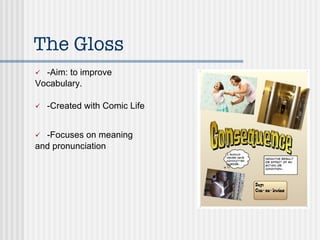
The Gloss -Aim: to improve  Vocabulary. -Created with Comic Life -Focuses on meaning and pronunciation
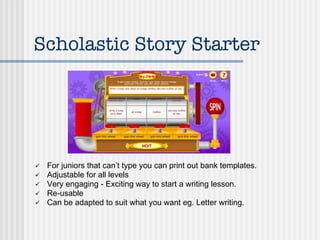
Scholastic Story Starter For juniors that can’t type you can print out bank templates. Adjustable for all levels Very engaging - Exciting way to start a writing lesson. Re-usable Can be adapted to suit what you want eg. Letter writing.
Scholastic Story Starter Pick a format for your story. Students may either type their story and print or print the template.
fotobabble Website:  http://www.fotobabble.com Allows you to record voice onto photos Possible uses: -getting students to talk about their artwork -book reviews -extending a gloss  -explaining a math's strategy
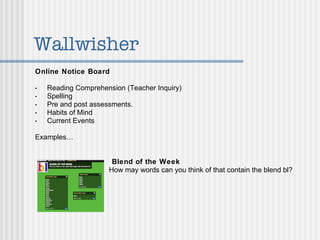
Wallwisher Online Notice Board   Reading Comprehension (Teacher Inquiry) Spelling Pre and post assessments. Habits of Mind Current Events Examples…     Blend of the Week   How may words can you think of that contain the blend bl?
Wallwisher Comprehension Questions Students answer a question (literal or inferential) about their reader by posting their answer on wallwisher. Brainstorming Could use wallwisher to brainstorm ideas or words etc.
Spelling Animations Tools used: Digital cameras, Modelling clay & iMovie
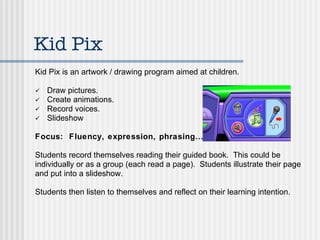
Kid Pix Kid Pix is an artwork / drawing program aimed at children. Draw pictures. Create animations. Record voices. Slideshow Focus:  Fluency, expression, phrasing… Students record themselves reading their guided book.  This could be individually or as a group (each read a page).  Students illustrate their page and put into a slideshow. Students then listen to themselves and reflect on their learning intention.
Into the Book Focus: To practise the Use of  Reading strategies Ties in very well with Sheena Cameron’s strategies http://reading. ecb .org/
Story Jumper Publish your own book. Place for students to create and publish their own stories. Create e-books. This website includes tutorials.
Writing Fun -Interactive exemplars for writing -A variety of different levels and genres Available http://www. writingfun .com/writingfun2010.html
Wordle Could use as display lists in your classroom. For example:  Words to use instead of ‘said’ etc. Students could make a story using all the words in the wordle picture. Put the students story into wordle and see which words are the largest (this means that they were used a lot) therefore this could show their next learning step.
Easi-Speaks Easi-Speaks lets you record up to 4 hours of audio, then download the files to your computer. Simple to use, even for the youngest students! Perfect for all kinds of oral language activities, memorization of math facts, digital portfolio assessment, and more
Using the Easi-Speaks in Inquiry Learning / Learning Model. School Wide Inquiry - Migration Year 2-3 Team focused on Bird Migration Community Open Day - Students share  their inquiry learning with parents / family members. We had been focusing on  asking questions and gathering information from various sources.
Build Your   Wild Self Students create a Wild Self picture. Use picture to motivate the children with their writing. Helps visual learners to structure their ideas. Using SOLO Extended Abstract I can describe many features of my wild self and explain why I have these features and reflect on what it is like to be like that. Relational I can describe many features of my wild self and explain why I have these features. Multi-structural I can describe two or more features of my wild self. Uni-structural I can describe one feature of my wild self. Pre-structural I need help to write about my wild self.

ICT Tools for Literacy

  • 1.
    ICT Tools forLiteracy Learning By Jenny Deed & Nadine Mackereth
  • 2.
    The Gloss -Aim:to improve Vocabulary. -Created with Comic Life -Focuses on meaning and pronunciation
  • 3.
    Scholastic Story StarterFor juniors that can’t type you can print out bank templates. Adjustable for all levels Very engaging - Exciting way to start a writing lesson. Re-usable Can be adapted to suit what you want eg. Letter writing.
  • 4.
    Scholastic Story StarterPick a format for your story. Students may either type their story and print or print the template.
  • 5.
    fotobabble Website: http://www.fotobabble.com Allows you to record voice onto photos Possible uses: -getting students to talk about their artwork -book reviews -extending a gloss -explaining a math's strategy
  • 6.
    Wallwisher Online NoticeBoard Reading Comprehension (Teacher Inquiry) Spelling Pre and post assessments. Habits of Mind Current Events Examples… Blend of the Week How may words can you think of that contain the blend bl?
  • 7.
    Wallwisher Comprehension QuestionsStudents answer a question (literal or inferential) about their reader by posting their answer on wallwisher. Brainstorming Could use wallwisher to brainstorm ideas or words etc.
  • 8.
    Spelling Animations Toolsused: Digital cameras, Modelling clay & iMovie
  • 9.
    Kid Pix KidPix is an artwork / drawing program aimed at children. Draw pictures. Create animations. Record voices. Slideshow Focus: Fluency, expression, phrasing… Students record themselves reading their guided book. This could be individually or as a group (each read a page). Students illustrate their page and put into a slideshow. Students then listen to themselves and reflect on their learning intention.
  • 10.
    Into the BookFocus: To practise the Use of Reading strategies Ties in very well with Sheena Cameron’s strategies http://reading. ecb .org/
  • 11.
    Story Jumper Publishyour own book. Place for students to create and publish their own stories. Create e-books. This website includes tutorials.
  • 12.
    Writing Fun -Interactiveexemplars for writing -A variety of different levels and genres Available http://www. writingfun .com/writingfun2010.html
  • 13.
    Wordle Could useas display lists in your classroom. For example: Words to use instead of ‘said’ etc. Students could make a story using all the words in the wordle picture. Put the students story into wordle and see which words are the largest (this means that they were used a lot) therefore this could show their next learning step.
  • 14.
    Easi-Speaks Easi-Speaks letsyou record up to 4 hours of audio, then download the files to your computer. Simple to use, even for the youngest students! Perfect for all kinds of oral language activities, memorization of math facts, digital portfolio assessment, and more
  • 15.
    Using the Easi-Speaksin Inquiry Learning / Learning Model. School Wide Inquiry - Migration Year 2-3 Team focused on Bird Migration Community Open Day - Students share their inquiry learning with parents / family members. We had been focusing on asking questions and gathering information from various sources.
  • 16.
    Build Your Wild Self Students create a Wild Self picture. Use picture to motivate the children with their writing. Helps visual learners to structure their ideas. Using SOLO Extended Abstract I can describe many features of my wild self and explain why I have these features and reflect on what it is like to be like that. Relational I can describe many features of my wild self and explain why I have these features. Multi-structural I can describe two or more features of my wild self. Uni-structural I can describe one feature of my wild self. Pre-structural I need help to write about my wild self.

Editor's Notes

  • #2 Introductions Aim to give you some (hopefully) new ideas that you can use in your reading and writing programmes Handout at the end with the websites used.
  • #3 Teacher Inquiries- to use ICT to improve student achievement - low PAT reading vocab compared with PAT reading comp greater focus on words- hunt- listing- exposing Visual Display shows, meaning, pronunciation, part of speech and sometimes the origin of the word - At the end of the year PAT reading vocabulary had gone up substantially overall and had equalized overtaken comp stanines - in fact so successful that it is now used school wide.
  • #4 Imaginative / Creative Writing. Fun for the students.
  • #6 This is a website that allows you to record voice and sound onto a photograph. It gives you HTML code that you can insert onto your blog or wiki or, in our case, we have Knowledge Net- so we paste these onto our class pages.
  • #7 Teacher Inquiry: Ways to motivate and strengthen comprehension skills within Reading. Children are competent readers, and can talk about the text on a basic level, but are having difficulty in answering literal and inferential questions using references from the text. Open Learning - students are able to see others posts therefore they are thinking about their answers. Other uses for Wallwisher - adjectives etc.
  • #9 My Teacher Inquiry this year is to use eLearning to improve students spelling sense. One of the activities I throw into my tumble is for students to show their weekly spelling words in an animation. They use clay to create the letters, photograph them and upload them into imovie. With this programme they do a voiceover, explaining the rule and spelling out the word. Put on Blog and Knet I have found that my other students like to watch other groups animations and they tend to sound out the word with the animation!
  • #10 Use as part of a Reading Tumble.
  • #11 One of my (and my students) absolute favourite websites is Into the Book. Sheena Cameron’s book- reading strategies
  • #13 I use it a lot for modelling and I also print out the exemplars and have them displayed around the classroom.
  • #17 Use as a descriptive piece of writing.