Helping Teachers
  Make the Grade!

Lonnie Cochran, Krystle Horton,
Kimberly Cing, Kristi Reynolds,
       Rachel Ashwood
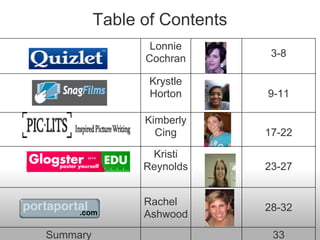
Table of Contents
                 Lonnie
                Cochran        3-8

                 Krystle
                 Horton       9-11

                Kimberly
                  Cing        17-22

                 Kristi
                Reynolds      23-27


                Rachel
                              28-32
                Ashwood
Summary                        33
What is

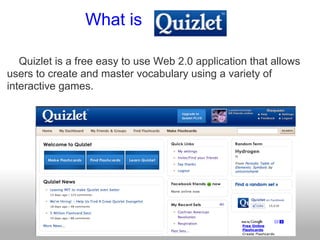
   Quizlet is a free easy to use Web 2.0 application that allows
users to create and master vocabulary using a variety of
interactive games.
Getting Started

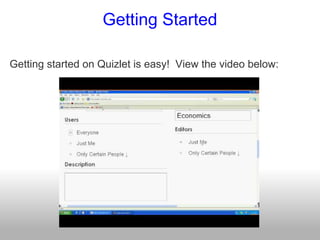
Getting started on Quizlet is easy! View the video below:
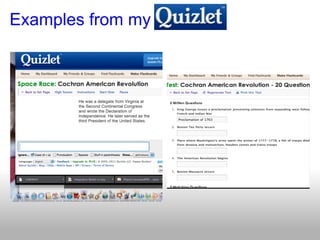
Examples from my
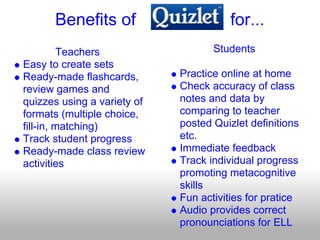
Benefits of                       for...
         Teachers                   Students
Easy to create sets
Ready-made flashcards,       Practice online at home
review games and             Check accuracy of class
quizzes using a variety of   notes and data by
formats (multiple choice,    comparing to teacher
fill-in, matching)           posted Quizlet definitions
Track student progress       etc.
Ready-made class review      Immediate feedback
activities                   Track individual progress
                             promoting metacognitive
                             skills
                             Fun activities for pratice
                             Audio provides correct
                             pronounciations for ELL
Potential Frustrations/ Limitations

Limited to students who have internet access, but printable
flashcards and quizzes make it accessible to all (teacher prints
and distributes)


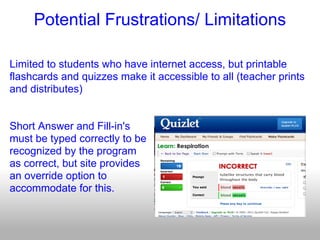
Short Answer and Fill-in's
must be typed correctly to be
recognized by the program
as correct, but site provides
an override option to
accommodate for this.
for


I love Quizlet! It is easy to use and access. It is free! Quizlet
is a great way to integrate technology in the classroom and
homework habits of my students! The interactive nature not
only allows my students to practice, study, and quiz
themselves, but the comments feature allows students to pose
questions of their peers and of me, the instructor, for
clarification! In addition, Quizlet is a tool my students can use
to generate flashcards for any course they will study! It is a
great tool for promoting lifelong learning and study skills.
SnagFilms.com is a website devoted to providing
full-length documentary films to a wide variety of
people across the world.

This website also allows people to do what is called
“snag a film” and post it practically anywhere on the
Internet.

The best part about this site is that it is FREE!
SnagFilms.com also has an educational section
called SnagLearning.
Selected films that are appropriate for students
grades six and up from the SnagFilms’ collection.
Films cover almost every discipline and include
films from PBS and National Geographic.
Teachers can collaborate with one another by
submitting lesson plans, activities, quizzes, and
homework.
The goal of this site is to share educational films that
open the class up for participating in discussions.
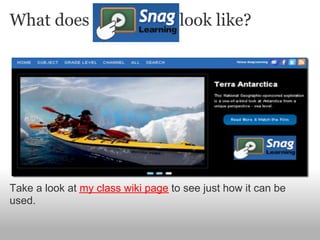
What does                           look like?


Take a look at my class wiki page to see just how it can be
used.
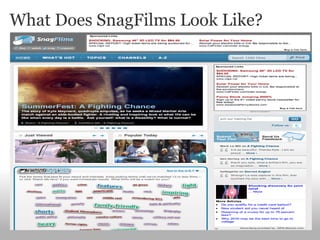
What Does SnagFilms Look Like?
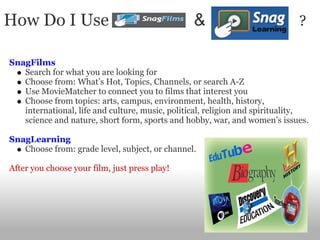
How Do I Use                                     &                           ?

SnagFilms
   Search for what you are looking for
   Choose from: What’s Hot, Topics, Channels, or search A-Z
   Use MovieMatcher to connect you to films that interest you
   Choose from topics: arts, campus, environment, health, history,
   international, life and culture, music, political, religion and spirituality,
   science and nature, short form, sports and hobby, war, and women’s issues.

SnagLearning
   Choose from: grade level, subject, or channel.

After you choose your film, just press play!
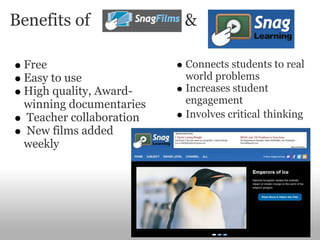
Benefits of              &

 Free                    Connects students to real
 Easy to use             world problems
 High quality, Award-    Increases student
 winning documentaries   engagement
 Teacher collaboration   Involves critical thinking
 New films added
 weekly
Frustrations and Barriers

There are none!
Conclusion


SnagFilms and SnagLearning are great Web 2.0 Applications
that should be used in the classroom. They are a great
alternative solutions to YouTube and are more about what is
going on in the world rather than random people uploading
whatever comes to mind first. This tool allows students to learn
about different disciplines in relation to their world.
“ PicLits.com is a creative writing site that matches beautiful images with
carefully selected keywords in order to inspire you. The object is to put the
right words in the right place and the right order to capture the essence, story,
and meaning of the picture.”
    Users choose a photograph from a large gallery of beautiful,
    inspirational, humorous, and thought-provoking photos
    Users may utilize a list of words (divided into nouns, verbs,
    adjectives, adverbs, and universal words) that the website offers
    related to each individual picture (sort of like “magnetic refrigerator
    poetry"), or the users may choose to freewrite poetry or descriptive
    paragraphs.
    Users can then post the finished poem to their Facebook or
    MySpace page, their blog, or a wiki or other website. They can also
    email the finished poem to any address.
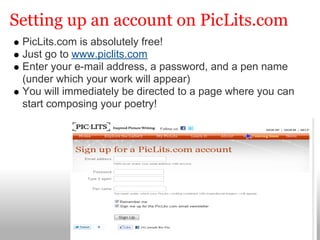
Setting up an account on PicLits.com
 PicLits.com is absolutely free!
 Just go to www.piclits.com
 Enter your e-mail address, a password, and a pen name
 (under which your work will appear)
 You will immediately be directed to a page where you can
 start composing your poetry!
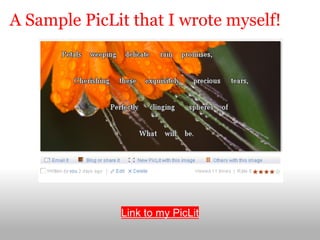
A Sample PicLit that I wrote myself!


              Link to my PicLit
Benefits of using PicLits
For teachers:                     For students:
   Has poetry and creative           It's free!
   writing lesson plans              Can be accessed from any
   incorporating the website         computer with internet use
   Lesson plans have                 Simple to use ... students can
   suggested worksheets and          use keywords to inspire them
   quizzes                           and help them to write poetry
   All keywords for each             Drag-n-drop option helps
   photograph are divided into       students change the tense
   parts of speech (helps teach      and forms of the keywords
   students grammar)                 A wide variety of inspiring
   "Coming Soon" to the site:        pictures to choose from
   search tools and tagging to       Students can post their
   aide with finding examples        poems to their Facebook
   to use in class                   page or email it to their
   You can also browse the           teacher
   gallery for good examples
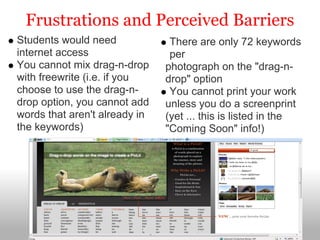
Frustrations and Perceived Barriers
Students would need             There are only 72 keywords
internet access                 per
You cannot mix drag-n-drop     photograph on the "drag-n-
with freewrite (i.e. if you    drop" option
choose to use the drag-n-       You cannot print your work
drop option, you cannot add    unless you do a screenprint
words that aren't already in   (yet ... this is listed in the
the keywords)                  "Coming Soon" info!)
Final Thoughts on PicLits.com
I'm excited to use this Web 2.0 site in my classroom. The
lesson plans provided on the site are an outstanding
resource. I have my students write poetry when we do
our poetry unit and they're always asking, "What do I
write about?" and "How do I get started?" PicLits really
gives students some inspiration and some ideas to get
started. Students could complete the assignment and
upload it to the class wiki or they could email it to the
teacher. It would also be a wonderful extra credit
assignment. Or I could also have students write
descriptive paragraphs on the photographs instead of
poetry. This site is a literature teacher's or creative
writing teacher's dream!
What is

Glogster EDU defines itself
as "A Web 2.0 platform that
allows users to easily upload
photos, videos, text, audio
and more to create a unique
online, interactive
poster."

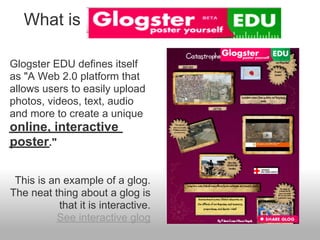
 This is an example of a glog.
The neat thing about a glog is
           that it is interactive.
          See interactive glog
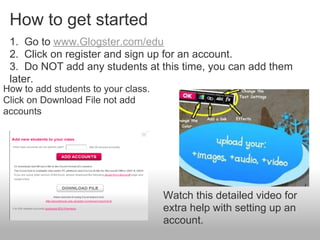
How to get started
 1. Go to www.Glogster.com/edu
 2. Click on register and sign up for an account.
 3. Do NOT add any students at this time, you can add them
 later.
How to add students to your class.
Click on Download File not add
accounts


                                     Watch this detailed video for
                                     extra help with setting up an
                                     account.
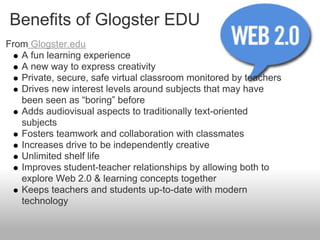
Benefits of Glogster EDU
From Glogster.edu
   A fun learning experience
   A new way to express creativity
   Private, secure, safe virtual classroom monitored by teachers
   Drives new interest levels around subjects that may have
   been seen as “boring” before
   Adds audiovisual aspects to traditionally text-oriented
   subjects
   Fosters teamwork and collaboration with classmates
   Increases drive to be independently creative
   Unlimited shelf life
   Improves student-teacher relationships by allowing both to
   explore Web 2.0 & learning concepts together
   Keeps teachers and students up-to-date with modern
   technology
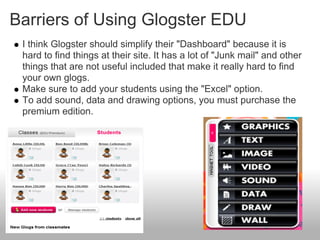
Barriers of Using Glogster EDU
 I think Glogster should simplify their "Dashboard" because it is
 hard to find things at their site. It has a lot of "Junk mail" and other
 things that are not useful included that make it really hard to find
 your own glogs.
 Make sure to add your students using the "Excel" option.
 To add sound, data and drawing options, you must purchase the
 premium edition.
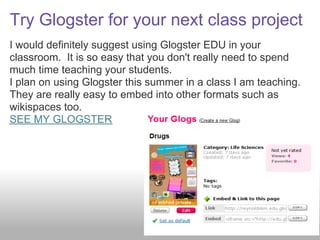
Try Glogster for your next class project
I would definitely suggest using Glogster EDU in your
classroom. It is so easy that you don't really need to spend
much time teaching your students.
I plan on using Glogster this summer in a class I am teaching.
They are really easy to embed into other formats such as
wikispaces too.
SEE MY GLOGSTER
PortaPortal

  Portaportal is a bookmarking site that is
  free and server based
  Convenient to bookmark all online links
  using categories and subcategories
   Easy for parents, students, and other
  teachers to access
  Share links with others
  Search other people's portals for specific
  things you might want to know more about
How to Get Started on PortaPortal

Go to www.portaportal.com
 Click the 2nd button down on the lefthand side that says
"Signup," enter your basic information, then click "Join
portaportal"
Note: The username you choose will also be the guest
name of your portal. Keep it simple so guests can easily
remember and access your portal
 Once you have your account you may begin
adding/editing/deleting categories, bookmarks, or basic
quick links by using the tools on the top right
 So that guests may view your portal, you must go to the
preferences page (top right), then you will seee the menu
"Guest Access" and you must change it to "Allow Guest
Access"
Portaportal Classroom Benefits

  Quickly pull up links on the projector to pull up websites
  from categories or quick links
  Helpful since bookmarks can be opened from any computer
  like the one in the classroom, the computer lab, or your
  students' home
  Parents can access easily to see what are good websites
  for them to use at home
  Students can access easily at home
  Categories can be specific like: "Parent Links," "TCAP
  Practice," "Phonics Skills," or links to other skills that have
  been studied in the classroom
  There is no limit to how many users may access your portal
  at one time
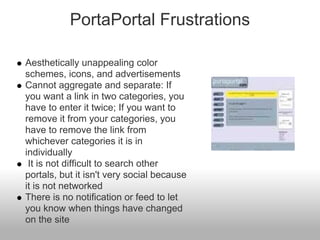
PortaPortal Frustrations

Aesthetically unappealing color
schemes, icons, and advertisements
Cannot aggregate and separate: If
you want a link in two categories, you
have to enter it twice; If you want to
remove it from your categories, you
have to remove the link from
whichever categories it is in
individually
 It is not difficult to search other
portals, but it isn't very social because
it is not networked
There is no notification or feed to let
you know when things have changed
on the site
Additional PortaPortal Thoughts

Many teachers at my school use portaportal. Our school's website
has all of our individual teacher links to portaportal. This is helpful
for parents with more than one child at our school so they do not
even have to remember our portal username.
I like how I can share links easily with fellow teachers and parents
My students are only in kindergarten so they do not access it
themselves, but I often pull it up on the projector to quickly open
bookmarks. I like it because I can use it in the library, computer
lab, another classroom, etc.
I like portaportal, because it is what many people at my school
use. However, I think Delicious is overall a better bookmarking site
Check out my portal:http://guest.portaportal.com/rkashwood
Summary
Web. 2.0 applications are definitely useful for educators and students
alike! Technology can be used to engage students because it's such a
huge part of their lives. The learning can be more relevant to students
if they can somehow use it with technology. In our research we've
found that ...
   Quizlet is a great resource for any subject and grade level. Teachers can
   create vocabulary lists, flashcards, quizzes, and review games promoting
   both in class and independent study skills.
   SnagFilms and SnagLearning offers educational films at your fingertips. It
   also offers activities and quizzes to accompany the films.
   PitLits is a creative outlet for students. It gives them inspiration to be great
   poets and writers and offers them a place to publish their work to Facebook
   or their class wikis.
   Glogster allows students and teachers to create interactive posters with
   photos, video, and audio. This would be an innovative way for students to
   do group projects in any subject area.
   PortaPortal is social bookmarking for the classroom allowing quick access
   to links and teachers, students and parents to share bookmarks.

Web 2.0 tools, sp11, group b

  • 1.
    Helping Teachers Make the Grade! Lonnie Cochran, Krystle Horton, Kimberly Cing, Kristi Reynolds, Rachel Ashwood
  • 2.
    Table of Contents Lonnie Cochran 3-8 Krystle Horton 9-11 Kimberly Cing 17-22 Kristi Reynolds 23-27 Rachel 28-32 Ashwood Summary 33
  • 3.
    What is Quizlet is a free easy to use Web 2.0 application that allows users to create and master vocabulary using a variety of interactive games.
  • 4.
    Getting Started Getting startedon Quizlet is easy! View the video below:
  • 5.
  • 6.
    Benefits of for... Teachers Students Easy to create sets Ready-made flashcards, Practice online at home review games and Check accuracy of class quizzes using a variety of notes and data by formats (multiple choice, comparing to teacher fill-in, matching) posted Quizlet definitions Track student progress etc. Ready-made class review Immediate feedback activities Track individual progress promoting metacognitive skills Fun activities for pratice Audio provides correct pronounciations for ELL
  • 7.
    Potential Frustrations/ Limitations Limitedto students who have internet access, but printable flashcards and quizzes make it accessible to all (teacher prints and distributes) Short Answer and Fill-in's must be typed correctly to be recognized by the program as correct, but site provides an override option to accommodate for this.
  • 8.
    for I love Quizlet!It is easy to use and access. It is free! Quizlet is a great way to integrate technology in the classroom and homework habits of my students! The interactive nature not only allows my students to practice, study, and quiz themselves, but the comments feature allows students to pose questions of their peers and of me, the instructor, for clarification! In addition, Quizlet is a tool my students can use to generate flashcards for any course they will study! It is a great tool for promoting lifelong learning and study skills.
  • 9.
    SnagFilms.com is awebsite devoted to providing full-length documentary films to a wide variety of people across the world. This website also allows people to do what is called “snag a film” and post it practically anywhere on the Internet. The best part about this site is that it is FREE!
  • 10.
    SnagFilms.com also hasan educational section called SnagLearning. Selected films that are appropriate for students grades six and up from the SnagFilms’ collection. Films cover almost every discipline and include films from PBS and National Geographic. Teachers can collaborate with one another by submitting lesson plans, activities, quizzes, and homework. The goal of this site is to share educational films that open the class up for participating in discussions.
  • 11.
    What does look like? Take a look at my class wiki page to see just how it can be used.
  • 12.
  • 13.
    How Do IUse & ? SnagFilms Search for what you are looking for Choose from: What’s Hot, Topics, Channels, or search A-Z Use MovieMatcher to connect you to films that interest you Choose from topics: arts, campus, environment, health, history, international, life and culture, music, political, religion and spirituality, science and nature, short form, sports and hobby, war, and women’s issues. SnagLearning Choose from: grade level, subject, or channel. After you choose your film, just press play!
  • 14.
    Benefits of & Free Connects students to real Easy to use world problems High quality, Award- Increases student winning documentaries engagement Teacher collaboration Involves critical thinking New films added weekly
  • 15.
  • 16.
    Conclusion SnagFilms and SnagLearningare great Web 2.0 Applications that should be used in the classroom. They are a great alternative solutions to YouTube and are more about what is going on in the world rather than random people uploading whatever comes to mind first. This tool allows students to learn about different disciplines in relation to their world.
  • 17.
    “ PicLits.com isa creative writing site that matches beautiful images with carefully selected keywords in order to inspire you. The object is to put the right words in the right place and the right order to capture the essence, story, and meaning of the picture.” Users choose a photograph from a large gallery of beautiful, inspirational, humorous, and thought-provoking photos Users may utilize a list of words (divided into nouns, verbs, adjectives, adverbs, and universal words) that the website offers related to each individual picture (sort of like “magnetic refrigerator poetry"), or the users may choose to freewrite poetry or descriptive paragraphs. Users can then post the finished poem to their Facebook or MySpace page, their blog, or a wiki or other website. They can also email the finished poem to any address.
  • 18.
    Setting up anaccount on PicLits.com PicLits.com is absolutely free! Just go to www.piclits.com Enter your e-mail address, a password, and a pen name (under which your work will appear) You will immediately be directed to a page where you can start composing your poetry!
  • 19.
    A Sample PicLitthat I wrote myself! Link to my PicLit
  • 20.
    Benefits of usingPicLits For teachers: For students: Has poetry and creative It's free! writing lesson plans Can be accessed from any incorporating the website computer with internet use Lesson plans have Simple to use ... students can suggested worksheets and use keywords to inspire them quizzes and help them to write poetry All keywords for each Drag-n-drop option helps photograph are divided into students change the tense parts of speech (helps teach and forms of the keywords students grammar) A wide variety of inspiring "Coming Soon" to the site: pictures to choose from search tools and tagging to Students can post their aide with finding examples poems to their Facebook to use in class page or email it to their You can also browse the teacher gallery for good examples
  • 21.
    Frustrations and PerceivedBarriers Students would need There are only 72 keywords internet access per You cannot mix drag-n-drop photograph on the "drag-n- with freewrite (i.e. if you drop" option choose to use the drag-n- You cannot print your work drop option, you cannot add unless you do a screenprint words that aren't already in (yet ... this is listed in the the keywords) "Coming Soon" info!)
  • 22.
    Final Thoughts onPicLits.com I'm excited to use this Web 2.0 site in my classroom. The lesson plans provided on the site are an outstanding resource. I have my students write poetry when we do our poetry unit and they're always asking, "What do I write about?" and "How do I get started?" PicLits really gives students some inspiration and some ideas to get started. Students could complete the assignment and upload it to the class wiki or they could email it to the teacher. It would also be a wonderful extra credit assignment. Or I could also have students write descriptive paragraphs on the photographs instead of poetry. This site is a literature teacher's or creative writing teacher's dream!
  • 23.
    What is Glogster EDUdefines itself as "A Web 2.0 platform that allows users to easily upload photos, videos, text, audio and more to create a unique online, interactive poster." This is an example of a glog. The neat thing about a glog is that it is interactive. See interactive glog
  • 24.
    How to getstarted 1. Go to www.Glogster.com/edu 2. Click on register and sign up for an account. 3. Do NOT add any students at this time, you can add them later. How to add students to your class. Click on Download File not add accounts Watch this detailed video for extra help with setting up an account.
  • 25.
    Benefits of GlogsterEDU From Glogster.edu A fun learning experience A new way to express creativity Private, secure, safe virtual classroom monitored by teachers Drives new interest levels around subjects that may have been seen as “boring” before Adds audiovisual aspects to traditionally text-oriented subjects Fosters teamwork and collaboration with classmates Increases drive to be independently creative Unlimited shelf life Improves student-teacher relationships by allowing both to explore Web 2.0 & learning concepts together Keeps teachers and students up-to-date with modern technology
  • 26.
    Barriers of UsingGlogster EDU I think Glogster should simplify their "Dashboard" because it is hard to find things at their site. It has a lot of "Junk mail" and other things that are not useful included that make it really hard to find your own glogs. Make sure to add your students using the "Excel" option. To add sound, data and drawing options, you must purchase the premium edition.
  • 27.
    Try Glogster foryour next class project I would definitely suggest using Glogster EDU in your classroom. It is so easy that you don't really need to spend much time teaching your students. I plan on using Glogster this summer in a class I am teaching. They are really easy to embed into other formats such as wikispaces too. SEE MY GLOGSTER
  • 28.
    PortaPortal Portaportalis a bookmarking site that is free and server based Convenient to bookmark all online links using categories and subcategories Easy for parents, students, and other teachers to access Share links with others Search other people's portals for specific things you might want to know more about
  • 29.
    How to GetStarted on PortaPortal Go to www.portaportal.com Click the 2nd button down on the lefthand side that says "Signup," enter your basic information, then click "Join portaportal" Note: The username you choose will also be the guest name of your portal. Keep it simple so guests can easily remember and access your portal Once you have your account you may begin adding/editing/deleting categories, bookmarks, or basic quick links by using the tools on the top right So that guests may view your portal, you must go to the preferences page (top right), then you will seee the menu "Guest Access" and you must change it to "Allow Guest Access"
  • 30.
    Portaportal Classroom Benefits Quickly pull up links on the projector to pull up websites from categories or quick links Helpful since bookmarks can be opened from any computer like the one in the classroom, the computer lab, or your students' home Parents can access easily to see what are good websites for them to use at home Students can access easily at home Categories can be specific like: "Parent Links," "TCAP Practice," "Phonics Skills," or links to other skills that have been studied in the classroom There is no limit to how many users may access your portal at one time
  • 31.
    PortaPortal Frustrations Aesthetically unappealingcolor schemes, icons, and advertisements Cannot aggregate and separate: If you want a link in two categories, you have to enter it twice; If you want to remove it from your categories, you have to remove the link from whichever categories it is in individually It is not difficult to search other portals, but it isn't very social because it is not networked There is no notification or feed to let you know when things have changed on the site
  • 32.
    Additional PortaPortal Thoughts Manyteachers at my school use portaportal. Our school's website has all of our individual teacher links to portaportal. This is helpful for parents with more than one child at our school so they do not even have to remember our portal username. I like how I can share links easily with fellow teachers and parents My students are only in kindergarten so they do not access it themselves, but I often pull it up on the projector to quickly open bookmarks. I like it because I can use it in the library, computer lab, another classroom, etc. I like portaportal, because it is what many people at my school use. However, I think Delicious is overall a better bookmarking site Check out my portal:http://guest.portaportal.com/rkashwood
  • 33.
    Summary Web. 2.0 applicationsare definitely useful for educators and students alike! Technology can be used to engage students because it's such a huge part of their lives. The learning can be more relevant to students if they can somehow use it with technology. In our research we've found that ... Quizlet is a great resource for any subject and grade level. Teachers can create vocabulary lists, flashcards, quizzes, and review games promoting both in class and independent study skills. SnagFilms and SnagLearning offers educational films at your fingertips. It also offers activities and quizzes to accompany the films. PitLits is a creative outlet for students. It gives them inspiration to be great poets and writers and offers them a place to publish their work to Facebook or their class wikis. Glogster allows students and teachers to create interactive posters with photos, video, and audio. This would be an innovative way for students to do group projects in any subject area. PortaPortal is social bookmarking for the classroom allowing quick access to links and teachers, students and parents to share bookmarks.