Glogster
  in the
Classroom


  Ellen Cordeiro and Kainoa Bowman
Objectives


What’s a Glog?

Classroom Application

Tutorial

Create
What is Glogster?


A Web 2.0 tool that allows you to
  create interactive posters, or
GLOGS, that contain images, text,
   music, movies, and more!
So...Why
Glogster?
Gail Lovelyʻs Top 10 Web 2.0 Tools
        for Young Learners


1.   Wikis         6. Animoto
2.   Blogs         7. Yack Pack
3.   Voicethread   8. Create-a-
4.   Glogster         graph
5.   Skype         9. Yoki
                   10. Kerpoof
                              Riedel (2009)
Gail Lovelyʻs Top 10 Web 2.0 Tools
        for Young Learners


1.   Wikis         6. Animoto
2.   Blogs         7. Yack Pack
3.   Voicethread   8. Create-a-
4.   Glogster         graph
5.   Skype         9. Yoki
                   10. Kerpoof
                              Riedel (2009)
Ten Tried and Tested Internet Tools
           for Teachers


1.   Animoto        6. Sliderocket
2.   Diigo          7. ToonDoo
3.   Edomodo        8. Voki
4.   Glogster       9. Wordle
5.   Go!Animate     10. Wordpress
                               Picardo(2009)
Ten Tried and Tested Internet Tools
           for Teachers


1.   Animoto        6. Sliderocket
2.   Diigo          7. ToonDoo
3.   Edomodo        8. Voki
4.   Glogster       9. Wordle
5.   Go!Animate     10. Wordpress
                               Picardo(2009)
Internet4Classrooms
Top 10 Free Sites for Web 2.0 Tools


1.   Delicious
                    6. Wallwisher
2.   Glogster
                    7. Poll Everywhere
3.   ipadio
                    8. Edomodo
4.   Kidblog
                    9. Prezi
5.   Voicethread
                    10. Wordle
                               Dembo (2010)
Internet4Classrooms
Top 10 Free Sites for Web 2.0 Tools


1.   Delicious
                    6. Wallwisher
2.   Glogster
                    7. Poll Everywhere
3.   ipadio
                    8. Edomodo
4.   Kidblog
                    9. Prezi
5.   Voicethread
                    10. Wordle
                               Dembo (2010)
http://goo.gl/ikVU6
•   Basic version - Free
•   Web based – anytime/anywhere access
•   Students can work individually or as a
    group
•   Share it with just your class or the entire
    world
•   Environmentally friendly
•   It addresses multiple learning styles
•   Digital Natives LOVE it!
•   Basic version - Free
•   Web based – anytime/anywhere access
•   Students can work individually or as a
    group
•   Share it with just your class or the entire
    world
•   Environmentally friendly
•   It addresses multiple learning styles
•   Digital Natives LOVE it!
•   Basic version - Free
•   Web based – anytime/anywhere access
•   Students can work individually or as a
    group
•   Share it with just your class or the entire
    world
•   Environmentally friendly
•   It addresses multiple learning styles
•   Digital Natives LOVE it!
Most Importantly...


 You don’t have to change
       your lessons
         to use it!
Slide modified from Jan McGee’s Presentation located at http://www.slideshare.net/jmcgee/glog-on-presentation
                              Images

                                                Video
                                       Hyperlinks
                      Text
TEACHER GLOGS


                                                                Project Instructions
                                                                Rubrics
                                                                Website Links
                                                                Webquests
                                                                Presentations
                                                                Class Website
                                                                Embed into Wiki
                                                                Spelling Tests/Practice
                                                                Post/link student
                                                                 projects
                                                                Student Showcase
                                                                Contact Information

Slide modified from Jan McGee’s Presentation located at http://www.slideshare.net/jmcgee/glog-on-presentation
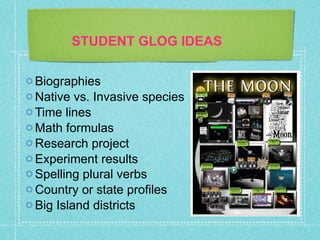
STUDENT GLOG IDEAS

 Biographies
 Native  vs. Invasive species
 Time lines
 Math formulas
 Research project
 Experiment results
 Spelling plural verbs
 Country or state profiles
 Big Island districts
You Name It
You Name It


There’s a Glog
  for That!
Gmail Trick


http://www.markbrumley.com/2010/02/18/the-gmail-
trick-once-and-for-all/
Tips

• Content first
• Create Exemplar
• Save often
• Discuss design principles
• Allow time to learn the tool
Your Turn

1.   Create an account

2. Change Wall and Background

3. Add an Image

4. Add Text as a title

5.   Add Text as a sticker
Works Cited
Dembo, Steve. "Top 10 Free Sites for Web 2.0 Tools." Internet4Classrooms. 1 Apr. 2010. Web. 17
   Feb. 2011. <http://i4c-internet4classrooms.blogspot.com/2010/04/top-10-free-
   sites-for-web-20-tools.html>.

Dyck, Brenda. "Education World ® Technology Channel: Visual Literacy: Hooked on
   Glogster: Posters 2.0." Education World® The Educator's Best Friend. 27 Feb. 2009.
   Web. 02 May 2010. <http://www.educationworld.com/a_tech/columnists/dyck/
   dyck037.shtml>.

McGee, Jan. "Glog On!" Upload & Share PowerPoint Presentations and Documents. 2009.
   Web. 17 Feb. 2011. http://www.slideshare.net/jmcgee/glog-on-presentation.

Picardo, Jose. "Technology and Education | Box of Tricks." Box of Tricks - Technology and
    Education. 25 Apr. 2009. Web. 17 Feb. 2011. <http://www.boxoftricks.net/?p=1004>.

Reynard, Ruth. "The K-12 Web 2.0 Debate: Learning to Communicate -- THE Journal." THE
   Journal: Technological Horizons in Education -- THE Journal. 21 Apr. 2010. Web. 02
   May 2010. <http://thejournal.com/articles/2010/04/21/the-k-12-web-2.0-debate-
   learning-to-communicate.aspx?sc_lang=en>.

Stephenson, Neil. "Historical Timelines with Glogster: A Student Example | Thinking In
    Mind." Thinking In Mind |. Web. 2 May 2010. <http://www.thinkinginmind.com/
    2009/04/historical-timelines-with-glogster-a-student-example/>.

Glogster 2 23-2012

  • 1.
    Glogster inthe Classroom Ellen Cordeiro and Kainoa Bowman
  • 2.
    Objectives What’s a Glog? ClassroomApplication Tutorial Create
  • 3.
    What is Glogster? AWeb 2.0 tool that allows you to create interactive posters, or GLOGS, that contain images, text, music, movies, and more!
  • 6.
  • 7.
    Gail Lovelyʻs Top10 Web 2.0 Tools for Young Learners 1. Wikis 6. Animoto 2. Blogs 7. Yack Pack 3. Voicethread 8. Create-a- 4. Glogster graph 5. Skype 9. Yoki 10. Kerpoof Riedel (2009)
  • 8.
    Gail Lovelyʻs Top10 Web 2.0 Tools for Young Learners 1. Wikis 6. Animoto 2. Blogs 7. Yack Pack 3. Voicethread 8. Create-a- 4. Glogster graph 5. Skype 9. Yoki 10. Kerpoof Riedel (2009)
  • 9.
    Ten Tried andTested Internet Tools for Teachers 1. Animoto 6. Sliderocket 2. Diigo 7. ToonDoo 3. Edomodo 8. Voki 4. Glogster 9. Wordle 5. Go!Animate 10. Wordpress Picardo(2009)
  • 10.
    Ten Tried andTested Internet Tools for Teachers 1. Animoto 6. Sliderocket 2. Diigo 7. ToonDoo 3. Edomodo 8. Voki 4. Glogster 9. Wordle 5. Go!Animate 10. Wordpress Picardo(2009)
  • 11.
    Internet4Classrooms Top 10 FreeSites for Web 2.0 Tools 1. Delicious 6. Wallwisher 2. Glogster 7. Poll Everywhere 3. ipadio 8. Edomodo 4. Kidblog 9. Prezi 5. Voicethread 10. Wordle Dembo (2010)
  • 12.
    Internet4Classrooms Top 10 FreeSites for Web 2.0 Tools 1. Delicious 6. Wallwisher 2. Glogster 7. Poll Everywhere 3. ipadio 8. Edomodo 4. Kidblog 9. Prezi 5. Voicethread 10. Wordle Dembo (2010)
  • 13.
  • 14.
    Basic version - Free • Web based – anytime/anywhere access • Students can work individually or as a group • Share it with just your class or the entire world • Environmentally friendly • It addresses multiple learning styles • Digital Natives LOVE it!
  • 15.
    Basic version - Free • Web based – anytime/anywhere access • Students can work individually or as a group • Share it with just your class or the entire world • Environmentally friendly • It addresses multiple learning styles • Digital Natives LOVE it!
  • 16.
    Basic version - Free • Web based – anytime/anywhere access • Students can work individually or as a group • Share it with just your class or the entire world • Environmentally friendly • It addresses multiple learning styles • Digital Natives LOVE it!
  • 17.
    Most Importantly... Youdon’t have to change your lessons to use it!
  • 18.
    Slide modified fromJan McGee’s Presentation located at http://www.slideshare.net/jmcgee/glog-on-presentation Images Video Hyperlinks Text
  • 19.
    TEACHER GLOGS  Project Instructions  Rubrics  Website Links  Webquests  Presentations  Class Website  Embed into Wiki  Spelling Tests/Practice  Post/link student projects  Student Showcase  Contact Information Slide modified from Jan McGee’s Presentation located at http://www.slideshare.net/jmcgee/glog-on-presentation
  • 20.
    STUDENT GLOG IDEAS Biographies  Native vs. Invasive species  Time lines  Math formulas  Research project  Experiment results  Spelling plural verbs  Country or state profiles  Big Island districts
  • 21.
  • 22.
    You Name It There’sa Glog for That!
  • 24.
  • 25.
    Tips • Content first •Create Exemplar • Save often • Discuss design principles • Allow time to learn the tool
  • 26.
    Your Turn 1. Create an account 2. Change Wall and Background 3. Add an Image 4. Add Text as a title 5. Add Text as a sticker
  • 27.
    Works Cited Dembo, Steve."Top 10 Free Sites for Web 2.0 Tools." Internet4Classrooms. 1 Apr. 2010. Web. 17 Feb. 2011. <http://i4c-internet4classrooms.blogspot.com/2010/04/top-10-free- sites-for-web-20-tools.html>. Dyck, Brenda. "Education World ® Technology Channel: Visual Literacy: Hooked on Glogster: Posters 2.0." Education World® The Educator's Best Friend. 27 Feb. 2009. Web. 02 May 2010. <http://www.educationworld.com/a_tech/columnists/dyck/ dyck037.shtml>. McGee, Jan. "Glog On!" Upload & Share PowerPoint Presentations and Documents. 2009. Web. 17 Feb. 2011. http://www.slideshare.net/jmcgee/glog-on-presentation. Picardo, Jose. "Technology and Education | Box of Tricks." Box of Tricks - Technology and Education. 25 Apr. 2009. Web. 17 Feb. 2011. <http://www.boxoftricks.net/?p=1004>. Reynard, Ruth. "The K-12 Web 2.0 Debate: Learning to Communicate -- THE Journal." THE Journal: Technological Horizons in Education -- THE Journal. 21 Apr. 2010. Web. 02 May 2010. <http://thejournal.com/articles/2010/04/21/the-k-12-web-2.0-debate- learning-to-communicate.aspx?sc_lang=en>. Stephenson, Neil. "Historical Timelines with Glogster: A Student Example | Thinking In Mind." Thinking In Mind |. Web. 2 May 2010. <http://www.thinkinginmind.com/ 2009/04/historical-timelines-with-glogster-a-student-example/>.

Editor's Notes