Using IBM PureData System
for Analytics Workload
Management
Session Number 2839
Gordon Booman, IBM, gbooman@us.ibm.com
Torsten Steinbach, IBM, torsten@de.ibm.com
© 2013 IBM Corporation
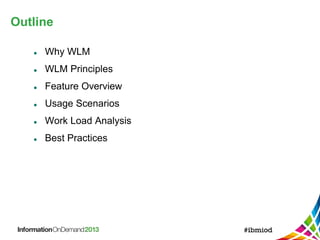
Outline
 Why WLM
 WLM Principles
 Feature Overview
 Usage Scenarios
 Work Load Analysis
 Best Practices
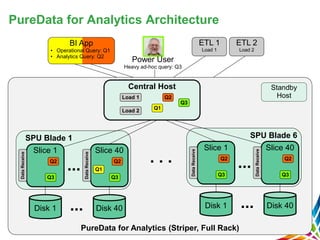
PureData for Analytics (Striper, Full Rack)
PureData for Analytics Architecture
SPU Blade 1
Disk 1
Slice 1
Disk 40
Q3
Q2
DataReceive
Slice 40
Q1
Q3
Q2
DataReceive Central Host
...
...
Q1
Q3
Q2Load 1
Load 2
BI App
• Operational Query: Q1
• Analytics Query: Q2
Power User
Heavy ad-hoc query: Q3
ETL 1
Load 1
ETL 2
Load 2
SPU Blade 6
Disk 1
Slice 1
Disk 40
Q3
Q2
DataReceive
Slice 40
Q3
Q2
DataReceive
...
...
Standby
Host
. . .
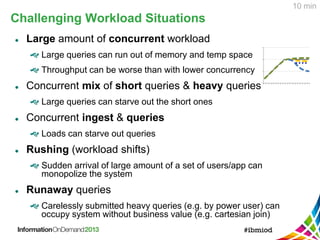
Challenging Workload Situations
 Large amount of concurrent workload
 Large queries can run out of memory and temp space
 Throughput can be worse than with lower concurrency
 Concurrent mix of short queries & heavy queries
 Large queries can starve out the short ones
 Concurrent ingest & queries
 Loads can starve out queries
 Rushing (workload shifts)
 Sudden arrival of large amount of a set of users/app can
monopolize the system
 Runaway queries
 Carelessly submitted heavy queries (e.g. by power user) can
occupy system without business value (e.g. cartesian join)
10 min
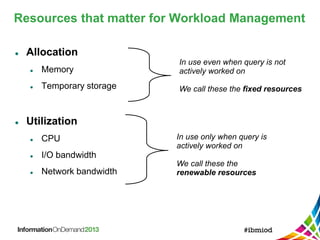
Resources that matter for Workload Management
 Allocation
 Memory
 Temporary storage
 Utilization
 CPU
 I/O bandwidth
 Network bandwidth
In use even when query is not
actively worked on
We call these the fixed resources
In use only when query is
actively worked on
We call these the
renewable resources
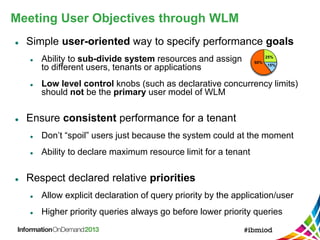
Meeting User Objectives through WLM
 Simple user-oriented way to specify performance goals
 Ability to sub-divide system resources and assign
to different users, tenants or applications
 Low level control knobs (such as declarative concurrency limits)
should not be the primary user model of WLM
 Ensure consistent performance for a tenant
 Don’t “spoil” users just because the system could at the moment
 Ability to declare maximum resource limit for a tenant
 Respect declared relative priorities
 Allow explicit declaration of query priority by the application/user
 Higher priority queries always go before lower priority queries
60%
25%
15%
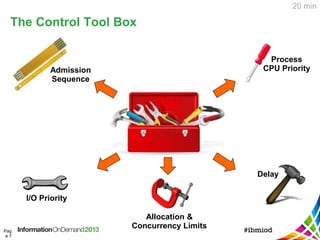
The Control Tool Box
Pag
e 7
Admission
Sequence
I/O Priority
Process
CPU Priority
Delay
Allocation &
Concurrency Limits
20 min
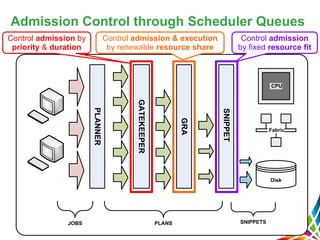
Admission Control through Scheduler Queues
GATEKEEPER
GRA
SNIPPET
Disk
Fabric
CPU
JOBS PLANS SNIPPETS
PLANNER
Control admission by
priority & duration
Control admission & execution
by renewable resource share
Control admission
by fixed resource fit
Declaring Priorities
Pag
e 9
 Four priority levels: Critical, High, Medium, Low
 Higher priority queries get served first within the
same resource sharing group
 System level default priority:
SET SYSTEM DEFAULT [DEFPRIORITY | MAXPRIORITY ]
TO [CRITICAL | HIGH | NORMAL | LOW | NONE]
 Set default priority per permission group:
CREATE GROUP <group name> WITH DEFPRIORITY <prio>;
 Change default priority of specific user:
ALTER USER <user> WITH DEFPRIORITY LOW MAXPRIORITY HIGH;
 Changing priority of existing session:
nzsession priority -high –u <user> -pw <pw> -id <session ID>, or
ALTER SESSION [<session ID>] SET PRIORITY TO <prio>;
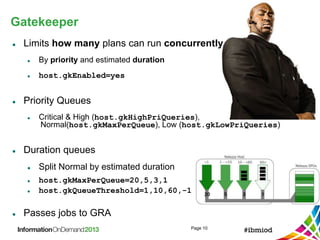
Gatekeeper
Page 10
 Limits how many plans can run concurrently
 By priority and estimated duration
 host.gkEnabled=yes
 Priority Queues
 Critical & High (host.gkHighPriQueries),
Normal(host.gkMaxPerQueue), Low (host.gkLowPriQueries)
 Duration queues
 Split Normal by estimated duration
 host.gkMaxPerQueue=20,5,3,1
 host.gkQueueThreshold=1,10,60,-1
 Passes jobs to GRA
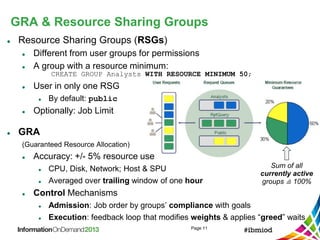
GRA & Resource Sharing Groups
Page 11
 Resource Sharing Groups (RSGs)
 Different from user groups for permissions
 A group with a resource minimum:
CREATE GROUP Analysts WITH RESOURCE MINIMUM 50;
 User in only one RSG
 By default: public
 Optionally: Job Limit
 GRA
(Guaranteed Resource Allocation)
 Accuracy: +/- 5% resource use
 CPU, Disk, Network; Host & SPU
 Averaged over trailing window of one hour
 Control Mechanisms
 Admission: Job order by groups’ compliance with goals
 Execution: feedback loop that modifies weights & applies “greed” waits
Sum of all
currently active
groups ≙ 100%
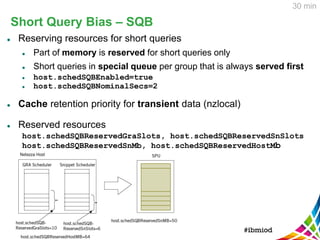
Short Query Bias – SQB
 Reserving resources for short queries
 Part of memory is reserved for short queries only
 Short queries in special queue per group that is always served first
 host.schedSQBEnabled=true
 host.schedSQBNominalSecs=2
 Cache retention priority for transient data (nzlocal)
 Reserved resources
host.schedSQBReservedGraSlots, host.schedSQBReservedSnSlots
host.schedSQBReservedSnMb, host.schedSQBReservedHostMb
30 min
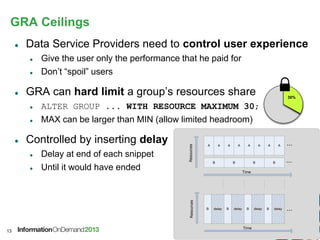
GRA Ceilings
 Data Service Providers need to control user experience
 Give the user only the performance that he paid for
 Don’t “spoil” users
 GRA can hard limit a group’s resources share
 ALTER GROUP ... WITH RESOURCE MAXIMUM 30;
 MAX can be larger than MIN (allow limited headroom)
 Controlled by inserting delay
 Delay at end of each snippet
 Until it would have ended
13
30%
Resources
Time
A
delay
A A A
B B B B
A A A A ...
...
Resources
Time
B ...delayB delayB delayB
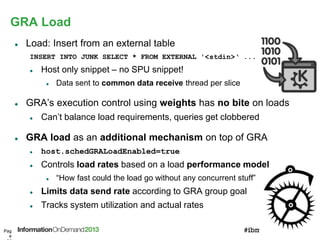
GRA Load
Pag
e
 Load: Insert from an external table
INSERT INTO JUNK SELECT * FROM EXTERNAL '<stdin>‘ ...
 Host only snippet – no SPU snippet!
 Data sent to common data receive thread per slice
 GRA’s execution control using weights has no bite on loads
 Can’t balance load requirements, queries get clobbered
 GRA load as an additional mechanism on top of GRA
 host.schedGRALoadEnabled=true
 Controls load rates based on a load performance model
 “How fast could the load go without any concurrent stuff”
 Limits data send rate according to GRA group goal
 Tracks system utilization and actual rates
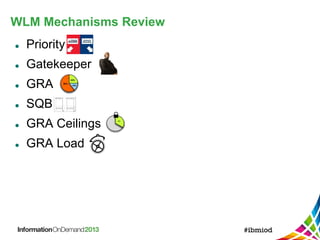
WLM Mechanisms Review
 Priority
 Gatekeeper
 GRA
 SQB
 GRA Ceilings
 GRA Load
30%
60%
25%
15%
Usage Scenarios
 Application Consolidation
 Mixed workload: ELT v reports v interactive
 Departmental Chargeback
 Data Analysis Service Provider
 System rollout / Application migration
 Power Users
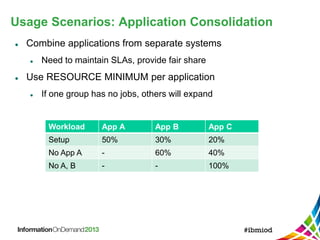
Usage Scenarios: Application Consolidation
 Combine applications from separate systems
 Need to maintain SLAs, provide fair share
 Use RESOURCE MINIMUM per application
 If one group has no jobs, others will expand
Workload App A App B App C
Setup 50% 30% 20%
No App A - 60% 40%
No A, B - - 100%
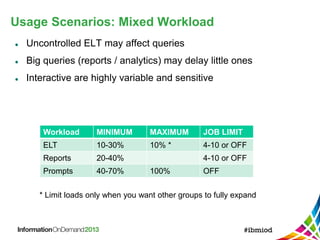
Usage Scenarios: Mixed Workload
 Uncontrolled ELT may affect queries
 Big queries (reports / analytics) may delay little ones
 Interactive are highly variable and sensitive
* Limit loads only when you want other groups to fully expand
Workload MINIMUM MAXIMUM JOB LIMIT
ELT 10-30% 10% * 4-10 or OFF
Reports 20-40% 4-10 or OFF
Prompts 40-70% 100% OFF
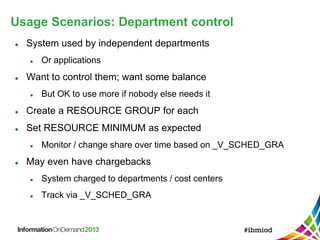
Usage Scenarios: Department control
 System used by independent departments
 Or applications
 Want to control them; want some balance
 But OK to use more if nobody else needs it
 Create a RESOURCE GROUP for each
 Set RESOURCE MINIMUM as expected
 Monitor / change share over time based on _V_SCHED_GRA
 May even have chargebacks
 System charged to departments / cost centers
 Track via _V_SCHED_GRA
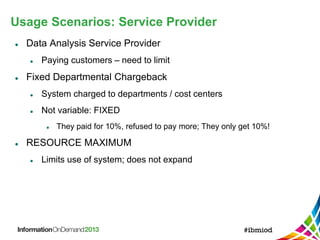
Usage Scenarios: Service Provider
 Data Analysis Service Provider
 Paying customers – need to limit
 Fixed Departmental Chargeback
 System charged to departments / cost centers
 Not variable: FIXED
 They paid for 10%, refused to pay more; They only get 10%!
 RESOURCE MAXIMUM
 Limits use of system; does not expand
Usage Scenarios
 New system rollout
 Consistent experience as applications arrive
 Set RESOURCE MAXIMUM for early users
 Increase over time; eventually remove
 Power Users
 Individuals that write raw SQL
 Killer / crazy queries; and lots of them!
 Use JOB LIMIT, GK queue limits, runaway query event
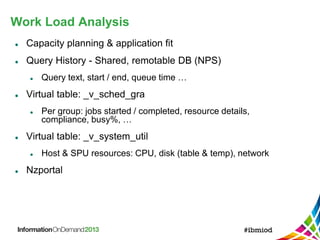
Work Load Analysis
 Capacity planning & application fit
 Query History - Shared, remotable DB (NPS)
 Query text, start / end, queue time …
 Virtual table: _v_sched_gra
 Per group: jobs started / completed, resource details,
compliance, busy%, …
 Virtual table: _v_system_util
 Host & SPU resources: CPU, disk (table & temp), network
 Nzportal
WLM Guidelines & Best Practices
 No more than 8 -10 Resource Sharing Groups
 Want each group to be able to run concurrently
 Roughly N max size snippets at once
 Approximately 11
 +/- 5% means that a 5% group could get NO TIME and be
compliant
 Smaller groups are harder to keep balanced
WLM Guidelines & Best Practices
 RESOURCE MINIMUMs should add up to 100%
 Not strictly necessary
 Easier to think about
 OK to change RSG minimums on the fly
 e.g. to have different day/night balances
 ADMIN
 Gets at least 50% of system resources
 Avoid using the Admin user account for normal work
 Gets a lot of boosts, can ruin balance for other groups
 Like "root" - use in emergencies, occasional privileged access
WLM Guidelines & Best Practices
 Short Query Bias (SQB)
 Many boosts for "short" queries
 Go to the head of the queue
 Can use reserved memory etc.
 More CPU, preferential disk access
 Default: estimate less than 2 seconds
 May not be right for you
 Make sure short queries are short!
 Check plan files
WLM Guidelines & Best Practices
 PRIORITY
 Control queries within a group
 E.g. interactive queries v reports v loads
 Users, groups have defaults
 Can set in a session & for running queries
 Two impacts:
 Select higher first; go to the head of the queue
 Increase resource share for a query -- within the group
 Normal gets 2X Low, High gets 2X normal, …
WLM Guidelines & Best Practices
 RESOURCE MAXIMUM
 Limit a RSG
 To protect other RSGs
 Other cases: pay for use, control growth experience
 Generally 5% accuracy: average over an hour
 Uses delay  latency variation
 Values should be between 30% and 80%.
 Larger values are sort of meaningless, not very effective
 Smaller values introduce a lot of variability
WLM Guidelines & Best Practices
 Limiting Jobs: two ways
 RSG JOB LIMIT works for a specific RSG
 Example: limit the ETL group to 10 loads
 ALTER GROUP … WITH JOB LIMIT 10
 Gatekeeper queues: limit jobs across RSGs
 Example: limit large jobs across the entire system
 Set query priority to LOW (user or session)
 Limit the GK LOW queue size
 Example: limit long jobs across the system
 Split GK normal queue at (say) 300 seconds
 <300 seconds 48, >300 seconds 5
WLM Guidelines & Best Practices
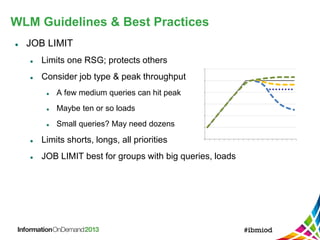
 JOB LIMIT
 Limits one RSG; protects others
 Consider job type & peak throughput
 A few medium queries can hit peak
 Maybe ten or so loads
 Small queries? May need dozens
 Limits shorts, longs, all priorities
 JOB LIMIT best for groups with big queries, loads
WLM Guidelines & Best Practices
 Experiment: Limit changes, record, verify.
 Your workload is not the same as others
 Your workload today is not the same as yesterday’s
 Effects may depend on subtle workload differences
 Effects can be hard to predict
Thank You
Your feedback is important!
• Access the Conference Agenda Builder to
complete your session surveys
o Any web or mobile browser at
http://iod13surveys.com/surveys.html
o Any Agenda Builder kiosk onsite

IBM Information on Demand 2013 - Session 2839 - Using IBM PureData System for Analytics Workload Management

  • 1.
    Using IBM PureDataSystem for Analytics Workload Management Session Number 2839 Gordon Booman, IBM, gbooman@us.ibm.com Torsten Steinbach, IBM, torsten@de.ibm.com © 2013 IBM Corporation
  • 2.
    Outline  Why WLM WLM Principles  Feature Overview  Usage Scenarios  Work Load Analysis  Best Practices
  • 3.
    PureData for Analytics(Striper, Full Rack) PureData for Analytics Architecture SPU Blade 1 Disk 1 Slice 1 Disk 40 Q3 Q2 DataReceive Slice 40 Q1 Q3 Q2 DataReceive Central Host ... ... Q1 Q3 Q2Load 1 Load 2 BI App • Operational Query: Q1 • Analytics Query: Q2 Power User Heavy ad-hoc query: Q3 ETL 1 Load 1 ETL 2 Load 2 SPU Blade 6 Disk 1 Slice 1 Disk 40 Q3 Q2 DataReceive Slice 40 Q3 Q2 DataReceive ... ... Standby Host . . .
  • 4.
    Challenging Workload Situations Large amount of concurrent workload  Large queries can run out of memory and temp space  Throughput can be worse than with lower concurrency  Concurrent mix of short queries & heavy queries  Large queries can starve out the short ones  Concurrent ingest & queries  Loads can starve out queries  Rushing (workload shifts)  Sudden arrival of large amount of a set of users/app can monopolize the system  Runaway queries  Carelessly submitted heavy queries (e.g. by power user) can occupy system without business value (e.g. cartesian join) 10 min
  • 5.
    Resources that matterfor Workload Management  Allocation  Memory  Temporary storage  Utilization  CPU  I/O bandwidth  Network bandwidth In use even when query is not actively worked on We call these the fixed resources In use only when query is actively worked on We call these the renewable resources
  • 6.
    Meeting User Objectivesthrough WLM  Simple user-oriented way to specify performance goals  Ability to sub-divide system resources and assign to different users, tenants or applications  Low level control knobs (such as declarative concurrency limits) should not be the primary user model of WLM  Ensure consistent performance for a tenant  Don’t “spoil” users just because the system could at the moment  Ability to declare maximum resource limit for a tenant  Respect declared relative priorities  Allow explicit declaration of query priority by the application/user  Higher priority queries always go before lower priority queries 60% 25% 15%
  • 7.
    The Control ToolBox Pag e 7 Admission Sequence I/O Priority Process CPU Priority Delay Allocation & Concurrency Limits 20 min
  • 8.
    Admission Control throughScheduler Queues GATEKEEPER GRA SNIPPET Disk Fabric CPU JOBS PLANS SNIPPETS PLANNER Control admission by priority & duration Control admission & execution by renewable resource share Control admission by fixed resource fit
  • 9.
    Declaring Priorities Pag e 9 Four priority levels: Critical, High, Medium, Low  Higher priority queries get served first within the same resource sharing group  System level default priority: SET SYSTEM DEFAULT [DEFPRIORITY | MAXPRIORITY ] TO [CRITICAL | HIGH | NORMAL | LOW | NONE]  Set default priority per permission group: CREATE GROUP <group name> WITH DEFPRIORITY <prio>;  Change default priority of specific user: ALTER USER <user> WITH DEFPRIORITY LOW MAXPRIORITY HIGH;  Changing priority of existing session: nzsession priority -high –u <user> -pw <pw> -id <session ID>, or ALTER SESSION [<session ID>] SET PRIORITY TO <prio>;
  • 10.
    Gatekeeper Page 10  Limitshow many plans can run concurrently  By priority and estimated duration  host.gkEnabled=yes  Priority Queues  Critical & High (host.gkHighPriQueries), Normal(host.gkMaxPerQueue), Low (host.gkLowPriQueries)  Duration queues  Split Normal by estimated duration  host.gkMaxPerQueue=20,5,3,1  host.gkQueueThreshold=1,10,60,-1  Passes jobs to GRA
  • 11.
    GRA & ResourceSharing Groups Page 11  Resource Sharing Groups (RSGs)  Different from user groups for permissions  A group with a resource minimum: CREATE GROUP Analysts WITH RESOURCE MINIMUM 50;  User in only one RSG  By default: public  Optionally: Job Limit  GRA (Guaranteed Resource Allocation)  Accuracy: +/- 5% resource use  CPU, Disk, Network; Host & SPU  Averaged over trailing window of one hour  Control Mechanisms  Admission: Job order by groups’ compliance with goals  Execution: feedback loop that modifies weights & applies “greed” waits Sum of all currently active groups ≙ 100%
  • 12.
    Short Query Bias– SQB  Reserving resources for short queries  Part of memory is reserved for short queries only  Short queries in special queue per group that is always served first  host.schedSQBEnabled=true  host.schedSQBNominalSecs=2  Cache retention priority for transient data (nzlocal)  Reserved resources host.schedSQBReservedGraSlots, host.schedSQBReservedSnSlots host.schedSQBReservedSnMb, host.schedSQBReservedHostMb 30 min
  • 13.
    GRA Ceilings  DataService Providers need to control user experience  Give the user only the performance that he paid for  Don’t “spoil” users  GRA can hard limit a group’s resources share  ALTER GROUP ... WITH RESOURCE MAXIMUM 30;  MAX can be larger than MIN (allow limited headroom)  Controlled by inserting delay  Delay at end of each snippet  Until it would have ended 13 30% Resources Time A delay A A A B B B B A A A A ... ... Resources Time B ...delayB delayB delayB
  • 14.
    GRA Load Pag e  Load:Insert from an external table INSERT INTO JUNK SELECT * FROM EXTERNAL '<stdin>‘ ...  Host only snippet – no SPU snippet!  Data sent to common data receive thread per slice  GRA’s execution control using weights has no bite on loads  Can’t balance load requirements, queries get clobbered  GRA load as an additional mechanism on top of GRA  host.schedGRALoadEnabled=true  Controls load rates based on a load performance model  “How fast could the load go without any concurrent stuff”  Limits data send rate according to GRA group goal  Tracks system utilization and actual rates
  • 15.
    WLM Mechanisms Review Priority  Gatekeeper  GRA  SQB  GRA Ceilings  GRA Load 30% 60% 25% 15%
  • 16.
    Usage Scenarios  ApplicationConsolidation  Mixed workload: ELT v reports v interactive  Departmental Chargeback  Data Analysis Service Provider  System rollout / Application migration  Power Users
  • 17.
    Usage Scenarios: ApplicationConsolidation  Combine applications from separate systems  Need to maintain SLAs, provide fair share  Use RESOURCE MINIMUM per application  If one group has no jobs, others will expand Workload App A App B App C Setup 50% 30% 20% No App A - 60% 40% No A, B - - 100%
  • 18.
    Usage Scenarios: MixedWorkload  Uncontrolled ELT may affect queries  Big queries (reports / analytics) may delay little ones  Interactive are highly variable and sensitive * Limit loads only when you want other groups to fully expand Workload MINIMUM MAXIMUM JOB LIMIT ELT 10-30% 10% * 4-10 or OFF Reports 20-40% 4-10 or OFF Prompts 40-70% 100% OFF
  • 19.
    Usage Scenarios: Departmentcontrol  System used by independent departments  Or applications  Want to control them; want some balance  But OK to use more if nobody else needs it  Create a RESOURCE GROUP for each  Set RESOURCE MINIMUM as expected  Monitor / change share over time based on _V_SCHED_GRA  May even have chargebacks  System charged to departments / cost centers  Track via _V_SCHED_GRA
  • 20.
    Usage Scenarios: ServiceProvider  Data Analysis Service Provider  Paying customers – need to limit  Fixed Departmental Chargeback  System charged to departments / cost centers  Not variable: FIXED  They paid for 10%, refused to pay more; They only get 10%!  RESOURCE MAXIMUM  Limits use of system; does not expand
  • 21.
    Usage Scenarios  Newsystem rollout  Consistent experience as applications arrive  Set RESOURCE MAXIMUM for early users  Increase over time; eventually remove  Power Users  Individuals that write raw SQL  Killer / crazy queries; and lots of them!  Use JOB LIMIT, GK queue limits, runaway query event
  • 22.
    Work Load Analysis Capacity planning & application fit  Query History - Shared, remotable DB (NPS)  Query text, start / end, queue time …  Virtual table: _v_sched_gra  Per group: jobs started / completed, resource details, compliance, busy%, …  Virtual table: _v_system_util  Host & SPU resources: CPU, disk (table & temp), network  Nzportal
  • 23.
    WLM Guidelines &Best Practices  No more than 8 -10 Resource Sharing Groups  Want each group to be able to run concurrently  Roughly N max size snippets at once  Approximately 11  +/- 5% means that a 5% group could get NO TIME and be compliant  Smaller groups are harder to keep balanced
  • 24.
    WLM Guidelines &Best Practices  RESOURCE MINIMUMs should add up to 100%  Not strictly necessary  Easier to think about  OK to change RSG minimums on the fly  e.g. to have different day/night balances  ADMIN  Gets at least 50% of system resources  Avoid using the Admin user account for normal work  Gets a lot of boosts, can ruin balance for other groups  Like "root" - use in emergencies, occasional privileged access
  • 25.
    WLM Guidelines &Best Practices  Short Query Bias (SQB)  Many boosts for "short" queries  Go to the head of the queue  Can use reserved memory etc.  More CPU, preferential disk access  Default: estimate less than 2 seconds  May not be right for you  Make sure short queries are short!  Check plan files
  • 26.
    WLM Guidelines &Best Practices  PRIORITY  Control queries within a group  E.g. interactive queries v reports v loads  Users, groups have defaults  Can set in a session & for running queries  Two impacts:  Select higher first; go to the head of the queue  Increase resource share for a query -- within the group  Normal gets 2X Low, High gets 2X normal, …
  • 27.
    WLM Guidelines &Best Practices  RESOURCE MAXIMUM  Limit a RSG  To protect other RSGs  Other cases: pay for use, control growth experience  Generally 5% accuracy: average over an hour  Uses delay  latency variation  Values should be between 30% and 80%.  Larger values are sort of meaningless, not very effective  Smaller values introduce a lot of variability
  • 28.
    WLM Guidelines &Best Practices  Limiting Jobs: two ways  RSG JOB LIMIT works for a specific RSG  Example: limit the ETL group to 10 loads  ALTER GROUP … WITH JOB LIMIT 10  Gatekeeper queues: limit jobs across RSGs  Example: limit large jobs across the entire system  Set query priority to LOW (user or session)  Limit the GK LOW queue size  Example: limit long jobs across the system  Split GK normal queue at (say) 300 seconds  <300 seconds 48, >300 seconds 5
  • 29.
    WLM Guidelines &Best Practices  JOB LIMIT  Limits one RSG; protects others  Consider job type & peak throughput  A few medium queries can hit peak  Maybe ten or so loads  Small queries? May need dozens  Limits shorts, longs, all priorities  JOB LIMIT best for groups with big queries, loads
  • 30.
    WLM Guidelines &Best Practices  Experiment: Limit changes, record, verify.  Your workload is not the same as others  Your workload today is not the same as yesterday’s  Effects may depend on subtle workload differences  Effects can be hard to predict
  • 31.
    Thank You Your feedbackis important! • Access the Conference Agenda Builder to complete your session surveys o Any web or mobile browser at http://iod13surveys.com/surveys.html o Any Agenda Builder kiosk onsite