DB12C: ALL YOU NEED TO KNOW
ABOUT THE RESOURCE MANAGER
Māris Elsiņš
Lead Database Consultant
Pythian
@MarisElsins
MARIS ELSINS
Lead Database Consultant at Pythian
Oracle [Apps] DBA since 2005
Speaker at conferences since 2007
@MarisElsins elsins@pythian.com
http://bit.ly/getMOSPatch
ABOUT PYTHIAN
3
Founded  in  1997,  Pythian  is  a  global  
leader  in  data  consulting  and  managed  
services  specializing    in  planning,  
optimizing,  and  managing  mission-­
critical  data  systems
Top	
  5%	
  talent	
  worldwide	
  	
  
10	
  Oracle	
  ACEs
3	
  Oracle	
  ACE	
  Directors
18	
  years	
  in	
  business	
  
450+	
  employees
250+	
  customers	
  worldwide	
  
AGENDA
• Features of the Resource Manager
• The new 12c-stuff
• Consolidations using Oracle Multitenant
• Overhead of the RM
4
FEATURES OF THE RESOURCE MANAGER
5
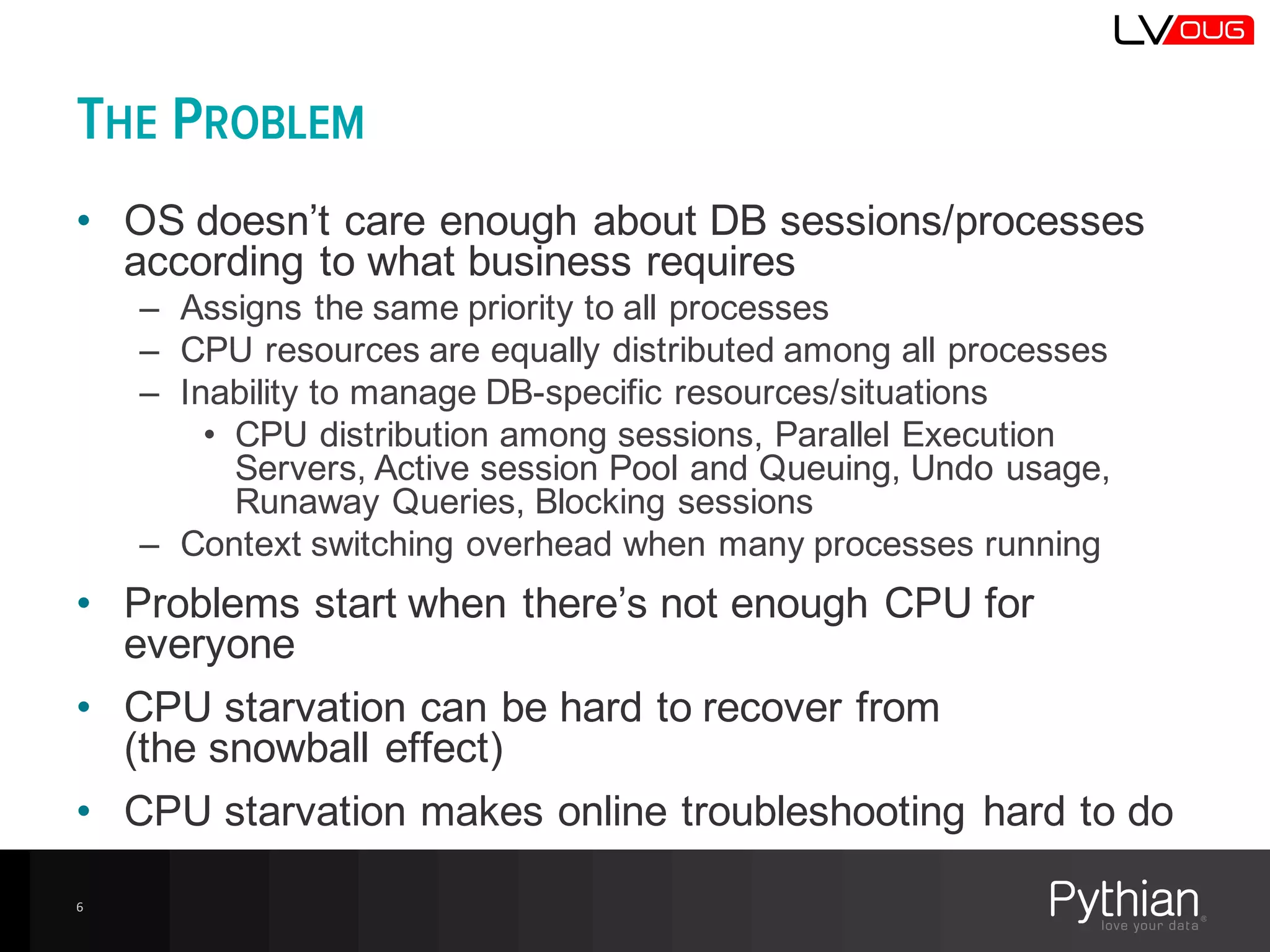
THE PROBLEM
• OS  doesn’t  care  enough  about  DB  sessions/processes  
according  to  what  business  requires
– Assigns  the  same  priority  to  all  processes
– CPU  resources  are  equally  distributed  among  all  processes
– Inability  to  manage  DB-­specific  resources/situations
• CPU  distribution  among  sessions,  Parallel  Execution  
Servers,  Active  session  Pool  and  Queuing,  Undo  usage,  
Runaway  Queries,  Blocking  sessions
– Context  switching  overhead  when  many  processes  running
• Problems  start  when  there’s  not  enough  CPU  for  
everyone
• CPU  starvation  can  be  hard  to  recover  from
(the  snowball  effect)
• CPU  starvation  makes  online  troubleshooting  hard  to  do
6
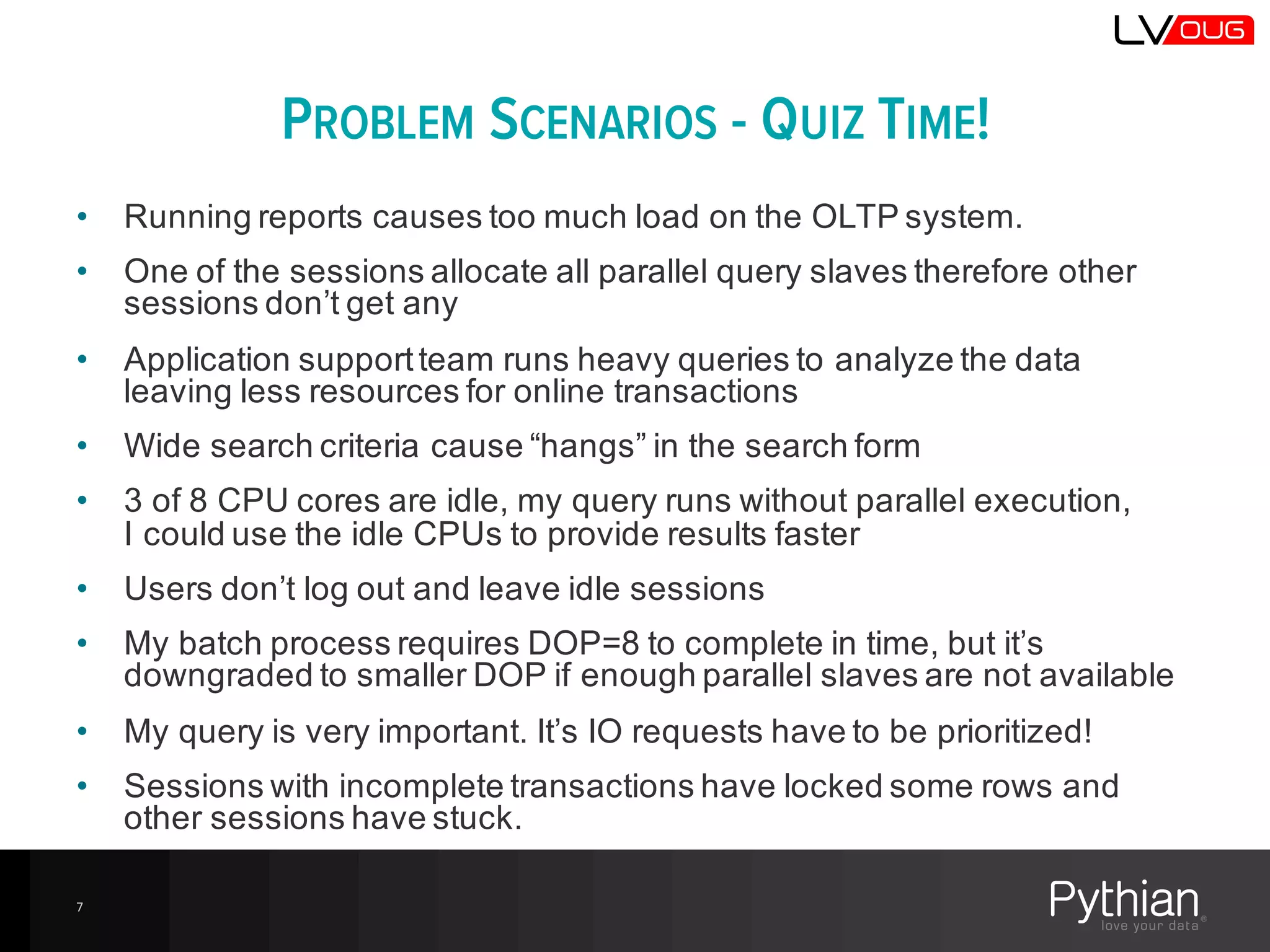
PROBLEM SCENARIOS - QUIZ TIME!
• Running  reports  causes  too  much  load  on  the  OLTP  system.
• One  of  the  sessions  allocate  all  parallel  query  slaves  therefore  other  
sessions  don’t  get  any
• Application  support  team  runs  heavy  queries  to  analyze  the  data  
leaving  less  resources  for  online  transactions
• Wide  search  criteria  cause  “hangs”  in  the  search  form
• 3  of  8  CPU  cores  are  idle,  my  query  runs  without  parallel  execution,  
I  could  use  the  idle  CPUs  to  provide  results  faster
• Users  don’t  log  out  and  leave  idle  sessions
• My  batch  process  requires  DOP=8  to  complete  in  time,  but  it’s  
downgraded  to  smaller  DOP  if  enough  parallel  slaves  are  not  available
• My  query  is  very  important.  It’s  IO  requests  have  to  be  prioritized!
• Sessions  with  incomplete  transactions  have  locked  some  rows  and  
other  sessions  have  stuck.
7
THE BASIC CONCEPTS
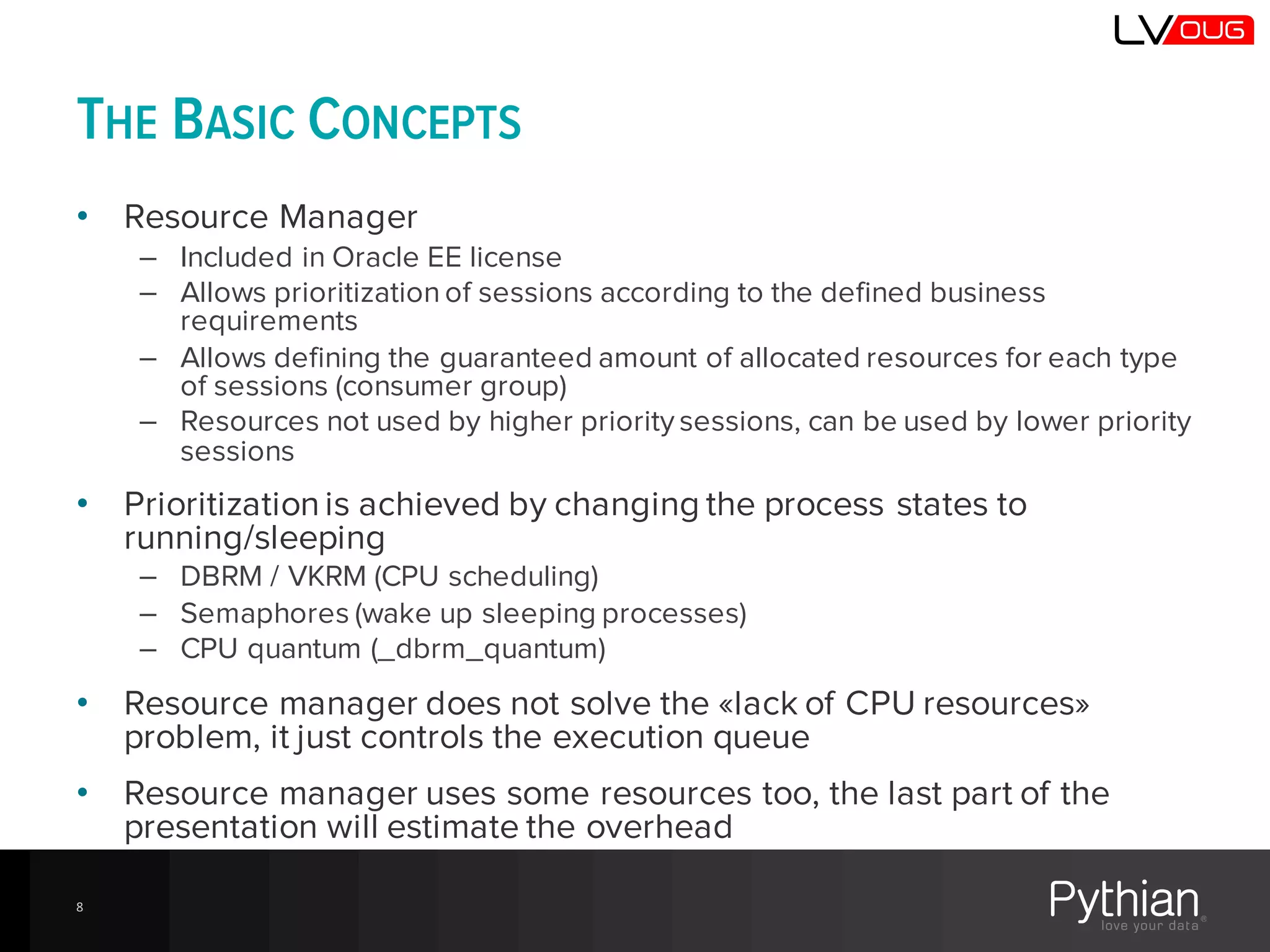
• Resource Manager
– Included in Oracle EE license
– Allows prioritization of sessions according to the defined business
requirements
– Allows defining the guaranteed amount of allocated resources for each type
of sessions (consumer group)
– Resources not used by higher priority sessions, can be used by lower priority
sessions
• Prioritizationis achieved by changing the process states to
running/sleeping
– DBRM / VKRM (CPU scheduling)
– Semaphores (wake up sleeping processes)
– CPU quantum (_dbrm_quantum)
• Resource manager does not solve the «lack of CPU resources»
problem, it just controls the execution queue
• Resource manager uses some resources too, the last part of the
presentation will estimate the overhead
8
THE BASIC CONCEPTS
9
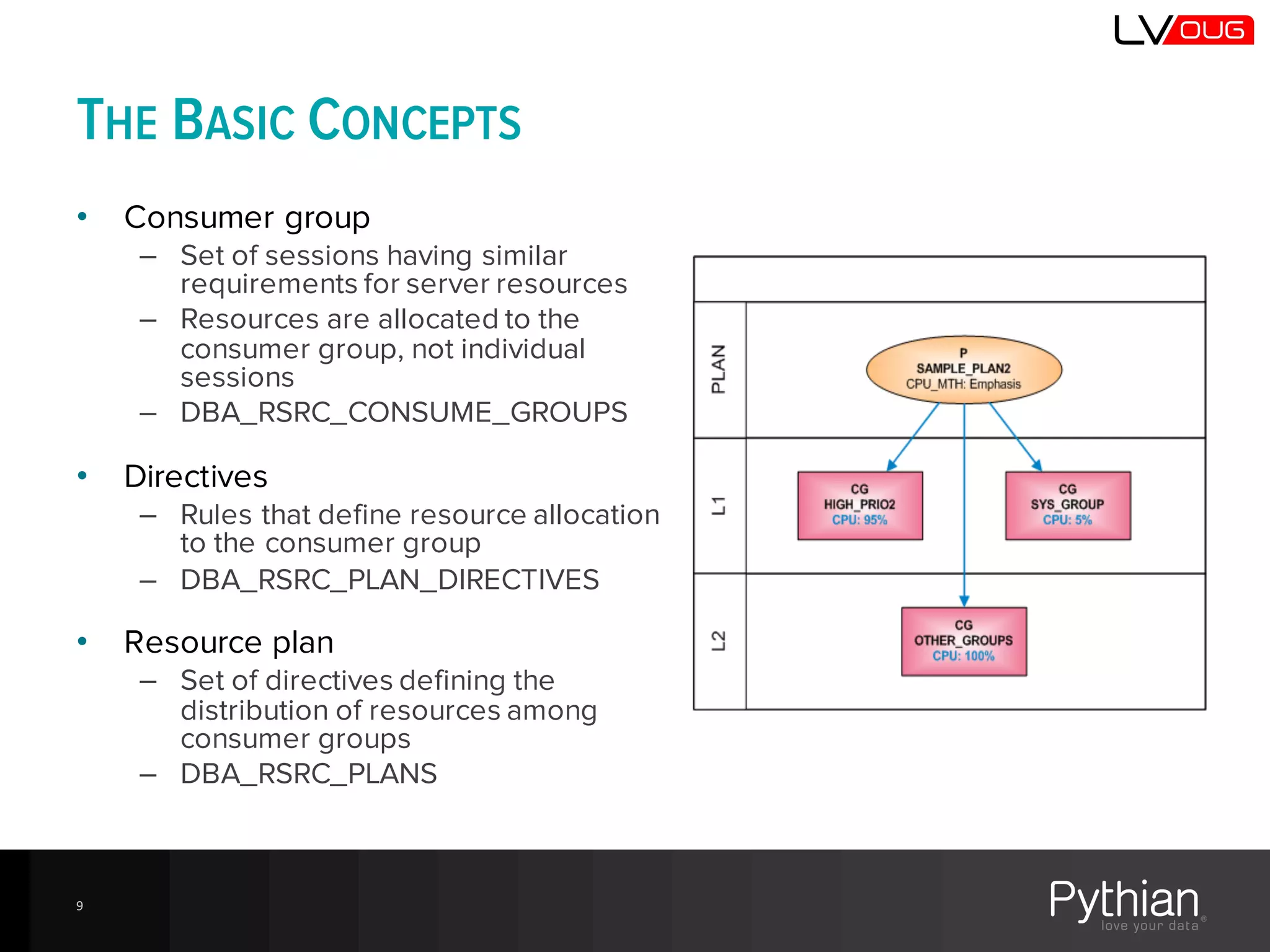
• Consumer group
– Set of sessions having similar
requirements for server resources
– Resources are allocated to the
consumer group, not individual
sessions
– DBA_RSRC_CONSUME_GROUPS
• Directives
– Rules that define resource allocation
to the consumer group
– DBA_RSRC_PLAN_DIRECTIVES
• Resource plan
– Set of directives defining the
distribution of resources among
consumer groups
– DBA_RSRC_PLANS
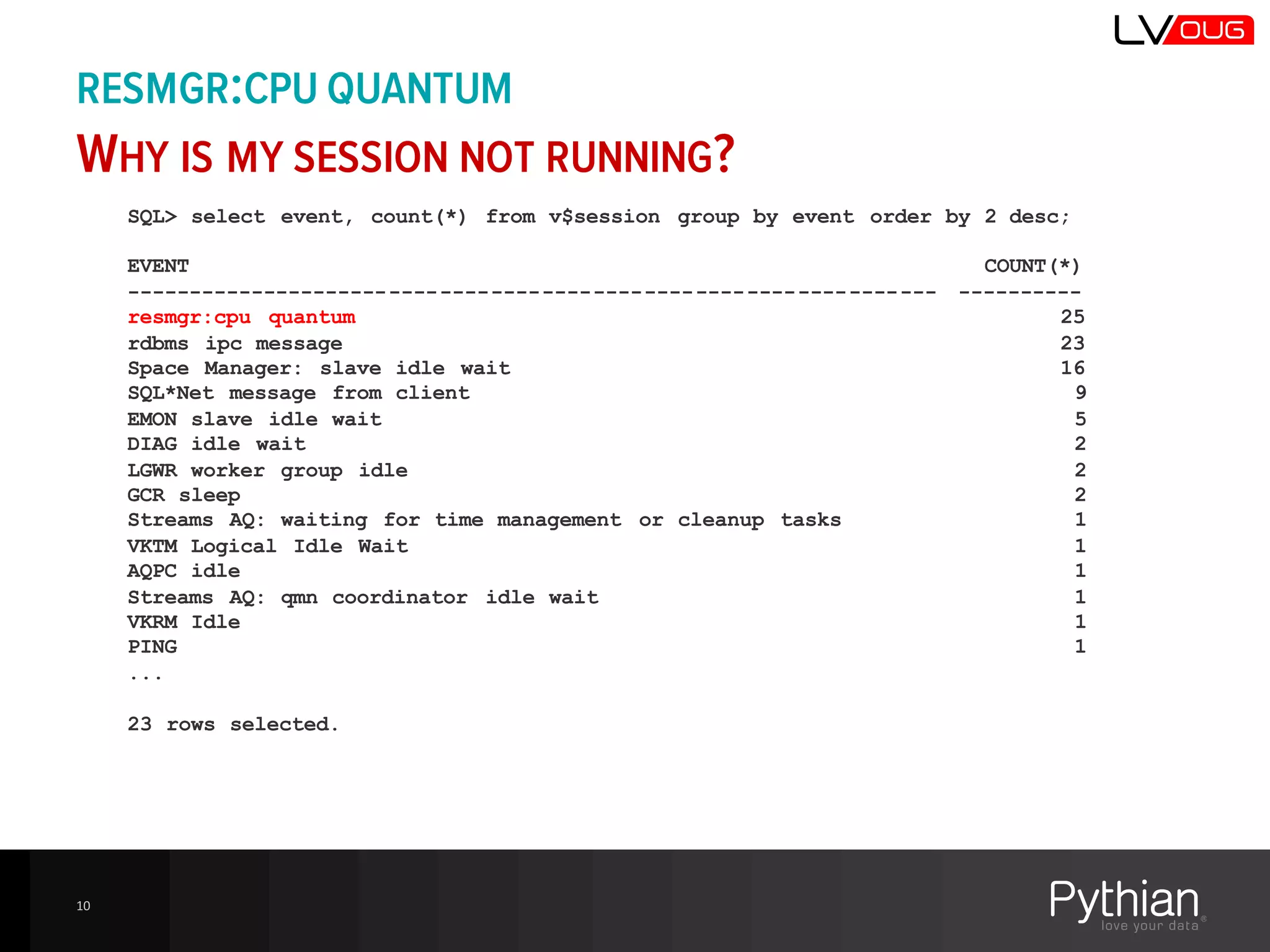
SQL> select event, count(*) from v$session group by event order by 2 desc;
EVENT COUNT(*)
---------------------------------------------------------------- ----------
resmgr:cpu quantum 25
rdbms ipc message 23
Space Manager: slave idle wait 16
SQL*Net message from client 9
EMON slave idle wait 5
DIAG idle wait 2
LGWR worker group idle 2
GCR sleep 2
Streams AQ: waiting for time management or cleanup tasks 1
VKTM Logical Idle Wait 1
AQPC idle 1
Streams AQ: qmn coordinator idle wait 1
VKRM Idle 1
PING 1
...
23 rows selected.
RESMGR:CPU QUANTUM
WHY IS MY SESSION NOT RUNNING?
10
RESMGR:CPU QUANTUM
WHY IS MY SESSION NOT RUNNING?
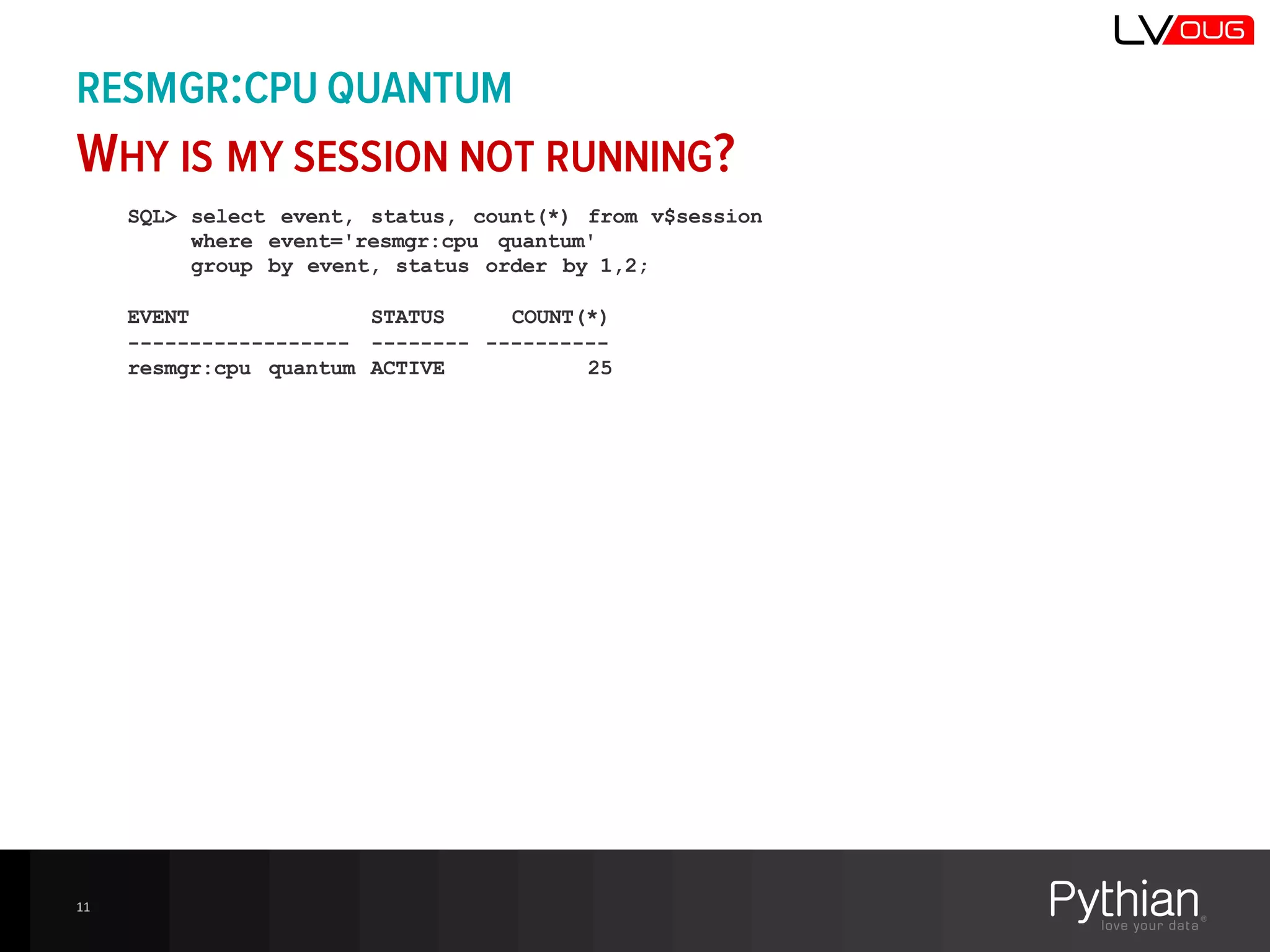
SQL> select event, status, count(*) from v$session
where event='resmgr:cpu quantum'
group by event, status order by 1,2;
EVENT STATUS COUNT(*)
------------------ -------- ----------
resmgr:cpu quantum ACTIVE 25
11
RESMGR:CPU QUANTUM
WHY IS MY SESSION NOT RUNNING?
12
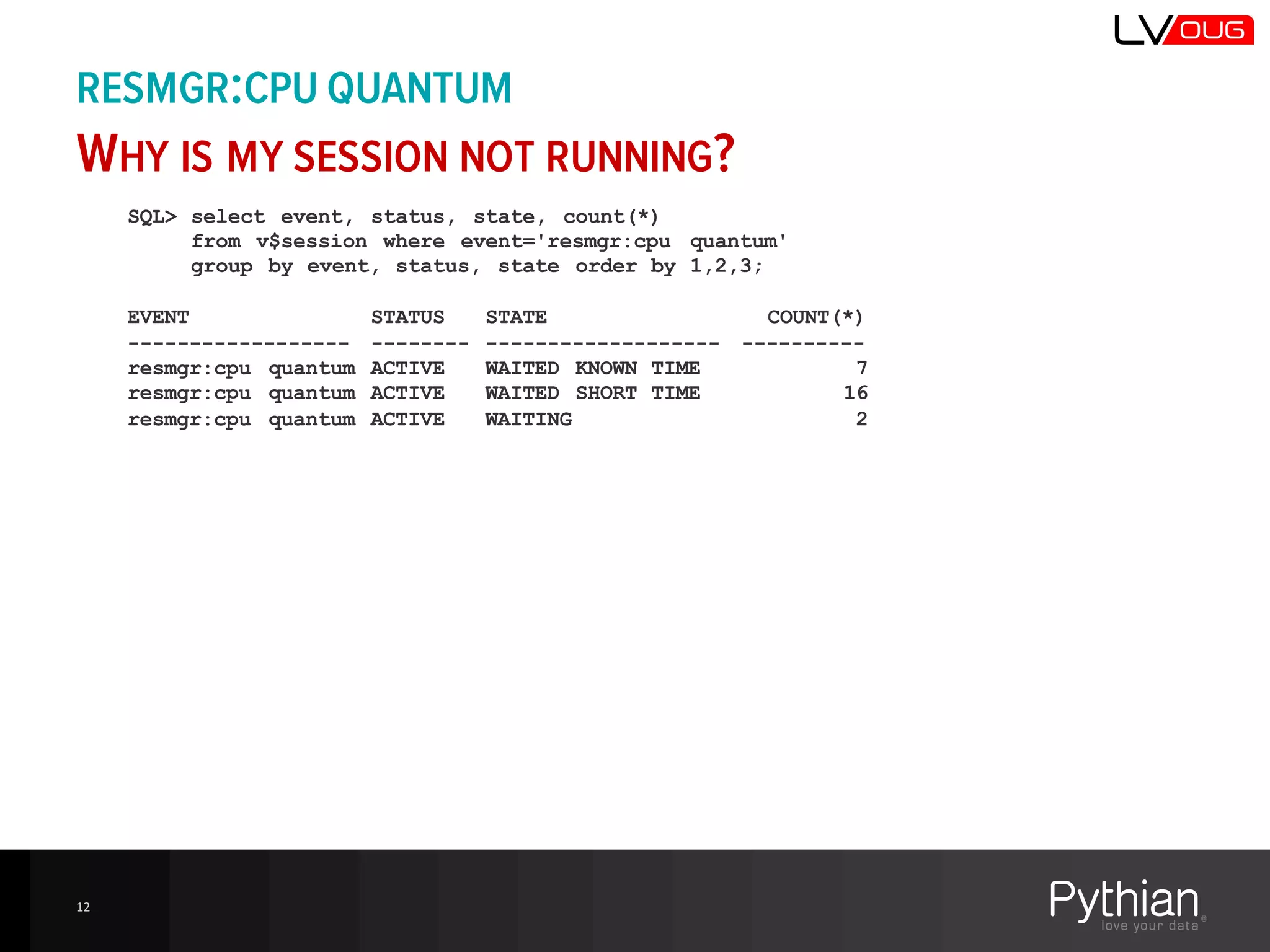
SQL> select event, status, state, count(*)
from v$session where event='resmgr:cpu quantum'
group by event, status, state order by 1,2,3;
EVENT STATUS STATE COUNT(*)
------------------ -------- ------------------- ----------
resmgr:cpu quantum ACTIVE WAITED KNOWN TIME 7
resmgr:cpu quantum ACTIVE WAITED SHORT TIME 16
resmgr:cpu quantum ACTIVE WAITING 2
RESMGR:CPU QUANTUM
WHY IS MY SESSION NOT RUNNING?
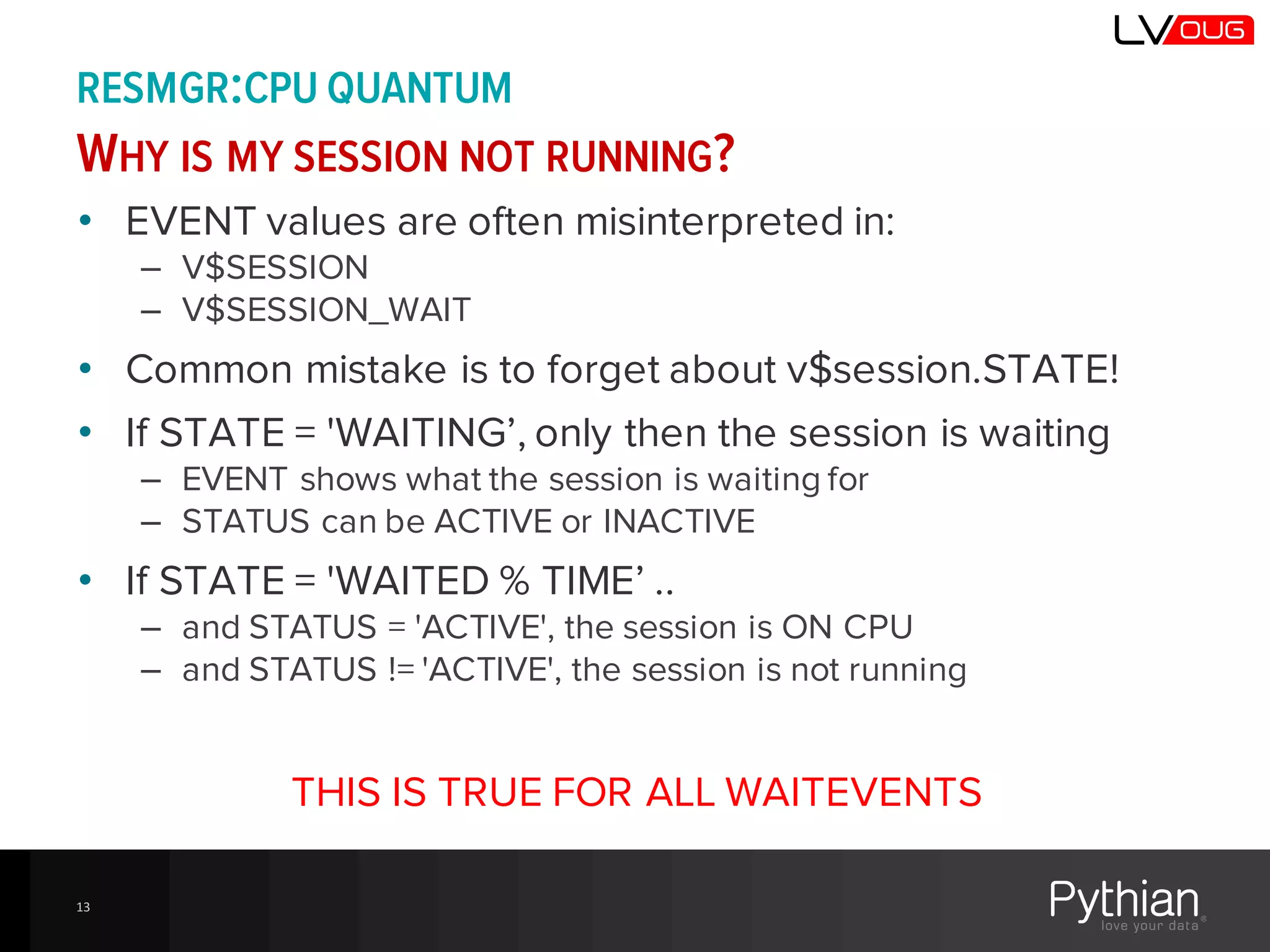
• EVENT values are often misinterpreted in:
– V$SESSION
– V$SESSION_WAIT
• Common mistake is to forget about v$session.STATE!
• If STATE = 'WAITING’, only then the session is waiting
– EVENT shows what the session is waiting for
– STATUS can be ACTIVE or INACTIVE
• If STATE = 'WAITED % TIME’ ..
– and STATUS = 'ACTIVE', the session is ON CPU
– and STATUS != 'ACTIVE', the session is not running
THIS IS TRUE FOR ALL WAITEVENTS
13
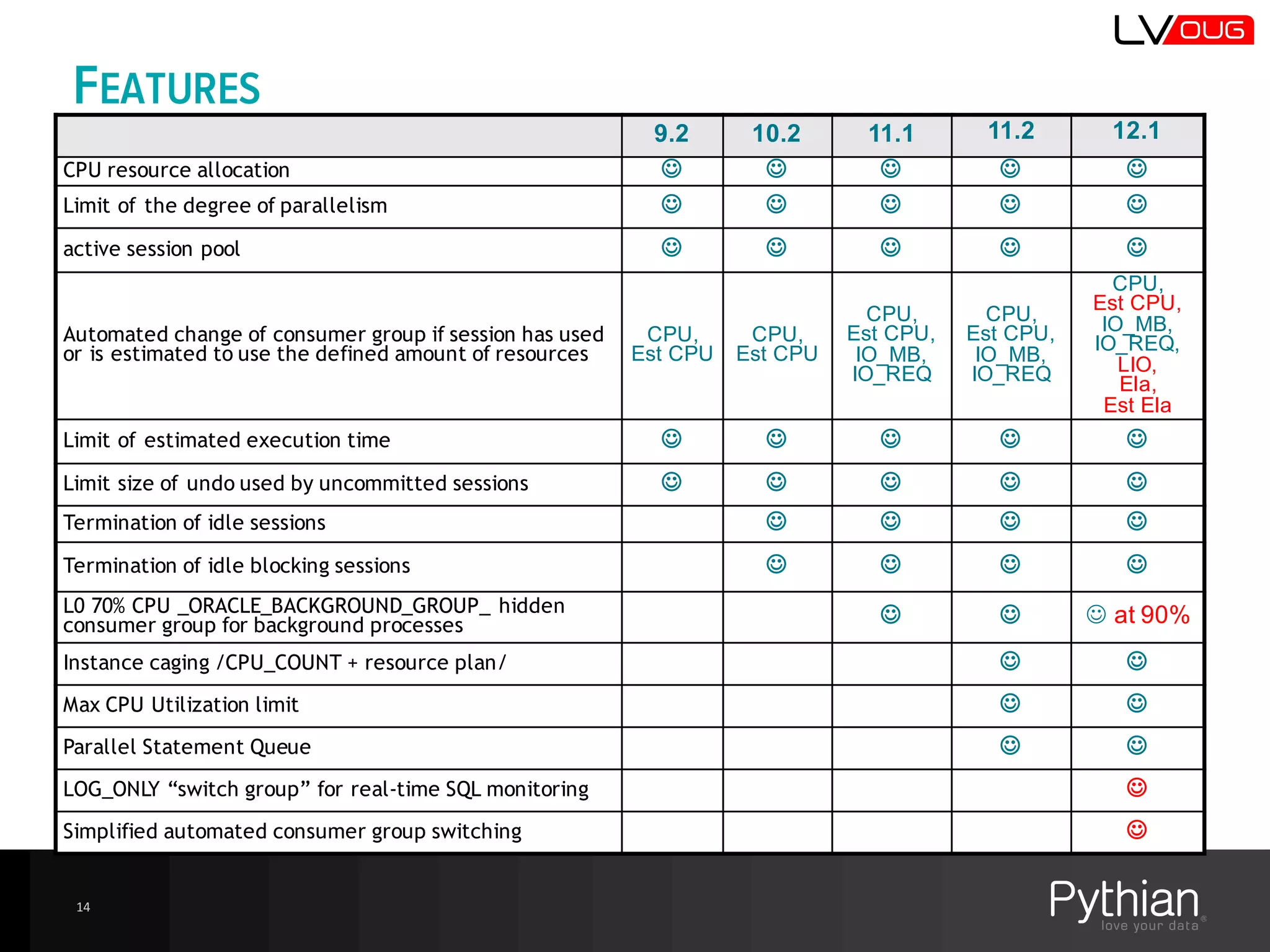
FEATURES
9.2 10.2 11.1 11.2 12.1
CPU resource allocation J J J J J
Limit of the degree of parallelism J J J J J
active session pool J J J J J
Automated change of consumer group if session has used
or is estimated to use the defined amount of resources
CPU,  
Est  CPU
CPU,  
Est  CPU
CPU,
Est CPU,  
IO_MB,  
IO_REQ
CPU,
Est CPU,  
IO_MB,  
IO_REQ
CPU,
Est  CPU,  
IO_MB,  
IO_REQ,
LIO,
Ela,
Est  Ela
Limit of estimated execution time J J J J J
Limit size of undo used by uncommitted sessions J J J J J
Termination of idle sessions J J J J
Termination of idle blocking sessions J J J J
L0 70% CPU _ORACLE_BACKGROUND_GROUP_ hidden
consumer group for background processes J J J at  90%
Instance caging /CPU_COUNT + resource plan/ J J
Max CPU Utilization limit J J
Parallel Statement Queue J J
LOG_ONLY “switch group” for real-time SQL monitoring J
Simplified automated consumer group switching J
14
THE NEW 12C-STUFF
15
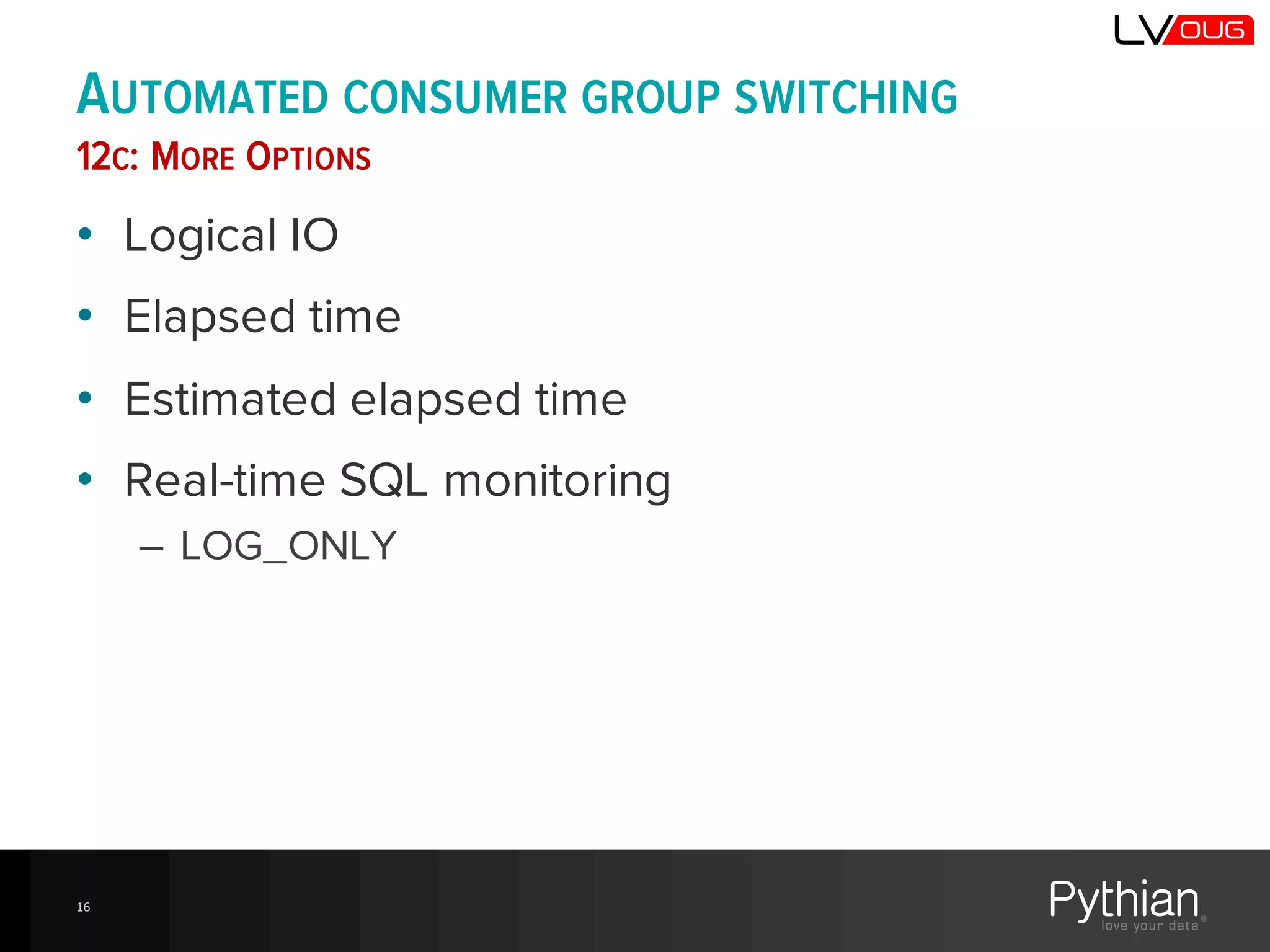
AUTOMATED CONSUMER GROUP SWITCHING
12C: MORE OPTIONS
• Logical IO
• Elapsed time
• Estimated elapsed time
• Real-time SQL monitoring
– LOG_ONLY
16
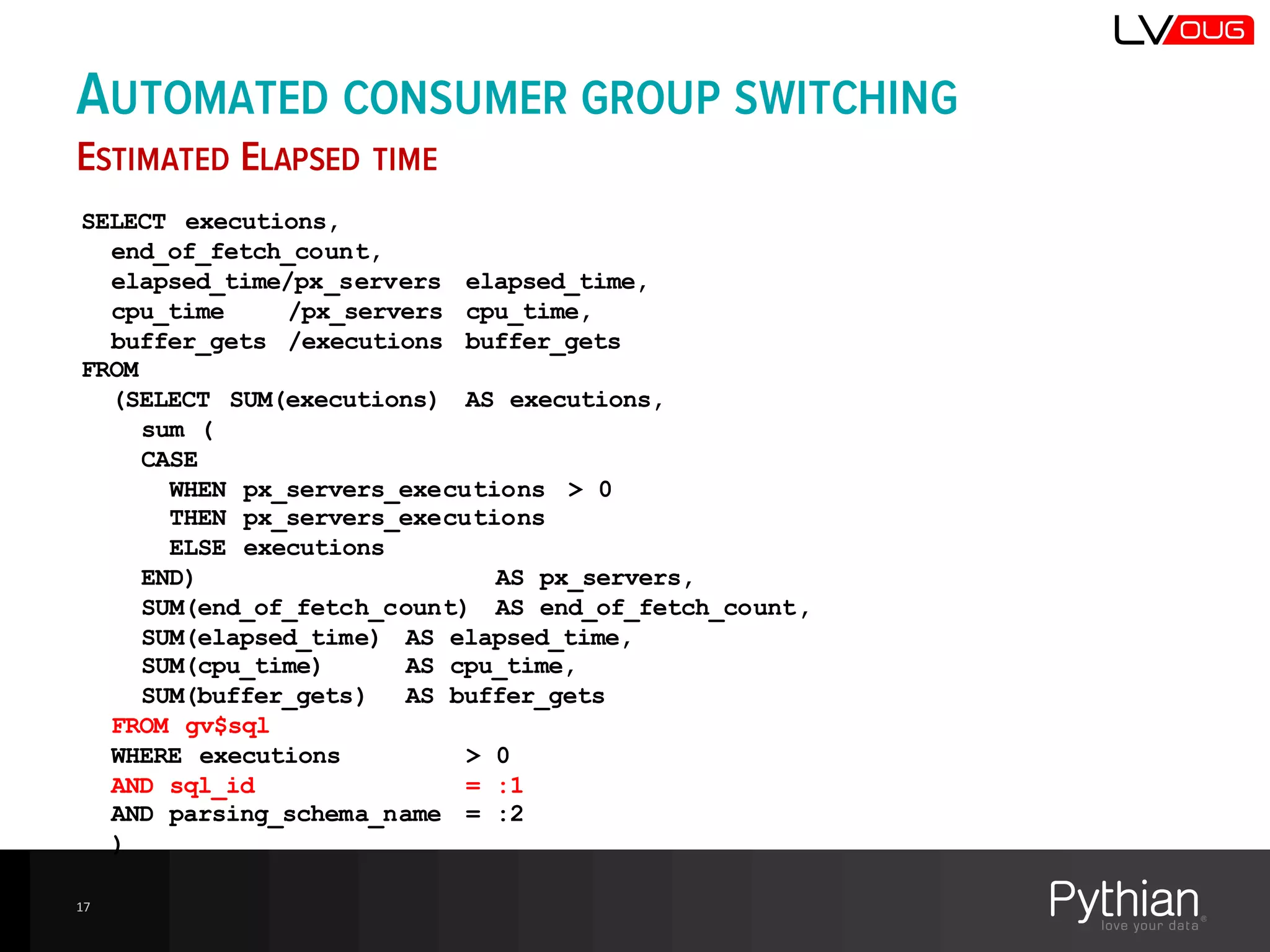
17
SELECT executions,
end_of_fetch_count,
elapsed_time/px_servers elapsed_time,
cpu_time /px_servers cpu_time,
buffer_gets /executions buffer_gets
FROM
(SELECT SUM(executions) AS executions,
sum (
CASE
WHEN px_servers_executions > 0
THEN px_servers_executions
ELSE executions
END) AS px_servers,
SUM(end_of_fetch_count) AS end_of_fetch_count,
SUM(elapsed_time) AS elapsed_time,
SUM(cpu_time) AS cpu_time,
SUM(buffer_gets) AS buffer_gets
FROM gv$sql
WHERE executions > 0
AND sql_id = :1
AND parsing_schema_name = :2
)
AUTOMATED CONSUMER GROUP SWITCHING
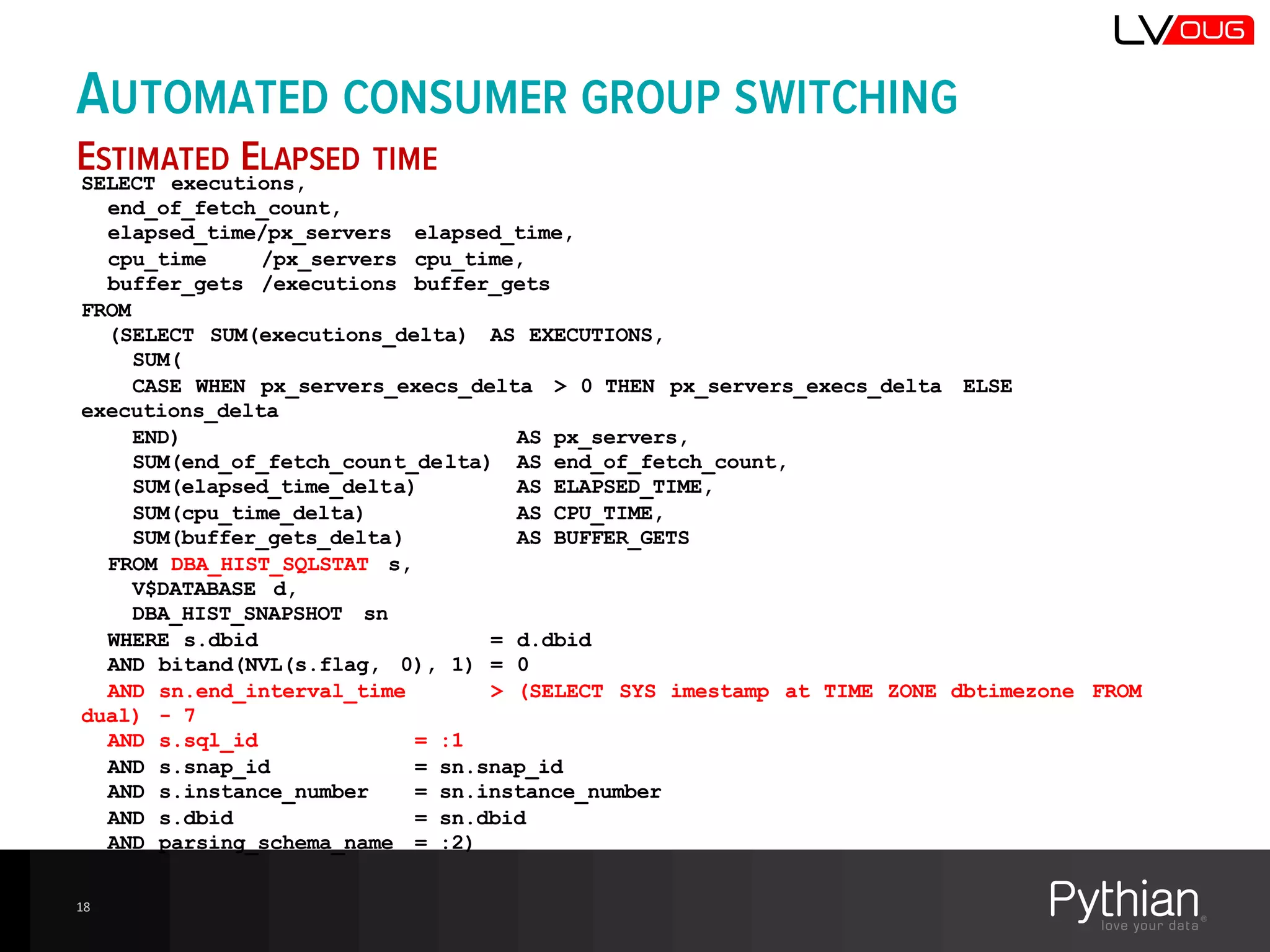
ESTIMATED ELAPSED TIME
AUTOMATED CONSUMER GROUP SWITCHING
ESTIMATED ELAPSED TIME
18
SELECT executions,
end_of_fetch_count,
elapsed_time/px_servers elapsed_time,
cpu_time /px_servers cpu_time,
buffer_gets /executions buffer_gets
FROM
(SELECT SUM(executions_delta) AS EXECUTIONS,
SUM(
CASE WHEN px_servers_execs_delta > 0 THEN px_servers_execs_delta ELSE
executions_delta
END) AS px_servers,
SUM(end_of_fetch_count_delta) AS end_of_fetch_count,
SUM(elapsed_time_delta) AS ELAPSED_TIME,
SUM(cpu_time_delta) AS CPU_TIME,
SUM(buffer_gets_delta) AS BUFFER_GETS
FROM DBA_HIST_SQLSTAT s,
V$DATABASE d,
DBA_HIST_SNAPSHOT sn
WHERE s.dbid = d.dbid
AND bitand(NVL(s.flag, 0), 1) = 0
AND sn.end_interval_time > (SELECT SYS imestamp at TIME ZONE dbtimezone FROM
dual) - 7
AND s.sql_id = :1
AND s.snap_id = sn.snap_id
AND s.instance_number = sn.instance_number
AND s.dbid = sn.dbid
AND parsing_schema_name = :2)
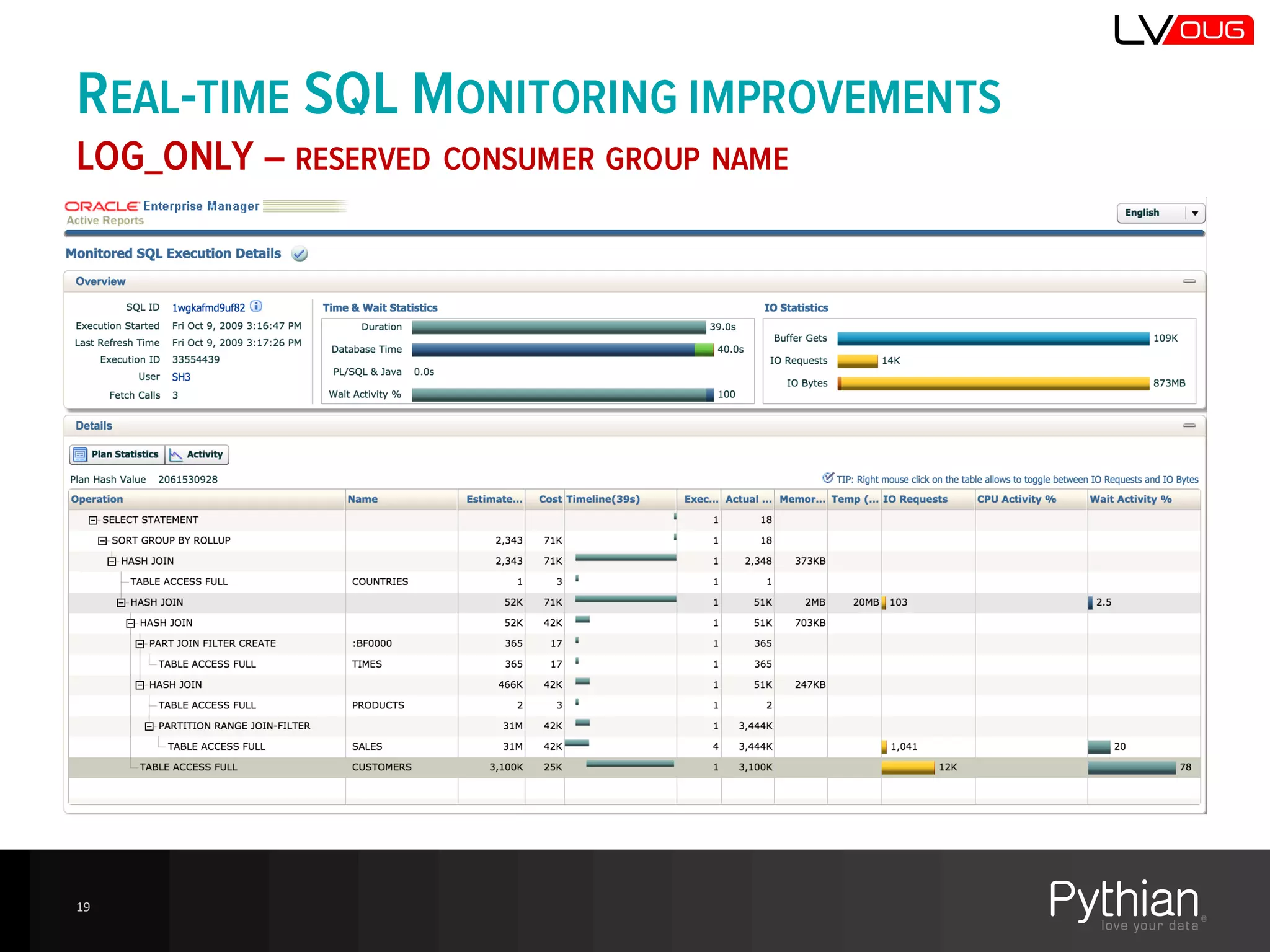
REAL-TIME SQL MONITORING IMPROVEMENTS
LOG_ONLY – RESERVED CONSUMER GROUP NAME
• Analyze the RM activity (V$SQL_MONITOR)
– RM_LAST_ACTION
– RM_LAST_ACTION_REASON
– RM_LAST_ACTION_TIME
– RM_CONSUMER_GROUP
• Understand how and why the consumer groups
are switched
• V$SQL_MONITOR.QUEUING_TIME
• The RM_% values are not presented in SQL
Monitor reports or in EM 12c CC
19
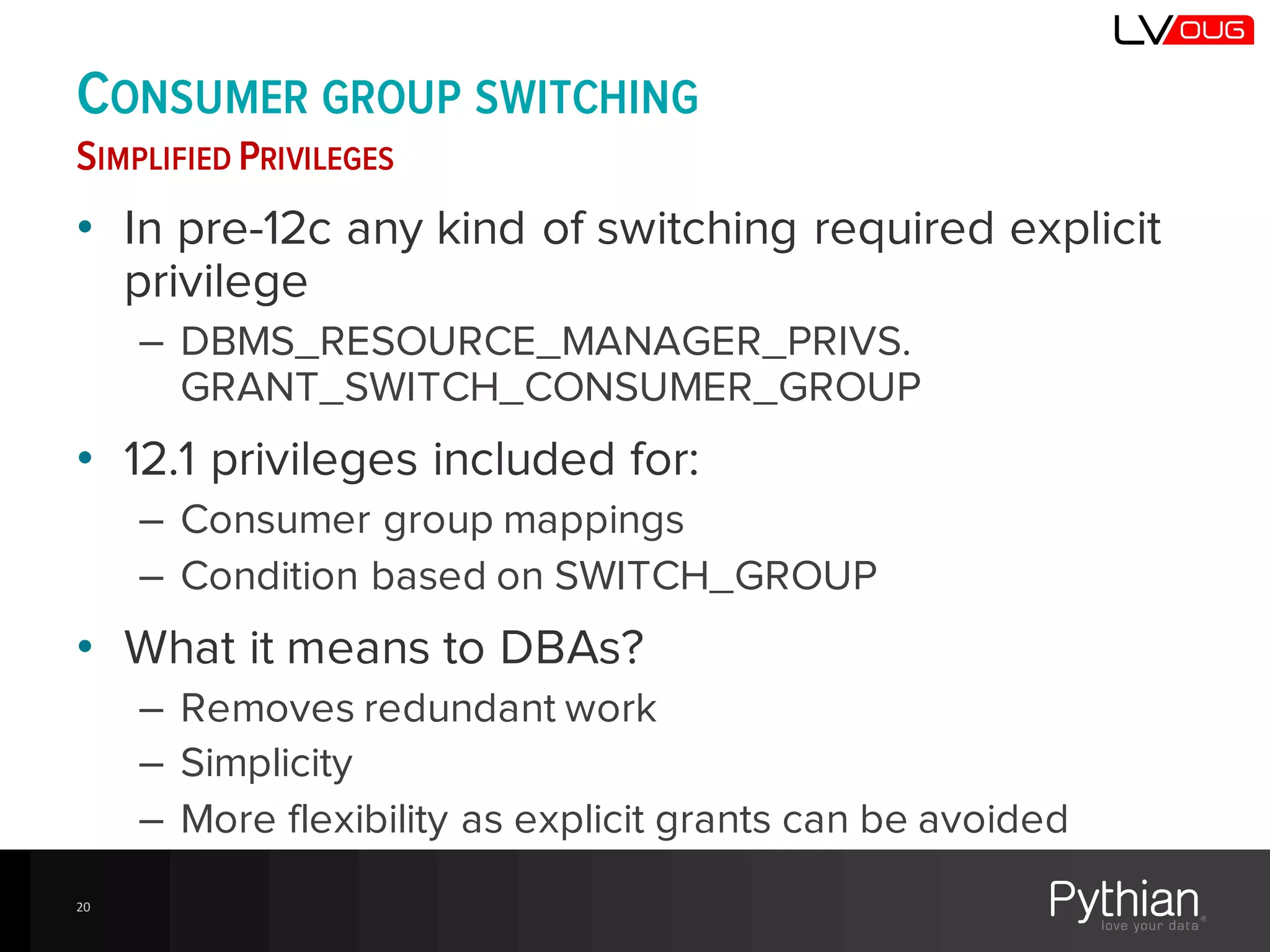
CONSUMER GROUP SWITCHING
SIMPLIFIED PRIVILEGES
• In pre-12c any kind of switching required explicit
privilege
– DBMS_RESOURCE_MANAGER_PRIVS.
GRANT_SWITCH_CONSUMER_GROUP
• 12.1 privileges included for:
– Consumer group mappings
– Condition based on SWITCH_GROUP
• What it means to DBAs?
– Removes redundant work
– Simplicity
– More flexibility as explicit grants can be avoided
20
CDB and PDB Resource Plans
CONSOLIDATION USING ORACLE MULTITENANT
21
CDB RESOURCE PLAN
• CDB resource plan
– Defines how resources are distributed between PDBs
– Shares – Minimum portion of resources allocated to the PDB
– Additional Limits
• Utilization_limit
• Parallel_server_limit (%)
• CDB Plan Directives (in DEFAULT_CDB_PLAN)
– ORA$DEFAULT_PDB_DIRECTIVE – default
• Shares=1, utilization_limit=100, parallel_server_limit=100
– ORA$AUTOTASK – for autotasks in root container
• Shares=1, utilization_limit=90, parallel_server_limit=100
• User-defined directives for exceptional PDBs
PDB RESOURCE PLAN
• Allows to use the resources proportionally to the
allocated shares
• Works just like a resource plan for non-CDB
• Few restrictions
– A PDB resource plan can't have sub-plans.
– A PDB resource plan can have a maximum of eight
consumer groups.
– A PDB resource plan cannot have a multi-level scheduling
policy.
• So we need to take action to re-implement the
resource plans when we switch from non-CDB to the
CDB?
– Not always! It happens automatically, but how?
23
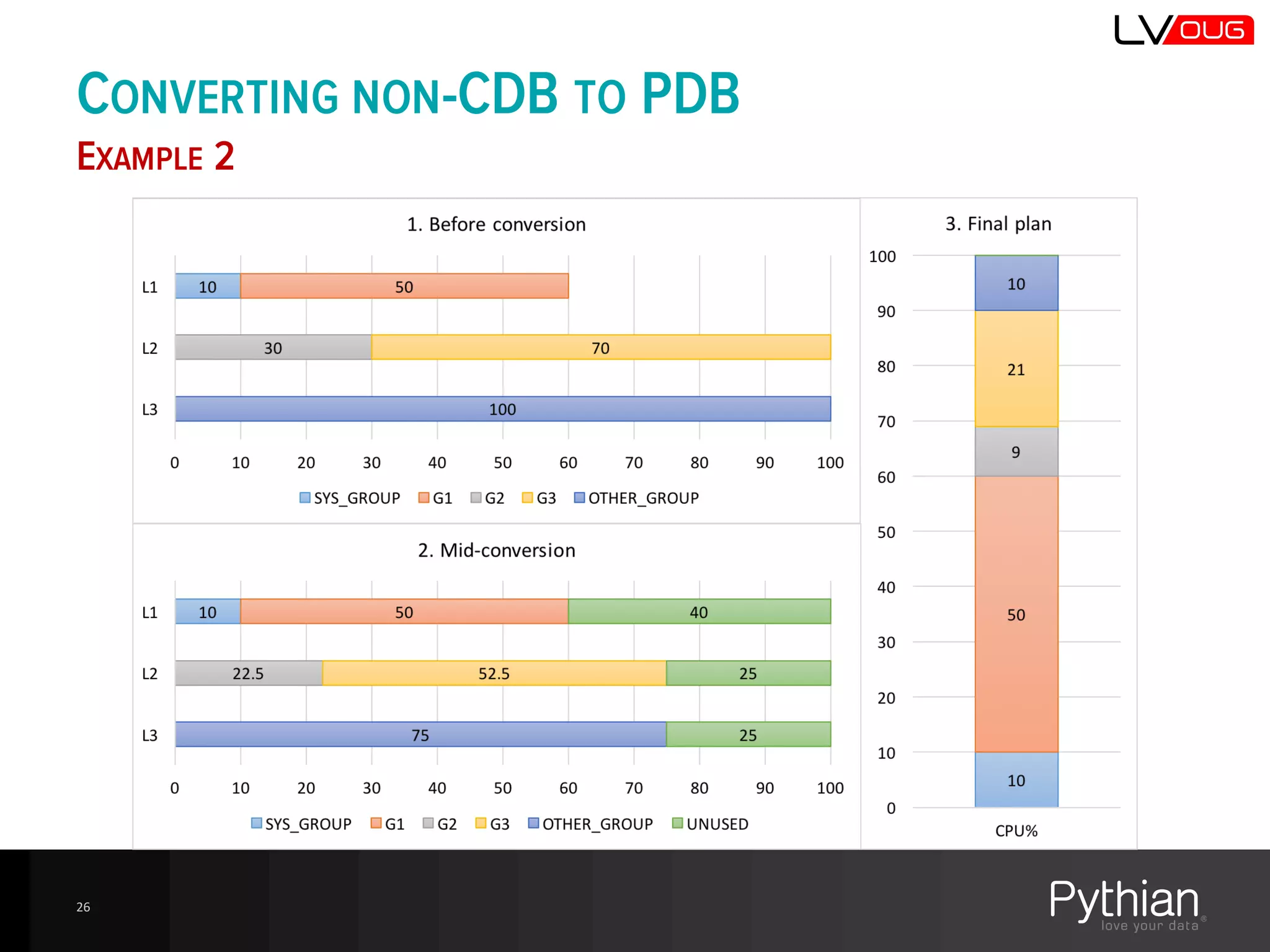
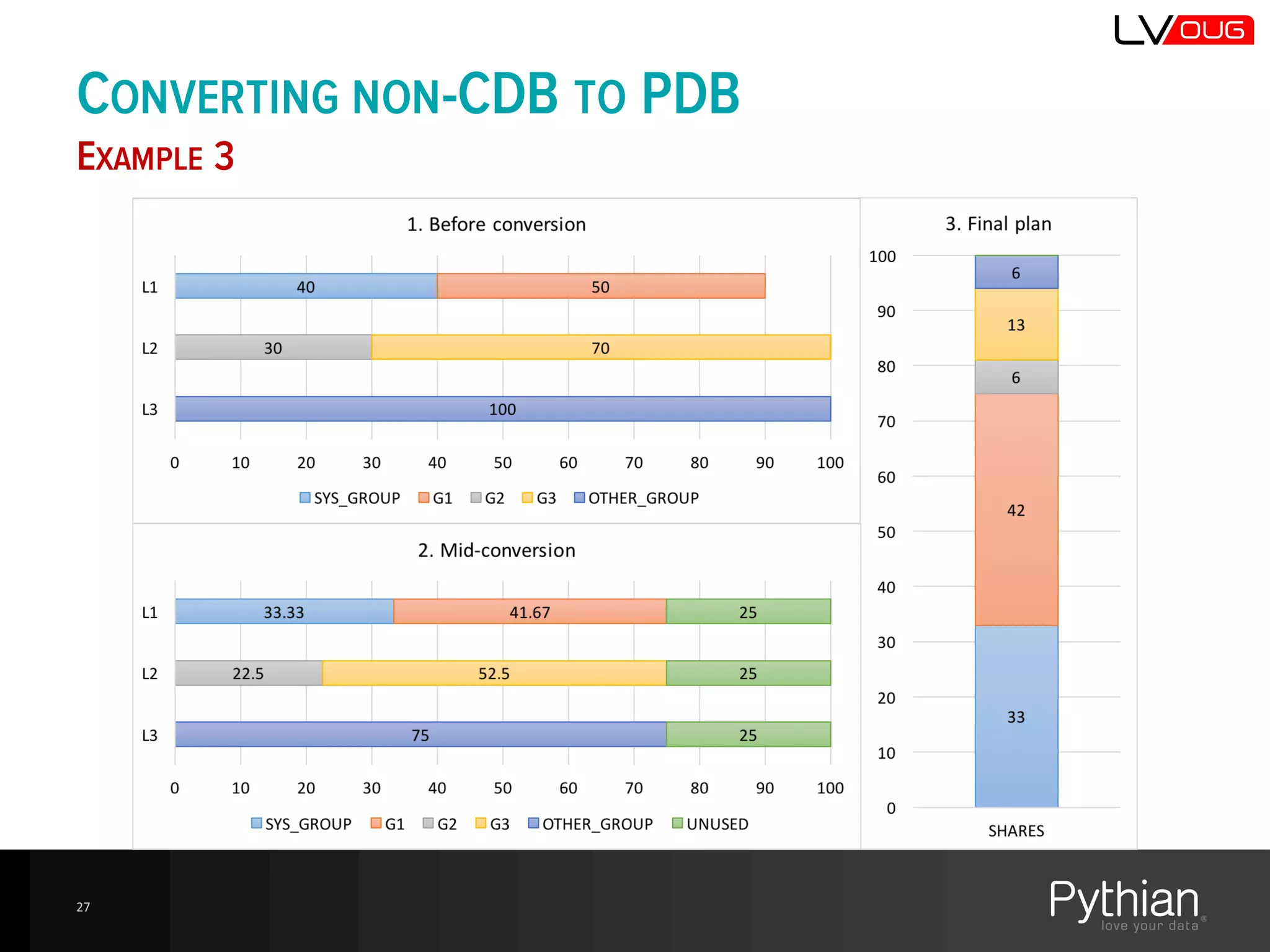
CONVERTING NON-CDB PLANS TO PDB PLANS
MULTI-LEVEL SCHEDULING POLICIES ARE NOT ALLOWER
• Automatically when the non-CDB is converted into PDB
– $ORACLE_HOME/rdbms/admin/noncdb_to_pdb.sql
– The original plan and plan directivesare saved with
STATUS=LEGACY
– A new plan is added with the same name and STATUS={null}
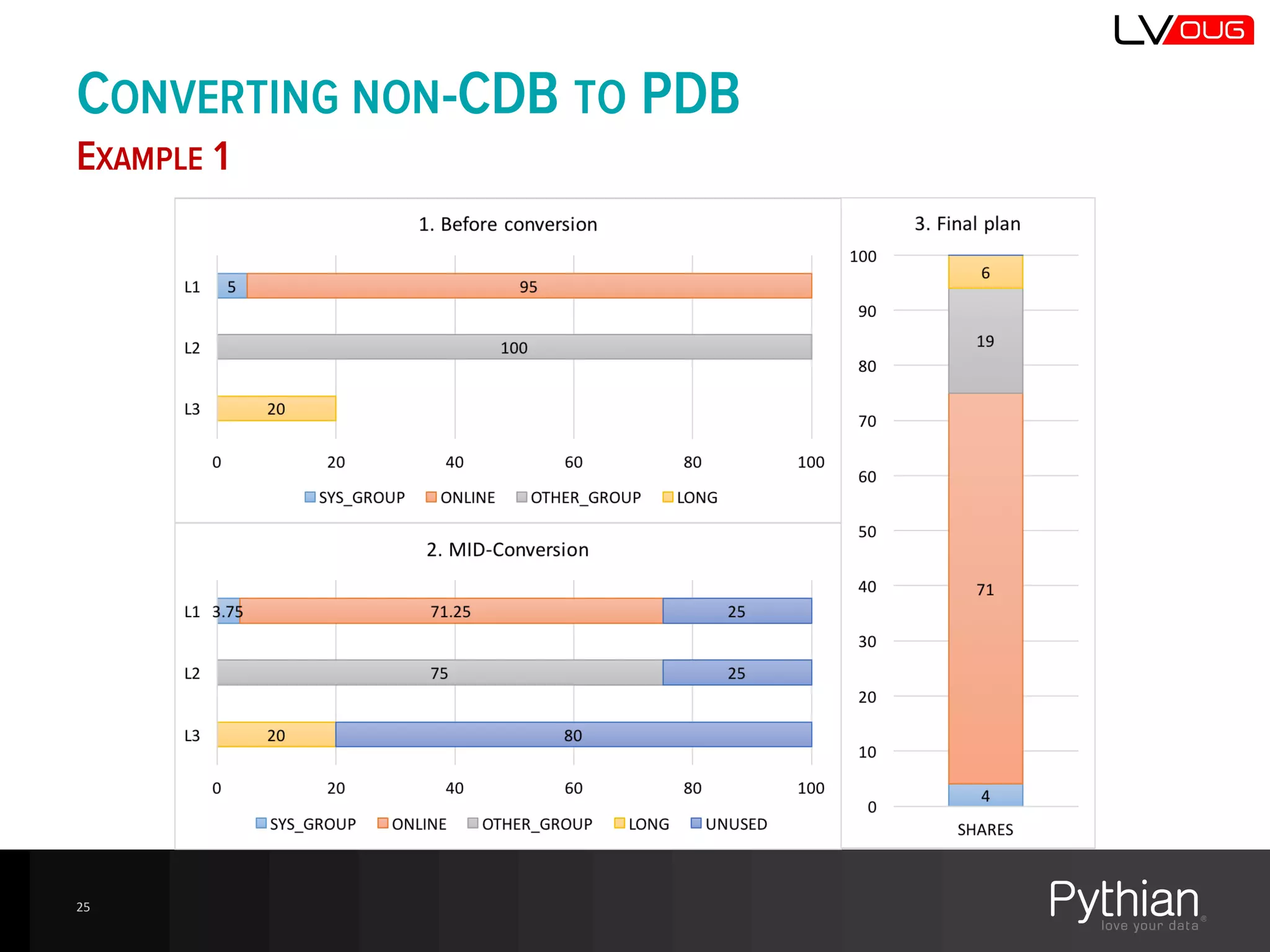
• Algorithm is not documented, but appears to be simple
enough:
– Adjust allocated CPU% on each level
• Reduce each level to 75% proportionally
• Leave it as is if it’s already lower than 75%
– The “free portion” is passed to the lower level and split per
calculated percentages, the remaining portion is passed down
– The last level get’s all remaining resources
24
CONVERTING NON-CDB TO PDB
EXAMPLE 1
25
CONVERTING NON-CDB TO PDB
EXAMPLE 2
26
CONVERTING NON-CDB TO PDB
EXAMPLE 3
27
OVERHEAD OF THE RM
28
• RM requires resources
– I’ve heard rumors: 1-10% of CPU
• Testing needed!
NOTHING IS FOR FREE
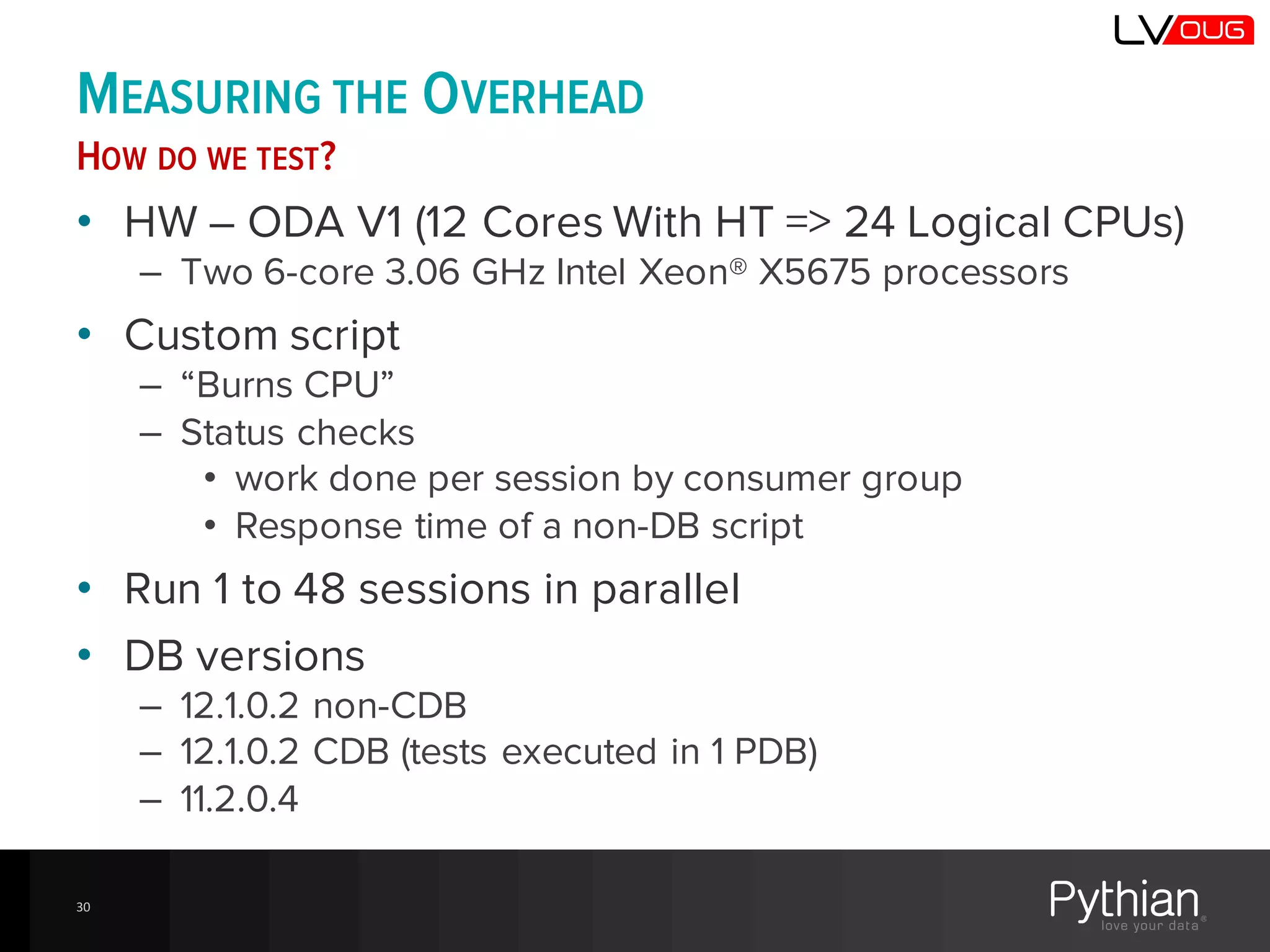
MEASURING THE OVERHEAD
HOW DO WE TEST?
• HW – ODA V1 (12 Cores With HT => 24 Logical CPUs)
– Two 6-core 3.06 GHz Intel Xeon® X5675 processors
• Custom script
– “Burns CPU”
– Status checks
• work done per session by consumer group
• Response time of a non-DB script
• Run 1 to 48 sessions in parallel
• DB versions
– 12.1.0.2 non-CDB
– 12.1.0.2 CDB (tests executed in 1 PDB)
– 11.2.0.4
30
TESTING SCRIPTS
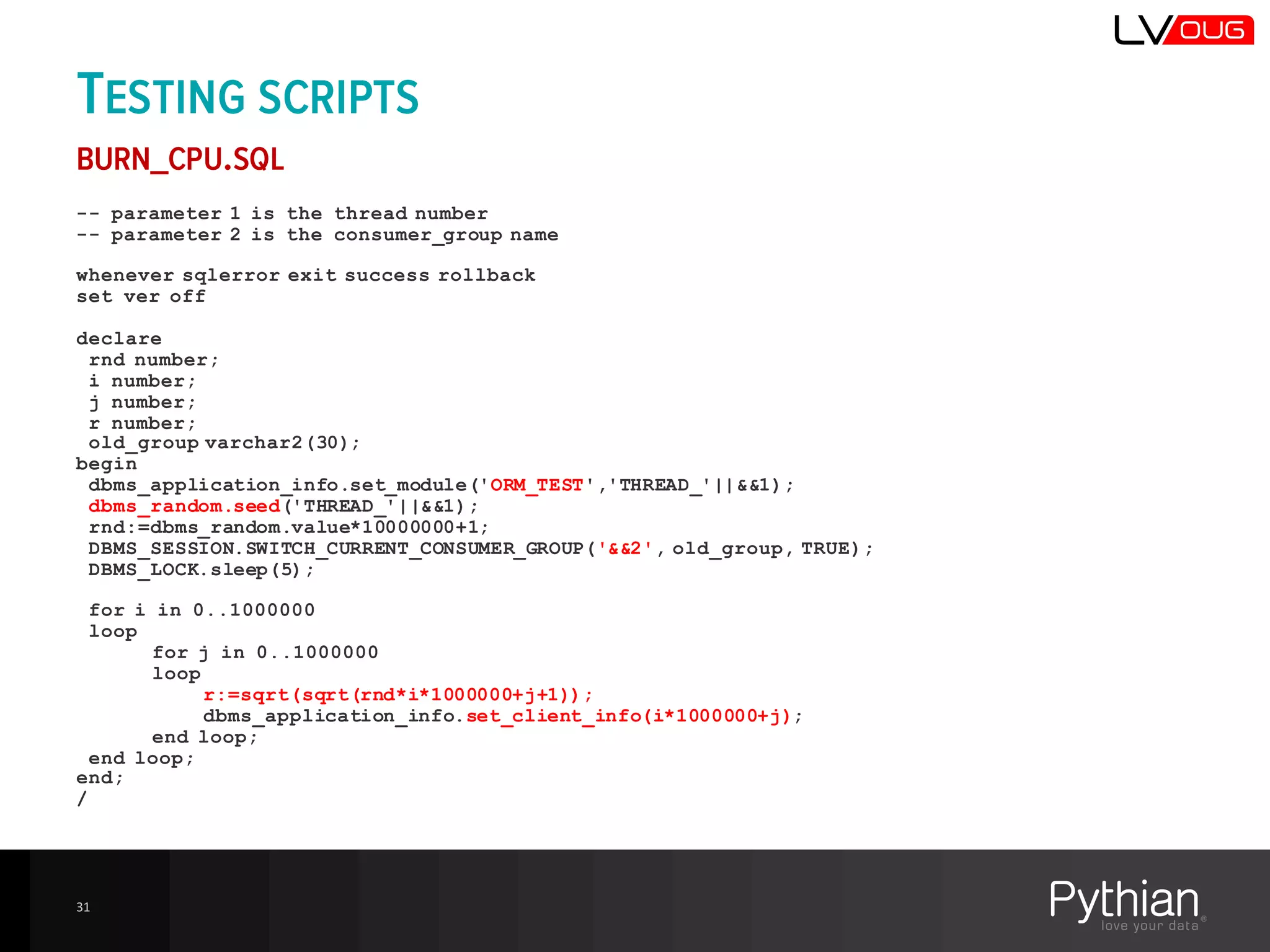
BURN_CPU.SQL
-- parameter 1 is the thread number
-- parameter 2 is the consumer_group name
whenever sqlerror exit success rollback
set ver off
declare
rnd number;
i number;
j number;
r number;
old_group varchar2(30);
begin
dbms_application_info.set_module('ORM_TEST','THREAD_'||&&1);
dbms_random.seed('THREAD_'||&&1);
rnd:=dbms_random.value*10000000+1;
DBMS_SESSION.SWITCH_CURRENT_CONSUMER_GROUP('&&2', old_group, TRUE);
DBMS_LOCK.sleep(5);
for i in 0..1000000
loop
for j in 0..1000000
loop
r:=sqrt(sqrt(rnd*i*1000000+j+1));
dbms_application_info.set_client_info(i*1000000+j);
end loop;
end loop;
end;
/
31
TESTING SCRIPTS
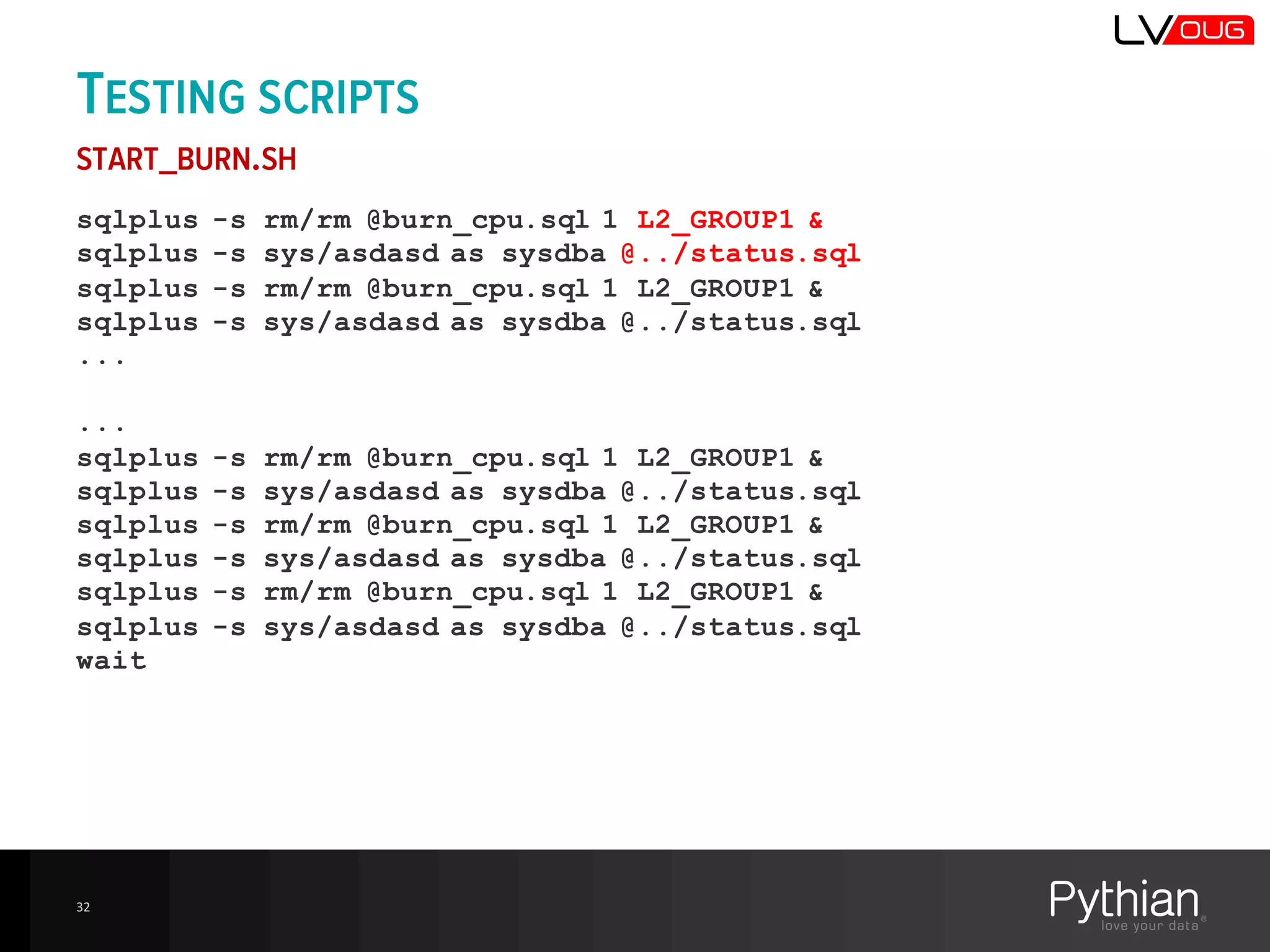
START_BURN.SH
sqlplus -s rm/rm @burn_cpu.sql 1 L2_GROUP1 &
sqlplus -s sys/asdasd as sysdba @../status.sql
sqlplus -s rm/rm @burn_cpu.sql 1 L2_GROUP1 &
sqlplus -s sys/asdasd as sysdba @../status.sql
...
...
sqlplus -s rm/rm @burn_cpu.sql 1 L2_GROUP1 &
sqlplus -s sys/asdasd as sysdba @../status.sql
sqlplus -s rm/rm @burn_cpu.sql 1 L2_GROUP1 &
sqlplus -s sys/asdasd as sysdba @../status.sql
sqlplus -s rm/rm @burn_cpu.sql 1 L2_GROUP1 &
sqlplus -s sys/asdasd as sysdba @../status.sql
wait
32
TESTING SCRIPTS
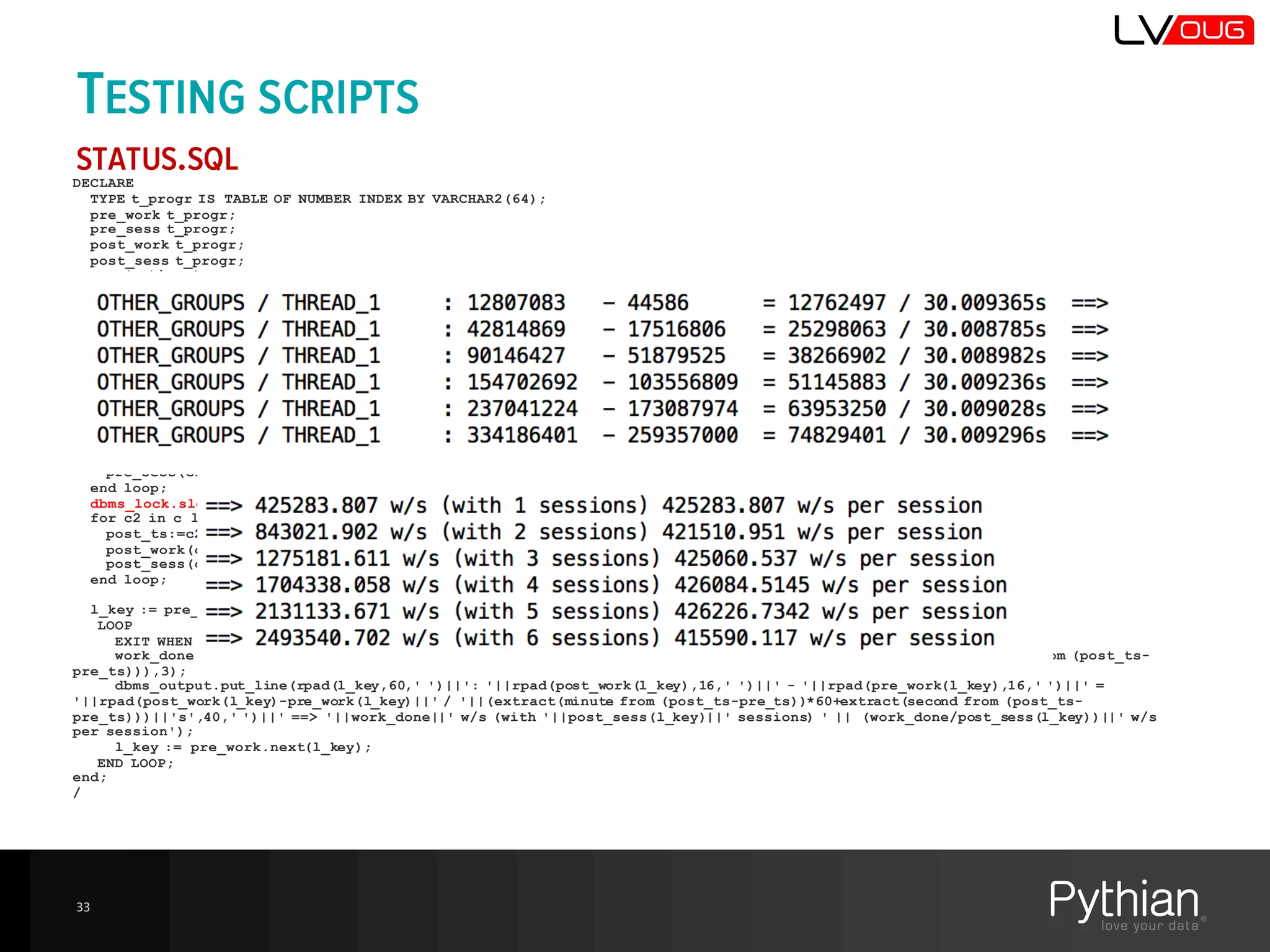
STATUS.SQL
DECLARE
TYPE t_progr IS TABLE OF NUMBER INDEX BY VARCHAR2(64);
pre_work t_progr;
pre_sess t_progr;
post_work t_progr;
post_sess t_progr;
pre_ts timestamp;
post_ts timestamp;
cursor c is select current_timestamp ts , nvl(RESOURCE_CONSUMER_GROUP,'{null}')||' / '||action RESOURCE_CONSUMER_GROUP,
count(*) sessions, sum(CLIENT_INFO) WORK_DONE from v$session where module='ORM_TEST' group by current_timestamp,
nvl(RESOURCE_CONSUMER_GROUP,'{null}')||' / '||action order by 2;
c1 c%rowtype;
c2 c%rowtype;
l_key varchar2(100);
work_done number;
begin
for c1 in c loop
pre_ts:=c1.ts;
pre_work(c1.RESOURCE_CONSUMER_GROUP):=c1.WORK_DONE;
pre_sess(c1.RESOURCE_CONSUMER_GROUP):=c1.sessions;
end loop;
dbms_lock.sleep(30);
for c2 in c loop
post_ts:=c2.ts;
post_work(c2.RESOURCE_CONSUMER_GROUP):=c2.WORK_DONE;
post_sess(c2.RESOURCE_CONSUMER_GROUP):=c2.sessions;
end loop;
l_key := pre_work.first;
LOOP
EXIT WHEN l_key IS NULL;
work_done:=round((post_work(l_key)-pre_work(l_key))/(extract(minute from (post_ts-pre_ts))*60+extract(second from (post_ts-
pre_ts))),3);
dbms_output.put_line(rpad(l_key,60,' ')||': '||rpad(post_work(l_key),16,' ')||' - '||rpad(pre_work(l_key),16,' ')||' =
'||rpad(post_work(l_key)-pre_work(l_key)||' / '||(extract(minute from (post_ts-pre_ts))*60+extract(second from (post_ts-
pre_ts)))||'s',40,' ')||' ==> '||work_done||' w/s (with '||post_sess(l_key)||' sessions) ' || (work_done/post_sess(l_key))||' w/s
per session');
l_key := pre_work.next(l_key);
END LOOP;
end;
/
33
TESTING SCRIPTS
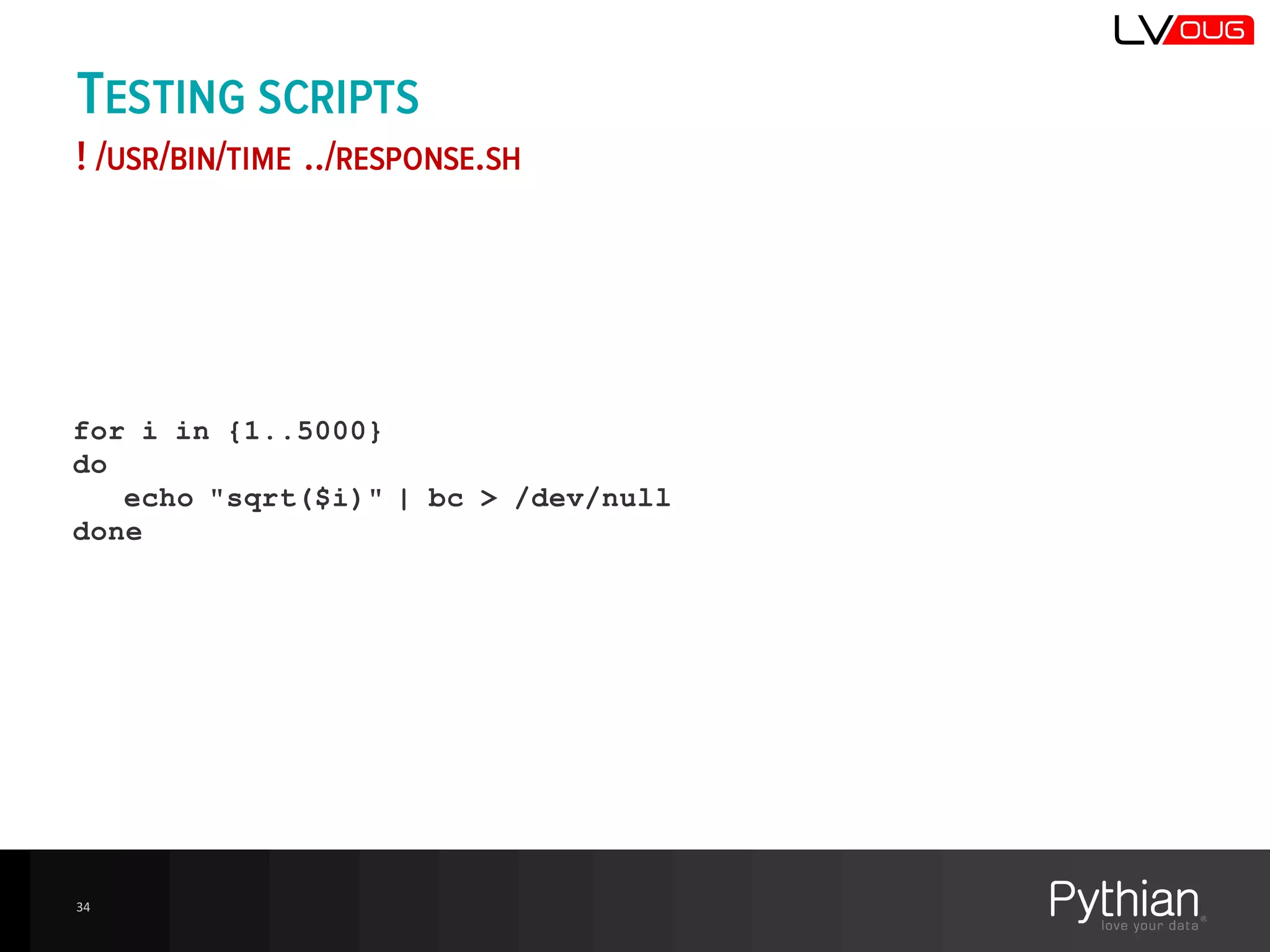
! /USR/BIN/TIME ../RESPONSE.SH
for i in {1..5000}
do
echo "sqrt($i)" | bc > /dev/null
done
34
TEST1
NO RESOURCE MANAGER
• Init parameters:
– resource_limit=true
– cpu_count=24
– resource_manager_plan='FORCE:’
• CDB
– resource_manager_plan='FORCE:’ was set in all PDBs
and ROOT.
– ! Having a RM plan enabled in one PDB caused the
whole CDB to be managed by the Resource Manager
35
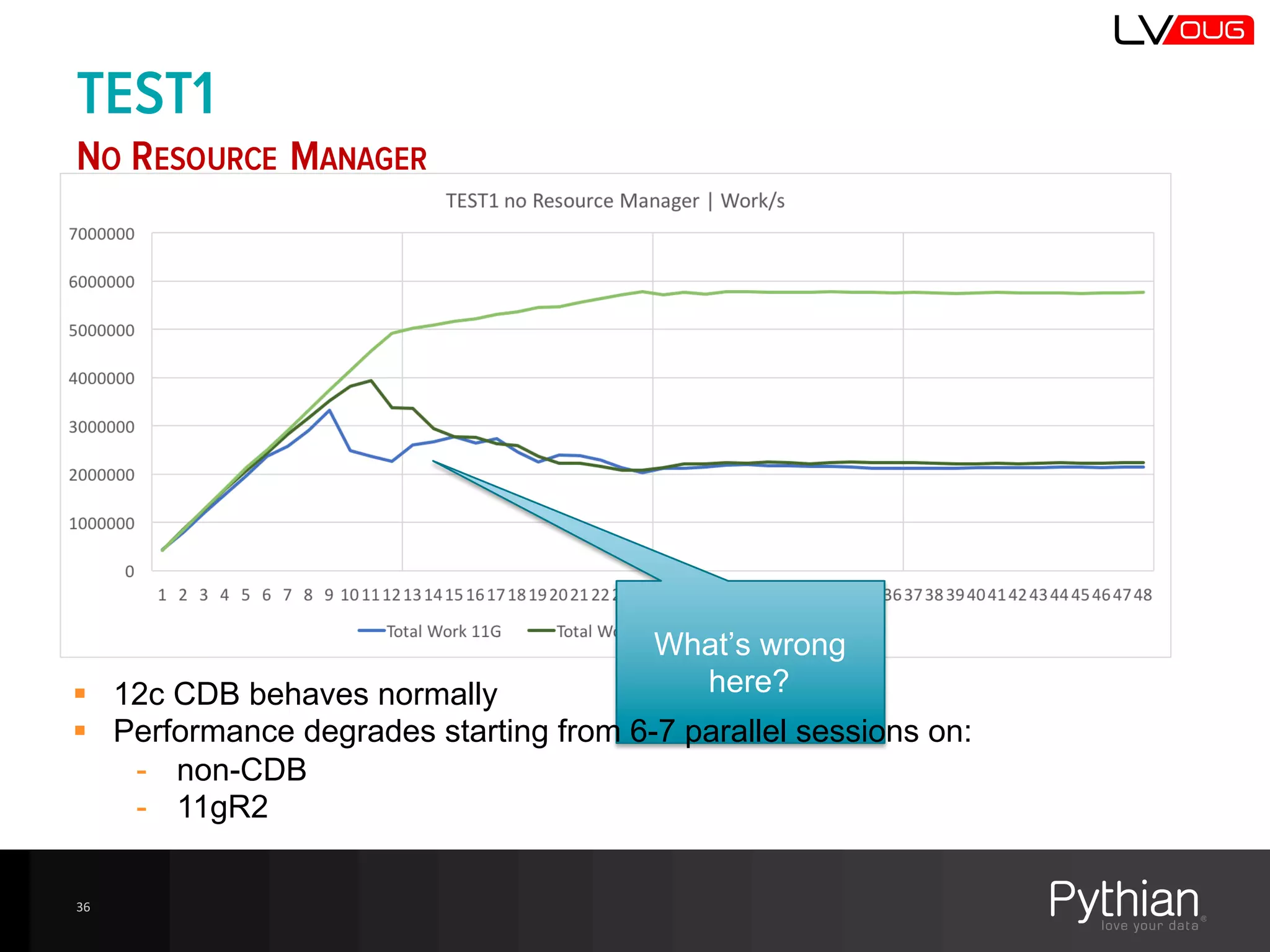
TEST1
NO RESOURCE MANAGER
36
What’s  wrong  
here?§ 12c  CDB  behaves  normally
§ Performance  degrades  starting  from  6-­7  parallel  sessions  on:
-­ non-­CDB
-­ 11gR2
TEST1
NO RESOURCE MANAGER
37
We’re  sleeping  
for  Latch  Gets
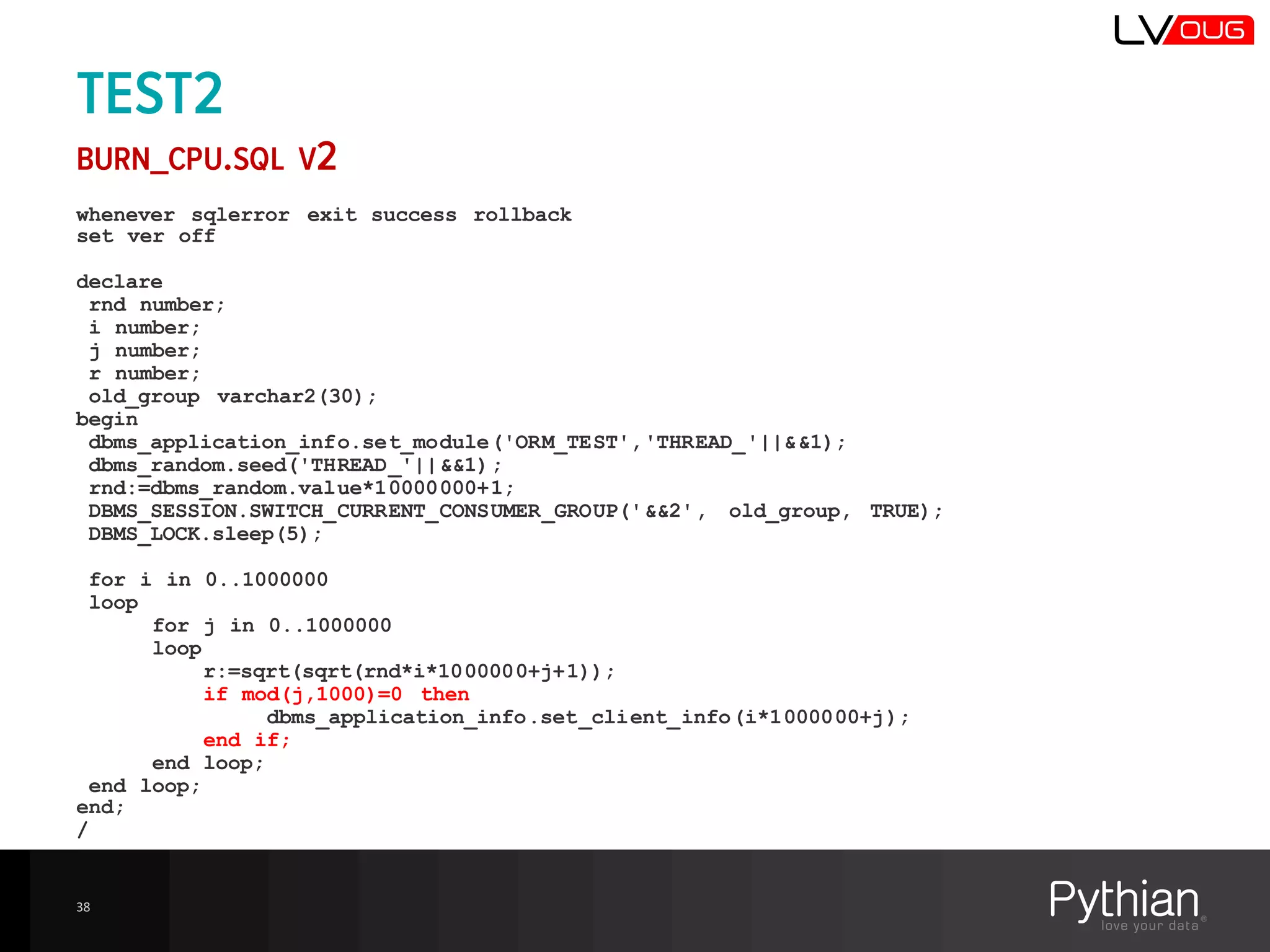
TEST2
BURN_CPU.SQL V2
whenever sqlerror exit success rollback
set ver off
declare
rnd number;
i number;
j number;
r number;
old_group varchar2(30);
begin
dbms_application_info.set_module('ORM_TEST','THREAD_'||&&1);
dbms_random.seed('THREAD_'||&&1);
rnd:=dbms_random.value*10000000+1;
DBMS_SESSION.SWITCH_CURRENT_CONSUMER_GROUP('&&2', old_group, TRUE);
DBMS_LOCK.sleep(5);
for i in 0..1000000
loop
for j in 0..1000000
loop
r:=sqrt(sqrt(rnd*i*1000000+j+1));
if mod(j,1000)=0 then
dbms_application_info.set_client_info(i*1000000+j);
end if;
end loop;
end loop;
end;
/
38
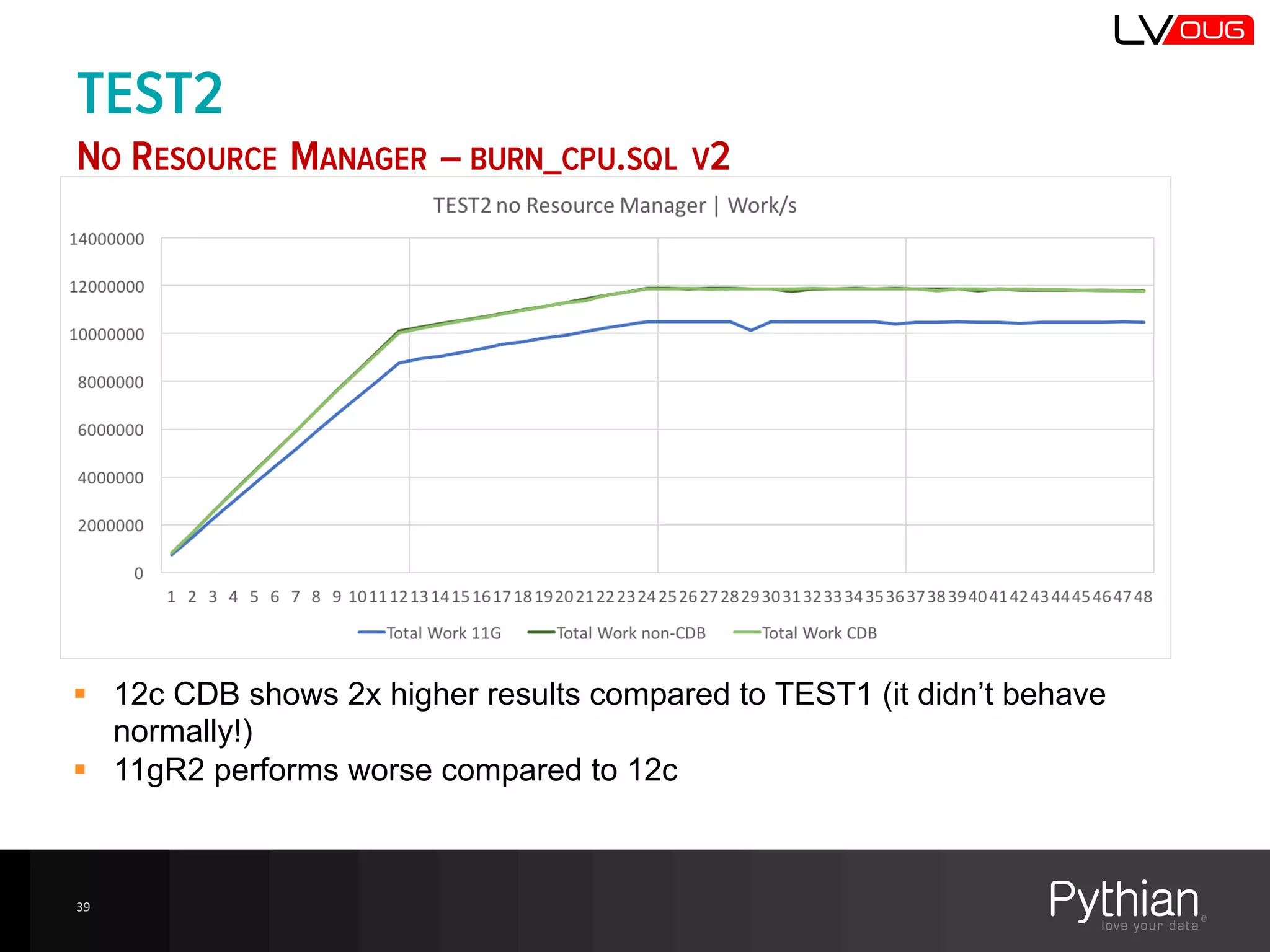
TEST2
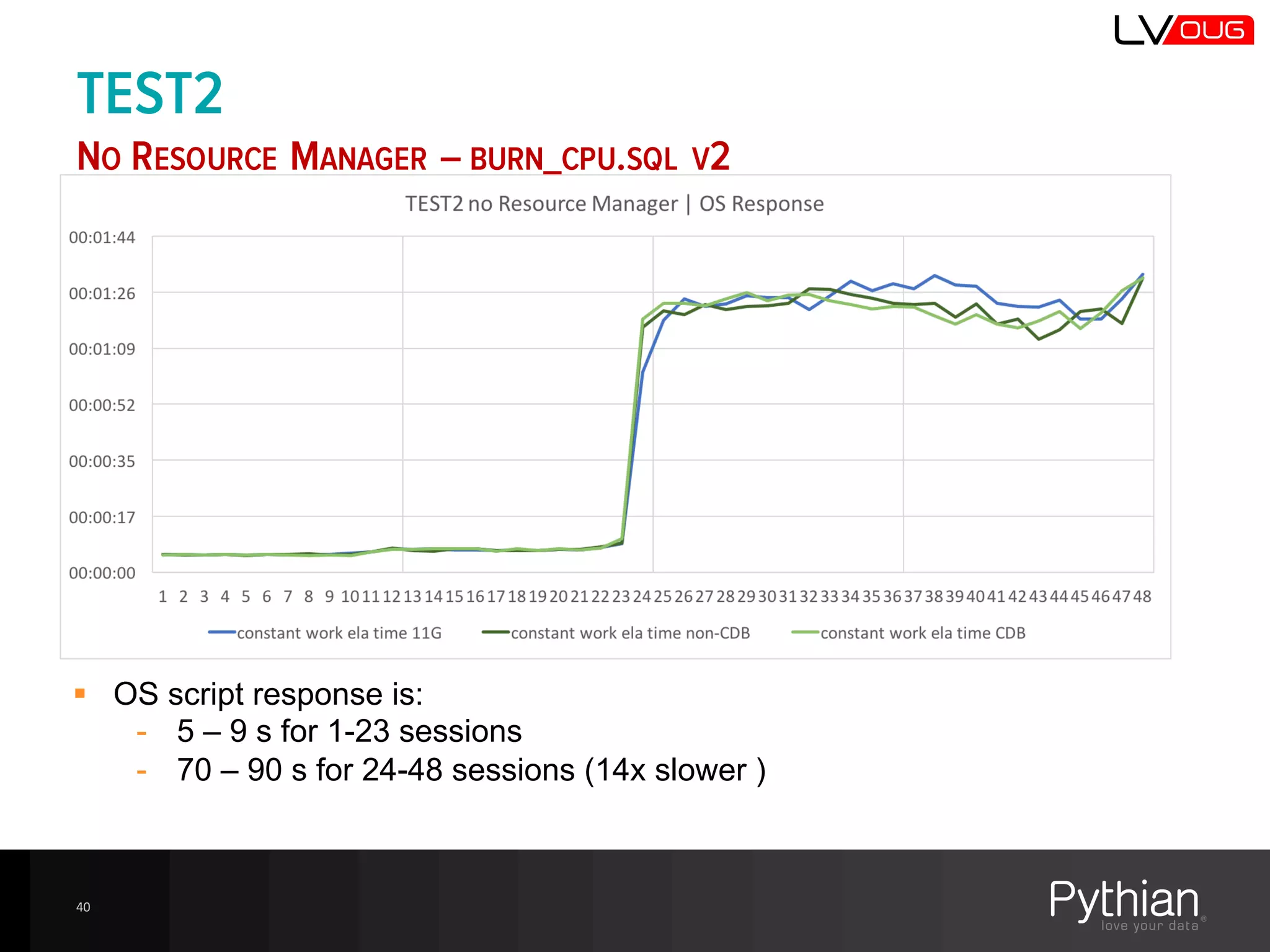
NO RESOURCE MANAGER – BURN_CPU.SQL V2
39
§ 12c  CDB  shows  2x  higher  results  compared  to  TEST1  (it  didn’t  behave  
normally!)
§ 11gR2  performs  worse  compared  to  12c
TEST2
NO RESOURCE MANAGER – BURN_CPU.SQL V2
40
§ OS  script  response  is:
-­ 5  – 9  s  for  1-­23  sessions
-­ 70  – 90  s  for  24-­48  sessions  (14x  slower  )
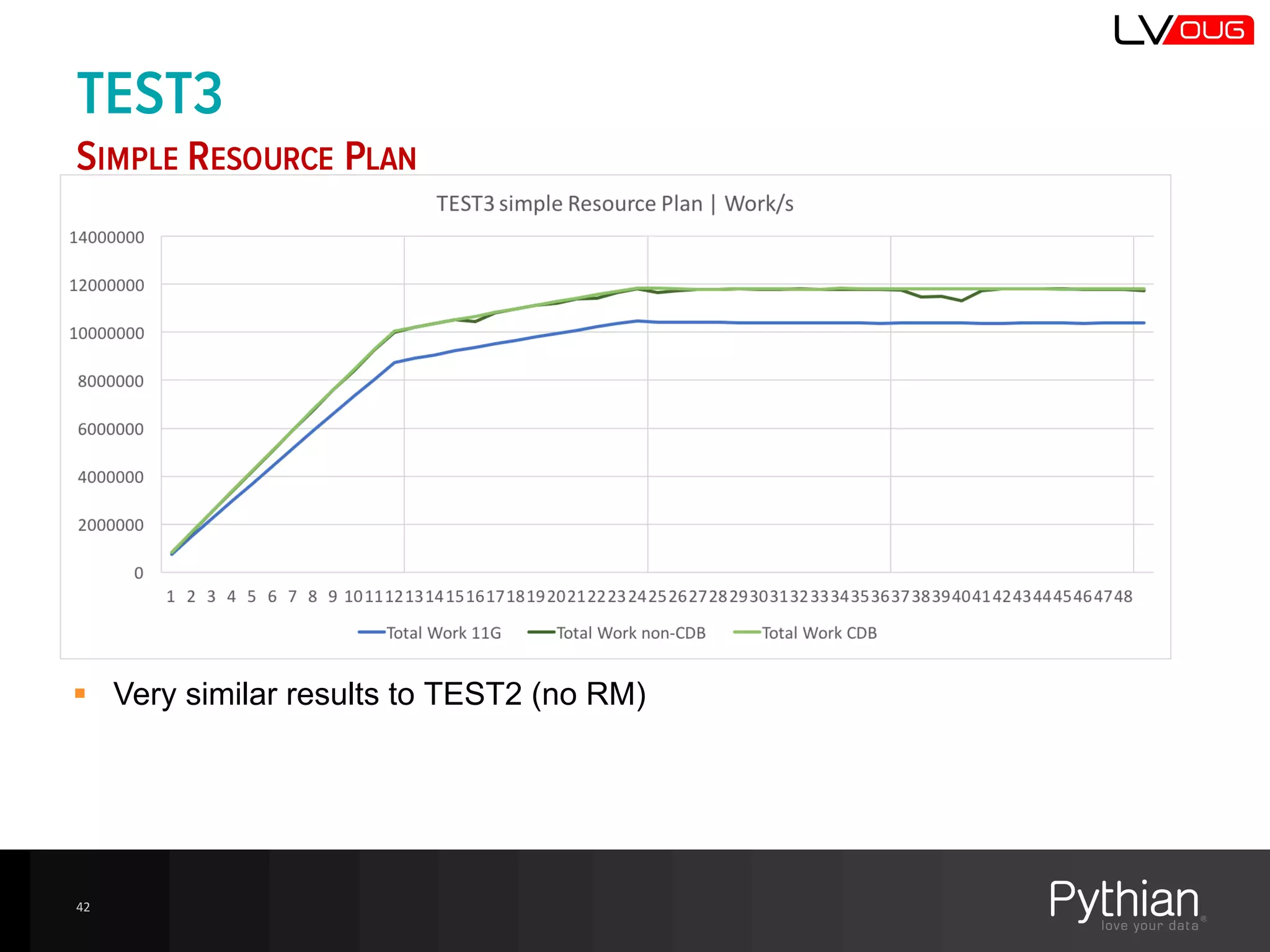
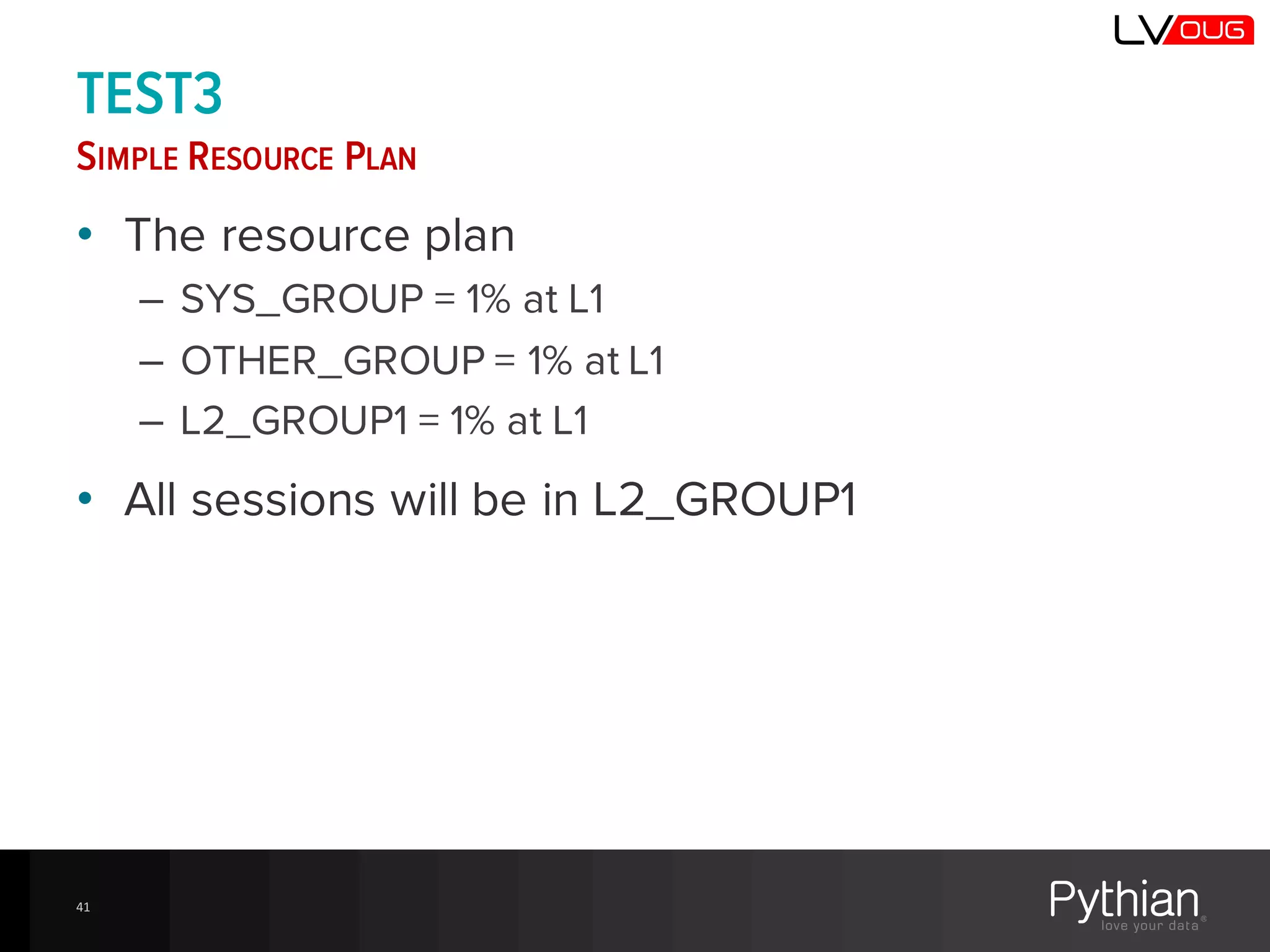
TEST3
SIMPLE RESOURCE PLAN
• The resource plan
– SYS_GROUP = 1% at L1
– OTHER_GROUP = 1% at L1
– L2_GROUP1 = 1% at L1
• All sessions will be in L2_GROUP1
41
TEST3
SIMPLE RESOURCE PLAN
42
§ Very  similar  results  to  TEST2  (no  RM)
TEST3
SIMPLE RESOURCE PLAN
43
§ Even  a  very  simple  RM  plan  throttles  sessions  instead  of  letting  them  
saturate  the  servers
§ Spike  at  exactly  24  active  sessions  is  caused  by  the  fact  the  RM  is  not  yet  
throttling  sessions  and  all  Logical  CPUs  are  used
What  is  that  
spike?
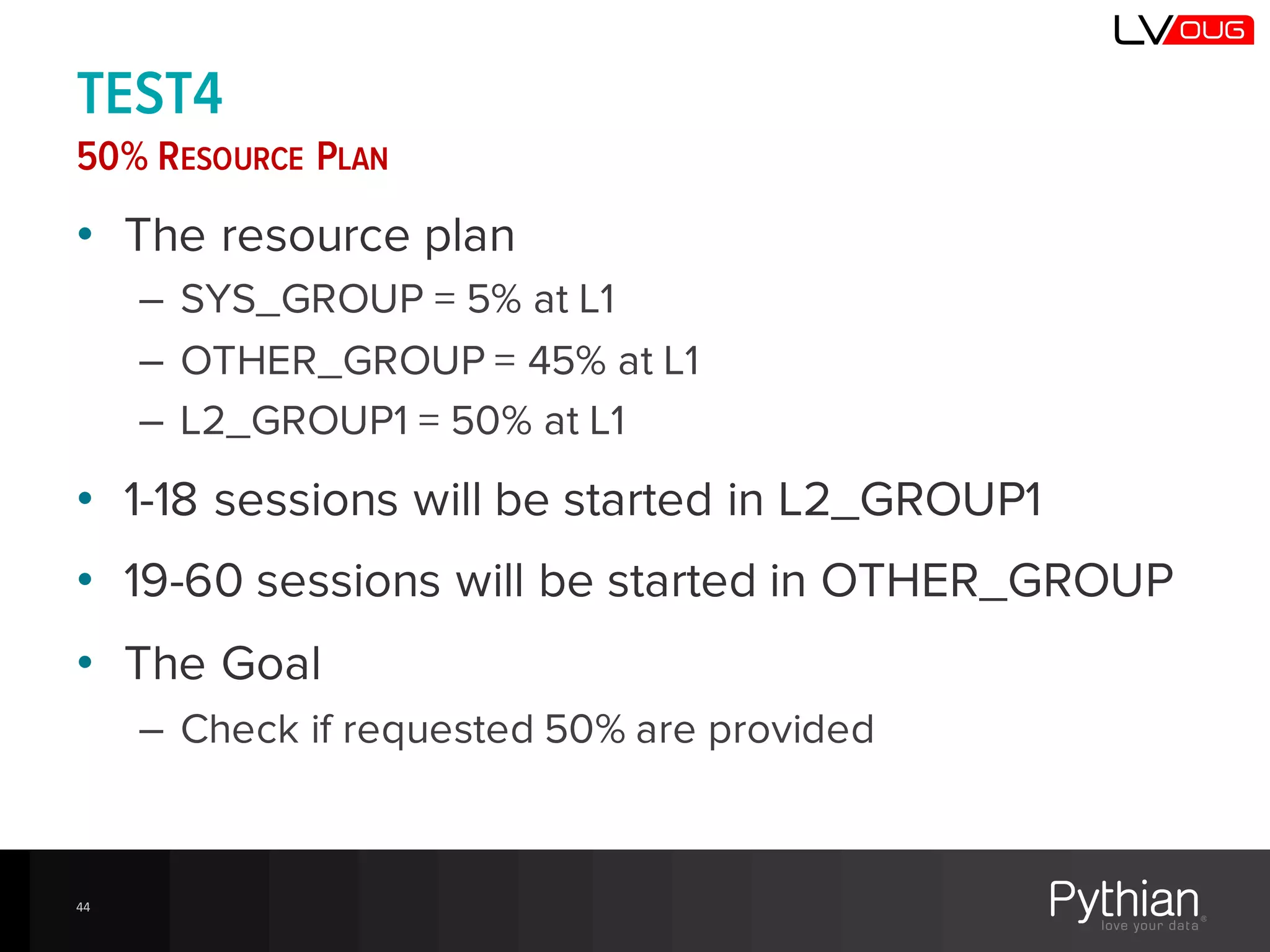
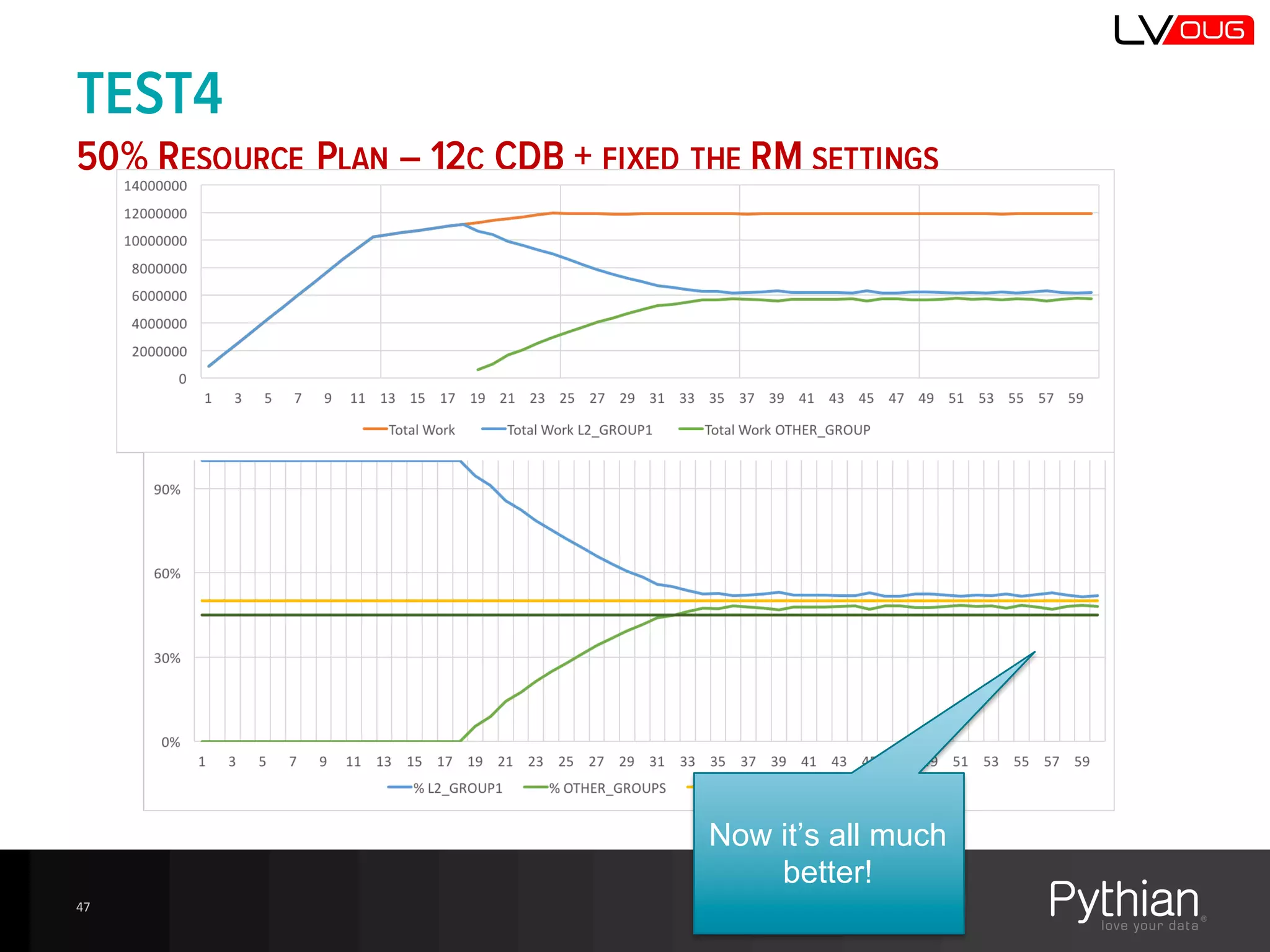
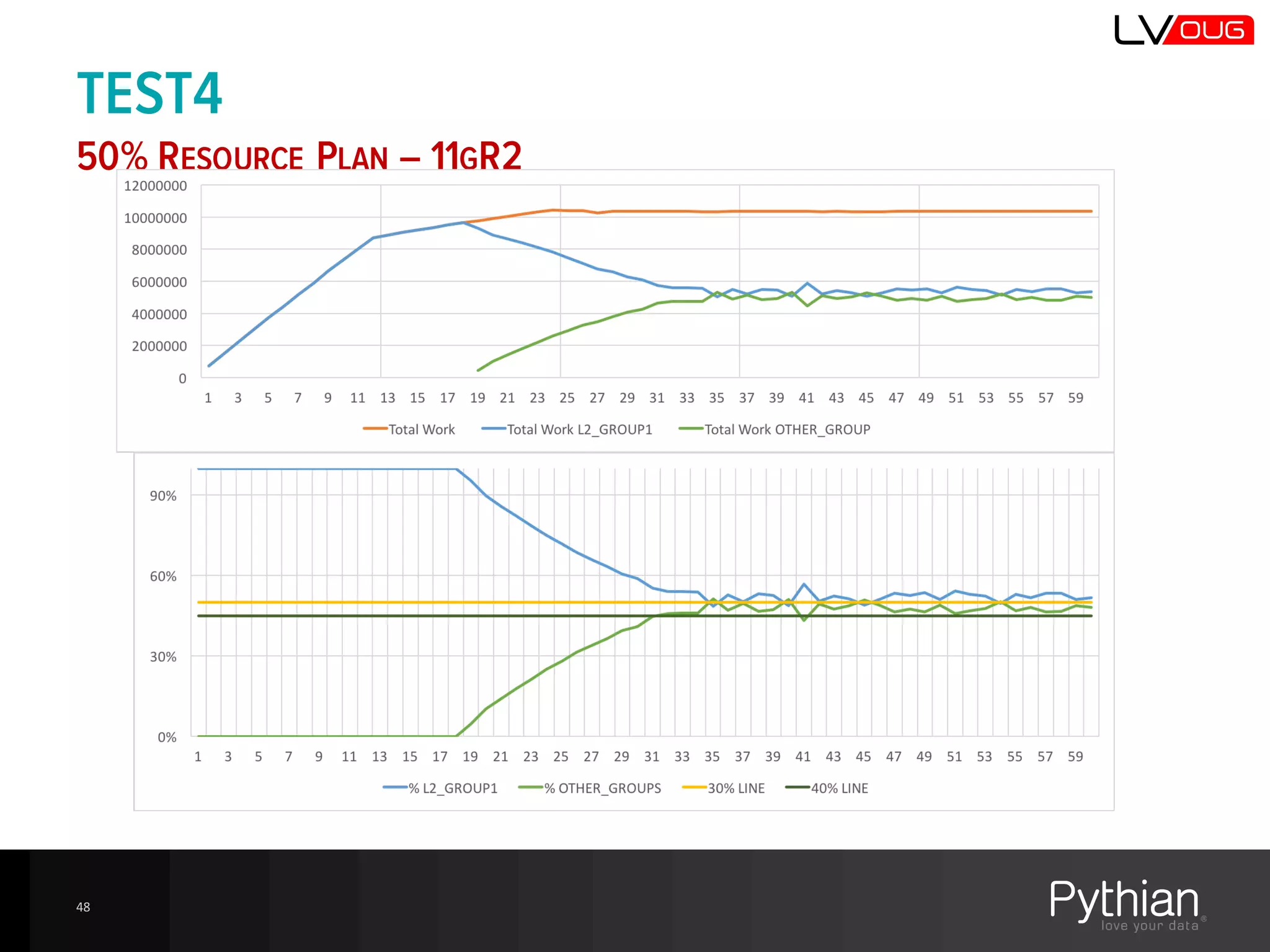
TEST4
50% RESOURCE PLAN
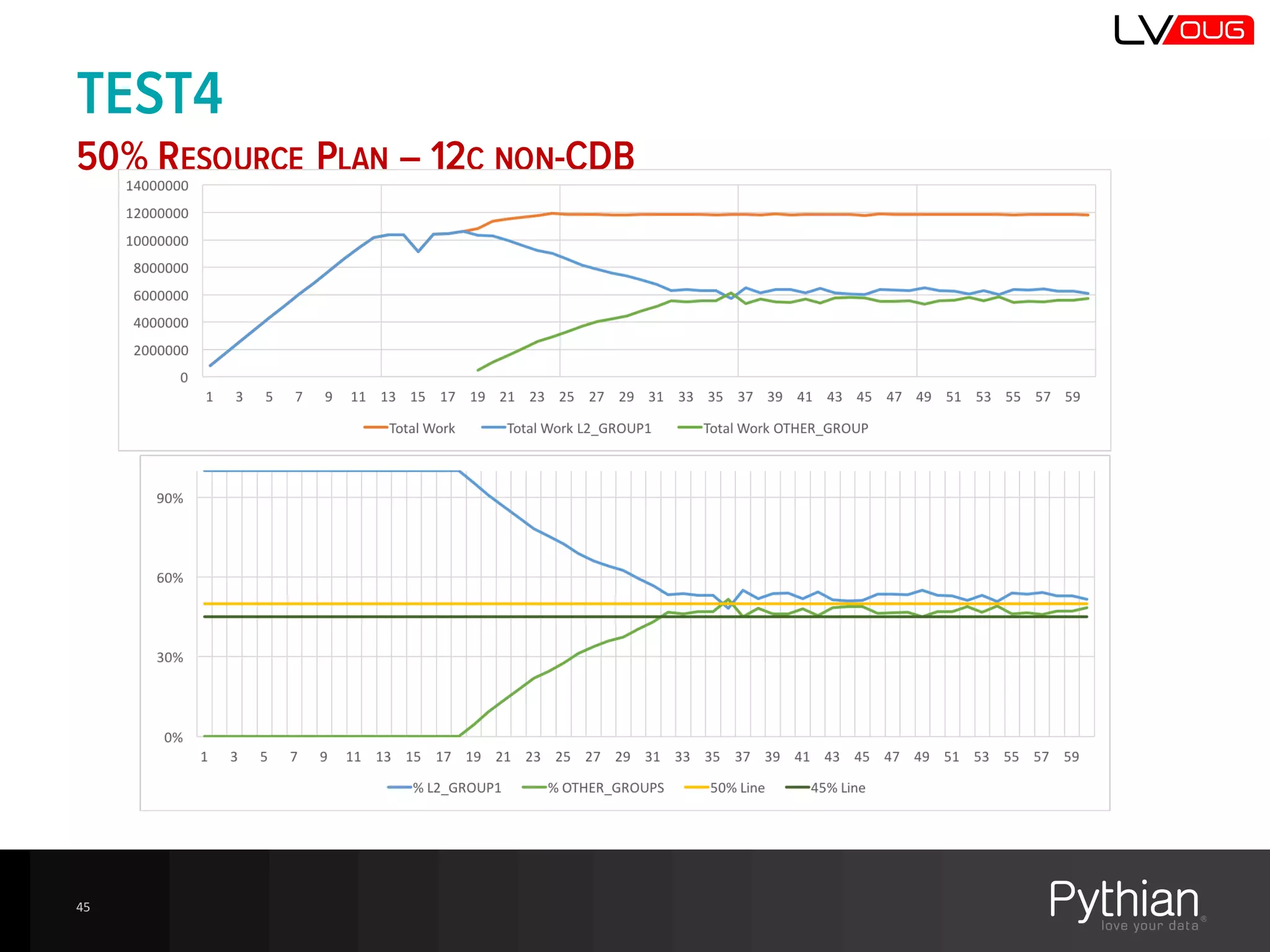
• The resource plan
– SYS_GROUP = 5% at L1
– OTHER_GROUP = 45% at L1
– L2_GROUP1 = 50% at L1
• 1-18 sessions will be started in L2_GROUP1
• 19-60 sessions will be started in OTHER_GROUP
• The Goal
– Check if requested 50% are provided
44
TEST4
50% RESOURCE PLAN – 12C NON-CDB
45
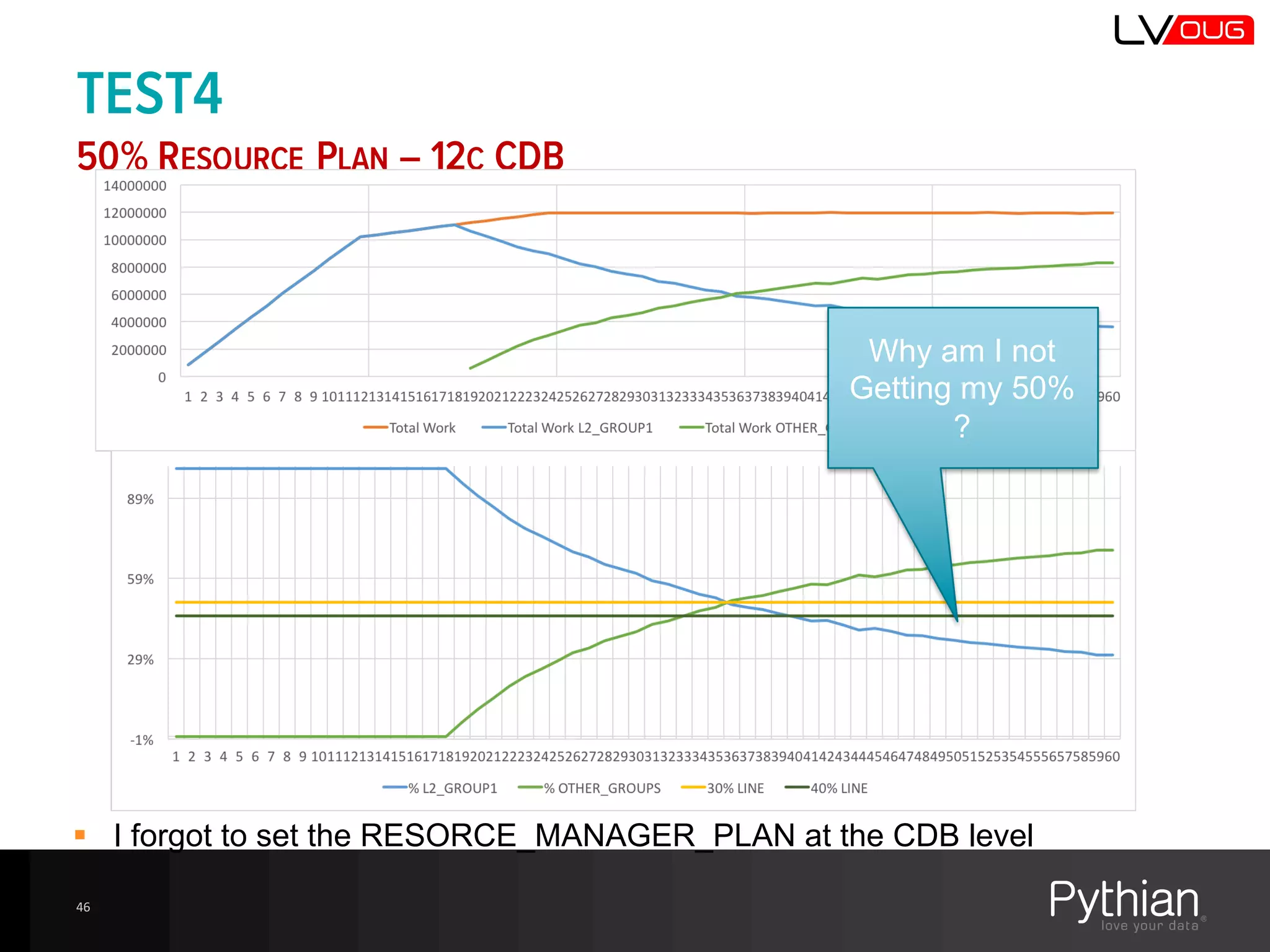
TEST4
50% RESOURCE PLAN – 12C CDB
46
Why  am  I  not  
Getting  my  50%  
?
§ I  forgot  to  set  the  RESORCE_MANAGER_PLAN  at  the  CDB  level
TEST4
50% RESOURCE PLAN – 12C CDB + FIXED THE RM SETTINGS
47
Now  it’s  all  much  
better!
TEST4
50% RESOURCE PLAN – 11GR2
48
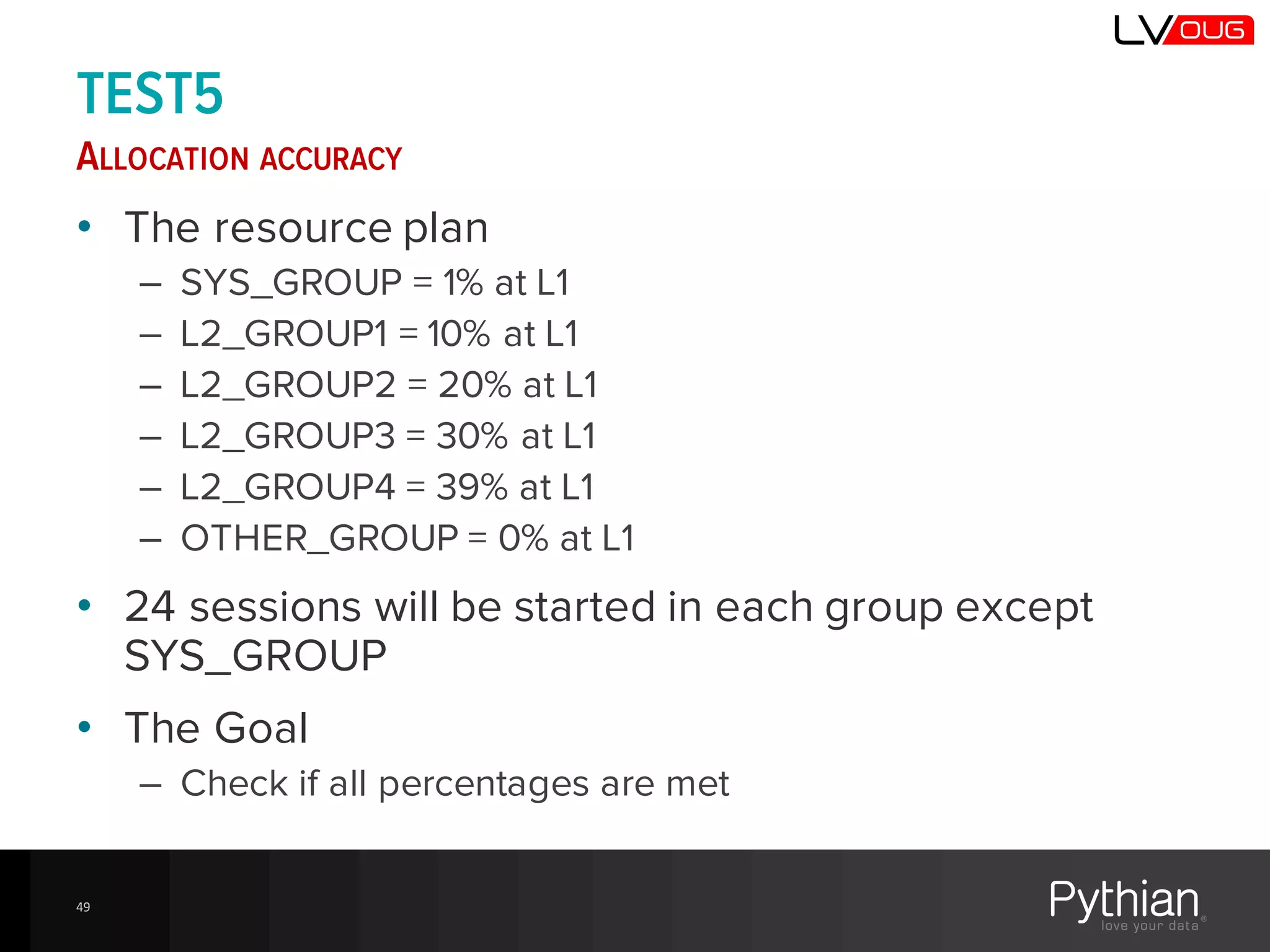
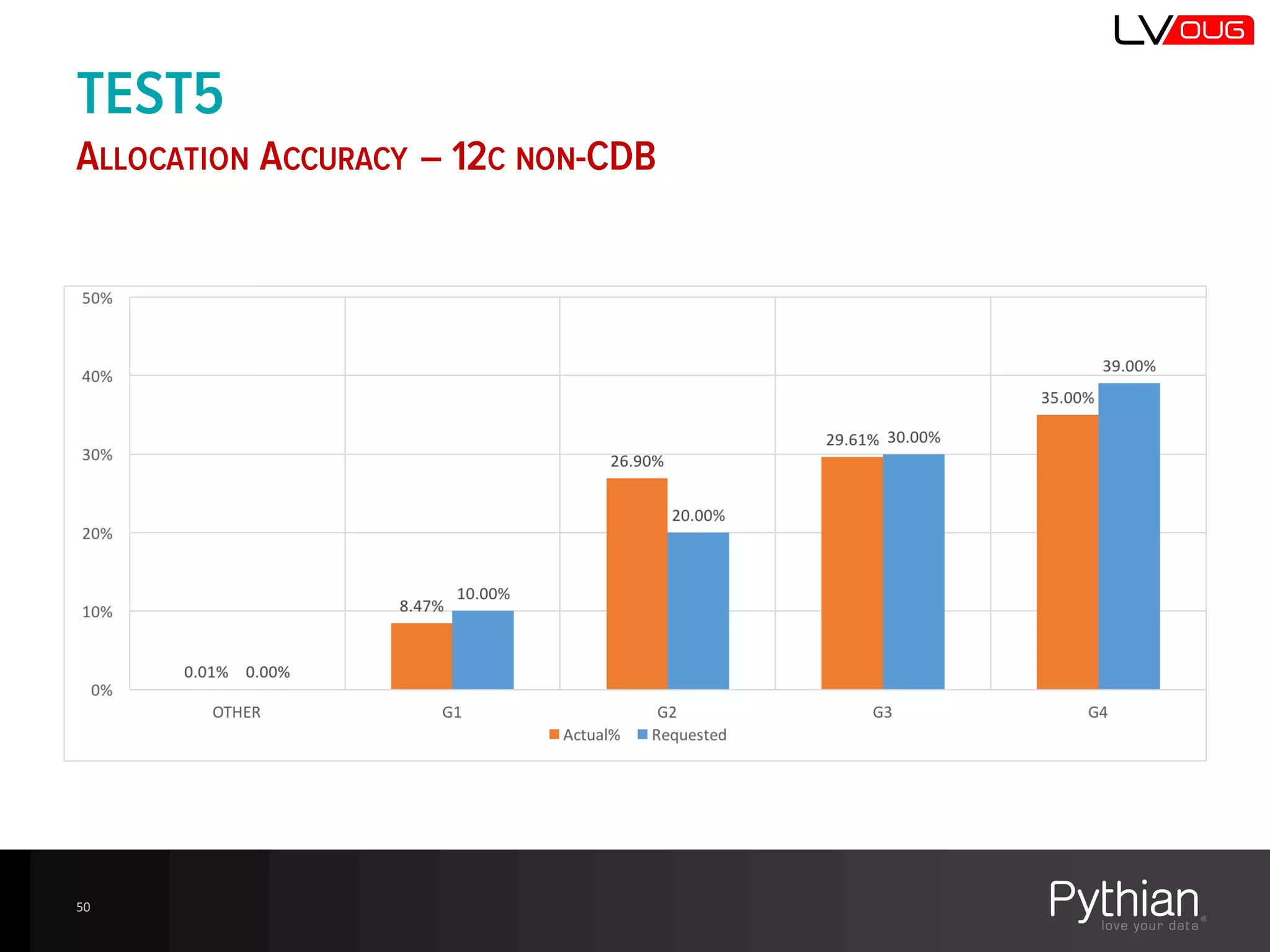
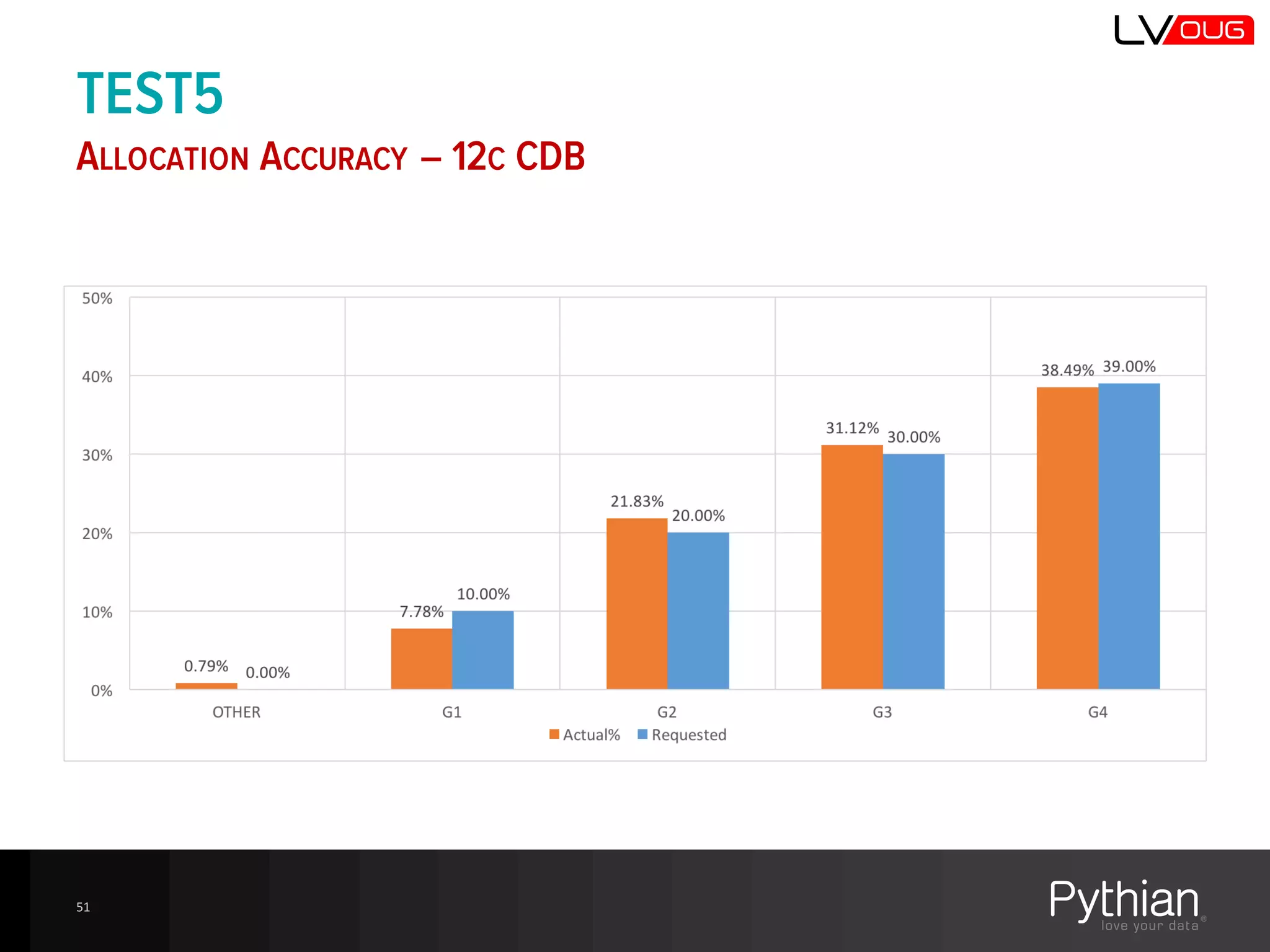
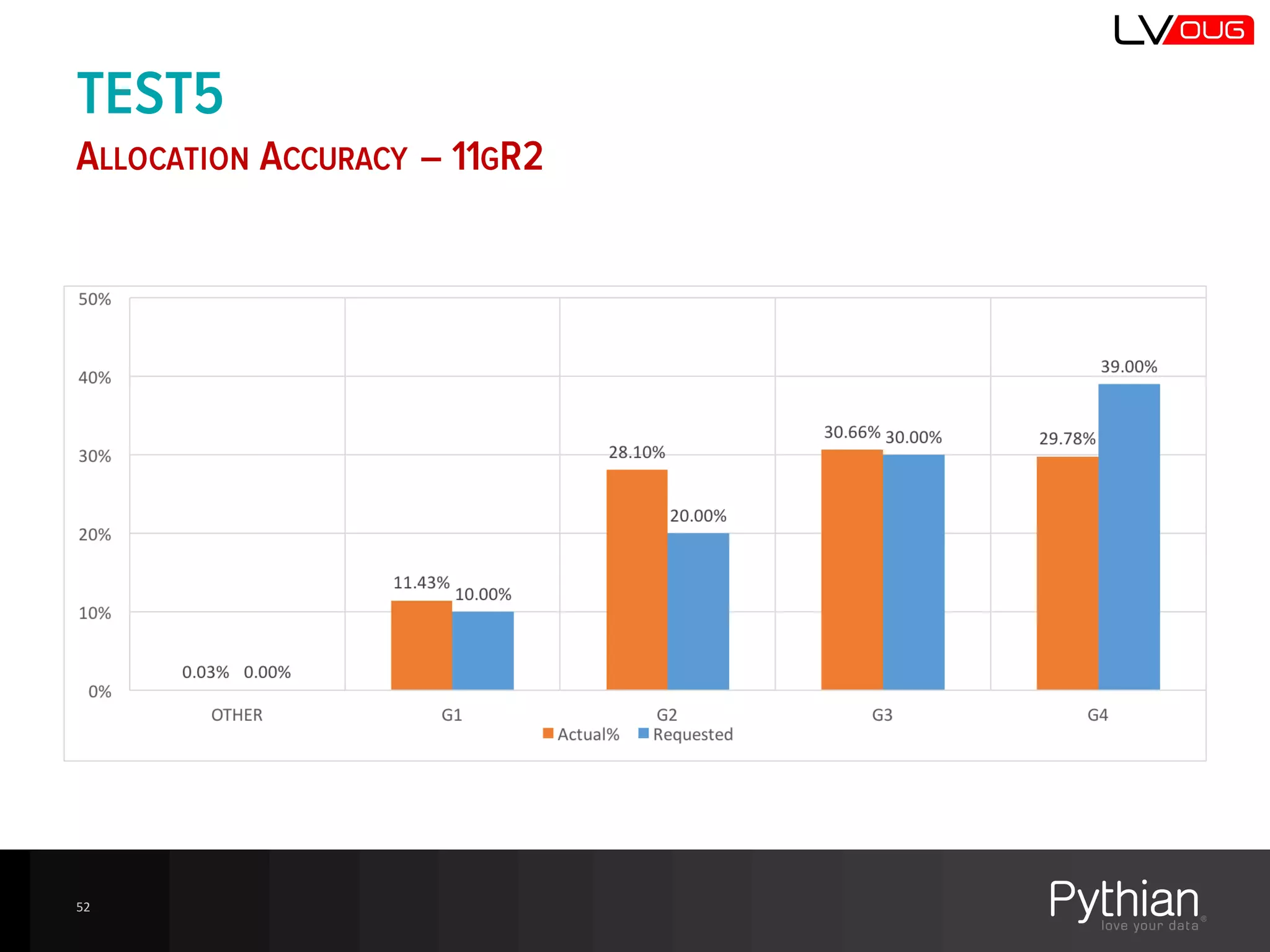
TEST5
ALLOCATION ACCURACY
• The resource plan
– SYS_GROUP = 1% at L1
– L2_GROUP1 = 10% at L1
– L2_GROUP2 = 20% at L1
– L2_GROUP3 = 30% at L1
– L2_GROUP4 = 39% at L1
– OTHER_GROUP = 0% at L1
• 24 sessions will be started in each group except
SYS_GROUP
• The Goal
– Check if all percentages are met
49
TEST5
ALLOCATION ACCURACY – 12C NON-CDB
50
TEST5
ALLOCATION ACCURACY – 12C CDB
51
TEST5
ALLOCATION ACCURACY – 11GR2
52
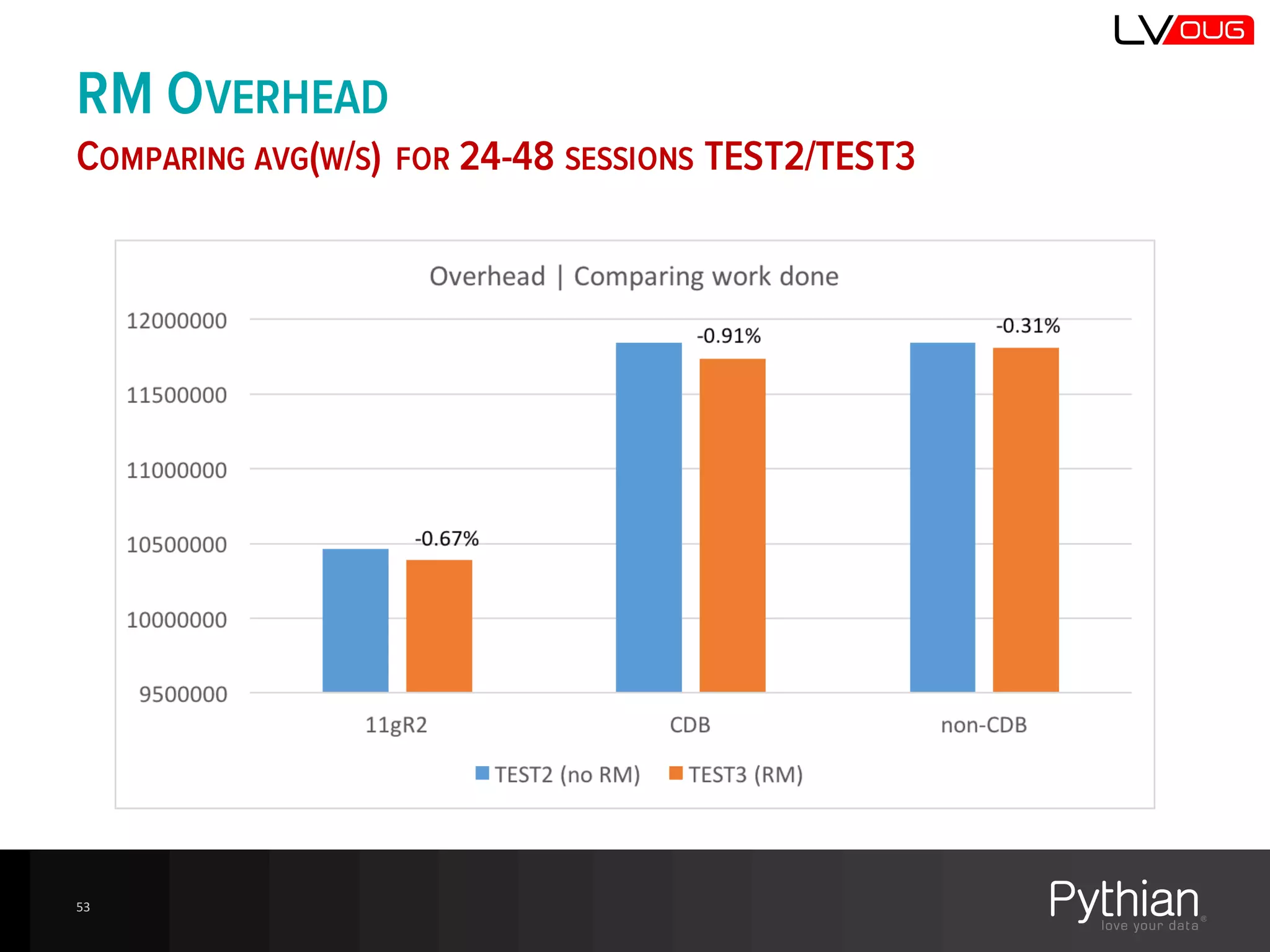
RM OVERHEAD
COMPARING AVG(W/S) FOR 24-48 SESSIONS TEST2/TEST3
53
FINDINGS
54
FINDINGS
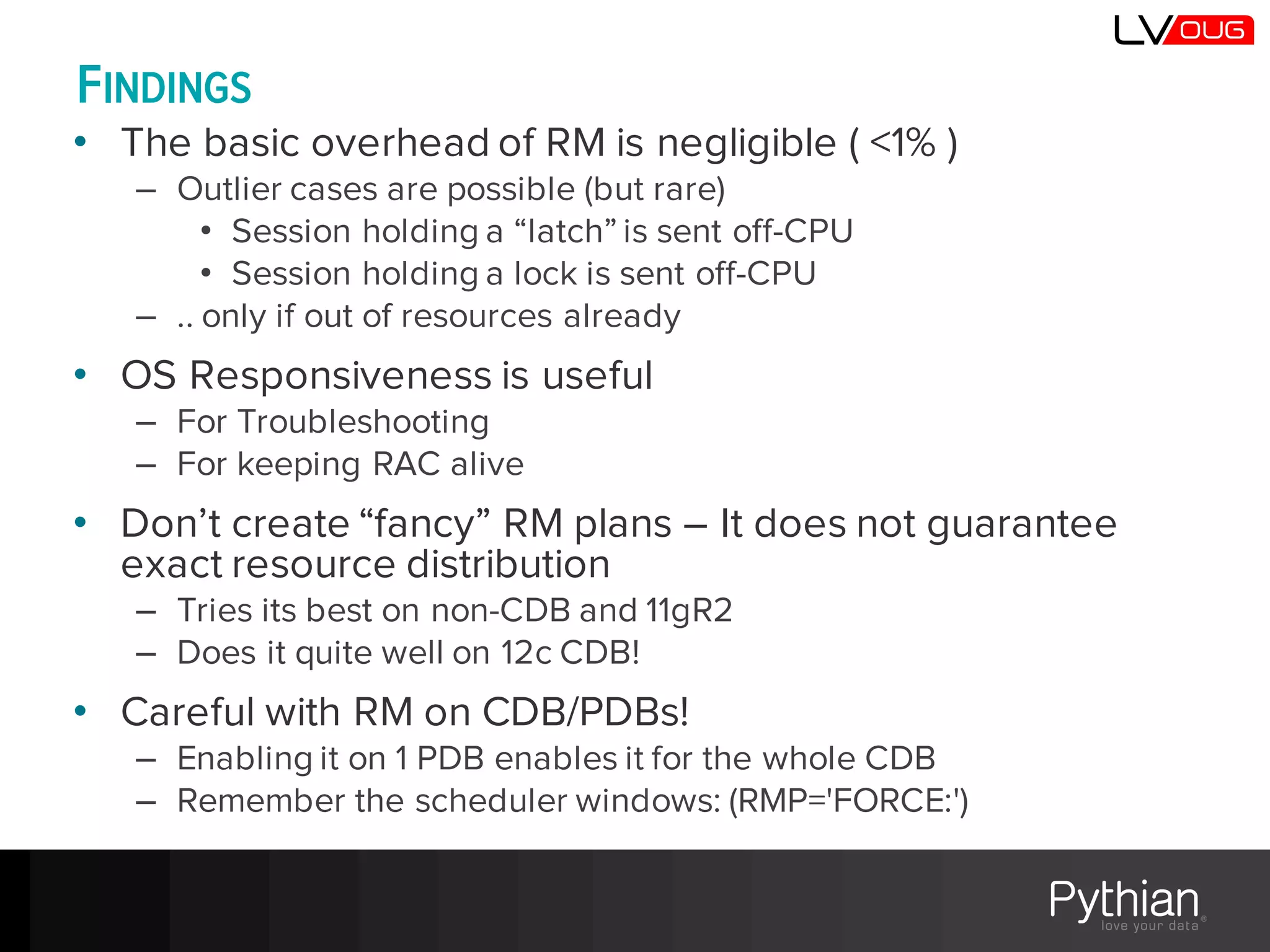
• The basic overhead of RM is negligible ( <1% )
– Outlier cases are possible (but rare)
• Session holding a “latch” is sent off-CPU
• Session holding a lock is sent off-CPU
– .. only if out of resources already
• OS Responsiveness is useful
– For Troubleshooting
– For keeping RAC alive
• Don’t create “fancy” RM plans – It does not guarantee
exact resource distribution
– Tries its best on non-CDB and 11gR2
– Does it quite well on 12c CDB!
• Careful with RM on CDB/PDBs!
– Enabling it on 1 PDB enables it for the whole CDB
– Remember the scheduler windows: (RMP='FORCE:')
?
http://bit.ly/getMOSPatch elsins@pythian.com
http://www.pythian.com/blog/author/elsins @MarisElsins
56

DB12c: All You Need to Know About the Resource Manager

  • 1.
    DB12C: ALL YOUNEED TO KNOW ABOUT THE RESOURCE MANAGER Māris Elsiņš Lead Database Consultant Pythian @MarisElsins
  • 2.
    MARIS ELSINS Lead DatabaseConsultant at Pythian Oracle [Apps] DBA since 2005 Speaker at conferences since 2007 @MarisElsins elsins@pythian.com http://bit.ly/getMOSPatch
  • 3.
    ABOUT PYTHIAN 3 Founded  in 1997,  Pythian  is  a  global   leader  in  data  consulting  and  managed   services  specializing    in  planning,   optimizing,  and  managing  mission-­ critical  data  systems Top  5%  talent  worldwide     10  Oracle  ACEs 3  Oracle  ACE  Directors 18  years  in  business   450+  employees 250+  customers  worldwide  
  • 4.
    AGENDA • Features ofthe Resource Manager • The new 12c-stuff • Consolidations using Oracle Multitenant • Overhead of the RM 4
  • 5.
    FEATURES OF THERESOURCE MANAGER 5
  • 6.
    THE PROBLEM • OS doesn’t  care  enough  about  DB  sessions/processes   according  to  what  business  requires – Assigns  the  same  priority  to  all  processes – CPU  resources  are  equally  distributed  among  all  processes – Inability  to  manage  DB-­specific  resources/situations • CPU  distribution  among  sessions,  Parallel  Execution   Servers,  Active  session  Pool  and  Queuing,  Undo  usage,   Runaway  Queries,  Blocking  sessions – Context  switching  overhead  when  many  processes  running • Problems  start  when  there’s  not  enough  CPU  for   everyone • CPU  starvation  can  be  hard  to  recover  from (the  snowball  effect) • CPU  starvation  makes  online  troubleshooting  hard  to  do 6
  • 7.
    PROBLEM SCENARIOS -QUIZ TIME! • Running  reports  causes  too  much  load  on  the  OLTP  system. • One  of  the  sessions  allocate  all  parallel  query  slaves  therefore  other   sessions  don’t  get  any • Application  support  team  runs  heavy  queries  to  analyze  the  data   leaving  less  resources  for  online  transactions • Wide  search  criteria  cause  “hangs”  in  the  search  form • 3  of  8  CPU  cores  are  idle,  my  query  runs  without  parallel  execution,   I  could  use  the  idle  CPUs  to  provide  results  faster • Users  don’t  log  out  and  leave  idle  sessions • My  batch  process  requires  DOP=8  to  complete  in  time,  but  it’s   downgraded  to  smaller  DOP  if  enough  parallel  slaves  are  not  available • My  query  is  very  important.  It’s  IO  requests  have  to  be  prioritized! • Sessions  with  incomplete  transactions  have  locked  some  rows  and   other  sessions  have  stuck. 7
  • 8.
    THE BASIC CONCEPTS •Resource Manager – Included in Oracle EE license – Allows prioritization of sessions according to the defined business requirements – Allows defining the guaranteed amount of allocated resources for each type of sessions (consumer group) – Resources not used by higher priority sessions, can be used by lower priority sessions • Prioritizationis achieved by changing the process states to running/sleeping – DBRM / VKRM (CPU scheduling) – Semaphores (wake up sleeping processes) – CPU quantum (_dbrm_quantum) • Resource manager does not solve the «lack of CPU resources» problem, it just controls the execution queue • Resource manager uses some resources too, the last part of the presentation will estimate the overhead 8
  • 9.
    THE BASIC CONCEPTS 9 •Consumer group – Set of sessions having similar requirements for server resources – Resources are allocated to the consumer group, not individual sessions – DBA_RSRC_CONSUME_GROUPS • Directives – Rules that define resource allocation to the consumer group – DBA_RSRC_PLAN_DIRECTIVES • Resource plan – Set of directives defining the distribution of resources among consumer groups – DBA_RSRC_PLANS
  • 10.
    SQL> select event,count(*) from v$session group by event order by 2 desc; EVENT COUNT(*) ---------------------------------------------------------------- ---------- resmgr:cpu quantum 25 rdbms ipc message 23 Space Manager: slave idle wait 16 SQL*Net message from client 9 EMON slave idle wait 5 DIAG idle wait 2 LGWR worker group idle 2 GCR sleep 2 Streams AQ: waiting for time management or cleanup tasks 1 VKTM Logical Idle Wait 1 AQPC idle 1 Streams AQ: qmn coordinator idle wait 1 VKRM Idle 1 PING 1 ... 23 rows selected. RESMGR:CPU QUANTUM WHY IS MY SESSION NOT RUNNING? 10
  • 11.
    RESMGR:CPU QUANTUM WHY ISMY SESSION NOT RUNNING? SQL> select event, status, count(*) from v$session where event='resmgr:cpu quantum' group by event, status order by 1,2; EVENT STATUS COUNT(*) ------------------ -------- ---------- resmgr:cpu quantum ACTIVE 25 11
  • 12.
    RESMGR:CPU QUANTUM WHY ISMY SESSION NOT RUNNING? 12 SQL> select event, status, state, count(*) from v$session where event='resmgr:cpu quantum' group by event, status, state order by 1,2,3; EVENT STATUS STATE COUNT(*) ------------------ -------- ------------------- ---------- resmgr:cpu quantum ACTIVE WAITED KNOWN TIME 7 resmgr:cpu quantum ACTIVE WAITED SHORT TIME 16 resmgr:cpu quantum ACTIVE WAITING 2
  • 13.
    RESMGR:CPU QUANTUM WHY ISMY SESSION NOT RUNNING? • EVENT values are often misinterpreted in: – V$SESSION – V$SESSION_WAIT • Common mistake is to forget about v$session.STATE! • If STATE = 'WAITING’, only then the session is waiting – EVENT shows what the session is waiting for – STATUS can be ACTIVE or INACTIVE • If STATE = 'WAITED % TIME’ .. – and STATUS = 'ACTIVE', the session is ON CPU – and STATUS != 'ACTIVE', the session is not running THIS IS TRUE FOR ALL WAITEVENTS 13
  • 14.
    FEATURES 9.2 10.2 11.111.2 12.1 CPU resource allocation J J J J J Limit of the degree of parallelism J J J J J active session pool J J J J J Automated change of consumer group if session has used or is estimated to use the defined amount of resources CPU,   Est  CPU CPU,   Est  CPU CPU, Est CPU,   IO_MB,   IO_REQ CPU, Est CPU,   IO_MB,   IO_REQ CPU, Est  CPU,   IO_MB,   IO_REQ, LIO, Ela, Est  Ela Limit of estimated execution time J J J J J Limit size of undo used by uncommitted sessions J J J J J Termination of idle sessions J J J J Termination of idle blocking sessions J J J J L0 70% CPU _ORACLE_BACKGROUND_GROUP_ hidden consumer group for background processes J J J at  90% Instance caging /CPU_COUNT + resource plan/ J J Max CPU Utilization limit J J Parallel Statement Queue J J LOG_ONLY “switch group” for real-time SQL monitoring J Simplified automated consumer group switching J 14
  • 15.
  • 16.
    AUTOMATED CONSUMER GROUPSWITCHING 12C: MORE OPTIONS • Logical IO • Elapsed time • Estimated elapsed time • Real-time SQL monitoring – LOG_ONLY 16
  • 17.
    17 SELECT executions, end_of_fetch_count, elapsed_time/px_servers elapsed_time, cpu_time/px_servers cpu_time, buffer_gets /executions buffer_gets FROM (SELECT SUM(executions) AS executions, sum ( CASE WHEN px_servers_executions > 0 THEN px_servers_executions ELSE executions END) AS px_servers, SUM(end_of_fetch_count) AS end_of_fetch_count, SUM(elapsed_time) AS elapsed_time, SUM(cpu_time) AS cpu_time, SUM(buffer_gets) AS buffer_gets FROM gv$sql WHERE executions > 0 AND sql_id = :1 AND parsing_schema_name = :2 ) AUTOMATED CONSUMER GROUP SWITCHING ESTIMATED ELAPSED TIME
  • 18.
    AUTOMATED CONSUMER GROUPSWITCHING ESTIMATED ELAPSED TIME 18 SELECT executions, end_of_fetch_count, elapsed_time/px_servers elapsed_time, cpu_time /px_servers cpu_time, buffer_gets /executions buffer_gets FROM (SELECT SUM(executions_delta) AS EXECUTIONS, SUM( CASE WHEN px_servers_execs_delta > 0 THEN px_servers_execs_delta ELSE executions_delta END) AS px_servers, SUM(end_of_fetch_count_delta) AS end_of_fetch_count, SUM(elapsed_time_delta) AS ELAPSED_TIME, SUM(cpu_time_delta) AS CPU_TIME, SUM(buffer_gets_delta) AS BUFFER_GETS FROM DBA_HIST_SQLSTAT s, V$DATABASE d, DBA_HIST_SNAPSHOT sn WHERE s.dbid = d.dbid AND bitand(NVL(s.flag, 0), 1) = 0 AND sn.end_interval_time > (SELECT SYS imestamp at TIME ZONE dbtimezone FROM dual) - 7 AND s.sql_id = :1 AND s.snap_id = sn.snap_id AND s.instance_number = sn.instance_number AND s.dbid = sn.dbid AND parsing_schema_name = :2)
  • 19.
    REAL-TIME SQL MONITORINGIMPROVEMENTS LOG_ONLY – RESERVED CONSUMER GROUP NAME • Analyze the RM activity (V$SQL_MONITOR) – RM_LAST_ACTION – RM_LAST_ACTION_REASON – RM_LAST_ACTION_TIME – RM_CONSUMER_GROUP • Understand how and why the consumer groups are switched • V$SQL_MONITOR.QUEUING_TIME • The RM_% values are not presented in SQL Monitor reports or in EM 12c CC 19
  • 20.
    CONSUMER GROUP SWITCHING SIMPLIFIEDPRIVILEGES • In pre-12c any kind of switching required explicit privilege – DBMS_RESOURCE_MANAGER_PRIVS. GRANT_SWITCH_CONSUMER_GROUP • 12.1 privileges included for: – Consumer group mappings – Condition based on SWITCH_GROUP • What it means to DBAs? – Removes redundant work – Simplicity – More flexibility as explicit grants can be avoided 20
  • 21.
    CDB and PDBResource Plans CONSOLIDATION USING ORACLE MULTITENANT 21
  • 22.
    CDB RESOURCE PLAN •CDB resource plan – Defines how resources are distributed between PDBs – Shares – Minimum portion of resources allocated to the PDB – Additional Limits • Utilization_limit • Parallel_server_limit (%) • CDB Plan Directives (in DEFAULT_CDB_PLAN) – ORA$DEFAULT_PDB_DIRECTIVE – default • Shares=1, utilization_limit=100, parallel_server_limit=100 – ORA$AUTOTASK – for autotasks in root container • Shares=1, utilization_limit=90, parallel_server_limit=100 • User-defined directives for exceptional PDBs
  • 23.
    PDB RESOURCE PLAN •Allows to use the resources proportionally to the allocated shares • Works just like a resource plan for non-CDB • Few restrictions – A PDB resource plan can't have sub-plans. – A PDB resource plan can have a maximum of eight consumer groups. – A PDB resource plan cannot have a multi-level scheduling policy. • So we need to take action to re-implement the resource plans when we switch from non-CDB to the CDB? – Not always! It happens automatically, but how? 23
  • 24.
    CONVERTING NON-CDB PLANSTO PDB PLANS MULTI-LEVEL SCHEDULING POLICIES ARE NOT ALLOWER • Automatically when the non-CDB is converted into PDB – $ORACLE_HOME/rdbms/admin/noncdb_to_pdb.sql – The original plan and plan directivesare saved with STATUS=LEGACY – A new plan is added with the same name and STATUS={null} • Algorithm is not documented, but appears to be simple enough: – Adjust allocated CPU% on each level • Reduce each level to 75% proportionally • Leave it as is if it’s already lower than 75% – The “free portion” is passed to the lower level and split per calculated percentages, the remaining portion is passed down – The last level get’s all remaining resources 24
  • 25.
    CONVERTING NON-CDB TOPDB EXAMPLE 1 25
  • 26.
    CONVERTING NON-CDB TOPDB EXAMPLE 2 26
  • 27.
    CONVERTING NON-CDB TOPDB EXAMPLE 3 27
  • 28.
  • 29.
    • RM requiresresources – I’ve heard rumors: 1-10% of CPU • Testing needed! NOTHING IS FOR FREE
  • 30.
    MEASURING THE OVERHEAD HOWDO WE TEST? • HW – ODA V1 (12 Cores With HT => 24 Logical CPUs) – Two 6-core 3.06 GHz Intel Xeon® X5675 processors • Custom script – “Burns CPU” – Status checks • work done per session by consumer group • Response time of a non-DB script • Run 1 to 48 sessions in parallel • DB versions – 12.1.0.2 non-CDB – 12.1.0.2 CDB (tests executed in 1 PDB) – 11.2.0.4 30
  • 31.
    TESTING SCRIPTS BURN_CPU.SQL -- parameter1 is the thread number -- parameter 2 is the consumer_group name whenever sqlerror exit success rollback set ver off declare rnd number; i number; j number; r number; old_group varchar2(30); begin dbms_application_info.set_module('ORM_TEST','THREAD_'||&&1); dbms_random.seed('THREAD_'||&&1); rnd:=dbms_random.value*10000000+1; DBMS_SESSION.SWITCH_CURRENT_CONSUMER_GROUP('&&2', old_group, TRUE); DBMS_LOCK.sleep(5); for i in 0..1000000 loop for j in 0..1000000 loop r:=sqrt(sqrt(rnd*i*1000000+j+1)); dbms_application_info.set_client_info(i*1000000+j); end loop; end loop; end; / 31
  • 32.
    TESTING SCRIPTS START_BURN.SH sqlplus -srm/rm @burn_cpu.sql 1 L2_GROUP1 & sqlplus -s sys/asdasd as sysdba @../status.sql sqlplus -s rm/rm @burn_cpu.sql 1 L2_GROUP1 & sqlplus -s sys/asdasd as sysdba @../status.sql ... ... sqlplus -s rm/rm @burn_cpu.sql 1 L2_GROUP1 & sqlplus -s sys/asdasd as sysdba @../status.sql sqlplus -s rm/rm @burn_cpu.sql 1 L2_GROUP1 & sqlplus -s sys/asdasd as sysdba @../status.sql sqlplus -s rm/rm @burn_cpu.sql 1 L2_GROUP1 & sqlplus -s sys/asdasd as sysdba @../status.sql wait 32
  • 33.
    TESTING SCRIPTS STATUS.SQL DECLARE TYPE t_progrIS TABLE OF NUMBER INDEX BY VARCHAR2(64); pre_work t_progr; pre_sess t_progr; post_work t_progr; post_sess t_progr; pre_ts timestamp; post_ts timestamp; cursor c is select current_timestamp ts , nvl(RESOURCE_CONSUMER_GROUP,'{null}')||' / '||action RESOURCE_CONSUMER_GROUP, count(*) sessions, sum(CLIENT_INFO) WORK_DONE from v$session where module='ORM_TEST' group by current_timestamp, nvl(RESOURCE_CONSUMER_GROUP,'{null}')||' / '||action order by 2; c1 c%rowtype; c2 c%rowtype; l_key varchar2(100); work_done number; begin for c1 in c loop pre_ts:=c1.ts; pre_work(c1.RESOURCE_CONSUMER_GROUP):=c1.WORK_DONE; pre_sess(c1.RESOURCE_CONSUMER_GROUP):=c1.sessions; end loop; dbms_lock.sleep(30); for c2 in c loop post_ts:=c2.ts; post_work(c2.RESOURCE_CONSUMER_GROUP):=c2.WORK_DONE; post_sess(c2.RESOURCE_CONSUMER_GROUP):=c2.sessions; end loop; l_key := pre_work.first; LOOP EXIT WHEN l_key IS NULL; work_done:=round((post_work(l_key)-pre_work(l_key))/(extract(minute from (post_ts-pre_ts))*60+extract(second from (post_ts- pre_ts))),3); dbms_output.put_line(rpad(l_key,60,' ')||': '||rpad(post_work(l_key),16,' ')||' - '||rpad(pre_work(l_key),16,' ')||' = '||rpad(post_work(l_key)-pre_work(l_key)||' / '||(extract(minute from (post_ts-pre_ts))*60+extract(second from (post_ts- pre_ts)))||'s',40,' ')||' ==> '||work_done||' w/s (with '||post_sess(l_key)||' sessions) ' || (work_done/post_sess(l_key))||' w/s per session'); l_key := pre_work.next(l_key); END LOOP; end; / 33
  • 34.
    TESTING SCRIPTS ! /USR/BIN/TIME../RESPONSE.SH for i in {1..5000} do echo "sqrt($i)" | bc > /dev/null done 34
  • 35.
    TEST1 NO RESOURCE MANAGER •Init parameters: – resource_limit=true – cpu_count=24 – resource_manager_plan='FORCE:’ • CDB – resource_manager_plan='FORCE:’ was set in all PDBs and ROOT. – ! Having a RM plan enabled in one PDB caused the whole CDB to be managed by the Resource Manager 35
  • 36.
    TEST1 NO RESOURCE MANAGER 36 What’s wrong   here?§ 12c  CDB  behaves  normally § Performance  degrades  starting  from  6-­7  parallel  sessions  on: -­ non-­CDB -­ 11gR2
  • 37.
    TEST1 NO RESOURCE MANAGER 37 We’re sleeping   for  Latch  Gets
  • 38.
    TEST2 BURN_CPU.SQL V2 whenever sqlerrorexit success rollback set ver off declare rnd number; i number; j number; r number; old_group varchar2(30); begin dbms_application_info.set_module('ORM_TEST','THREAD_'||&&1); dbms_random.seed('THREAD_'||&&1); rnd:=dbms_random.value*10000000+1; DBMS_SESSION.SWITCH_CURRENT_CONSUMER_GROUP('&&2', old_group, TRUE); DBMS_LOCK.sleep(5); for i in 0..1000000 loop for j in 0..1000000 loop r:=sqrt(sqrt(rnd*i*1000000+j+1)); if mod(j,1000)=0 then dbms_application_info.set_client_info(i*1000000+j); end if; end loop; end loop; end; / 38
  • 39.
    TEST2 NO RESOURCE MANAGER– BURN_CPU.SQL V2 39 § 12c  CDB  shows  2x  higher  results  compared  to  TEST1  (it  didn’t  behave   normally!) § 11gR2  performs  worse  compared  to  12c
  • 40.
    TEST2 NO RESOURCE MANAGER– BURN_CPU.SQL V2 40 § OS  script  response  is: -­ 5  – 9  s  for  1-­23  sessions -­ 70  – 90  s  for  24-­48  sessions  (14x  slower  )
  • 41.
    TEST3 SIMPLE RESOURCE PLAN •The resource plan – SYS_GROUP = 1% at L1 – OTHER_GROUP = 1% at L1 – L2_GROUP1 = 1% at L1 • All sessions will be in L2_GROUP1 41
  • 42.
    TEST3 SIMPLE RESOURCE PLAN 42 §Very  similar  results  to  TEST2  (no  RM)
  • 43.
    TEST3 SIMPLE RESOURCE PLAN 43 §Even  a  very  simple  RM  plan  throttles  sessions  instead  of  letting  them   saturate  the  servers § Spike  at  exactly  24  active  sessions  is  caused  by  the  fact  the  RM  is  not  yet   throttling  sessions  and  all  Logical  CPUs  are  used What  is  that   spike?
  • 44.
    TEST4 50% RESOURCE PLAN •The resource plan – SYS_GROUP = 5% at L1 – OTHER_GROUP = 45% at L1 – L2_GROUP1 = 50% at L1 • 1-18 sessions will be started in L2_GROUP1 • 19-60 sessions will be started in OTHER_GROUP • The Goal – Check if requested 50% are provided 44
  • 45.
    TEST4 50% RESOURCE PLAN– 12C NON-CDB 45
  • 46.
    TEST4 50% RESOURCE PLAN– 12C CDB 46 Why  am  I  not   Getting  my  50%   ? § I  forgot  to  set  the  RESORCE_MANAGER_PLAN  at  the  CDB  level
  • 47.
    TEST4 50% RESOURCE PLAN– 12C CDB + FIXED THE RM SETTINGS 47 Now  it’s  all  much   better!
  • 48.
  • 49.
    TEST5 ALLOCATION ACCURACY • Theresource plan – SYS_GROUP = 1% at L1 – L2_GROUP1 = 10% at L1 – L2_GROUP2 = 20% at L1 – L2_GROUP3 = 30% at L1 – L2_GROUP4 = 39% at L1 – OTHER_GROUP = 0% at L1 • 24 sessions will be started in each group except SYS_GROUP • The Goal – Check if all percentages are met 49
  • 50.
  • 51.
  • 52.
  • 53.
    RM OVERHEAD COMPARING AVG(W/S)FOR 24-48 SESSIONS TEST2/TEST3 53
  • 54.
  • 55.
    FINDINGS • The basicoverhead of RM is negligible ( <1% ) – Outlier cases are possible (but rare) • Session holding a “latch” is sent off-CPU • Session holding a lock is sent off-CPU – .. only if out of resources already • OS Responsiveness is useful – For Troubleshooting – For keeping RAC alive • Don’t create “fancy” RM plans – It does not guarantee exact resource distribution – Tries its best on non-CDB and 11gR2 – Does it quite well on 12c CDB! • Careful with RM on CDB/PDBs! – Enabling it on 1 PDB enables it for the whole CDB – Remember the scheduler windows: (RMP='FORCE:')
  • 56.