White Paper


MoreVRP for EMC Greenplum
Performance monitoring and acceleration for Greenplum DCA


                            Abstract
       “MoreVRP for EMC Greenplum” from More IT Resources is the perfect complement to
       the EMC Data Computing Appliance (DCA). MoreVRP is a database performance
       monitoring and acceleration tool, and offers DBAs the capability to have real-time
       monitoring and resource management and control. In addition, the Business
       Intelligence historical analysis, with which DBAs can perform drill downs and utilize
       the Playback feature, allowing the DBA a frame by frame historical look of any time
       frame, for use in pinpointing performance bottlenecks in the database. These
       features from MoreVRP are indispensible everyday tool that can help DBAs perform
       their duties.


                            June 2012
Copyright © 2012 EMC Corporation. All Rights Reserved.

EMC believes the information in this publication is accurate as
of its publication date. The information is subject to change
without notice.

The information in this publication is provided “as is.” EMC
Corporation makes no representations or warranties of any kind
with respect to the information in this publication, and
specifically disclaims implied warranties of merchantability or
fitness for a particular purpose.

Use, copying, and distribution of any EMC software described in
this publication requires an applicable software license.

For the most up-to-date listing of EMC product names, see EMC
Corporation Trademarks on EMC.com. All trademarks used
herein are the property of their respective owners.

Part Number h10759


                                                     White Paper Title   2
Table of Contents
          summary................................................................................................
                 ..................................................................................................
Executive summary.................................................................................................. 4
   Audience ............................................................................................................................ 4
   Glossary ............................................................................................................................. 4
                                 ................................................................
                                                                 ........................................
Using MoreVRP with Greenplum DCA ........................................................................ 5
   Greenplum DCA .................................................................................................................. 5
   MoreVRP ............................................................................................................................ 6
     Real-time Monitoring ...................................................................................................... 6
     Performance Acceleration............................................................................................... 8
     Performance Analytics .................................................................................................... 9
MoreVRP Requirements ......................................................................................... 11
        Requirements ................................................................
                                                     .........................................................
Setup and Configuration with DCA/GPDB ............................................................... 11
                                      ...............................................................
      Testing with DCA .......................................................................................................... 12
      Testing with Single-Node Greenplum Databases .......................................................... 14
      Testing with Multiple DCAs ........................................................................................... 14
Conclusion ............................................................................................................ 14
           ............................................................................................................
                                           ................................................................
References ............................................................................................................ 15
           ............................................................................................................
                                           ................................................................


                                                                                                                       White Paper Title      3
Executive summary

“MoreVRP for EMC Greenplum” from More IT Resources is the perfect complement to
the Greenplum Database and the EMC Data Computing Appliance (DCA). MoreVRP is a
database performance monitoring and acceleration tool that offers DBAs the
capability to have real-time monitoring and resource management and control.
In addition, MoreVRP comes with a Business Intelligence historical analysis feature,
with which the DBA can do performance drill downs and also has a Playback feature,
allowing the DBA a frame by frame historical look of any time period for use in
pinpointing performance bottlenecks in the database. These features from MoreVRP
are an indispensible, everyday tool that can help DBAs perform their duties, giving
their users the best quality of Service (QoS) and service level agreement (SLA),
maximizing workload concurrency by allowing more transactions to be executed
concurrently.
MoreVRP helps system administrators improve their DCA system performance,
availability and stability, ensuring maximum resource utilization. MoreVRP also
reduces possible downtime due to hung processes, runaway processes, ultimately
improving the total cost of ownership.


Audience
This paper is intended for EMC field personnel and customers intending to use
MoreVRP to monitor and control the performance of their Greenplum databases and
Greenplum Data Computing Appliances.

Glossary
The table below contains some frequently used abbreviations and terms used in
conjunction with Greenplum:

BI             Business intelligence

DBA            Database Administrator

DCA            Data Computing Appliance

DIA            Data Integration Accelerator

EDW            Enterprise Data Warehouse

ETL            Extract, Transform and Load

LAN            Local Area Network


                                                                         White Paper Title   4
NIC            Network Interface Card


Using MoreVRP with Greenplum DCA

Greenplum DBAs want to provide their users with consistent quality of service and
high performance, ensuring that all database processes receive optimal CPU and IO
resources. To monitor and manually control all transactions in a database is a full
time job without performance monitoring and management software.
MoreVRP helps system administrators improve their Greenplum database and DCA
system performance, availability, and stability, ensuring maximum resource
utilization and reducing possible downtime due to hung processes, runaway
processes, ultimately improving the quality of service.
MoreVRP also has an extremely small overhead. The software employs agents that
run on each server to be monitored. For the Greenplum database and the DCA this
includes the master server, the standby master, and all segment servers in the
cluster. Each agent utilizes about 1% of a single CPU resource in testing on a DCA,
and thus is unobtrusive to normal database operations.
MoreVRP collects performance statistics and stores them in a smart repository. This
can be a small database in the MoreVRP server, in the Greenplum database itself, or
in a separate database in the DCA. The collected statistics are useful in performing
playback and can also be used in drill-down situations to find bottlenecks in the
database.
MoreVRP comes with many modules and tools to help DBAs manage their databases.
It understands the Greenplum and DCA architecture, and its analytical tools are tuned
to help DBAs identify skews that are caused by uneven distribution, hot nodes and
segments.


Greenplum DCA

EMC’s Greenplum Data Computing Appliance (DCA) brings the power of a massively
parallel processing (MPP) architecture while delivering the fastest data-loading
capacity and the best price / performance ratio in the industry,without the complexity
and constraints of proprietary hardware. The DCA is a purpose-built, highly scalable,
parallel EDW appliance that integrates database, compute, storage, and networking
into an enterprise-class, easy to implement system.
The DCA is a self-contained data analytics solution that integrates all the database
software, servers, and switches that are required to perform enterprise-scale data
analytics workloads. The DCA is delivered in its own rack, ready for immediate data-
loading.


                                                                          White Paper Title   5
The components of the DCA are:
•   Greenplum Database (GPDB) — this is an MPP database server, based on
    PostgreSQL open-source technology. The GPDB is explicitly designed to support
    business intelligence (BI) applications and large, multi-terabyte data warehouses.
•   Master Servers — the servers that run the master database, responsible for the
    automatic parallelization of queries. This is the entry point to the GPDB. There are
    two servers — a master and a standby server — to cover for
    failover situations.
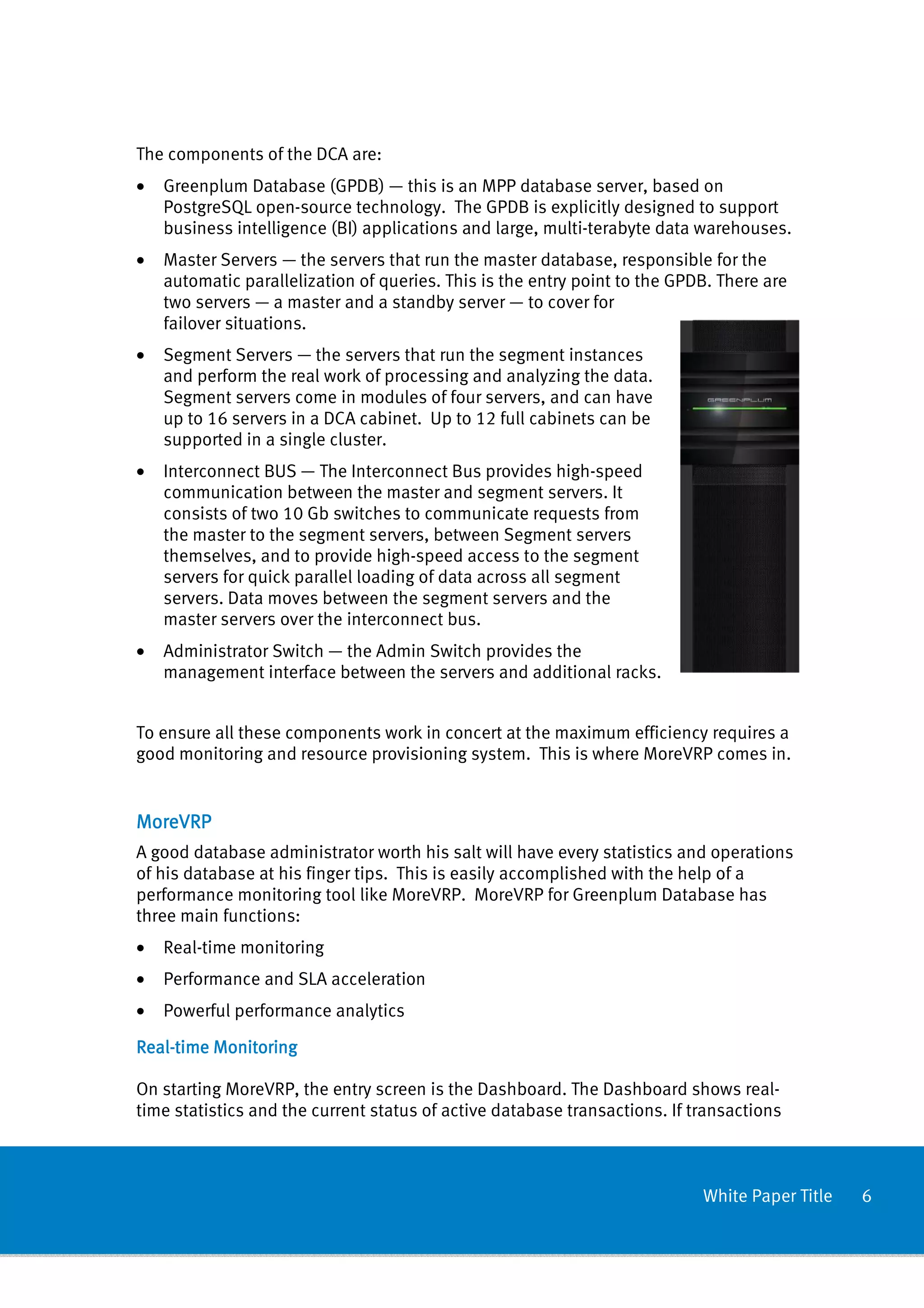
•   Segment Servers — the servers that run the segment instances
    and perform the real work of processing and analyzing the data.
    Segment servers come in modules of four servers, and can have
    up to 16 servers in a DCA cabinet. Up to 12 full cabinets can be
    supported in a single cluster.
•   Interconnect BUS — The Interconnect Bus provides high-speed
    communication between the master and segment servers. It
    consists of two 10 Gb switches to communicate requests from
    the master to the segment servers, between Segment servers
    themselves, and to provide high-speed access to the segment
    servers for quick parallel loading of data across all segment
    servers. Data moves between the segment servers and the
    master servers over the interconnect bus.
•   Administrator Switch — the Admin Switch provides the
    management interface between the servers and additional racks.


To ensure all these components work in concert at the maximum efficiency requires a
good monitoring and resource provisioning system. This is where MoreVRP comes in.


MoreVRP
A good database administrator worth his salt will have every statistics and operations
of his database at his finger tips. This is easily accomplished with the help of a
performance monitoring tool like MoreVRP. MoreVRP for Greenplum Database has
three main functions:
•   Real-time monitoring
•   Performance and SLA acceleration
•   Powerful performance analytics

Real-
Real-time Monitoring

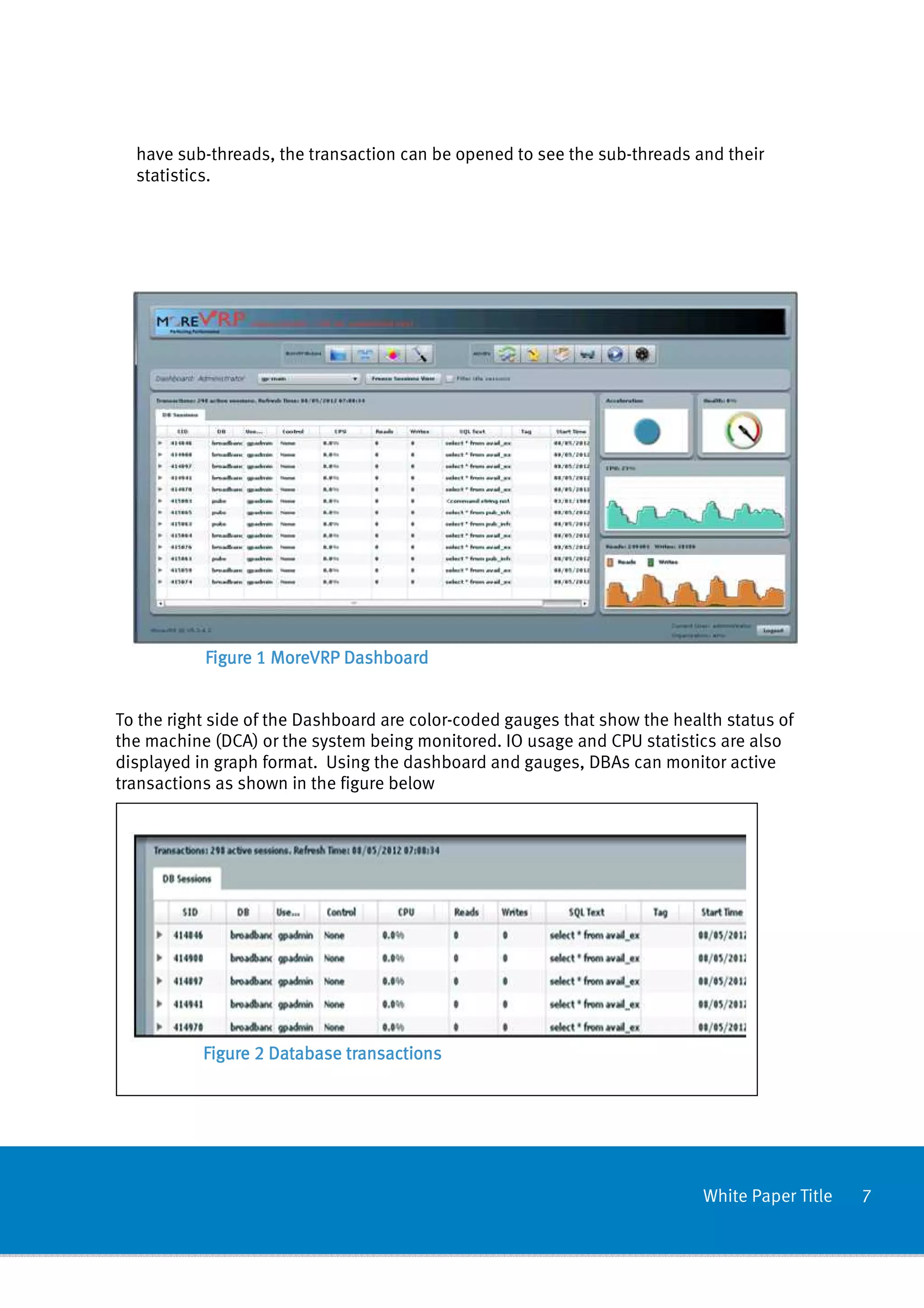
On starting MoreVRP, the entry screen is the Dashboard. The Dashboard shows real-
time statistics and the current status of active database transactions. If transactions


                                                                            White Paper Title   6
have sub-threads, the transaction can be opened to see the sub-threads and their
  statistics.


           Figure 1 MoreVRP Dashboard


To the right side of the Dashboard are color-coded gauges that show the health status of
the machine (DCA) or the system being monitored. IO usage and CPU statistics are also
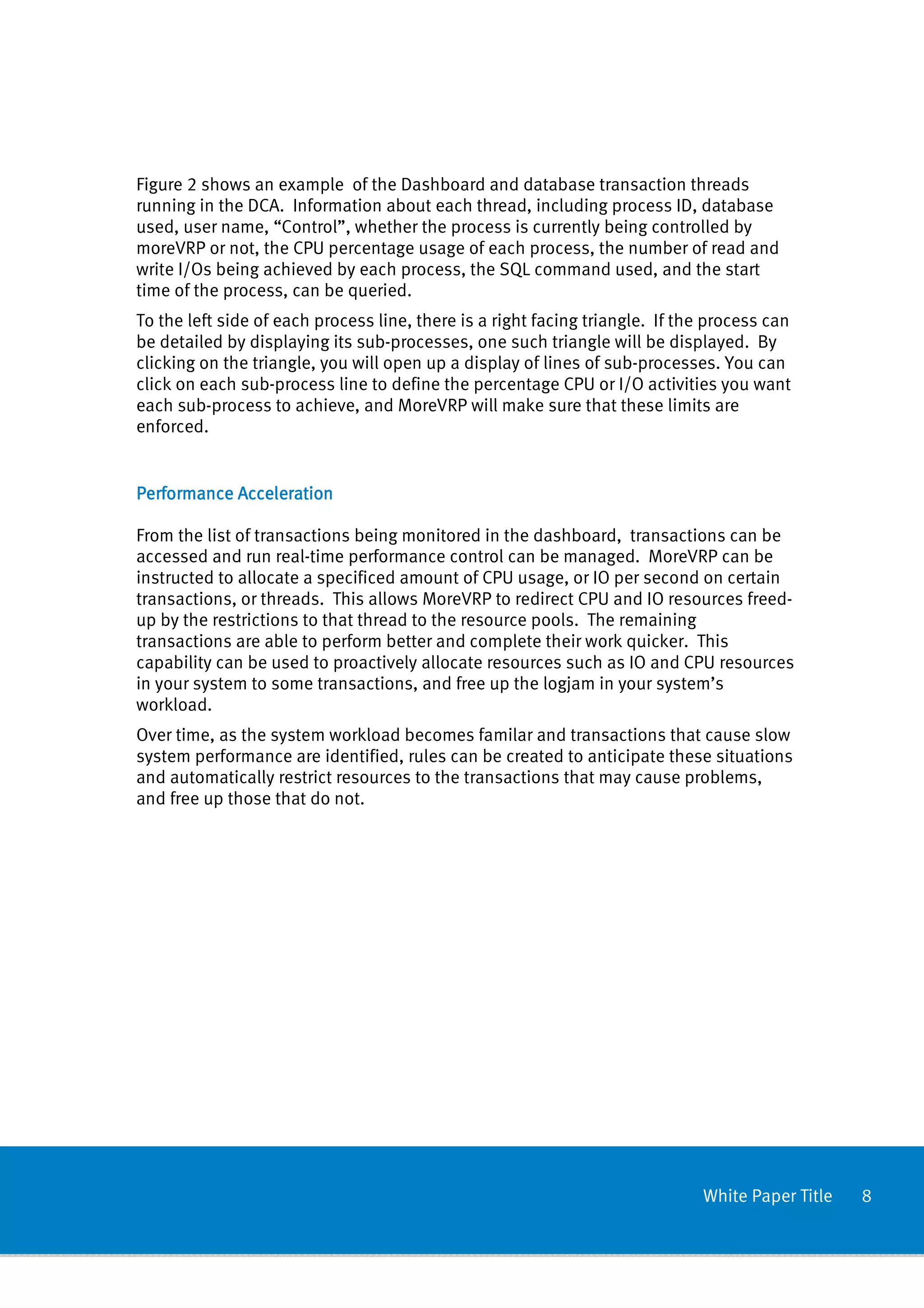
displayed in graph format. Using the dashboard and gauges, DBAs can monitor active
transactions as shown in the figure below


           Figure 2 Database transactions


                                                                            White Paper Title   7
Figure 2 shows an example of the Dashboard and database transaction threads
running in the DCA. Information about each thread, including process ID, database
used, user name, “Control”, whether the process is currently being controlled by
moreVRP or not, the CPU percentage usage of each process, the number of read and
write I/Os being achieved by each process, the SQL command used, and the start
time of the process, can be queried.
To the left side of each process line, there is a right facing triangle. If the process can
be detailed by displaying its sub-processes, one such triangle will be displayed. By
clicking on the triangle, you will open up a display of lines of sub-processes. You can
click on each sub-process line to define the percentage CPU or I/O activities you want
each sub-process to achieve, and MoreVRP will make sure that these limits are
enforced.


Performance Acceleration

From the list of transactions being monitored in the dashboard, transactions can be
accessed and run real-time performance control can be managed. MoreVRP can be
instructed to allocate a specificed amount of CPU usage, or IO per second on certain
transactions, or threads. This allows MoreVRP to redirect CPU and IO resources freed-
up by the restrictions to that thread to the resource pools. The remaining
transactions are able to perform better and complete their work quicker. This
capability can be used to proactively allocate resources such as IO and CPU resources
in your system to some transactions, and free up the logjam in your system’s
workload.
Over time, as the system workload becomes familar and transactions that cause slow
system performance are identified, rules can be created to anticipate these situations
and automatically restrict resources to the transactions that may cause problems,
and free up those that do not.


                                                                              White Paper Title   8
Performance Analytics


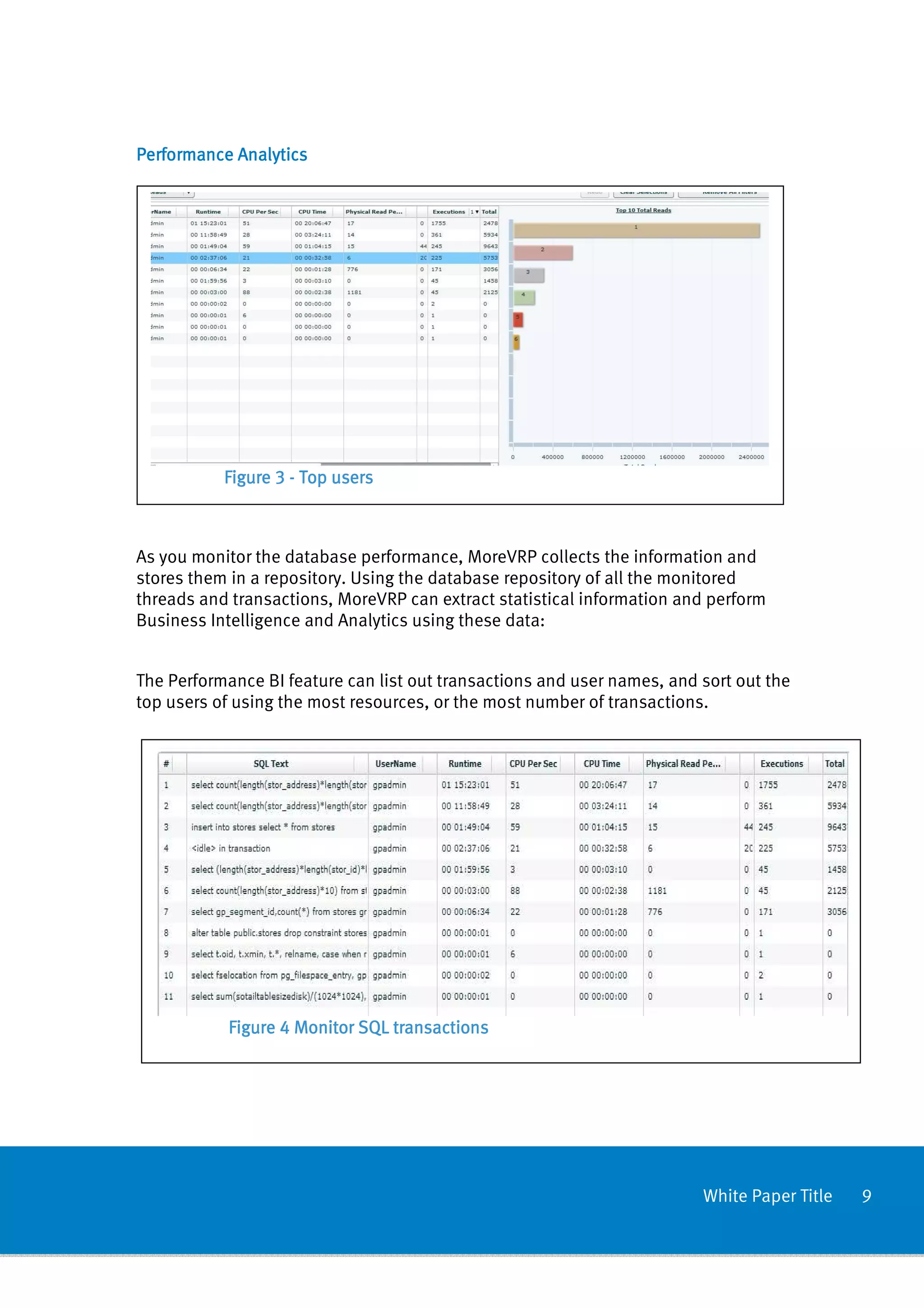
           Figure 3 - Top users


As you monitor the database performance, MoreVRP collects the information and
stores them in a repository. Using the database repository of all the monitored
threads and transactions, MoreVRP can extract statistical information and perform
Business Intelligence and Analytics using these data:


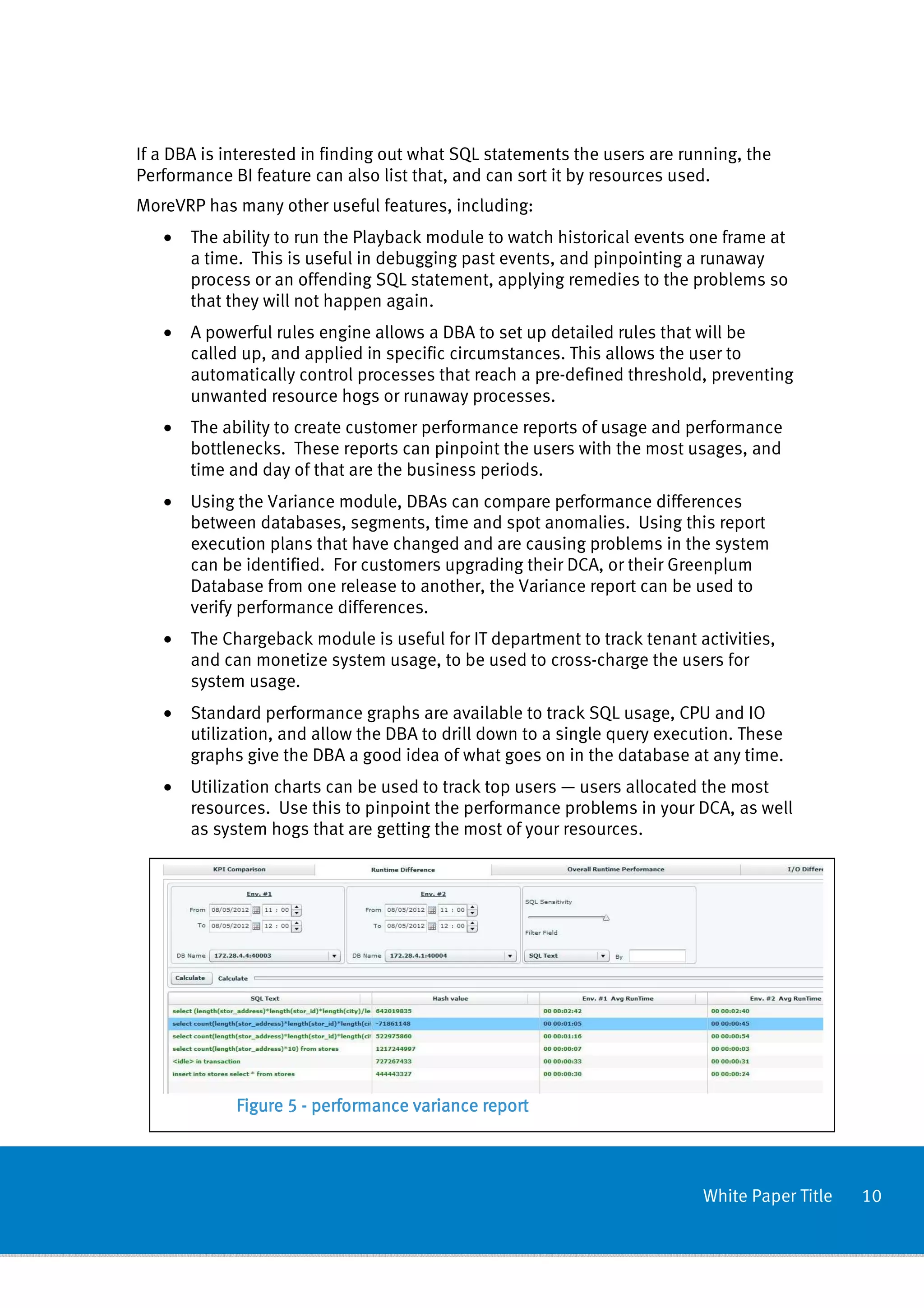
The Performance BI feature can list out transactions and user names, and sort out the
top users of using the most resources, or the most number of transactions.


           Figure 4 Monitor SQL transactions


                                                                         White Paper Title   9
If a DBA is interested in finding out what SQL statements the users are running, the
Performance BI feature can also list that, and can sort it by resources used.
MoreVRP has many other useful features, including:
   •   The ability to run the Playback module to watch historical events one frame at
       a time. This is useful in debugging past events, and pinpointing a runaway
       process or an offending SQL statement, applying remedies to the problems so
       that they will not happen again.
   •   A powerful rules engine allows a DBA to set up detailed rules that will be
       called up, and applied in specific circumstances. This allows the user to
       automatically control processes that reach a pre-defined threshold, preventing
       unwanted resource hogs or runaway processes.
   •   The ability to create customer performance reports of usage and performance
       bottlenecks. These reports can pinpoint the users with the most usages, and
       time and day of that are the business periods.
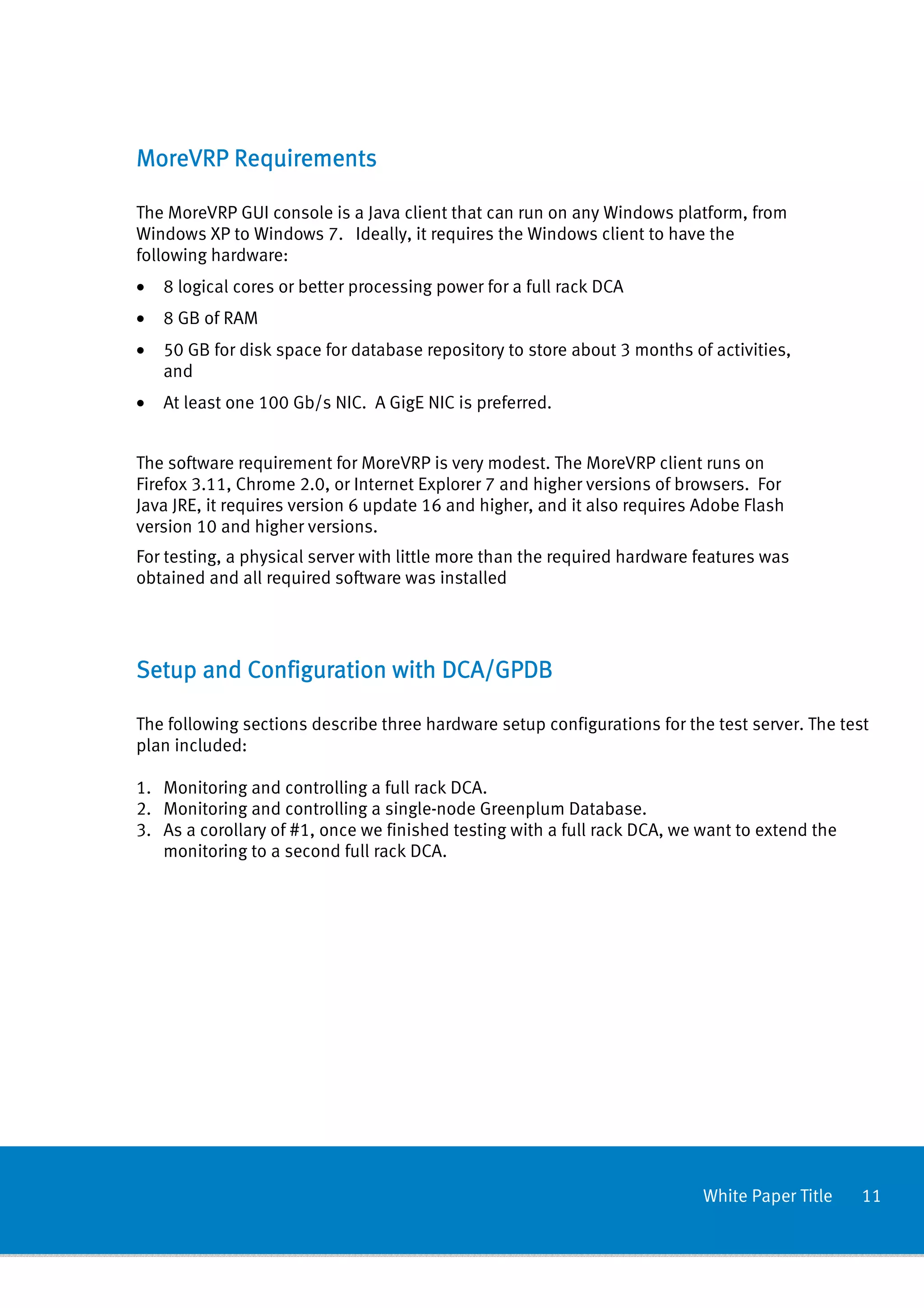
   •   Using the Variance module, DBAs can compare performance differences
       between databases, segments, time and spot anomalies. Using this report
       execution plans that have changed and are causing problems in the system
       can be identified. For customers upgrading their DCA, or their Greenplum
       Database from one release to another, the Variance report can be used to
       verify performance differences.
   •   The Chargeback module is useful for IT department to track tenant activities,
       and can monetize system usage, to be used to cross-charge the users for
       system usage.
   •   Standard performance graphs are available to track SQL usage, CPU and IO
       utilization, and allow the DBA to drill down to a single query execution. These
       graphs give the DBA a good idea of what goes on in the database at any time.
   •   Utilization charts can be used to track top users — users allocated the most
       resources. Use this to pinpoint the performance problems in your DCA, as well
       as system hogs that are getting the most of your resources.


             Figure 5 - performance variance report


                                                                           White Paper Title   10
MoreVRP Requirements

The MoreVRP GUI console is a Java client that can run on any Windows platform, from
Windows XP to Windows 7. Ideally, it requires the Windows client to have the
following hardware:
•   8 logical cores or better processing power for a full rack DCA
•   8 GB of RAM
•   50 GB for disk space for database repository to store about 3 months of activities,
    and
•   At least one 100 Gb/s NIC. A GigE NIC is preferred.


The software requirement for MoreVRP is very modest. The MoreVRP client runs on
Firefox 3.11, Chrome 2.0, or Internet Explorer 7 and higher versions of browsers. For
Java JRE, it requires version 6 update 16 and higher, and it also requires Adobe Flash
version 10 and higher versions.
For testing, a physical server with little more than the required hardware features was
obtained and all required software was installed


Setup and Configuration with DCA/GPDB

The following sections describe three hardware setup configurations for the test server. The test
plan included:

1. Monitoring and controlling a full rack DCA.
2. Monitoring and controlling a single-node Greenplum Database.
3. As a corollary of #1, once we finished testing with a full rack DCA, we want to extend the
   monitoring to a second full rack DCA.


                                                                           White Paper Title    11
Testing with DCA


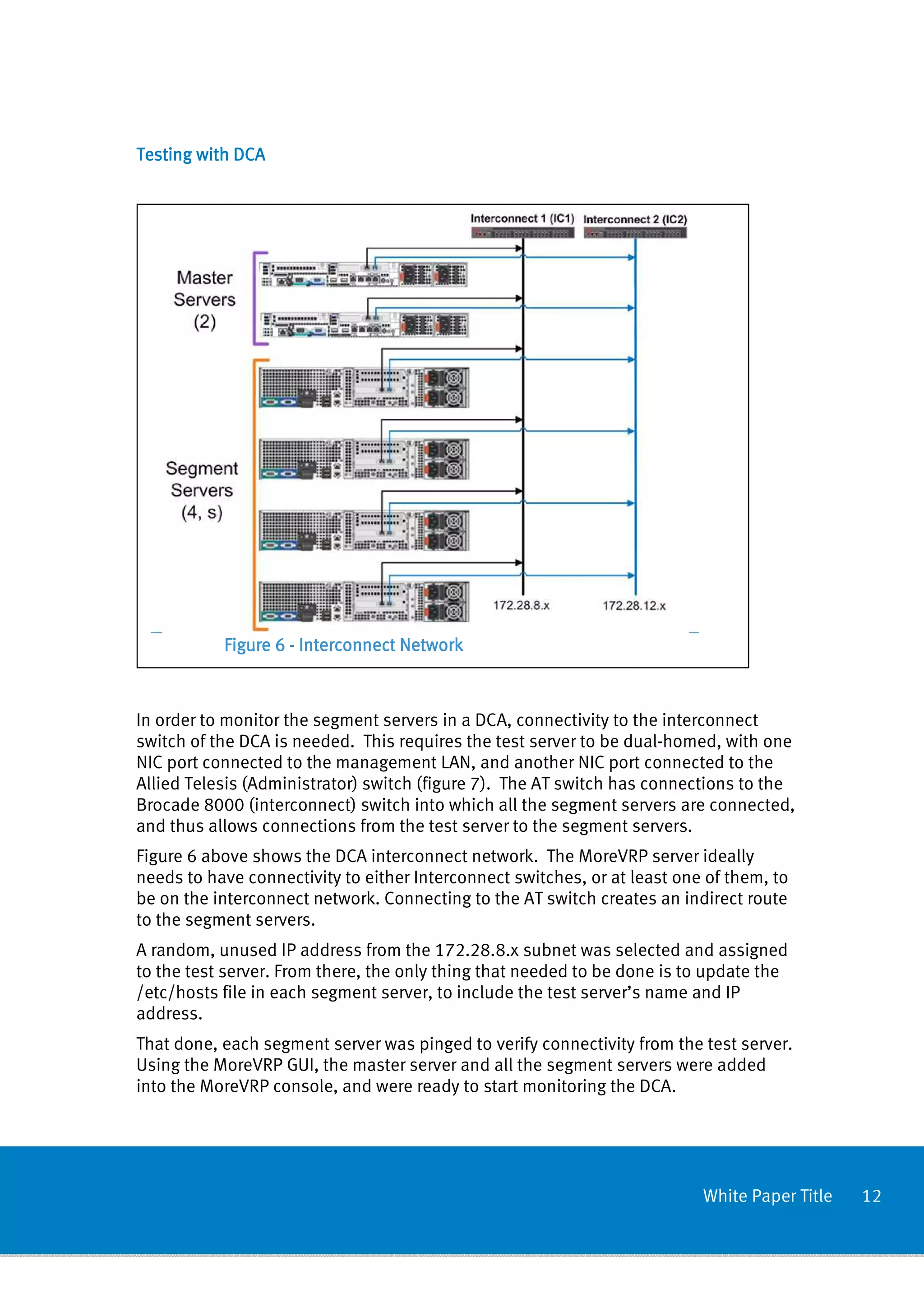
           Figure 6 - Interconnect Network


In order to monitor the segment servers in a DCA, connectivity to the interconnect
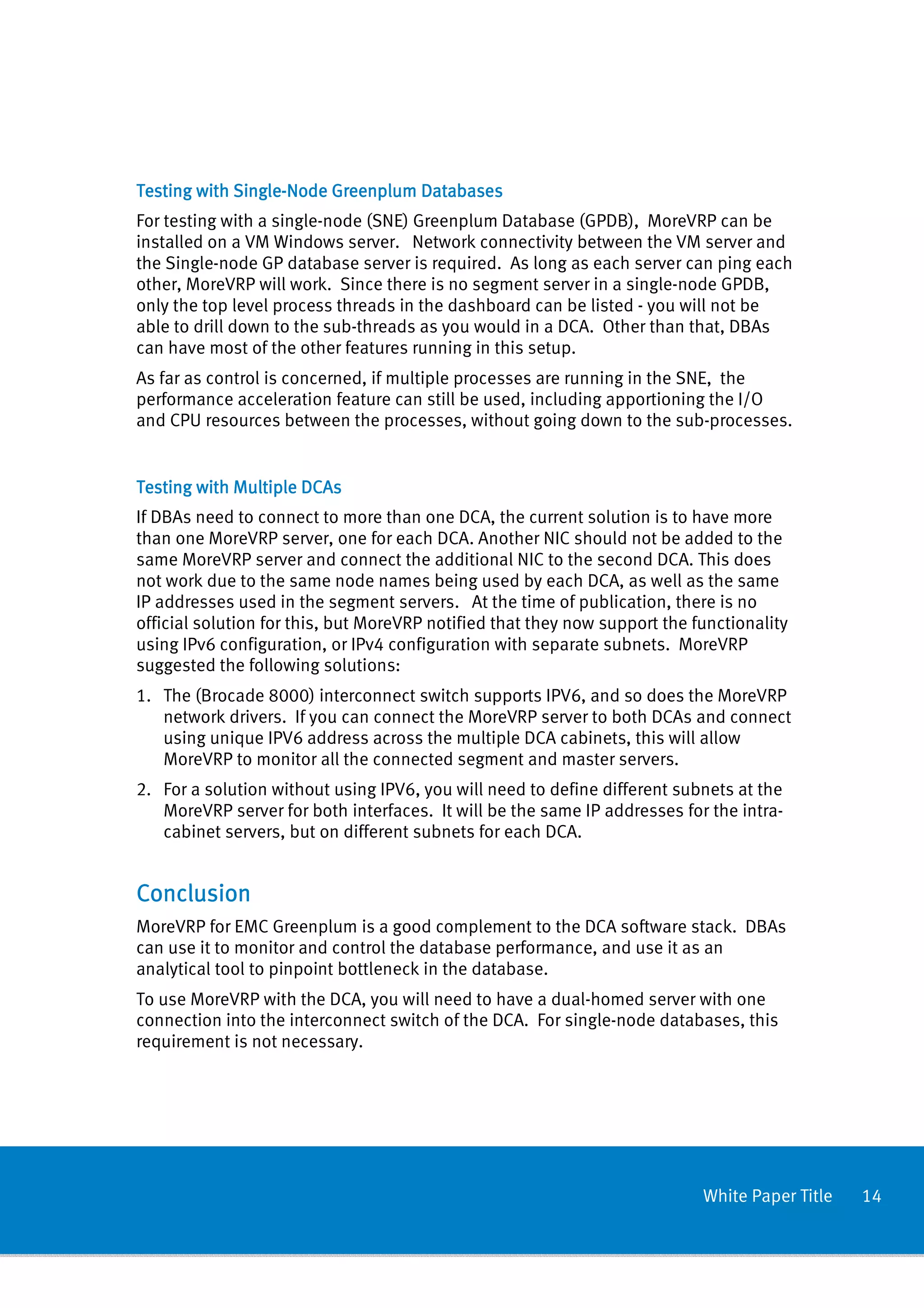
switch of the DCA is needed. This requires the test server to be dual-homed, with one
NIC port connected to the management LAN, and another NIC port connected to the
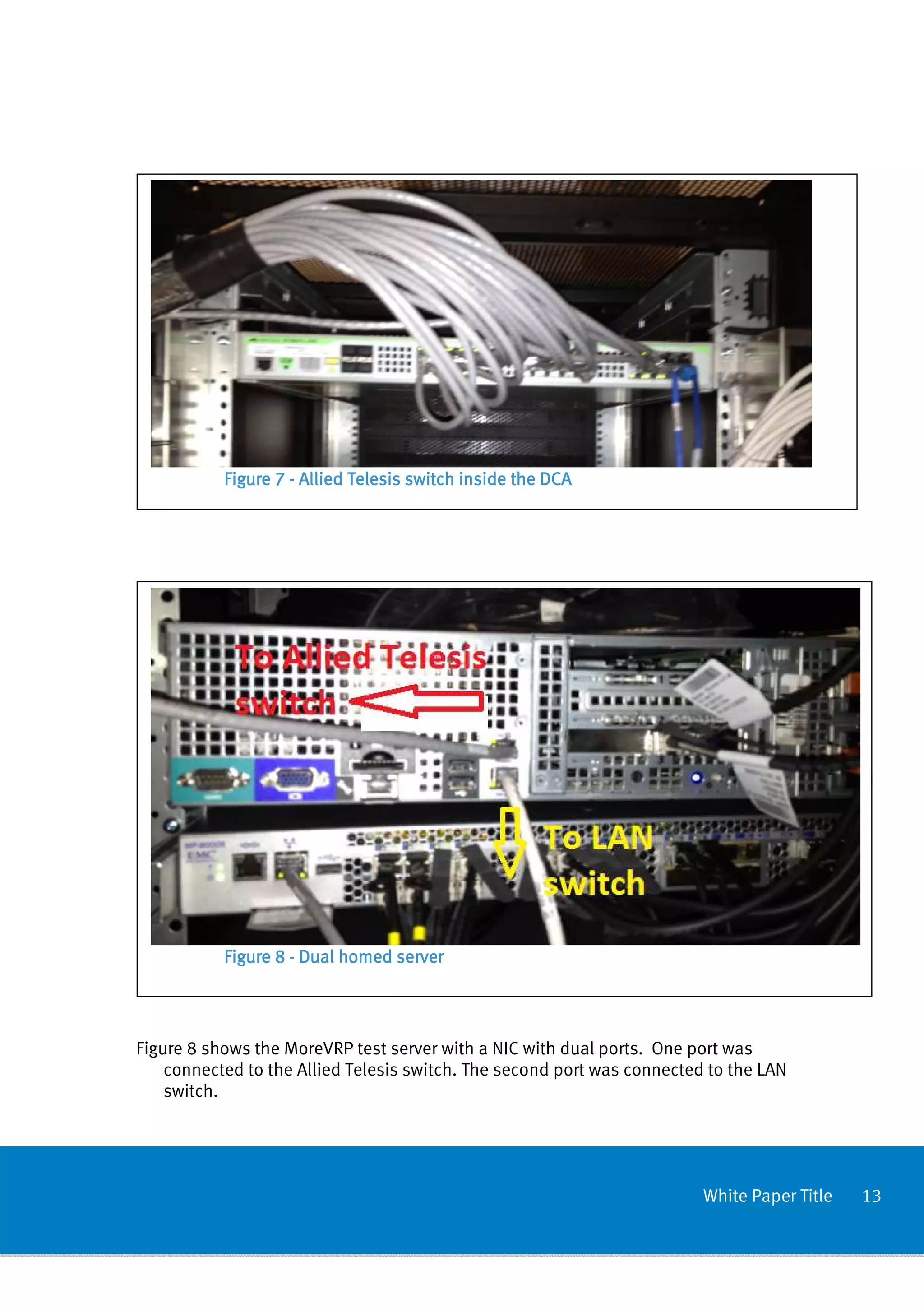
Allied Telesis (Administrator) switch (figure 7). The AT switch has connections to the
Brocade 8000 (interconnect) switch into which all the segment servers are connected,
and thus allows connections from the test server to the segment servers.
Figure 6 above shows the DCA interconnect network. The MoreVRP server ideally
needs to have connectivity to either Interconnect switches, or at least one of them, to
be on the interconnect network. Connecting to the AT switch creates an indirect route
to the segment servers.
A random, unused IP address from the 172.28.8.x subnet was selected and assigned
to the test server. From there, the only thing that needed to be done is to update the
/etc/hosts file in each segment server, to include the test server’s name and IP
address.
That done, each segment server was pinged to verify connectivity from the test server.
Using the MoreVRP GUI, the master server and all the segment servers were added
into the MoreVRP console, and were ready to start monitoring the DCA.


                                                                           White Paper Title   12
Figure 7 - Allied Telesis switch inside the DCA


           Figure 8 - Dual homed server


Figure 8 shows the MoreVRP test server with a NIC with dual ports. One port was
    connected to the Allied Telesis switch. The second port was connected to the LAN
    switch.


                                                                         White Paper Title   13
Testing with Single-Node Greenplum Databases
             Single-
For testing with a single-node (SNE) Greenplum Database (GPDB), MoreVRP can be
installed on a VM Windows server. Network connectivity between the VM server and
the Single-node GP database server is required. As long as each server can ping each
other, MoreVRP will work. Since there is no segment server in a single-node GPDB,
only the top level process threads in the dashboard can be listed - you will not be
able to drill down to the sub-threads as you would in a DCA. Other than that, DBAs
can have most of the other features running in this setup.
As far as control is concerned, if multiple processes are running in the SNE, the
performance acceleration feature can still be used, including apportioning the I/O
and CPU resources between the processes, without going down to the sub-processes.


Testing with Multiple DCAs
If DBAs need to connect to more than one DCA, the current solution is to have more
than one MoreVRP server, one for each DCA. Another NIC should not be added to the
same MoreVRP server and connect the additional NIC to the second DCA. This does
not work due to the same node names being used by each DCA, as well as the same
IP addresses used in the segment servers. At the time of publication, there is no
official solution for this, but MoreVRP notified that they now support the functionality
using IPv6 configuration, or IPv4 configuration with separate subnets. MoreVRP
suggested the following solutions:
1. The (Brocade 8000) interconnect switch supports IPV6, and so does the MoreVRP
   network drivers. If you can connect the MoreVRP server to both DCAs and connect
   using unique IPV6 address across the multiple DCA cabinets, this will allow
   MoreVRP to monitor all the connected segment and master servers.
2. For a solution without using IPV6, you will need to define different subnets at the
   MoreVRP server for both interfaces. It will be the same IP addresses for the intra-
   cabinet servers, but on different subnets for each DCA.


Conclusion
MoreVRP for EMC Greenplum is a good complement to the DCA software stack. DBAs
can use it to monitor and control the database performance, and use it as an
analytical tool to pinpoint bottleneck in the database.
To use MoreVRP with the DCA, you will need to have a dual-homed server with one
connection into the interconnect switch of the DCA. For single-node databases, this
requirement is not necessary.


                                                                            White Paper Title   14
Using the many tools and features that come with MoreVRP, the DCA system
administrator can ensure that the workload in the DCAs can run in their maximum
performance capability.


References
The following are some useful reference sources for this topic:
1. Greenplum® Database 4.2 Administrator Guide P/N: 300-013-163 Rev:
   A03.
   http://powerlink.emc.com/km/live1/en_US/Offering_Technical/Technical_Document
   ation/300-013-163.pdf
2. Datasheet: MoreVRP for EMC2 Greenplum.
   http://www.morevrp.com/images/documents/MoreVRP_for_EMC_Greenplum.pdf


                                                                       White Paper Title   15

White Paper: MoreVRP for EMC Greenplum

  • 1.
    White Paper MoreVRP forEMC Greenplum Performance monitoring and acceleration for Greenplum DCA Abstract “MoreVRP for EMC Greenplum” from More IT Resources is the perfect complement to the EMC Data Computing Appliance (DCA). MoreVRP is a database performance monitoring and acceleration tool, and offers DBAs the capability to have real-time monitoring and resource management and control. In addition, the Business Intelligence historical analysis, with which DBAs can perform drill downs and utilize the Playback feature, allowing the DBA a frame by frame historical look of any time frame, for use in pinpointing performance bottlenecks in the database. These features from MoreVRP are indispensible everyday tool that can help DBAs perform their duties. June 2012
  • 2.
    Copyright © 2012EMC Corporation. All Rights Reserved. EMC believes the information in this publication is accurate as of its publication date. The information is subject to change without notice. The information in this publication is provided “as is.” EMC Corporation makes no representations or warranties of any kind with respect to the information in this publication, and specifically disclaims implied warranties of merchantability or fitness for a particular purpose. Use, copying, and distribution of any EMC software described in this publication requires an applicable software license. For the most up-to-date listing of EMC product names, see EMC Corporation Trademarks on EMC.com. All trademarks used herein are the property of their respective owners. Part Number h10759 White Paper Title 2
  • 3.
    Table of Contents summary................................................................................................ .................................................................................................. Executive summary.................................................................................................. 4 Audience ............................................................................................................................ 4 Glossary ............................................................................................................................. 4 ................................................................ ........................................ Using MoreVRP with Greenplum DCA ........................................................................ 5 Greenplum DCA .................................................................................................................. 5 MoreVRP ............................................................................................................................ 6 Real-time Monitoring ...................................................................................................... 6 Performance Acceleration............................................................................................... 8 Performance Analytics .................................................................................................... 9 MoreVRP Requirements ......................................................................................... 11 Requirements ................................................................ ......................................................... Setup and Configuration with DCA/GPDB ............................................................... 11 ............................................................... Testing with DCA .......................................................................................................... 12 Testing with Single-Node Greenplum Databases .......................................................... 14 Testing with Multiple DCAs ........................................................................................... 14 Conclusion ............................................................................................................ 14 ............................................................................................................ ................................................................ References ............................................................................................................ 15 ............................................................................................................ ................................................................ White Paper Title 3
  • 4.
    Executive summary “MoreVRP forEMC Greenplum” from More IT Resources is the perfect complement to the Greenplum Database and the EMC Data Computing Appliance (DCA). MoreVRP is a database performance monitoring and acceleration tool that offers DBAs the capability to have real-time monitoring and resource management and control. In addition, MoreVRP comes with a Business Intelligence historical analysis feature, with which the DBA can do performance drill downs and also has a Playback feature, allowing the DBA a frame by frame historical look of any time period for use in pinpointing performance bottlenecks in the database. These features from MoreVRP are an indispensible, everyday tool that can help DBAs perform their duties, giving their users the best quality of Service (QoS) and service level agreement (SLA), maximizing workload concurrency by allowing more transactions to be executed concurrently. MoreVRP helps system administrators improve their DCA system performance, availability and stability, ensuring maximum resource utilization. MoreVRP also reduces possible downtime due to hung processes, runaway processes, ultimately improving the total cost of ownership. Audience This paper is intended for EMC field personnel and customers intending to use MoreVRP to monitor and control the performance of their Greenplum databases and Greenplum Data Computing Appliances. Glossary The table below contains some frequently used abbreviations and terms used in conjunction with Greenplum: BI Business intelligence DBA Database Administrator DCA Data Computing Appliance DIA Data Integration Accelerator EDW Enterprise Data Warehouse ETL Extract, Transform and Load LAN Local Area Network White Paper Title 4
  • 5.
    NIC Network Interface Card Using MoreVRP with Greenplum DCA Greenplum DBAs want to provide their users with consistent quality of service and high performance, ensuring that all database processes receive optimal CPU and IO resources. To monitor and manually control all transactions in a database is a full time job without performance monitoring and management software. MoreVRP helps system administrators improve their Greenplum database and DCA system performance, availability, and stability, ensuring maximum resource utilization and reducing possible downtime due to hung processes, runaway processes, ultimately improving the quality of service. MoreVRP also has an extremely small overhead. The software employs agents that run on each server to be monitored. For the Greenplum database and the DCA this includes the master server, the standby master, and all segment servers in the cluster. Each agent utilizes about 1% of a single CPU resource in testing on a DCA, and thus is unobtrusive to normal database operations. MoreVRP collects performance statistics and stores them in a smart repository. This can be a small database in the MoreVRP server, in the Greenplum database itself, or in a separate database in the DCA. The collected statistics are useful in performing playback and can also be used in drill-down situations to find bottlenecks in the database. MoreVRP comes with many modules and tools to help DBAs manage their databases. It understands the Greenplum and DCA architecture, and its analytical tools are tuned to help DBAs identify skews that are caused by uneven distribution, hot nodes and segments. Greenplum DCA EMC’s Greenplum Data Computing Appliance (DCA) brings the power of a massively parallel processing (MPP) architecture while delivering the fastest data-loading capacity and the best price / performance ratio in the industry,without the complexity and constraints of proprietary hardware. The DCA is a purpose-built, highly scalable, parallel EDW appliance that integrates database, compute, storage, and networking into an enterprise-class, easy to implement system. The DCA is a self-contained data analytics solution that integrates all the database software, servers, and switches that are required to perform enterprise-scale data analytics workloads. The DCA is delivered in its own rack, ready for immediate data- loading. White Paper Title 5
  • 6.
    The components ofthe DCA are: • Greenplum Database (GPDB) — this is an MPP database server, based on PostgreSQL open-source technology. The GPDB is explicitly designed to support business intelligence (BI) applications and large, multi-terabyte data warehouses. • Master Servers — the servers that run the master database, responsible for the automatic parallelization of queries. This is the entry point to the GPDB. There are two servers — a master and a standby server — to cover for failover situations. • Segment Servers — the servers that run the segment instances and perform the real work of processing and analyzing the data. Segment servers come in modules of four servers, and can have up to 16 servers in a DCA cabinet. Up to 12 full cabinets can be supported in a single cluster. • Interconnect BUS — The Interconnect Bus provides high-speed communication between the master and segment servers. It consists of two 10 Gb switches to communicate requests from the master to the segment servers, between Segment servers themselves, and to provide high-speed access to the segment servers for quick parallel loading of data across all segment servers. Data moves between the segment servers and the master servers over the interconnect bus. • Administrator Switch — the Admin Switch provides the management interface between the servers and additional racks. To ensure all these components work in concert at the maximum efficiency requires a good monitoring and resource provisioning system. This is where MoreVRP comes in. MoreVRP A good database administrator worth his salt will have every statistics and operations of his database at his finger tips. This is easily accomplished with the help of a performance monitoring tool like MoreVRP. MoreVRP for Greenplum Database has three main functions: • Real-time monitoring • Performance and SLA acceleration • Powerful performance analytics Real- Real-time Monitoring On starting MoreVRP, the entry screen is the Dashboard. The Dashboard shows real- time statistics and the current status of active database transactions. If transactions White Paper Title 6
  • 7.
    have sub-threads, thetransaction can be opened to see the sub-threads and their statistics. Figure 1 MoreVRP Dashboard To the right side of the Dashboard are color-coded gauges that show the health status of the machine (DCA) or the system being monitored. IO usage and CPU statistics are also displayed in graph format. Using the dashboard and gauges, DBAs can monitor active transactions as shown in the figure below Figure 2 Database transactions White Paper Title 7
  • 8.
    Figure 2 showsan example of the Dashboard and database transaction threads running in the DCA. Information about each thread, including process ID, database used, user name, “Control”, whether the process is currently being controlled by moreVRP or not, the CPU percentage usage of each process, the number of read and write I/Os being achieved by each process, the SQL command used, and the start time of the process, can be queried. To the left side of each process line, there is a right facing triangle. If the process can be detailed by displaying its sub-processes, one such triangle will be displayed. By clicking on the triangle, you will open up a display of lines of sub-processes. You can click on each sub-process line to define the percentage CPU or I/O activities you want each sub-process to achieve, and MoreVRP will make sure that these limits are enforced. Performance Acceleration From the list of transactions being monitored in the dashboard, transactions can be accessed and run real-time performance control can be managed. MoreVRP can be instructed to allocate a specificed amount of CPU usage, or IO per second on certain transactions, or threads. This allows MoreVRP to redirect CPU and IO resources freed- up by the restrictions to that thread to the resource pools. The remaining transactions are able to perform better and complete their work quicker. This capability can be used to proactively allocate resources such as IO and CPU resources in your system to some transactions, and free up the logjam in your system’s workload. Over time, as the system workload becomes familar and transactions that cause slow system performance are identified, rules can be created to anticipate these situations and automatically restrict resources to the transactions that may cause problems, and free up those that do not. White Paper Title 8
  • 9.
    Performance Analytics Figure 3 - Top users As you monitor the database performance, MoreVRP collects the information and stores them in a repository. Using the database repository of all the monitored threads and transactions, MoreVRP can extract statistical information and perform Business Intelligence and Analytics using these data: The Performance BI feature can list out transactions and user names, and sort out the top users of using the most resources, or the most number of transactions. Figure 4 Monitor SQL transactions White Paper Title 9
  • 10.
    If a DBAis interested in finding out what SQL statements the users are running, the Performance BI feature can also list that, and can sort it by resources used. MoreVRP has many other useful features, including: • The ability to run the Playback module to watch historical events one frame at a time. This is useful in debugging past events, and pinpointing a runaway process or an offending SQL statement, applying remedies to the problems so that they will not happen again. • A powerful rules engine allows a DBA to set up detailed rules that will be called up, and applied in specific circumstances. This allows the user to automatically control processes that reach a pre-defined threshold, preventing unwanted resource hogs or runaway processes. • The ability to create customer performance reports of usage and performance bottlenecks. These reports can pinpoint the users with the most usages, and time and day of that are the business periods. • Using the Variance module, DBAs can compare performance differences between databases, segments, time and spot anomalies. Using this report execution plans that have changed and are causing problems in the system can be identified. For customers upgrading their DCA, or their Greenplum Database from one release to another, the Variance report can be used to verify performance differences. • The Chargeback module is useful for IT department to track tenant activities, and can monetize system usage, to be used to cross-charge the users for system usage. • Standard performance graphs are available to track SQL usage, CPU and IO utilization, and allow the DBA to drill down to a single query execution. These graphs give the DBA a good idea of what goes on in the database at any time. • Utilization charts can be used to track top users — users allocated the most resources. Use this to pinpoint the performance problems in your DCA, as well as system hogs that are getting the most of your resources. Figure 5 - performance variance report White Paper Title 10
  • 11.
    MoreVRP Requirements The MoreVRPGUI console is a Java client that can run on any Windows platform, from Windows XP to Windows 7. Ideally, it requires the Windows client to have the following hardware: • 8 logical cores or better processing power for a full rack DCA • 8 GB of RAM • 50 GB for disk space for database repository to store about 3 months of activities, and • At least one 100 Gb/s NIC. A GigE NIC is preferred. The software requirement for MoreVRP is very modest. The MoreVRP client runs on Firefox 3.11, Chrome 2.0, or Internet Explorer 7 and higher versions of browsers. For Java JRE, it requires version 6 update 16 and higher, and it also requires Adobe Flash version 10 and higher versions. For testing, a physical server with little more than the required hardware features was obtained and all required software was installed Setup and Configuration with DCA/GPDB The following sections describe three hardware setup configurations for the test server. The test plan included: 1. Monitoring and controlling a full rack DCA. 2. Monitoring and controlling a single-node Greenplum Database. 3. As a corollary of #1, once we finished testing with a full rack DCA, we want to extend the monitoring to a second full rack DCA. White Paper Title 11
  • 12.
    Testing with DCA Figure 6 - Interconnect Network In order to monitor the segment servers in a DCA, connectivity to the interconnect switch of the DCA is needed. This requires the test server to be dual-homed, with one NIC port connected to the management LAN, and another NIC port connected to the Allied Telesis (Administrator) switch (figure 7). The AT switch has connections to the Brocade 8000 (interconnect) switch into which all the segment servers are connected, and thus allows connections from the test server to the segment servers. Figure 6 above shows the DCA interconnect network. The MoreVRP server ideally needs to have connectivity to either Interconnect switches, or at least one of them, to be on the interconnect network. Connecting to the AT switch creates an indirect route to the segment servers. A random, unused IP address from the 172.28.8.x subnet was selected and assigned to the test server. From there, the only thing that needed to be done is to update the /etc/hosts file in each segment server, to include the test server’s name and IP address. That done, each segment server was pinged to verify connectivity from the test server. Using the MoreVRP GUI, the master server and all the segment servers were added into the MoreVRP console, and were ready to start monitoring the DCA. White Paper Title 12
  • 13.
    Figure 7 -Allied Telesis switch inside the DCA Figure 8 - Dual homed server Figure 8 shows the MoreVRP test server with a NIC with dual ports. One port was connected to the Allied Telesis switch. The second port was connected to the LAN switch. White Paper Title 13
  • 14.
    Testing with Single-NodeGreenplum Databases Single- For testing with a single-node (SNE) Greenplum Database (GPDB), MoreVRP can be installed on a VM Windows server. Network connectivity between the VM server and the Single-node GP database server is required. As long as each server can ping each other, MoreVRP will work. Since there is no segment server in a single-node GPDB, only the top level process threads in the dashboard can be listed - you will not be able to drill down to the sub-threads as you would in a DCA. Other than that, DBAs can have most of the other features running in this setup. As far as control is concerned, if multiple processes are running in the SNE, the performance acceleration feature can still be used, including apportioning the I/O and CPU resources between the processes, without going down to the sub-processes. Testing with Multiple DCAs If DBAs need to connect to more than one DCA, the current solution is to have more than one MoreVRP server, one for each DCA. Another NIC should not be added to the same MoreVRP server and connect the additional NIC to the second DCA. This does not work due to the same node names being used by each DCA, as well as the same IP addresses used in the segment servers. At the time of publication, there is no official solution for this, but MoreVRP notified that they now support the functionality using IPv6 configuration, or IPv4 configuration with separate subnets. MoreVRP suggested the following solutions: 1. The (Brocade 8000) interconnect switch supports IPV6, and so does the MoreVRP network drivers. If you can connect the MoreVRP server to both DCAs and connect using unique IPV6 address across the multiple DCA cabinets, this will allow MoreVRP to monitor all the connected segment and master servers. 2. For a solution without using IPV6, you will need to define different subnets at the MoreVRP server for both interfaces. It will be the same IP addresses for the intra- cabinet servers, but on different subnets for each DCA. Conclusion MoreVRP for EMC Greenplum is a good complement to the DCA software stack. DBAs can use it to monitor and control the database performance, and use it as an analytical tool to pinpoint bottleneck in the database. To use MoreVRP with the DCA, you will need to have a dual-homed server with one connection into the interconnect switch of the DCA. For single-node databases, this requirement is not necessary. White Paper Title 14
  • 15.
    Using the manytools and features that come with MoreVRP, the DCA system administrator can ensure that the workload in the DCAs can run in their maximum performance capability. References The following are some useful reference sources for this topic: 1. Greenplum® Database 4.2 Administrator Guide P/N: 300-013-163 Rev: A03. http://powerlink.emc.com/km/live1/en_US/Offering_Technical/Technical_Document ation/300-013-163.pdf 2. Datasheet: MoreVRP for EMC2 Greenplum. http://www.morevrp.com/images/documents/MoreVRP_for_EMC_Greenplum.pdf White Paper Title 15