HTTP/2,
Differences and Performance Improvements with HTTP
AMIT BHAKAY
JUNE 07, 2017
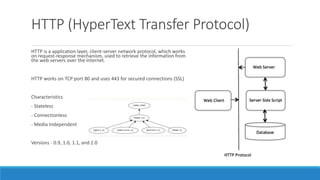
HTTP (HyperText Transfer Protocol)
HTTP is a application layer, client-server network protocol, which works
on request-response mechanism, used to retrieve the information from
the web servers over the Internet.
HTTP works on TCP port 80 and uses 443 for secured connections (SSL)
Characteristics
- Stateless
- Connectionless
- Media Independent
Versions - 0.9, 1.0, 1.1, and 2.0
HTTP/1
Currently accepted version of HTTP - 1.0 and 1.1
HTTP 1.0 is a stateless and 1.1 is a stateful protocol.
HTTP 1.1 Features -
1. Extensibility
2. Caching
3. Bandwidth optimization
4. Network connection management
5. Message transmission
6. Internet address conservation
7. Error notification
8. Security, integrity, and authentication
9. Content negotiation
SPDY & HTTP/2
An experimental protocol developed by Google in 2009 to overcome, to reduce the web latency and
improve web security.
The primary goals for HTTP/2 are to reduce latency by enabling full request and response multiplexing,
minimize protocol overhead via efficient compression of HTTP header fields, and add support for request
prioritization and server push.
Browsers supported - Google Chrome, Mozilla Firefox, Apple Safari, Microsoft IE, Amazon Silk, Opera
SPDY reduces web latency through Compression, Multiplexing, Prioritization
IETF used SPDY to define HTTP/2
HTTP/2 - Differences with HTTP/1
- Binary, instead of textual
- Fully multiplexed, instead of ordered and blocking
- Can therefore use one connection for parallelism
- Uses header compression to reduce overhead
- Allows servers to “push” responses proactively into client caches
HTTP/2 - Connection Initiation & Termination
Server Response -
HTTP/1.1 101 Switching Protocols
Connection: Upgrade
Upgrade: h2c
A client that makes a request to an "https" URI uses TLS with the application-layer protocol negotiation (ALPN) extension (h2 for HTTP/2 using
TLS and h2c for HTTP/2 over clear text). Once the TLS negotiation is complete, both client and server must send the Connection Preface.
Connection Preface - Sequence of 24 Octets Hex value, sent immediately after 101 response, must be the first frame the server sends after
HTTP2 connection. It is the final confirmation that, the HTTP/2 will be used now for further communication.
0x505249202a20485454502f322e300d0a0d0a534d0d0a0d0a
Client Request -
GET / HTTP/1.1
Host: server.example.com
Connection: Upgrade, HTTP2-Settings
Upgrade: h2c
HTTP2-Settings: <base64url encoding of HTTP/2 SETTINGS payload>
HTTP/2 - Binary Framing & Frame Format
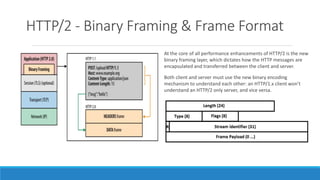
At the core of all performance enhancements of HTTP/2 is the new
binary framing layer, which dictates how the HTTP messages are
encapsulated and transferred between the client and server.
Both client and server must use the new binary encoding
mechanism to understand each other: an HTTP/1.x client won’t
understand an HTTP/2 only server, and vice versa.
HTTP/2 - Streams & Multiplexing
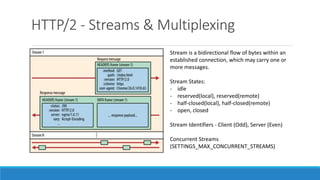
Stream is a bidirectional flow of bytes within an
established connection, which may carry one or
more messages.
Stream States:
- idle
- reserved(local), reserved(remote)
- half-closed(local), half-closed(remote)
- open, closed
Stream Identifiers - Client (Odd), Server (Even)
Concurrent Streams
(SETTINGS_MAX_CONCURRENT_STREAMS)
HTTP/2 - Flow Control & Stream Priority
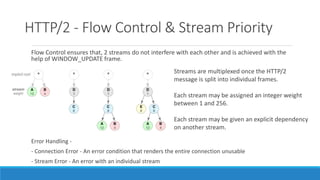
Flow Control ensures that, 2 streams do not interfere with each other and is achieved with the
help of WINDOW_UPDATE frame.
Streams are multiplexed once the HTTP/2
message is split into individual frames.
Each stream may be assigned an integer weight
between 1 and 256.
Each stream may be given an explicit dependency
on another stream.
Error Handling -
- Connection Error - An error condition that renders the entire connection unusable
- Stream Error - An error with an individual stream
HTTP/2 - Server Push
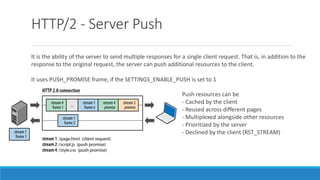
It is the ability of the server to send multiple responses for a single client request. That is, in addition to the
response to the original request, the server can push additional resources to the client.
It uses PUSH_PROMISE frame, if the SETTINGS_ENABLE_PUSH is set to 1
Push resources can be
- Cached by the client
- Reused across different pages
- Multiplexed alongside other resources
- Prioritized by the server
- Declined by the client (RST_STREAM)
HTTP/2 - Terminologies & Error Codes
HTTP/2 Terminologies
- PING frame
- GOAWAY method
- CONNECT method
Error Codes - Error codes are used in RST_STREAM and GOAWAY frames to let the other
endpoint know the reason for connection or stream error.
Some common error codes are NO_ERROR(0x0), PROTOCOL_ERROR(0x1),
INTERNAL_ERROR(0x2), FLOW_CONTROL_ERROR(0x3), CANCEL(0x8),
SETTINGS_TIMED_OUT(0x4), FRAME_SIZE_ERROR(0x6), COMPRESSION_ERROR(0x9) etc.
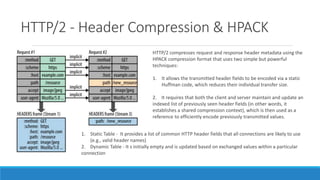
HTTP/2 - Header Compression & HPACK
HTTP/2 compresses request and response header metadata using the
HPACK compression format that uses two simple but powerful
techniques:
1. It allows the transmitted header fields to be encoded via a static
Huffman code, which reduces their individual transfer size.
2. It requires that both the client and server maintain and update an
indexed list of previously seen header fields (in other words, it
establishes a shared compression context), which is then used as a
reference to efficiently encode previously transmitted values.
1. Static Table - It provides a list of common HTTP header fields that all connections are likely to use
(e.g., valid header names)
2. Dynamic Table - It s initially empty and is updated based on exchanged values within a particular
connection
HTTP/2 – Security Considerations
- Denial-of-Service attacks
- Pushed Response caching
- Intermediary Encapsulation attacks
- Server Authority
- Cross-Protocol attacks

HTTP/2 - Differences and Performance Improvements with HTTP

  • 1.
    HTTP/2, Differences and PerformanceImprovements with HTTP AMIT BHAKAY JUNE 07, 2017
  • 2.
    HTTP (HyperText TransferProtocol) HTTP is a application layer, client-server network protocol, which works on request-response mechanism, used to retrieve the information from the web servers over the Internet. HTTP works on TCP port 80 and uses 443 for secured connections (SSL) Characteristics - Stateless - Connectionless - Media Independent Versions - 0.9, 1.0, 1.1, and 2.0
  • 3.
    HTTP/1 Currently accepted versionof HTTP - 1.0 and 1.1 HTTP 1.0 is a stateless and 1.1 is a stateful protocol. HTTP 1.1 Features - 1. Extensibility 2. Caching 3. Bandwidth optimization 4. Network connection management 5. Message transmission 6. Internet address conservation 7. Error notification 8. Security, integrity, and authentication 9. Content negotiation
  • 4.
    SPDY & HTTP/2 Anexperimental protocol developed by Google in 2009 to overcome, to reduce the web latency and improve web security. The primary goals for HTTP/2 are to reduce latency by enabling full request and response multiplexing, minimize protocol overhead via efficient compression of HTTP header fields, and add support for request prioritization and server push. Browsers supported - Google Chrome, Mozilla Firefox, Apple Safari, Microsoft IE, Amazon Silk, Opera SPDY reduces web latency through Compression, Multiplexing, Prioritization IETF used SPDY to define HTTP/2
  • 5.
    HTTP/2 - Differenceswith HTTP/1 - Binary, instead of textual - Fully multiplexed, instead of ordered and blocking - Can therefore use one connection for parallelism - Uses header compression to reduce overhead - Allows servers to “push” responses proactively into client caches
  • 6.
    HTTP/2 - ConnectionInitiation & Termination Server Response - HTTP/1.1 101 Switching Protocols Connection: Upgrade Upgrade: h2c A client that makes a request to an "https" URI uses TLS with the application-layer protocol negotiation (ALPN) extension (h2 for HTTP/2 using TLS and h2c for HTTP/2 over clear text). Once the TLS negotiation is complete, both client and server must send the Connection Preface. Connection Preface - Sequence of 24 Octets Hex value, sent immediately after 101 response, must be the first frame the server sends after HTTP2 connection. It is the final confirmation that, the HTTP/2 will be used now for further communication. 0x505249202a20485454502f322e300d0a0d0a534d0d0a0d0a Client Request - GET / HTTP/1.1 Host: server.example.com Connection: Upgrade, HTTP2-Settings Upgrade: h2c HTTP2-Settings: <base64url encoding of HTTP/2 SETTINGS payload>
  • 7.
    HTTP/2 - BinaryFraming & Frame Format At the core of all performance enhancements of HTTP/2 is the new binary framing layer, which dictates how the HTTP messages are encapsulated and transferred between the client and server. Both client and server must use the new binary encoding mechanism to understand each other: an HTTP/1.x client won’t understand an HTTP/2 only server, and vice versa.
  • 8.
    HTTP/2 - Streams& Multiplexing Stream is a bidirectional flow of bytes within an established connection, which may carry one or more messages. Stream States: - idle - reserved(local), reserved(remote) - half-closed(local), half-closed(remote) - open, closed Stream Identifiers - Client (Odd), Server (Even) Concurrent Streams (SETTINGS_MAX_CONCURRENT_STREAMS)
  • 9.
    HTTP/2 - FlowControl & Stream Priority Flow Control ensures that, 2 streams do not interfere with each other and is achieved with the help of WINDOW_UPDATE frame. Streams are multiplexed once the HTTP/2 message is split into individual frames. Each stream may be assigned an integer weight between 1 and 256. Each stream may be given an explicit dependency on another stream. Error Handling - - Connection Error - An error condition that renders the entire connection unusable - Stream Error - An error with an individual stream
  • 10.
    HTTP/2 - ServerPush It is the ability of the server to send multiple responses for a single client request. That is, in addition to the response to the original request, the server can push additional resources to the client. It uses PUSH_PROMISE frame, if the SETTINGS_ENABLE_PUSH is set to 1 Push resources can be - Cached by the client - Reused across different pages - Multiplexed alongside other resources - Prioritized by the server - Declined by the client (RST_STREAM)
  • 11.
    HTTP/2 - Terminologies& Error Codes HTTP/2 Terminologies - PING frame - GOAWAY method - CONNECT method Error Codes - Error codes are used in RST_STREAM and GOAWAY frames to let the other endpoint know the reason for connection or stream error. Some common error codes are NO_ERROR(0x0), PROTOCOL_ERROR(0x1), INTERNAL_ERROR(0x2), FLOW_CONTROL_ERROR(0x3), CANCEL(0x8), SETTINGS_TIMED_OUT(0x4), FRAME_SIZE_ERROR(0x6), COMPRESSION_ERROR(0x9) etc.
  • 12.
    HTTP/2 - HeaderCompression & HPACK HTTP/2 compresses request and response header metadata using the HPACK compression format that uses two simple but powerful techniques: 1. It allows the transmitted header fields to be encoded via a static Huffman code, which reduces their individual transfer size. 2. It requires that both the client and server maintain and update an indexed list of previously seen header fields (in other words, it establishes a shared compression context), which is then used as a reference to efficiently encode previously transmitted values. 1. Static Table - It provides a list of common HTTP header fields that all connections are likely to use (e.g., valid header names) 2. Dynamic Table - It s initially empty and is updated based on exchanged values within a particular connection
  • 13.
    HTTP/2 – SecurityConsiderations - Denial-of-Service attacks - Pushed Response caching - Intermediary Encapsulation attacks - Server Authority - Cross-Protocol attacks