© Copyright SELA Software & Education Labs Ltd. | 14-18 Baruch Hirsch St Bnei Brak, 51202 Israel | www.selagroup.com
Ido Flatow
Introducing HTTP/2
About Me
Senior Architect, Sela Group
Other titles: Microsoft Regional Director, IIS/ASPNET
MVP
Co-author of courses and books
Focus on server, web, and cloud
Manager of the Israeli Web Developers User Group
Agenda
Web (HTTP 1.1) and its current state
What is (HTTP/2) – and how fast is it?
Goals of HTTP/2
HTTP/2 concepts
How to troubleshoot
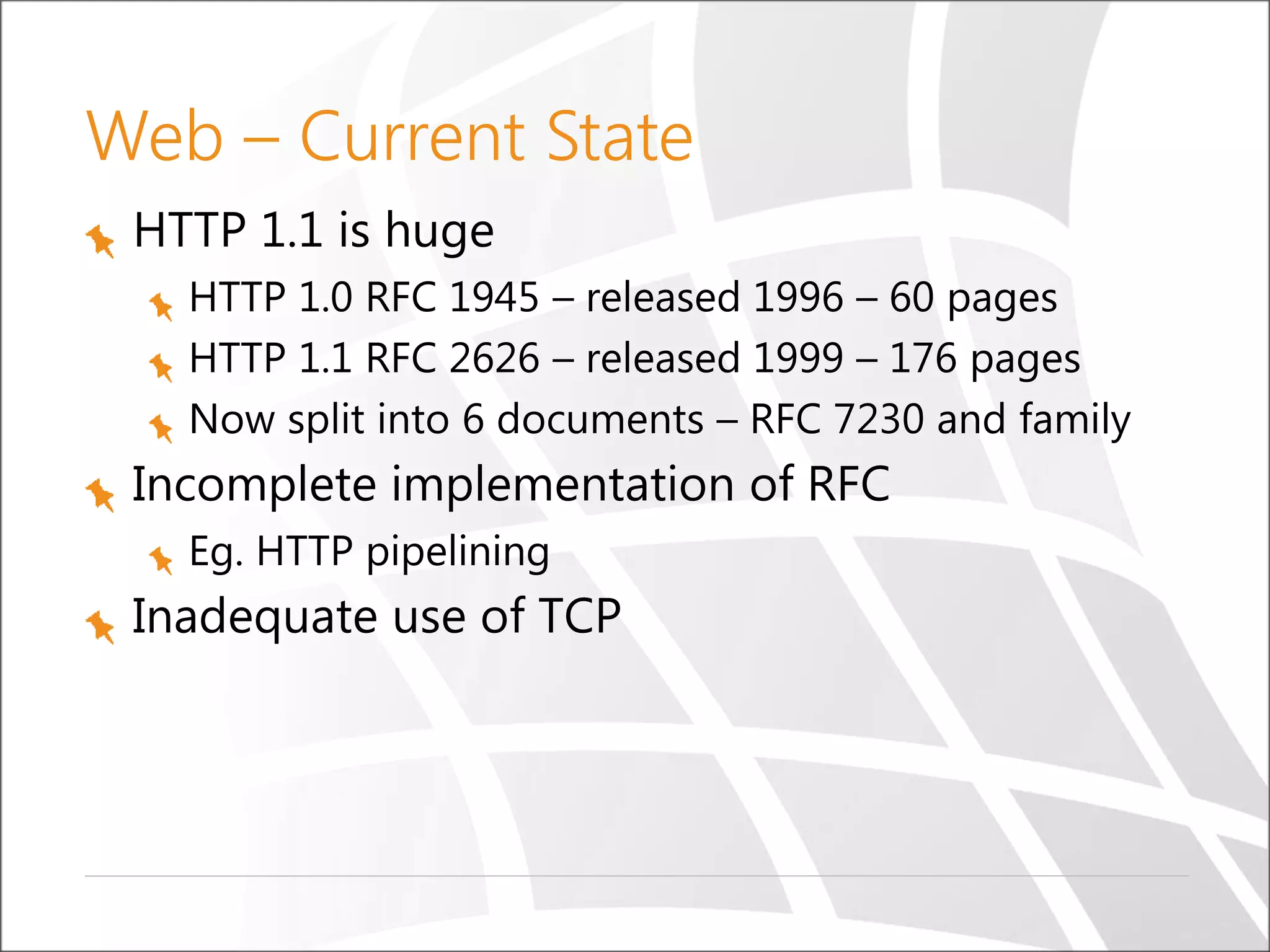
Web – Current State
HTTP 1.1 is huge
HTTP 1.0 RFC 1945 – released 1996 – 60 pages
HTTP 1.1 RFC 2626 – released 1999 – 176 pages
Now split into 6 documents – RFC 7230 and family
Incomplete implementation of RFC
Eg. HTTP pipelining
Inadequate use of TCP
Average Request +150% in 3 Years
Jan 2012 – Nov 2015
(http://httparchive.org) top 1000 sites
Shortcoming – Current Web
Concurrent connection limit
Head of line blocking
TCP slow start
Latency – page load time
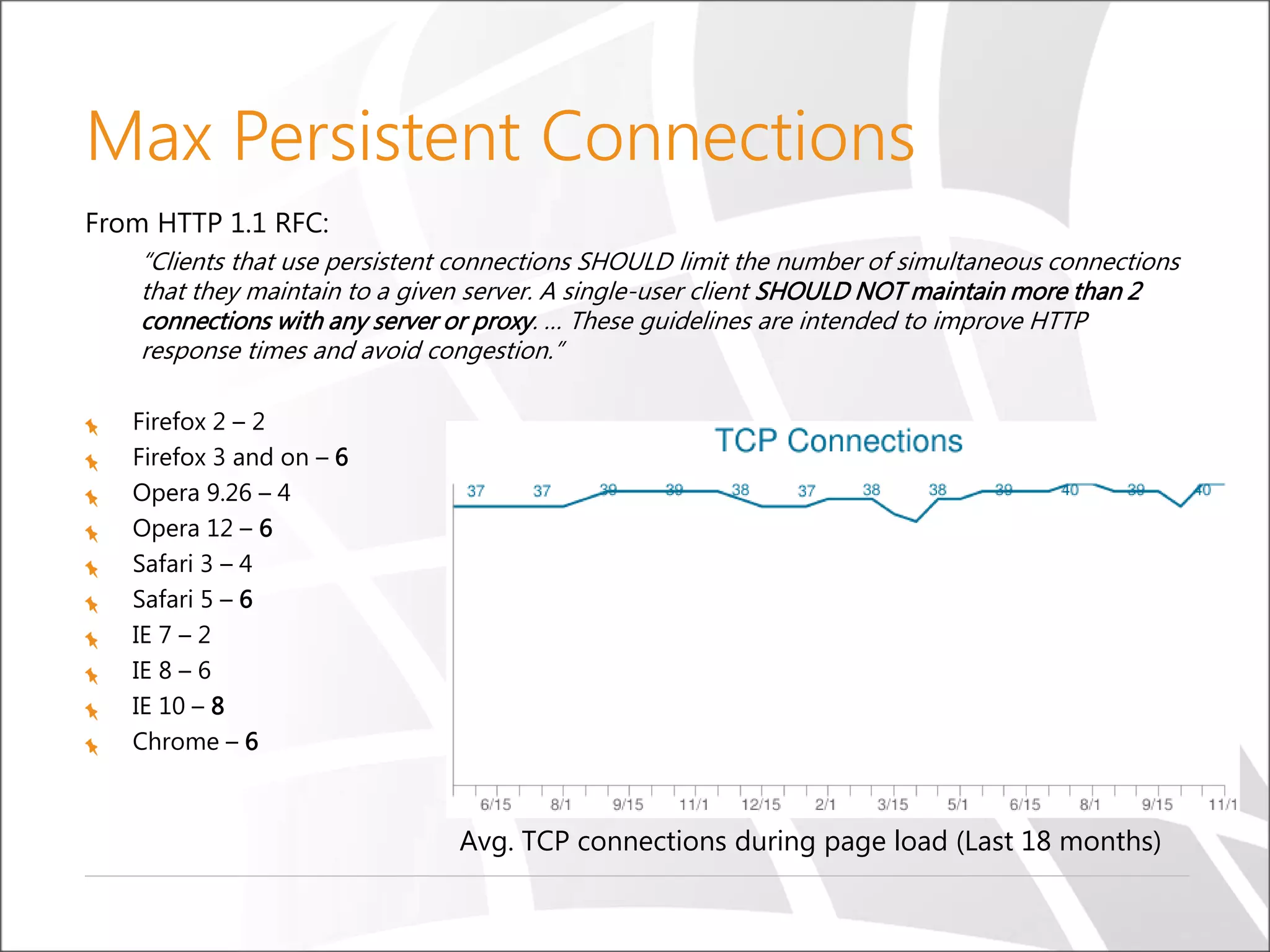
Max Persistent Connections
From HTTP 1.1 RFC:
“Clients that use persistent connections SHOULD limit the number of simultaneous connections
that they maintain to a given server. A single-user client SHOULD NOT maintain more than 2
connections with any server or proxy. … These guidelines are intended to improve HTTP
response times and avoid congestion.”
Firefox 2 – 2
Firefox 3 and on – 6
Opera 9.26 – 4
Opera 12 – 6
Safari 3 – 4
Safari 5 – 6
IE 7 – 2
IE 8 – 6
IE 10 – 8
Chrome – 6
Avg. TCP connections during page load (Last 18 months)
Head-of-Line Blocking (No
Pipelining)
Each connection can
only handle one request
at a time
If current request
blocks, next request will
wait
HTTP 1.1 defines
pipelining, but most
browsers do not
implement it
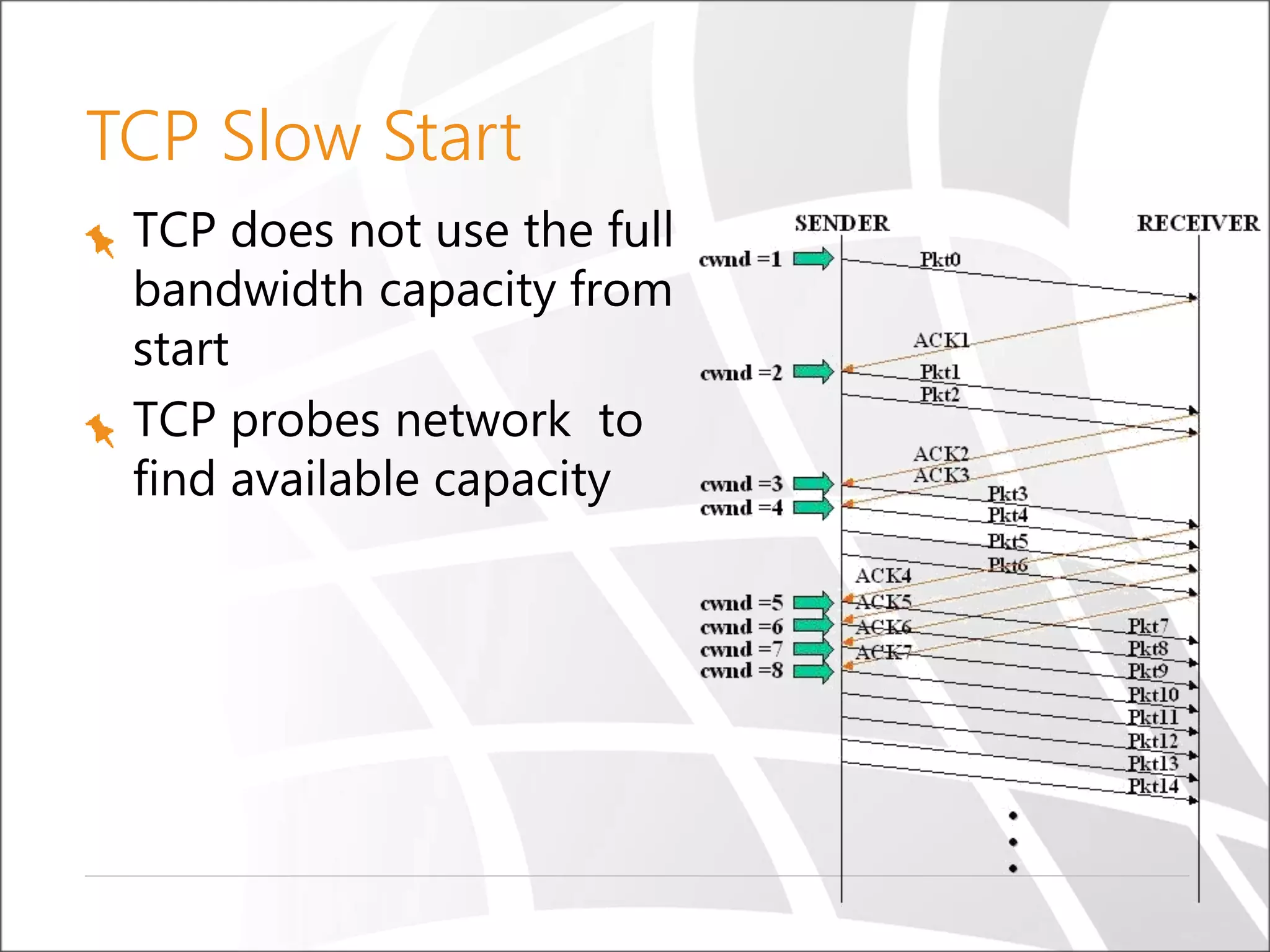
TCP Slow Start
TCP does not use the full
bandwidth capacity from
start
TCP probes network to
find available capacity
Latency vs Bandwidth
Average web page has over 100 objects to download
Largest impact on page load time is latency, not
bandwidth
https://www.akamai.com/us/en/our-thinking/state-of-the-internet-report
What is 20ms of Latency?
(RTT = Round-trip time)
What Have we Done to Improvise?
Reduce # of requests and latency overhead
Spriting
Concatenation (JavaScript, CSS)
Inlining
Overcome max connection limit
Domain sharding
Problems with “optimizations”
Spriting
Painful and annoying preprocessing, cache
invalidations, slower executions
Inlining
Resource can’t be cached, inflates parent document
by 33% overhead
Concatenation
Less modular code, expensive cache invalidators,
slower execution
Domain sharding
TCP slowstart, excessive DNS lookup, latency
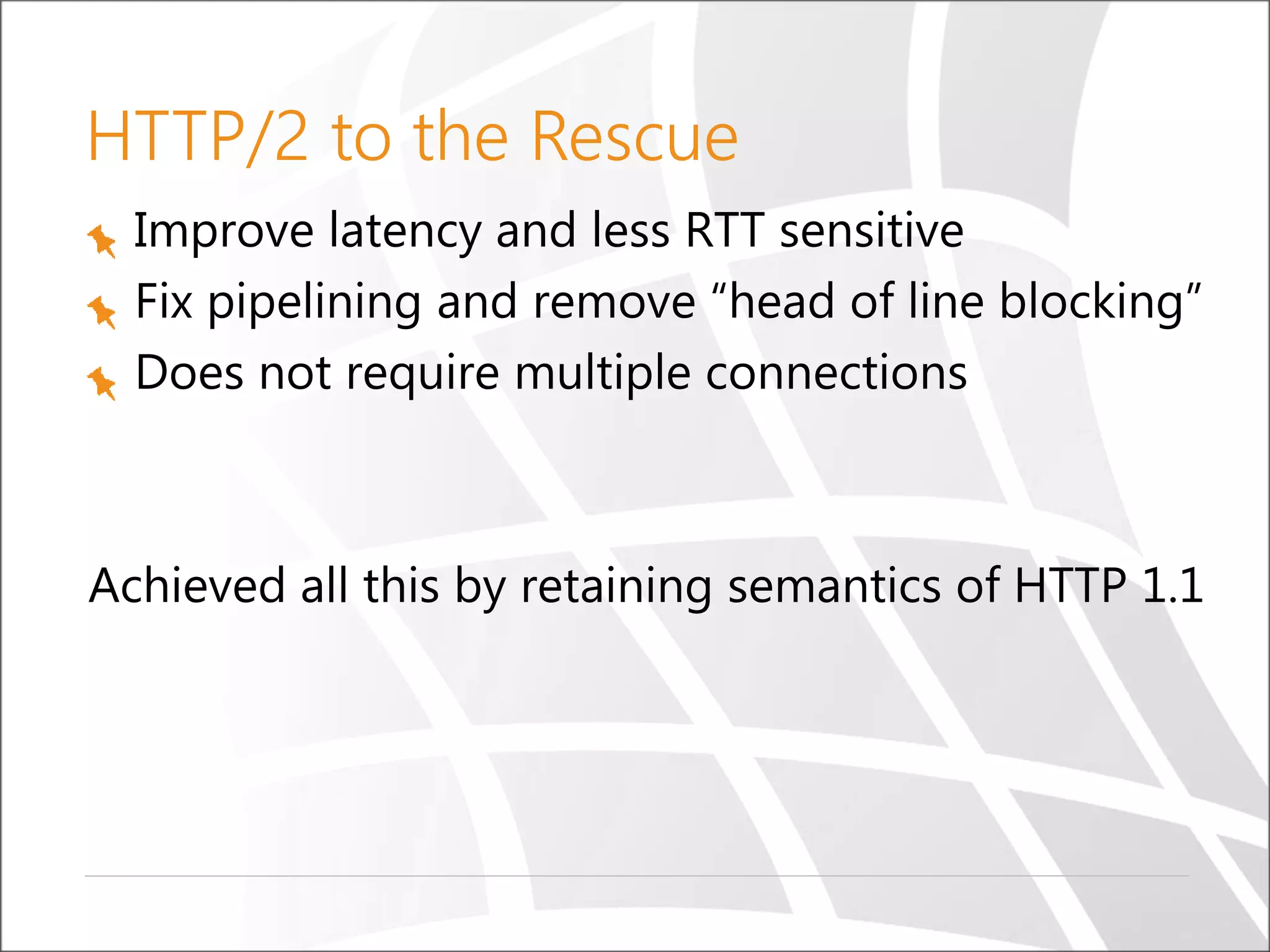
HTTP/2 to the Rescue
Improve latency and less RTT sensitive
Fix pipelining and remove “head of line blocking”
Does not require multiple connections
Achieved all this by retaining semantics of HTTP 1.1
It Began with SPDY
Originally proposed by Google as a wire format
extension to HTTP in 2011
Implements all the major features of HTTP/2
Serves as a testbed for improvements to HTTP
Without the burden of standardization
SPDY became the basis of HTTP/2 in 2012
SPDY will cease to exist in 2016, making way to
HTTP/2
What is HTTP/2
HTTP/2 uses a single, multiplexed connection
Max connection limit per domain can be ignored
HTTP/2 compresses header data and sends it in
a concise, binary format
Better than the plain text format used previously
Less need for popular HTTP 1.1 optimizations
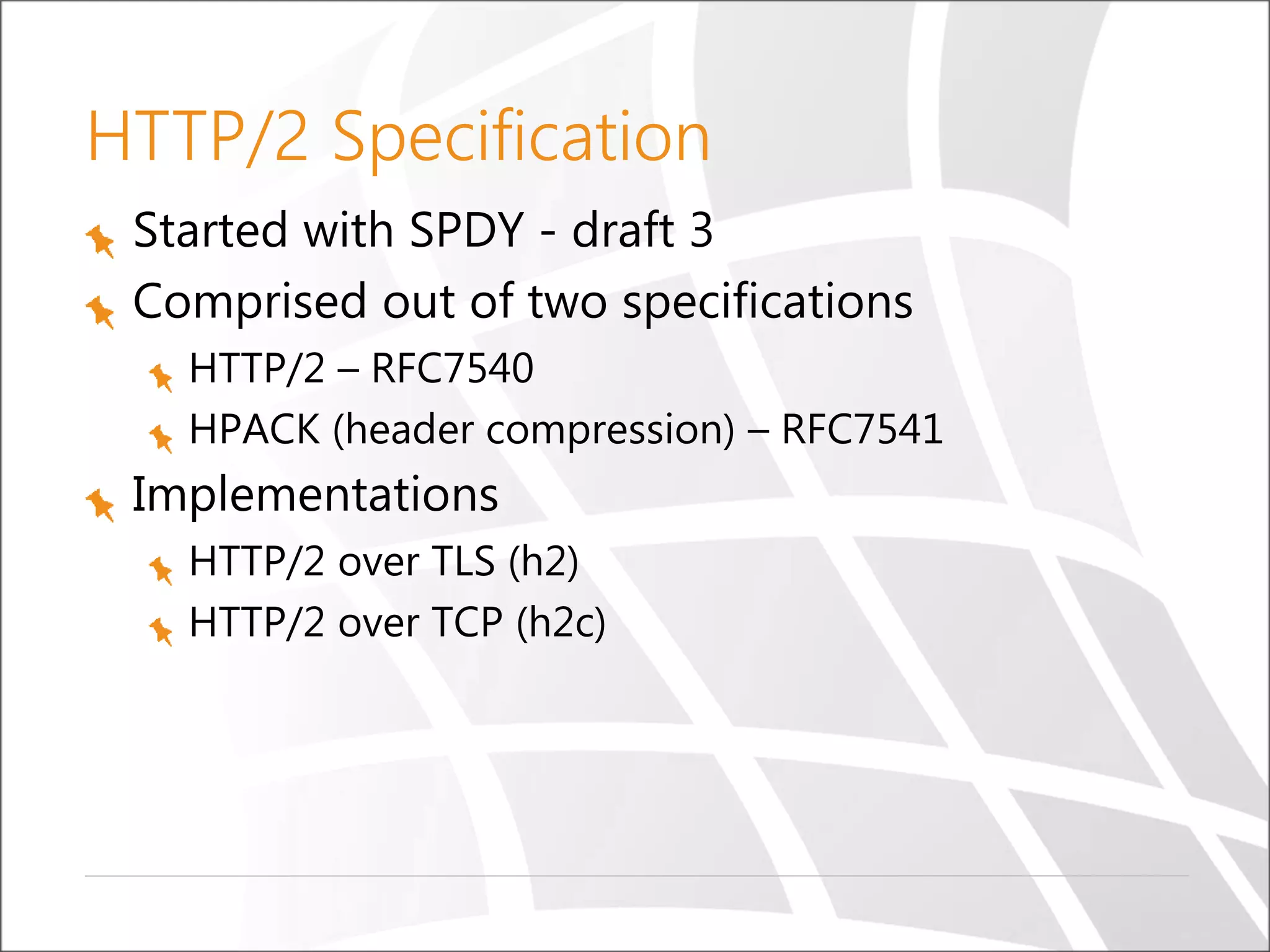
HTTP/2 Specification
Started with SPDY - draft 3
Comprised out of two specifications
HTTP/2 – RFC7540
HPACK (header compression) – RFC7541
Implementations
HTTP/2 over TLS (h2)
HTTP/2 over TCP (h2c)
HTTP/2 Over TLS (h2)
HTTP/2 shipped with TLS as optional
Firefox and Chrome developer teams stated
they will only implement HTTP/2 over TLS
Today, only HTTPS:// is allowed for HTTP/2
TLS must be at least v1.2, with cipher suite
restrictions
https://http2.github.io/http2-spec/#BadCipherSuites
HTTP/2 Over TCP (h2c)
Uses the Upgrade header
Plans to support on IE, already supported in CURL
GET /page HTTP/1.1
Host: server.example.com
Connection: Upgrade, HTTP2-Settings
Upgrade: h2c
HTTP2-Settings: (SETTINGS payload)
HTTP/1.1 200 OK
Content-length: 243
Content-type: text/html
(... HTTP/1.1 response ...)
--- or ---
HTTP/1.1 101 Switching Protocols
Connection: Upgrade
Upgrade: h2c
(... HTTP/2 response ...)
HTTP/2 in One Slide
One TCP connection
Request → Stream
Streams are multiplexed
Streams are prioritized
Binary framing layer
Prioritization
Flow control
Server push
Header compression
(HPACK)
TCP Connections - HTTP 1.1 vs HTTP/2
HTTP 1.1
HTTP/2
Client
http://www.url.com
Client
http://www.url.com
Demo
How to Troubleshoot - Dev Tools
HTTP/2 Support
Servers
Microsoft IIS 10
(Win 10 / Server 2016)
Apache 2.4.12
Nginx 1.9.5
Jetty 9.3
Many more…
Browsers
Edge
IE11 (Windows 10)
Firefox 40+
Chrome 43+
Safari 9+
Opera 32+
iOS Safari 9.1+
Chrome for Android 46+
CURL
Google, Facebook, Twitter and many more are using HTTP/2 already
HTTP/2 is used by 4.5% of all websites (Dec. 2015
http://w3techs.com)
HTTP/2 Multiplexing
Each request/response stream has an ID
Streams comprise of frames (Header, Data…)
TCP connection can have multiple streams
Frames can be interleaved in the TCP channel
Stream dependencies control frame prioritization
Server (IIS/ASP.NET) sees streams as TCP
connections
Frame Types
Frame type Description
DATA HTTP body
HEADERS Header fields
PRIORITY Sender-advised priority of stream
RST_STREAM Signal termination of stream
SETTINGS Configuration parameters for the connection
PUSH_PROMISE Signal a promise (push) of referenced sources
PING Measure roundtrip time and “liveness”
GOAWAY Inform peer to stop creating streams for current connection
WINDOW_UPDATE Connection flow control
CONTINUATION Continue a segment of header block fragments
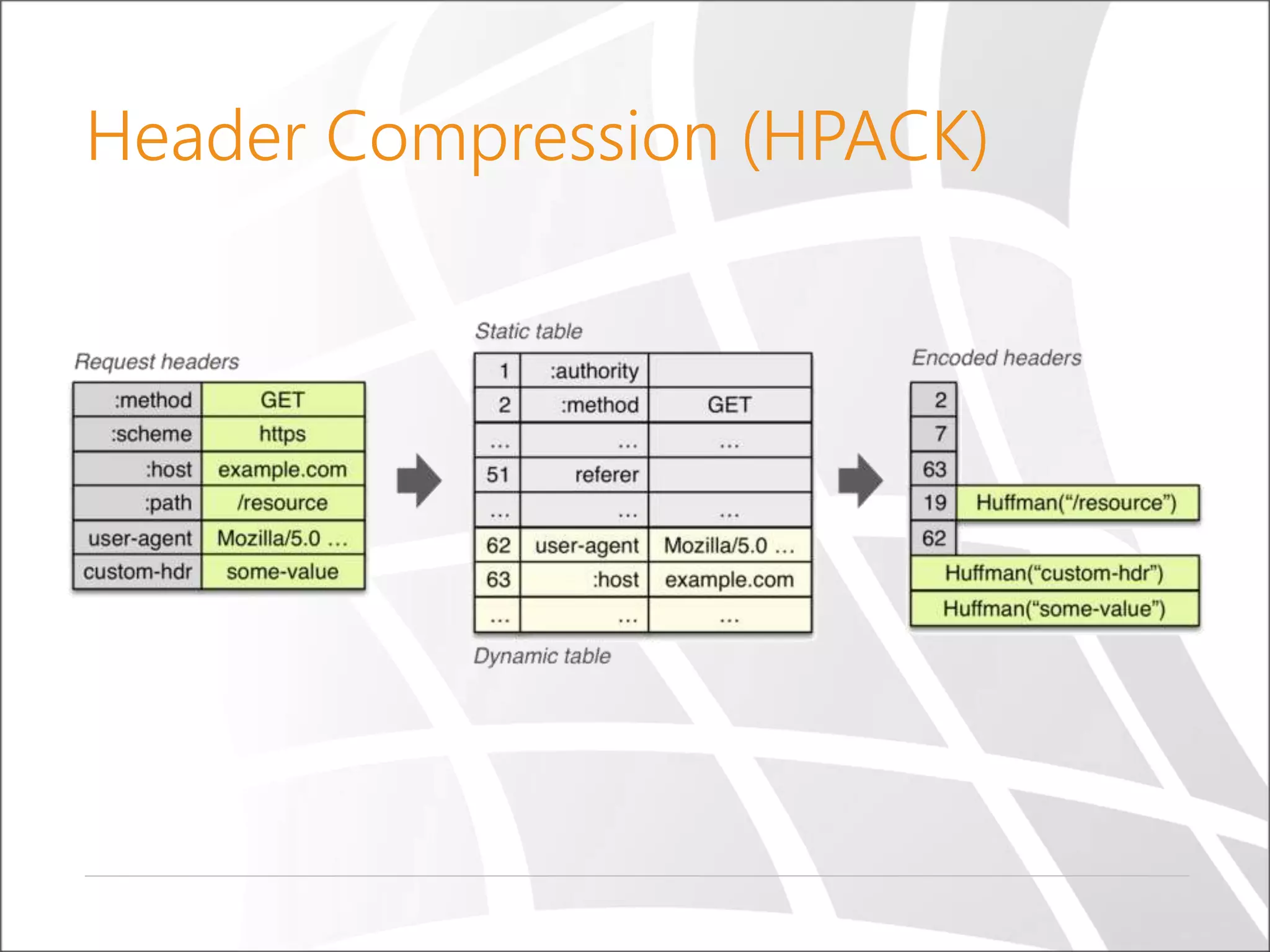
Header Compression (HPACK)
Demo
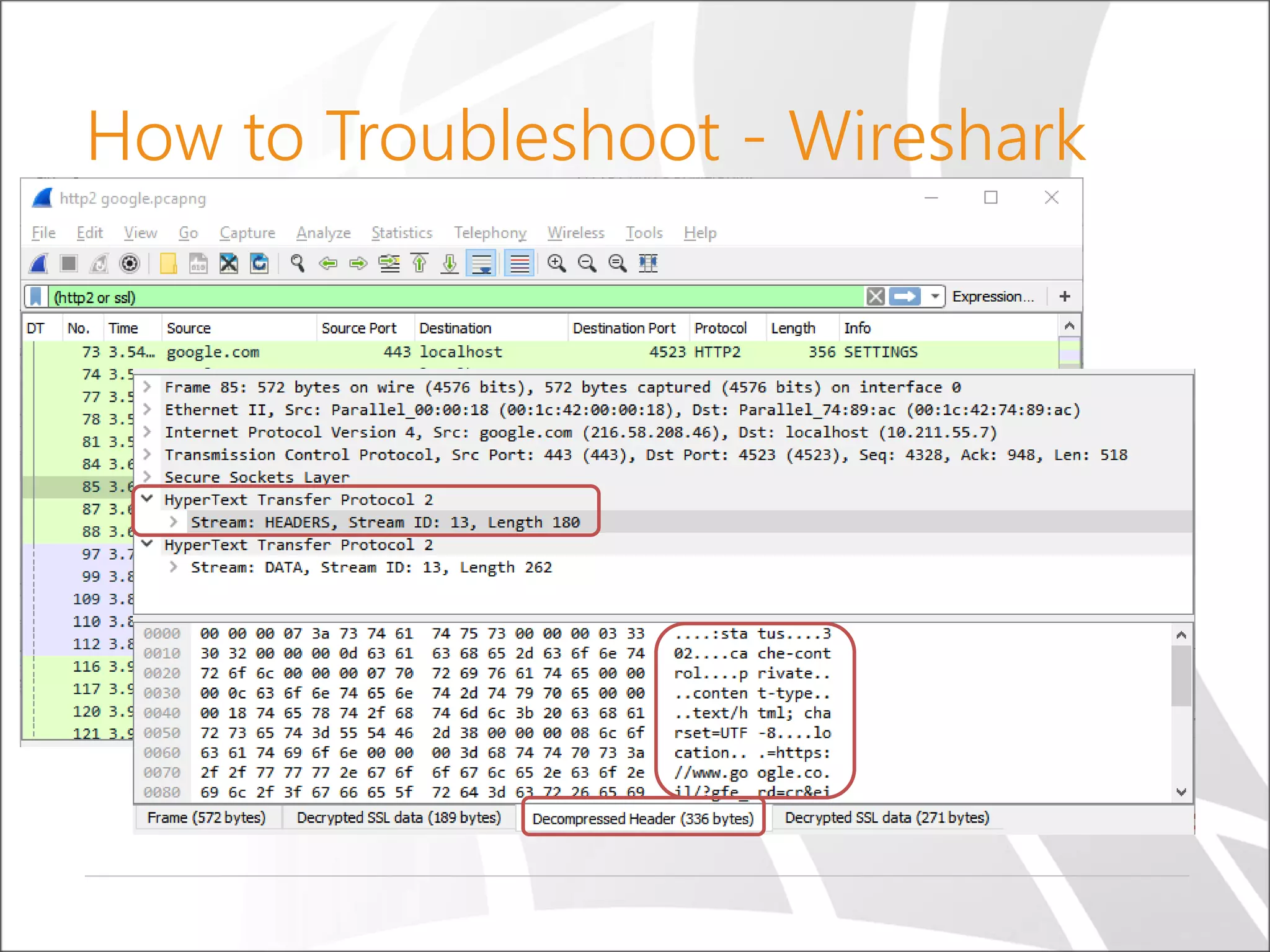
How to Troubleshoot - Wireshark
Works with Chrome and Firefox only (Windows, Linux, Mac)
Set SSLKeyLogFile for HTTPS sniffing
Wireshark->Preferences->Protocols->SSL
C:> set SSLKEYLOGFILE=c:tempsslkeylog.log
How to Troubleshoot - Wireshark
Demo
Server Push (Promise)
After the server responds with an HTML, it waits for
requests to embedded resources
Server code knows which resources client needs
JavaScript
CSS
Images
HTML pages of future navigation
Why not just push it to the client along with the HTML?
In ASP.NET, use HttpResponse.PushPromise
string path = Request.ApplicationPath;
Response.PushPromise(path + "/Images/1.png");
Response.PushPromise(path + "/Images/2.png");
Demo
Summary
Multiplexing
Multiple requests and responses
Fixes head-of-line blocking problem
Avoid the HTTP 1.1 hacks
Mechanism for request prioritization
Fewer TCP connections
Reduces TCP slow start
Header compression
Server Push
Resources
https://http2.github.io/faq
http://daniel.haxx.se/http2/http2-v1.10.pdf
https://tools.ietf.org/html/rfc7540
http://blogs.iis.net/davidso/http2
http://blogs.msdn.com/b/webdev/archive/2015
/04/30/updates-for-asp-net-4-6-web-forms-
mvc-5-web-api-2.aspx

Introducing HTTP/2

  • 1.
    © Copyright SELASoftware & Education Labs Ltd. | 14-18 Baruch Hirsch St Bnei Brak, 51202 Israel | www.selagroup.com Ido Flatow Introducing HTTP/2
  • 2.
    About Me Senior Architect,Sela Group Other titles: Microsoft Regional Director, IIS/ASPNET MVP Co-author of courses and books Focus on server, web, and cloud Manager of the Israeli Web Developers User Group
  • 3.
    Agenda Web (HTTP 1.1)and its current state What is (HTTP/2) – and how fast is it? Goals of HTTP/2 HTTP/2 concepts How to troubleshoot
  • 4.
    Web – CurrentState HTTP 1.1 is huge HTTP 1.0 RFC 1945 – released 1996 – 60 pages HTTP 1.1 RFC 2626 – released 1999 – 176 pages Now split into 6 documents – RFC 7230 and family Incomplete implementation of RFC Eg. HTTP pipelining Inadequate use of TCP
  • 5.
    Average Request +150%in 3 Years Jan 2012 – Nov 2015 (http://httparchive.org) top 1000 sites
  • 6.
    Shortcoming – CurrentWeb Concurrent connection limit Head of line blocking TCP slow start Latency – page load time
  • 7.
    Max Persistent Connections FromHTTP 1.1 RFC: “Clients that use persistent connections SHOULD limit the number of simultaneous connections that they maintain to a given server. A single-user client SHOULD NOT maintain more than 2 connections with any server or proxy. … These guidelines are intended to improve HTTP response times and avoid congestion.” Firefox 2 – 2 Firefox 3 and on – 6 Opera 9.26 – 4 Opera 12 – 6 Safari 3 – 4 Safari 5 – 6 IE 7 – 2 IE 8 – 6 IE 10 – 8 Chrome – 6 Avg. TCP connections during page load (Last 18 months)
  • 8.
    Head-of-Line Blocking (No Pipelining) Eachconnection can only handle one request at a time If current request blocks, next request will wait HTTP 1.1 defines pipelining, but most browsers do not implement it
  • 9.
    TCP Slow Start TCPdoes not use the full bandwidth capacity from start TCP probes network to find available capacity
  • 10.
    Latency vs Bandwidth Averageweb page has over 100 objects to download Largest impact on page load time is latency, not bandwidth https://www.akamai.com/us/en/our-thinking/state-of-the-internet-report
  • 11.
    What is 20msof Latency? (RTT = Round-trip time)
  • 12.
    What Have weDone to Improvise? Reduce # of requests and latency overhead Spriting Concatenation (JavaScript, CSS) Inlining Overcome max connection limit Domain sharding
  • 13.
    Problems with “optimizations” Spriting Painfuland annoying preprocessing, cache invalidations, slower executions Inlining Resource can’t be cached, inflates parent document by 33% overhead Concatenation Less modular code, expensive cache invalidators, slower execution Domain sharding TCP slowstart, excessive DNS lookup, latency
  • 14.
    HTTP/2 to theRescue Improve latency and less RTT sensitive Fix pipelining and remove “head of line blocking” Does not require multiple connections Achieved all this by retaining semantics of HTTP 1.1
  • 15.
    It Began withSPDY Originally proposed by Google as a wire format extension to HTTP in 2011 Implements all the major features of HTTP/2 Serves as a testbed for improvements to HTTP Without the burden of standardization SPDY became the basis of HTTP/2 in 2012 SPDY will cease to exist in 2016, making way to HTTP/2
  • 16.
    What is HTTP/2 HTTP/2uses a single, multiplexed connection Max connection limit per domain can be ignored HTTP/2 compresses header data and sends it in a concise, binary format Better than the plain text format used previously Less need for popular HTTP 1.1 optimizations
  • 17.
    HTTP/2 Specification Started withSPDY - draft 3 Comprised out of two specifications HTTP/2 – RFC7540 HPACK (header compression) – RFC7541 Implementations HTTP/2 over TLS (h2) HTTP/2 over TCP (h2c)
  • 18.
    HTTP/2 Over TLS(h2) HTTP/2 shipped with TLS as optional Firefox and Chrome developer teams stated they will only implement HTTP/2 over TLS Today, only HTTPS:// is allowed for HTTP/2 TLS must be at least v1.2, with cipher suite restrictions https://http2.github.io/http2-spec/#BadCipherSuites
  • 19.
    HTTP/2 Over TCP(h2c) Uses the Upgrade header Plans to support on IE, already supported in CURL GET /page HTTP/1.1 Host: server.example.com Connection: Upgrade, HTTP2-Settings Upgrade: h2c HTTP2-Settings: (SETTINGS payload) HTTP/1.1 200 OK Content-length: 243 Content-type: text/html (... HTTP/1.1 response ...) --- or --- HTTP/1.1 101 Switching Protocols Connection: Upgrade Upgrade: h2c (... HTTP/2 response ...)
  • 20.
    HTTP/2 in OneSlide One TCP connection Request → Stream Streams are multiplexed Streams are prioritized Binary framing layer Prioritization Flow control Server push Header compression (HPACK)
  • 21.
    TCP Connections -HTTP 1.1 vs HTTP/2 HTTP 1.1 HTTP/2 Client http://www.url.com Client http://www.url.com
  • 22.
  • 23.
  • 24.
    HTTP/2 Support Servers Microsoft IIS10 (Win 10 / Server 2016) Apache 2.4.12 Nginx 1.9.5 Jetty 9.3 Many more… Browsers Edge IE11 (Windows 10) Firefox 40+ Chrome 43+ Safari 9+ Opera 32+ iOS Safari 9.1+ Chrome for Android 46+ CURL Google, Facebook, Twitter and many more are using HTTP/2 already HTTP/2 is used by 4.5% of all websites (Dec. 2015 http://w3techs.com)
  • 25.
    HTTP/2 Multiplexing Each request/responsestream has an ID Streams comprise of frames (Header, Data…) TCP connection can have multiple streams Frames can be interleaved in the TCP channel Stream dependencies control frame prioritization Server (IIS/ASP.NET) sees streams as TCP connections
  • 26.
    Frame Types Frame typeDescription DATA HTTP body HEADERS Header fields PRIORITY Sender-advised priority of stream RST_STREAM Signal termination of stream SETTINGS Configuration parameters for the connection PUSH_PROMISE Signal a promise (push) of referenced sources PING Measure roundtrip time and “liveness” GOAWAY Inform peer to stop creating streams for current connection WINDOW_UPDATE Connection flow control CONTINUATION Continue a segment of header block fragments
  • 27.
  • 28.
  • 29.
    How to Troubleshoot- Wireshark Works with Chrome and Firefox only (Windows, Linux, Mac) Set SSLKeyLogFile for HTTPS sniffing Wireshark->Preferences->Protocols->SSL C:> set SSLKEYLOGFILE=c:tempsslkeylog.log
  • 30.
  • 31.
  • 32.
  • 33.
  • 34.
    Server Push (Promise) Afterthe server responds with an HTML, it waits for requests to embedded resources Server code knows which resources client needs JavaScript CSS Images HTML pages of future navigation Why not just push it to the client along with the HTML? In ASP.NET, use HttpResponse.PushPromise string path = Request.ApplicationPath; Response.PushPromise(path + "/Images/1.png"); Response.PushPromise(path + "/Images/2.png");
  • 35.
  • 36.
    Summary Multiplexing Multiple requests andresponses Fixes head-of-line blocking problem Avoid the HTTP 1.1 hacks Mechanism for request prioritization Fewer TCP connections Reduces TCP slow start Header compression Server Push
  • 37.

Editor's Notes

  • #5 Pipelining in HTTP 1.1 is mostly supported in browsers, but not in proxies
  • #11 Diagrams via Akamai’s state of the Internet statistics https://www.igvita.com/2012/07/19/latency-the-new-web-performance-bottleneck/
  • #22 TLS must support SNI, disable compression and re-negotiation, minimal key length for ephemeral key exchange