Content Network Navigation  Sanjoy Sanyal:www.itforintelligentfolks.blogspot.com
Definitions Navigation – location of a destination and determining a path towards it  Switching -  choosing among several local endpoints  Typically at Layer 2 the Link layer  Can also be based on Layer 4-7 selection (transport thru application)  Routing – choosing a path over which to send packets  At Layer 3 the network layer  Sanjoy Sanyal:www.itforintelligentfolks.blogspot.com
Domain Name System Translates  hostnames  to the corresponding numeric IP addresses Makes it possible to assign Internet names independently of the physical routing and hosting With an older system, each computer on the network retrieved a file called  HOSTS.TXT  from a central computer Sanjoy Sanyal:www.itforintelligentfolks.blogspot.com
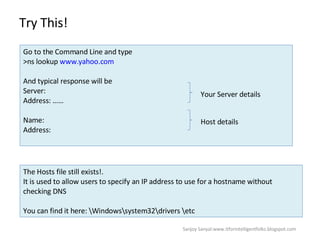
Try This!  Go to the Command Line and type  >ns lookup  www.yahoo.com And typical response will be  Server:  Address: …… Name:  Address:  Your Server details Host details The Hosts file still exists!.  It is used to allow users to specify an IP address to use for a hostname without checking DNS  You can find it here: \Windows\system32\drivers \etc Sanjoy Sanyal:www.itforintelligentfolks.blogspot.com
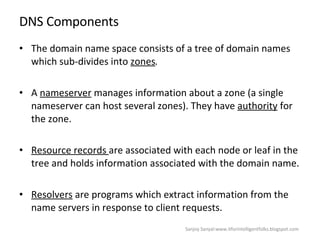
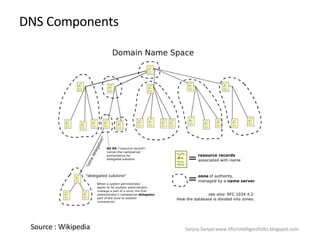
DNS Components The domain name space consists of a tree of domain  names  which sub-divides into  zones . A  nameserver  manages information about a zone (a single nameserver can host several zones). They have  authority  for the zone. Resource records  are associated with each node or leaf in the tree and holds information associated with the domain name. Resolvers  are programs which extract information from the name servers in response to client requests. Sanjoy Sanyal:www.itforintelligentfolks.blogspot.com
DNS Components Source : Wikipedia Sanjoy Sanyal:www.itforintelligentfolks.blogspot.com
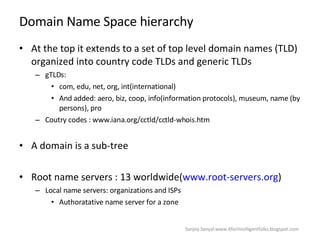
Domain Name Space hierarchy At the top it extends to a set of top level domain names (TLD) organized into country code TLDs and generic TLDs gTLDs: com, edu, net, org, int(international) And added: aero, biz, coop, info(information protocols), museum, name (by persons), pro  Coutry codes : www.iana.org/cctld/cctld-whois.htm  A domain is a sub-tree Root name servers : 13 worldwide( www.root-servers.org ) Local name servers: organizations and ISPs Authoratative name server for a zone Sanjoy Sanyal:www.itforintelligentfolks.blogspot.com
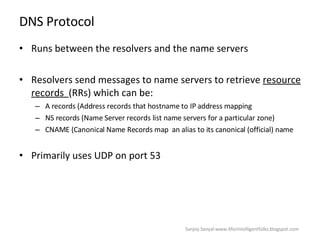
DNS Protocol Runs between the resolvers and the name servers Resolvers send messages to name servers to retrieve  resource records  (RRs) which can be: A records (Address records that hostname to IP address mapping NS records (Name Server records list name servers for a particular zone)  CNAME (Canonical Name Records map  an alias to its canonical (official) name Primarily uses UDP on port 53  Sanjoy Sanyal:www.itforintelligentfolks.blogspot.com
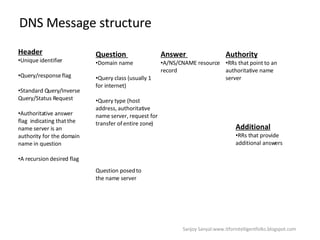
DNS Message structure Header   Unique identifier  Query/response flag Standard Query/Inverse Query/Status Request  Authoritative answer flag  indicating that the name server is an authority for the domain name in question  A recursion desired flag  Question  Domain name Query class (usually 1 for internet) Query type (host address, authoritative name server, request for transfer of entire zone) Question posed to the name server Answer  A/NS/CNAME resource record Authority   RRs that point to an authoritative name server  Additional RRs that provide additional answers Sanjoy Sanyal:www.itforintelligentfolks.blogspot.com
DNS Requests A name server holds a portion of the entire domain name space  Recursive requests  - first server pursues the client to another server  Iterative – server refers the client to another server and client pursues the query DNS requires most name servers to implement the iterative approach with the request as an option  Sanjoy Sanyal:www.itforintelligentfolks.blogspot.com
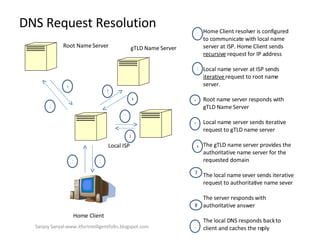
DNS Request Resolution  Home Client Local ISP Root Name Server gTLD Name Server 1 2 3 4 5 6 7 8 Home Client resolver is configured to communicate with local name server at ISP. Home Client sends  recursive  request for IP address  Local name server at ISP sends  iterative  request to root name server.  Root name server responds with gTLD Name Server Local name server sends iterative request to gTLD name server  The gTLD name server provides the authoritative name server for the requested domain  The local name sever sends iterative request to authoritative name sever The server responds with authoritative answer  The local DNS responds back to client and caches the reply  1 3 4 5 2 6 7 8 Sanjoy Sanyal:www.itforintelligentfolks.blogspot.com
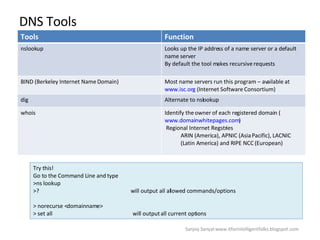
DNS Tools Try this! Go to the Command Line and type  >ns lookup >?  will output all allowed commands/options > norecurse <domainname> > set all  will output all current options Sanjoy Sanyal:www.itforintelligentfolks.blogspot.com Tools Function nslookup  Looks up the IP address of a name server or a default name server  By default the tool makes recursive requests  BIND (Berkeley Internet Name Domain) Most name servers run this program – available at  www.isc.org  (Internet Software Consortium)  dig Alternate to nslookup whois Identify the owner of each registered domain ( www.domainwhitepages.com )  Regional Internet Regstries ARIN (America), APNIC (Asia Pacific), LACNIC (Latin America) and RIPE NCC (European)
Switching Connecting to Endpoints  The key issue in switching is to ask which web server to connect to? The objective is to balance the load between servers  In this section we will discuss several ways to achieve load balancing  Sanjoy Sanyal:www.itforintelligentfolks.blogspot.com
Using DNS for Load Sharing  Multiple IP addresses can be specified for the hostname  Name Server rotates the order of these records This is not Load Balancing!  Try this!  >Nslook cnn.com Wait for TTL to expire (say 2 minutes) >ping cnn.com  and see the IP address Sanjoy Sanyal:www.itforintelligentfolks.blogspot.com
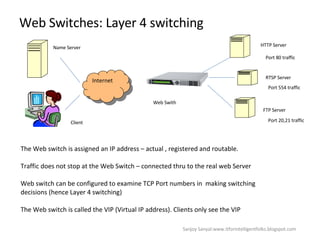
Web Switches: Layer 4 switching  Internet HTTP Server RTSP Server FTP Server Web Swith Name Server Client The Web switch is assigned an IP address – actual , registered and routable.  Traffic does not stop at the Web Switch – connected thru to the real web Server Web switch can be configured to examine TCP Port numbers in  making switching decisions (hence Layer 4 switching) The Web switch is called the VIP (Virtual IP address). Clients only see the VIP  Port 80 traffic Port 554 traffic Port 20,21 traffic Sanjoy Sanyal:www.itforintelligentfolks.blogspot.com
Server Load Balancing Policies with Layer 4 switches  Best Available Server for new sessions  Persistence – same client to same server  Differentiated Services  Sanjoy Sanyal:www.itforintelligentfolks.blogspot.com
Best Available Server for new connection Random Server Selection  Connections assigned uniformly but not deterministically  Round Robin  Assigned sequentially  Static Weighted Distribution assigned based on specified traffic percentage  Dynamic Weighted Distribution  Assigned to servers with fastest response times Least Connections  Assigned to server with least connections  Fewest Packets  Assigned to server that has received the fewest packets in a time interval Least Busy Server Assigned to Server based on utilization, health and security  Sanjoy Sanyal:www.itforintelligentfolks.blogspot.com
Persistent Policies Takes precedence over best available service policies  Useful situations: TCP’s protocol acknowledgement mechanisms to work  Online Shopping  SSL sessions  Techniques: Bind a particular server to a source IP address assumed to be a client and release when inactive Session monitoring helps persistence policy implementation  SSL monitoring at Layer 7  Ecommerce monitoring from cookies  Sanjoy Sanyal:www.itforintelligentfolks.blogspot.com
Differentiated Policies Scarce resources for important customers  Identify most important customers: SSL sessions  Cookies  Name Servers Threshold when these policies take over  Sanjoy Sanyal:www.itforintelligentfolks.blogspot.com
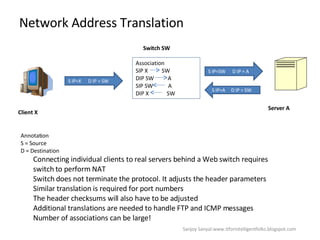
Network Address Translation  S IP=X  D IP = SW Client X Switch SW Association SIP X  SW DIP SW  A SIP SW  A DIP X  SW S IP=SW  D IP = A S IP=A  D IP = SW Server A Annotation  S = Source  D = Destination Connecting individual clients to real servers behind a Web switch requires switch to perform NAT Switch does not terminate the protocol. It adjusts the header parameters Similar translation is required for port numbers  The header checksums will also have to be adjusted  Additional translations are needed to handle FTP and ICMP messages  Number of associations can be large! Sanjoy Sanyal:www.itforintelligentfolks.blogspot.com
NAT on the balance  Frees up IP addresses for local admin but has following advantages:  Move connection control away from end points (violates the End to End design)  Creates a single point of failure  Complicates the practice of maintaining several physical connections to the Internet Cannot work with encrypted messages at the IP level Cannot work with IP=based authorization schemes such as SNMPv3  Widely used in-spite of the above challenges  Sanjoy Sanyal:www.itforintelligentfolks.blogspot.com
Layer 7 Switching  Switches based on Layer 7 (application) information: URL, HTTP Header Information, Cookies, SSL Session identifier  Application: Switch based on content  Switch to interception proxy based on cacheability indications in HTTP header Switch based on transaction policies based on cookies  Difference with Layer 4 switching: Has to wait for the HTTP GET request (Layer 4: at TCP session setup)  Terminates the TCP session (Layer 4:  does not terminate, rewrite header info)  Sanjoy Sanyal:www.itforintelligentfolks.blogspot.com
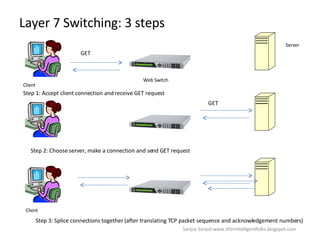
Layer 7 Switching: 3 steps  Server Web Switch Client GET Step 1: Accept client connection and receive GET request GET Step 2: Choose server, make a connection and send GET request Client Step 3: Splice connections together (after translating TCP packet sequence and acknowledgement numbers)  Sanjoy Sanyal:www.itforintelligentfolks.blogspot.com
Virtual Router Redundancy Protocol (VRRP) Allows a single virtual IP address to identify a virtual router which consists of at least two physical Web switches  Provides reliability  Sanjoy Sanyal:www.itforintelligentfolks.blogspot.com
Steering Client Requests  Once the destination has been selected (which is what we have learnt so far) several techniques can direct client requests to the destination  Sanjoy Sanyal:www.itforintelligentfolks.blogspot.com
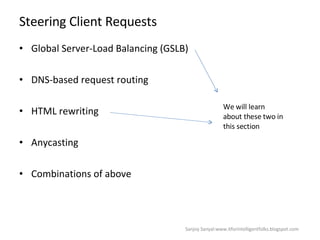
Steering Client Requests Global Server-Load Balancing (GSLB)  DNS-based request routing  HTML rewriting  Anycasting  Combinations of above  We will learn about these two in this section Sanjoy Sanyal:www.itforintelligentfolks.blogspot.com
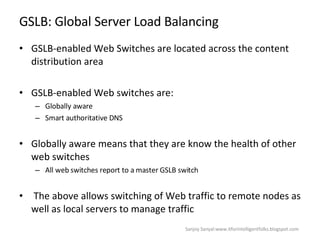
GSLB: Global Server Load Balancing  GSLB-enabled Web Switches are located across the content distribution area GSLB-enabled Web switches are: Globally aware  Smart authoritative DNS  Globally aware means that they are know the health of other web switches  All web switches report to a master GSLB switch  The above allows switching of Web traffic to remote nodes as well as local servers to manage traffic  Sanjoy Sanyal:www.itforintelligentfolks.blogspot.com
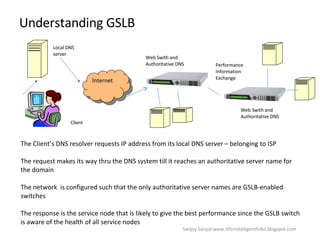
Understanding GSLB  Internet Web Swith and Authoritative DNS Local DNS server Client The Client’s DNS resolver requests IP address from its local DNS server – belonging to ISP The request makes its way thru the DNS system till it reaches an authoritative server name for the domain  The network  is configured such that the only authoritative server names are GSLB-enabled switches  The response is the service node that is likely to give the best performance since the GSLB switch is aware of the health of all service nodes  Performance Information Exchange Web Swith and Authoritative DNS Sanjoy Sanyal:www.itforintelligentfolks.blogspot.com
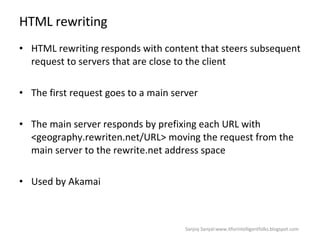
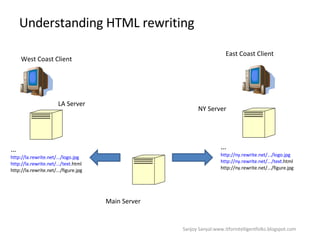
HTML rewriting HTML rewriting responds with content that steers subsequent request to servers that are close to the client  The first request goes to a main server  The main server responds by prefixing each URL with <geography.rewriten.net/URL> moving the request from the main server to the rewrite.net address space Used by Akamai  Sanjoy Sanyal:www.itforintelligentfolks.blogspot.com
Understanding HTML rewriting LA Server East Coast Client West Coast Client NY Server Main Server … http://ny.rewrite.net/.../logo.jpg http://ny.rewrite.net/.../text. html http://ny.rewrite.net/.../figure.jpg … http://la.rewrite.net/.../logo.jpg http://la.rewrite.net/.../text. html http://la.rewrite.net/.../figure.jpg Sanjoy Sanyal:www.itforintelligentfolks.blogspot.com
Summary This has been a long session  If you have reached here you need a cold beer  You need to know the name of the shop and the address (DNS)  If you don’t you will have to ask friends (DNS request resolution)  Once you know a few alternate destinations you need to know which is the one that will be most efficient one for you (switching)  Now you need to get the most efficient way of getting there (routing) Sanjoy Sanyal:www.itforintelligentfolks.blogspot.com

Content Navigation

  • 1.
    Content Network Navigation Sanjoy Sanyal:www.itforintelligentfolks.blogspot.com
  • 2.
    Definitions Navigation –location of a destination and determining a path towards it Switching - choosing among several local endpoints Typically at Layer 2 the Link layer Can also be based on Layer 4-7 selection (transport thru application) Routing – choosing a path over which to send packets At Layer 3 the network layer Sanjoy Sanyal:www.itforintelligentfolks.blogspot.com
  • 3.
    Domain Name SystemTranslates hostnames to the corresponding numeric IP addresses Makes it possible to assign Internet names independently of the physical routing and hosting With an older system, each computer on the network retrieved a file called HOSTS.TXT from a central computer Sanjoy Sanyal:www.itforintelligentfolks.blogspot.com
  • 4.
    Try This! Go to the Command Line and type >ns lookup www.yahoo.com And typical response will be Server: Address: …… Name: Address: Your Server details Host details The Hosts file still exists!. It is used to allow users to specify an IP address to use for a hostname without checking DNS You can find it here: \Windows\system32\drivers \etc Sanjoy Sanyal:www.itforintelligentfolks.blogspot.com
  • 5.
    DNS Components Thedomain name space consists of a tree of domain names which sub-divides into zones . A nameserver manages information about a zone (a single nameserver can host several zones). They have authority for the zone. Resource records are associated with each node or leaf in the tree and holds information associated with the domain name. Resolvers are programs which extract information from the name servers in response to client requests. Sanjoy Sanyal:www.itforintelligentfolks.blogspot.com
  • 6.
    DNS Components Source: Wikipedia Sanjoy Sanyal:www.itforintelligentfolks.blogspot.com
  • 7.
    Domain Name Spacehierarchy At the top it extends to a set of top level domain names (TLD) organized into country code TLDs and generic TLDs gTLDs: com, edu, net, org, int(international) And added: aero, biz, coop, info(information protocols), museum, name (by persons), pro Coutry codes : www.iana.org/cctld/cctld-whois.htm A domain is a sub-tree Root name servers : 13 worldwide( www.root-servers.org ) Local name servers: organizations and ISPs Authoratative name server for a zone Sanjoy Sanyal:www.itforintelligentfolks.blogspot.com
  • 8.
    DNS Protocol Runsbetween the resolvers and the name servers Resolvers send messages to name servers to retrieve resource records (RRs) which can be: A records (Address records that hostname to IP address mapping NS records (Name Server records list name servers for a particular zone) CNAME (Canonical Name Records map an alias to its canonical (official) name Primarily uses UDP on port 53 Sanjoy Sanyal:www.itforintelligentfolks.blogspot.com
  • 9.
    DNS Message structureHeader Unique identifier Query/response flag Standard Query/Inverse Query/Status Request Authoritative answer flag indicating that the name server is an authority for the domain name in question A recursion desired flag Question Domain name Query class (usually 1 for internet) Query type (host address, authoritative name server, request for transfer of entire zone) Question posed to the name server Answer A/NS/CNAME resource record Authority RRs that point to an authoritative name server Additional RRs that provide additional answers Sanjoy Sanyal:www.itforintelligentfolks.blogspot.com
  • 10.
    DNS Requests Aname server holds a portion of the entire domain name space Recursive requests - first server pursues the client to another server Iterative – server refers the client to another server and client pursues the query DNS requires most name servers to implement the iterative approach with the request as an option Sanjoy Sanyal:www.itforintelligentfolks.blogspot.com
  • 11.
    DNS Request Resolution Home Client Local ISP Root Name Server gTLD Name Server 1 2 3 4 5 6 7 8 Home Client resolver is configured to communicate with local name server at ISP. Home Client sends recursive request for IP address Local name server at ISP sends iterative request to root name server. Root name server responds with gTLD Name Server Local name server sends iterative request to gTLD name server The gTLD name server provides the authoritative name server for the requested domain The local name sever sends iterative request to authoritative name sever The server responds with authoritative answer The local DNS responds back to client and caches the reply 1 3 4 5 2 6 7 8 Sanjoy Sanyal:www.itforintelligentfolks.blogspot.com
  • 12.
    DNS Tools Trythis! Go to the Command Line and type >ns lookup >? will output all allowed commands/options > norecurse <domainname> > set all will output all current options Sanjoy Sanyal:www.itforintelligentfolks.blogspot.com Tools Function nslookup Looks up the IP address of a name server or a default name server By default the tool makes recursive requests BIND (Berkeley Internet Name Domain) Most name servers run this program – available at www.isc.org (Internet Software Consortium) dig Alternate to nslookup whois Identify the owner of each registered domain ( www.domainwhitepages.com ) Regional Internet Regstries ARIN (America), APNIC (Asia Pacific), LACNIC (Latin America) and RIPE NCC (European)
  • 13.
    Switching Connecting toEndpoints The key issue in switching is to ask which web server to connect to? The objective is to balance the load between servers In this section we will discuss several ways to achieve load balancing Sanjoy Sanyal:www.itforintelligentfolks.blogspot.com
  • 14.
    Using DNS forLoad Sharing Multiple IP addresses can be specified for the hostname Name Server rotates the order of these records This is not Load Balancing! Try this! >Nslook cnn.com Wait for TTL to expire (say 2 minutes) >ping cnn.com and see the IP address Sanjoy Sanyal:www.itforintelligentfolks.blogspot.com
  • 15.
    Web Switches: Layer4 switching Internet HTTP Server RTSP Server FTP Server Web Swith Name Server Client The Web switch is assigned an IP address – actual , registered and routable. Traffic does not stop at the Web Switch – connected thru to the real web Server Web switch can be configured to examine TCP Port numbers in making switching decisions (hence Layer 4 switching) The Web switch is called the VIP (Virtual IP address). Clients only see the VIP Port 80 traffic Port 554 traffic Port 20,21 traffic Sanjoy Sanyal:www.itforintelligentfolks.blogspot.com
  • 16.
    Server Load BalancingPolicies with Layer 4 switches Best Available Server for new sessions Persistence – same client to same server Differentiated Services Sanjoy Sanyal:www.itforintelligentfolks.blogspot.com
  • 17.
    Best Available Serverfor new connection Random Server Selection Connections assigned uniformly but not deterministically Round Robin Assigned sequentially Static Weighted Distribution assigned based on specified traffic percentage Dynamic Weighted Distribution Assigned to servers with fastest response times Least Connections Assigned to server with least connections Fewest Packets Assigned to server that has received the fewest packets in a time interval Least Busy Server Assigned to Server based on utilization, health and security Sanjoy Sanyal:www.itforintelligentfolks.blogspot.com
  • 18.
    Persistent Policies Takesprecedence over best available service policies Useful situations: TCP’s protocol acknowledgement mechanisms to work Online Shopping SSL sessions Techniques: Bind a particular server to a source IP address assumed to be a client and release when inactive Session monitoring helps persistence policy implementation SSL monitoring at Layer 7 Ecommerce monitoring from cookies Sanjoy Sanyal:www.itforintelligentfolks.blogspot.com
  • 19.
    Differentiated Policies Scarceresources for important customers Identify most important customers: SSL sessions Cookies Name Servers Threshold when these policies take over Sanjoy Sanyal:www.itforintelligentfolks.blogspot.com
  • 20.
    Network Address Translation S IP=X D IP = SW Client X Switch SW Association SIP X SW DIP SW A SIP SW A DIP X SW S IP=SW D IP = A S IP=A D IP = SW Server A Annotation S = Source D = Destination Connecting individual clients to real servers behind a Web switch requires switch to perform NAT Switch does not terminate the protocol. It adjusts the header parameters Similar translation is required for port numbers The header checksums will also have to be adjusted Additional translations are needed to handle FTP and ICMP messages Number of associations can be large! Sanjoy Sanyal:www.itforintelligentfolks.blogspot.com
  • 21.
    NAT on thebalance Frees up IP addresses for local admin but has following advantages: Move connection control away from end points (violates the End to End design) Creates a single point of failure Complicates the practice of maintaining several physical connections to the Internet Cannot work with encrypted messages at the IP level Cannot work with IP=based authorization schemes such as SNMPv3 Widely used in-spite of the above challenges Sanjoy Sanyal:www.itforintelligentfolks.blogspot.com
  • 22.
    Layer 7 Switching Switches based on Layer 7 (application) information: URL, HTTP Header Information, Cookies, SSL Session identifier Application: Switch based on content Switch to interception proxy based on cacheability indications in HTTP header Switch based on transaction policies based on cookies Difference with Layer 4 switching: Has to wait for the HTTP GET request (Layer 4: at TCP session setup) Terminates the TCP session (Layer 4: does not terminate, rewrite header info) Sanjoy Sanyal:www.itforintelligentfolks.blogspot.com
  • 23.
    Layer 7 Switching:3 steps Server Web Switch Client GET Step 1: Accept client connection and receive GET request GET Step 2: Choose server, make a connection and send GET request Client Step 3: Splice connections together (after translating TCP packet sequence and acknowledgement numbers) Sanjoy Sanyal:www.itforintelligentfolks.blogspot.com
  • 24.
    Virtual Router RedundancyProtocol (VRRP) Allows a single virtual IP address to identify a virtual router which consists of at least two physical Web switches Provides reliability Sanjoy Sanyal:www.itforintelligentfolks.blogspot.com
  • 25.
    Steering Client Requests Once the destination has been selected (which is what we have learnt so far) several techniques can direct client requests to the destination Sanjoy Sanyal:www.itforintelligentfolks.blogspot.com
  • 26.
    Steering Client RequestsGlobal Server-Load Balancing (GSLB) DNS-based request routing HTML rewriting Anycasting Combinations of above We will learn about these two in this section Sanjoy Sanyal:www.itforintelligentfolks.blogspot.com
  • 27.
    GSLB: Global ServerLoad Balancing GSLB-enabled Web Switches are located across the content distribution area GSLB-enabled Web switches are: Globally aware Smart authoritative DNS Globally aware means that they are know the health of other web switches All web switches report to a master GSLB switch The above allows switching of Web traffic to remote nodes as well as local servers to manage traffic Sanjoy Sanyal:www.itforintelligentfolks.blogspot.com
  • 28.
    Understanding GSLB Internet Web Swith and Authoritative DNS Local DNS server Client The Client’s DNS resolver requests IP address from its local DNS server – belonging to ISP The request makes its way thru the DNS system till it reaches an authoritative server name for the domain The network is configured such that the only authoritative server names are GSLB-enabled switches The response is the service node that is likely to give the best performance since the GSLB switch is aware of the health of all service nodes Performance Information Exchange Web Swith and Authoritative DNS Sanjoy Sanyal:www.itforintelligentfolks.blogspot.com
  • 29.
    HTML rewriting HTMLrewriting responds with content that steers subsequent request to servers that are close to the client The first request goes to a main server The main server responds by prefixing each URL with <geography.rewriten.net/URL> moving the request from the main server to the rewrite.net address space Used by Akamai Sanjoy Sanyal:www.itforintelligentfolks.blogspot.com
  • 30.
    Understanding HTML rewritingLA Server East Coast Client West Coast Client NY Server Main Server … http://ny.rewrite.net/.../logo.jpg http://ny.rewrite.net/.../text. html http://ny.rewrite.net/.../figure.jpg … http://la.rewrite.net/.../logo.jpg http://la.rewrite.net/.../text. html http://la.rewrite.net/.../figure.jpg Sanjoy Sanyal:www.itforintelligentfolks.blogspot.com
  • 31.
    Summary This hasbeen a long session If you have reached here you need a cold beer You need to know the name of the shop and the address (DNS) If you don’t you will have to ask friends (DNS request resolution) Once you know a few alternate destinations you need to know which is the one that will be most efficient one for you (switching) Now you need to get the most efficient way of getting there (routing) Sanjoy Sanyal:www.itforintelligentfolks.blogspot.com