Disclaimer: This presentation is prepared by trainees of
baabtra as a part of mentoring program. This is not official
document of baabtra –Mentoring Partner
Baabtra-Mentoring Partner is the mentoring division of baabte System Technologies Pvt .
Ltd
HTML 5
Jaseena A P
jsnp65@gmail.com
www.facebook.com/Jaseena
Muhammed A P
twitter.com/username
in.linkedin.com/in/profilena
me
9539443588
What is HTML 5
 HTML5 is the standard for HTML
 Use of internet changed a lot since HTML 4.01 (1999)
 Several HTML 4.01 elements are never used or never
used the way they were intended
 To better handle todays internet, HTML5 brings new
changes: New elements for drawing graphics, adding
media content, better page structure, better form
handling, and several APIs to drag/drop elements, find
Geolocation, include web storage, application cache,
web workers, etc.
How Did HTML5 Get Started?
 Cooperation between World Wide Web
Consortium (W3C) and Web Hypertext Application
Technology Working Group (WHATWG)
Some rules of HTML5 ….
New features should be based on HTML, CSS, DOM, and
JavaScript
Reduce the need for external plugins (like Flash)
Better error handling
More markup to replace scripting
HTML5 should be device independent
The development process should be visible to the public.
New features in HTML5:
The canvas element for drawing
The video and audio elements for media playback
Better support for local offline storage
New content specific elements, like article, footer,
header, nav, section
New form controls, like calendar, date, time, email, url.
New Markup elements
<HEADER>
 Specifies a group of navigation elements for the
document.
 All major browsers support <Header> Tag.
How <Header> works??
<Header>
<h1>Welcome to my website</h1>
<p>This is just an example</p>
</Header>
New Markup elements
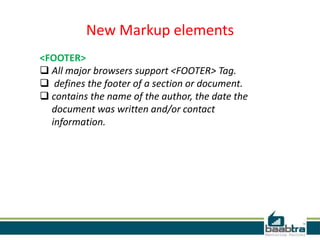
<FOOTER>
 All major browsers support <FOOTER> Tag.
 defines the footer of a section or document.
 contains the name of the author, the date the
document was written and/or contact
information.
New Markup elements
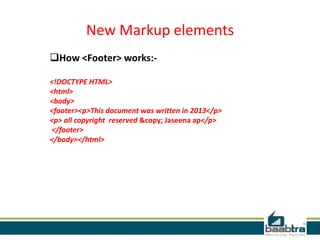
How <Footer> works:-
<!DOCTYPE HTML>
<html>
<body>
<footer><p>This document was written in 2013</p>
<p> all copyright reserved &copy; Jaseena ap</p>
</footer>
</body></html>
New Markup elements
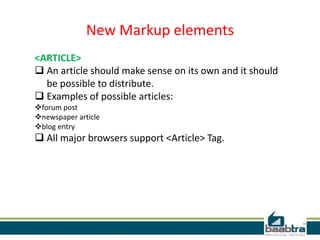
<ARTICLE>
 An article should make sense on its own and it should
be possible to distribute.
 Examples of possible articles:
forum post
newspaper article
blog entry
 All major browsers support <Article> Tag.
New Markup elements
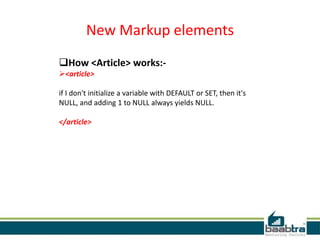
How <Article> works:-
<article>
if I don't initialize a variable with DEFAULT or SET, then it's
NULL, and adding 1 to NULL always yields NULL.
</article>
New Markup elements
<ASIDE>
 Defines some content aside from the content it is placed in.
 The aside content should be related to the surrounding
content.
 All major browsers support <Aside> Tag.
How <Aside> works:-
<p>Govt Engg college Idukki is situated in painavu,the major
town in Idukki district.</p>
<aside>
<h4>Idukki Dam</h4>
Asia’s largest arch dam. Just 3km away from GECI .
</aside>
New Markup elements
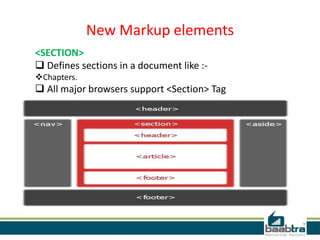
<SECTION>
 Defines sections in a document like :-
Chapters.
 All major browsers support <Section> Tag
HTML5 VIDEO
Video on the Web:-
 Until now, there has never been a standard for showing video on a
web page.
 Today, most videos are shown through a plugin (like flash). However,
not all browsers have the same plugins.
 HTML5 specifies a standard way to include video, with the video
element.
Video Formats:- (Ogg , MPEG 4 , WebM).
HTML5 VIDEO
How can we use it??
<video src="C:UsersJaseenaDownloadsVideovideo1.mp4"
width="320" height="240" controls="controls">
</video>
HTML5 VIDEO
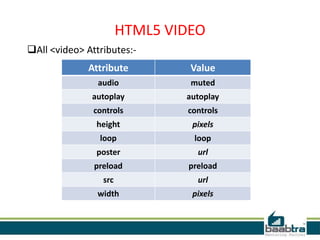
All <video> Attributes:-
ValueAttribute
mutedaudio
autoplayautoplay
controlscontrols
pixelsheight
looploop
urlposter
preloadpreload
urlsrc
pixelswidth
HTML5 AUDIO
Audio on the Web:-
 Until now, there has never been a standard for playing
audio on a web page.
 Today, most audio are played through a plugin (like flash).
However, not all browsers have the same plugins.
 HTML5 specifies a standard way to include audio, with the
audio element.
 The audio element can play sound files, or an audio
stream.
Audio Formats:- (Ogg Vorbis, MP3, Wav).
HTML5 AUDIO
How can we use it??
<audio src="C:UsersJaseenaDownloadsMusicsong1.mp3“
controls="controls">
</audio>
HTML5 AUDIO
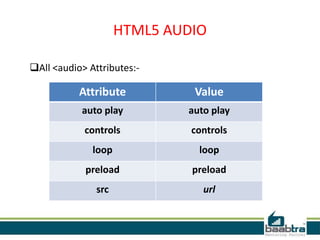
All <audio> Attributes:-
ValueAttribute
auto playauto play
controlscontrols
looploop
preloadpreload
urlsrc
HTML CANVAS
What is Canvas??
<canvas> tag is used to display graphics.
it is only a container for graphics, we must use a script to
actually paint graphics.
All major browsers support <Canvas> Tag.
HTML CANVAS
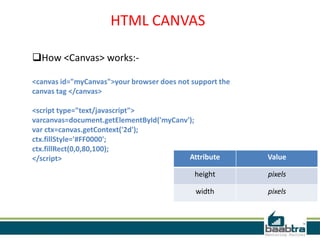
How <Canvas> works:-
<canvas id="myCanvas">your browser does not support the
canvas tag </canvas>
<script type="text/javascript">
varcanvas=document.getElementById('myCanv');
var ctx=canvas.getContext('2d');
ctx.fillStyle='#FF0000';
ctx.fillRect(0,0,80,100);
</script> ValueAttribute
pixelsheight
pixelswidth
HTML5 INPUT TYPES
 HTML5 has several new input types for forms. These new
features allow better input control and validation.
 color
 date
 datetime
 datetime-local
 email
 month
 number
 range
 search
 tel
 time
 url
 week
HTML5 FORM ELEMENTS
HTML5 has the following new form elements:
- <datalist>
- <keygen>
- <output>
HTML5 FORM ELEMENTS
<datalist>
 The <datalist> element specifies a list of pre-defined
options for an <input> element.
 The <datalist> element is used to provide an
"autocomplete" feature on <input> elements. Users will
see a drop-down list of pre-defined options as they input
data.
 Use the <input> element's list attribute to bind it
together with a <datalist> element.
HTML5 FORM ELEMENTS
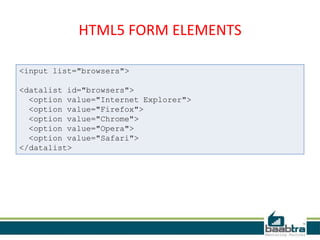
<input list="browsers">
<datalist id="browsers">
<option value="Internet Explorer">
<option value="Firefox">
<option value="Chrome">
<option value="Opera">
<option value="Safari">
</datalist>
HTML5 FORM ELEMENTS
 <keygen>
 The purpose of the <keygen> element is to provide a
secure way to authenticate users.
 The <keygen> tag specifies a key-pair generator field in a
form.
 When the form is submitted, two keys are generated, one
private and one public.
 The private key is stored locally, and the public key is sent
to the server. The public key could be used to generate a
client certificate to authenticate the user in the future.
HTML5 FORM ELEMENTS
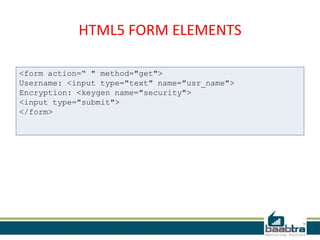
<form action=“ " method="get">
Username: <input type="text" name="usr_name">
Encryption: <keygen name="security">
<input type="submit">
</form>
HTML5 FORM ELEMENTS
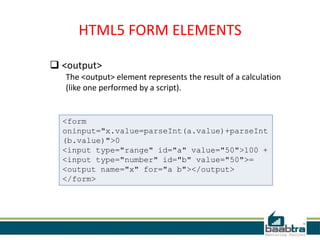
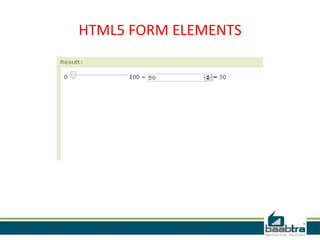
 <output>
The <output> element represents the result of a calculation
(like one performed by a script).
<form
oninput="x.value=parseInt(a.value)+parseInt
(b.value)">0
<input type="range" id="a" value="50">100 +
<input type="number" id="b" value="50">=
<output name="x" for="a b"></output>
</form>
HTML5 FORM ELEMENTS
THANK YOU
If this presentation helped you, please visit our
page facebook.com/baabtra and like it.
Thanks in advance.
www.baabtra.com | www.massbaab.com |www.baabte.com
Contact Us
Emarald Mall (Big Bazar Building)
Mavoor Road, Kozhikode,
Kerala, India.
Ph: + 91 – 495 40 25 550
NC Complex, Near Bus Stand
Mukkam, Kozhikode,
Kerala, India.
Ph: + 91 – 495 40 25 550
Start up Village
Eranakulam,
Kerala, India.
Email: info@baabtra.com

Html5

  • 2.
    Disclaimer: This presentationis prepared by trainees of baabtra as a part of mentoring program. This is not official document of baabtra –Mentoring Partner Baabtra-Mentoring Partner is the mentoring division of baabte System Technologies Pvt . Ltd
  • 4.
    HTML 5 Jaseena AP jsnp65@gmail.com www.facebook.com/Jaseena Muhammed A P twitter.com/username in.linkedin.com/in/profilena me 9539443588
  • 5.
    What is HTML5  HTML5 is the standard for HTML  Use of internet changed a lot since HTML 4.01 (1999)  Several HTML 4.01 elements are never used or never used the way they were intended  To better handle todays internet, HTML5 brings new changes: New elements for drawing graphics, adding media content, better page structure, better form handling, and several APIs to drag/drop elements, find Geolocation, include web storage, application cache, web workers, etc.
  • 6.
    How Did HTML5Get Started?  Cooperation between World Wide Web Consortium (W3C) and Web Hypertext Application Technology Working Group (WHATWG)
  • 7.
    Some rules ofHTML5 …. New features should be based on HTML, CSS, DOM, and JavaScript Reduce the need for external plugins (like Flash) Better error handling More markup to replace scripting HTML5 should be device independent The development process should be visible to the public.
  • 8.
    New features inHTML5: The canvas element for drawing The video and audio elements for media playback Better support for local offline storage New content specific elements, like article, footer, header, nav, section New form controls, like calendar, date, time, email, url.
  • 9.
    New Markup elements <HEADER> Specifies a group of navigation elements for the document.  All major browsers support <Header> Tag. How <Header> works?? <Header> <h1>Welcome to my website</h1> <p>This is just an example</p> </Header>
  • 10.
    New Markup elements <FOOTER> All major browsers support <FOOTER> Tag.  defines the footer of a section or document.  contains the name of the author, the date the document was written and/or contact information.
  • 11.
    New Markup elements How<Footer> works:- <!DOCTYPE HTML> <html> <body> <footer><p>This document was written in 2013</p> <p> all copyright reserved &copy; Jaseena ap</p> </footer> </body></html>
  • 12.
    New Markup elements <ARTICLE> An article should make sense on its own and it should be possible to distribute.  Examples of possible articles: forum post newspaper article blog entry  All major browsers support <Article> Tag.
  • 13.
    New Markup elements How<Article> works:- <article> if I don't initialize a variable with DEFAULT or SET, then it's NULL, and adding 1 to NULL always yields NULL. </article>
  • 14.
    New Markup elements <ASIDE> Defines some content aside from the content it is placed in.  The aside content should be related to the surrounding content.  All major browsers support <Aside> Tag. How <Aside> works:- <p>Govt Engg college Idukki is situated in painavu,the major town in Idukki district.</p> <aside> <h4>Idukki Dam</h4> Asia’s largest arch dam. Just 3km away from GECI . </aside>
  • 15.
    New Markup elements <SECTION> Defines sections in a document like :- Chapters.  All major browsers support <Section> Tag
  • 16.
    HTML5 VIDEO Video onthe Web:-  Until now, there has never been a standard for showing video on a web page.  Today, most videos are shown through a plugin (like flash). However, not all browsers have the same plugins.  HTML5 specifies a standard way to include video, with the video element. Video Formats:- (Ogg , MPEG 4 , WebM).
  • 17.
    HTML5 VIDEO How canwe use it?? <video src="C:UsersJaseenaDownloadsVideovideo1.mp4" width="320" height="240" controls="controls"> </video>
  • 18.
    HTML5 VIDEO All <video>Attributes:- ValueAttribute mutedaudio autoplayautoplay controlscontrols pixelsheight looploop urlposter preloadpreload urlsrc pixelswidth
  • 19.
    HTML5 AUDIO Audio onthe Web:-  Until now, there has never been a standard for playing audio on a web page.  Today, most audio are played through a plugin (like flash). However, not all browsers have the same plugins.  HTML5 specifies a standard way to include audio, with the audio element.  The audio element can play sound files, or an audio stream. Audio Formats:- (Ogg Vorbis, MP3, Wav).
  • 20.
    HTML5 AUDIO How canwe use it?? <audio src="C:UsersJaseenaDownloadsMusicsong1.mp3“ controls="controls"> </audio>
  • 21.
    HTML5 AUDIO All <audio>Attributes:- ValueAttribute auto playauto play controlscontrols looploop preloadpreload urlsrc
  • 22.
    HTML CANVAS What isCanvas?? <canvas> tag is used to display graphics. it is only a container for graphics, we must use a script to actually paint graphics. All major browsers support <Canvas> Tag.
  • 23.
    HTML CANVAS How <Canvas>works:- <canvas id="myCanvas">your browser does not support the canvas tag </canvas> <script type="text/javascript"> varcanvas=document.getElementById('myCanv'); var ctx=canvas.getContext('2d'); ctx.fillStyle='#FF0000'; ctx.fillRect(0,0,80,100); </script> ValueAttribute pixelsheight pixelswidth
  • 24.
    HTML5 INPUT TYPES HTML5 has several new input types for forms. These new features allow better input control and validation.  color  date  datetime  datetime-local  email  month  number  range  search  tel  time  url  week
  • 25.
    HTML5 FORM ELEMENTS HTML5has the following new form elements: - <datalist> - <keygen> - <output>
  • 26.
    HTML5 FORM ELEMENTS <datalist> The <datalist> element specifies a list of pre-defined options for an <input> element.  The <datalist> element is used to provide an "autocomplete" feature on <input> elements. Users will see a drop-down list of pre-defined options as they input data.  Use the <input> element's list attribute to bind it together with a <datalist> element.
  • 27.
    HTML5 FORM ELEMENTS <inputlist="browsers"> <datalist id="browsers"> <option value="Internet Explorer"> <option value="Firefox"> <option value="Chrome"> <option value="Opera"> <option value="Safari"> </datalist>
  • 28.
    HTML5 FORM ELEMENTS <keygen>  The purpose of the <keygen> element is to provide a secure way to authenticate users.  The <keygen> tag specifies a key-pair generator field in a form.  When the form is submitted, two keys are generated, one private and one public.  The private key is stored locally, and the public key is sent to the server. The public key could be used to generate a client certificate to authenticate the user in the future.
  • 29.
    HTML5 FORM ELEMENTS <formaction=“ " method="get"> Username: <input type="text" name="usr_name"> Encryption: <keygen name="security"> <input type="submit"> </form>
  • 30.
    HTML5 FORM ELEMENTS <output> The <output> element represents the result of a calculation (like one performed by a script). <form oninput="x.value=parseInt(a.value)+parseInt (b.value)">0 <input type="range" id="a" value="50">100 + <input type="number" id="b" value="50">= <output name="x" for="a b"></output> </form>
  • 31.
  • 32.
  • 33.
    If this presentationhelped you, please visit our page facebook.com/baabtra and like it. Thanks in advance. www.baabtra.com | www.massbaab.com |www.baabte.com
  • 34.
    Contact Us Emarald Mall(Big Bazar Building) Mavoor Road, Kozhikode, Kerala, India. Ph: + 91 – 495 40 25 550 NC Complex, Near Bus Stand Mukkam, Kozhikode, Kerala, India. Ph: + 91 – 495 40 25 550 Start up Village Eranakulam, Kerala, India. Email: info@baabtra.com