HTML5: What is it?HTML5: What is it?
HTML5 will be the new standard for HTML,
XHTML, and the HTML DOM.
The previous version of HTML came in 1999.
The web has changed a lot since then.
HTML5 is still a work in progress. However,
most modern browsers have some HTML5
support.
HTML5: OriginsHTML5: Origins
HTML5 is a cooperation between the World
Wide Web Consortium (W3C) and the Web
Hypertext Application Technology Working
Group (WHATWG).
WHATWG was working with web forms and
applications, and W3C was working with
XHTML 2.0. In 2006, they decided to
cooperate and create a new version of HTML.
HTML5: Ground rulesHTML5: Ground rules
Some rules for HTML5 were established:

New features should be based on HTML,
CSS, DOM, and JavaScript

Reduce the need for external plugins

Better error handling

More markup to replace scripting

HTML5 should be device independent

Dev process should be visible to the public
HTML5: New FeaturesHTML5: New Features

Canvas element for drawing

Video/audio elements for media playback

Better support for local offline storage

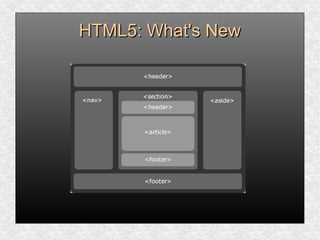
New content specific elements, like article,
footer, header, nav, section

New form controls, like calendar, date, time,
email, url, search
HTML5: SupportHTML5: Support
HTML5 is not yet an official standard, and no
browsers has full HTML5 support.
HTML5: SupportHTML5: Support
You may well ask: “How can I start using
HTML5 if older browsers don’t support it?” But
the question itself is misleading.
HTML5 is not one big thing; it is a collection of
individual features. You can only detect
support for individual features, like canvas,
video, or geolocation.
HTML5: SupportHTML5: Support
Love it or hate it, you can’t deny that HTML 4
is the most successful markup format ever.
HTML5 builds on that success.
You don’t need to throw away your existing
markup. You don’t need to relearn things you
already know. If your web application worked
yesterday in HTML 4, it will still work today in
HTML5. Period.
HTML5: ExampleHTML5: Example
HTML5 supports all the form controls from
HTML 4, but it also includes new input
controls. Some of these are long-overdue
additions like sliders and date pickers; others
are more subtle...
HTML5: ExampleHTML5: Example
For example, the email input type looks just
like a text box, but mobile browsers will
customize their onscreen keyboard to make it
easier to type email addresses. Older
browsers that don’t support the email input
type will treat it as a regular text field, and the
form still works with no markup changes or
scripting hacks.
HTML5: DOCTYPEHTML5: DOCTYPE
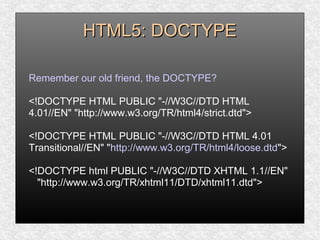
Remember our old friend, the DOCTYPE?
<!DOCTYPE HTML PUBLIC "-//W3C//DTD HTML
4.01//EN" "http://www.w3.org/TR/html4/strict.dtd">
<!DOCTYPE HTML PUBLIC "-//W3C//DTD HTML 4.01
Transitional//EN" "http://www.w3.org/TR/html4/loose.dtd">
<!DOCTYPE html PUBLIC "-//W3C//DTD XHTML 1.1//EN"
"http://www.w3.org/TR/xhtml11/DTD/xhtml11.dtd">
HTML: DOCTYPEHTML: DOCTYPE
Previous versions of HTML defined a lot of
doctypes, and choosing the right one could
be tricky. In HTML5, there is only one
doctype:
<!DOCTYPE html>
HTML: SupportHTML: Support
Whether you want to draw on a canvas, play
video, design better forms, or build web
applications that work offline, you’ll find that
HTML5 is already well-supported.
HTML: SupportHTML: Support
Firefox, Safari, Chrome, Opera, and mobile
browsers already support canvas, video,
geolocation, local storage, and more. Google
already supports microdata annotations. Even
Microsoft — rarely known for blazing the trail
of standards support — will be supporting
most HTML5 features in the upcoming
Internet Explorer 9.
HTML5: MIME typesHTML5: MIME types
Every time your web browser requests a
page, the web server sends “headers” before
it sends the actual page markup. Headers
are important, because they tell your browser
how to interpret the page markup that
follows.
Multipurpose Internet Mail Extensions
HTML5: MIME typesHTML5: MIME types
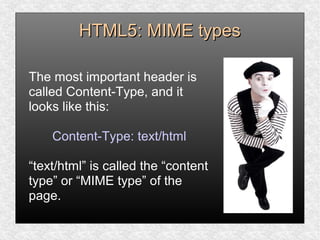
The most important header is
called Content-Type, and it
looks like this:
Content-Type: text/html
“text/html” is called the “content
type” or “MIME type” of the
page.
HTML5: MIME typesHTML5: MIME types
This header is the only thing that determines
what a particular resource truly is, and
therefore how it should be rendered. Images
have their own MIME types (image/jpeg for
JPEG images, image/png for PNG images,
and so on). JavaScript files have their own
MIME type. CSS stylesheets have their own
MIME type. Everything has its own MIME
type. The web runs on MIME types.
HTML5: DetectionHTML5: Detection
When your browser renders a web page, it
constructs a Document Object Model, a
collection of objects that represent the HTML
elements on the page. Every element is
represented in the DOM by a different object.
In browsers that support HTML5 features,
certain objects will have unique properties. A
quick peek at the DOM will tell you which
features are supported.
HTML5: DetectionHTML5: Detection
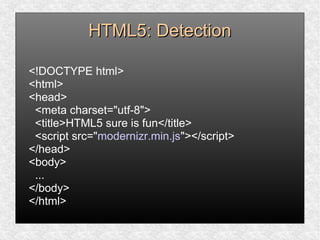
[Modernizr] is an open source, MIT-licensed
JavaScript library that detects support for
many HTML5 & CSS3 features. To use it,
include the following <script> element at the
top of your page...
HTML5: DetectionHTML5: Detection
<!DOCTYPE html>
<html>
<head>
<meta charset="utf-8">
<title>HTML5 sure is fun</title>
<script src="modernizr.min.js"></script>
</head>
<body>
...
</body>
</html>
HTML5: DetectionHTML5: Detection
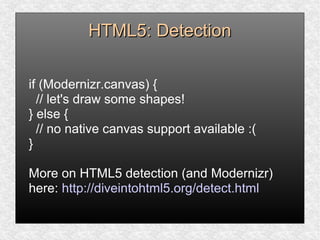
Modernizr runs automatically. When it runs, it
creates a global object called Modernizr, that
contains a set of Boolean properties for each
feature it can detect. For example, if your
browser supports the canvas API, the
Modernizr.canvas property will be true –
otherwise the property will be false:
HTML5: DetectionHTML5: Detection
if (Modernizr.canvas) {
// let's draw some shapes!
} else {
// no native canvas support available :(
}
More on HTML5 detection (and Modernizr)
here: http://diveintohtml5.org/detect.html
HTML5: What's NewHTML5: What's New
The internet has changed a lot since HTML 4.01
became a standard in 1999.
Today, some elements in HTML 4.01 are obsolete,
never used, or not used the way they were intended
to. These elements are deleted or re-written in
HTML5.
HTML5 also includes new elements for better
structure, drawing, media content, form handling.
HTML5: What's NewHTML5: What's New
New elements list:
http://www.w3schools.com/html5/
HTML5: What's NewHTML5: What's New
HTML5: VideoHTML5: Video
Until now, there has never been a standard
for showing video on a web page.
Today, most videos are shown through a
plugin (like flash). However, not all browsers
have the same plugins.
HTML5 specifies a standard way to include
video, with the video element.
HTML5: VideoHTML5: Video
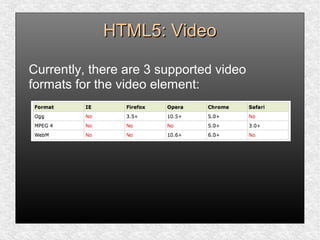
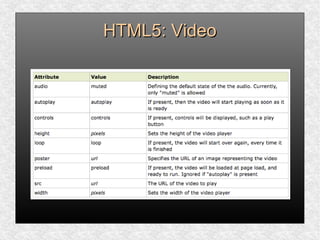
Currently, there are 3 supported video
formats for the video element:
HTML5: VideoHTML5: Video
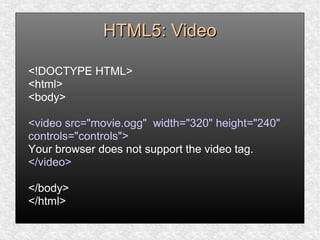
<!DOCTYPE HTML>
<html>
<body>
<video src="movie.ogg" width="320" height="240"
controls="controls">
Your browser does not support the video tag.
</video>
</body>
</html>
HTML5: VideoHTML5: Video
The last example uses an Ogg file, and will work in
Firefox, Opera and Chrome.
To make the video work in Safari and future
versions of Chrome, we must add a MPEG4 and
WebM file.
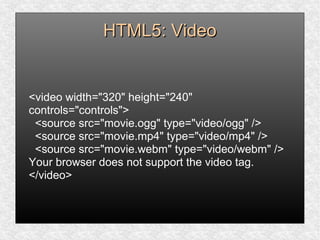
The video element allows multiple source elements.
Source elements can link to different video files. The
browser will use the first recognized format:
HTML5: VideoHTML5: Video
<video width="320" height="240"
controls="controls">
<source src="movie.ogg" type="video/ogg" />
<source src="movie.mp4" type="video/mp4" />
<source src="movie.webm" type="video/webm" />
Your browser does not support the video tag.
</video>
HTML5: VideoHTML5: Video
Surprising fact: Internet Explorer 8 does not
support the video element. In IE 9, there will
be support for video element using MPEG4.
HTML5: VideoHTML5: Video
HTML5: AudioHTML5: Audio
Until now, there has never been a standard for
playing audio on a web page.
Today, most audio are played through a plugin (like
flash). However, not all browsers have the same
plugins.
HTML5 specifies a standard way to include audio,
with the audio element. The audio element can play
sound files, or an audio stream.
HTML5: AudioHTML5: Audio
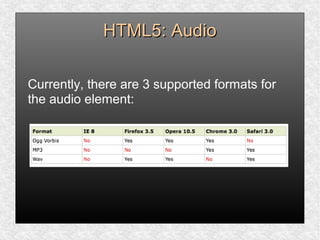
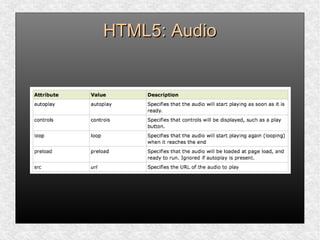
Currently, there are 3 supported formats for
the audio element:
HTML5: AudioHTML5: Audio
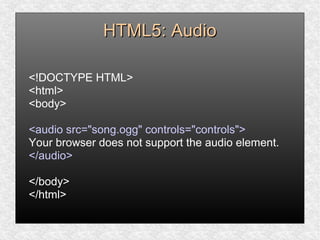
<!DOCTYPE HTML>
<html>
<body>
<audio src="song.ogg" controls="controls">
Your browser does not support the audio element.
</audio>
</body>
</html>
HTML5: AudioHTML5: Audio
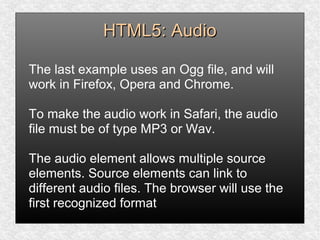
The last example uses an Ogg file, and will
work in Firefox, Opera and Chrome.
To make the audio work in Safari, the audio
file must be of type MP3 or Wav.
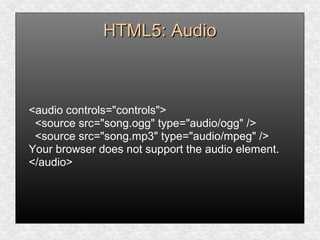
The audio element allows multiple source
elements. Source elements can link to
different audio files. The browser will use the
first recognized format
HTML5: AudioHTML5: Audio
<audio controls="controls">
<source src="song.ogg" type="audio/ogg" />
<source src="song.mp3" type="audio/mpeg" />
Your browser does not support the audio element.
</audio>
HTML5: AudioHTML5: Audio
Another surprising fact: Internet Explorer 8
does not support the audio element. In IE 9,
there will be support for audio element.
HTML5: AudioHTML5: Audio
HTML5: CanvasHTML5: Canvas
The HTML5 canvas element uses JavaScript
to draw graphics on a web page.
A canvas is a rectangular area, and you
control every pixel of it.
The canvas element has several methods for
drawing paths, boxes, circles, characters, and
adding images.
HTML5: CanvasHTML5: Canvas
Adding a canvas element to the HTML5 page.
Specify the id, width, height of the element:
<canvas id="myCanvas" width="200"
height="100"></canvas>
HTML5: CanvasHTML5: Canvas
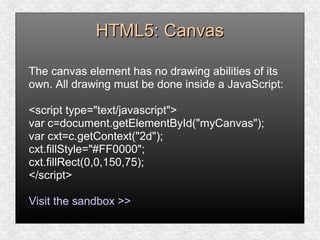
The canvas element has no drawing abilities of its
own. All drawing must be done inside a JavaScript:
<script type="text/javascript">
var c=document.getElementById("myCanvas");
var cxt=c.getContext("2d");
cxt.fillStyle="#FF0000";
cxt.fillRect(0,0,150,75);
</script>
Visit the sandbox >>
HTML5: Web StorageHTML5: Web Storage
For information about web storage:
http://www.w3schools.com/html5/
HTML5: Input typesHTML5: Input types
HTML5 has several new input types for forms.
* email
* url
* number
* range
* date pickers (date, month, week, time,
datetime, datetime-local)
* search
* color
HTML5: Input typesHTML5: Input types
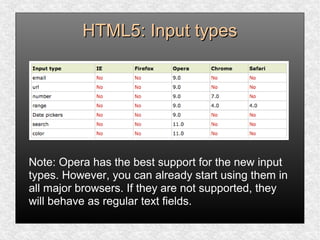
Note: Opera has the best support for the new input
types. However, you can already start using them in
all major browsers. If they are not supported, they
will behave as regular text fields.
HTML5: Input - e-mailHTML5: Input - e-mail
The email type is used for input fields that should
contain an e-mail address.
The value of the email field is automatically
validated when the form is submitted.
E-mail: <input type="email" name="user_email" />
Tip: Safari on the iPhone recognizes the email input
type, and changes the on-screen keyboard to match
it (adds @ and .com options).
HTML5: Input - urlHTML5: Input - url
The url type is used for input fields that should
contain a URL address.
The value of the url field is automatically validated
when the form is submitted.
Homepage: <input type="url" name="user_url" />
Tip: Safari on the iPhone recognizes the url input
type, and changes the on-screen keyboard to match
it (adds .com option).
HTML5: Input - numberHTML5: Input - number
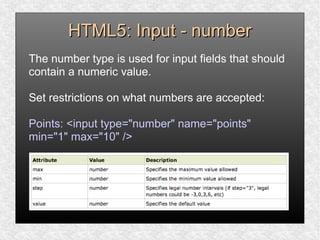
The number type is used for input fields that should
contain a numeric value.
Set restrictions on what numbers are accepted:
Points: <input type="number" name="points"
min="1" max="10" />
HTML5: Input - rangeHTML5: Input - range
The range type is used for input fields that should
contain a value from a range of numbers.
The range type is displayed as a slider bar.
You can also set restrictions on what numbers are
accepted:
<input type="range" name="points" min="1"
max="10" />
HTML5: Input – date pickersHTML5: Input – date pickers
HTML5 has several new input types for selecting
date and time:
* date - Selects date, month and year
* month - Selects month and year
* week - Selects week and year
* time - Selects time (hour and minute)
* datetime - Selects time, date, month and year
* datetime-local - Selects time, date, month and
year (local time)
HTML5: Input - searchHTML5: Input - search
The search type is used for search fields, like
a site search, or Google search.
The search field behaves like a regular text
field.
HTML5: Input – color pickerHTML5: Input – color picker
The color type is used for input fields that
should contain a color.
This input type will allow you to select a color
from a color picker:
Color: <input type="color" name="user_color" />
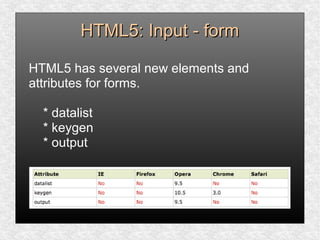
HTML5: Input - formHTML5: Input - form
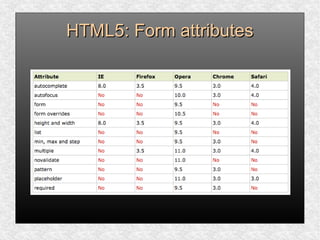
HTML5 has several new elements and
attributes for forms.
* datalist
* keygen
* output
HTML5: Form elementsHTML5: Form elements
The datalist element specifies a list of options for an
input field. The list is created with option elements
inside the datalist.
The purpose of the keygen element is to provide a
secure way to authenticate users.
The output element is used for different types of
output, like calculations or script output:
HTML5: Form attributesHTML5: Form attributes
HTML5: ReferenceHTML5: Reference
For a decent list of references:
http://www.w3schools.com/html5
HTML5HTML5
HTML5HTML5

Html5

  • 2.
    HTML5: What isit?HTML5: What is it? HTML5 will be the new standard for HTML, XHTML, and the HTML DOM. The previous version of HTML came in 1999. The web has changed a lot since then. HTML5 is still a work in progress. However, most modern browsers have some HTML5 support.
  • 3.
    HTML5: OriginsHTML5: Origins HTML5is a cooperation between the World Wide Web Consortium (W3C) and the Web Hypertext Application Technology Working Group (WHATWG). WHATWG was working with web forms and applications, and W3C was working with XHTML 2.0. In 2006, they decided to cooperate and create a new version of HTML.
  • 4.
    HTML5: Ground rulesHTML5:Ground rules Some rules for HTML5 were established:  New features should be based on HTML, CSS, DOM, and JavaScript  Reduce the need for external plugins  Better error handling  More markup to replace scripting  HTML5 should be device independent  Dev process should be visible to the public
  • 5.
    HTML5: New FeaturesHTML5:New Features  Canvas element for drawing  Video/audio elements for media playback  Better support for local offline storage  New content specific elements, like article, footer, header, nav, section  New form controls, like calendar, date, time, email, url, search
  • 6.
    HTML5: SupportHTML5: Support HTML5is not yet an official standard, and no browsers has full HTML5 support.
  • 7.
    HTML5: SupportHTML5: Support Youmay well ask: “How can I start using HTML5 if older browsers don’t support it?” But the question itself is misleading. HTML5 is not one big thing; it is a collection of individual features. You can only detect support for individual features, like canvas, video, or geolocation.
  • 8.
    HTML5: SupportHTML5: Support Loveit or hate it, you can’t deny that HTML 4 is the most successful markup format ever. HTML5 builds on that success. You don’t need to throw away your existing markup. You don’t need to relearn things you already know. If your web application worked yesterday in HTML 4, it will still work today in HTML5. Period.
  • 9.
    HTML5: ExampleHTML5: Example HTML5supports all the form controls from HTML 4, but it also includes new input controls. Some of these are long-overdue additions like sliders and date pickers; others are more subtle...
  • 10.
    HTML5: ExampleHTML5: Example Forexample, the email input type looks just like a text box, but mobile browsers will customize their onscreen keyboard to make it easier to type email addresses. Older browsers that don’t support the email input type will treat it as a regular text field, and the form still works with no markup changes or scripting hacks.
  • 11.
    HTML5: DOCTYPEHTML5: DOCTYPE Rememberour old friend, the DOCTYPE? <!DOCTYPE HTML PUBLIC "-//W3C//DTD HTML 4.01//EN" "http://www.w3.org/TR/html4/strict.dtd"> <!DOCTYPE HTML PUBLIC "-//W3C//DTD HTML 4.01 Transitional//EN" "http://www.w3.org/TR/html4/loose.dtd"> <!DOCTYPE html PUBLIC "-//W3C//DTD XHTML 1.1//EN" "http://www.w3.org/TR/xhtml11/DTD/xhtml11.dtd">
  • 12.
    HTML: DOCTYPEHTML: DOCTYPE Previousversions of HTML defined a lot of doctypes, and choosing the right one could be tricky. In HTML5, there is only one doctype: <!DOCTYPE html>
  • 13.
    HTML: SupportHTML: Support Whetheryou want to draw on a canvas, play video, design better forms, or build web applications that work offline, you’ll find that HTML5 is already well-supported.
  • 14.
    HTML: SupportHTML: Support Firefox,Safari, Chrome, Opera, and mobile browsers already support canvas, video, geolocation, local storage, and more. Google already supports microdata annotations. Even Microsoft — rarely known for blazing the trail of standards support — will be supporting most HTML5 features in the upcoming Internet Explorer 9.
  • 15.
    HTML5: MIME typesHTML5:MIME types Every time your web browser requests a page, the web server sends “headers” before it sends the actual page markup. Headers are important, because they tell your browser how to interpret the page markup that follows. Multipurpose Internet Mail Extensions
  • 16.
    HTML5: MIME typesHTML5:MIME types The most important header is called Content-Type, and it looks like this: Content-Type: text/html “text/html” is called the “content type” or “MIME type” of the page.
  • 17.
    HTML5: MIME typesHTML5:MIME types This header is the only thing that determines what a particular resource truly is, and therefore how it should be rendered. Images have their own MIME types (image/jpeg for JPEG images, image/png for PNG images, and so on). JavaScript files have their own MIME type. CSS stylesheets have their own MIME type. Everything has its own MIME type. The web runs on MIME types.
  • 18.
    HTML5: DetectionHTML5: Detection Whenyour browser renders a web page, it constructs a Document Object Model, a collection of objects that represent the HTML elements on the page. Every element is represented in the DOM by a different object. In browsers that support HTML5 features, certain objects will have unique properties. A quick peek at the DOM will tell you which features are supported.
  • 19.
    HTML5: DetectionHTML5: Detection [Modernizr]is an open source, MIT-licensed JavaScript library that detects support for many HTML5 & CSS3 features. To use it, include the following <script> element at the top of your page...
  • 20.
    HTML5: DetectionHTML5: Detection <!DOCTYPEhtml> <html> <head> <meta charset="utf-8"> <title>HTML5 sure is fun</title> <script src="modernizr.min.js"></script> </head> <body> ... </body> </html>
  • 21.
    HTML5: DetectionHTML5: Detection Modernizrruns automatically. When it runs, it creates a global object called Modernizr, that contains a set of Boolean properties for each feature it can detect. For example, if your browser supports the canvas API, the Modernizr.canvas property will be true – otherwise the property will be false:
  • 22.
    HTML5: DetectionHTML5: Detection if(Modernizr.canvas) { // let's draw some shapes! } else { // no native canvas support available :( } More on HTML5 detection (and Modernizr) here: http://diveintohtml5.org/detect.html
  • 23.
    HTML5: What's NewHTML5:What's New The internet has changed a lot since HTML 4.01 became a standard in 1999. Today, some elements in HTML 4.01 are obsolete, never used, or not used the way they were intended to. These elements are deleted or re-written in HTML5. HTML5 also includes new elements for better structure, drawing, media content, form handling.
  • 24.
    HTML5: What's NewHTML5:What's New New elements list: http://www.w3schools.com/html5/
  • 25.
  • 26.
    HTML5: VideoHTML5: Video Untilnow, there has never been a standard for showing video on a web page. Today, most videos are shown through a plugin (like flash). However, not all browsers have the same plugins. HTML5 specifies a standard way to include video, with the video element.
  • 27.
    HTML5: VideoHTML5: Video Currently,there are 3 supported video formats for the video element:
  • 28.
    HTML5: VideoHTML5: Video <!DOCTYPEHTML> <html> <body> <video src="movie.ogg" width="320" height="240" controls="controls"> Your browser does not support the video tag. </video> </body> </html>
  • 29.
    HTML5: VideoHTML5: Video Thelast example uses an Ogg file, and will work in Firefox, Opera and Chrome. To make the video work in Safari and future versions of Chrome, we must add a MPEG4 and WebM file. The video element allows multiple source elements. Source elements can link to different video files. The browser will use the first recognized format:
  • 30.
    HTML5: VideoHTML5: Video <videowidth="320" height="240" controls="controls"> <source src="movie.ogg" type="video/ogg" /> <source src="movie.mp4" type="video/mp4" /> <source src="movie.webm" type="video/webm" /> Your browser does not support the video tag. </video>
  • 31.
    HTML5: VideoHTML5: Video Surprisingfact: Internet Explorer 8 does not support the video element. In IE 9, there will be support for video element using MPEG4.
  • 32.
  • 33.
    HTML5: AudioHTML5: Audio Untilnow, there has never been a standard for playing audio on a web page. Today, most audio are played through a plugin (like flash). However, not all browsers have the same plugins. HTML5 specifies a standard way to include audio, with the audio element. The audio element can play sound files, or an audio stream.
  • 34.
    HTML5: AudioHTML5: Audio Currently,there are 3 supported formats for the audio element:
  • 35.
    HTML5: AudioHTML5: Audio <!DOCTYPEHTML> <html> <body> <audio src="song.ogg" controls="controls"> Your browser does not support the audio element. </audio> </body> </html>
  • 36.
    HTML5: AudioHTML5: Audio Thelast example uses an Ogg file, and will work in Firefox, Opera and Chrome. To make the audio work in Safari, the audio file must be of type MP3 or Wav. The audio element allows multiple source elements. Source elements can link to different audio files. The browser will use the first recognized format
  • 37.
    HTML5: AudioHTML5: Audio <audiocontrols="controls"> <source src="song.ogg" type="audio/ogg" /> <source src="song.mp3" type="audio/mpeg" /> Your browser does not support the audio element. </audio>
  • 38.
    HTML5: AudioHTML5: Audio Anothersurprising fact: Internet Explorer 8 does not support the audio element. In IE 9, there will be support for audio element.
  • 39.
  • 40.
    HTML5: CanvasHTML5: Canvas TheHTML5 canvas element uses JavaScript to draw graphics on a web page. A canvas is a rectangular area, and you control every pixel of it. The canvas element has several methods for drawing paths, boxes, circles, characters, and adding images.
  • 41.
    HTML5: CanvasHTML5: Canvas Addinga canvas element to the HTML5 page. Specify the id, width, height of the element: <canvas id="myCanvas" width="200" height="100"></canvas>
  • 42.
    HTML5: CanvasHTML5: Canvas Thecanvas element has no drawing abilities of its own. All drawing must be done inside a JavaScript: <script type="text/javascript"> var c=document.getElementById("myCanvas"); var cxt=c.getContext("2d"); cxt.fillStyle="#FF0000"; cxt.fillRect(0,0,150,75); </script> Visit the sandbox >>
  • 43.
    HTML5: Web StorageHTML5:Web Storage For information about web storage: http://www.w3schools.com/html5/
  • 44.
    HTML5: Input typesHTML5:Input types HTML5 has several new input types for forms. * email * url * number * range * date pickers (date, month, week, time, datetime, datetime-local) * search * color
  • 45.
    HTML5: Input typesHTML5:Input types Note: Opera has the best support for the new input types. However, you can already start using them in all major browsers. If they are not supported, they will behave as regular text fields.
  • 46.
    HTML5: Input -e-mailHTML5: Input - e-mail The email type is used for input fields that should contain an e-mail address. The value of the email field is automatically validated when the form is submitted. E-mail: <input type="email" name="user_email" /> Tip: Safari on the iPhone recognizes the email input type, and changes the on-screen keyboard to match it (adds @ and .com options).
  • 47.
    HTML5: Input -urlHTML5: Input - url The url type is used for input fields that should contain a URL address. The value of the url field is automatically validated when the form is submitted. Homepage: <input type="url" name="user_url" /> Tip: Safari on the iPhone recognizes the url input type, and changes the on-screen keyboard to match it (adds .com option).
  • 48.
    HTML5: Input -numberHTML5: Input - number The number type is used for input fields that should contain a numeric value. Set restrictions on what numbers are accepted: Points: <input type="number" name="points" min="1" max="10" />
  • 49.
    HTML5: Input -rangeHTML5: Input - range The range type is used for input fields that should contain a value from a range of numbers. The range type is displayed as a slider bar. You can also set restrictions on what numbers are accepted: <input type="range" name="points" min="1" max="10" />
  • 50.
    HTML5: Input –date pickersHTML5: Input – date pickers HTML5 has several new input types for selecting date and time: * date - Selects date, month and year * month - Selects month and year * week - Selects week and year * time - Selects time (hour and minute) * datetime - Selects time, date, month and year * datetime-local - Selects time, date, month and year (local time)
  • 51.
    HTML5: Input -searchHTML5: Input - search The search type is used for search fields, like a site search, or Google search. The search field behaves like a regular text field.
  • 52.
    HTML5: Input –color pickerHTML5: Input – color picker The color type is used for input fields that should contain a color. This input type will allow you to select a color from a color picker: Color: <input type="color" name="user_color" />
  • 53.
    HTML5: Input -formHTML5: Input - form HTML5 has several new elements and attributes for forms. * datalist * keygen * output
  • 54.
    HTML5: Form elementsHTML5:Form elements The datalist element specifies a list of options for an input field. The list is created with option elements inside the datalist. The purpose of the keygen element is to provide a secure way to authenticate users. The output element is used for different types of output, like calculations or script output:
  • 55.
  • 56.
    HTML5: ReferenceHTML5: Reference Fora decent list of references: http://www.w3schools.com/html5
  • 57.
  • 58.