HR510 Personnel Development
HR510


Release 640 04/06/2006
HR510 Personnel Development


           HR510
            Personnel Development


            THE BEST-RUN BUSINESSES RUN SAP

    © SAP AG© SAP AG 2004
            2003


SAP R/3 Enterprise
2004/Q4
50067771
Copyright


     Copyright 2004 SAP AG. All rights reserved.
     No part of this publication may be reproduced or transmitted in
     any form or for any purpose without the express permission of
     SAP AG. The information contained herein may be changed
     without prior notice.


     © SAP AG 2004


Some software products marketed by SAP AG and its distributors contain proprietary software components of
other software vendors.
Microsoft, Windows, Outlook, and PowerPoint are registered trademarks of Microsoft Corporation.
IBM, DB2, DB2 Universal Database, OS/2, Parallel Sysplex, MVS/ESA, AIX, S/390, AS/400, OS/390, OS/400,
iSeries, pSeries, xSeries, zSeries, z/OS, AFP, Intelligent Miner, WebSphere, Netfinity, Tivoli, and Informix are
trademarks or registered trademarks of IBM Corporation in the United States and/or other countries.
Oracle is a registered trademark of Oracle Corporation.
UNIX, X/Open, OSF/1, and Motif are registered trademarks of the Open Group.
Citrix, ICA, Program Neighborhood, MetaFrame, WinFrame, VideoFrame, and MultiWin are trademarks or
registered trademarks of Citrix Systems, Inc.
HTML, XML, XHTML and W3C are trademarks or registered trademarks of W3C®, World Wide Web
Consortium, Massachusetts Institute of Technology.
Java is a registered trademark of Sun Microsystems, Inc.
JavaScript is a registered trademark of Sun Microsystems, Inc., used under license for technology invented and
implemented by Netscape.
MaxDB is a trademark of MySQL AB, Sweden.
SAP, R/3, mySAP, mySAP.com, xApps, xApp, and other SAP products and services mentioned herein as well as
their respective logos are trademarks or registered trademarks of SAP AG in Germany and in several other
countries all over the world. All other product and service names mentioned are the trademarks of their respective
companies. Data contained in this document serves informational purposes only. National product specifications
may vary.
These materials are subject to change without notice. These materials are provided by SAP AG and its affiliated
companies ("SAP Group") for informational purposes only, without representation or warranty of any kind, and
SAP Group shall not be liable for errors or omissions with respect to the materials. The only warranties for SAP
Group products and services are those that are set forth in the express warranty statements accompanying such
products and services, if any. Nothing herein should be construed as constituting an additional warranty.
Course Prerequisites


  Required:
     SAPHR (Overview of the mySAP Human Resources Solution)
     HR120        (Basics of Personnel Cost Planning)
  Recommended:
     HR505        (Organizational Management)


  © SAP AG 2003
Target Audience


    Target group:
       Project team
    Duration:
       3 Days


    © SAP AG 2003


     Notes to the user
The training materials are not teach-yourself programs. They complement the course instructor's
explanations. On the sheets, there is space for you to write down additional information.
Course Overview


      Contents:
             Course goals and objectives
             Course contents
             Main business scenario


      © SAP AG 2003


(C) SAP AG                            HR510   1-1
Course Goals and Objectives (1)


                      This course will enable you to:
                         Understand how personnel development processes
                         can be mapped and handled in the SAP System


                      At the end of this course, you will be able to:
                         Set up and maintain the qualifications catalog
                         Create and evaluate profiles for a range of objects
                         (for example, persons and positions)


      © SAP AG 2003


(C) SAP AG                                HR510                                1-2
Course Goals and Objectives (2)


                      Work through and evaluate career and succession
                      planning scenarios
                      Create development plans, and work through individual
                      development planning scenarios
                      Set up objectives and appraisals, and also plan, hold,
                      and evaluate appraisals.
                      Customize the functions of Personnel Development
                      to meet customer requirements


      © SAP AG 2003


(C) SAP AG                             HR510                                   1-3
Course Content


                  Preface

    Unit 1       Course Overview
    Unit 2       Overview of Personnel Development
    Unit 3       Setting Up the Qualifications Catalog
    Unit 4       Creating and Evaluating Profiles
    Unit 5       System Settings for Qualifications and Requirements
    Unit 6       Career and Succession Planning
    Unit 7       Development Plans
    Unit 8       Objectives and Appraisals

                  Appendix
                  Exercises
                  Solutions

      © SAP AG 2003


(C) SAP AG                                HR510                        1-4
Main Business Scenario (1)


                      Personnel development plays an important
                      role in your company and is performed in accordance
                      with the company's overall objectives.
                      You have been a personnel development officer for
                      some years now. Your job involves drawing up
                      personnel development concepts in conjunction with
                      the various company departments, and planning the
                      professional development of individual employees.


      © SAP AG 2003


(C) SAP AG                            HR510                                 1-5
Main Business Scenario (2)


                      You liaise with your employees and their
                      supervisors to determine if there is any need
                      for training, and you plan the appropriate
                      training measures.
                      You regularly perform succession planning for
                      higher management positions to ensure that these
                      are adequately staffed in the future.
                      You are also responsible for drawing up
                      and providing support for the annual
                      performance appraisal sheets.


      © SAP AG 1999


(C) SAP AG                            HR510                              1-6
Main Business Scenario (3)


                      A year ago, your company's old software systems
                      were replaced by a brand new SAP R/3 System.
                      Various HR components were implemented,
                      including Personnel Development, Organizational
                      Management, and Training and Event Management.

                      These components were integrated with each other
                      to provide optimum functionality for personnel
                      development planning activities.
                      You use this R/3 System for your day-to-day work.


      © SAP AG 2003


(C) SAP AG                            HR510                               1-7
Overview of Personnel Development


      Contents:
             Objectives and tasks of personnel development
             The Personnel Development component in the SAP System


      © SAP AG 2003


(C) SAP AG                            HR510                          2-1
Overview of Personnel Development: Unit
  Objectives


                      At the end of this unit, you will be able to:
                         Define the objectives and tasks involved in
                         personnel development
                         Identify the SAP components that are used to
                         map personnel development processes
                         Explain how Personnel Development is
                         integrated with other components


      © SAP AG 1999


(C) SAP AG                                 HR510                        2-2
Personnel Development: Objectives


                                                   To qualify employees so that they
                                                   meet current and future job
                                                   requirements
                                                   To ensure that your organization has
                                                   all the qualifications it needs, both
                                                   now and in the future
                                                   To increase employees' motivation
                                                   and productivity
                                                   To create a good working environment
                                                   To reduce rate of employee turnover


       © SAP AG 2003


  Personnel development involves planning and implementing training measures to promote the
  professional development of individual employees. On the one hand, personnel development is based on
  the qualifications and skills that an organization requires. On the other hand, the needs and aptitude of
  individual employees are also taken into account.
  Personnel development sets out to ensure that an organization has all the qualifications and skills it needs
  in all fields. This is achieved by drawing up qualification potentials.


(C) SAP AG                                         HR510                                                   2-3
Personnel Development: Events


                               Hiring new employees
                               Transfers
                               Personnel reviews
                                  At regular intervals
                                  For a special reason


                      Organizational changes within a company
                        Redefinition of company posts and tasks
                        Internationalization of business


                       Market influences
                         More aggressive competition
                         Introduction of new products and technologies

      © SAP AG 2003


(C) SAP AG                                 HR510                         2-4
Basic Information Required


                                   All
                               required
                            qualifications?
                                                                      Posts
         Enterprise
                                                                      Which qualifications
       Organization and structure?                                      are required?
             Which posts in the
                company?

                               Existing
                            qualifications?
                       Preferences and
                          interests?
                                                                 Development
        Employee                 Potential?
                                                                 plans?
                                                                         Training
     Objective setting and appraisals?                                   programs?
                                                           Enterprise

      © SAP AG 2003


  Before you can implement the appropriate personnel development measures, you will need to collect
  information on your company and how it functions.


(C) SAP AG                                      HR510                                                 2-5
Tasks Involved in Personnel Development


                             Target analysis              Actual analysis

                                                                  Employees:
    Positions in your company:
                                                                    Skills, knowledge
      Current requirements
                                                                    Potentials
      Future requirements
                                                                    Preferences

                                         Comparison:
                            Determine personnel development need
                                  (target/actual comparison)


                                                                 Personnel development
                                                                       measures


                                      Analyze success
                                         of training
       © SAP AG 2003


  Targets and objectives must be defined for personnel development. These objectives should address
  current and future requirements. These objectives are then compared against existing qualifications, the
  potential for development, and also the preferences and aspirations of company employees to determine
  the need for personnel development. The need for personnel development is determined from this
  comparison.
  Suitable personnel development measures, which meet the needs determined, are defined (for example,
  attending training courses and seminars, job rotation, and so on).
  A range of methods can be used to evaluate whether the objectives have been achieved successfully.
  These include questionnaires and surveys, personnel appraisals, tests, and analyses of company statistics
  such as employee turnover rate.


(C) SAP AG                                        HR510                                                 2-6
Personnel Development Measures


                                      On-the-job
                                        training
               Job                   (learning by                       Individual
             rotation                    doing)                        development
                                                                          plans


         Courses
        Seminars
        Workshops                                                                     Transfers


                  Trainee                                                      Succession
                 programs                                                       planning
                                        Objective setting and
                                             appraisals
       © SAP AG 2003


  A range of training and development measures can be implemented, depending on the type of
  qualification required.
  These development measures might be geared toward an employee being transferred to a specific post
  (using career and succession planning scenarios). However, they might also be more general measures
  geared toward retaining or enhancing existing employee skills and abilities, or ensuring that employees
  keep up with technological developments.


(C) SAP AG                                        HR510                                                 2-7
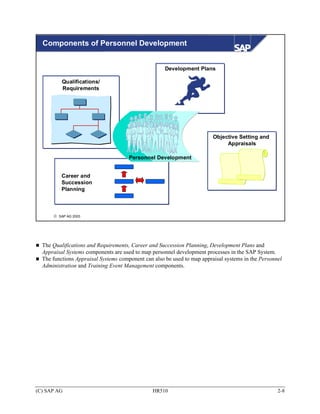
Components of Personnel Development


                                                     Development Plans

          Qualifications/
          Requirements


                                                                         Objective Setting and
                                                                              Appraisals

                                      Personnel Development


          Career and
          Succession
          Planning


      © SAP AG 2003


  The Qualifications and Requirements, Career and Succession Planning, Development Plans and
  Appraisal Systems components are used to map personnel development processes in the SAP System.
  The functions Appraisal Systems component can also be used to map appraisal systems in the Personnel
  Administration and Training Event Management components.


(C) SAP AG                                      HR510                                               2-8
Qualifications and Requirements


       Qualifications/Requirements                   Qualifications catalog containing all
                                                     of the qualifications (skills, knowledge,
                                                     licenses, and so on) required in a
                                                     company
                                                     Functions for performing suitability
                                                     analyses (for example, determining
                                                     the extent to which persons are suitable
                                                     for specific posts)
                                                     Functions for determining qualification
                                                     deficits and any need for further training


       © SAP AG 1999


  The qualifications that are of interest to a company are stored and managed in a qualifications catalog.
  Requirements can be defined for jobs and positions, for example, and compared against the
  qualifications of employees, applicants, etc. Suitability analyses such as these form the basis for
  determining any need for further training.


(C) SAP AG                                        HR510                                                  2-9
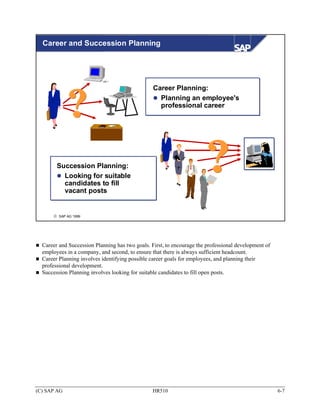
Career and Succession Planning


   Career Planning/
   Succession Planning


                                                   Planning an employee's professional
                                                   career path
                                                   Finding suitable candidates to fill
                                                   vacant posts
                                                   In both cases, taking a range of
                                                   factors into account (suitability, for
                                                   example, or employee preferences)
       © SAP AG 2003


  You can use the Career and Succession Planning component to prepare, work through and analyze
  career and succession planning scenarios. Career Planning involves identifying possible career goals for
  employees, and planning their professional development. Succession Planning is used to find suitable
  candidates for staffing positions.


(C) SAP AG                                        HR510                                                2-10
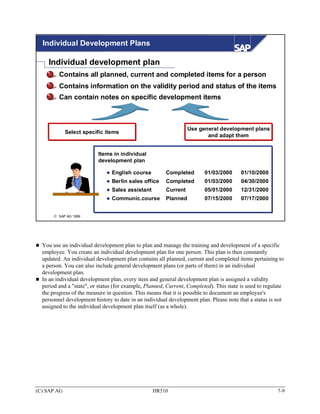
Development Plans


                                             Functions for mapping generally applicable
                                             and individual development plans
                                                 General development plans are used
                  Trainee programs               as templates for training measures that
                  Training plans                 occur frequently or that are similar
                                                 Individual development plans are used
                                                 for planning (further) training, and for
                                                 updating the training history of individual
                                                 employees


       Items in individual
       development plan
             English course        Completed
             Berlin sales office   Completed
             Sales assistant       Current

      © SAP AG 2003


  You can use the Development Plans component to map both generally applicable and individual
  development plans. You can then use these development plans to plan and manage both short-term and
  long-term development (training) measures.


(C) SAP AG                                     HR510                                              2-11
Objective Setting and Appraisals

             Creating and managing appraisals
             Functions for planning, holding and evaluating appraisals


                                  360° appraisal


                          Surveys
                                                                        Personnel
                                                      Tests             appraisals


                        Business event appraisals


      © SAP AG 2003


  The Obective Setting and Appraisals component enables you to create appraisal systems, as well as plan,
  hold, and evaluate appraisals. Consequently, this component is useful not just in Personnel
  Development, but also in other components (Training and Event Management, for example, or Personnel
  Administration).


(C) SAP AG                                       HR510                                               2-12
Integration With Other Components (1)


                                              Training and
                                                 Event
                       Compensation           Management            Organizational
                        Management                                   Management


                                             Personnel
                         Shift
                                            Development                  Personnel
                       Planning                                        Administration


                                  Logistics                Recruitment


       © SAP AG 2003


  Integration with Organizational Management enables you to access objects within the organizational
  structure. If you want to use the Personnel Development component effectively, you should also
  implement the Organizational Management component.
  Integration with Training and Event Management means that the system can generate training proposals,
  and that you can make direct bookings onto business events, and create prebookings for business event
  types. As of release 4.5B, the Personnel Development appraisal system functionality is also available in
  the Training and Event Management component.
  Integration with Personnel Administration means that you can use HR master data for personnel
  development planning. If this is the case, qualifications and appraisals are managed in the Personnel
  Development component. There are special integration switches for integrating qualifications and
  appraisals.
  If Personnel Development is integrated with Recruitment, then applicant qualifications are managed in
  Personnel Development only. This means that you can perform standardized appraisals for applicants
  and employees alike.


(C) SAP AG                                       HR510                                                2-13
Integration With Other Components (2)


                                              Training and
                                                  Event
                       Compensation           Management            Organizational
                        Management                                   Management


                                             Personnel
                         Shift
                                            Development                  Personnel
                       Planning                                        Administration


                                  Logistics                Recruitment


       © SAP AG 2003


  It is possible to make the results of personnel appraisals available to the Compensation Management
  component.
  Integration with Shift Planning means that you can take qualifications into account when you schedule
  shifts. You can specify that the employees working on a specific shift should have specific
  qualifications, for example.
  In Logistics (Service Management, for example, Production Planning, and so on) you can store work
  center requirements, or requirements for orders, for example. This will mean that suitable employees can
  be found during the shift planning process by matching up requirements with qualifications.
  Other integration options:
     SEM (Strategic Enterprise Management)
     BW (Business Warehouse)


(C) SAP AG                                       HR510                                                2-14
Overview of Personnel Development: Summary


                      The Qualifications and Requirements, Career and
                      Succession Planning, Development Plans, as well
                      as Objective Settings and Appraisals areas are used
                      to support personnel development processes in
                      the SAP System.
                      You can identify where Personnel Development can
                      be integrated with other components


      © SAP AG 2003


(C) SAP AG                            HR510                                 2-15
Working with the Qualifications Catalog


      Contents:
             Qualifications catalog
               Qualifications and requirements
               Structure of the qualifications catalog
               Quality scales
               Assigning alternative qualifications
               Depreciation meter values and validities
             User-specific settings


      © SAP AG 1999


(C) SAP AG                                 HR510          3-1
Working with the Qualifications Catalog: Unit
  Objectives


                      At the conclusion of this unit, you will be able to
                         Define qualifications and requirements
                         Describe how the qualifications catalog is
                         structured
                         Assign alternative qualifications
                         Define qualifications that expire gradually or on a
                         specific date by specifying depreciation meter
                         values or validities
                         Make user-specific settings


      © SAP AG 1999


(C) SAP AG                                HR510                                3-2
Working with the Qualifications Catalog: Business
  Scenario


                      All the qualifications that are relevant to your company
                      are stored in the company's qualifications catalog.
                      The structure of this catalog is devised in a detailed
                      conceptual planning phase before it is actually set
                      up in the system.
                      You must have a qualifications catalog if you want to
                      maintain qualifications profiles for employees, or
                      requirements profiles for jobs or positions.
                      It is your responsibility to maintain the catalog and
                      keep it up to date.


      © SAP AG 2003


(C) SAP AG                              HR510                                    3-3
Qualifications and Requirements


       Qualifications                                  Requirements
                      Person, applicant,                             Job, position,
                           user…                                     work center...

    The term "qualifications"                      The term "requirements" refers to
    refers to skills, abilities or                 the skills, abilities or knowledge that
    knowledge that a person,                       are required for a job, position, task
    applicant, user (and so on)                    (and so on).
    possesses.


      © SAP AG 1999


(C) SAP AG                                 HR510                                         3-4
Qualifications Catalog: Overview


                                                                                Word
                Italian
                                    Qualifications Catalog                         Excel
          Chinese


             COBOL
                                                                                    Controlling
        ABAP
                                                                                Marketing
                 C++


      © SAP AG 1999


  All the knowledge and skills that are of interest to a company are referred to as qualifications.
  Qualifications are managed in the qualifications catalog.
  You edit the qualifications catalog in Customizing for Personnel Development (under: Master Data ->
  Edit Qualifications Catalog). You can also make changes in a system that has already gone live by
  choosing the Current settings menu option.


(C) SAP AG                                      HR510                                               3-5
Working with the Qualifications Catalog

     Catalog                             01.01.1900 - 31.12.9999

                       ..........                                    Qualification group
                       Licenses/Certificates
                            First aid course                            Qualification
                            ..........

                       Social Skills
                                                                        Possible nesting options
                            Ability to assert oneself
                            Communication skills                         Qualification group
                            ..........                                       Qualification group
                                                                             Qualification
                       Language skills
                                                                          Qualification
                             Italian                                         Qualification
                                         Business Italian
                                         Technical Italian
                             Spanish

       © SAP AG 2003


  In the qualifications catalog, qualifications that are similar and belong together are grouped together into
  qualification groups. These qualification groups are used to structure the qualifications catalog.
  Qualification groups (object type QK) can contain qualifications, and also further qualification groups.
  Qualifications (object type Q) can also contain further qualifications.
  Example: The qualification group Language Skills contains the qualification groups Italian and Spanish.
  The qualification group Spanish contains the qualifications Business Spanish and Technical Spanish.
  It is not possible to assign qualification groups to persons. If you want to create a qualification group,
  you must first define at least one proficiency scale.
  You can display a where-used list for every qualification group and qualification. This where-used list
  displays all of the objects to which the original object has a relationship. The relationship itself is also
  displayed. You should always generate a where-used list before you delete an object.
  A translation function is also available - this means that you can use the qualifications catalog in
  different languages.
  You can set up your user-settings to display and maintain the object abbreviations of all of the objects in
  the qualifications catalog (qualification groups and qualifications). (You can switch on and off display of
  the object abbreviation by choosing View -> Abbreviation on/off). In addition, you must set the
  Customizing switch QUALI SHORT to 'X' (under Functions -> Set Up Control Parameters).


(C) SAP AG                                                   HR510                                         3-6
Assigning Quality Scales

     Catalog                           01/01/1900 - 12/31/9999
                       Licenses/Certificates                            Yes/No scale
                          First aid course
                                                                                      Yes
                          ..........

                       Social Skills
                                                                        Points scale (1-5)
                          Ability to get on with others
                          ............                                       Low
                          Independence/initiative                            Below average
                                                                             Average
                       Proficiency description                               Good
                          for qualifications
                                                                             Excellent
    Average proficiency                    Average proficiency
    for Ability to get on                  for Independence and
    with others                            Initiative
    Gets on with colleagues and            Recognizes need for action
    customers                              and carries out the
                                           necessary activities


       © SAP AG 1999


  Qualifications are "measured" (rated) by means of proficiency scales. Very often, it makes sense to use
  different scales for different qualifications.
  To rate the proficiency of a qualification, you create a quality scale. It is entirely up to you how many
  ratings there are on this scale, or what they are called. In the case of quality scales, you must define and
  name every individual proficiency.
  Example:
  A scale for measuring proficiency at languages might include the proficiencies Basic
  knowledge/satisfactory/fluent/native speaker. On the other hand, to show that someone has a license, all
  you require is a Yes/No scale.
  Quality scales are assigned to qualification groups (not qualifications). A quality scale must be assigned
  to each qualification group. This scale is then assigned automatically to all the qualifications belonging
  to this group.
  If qualification groups with different quality scales are arranged hierarchically, the qualifications of the
  various groups are always assigned the scale of the directly superior qualification group.
  The proficiencies of the scales can be given individual descriptions for every qualification/qualification
  group in the qualifications catalog. These proficiency descriptions are then available when you edit
  qualifications profiles and requirements profiles.


(C) SAP AG                                              HR510                                               3-7
Assigning Alternative Qualifications

    Catalog                       01/01/1900 - 12/31/9999
                   ..........                Points scale (1-5)
                                                                                           COBOL
                   Programming Languages                              ABAP
                        ABAP
                        COBOL                                                80% alternative
                        ..................    Language scale
                   Language Skills
                                                                                           Technical
                         Italian                                      Business              Italian
                                    Business Italian                   Italian
                                    Technical Italian
                         Spanish                                            100% alternative


                                                                Prerequisite:
                                                                  The proficiencies of the
                                                                  qualifications must be entered
                                                                  using the same scale
       © SAP AG 1999


  You can assign one or more alternative qualifications to a qualification.
  You can define a percentage value specifying the extent to which one qualification can replace another.
  Alternative qualifications are considered to be comparable alternatives to existing (or required)
  qualifications during suitability analyses in Career and Succession Planning. The replacement percentage
  is taken into account here also.
  The relationship between qualification and alternative qualification is bi-directional (if A is an
  alternative to B, then B is also an alternative to A).
  A qualification can only be defined as an alternative to another if both qualifications have the same
  proficiency scale. (If qualifications have different scales, they are probably so dissimilar that they could
  not be considered as alternatives anyway.) Qualifications with different scales cannot be compared with
  each other.
  You can make a user-specific setting specifying whether or not alternative qualifications should be
  included in evaluations.


(C) SAP AG                                              HR510                                              3-8
Depreciation Meter


                                                                                Position

                                                                           requires:
                       Holder of position

        fulfills:                                                                  ABAP
                                                                                   ABAP
               ABAP
               ABAP                                 HR
                                                    HR
          (proficiency 10)
          (proficiency 10)                   (proficiency 10)
                                             (proficiency 10)


                                         r
                                                                       Depreciation meter
                                 1 yea             7

                         1    2   3   4 5
                                      11 1
                                              6
                                           2 13
                                                   14
                                                    21
                                                                       value:
                                    0          20
                               9 1
                          8
                          1 5 16
                                   17 1
                                       2
                                        8  19
                                        4 25
                                                26
                                                     27
                                                                       ABAP: 1 year
                                2 23
                           21 2
                            28 2
                                 9 30
                                        31
                                                                       HR:    1 year


               ABAP
               ABAP                                HR
                                                   HR
          (proficiency 10)
          (proficiency 10)                   (proficiency 5)
                                             (proficiency 5)

       © SAP AG 1999


  You can assign a depreciation meter value to qualifications. This allows you to simulate in the system
  that certain qualifications can be forgotten as time passes.
  If you specify a depreciation meter value for a qualification, the proficiency of this qualification
  decreases exponentially.
  The depreciation meter value is the length of time that it takes for the proficiency of a qualification to be
  halved.
  The proficiencies of qualifications for which a depreciation meter value has been defined are updated
  constantly (i.e. recalculated at runtime). The basis for this calculation is the date on which the
  qualification (original proficiency) was assigned to the person.
  If a qualification with a depreciation meter value is assigned to a person, the proficiency is adjusted
  automatically if the person does not make use of the qualification on a regular basis. If, however, the
  qualification is required by a position, it can safely be assumed that the holder of this position will make
  use of the qualification. In this case, the proficiency of the qualification remains constant.
  You can make a user-specific setting specifying that the depreciation meter should not be included in
  evaluations.


(C) SAP AG                                                 HR510                                            3-9
Validities


                                       License for transporting
                                         hazardous materials
                                                       Validity:
                                                       5 years


               Holder of position

             has:
                                                               rs
                 License for
                 License for                           5 yea       6
                                                                       7       License for
                                                                               License for
                                                          4 5          14
                                                      3         2 13
                transporting
                transporting                  1   2
                                                   9  10  11 1
                                                                19
                                                                    20
                                                                        21    transporting
                                                                              transporting
                                               8           18            27
                 hazardous
                  hazardous                    15 1
                                                    6 17
                                                    2 23
                                                            24 2
                                                                  5 26         hazardous
                                                                                hazardous
                                                21 2         31
                  materials
                  materials                      28 2
                                                     9 30                       materials
                                                                                 materials


       © SAP AG 1999


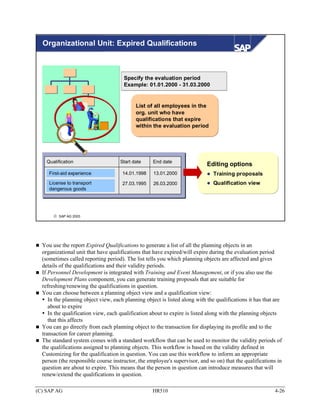
  You can assign a validity period to qualifications. This allows you to record that certain qualifications
  (such as licenses) expire and have to be renewed at regular intervals.
  Qualifications with a validity only appear in a person's qualification subprofile for the period of time
  specified. In other words, the qualification is deleted from the subprofile when the validity period
  expires.
  You can run the Expired Qualifications report for a specific organizational unit and evaluation period.
  This report generates a list of the employees in this organizational unit whose qualifications have
  expired/will expire in the period specified. This information is based on the validity defined for the
  qualifications in question in the qualifications catalog.
  It is also possible to use a workflow to monitor qualifications with limited validity. The standard system
  contains a standard workflow that can be adapted to specific customer requirements. The relevant person
  (the responsible course instructor, the employee's supervisor, and so on) is then informed that the
  qualifications in question are about to expire.


(C) SAP AG                                             HR510                                            3-10
Qualifications and Requirements


                                        Qualifications Catalog


        Qualifications                                                        Requirements


                             Person,                              Job, position,
                        applicant, user…                          work center...

       © SAP AG 1999


  You can assign the qualifications stored in the qualifications catalog to various object types (persons,
  positions...).
  If these are assigned to employees, applicants (and so on), they are referred to as qualifications (that is,
  knowledge or skills that a person possesses).
  If, however, they are assigned to jobs, positions (and so on), they are referred to as requirements (that is,
  knowledge or skills required for the job/position in question).
  It is important that requirements and qualifications can be compared with each other - this is a
  prerequisite for determining suitability. That is why the same object type (Q) is used for mapping both
  qualifications and requirements.


(C) SAP AG                                          HR510                                                  3-11
User-Specific Settings (1)

    General settings
    Plan version
    Evaluation period               to

    Qualifications/requirements
        Include alternative qualifications
        Include essential requirements
        Disregard depreciation meter value

    Structure access                              You can override standard settings
                                                  and specify default values by
    Org. unit
                                                  defining user-specific settings.
    Career planning                               You can define permanent or temporary
        Display vacant positions only             user settings for Personnel Development.

    Appraisals
    Appraisal model
    Appraiser
    Appraisees

       Temporary       Fixed      Reset

       © SAP AG 1999


  You can make a number of user-specific settings. You can use these user-specific settings to override
  standard settings or to propose default values for specific fields.
  In Personnel Development, you can define user-specific settings
     Permanently (in this case, they apply to all future terminal sessions of the user in question)
     Temporarily (in this case, they apply only to the current terminal session)


(C) SAP AG                                       HR510                                                3-12
User-Specific Settings (2)


                                                                         Override standard settings
                                                                         (for example, use a specific
                                                                         plan version instead of the
                                                                         integration plan version)
                                            User
                                                                         Defaults values
                                           settings                      (for example, a specific
                                                                         organizational unit)


         Fixed                               Temporary

         Used for all future                   Used for the current
         terminal sessions                     terminal session


                            Overrides the fixed
                            (permanent) user settings
                            Revert to fixed user settings


       © SAP AG 1999


  You can change all settings (both permanent and temporary) in the application itself. In each case, the
  last values defined are proposed. The next time the user logs on, the permanent settings will then apply
  again. In other words, you can override fixed (permanent) user settings temporarily (that is, for the
  current terminal session). You can also undo these temporary changes during the current terminal
  session, and revert to the original fixed settings.
  When you define permanent user-specific settings, you are in effect defining user parameters.
  In addition to these user-specific settings, the following user parameters are also available for Personnel
  Development:
     You can use the parameter HRPDV_OTYPE to specify a default standard object type for Personnel
     Development (does not apply to Appraisal Systems). This parameter overrides the standard setting,
     which is usually the object type User (exception: the standard default object type in Succession
     Planning is S for position).
     You can use the parameter HRPDV_SEARCH_OTYPES to define default object types when searching
     for objects for qualifications and requirements.
     You can use the parameter POK to switch on the display of the ID (of all displayed objects) and
     abbreviation (of qualifications objects) generally in Personnel Development.


(C) SAP AG                                         HR510                                                 3-13
Working with the Qualifications Catalog: Unit
  Summary (1)


                      The qualifications catalog contains all the
                      qualifications that are of interest to a
                      company.
                      You use qualification groups to structure the
                      qualifications catalog.
                      You create quality scales to record the
                      proficiencies of qualifications and
                      requirements. You assign these scales to
                      qualification groups - the scale then applies to
                      all the qualifications in the group in question.


      © SAP AG 1999


(C) SAP AG                             HR510                             3-14
Working with the Qualifications Catalog: Unit
  Summary (2)


                      You can use depreciation meter values
                      and validities to show that qualifications
                      expire gradually or on a specific date.
                      You can override standard Personnel
                      Development settings by defining user-
                      specific settings.


      © SAP AG 1999


(C) SAP AG                             HR510                       3-15
Working with the Qualifications Catalog                     Exercises

                    Unit: Working with the Qualifications Catalog
                    Topic: Quality Scales, Qualification Groups and
                    Qualifications
                   • Practice setting up the qualifications catalog by adding new
                     qualification groups and qualifications to an existing
                     qualifications catalog.
                   • Define additional information for the qualification groups and
                      qualifications you create.
                    New positions have been created in your Marketing department.
                    The new positions have requirements that have not yet been
                    defined in the qualifications catalog. To rectify this, you add the
                    necessary information to the existing catalog.


Notes:
You work during the whole course in the active plan variant. This plan version, which is set
automatically, contains data about your company.
Replace the place holder ## with your group number


1      Adding Objects to the Qualifications Catalog
       1-1     Creating qualification groups and qualifications
               Create the following new qualification groups and qualifications in the
               qualifications catalog:
                  A new qualification group called Graphic design. Create a new qualification
                  called Graphical layout for this group.
                  A new qualification group called Graphics programs. Create new qualifications
                  called Corel Draw, Paintshop, and Photoshop for this group.
                  A new qualification group called Internet skills. Create a new qualification
                  Knowledge of HTML, and assign it to the qualification group Internet skills.

Note:
Before you put the new qualifications groups and qualifications listed above in the qualification
catalog, you should firstly create a single qualification group Catalog Group ### and secondly set
a point of access for this group##.


(C) SAP AG                                     HR510                                           3-16
Assign scales of your choice to your qualification groups.
             Note:
             Pay particular attention to the validity periods of the qualification groups and
             qualifications you create. The start date should be 01/01/1900, or a date on which
             the qualification can feasibly exist if the qualification is “modern”(knowledge of
             HTML, for example). The end date should be 12/31/9999.

       1-2   Assigning depreciation meter values
             Some skills can be forgotten quickly or become outdated if they are not practiced
             regularly. These skills are assigned a depreciation meter value.
             Assign a depreciation meter value of your choice to one or more qualifications.
             You can also do this when you are creating a qualification.

       1-3   Assigning alternative qualifications
             Specify that the qualifications Corel Draw, Paintshop and Photoshop should be
             regarded as alternatives to each other. Accept the default value of 100%.

       1-4   Proficiency descriptions
             You have assigned quality scales of your choice when creating the qualification
             groups. Each specification can be explicated using a description.
             Create proficiency descriptions for qualifications Corel Draw, Paintshop and
             Photoshop.
             Note:
             You can also enter proficiency descriptions when you are creating qualifications
             and qualification groups.

       1-5   Where-used list
             Find out if the qualification SAPHR is linked to any other objects. To do this,
             generate a where-used list for this qualification in the qualifications catalog.
             Note:
             You can also execute the usage note for qualification groups.


(C) SAP AG                                   HR510                                              3-17
Structure of the Qualification Catalog: Solutions


(C) SAP AG                      HR510               3-18
(C) SAP AG   HR510   3-19
Unit: Working with the Qualifications Catalog
                  Topic: Quality Scales, Qualification Groups and
                  Qualifications

1      Adding Objects to the Qualifications Catalog
       1-1   Creating qualification groups and qualifications
             Choose:
             Human Resources → Personnel Management → Personnel Development →
             Settings → Current Settings
             Now choose the activity Edit Qualifications Catalog (by double-clicking the line
             in question). The system displays the qualifications catalog.
             Note:
             Before you add the new qualifications groups and qualifications to the qualification
             catalog, you should first create a single qualification group Catalog Group ### and
             set a point of access for this group##.
             1-1-1 Creating the qualification group Graphic design:
                    Position your cursor on the top line Catalog Group### and click the Create
                    icon (or choose Entry→ Create). The Create Qualification group screen
                    appears. Enter the name of the qualification group (Graphic design, for
                    example) on the Qualification group tab page. Use the validity period
                    proposed by the system (01/01/1900 – 12/31/9999).
                    You now have to assign a scale to the qualification group. To select a scale,
                    click the down-arrow to the right of the Scale field. A list of all the scales
                    that exist is displayed. Click one of the scales, save your entries, and then
                    choose Enter.


(C) SAP AG                                  HR510                                              3-20
1-1-2 Creating the qualification Graphical layout:
                   The qualification Graphical layout is going to be assigned to the
                   qualification group Graphic design. For this reason, position your cursor on
                   the qualification group Graphic design, and click the Create icon (or choose
                   Entry -> Create). A dialog box appears. In this dialog box, position your
                   cursor on the line Qualification and then click Transfer. The Create
                   Qualification dialog box appears. On the Qualification tab page, enter the
                   name of the qualification (Graphical layout, for example), and save your
                   entries. Then choose Enter.


             1-1-3 Creating the qualification group Graphics programs:
                   Position your cursor on the qualification group on the top line Catalog
                   Group###, and click the Create icon. A dialog box appears. In this dialog
                   box, position your cursor on the line Qualification group, and then click the
                   Transfer icon.
                   The Create Qualification group screen appears. Enter the name of the
                   qualification group (Graphics programs, for example) on the Qualification
                   group tab page. Use the validity period proposed by the system (01/01/1900
                   – 12/31/9999).
                   You now have to assign a scale to the qualification group. To select a scale,
                   click the down-arrow to the right of the Scale field. A list of all the scales
                   that exist is displayed. Click one of the scales, save your entries, and then
                   choose Enter.


(C) SAP AG                                 HR510                                              3-21
1-1-4 Creating the qualifications Corel Draw, Paintshop and Photoshop:
                    The qualification Corel Draw (Paintshop/Photoshop) is going to be
                    assigned to the qualification group Graphics programs. For this reason,
                    position your cursor on the qualification group Graphic programs, and click
                    the Create icon (or choose Entry -> Create). A dialog box appears. In this
                    dialog box, position your cursor on the line Qualification, and then click the
                    Transfer icon. The Create Qualification dialog box appears. Enter the name
                    of the qualification (Corel Draw, for example) on the Qualification tab
                    page. The validity period of the qualification should be 01.01.1900 –
                    31.12.9999. Now save your entries. To create another qualification at this
                    point, click the Create next qualification icon. The Create Qualification
                    dialog box appears again. Proceed in the same way as before to create the
                    qualifications Paintshop and Photoshop in the qualification group Graphics
                    programs.


             1-1-5 Creating the qualification group Internet Skills and the qualification
                   Knowledge of HTML:
                    To create the qualification group Internet skills, follow the same procedure
                    as for the qualification group Graphic design above. Create the qualification
                    Knowledge of HTML in the same way as you created the other
                    qualifications above (for example Graphical layout).


(C) SAP AG                                  HR510                                             3-22
1-2   Assigning depreciation meter values
             You have been asked to assign a depreciation meter value to some qualifications.
             In the qualifications catalog, position your cursor on a qualification (Paintshop, for
             example). Now double-click the qualification (or choose Entry -> Change). The
             Change Qualification dialog box appears. Click the Additional data tab page.
             Note:
             You can toggle between the depreciation meter and validities by clicking the
             Depreciation meter (validity) field. Please make sure in this case that the
             depreciation meter is active.
             Enter a depreciation meter value in years and months.
             Example:
             Years:         2
             Months:        6
             You can also define the overall duration in months. This is automatically calculated
             into years and months.
             Save your entries.
             Proceed in the same way for the other qualifications for which you want to define
             depreciation meter values.


       1-3   Assigning alternative qualifications
             Corel Draw, Paintshop and Photoshop are all to be regarded as alternative
             qualifications to each other. The respective replacement percentage should be
             100%.
             In the qualifications catalog, position your cursor on one of the qualifications
             (Corel Draw, for example). Now double-click the qualification (or choose Entry ->
             Change). The Change Qualification dialog box appears.
             Choose the Additional data tab page (by clicking the icon in the top right of the
             dialog box). Click the Insert line icon. Select the qualifications that are to act as
             alternative qualifications (Paintshop, Photoshop) and then click the Continue icon.
             The default replacement percentage is the value you defined for this in
             Customizing. Accept this default value of 100 percent.
             Save your entries, and then choose Continue.


(C) SAP AG                                   HR510                                              3-23
Now, Paintshop and Photoshop are defined as alternative qualifications for the
             qualification Corel Draw. Consequently, Corel Draw is also an alternative of
             Paintshop and Photoshop. All that remains to be done is to define Paintshop and
             Photoshop as alternatives for each other.
             In the qualifications catalog, position your cursor on one of the two qualifications
             (Photoshop, for example). Now double-click the qualification (or choose Entry ->
             Change). The Change Qualification dialog box appears. Click the Additional data
             tab page. Click the Insert line icon. Select the qualification Paintshop and then
             click the Continue icon. In the Replacement percentage field of the new alternative
             qualification (Paintshop), enter a percentage value of your choice. Save your
             entries, and then choose Continue.


       1-4   Proficiency descriptions
             To create proficiency descriptions for qualifications Corel Draw, Paintshop and
             Photoshop, position your cursor on these qualifications. Now double-click the
             qualification (or choose Entry -> Change). The Change Qualification dialog box
             appears.
             Click the Proficiencies tab page. Please make sure that the Default field has not
             been flagged. If it has, the proficiency descriptions of the superordinate
             qualification or qualification group will be passed down automatically.
             Select the proficiency for which you wish to enter a description. In the Description
             field for this proficiency, enter a suitable text. Save your data, and then select the
             next proficiency for which you wish to enter a descriptive text. Proceed as
             described above.
             Once you have entered and saved all the proficiency descriptions, choose
             Continue.


(C) SAP AG                                   HR510                                               3-24
1-5   Where-used list
             To check whether the qualification SAPHR is linked to any other objects, position
             your cursor on the qualification Business English, and click the Where-used list
             icon (or choose Entry → Where-used list).
             The objects with relationships to the qualification in question are displayed (along
             with the relationship itself, and the relationship period).
             Note:
             You can also execute the where-used list for qualification groups.


(C) SAP AG                                   HR510                                             3-25
Creating and Evaluating Profiles


      Contents:
             The general structure of profiles
             Subprofiles for qualifications/requirements
             Evaluations and profile matchups
             Planning for an organizational unit


      © SAP AG 2003


(C) SAP AG                              HR510              4-1
Creating and Evaluating Profiles: Unit Objectives


                      At the conclusion of this unit, you will be able to
                         Describe how profiles are structured and set up
                         Create and change subprofiles for various object
                         types (persons, positions)
                         Run profile matchups, and determine the need for
                         further training
                         Find objects for specific qualifications/requirements
                         Run other evaluations
                         Work through a personnel development
                         scenario for an organizational unit


      © SAP AG 2003


(C) SAP AG                                  HR510                                4-2
Creating and Evaluating Profiles: Business
  Scenario (1)


                      Your company wants to advertise more. In addition
                      to the usual, more traditional media, the company
                      also wants to strengthen its presence and advertise
                      its product range on the Internet.
                      For this reason, it has been decided that the
                      Marketing Department should be expanded.
                      Once you have created requirements profiles for
                      the new posts in your company, you start to look for
                      suitable candidates to fill these posts.


      © SAP AG 2003


(C) SAP AG                            HR510                                  4-3
Creating and Evaluating Profiles: Business
  Scenario (2)


                      Once the new employees' probationary
                      period is over, the Marketing Manager
                      conducts a personnel review with these
                      employees. On the basis of this review,
                      you create profiles for the new employees.
                      These profiles give details of the employees’
                      qualifications, as well as their preferences
                      and aspirations.

                      You are also responsible for running some
                      other evaluations at regular intervals.
                      These evaluations show you if any employees
                      have qualifications that are about to expire -
                      this means that you can implement appropriate
                      training measures in time to rectify this situation.


      © SAP AG 1999


(C) SAP AG                              HR510                                4-4
Profiles


       Profiles are used to store special information on objects. Each profile
       has a header with standard information on the object, and a number of
                                     subprofiles.


             Name                                                           Name
             Date of birth                                                  Holder
             Position                                                       Org. unit
                                                                            Org.


                                           .................
   Qualifications?
                                                                         Requirements?
                                         Dislikes?
             Potential?
                               Preferences?

      © SAP AG 1999


  Profiles are used to store special information on objects.
  Each profile comprises a header, and a number of subprofiles. The header contains standard information
  on the object in question. For persons, this information might include the person's name, date of birth
  and the position the person holds. The subprofiles contain more specific information on a particular
  aspect. For example, a person's Qualifications subprofile contains details of the person's skills and
  knowledge.
  You can create profiles for different object types. Each object type can have up to 20 different
  subprofiles.


(C) SAP AG                                         HR510                                               4-5
The Qualifications Subprofile


      Qualifications Catalog

                                                           The Qualifications subprofile is used to
                                                           store information on a planning
                                                           object's (i.e. person's, applicant's,
                                                           user's...) skills and knowledge.


         Qualifications            Potentials      Preferences          ........

             Qualification group      Name                       Proficiency       Start             End               Note

             Social skills           Team spirit                 Average           01/01/1998        12/31/9999

             Language skills         Business Spanish            Basic knowledge   01/01/1996        12/31/9999

             Language skills         Business Portuguese         Good              ...............   ...............


       © SAP AG 1999


  The Qualifications subprofile is used to store information on an employee's/applicant's/user's skills and
  knowledge.You can assign an unlimited number of qualifications from the qualifications catalog to the
  Qualifications subprofile.
  You can also specify how good or bad the planning object in question (person, applicant, etc.) is at the
  qualification (that is, to what level of proficiency is the qualification fulfilled). The scale of the
  qualification group to which the qualification belongs determines which proficiencies can be assigned.
  The qualifications are sorted by qualification group.
  You specify a validity period for every qualification that is assigned to the profile. You can also enter
  texts (notes) for every qualification in the profile. Furthermore, you can display information for every
  qualification telling you who last changed the qualification in question, and when.
  If a qualification has a depreciation meter value, the proficiency is adjusted accordingly as time
  progresses. You can also make user-specific settings to specify that depreciation meter values should be
  disregarded.
  Qualifications with a limited validity are stored in the subprofile for the duration of the validity period in
  question. The basis for calculating this is the start date of the relationship period.
  In the standard system, objects of the following object types can have a Qualifications subprofile:
  person, external person, applicant, user, company, contact person. You can, however, customize the
  system so that it is possible to assign this subprofile to other object types.


(C) SAP AG                                                 HR510                                                              4-6
The Potentials Subprofile


      Work center
      Task                                           The Potentials subprofile is used to
      Position
                                                     store prognostic information on a
                                                     person's suitability and professional
      Qualification
                                                     development.
      Job


         Qualifications      Potentials      Preferences       .............         .............

             Type             Name                         Start               End             Note

             Job              Sales employee               01/01/2000          12/31/9999

             Qualification    Business Chinese             01/01/2000          12/31/9999

             Position         AL Marketing                 01/01/2000          12/31/9999


                                                                                              General


       © SAP AG 1999


  The Potentials subprofile is used to store information regarding a person's future suitability and
  professional development. These forecasts might apply to a person's ability to obtain qualifications,
  perform tasks, or to the person's future suitability for specific jobs, positions, and so on.
  Example:
  A personnel administrator becomes qualified in human resource management. It is probable that she will
  obtain further qualifications that are required for the position of HR Department Manager. Because of
  this, potential for the position HR Department Manager is included in her subprofile.
  You can enter notes for every object included in this subprofile (and also for the entire subprofile).
  In the standard system, the Potentials subprofile can be assigned to persons, external persons, applicants
  and users. However, it is also possible to set up the system so that the subprofile can be assigned to
  further object types.


(C) SAP AG                                         HR510                                                 4-7
The Preferences and Dislikes Subprofiles


          Work center                                  The Preferences and Dislikes
          Task                                         subprofiles are used to store personal
          Position
                                                       aspirations and preferences with
                                                       regard to a person's professional
          Qualification
                                                       development.
          Job


         Qualifications      Potentials       Preferences            Dislikes              ............

             Type              Name                            Start        End                     Note

             Job               Department Manager           01.01.2000      31.12.9999

             Qualification     Organizational skills        01.01.2000      31.12.9999

             ............      ............                 ............    ............


                                                                                                   General


       © SAP AG 1999


  The Preferences subprofile is used to store information on the professional goals that planning objects
  (employees, for example) have set themselves. These might include obtaining qualifications, performing
  specific tasks, or holding specific positions (jobs, work centers…).
  Example:
  An assistant in the Sales Department would like to learn Portuguese, and eventually be promoted to the
  position of Sales Officer. You assign the qualification Portuguese and the job Sales Officer to his
  Preferences subprofile.
  The Dislikes subprofile is used to specify the jobs, positions, qualifications, etc., that a person wishes to
  exclude from their future professional development.
  Example:
  An employee has certain ties to the area in which she lives, and therefore does not want to work as part
  of the field sales team. You assign the job Field salesperson to her Dislikes subprofile.
  You can enter notes for every object included in this subprofile (and also for the entire subprofile). The
  same applies to dislikes.
  In the standard system, the Preferences and Dislikes subprofiles can be assigned to persons, external
  persons, applicants and users. However, it is also possible to set up the system so that these subprofiles
  can be assigned to further object types.


(C) SAP AG                                             HR510                                                 4-8
The Requirements Subprofile


      Qualifications Catalog

                                                   The Requirements subprofile is used to
                                                   store information on the knowledge and
                                                   skills that are required for a job, position,
                                                   etc.


        Requirements

             Name             St..   Proficiency         St..   Start        End          Note

             Controlling             Excellent                  01/01/1998   12/31/9999

             COBOL                   Very good                  01/01/1998   12/31/9999

             Team spirit             Very good                  01/01/1998   12/31/9999


      © SAP AG 1999


  The Requirements subprofile is used to specify the knowledge and skills (and the level of proficiency at
  these skills) required for a specific job, position, etc.
  The qualifications catalog is used to create a Requirements subprofile.
  Requirements can remain unevaluated (i.e. without a specific proficiency), or you can assign them a
  proficiency. The scale of the qualification group to which the qualification in question belongs
  determines which proficiencies can be assigned.
  You can also specify whether a requirement is compulsory (essential requirement), or desirable (optional
  requirement). This factor can be taken into account in profile matchups, for example, or during career
  and succession planning.
  You must specify a validity period for each requirement.
  You can enter notes for every requirement in the subprofile.


(C) SAP AG                                          HR510                                              4-9
Inheritance of Requirements

                             Task (T)                                                   Job (C)
                                                                Inheritance of
                                                                requirements

     Work center (A)                                                                     Position (S)
                                               Position (S)
             Requirements
                                   Job (C)

   Requirements Subprofile


                       Inherited                                Example:
                                                                If a task is related to a job, then
         Name                      St..   Proficiency           all the requirements assigned to
                                                                the task are automatically passed
          Controlling                     Excellent             on to the job (inherited).
          COBOL                           Very good             These requirements are given the
                                                                status Inherited and cannot be
          Team spirit                     Very good             deleted from the job profile.

       © SAP AG 1999


  Requirements can be passed on (inherited). This means that if objects are related to each other, the
  requirements of one object are automatically passed on to the other object. Inheritance is only uni-
  directional.
  In the standard system, the following inheritance rules apply: a task passes on requirements to a job, a
  position or a work center. Jobs pass on requirements to positions.
  Inherited requirements cannot be deleted from the subprofile. However, they can be assigned a different
  proficiency or even a different status. This is achieved by recreating the requirement in question for the
  object in the subprofile.
  In the Requirements subprofile, you can click on the Status field to go from the inherited requirement to
  the profile of the original object (i.e. the object that passed on the requirement).
  Example:
  The job Department Manager describes the position HR Department Manager. All the requirements
  specified for the job (assertiveness, and communication skills, for example) are passed on to the position.
  In the subprofile of the position, these requirements will appear with the status Inherited. It is possible to
  go from the requirement Communication skills in the subprofile of the position directly to the
  requirements profile of the job Department Manager. The position can also have other requirements
  besides the ones it has inherited (knowledge of occupational psychology, for example).


(C) SAP AG                                              HR510                                              4-10
Looking Ahead: Other Subprofiles


             Objective Setting                               Development Plans
             and Appraisals

              Objective setting and                          Individual Development
              appraisals (open)                              subprofile
              Objective setting and                          Development Plan History
              appraisals (received)                          subprofile
              Objective setting and
              appraisals (created)


      © SAP AG 2003


  Further subprofiles are available for use by the Objective Setting and Appraisal and Development Plans
  components. We will discuss these subprofiles later when we learn about the components in question.


(C) SAP AG                                       HR510                                               4-11
Qualifications and Requirements: Reports


                                              Other

                Profiles                            List of Alternative Qualifications
                                                    Prebookings per Attendee


    Profile matchup                                                Profile
                                         Reports
                                                                       Objects Without
                                                                       Qualifications/
         Search                                                        Requirements
                                                                       Objects with Unevaluated
               Based on a qualification                                Qualifications/Requirements

                                                  Org. unit
                   Catalog                                 Profile Matchup: Position/Holder
                                                           Profiles
                          Qualifications                   Expired Qualifications
                                                           Qualifications Overview
       © SAP AG 1999


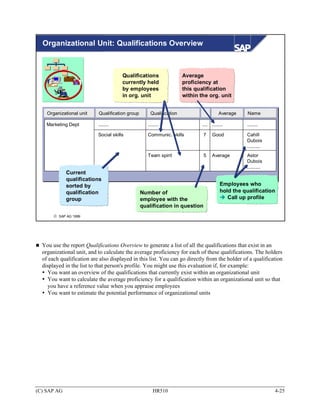
  There are many ways in which you can evaluate and analyze the information contained in subprofiles.
  In the remainder of this unit, we will focus primarily on the reporting options available for qualifications
  and requirements. We will look at the reporting options available for the subprofiles relevant for
  appraisals and development plans in later units.


(C) SAP AG                                         HR510                                                  4-12
Profile Evaluation: Entering Data

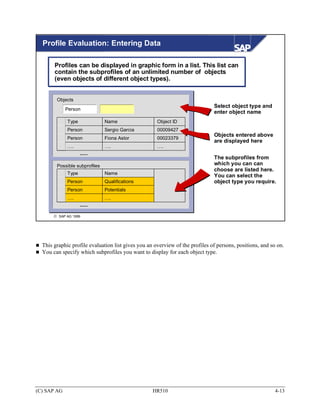
       Profiles can be displayed in graphic form in a list. This list can
       contain the subprofiles of an unlimited number of objects
       (even objects of different object types).


        Objects
                                                                              Select object type and
             Person
                                                                              enter object name
             Type              Name                  Object ID
             Person            Sergio Garcia         00009427
                                                                              Objects entered above
             Person            Fiona Astor           00023379
                                                                              are displayed here
             ….                ….                    ….
                    ......
                                                                              The subprofiles from
        Possible subprofiles                                                  which you can can
                                                                              choose are listed here.
             Type              Name
                                                                              You can select the
             Person            Qualifications                                 object type you require.
             Person            Potentials
             ….                ….
                    ......

       © SAP AG 1999


  This graphic profile evaluation list gives you an overview of the profiles of persons, positions, and so on.
  You can specify which subprofiles you want to display for each object type.


(C) SAP AG                                         HR510                                                  4-13
Profile Evaluation: Graphic List

    01/12/2000                                     Profile           01 Current plan

    Pers. no.         00001000                 Name            Fiona Astor                   Header data
    .......            .........               .......         .........

     Qualifications

      Social skills                    Points scale
        Assertiveness                       Good                                             Standardiz-
        Team spirit                      Very good                                           ation of
      Language Skills                  Language scale                                        scales
        Italian                             Basic knowledge
                                   ......

     Potentials
                                                                                             Subprofiles
      Job
      Department Manager                                        02/01/1998 - 12/31/9999


     Preferences

                                       None found!


       © SAP AG 1999


  This list displays general information for each object, and also information specific to the subprofiles
  you chose.
  Example:
  You specify that you want to display the Qualifications and Potentials subprofiles for the object type
  Person. This means that the system will display qualifications and potentials (but no preferences or
  dislikes) for all of the employees you specified.
  A standardized scale representation is used to make it easier for you to compare different
  qualifications/requirements.
  You can save this list to file and/or print it out.


(C) SAP AG                                                   HR510                                           4-14
Profile Matchup: Overview


      Persons, applicants,
                                                                      Job, position,
           users...
                                                                      work center...


                   Qualifications                                            Requirements


       © SAP AG 1999


  Profile matchups enable you to compare qualifications and requirements.
  Example:
  An employee's qualifications are compared with the requirements of the position which he holds.
  Profile matchups can also be used to determine an object's suitability (for example, how suitable a
  person is for a position), and to establish if any qualification deficits exist.


(C) SAP AG                                        HR510                                                 4-15
Profile Matchup: Data Model


                                            Q
                                                                Q
                                            Q
                                                                Q
                                            Q
                                                                Q
             Qualifications                                                      Requirements
               profiles                     Q                                      profiles
                                                                Q
                                            Q                                          Job
         Person
                                                                Q                      Position
         Applicant
                                            Q                                          Task
         User
                                                                                       Work center
         ...                                                    Q
                                                                                       ...
                                            Q


       © SAP AG 1999


  A profile matchup (between a position and an employee, for example) involves comparing each
  requirement of the position (including the proficiency required) with the corresponding qualification of
  the employee (including its proficiency).
  When you compare a qualification with a requirement, one of the following scenarios can result:
    The qualification fulfills the requirement exactly.
    The qualification does not fulfill the requirement (that is, the proficiency of the qualification is lower
    than is required, or does not exist at all).
    Overqualification (that is, the proficiency of the qualification is higher than is required).


(C) SAP AG                                          HR510                                                  4-16
Profile Matchup: Graphic List


              Key date: 12.01.2000              Profile matchup                  Plan version   01

                 Position            Marketing Assistant     Person          Lilian Berg

                 Application software             Points scale
                   Powerpoint                     Excellent
                                                  Very good
                       Word                       Excellent
                                                  Good

                 Social skills                    Points scale
                   Communic. skills               Very good
                                                  Very good

                 Other qualifications held by         Lilian Berg

                 Social skills                    Points scale
                  Willing to assume reponsibility Average
                 Language Skills                  Points scale
                   French                         Excellent


       © SAP AG 1999


  You can display the profile matchup in the SAP List Viewer or as a graphic list (see slide).
  The proficiencies of requirements and qualifications are compared against each other.
  Requirements and qualifications are sorted by qualification group in the list. The scale and
  corresponding proficiencies of each qualification group are also displayed.
  A standardized representation of the scale is used to make it easier to compare the qualifications with
  requirements visually.
  If requirements are essential requirements, they are flagged accordingly.
  If alternative qualifications are included in the matchup, these might also appear in the list. If so, they are
  flagged accordingly.
  All qualifications that are not specified in the requirements profile, but which a person has anyway, are
  output at the end of the list.
  You can save this list to file and/or print it out.


(C) SAP AG                                           HR510                                                  4-17
Qualification Deficits


         Position            Person

         Application software                                          Position       Person

         Excel                                                     Application software
                                                                    Excel
         Powerpoint

                                                                    Powerpoint
         Word


                                                                   Social Skills
         Social Skills                                              Communication
         Stress resistance


         Communication
                                                                   Limit the
         Team spirit                                          profile matchup to
                                                             qualification deficits

       © SAP AG 2003


  If you select the Qualification deficits only option, this will mean that the results of the profile matchup
  will be restricted to entries where qualifications are lacking (that is, the proficiency of the qualification is
  lower than is required, or the qualification does not exist at all).


(C) SAP AG                                           HR510                                                   4-18
Profile Matchup: Graphic Display

        Call graphic from
        SAP List Viewer with        :
                                             Team spirit
                                                  100
                                                   90
                        Stress management          80                   Powerpoint
                                                   70
                                                   60
                                                   50
                                                   40
                                                   30
                                                   20
                                                   10
                       Excel                                                    Word


                        French                                          Communication
                                                                        skills

                                  Willingness to assume reponsibility


                               Marketing Assistant             Lilian Berg
       © SAP AG 1999


  In addition to the list formats already mentioned (graphic list or SAP List Viewer), you can also display
  the profile matchup with SAP Presentation Graphics.
  This provides many additional display options for profile matchups.
  You can call SAP Presentation Graphics from either list display.
  You can access configuration options for the graphic with the right mouse button.


(C) SAP AG                                        HR510                                                 4-19
Training Proposals

                                                                                           Japanese

                                                            Business event type

                                                                     Prebook for
                                                                     business event type
     Requirements                 Qualifications                     Book on business event


        Japanese:                  Japanese:                  Development plan
         Average                 Basic knowledge
                                                                     Assign a development
                                                                     plan and select items


                                                      Business event type
                                                      Development Plans
              Training proposals to
                                                         Impart Japanese skills
             impart qualification (or
                                                         (proficiency better than
              proficiency) required                      "basic knowledge")

       © SAP AG 1999


  If Personnel Development is integrated with Training and Event Management, you can use the Generate
  training proposals function. In this case, the system will propose training courses (business events) that
  can provide any qualifications that are missing. You can book employees onto courses directly, or
  alternatively prebook them for business event types.
  In the same way, if you use the Development Plans component, you can also have the system propose
  development plans that can provide the qualifications required. You can assign a development plan
  directly, and then copy items from this general development plan to a person's individual development
  plan.
  The system proposes only business events and development plans that result in the same or a higher
  level of proficiency at the qualification (compared to current proficiency in the Qualifications subprofile
  of the person in question).
  Example:
  A mechanical engineer is to work in Japan for a longer period of time. However, her profile matchup
  against the new position in Japan shows that she does not have sufficient language skills. Since
  Personnel Development is integrated with Training and Event Management, the system proposes
  Japanese courses which will give the engineer the skills she needs for her new position. She is booked
  directly onto one of these courses.


(C) SAP AG                                         HR510                                                 4-20
Obtaining Qualifications

                                                             Transfer
                                                           qualification


                            Training and Event
                               Management
                                                                 Business event
                                Attendance booking
                                                                   attendance


                                      Development
                                         Plans
                                                                                   Status
                                           Assign development                    "Completed
    Qualification deficit                  plan                                 successfully"


       © SAP AG 1999


  If a person attends a training course (business event), this might mean that the person will have an
  additional qualification at the end of the course. In the follow-up activities to the business event, this
  qualification and its proficiency are transferred to the attendee. The default proficiency can be changed
  for individual attendees.
  In the standard system, if an employee completes a development plan successfully, the qualifications
  assigned to the development plan (and the corresponding proficiencies) can be copied to the person's
  qualifications profile. In Customizing, you can specify whether the qualifications should be copied
  automatically in the background, or if this operation should be confirmed by users first.


(C) SAP AG                                         HR510                                                  4-21
Finding Objects for Qualifications (1)


                                                                                           "Essential
                                                                                        requirement" flag
                         Qualifications required
                                    Name                       Ess. O.. Proficiency         Proficiency

                                    Ability to handle stress            Above average
    Specifying                      Communications skills               Above average
    qualifications
                                    Sales skills                        Very good

       Select specific              Business French                     Very good           Native speaker

       qualifications
       Specify profiles
                                                                   Entries regarding
                                                                 proficiencies required


       © SAP AG 1999


  You can use the Find Objects for Qualifications report to search for persons (applicants, etc.) who have
  specific qualifications. You can also specify that a specific proficiency is required for each individual
  qualification. You can restrict your selection further by entering further selection criteria.
  Examples:
     Finding persons with specific qualifications
     Selecting suitably qualified applicants
     Searching within an organizational unit to find suitable people to work on a project team
     Identifying employees who exceed/fall short of the qualification criteria specified
  When you specify the qualifications for which you are trying to find objects, you can select
  qualifications individually from the qualifications catalog and/or you can take the
  qualifications/requirements profiles of objects of your choice and adapt them to your needs.
  When you specify the proficiencies you are looking for, you can enter individual values or value ranges,
  and you can also specify that certain conditions must be met.
  Furthermore, by setting the Essential requirement flag for a qualification, you can specify whether the
  object you are looking for has to have the qualification in question. If you set the Essential requirement
  flag for a qualification, then only objects with at least this qualification will be selected.


(C) SAP AG                                           HR510                                                   4-22
Finding Objects for Qualifications (2)

      Qualifications
      required
                                   +         Other selection options
                                                                    Other
                                                                 restrictions
                                      Restrict to              (depending on
                             +         specific
                                     object types
                                                        +          selected
                                                                object types)
                                                                                        +    Availability


  Possible set of hits        Example:                     Example:                     Example:
    Applicants                Only employees               Object type Person           Object type Person
    Persons                   (object type Person)           Field selection              Availability
    ........                                                   Personnel area 1300          12.09.2000 -
                                                               EE subgroup DU               31.03.2001
                                                             Org. structure
                                                               Org. unit: Sales Dept.


       © SAP AG 1999


  You can limit your search to objects of specific object types. For example, you might wish to restrict
  your search to employees (object type P), or to applicants (object type AP).
  Depending on the object types you specify, you can then go on to limit your search even further. For
  example, you might limit your search to objects of the object type Person, and then specify that the
  persons must belong to a particular organizational units and restrict the selection even further to specific
  personnel areas, employee subgroups, and so on (infotype data). The ad hoc query is the basis for
  defining these selection criteria by selecting fields.
  In addition, you can use the criteria availability when searching for persons with qualifications (object
  type P). This is checked via the interface with Time Management. The resulting hit list of persons is
  restricted to persons that are available for a certain number of days in the planning period.
  The list generated by the report contains the objects that BOTH have the qualifications and proficiencies
  specified AND also fulfill the other selection criteria.
  Planning objects with alternative qualifications will also be listed if you have specified this in the user-
  specific settings.
  Note:
  Customers can extend the selection options for the report using a Business Add-In (refer to the slide
  Business Add-Ins in Personnel Development in the Appendix for details).


(C) SAP AG                                         HR510                                                    4-23
Overview: Reporting Options for Organizational
  Unit


                                                                      Profile Matchup:
                                                                      Position/Holder


                                                                           Profiles


                                                                       Qualifications
                                                                        Overview


                                                                         Expired
                                                                       Qualifications


       © SAP AG 1999


  You use the report Profiles in an Organizational Unit to display the subprofiles of all planning objects
  (positions, holders of positions, jobs that describe the positions, and so on) within a specific
  organizational unit. You can also limit your selection to specific subprofiles.
  The report Profile Matchup: Position/Holder for Organizational Unit compares the requirements of all
  the positions in one or more organizational units with the qualifications of the people who hold these
  positions. You can restrict your selection to situations involving qualification deficits. If Personnel
  Development is integrated with Training and Event Management, or if you also use the Development
  Plans component, you can also display suitable training proposals.


(C) SAP AG                                        HR510                                                 4-24
Organizational Unit: Qualifications Overview


                                       Qualifications                Average
                                       currently held                proficiency at
                                       by employees                  this qualification
                                       in org. unit                  within the org. unit


    Organizational unit    Qualification group       Qualification                     Average     Name

    Marketing Dept         ........                 ........                 .... ........        ........

                           Social skills            Communic. skills         7     Good           Cahill
                                                                                                  Dubois
                                                                                                  ..........
                                                    Team spirit              5     Average        Astor
                                                                                                  Dubois
                                                                                                  ..........
             Current
             qualifications
             sorted by                                                                  Employees who
             qualification                       Number of                              hold the qualification
             group                               employee with the                         Call up profile
                                                 qualification in question
       © SAP AG 1999


  You use the report Qualifications Overview to generate a list of all the qualifications that exist in an
  organizational unit, and to calculate the average proficiency for each of these qualifications. The holders
  of each qualification are also displayed in this list. You can go directly from the holder of a qualification
  displayed in the list to that person's profile. You might use this evaluation if, for example:
    You want an overview of the qualifications that currently exist within an organizational unit
    You want to calculate the average proficiency for a qualification within an organizational unit so that
    you have a reference value when you appraise employees
    You want to estimate the potential performance of organizational units


(C) SAP AG                                             HR510                                                   4-25
Organizational Unit: Expired Qualifications


                                      Specify the evaluation period
                                      Example: 01.01.2000 - 31.03.2000


                                            List of all employees in the
                                            org. unit who have
                                            qualifications that expire
                                            within the evaluation period


    Qualification                    Start date    End date
                                                                            Editing options
     First-aid experience             14.01.1998    13.01.2000                 Training proposals
     License to transport             27.03.1995    26.03.2000                 Qualification view
     dangerous goods


       © SAP AG 2003


  You use the report Expired Qualifications to generate a list of all the planning objects in an
  organizational unit that have qualifications that have expired/will expire during the evaluation period
  (sometimes called reporting period). The list tells you which planning objects are affected and gives
  details of the qualifications and their validity periods.
  If Personnel Development is integrated with Training and Event Management, or if you also use the
  Development Plans component, you can generate training proposals that are suitable for
  refreshing/renewing the qualifications in question.
  You can choose between a planning object view and a qualification view:
     In the planning object view, each planning object is listed along with the qualifications it has that are
     about to expire
     In the qualification view, each qualification about to expire is listed along with the planning objects
     that this affects
  You can go directly from each planning object to the transaction for displaying its profile and to the
  transaction for career planning.
  The standard system comes with a standard workflow that can be used to monitor the validity periods of
  the qualifications assigned to planning objects. This workflow is based on the validity defined in
  Customizing for the qualification in question. You can use this workflow to inform an appropriate
  person (the responsible course instructor, the employee's supervisor, and so on) that the qualifications in
  question are about to expire. This means that the person in question can introduce measures that will
  renew/extend the qualifications in question.

(C) SAP AG                                         HR510                                                  4-26
Other Reporting Options

  Profiles
                 Objects with Unevaluated                     Objects With No Qualifications/
                 Qualifications/Requirements                  Requirements Profile

                Select object type                            Select object type
                   List of all objects of the object             List of all objects of the object
                   type selected that have                       type selected that have no
                   unevaluated qualifications/                   qualifications/requirements
                   requirements                                  profile
                   Possible to go to profile                     Possible to go to profile
                   maintenance directly                          maintenance directly


  Other                 List of Alternative Qualifications

                       The list that is generated contains information on the
                         Qualification
                         Assigned alternative qualification
                         Replacement percentage
                         Validity period


       © SAP AG 1999


  The report Objects With Unevaluated Qualifications/Requirements generates a list if all the objects of a
  specific object type that have qualifications or requirements with the status Unevaluated.
  The report Objects Without a Qualifications/Requirements Profile generates a list of all the objects of a
  specific object type to which no qualifications or requirements have been assigned.
  You can go directly from an object in either list (a person, for example) into profile maintenance.
  The report List of Alternative Qualifications generates a list of all qualifications for which alternative
  qualifications have been defined. The replacement percentages are also displayed in the list.
  The report Prebookings per Attendee can be found under the miscellaneous reports. This report
  generates a list of prebookings for business event types. It can be run for several objects of the same
  object type at the same time (e.g. for several employees). You can only run this report if you have also
  implemented the Training and Event Management component.


(C) SAP AG                                         HR510                                                 4-27
Planning for an Organizational Unit


    Graphic display of the objects
      belonging to an org. unit


                                                                       You can execute all
                                        O                              relevant Personnel
                                                                       Development functions
                                            S                          directly from the
                                                                       graphic display.
                                                P

                                                C


                       Entire Personnel
                   Development functionality

       © SAP AG 1999


  By using the Planning for an Organizational Unit function, you can restrict your personnel development
  scenario to one organizational unit.
  The following objects appear in the graphic display:
     Organizational unit
     Job
     Position
     Person
     User
  You can enter a specific organizational unit for which you want to plan when you are performing the
  planning function in question. Once you have entered the organizational unit, it is written automatically
  to your temporary user-specific settings.
  You can also specify a default organizational unit in the permanent and temporary user-specific settings.
  In this case, the organizational unit specified here is defaulted automatically when you choose the
  Planning for an Organizational Unit function.


(C) SAP AG                                          HR510                                              4-28
Planning for an Organizational Unit: Procedure


                                                                             Graphic display
                                                                               Org. unit
              HR Department                                                    Position
                                                                               Job
                           HR Department Manager
                                                                               Person
                                    Department Manager                         User
                                    Max Lund


                           HR Assistant

                                    Assistant

                                    Ricarda Sanders                        Select the objects you
                       ........
                                                                           require, then execute
                                                                                the function


       © SAP AG 1999


  You can perform all the Change, Display and reporting functions of Personnel Development directly
  from the graphic display. You simply select the objects you require, and execute the function.
  Example:
  You want to analyze specific HR department employees to see how suitable they are for the position of
  HR Department Manager. You need to perform a profile matchup for these employees and the position.
  To do this, you select the employees and the position in the graphic display, and then choose the Profile
  matchup function.


(C) SAP AG                                         HR510                                                4-29
Creating and Evaluating Profiles: Unit Summary


                      Profiles are used to store special information
                      on objects. Profiles have a header and a number
                      of subprofiles. Subprofiles can contain
                      information on qualifications, requirements,
                      preferences, and so on.
                      There are many ways of using and evaluating
                      this information on qualifications and
                      requirements (for profile matchups, for example,
                      or for finding objects for specific qualifications).
                      When you are planning for one organizational
                      unit, you can execute Personnel Development
                      functions directly from the graphic display of
                      the organizational unit in question.


      © SAP AG 1999


(C) SAP AG                             HR510                                 4-30
Creating and Evaluating Profiles               Exercises

                  Unit: Creating and Evaluating Profiles
                  Topic: Subprofiles

                  •   Set up subprofiles for positions and employees.
                  •   Perform profile matchups


                  Requirements profiles are defined for the Marketing Department
                  positions. Qualifications, preferences and potentials are stored in
                  the system for the employees hired to fill these positions. You
                  are also responsible for running other evaluations (reports).
                  Note:
                  Replace the place holder ## with your group number


1      Creating Subprofiles
       1-1   Creating a Requirements subprofile for a position
             The Assistant position (the first assistant position in your organizational structure)
             is described by the job Assistant. Requirements have already been defined for this
             job. These requirements are inherited by the position automatically.
             Store the following additional requirements for the Assistant position.
             •   Graphical layout
             •   Knowledge of HTML
             •   Corel Draw
             •   Photoshop
             •   English
             Assign proficiencies of your choice to these requirements.
             Flag some of these requirements as essential requirements.
             The validity of these requirements should apply from the start date of the position
             (that is, the first day of the current month) through to 12/31/9999.


(C) SAP AG                                   HR510                                              4-31
1-2   Creating Qualifications, Potentials, Preferences and Dislikes subprofiles for
             employees
             The ##-Manager position (the second Manager position in your Marketing
             organizational structure) is occupied by Mr. Simon Miller (personnel number
             510995##).
             Assign Mr Simon Miller the following qualifications in the Qualifications
             subprofile:
             •   Team work                      Above average
             •   Communication skills           Average
             •   Organizational skills          Average
             •   Conceptual thinking            High
             •   Marketing skills               Very high
             •   Economics skills               Very high
             •   English                        Native speaker
             •   First aid course               Yes


             Note:

             The first aid course has a validity of 2 years. The start date of the validity should be
             a date from last year.
             If the proficiencies named above do not exist, choose a similar proficiency.
             Assign Mr Simon Miller the potential for the position Marketing Department
             Manager.
             Mr Simon Miller has also expressed a preference for the following:
             •   Sales Officer (job)
             •   Marketing Department Manager (position)


(C) SAP AG                                    HR510                                              4-32
2      Evaluating Profiles
       2-1   Display the subprofiles that you created for the positions ##-Assistant and ##-
             Manager, as well as those for the employee Mr. Simon Miller (personnel number
             510995##). Please only evaluate Mr Miller’s Qualifications and Potentials
             subprofiles. His other subprofiles should not appear in the list.


3      Performing Profile Matchups
       3-1   Profile Matchup: Position/Holder
             Compare Simon Miller’s (personnel number 510995##) qualifications with the
             requirements of the position he holds (##-Manager). Which requirements are met
             precisely (that is, the proficiencies of both qualification and requirement are the
             same)? Does Mr Miller have any qualification deficits? Is Mr Miller overqualified
             in some areas?
             Post Mr. Miller to the business event communications course.
             Note:
             If there is not a suitable business event date, then choose the prebook function.


4      Find Objects for Qualifications
       4-1   Your company is looking for employees to work in a project team which will
             decide where a new sales office should be located.
             The requirements profile of the job Sales Officer is taken as the basis for this
             search.
             If necessary, delete some of the requirements from the list of required
             qualifications.
             Restrict your search to employees (object type P). Furthermore, you only wish to
             include employees who belong to personnel area CABB and employee subgroup X0
             (salaried employees).


(C) SAP AG                                   HR510                                               4-33
5      Expired Qualifications
       5-1   In your company, checks are run regularly to see if any qualifications are about to
             expire so that the appropriate training measures can be implemented in a timely
             manner.
             Check to see if any employees in the Marketing Department ##-Marketing have
             qualifications that are going to expire this year.
             Also display training proposals for employees where this is the case. If there are
             date proposals, you can post the employees affected to such a business event.


6      Qualifications overview
       6-1   Display a qualifications overview for your Marketing Department ##-Marketing.


7      Optional Exercises: Planning for an organizational unit
       7-1   Performing profile matchups from the structural display of an organizational
             unit
             Run the following matchup from the structural display for the Marketing
             Department ##-Marketing:
             Compare the qualifications profile of the manager (for example, Simon Miller,
             personnel number 510995##) and the Marketing employee with the requirements of
             the Department Manager position.
             Note:
             If you want to execute evaluations for another organizational unit, choose the menu
             View other organizational unit and select a different organizational key there.


       7-2   Finding objects for qualifications (from the structural display of an
             organizational unit)
             Find objects for qualifications (starting out from the structural display of your
             Marketing Department).
             You want to find employees who meet the requirements defined for the position
             Department Manager.
             Note:
             Remove the Essential requirement flag for some of the requirements of this
             position.


(C) SAP AG                                   HR510                                                4-34
Creating and Evaluating Profiles Solutions


(C) SAP AG                      HR510        4-35
(C) SAP AG   HR510   4-36
Unit: Creating and Evaluating Profiles
                    Topic: Subprofiles


1      Creating Subprofiles
       1-1    Creating a Requirements subprofile for a position
              1-1-1 Creating additional requirements for the position Marketing Assistant
                      In the Personnel Development menu, choose:
                      Profile → Change
                      The Person: Change Profile screen. In the upper left screen (Search area)
                      under Find by, find the object type Position and click the icon beside
                      position to display the underlying texts. The search tools available for
                      searching for objects of this type are displayed.
                      Choose the Structure search, for example. The organizational structure now
                      appears in the lower part of the screen (selection area). Expand the
                      organizational structure up to your Marketing department ##-Marketing and
                      its positions (→ Organizational HR Group Training → Training
                      International → Marketing) and choose the first position Assistant of your
                      Marketing department by double-clicking.
                      In the right screen area (work area), enter the key date as the first day of
                      the current month (that is, the start date of the position’s validity period).
                      Click the Execute icon (or choose Profile → Execute). The Position:
                      Change Profile window appears. The system displays the requirements of
                      the position Marketing Assistant that have been inherited from the job
                      Assistant.
                       To define new requirements in the profile, click the Create icon on the
               bottom left (or choose Requirements -> Create). Select (using one of
       several different search options) the qualifications you require from the
       qualifications catalog, and then click the Continue icon.
                      To assign a proficiency to a requirement, position your cursor on the
                      Proficiency field, and click the down-arrow to the right of this field. The
                      system displays the proficiencies of the scale defined for the qualification
                      group to which the qualification belongs.
                      To view proficiencies descriptions, click the Descriptions pushbutton.
                      Note:
                      Proficiencies are not maintained for all qualifications in the system.


(C) SAP AG                                    HR510                                              4-37
Select the proficiency you require by positioning your cursor on this
                    proficiency, and then clicking the Continue icon (or simply by double-
                    clicking the proficiency in question).
                    To define a requirement as an essential requirement, select the Ess. ( =
                    Essential requirement) field.
                    Save your entries.


       1-2   Creating Qualifications, Potentials, Preferences and Dislikes subprofiles for
             employees
             1-2-1 Accessing profile maintenance for persons
                    Choose:
                    Human Resources → Personnel Management → Personnel Development
                    → Profile → Change
                    The Person: Change Profile screen. In the search area under Find by,
                    select the object type Person. A dialog box appears where you can search
                    for the person by entering a search string. (As in the first search, you can
                    first click the icon beside Person and use any of the search tools available to
                    search for objects of this object type).
                    Enter the person’s surname (Miller, for example), press Enter and in the
                    selection area select the person you are looking for from the list (Simon
                    Miller).
                    Double-click the person you are looking for and the pertinent data is
                    displayed for editing in the work area.


             1-2-2 Creating a Qualifications subprofile
                    You are on the Person: Change Profile screen. Make sure that the
                    Qualifications tab page is active (that is, at the front). If it is not, click on it.
                    You can now maintain the Qualifications subprofile.
                    To insert qualifications in this subprofile, click the Create icon (or choose
                    Qualifications -> Create). Select the qualifications you require from the
                    qualifications catalog (using one of several search options) , and then click
                    the Continue icon. To assign a proficiency to a qualification, position your
                    cursor on the Proficiency field, and click the down-arrow to the right of this
                    field. The system displays the proficiencies of the scale defined for the
                    qualification group to which the qualification belongs.
                    To view proficiencies descriptions, click the Descriptions pushbutton.
                    Select the proficiency you require by positioning your cursor on this
                    proficiency, and then clicking the Continue icon (or simply by double-
                    clicking the proficiency in question).

(C) SAP AG                                     HR510                                                 4-38
Enter a relationship start date of your choice in the Start date field.
                    Exception:
                    Specify a start date from last year for the qualification First aid course. The
                    end date is set automatically by the system (for example, if this qualification
                    has a validity of 2 years, the end date will be set as 2 years after the start
                    date). The proficiency is proposed, since a Yes/No scale is used for this
                    qualification.
                    Save your entries


             1-2-3 Creating a Potentials subprofile
                    To define a potential for Mr Simon Miller, go into profile maintenance
                    (proceed as described in 1-2-1), and click the Potentials tab page. Then
                    click the Create icon (or choose Potentials -> Create). Select the object
                    type Position by positioning your cursor on the object type Position, and
                    then clicking the Transfer icon. Use the search help to select the position
                    Marketing Department Manager. Specify the first day of the current month
                    as the start date. Save your entries
             1-2-4 Creating a Preferences subprofile
                    To define preferences, go into profile maintenance (proceed as described in
                    1-2-1), and click the Preferences tab page. Then click the Create icon (or
                    choose Preferences -> Create). Select the object type you require
                    (Job/Position/Qualification) by positioning your cursor on the
                    corresponding line, and then clicking the Transfer icon. Enter the object
                    concerned (for example, Sales Officer job), using input help. Accept the
                    data proposed as the start date.
                    Save your entries


2      Evaluating Profiles
       2-1   In the Personnel Development menu, choose:
             Information System → Reports → Profiles
             The Profile Evaluation screen appears.
             If the object type Person has not already been initialized, choose this using input
             help. Enter the employee’s surname (Miller) in the Name field, and then choose
             Enter. Select the person you want (Simon Miller, personnel number 510995##)
             from the list of employees with the surname Miller, and confirm your selection by
             choosing Enter. Alternatively, you can use the search help function. You can
             alternatively enter the personnel number directly.
             To include positions in the list also, click the field containing the object type, and
             select the object type Position.
             Since the abbreviations for positions are not easy to remember, it is probably better
             to use the search help function: Click the scroll button of the entry field and use the


(C) SAP AG                                    HR510                                              4-39
structure search as the input help to find your Marketing department ##-Marketing.
             Choose the positions ##-Manager and ##-Assistant from the positions executed.
             In the Possible subprofiles area at the bottom of the Profile Evaluation screen,
             deselect all the subprofiles that you do not want to evaluate for the persons (for
             example, the subprofiles Preferences, Dislikes).
             Now click the Execute icon (or choose Profiles -> Execute).
             The profiles (or selected subprofiles) of the employees and positions in question are
             displayed.


(C) SAP AG                                   HR510                                                4-40
3      Performing Profile Matchups
       3-1   Profile Matchup: Position/Holder
             3-1-1 Running a profile matchup
                    If you are in a person’s profile, you can run a profile matchup to compare
                    this person’s profile with the requirements profile of the position he/she
                    holds. You can also run this profile matchup for the requirements profile of
                    the position.
                    In the Personnel Development menu, choose:
                    Profile → Display or Profile → (Change)
                    In the Search area, select the object type Person, select the search help
                    Search term, and enter the employee’s name.
                    The requested employee is displayed in the selection area. Double-click the
                    employee’s name and the pertinent data is displayed for editing in the work
                    area.
                    Click the (Matchup with) current position icon at the top of this screen.
                    You can display the profile matchup in a graphical list.


             3-1-2 Restricting the matchup to qualification deficits only
                    In the results list of the profile matchup (see 3-1-1), click the Editing
                    options pushbutton (or choose View → Editing options).
                    In the Profile Matchup dialog box that appears, also select the option
                    Qualification deficits only and then click the Transfer icon. The system
                    thereby still only displays any qualification deficits that the person has with
                    regard to the position in question.


             3-1-3 Displaying business events, bookings and prebookings
                    On the screen where the profile matchup is displayed, click the Editing
                    options pushbutton again.
                    In the Profile Matchup dialog box which appears, select the option
                    Generate training proposals (and, if you wish, the option Qualification
                    deficits only) and then click the Transfer icon.
                    If any qualification deficits exist, the system displays any training courses
                    (business events) and development plans that will correct this situation.
                    To make a booking or prebooking, position the cursor on the required
                    business event type, and choose Edit → Further training, or click the icon
                    that appears to the left of the business event type. The Book Attendance
                    screen appears: Data Screen appears.
                    •   To make a booking for a business event, select the date you require
                        from the business events on offer, and then click the Book pushbutton

(C) SAP AG                                   HR510                                              4-41
on the bottom left. You have made the booking. If you receive an error
                        message (for example, that the participant you want to book onto a
                        business event does not meet the prerequisites), choose the Prebook
                        function.
                    •   To make a prebooking for a business event type, choose Attendance
                        → Prebook or click the Prebook pushbutton. On the Prebook
                        Attendance: Data screen that appears, click the Prebook (disc symbol)
                        button. You have made the prebooking. Now choose Exit.


4      Find Objects for Qualifications
       4-1   In the Personnel Development menu, choose:
             Information System → Reports → Search → For Qualifications
             The Find Objects for Qualifications screen appears. In the upper left screen
             (Search area) under Find by, find the object type Job and double-click it. The
             dialog box for the search using search term appears.
             Enter the sales officer. The requested job now appears in the lower part of the
             screen (selection area). Double-click the job. The system displays the requirements
             defined for this job in the work area. In the standard system, the operator At least
             (Operator >=) is applied to the proficiencies of the qualifications in the profile
             selected. However, you can change this operator.
             To delete the qualifications from the list of qualifications required, select the
             qualifications in question, and then click the Delete qualification icon (which you
             will find at the bottom of the Qualifications required group box).
             Then position your cursor in the Proficiency field for one of the qualifications,
             click the down-arrow to the right of this field, and select the proficiency Average
             by double-clicking it. Select the operator At least (that is, greater than or equal to
             “>=”).
             Click the Restrict to object types tab page. Deselect all object types except for the
             object type Person.
             Now click the Restrict further tab page.
             Leave the defaulted object type as Person. Select the down-arrow of the input field
             to the right of the field for the object type. If a search help option has already been
             set, you can select another appropriate search help by selecting the Other search
             help button at the bottom of the popup.
             In the Organizational Assignment tab page that appears, click the Free search icon
             on the top right.
             Enter the value X0 for the employee subgroup, and the value CABB for the
             personnel area.
             Click the Start Search button, The number of persons to be selected using the
             search criteria specified is displayed.
             Choose the functions All mark and Enter. Thereby, the persons found are listed in
             the Restrict further tab page.

(C) SAP AG                                    HR510                                               4-42
Then, to find objects for the qualifications specified, click the Execute icon (or
             choose Search -> Execute).
             Note:
             If a results list is not displayed, go back, and use the search function again.


5      Expired Qualifications
       5-1   In the Personnel Development menu, choose: Information System → Reports →
             Organizational Unit → Expired Qualifications.
             In the Search term field, enter the abbreviation for your Marketing Department ##-
             Marketing, or use the search help function for the Organizational unit field.
             Enter the evaluation period start date as January 1 of the current year, and the end
             date as December 31. 9999.
             Under Editing options, select Generate training proposals.
              Choose Execute, or Program → Execute.
             The system displays a list of employees who have qualifications that expire this
             year.
             To book an employee in one of these business events, position your cursor on the
             event in question, and choose Edit → Book training.
             Select a business event from the events on offer, and click the Book pushbutton. If
             no dates are proposed, you can use the Prebook function.


(C) SAP AG                                    HR510                                               4-43
6      Qualifications overview
       6-1   In the Personnel Development menu, choose: Information System → Reports →
             Organizational Unit → Qualifications Overview.
             In the Search term field, enter the abbreviation for the Marketing Department, or
             use the search help function for the Organizational unit field.
              Leave the key date as it is (today’s date).
             Click the Execute icon, or choose Program → Execute.
             The qualifications that exist in the organizational unit in question are displayed and
             sorted by qualification group. The employees who hold the qualifications in
             question are also listed.


7      Optional Exercises: Planning for an Organizational Unit
       7-1   Performing profile matchups from the structural display of an organizational
             unit
             To make temporary user-specific settings for planning for organizational units,
             proceed as described in 7-1-1 or 7-1-2.
             7-1-1 Entering the organizational unit manually
                    On the initial screen, choose Human Resources → Personnel Management
                    →Personnel Development → Planning for Organizational Unit.
                    Then select the organizational unit ##-Marketing (using the structure search
                    function, for example).
                    The Marketing Department ##Marketing will be saved to your temporary
                    user-specific settings.
             7-1-2 Making user-specific settings
                    On the initial screen, choose Human Resources → Personnel Management
                    →Personnel Development → Settings → User-Specific.
                    In the Structure access section of the screen that appears, enter your
                    Marketing Department (using the structure search function, for example) in
                    the Organizational unit field, and then choose Enter.
                    To apply these settings to the current terminal session only, click the Set
                    temporarily pushbutton.
                    Then choose Personnel Development → Planning for Organizational
                    Unit.


(C) SAP AG                                   HR510                                                4-44
7-1-3 Performing profile matchups from the structural display of an
                   organizational unit
                    You are on the Planning for Organizational Unit screen and your
                    organizational unit Marketing department ##-Marketing and its positions
                    are displayed.
                    Position your cursor on the Marketing Department, and click the Expand
                    all icon (or choose Edit Expand all).
                    Select the holders of the Marketing employee and Marketing Manager
                    positions displayed by flagging the checkbox to the left of the employees'
                    names. Select the position Department Manager in the same way.
                    Then choose Navigation Reporting Profile matchup or click the
                    Profile matchup pushbutton. The system displays the profile matchups.


       7-2   Finding objects for qualifications (from the structural display of an
             organizational unit)
             Choose Personnel Development → Planning for Organizational Unit.
             You are on the Planning for Organizational Unit screen and your organizational
             unit Marketing department ##-Marketing and its positions are displayed. Select the
             position Department Manager, and then click the Find objects for qualifications
             pushbutton (or choose Navigation → Reporting→ Find objects for qualifications).
             On the Find Objects for Qualifications screen, you will see the requirements of the
             position displayed as “qualifications required.” The default operator Greater than
             or equal to has already been applied to the proficiencies of the qualifications.
             Choose Execute, or in the menu Search → Execute.


(C) SAP AG                                  HR510                                            4-45
System Settings for Qualifications and
  Requirements


      Contents:
             IMG Customizing
             Overview of system settings for Personnel Development
             System settings for qualifications and requirements


      © SAP AG 1999


(C) SAP AG                             HR510                         5-1
System Settings for Qualifications and
  Requirements: Unit Objectives


                      At the end of this unit, you will be able to:
                         Describe the concept behind IMG Customizing
                         Make system settings for qualifications and
                         requirements


      © SAP AG 1999


(C) SAP AG                                 HR510                       5-2
System Settings for Qualifications and
  Requirements: Business Scenario


                      Last year, the systems support team customized
                      the standard system to meet the requirements of
                      your company. You played a consultative role in
                      this process. The system settings were made after
                      you and your colleagues drew up a detailed concept
                      for the structure and setup of the qualifications
                      catalog.
                      You have decided to use the profiles set up
                      in the SAP standard system. The Personnel
                      Development and Personnel Administration
                      components are integrated for qualifications.


      © SAP AG 2003


(C) SAP AG                            HR510                                5-3
The Implementation Guide (IMG)


          Documentation is available for
            every activity in the IMG .                        IMG           Global Settings
          You can execute all activities
         directly from the IMG structure.                                    Countries
        Functions are available to help you                                  Currencies
           manage and document your
             implementation project.                                         Calendars


                                                                                        Project
  SAP Documentation                Activities          Project Management
                                                                                     Documentation
     Concept                   Go into Customizing         Status management         Structured
     Recommendations           transactions                Scheduling                appropriately
     Prerequisites                                         Resources
     Activity

     HTML/ SAPscript                                       Connection                MS Word used
     for outputting text                                   to MS Project             as editor


       © SAP AG 1999


  You use the IMG to help you make system settings. The IMG helps you make system settings for all
  applications in the R/3 System.
  The IMG is divided up into different application areas. With an application area, the individual activities
  appear in the sequence in which they should be processed.
  Technically, the IMG is a hierarchical structure. You can perform the following functions directly from
  this structure:
     Access SAP documentation:
     Here, you will find the information you need to make the system settings you require.
     Call up Customizing transaction:
     Here, you actually make the appropriate system settings.
     Go to project management:
     You can go into project management for every Customizing step. This allows you to enter a status,
     deadlines, and resources. You can also specify how much progress has been made.
     Go to project documentation:
     You can produce project documentation for each Customizing step.


(C) SAP AG                                         HR510                                                  5-4
IMG: Personnel Development

                                                                 The IMG for Personnel
                                                                 Development is divided
                               Personnel Development             into 8 areas:


                                   Basic Settings            Basic Settings
                                                             Integration
                                   Integration               Master Data
                                                             Functions
                                   Master Data               Tools
                                   Functions                 Employee Self-Service
                                                             (ESS)
                                   Tools                     Development plans
                                                             Objective Setting and
                                   Employee Self-Service (ESS)
                                                             Appraisals
                                   Development plans         Appraisal Systems

                                   Objective Setting and Appraisals

                                   Appraisal Systems

      © SAP AG 2003


  You will find the settings you have to make for Personnel Development under the IMG topic called
  'Personnel Development.'
  Some of the system settings we will look at apply to all components of Personnel Development, and not
  just to the Qualifications and Requirements component (the settings you make in the activities entitled
  Edit Organizational Plan and Define Profile View, for example).
  For this reason, please do not regard the way in which the various Customizing activities have been
  distributed among the various units as being absolutely authoritative. Instead, try to see the various
  components in Personnel Development as being tightly intertwined.


(C) SAP AG                                       HR510                                                 5-5
Basic Settings


                                    Personnel Development

                                        Basic Settings


              The IMG topic "Basic Settings" contains general settings for
              Human Resources (maintaining number ranges, infotypes,
              relationships, and so on).


      © SAP AG 1999


  These settings are explained in detail in course HR505 (Organizational Management).


(C) SAP AG                                      HR510                                   5-6
Edit Organizational Plan


                                     Personnel Development

                                        Master Data

                                                   Edit Organizational Plan


                Depiction of a
              company's structure


      © SAP AG 1999


  The organizational plan shows how your company's structure is depicted in the SAP System.
  If you want to use Personnel Development, but do not want to implement all of Organizational
  Management, you can depict the structures required for Personnel Development here.
  Note:
  The organizational plan is explained in detail in course HR505 (Organizational Management).


(C) SAP AG                                      HR510                                            5-7
Customizing Checklist for Qualifications and
  Requirements

       Integration
             Integration with Personnel Administration/Recruitment
             Transfer Qualifications from Personnel Administration
             Transfer Qualifications from Recruitment

       Master Data
             Edit Scales
             Edit Qualifications Catalog

       Functions
             Define Profile View

       Tools
             Copy Requirements Profiles to Position Holder(s)
             Qualifications Profile: Mass Data Maintenance


      © SAP AG 1999


  The Customizing checklist in the slide above shows the various Customizing activities that affect the
  Qualifications and Requirements component. We have already discussed how you edit the development
  plan catalog, so we do not need to go into any further detail about this here.


(C) SAP AG                                      HR510                                                5-8
Integration with Qualifications


    Personnel Administration                                           Personnel Development

                                                                                Q
                                                                                          Qualification
              Infotype 0024
              Qualifications
                                                                                   P
                                                                                                 Person


        Integration switch for Personnel Administration/ Recruitment

                      Group   Sem. abbr.   Value abbr.   Description

                      PLOGI    QUALI       1 A032Q       Integration switch for qualifications


      © SAP AG 1999


  In Personnel Administration, you have the option either of using infotype 0024 or of using Personnel
  Development subprofiles to create qualifications.
  If you wish to manage qualifications in Personnel Development, you must activate the integration switch
  between the Personnel Administration and Personnel Development components. You do this in the
  Personnel Development section of the IMG.
  If this integration switch is activated, and you use transaction PA30 (Maintain HR Master Data) to call
  up infotype 0024, you will go to the profile of the person in question. From here, you can then work
  through the tasks you wish to carry out.
  Important:
  Integration will only take effect if an active plan version has been specified for switch PLOGI PLOGI.


(C) SAP AG                                           HR510                                                5-9
Transferring Qualifications from Personnel
  Administration and Recruitment


                                                                            Pers. no.
                                                                            .....
                                                                            Valid


    Transfer qualifications
    from:                                                                   Qualification
                                                                            .......              .......

         Personnel Administration
                       RHQINTE0
                                                                                        ......       ......
                       RHALTD00


                  Recruitment
                       RHQINTE1
                       RHALTD00


       © SAP AG 1999


  If you have already created qualifications in Personnel Administration, and then you activate integration,
  you can use reports RHQINTE0 and RHALTD00 to transfer these qualifications to Personnel
  Development.
  Report RHQINTE0 generates a batch input session with the appropriate qualifications and relationships
  in question. This batch input session is imported into the system by report RHALTD00 (this is the actual
  point at which the data is transferred). The infotype 0024 records of the persons affected are deleted.
  Note:
  The qualifications are transferred with their original object ID. If, however, a qualification with the same
  object ID already exists in Personnel Development, it is presumed that these qualifications are the same.
  Qualifications are transferred to Personnel Development from Recruitment in the same way as from
  Personnel Administration. The reports used for this transfer are RHQINTE1 and RHALTD00.


(C) SAP AG                                         HR510                                                      5-10
Edit Scales


  Edit Scales
     ID       Scale

     1       Language scale                                                   Average proficiency
                                   Proficiencies                              for Ability to get on
     2       Yes/No scale                                                     with others
                                      ID     Specification
     3       5-point scale                                                       Gets on with colleagues
                                                                                 and customers
                                       1    Low

                                       2    Below average
                                                                              Average proficiency
                                       3    Average                           for Independence and
                                                                              initiative
                                       4    Good
                                                                                 Knows when to act,
                                       5    Excellent                            and performs the
                                                                                 necessary activities


         © SAP AG 1999


  You create and change proficiency scales in Customizing. You specify a unique ID and a name for each
  scale. You must also specify proficiencies for each scale.
  You must use quality scales to enter proficiencies for qualifications. Every proficiency has to have a
  unique ID and name. Each scale can contain up to 9999 proficiencies, and each of these can have a user-
  defined proficiency text.
  To ensure that depreciation meter values and suitability percentages are calculated correctly, you must
  define proficiencies in ascending order (that is, the proficiency with the highest value in the ID field
  must be the highest (best) proficiency of a qualification). The lowest proficiency must have the value 1;
  all subsequent proficiencies must be numbered consecutively.
  You can enter a descriptive text for all proficiencies of every qualification and qualification group in the
  qualifications catalog.
  Note:
  In the Qualifications and Requirements component, you cannot use the proficiency 0 for rating
  qualifications or requirements.


(C) SAP AG                                         HR510                                                   5-11
Define Profile View


                                        O..    No.    Name                         Report     Screen   D..

       Header definition                 P     1      Person                       SAPLRHPP    2010    02

                                         P     2      Person                       SAPLRHPP    2010    00


             Name                            Report          Screen      Icon
                                                                                   Definition of
         1   Qualifications                  SAPLRHPP          2101       ...
                                                                                   subprofiles
         2   Potentials                      SAPLRHPP          2200       ....

                                                                                              Which header
                                                                                              for which
                               Name                                                           object type in
                                                                       Header assignment
                                                                                              which view?
    Views                 CP   Compensation Mgt
                          PD   Personnel Development                                          Which subprofiles
                                                                      Subprofile assignment for which object
                                                                                              type in a view?


       © SAP AG 1999


  In this step of the IMG, you define the profile views that should be available for various object types in
  different components.
  Every profile has a header containing general information on the object (in the case of persons, for
  example, this might be information such as personnel number, personnel area, and so on), and also a
  number of subprofiles (Qualifications, Potentials, and so on, in the case of persons).
  By defining different views for the various components, you can specify what information should be
  displayed for a given object type.
  The procedure for defining a new profile view comprises several steps:
     First, you define the headers that can be used for each of the object types, and specify which
     subprofiles are to be generally available. These settings apply to all profile views, so you only have to
     enter them once.
     Next, you specify which profile views are to be created for the various components (Personnel
     Development, Compensation Management, for example), and you assign a report that controls the
     menu options.
     Finally, you specify which object types, headers and subprofiles should be displayed in each of these
     views.
  The standard system comes with a comprehensive range of entries. This means that you do not normally
  need to define brand new profile views - you can simply change the standard entries as required.


(C) SAP AG                                            HR510                                                    5-12
Copy Requirements Profiles to Position Holder(s)


       Requirements
        of position                                                      S       S   S

                                                                   P         P              P

                                  Qualifications
                                   of position
                                     holder
                                                            The requirements defined for the
                                                            positions in an organizational
                                                            unit can be copied to the holders
                                                            of these positions.


       © SAP AG 1999


  In this step, you can copy the requirements of the positions in an organizational unit to the holders of
  these positions.
  You should only use this function in the initial stages of setting up your system.
  The function is based on the presumption that a person who holds a certain position is also qualified to
  hold that position (that is, meets the requirements of the position).
  Note:
  When you perform this function, the proficiencies of any existing qualifications in persons' profiles are
  overwritten.


(C) SAP AG                                         HR510                                                 5-13
Qualifications Profile: Mass Data Maintenance


    You can use the mass data maintenance transaction to assign qualifications
    (including specific proficiencies and specific relationship periods) to several
    objects of different object types.


      Select objects of
                                                                   Applicants
      different object                                             Persons
      types                                                        ......

      Select qualifications
      from the                                                                                      ...... ......
                                                                                               ...... ......
      qualifications catalog                                                               ...... ......
      and assign                                                                      ...... ......
      proficiencies (where
      applicable)


                                         English:       Good
                                         French:        Average

      © SAP AG 1999


  You can use the Mass Data Maintenance function to create entries in the Qualifications subprofiles for
  several planning objects of different object types simultaneously.
  You can specify a proficiency and relationship period for every qualification.


(C) SAP AG                                          HR510                                                           5-14
System Settings for Qualifications and
  Requirements: Unit Summary


                      The SAP Implementation Guide (IMG) is
                      structured to help you set up your R/3 System
                      to suit your company's needs.
                      You can use the IMG to make specific settings for
                      Personnel Development. Some of these Customizing
                      settings (maintaining the qualifications catalog,
                      for example) can also be made by choosing the menu
                      option Current settings.
                      In this unit, you have familiarized yourself
                      with the system settings relevant to qualifications
                      and requirements.


      © SAP AG 1999


(C) SAP AG                             HR510                                5-15
System Settings for Qualifications and Requirements Exercises


(C) SAP AG                    HR510                             5-16
(C) SAP AG   HR510   5-17
Unit: System Settings for Qualifications and
                    Requirements


                    You familiarize yourself with the system settings for the
                    Qualifications and Requirements component.


                    You helped customize the standard system last year.


                    Note:
                    Replace the place holder ## with your group number.


1      Copying the Requirements of Positions to the Holders of the Same
       Positions
       In test mode, copy the requirements of your positions in the organizational unit Marketing
       ## to the holders of the same positions.

2      Qualifications Profile: Mass Data Maintenance
       In some departments at your company (the Human Resources department, for example)
       skills management functionality will be implemented at a later stage.
       Store qualifications of your choice that everyone should possess for employees belonging
       to the organizational unit ##Purchasing. Do not enter any proficiencies yet. Proficiencies
       will be assigned to the qualifications later, when you maintain individual profiles.
       Check your qualification assignments.


(C) SAP AG                                     HR510                                          5-18
3     Optional Exercise:
       Integration with Personnel Administration
       The integration switch (for qualifications) is activated between the Personnel
       Administration and Personnel Development components. Where are qualifications
       maintained in this case? What role does infotype 0024 play if integration is activated, and
       what role does it play if integration is not activated?


(C) SAP AG                                    HR510                                             5-19
System Settings for Qualifications and Requirements Solutions


(C) SAP AG                    HR510                             5-20
(C) SAP AG   HR510   5-21
Unit: System Settings for Qualifications and
                      Requirements


1      Copying the Requirements of Positions to the Holders of the Same
       Positions
       To access Customizing, choose Tools → Customizing → IMG → Edit Project.
       The Customizing: Execute Project screen appears. If there is no Personnel Development
       project IMG, click the SAP Reference IMG pushbutton, or choose Goto → SAP
       Reference IMG.
       If there is a special project IMG for HR510 Personnel Development, click the Add to
       worklist pushbutton. In the Add Projects/Views to Worklist dialog box that appears, select
       the project in question, and click the Copy icon. Select the project, which is now in your
       Customizing Worklist, and then click the Display project pushbutton. The system displays
       the project IMG.
       In the IMG structure (SAP Reference IMG or Project IMG), choose Personnel
       Management Personnel Development Tools Copy Requirements Profiles to
       Position Holder(s).
       Click the Execute icon to the left of this activity. The Copy Requirements Profiles to
       Position Holder(s) screen appears.
       This screen should contain the following values (if it does not enter them now):
       Plan version:       01
       Object type:        O
       Object ID:          Object ID of your Marketing department ##-Marketing
       Evaluation path:    SBES (Staff assignments per organization)
       Make sure that the Test run option is flagged.
       Click the Execute icon (or choose Program →Execute).

       The test run displays a list of the qualifications (and the corresponding proficiencies) that
       would be copied to the position holders.


2      Qualifications Profile: Mass Data Maintenance
       In the IMG structure, choose Personnel Management Personnel Development
       Tools Qualifications Profile: Mass Data Maintenance.

(C) SAP AG                                     HR510                                              5-22
Click the Execute icon to the left of this activity. The Qualifications Profile: Mass Data
       Maintenance screen appears.
       Leave the defaulted object type as Person.
       To select the employees in the Purchasing department ##-Purchasing, proceed as follows:
       Click the down-arrow of the input field to the right of the field for the object type. If a
       search help option has already been set, you can select another, more appropriate search
       help: Structure search.
       Position your cursor on the organizational unit HR Group Training and expand by going
       to: Training International → Purchasing- your organizational unit → ##-Purchasing
       Expand the structure until the individual holder assignments are displayed. Select the
       Purchasing department ##-Purchasing employees to whom you wish to assign the
       qualifications, and choose Enter.
       To assign qualifications to these employees, click the Create icon in the Qualifications
       box.

       In the Choose Qualifications dialog box that then appears, there are different search
       options for the qualifications catalog. Select several qualifications of your choice. Then choose
       Enter.
       The qualifications do not contain any proficiencies that are unevaluated (that is, without a
       specific level or grade).
       Check over the start date and end date of the qualification assignments, and then choose
       Profiles → Save or the function Save.
       To check over the qualifications you have assigned, choose Goto → Qualifications profile
       reporting.
       The system displays the qualifications of the employees in question.


3      Integration with Personnel Administration
       If you only use the Personnel Administration component, you can store qualifications for
       persons and applicants in the Master Data infotype 0024 instead of in the subprofiles of
       Personnel Development. This, however, does not correspond to the standard SAP delivery.
       If Personnel Development is integrated with Personnel Administration, all qualifications
       are managed in Personnel Development. “Integrated” means that the PLOGI QUALI
       switch has been set to 1 A032 Q. In this case, infotype 0024 is not used at all. If, however,
       integration is activated and data has already been stored in infotype 0024, you can run
       reports to transfer this data to Personnel Development.


(C) SAP AG                                       HR510                                                 5-23
Career and Succession Planning


      Contents:
             Overview of career and succession planning
             Setting up careers
             Planning criteria
             Career plan and ranking list
             Suitability percentage and suitability ranges
             Evaluating career plans
             Succession plan and ranking list
             Detail selection in Succession Planning
             Evaluating succession plans
             Simulating succession scenarios
             System settings for Career and Succession Planning

      © SAP AG 2003


(C) SAP AG                              HR510                     6-1
Career and Succession Planning: Unit Objectives


                      At the end of this unit, you will be able to:
                         Describe how careers are set up
                         Work through career planning scenarios
                         Describe how suitability is measured (suitability
                         percentage, suitability range)
                         Evaluate career plans
                         Work through succession planning scenarios
                         Evaluate succession plans
                         Simulate and evaluate succession scenarios
                         Make system settings for Career and Succession
                         Planning


      © SAP AG 2003


(C) SAP AG                                 HR510                             6-2
Career and Succession Planning: Business
  Scenario (1)


                      You work through individual career planning scenarios
                      or the managers in your company to motivate them and
                      prepare them for their long-term career goals. You take
                      the personal preferences of these people into account.
                      You also give consideration to the performance
                      appraisals held by these people's supervisors.
                      These appraisals might also contain an estimate of
                      the employees' potential.


      © SAP AG 2003


(C) SAP AG                             HR510                                6-3
Career and Succession Planning: Business
  Scenario (2)


                      If your career planning scenario establishes that an
                      employee is aiming to hold a specific position in the
                      medium or long term, you draw up an individual
                      promotion plan for this employee.
                      Once the new marketing manager has completed her
                      probationary period successfully, you work through a
                      career planning scenario for her.


      © SAP AG 2003


(C) SAP AG                            HR510                                   6-4
Career and Succession Planning: Business
  Scenario (3)


                      In conjunction with the relevant departments, you
                      create succession plans for management posts to
                      ensure that these posts will always be filled.
                      Potential successors are trained and qualified in
                      preparation for the posts in question.
                      In the same way, execute succession planning for
                      the position Marketing Department Manager.


      © SAP AG 2003


(C) SAP AG                           HR510                                6-5
Career and Succession Planning: Business
  Scenario (4)


                      When the Marketing Manager announces that she is
                      leaving the company at the end of the year, look at
                      the succession plan, analyze it, and put the top
                      candidates through a selection procedure.
                      Last year, you made the necessary system settings
                      for Career and Succession Planning. This activity
                      involved mapping the general career development
                      options in so-called careers, defining suitability
                      ranges, defining how overqualification should be
                      handled, and so on.


      © SAP AG 2003


(C) SAP AG                           HR510                                  6-6
Career and Succession Planning


                                                 Career Planning:
                                                   Planning an employee's
                                                   professional career


        Succession Planning:
          Looking for suitable
          candidates to fill
          vacant posts


      © SAP AG 1999


  Career and Succession Planning has two goals. First, to encourage the professional development of
  employees in a company, and second, to ensure that there is always sufficient headcount.
  Career Planning involves identifying possible career goals for employees, and planning their
  professional development.
  Succession Planning involves looking for suitable candidates to fill open posts.


(C) SAP AG                                       HR510                                                6-7
Careers


                                  Department
                                   Manager


                              Administrator                 HR Administrator


                                                       Careers describe general,
                                  Assistant            non person specific paths
                                                       within an organizational structure.
                                                       Careers can contain jobs and positions.
                       Job                             Careers can be used as a planning
                                                       criterion in Career and Succession
                                                       Planning.
                       Position

       © SAP AG 1999


  Careers are non-person-specific paths within an organizational structure. These can be used to show the
  main personnel development paths within a company.
  You can use careers as planning criteria in Career and Succession Planning. You can also use them for
  "marketing" purposes (by showing potential employees the career opportunities that are open to them if
  they prove suitable and work well).
  Careers can contain jobs and positions in any combination. You can depict vertical and horizontal
  movements within a career.
  The career items within a career are arranged in such a way that those lowest down in the hierarchy
  appear at the bottom of the career, and those higher up in the hierarchy appear at the top.
  Career items from the same hierarchy level appear beside each other.


(C) SAP AG                                       HR510                                                 6-8
Edit Careers


     Career

     50001625          Management career                             Each career has a name and
                                                                     an object ID.
     50000546          Developer career
                                                                     You can create as many
     50001418                   .........                            careers as you wish.
         ...                    .........
         ...                    .........


       © SAP AG 1999


  You display and edit careers in SAP Network Graphics.
  Careers have an object type of their own (LB).
  There is no limit to the number of careers you create. Each career is given its own name and object ID.
  You can save a list of all your careers as a file and/or print it out.
  You edit career in Customizing for Personnel Development (path: Master Data -> Edit Careers). You
  can also make changes in a system that has already gone live by choosing the Current settings menu
  option.


(C) SAP AG                                        HR510                                                 6-9
Criteria for Career and Succession Planning


                           Qualifications
                                                     Preferences


                                         Career Planning/                           Potentials
         Designations                  Succession Planning


                                Dislikes
                                                           Career


             You can use a range of planning criteria for both Career Planning
             and Succession Planning. You can use each criterion on its own,
                    or in conjunction with one or more other criteria.


      © SAP AG 1999


  You can use the following planning criteria for Career and Succession Planning:
   Qualifications
   Potentials
   Preferences
   Dislikes
   Designations
   Career
   Additional career


(C) SAP AG                                       HR510                                           6-10
Career Planning (1)


                                                             Planning for employees:
                                                                 Further professional
                                                                 development?
                                                                 Measures to impart
                                                                 qualifications?


       © SAP AG 1999


  A career planning scenario is based on an employee's personality and abilities, and specifies the
  sequence of positions this employee should hold as part of his or her professional development. It also
  lists the measures that are required to qualify the employee for specific positions.
  Career planning sets out to encourage the professional development of employees. Career planning can
  also help reduce a high employee turnover rate by showing employees the career opportunities that are
  open to them. Career planning is also used to ensure that qualified successors are always available for
  positions.
  The Career Planning component can also be used to search for activities that suit a person's (applicant's,
  etc.) profile.


(C) SAP AG                                        HR510                                                 6-11
Career Planning (2)


     Person                              Contact
                             User                                 Restrict planning to
                                                                  vacant positions
                                             Applicants
         Object types
                                        Customer                                User parameters
    External person
                       Company

                                                                                     Qualifications
                                 7
                    4 5
                            6
                                 14
                                                   Career Planning                         Preferences
            2 3      1 1
                         2 13
       1
        8 9
                10 1
                      8 19
                             20
                                  21                                        Potentials
                 17 1              27
             6           25   26
        15 1
              2   23 24                                                                  Designations
         21 2         31
               9 30
          28 2
                                                                           Planning criteria
     Evaluation period:
                                                                    Dislikes
         Specify a key date
         for career planning                                                     Additional career
                                                                  Career
       © SAP AG 1999


  You can work through career planning scenarios for a range of object types (e.g. for persons, applicants,
  users, etc.).
  You can use a range of planning criteria for career planning. You can use each criterion on its own, or in
  conjunction with one or more other criteria.
  You can restrict career planning scenarios to vacant positions. You do this by making the appropriate
  user-specific settings.
  Career planning is performed for a key date. The default key date is today's date, but you can overwrite
  this date if required.


(C) SAP AG                                                HR510                                          6-12
Planning Criteria: Include Qualifications


                                           Q

                                           Q

                                Q
                                           Q

                                Q
                                           Q
                                                                  Displays all career plan
                                Q                                 objects that require
                                                                  qualifications held by
                                          Q                       the person in question
                                Q
    Qualifications
    profile                               Q
                                Q

                                          Q

                                          Q


       © SAP AG 1999


  If you use the planning criterion Include qualifications, then all objects that require at least one of the
  qualifications possessed by person will appear in the career plan under this criterion.
  Example:
  An employee has the qualifications Marketing experience and Italian. When you work through a career
  planning scenario for this person, and you use the Include qualifications criterion, all positions (jobs,
  etc.) that require marketing experience, or Italian, or both, will appear in the career plan under this
  criterion.
  If you also specify that you want to take essential requirements into account (you specify this in your
  user settings), then only positions (jobs, etc.) where all essential requirements are fulfilled by the
  person's qualifications appear in the career plan under this criterion. You specify in your user settings
  whether or not essential requirements are to be taken into account.


(C) SAP AG                                         HR510                                                  6-13
Planning Criteria: Include Preferences, Potentials;
  Exclude Dislikes


                                                                   Preferences

                                                                   Position
                                                                   Job
                                                                   ...


             Dislikes

          Position
          Job
          ...                                                        Potentials

                                                                   Position
                                                                   Job
                                                                    ...


       © SAP AG 1999


  If you use the planning criterion Include preferences, then all objects (except qualifications) contained in
  the person's Preferences subprofile will appear in the career plan. Dependencies between jobs and
  positions are taken into account here. Preferences with regard to qualifications are not included in Career
  Planning.
  If you use the planning criterion Exclude dislikes, then all objects contained in the person's Dislikes
  subprofile are deleted from the career plan display. Because only objects that appear because they were
  selected using another criterion are deleted, it really only makes sense to use the Exclude dislikes
  criterion in conjunction with another planning criterion. Dislikes are not displayed separately - they are
  merely deleted.
  Example:
  An employee's career plan should normally contain the job Field sales officer because the person is
  qualified for this, and the criterion Include qualifications was used. However, this job appears in the
  employee's Dislikes subprofile. For this reason, it is not included in the selection, and is not displayed in
  the career plan.
  If you use the Include potentials criterion, all objects (except qualifications) contained in the person's
  Potentials subprofile appear in the hitlist. Dependencies between jobs and positions are taken into
  account here.


(C) SAP AG                                         HR510                                                   6-14
Planning Criteria: Include Designations, Career,
  Additional Career


                                                                       Include career
           Designations
                                                                 Items of all careers that
                                                                 contain the person's position


                 Additional career

                             Items in the career
                             specified


       © SAP AG 1999


  Designations might already exist for a person (user, etc.) as a result of previous career and succession
  planning scenarios. You can take these designations into account in your current planning scenario. If
  you use the Include designations criterion, all positions for which the person is designated will be
  displayed.
  If you use the Include career criterion, the items (jobs or positions) of all the careers that contain the
  person's current position (or the corresponding job) are displayed. The items are displayed hierarchically
  in relation to the person's current position.
  If you use the Additional career criterion, the items of the careers you have specified are displayed.
  You can use the Additional career criterion independently of the Include career criterion.


(C) SAP AG                                        HR510                                                 6-15
Career Plan (Outcome of Career Planning)


                                                                    All the objects that fulfill a
                                                                    criterion are displayed for
          Pers. no.          01000    Name        Tim Miller        the criterion in question.
          .........                   .........
                                                                    Because each criterion is
                        Has qualifications for                      evaluated separately, some
                                 Department Manager                 objects may appear more than
                                                                    once (under different criteria).
                                 Marketing Manager
                        ......                                      The vacancy period of vacant
                                                                    positions is displayed.
                       Has potential for
                                 Marketing Manager

                       Is designated for
                       Has expressed preference for
                       Careers


       © SAP AG 1999


  The result of Career Planning is a career plan containing suitable objects, sorted by planning criterion.


(C) SAP AG                                            HR510                                               6-16
Displaying a Ranking List


                                      Ranking list

                                                                         Sorted by
        Career plan             Ranking list Key date: 01/17/2000        suitability
        Suitab.        Post                             ...   ...        Suitability percentage
                                                                         or suitability range
                       Marketing Manager
                                                                         Planning criteria
                       Product Manager                                   displayed
                       Department Manager

                       ......
                       ......
                       ......


       © SAP AG 1999


  Objects that appear in the ranking list are sorted by suitability.
  You can choose whether you want the suitability percentage or the suitability range displayed.
  You are shown the planning criteria that were used for selecting each object.
  You can save the career plan/ranking list to file and/or print it out.


(C) SAP AG                                          HR510                                          6-17
Suitability Percentage

                                                                  Individual
                                                                  requirement/
                                                                  qualification
                               Q
                                                                  comparison
                                              Q
                                                                          The proficiency required is
                               Q                                          compared against the
                                              Q                           proficiency that actually
                               Q                                          exists.
                                              Q
                               Q
   Qualifications                                      Requirements
                                              Q
   profile                                             profile
                               Q                                             Result of
                                                                             matchup
                             Profile matchup
                                                                             Overqualification
                                                                             Exact matchup
                                                                             Underqualification
                                            Suitability
                                            percentage
       © SAP AG 1999


  To find out how suitable a person is for a specific position, you compare the requirements profile of the
  position with the person's qualification profile. The result of this matchup can be represented as a
  suitability percentage.
  The suitability percentage is calculated by comparing the proficiency specified for each requirement
  with the proficiency of the corresponding qualification. If these are different, this is taken into account
  when the suitability percentage is calculated.
  If the suitability percentage is 100%, this means that requirements were fulfilled precisely (that is, the
  person is 100% suitable). If the suitability percentage is less than 100%, the person is less suitable.
  Note:
  If the person is overqualified, the suitability percentage can be greater than 100%.
  Never regard the suitability percentage as an absolute value, but use it as a criterion for sorting ranking
  lists. After all, the suitability percentage is calculated solely on the basis of system data, and cannot take
  all external factors into account. You should always gather extensive additional information before
  making judgement on a person's suitability. Only use the suitability percentage as a rough initial guide.


(C) SAP AG                                          HR510                                                   6-18
Other Factors That Affect Suitability


                             Other factors that affect the
                               suitability percentage


         Customizing setting                                  User settings
             Handling of                                         Include alternative
             overqualification                                   qualifications
             (negative, neutral,
                                                                 Disregard depreciation
             positive)
                                                                 meter value


       © SAP AG 1999


  The following factors affect the way in which the suitability percentage is calculated:
    Include alternative qualifications:
    If alternative qualifications are included, these are weighted (on the basis of the replacement
    percentage) before the suitability percentage is calculated.
    Note:
    If a person has both the qualification specified and a permissible alternative qualification, the
    qualification that gives the highest suitability percentage is taken.
    Disregard depreciation meter values:
    Depending on whether or not depreciation meter values are taken into account, the proficiencies of
    qualifications with a depreciation meter value can vary considerably. Consequently, the suitability
    percentage can vary considerably.
    In Customizing, you specify how overqualification should be handled (negative, neutral, positive).
    This will affect the suitability percentage.


(C) SAP AG                                        HR510                                                   6-19
Suitability Ranges


     Career plan
     Suitab.      ...
                            Career plan
                            Suitab.       Post                      In the ranking list of
                            100.00%        ......
                                                                    the career plan, suitability
                                                                    can be expressed as a
                            69.89%        ......                    percentage value, or using
                            51.27%                                  a suitability range.

                            43.25%
                            38.49%
                            17.11%


       © SAP AG 1999


  To stop people from interpreting the suitability percentage too literally, you can define suitability ranges
  in Customizing. These suitability ranges allow you to express a person's suitability in terms which are
  easy-to-understand.
  When you define suitability ranges, you subdivide a percentage scale into intervals (ranges). A
  suitability range is defined for each of these intervals, and an appropriate icon is assigned.
  You can choose whether you want to express suitability as a percentage, or as a suitability range. If you
  opt for suitability ranges, all the objects in the same suitability range will appear with the same icon.


(C) SAP AG                                          HR510                                                 6-20
Evaluating Career Plans: Profiles


        Career plan                                                                   Display profile
                                                                                      of planning
                                                                                      object


                                                                             Display profile
                                                                             for object in
                       Q                                                     career plan
                             Q
                       Q
                             Q
                       Q
                             Q
                       Q
                             Q
                       Q

              Profile matchup
                                           Display qualification
                                                                                Training
                                                 deficits
                                                                               proposals
       © SAP AG 1999


  You can use reports to process the career plan and ranking list further.
  You can display the profile of the planning object (person, user, etc.) and the profiles of the objects from
  the career plan (jobs, positions, etc.).
  You can match up the person's qualifications with the requirements of the objects from the career plan.
  You can also use further reports (displaying qualification deficits only, and if you also implement
  Training and Event Management generating training proposals). This gives you an overview of the
  qualifications and training measures required if a person is to occupy one of the positions in future.


(C) SAP AG                                         HR510                                                  6-21
Evaluating Career Plans: Preferences, Potentials,
  Designations and Transfers


                                Career plan


               Preference
                                                     Designation


                                    Potential                                    Transfer


       © SAP AG 1999


  You can define preferences or potentials for objects from a person's career plan (positions, jobs, etc.).
  You can also designate the person for a position displayed in the career plan, or transfer the person
  directly to this position.


(C) SAP AG                                         HR510                                                  6-22
Searching for Suitable Jobs and Positions


                       SAP AG                 Anna Anders                           Example:
                       Neurottstr. 16         Niedere Str.6
                       69185 Walldorf         59929 Brilon                          You conduct a search for
                       Dear Sir or Madam,
                                                                                    suitable activities for an applicant.
                       I read your advertisment in the
                       Times with great interest.

                       I am currently working as a...
                       ...


                                                              ......   ......


       © SAP AG 1999


  You can use career planning functionality to look for suitable activities for an employee, applicant, etc.
  You use the person's profile as a basis for conducting this search.


(C) SAP AG                                                                      HR510                                       6-23
Succession Planning (1)


                                                             Planning for posts:
                                                             Selecting and preparing
                                                             potential successors


       © SAP AG 1999


  Succession planning scenarios are a means of ensuring that a continuous supply of qualified personnel is
  available for posts in the company.
  Succession planning scenarios are based on posts that are have to be filled, either now or in the future.
  Succession planning involves selecting potential successors for these posts, and preparing them for the
  posts. This means that suitable persons can be identified immediately should one of the posts become
  vacant.
  Succession Planning functionality can be used to find suitable persons (applicants, etc.) for jobs,
  positions, etc.


(C) SAP AG                                        HR510                                                6-24
Succession Planning (2)


     Position                           Job                                     6
                                                                                     7

                                                                  3   4 5         3 1
                                                                                       4
                                                              2             12 1
                       Task                               1
                                                           8   9  10 1
                                                                       1
                                                                       18 1
                                                                              9 2
                                                                                   0 2
                                                                                        1
                                                                                       27
                                                                6 17           5 26
                                                           15 1         24 2
                                                                2 23
                                                            21 2         31
                                                                 9 30
                                                             28 2
                              Requirements
         Object types                                                   Evaluation period:
                              profile
                                                                           Specify a key date for
    Work center            ….                                              succession planning


                                                                                               Qualifications
           Detail selection
                                    Succession Planning                                         Preferences
                                                                                    Potentials
                                                                                              Designations

                               c                                            Planning criteria
                         Ad ho
                          query                                    Dislikes
                                                                                            Additional career
                                                          Career
       © SAP AG 1999


  You can work through succession planning scenarios for a range of object types (position, job, task, and
  so on).
  You can use a range of planning criteria for succession planning. You can use each criterion on its own,
  or in conjunction with one or more other criteria.
  You can use detail selection to restrict the number of potential successors. The ad hoc query is used for
  detail selection.
  Succession planning is performed for a key date. The default key date is today's date, but you can
  overwrite this date if required.


(C) SAP AG                                        HR510                                                         6-25
Planning Criteria: Succession Planning


                            Qualifications
                                                      Preferences


                                                                                   Potentials
          Designations                 Succession Planning


                                 Dislikes
                                                            Career


       © SAP AG 1999


  In Succession Planning, you can use the same planning criteria as for Career Planning.


(C) SAP AG                                       HR510                                          6-26
Succession Plan (Outcome of Succession Planning)


                 Department
                  Manager

    Succession plan key date: 04/01/2000                 Ranking list
             Is a qualification of
               Dr. Walter Sanders
               Lilian Berg                        Succession plan     Ranking list
               Sandrine Johnson                   Suitab.        Person, applicant...              ...

             Is a potential of                                   Lilian Berg
               Bert Bode
                                                                 Sandrine Johnson
             Is a designation of                                 Dr. Walter Sanders
             Is a preference of                                  Bert Bode
             Careers


       © SAP AG 1999


  You can select suitable planning criteria for a succession planning scenario. These criteria are evaluated
  in conjunction with each other.
  The result of a succession planning scenario is a succession plan containing all suitable objects, sorted
  by planning criterion.
  Since these planning criteria are evaluated independently of each other, some objects may appear more
  than once (that is, under different selection criteria).
  Objects in the ranking list are sorted by suitability.
  You can choose between expressing suitability using percentages or using suitability ranges.
  You are shown the planning criteria that were used for selecting each object.
  You can save the succession plan/ranking list to file and/or print it out.
  You can also work through a succession planning scenario from the structural display of an
  organizational unit. In this case, you select the position in the organizational unit, and choose the
  Succession planning function. When you search for persons, these searches are not restricted to the
  organizational unit, but are conducted company wide.


(C) SAP AG                                         HR510                                                 6-27
Detail Selection in Succession Planning


    Succession plan      Ranking list
                                                                 By using detail selection, you
                                                                 can further restrict the list of
    Suitab.        Person, applicant...                ...       objects (persons, applicants,...)
                                                                 selected on the basis of object
                   P ... Lilian Berg
                                                                 type.
                   AP... Sandrine Johnson
                                                                 You make detail selection
                   P ... Dr. Walter Sanders                      specifications separately
                          Selection
                   AP... Bert Bode                               for each object type.
                          criteria for
                          applicants

                                        Selection
                                       criteria for
                   Succession plan Ranking list
                                         persons
                   Suitab.        Person, applicant...                ...

                                  P ... Lilian Berg
                                  P ... Dr. Walter Sanders


       © SAP AG 1999


  You can specify detailed selection criteria to restrict the succession plan and ranking list further. You
  can use detail selection to delete or retain objects of a specific object type in the hitlist. The object types
  Person and Applicant are special in that you can also restrict the hitlist further by specifying additional
  selection criteria.
  You make detail selection specifications separately for each object type.
  The system then outputs a list of persons and applicants who also fulfill the additional criteria.
  You can repeat detail selection as often as you want.
  The selection criteria available are defined in Customizing for each object type (person, applicant). For
  persons, you can use all data fields in Personnel Administration as selection criteria. For applicants, you
  can use all data fields in Recruitment as selection criteria.


(C) SAP AG                                            HR510                                                   6-28
Evaluating Succession Plans


    Display profile
                                   Succession plan
                                                                                Preference


                                                                                    Potential
                          Q
                                   Q
                          Q
                                   Q                                       Designation
                          Q
                                   Q
                          Q

                          Q
                                                                  Transfer
                       Profile matchup

                       Qualification deficits
                       Training proposals
       © SAP AG 1999


  You can use reports to process the succession plan and ranking list further.
  You can display the profile of the planning object (position) and the profiles of the objects from the
  succession plan (persons, applicants, etc.).
  You can match up the requirements of the planning object with the qualifications of the persons listed in
  the succession plan. You can also use further evaluations (displaying qualification deficits only, and, if
  you also implement Training and Event Management, generating training proposals). This gives you an
  overview of the qualifications and training measures required for potential successors.
  You can define that the persons (applicants, etc.) listed in the succession plan have expressed a
  preference for, have potential for and/or have been designated for the planning object.
  You can also transfer a candidate directly to the position in question from the succession plan or ranking
  list.


(C) SAP AG                                        HR510                                                 6-29
Searching for Suitable Persons


                                                            Example:
                                                            You conduct a search for
                                                            employees and applicants
                                                            who are suitable for a
                                                            specific new position.


       © SAP AG 1999


  You can use succession planning functionality to look for persons (applicants, etc.) who are suitable for
  a specific object (position, task, etc.).


(C) SAP AG                                        HR510                                                 6-30
Simulating Succession Scenarios


                                                          Vacancy:
                                                     Department Manager


                                                                          You can use the same
                                                                          criteria for simulating a
                          Successor is transferred.                       succession planning
                         New vacancy: Administrator                       scenario as you would
                                                                          for working through a
                                                                          succession planning
                                         Find successor                   scenario normally.
                                       for this position ...              In each case, the
                                                                          transfer of the most
                                                                          suitable person is
                                                                          simulated.


      Successor is transferred.
      New vacancy: Assistant

       © SAP AG 1999


  By simulating a succession scenario, you can analyze and appraise the knock-on effects of an employee
  transfer. Vacancies arising as a result of an employee being transferred are determined over several
  levels, and can be simulated on the basis of user-defined criteria.
  If you simulate a transfer, the system looks for successors for the position that becomes vacant as a
  result. If the successor for this position is an employee, and this employee is transferred, this creates a
  further vacancy for which the system performs a succession planning scenario.
  The simulation stops if a successor does not hold a position, or if the successor's current position does
  not have to be restaffed.
  In each case, the system automatically selects the most suitable successor.
  When the simulation is completed, the system displays a list of all positions that have to be restaffed, and
  proposes suitable persons for these positions. You are also shown each person's suitability, and the
  planning criteria that they fulfill.
  You can conduct simulations for all the object types available. Subsequently, however, only positions
  are evaluated (with the exception of the object specified).


(C) SAP AG                                         HR510                                                 6-31
Evaluating Simulated Succession Scenarios


    Simulation of succession

    Post that is to be filled                       Suitab.     ...
    Persons/applicants, etc. found
                                                                                   Display profile
                                                                                   Profile matchup
                                                                                   Qualification deficits
                                                                                   Training proposals


                                                                                        Transfer

                                 Succession
   Career                        planning
   planning


       © SAP AG 1999


  You can use evaluations to process the simulation of a succession planning scenario further.
  You can display the profile of all the objects that appear in the list.
  You can also perform a profile matchup between the posts to be filled as a result of the simulation, and
  the persons assigned to these posts. You can also use further evaluations (displaying qualification
  deficits only, and if you also implement Training and Event Management generating training
  proposals).
  You can also work through a career planning scenario for the persons listed in the succession planning
  simulation. This enables you to check whether a person might actually be more suitable for a position
  other than the one assigned during the simulation.
  You can also go to Succession Planning for the positions displayed.
  You can also assign a person directly (that is, from the simulation list) to the position assigned to them
  during the simulation.


(C) SAP AG                                         HR510                                                  6-32
Reporting: Succession Overview for Organizational
  Unit
                                                                      Select the relevant criteria
    List     Edit      Goto    Settings    System      Help
                                   ...
                                                                      Overview of the
    Succession Overview                                               succession situation
                                                                      for the positions of an
                                                                      organizational unit
      Succession Overview                                             Candidates are displayed
                                                                      for each criterion and
      Organizational unit     O00001001 HR Dept. (D)                  position
      Key date                18.09.2000
      Object name                                   No. cand. found Suitability %    Suitability range
      Human Resources Manager (D)                             30             93,57
      Human Resources Administrator (D)                       22           96,00
      Personnel Admin. Specialist                              1           83,57
      Personnel Admin. Secretary (D)                          17           52,00
      Dept. Manager Social & Legal                             5           70,48
      Personnel Dept. Secretary (D)                            8           70,48
                                                                       Suitability of best
      Payroll Administrator (D)                                -           83,57
                                                                       suited candidate is
      Payroll Assistant (D)                                    5           96,00
                                                                       displayed in each case
      Payroll Secretary (D)                                    3           83,57

       © SAP AG 1999


  The Succession Overview for Organizational Unit evaluation displays an overview of the succession
  situation for all of the positions in an organizational unit.
  Potential successors are determined for every position (on the basis of the planning criteria specified).
  The number of potential successors found is displayed for each planning criteria selected, and for all
  criteria as a whole. You can then go directly from here to a list of the potential successors found.
  The suitability of the best potential successor is always displayed in the succession overview. From here,
  too, you can go to a list of all potential successors. This list tells you how suitable each candidate is for
  the position in question.
  The Vacant Positions report generates a list of all positions that have been flagged as vacant. This report
  is run for an organizational structure, or part of an organizational structure. You will find this report
  under Reports -> Other.


(C) SAP AG                                          HR510                                                  6-33
Career and Succession Planning: Customizing
  Checklist


       Master Data
             Edit Careers

       Functions
             Set Up Control Parameters
             Define Suitability Ranges
             Define Criteria for Detail Selection
             Activate/Deactivate 'Vacancy' Infotype


      © SAP AG 1999


  The Customizing checklist in the slide above shows the various Customizing activities that affect the
  Career and Succession Planning component. We have already discussed how you edit careers, so we do
  not need to go into any further detail about this.


(C) SAP AG                                      HR510                                               6-34
Set Up Control Parameters


                       Group   Sem. abbr.   Value abbr.   Description

                       QUALI    MAXEN          20         Maximum no. of entries in the hitlist

                       QUALI    OVERQ          1          Handling of overqualification

                       QUALI    QPROZ          100        Replacement percent for alternative qualifications


                          Maximum number of entries that may appear in the ranking lists of
           MAXEN          Career and Succession Planning

                          Specifies how overqualification should be handled in career and
           OVERQ          succession planning scenarios

                          Defines the default replacement percentage that is proposed
           QPROZ          when you create alternative qualifications


       © SAP AG 2003


  Handling of overqualification:
    Value -1 means that overqualification is evaluated positively (in other words, the actual proficiency of
    a qualification is used to calculate the suitability percentage).
    Value 0 means that overqualification is ignored and the proficiency specified in the requirements
    profile is used to calculate the suitability percentage.
    The value +1 means that overqualifications enter the negative in the calculation of the suitability
    percentage.


(C) SAP AG                                            HR510                                                    6-35
Define Suitability Ranges


             User-definable suitability ranges
             in Customizing
                                                                               100%
                               Very suitable
                                                                               - 70%


                                                                                 70%
                           Possibly suitable
                                                                               - 40%


                                                                                40%
                               Less suitable
                                                                                - 0%


       © SAP AG 1999


  You can define suitability ranges in Customizing (as an alternative option to suitability percentages).
  These suitability ranges allow you to express a person's suitability in terms which are easy to understand.
  When you define suitability ranges, you subdivide a percentage scale into intervals (ranges). The lowest
  range must start at 0%, and the highest range must go up to 100%.
  A suitability range is defined for each of these intervals, and an appropriate icon is assigned.
  Note:
  If overqualification is evaluated positively, the suitability percentage might be greater than 100%. If this
  is the case, objects are displayed in the highest suitability range. Alternatively, you can create a separate
  suitability range for suitability percentages greater than 100%.
  Example:
  The percentage scale is divided up into 3 suitability ranges: Very suitable (100 - 70%), Possibly suitable
  (70 - 40%) and Less suitable (40 - 0%). An appropriate traffic-light icon (green, yellow, and red,
  respectively) is assigned to each of these suitability ranges.
  This means that if suitability ranges are used in a career planning ranking list, all objects that are more
  than 70% suitable will appear with a green traffic-light icon.


(C) SAP AG                                         HR510                                                   6-36
Define Criteria for Detail Selection


                        Selection                                     Selection
                        criteria for                                  criteria for
                         persons                                      applicants
                                          Succession plan


          InfoSet for person selection                    InfoSet for applicant selection
          with fields from PNP database:                  with fields from PAP database:

          P0001 -      PERNR   Personnel number           P0001 - PERSG       Applicant group
          P0001 -      PERSG   Employee group             P0022 - AUSBI       Educ. & Training
          P0001 -      BUKRS   Company code               P0022 - FACCD       Specialist area
          P0002 -      NATIO   Nationality                P0022 - SLABS       Certificate
             Infotype fields                                                      Infotype fields

                         PNPCE                                             PAP
       © SAP AG 2003


  Under Functions -> Define Criteria for Detail Selection, you define additional selection criteria for
  selecting persons and applicants. These criteria are used for detail selection in Succession Planning.
  All of the HR Master Data infotype fields (from the PNP database) can be used as selection criteria for
  the detail selection of persons, and all of the Recruitment infotype fields (from the PAP database) can be
  used for applicants.
  The data fields to be used for selection are provided in the form of SAP QUERY InfoSets.
  You can also define your own InfoSets. If you want to use your own InfoSets, you must set up one
  InfoSet for person selection and one for applicant selection in this Customizing step for the scenario
  PDVFINE.
  In the standard system, the following predefined InfoSets are available: /SAPQUERY/HR_PD_FINE_P
  for person selection and /SAPQUERY/HR_PD_FINE_AP for applicant selection. If you want to use the
  predefined InfoSets in the standard system, no settings are required here.
  Note:
  The InfoSets are NOT client-specific.


(C) SAP AG                                        HR510                                                 6-37
Activate/Deactivate 'Vacancy' Infotype


                       Group   Sem. abbr.   Value abbr.   Description

                       PPVAC    PPVAC       1             Switch for defining a vacancy


         You use this switch to specify whether a position is considered as
         being vacant if it has a Vacancy infotype record, or if every unstaffed
         position should automatically be considered as being vacant.

                   0 : Every unoccupied position is vacant
                   1 : Vacancy infotype used to determine if position is vacant


       © SAP AG 1999


  In this step, you specify whether a position is considered as being vacant if it has a Vacancy infotype
  record (1007), or whether all unstaffed positions should be considered as being vacant.
  In SAP terminology, the term vacancy refers to an unoccupied position that can be restaffed.
  This information is required mainly for recruitment purposes. If you want to be integrated with
  Recruitment, the Vacancy infotype must be activated (that is, the switch must have the value 1).
  This information is also used in career and succession planning scenarios. It tells you when a position is
  to be restaffed. It also enables you to restrict your career planning scenario to vacant positions.


(C) SAP AG                                           HR510                                              6-38
Career and Succession Planning: Unit Summary (1)


                      A range of planning criteria (which can be used in
                      conjunction with each other) are used for working
                      through career planning scenarios.
                      Careers represent one of these criteria. Careers are
                      displayed in SAP Network Graphics.
                      The result of a career planning scenario is a career
                      plan listing suitable objects that fulfill the criteria
                      specified.


      © SAP AG 2003


(C) SAP AG                             HR510                                    6-39
Career and Succession Planning: Unit Summary (2)


                      The objects in the career plan ranking list are sorted
                      by suitability.
                      You can use a range of reports to further process
                      the career plan (ranking list), establish a need for
                      training, for example, or create designations,
                      and so on.


      © SAP AG 2003


(C) SAP AG                             HR510                                   6-40
Career and Succession Planning: Unit Summary (3)


                      A range of planning criteria (which can be used in
                      conjunction with each other) are used for working
                      through succession planning scenarios.
                      The result of a succession planning scenario is a
                      succession plan listing suitable persons, applicants,
                      etc., who fulfill the criteria specified.
                      The objects in the succession plan ranking list are
                      sorted by suitability.
                      You can simulate a succession planning scenario in
                      order to evaluate the knock-on effects of transferring
                      an employee.


      © SAP AG 2003


(C) SAP AG                            HR510                                    6-41
Career and Succession Planning: Unit Summary (4)


                      You have found out about the system settings that
                      affect Career and Succession Planning (including how
                      to map careers in an organization, how to define
                      suitability ranges, and how to handle overqualification.


      © SAP AG 2003


(C) SAP AG                            HR510                                  6-42
Career Planning Exercises

                    Unit: Career and Succession Planning
                    Topic: Creating Careers
                    Topic: Working Through and Evaluating Career
                    Planning Scenarios
                    Topic: Working Through, Evaluating and
                    Simulating Succession Planning Scenarios
                   • You find out how to map careers in the system.
                   • You learn how to work through and evaluate career planning
                     scenarios.
                   • You practice working through and evaluating succession
                     planning scenarios.
                   • You simulate succession planning so that you can analyze the
                        knock-on effects of an employee transfer.
                    At your company, you plan to define additional careers where it
                    is easier for employees to switch departments.
                    You work through a career planning scenario for the manager,
                    Mr. Simon Miller.
                    You work through succession planning scenarios for the
                    management positions.
                    Note:
                    Replace the place holder ## with your group number.


1      Creating Careers

       Create the following career in the system:
       Marketing and Sales Career Group ##:

       Career step 1:         Assistant
       Career step 2:         Marketing employee
       Career step 3:         Manager                      Sales employee
       Career step 4:         Department Manager

       Note: Use the relevant jobs as objects.


(C) SAP AG                                       HR510                                6-43
2 Working Through and Evaluating a Career Planning Scenario
       You work through a career planning scenario for Mr. Simon Miller (personnel number
       510995##), and use all the planning criteria available (with the exception of the Additional
       career criterion).
       To which positions is Mr. Miller well suited (suitability range symbol: green traffic-light
       icon)?
       Perform a profile matchup for one of these positions. Restrict the profile matchup to
       qualification deficits, and have the system generate training proposals.
       From the ranking list, specify that Mr. Miller has potential for a job (of your choice). Then,
       also from the ranking list, display Mr. Miller’s new profile.
       Designate Mr Miller for a position for which he requires few additional qualifications.
       Display this prebooking from the ranking list.


3      Working Through and Evaluating a Succession Planning Scenario
       Work through a succession planning scenario for the position Marketing Department
       Manager in your department ##-Marketing, using the criteria Designations, Potentials and
       Qualifications, and any further criteria of your choice.
       What are the requirements of the position?
       From the succession plan, perform a profile matchup for one of the employees listed, who
       has potential for this position. What training does this employee need for the position of
       Department Manager? Does the system propose any business events to qualify the
       employee for this position?
       Are there any employees who are very suitable for this position (suitability range symbol:
       green traffic-light icon)?
       Restrict your list of potential successors to employees of company code CABD and
       employee subgroup Z0.
       Create a planned transfer for one of the candidates whom you think is suitable. What has
       changed in the succession planning scenario?


4      Optional Exercise: Overqualification
       What are the various options for handling overqualification? Where and how do you define
       the way in which overqualification is handled?


5      Optional Exercise: Detail selection
       Which selection criteria can you define in Customizing?


(C) SAP AG                                     HR510                                             6-44
Career Planning Solutions


(C) SAP AG                  HR510   6-45
(C) SAP AG   HR510   6-46
Unit: Career and Succession Planning
                                     Topic: Creating Careers
                                     Topic: Working Through and
                                     Evaluating Career Planning Scenarios
                                     Topic: Working Through, Evaluating
                                     and Simulating Succession Planning
                                     Scenarios

1      Creating Careers
       On the initial screen, choose:
       Human Resources -> Personnel Management -> Personnel Development -> Settings ->
       Current Settings -> Edit Careers
       Use the default values that appear for the current plan (value 01) and the key date (today’s
       date). Then click the Execute icon (or choose Program -> Execute).
       To create a new career, choose Career -> Create or click the Create icon. Give the new
       career the name Marketing and sales career group### and then choose Create.
       Now position your cursor on this new career and choose Career -> Change or click the
       Change icon. This starts SAP Network Graphics.
       To insert jobs or positions in the career, click on the node area on a corresponding object
       (Job) in the Node area section. The cursor changes accordingly (becomes a rectangle
       suspended from a vertical line). Click anywhere in the display area, and select the job in
       question (Assistant) using the possible entries function. The system then inserts this job
       into the career.
       To insert a further job or position, proceed as follows:
       Once you have selected the object (job or position) to insert in the node area, place your
       cursor in the display area as follows:
       •     To insert a higher-level career item (that is, job or position), position the cursor above
             an existing career item.
       •     To insert a lower-level career item, position the cursor beneath an existing career item.
       •     To insert a career item at the same level, position the cursor beside an existing career
             item.


(C) SAP AG                                        HR510                                              6-47
If, for example, you want to insert the job Marketing employee above the job Assistant
       (which already exists in the career), select the object Job, and position the cursor above the
       job Assistant in the display area. Now click your mouse button.
       Use the possible entries function to select the job you want to insert (for example,
       Marketing employee).
       Follow the same procedure for the other career items you want to insert.
       Finally, Save your entries and return to SAP Easy Access Menu.


2      Working Through and Evaluating a Career Planning Scenario
       2-1    Working through a career planning scenario
              On the initial screen, choose:
              Human Resources → Personnel Management → Personnel Development →
              Planning → Career
              The Career Planning screen appears. Select the object type Person, and enter Mr.
              Simon Miller (possibly using the Last name – First name search function).
              To select all planning criteria, choose Edit -> Select all, or click the Select all icon
              (at the top, second on the left). Note the reporting period: Make sure that the value
              for the key date in the Evaluation period group is today’s date.
              To work through the career planning scenario, choose Planning -> Execute or
              click the Execute icon. The system displays the career plan.
              Expand the structure by clicking on the + signs.
              To expand all subitems, position your cursor on the individual points of the career
              plan, and click the Expand subtree icon (or choose Edit -> Expand subtree).
              To go to the ranking list, choose Goto → Ranking list, or click the Ranking list
              icon (first icon on the left).
       2-2    Evaluating a career planning scenario
              2-2-1 Performing a profile matchup (from the ranking list)
                      Position your cursor on a position in the ranking list, and choose Goto ->
                      Profile matchup. The system displays the corresponding profile matchup.
                      To restrict the evaluation to qualification deficits only, choose Settings ->
                      Editing options, or click the Editing options icon.
                      Flag the option Qualification deficits only. Flag that the option Generate
                      training proposals.
                      Click Transfer (Enter).
                      The system displays any qualification deficits and proposes any suitable
                      training courses that exist. Return to the ranking list.


              2-2-2 Defining a potential (from the ranking list)


(C) SAP AG                                      HR510                                              6-48
In the ranking list, position your cursor on a position of your choice (for
                   example, employee marketing). Now choose Planning -> Create ->
                   Potential.
                   Accept the default values displayed in the Period dialog box (today’s date
                   until 12/31/9999).
                   Choose Enter.
                   You have defined a potential for this job.


             2-2-3 Displaying the changed profile (from the ranking list)
                   In the ranking list, position your cursor in the box where Simon Miller’s
                   organizational data is displayed. Now choose Goto -> Profile.
                   The system displays Mr. Simon Miller’s profile.
                   Choose the Potentials tab page. The system displays the new potential you
                   defined.
             2-2-4 Creating a designation (from the ranking list)
                   In the ranking list, position your cursor on a position of your choice. Now
                   choose Planning -> Create -> Designation.
                   Accept the default values displayed in the Period dialog box (today’s date
                   until 12/31/9999).
                   Choose Enter.
                   The prebooking can be displayed in the ranking list.


(C) SAP AG                                 HR510                                                 6-49
3      Working Through and Evaluating a Succession Planning Scenario


       3-1   Working through a succession planning scenario
             On the initial screen, choose:
             Human Resources → Personnel Management → Personnel Development →
             Planning → Succession
             The Succession Planning screen appears. Select the object type Position and enter
             the position Department Manager of your organizational unit ##-Marketing (using
             the search function).
             Flag the relevant planning criteria (Designations, Potentials, Qualifications and any
             further criteria of your choice). If you want to use all planning criteria, choose Edit
             -> Select all, or click the Select all icon (at the top, third on the left).
             Use the default value proposed for the evaluation period (key date = today’s date).
             To work through the succession planning scenario, choose Planning -> Perform
             Planning, or click the Perform Planning icon (at the top on the left). The system
             displays the succession plan.
             To find out if the objects in question are applicants, employees, etc., choose View -
             > Key on. The system then displays the object type and object ID of the objects in
             the succession plan.


       3-2   Displaying the requirements of a position in the succession plan
             In the succession plan, position your cursor on the position Department Manager.
             To display the profile of this position, choose Goto -> Profile, or click the Profile
             pushbutton (at the top, 2nd pushbutton on the left). The system displays the profile
             of the position.


       3-3   Performing profile matchups in the succession plan
             In the succession plan, select one of the persons listed under the criterion
             Qualifications (by positioning your cursor on the person in question), and choose
             Goto -> Profile matchup. The system displays the profile matchup.
             To restrict the evaluation to qualification deficits only, choose View → Editing
             options, or click the Editing options icon. Flag the option Qualification deficits
             only. Check that the option Generate training proposals is also flagged. Click
             Transfer (Enter). The system displays any qualification deficits and proposes any
             suitable training courses that exist.


(C) SAP AG                                    HR510                                             6-50
3-4    Determining suitability from the ranking list
              To go to the ranking list, choose Goto → Ranking list, or click the Ranking list
              icon (first icon on the left). Use the View Suitability % on/off option to toggle
              between displaying the suitability percentages and suitability ranges.


       3-5    Detail Selection in Succession Planning
              From either the ranking list or the succession plan, choose Planning       Detail
              selection, or click the Detail selection pushbutton.
              In the Detail Selection for Person dialog box, click on Field selection (top right).
              Choose Company code and Employee subgroup in the fields of the Organizational
              Assignment infotype. In the appropriate Value input fields, enter company code
              CABD, and employee subgroup Z0. Then click the Determine hit list icon, and
              confirm by pressing Enter.


       3-6    Creating a planned transfer
              In the succession plan or ranking list, position your cursor on a person, and choose
              Planning Planned transferral.
              Enter the period for the planned transfer (today’s date until 12/31/9999) or use the
              default values proposed, and save your entries.
              Exit the ranking list.
              Now, the planned holder of the position is also displayed in the succession plan.


4      Optional Exercise: Overqualification
       Overqualification can be handled positively, neutrally, or negatively. If overqualification is
       handled positively, this means that the actual proficiency of the qualification is used to
       calculate the suitability percentage. If overqualification is handled neutrally, this means
       that the overqualification is ignored, and that the requirement is merely considered to be
       met exactly. If overqualification is handled negatively, this means that the surplus
       difference between the actual proficiency and the proficiency required is handled as if it
       were an underqualification.
       You set up the parameters (QUALI OVERQ) for handling overqualification in
       Customizing:
       +       1:      Negative
               0:      Neutral
       -       1:      Positive


5      Optional Exercise: Detail selection


(C) SAP AG                                     HR510                                              6-51
Detail selection is done by assigning InfoSets (one each for the object types P and AP) of
       SAP Query. All of the data fields defined as selection criteria in the assigned InfoSets are
       used for selection.
       All the infotype fields in HR Master Data can be used for detail selection in InfoSets for
       employees. All the infotype fields in Recruitment can be used as detail selection in
       InfoSets for applicants.


(C) SAP AG                                     HR510                                             6-52
Development Plans


      Contents:
             Development plans
             The development plan catalog
             Individual development plans
             Evaluating development plans
             Customizing settings for development plans


      © SAP AG 1999


(C) SAP AG                            HR510               7-1
Development Plans: Unit Objectives


                      At the end of this unit, you will be able to:
                         Describe how development plans are structured
                         Create general development plans
                         Work through individual development planning
                         scenarios
                         Evaluate development plans
                         Make the necessary Customizing settings
                         for development plans


      © SAP AG 1999


(C) SAP AG                                 HR510                         7-2
Development Plans: Business Scenario


                      Programs for training and further education
                      are offered regularly at your company.
                      As personnel development officer, you are
                      responsible for coordinating these programs.


      © SAP AG 2003


(C) SAP AG                            HR510                          7-3
Development Plans: Introduction


         Development plans are used to map
         personnel development measures


                                                                                      Job
          Trainee                                                                   rotation
         programs


                                                                          On-the-job
                                    Training courses                        training
                                    Seminars                             (learning by
                                    Workshops                                doing)
                                    ......


      © SAP AG 1999


  You can use the Development Plans component to map both generally applicable and individual
  development plans. You can then use these development plans to plan and manage both short-term and
  long-term development (training) measures. For example, you can use development plans to map the
  following personnel development measures:
    Trainee programs and the like
    Training courses, seminars, workshops, and so on
    On-the-job training, job rotation, and so on
  A development plan comprises a sequence of development measures (which can also run parallel to each
  other). Examples of development measures include:
    Attendance of a training course
    Staffing of a position
    Practical experience in a specific organizational unit
    Time spent abroad


(C) SAP AG                                         HR510                                           7-4
General and Individual Development Plans


          General development plans
               Group together training and further education measures
               Not specific to certain persons, can be used as templates

          Individual development plans
               Used for planning development for specific employees
               Contain entire development history of the employees


       © SAP AG 1999


  General development plans:
    A general development plan is a collection of training measures that impart specific qualifications for
    a specific purpose.
    You can use general development plans as generally applicable, non-specific (i.e. they do not apply to
    specific persons) copy templates for creating complex or similar training and further education
    measures that are implemented frequently in an organization. You can then copy this information to
    the individual development plans of specific persons, and change them to suit the requirements of the
    persons in question. For example, you might create entire trainee programs in this way, and then copy
    these to the individual development plans of the persons who are to participate in these trainee
    programs.
  Individual development plans:
    You use an individual development plan to plan and manage the training and development of a
    specific employee. The individual development plan is tailored to the needs of the employee in
    question by adding the necessary items or development plans. For example, you can include
    individual measures, entire training programs, or even a catalog of development measures for planning
    the career of a potential manager. You can tailor general development plans to suit the needs of
    individual persons.


(C) SAP AG                                       HR510                                                  7-5
Development Plan Catalog


       Catalog                           01/03/2000      01 Current plan


                      Trainee programs

                              Trainee consultant                     Development plan
                                                                          group
                              Trainee sales executive


                      Apprenticeship programs                                   Development
                                                                                   plan
                              Apprenticeship as purchaser

                              Apprenticeship as IT specialist


      © SAP AG 1999


  You can create and manage general development plans in the development plan catalog. You can then
  use these general development plans as copy templates for creating individual development plans.
  The development plan catalog can contain both development plan groups and development plans:
     Development plan groups (object type BL) are used to structure the development plan catalog.
     A development plan group can contain development plans, and also further development plan groups.
     A development plan (object type B) contains a sequence of items - such as attendance of a business
     event (for example, a communications course), staffing of a position (for example, sales assistant),
     practical experience in an organizational unit (for example, the sales department), and so on.
     You can enter descriptive texts for development plan groups and development plans.
  A translation function is also available - this means that you can use the development plan catalog in
  different languages.
  You edit the development plan catalog in Customizing for Personnel Development (path: Development
  Plans -> Edit Development Plan Catalog). You can also make changes in a system that has already gone
  live by choosing the Current settings menu option.


(C) SAP AG                                       HR510                                                7-6
Structure of General Development Plans


                Trainee program for
                 sales executives
                  Business event type

        1         Introductory event

                  Years   Months     Days 2
                                                                                  Items
                  Business event type          Business event type

        2         General English              Communications course
                                                                                  Different
                  Years   Months     Days 21   Years   Months     Days 3          object types
                                                                                  Duration
                  Organizational unit          Organizational unit

                  Berlin sales office          London sales office                Sequence
        3
                                                                                  Optional or
      Min. 1      Years   Months 3      Days   Years   Months 3      Days
                                                                                  compulsory
                  Job                                                             Notes
        4         Sales assistant

                  Years   Months 6      Days


       © SAP AG 1999


  You display and edit development plans in SAP Network Graphics.
  Development plans contain a sequence of development plan items. In the standard system, you can insert
  objects of the following object types as items in development plans: business event type, job, position,
  organizational unit, work center, location, appraisal model.
  You arrange the various items in a development plan into a specific sequence. Please note that it is also
  possible for items to run in parallel to each other.
  You can specify a duration for every item in a development plan (years/months/days). You can also
  specify that certain items are compulsory. Furthermore, you can specify that a certain number of items
  are compulsory in a given step (for example, 2 out of 4 items in a step must be completed). The notes
  function enables you to enter descriptive texts for items.
  Note:
  If you include a business event type in a development plan, and a duration has been specified for this
  business event type in the Training and Event Management component, this duration will also be used
  for the corresponding item in the development plan.


(C) SAP AG                                             HR510                                            7-7
Imparting Qualifications


         Catalog                                        01/03/2000                   01 Current plan


                         Trainee programs

                                        ............................

                                        Trainee sales executive


                         ............
                                                                       Qualifications
                                                                        Name                                  Proficiency             Start          ...

                                                                       Sales skills                         Average                01/01/1999        ....
                                                                       Business English                     Good                   01/01/1999        ....

                                                                       ..................................   ....................   ...............   ....
    Qualifications imparted
     by the development
              plan


       © SAP AG 1999


  You can specify which qualifications should be imparted upon completion of a general development
  plan.
  You can have the system propose qualifications to help you here. In this case, the system proposes all of
  the qualifications or requirements (including proficiencies) that are related to the individual items in the
  development plan. For example, if the requirement English (proficiency Good) has been defined for a
  position, and if this position is an item in a development plan, the English (proficiency 'Good') will be
  proposed by the system as the qualification to be imparted upon completion of the development plan.
  You can change the list of qualifications proposed by the system - in other words, you can delete
  qualifications, or add more qualifications. You can also change the proficiencies proposed for the
  qualifications.
  When people complete the development plan, the qualifications defined for a general development plan
  can be written to the qualifications profiles of the people in question.
  Depending on the qualifications they impart, development plans can also be included as training
  proposals (in profile matchups, for example).


(C) SAP AG                                                       HR510                                                                                      7-8
Individual Development Plans

    Individual development plan
         Contains all planned, current and completed items for a person
         Contains information on the validity period and status of the items
         Can contain notes on specific development items


                                                                  Use general development plans
             Select specific items
                                                                         and adapt them


                          Items in individual
                          development plan

                                English course          Completed        01/03/2000      01/10/2000
                                Berlin sales office     Completed        01/03/2000      04/30/2000
                                Sales assistant         Current          05/01/2000      12/31/2000
                                Communic.course         Planned          07/15/2000      07/17/2000


       © SAP AG 1999


  You use an individual development plan to plan and manage the training and development of a specific
  employee. You create an individual development plan for one person. This plan is then constantly
  updated. An individual development plan contains all planned, current and completed items pertaining to
  a person. You can also include general development plans (or parts of them) in an individual
  development plan.
  In an individual development plan, every item and general development plan is assigned a validity
  period and a "state", or status (for example, Planned, Current, Completed). This state is used to regulate
  the progress of the measure in question. This means that it is possible to document an employee's
  personnel development history to date in an individual development plan. Please note that a status is not
  assigned to the individual development plan itself (as a whole).


(C) SAP AG                                        HR510                                                  7-9
The Individual Development Subprofile

                                                                                               Notes
                                                                                                     Remarks/comments on
                                                                                                     individual items and
                                                            Indiv. development
                                                                                                     development plans

             Item type           Name                                   State           Valid from      Valid to      Note

             Business event...   Business English 1                     Completed       01/03/2000      01/31/2000

             Job                 Sales assistant                        Current         02/01/2000      07/31/2000

             ..........          ..................................     ..........      ..........       ..........


  Inserting items                                                              State management

                                                                                     Manual update
      Insert specific items of your choice                                           Further processing steps triggered
      Insert items using a general                                                   by specific states
      development plan as a template                                                 State changes triggered by specific
                                                                                     events

       © SAP AG 1999


  You use the Individual Development subprofile to plan and manage an employee's individual personnel
  development.
  You can add new items to an individual development plan, or you can edit existing items. You can also
  include a general development plan (or parts of it) in an individual development plan.
  Every item in an individual development plan is assigned a validity period and a "state", or status (for
  example, Planned, Current, Completed). This state is used to regulate the progress of the measure in
  question. You can assign and update these statuses manually when you work through individual
  planning scenarios. It is, however, possible to partially automate state management - you can specify that
  certain events should automatically trigger a change in the state of an item.
  You specify in Customizing which statuses can be assigned to the items and development plans in an
  individual development plan.
  You can enter notes for every item and general development plan in an individual development plan.
  Integration:
  If you use the Training and Event Management functionality to book a person onto a business event, this
  information will be written automatically to the individual development plan (that is, a corresponding
  item will be added).


(C) SAP AG                                                            HR510                                                  7-10
Individual Development Planning (Using Template)

               Graphical display of                                    Individual development plan:
               general development                                         Copy all items
                    selected                                               Copy mandatory items
                                                                           Select specific items

               Business event type

               Introductory event            Pers. no.                                                 Name
    1
                                                           .........
               Years    Months     Days 2

               Business event type           Sales executive trainee program

    2          General English               Planned
               Years    Months     Days 21

               Organizational unit
                                              Item type                Name                                 State        Valid from   ....
    3          Berlin sales office
                                              Business event... Introductory...                             Completed    01/03/2000
   Min. 1      Years    Months 3     Days
                                              Job                      Sales assistant                      Current      02/01/2000
               Job

               Sales assistant                ..........               ..................................   ..........   ..........
    4
               Years    Months 6     Days     ..........

        © SAP AG 1999


  When you create an individual development plan for an employee, you can copy from a general
  development plan. You can then tailor this general individual plan to the employee's requirements by
  deleting items or adding new items. The items you select are then copied to the individual development
  plan.
  The general plan is displayed in graphical form. By choosing Transfer mandatory items, you can copy
  all mandatory items to the individual plan. By choosing Transfer all, you can copy all items from the
  general development plan to the individual development plan. You can copy individual items in the
  general plan to the individual plan by double-clicking them. Items you have already selected are
  highlighted accordingly in the graphical display of the general plan.
  You can also define a status, validity period and notes for every general development plan in an
  individual development plan. This enables you to document in the individual plan that the general plan
  (an apprenticeship, for example) has been completed.
  If a person completes a general development plan successfully, the qualifications assigned to the
  development plan can be written to the person's qualifications profile. If the person already holds a
  qualification, only the proficiency of the qualification is updated (that is, providing the new proficiency
  is higher/better than the existing one).


(C) SAP AG                                                 HR510                                                                       7-11
The Development Plan History Subprofile


    Used for managing the general development plans
    in which a person is/was involved. Contains:
       State
        Validity period
        Note


                                                                Dev. plan history


                          Name                                   State        Valid from   Valid to     Note

                          Sales exec. trainee program            Completed    01/03/1998   12/31/1999

                          Management trainee program Planned                  02/01/2000   07/31/2000

                          ..................................     ..........   ..........   ..........


       © SAP AG 1999


  You use the Development Plan History subprofile to manage the general development plans in which a
  person is/has been involved.
  You might, for example, use the Development Plan History subprofile to:
    Get an overview of the development plans in which a person is currently participating/has participated
    Delete development plans from the person's history
    Tailor a development plan to a person's needs, and change the state of a development plan


(C) SAP AG                                                     HR510                                           7-12
Triggering Further Processing Steps


    Certain development measures can trigger further
    processing steps (this depends on the state of the measures)


               Individual development plan


                Change of state                                                    Event


     Item:
                             Current                                           Booking
     Training X


     Item:
                             Current                                          Transfer
     Position Y

                        ..........                               ..........
       © SAP AG 1999


  If a specific state is assigned to a development plan or to an item in a development plan, it is possible to
  trigger certain further processing steps automatically.
  The standard system contains the following function modules for further processing:
     If an item involves attending a business event, and its state is changed to Current, the person is
     booked onto the business event in question.
     If an item involves staffing a particular position, and its state is changed to Current, the person is
     transferred to the position in question.
     If the state Completed successfully is assigned to a development plan (within an individual
     development plan), the qualifications imparted by the development plan are written to the person's
     qualifications profile.
     If the state Current is assigned to an appraisal, the system goes directly to the functionality for holding
     the appraisal.
  You can also make settings in Customizing to specify whether users have to confirm execution of a
  further processing module, or whether it should be executed entirely in the background.


(C) SAP AG                                          HR510                                                   7-13
Automatic State Management (1)


    Certain triggering events can change the states of items
    in development plans


                                                                 Individual development plan


                          Event                                         Change of state


                                                         Item:
                       Course                                                Current      Completed
                                                         Training X
                       followed up


                                                         Item:
                       Employee                                              Planned Current
                                                         Position Y
                       transferred


       © SAP AG 1999


  You can update the states (Planned, Current, and so on) of items in individual development plans
  manually. It is, however, possible to partially automate state management for items - you can specify
  that certain events should automatically trigger a change in the state of specific items.
  Examples:
  A person is to staff a specific position as part of his/her individual development plan. To start with, the
  state of this item is Planned. When the person is transferred to the position, the event Position is
  restaffed comes into force. This event causes the state of the item in the person's individual plan to
  change from Planned to Current.


(C) SAP AG                                          HR510                                                  7-14
Automatic State Management (2)


                           Event                                        Change of state


                                                           Item:
                       Appraisal                                             Current Completed
                                                           Appraisal
                       completed


                                                           Item:
                          Holder                                             Current Completed
                                                           Position Y
                          leaves
                         position


                                                           Item:                         Not
                       Designation                                             -----
                                                           Position Y                    carried out
                       for position
                         deleted

       © SAP AG 1999


  Note:
  The events are not bound by the validity period (that is, the duration defined for an item in an individual
  development plan). The events are triggered when a specific action occurs (for example, a person is
  transferred to a position) - this changes the state of the item in question - even if the event occurs before
  the end of the validity period defined for the item.
  The 5 events shown in the slide above are contained in the standard system.


(C) SAP AG                                          HR510                                                   7-15
Development Plans: Reporting Options


                                                         Find Objects for
                                                        Development Plan:


             Find Objects for
              Development
                Plan Item


         Business event type

         General English

         Years   Months        Days


       © SAP AG 1999


  The Find Objects for Development Plan search function generates a list of all persons involved in a
  development plan. This list is broken down by development state - in other words, it is sorted according
  to the status (for example, Planned, Completed successfully) attained in the development plan. You
  might use this functionality, for example, to find out how many people have completed a specific
  development plan successfully and how many unsuccessfully, to see who is currently participating in a
  development plan, how many people are scheduled to participate in a development plan, and so on.
  The Find Objects for Development Plan Item search function generates a list of all persons involved in a
  development plan item. This list is also sorted by development state.


(C) SAP AG                                       HR510                                                7-16
Customizing Checklist: Development Plans


       Development Plans
             Edit Development Plan Catalog

             Define Development Plan States

             Define Permitted Further Processing

             Further Processing of Plan States

             Automatic State Management

             Set Up Control Parameters


      © SAP AG 2003


  You make system settings for the Development Plans component in Customizing for Personnel
  Development (under the option Development Plans).
  The Customizing checklist in the slide above lists the various Customizing activities that affect the
  Development Plans component. We have already discussed how you edit the development plan catalog,
  so we do not need to go into any further detail about this.
  The IMG activity Define Profile View is also relevant to the Development Plans component - in this
  activity, you specify whether or not the Individual Development and Development Plan History
  subprofiles should be used and, if so, for which object types.


(C) SAP AG                                      HR510                                               7-17
Defining Development Plan States


          State       State of development

          1           Planned
          2           Current
          3           Completed                                         Development plan
          4           Completed unsuccessfully
          5           Completed successfully
                                                                         Business event type
          6           Not carried out
                                                                         General English

                                                                         Years   Months        Days

                                                                         Development plan
                                                                               item

      © SAP AG 1999


  In the step entitled Define Development Plan States, you specify which states can be assigned to items
  and development plans.
  The state represents the current progress made in a development measure. You have to assign and update
  the states of items and development plans manually.
  Note:
  You cannot assign a state to an entire individual development plan itself - you assign states to the
  individual items and development plans contained within the individual development plan.
  The standard system contains the states shown in the slide above. You can add more of your own, and/or
  change the standard entries.


(C) SAP AG                                      HR510                                                 7-18
Further Processing of Plan States


    Further Processing of Plan States

           O..   State   Further processing module

             B   5       RHPQ_T77BX_ADD_QUALIS_OF_DPLAN

             D   2       RHPQ_T77BX_PARTICIPATION_INS

             S   2       RHPQ_T77BX_SET_PERS_TO_POS         An item of a specific object type,
                                                            or a development plan (object type B)
           BS    2       RHPQ_T77BX_START_APPRAISAL
                                                            is assigned a specific status (state).

                                                                      The further processing step is
    Object type State/status                                          triggered, and executed by the
                                                                      further processing module
                                                                      specified.


       © SAP AG 1999


  In the step entitled Further Processing of Plan States, you define the further processing steps that can be
  triggered when a specific state is assigned to an item or a development plan.
  In the Object type field, you enter the object type of the item or development plan in question. In the
  State field, you enter the ID of the state that the item or development must have for the further
  processing step to be triggered. In the Further processing module field, you enter the name of the
  function module that executes the further processing step.
  Example:
  If the state Completed successfully (ID 5) is assigned to a development plan (object type B), the
  qualifications imparted by the development plan are written to the person's qualifications profile. The
  qualification profile is updated by the further processing module specified
  (RHPQ_T77BX_ADD_QUALIS_OF_DPLAN).
  The standard system contains the entries shown in the slide above. However, you can also define further
  processing steps of your own. To help you do this, the standard system comes with a function module
  called RHPQ_T77BX_INTERFACE_SAMPLE. This module contains information on the interfaces, and
  can be used as a template to copy from.


(C) SAP AG                                         HR510                                                 7-19
Automatic State Management

    Development Plans: State Keys

          State key    Active   O..   Ta.. Text

         APPR_HISTO              2     3   Archive/complete appraisal

         EVENT_FIN               2     3   Follow up business event

         S_DEL                         6   Staffing assignment was deleted

         S_NEW                   1     2   Position will be restaffed
                                                                                  Event
         S_OLD                   2     3   Holder leaves position


                                                                                 Course
  Event that automatically                  New (target)                       followed up
  triggers the change in                    state of the
  state of the item                         item

                                                                             Change of state
                            Original state of the
                            item in the individual
                            development plan                    Item:
                                                                               Current Completed
                                                                Training X
       © SAP AG 1999


  In the step entitled Automatic State Management, you specify the events that trigger an automatic change
  in the state of an item. In this way, you can partially automate state management for items in individual
  development plans.
  In the State key field, you enter the event that is to trigger a change in the state of an item. In the
  Original state field, you enter the state that the item must have when the event occurs. In the Target state
  field, you enter the new state to be assigned to the item when the event occurs. The Active flag
  determines whether automatic state management is to be activated for the event in question.
  If one of these predefined events occurs, the following factors are checked:
      Are the objects in question (in our example, person and position) linked to each other through an
      individual development plan?
      Has the Active flag been set for the event?
      Is the status of the item the same as the status defined in the Original status field?
  If the answer to all these questions is yes, the status of the item in the individual development plan is
  changed as specified.
  Note:
  If you do not wish to use certain events, do not delete them - deactivate them instead.


(C) SAP AG                                          HR510                                                 7-20
Set Up Control Parameters


   Should the user have to confirm execution of the further processing module,
   or should it be executed directly in the background?

           Group       Sem. abbr.   Value abbr.   Further processing module

          DPLAN        CONFS            X         Indiv. planning: Confirm further processing


   Should business events that were not defined in the individual development
   plan be displayed in the individual development plan?

           Group       Sem. abbr.   Value abbr.   Further processing module

          DPLAN        SIMU             1         Participants in the development plans


   Which state should a business event visit have that is automatically recorded in the
   development plan?

           Group       Sem. abbr.   Value abbr.   Further processing module

          DPLAN        TSTAT            3         Indiv. planning: state after course attended


       © SAP AG 2003


  In the activity entitled Set Up Control Parameters, you can specify whether users have to confirm
  execution of a further processing module, or whether it should be executed entirely in the background. If
  you enter the value X for entry CONFS of group DPLAN, this will mean that users will have to confirm
  the further processing step.
  In addition, in this step you can specify what state is automatically assigned for course attendance and
  written to the individual development plan of attendees. This is done via the switch TSTAT of the
  DPLAN group when integration is active between the application components Development Plans and
  Training and Event Management.
  You do so by entering the numerical ID of the state in this switch. In the standard system, the default
  entry is 3 completed for state after course attendance.


(C) SAP AG                                                HR510                                        7-21
Development Plans: Unit Summary


                      You are now able to:
                         Describe how development plans are structured
                         Create general development plans
                         Work through individual development planning
                         scenarios
                         Evaluate development plans
                         Make the necessary Customizing settings for
                         development plans


      © SAP AG 1999


(C) SAP AG                               HR510                           7-22
Development Plans Exercises


(C) SAP AG                    HR510   7-23
(C) SAP AG   HR510   7-24
Unit: Development plans
                   Topic: General and Individual Development Plans

                   • Practice creating general development plans.
                   • Work through individual development planning scenarios


                   The training and development of employees play an important
                   roll in your company. A trainee program was devised for newly
                   appointed employees in the Marketing and Sales area. You now
                   have to map this trainee program in the system.
                   Note: Replace the place holder ## with your group number.


1      Setting Up a General Development Plan
       You want to map the Sales/marketing group ## trainee program in the system.
       1-1    Create a development plan called Sales/marketing trainee program group ##
              beneath the development plan group Training programs Training International.
              Enter 01.01 as the validity start date, and use the validity end date proposed by the
              system.
       1-2    Create the business event type Introductory event as the first step in the plan.
       1-3    Specify that the second step in the plan should involve a three-month placement in
              each of the following organizational units: ##-Marketing, Sales department 1, and
              Sales department 2. Also specify that at least 2 of the items in this step must be
              completed.
       1-4    The third step in the plan should include the business event types Communications
              Course and Presentation in the Customer Conversation. Stipulate that the business
              event type Communications course is a mandatory item.
       1-5    Have the system propose the qualifications imparted by the development plan.
              Accept at least one of the qualifications proposed.


(C) SAP AG                                    HR510                                              7-25
2      Creating an Individual Development Plan
       The employee, Ricarda Sanders, participates in the trainee program.
       2-1   Assign the general development plan Sales/marketing trainee program to Ricarda
             Sanders’ individual development plan from the beginning of the following month.
       2-2   Ms Sanders’ individual development plan should contain the following items from
             the general development plan:
              •   The organizational unit ##-Marketing
              •   The organizational unit Sales department 1
              • The organizational unit Sales department 2
              Assign the state Planned to the general development plan in which Ms. Sanders is
              participating.
              Also assign the state Planned to all of the items.
       2-3    The individual training for Ms. Sanders should still include the staffing of a
              position of your choice from your organization department ##-Marketing. This item
              should start directly after the items in the general development plan have been
              completed, and should also be assigned the state Planned. Ms Sanders should hold
              the position for 6 months.
              Save the individual development plan.


3      Updating the Individual Development Plan
       3-1    Ricarda Sanders is now due to start the items ##-Marketing and Communications
              course. Change the state of the items to Current.
              Book Ms Sanders onto an available communications training business event.
              Save the development plan.


4      Updating the Qualifications Profile
       4-1    Ms Sanders has now successfully completed all of the items in her development
              plan. In the Development Plan History subprofile, change the state of the
              development plan in her individual development plan to Completed successfully.
              Display Ms Sander’s qualifications profile, and check to see if it contains the new
              qualifications.


5      Evaluating Development Plans
       5-1    Display a list of all employees who have participated in the development plan item
              Communication course.


(C) SAP AG                                    HR510                                            7-26
Development Plans Solutions


(C) SAP AG                    HR510   7-27
(C) SAP AG   HR510   7-28
Unit: Development plans
                  Topic: General and Individual Development Plans


1      Setting Up a General Development Plan
       1-1   To create a new development plan, choose:
             Human Resources → Personnel Management → Personnel Development →
             Settings → Current Settings → Edit Development Plan Catalog
             Alternatively, you can proceed using the IMG:
             Choose: Tools -> Customizing -> IMG -> Edit Project.
             The Customizing: Execute Project screen appears. If there is no HR510 Personnel
             Development project IMG, click the Display SAP Reference IMG pushbutton, or
             choose Goto -> Display SAP Reference IMG.
             If your Customizing Worklist already contains a HR510 Personnel Development
             project, select it, and then click the Display project pushbutton. The system
             displays the project IMG.
             In the IMG structure, choose Personnel Management → Personnel Development
             → Development Plans → Edit Development Plan Catalog
             To create a new development plan beneath the development plan group Trainee
             Programs Training International place your cursor on this development plan
             group, and either click the Create icon, or choose Entry -> Create.
             In the Create popup that appears, place your cursor on the option Development
             plan, and then choose Enter (Transfer).
             Enter the name of the new development plan (Trainee program for marketing/sales
             group###).
             Enter 01.01 of the current year as the validity start date, and use the validity end
             date proposed by the system.
             Save your entries


(C) SAP AG                                  HR510                                            7-29
1-2   You are in the Change Development Plan dialog box.
             Click the Change items icon (the icon to the right of the Save icon).
             The Edit Development Plan Items screen appears.
             The first step in the development plan involves attendance of a business event of
             the type Introductory event.
             In the Node Area, click once on the object Business event type. Your cursor will
             change shape (it is now a rectangle hanging from a vertical line).
             Click anywhere in the Display Area, and use the possible entries function to select
             the business event type in question.


       1-3   To create items for a new step, proceed as follows:
             In the Node Area, click once on the object you wish to insert (Organizational unit).
             The shape of the cursor changes again (see exercise 1-2).
             In the Display Area, click anywhere beneath the first step, and use the possible
             entries function to select the organizational unit in question.
             To assign a further organizational unit as an item to this second step, click the
             object Organizational unit in the Node Area again, and in the Display Area,
             position it beside the existing items for the second step (Marketing, for example).
             Use the possible entries function again to select the organizational unit you want to
             insert (for example, Sales department 1).
             Proceed in the same way to insert the third item (Sales department 2) in the second
             step.
             Note:
             It is always possible to insert an “earlier” step with items.
             In this case, simply place your cursor above the items of an existing step in order to
             insert an item of the earlier step. The steps will be re-numbered in this case.


(C) SAP AG                                   HR510                                              7-30
To specify a duration for an item, click the item once, and choose Edit → Change.
             (Alternatively, you can simply double-click the item in question.)
             In the Maintain Item popup, enter the value 3 in the Months fields, and choose
             Transfer (Enter). Follow the same procedure for the other items.
             To specify that at least 2 of the items in this step must be completed, place your
             cursor on the 2 (for step 2), and choose Edit → Change. (Alternatively, you can
             simply double-click the 2.)
             The Change Number of Mandatory Items popup appears. In the Number of
             mandatory items field, enter the value 2, and then choose Transfer.


       1-4   To create items for the third step in the development plan, follow the same
             procedure as in 1-3, but this time select the appropriate business event type in the
             Node Area.
             To specify that an item is a mandatory item, click the item once, and choose Edit
             → Change. (Alternatively, you can simply double-click the item in question.)
             In the Maintain Item popup, select the option Mandatory item, and then choose
             Transfer (Enter).
             Save your entries, and choose Development plan → Exit. This takes you back to
             the Change Development Plan Catalog screen.


       1-5   To have the system propose qualifications for the development plan Trainee
             program for marketing/sales group### on the basis of the items included in this
             development plan, place your cursor on this development plan, and choose Entry -
             > Change. (Alternatively, you can simply double-click the development plan.)
             Choose the Qualifications tab page, and then click the Propose qualifications
             pushbutton. The system proposes the qualifications/requirements (and their
             corresponding proficiencies) linked to the items in the plan. The values of the
             proficiencies can be changed.
             To delete a qualification, select it, and then click the Delete qualification icon.
             To add a qualification, choose Add Qualification.


             Save your entries, and confirm by choosing Enter.


(C) SAP AG                                    HR510                                                7-31
2      Creating an Individual Development Plan
       2-1   Choose:
             Human Resources → Personnel Management → Personnel Development →
             Planning → Individual Development.
             The Individual Development screen appears.
             Leave the object type as Person, and in the input field to the right of it, enter the
             employee surname Sanders.
             Enter the development plan Sales/marketing trainee program group## as the model
             development plan.
             Enter the first day of the following month as the planning start date.
             Now choose Individual planning → Change, or click the Change icon.


       2-2   The Individual Development Planning screen appears.
             The items of the general development plan are displayed on the left-hand side of
             this screen.
             To copy an item from the general development plan to the individual development
             plan, place your cursor on the item in question, and choose Edit → Change
             (alternatively, simply double-click the item in question).
             Select the items ##-Marketing, Sales department 1, and Communications course
             from the general development plan.
             To assign the state Planned to all of the individual items, simply assign the state
             Planned to the entire sales/marketing trainee program. A popup appears asking you
             if you want to adjust the states of the individual items. Confirm this popup by
             clicking Yes.
             Save your entries, and then choose Goto → Profile.


       2-3   You are in the Individual Development subprofile.
             To add more items to the individual development plan, choose Individual
             development → Create (or simply click the Create icon at the bottom).
             In the popup that appears, select the object type Position by double-clicking it.
             Then use the search help to select the position of your choice from your
             organizational unit ##-Marketing.. Specify the validity period (6 months) by
             entering the appropriate validity start and end dates, and also assign the state
             Planned. Save your entries.


(C) SAP AG                                    HR510                                                  7-32
3      Updating the Individual Development Plan
       3-1   You are still in Ms Sanders’ Individual Development subprofile.
             In the State field, change the state of the item ##-Marketing to Current.
             When you change the state of the item Communications training to Current, a
             popup appears asking you if you want to book the attendance. Confirm this popup
             by clicking Yes.
             Select a business event in the window that appears, and click the Book pushbutton.
             Click the green arrow to go back to the Individual Development subprofile.
             Save your entries.


4      Updating the Qualifications Profile
       4-1   You are still in Ms Sanders’ profile.
             Select the Development Plan History subprofile. Select the development plan
             Sales/marketing trainee program, and choose Edit -> Choose or click the Choose
             icon.
             Change the state of the trainee program to Completed successfully. Click Yes in the
             popup asking you if you want to add the qualifications imparted by the
             development plan.
             Also click Yes in the popup asking you if you want to adjust the states of the
             individual items.
             Save your entries.
             Choose Goto -> Profile.
             Choose the Qualifications tab page.
             As you can see, the qualifications imparted by the development plan have been
             written to the qualifications profile.


5      Evaluating Development Plans
       5-1   You are on the SAP Easy Access screen. Choose:
             Human Resources → Personnel Management → Personnel Development →
             Information System → Reports → Search → For Development Plan Item
             Select the object type Business event type, and enter the business event type
             Communications training in the input field to the right of it. Use the evaluation
             period proposed by the system.
             Now choose Search → Execute, or click the Execute icon.
             In the Find Objects for Development Plan Item view, the assigned employees are listed
             per state for you.


(C) SAP AG                                    HR510                                                  7-33
Objective Setting and Appraisals


      Contents:
             Appraisal Process
             Evaluation options
             Customizing Appraisals
             Integration Options


      © SAP AG 2003


(C) SAP AG                            HR510   8-1
Objective Setting and Appraisals: Unit Objectives


                      At the conclusion of this unit, you will be able to:
                         Describe the structure of appraisals and the
                         appraisal process
                         Set up Objective Setting and Appraisals
                         Perform appraisal process
                         Evaluate Objective Setting and Appraisals
                         Describe integration options


      © SAP AG 2003


(C) SAP AG                                HR510                              8-2
Objective Setting and Appraisals: Business Scenario


                      At your company, annual personnel reviews are held
                      at the end of each year. In each case, an employee's
                      performance is appraised by his or her supervisor.
                      In your role as personnel development officer, you
                      are responsible for creating an electronic version of
                      the appraisal sheet (which has only been available in
                      hardcopy form up to now). You also make the
                      appropriate system settings for this.
                      In train-the-trainer courses, you show a selected
                      group of people how to work through appraisals.
                      These people are then responsible for passing on
                      this knowledge to others in the company.


      © SAP AG 2003


(C) SAP AG                            HR510                                   8-3
Part A: Appraisal Systems


      Contents:
             Appraisal systems as of 4.5
             Appraisal process
             Analyzing and evaluating appraisals
             Integration options
             Customizing appraisal systems


       © SAP AG 2003


  The following information in the first part (part A) relates to the functionality of the appraisal systems
  that has existed since Release 4.5.
  The second part of the unit (part B) deals with the functionality of Objective Setting and Appraisals that
  has been available since Release 3.7 Extension 1.10.
  The old functionality of the appraisal systems can also be used with Release 4.7, just as before.
  It is not, however, possible to use both the appraisal systems and the new Objective Setting and
  Appraisals.


(C) SAP AG                                         HR510                                                  8-4
Introduction: Appraisal Systems (1)


                   One flexible, internationally applicable appraisal tool
                   for all HR components
                   Definition of different appraisal procedures
                   Analytical appraisal procedures
                   Simple Customizing
                   Evaluation options


       © SAP AG 2003


  Appraisal Systems enables you to create appraisal systems, as well as plan, hold, and evaluate appraisals.
  An appraisal system is a self-contained process that enables you to make formal and standardized
  appraisals in a business context using one or more templates (appraisal models). This is turn ensures that
  the appraisals you make are as objective as possible.
  Appraisal Systems are used in Personnel Development, Training and Event Management and Personnel
  Administration.
  Only analytical appraisal procedures are supported (no comparative ranking procedures).
  Customizing involves only a few activities. At various points in Customizing, customers can use
  function modules of their own, and in this way tailor the component to their own specific needs.
  It allows you to carry out many evaluations.


(C) SAP AG                                        HR510                                                  8-5
Introduction: Objective Setting and Appraisals (2)


                       360° appraisal                     Personnel appraisal


                Training appraisals                             Surveys

                               Management by Objectives
      © SAP AG 2003


  Objective Setting and Appraisals can be useful as a Personnel Development instrument - for example, it
  enables you to rate employees in a formalized, standardized way on the basis of predefined criteria.
  Personnel appraisals provide information on employees' characters and performance, and can form a
  reliable basis for planning and making decisions - both for individual employees and for employees as a
  whole.
  You can also use personnel appraisals to monitor the success of any human resource measures that have
  been implemented.
  In other words, personnel appraisals can be used to analyze both the past, present, and future.


(C) SAP AG                                       HR510                                                 8-6
Information Required for Appraisals


                                                                  How to calculate
                       Who appraises whom?
                                                                 appraisal results?


                 One appraisal or
                                                                  Which appraisal criteria?
              several subappraisals?


                       Anonymous appraisal?                       Period appraised


       © SAP AG 2003


  The following information is required for appraisals:
    The appraiser(s) and the appraisee(s) (who appraises whom? Example: supervisor appraises
    employee)
    Is the appraisal to be conducted by one or more appraisers? If several appraisers are involved - should
    only one overall appraisal be generated, or should several independent subappraisals be generated and
    then merged together into an overall appraisal in a later step?
    Should the appraisers remain anonymous?
    Which period is to be appraised? (Example: the previous year for performance appraisals)
    Which criteria (for example, quality of work, ability to cope with stress, and so on) are to be used for
    the appraisal? Should these criteria be grouped together into groups? Which scales should be used to
    rate these criteria (in other words, which proficiencies should be made available for appraising the
    individual criteria)? Should certain criteria or groups of criteria be weighted more than others? Should
    the criteria be sorted in a certain way?
    How should the appraisal results be determined? Should individual criteria (groups) affect the result
    more than others? If several subappraisals were held, how should the overall appraisal be determined
    from these subappraisals?


(C) SAP AG                                        HR510                                                  8-7
Appraisal Models - The Basis for Appraisals


                       Individual appraisal       Performance appraisal for J. Smith 1999            In process
                       Supervisor (appraiser)     Helena Camino

                       Employees (appraisees)     Johanna Smith
                       Period appraised           01.01.1999      to   31.12.1999    Created on 05.01.2000


                             Name                        Weight        Valuation       Rating text          =weight.      Note

                            Individual performance appraisal                   4    Good                          0,000

                            Performance                    2,00                4    Good                          8,000
                            Quality of work                1,00                4    Good                          4,000
                            Quantity of work               1,00                3    Average                       3,000


   Appraisal model
      Appraisal procedure (analytical)
      Form of appraisal (who appraises whom?)
      Appraisal type (individual/multisource, anonymous)
      Criteria / criteria groups / qualifications
       © SAP AG 2003


  Each appraisal system can contain one or more appraisal models (in the case of personnel appraisals, for
  example, there might be separate appraisal models for hourly-paid workers and salaried employees).
  An appraisal model is a template for an actual appraisal. In other words, it corresponds to a blank copy
  of an appraisal sheet.
  During the preparatory phase, the persons responsible have to define the basic conditions that are to
  apply to the appraisal systems.
  These basic conditions include:
    Appraisal procedure/method (always analytical)
    Form of appraisal (who appraises whom? which object type combinations are possible?)
    Appraisal type (individual or multisource appraisals, anonymous appraisals)
    The appraisal elements to be rated (criteria groups, criteria, qualifications)
  Appraisal models, criteria groups and criteria are all managed in the appraisals catalog. This can also be
  called using the Current Settings in the SAP EASY ACCESS Menu.


(C) SAP AG                                              HR510                                                                    8-8
Customizing Checklist: Appraisal Systems


      Integration
             Integration with Personnel Administration
             Transfer Appraisals from Personnel Administration

      Appraisal Systems
             Edit Form of Appraisal
             Edit Scales
             Define Permissible Functions
             Edit Appraisals Catalog
             Assign Appraisal Model to Personnel
             (Sub)Area/Employee (Sub)Group


       © SAP AG 2003


  In this part of the course, we will now look at the system settings that are relevant to creating appraisal
  models. Please note that the appraisal types also discussed here are predefined by SAP (in other words,
  they cannot be customized).
  You make system settings for the Appraisal Systems component in Customizing for Personnel
  Development (under the option Appraisal Systems).

  Note:
   The old functionality of the appraisal systems can also be used with Release 4.7, just as before.
   It is not, however, possible to use both the appraisal systems and the new Objective Setting and
   Appraisals.
   If the new Objective Setting and Appraisals is set up, then the system settings mentioned above are
   irrelevant.


(C) SAP AG                                         HR510                                                    8-9
Form of Appraisal

  Who appraises whom?

    Form of Appraisal

       Role of appraiser and appraisee                                                   Assign to
       Allowed object type combinations for
                                                                                      appraisal model
       appraiser and appraisee


                                 Appraisal      Form of Appraisal                    Appraiser         Appraisee
             Appraisals
              appraisal          1              Performance appraisal               Supervisor         Employee


                                 A..   A..   Evaluation.. .............                   Appraiser:    Appraisee:

                                 P     P                                  Role:           Supervisor    Employee

          Allowed                P     US                                 Object type     Person        Person
        combinations             US P
                                                                          combinations:   Person        the user
                                                                                          the user      Person
                                 US US                                                    the user      the user

      © SAP AG 2003


  A form of appraisal contains information on:

    Who is the appraiser and who or what is the appraisee (for example, supervisor and employee, or
    attendee and business event)
    Which object types are allowed as appraiser and which as appraisee (for example, only the object type
    Person is allowed in both cases)
    Evaluation paths for generating "to-do" lists for object groups (optional)


(C) SAP AG                                           HR510                                                           8-10
Appraisal Type


          Individual appraisal                               Multisource appraisal
          Anonymous individual appraisal                     Anonymous multisource
                                                             appraisal

     Individual appraisal                              Multisource appraisal

                   Appraisal model                                      Appraisal model


                                                                    Su
                                                                      ba
                                                                         pp
                                                                           ra
                                                                           is
                                                                              al
                                                                                 s
                 Creates          Receives
               Was created by   Was created for


                                                          Overall appraisal

       © SAP AG 2003


  Individual appraisal: Appraisal type where one or more appraisers appraise one or more persons or
  objects at once. In this case, only one appraisal is created.
  Multisource appraisal: Appraisal type involving several appraisers, where each appraiser appraises one
  or more persons or objects. Each appraiser creates a separate subappraisal. An overall appraisal is then
  created on the basis of these subappraisals. The various subappraisals might have different weightings -
  the weighting determines the extent to which the subappraisal affects the overall appraisal.
  If the appraisal is an anonymous individual appraisal, no information is stored on the appraiser(s).
  If the appraisal is an anonymous multisource appraisal, only the total number of appraisers is stored (but
  no further information on the appraiser(s)).

Note:
  These four appraisal types are predefined by SAP in the standard delivery, and cannot be changed.


(C) SAP AG                                        HR510                                                 8-11
Scales for Appraisals


             Quality scales
                 Fixed ratings (proficiencies)
                 User-defined names and descriptions for proficiencies
                 Examples:
                   Language scale with the ratings (proficiencies) Basic knowledge,
                   Average, and Fluent
                   Yes/No scale with the proficiency Yes
                   5-point scale with a user-defined name for each proficiency


             Quantity scales
                 Scale defined by minimum/maximum, interval range, and unit
                 Used for covering large value ranges
                 Examples:
                   Scale with the unit Points, a value range from 0 to 1,000,000 and
                   an interval range of 10


      © SAP AG 2003


  Two different types of scale can be used in the Objective Setting and Appraisals component:

    Quality scales:

    If the scale is a quality scale, you must define and name every individual proficiency. Each scale can
    contain up to 9999 proficiencies, and each of these can have a user-defined proficiency description.
    Quality scales can be used for both Qualifications and Requirements and Appraisal Systems.
    Unlike the Qualifications and Requirements, it is possible for quality scales to have a proficiency of 0
    in the Appraisal Systems. The proficiency 0 should always be used to mean "does not exist."
    You can store descriptive texts for the individual proficiencies of a quality scale. These proficiency
    texts can be passed on to the appraisal elements (appraisal model, criteria groups and criteria) or
    overwritten, as required.

    Quantity scales:

    If a scale is a quantity scale, you define the minimum and maximum proficiencies, the interval range
    and the unit to be used for rating the proficiencies.
    When you define quantity scales, you can use values with up to 12 places before the decimal point and
    3 places after the decimal point.
    You can also specify a proficiency of 0.
    Quantity scales can only be used for the appraisal systems, not for qualifications or requirements.
(C) SAP AG                                        HR510                                                 8-12
Define Permissible Functions

               Function modules for results calculation and follow-up


         Use                             Name of function module                Short text

        Result - appraisal model        RHPA_CALC_VALUE_ADD                   Total

        Result - appraisal model        RHPA_CALC_VALUE_AVERAGE               Average

        Result - appraisal model        RHPA_CALC_VALUE_PERCENTAGE            Percent

        Result - criteria group         RHPA_CALC_VALUE_ADD                   Total

        ...                             ...                                   ...

        Result - qualification          RHPA_CALC_VALUE_ADD                   Total

        ...                             ...                                   ...

        Further processing of subapp.   RHPA_APP_PROCESS_PART_LAST            Use result of last subapp. as over.

        Further processing of overall app. RHPA_APP_PROCESS_FINAL_COMPENS Adjust remuneration

        ...                             ...                                   ...


       © SAP AG 2003


  In this step, you specify what function modules are available for appraisal systems for

    results calculation (for appraisal model, criteria group, criterion and qualifications)
    further processing subprofiles
    further processing completed individual and overall appraisals

  In addition to the function modules delivered in the standard system, you can integrate your own
  function modules. Function modules are assigned a specific use so that only relevant modules are offered
  for the various Customizing activities.
  You must specify a name for each function module. This name can be translated into different
  languages.


(C) SAP AG                                         HR510                                                       8-13
Appraisals Catalog


         Catalog                           01.01.1900 - 31.12.9999          Appraisal model
                       360° appraisal
                       Individual performance appraisal
                                                                               Criteria group
                           Performance
                                    Organizational skills
                                    Quality of work
                                    Quantity of work                                  Criteria
                                    Problem-solving skills
                           Social skills
                                    Ability to assert oneself
                                    Management skills
                                    Communication skills
                                    Team spirit
                       Multisource performance appraisal                          Qualification


       © SAP AG 2003


  Appraisal elements are managed in the appraisals catalog. The appraisals catalog contains all of the
  appraisal models that can be used as templates for creating actual appraisals.
  An appraisal model contains a number of criteria, criteria groups or qualifications, and is used as a
  template for creating an actual appraisal.
  Criteria groups, criteria and qualifications can used more than once (for example, they might be used in
  different appraisal models). If this is the case, any changes you make to their attributes will affect all
  occurrences of the object in question.
  By generating a where-used list, you can find out how often - and where - an appraisal element is used.
  A translation function is also available - this means that you can use the appraisals catalog in different
  languages.


(C) SAP AG                                         HR510                                                 8-14
Appraisal Elements


         Object types allowed in
         an appraisal model:
             BG - Criteria group               Possible nesting options
             BK - Criterion                    for appraisal elements:
             Q    - Qualification               Appraisal model
                                                   Criterion
                                                   Qualification
                                                   Criteria group
                                                   Criteria group
                                                       Criterion
                                                       Qualification
                                                            Criterion
                                                   Qualification
                                                       Criterion

       © SAP AG 2003


  Criteria are the individual factors that are to be rated in an appraisal. A criterion can be assigned to an
  appraisal model, criteria group or qualification, but not to another criterion.
  Criteria groups are used to structure appraisal models. They must be assigned directly to the appraisal
  model, and cannot be nested. It is possible to rate criteria groups. The use of criteria groups is optional.
  You can also use the object type Qualification in an appraisal model (in addition to the object types
  Criteria group and Criterion).
  You can use qualifications as appraisal elements in an appraisal model (instead of criteria groups or
  criteria). You can use all of the qualifications defined in the qualifications catalog.
  Note:
  You still have to edit and manage all qualifications in the qualifications catalog. Qualifications can
  therefore only be included in an appraisal model using the function Existing Appraisal Element. You
  cannot create qualifications in the appraisals catalog.


(C) SAP AG                                          HR510                                                   8-15
Appraisal Model (1)


                                                                    Appraisal model

                                                         Appraisal model
     Catalog                                               Name, description and validity
                                     01.01.1900 - 31.12.9999
                                                           period
                  360° appraisal                           Form of appraisal
                                                               A    Appraisal type
                  Individual performance appraisal
                                                           Additional data
                      Performance                            Type of numbering
                              Organizational skills        Processing
                              Quality of work                  Follow up of the results
                              Quantity of work                 Processing partial results
                              Problem-solving skills
                                                               Editing stored appraisals
                                                               Authorization only to create an appraisal
                                                           Result
                                                             Rating scale
                                                             Input control
                                                             Calculation procedure for result
                                                             Notes - yes/no Proficiencies
                                                             Proficiency descriptions

      © SAP AG 2003


  The following information is stored in an appraisal model:

    The name and validity period of the appraisal model (and, if required, a description of the appraisal
    model)
    The form of appraisal (who appraises whom?) and the appraisal type (individual or multisource
    appraisal? anonymous appraisal?)
    The way in which the appraisal elements are numbered when an actual appraisal is generated
    Processing: You can store specifications for how appraisal results should be followed up (should they
    be passed on to Compensation Management, for example, or should the appraisee's qualifications
    profile be updated?).
    Further processing of subappraisals (for example, should the overall appraisal be determined by
    calculating the average of the subappraisals) is only applicable for the appraisal types Multisource
    appraisal and Anonymous multisource appraisal.
    You can select function modules for follow-up processing of appraisal results or for processing
    subappraisals and overall appraisals. These funciton modules were set up for this purpose in
    Customizing for Personnel Development under Appraisal Systems -> Define Permissible Functions.
    Whether only one appraisal may be created in an appraisal period for a combination of appraiser,
    appraisee, and appraisal model.
    Under Further processing, you can specify whether archived (completed, approved, or rejected)
    appraisals of an appraisal model may be deleted or edited.

(C) SAP AG                                       HR510                                                 8-16
In this way, you can override the SAP default setting that prevents deletion or status resetting per
    appraisal model.


(C) SAP AG                                         HR510                                                   8-17
Appraisal Model (2)


                                                                       Appraisal model

                                                           Appraisal model
     Catalog                                                 Name, description and validity
                                       01.01.1900 - 31.12.9999
                                                             period
                   360° appraisal                            Form of appraisal A       Appraisal type
                                                               Additional data
                   Individual performance appraisal
                                                                 Type of numberingr
                       Performance                             Processing
                                Organizational skills            Follow up of the results
                                Quality of work                  Processing partial results
                                Quantity of work                 Editing stored appraisals
                                Problem-solving skills
                                                                 Authorization only to create an appraisal
                                                               Result
                                                                 Rating scale
                                                                 Input control
                                                                 Calculation procedure for result
                                                                 Notes - yes/no Proficiencies
                                                                 Proficiency descriptions


       © SAP AG 2003


  In addition, the following information is stored per appraisal model:

    Scale for the results (quality scale or quantity scale)
    Input control for the result of the appraisal (optional input, required input, no input)
    The calculation procedure for determining the result (manual, totals, average, percentage, other):
    The option Other includes any customer-specific function module used to calculate the result.
    Here, the function modules are chosen that were set up for results calculation in Customizing for
    Personnel Development under Appraisal Systems -> Define Permissible Functions.
    Whether or not you can enter notes
    Individual proficiency texts if the descriptions stored for proficiencies of the quality scale are not to be
    passed on (transferred).


(C) SAP AG                                          HR510                                                   8-18
Appraisal Model (3)


                                                                  Criteria / criteria groups

                                                              Criterion/criteria group
        Individual performance appraisal
                                                                Name, description and validity
             Performance                                        period

                       Organizational skills                  Result
                                                                Rating scale
                       Quality of work                          Input control
                       Quantity of work                         Calculation procedure for partial result
                                                                Notes - yes/no
                       Problem-solving skills
                                                              Proficiencies
             Social skills                                      Proficiency descriptions
                       Ability to assert oneself
                       Management skills
                       Communication skills                          Qualifications
                       Team spirit
                                                           Qualifications are managed in the
                                                             qualifications catalog
                                                           Additional tab page for result
                                                             Input control
                                                             Calculation procedure for partial result
                                                             Notes - yes/no
       © SAP AG 2003


  The following information is specified for criteria groups and criteria:
     The name, validity period (and, if applicable, a description)
     The scale, input control details, and calculation procedure for determining the result
     Whether or not you can enter notes
     Individual proficiency texts if the scale descriptions stored are not to be passed on (transferred).
  You can only use the options Manual and Other as calculation methods for criteria. However, for criteria
  groups you can use the same options as for the appraisal model (Manual, Total, Average, Percentage,
  and Other) since you can calculate the overall result on the basis of the results of the corresponding
  criteria/qualifications.
  You create and manage qualifications in the qualification catalog. You can also access qualifications on
  the Result tab page in the appraisals catalog. On this tab page, you can make specifications regarding
  input control and the calculation method for the result. Remember, though, that a result scale has already
  been assigned to the qualifications (inherited from the qualification group) - you cannot change this scale
  in the appraisals catalog.
  On the Proficiencies tab page, you can specify further details for the proficiencies of the scales used
  (quality scales only) for the appraisal elements appraisal model, criteria and criteria groups. These texts
  will help the appraisers when they come to hold the appraisal. In the case of qualifications, you must
  create the proficiency texts in the qualifications catalog.


(C) SAP AG                                         HR510                                                   8-19
Features of Appraisal Models

                       User-defined appraisal
                                                                Further processing
                        criteria and criteria
                                                                of appraisal results
                               groups


               Use of qualifications
                                                                          Processing of
               as criteria or criteria
                                                                          subappraisals
                      groups


               Reusability of                                             Various calculation
             appraisal elements                                       procedures for determining
              (where-used list)                                        partial and overall results


                User-defined rating
                                                                    Sorting and weighting of
             scales for each appraisal
                                                                      appraisal elements
                      element


                   Proficiency descriptions
                                                                  Notes for each
                      for each appraisal
                                                                 appraisal element
                           element

       © SAP AG 2003


  Criteria groups, criteria and qualifications can used more than once (for example, they might be used in
  different appraisal models.
  If this is the case, any changes you make to their attributes will affect all occurrences of the object in
  question.
  To insert existing appraisal elements in an appraisal model, choose Entry ? Enter? Existing appraisal
  element. By generating a where-used list, you can find out how often - and where - an appraisal element
  is used.
  You can also specify how the appraisal elements within an appraisal model should be weighted and
  sorted.
  If you do not specify this information explicitly, the appraisal elements at each level will be sorted
  alphabetically, and the standard weighting of 1.00 will be used.
  If you create an appraisal model, you can generate a preview of the appraisal this gives rise to in the
  appraisals catalog.


(C) SAP AG                                        HR510                                                  8-20
Appraisal Process


                                                                         Follow-up
                                                                         appraisal
                                            Propose data
                                               from a
                                             completed
                             Prepare          appraisal
                                                             Appraisal
                            appraisal                        Approved
                        (Status: Planned)
                                 Planned)
                                                                                        Appraisal
                                                                      Approve
                                                                                        Rejected
                                                                      appraisal
                         Appraisal                               (Status: Approved
                         prepared                                   or Rejected)


                                                                  Appraisal
                          Appraisal
                                                                  Completed
                          Positions
                       (Status: Active)
                                Active)                   Complete             Follow-up
                                                          appraisal            appraisal
                                     Appraisal       (Status: Historical
                                       held
                                                           record)
                                                           record)


       © SAP AG 2003


  The appraisal process is divided into various stages. Status management is used to map these stages.

    1. Preparation
    The first stage in the process involves preparing the appraisal. In this stage, you define planning data
    (such as the period to be appraised and the objects involved).
    You can copy planning data from an appraisal that has already been completed. When you complete
    preparation of the appraisal, you move on to the second stage.
    2. Holding
    This is where the actual appraisal is performed. You specify the date on which the actual appraisal was
    created (held). You can enter notes for      every appraisal element.
       When you have finished holding the appraisal, you move on to the third stage.
    3. Complete
       On completion of the appraisal, it is archived and may not be changed again. There are control
    parameters in Customizing to specify whether          changes may be made to archived appraisals.
    4. Approval Process
    Finally, an approval process can take place, supported by a workflow.
    5. Follow-up
       You can carry out follow-up actions for a completed/approved appraisal (pass on the appraisal
    results to Compensation Management, for example).


(C) SAP AG                                        HR510                                                  8-21
(C) SAP AG   HR510   8-22
Preparing an Appraisal

    Initial Screen:
                                                                        Example
         "Create Appraisal" menu option                                    Performance appraisal
         Appraisals where appraisee subprofile                             Performance appraisal Mr Klein
                                                                           01.01.2004 - 31.12.2004
         Appraisals where appraiser subprofile                             Appraiser:      Appraisee:
                                                                           Helena Groß     Markus Klein


                                 Make preparations

                                      Select appraisal model
                                      Specify period to be appraised
                                      Select appraiser and appraisee


             Complete preparations
                 Save your preparations
                 Complete your preparations
                 Hold the appraisal

       © SAP AG 2003


  During the preparatory stage, you have to enter a range of information that is required for holding the
  appraisal.
  The appraisal is prepared by a person specially commissioned to do so - this person does not necessarily
  have to be one of the appraisers.
  You can access this stage of the appraisal process via the corresponding menu option, or from either the
  Appraisals where appraisee or Appraisals where appraiser subprofiles.
  You specify the following information in the preparatory stage:
  the appraisal model, the appraiser(s), the appraisee(s) and, if applicable, the period during which the
  appraisal must be created (held).
  In the case of non-anonymous appraisal types, you can flag the Anonymous appraiser option to specify
  that no information on the appraiser(s) should appear when the appraisal is displayed. Unlike anonymous
  appraisal types, information is actually stored on the appraisers in this case. This information is simply
  not displayed in the appraisal, but it can be used for reporting purposes.
  There are three ways of completing the preparatory stage:
  - Save your preparations: you can still change this data later The preparation can later be changed.
  - Completion of the preparation (changes no longer possible)- Direct execution of the appraisal (only for
  individual appraisal).
  You can copy data from an appraisal that has already been completed.


(C) SAP AG                                        HR510                                                 8-23
Generating a "To-Do" List

    Appraisals             Appraisal      Form of appraisal                   Appraiser         Appraisee
     appraisal
                           1              Business Event Appraisals           Attendee       Business event


                                          Allowed               A..     A..   Evaluation.. Evaluation.. .............
                                        combinations            P       E        B025           A025
                                                                ...     ...       ….             ….
          Generate a "to-do" list:
          Generate a "to-
                     "to-do" list:
          prepare appraisals centrally
          prepare appraisals centrally
                       Individual appraisal     Business Event Appraisals

                       Period appraised         01.05.2004     to      31.05.2004

                           Attendee (appraiser)            Business event (appraisee)

                       Business event             50013554          Business English 1

                       Attendee
                           Name                     Type        A
                           Roberta Centerola        Person
                           Johanna Smith            Person
                           Pierre Dubois            Person

       © SAP AG 2003


  You can also prepare appraisals centrally. You can generate a "to-do" list containing objects for which
  appraisals have to be prepared.
  You can determine whether an object to be appraised should be specified and appraisers found for this
  object, or whether an appraiser should be specified and the corresponding objects to be appraised should
  be found.
  If you wish to generate a "to-do" list, you must ensure that suitable evaluation paths have been assigned
  to the appraisal model in the form of appraisal.
  You can only use the "to-do" list functionality for appraisal models with the form of appraisal Individual
  appraisal. In each case, only one appraiser and one appraisee should be involved in the appraisal.
  Examples:
     Preparation of business event appraisals
     Preparation of performance appraisals for the employees in an organizational unit


(C) SAP AG                                             HR510                                                            8-24
Holding Appraisals

  Individual appraisal       Performance appraisal                                   In process
  Supervisor (appraiser)     Helena Groß

  Employees (appraisees)     Markus Klein
  Period appraised           01.01.2004        to   31.12.2004       Created on 05.01.2005

        Name                        Weight          Valuation          Rating text          =weight.       Note
                                                                                                                  Proficiencies
       Individual performance appraisal                     4     Good                             0,000
                                                                                                                  of the scale
       Performance                    2,00                  4     Good                             8,000          used
       Quality of work                1,00                  4     Good                             4,000
       Focus on customers             1,00
                                                                                                  Scale: 5-point scale
       ......                         ......             ......   ......

                                                                                         Maximum
  If quality scale, proficiency descriptions
  can be displayed                                                                         Low
                .........                                                                  Below average
                Average                                                                    Average
                Makes good suggestions, and is                                             Good
                actively involved in increasing                                            Very good
                customer satisfaction
                .........
                                                                                                  Description
        © SAP AG 2003


  Once you have specified information for the appraisal, you go on to collect information on the persons to
  be appraised, and then you actually hold the appraisal.

  You can hold an appraisal
   Directly from the preparation screen
   From the subprofiles
   By processing/evaluating appraisals.

  The system proposes today's date as the appraisal date.
  The individual appraisal elements can be rated in accordance with the appraisal model specifications. If
  appraisal elements are rated using a quality scale, it is possible to display the proficiency descriptions for
  this scale.
  The weighting, rating entered, and the weighted result of this rating are displayed for each appraisal
  element.
  If you have made the appropriate specifications in the appraisal model, you can also enter notes for the
  individual appraisal elements.
  You can save the appraisal, and continue to edit it at a later time.

  If you do not wish to hold an appraisal online in the system, you can print out an appraisal sheet, and
  enter the appraisal results here first. You might do this for an annual performance review, for example. If
  you wish to do this, though, you must have completed preparation of the appraisal in the system.
(C) SAP AG                                                        HR510                                                           8-25
Various options are available for printing out the appraisal sheet:
    You can use checkboxes instead of text lines for rating appraisal elements using a scale with 9 or less
    proficiencies
    You can enter notes for each appraisal element (if this is allowed in the corresponding appraisal
    model)
    You can also print out a legend with the descriptions of each appraisal element, the proficiencies of
    the scales used, or the corresponding proficiency descriptions


(C) SAP AG                                        HR510                                                 8-26
Subprofiles for Appraisals


                 Person
                                                    Person is                                    Person is
                                                    appraisee                                    appraiser


                                                      Appraisals where            Appraisals where appraiser
                                                      appraisee

        Name                         Final result      Rating text   Note       Status       Created on   Start

        Performance appraisal 2003             3    Average                 Completed

        Performance appraisal 2004             4    Good                    In process


       © SAP AG 2003


  You can display the appraisals in which a person has been involved (either in the role of appraiser or
  appraisee) from that person's profile.
  The Appraisals where appraisee subprofile contains appraisals where the person was appraised. The
  Appraisals where appraiser subprofile contains the appraisals where the person acted in the role of
  appraiser.
  You can also use these subprofiles to create and edit appraisals.


(C) SAP AG                                                 HR510                                                  8-27
Completing Appraisals


   Changes
                                          Completion
                                          of Appraisal


     Appraisal                                                        Archived
     Positions                                                        appraisal

                                                                         No changes


                                     Delete?
                                     Reset status to                                 Follow-up
                                                                                     Follow-
                                     In process?                                      actions

       © SAP AG 2003


  Once you have held an appraisal, you now have to complete it.
  When you complete an appraisal, it is historically recorded and cannot be changed.
  Exception: You can make a setting per appraisal model to specify that the status of completed appraisals
  can be changed back to In process. This means that you can make changes to the appraisal again. You
  can also specify whether it is possible to delete completed appraisals.
  Once an appraisal has been completed, you can carry out follow-on actions (such as passing on appraisal
  results to Compensation Management, or updating a person's qualifications profile on the basis of the
  appraisal results).


(C) SAP AG                                       HR510                                                8-28
Excursion: Multisource Appraisals


    Appraisal type                                        Appraisal model
       Multisource appraisal                              Specifications for generating
       Anonymous multisource appraisal                    overall appraisal
                                                          Generate overall appraisal automatically
                                                          from subappraisals
    Supervisor                        Assignment
                                                             Overall result using average
                                                             Calculate overall result on basis
                                      Employee
                                                             of last subappraisal
                                                             Customer-specific function module
                                Subappraisals
 Employee                                                 No specifications for generating
                                                          overall appraisal
                                                                Generate overall appraisal manually


                       Overall appraisal
       © SAP AG 2003


  In multisource appraisals, several appraisers each appraise one or more persons or objects. Each
  appraiser creates a separate subappraisal. An overall appraisal is then created on the basis of these
  subappraisals. Example of multisource appraisals include 360° appraisals, or an anonymous appraisal of
  a supervisor by the employees in the supervisor's department.
  You can use the appraisal type Multisource appraisal and Anonymous multisource appraisal for
  multisource appraisals. These appraisal types can then be assigned to appropriate appraisal models. If the
  appraisal is an anonymous multisource appraisal, only the total number of appraisers is stored (but no
  further information on the appraiser(s)).
  The appraisal model specifies how the overall appraisal should be derived from the subappraisals.
  The standard system provides the following methods for this:
     Calculate overall result on basis of average
     Calculate overall result on basis of last subappraisal
     Entering the overall result manually

  When you prepare a multisource appraisal, you can specify a period within which each appraiser should
  hold his/her subappraisal. You can also specify an individual weighting factor for each appraiser - this
  will determine how this appraiser's appraisal affects the results of the overall appraisal.
  In the standard system, this weighting is only taken into account in the Average calculation method.
  Multisource appraisals and their subappraisals are held in the same way as individual appraisals.
  When the last subappraisal is completed, the calculation method specified in the appraisal model is used
  to generate the overall appraisal.
(C) SAP AG                                        HR510                                                 8-29
If you have not specified how the overall appraisal should be determined, one of the appraisers will have
  to generate the overall appraisal manually.
  This is, however, only possible when the lasz subappraisal has been completed.
  This is historically recorded by completing the overall appraisal.


(C) SAP AG                                        HR510                                                8-30
Workflow Support for Appraisals


                        Workflows are used for the approval of appraisals


                                                                     Receives
                                               Declines             reaction of
                                                                     appraisee

     Change
    appraisal,                   Receives
  and complete                   appraisal
    appraisal
                       Start workflow
                                                                     Receives                Further
                                               Accepts              reaction of
                                                                     appraisee              processing


   Appraiser                            Appraiser                  Appraiser                 Line
                                                                                            manager

       © SAP AG 2003


  A standard workflow is available for approving appraisals.
  Approval of appraisals is only possible with this workflow.
  Once an appraiser has held and completed an appraisal, the appraisal can be passed on to the appraisee
  for approval. The appraisee can view the appraisal, and decide whether he/she wishes to approve or
  reject the appraisal.
  If the appraisee rejects the appraisal, the appraisal is automatically put back in the status In process so
  that the appraiser can review it.
  After approving the appraisal, different further processing steps can be performed.
  Note:
  The setting regarding whether or not the status of completed and rejected appraisals can be changed back
  to In process (which means that you can make changes to these appraisals again) is made for the
  appraisal model.
  You can also specify there whether it is possible to delete approved or rejected appraisals.


(C) SAP AG                                        HR510                                                  8-31
Following Up Appraisals


                                      Follow-up actions
                                      Follow-

  Archived
  Appraisal                           Plan next holding of appraisal
                                      Further processing of appraisal results
                                            Pass on to Compensation Management
                                            Update qualifications profile


                         Function modules for further processing

                       RHPA_APP_PROCESS_FINAL_COMPENS             Adjust remuneration

                       RHPA_APP_PROCESS_FINAL_QUALI               Update qualifications profile


       © SAP AG 2003


  When an appraisal (individual or multisource) has been completed (with or without an approval step),
  you can carry out follow-on actions:
    If you hold appraisals at regular intervals, you can use the completed appraisal to plan the next session
    of appraisals
    The appraisal results can be processed further automatically

  The standard system comes with the following further processing steps for appraisal results:
    When an appraisal is completed, the appraisal results can be passed on automatically to Compensation
    Management
    An update of the qualifications profile of the appraisee can occur when completing an appraisal.

  Function modules are used to work through these further processing steps.
  You specify whether or not further processing should take place for an appraisal (and, if so, which form
  of further processing) in the corresponding appraisal model.
  You can enter the function modules to be used for further processing in the Follow-up section of the
  Processing tab page.

  Note:
  If you wish to use the Adjust remuneration further processing option, you must have defined a matrix
  guideline in Compensation Management Customizing.

(C) SAP AG                                         HR510                                                 8-32
You can also create function modules of your own for following up appraisals.
  The function module RHPA_APP_PROCESS_FINAL is delivered for this reason. You can use this
  function module as a copy template.


(C) SAP AG                                   HR510                                            8-33
Selection Screen for Appraisals


   Appraisal model
   More selection criteria                                                Combinable
   Period appraised                              to                       selection criteria
   Period created                                to

   Objects involved
    Appraiser                                                            Example
         Person              CAMINO
                               AND                                         All appraisals prepared for
    Appraisee                  OR                                          an appraiser
                                                                           All 2004 appraisals that
                                                                           have not yet been
      Without appraisal                Display existing                    completed

   Appraisal status
      In preparation            In process
      Completed                 Approved                Rejected

      Individual and overall appraisals          Subappraisals

       © SAP AG 2003


  Various reporting options are available for appraisals. These enable you to find, display, and evaluate all
  of the appraisals that were created.
  When you want to change an appraisal, you access it via the same selection screen.
  You can choose and combine a range of selection criteria (for example, appraisal model, period to be
  appraised, status of appraisals, and so on) to help you select appraisals.
  If you combine different selection criteria (appraisal model and period to be appraised, for example), the
  criteria are connected by an AND operator.
  If you select several options of the same selection criterion (if, for example, you select the appraisal
  statuses In preparation, In process, and so on), these are connected with an OR operator.
  The More selection criteria option enables you to select appraisal elements from the appraisals catalog,
  and to enter further details regarding the proficiencies that you require. This means that you can search
  for persons who have attained a certain minimum rating for the appraisal elements selected. If you
  combine information on several appraisal elements, this information is connected by means of an AND
  operator.
  Using the With no appraisal function, the evaluation of objects that still do not contain an appraisal is
  restricted. The With no appraisal function requires the appraiser and/or appraisee to be specified. The
  status With no appraisal always applies to a specific data selection period. If you flag both the With no
  appraisal and Display existing options, then the list that is generated will contain all objects with and
  without an appraisal that also fulfill the other selection criteria. The Display existing option can only
  ever be used in conjunction with the With no appraisal option.

(C) SAP AG                                            HR510                                              8-34
Evaluating and Changing Appraisals: Results List

    List    Edit       Goto     View Settings        System Help
                                                                            Evaluate appraisals:
                                                                              Qualifications
                                   ...
                                                                              Compare
     Evaluate Appraisals
                                                                              Determine average
                          Ranking list
                                                                              Ranking list
                                                                              ...
           Evaluate Appraisals
           Appraisal model      Performance appraisal
           Period appraised     01.01.2004 - 31.12.2004
                                                                            Change appraisals:
           Appraiser            Paul Smith                                    Change
           AND                                                                Delete
           Appraisee            All                                           ...
           Appraisal status     All Individual and overall appraisals

      Appraiser        Appraisee           Status               Appraisal   Start      End
      Tom Smith Frank Farmer              In process            Perform.    01.01.2004 31.12.2004
      Tom Smith Lisa Fischer              In process            Perform.    01.01.2004 31.12.2004
      Tom Smith Rosa Lee                  In process            Perform.    01.01.2004 31.12.2004
      Tom Smith Anja Müller               In process            Perform.    01.01.2004 31.12.2004
      Tom Smith Ricarda Sanders In process                      Perform.    01.01.2004 31.12.2004
      Tom Smith Hanna Ulrich    In process                      Perform.    01.01.2004 31.12.2004


       © SAP AG 2003


  The system generates a results list on the basis of the selection criteria you specify. You can perform a
  range of reporting options from this list.
  For example, you can compare appraisals with each other, or you can calculate the average of appraisals.
  If you are in Edit mode, you can also go in and edit the appraisals. This means that you can hold
  appraisals that have already been prepared or change appraisals.
  New appraisals can be created using a completed appraisal as the template. The information from the
  template is thereby accepted as the default values for the preparation of the new appraisal.
  You can determine the average result of several appraisals, even if they were held by different
  appraisers, or involved different appraisees.
  However, it normally only makes sense to calculate the average of appraisals that are based on the same
  appraisal model.


(C) SAP AG                                             HR510                                           8-35
Ranking Appraisals

    List    Edit       Goto      View Settings     System Help
            You can display a ranking list of appraisals:
                          ...
     Appraisals: Ranking list


           Ranking list                                          Call graphic display

      Appraisee               Appraiser    Appraisal     Rating
                                                              Rating text Start         End
      Lisa Fischer            Tom Smith Perform.         5     Very good 01.01.2004 31.12.2004
      Rosa Lee                Tom Smith Perform.         5     Very good 01.01.2004 31.12.2004
      Anja Müller             Tom Smith Perform.         4     Very good 01.01.2004 31.12.2004
      Ricarda Sanders Tom Smith Perform.                 4     Good       01.01.2004 31.12.2004
      Hanna Ulrich            Tom Smith Perform.         3     Average    01.01.2004 31.12.2004
      Fred Noone              Tom Smith Perform.         3     Average    01.01.2004 31.12.2004


                                                       Listing of
                                                       appraisals according
                                                       to their rating

       © SAP AG 2003


  This function lets you determine a ranking list for several appraisals. Objects in the ranking list are
  sorted by rating. You can use this function, for example, to identify top performers among the employees
  in an organizational unit.
  It only makes sense to compare appraisals that are based on the same appraisal model.

  You call this function by choosing Appraisal -> Edit or Information System -> Reports -> Appraisals.
  Then, select the appraisals you want to compare in the results list and choose Ranking List.
  From the results lists of the Edit Appraisals and Evaluate Appraisals reports, as well as from the ranking
  list, you can display the appraisal results graphically.
  SAP Presentation Graphics is called for this purpose, which offers a large number of presentation
  options for the results.
  You can access the graphic with the right mouse button using the context menu.


(C) SAP AG                                             HR510                                            8-36
Comparing Appraisals

                                                                  Comparison

                                       Comparison                 With reference appraisal
                                       Currently displayed        Appraisee
   Comparis
   on       2003                       Appraisal
                                       Performance appraisal Klein 2004 01.01.2004 - 31.12.2004
   Example:            2004            Performance appraisal Klein 2003 01.01.2003 - 31.12.2003
   Compare an
   employee's                          Overall performance appraisal
   performance appraisals                 Markus Klein                       4 Good
   for two years
                                          Markus Klein                       3 Average
                                       Performance
                                          Markus Klein                       5 Very good
                                          Markus Klein                       3 Average
                                       Willingness to learn
                                          Markus Klein                       4 Good
     Appraisal model
                                          Markus Klein                       4 Good
     Criteria group                    Problem-solving skills
     Criterion                        .........................              ..........
       © SAP AG 2003


  You can compare appraisals with each other.
  You can only compare appraisals that are either based on the same appraisal model, or appraisals where
  at least the first appraisal element (as per appraisal model) is the same.
  Even then, the appraisals you compare should share as many criteria groups and criteria as possible (and
  the sequence in which these appear should be as similar as possible).
  The comparison is run at the level of the individual appraisal elements.
  An appraisal comparison is always started by specifying a reference appraisal. This reference appraisal is
  the appraisal against which the comparison is made.
  The rating of every appraisal element in the reference appraisal is displayed at the start of the line
  containing the corresponding appraisal elements of the other appraisals in the comparison. Instead of
  specifying a particular reference appraisal, it is also possible to use the average of the appraisals
  involved in the comparison as a reference.
  You can run the comparison for appraisers or for appraisees.
  Examples of the use of appraisal comparisons:
     Compare the appraisals of an employee over a number
     of years to find out if there is a trend in this employee's
     performance
     Compare the appraisals of an appraiser to find out if there are any trends in the way this person
     appraises
     Compare the appraisals of several appraisers

(C) SAP AG                                             HR510                                            8-37
Personnel Development in the Manager's Desktop


                                                              Performance appraisals
                                                                 Create appraisals
                                                                 Evaluate Appraisals


                                                              Personnel Development
                                                                  Employee profile
                                                                  requirements profile
                                                                  Perform profile matchup
                                                                  Qualifications overview


       © SAP AG 2003


  The SAP Manager's Desktop meets the day-to-day requirements of managers and supervisors, and helps
  them perform their administrative, organizational and planning activities efficiently. The Manager's
  Desktop is a useful tool in a business world where human resource management tasks are increasingly
  being shifted to the individual departments.
  In the Employee section of the Manager's Desktop, you will find the most important functions of
  Personnel Development:
    Evaluate appraisals
    Enables the evaluation of employees' appraisals.
    Create appraisal
    Enables the preparations and execution of appraisals for employees.
    Employee profile and requirements profile
    Enables the processing of all subprofiles for employees and for job-related objects. Practically all
    Personnel Development functionality can be accessed from these profiles.
    Profile matchup
        This function enables you to compare employee profiles and job-related profiles for the purpose of
    determining qualification deficits.
    Qualifications overview (for organizational unit)
    Succession overview (for organizational unit)


(C) SAP AG                                       HR510                                                 8-38
Excursion: Training and Event Management Integration

                                      Follow-up a training course
                               For example, for all attendees of a seminar           "To-Do" List
                                                                                     Denise Smith
                                                                                     Simone Giovanni
                                                                                     Helga Martin
                                                                                     Kai Zimmermann
                                                                                     Ina Glenn


                                                               s
                                                            sal
                                                       prai
                                                   f ap es
                                              n o ende
                                          atio tt
                                       par r all a
                                   Pr e fo


                                                                                      Denise Smith
                Denise Smith                                                          -… Good
                     -…                                                               -… Good
                     -…                                                               -… Very good
                     -...
                                     Holding of individual appraisals


       © SAP AG 2003


  The appraisal system of Personnel Development is used in the Training and Events Management
  component
  You can hold any kind of appraisal, such as business event appraisals, attendee appraisals, instructor
  appraisals, and so on.
  A "to-do" list can be generated automatically for every business event. This list contains all of the
  objects that are to be appraised, or that are to act as appraisers themselves.
  The appraisals for these objects can be prepared from the "to-do" list. If necessary, the appraisals can
  also be anonymous.
  Note:
  As of Release 4.7, Extension 1.10, it is possible to use the new functionality in Objective Setting and
  Appraisals for Training and Event Management.
  You determine whether you want to work with the appraisals systems that have been available since
  Release 4.5 or with the new Objective Setting and Appraisals that have only been available since
  Extension 4.7, Extension 1.10. This can be controlled using the parameter HAP00 REPLA.


(C) SAP AG                                          HR510                                                    8-39
Customizing Checklist: Appraisal Systems


      Integration
             Integration with Personnel Administration

             Transfer Appraisals from Personnel Administration

      Appraisal Systems
             Edit Form of Appraisal

             Edit Scales

             Define Permissible Functions

             Edit Appraisals Catalog

             Assign Appraisal Model to Personnel
             (Sub)Area/Employee (Sub)Group


       © SAP AG 2003


  You make system settings for the Appraisal Systems in Customizing for Personnel Development (under
  the option Appraisal Systems).
  You make the settings that are required for integrating the Appraisal Systems and Personnel
  Administration components in Customizing for Personnel Development (under the option Integration).
  The Customizing checklist in the slide above lists the various Customizing activities that affect the
  Appraisal Systems component. Some of these steps have already been dealt with in this unit, so we will
  not discuss these in any further detail here.
  The Customizing activity Define Profile View (which is not listed in the slide above) is also relevant to
  Appraisal Systems - in this activity, you specify whether or not the Appraisals where appraisee and
  Appraisals where appraiser subprofiles should be used and, if so, for which object types.


(C) SAP AG                                        HR510                                                 8-40
Integration with Personnel Administration

     Integration
                Integration with Personnel Administration/Recruitment


             Group              Sem. abbr.   Value abbr.   Description

             PLOGI                APPRA         1          Integration switch for appraisals


     Transfer Appraisals from Personnel
     Administration


                                                                                                      Appraisals
             Pers. no.
             .....
             Valid                                  RPIT25APP                         Name          ......         ......   ......

             Appraisal                                                             Perform.. 2003

             .........................                                             Perform.. 2004


             Appraisal attributes
             .........................


       © SAP AG 2003


  If the Personnel Development and Personnel Administration components are integrated, then the
  Personnel Development appraisal system can be used instead of the Appraisals infotype (0025).
  This appraisal integration is controlled by the entry APPRA (semantic abbreviation) in group PLOGI.
  This switch must have the value 1 if integration is to be active that corresponds to the SAP standard
  delivery run.
  If it has the value 0, then the two components are not integrated.
  If there are no IT0025 records, and if you want the two components Personnel Development and
  Personnel Administration to be integrated, then you can enter the value 1 for the PLOGI APPRA switch.
  If there are already IT0025 records for appraisals, and you want to activate integration, you can use
  report RPIT25APP to transfer appraisal data from infotype 0025 to the appraisal system in Personnel
  Development. This report automatically activates the integration switch PLOGI APPRA (that is, it sets it
  to 1).
  Important:
  The report does not perform a one-to-one conversion. Data on the employees' organizational
  assignments and any notes stored in infotype 0025 are lost.
  Note:
  Run the report once only. If you run the report more than once, the data records will also be created more
  than once!


(C) SAP AG                                                       HR510                                                               8-41
Appraisal Model Assignment to Personnel
  Subareas and Employee Subgroups


                                                                                              Commercial
                                                                Hourly wage earners           trainees
                                                     Hourly                and so on                  and
                                                     wage earners
                                                                                                      so on
                                                                                Salaried EE
             1                     2                                   1                         2
         Personnel subarea grouping for                        Personnel subarea grouping for
                   appraisals                                            appraisals


                                           PSG     ESG     Object ID

                                             1       1     50345673


                        Means that the appraisal model with the object ID
                        50345673 is only allowed for employee subgroups that are
                        assigned to grouping 1 for appraisals, and for personnel
                        subareas that are assigned to grouping 1 for appraisals.


       © SAP AG 2003


  In this IMG activity, you can assign appraisal models to specific personnel (sub)area groupings and
  employee (sub)group groupings. This will enable you to restrict your selection of appraisal models for
  employees on the basis of the employees' organizational assignment within the company.
  Example:
  Different appraisal models are to be used for salaried employees and hourly paid workers. For this
  reason, these two employee subgroups are assigned to different employee subgroup groupings for
  appraisals. These subgroup groupings are, in turn, assigned to permissible appraisal models.
  Note:
  If you wish to stipulate that only specific appraisal models can be used, you must always assign these
  appraisal models to a grouping combination of personnel subareas and employee subgroups.
  Note:
  If you do not wish to restrict the appraisal models in this way, do not enter anything.


(C) SAP AG                                       HR510                                                     8-42
Part B: Objective Setting and Appraisals


      Contents:
             Objective Setting and Appraisals as of 4.6, Ext. 1.10
             Appraisal Process
             Analyzing and Evaluating Appraisals
             Integration Options
             Customizing Objective Setting and Appraisals


       © SAP AG 2003


  The second part of the unit (part B) deals with the functionality of Objective Setting and Appraisals that
  has been available since Release 3.7 Extension 1.10.
  The old functionality of the appraisal systems can also be used with Release 4.7.
  It is not, however, possible to use both the appraisal systems and the new Objective Setting and
  Appraisals.


(C) SAP AG                                         HR510                                                 8-43
Introduction: Objective Setting and Appraisals (1)


                   One flexible, internationally applicable appraisal tool
                   for all HR components
                   Definition of different appraisal processes including
                   objectives and reviews of these objectives
                   Analytical appraisal procedures
                   Various Customizing settings
                   Evaluation options


       © SAP AG 2003


  The Obective Setting and Appraisals component enables you to create appraisals, as well as plan, hold,
  and evaluate appraisals. An appraisal system is a self-contained process that enables you to make formal
  and standardized appraisals in a business context using one or more templates (appraisal forms). This is
  turn ensures that the appraisals you make are as objective as possible.
  The Objective Setting and Appraisals component is used in Personnel Development, Training and Event
  Management and Personnel Administration.
  Only analytical appraisal procedures are supported (no comparative ranking procedures).
  At various points in Customizing, customers can use function modules of their own, and in this way
  tailor the component to their own specific needs.
  It allows you to carry out many evaluations.


(C) SAP AG                                       HR510                                                8-44
Introduction: Objective Setting and Appraisals (2)


                       360° appraisal                     Personnel appraisal


                Training appraisals                            Surveys

                       Objective Setting and Appraisals
      © SAP AG 2003


  The Objective Setting and Appraisals component can be useful as a personnel development instrument -
  for example, it enables you to rate employees in a formalized, standardized way on the basis of
  predefined criteria. Personnel appraisals provide information on employees' characters and performance,
  and can form a reliable basis for planning and making decisions - both for individual employees and for
  employees as a whole. You can also use personnel appraisals to monitor the success of any human
  resource measures that have been implemented. In other words, personnel appraisals can be used to
  analyze both the past, present, and future.


(C) SAP AG                                       HR510                                               8-45
Information Required for Appraisals


                                                                  How to calculate
                       Who appraises whom?
                                                                 appraisal results?


                 One appraisal or
                                                                  Which appraisal criteria?
              several subappraisals?


                       Anonymous appraisal?                       Period appraised


       © SAP AG 2003


  The following information is required for appraisals:
    The appraiser(s) and the appraisee(s) (who appraises whom? Example: supervisor appraises
    employee)
    Is the appraisal to be conducted by one or more appraisers? If several appraisers are involved - should
    only one overall appraisal be generated, or should several independent subappraisals be generated and
    then merged together into an overall appraisal in a later step?
    Should the appraisers remain anonymous?
    Which period is to be appraised? (Example: the previous year for performance appraisals)
    Which criteria (for example, quality of work, ability to cope with stress, and so on) are to be used for
    the appraisal? Should these criteria be grouped together into groups? Which scales should be used to
    rate these criteria (in other words, which proficiencies should be made available for appraising the
    individual criteria)? Should certain criteria or groups of criteria be weighted more than others?
    How should the appraisal results be determined? Should individual criteria (groups) affect the result
    more than others? If several subappraisals were held, how should the overall appraisal be determined
    from these subappraisals?


(C) SAP AG                                        HR510                                                 8-46
Appraisal Form as Basis for Objective Setting and
  Appraisals
                       Personnel appraisal      Performance appraisal

                       Appraisal status         In preparation
                       Supervisor (appraiser)   Helena Camino

                       Employees (appraisees)   Johanna Smith
                       Validity period          01.01.2004   to   31.12.2004


                                                                                 Further data


   Appraisal Form
      Appraisal procedure (analytical)
      Form of appraisal (who appraises whom?)
      Appraisal type (individual/multisource, anonymous)
      Criteria / criteria groups / qualifications
       © SAP AG 2003


  One or more appraisal forms can be defined for appraisals (for example, appraisal forms for salaried and
  hourly-paid workers for personnel appraisals)
  An appraisal model is a template for an actual appraisal. In other words, it corresponds to a blank copy
  of an appraisal sheet.
  During the preparatory phase, the persons responsible have to define the basic conditions that are to
  apply to the appraisals.
  These basic conditions include:
    Appraisal procedure/method (always analytical)
    Form of appraisal (who appraises whom? which object type combinations are possible?)
    Appraisal type (individual or multisource appraisals, anonymous appraisals)
    The appraisal elements to be rated (criteria groups, criteria, qualifications)
  Appraisal forms, criteria groups and criteria are controlled in the appraisals catalog, This can also be
  called using Current Settings in the SAP EASY ACCESS menu.


(C) SAP AG                                            HR510                                           8-47
Personnel Management by Objective Setting and
  Appraisals

         Cooperative
         Future-oriented
         Motivated


                                                                                       Manager

                                             Area supervisor


      Team member

       © SAP AG 2003


  The Objective Setting and Appraisals component is a modern Personnel Management method.
  Compensation is based on the extent to which the employee's performance meets the objectives set. This
  method of management often leads to increased motiviation and improved performance on the part of
  the employees.
  The Objective Setting and Appraisals component offers a tool you can use to monitor the operative
  objectives of your employees. What's more, with it you can distribute company goals at employee level
  by introducing detailed objectives and initiatives, by holding performance feedback reviews (appraisals)
  and carrying out compensation adjustments.

  Ideally, objectives must be formulated as follows (SMART Objectives):
    Specific
    The objectives to be attained should be specified as clearly as possible.
    Measurable
    The objectives defined can be quantitative and, as such, measurable.
    Executable
    Achieving the objectives is the employee's responsibility and can be influenced by him or her.
    Realistic
    The objectives defined have a realistic chance of being achieved.
    Time-phased
    There is a clear time frame for the objectives to be met.

(C) SAP AG                                        HR510                                               8-48
Objective Setting and Appraisals: Changes in the
  Performance Appraisal

                  Objective-related assessment (MBO) instead of ...

                                      Objective setting

                                                                        Actions to improve
                                                                            chances of
                                                                             achieving
                                                                          objectives set


                                             Appraisal

                       ...performance-based assessment: Appraisal

     Performance appraisal
     Performance appraisal               Appraisal discussion
                                         Appraisal discussion                   360° Feedback
                                                                                360° Feedback


       © SAP AG 2003


  The appraisal process includes the following:
    - Manager and employee agree upon objectives, employee reviews, and close the performance
       appraisal.
    - Support of strategic goals from the Balanced Scorecard in SEM and transfer of appraisal data to
       mySAP HR
    Company, departmental, and area goals are included.
    Individual objectives are included.
    The performance management process may be supplemented by employee reviews.
    There are appraisal templates to support appraisal types such as part appraisals, 360° feedback and
    final appraisals.
    Compensation adjustments can be used to include the results of this process in compensation.

    As SAP R/3 functionality, the Objective Setting and Appraisals component is positioned under
    Performance Management of the Employee Lifecycle Management.


(C) SAP AG                                        HR510                                                   8-49
Objective Setting and Appraisals: Development Points


     Flexibility                                           Integration


      Changeable, re-usable appraisal
      Changeable, re-usable appraisal                        Personnel Development
                                                             Personnel Development
      forms
      forms                                                  Training and Event
                                                             Training and Event
      Objectives
      Objectives                                             Management
                                                             Management
      Fast entry for forms
      Fast entry for forms                                   Compensation Management
                                                             Compensation Management
      Status processing and Workflow
      Status processing and Workflow                         Strategic Enterprise
                                                             Strategic Enterprise
      support
      support                                                Management (SEM)
                                                             Management (SEM)
      Numerous BAdis for customer
      Numerous BAdis for customer                            Business Warehouse (BW)
                                                             Business Warehouse (BW)
      implementations
      implementations


      © SAP AG 2003


    As SAP R/3 functionality, the Objective Setting and Appraisals component is positioned under
    Performance Management of the Employee Lifecycle Management.
    The development points relate to both the Release 4.7, Extension 1.10 and also Extension 2.00.
    The integration with Personnel Development enables requirements profiles to be taken from
    positions or qualifications from the qualifications catalog directly in the employee's individual
    objective setting. The qualification profiles of the employees who have been appraised can be updated
    after the appraisal processes have been completed.
    The integration with Training and Events Management enables appraisal processes for business
    event and attendee appraisals.
    Due to the integration with Compensation Management, proposals for a compensation adjustment
    are accepted as soon as the appraisal process has been completed.
    By integrating with Strategic Enterprise Management (SEM), the departmental objectives taken
    from the company objectives can be displayed in the Balanced Scorecard and the relevant strategic
    objectives transferred directly to the employee's objective setting.
    By integrating with the Business Information Warehouse (BW), it is possible for comprehensive
    and complex evaluations, for instance, average calculations and comparisons of the appraisals.


(C) SAP AG                                       HR510                                               8-50
Continuous Feedback Process

   Planning                                                                  Review in
     Formulate objectives                                                    Personnel Review
       For enhancing skills                                                    Give Feedback
       and qualifications                                                        Support and coaching
                                             March        April
       Personnel development                                                     by the manager
       needs and the                                                             Checking objectives
       corresponding actions        Feb.                          May
                                                                                 Entering objectives
                                                                                 Deleting out-of-date
                                                                                 objectives
                                 Jan.                                June        Comparing performance
                                                                                 with objectives

                                Dec.
                                                                     July
   Appraisal
    Appraise performance                                          Aug.
                                     Nov.
    with regard to
    objectives, skills and                                 Sep.
                                              Oct.
    qualifications

       Summarizing overall
       performance
       Deriving measures

       © SAP AG 2003


  The Objective Setting and Appraisals component supports all phases in the continual performance
  feedback process.
  The manager holds a performance feedback session once a year with each individual employee. The
  manager and employee agree on concrete objectives and results that must have been achieved by a
  certain time. These objectives can be of a quantitative or qualitative nature. These objectives are
  recorded on paper and are kept in the personal files of the employee.
  The employee's performance is measured against the objectives set and can be used as a basis for
  determining compensation components (for example, special payments). Therefore, all employees know
  what is expected of them and how they can improve their salary. Employee reviews can be held again
  during the course of the year to ensure that the objectives always remain at the forefront. The objectives
  are then compared with the results achieved. The differences between the two are recorded, and, if
  necessary, the objectives are adjusted (for example, adjusting or re-formulating existing objectives).
  At the end of the cycle, the objectives are evaluated and the corresponding bonus payments or salary
  adjustments are made. The objectives are determined for the following period at the same time. Here, the
  circle is completed.


(C) SAP AG                                        HR510                                                  8-51
Layout and Functions of an Appraisal Form: Overview


                                                                            Header data
                                                                               Attendee
                                                                               Data
                                                                               Employee data

                                                                 Functions
                                                                   Status changes
                                                                   Log function
                                                                   Display Scorecard
                                                                   Display Qualifications
                                                                   Print


  Objective setting
    Enhanced text and links                   Subappraisals                   Final Appraisal
    User-definable text/pre-defined             Manager / employee               Manager
    objectives                                  Colleagues                       Value scales,
    Weighting                                   Value scales, notes              notes
    Enter / remove objectives
      © SAP AG 2003


  An appraisal process is represented in the appraisal catalog based on an appraisal category and an
  appraisal form created for this category.
  The appraisal form acts as a model in the application process for creating appraisal documents.
  The layout of the appraisal form is dependent on the data in the form header.
  The SAP R/3 system can therefore visualize the appraisal form if you have entered the necessary data.
  Proceed as follows:
    Enter header data as required.
    Choose Complete Preparation (or the next process step).


(C) SAP AG                                       HR510                                                8-52
Appraisal Types


          Individual appraisal                                  Multisource appraisal
          Anonymous individual appraisal                        Anonymous multisource
                                                                appraisal

    Individual appraisal                                 Multisource appraisal

                       Appraisal Form                                      Appraisal Form


                                                                      Su
                                                                        ba
                                                                           pp
                                                                             ra
                                                                             is
                                                                                al
                                                                                   s
           Created Was created by     Receives
                                    Was created for


                                                              Overall appraisal

       © SAP AG 2003


  Individual appraisal: Appraisal type where each appraiser appraises one or more persons or objects.
  In this case, only one appraisal is created.
  Individual appraisals are suitable for the following appraisal processes:
     Annual employee appraisal
     Business Event Appraisals
  Multisource appraisal: Appraisal type involving several appraisers, where each appraiser appraises one
  or more persons or objects. Each appraiser creates a separate subappraisal. An overall appraisal is then
  created on the basis of these subappraisals.
  The various subappraisals might have different weightings - the weighting determines the extent to
  which the subappraisal affects the overall appraisal.
  The group appraisal can be used to create a 360 degree feedback appraisal. One person is thereby
  appraised by several colleagues and the completed appraisal is accepted by the manager.
  If the appraisal is an anonymous individual appraisal, no information is stored on the appraiser(s).
  If the appraisal is an anonymous multisource appraisal, only the total number of appraisers is stored (but
  no further information on the appraiser(s)).
  Note:
  A subappraisal is an appraisal process whereby several participants appraise one object (either a person
  or business event). It is also possible for a subappraiser to evaluate himself.
  Individual appraisals are suitable for the following appraisal processes:


(C) SAP AG                                            HR510                                             8-53
To enable the employee to appraise his or her own performance and this then be compared with the
    manager's subappraisal as part of an objective setting process. The final appraisal involves a manager
    and employee discussion.
    To produce a 360 degree feedback process without a final appraisal. For instance, several colleagues
    appraise your manager.


(C) SAP AG                                        HR510                                                8-54
Appraisal Process and Status Processing

         Create document
                                                        Prepare proposals
                               In preparation
                                                        Maintain header data

             Plan objectives

                                                        Record agreed
                                In planning
                                                        objectives and targets

            Review /
         employee review

                                                        Change appraisal regarding
                                In checking
                                                        business-related requirements

                Perform

                                                        Record partial and
                                In process
                                                        complete appraisals

               Complete

                                Completed                            Consequent processes
      © SAP AG 2003


  Further statuses can be added to the status specified above:
    Approved
    Rejected
    Finally approved
    Finally rejected
  Further processing can be triggered using the workflow and can underlie an approval process, whereby,
  for instance, the employee (or another role) accepts his or her own appraisal.
  In this scenario, approval would provoke the update of the qualification profiles, as well as the
  adjustment of the compensation components (integrated with the Compensation Management
  component).


(C) SAP AG                                      HR510                                               8-55
Status Processing and Workflow Support (Extension
  2.00)

          Create document
                                                          Prepare appraisals
                               In preparation
                                                          Maintain header data

             Plan objectives

                                                          Record agreed
                                 In planning
                                                          objectives and targets

             Review /
          employee review
                                                          Change appraisal regarding
                                 In checking
                                                          business-related requirements

                Perform
                                                          Record partial and complete appraisals:
                                 In process
                                                          workflow-supported

               Complete

                                 Completed                             Follow-up processes
       © SAP AG 2003


  Other statuses:
    Approved
    Rejected
    Finally approved
    Finally rejected
  Further processing can be triggered using the workflow and can underlie an approval process, whereby,
  for instance, the employee (or another role) accepts his or her own appraisal. Approval in this scenario
  would cause the development of qualifications and adjustment of compensation components.
  Customer-specific status descriptions are possible with Extension 2.00 using a BAdI.


(C) SAP AG                                        HR510                                                8-56
Objective Setting and Appraisals Subprofiles


                                                                                             Person is
                                         Person is                                           appraiser
                                         appraisee

           Person


                                                   Objective setting and       Objective setting and
                                                   appraisal (received)         appraisal (created)

        Name                     Final result      Rating text    Note         Status       Created on   Start

        Performance appr. 2004             3    Average                    Completed

        Performance appr. 2003             4    Good                       In process


       © SAP AG 2003


  You can display the appraisals in which a person has been involved (either in the role of appraiser or
  appraisee) from that person's profile.
  The Objective Setting and Appraisals (received) subprofile contains appraisals where the person was
  appraised. The Objective Setting and Appraisals (created) subprofile contains the appraisals where the
  person acted in the role of appraiser.
  You can also use these subprofiles to create and edit appraisals.
  If the appraisal process is performed with the Objective Setting and Appraisals component, three
  subappraisals are available in total:
     Objective setting and appraisals (user-defined)
     Objective setting and appraisal (received)
     Objective setting and appraisal (created)


(C) SAP AG                                             HR510                                                     8-57
Customizing Checklist


     Objective Setting and Appraisals


             Edit basic settings
             Edit forms
             Integration between HR and SEM system


       © SAP AG 2003


  In this part of the course, we will now look at the system settings that are relevant to creating appraisal
  forms.
  You make system settings for the Objective Setting and Appraisals component in Customizing for
  Personnel Development (under the option Objective Setting and Appraisals).


(C) SAP AG                                          HR510                                                  8-58
Edit Basic Settings

                                                   Which appraisal system is being used?


             Group     Sem. abbr.   Value abbr.   Description

             HAP00     REPLA          A           Generally replace (old) appraisal system


                                                                 RFC connection to the SEM system?


                         Group      Sem. abbr.    Value abbr.   Description

                         HAP00       RFCSE                      RFC destination to the SEM system?


       © SAP AG 2003


  Determine the following in the basic settings:
    Appraisal system with which you want to work.
    The RFC connection to the SEM system with which you want to work.

  You can determine using the HAP00 REPLA switch whether you want to continue working with the
  older Appraisal Systems or you want to replace this with Objective Setting and Appraisals that has been
  available since Release 4.7, extension 1.10.

  If you decide for the replacement, you have the following options:

    You can replace the subcomponent Appraisal Systems with the subcomponent Objective Setting and
    Appraisals (value A). In this case, the components Personnel Development and Training and Events
    Management use Objective Setting and Appraisals. This means that the SAP R/3 system offers a user
    this functionality for processing appraisals (for instance, personnel appraisals).

    You can only use the subcomponent Objective Setting and Appraisals within the Personnel
    Development component (value X).
    You can only use the subcomponent Objective Setting and Appraisals within the Training and Events
    Management component (value T).
    If you choose the blank entry, you use the old functionality of the appraisal systems.

(C) SAP AG                                              HR510                                        8-59
RFC connection to the SEM system?

  If you want to use the functions of Objective Setting and Appraisals integrated with SAP Strategic
  Enterprise Management (SAP SEM), (for example, read the performance overview of an employee, or
  display a Balanced Scorecard), you must store a relevant RFC connection to your SEM system.
  The parameter value that you store here must correspond to the name of your RFC connection (that you
  must have first created using network management in System Administration).


Note: Alternatively, the control parameters given above in the system table T77S0 can be adjusted.


(C) SAP AG                                        HR510                                              8-60
Edit Forms in the Appraisals Catalog


             A central access to all Customizing settings using
             transaction PHAP_CATALOG_PA

             Overview of existing appraisal forms

             Creating forms for optional appraisal processes

             using example forms


      © SAP AG 2003


  The transaction PHAP_CATALOG_PA is the central entry point for all Customizing settings of the
  appraisal forms.
  The transactions OOHAP_BASIC and OOHAP_VALUE_TYPE are integrated in this transaction.

  Alternatively, the catalog of the appraisal forms can be accessed using the Personnel Development menu
  using Settings, Current Settings or directly in the IMG under Personnel Development, Objective Setting
  and Appraisals.

  You can create and archive forms relevant for your company in the catalog for appraisal forms.

  Example forms that are delivered by SAP make creating company-specific forms easier in the SAP R/3
  system.


(C) SAP AG                                       HR510                                              8-61
Functional Scope of the Appraisal Catalog (1)


          Many appraisal elements
          Status management
          Optional scales and value descriptions
          Pre-defined examples for appraisal forms
          Copy function for appraisal forms
          Consistency check
          Reusability of the appraisal elements


      © SAP AG 2003


  You can find additional technical information about the appraisals catalog in the note FAQ 497777


(C) SAP AG                                       HR510                                                8-62
Functional Scope of the Appraisal Catalog (2)


          Reusability of the appraisal elements
          Where-used list
          Translation function
          Differentiated weighting of the appraisal elements
          Flexible numbering
          Includes foreign objects
          Fast configuration of appraisal forms using a Wizard


      © SAP AG 2003


  You can find additional technical information about the appraisals catalog in the note FAQ 497777


(C) SAP AG                                       HR510                                                8-63
Excursion: Expert Transactions


       PHAP_PREPARE_PA:                   Create or prepare several appraisal

       PPHAP_CREATE_PA:                   Create appraisal documents individually

       PPHAP_CHANGE_PA:                   Change appraisal documents

       PPHAP_SEARCH_PA:                   Reporting (only display)

       PPHAP_ ADMIN_PA:                   Administrator functions

       OOHAP_SETTINGS_PA: Maintenance T77S0

       PPHAP_START_BSP:                   Create internet address

       PPHAP_CATALOG_PA: Catalog of appraisal forms


      © SAP AG 2003


  The transactions named above are for experts and some of them are not available in the SAP standard
  menu.
  There are special transactions that are available for mass maintenance.
  The transaction PHAP_CATALOG_PA is the central entry point for all Customizing settings of the
  appraisal forms.
  Additional information can be found in the composite SAP note 497777 and in the SAP R/3 Library
  under Transactions.


(C) SAP AG                                      HR510                                               8-64
Edit Forms: Appraisal Elements


             Category groups
             Categories


                          Appraisal forms
                          Criteria groups
                          Criteria


                                        Foreign element,
                                        for example, qualifications


      © SAP AG 2003


  Optional appraisal processes can be entered in the appraisal catalog.
  A hierarchy is created using the appraisal elements to control diverse appraisal forms.
  When working in the appraisal catalog, the following hierarchical dependencies of the individual
  appraisal elements must be noted: At least one category group and one category must be created, since
  the appraisal forms can only be created under a category.
  An appraisal form can be used as a model for appraisal documents in the application, as soon as the
  appraisal status has been set to released.


(C) SAP AG                                       HR510                                               8-65
Data Modelling

             New object types:
                  VA Appraisal form
                  VB Criteria group
                  VC Criteria
             New links, for example.
                  A 605 is an element of
                  A 606 is a referencing element of
                  A 607 is a definitive element of
                  A 608 is an appraisal form for
             New infotypes, for example, for describing the appraisal form in detail
                  IT 5020 Category assignment
                  IT 5021 Layout Definition
                  IT 5022 Columns/rows definition
                  IT 5023 Columns access

       © SAP AG 2003


  Note:
  An appraisal is not an object anymore in the sense of the functionality of the appraisal systems that has
  been available since Release 4.5.


(C) SAP AG                                         HR510                                                 8-66
Terminology in the Catalog for Appraisal Forms


      Category group/category/form                                      Category group
                       Surveys
                       Personnel appraisals
                                                                             Category
                         Performance appraisal
                                 Objective setting
                                 Appraisal for engineer
                                 Appraisal for apprentices
                                 Appraisal for ...
                                                                                          Form
                                                                                      consists of:
                                                                                    Criteria groups,
                                                                                         criteria
                                                                                           and
                                                                                     qualifications


                       Business event appraisals


       © SAP AG 2003


  The catalog structure is built hierarchically and consists of all elements that exist in the structure
  (structure elements). You assemble the structure successively.
  If you are displaying or editing the catalog for appraisal forms for the first time, the SAP R/3 system
  displays the following structure elements:
     Header line of the catalog structure
     Category group
  The SAP R/3 system prompts you to then create a category and then a form with a dialog box.
  The category group and category elements provide the outline for the catalog structure.
  The following appraisal elements are embedded in the entire catalog structure:
     Appraisal Form
     Criteria group
     Criterion
     Foreign element (for example, qualification)
  You create your forms using the appraisal elements. You deposit these under a relevant category. You
  can create different categories for different appraisal processes (for example, objective setting, 360
  degree appraisals, standard appraisals, certificates of employment, and so on).

  The individual appraisal form (object type VA) consists of the following object types:
    Criteria groups (object type VB)
    Criteria (object type VC)

(C) SAP AG                                           HR510                                              8-67
Appraisal scales (called value descriptions) are assigned to the forms in the attributes.

  Specialist, detailed help information is available (symbol 1) relating to the significance and Customizing
  options of the appraisal forms.


(C) SAP AG                                         HR510                                                8-68
Category Groups

             Structuring of the appraisal forms, for example,

             personnel appraisals, business event appraisals, or employee

             surveys.

             Definition of permissible object types, for instance, persons
             (object type P) or R/3 user (object type US)

             Definition of the characteristics belonging to the status flow


       © SAP AG 2003


  The category groups structure the appraisal catalog.
  The category groups are generally only created by System Administration.
  At the level of category group, the permissible object types are determined that are available in the
  forms.
  These object types can not be deleted at the level category so as to avoid data inconsistencies. Additional
  permissible object types can, however, be added at the category level.
  The characteristics belonging to the status are as follows:
    Status/substatus for the appraisal process
    The person authorized to perform a status change by assigning the roles
    Selectable workflow results
  To display the characteristics of a category group, choose Display in the context menu of the category
  group.


(C) SAP AG                                         HR510                                                 8-69
Categories


                                                                     For example,
                                                                    assignment of
                                                                      value lists


     Objects
     involved          Columns      Roles             Value lists                 Enhancements


       © SAP AG 2003


  Categories structure the appraisal forms in the appraisals catalog. One or more appraisal forms can be
  represented within one category.
  The following example categories are delivered in the SAP standard system: Standard appraisal,
  objective setting, 360 degree appraisal, work report, and check list.
  Different attributes for processing are proposed on the tab pages when creating a category.
    Objects involved:
    Definition of the descriptions in the appraisal form, for instance, the text that appears in the header
    area as the identifier for the appraiser. If no text is stored, the appraiser description appears.
    Definition of the permissible appraisal types.
    Columns
    Definition of the available columns of an appraisal form. SAP delivered different standards for this
    reason:
    Using transaction OOHAP_BASIC, customer-specific columns can be defined.
    Roles
    Definition of the permissible roles of an appraisal form.
    Using transaction OOHAP_BASIC, customer-specific columns can be defined.
       Note: There is no link between the roles of Objective Setting anf Appraisals and the role concept
       delivered by SAP.
    Value lists
    Assignment of the available value lists for the appraisal forms of this category.

(C) SAP AG                                         HR510                                                  8-70
Enhancements:
   Storing the BAdIs that should be made available for the appraisal forms in this category.
   These BAdIs can not be deleted at the forms level. However, BAdIs can not be added.
   Status flow:
   Determining which statuses are available in this category, which objects involved may perform a
   status change, and which workflow events can be included.

  After creating an appraisal form, the settings referred to above can no longer be deleted at the category
  level , because this would lead to data inconsistencies. Settings can, however, be added.


(C) SAP AG                                         HR510                                                 8-71
Appraisal Form


                                                             Form attributes


                                                      Column access      Value descriptions


         Column                Col. owner     Owner plan

         Objective setting      Appraiser    Change

         Weighting              Appraiser    Change


       © SAP AG 2003


  Appraisal forms form the basis of appraisal documents. All prerequisites are displayed in the appraisal
  form that are characteristic of the appraisal process.
  Main steps and rules for creating forms:
     You must at least create one category under the category group (a form is always subordinate to a
     category)
     You can create a category using the examples provided by SAP.
     In the next step, you create one or more forms (as templates for the appraisal documents about to be
     created)
     You can create forms using the examples provided by SAP and adjust them to suit your needs.
     When creating a form, you edit the form attributes (for example, columns, roles, and so on.) You must
     also assign criteria to your form (if necessary, criteria groups and foreign elements too).
  To be able to use a form productively in the appraisal process, you must set the form's status to released.
  Before releasing the form, you should have displayed the preview of the form and made consistency
  checks.
  You can archive forms that you no longer want, since these can not be deleted.
Note
A detailed description of the functions that you can use in the catalog for appraisal forms can be found in
  the IMG for Objective Setting and Appraisals.


(C) SAP AG                                         HR510                                                 8-72
How can appraisal forms be created?


           Using example forms
           Using Wizard
           By uploading
           By creating them manually


       © SAP AG 2003


  Example forms contain default criteria groups and also criteria, in which you can record user-definable
  objectives.
  In the SAP Standard, the performance review and objective setting review are delivered as example
  forms.
  Fast configuration of appraisal forms using the Wizard is possible.
  By uploading from other R/3 systems, forms can be used that are already used in those other R/3
  systems.
  By creating the form manually, a new form is created.
  Basically, each form can contain the following elements:
    The form itself (for example, the header data)
    Criteria groups
    Criteria
  The characteristics/attributes of the appraisal forms, the criteria groups, and the criteria are determined
  by processing the following tab pages:
    Description
    Layout
    Columns
    Column access
    Value description
    Roles
    Processing
(C) SAP AG                                         HR510                                                   8-73
Status flow


(C) SAP AG        HR510   8-74
Excursion: Authorizations for Objective Setting
  and Appraisals


              HR Standard authorizations
              HR Structural authorizations
              New authorization object P_HAP_DOC
              Additional authorizations at the level of appraisal forms
              (role-based)


      © SAP AG 2003


  The new authorization object P_HAP_DOC uses the SAP R/3 system for the authorization check of
  appraisals to restrict access to appraisal forms.
  Authorization checks can occur in the following fields:
    Activity
    This field determines which general access rights a user has to appraisals (for example, displaying,
    changing, and so on.)
    Plan version
    This field determines to which plan version(s) a user has access.
    Category group
    This field determines to which category group(s) a user has access.
    Category
    This field determines to which category or categories a user has access.
    Form
    This field determines to which form(s) a user has access.
    Authorization profile
    This field determines to which target object(s) a user has access.
    Using this field, you can determine whether a user has authorization to make changes to (for example,
    for all employees within his or her department) or display appraisals (for example, for all other
    employees).


(C) SAP AG                                       HR510                                               8-75
Note:
  Using the parameter HAP00 AUTHO, an extended authorization check can be activated in T77S0 (value
    X).
    The authorization check in the standard system allows defined authorizations (for example, changing
    appraisals) for a user to be universally valid.
  This means, if , for instance, a manager realizes a substitution function for an organizational unit. By
    activating the extended authorization check, you can control that a manager, for example, is allowed to
    change appraisals for employees in the organizational unit that is within his area of responsibility, and
    only display appraisals for employees in the organizational unit in which he is assuming a
    substitutional function.


(C) SAP AG                                        HR510                                                 8-76
Integration Options: Overview


                                               SAP BW


                    SAP SEM:
               Balanced Scorecard                                     Compensation
                                                                       Management


    Organizational
     Management                           Objective setting                         Training and
    Requirements                                                                 Events Management
   of jobs/positions                       and appraisals


                    Personnel                                           Personnel
                  Administration:                                      Development:
                   Master Data                                          Determine
                                                                         profiles


      © SAP AG 2003


    The development points relate to both the Release 4.7, Extension 1.10 and also Extension 2.00.
    The integration with Personnel Development enables requirements profiles to be taken from
    positions or qualifications from the qualifications catalog directly in the employee's individual
    objective setting. The qualification profiles of the employees who have been appraised can be updated
    after the appraisal processes have been completed.
    The integration with Training and Events Management enables appraisal processes for business
    event and attendee appraisals.
    Due to the integration with Compensation Management, proposals for a compensation adjustment
    are accepted as soon as the appraisal process has been completed.
    By integrating with Strategic Enterprise Management (SEM), the departmental objectives taken
    from the company objectives can be displayed in the Balanced Scorecard and the relevant strategic
    objectives transferred directly to the employee's objective setting.
    By integrating with the Business Information Warehouse (BW), it is possible for comprehensive
    and complex evaluations, for instance, average calculations and comparisons of the appraisals.


(C) SAP AG                                       HR510                                               8-77
Integration with Training and Event Management
             Follow-up a training course. For example, for all attendees of a seminar


                                                                                   "To-Do" List
                                                                                   Denise Smith
                                                                                   Simone Giovanni
                                                                                   Helga Martin
                                                                                   Kai Zimmermann
                                                                                   Ina Glenn
                                                              s
                                                           sal
                                                      prai
                                                  f ap es
                                             n o ende
                                         atio tt
                                      par r all a
                                  Pr e fo


                                                                                    Denise Smith
                Denise Smith                                                        -… Good
                     -…                                                             -… Good
                     -…                                                             -… Very good
                     -...
                                    Holding of individual appraisals


       © SAP AG 2003


  You can hold any kind of appraisal, such as business event appraisals, attendee appraisals, instructor
  appraisals, and so on.
  A "to-do" list can be generated automatically for every business event. This list contains all of the
  objects that are to be appraised, or that are to act as appraisers themselves. The appraisals for these
  objects can be prepared from the "to-do" list. If necessary, the appraisals can also be anonymous.
  In the system table T77S0, you determine for Training and Events Management whether you want to
  work with the appraisals systems that have been available since Release 4.5 or with the new Objective
  Setting and Appraisals that have only been available since Extension 3, Extension 1.10.


(C) SAP AG                                         HR510                                                8-78
Integration with Compensation Management


                                     Tina Smith
                                     -… Good
                                     -… Good
                                     -… Very good


                      When the appraisal is completed, the appraisal
                      results can be passed on to
                      Compensation Management.


      © SAP AG 2003


    Due to the integration with Compensation Management, proposals for a compensation adjustment are
    accepted as soon as the appraisal process has been completed.
    These proposals can be differentiated for the overall appraisal, for groupings of certain objectives or
    for individual objectives.


(C) SAP AG                                        HR510                                                 8-79
Integration SEM: Objective Setting and Appraisals


    SAP SEM                                               Vision                          Executive Board
    Strategic Objectives                             Company Objectives
    Company and organizational
    objectives

                                                           Company/                       Higher
                                                         area objectives                  management


                                                   Departmental and team                  Department
                                                         objectives
                                                                                          manager and
                                                                                          team manager
    mySAP HR
    Operative objectives (MBO)
    Operative objectives (MBO)
    Relevant for remuneration
    Relevant for remuneration                    Individual                Individual     Employee
                                                 objectives                objectives
    at the employee level
    at the employee level

       © SAP AG 2003


  This slide illustrates the objective setting procedure in the context of the performance feedback process.
  Ideally, objectives should be agreed in the planning sessions that are held at every organizational level.
  This process is both a top-down and bottom-up one. This means that on the one hand, company
  objectives are determined and transferred to the overall organization, and on the other hand, these
  objectives are linked at each organizational level by planning sessions that must take place at every
  organizational level.
  The communication between managers and employees is important as it allows managers to set
  objectives fairly and realistically.
  Managers and employees should have both long and short term objectives in mind for the whole year.
  The agreement should contain several short term objectives and also some objectives that have long term
  results.
  Short term objectives are based on a departments current results. Employees must acquire new
  qualifications and skills or improve existing ones to achieve these short term objectives.
  Long term objectives are based on such skills and qualifications that can be developed over a longer
  period of time. These long term objectives could, for instance, relate to skills and qualifications that an
  employee needs to lead a complex project over two years. In this case, the employee has more time to
  acquire the necessary qualifications.
  This means that a development plan is agreed upon that takes into account both the short and long term
  development of the employee.


(C) SAP AG                                        HR510                                                  8-80
Integration SEM: Strategic Objectives in Appraisals

   SAP SEM                                                                           mySAP HR
    Assign scorecard
    of the
    organizational unit


    Balanced Scorecard


                                                         Objective setting


                          Transfer strategic
                          objectives of the
                          organizational unit in the
                          HR template


       © SAP AG 2003


  The value from the SAP SEM Performance Matrix can be transferred to the individual appraisals in
  mySAP HR through the integration of SAP SEM and mySAP HR. This function is available as of SAP
  HR 4.5B and SAP SEM 3.0.
  The descriptions from the Performance Matrix are displayed on the appraisal sheets and represent the
  individual objectives in more detail.
  Strategic Objectives can also be taken into account as individual objectives, whereby these are accepted
  in the appraisal documents of the individual employees.
  You an find technical detailed information in the following notes:
     33336547 Integration of HR and SEM (with ALE Scenario)
     314287 Integration of appraisal and SEM performance matrix
     These notes are available to our customers on the Service Market place under the alias/HR Employee
     Life Cicle Management Performance Management in our Media Center.


(C) SAP AG                                             HR510                                           8-81
Objective Setting and Appraisals: Summary


                      You are now able to:
                        Describe the structure of appraisals
                        and the appraisal process
                        Set up appraisals
                        Perform appraisals
                        Evaluate Appraisals
                        Describe integration options


      © SAP AG 2003


(C) SAP AG                               HR510                 8-82
Objective Setting and Appraisals Exercises


(C) SAP AG                      HR510        8-83
(C) SAP AG   HR510   8-84
Unit: Objective Setting and Appraisals
                                   Topic: Appraisal Process

                                   At the conclusion of these exercises, you will be able to:
                   • Maintain the Communication infotype (IT0105)
                   • Store default values using the user-specific settings
                   • Execute an employee appraisal
                   • Evaluate Appraisals
                                   Objective setting and appraisals are executed in your
                                   company.
                                   Notes: Replace ## with your group number
                                               Choose the current or next year as the appraisal
                                   period.


1      Maintain the infotype Communication (IT 0105) with the subtype 0001 (system user
       name) in the personnel master data for the employee Charlotte Hansen. Enter the R/3 user
       there, with which you have logged on to the current training system.


2      Store the following data in the user-specific settings in the Appraisals area:
               Appraiser Person
                              Appraised Person


3      Charlotte Hansen (personnel number 510991##) prepares the appraisal of Fiona Astor
       (personnel number 510992##) using the appraisal form Worldclass Management
       Objectives, determines the objectives and, if necessary, revises these objectives.

       Note:
       A form named by the instructor can be used instead of the appraisal form named above.


(C) SAP AG                                     HR510                                              8-85
4      Charlotte Hansen (personnel number 510991##) carries out the employee appraisal for
       Fiona Astor (personnel number 510992##).


5      Charlotte Hansen (personnel number 510991##) concludes the employee appraisal for
       Fiona Astor (personnel number 510992##).


6      Check the appraisal just created in the subprofiles of Personnel Development


7      Evaluate all appraisals, which were already represented in the system with the appraisal
       form Worldclass Management Objectives.


(C) SAP AG                                    HR510                                               8-86
Exercises


(C) SAP AG   HR510          8-87
(C) SAP AG   HR510   8-88
Unit: Objective Setting and Appraisals
                                    Topic: Appraisal Form

                                    At the conclusion of these exercises, you will be able to:
                     • Create an appraisal form in the appraisal catalog.


                                    Forms are set up in your company for the appraisal
                                    processes in the appraisal catalog.
                                    Note: Replace ## with your group number


   1          In your project IMG, check whether the new objective setting functionality has
             been set up for Personnel Development.

   2           Access the appraisal catalog by going to Current Settings (or the expert
             transaction PHAP_CATALOG_PA).
             Check which object types are allowed in the category group Personnel
             Appraisals.

   3          Create a new appraisal form in the category Performance Management, using
             the example Objective Setting Example as a basis. Translate the name of the
             new form.
             Rename the form as HR510_Group##. If necessary, change the text given on
             the Description tab page.
             Select a language of your choice in the dialog box Select Langauge for
             Translation.

   4          Change the form HR510_Group##, by removing the link Balance Scorecard

   5         Delete one of the crieteria in the criteria group Aim.

             Alternatively, you can just delete the link between the element/criterion and the
             criteria group Aims, whereby you can continue to use the element/criterion.


(C) SAP AG                                      HR510                                            8-89
6        Add a new criteria group and a new criteria.
             Then enter a qualification of your choice as the appraisal criteria.

              Using the search function, select a qualification of your choice from the
              qualifications catalog.

    7         Check the tab page Processing for the form HR510_Group##.

             Change the processing if necessary, by choosing the option Adapt
             Qualification in the Following Up block.

    8         Check the tab page Status Flow for the form HR510_Group##.

Note:

To use a newly created form for an appraisal process, you must release it beforehand.
After releasing it, this form can, however, not be changed anymore.
The release can not be reset.


(C) SAP AG                                             HR510                              8-90
Objective Setting and Appraisals Solutions


(C) SAP AG                      HR510        8-91
(C) SAP AG   HR510   8-92
Unit: Objective Setting and Appraisals
                                   Topic: Appraisal Process


1      Maintain the infotype Communication (IT 0105) with the subtype 0001 (system user
       name) in the personnel master data for the employee Charlotte Hansen. Enter the R/3 user
       there, with which you have logged on to the current training system.
       Choose Personnel Management -> Administration -> HR Master Data -> Maintain.
       Enter the personnel number 510991## and choose the infotype Communication (IT 0105)
       in the Direct Selection Area.
       Choose the function Create. In the dialog window Subtypes for the Communication
       Infotype, accept the subtype 0001 (system user name) by double-clicking.
       In the Create Communication view, maintain the R/3 user in the ID/Number field with
       which you logged on to the training system.
       Save the infotype Communication (IT0105) and return to the SAP Easy Access Menu.


2      Store the following data in the user-specific settings in the Appraisals area:   The
following data:       Appraiser Person
                              Appraised Person
       Choose Personnel Development → Settings → User-Specific.
       Maintain the option Person in the Appraisals area for Appraiser and Appraisee.
       Choose the function Fixed.
       You then automatically return to the SAP Easy Access Menu.


3      Charlotte Hansen (personnel number 510991##) prepares the appraisal of Fiona Astor
       (personnel number 510992##) using the appraisal form PC4YOU, determines the
       objectives and, if necessary, revises these objectives.

       Note:
       A form named by the instructor can be used instead of the appraisal form named above.


       Choose Personnel Development → Appraisal → Create .
       Choose the entry Worldclass Management Objectives in the appraisal form view by
       double-clicking.

(C) SAP AG                                     HR510                                           8-93
In the New Worldclass Management Objectives view, enter the personnel number of Fiona
      Astor (510992##) in the header of the field Employee (Appraiser). The information of the
      manager (appraiser) has already been maintained. If necessary, change the period proposed
      by choosing the next year.
      Choose the function Determine Aims.
      Maintain the aims, targets, and weightings of your choice and choose the function
      Review if necessary. You can change the aims determined several times by doing so.
      Choose the function Start Appraisal Process to store the appraisal results for
      Fiona Astor in the system.


4      Charlotte Hansen (personnel number 510991##) carries out the employee appraisal for
       Fiona Astor (personnel number 510992##).
       You have chosen the Start Appraisal Process function.
       Now enter results of your choice in the Final Appraisal
       column. Using input help, you can choose freely from the possible entries of assigned
       scales.
       Save the appraisal results that you have just entered.


5      Complete the employee appraisal for Fiona Astor (personnel number 510992##).
       Choose the function Complete.
       If necessary, you can see an overview of the appraisal steps completed so far using the
       function
       Action Log.
       Do not return to the SAP Easy Access Menu.


6      Check the appraisal just created in the subprofiles of Personnel Development.
       Choose Display Qualifications.
       You then arrive in the Person view: Display Profile screen appears.
      Choose the Objective setting and appraisals (received) subprofile for Fiona Astor and
      display the appraisal results in detail.
       Return to the SAP Easy Access Menu.


7     Evaluate all appraisals, which were already represented in the system with the appraisal
      form Worldclass Management Objectives.
       Choose Personnel Development → Infosystem→ Reports → Appraisals .
      You then arrive in the Appraisals view: Choose the appraisal form Worldclass
      Management Objectives using the input help and set an indicator in the selection options
      for all statuses.

(C) SAP AG                                     HR510                                             8-94
Choose the Execute function. You receive different appraisals as
       selection results. The individual appraisals can be marked and analyzed in detail using the
       Display function.
       Return to the SAP Easy Access Menu.


(C) SAP AG                                    HR510                                            8-95
Solutions


(C) SAP AG   HR510         8-96
(C) SAP AG   HR510   8-97
Unit: Objective Setting and Appraisals
                                   Topic: Appraisal Form


   1          In your project IMG, check whether the new objective setting functionality has
             been set up for Personnel Development.
             Choose Project IMG -> Personnel Management -> Personnel Development ->
             Objective Setting and Appraisals -> Edit Basic Settings.
             The HAP00 REPLA switch must be set to the value X (only replace for personnel
             appraisals) or the value A (generally replace for the old appraisal system).
             Note:
             Alternatively, you can set this switch directly using the table maintenance in
             T77S0.

   2           Access the appraisal catalog by going to Current Settings (or the expert
             transaction PHAP_CATALOG_PA).
             Choose SAP EASY ACCESS MENU -> Personnel Management -> Personnel
             Development -> Settings -> Current Settings -> Process Appraisals Catalog.
             Check which object types are allowed in the category group Personnel
             Appraisals.
             Double-click on the category group Personnel Appraisals in the left area of the
             Appraisals catalog. On the right hand side, check on the Objects Involved tab
             page, whether the Person object type is a permissible appraisal type.

    3         Create a new appraisal form in the category Performance Management, using
             the example Objective Setting Example as a basis. Translate the name of the
             new form.
             Position your cursor on the Performance Management category and choose
             the option Via Objective Setting Example in the Create Form dialog box using
             the context menu (right mouse click).
             Then choose Execute.
             Rename the form as HR510_Group##. Double-click in the left area on the form
             name and rename the form in the right area of the screen. If necessary,
             change the text given in the Description tab page.
             Save your data.

             Confirm the Translate dialog box with the option Yes to translate the form

(C) SAP AG                                    HR510                                           8-98
name. Select a language of your choice in the dialog box Select Langauge for
             Translation.

             Choose the function Continue and translate the name of the form on the Name
             and Description tab page.
             Save your data.

   4          Change the form HR510_Group##, by removing the link Balance Scorecard
             Position the cursor in the left area on the form HR510_Group## and double-
             click.
             In the right area, remove the entry Balance Scorecard on the Layout tab page
             in the Links block.
             Save your data.

   5          Delete one of the criteria in the criteria group Objectives.

             Position your cursor in the left area of the appraisal catalog on a criterion from
             the criteria group Objectives and choose the function Delete Current Criteria from
             the context menu (right mouse click). Choose Continue in the Type of Element
             Deletion dialog box. You thereby delete the object.
             Alternatively, you can just delete the link between the element/criterion and the
             criteria group Objectives, whereby you can continue to use the
             element/criterion.
             Save your data.

   6          Add a new criteria group and a new criterion.
             Then enter a qualification of your choice as the appraisal criteria.

             Position your cursor on the form and choose the function Insert New using the
             context menu (right mouse click).
             Choose the option Nodes Criteria Group in the Type of Insertion dialog box and
             confirm with Continue. In the right area, name the new criteria groups.
             Save your data.
             Proceed in the same way to insert a new criteria. Simply choose the Node
             Criteria option instead in the Type of Insertion dialog box.
             Proceed in the same way to insert an existing qualification of your choice as
             the new criteria. Simply choose the Node Qualification option instead in the
             Type of Insertion dialog box. Using the search function, select a qualification of
             your choice from the qualifications catalog.
             Save your data.

   7          Check the tab page Processing for the form HR510_Group##.
             In the left area, double-click on the form name and choose the Processings tab
             page in the right area.
(C) SAP AG                                     HR510                                         8-99
Change the processing if necessary, by choosing the option Adapt
             Qualification in the Following Up block.

   8         Check the tab page Status Flow for the form HR510_Group##.
             Choose the Status Flow tab page in the right area and check which parts of the
             appraisal process are supported.
             Note:
             To use a newly created form for an appraisal process, you must release it
             beforehand.
             After releasing it, this form can, however, not be changed anymore.
             The release can not be reset.


(C) SAP AG                                  HR510                                        8-100
Appendix


                      This section contains additional material
                      to be used for reference purposes.
                      This material is not part of the
                      standard course.
                      Therefore, it may not be covered
                      during the course presentation.


      © SAP AG 2003


(C) SAP AG                               HR510                    9-1
Web Applications in Personnel Development


   Internet Application Components


                                                                         Enterprise
                                        Internet


                                              Intranet


                                                      Employee Self-Service (ESS)


               User
      © SAP AG 1999


  Personnel Development has a number of Web applications that enable employees to display and edit
  their qualifications and appraisal data. For example, employees can view and update their own
  qualifications data, managers can hold employee appraisals in the Self-Service and so on.
  Users can access these services as Employee Self-Services on the corporate intranet or as Internet
  Application Components on the intranet and Internet. The services are presented in an easy-to-use,
  intuitive form.
  Note:
  We only talk of Employee Self-Services when referring to the Internet Application Components that are
  assigned to the role Employee (SAP_ESSUSER).


(C) SAP AG                                      HR510                                                9-2
Overview: Web Applications for Qualifications and
  Requirements

                              Maintain
                            qualifications
                               profile
                                        Employee
                                                         Display
                                                      requirements
              Profile matchup          Intranet
             with own position                             Employee


             Employee


                                       Display
                                     qualifications

                                 Employee
      © SAP AG 1999


(C) SAP AG                               HR510                        9-3
ESS Maintain Qualifications Profiles

     Quit       ?

    Qualifications Profile for Ricarda Sanders
     Qualifications Catalog                                 My Profile
            Expand        Collapse         Detail                Save       Delete      Localize      Detail
            Qualifications
              General management skills                         Knowledge of ABAP             Very good
              Knowledge of data processing                      General English               Very good
                Knowledge of ABAP                               Excel                         Satisfactory
                Excel                                           Management skills             Very good
                Knowledge of JAVA
                                                                Communication skills          Very good
                Word
                                                                Mobility                      Poor
              Competencies
                Communication skills                            Team spirit                   Good
                Team spirit                                     Business English              Good
              Licenses/Certificates                             Word                          Poor
                                        Transfer
              Language Skills
     Details
     Qualification            Knowledge of ABAP
     Validity period          01.01.1900 - 31.12.9999
     Very good                                                  Size of profile   9 Entries
     Good

       © SAP AG 1999


  This Employee Self-Service (ESS) enables employees to edit their own qualifications profiles.
  Employees can select the qualifications they hold from the qualifications catalog, and store them with
  the respective proficiencies in their own individual qualifications profile. In this way, employees can
  keep their profiles up to date.
  Companies can use this ESS to record what qualifications profiles exist in the company and keep these
  profiles up to date. The service reduces the administrative workload of personnel officers and
  supervisors, and gives employees more responsibility for their own data within the organization.
  The service name of this ESS is PZ31. You can find all the relevant data under this service name in the
  SAP System. The names of the corresponding transactions are PZ31 and PZ32.
  Prerequisites:
    You have implemented the Personnel Development component. You have created the appropriate
    scales and maintained the qualifications catalog in Customizing.
    You have created a mini master data record for each employee. You have created infotype 105 records
    for employees, where a user is assigned to the employee. This prerequisite applies to all other
    Employee Self-Services as well.


(C) SAP AG                                              HR510                                                  9-4
ESS Display Qualifications

     Quit      ?

    Display Qualifications

                                                Display your own
                                                  qualifications
    Display qualifications                    and their proficiencies
    Key date              26.09.2000
    Person                Ricarda Sanders

   Qualification group          Qualification name           Proficiency       Start date    End date
   Gen. management skills Management skills                  Very good         08.01.1994 31.12.9999
   Gen. management skills Mobility                           Poor              13.05.1986 31.12.9999
   Data processing              Knowledge of ABAP            Very good         08.01.1994 31.12.9999
   Data processing              Excel                        Satisfactory      08.01.1994 31.12.9999
   Data processing              Word                         Poor              08.01.1994 31.12.9999
   Competencies                 Communication skills         Very good         08.01.1994 31.12.9999
   Competencies                 Team spirit                  Good              08.01.1994 31.12.9999
   Language skills              General English              Very good         08.01.1994 31.12.9999
   Language skills              Business English             Good              08.01.1994 31.12.9999

       © SAP AG 1999


  This Employee Self-Service (ESS) enables employees to view their own qualifications. The display also
  includes the proficiency and validity of each qualification. In this way, the employee can easily identify
  possible future training needs.

  The service name of this ESS is MY_QUALIS. You can find all the relevant data under this service
  name in the SAP System. The name of the corresponding transaction is PP_MY_QUALIFICATIONS.


(C) SAP AG                                        HR510                                                   9-5
ESS Display Requirements

     Quit      ?

    Display Requirements

                                                                  Display the requirements
    Display requirements                                            of your own position
                                                                      and the required
    Key date              26.09.2000                                  proficiency levels
    Position              Application Programmer

    Qualification group        Qualification name          Reqd proficiency Start date    End date
    Data processing            Knowledge of ABAP           Very good        08.01.1994 31.12.9999
    Data processing            Excel                       Good             13.05.1986 31.12.9999
    Data processing            Knowledge of JAVA           Good             08.01.1994 31.12.9999
    Data processing            Word                        Good             08.01.1994 31.12.9999
    Competencies               Communication skills        Good             08.01.1994 31.12.9999
    Competencies               Team spirit                 Very good        08.01.1994 31.12.9999
    Licenses/Certificates      Certified consultant        Good             08.01.1994 31.12.9999
    Language skills            General English             Very good        08.01.1994 31.12.9999
    Language skills            Business English            Very good        08.01.1994 31.12.9999

       © SAP AG 1999


  This Employee Self-Service (ESS) enables employees to view the requirements of their own positions.
  The display also includes the required proficiency of each requirement. In this way, the employee can
  easily identify possible future training needs to meet the requirements of the position.

  The service name of this ESS is MY_REQUIREMENT. You can find all the relevant data under this
  service name in the SAP System. The name of the corresponding transaction is
  PP_MY_REQUIREMENTS.


(C) SAP AG                                       HR510                                                9-6
ESS Profile Matchup with Your Own Position

     Quit      ?

    Profile Matchup with Your Own Position

      Display profile matchup                                  Display the requirements
                                                               of your own position together
      Key date              01.01.1900 - 31.12.9999
      Position              Application Programmer             with the difference between the
      Person                Ricarda Sanders                    required and existing proficiencies
      Other setting         Alternative qualifications were
                            not included
   Qualification group    Qualification                Required prof.     Existing prof.     Diff. Training
   Data processing        Knowledge of ABAP            Very good          Very good             0 -
   Data processing        Excel                        Good               Satisfactory          1-
   Data processing        Knowledge of JAVA            Good                                     5- -
   Data processing        Word                         Good               Poor                  2-
   Competencies           Communication skills         Good               Very good             1
   Competencies           Team spirit                  Very good          Good                  1-
   Licenses/Certificates Certified consultant Where relevant, branch to display
                                                Good                                            5- -
   Language skills        General English          of proposals for further training
                                                       Very good       Very good                0
                                                   (such as training courses)                   1-
   Language skills        Business English             Very good       Good
                                                   and from there directly to
                                                   registration.
       © SAP AG 2003


  This Employee Self-Service (ESS) enables employees to match their qualifications with the
  requirements of their own position. The employee's qualifications are compared with the requirements of
  the position he or she holds. In the event of qualification deficits, the employee can register directly for a
  suitable training measure (training course or development plan) where available.

  The service name of this ESS is MY_PROFILEMATC. You can find all the relevant data under this
  service name in the R/3 System. The name of the corresponding transaction is
  PP_MY_PROFILEMATCHUP.

  Security: Every user is only authorized to view his/her own appraisals. Users are automatically
  authorized to display their own appraisals if they have the corresponding user for the SAP System.


(C) SAP AG                                          HR510                                                     9-7
Overview: Web Applications for Appraisals


                                                    Appraisals
        My                                          Overview
        Appraisals
                        Internet/Intranet

       Employee                                           Manager


                                                Employee
                                                 survey
                                                                       ?
                             Holding a           ______
                                                 ______
                                                                     ______
                                                                     ______
                              Survey                      Feedback
                            (Template)                      form
                                                           ______
                                                           ______
                      Employees, customers...


      © SAP AG 1999


(C) SAP AG                           HR510                                    9-8
ESS My Appraisals

     Quit        ?

    My Appraisals

       Personnel no.              1809                     Name                    Frank Farmer

       EE group                   1   Active               Pers. area              1000    Hamburg

       EE subgroup                U4 Salaried EE           Cost center             4300          Sales D


            Appraisals where appraisee

            Status of appraisal Appraiser      Appraisal                Period appraised To
            Completed          Tom Smith Performance app.                01.01.1998       31.12.1998
            Completed          Tom Smith Performance app.                01.01.1999       31.12.1999
            Completed          Anja Müller Attendee app.                 09.10.2000       12.10.2000

                                                                        Double-click to branch
                                                                         to the display of the
                                                                         individual appraisals


       © SAP AG 1999


  This Employee Self-Service (ESS) enables employees to view appraisals where they have been
  appraised, for example, their own performance appraisals.

  The service name of this ESS is MY_APPRAISALS. You can find all the relevant data under this
  service name in the SAP System. The name of the corresponding transaction is PP_MY_APP.


(C) SAP AG                                           HR510                                                 9-9
Internet Application Component for Appraisals
  Overview Manager
     Quit        ?
                                                Display appraisals
    Appraisals Overview                         with the status Completed
                                                where the manager
       Personnel no.              10200         was the Name
                                                         appraiser.             Tom Smith

       EE group                   1   Active             Pers. area             1000    Hamburg

       EE subgroup                U4 Salaried EE         Cost center            4300          Sales D

            Appraisals to be edited            Appr. where appraiser   Appr. where appraisee


            Appraisee                     Appraisal                     Start          to
            Frank Farmer                  Performance appraisal         01.01.1998 31.12.1998
            Maria Rauenberger             Performance appraisal         01.01.1998 31.12.1998
                                                                       Display appraisals
            Melissa Taylor                Performance appraisal         01.01.1999 31.01.1999
                                                                       where the manager
            Frank Farmer                  Performance appraisal        was appraisee.
                                                                        01.01.1999 31.12.1999
            Ricarda Sanders               Performance appraisal        Display appraisals
                                                                        01.01.1999 31.12.1999
            Melissa Taylor                Performance appraisal        with the status in process
                                                                        01.01.2000 31.01.2000
                                          Performance appraisal        which the manager still
            John Smith                                                  01.01.2000 31.01.2000
                                                                       has to complete.
        Creation and deletion
        of appraisals
       © SAP AG 1999


  This Internet Application Component was specially developed for the role Personnel Development
  Manager Generic (SAP_HR_PD_MANAGER). With it managers or employees with personnel
  responsibility can display appraisals they have created, as well as create and edit appraisals directly from
  their mySAP.com Workplace.

  The initial screen of the service is clearly structured and contains 3 tab pages (Appraisals to be edited,
  Appraisals where appraiser, and Appraisals where appraisee) so that the manager can access the
  required function directly.

  On the Appraisals to be edited tab page (see slide), appraisals can be created and deleted by clicking the
  relevant icons. When creating an appraisal, the manager can display a drop-down list box of appraisal
  models (individual appraisals) and select one.

  The service name of this Web application is MY_APPRAISALM. You can find all the relevant data
  under this service name in the SAP System. The name of the corresponding transaction is
  PP_MY_APP_MGT.

  There are no special security measures to consider when implementing this Internet Application
  Component. Users require authorization to display their own appraisals, and to display and change the
  appraisals of employees for whom they are responsible.


(C) SAP AG                                            HR510                                                9-10
Performing Appraisals

     Quit         ?

    Performance Appraisal

       Manager                         Tom Smith

       Employee                        Ricarda Sanders

       Period appraised                01.01.1999    to       31.12.1999    Created on      26.05.2000

                                          Save                   Complete                   Back
     Evaluation
        Performance appraisal

               Overall excellent

        Commitment                               Excellent
                                                                                         Option to enter
               Far exceeds department average                                            free comment.
        Productivity                             Very good
                                                 Poor                         You can select either list
                                                 Adequate
                                                 Average
                                                                               boxes or radio buttons
        Endurance                                                             (as shown on next slide)
                                                 Good
                                                 Very good                        for the evaluation.

       © SAP AG 1999


  You can define the layout of the form you access when you create an appraisal as required (using the
  Web application Appraisals Overview, see previous slide): you can enter evaluations as free text
  comments or choose from the list-box or radio button options.
  You specify the layout of the appraisal forms for the individual appraisal models in Customizing for
  Personnel Development under Appraisal Systems -> Edit Appraisals Catalog. You will find the required
  setting for each appraisal model on the Additional Data tab page under Layout Specifications.
  There are two options for completing the evaluation:
    If you choose Save, the appraisal is given the status In process and is then listed on the initial screen of
    the Web application on the tab page Appraisals to be edited.
    If you choose Complete, the appraisal is given the status Completed and is listed on the tab page
    Appraisals where appraiser (see also previous slide).


(C) SAP AG                                           HR510                                                 9-11
Internet Application Component: Holding a Survey

                                                                                         An
     Quit         ?                                                                         on
                                                                                          sur ymou
    CAB Co.                                                                                  vey s
                                                                                                s

       Topic of survey                 Satisfaction with our customer service

       Period appraised                01.01.1999   to       31.12.1999   Created on     15.09.2000

                                          Save                 Complete                  Back
     Evaluation

       Evaluate our customer service:
       1. How do you usually contact us ? By                                Telephone

       1 = Unsatisfactory, 2 = Satisfactory, 3 = Very satisfactory, 4 = Outstanding 1 2 3 4
                                                                                              Out-
       2. How do you rate the way you are dealt with ?
                                                                                              standing
            My contact person has always been extremely courteous.

       3. How do you rate our repair service?                                                 Very
                                                                                              satisfact-
                                                                                              ory
       4. How do you rate our opening times?                Radio buttons


       © SAP AG 1999


  This Web application is provided as a copy template, and enables you to hold individual appraisals
  directly from your mySAP.com Workplace, or via a link (to your homepage, for example).
  The service can be used universally, for example, you might use it for
     Surveys
     Customer feedback
     Other evaluations
  The service name of this Web application is MY_APP_CREATE. You can find all the relevant data
  under this service name in the R/3 System. The name of the corresponding transaction is
  PP_MY_APP_CREATE.

  There are no special security measures to consider when implementing this Internet Application
  Component. Users require authorization to display and change appraisals.


(C) SAP AG                                          HR510                                                  9-12
Copying the Internet Application Component
  Holding a Survey: Overview

                                A. Customizing steps

                                1. Check whether a suitable scale and
                                   appraisal form exist
                                2. Create an appraisal model
                                3. Define a form layout for the survey
                                4. Specify whether the survey should
                                   be anonymous


                                 B. Publishing steps

                                1.    Copy the standard service
                                2.    Publish the copied service
                                3.    Test the copied service (optional)
                                4.    Set link from URL address to your
                                      homepage


      © SAP AG 1999


(C) SAP AG                    HR510                                        9-13
Copying the Internet Application Component
  Holding a Survey: Customizing

                       A. Customizing steps

                       1. Check whether a suitable scale and
                          appraisal form exist
                       2. Create an appraisal model
                       3. Define a form layout for the survey
                       4. Specify whether the survey should
                          be anonymous


                                              Appraisal systems
                                                    Edit Form of Appraisal
                                                    Edit Scales
                                                    Define Permissible Functions
                                                    Edit Appraisals Catalog

       © SAP AG 1999


  If you want to copy and use the service Holding a Survey, you must check and/or make a number of
  Customizing settings.
  In step 1, you must check the settings for forms of appraisal and scales. These were covered in the unit
  on Appraisal Systems.
  In steps 2 - 4, you make the required settings in the appraisals catalog, where you must generate an
  appraisal model for surveys. You make specifications regarding survey layout and survey anonymity for
  the appraisal model.


(C) SAP AG                                       HR510                                                9-14
Copying the Internet Application Component
  Holding a Survey: Publishing I


                      B. Publishing steps

                      1.   Copy the standard service
                      2.   Publish the copied service
                      3.   Test the copied service (optional)
                      4.   Set link from URL address to your
                           homepage


      © SAP AG 1999


  The publishing steps cover the actual copying of the service, further processing of the copied service,
  and how to publish it on your own homepage.
  You copy the standard service MY_APP_CREATE in the Object Navigator (transaction SE80). You can
  copy it both locally and to your customer name space. Ensure that you copy ALL of the templates.
  You must configure the following parameters:
    PLANVERSION (plan version)
    EVALUATED_OBJECT_TYPE (object type of object appraised)
    EVALUATED_OBJECT_ID (ID of object appraised)
    EVALUATED_SHEET (ID of appraisal model used)
    EVALUATED_VALID_FROM (start date of period appraised)
    EVALUATED_VALID_TO (end date of period appraised)
  In addition, you can set up a standard user login with the following parameters:
    ~CLIENT; ~LOGIN (User); ~PASSWORD; ~LANGUAGE


(C) SAP AG                                       HR510                                               9-15
Copying the Internet Application Component
  Holding a Survey: Publishing II


                       B. Publishing steps

                       1.   Copy the standard service
                       2.   Publish the copied service
                       3.   Test the copied service (optional)
                       4.   Set link from URL address to your
                            homepage


                                                                     Employee
                                                                      Survey
                                                                                            ?
     http://www.CaliberACabCo.DE                                      ______
                                                                                          ______
                                                                      ______
                                                                                          ______
                                                                               Feedback
                                                                                 Form
                                                                                ______
                                                                                ______


       © SAP AG 1999


  We recommend that you copy the complete service. To do so, choose Publish -> Complete Service.
  Step 3 Testing the Service is optional. To test the service, you can start the service directly from the
  Object Navigator by choosing Internet Service -> Execute.
  In the last step, you must create a link from the service's URL address to your homepage or to the
  document to which you want to give appraisers access.


(C) SAP AG                                          HR510                                                    9-16
ESS Customizing Settings


                                     Personnel Development

                                         Basic Settings
                                         Integration
                                         Master Data
                                         Functions
                                         Tools
                                         Employee Self-Service (ESS)
                                                   Define Root Qualification Group


       © SAP AG 1999


  You can set up a root qualification group for Employee Self-Service in the Customizing activity Define
  Root Qualification Group.
  This Customizing setting lets you restrict the display of qualification groups in the Employee Self-
  Service Maintain Qualification Profile to one qualification group and its underlying objects (possibly
  including other qualification groups and qualifications).


(C) SAP AG                                        HR510                                                9-17
Monitoring Qualifications


                                            Message sent
                                             to training                   Training
      Training                                manager
                                                                                =
             =                                                             License
                                            6 weeks before
       License                              license expires                renewed
     for 2 years
                                                                                    1/1/2001

      1/1/1999                                  Start
                                               Workflow
                  License valid for
                      2 years


                                                                                             License
                                                                                             invalid

       © SAP AG 1999


  The standard system comes with a standard workflow that can be used to monitor the validity periods of
  the qualifications assigned to planning objects. This workflow is based on the validity defined in
  Customizing for the qualification in question. You can use this workflow to inform an appropriate
  person (the responsible course instructor, the employee's supervisor, and so on) that the qualifications in
  question are about to expire. This means that the person in question can introduce measures that will
  renew/extend the qualifications in question.
  The process flow here is as follows:
     When a qualification with a validity is assigned to an employee, the workflow is started automatically
     when the qualification is created.
     The validity end date is calculated on the basis of the start date of the assignment and the duration of
     the validity. The workflow is placed into a queue.
     At a predefined point in time before the validity end date, the person responsible (the personnel
     administrator, for example) is informed that the qualification is about to expire.
     The workflow ends when the work item is completed.
  Note:
  If the qualification is renewed or extended before the work item is executed, the original workflow is
  completed automatically, and a new workflow is started.


(C) SAP AG                                         HR510                                                 9-18
Workflow: Changed Subprofile

             Workflow Changed Subprofile


               Changed                                               Display of
               Changed                                           changed subprofile
              subprofile
              subprofile
                                  Start workflow                 or profile matchup


                                                                     Employee


       © SAP AG 1999


  This workflow does the following: When changes are made to a subprofile, the owner of the profile, that
  is, the person for whom the profile was created, is informed. The changed subprofile is submitted to the
  person concerned for viewing.
  This applies to all subprofiles in Personnel Development except the subprofiles for appraisals
  (appraisals where appraiser, appraisals where appraisee) and to the individual development plans.
  In the case of the subprofile Requirements, the system determines who the holder of the job/position is
  and informs him or her. In this case, the holder is sent the current profile matchup between existing
  qualifications and requirements.


(C) SAP AG                                       HR510                                                9-19
Workflow: Profile Matchup for Transfer to Another
  Position

             New workflow Profile Matchup for Transfer to Another Position


         New/changed                                                  Display
           position                                               profile matchup
                                 Start workflow


                                                                    Employee


      © SAP AG 1999


  This workflow informs an employee of the requirements of the new position to which he/she has been
  transferred.
  Once a person is transferred to a new position, a profile matchup between existing and required
  qualifications informs the employee about the requirements of the new position. The profile matchup
  makes training proposals where available in the event that the new requirements are not met.


(C) SAP AG                                      HR510                                               9-20
Approving Appraisals


                       Workflows are used for the approval of appraisals


                                                                      Receives
                                               Declines              reaction of
                                                                      appraisee

     Create,
     change,                       Receives
  and complete                     appraisal
    appraisal
                  Start workflow
                                                                      Receives                Further
                                                Accepts              reaction of
                                                                      appraisee              processing


   Appraiser                          Appraiser                     Appraiser                 Line
                                                                                             manager
                              Appendix
       © SAP AG 2003


  A standard workflow is available for approving appraisals. Approval of appraisals is only possible with
  this workflow.
  Once an appraiser has held and completed an appraisal, the appraisal can be passed on to the appraisee
  for approval. The appraisee can view the appraisal, and decide whether he/she wishes to approve or
  reject the appraisal. If the appraisee rejects the appraisal, the appraisal is automatically put back in the
  status In process so that the appraiser can review it. Once the appraisal has been approved, various
  follow-up actions can be carried out (refer to next slide for details).
  Note:
  The setting regarding whether or not the status of completed and rejected appraisals can be changed back
  to In process (which means that you can make changes to these appraisals again) is made for the
  appraisal model. Here, you can also specify whether it is possible to delete approved or rejected
  appraisals (refer to the slide Appraisal Models 1).


(C) SAP AG                                         HR510                                                  9-21

Hr510 personnel development

  • 1.
  • 2.
    HR510 Personnel Development HR510 Personnel Development THE BEST-RUN BUSINESSES RUN SAP © SAP AG© SAP AG 2004 2003 SAP R/3 Enterprise 2004/Q4 50067771
  • 3.
    Copyright Copyright 2004 SAP AG. All rights reserved. No part of this publication may be reproduced or transmitted in any form or for any purpose without the express permission of SAP AG. The information contained herein may be changed without prior notice. © SAP AG 2004 Some software products marketed by SAP AG and its distributors contain proprietary software components of other software vendors. Microsoft, Windows, Outlook, and PowerPoint are registered trademarks of Microsoft Corporation. IBM, DB2, DB2 Universal Database, OS/2, Parallel Sysplex, MVS/ESA, AIX, S/390, AS/400, OS/390, OS/400, iSeries, pSeries, xSeries, zSeries, z/OS, AFP, Intelligent Miner, WebSphere, Netfinity, Tivoli, and Informix are trademarks or registered trademarks of IBM Corporation in the United States and/or other countries. Oracle is a registered trademark of Oracle Corporation. UNIX, X/Open, OSF/1, and Motif are registered trademarks of the Open Group. Citrix, ICA, Program Neighborhood, MetaFrame, WinFrame, VideoFrame, and MultiWin are trademarks or registered trademarks of Citrix Systems, Inc. HTML, XML, XHTML and W3C are trademarks or registered trademarks of W3C®, World Wide Web Consortium, Massachusetts Institute of Technology. Java is a registered trademark of Sun Microsystems, Inc. JavaScript is a registered trademark of Sun Microsystems, Inc., used under license for technology invented and implemented by Netscape. MaxDB is a trademark of MySQL AB, Sweden. SAP, R/3, mySAP, mySAP.com, xApps, xApp, and other SAP products and services mentioned herein as well as their respective logos are trademarks or registered trademarks of SAP AG in Germany and in several other countries all over the world. All other product and service names mentioned are the trademarks of their respective companies. Data contained in this document serves informational purposes only. National product specifications may vary. These materials are subject to change without notice. These materials are provided by SAP AG and its affiliated companies ("SAP Group") for informational purposes only, without representation or warranty of any kind, and SAP Group shall not be liable for errors or omissions with respect to the materials. The only warranties for SAP
  • 4.
    Group products andservices are those that are set forth in the express warranty statements accompanying such products and services, if any. Nothing herein should be construed as constituting an additional warranty.
  • 5.
    Course Prerequisites Required: SAPHR (Overview of the mySAP Human Resources Solution) HR120 (Basics of Personnel Cost Planning) Recommended: HR505 (Organizational Management) © SAP AG 2003
  • 6.
    Target Audience Target group: Project team Duration: 3 Days © SAP AG 2003 Notes to the user The training materials are not teach-yourself programs. They complement the course instructor's explanations. On the sheets, there is space for you to write down additional information.
  • 7.
    Course Overview Contents: Course goals and objectives Course contents Main business scenario © SAP AG 2003 (C) SAP AG HR510 1-1
  • 8.
    Course Goals andObjectives (1) This course will enable you to: Understand how personnel development processes can be mapped and handled in the SAP System At the end of this course, you will be able to: Set up and maintain the qualifications catalog Create and evaluate profiles for a range of objects (for example, persons and positions) © SAP AG 2003 (C) SAP AG HR510 1-2
  • 9.
    Course Goals andObjectives (2) Work through and evaluate career and succession planning scenarios Create development plans, and work through individual development planning scenarios Set up objectives and appraisals, and also plan, hold, and evaluate appraisals. Customize the functions of Personnel Development to meet customer requirements © SAP AG 2003 (C) SAP AG HR510 1-3
  • 10.
    Course Content Preface Unit 1 Course Overview Unit 2 Overview of Personnel Development Unit 3 Setting Up the Qualifications Catalog Unit 4 Creating and Evaluating Profiles Unit 5 System Settings for Qualifications and Requirements Unit 6 Career and Succession Planning Unit 7 Development Plans Unit 8 Objectives and Appraisals Appendix Exercises Solutions © SAP AG 2003 (C) SAP AG HR510 1-4
  • 11.
    Main Business Scenario(1) Personnel development plays an important role in your company and is performed in accordance with the company's overall objectives. You have been a personnel development officer for some years now. Your job involves drawing up personnel development concepts in conjunction with the various company departments, and planning the professional development of individual employees. © SAP AG 2003 (C) SAP AG HR510 1-5
  • 12.
    Main Business Scenario(2) You liaise with your employees and their supervisors to determine if there is any need for training, and you plan the appropriate training measures. You regularly perform succession planning for higher management positions to ensure that these are adequately staffed in the future. You are also responsible for drawing up and providing support for the annual performance appraisal sheets. © SAP AG 1999 (C) SAP AG HR510 1-6
  • 13.
    Main Business Scenario(3) A year ago, your company's old software systems were replaced by a brand new SAP R/3 System. Various HR components were implemented, including Personnel Development, Organizational Management, and Training and Event Management. These components were integrated with each other to provide optimum functionality for personnel development planning activities. You use this R/3 System for your day-to-day work. © SAP AG 2003 (C) SAP AG HR510 1-7
  • 14.
    Overview of PersonnelDevelopment Contents: Objectives and tasks of personnel development The Personnel Development component in the SAP System © SAP AG 2003 (C) SAP AG HR510 2-1
  • 15.
    Overview of PersonnelDevelopment: Unit Objectives At the end of this unit, you will be able to: Define the objectives and tasks involved in personnel development Identify the SAP components that are used to map personnel development processes Explain how Personnel Development is integrated with other components © SAP AG 1999 (C) SAP AG HR510 2-2
  • 16.
    Personnel Development: Objectives To qualify employees so that they meet current and future job requirements To ensure that your organization has all the qualifications it needs, both now and in the future To increase employees' motivation and productivity To create a good working environment To reduce rate of employee turnover © SAP AG 2003 Personnel development involves planning and implementing training measures to promote the professional development of individual employees. On the one hand, personnel development is based on the qualifications and skills that an organization requires. On the other hand, the needs and aptitude of individual employees are also taken into account. Personnel development sets out to ensure that an organization has all the qualifications and skills it needs in all fields. This is achieved by drawing up qualification potentials. (C) SAP AG HR510 2-3
  • 17.
    Personnel Development: Events Hiring new employees Transfers Personnel reviews At regular intervals For a special reason Organizational changes within a company Redefinition of company posts and tasks Internationalization of business Market influences More aggressive competition Introduction of new products and technologies © SAP AG 2003 (C) SAP AG HR510 2-4
  • 18.
    Basic Information Required All required qualifications? Posts Enterprise Which qualifications Organization and structure? are required? Which posts in the company? Existing qualifications? Preferences and interests? Development Employee Potential? plans? Training Objective setting and appraisals? programs? Enterprise © SAP AG 2003 Before you can implement the appropriate personnel development measures, you will need to collect information on your company and how it functions. (C) SAP AG HR510 2-5
  • 19.
    Tasks Involved inPersonnel Development Target analysis Actual analysis Employees: Positions in your company: Skills, knowledge Current requirements Potentials Future requirements Preferences Comparison: Determine personnel development need (target/actual comparison) Personnel development measures Analyze success of training © SAP AG 2003 Targets and objectives must be defined for personnel development. These objectives should address current and future requirements. These objectives are then compared against existing qualifications, the potential for development, and also the preferences and aspirations of company employees to determine the need for personnel development. The need for personnel development is determined from this comparison. Suitable personnel development measures, which meet the needs determined, are defined (for example, attending training courses and seminars, job rotation, and so on). A range of methods can be used to evaluate whether the objectives have been achieved successfully. These include questionnaires and surveys, personnel appraisals, tests, and analyses of company statistics such as employee turnover rate. (C) SAP AG HR510 2-6
  • 20.
    Personnel Development Measures On-the-job training Job (learning by Individual rotation doing) development plans Courses Seminars Workshops Transfers Trainee Succession programs planning Objective setting and appraisals © SAP AG 2003 A range of training and development measures can be implemented, depending on the type of qualification required. These development measures might be geared toward an employee being transferred to a specific post (using career and succession planning scenarios). However, they might also be more general measures geared toward retaining or enhancing existing employee skills and abilities, or ensuring that employees keep up with technological developments. (C) SAP AG HR510 2-7
  • 21.
    Components of PersonnelDevelopment Development Plans Qualifications/ Requirements Objective Setting and Appraisals Personnel Development Career and Succession Planning © SAP AG 2003 The Qualifications and Requirements, Career and Succession Planning, Development Plans and Appraisal Systems components are used to map personnel development processes in the SAP System. The functions Appraisal Systems component can also be used to map appraisal systems in the Personnel Administration and Training Event Management components. (C) SAP AG HR510 2-8
  • 22.
    Qualifications and Requirements Qualifications/Requirements Qualifications catalog containing all of the qualifications (skills, knowledge, licenses, and so on) required in a company Functions for performing suitability analyses (for example, determining the extent to which persons are suitable for specific posts) Functions for determining qualification deficits and any need for further training © SAP AG 1999 The qualifications that are of interest to a company are stored and managed in a qualifications catalog. Requirements can be defined for jobs and positions, for example, and compared against the qualifications of employees, applicants, etc. Suitability analyses such as these form the basis for determining any need for further training. (C) SAP AG HR510 2-9
  • 23.
    Career and SuccessionPlanning Career Planning/ Succession Planning Planning an employee's professional career path Finding suitable candidates to fill vacant posts In both cases, taking a range of factors into account (suitability, for example, or employee preferences) © SAP AG 2003 You can use the Career and Succession Planning component to prepare, work through and analyze career and succession planning scenarios. Career Planning involves identifying possible career goals for employees, and planning their professional development. Succession Planning is used to find suitable candidates for staffing positions. (C) SAP AG HR510 2-10
  • 24.
    Development Plans Functions for mapping generally applicable and individual development plans General development plans are used Trainee programs as templates for training measures that Training plans occur frequently or that are similar Individual development plans are used for planning (further) training, and for updating the training history of individual employees Items in individual development plan English course Completed Berlin sales office Completed Sales assistant Current © SAP AG 2003 You can use the Development Plans component to map both generally applicable and individual development plans. You can then use these development plans to plan and manage both short-term and long-term development (training) measures. (C) SAP AG HR510 2-11
  • 25.
    Objective Setting andAppraisals Creating and managing appraisals Functions for planning, holding and evaluating appraisals 360° appraisal Surveys Personnel Tests appraisals Business event appraisals © SAP AG 2003 The Obective Setting and Appraisals component enables you to create appraisal systems, as well as plan, hold, and evaluate appraisals. Consequently, this component is useful not just in Personnel Development, but also in other components (Training and Event Management, for example, or Personnel Administration). (C) SAP AG HR510 2-12
  • 26.
    Integration With OtherComponents (1) Training and Event Compensation Management Organizational Management Management Personnel Shift Development Personnel Planning Administration Logistics Recruitment © SAP AG 2003 Integration with Organizational Management enables you to access objects within the organizational structure. If you want to use the Personnel Development component effectively, you should also implement the Organizational Management component. Integration with Training and Event Management means that the system can generate training proposals, and that you can make direct bookings onto business events, and create prebookings for business event types. As of release 4.5B, the Personnel Development appraisal system functionality is also available in the Training and Event Management component. Integration with Personnel Administration means that you can use HR master data for personnel development planning. If this is the case, qualifications and appraisals are managed in the Personnel Development component. There are special integration switches for integrating qualifications and appraisals. If Personnel Development is integrated with Recruitment, then applicant qualifications are managed in Personnel Development only. This means that you can perform standardized appraisals for applicants and employees alike. (C) SAP AG HR510 2-13
  • 27.
    Integration With OtherComponents (2) Training and Event Compensation Management Organizational Management Management Personnel Shift Development Personnel Planning Administration Logistics Recruitment © SAP AG 2003 It is possible to make the results of personnel appraisals available to the Compensation Management component. Integration with Shift Planning means that you can take qualifications into account when you schedule shifts. You can specify that the employees working on a specific shift should have specific qualifications, for example. In Logistics (Service Management, for example, Production Planning, and so on) you can store work center requirements, or requirements for orders, for example. This will mean that suitable employees can be found during the shift planning process by matching up requirements with qualifications. Other integration options: SEM (Strategic Enterprise Management) BW (Business Warehouse) (C) SAP AG HR510 2-14
  • 28.
    Overview of PersonnelDevelopment: Summary The Qualifications and Requirements, Career and Succession Planning, Development Plans, as well as Objective Settings and Appraisals areas are used to support personnel development processes in the SAP System. You can identify where Personnel Development can be integrated with other components © SAP AG 2003 (C) SAP AG HR510 2-15
  • 29.
    Working with theQualifications Catalog Contents: Qualifications catalog Qualifications and requirements Structure of the qualifications catalog Quality scales Assigning alternative qualifications Depreciation meter values and validities User-specific settings © SAP AG 1999 (C) SAP AG HR510 3-1
  • 30.
    Working with theQualifications Catalog: Unit Objectives At the conclusion of this unit, you will be able to Define qualifications and requirements Describe how the qualifications catalog is structured Assign alternative qualifications Define qualifications that expire gradually or on a specific date by specifying depreciation meter values or validities Make user-specific settings © SAP AG 1999 (C) SAP AG HR510 3-2
  • 31.
    Working with theQualifications Catalog: Business Scenario All the qualifications that are relevant to your company are stored in the company's qualifications catalog. The structure of this catalog is devised in a detailed conceptual planning phase before it is actually set up in the system. You must have a qualifications catalog if you want to maintain qualifications profiles for employees, or requirements profiles for jobs or positions. It is your responsibility to maintain the catalog and keep it up to date. © SAP AG 2003 (C) SAP AG HR510 3-3
  • 32.
    Qualifications and Requirements Qualifications Requirements Person, applicant, Job, position, user… work center... The term "qualifications" The term "requirements" refers to refers to skills, abilities or the skills, abilities or knowledge that knowledge that a person, are required for a job, position, task applicant, user (and so on) (and so on). possesses. © SAP AG 1999 (C) SAP AG HR510 3-4
  • 33.
    Qualifications Catalog: Overview Word Italian Qualifications Catalog Excel Chinese COBOL Controlling ABAP Marketing C++ © SAP AG 1999 All the knowledge and skills that are of interest to a company are referred to as qualifications. Qualifications are managed in the qualifications catalog. You edit the qualifications catalog in Customizing for Personnel Development (under: Master Data -> Edit Qualifications Catalog). You can also make changes in a system that has already gone live by choosing the Current settings menu option. (C) SAP AG HR510 3-5
  • 34.
    Working with theQualifications Catalog Catalog 01.01.1900 - 31.12.9999 .......... Qualification group Licenses/Certificates First aid course Qualification .......... Social Skills Possible nesting options Ability to assert oneself Communication skills Qualification group .......... Qualification group Qualification Language skills Qualification Italian Qualification Business Italian Technical Italian Spanish © SAP AG 2003 In the qualifications catalog, qualifications that are similar and belong together are grouped together into qualification groups. These qualification groups are used to structure the qualifications catalog. Qualification groups (object type QK) can contain qualifications, and also further qualification groups. Qualifications (object type Q) can also contain further qualifications. Example: The qualification group Language Skills contains the qualification groups Italian and Spanish. The qualification group Spanish contains the qualifications Business Spanish and Technical Spanish. It is not possible to assign qualification groups to persons. If you want to create a qualification group, you must first define at least one proficiency scale. You can display a where-used list for every qualification group and qualification. This where-used list displays all of the objects to which the original object has a relationship. The relationship itself is also displayed. You should always generate a where-used list before you delete an object. A translation function is also available - this means that you can use the qualifications catalog in different languages. You can set up your user-settings to display and maintain the object abbreviations of all of the objects in the qualifications catalog (qualification groups and qualifications). (You can switch on and off display of the object abbreviation by choosing View -> Abbreviation on/off). In addition, you must set the Customizing switch QUALI SHORT to 'X' (under Functions -> Set Up Control Parameters). (C) SAP AG HR510 3-6
  • 35.
    Assigning Quality Scales Catalog 01/01/1900 - 12/31/9999 Licenses/Certificates Yes/No scale First aid course Yes .......... Social Skills Points scale (1-5) Ability to get on with others ............ Low Independence/initiative Below average Average Proficiency description Good for qualifications Excellent Average proficiency Average proficiency for Ability to get on for Independence and with others Initiative Gets on with colleagues and Recognizes need for action customers and carries out the necessary activities © SAP AG 1999 Qualifications are "measured" (rated) by means of proficiency scales. Very often, it makes sense to use different scales for different qualifications. To rate the proficiency of a qualification, you create a quality scale. It is entirely up to you how many ratings there are on this scale, or what they are called. In the case of quality scales, you must define and name every individual proficiency. Example: A scale for measuring proficiency at languages might include the proficiencies Basic knowledge/satisfactory/fluent/native speaker. On the other hand, to show that someone has a license, all you require is a Yes/No scale. Quality scales are assigned to qualification groups (not qualifications). A quality scale must be assigned to each qualification group. This scale is then assigned automatically to all the qualifications belonging to this group. If qualification groups with different quality scales are arranged hierarchically, the qualifications of the various groups are always assigned the scale of the directly superior qualification group. The proficiencies of the scales can be given individual descriptions for every qualification/qualification group in the qualifications catalog. These proficiency descriptions are then available when you edit qualifications profiles and requirements profiles. (C) SAP AG HR510 3-7
  • 36.
    Assigning Alternative Qualifications Catalog 01/01/1900 - 12/31/9999 .......... Points scale (1-5) COBOL Programming Languages ABAP ABAP COBOL 80% alternative .................. Language scale Language Skills Technical Italian Business Italian Business Italian Italian Technical Italian Spanish 100% alternative Prerequisite: The proficiencies of the qualifications must be entered using the same scale © SAP AG 1999 You can assign one or more alternative qualifications to a qualification. You can define a percentage value specifying the extent to which one qualification can replace another. Alternative qualifications are considered to be comparable alternatives to existing (or required) qualifications during suitability analyses in Career and Succession Planning. The replacement percentage is taken into account here also. The relationship between qualification and alternative qualification is bi-directional (if A is an alternative to B, then B is also an alternative to A). A qualification can only be defined as an alternative to another if both qualifications have the same proficiency scale. (If qualifications have different scales, they are probably so dissimilar that they could not be considered as alternatives anyway.) Qualifications with different scales cannot be compared with each other. You can make a user-specific setting specifying whether or not alternative qualifications should be included in evaluations. (C) SAP AG HR510 3-8
  • 37.
    Depreciation Meter Position requires: Holder of position fulfills: ABAP ABAP ABAP ABAP HR HR (proficiency 10) (proficiency 10) (proficiency 10) (proficiency 10) r Depreciation meter 1 yea 7 1 2 3 4 5 11 1 6 2 13 14 21 value: 0 20 9 1 8 1 5 16 17 1 2 8 19 4 25 26 27 ABAP: 1 year 2 23 21 2 28 2 9 30 31 HR: 1 year ABAP ABAP HR HR (proficiency 10) (proficiency 10) (proficiency 5) (proficiency 5) © SAP AG 1999 You can assign a depreciation meter value to qualifications. This allows you to simulate in the system that certain qualifications can be forgotten as time passes. If you specify a depreciation meter value for a qualification, the proficiency of this qualification decreases exponentially. The depreciation meter value is the length of time that it takes for the proficiency of a qualification to be halved. The proficiencies of qualifications for which a depreciation meter value has been defined are updated constantly (i.e. recalculated at runtime). The basis for this calculation is the date on which the qualification (original proficiency) was assigned to the person. If a qualification with a depreciation meter value is assigned to a person, the proficiency is adjusted automatically if the person does not make use of the qualification on a regular basis. If, however, the qualification is required by a position, it can safely be assumed that the holder of this position will make use of the qualification. In this case, the proficiency of the qualification remains constant. You can make a user-specific setting specifying that the depreciation meter should not be included in evaluations. (C) SAP AG HR510 3-9
  • 38.
    Validities License for transporting hazardous materials Validity: 5 years Holder of position has: rs License for License for 5 yea 6 7 License for License for 4 5 14 3 2 13 transporting transporting 1 2 9 10 11 1 19 20 21 transporting transporting 8 18 27 hazardous hazardous 15 1 6 17 2 23 24 2 5 26 hazardous hazardous 21 2 31 materials materials 28 2 9 30 materials materials © SAP AG 1999 You can assign a validity period to qualifications. This allows you to record that certain qualifications (such as licenses) expire and have to be renewed at regular intervals. Qualifications with a validity only appear in a person's qualification subprofile for the period of time specified. In other words, the qualification is deleted from the subprofile when the validity period expires. You can run the Expired Qualifications report for a specific organizational unit and evaluation period. This report generates a list of the employees in this organizational unit whose qualifications have expired/will expire in the period specified. This information is based on the validity defined for the qualifications in question in the qualifications catalog. It is also possible to use a workflow to monitor qualifications with limited validity. The standard system contains a standard workflow that can be adapted to specific customer requirements. The relevant person (the responsible course instructor, the employee's supervisor, and so on) is then informed that the qualifications in question are about to expire. (C) SAP AG HR510 3-10
  • 39.
    Qualifications and Requirements Qualifications Catalog Qualifications Requirements Person, Job, position, applicant, user… work center... © SAP AG 1999 You can assign the qualifications stored in the qualifications catalog to various object types (persons, positions...). If these are assigned to employees, applicants (and so on), they are referred to as qualifications (that is, knowledge or skills that a person possesses). If, however, they are assigned to jobs, positions (and so on), they are referred to as requirements (that is, knowledge or skills required for the job/position in question). It is important that requirements and qualifications can be compared with each other - this is a prerequisite for determining suitability. That is why the same object type (Q) is used for mapping both qualifications and requirements. (C) SAP AG HR510 3-11
  • 40.
    User-Specific Settings (1) General settings Plan version Evaluation period to Qualifications/requirements Include alternative qualifications Include essential requirements Disregard depreciation meter value Structure access You can override standard settings and specify default values by Org. unit defining user-specific settings. Career planning You can define permanent or temporary Display vacant positions only user settings for Personnel Development. Appraisals Appraisal model Appraiser Appraisees Temporary Fixed Reset © SAP AG 1999 You can make a number of user-specific settings. You can use these user-specific settings to override standard settings or to propose default values for specific fields. In Personnel Development, you can define user-specific settings Permanently (in this case, they apply to all future terminal sessions of the user in question) Temporarily (in this case, they apply only to the current terminal session) (C) SAP AG HR510 3-12
  • 41.
    User-Specific Settings (2) Override standard settings (for example, use a specific plan version instead of the integration plan version) User Defaults values settings (for example, a specific organizational unit) Fixed Temporary Used for all future Used for the current terminal sessions terminal session Overrides the fixed (permanent) user settings Revert to fixed user settings © SAP AG 1999 You can change all settings (both permanent and temporary) in the application itself. In each case, the last values defined are proposed. The next time the user logs on, the permanent settings will then apply again. In other words, you can override fixed (permanent) user settings temporarily (that is, for the current terminal session). You can also undo these temporary changes during the current terminal session, and revert to the original fixed settings. When you define permanent user-specific settings, you are in effect defining user parameters. In addition to these user-specific settings, the following user parameters are also available for Personnel Development: You can use the parameter HRPDV_OTYPE to specify a default standard object type for Personnel Development (does not apply to Appraisal Systems). This parameter overrides the standard setting, which is usually the object type User (exception: the standard default object type in Succession Planning is S for position). You can use the parameter HRPDV_SEARCH_OTYPES to define default object types when searching for objects for qualifications and requirements. You can use the parameter POK to switch on the display of the ID (of all displayed objects) and abbreviation (of qualifications objects) generally in Personnel Development. (C) SAP AG HR510 3-13
  • 42.
    Working with theQualifications Catalog: Unit Summary (1) The qualifications catalog contains all the qualifications that are of interest to a company. You use qualification groups to structure the qualifications catalog. You create quality scales to record the proficiencies of qualifications and requirements. You assign these scales to qualification groups - the scale then applies to all the qualifications in the group in question. © SAP AG 1999 (C) SAP AG HR510 3-14
  • 43.
    Working with theQualifications Catalog: Unit Summary (2) You can use depreciation meter values and validities to show that qualifications expire gradually or on a specific date. You can override standard Personnel Development settings by defining user- specific settings. © SAP AG 1999 (C) SAP AG HR510 3-15
  • 44.
    Working with theQualifications Catalog Exercises Unit: Working with the Qualifications Catalog Topic: Quality Scales, Qualification Groups and Qualifications • Practice setting up the qualifications catalog by adding new qualification groups and qualifications to an existing qualifications catalog. • Define additional information for the qualification groups and qualifications you create. New positions have been created in your Marketing department. The new positions have requirements that have not yet been defined in the qualifications catalog. To rectify this, you add the necessary information to the existing catalog. Notes: You work during the whole course in the active plan variant. This plan version, which is set automatically, contains data about your company. Replace the place holder ## with your group number 1 Adding Objects to the Qualifications Catalog 1-1 Creating qualification groups and qualifications Create the following new qualification groups and qualifications in the qualifications catalog: A new qualification group called Graphic design. Create a new qualification called Graphical layout for this group. A new qualification group called Graphics programs. Create new qualifications called Corel Draw, Paintshop, and Photoshop for this group. A new qualification group called Internet skills. Create a new qualification Knowledge of HTML, and assign it to the qualification group Internet skills. Note: Before you put the new qualifications groups and qualifications listed above in the qualification catalog, you should firstly create a single qualification group Catalog Group ### and secondly set a point of access for this group##. (C) SAP AG HR510 3-16
  • 45.
    Assign scales ofyour choice to your qualification groups. Note: Pay particular attention to the validity periods of the qualification groups and qualifications you create. The start date should be 01/01/1900, or a date on which the qualification can feasibly exist if the qualification is “modern”(knowledge of HTML, for example). The end date should be 12/31/9999. 1-2 Assigning depreciation meter values Some skills can be forgotten quickly or become outdated if they are not practiced regularly. These skills are assigned a depreciation meter value. Assign a depreciation meter value of your choice to one or more qualifications. You can also do this when you are creating a qualification. 1-3 Assigning alternative qualifications Specify that the qualifications Corel Draw, Paintshop and Photoshop should be regarded as alternatives to each other. Accept the default value of 100%. 1-4 Proficiency descriptions You have assigned quality scales of your choice when creating the qualification groups. Each specification can be explicated using a description. Create proficiency descriptions for qualifications Corel Draw, Paintshop and Photoshop. Note: You can also enter proficiency descriptions when you are creating qualifications and qualification groups. 1-5 Where-used list Find out if the qualification SAPHR is linked to any other objects. To do this, generate a where-used list for this qualification in the qualifications catalog. Note: You can also execute the usage note for qualification groups. (C) SAP AG HR510 3-17
  • 46.
    Structure of theQualification Catalog: Solutions (C) SAP AG HR510 3-18
  • 47.
    (C) SAP AG HR510 3-19
  • 48.
    Unit: Working withthe Qualifications Catalog Topic: Quality Scales, Qualification Groups and Qualifications 1 Adding Objects to the Qualifications Catalog 1-1 Creating qualification groups and qualifications Choose: Human Resources → Personnel Management → Personnel Development → Settings → Current Settings Now choose the activity Edit Qualifications Catalog (by double-clicking the line in question). The system displays the qualifications catalog. Note: Before you add the new qualifications groups and qualifications to the qualification catalog, you should first create a single qualification group Catalog Group ### and set a point of access for this group##. 1-1-1 Creating the qualification group Graphic design: Position your cursor on the top line Catalog Group### and click the Create icon (or choose Entry→ Create). The Create Qualification group screen appears. Enter the name of the qualification group (Graphic design, for example) on the Qualification group tab page. Use the validity period proposed by the system (01/01/1900 – 12/31/9999). You now have to assign a scale to the qualification group. To select a scale, click the down-arrow to the right of the Scale field. A list of all the scales that exist is displayed. Click one of the scales, save your entries, and then choose Enter. (C) SAP AG HR510 3-20
  • 49.
    1-1-2 Creating thequalification Graphical layout: The qualification Graphical layout is going to be assigned to the qualification group Graphic design. For this reason, position your cursor on the qualification group Graphic design, and click the Create icon (or choose Entry -> Create). A dialog box appears. In this dialog box, position your cursor on the line Qualification and then click Transfer. The Create Qualification dialog box appears. On the Qualification tab page, enter the name of the qualification (Graphical layout, for example), and save your entries. Then choose Enter. 1-1-3 Creating the qualification group Graphics programs: Position your cursor on the qualification group on the top line Catalog Group###, and click the Create icon. A dialog box appears. In this dialog box, position your cursor on the line Qualification group, and then click the Transfer icon. The Create Qualification group screen appears. Enter the name of the qualification group (Graphics programs, for example) on the Qualification group tab page. Use the validity period proposed by the system (01/01/1900 – 12/31/9999). You now have to assign a scale to the qualification group. To select a scale, click the down-arrow to the right of the Scale field. A list of all the scales that exist is displayed. Click one of the scales, save your entries, and then choose Enter. (C) SAP AG HR510 3-21
  • 50.
    1-1-4 Creating thequalifications Corel Draw, Paintshop and Photoshop: The qualification Corel Draw (Paintshop/Photoshop) is going to be assigned to the qualification group Graphics programs. For this reason, position your cursor on the qualification group Graphic programs, and click the Create icon (or choose Entry -> Create). A dialog box appears. In this dialog box, position your cursor on the line Qualification, and then click the Transfer icon. The Create Qualification dialog box appears. Enter the name of the qualification (Corel Draw, for example) on the Qualification tab page. The validity period of the qualification should be 01.01.1900 – 31.12.9999. Now save your entries. To create another qualification at this point, click the Create next qualification icon. The Create Qualification dialog box appears again. Proceed in the same way as before to create the qualifications Paintshop and Photoshop in the qualification group Graphics programs. 1-1-5 Creating the qualification group Internet Skills and the qualification Knowledge of HTML: To create the qualification group Internet skills, follow the same procedure as for the qualification group Graphic design above. Create the qualification Knowledge of HTML in the same way as you created the other qualifications above (for example Graphical layout). (C) SAP AG HR510 3-22
  • 51.
    1-2 Assigning depreciation meter values You have been asked to assign a depreciation meter value to some qualifications. In the qualifications catalog, position your cursor on a qualification (Paintshop, for example). Now double-click the qualification (or choose Entry -> Change). The Change Qualification dialog box appears. Click the Additional data tab page. Note: You can toggle between the depreciation meter and validities by clicking the Depreciation meter (validity) field. Please make sure in this case that the depreciation meter is active. Enter a depreciation meter value in years and months. Example: Years: 2 Months: 6 You can also define the overall duration in months. This is automatically calculated into years and months. Save your entries. Proceed in the same way for the other qualifications for which you want to define depreciation meter values. 1-3 Assigning alternative qualifications Corel Draw, Paintshop and Photoshop are all to be regarded as alternative qualifications to each other. The respective replacement percentage should be 100%. In the qualifications catalog, position your cursor on one of the qualifications (Corel Draw, for example). Now double-click the qualification (or choose Entry -> Change). The Change Qualification dialog box appears. Choose the Additional data tab page (by clicking the icon in the top right of the dialog box). Click the Insert line icon. Select the qualifications that are to act as alternative qualifications (Paintshop, Photoshop) and then click the Continue icon. The default replacement percentage is the value you defined for this in Customizing. Accept this default value of 100 percent. Save your entries, and then choose Continue. (C) SAP AG HR510 3-23
  • 52.
    Now, Paintshop andPhotoshop are defined as alternative qualifications for the qualification Corel Draw. Consequently, Corel Draw is also an alternative of Paintshop and Photoshop. All that remains to be done is to define Paintshop and Photoshop as alternatives for each other. In the qualifications catalog, position your cursor on one of the two qualifications (Photoshop, for example). Now double-click the qualification (or choose Entry -> Change). The Change Qualification dialog box appears. Click the Additional data tab page. Click the Insert line icon. Select the qualification Paintshop and then click the Continue icon. In the Replacement percentage field of the new alternative qualification (Paintshop), enter a percentage value of your choice. Save your entries, and then choose Continue. 1-4 Proficiency descriptions To create proficiency descriptions for qualifications Corel Draw, Paintshop and Photoshop, position your cursor on these qualifications. Now double-click the qualification (or choose Entry -> Change). The Change Qualification dialog box appears. Click the Proficiencies tab page. Please make sure that the Default field has not been flagged. If it has, the proficiency descriptions of the superordinate qualification or qualification group will be passed down automatically. Select the proficiency for which you wish to enter a description. In the Description field for this proficiency, enter a suitable text. Save your data, and then select the next proficiency for which you wish to enter a descriptive text. Proceed as described above. Once you have entered and saved all the proficiency descriptions, choose Continue. (C) SAP AG HR510 3-24
  • 53.
    1-5 Where-used list To check whether the qualification SAPHR is linked to any other objects, position your cursor on the qualification Business English, and click the Where-used list icon (or choose Entry → Where-used list). The objects with relationships to the qualification in question are displayed (along with the relationship itself, and the relationship period). Note: You can also execute the where-used list for qualification groups. (C) SAP AG HR510 3-25
  • 54.
    Creating and EvaluatingProfiles Contents: The general structure of profiles Subprofiles for qualifications/requirements Evaluations and profile matchups Planning for an organizational unit © SAP AG 2003 (C) SAP AG HR510 4-1
  • 55.
    Creating and EvaluatingProfiles: Unit Objectives At the conclusion of this unit, you will be able to Describe how profiles are structured and set up Create and change subprofiles for various object types (persons, positions) Run profile matchups, and determine the need for further training Find objects for specific qualifications/requirements Run other evaluations Work through a personnel development scenario for an organizational unit © SAP AG 2003 (C) SAP AG HR510 4-2
  • 56.
    Creating and EvaluatingProfiles: Business Scenario (1) Your company wants to advertise more. In addition to the usual, more traditional media, the company also wants to strengthen its presence and advertise its product range on the Internet. For this reason, it has been decided that the Marketing Department should be expanded. Once you have created requirements profiles for the new posts in your company, you start to look for suitable candidates to fill these posts. © SAP AG 2003 (C) SAP AG HR510 4-3
  • 57.
    Creating and EvaluatingProfiles: Business Scenario (2) Once the new employees' probationary period is over, the Marketing Manager conducts a personnel review with these employees. On the basis of this review, you create profiles for the new employees. These profiles give details of the employees’ qualifications, as well as their preferences and aspirations. You are also responsible for running some other evaluations at regular intervals. These evaluations show you if any employees have qualifications that are about to expire - this means that you can implement appropriate training measures in time to rectify this situation. © SAP AG 1999 (C) SAP AG HR510 4-4
  • 58.
    Profiles Profiles are used to store special information on objects. Each profile has a header with standard information on the object, and a number of subprofiles. Name Name Date of birth Holder Position Org. unit Org. ................. Qualifications? Requirements? Dislikes? Potential? Preferences? © SAP AG 1999 Profiles are used to store special information on objects. Each profile comprises a header, and a number of subprofiles. The header contains standard information on the object in question. For persons, this information might include the person's name, date of birth and the position the person holds. The subprofiles contain more specific information on a particular aspect. For example, a person's Qualifications subprofile contains details of the person's skills and knowledge. You can create profiles for different object types. Each object type can have up to 20 different subprofiles. (C) SAP AG HR510 4-5
  • 59.
    The Qualifications Subprofile Qualifications Catalog The Qualifications subprofile is used to store information on a planning object's (i.e. person's, applicant's, user's...) skills and knowledge. Qualifications Potentials Preferences ........ Qualification group Name Proficiency Start End Note Social skills Team spirit Average 01/01/1998 12/31/9999 Language skills Business Spanish Basic knowledge 01/01/1996 12/31/9999 Language skills Business Portuguese Good ............... ............... © SAP AG 1999 The Qualifications subprofile is used to store information on an employee's/applicant's/user's skills and knowledge.You can assign an unlimited number of qualifications from the qualifications catalog to the Qualifications subprofile. You can also specify how good or bad the planning object in question (person, applicant, etc.) is at the qualification (that is, to what level of proficiency is the qualification fulfilled). The scale of the qualification group to which the qualification belongs determines which proficiencies can be assigned. The qualifications are sorted by qualification group. You specify a validity period for every qualification that is assigned to the profile. You can also enter texts (notes) for every qualification in the profile. Furthermore, you can display information for every qualification telling you who last changed the qualification in question, and when. If a qualification has a depreciation meter value, the proficiency is adjusted accordingly as time progresses. You can also make user-specific settings to specify that depreciation meter values should be disregarded. Qualifications with a limited validity are stored in the subprofile for the duration of the validity period in question. The basis for calculating this is the start date of the relationship period. In the standard system, objects of the following object types can have a Qualifications subprofile: person, external person, applicant, user, company, contact person. You can, however, customize the system so that it is possible to assign this subprofile to other object types. (C) SAP AG HR510 4-6
  • 60.
    The Potentials Subprofile Work center Task The Potentials subprofile is used to Position store prognostic information on a person's suitability and professional Qualification development. Job Qualifications Potentials Preferences ............. ............. Type Name Start End Note Job Sales employee 01/01/2000 12/31/9999 Qualification Business Chinese 01/01/2000 12/31/9999 Position AL Marketing 01/01/2000 12/31/9999 General © SAP AG 1999 The Potentials subprofile is used to store information regarding a person's future suitability and professional development. These forecasts might apply to a person's ability to obtain qualifications, perform tasks, or to the person's future suitability for specific jobs, positions, and so on. Example: A personnel administrator becomes qualified in human resource management. It is probable that she will obtain further qualifications that are required for the position of HR Department Manager. Because of this, potential for the position HR Department Manager is included in her subprofile. You can enter notes for every object included in this subprofile (and also for the entire subprofile). In the standard system, the Potentials subprofile can be assigned to persons, external persons, applicants and users. However, it is also possible to set up the system so that the subprofile can be assigned to further object types. (C) SAP AG HR510 4-7
  • 61.
    The Preferences andDislikes Subprofiles Work center The Preferences and Dislikes Task subprofiles are used to store personal Position aspirations and preferences with regard to a person's professional Qualification development. Job Qualifications Potentials Preferences Dislikes ............ Type Name Start End Note Job Department Manager 01.01.2000 31.12.9999 Qualification Organizational skills 01.01.2000 31.12.9999 ............ ............ ............ ............ General © SAP AG 1999 The Preferences subprofile is used to store information on the professional goals that planning objects (employees, for example) have set themselves. These might include obtaining qualifications, performing specific tasks, or holding specific positions (jobs, work centers…). Example: An assistant in the Sales Department would like to learn Portuguese, and eventually be promoted to the position of Sales Officer. You assign the qualification Portuguese and the job Sales Officer to his Preferences subprofile. The Dislikes subprofile is used to specify the jobs, positions, qualifications, etc., that a person wishes to exclude from their future professional development. Example: An employee has certain ties to the area in which she lives, and therefore does not want to work as part of the field sales team. You assign the job Field salesperson to her Dislikes subprofile. You can enter notes for every object included in this subprofile (and also for the entire subprofile). The same applies to dislikes. In the standard system, the Preferences and Dislikes subprofiles can be assigned to persons, external persons, applicants and users. However, it is also possible to set up the system so that these subprofiles can be assigned to further object types. (C) SAP AG HR510 4-8
  • 62.
    The Requirements Subprofile Qualifications Catalog The Requirements subprofile is used to store information on the knowledge and skills that are required for a job, position, etc. Requirements Name St.. Proficiency St.. Start End Note Controlling Excellent 01/01/1998 12/31/9999 COBOL Very good 01/01/1998 12/31/9999 Team spirit Very good 01/01/1998 12/31/9999 © SAP AG 1999 The Requirements subprofile is used to specify the knowledge and skills (and the level of proficiency at these skills) required for a specific job, position, etc. The qualifications catalog is used to create a Requirements subprofile. Requirements can remain unevaluated (i.e. without a specific proficiency), or you can assign them a proficiency. The scale of the qualification group to which the qualification in question belongs determines which proficiencies can be assigned. You can also specify whether a requirement is compulsory (essential requirement), or desirable (optional requirement). This factor can be taken into account in profile matchups, for example, or during career and succession planning. You must specify a validity period for each requirement. You can enter notes for every requirement in the subprofile. (C) SAP AG HR510 4-9
  • 63.
    Inheritance of Requirements Task (T) Job (C) Inheritance of requirements Work center (A) Position (S) Position (S) Requirements Job (C) Requirements Subprofile Inherited Example: If a task is related to a job, then Name St.. Proficiency all the requirements assigned to the task are automatically passed Controlling Excellent on to the job (inherited). COBOL Very good These requirements are given the status Inherited and cannot be Team spirit Very good deleted from the job profile. © SAP AG 1999 Requirements can be passed on (inherited). This means that if objects are related to each other, the requirements of one object are automatically passed on to the other object. Inheritance is only uni- directional. In the standard system, the following inheritance rules apply: a task passes on requirements to a job, a position or a work center. Jobs pass on requirements to positions. Inherited requirements cannot be deleted from the subprofile. However, they can be assigned a different proficiency or even a different status. This is achieved by recreating the requirement in question for the object in the subprofile. In the Requirements subprofile, you can click on the Status field to go from the inherited requirement to the profile of the original object (i.e. the object that passed on the requirement). Example: The job Department Manager describes the position HR Department Manager. All the requirements specified for the job (assertiveness, and communication skills, for example) are passed on to the position. In the subprofile of the position, these requirements will appear with the status Inherited. It is possible to go from the requirement Communication skills in the subprofile of the position directly to the requirements profile of the job Department Manager. The position can also have other requirements besides the ones it has inherited (knowledge of occupational psychology, for example). (C) SAP AG HR510 4-10
  • 64.
    Looking Ahead: OtherSubprofiles Objective Setting Development Plans and Appraisals Objective setting and Individual Development appraisals (open) subprofile Objective setting and Development Plan History appraisals (received) subprofile Objective setting and appraisals (created) © SAP AG 2003 Further subprofiles are available for use by the Objective Setting and Appraisal and Development Plans components. We will discuss these subprofiles later when we learn about the components in question. (C) SAP AG HR510 4-11
  • 65.
    Qualifications and Requirements:Reports Other Profiles List of Alternative Qualifications Prebookings per Attendee Profile matchup Profile Reports Objects Without Qualifications/ Search Requirements Objects with Unevaluated Based on a qualification Qualifications/Requirements Org. unit Catalog Profile Matchup: Position/Holder Profiles Qualifications Expired Qualifications Qualifications Overview © SAP AG 1999 There are many ways in which you can evaluate and analyze the information contained in subprofiles. In the remainder of this unit, we will focus primarily on the reporting options available for qualifications and requirements. We will look at the reporting options available for the subprofiles relevant for appraisals and development plans in later units. (C) SAP AG HR510 4-12
  • 66.
    Profile Evaluation: EnteringData Profiles can be displayed in graphic form in a list. This list can contain the subprofiles of an unlimited number of objects (even objects of different object types). Objects Select object type and Person enter object name Type Name Object ID Person Sergio Garcia 00009427 Objects entered above Person Fiona Astor 00023379 are displayed here …. …. …. ...... The subprofiles from Possible subprofiles which you can can choose are listed here. Type Name You can select the Person Qualifications object type you require. Person Potentials …. …. ...... © SAP AG 1999 This graphic profile evaluation list gives you an overview of the profiles of persons, positions, and so on. You can specify which subprofiles you want to display for each object type. (C) SAP AG HR510 4-13
  • 67.
    Profile Evaluation: GraphicList 01/12/2000 Profile 01 Current plan Pers. no. 00001000 Name Fiona Astor Header data ....... ......... ....... ......... Qualifications Social skills Points scale Assertiveness Good Standardiz- Team spirit Very good ation of Language Skills Language scale scales Italian Basic knowledge ...... Potentials Subprofiles Job Department Manager 02/01/1998 - 12/31/9999 Preferences None found! © SAP AG 1999 This list displays general information for each object, and also information specific to the subprofiles you chose. Example: You specify that you want to display the Qualifications and Potentials subprofiles for the object type Person. This means that the system will display qualifications and potentials (but no preferences or dislikes) for all of the employees you specified. A standardized scale representation is used to make it easier for you to compare different qualifications/requirements. You can save this list to file and/or print it out. (C) SAP AG HR510 4-14
  • 68.
    Profile Matchup: Overview Persons, applicants, Job, position, users... work center... Qualifications Requirements © SAP AG 1999 Profile matchups enable you to compare qualifications and requirements. Example: An employee's qualifications are compared with the requirements of the position which he holds. Profile matchups can also be used to determine an object's suitability (for example, how suitable a person is for a position), and to establish if any qualification deficits exist. (C) SAP AG HR510 4-15
  • 69.
    Profile Matchup: DataModel Q Q Q Q Q Q Qualifications Requirements profiles Q profiles Q Q Job Person Q Position Applicant Q Task User Work center ... Q ... Q © SAP AG 1999 A profile matchup (between a position and an employee, for example) involves comparing each requirement of the position (including the proficiency required) with the corresponding qualification of the employee (including its proficiency). When you compare a qualification with a requirement, one of the following scenarios can result: The qualification fulfills the requirement exactly. The qualification does not fulfill the requirement (that is, the proficiency of the qualification is lower than is required, or does not exist at all). Overqualification (that is, the proficiency of the qualification is higher than is required). (C) SAP AG HR510 4-16
  • 70.
    Profile Matchup: GraphicList Key date: 12.01.2000 Profile matchup Plan version 01 Position Marketing Assistant Person Lilian Berg Application software Points scale Powerpoint Excellent Very good Word Excellent Good Social skills Points scale Communic. skills Very good Very good Other qualifications held by Lilian Berg Social skills Points scale Willing to assume reponsibility Average Language Skills Points scale French Excellent © SAP AG 1999 You can display the profile matchup in the SAP List Viewer or as a graphic list (see slide). The proficiencies of requirements and qualifications are compared against each other. Requirements and qualifications are sorted by qualification group in the list. The scale and corresponding proficiencies of each qualification group are also displayed. A standardized representation of the scale is used to make it easier to compare the qualifications with requirements visually. If requirements are essential requirements, they are flagged accordingly. If alternative qualifications are included in the matchup, these might also appear in the list. If so, they are flagged accordingly. All qualifications that are not specified in the requirements profile, but which a person has anyway, are output at the end of the list. You can save this list to file and/or print it out. (C) SAP AG HR510 4-17
  • 71.
    Qualification Deficits Position Person Application software Position Person Excel Application software Excel Powerpoint Powerpoint Word Social Skills Social Skills Communication Stress resistance Communication Limit the Team spirit profile matchup to qualification deficits © SAP AG 2003 If you select the Qualification deficits only option, this will mean that the results of the profile matchup will be restricted to entries where qualifications are lacking (that is, the proficiency of the qualification is lower than is required, or the qualification does not exist at all). (C) SAP AG HR510 4-18
  • 72.
    Profile Matchup: GraphicDisplay Call graphic from SAP List Viewer with : Team spirit 100 90 Stress management 80 Powerpoint 70 60 50 40 30 20 10 Excel Word French Communication skills Willingness to assume reponsibility Marketing Assistant Lilian Berg © SAP AG 1999 In addition to the list formats already mentioned (graphic list or SAP List Viewer), you can also display the profile matchup with SAP Presentation Graphics. This provides many additional display options for profile matchups. You can call SAP Presentation Graphics from either list display. You can access configuration options for the graphic with the right mouse button. (C) SAP AG HR510 4-19
  • 73.
    Training Proposals Japanese Business event type Prebook for business event type Requirements Qualifications Book on business event Japanese: Japanese: Development plan Average Basic knowledge Assign a development plan and select items Business event type Development Plans Training proposals to Impart Japanese skills impart qualification (or (proficiency better than proficiency) required "basic knowledge") © SAP AG 1999 If Personnel Development is integrated with Training and Event Management, you can use the Generate training proposals function. In this case, the system will propose training courses (business events) that can provide any qualifications that are missing. You can book employees onto courses directly, or alternatively prebook them for business event types. In the same way, if you use the Development Plans component, you can also have the system propose development plans that can provide the qualifications required. You can assign a development plan directly, and then copy items from this general development plan to a person's individual development plan. The system proposes only business events and development plans that result in the same or a higher level of proficiency at the qualification (compared to current proficiency in the Qualifications subprofile of the person in question). Example: A mechanical engineer is to work in Japan for a longer period of time. However, her profile matchup against the new position in Japan shows that she does not have sufficient language skills. Since Personnel Development is integrated with Training and Event Management, the system proposes Japanese courses which will give the engineer the skills she needs for her new position. She is booked directly onto one of these courses. (C) SAP AG HR510 4-20
  • 74.
    Obtaining Qualifications Transfer qualification Training and Event Management Business event Attendance booking attendance Development Plans Status Assign development "Completed Qualification deficit plan successfully" © SAP AG 1999 If a person attends a training course (business event), this might mean that the person will have an additional qualification at the end of the course. In the follow-up activities to the business event, this qualification and its proficiency are transferred to the attendee. The default proficiency can be changed for individual attendees. In the standard system, if an employee completes a development plan successfully, the qualifications assigned to the development plan (and the corresponding proficiencies) can be copied to the person's qualifications profile. In Customizing, you can specify whether the qualifications should be copied automatically in the background, or if this operation should be confirmed by users first. (C) SAP AG HR510 4-21
  • 75.
    Finding Objects forQualifications (1) "Essential requirement" flag Qualifications required Name Ess. O.. Proficiency Proficiency Ability to handle stress Above average Specifying Communications skills Above average qualifications Sales skills Very good Select specific Business French Very good Native speaker qualifications Specify profiles Entries regarding proficiencies required © SAP AG 1999 You can use the Find Objects for Qualifications report to search for persons (applicants, etc.) who have specific qualifications. You can also specify that a specific proficiency is required for each individual qualification. You can restrict your selection further by entering further selection criteria. Examples: Finding persons with specific qualifications Selecting suitably qualified applicants Searching within an organizational unit to find suitable people to work on a project team Identifying employees who exceed/fall short of the qualification criteria specified When you specify the qualifications for which you are trying to find objects, you can select qualifications individually from the qualifications catalog and/or you can take the qualifications/requirements profiles of objects of your choice and adapt them to your needs. When you specify the proficiencies you are looking for, you can enter individual values or value ranges, and you can also specify that certain conditions must be met. Furthermore, by setting the Essential requirement flag for a qualification, you can specify whether the object you are looking for has to have the qualification in question. If you set the Essential requirement flag for a qualification, then only objects with at least this qualification will be selected. (C) SAP AG HR510 4-22
  • 76.
    Finding Objects forQualifications (2) Qualifications required + Other selection options Other restrictions Restrict to (depending on + specific object types + selected object types) + Availability Possible set of hits Example: Example: Example: Applicants Only employees Object type Person Object type Person Persons (object type Person) Field selection Availability ........ Personnel area 1300 12.09.2000 - EE subgroup DU 31.03.2001 Org. structure Org. unit: Sales Dept. © SAP AG 1999 You can limit your search to objects of specific object types. For example, you might wish to restrict your search to employees (object type P), or to applicants (object type AP). Depending on the object types you specify, you can then go on to limit your search even further. For example, you might limit your search to objects of the object type Person, and then specify that the persons must belong to a particular organizational units and restrict the selection even further to specific personnel areas, employee subgroups, and so on (infotype data). The ad hoc query is the basis for defining these selection criteria by selecting fields. In addition, you can use the criteria availability when searching for persons with qualifications (object type P). This is checked via the interface with Time Management. The resulting hit list of persons is restricted to persons that are available for a certain number of days in the planning period. The list generated by the report contains the objects that BOTH have the qualifications and proficiencies specified AND also fulfill the other selection criteria. Planning objects with alternative qualifications will also be listed if you have specified this in the user- specific settings. Note: Customers can extend the selection options for the report using a Business Add-In (refer to the slide Business Add-Ins in Personnel Development in the Appendix for details). (C) SAP AG HR510 4-23
  • 77.
    Overview: Reporting Optionsfor Organizational Unit Profile Matchup: Position/Holder Profiles Qualifications Overview Expired Qualifications © SAP AG 1999 You use the report Profiles in an Organizational Unit to display the subprofiles of all planning objects (positions, holders of positions, jobs that describe the positions, and so on) within a specific organizational unit. You can also limit your selection to specific subprofiles. The report Profile Matchup: Position/Holder for Organizational Unit compares the requirements of all the positions in one or more organizational units with the qualifications of the people who hold these positions. You can restrict your selection to situations involving qualification deficits. If Personnel Development is integrated with Training and Event Management, or if you also use the Development Plans component, you can also display suitable training proposals. (C) SAP AG HR510 4-24
  • 78.
    Organizational Unit: QualificationsOverview Qualifications Average currently held proficiency at by employees this qualification in org. unit within the org. unit Organizational unit Qualification group Qualification Average Name Marketing Dept ........ ........ .... ........ ........ Social skills Communic. skills 7 Good Cahill Dubois .......... Team spirit 5 Average Astor Dubois .......... Current qualifications sorted by Employees who qualification Number of hold the qualification group employee with the Call up profile qualification in question © SAP AG 1999 You use the report Qualifications Overview to generate a list of all the qualifications that exist in an organizational unit, and to calculate the average proficiency for each of these qualifications. The holders of each qualification are also displayed in this list. You can go directly from the holder of a qualification displayed in the list to that person's profile. You might use this evaluation if, for example: You want an overview of the qualifications that currently exist within an organizational unit You want to calculate the average proficiency for a qualification within an organizational unit so that you have a reference value when you appraise employees You want to estimate the potential performance of organizational units (C) SAP AG HR510 4-25
  • 79.
    Organizational Unit: ExpiredQualifications Specify the evaluation period Example: 01.01.2000 - 31.03.2000 List of all employees in the org. unit who have qualifications that expire within the evaluation period Qualification Start date End date Editing options First-aid experience 14.01.1998 13.01.2000 Training proposals License to transport 27.03.1995 26.03.2000 Qualification view dangerous goods © SAP AG 2003 You use the report Expired Qualifications to generate a list of all the planning objects in an organizational unit that have qualifications that have expired/will expire during the evaluation period (sometimes called reporting period). The list tells you which planning objects are affected and gives details of the qualifications and their validity periods. If Personnel Development is integrated with Training and Event Management, or if you also use the Development Plans component, you can generate training proposals that are suitable for refreshing/renewing the qualifications in question. You can choose between a planning object view and a qualification view: In the planning object view, each planning object is listed along with the qualifications it has that are about to expire In the qualification view, each qualification about to expire is listed along with the planning objects that this affects You can go directly from each planning object to the transaction for displaying its profile and to the transaction for career planning. The standard system comes with a standard workflow that can be used to monitor the validity periods of the qualifications assigned to planning objects. This workflow is based on the validity defined in Customizing for the qualification in question. You can use this workflow to inform an appropriate person (the responsible course instructor, the employee's supervisor, and so on) that the qualifications in question are about to expire. This means that the person in question can introduce measures that will renew/extend the qualifications in question. (C) SAP AG HR510 4-26
  • 80.
    Other Reporting Options Profiles Objects with Unevaluated Objects With No Qualifications/ Qualifications/Requirements Requirements Profile Select object type Select object type List of all objects of the object List of all objects of the object type selected that have type selected that have no unevaluated qualifications/ qualifications/requirements requirements profile Possible to go to profile Possible to go to profile maintenance directly maintenance directly Other List of Alternative Qualifications The list that is generated contains information on the Qualification Assigned alternative qualification Replacement percentage Validity period © SAP AG 1999 The report Objects With Unevaluated Qualifications/Requirements generates a list if all the objects of a specific object type that have qualifications or requirements with the status Unevaluated. The report Objects Without a Qualifications/Requirements Profile generates a list of all the objects of a specific object type to which no qualifications or requirements have been assigned. You can go directly from an object in either list (a person, for example) into profile maintenance. The report List of Alternative Qualifications generates a list of all qualifications for which alternative qualifications have been defined. The replacement percentages are also displayed in the list. The report Prebookings per Attendee can be found under the miscellaneous reports. This report generates a list of prebookings for business event types. It can be run for several objects of the same object type at the same time (e.g. for several employees). You can only run this report if you have also implemented the Training and Event Management component. (C) SAP AG HR510 4-27
  • 81.
    Planning for anOrganizational Unit Graphic display of the objects belonging to an org. unit You can execute all O relevant Personnel Development functions S directly from the graphic display. P C Entire Personnel Development functionality © SAP AG 1999 By using the Planning for an Organizational Unit function, you can restrict your personnel development scenario to one organizational unit. The following objects appear in the graphic display: Organizational unit Job Position Person User You can enter a specific organizational unit for which you want to plan when you are performing the planning function in question. Once you have entered the organizational unit, it is written automatically to your temporary user-specific settings. You can also specify a default organizational unit in the permanent and temporary user-specific settings. In this case, the organizational unit specified here is defaulted automatically when you choose the Planning for an Organizational Unit function. (C) SAP AG HR510 4-28
  • 82.
    Planning for anOrganizational Unit: Procedure Graphic display Org. unit HR Department Position Job HR Department Manager Person Department Manager User Max Lund HR Assistant Assistant Ricarda Sanders Select the objects you ........ require, then execute the function © SAP AG 1999 You can perform all the Change, Display and reporting functions of Personnel Development directly from the graphic display. You simply select the objects you require, and execute the function. Example: You want to analyze specific HR department employees to see how suitable they are for the position of HR Department Manager. You need to perform a profile matchup for these employees and the position. To do this, you select the employees and the position in the graphic display, and then choose the Profile matchup function. (C) SAP AG HR510 4-29
  • 83.
    Creating and EvaluatingProfiles: Unit Summary Profiles are used to store special information on objects. Profiles have a header and a number of subprofiles. Subprofiles can contain information on qualifications, requirements, preferences, and so on. There are many ways of using and evaluating this information on qualifications and requirements (for profile matchups, for example, or for finding objects for specific qualifications). When you are planning for one organizational unit, you can execute Personnel Development functions directly from the graphic display of the organizational unit in question. © SAP AG 1999 (C) SAP AG HR510 4-30
  • 84.
    Creating and EvaluatingProfiles Exercises Unit: Creating and Evaluating Profiles Topic: Subprofiles • Set up subprofiles for positions and employees. • Perform profile matchups Requirements profiles are defined for the Marketing Department positions. Qualifications, preferences and potentials are stored in the system for the employees hired to fill these positions. You are also responsible for running other evaluations (reports). Note: Replace the place holder ## with your group number 1 Creating Subprofiles 1-1 Creating a Requirements subprofile for a position The Assistant position (the first assistant position in your organizational structure) is described by the job Assistant. Requirements have already been defined for this job. These requirements are inherited by the position automatically. Store the following additional requirements for the Assistant position. • Graphical layout • Knowledge of HTML • Corel Draw • Photoshop • English Assign proficiencies of your choice to these requirements. Flag some of these requirements as essential requirements. The validity of these requirements should apply from the start date of the position (that is, the first day of the current month) through to 12/31/9999. (C) SAP AG HR510 4-31
  • 85.
    1-2 Creating Qualifications, Potentials, Preferences and Dislikes subprofiles for employees The ##-Manager position (the second Manager position in your Marketing organizational structure) is occupied by Mr. Simon Miller (personnel number 510995##). Assign Mr Simon Miller the following qualifications in the Qualifications subprofile: • Team work Above average • Communication skills Average • Organizational skills Average • Conceptual thinking High • Marketing skills Very high • Economics skills Very high • English Native speaker • First aid course Yes Note: The first aid course has a validity of 2 years. The start date of the validity should be a date from last year. If the proficiencies named above do not exist, choose a similar proficiency. Assign Mr Simon Miller the potential for the position Marketing Department Manager. Mr Simon Miller has also expressed a preference for the following: • Sales Officer (job) • Marketing Department Manager (position) (C) SAP AG HR510 4-32
  • 86.
    2 Evaluating Profiles 2-1 Display the subprofiles that you created for the positions ##-Assistant and ##- Manager, as well as those for the employee Mr. Simon Miller (personnel number 510995##). Please only evaluate Mr Miller’s Qualifications and Potentials subprofiles. His other subprofiles should not appear in the list. 3 Performing Profile Matchups 3-1 Profile Matchup: Position/Holder Compare Simon Miller’s (personnel number 510995##) qualifications with the requirements of the position he holds (##-Manager). Which requirements are met precisely (that is, the proficiencies of both qualification and requirement are the same)? Does Mr Miller have any qualification deficits? Is Mr Miller overqualified in some areas? Post Mr. Miller to the business event communications course. Note: If there is not a suitable business event date, then choose the prebook function. 4 Find Objects for Qualifications 4-1 Your company is looking for employees to work in a project team which will decide where a new sales office should be located. The requirements profile of the job Sales Officer is taken as the basis for this search. If necessary, delete some of the requirements from the list of required qualifications. Restrict your search to employees (object type P). Furthermore, you only wish to include employees who belong to personnel area CABB and employee subgroup X0 (salaried employees). (C) SAP AG HR510 4-33
  • 87.
    5 Expired Qualifications 5-1 In your company, checks are run regularly to see if any qualifications are about to expire so that the appropriate training measures can be implemented in a timely manner. Check to see if any employees in the Marketing Department ##-Marketing have qualifications that are going to expire this year. Also display training proposals for employees where this is the case. If there are date proposals, you can post the employees affected to such a business event. 6 Qualifications overview 6-1 Display a qualifications overview for your Marketing Department ##-Marketing. 7 Optional Exercises: Planning for an organizational unit 7-1 Performing profile matchups from the structural display of an organizational unit Run the following matchup from the structural display for the Marketing Department ##-Marketing: Compare the qualifications profile of the manager (for example, Simon Miller, personnel number 510995##) and the Marketing employee with the requirements of the Department Manager position. Note: If you want to execute evaluations for another organizational unit, choose the menu View other organizational unit and select a different organizational key there. 7-2 Finding objects for qualifications (from the structural display of an organizational unit) Find objects for qualifications (starting out from the structural display of your Marketing Department). You want to find employees who meet the requirements defined for the position Department Manager. Note: Remove the Essential requirement flag for some of the requirements of this position. (C) SAP AG HR510 4-34
  • 88.
    Creating and EvaluatingProfiles Solutions (C) SAP AG HR510 4-35
  • 89.
    (C) SAP AG HR510 4-36
  • 90.
    Unit: Creating andEvaluating Profiles Topic: Subprofiles 1 Creating Subprofiles 1-1 Creating a Requirements subprofile for a position 1-1-1 Creating additional requirements for the position Marketing Assistant In the Personnel Development menu, choose: Profile → Change The Person: Change Profile screen. In the upper left screen (Search area) under Find by, find the object type Position and click the icon beside position to display the underlying texts. The search tools available for searching for objects of this type are displayed. Choose the Structure search, for example. The organizational structure now appears in the lower part of the screen (selection area). Expand the organizational structure up to your Marketing department ##-Marketing and its positions (→ Organizational HR Group Training → Training International → Marketing) and choose the first position Assistant of your Marketing department by double-clicking. In the right screen area (work area), enter the key date as the first day of the current month (that is, the start date of the position’s validity period). Click the Execute icon (or choose Profile → Execute). The Position: Change Profile window appears. The system displays the requirements of the position Marketing Assistant that have been inherited from the job Assistant. To define new requirements in the profile, click the Create icon on the bottom left (or choose Requirements -> Create). Select (using one of several different search options) the qualifications you require from the qualifications catalog, and then click the Continue icon. To assign a proficiency to a requirement, position your cursor on the Proficiency field, and click the down-arrow to the right of this field. The system displays the proficiencies of the scale defined for the qualification group to which the qualification belongs. To view proficiencies descriptions, click the Descriptions pushbutton. Note: Proficiencies are not maintained for all qualifications in the system. (C) SAP AG HR510 4-37
  • 91.
    Select the proficiencyyou require by positioning your cursor on this proficiency, and then clicking the Continue icon (or simply by double- clicking the proficiency in question). To define a requirement as an essential requirement, select the Ess. ( = Essential requirement) field. Save your entries. 1-2 Creating Qualifications, Potentials, Preferences and Dislikes subprofiles for employees 1-2-1 Accessing profile maintenance for persons Choose: Human Resources → Personnel Management → Personnel Development → Profile → Change The Person: Change Profile screen. In the search area under Find by, select the object type Person. A dialog box appears where you can search for the person by entering a search string. (As in the first search, you can first click the icon beside Person and use any of the search tools available to search for objects of this object type). Enter the person’s surname (Miller, for example), press Enter and in the selection area select the person you are looking for from the list (Simon Miller). Double-click the person you are looking for and the pertinent data is displayed for editing in the work area. 1-2-2 Creating a Qualifications subprofile You are on the Person: Change Profile screen. Make sure that the Qualifications tab page is active (that is, at the front). If it is not, click on it. You can now maintain the Qualifications subprofile. To insert qualifications in this subprofile, click the Create icon (or choose Qualifications -> Create). Select the qualifications you require from the qualifications catalog (using one of several search options) , and then click the Continue icon. To assign a proficiency to a qualification, position your cursor on the Proficiency field, and click the down-arrow to the right of this field. The system displays the proficiencies of the scale defined for the qualification group to which the qualification belongs. To view proficiencies descriptions, click the Descriptions pushbutton. Select the proficiency you require by positioning your cursor on this proficiency, and then clicking the Continue icon (or simply by double- clicking the proficiency in question). (C) SAP AG HR510 4-38
  • 92.
    Enter a relationshipstart date of your choice in the Start date field. Exception: Specify a start date from last year for the qualification First aid course. The end date is set automatically by the system (for example, if this qualification has a validity of 2 years, the end date will be set as 2 years after the start date). The proficiency is proposed, since a Yes/No scale is used for this qualification. Save your entries 1-2-3 Creating a Potentials subprofile To define a potential for Mr Simon Miller, go into profile maintenance (proceed as described in 1-2-1), and click the Potentials tab page. Then click the Create icon (or choose Potentials -> Create). Select the object type Position by positioning your cursor on the object type Position, and then clicking the Transfer icon. Use the search help to select the position Marketing Department Manager. Specify the first day of the current month as the start date. Save your entries 1-2-4 Creating a Preferences subprofile To define preferences, go into profile maintenance (proceed as described in 1-2-1), and click the Preferences tab page. Then click the Create icon (or choose Preferences -> Create). Select the object type you require (Job/Position/Qualification) by positioning your cursor on the corresponding line, and then clicking the Transfer icon. Enter the object concerned (for example, Sales Officer job), using input help. Accept the data proposed as the start date. Save your entries 2 Evaluating Profiles 2-1 In the Personnel Development menu, choose: Information System → Reports → Profiles The Profile Evaluation screen appears. If the object type Person has not already been initialized, choose this using input help. Enter the employee’s surname (Miller) in the Name field, and then choose Enter. Select the person you want (Simon Miller, personnel number 510995##) from the list of employees with the surname Miller, and confirm your selection by choosing Enter. Alternatively, you can use the search help function. You can alternatively enter the personnel number directly. To include positions in the list also, click the field containing the object type, and select the object type Position. Since the abbreviations for positions are not easy to remember, it is probably better to use the search help function: Click the scroll button of the entry field and use the (C) SAP AG HR510 4-39
  • 93.
    structure search asthe input help to find your Marketing department ##-Marketing. Choose the positions ##-Manager and ##-Assistant from the positions executed. In the Possible subprofiles area at the bottom of the Profile Evaluation screen, deselect all the subprofiles that you do not want to evaluate for the persons (for example, the subprofiles Preferences, Dislikes). Now click the Execute icon (or choose Profiles -> Execute). The profiles (or selected subprofiles) of the employees and positions in question are displayed. (C) SAP AG HR510 4-40
  • 94.
    3 Performing Profile Matchups 3-1 Profile Matchup: Position/Holder 3-1-1 Running a profile matchup If you are in a person’s profile, you can run a profile matchup to compare this person’s profile with the requirements profile of the position he/she holds. You can also run this profile matchup for the requirements profile of the position. In the Personnel Development menu, choose: Profile → Display or Profile → (Change) In the Search area, select the object type Person, select the search help Search term, and enter the employee’s name. The requested employee is displayed in the selection area. Double-click the employee’s name and the pertinent data is displayed for editing in the work area. Click the (Matchup with) current position icon at the top of this screen. You can display the profile matchup in a graphical list. 3-1-2 Restricting the matchup to qualification deficits only In the results list of the profile matchup (see 3-1-1), click the Editing options pushbutton (or choose View → Editing options). In the Profile Matchup dialog box that appears, also select the option Qualification deficits only and then click the Transfer icon. The system thereby still only displays any qualification deficits that the person has with regard to the position in question. 3-1-3 Displaying business events, bookings and prebookings On the screen where the profile matchup is displayed, click the Editing options pushbutton again. In the Profile Matchup dialog box which appears, select the option Generate training proposals (and, if you wish, the option Qualification deficits only) and then click the Transfer icon. If any qualification deficits exist, the system displays any training courses (business events) and development plans that will correct this situation. To make a booking or prebooking, position the cursor on the required business event type, and choose Edit → Further training, or click the icon that appears to the left of the business event type. The Book Attendance screen appears: Data Screen appears. • To make a booking for a business event, select the date you require from the business events on offer, and then click the Book pushbutton (C) SAP AG HR510 4-41
  • 95.
    on the bottomleft. You have made the booking. If you receive an error message (for example, that the participant you want to book onto a business event does not meet the prerequisites), choose the Prebook function. • To make a prebooking for a business event type, choose Attendance → Prebook or click the Prebook pushbutton. On the Prebook Attendance: Data screen that appears, click the Prebook (disc symbol) button. You have made the prebooking. Now choose Exit. 4 Find Objects for Qualifications 4-1 In the Personnel Development menu, choose: Information System → Reports → Search → For Qualifications The Find Objects for Qualifications screen appears. In the upper left screen (Search area) under Find by, find the object type Job and double-click it. The dialog box for the search using search term appears. Enter the sales officer. The requested job now appears in the lower part of the screen (selection area). Double-click the job. The system displays the requirements defined for this job in the work area. In the standard system, the operator At least (Operator >=) is applied to the proficiencies of the qualifications in the profile selected. However, you can change this operator. To delete the qualifications from the list of qualifications required, select the qualifications in question, and then click the Delete qualification icon (which you will find at the bottom of the Qualifications required group box). Then position your cursor in the Proficiency field for one of the qualifications, click the down-arrow to the right of this field, and select the proficiency Average by double-clicking it. Select the operator At least (that is, greater than or equal to “>=”). Click the Restrict to object types tab page. Deselect all object types except for the object type Person. Now click the Restrict further tab page. Leave the defaulted object type as Person. Select the down-arrow of the input field to the right of the field for the object type. If a search help option has already been set, you can select another appropriate search help by selecting the Other search help button at the bottom of the popup. In the Organizational Assignment tab page that appears, click the Free search icon on the top right. Enter the value X0 for the employee subgroup, and the value CABB for the personnel area. Click the Start Search button, The number of persons to be selected using the search criteria specified is displayed. Choose the functions All mark and Enter. Thereby, the persons found are listed in the Restrict further tab page. (C) SAP AG HR510 4-42
  • 96.
    Then, to findobjects for the qualifications specified, click the Execute icon (or choose Search -> Execute). Note: If a results list is not displayed, go back, and use the search function again. 5 Expired Qualifications 5-1 In the Personnel Development menu, choose: Information System → Reports → Organizational Unit → Expired Qualifications. In the Search term field, enter the abbreviation for your Marketing Department ##- Marketing, or use the search help function for the Organizational unit field. Enter the evaluation period start date as January 1 of the current year, and the end date as December 31. 9999. Under Editing options, select Generate training proposals. Choose Execute, or Program → Execute. The system displays a list of employees who have qualifications that expire this year. To book an employee in one of these business events, position your cursor on the event in question, and choose Edit → Book training. Select a business event from the events on offer, and click the Book pushbutton. If no dates are proposed, you can use the Prebook function. (C) SAP AG HR510 4-43
  • 97.
    6 Qualifications overview 6-1 In the Personnel Development menu, choose: Information System → Reports → Organizational Unit → Qualifications Overview. In the Search term field, enter the abbreviation for the Marketing Department, or use the search help function for the Organizational unit field. Leave the key date as it is (today’s date). Click the Execute icon, or choose Program → Execute. The qualifications that exist in the organizational unit in question are displayed and sorted by qualification group. The employees who hold the qualifications in question are also listed. 7 Optional Exercises: Planning for an Organizational Unit 7-1 Performing profile matchups from the structural display of an organizational unit To make temporary user-specific settings for planning for organizational units, proceed as described in 7-1-1 or 7-1-2. 7-1-1 Entering the organizational unit manually On the initial screen, choose Human Resources → Personnel Management →Personnel Development → Planning for Organizational Unit. Then select the organizational unit ##-Marketing (using the structure search function, for example). The Marketing Department ##Marketing will be saved to your temporary user-specific settings. 7-1-2 Making user-specific settings On the initial screen, choose Human Resources → Personnel Management →Personnel Development → Settings → User-Specific. In the Structure access section of the screen that appears, enter your Marketing Department (using the structure search function, for example) in the Organizational unit field, and then choose Enter. To apply these settings to the current terminal session only, click the Set temporarily pushbutton. Then choose Personnel Development → Planning for Organizational Unit. (C) SAP AG HR510 4-44
  • 98.
    7-1-3 Performing profilematchups from the structural display of an organizational unit You are on the Planning for Organizational Unit screen and your organizational unit Marketing department ##-Marketing and its positions are displayed. Position your cursor on the Marketing Department, and click the Expand all icon (or choose Edit Expand all). Select the holders of the Marketing employee and Marketing Manager positions displayed by flagging the checkbox to the left of the employees' names. Select the position Department Manager in the same way. Then choose Navigation Reporting Profile matchup or click the Profile matchup pushbutton. The system displays the profile matchups. 7-2 Finding objects for qualifications (from the structural display of an organizational unit) Choose Personnel Development → Planning for Organizational Unit. You are on the Planning for Organizational Unit screen and your organizational unit Marketing department ##-Marketing and its positions are displayed. Select the position Department Manager, and then click the Find objects for qualifications pushbutton (or choose Navigation → Reporting→ Find objects for qualifications). On the Find Objects for Qualifications screen, you will see the requirements of the position displayed as “qualifications required.” The default operator Greater than or equal to has already been applied to the proficiencies of the qualifications. Choose Execute, or in the menu Search → Execute. (C) SAP AG HR510 4-45
  • 99.
    System Settings forQualifications and Requirements Contents: IMG Customizing Overview of system settings for Personnel Development System settings for qualifications and requirements © SAP AG 1999 (C) SAP AG HR510 5-1
  • 100.
    System Settings forQualifications and Requirements: Unit Objectives At the end of this unit, you will be able to: Describe the concept behind IMG Customizing Make system settings for qualifications and requirements © SAP AG 1999 (C) SAP AG HR510 5-2
  • 101.
    System Settings forQualifications and Requirements: Business Scenario Last year, the systems support team customized the standard system to meet the requirements of your company. You played a consultative role in this process. The system settings were made after you and your colleagues drew up a detailed concept for the structure and setup of the qualifications catalog. You have decided to use the profiles set up in the SAP standard system. The Personnel Development and Personnel Administration components are integrated for qualifications. © SAP AG 2003 (C) SAP AG HR510 5-3
  • 102.
    The Implementation Guide(IMG) Documentation is available for every activity in the IMG . IMG Global Settings You can execute all activities directly from the IMG structure. Countries Functions are available to help you Currencies manage and document your implementation project. Calendars Project SAP Documentation Activities Project Management Documentation Concept Go into Customizing Status management Structured Recommendations transactions Scheduling appropriately Prerequisites Resources Activity HTML/ SAPscript Connection MS Word used for outputting text to MS Project as editor © SAP AG 1999 You use the IMG to help you make system settings. The IMG helps you make system settings for all applications in the R/3 System. The IMG is divided up into different application areas. With an application area, the individual activities appear in the sequence in which they should be processed. Technically, the IMG is a hierarchical structure. You can perform the following functions directly from this structure: Access SAP documentation: Here, you will find the information you need to make the system settings you require. Call up Customizing transaction: Here, you actually make the appropriate system settings. Go to project management: You can go into project management for every Customizing step. This allows you to enter a status, deadlines, and resources. You can also specify how much progress has been made. Go to project documentation: You can produce project documentation for each Customizing step. (C) SAP AG HR510 5-4
  • 103.
    IMG: Personnel Development The IMG for Personnel Development is divided Personnel Development into 8 areas: Basic Settings Basic Settings Integration Integration Master Data Functions Master Data Tools Functions Employee Self-Service (ESS) Tools Development plans Objective Setting and Employee Self-Service (ESS) Appraisals Development plans Appraisal Systems Objective Setting and Appraisals Appraisal Systems © SAP AG 2003 You will find the settings you have to make for Personnel Development under the IMG topic called 'Personnel Development.' Some of the system settings we will look at apply to all components of Personnel Development, and not just to the Qualifications and Requirements component (the settings you make in the activities entitled Edit Organizational Plan and Define Profile View, for example). For this reason, please do not regard the way in which the various Customizing activities have been distributed among the various units as being absolutely authoritative. Instead, try to see the various components in Personnel Development as being tightly intertwined. (C) SAP AG HR510 5-5
  • 104.
    Basic Settings Personnel Development Basic Settings The IMG topic "Basic Settings" contains general settings for Human Resources (maintaining number ranges, infotypes, relationships, and so on). © SAP AG 1999 These settings are explained in detail in course HR505 (Organizational Management). (C) SAP AG HR510 5-6
  • 105.
    Edit Organizational Plan Personnel Development Master Data Edit Organizational Plan Depiction of a company's structure © SAP AG 1999 The organizational plan shows how your company's structure is depicted in the SAP System. If you want to use Personnel Development, but do not want to implement all of Organizational Management, you can depict the structures required for Personnel Development here. Note: The organizational plan is explained in detail in course HR505 (Organizational Management). (C) SAP AG HR510 5-7
  • 106.
    Customizing Checklist forQualifications and Requirements Integration Integration with Personnel Administration/Recruitment Transfer Qualifications from Personnel Administration Transfer Qualifications from Recruitment Master Data Edit Scales Edit Qualifications Catalog Functions Define Profile View Tools Copy Requirements Profiles to Position Holder(s) Qualifications Profile: Mass Data Maintenance © SAP AG 1999 The Customizing checklist in the slide above shows the various Customizing activities that affect the Qualifications and Requirements component. We have already discussed how you edit the development plan catalog, so we do not need to go into any further detail about this here. (C) SAP AG HR510 5-8
  • 107.
    Integration with Qualifications Personnel Administration Personnel Development Q Qualification Infotype 0024 Qualifications P Person Integration switch for Personnel Administration/ Recruitment Group Sem. abbr. Value abbr. Description PLOGI QUALI 1 A032Q Integration switch for qualifications © SAP AG 1999 In Personnel Administration, you have the option either of using infotype 0024 or of using Personnel Development subprofiles to create qualifications. If you wish to manage qualifications in Personnel Development, you must activate the integration switch between the Personnel Administration and Personnel Development components. You do this in the Personnel Development section of the IMG. If this integration switch is activated, and you use transaction PA30 (Maintain HR Master Data) to call up infotype 0024, you will go to the profile of the person in question. From here, you can then work through the tasks you wish to carry out. Important: Integration will only take effect if an active plan version has been specified for switch PLOGI PLOGI. (C) SAP AG HR510 5-9
  • 108.
    Transferring Qualifications fromPersonnel Administration and Recruitment Pers. no. ..... Valid Transfer qualifications from: Qualification ....... ....... Personnel Administration RHQINTE0 ...... ...... RHALTD00 Recruitment RHQINTE1 RHALTD00 © SAP AG 1999 If you have already created qualifications in Personnel Administration, and then you activate integration, you can use reports RHQINTE0 and RHALTD00 to transfer these qualifications to Personnel Development. Report RHQINTE0 generates a batch input session with the appropriate qualifications and relationships in question. This batch input session is imported into the system by report RHALTD00 (this is the actual point at which the data is transferred). The infotype 0024 records of the persons affected are deleted. Note: The qualifications are transferred with their original object ID. If, however, a qualification with the same object ID already exists in Personnel Development, it is presumed that these qualifications are the same. Qualifications are transferred to Personnel Development from Recruitment in the same way as from Personnel Administration. The reports used for this transfer are RHQINTE1 and RHALTD00. (C) SAP AG HR510 5-10
  • 109.
    Edit Scales Edit Scales ID Scale 1 Language scale Average proficiency Proficiencies for Ability to get on 2 Yes/No scale with others ID Specification 3 5-point scale Gets on with colleagues and customers 1 Low 2 Below average Average proficiency 3 Average for Independence and initiative 4 Good Knows when to act, 5 Excellent and performs the necessary activities © SAP AG 1999 You create and change proficiency scales in Customizing. You specify a unique ID and a name for each scale. You must also specify proficiencies for each scale. You must use quality scales to enter proficiencies for qualifications. Every proficiency has to have a unique ID and name. Each scale can contain up to 9999 proficiencies, and each of these can have a user- defined proficiency text. To ensure that depreciation meter values and suitability percentages are calculated correctly, you must define proficiencies in ascending order (that is, the proficiency with the highest value in the ID field must be the highest (best) proficiency of a qualification). The lowest proficiency must have the value 1; all subsequent proficiencies must be numbered consecutively. You can enter a descriptive text for all proficiencies of every qualification and qualification group in the qualifications catalog. Note: In the Qualifications and Requirements component, you cannot use the proficiency 0 for rating qualifications or requirements. (C) SAP AG HR510 5-11
  • 110.
    Define Profile View O.. No. Name Report Screen D.. Header definition P 1 Person SAPLRHPP 2010 02 P 2 Person SAPLRHPP 2010 00 Name Report Screen Icon Definition of 1 Qualifications SAPLRHPP 2101 ... subprofiles 2 Potentials SAPLRHPP 2200 .... Which header for which Name object type in Header assignment which view? Views CP Compensation Mgt PD Personnel Development Which subprofiles Subprofile assignment for which object type in a view? © SAP AG 1999 In this step of the IMG, you define the profile views that should be available for various object types in different components. Every profile has a header containing general information on the object (in the case of persons, for example, this might be information such as personnel number, personnel area, and so on), and also a number of subprofiles (Qualifications, Potentials, and so on, in the case of persons). By defining different views for the various components, you can specify what information should be displayed for a given object type. The procedure for defining a new profile view comprises several steps: First, you define the headers that can be used for each of the object types, and specify which subprofiles are to be generally available. These settings apply to all profile views, so you only have to enter them once. Next, you specify which profile views are to be created for the various components (Personnel Development, Compensation Management, for example), and you assign a report that controls the menu options. Finally, you specify which object types, headers and subprofiles should be displayed in each of these views. The standard system comes with a comprehensive range of entries. This means that you do not normally need to define brand new profile views - you can simply change the standard entries as required. (C) SAP AG HR510 5-12
  • 111.
    Copy Requirements Profilesto Position Holder(s) Requirements of position S S S P P P Qualifications of position holder The requirements defined for the positions in an organizational unit can be copied to the holders of these positions. © SAP AG 1999 In this step, you can copy the requirements of the positions in an organizational unit to the holders of these positions. You should only use this function in the initial stages of setting up your system. The function is based on the presumption that a person who holds a certain position is also qualified to hold that position (that is, meets the requirements of the position). Note: When you perform this function, the proficiencies of any existing qualifications in persons' profiles are overwritten. (C) SAP AG HR510 5-13
  • 112.
    Qualifications Profile: MassData Maintenance You can use the mass data maintenance transaction to assign qualifications (including specific proficiencies and specific relationship periods) to several objects of different object types. Select objects of Applicants different object Persons types ...... Select qualifications from the ...... ...... ...... ...... qualifications catalog ...... ...... and assign ...... ...... proficiencies (where applicable) English: Good French: Average © SAP AG 1999 You can use the Mass Data Maintenance function to create entries in the Qualifications subprofiles for several planning objects of different object types simultaneously. You can specify a proficiency and relationship period for every qualification. (C) SAP AG HR510 5-14
  • 113.
    System Settings forQualifications and Requirements: Unit Summary The SAP Implementation Guide (IMG) is structured to help you set up your R/3 System to suit your company's needs. You can use the IMG to make specific settings for Personnel Development. Some of these Customizing settings (maintaining the qualifications catalog, for example) can also be made by choosing the menu option Current settings. In this unit, you have familiarized yourself with the system settings relevant to qualifications and requirements. © SAP AG 1999 (C) SAP AG HR510 5-15
  • 114.
    System Settings forQualifications and Requirements Exercises (C) SAP AG HR510 5-16
  • 115.
    (C) SAP AG HR510 5-17
  • 116.
    Unit: System Settingsfor Qualifications and Requirements You familiarize yourself with the system settings for the Qualifications and Requirements component. You helped customize the standard system last year. Note: Replace the place holder ## with your group number. 1 Copying the Requirements of Positions to the Holders of the Same Positions In test mode, copy the requirements of your positions in the organizational unit Marketing ## to the holders of the same positions. 2 Qualifications Profile: Mass Data Maintenance In some departments at your company (the Human Resources department, for example) skills management functionality will be implemented at a later stage. Store qualifications of your choice that everyone should possess for employees belonging to the organizational unit ##Purchasing. Do not enter any proficiencies yet. Proficiencies will be assigned to the qualifications later, when you maintain individual profiles. Check your qualification assignments. (C) SAP AG HR510 5-18
  • 117.
    3 Optional Exercise: Integration with Personnel Administration The integration switch (for qualifications) is activated between the Personnel Administration and Personnel Development components. Where are qualifications maintained in this case? What role does infotype 0024 play if integration is activated, and what role does it play if integration is not activated? (C) SAP AG HR510 5-19
  • 118.
    System Settings forQualifications and Requirements Solutions (C) SAP AG HR510 5-20
  • 119.
    (C) SAP AG HR510 5-21
  • 120.
    Unit: System Settingsfor Qualifications and Requirements 1 Copying the Requirements of Positions to the Holders of the Same Positions To access Customizing, choose Tools → Customizing → IMG → Edit Project. The Customizing: Execute Project screen appears. If there is no Personnel Development project IMG, click the SAP Reference IMG pushbutton, or choose Goto → SAP Reference IMG. If there is a special project IMG for HR510 Personnel Development, click the Add to worklist pushbutton. In the Add Projects/Views to Worklist dialog box that appears, select the project in question, and click the Copy icon. Select the project, which is now in your Customizing Worklist, and then click the Display project pushbutton. The system displays the project IMG. In the IMG structure (SAP Reference IMG or Project IMG), choose Personnel Management Personnel Development Tools Copy Requirements Profiles to Position Holder(s). Click the Execute icon to the left of this activity. The Copy Requirements Profiles to Position Holder(s) screen appears. This screen should contain the following values (if it does not enter them now): Plan version: 01 Object type: O Object ID: Object ID of your Marketing department ##-Marketing Evaluation path: SBES (Staff assignments per organization) Make sure that the Test run option is flagged. Click the Execute icon (or choose Program →Execute). The test run displays a list of the qualifications (and the corresponding proficiencies) that would be copied to the position holders. 2 Qualifications Profile: Mass Data Maintenance In the IMG structure, choose Personnel Management Personnel Development Tools Qualifications Profile: Mass Data Maintenance. (C) SAP AG HR510 5-22
  • 121.
    Click the Executeicon to the left of this activity. The Qualifications Profile: Mass Data Maintenance screen appears. Leave the defaulted object type as Person. To select the employees in the Purchasing department ##-Purchasing, proceed as follows: Click the down-arrow of the input field to the right of the field for the object type. If a search help option has already been set, you can select another, more appropriate search help: Structure search. Position your cursor on the organizational unit HR Group Training and expand by going to: Training International → Purchasing- your organizational unit → ##-Purchasing Expand the structure until the individual holder assignments are displayed. Select the Purchasing department ##-Purchasing employees to whom you wish to assign the qualifications, and choose Enter. To assign qualifications to these employees, click the Create icon in the Qualifications box. In the Choose Qualifications dialog box that then appears, there are different search options for the qualifications catalog. Select several qualifications of your choice. Then choose Enter. The qualifications do not contain any proficiencies that are unevaluated (that is, without a specific level or grade). Check over the start date and end date of the qualification assignments, and then choose Profiles → Save or the function Save. To check over the qualifications you have assigned, choose Goto → Qualifications profile reporting. The system displays the qualifications of the employees in question. 3 Integration with Personnel Administration If you only use the Personnel Administration component, you can store qualifications for persons and applicants in the Master Data infotype 0024 instead of in the subprofiles of Personnel Development. This, however, does not correspond to the standard SAP delivery. If Personnel Development is integrated with Personnel Administration, all qualifications are managed in Personnel Development. “Integrated” means that the PLOGI QUALI switch has been set to 1 A032 Q. In this case, infotype 0024 is not used at all. If, however, integration is activated and data has already been stored in infotype 0024, you can run reports to transfer this data to Personnel Development. (C) SAP AG HR510 5-23
  • 122.
    Career and SuccessionPlanning Contents: Overview of career and succession planning Setting up careers Planning criteria Career plan and ranking list Suitability percentage and suitability ranges Evaluating career plans Succession plan and ranking list Detail selection in Succession Planning Evaluating succession plans Simulating succession scenarios System settings for Career and Succession Planning © SAP AG 2003 (C) SAP AG HR510 6-1
  • 123.
    Career and SuccessionPlanning: Unit Objectives At the end of this unit, you will be able to: Describe how careers are set up Work through career planning scenarios Describe how suitability is measured (suitability percentage, suitability range) Evaluate career plans Work through succession planning scenarios Evaluate succession plans Simulate and evaluate succession scenarios Make system settings for Career and Succession Planning © SAP AG 2003 (C) SAP AG HR510 6-2
  • 124.
    Career and SuccessionPlanning: Business Scenario (1) You work through individual career planning scenarios or the managers in your company to motivate them and prepare them for their long-term career goals. You take the personal preferences of these people into account. You also give consideration to the performance appraisals held by these people's supervisors. These appraisals might also contain an estimate of the employees' potential. © SAP AG 2003 (C) SAP AG HR510 6-3
  • 125.
    Career and SuccessionPlanning: Business Scenario (2) If your career planning scenario establishes that an employee is aiming to hold a specific position in the medium or long term, you draw up an individual promotion plan for this employee. Once the new marketing manager has completed her probationary period successfully, you work through a career planning scenario for her. © SAP AG 2003 (C) SAP AG HR510 6-4
  • 126.
    Career and SuccessionPlanning: Business Scenario (3) In conjunction with the relevant departments, you create succession plans for management posts to ensure that these posts will always be filled. Potential successors are trained and qualified in preparation for the posts in question. In the same way, execute succession planning for the position Marketing Department Manager. © SAP AG 2003 (C) SAP AG HR510 6-5
  • 127.
    Career and SuccessionPlanning: Business Scenario (4) When the Marketing Manager announces that she is leaving the company at the end of the year, look at the succession plan, analyze it, and put the top candidates through a selection procedure. Last year, you made the necessary system settings for Career and Succession Planning. This activity involved mapping the general career development options in so-called careers, defining suitability ranges, defining how overqualification should be handled, and so on. © SAP AG 2003 (C) SAP AG HR510 6-6
  • 128.
    Career and SuccessionPlanning Career Planning: Planning an employee's professional career Succession Planning: Looking for suitable candidates to fill vacant posts © SAP AG 1999 Career and Succession Planning has two goals. First, to encourage the professional development of employees in a company, and second, to ensure that there is always sufficient headcount. Career Planning involves identifying possible career goals for employees, and planning their professional development. Succession Planning involves looking for suitable candidates to fill open posts. (C) SAP AG HR510 6-7
  • 129.
    Careers Department Manager Administrator HR Administrator Careers describe general, Assistant non person specific paths within an organizational structure. Careers can contain jobs and positions. Job Careers can be used as a planning criterion in Career and Succession Planning. Position © SAP AG 1999 Careers are non-person-specific paths within an organizational structure. These can be used to show the main personnel development paths within a company. You can use careers as planning criteria in Career and Succession Planning. You can also use them for "marketing" purposes (by showing potential employees the career opportunities that are open to them if they prove suitable and work well). Careers can contain jobs and positions in any combination. You can depict vertical and horizontal movements within a career. The career items within a career are arranged in such a way that those lowest down in the hierarchy appear at the bottom of the career, and those higher up in the hierarchy appear at the top. Career items from the same hierarchy level appear beside each other. (C) SAP AG HR510 6-8
  • 130.
    Edit Careers Career 50001625 Management career Each career has a name and an object ID. 50000546 Developer career You can create as many 50001418 ......... careers as you wish. ... ......... ... ......... © SAP AG 1999 You display and edit careers in SAP Network Graphics. Careers have an object type of their own (LB). There is no limit to the number of careers you create. Each career is given its own name and object ID. You can save a list of all your careers as a file and/or print it out. You edit career in Customizing for Personnel Development (path: Master Data -> Edit Careers). You can also make changes in a system that has already gone live by choosing the Current settings menu option. (C) SAP AG HR510 6-9
  • 131.
    Criteria for Careerand Succession Planning Qualifications Preferences Career Planning/ Potentials Designations Succession Planning Dislikes Career You can use a range of planning criteria for both Career Planning and Succession Planning. You can use each criterion on its own, or in conjunction with one or more other criteria. © SAP AG 1999 You can use the following planning criteria for Career and Succession Planning: Qualifications Potentials Preferences Dislikes Designations Career Additional career (C) SAP AG HR510 6-10
  • 132.
    Career Planning (1) Planning for employees: Further professional development? Measures to impart qualifications? © SAP AG 1999 A career planning scenario is based on an employee's personality and abilities, and specifies the sequence of positions this employee should hold as part of his or her professional development. It also lists the measures that are required to qualify the employee for specific positions. Career planning sets out to encourage the professional development of employees. Career planning can also help reduce a high employee turnover rate by showing employees the career opportunities that are open to them. Career planning is also used to ensure that qualified successors are always available for positions. The Career Planning component can also be used to search for activities that suit a person's (applicant's, etc.) profile. (C) SAP AG HR510 6-11
  • 133.
    Career Planning (2) Person Contact User Restrict planning to vacant positions Applicants Object types Customer User parameters External person Company Qualifications 7 4 5 6 14 Career Planning Preferences 2 3 1 1 2 13 1 8 9 10 1 8 19 20 21 Potentials 17 1 27 6 25 26 15 1 2 23 24 Designations 21 2 31 9 30 28 2 Planning criteria Evaluation period: Dislikes Specify a key date for career planning Additional career Career © SAP AG 1999 You can work through career planning scenarios for a range of object types (e.g. for persons, applicants, users, etc.). You can use a range of planning criteria for career planning. You can use each criterion on its own, or in conjunction with one or more other criteria. You can restrict career planning scenarios to vacant positions. You do this by making the appropriate user-specific settings. Career planning is performed for a key date. The default key date is today's date, but you can overwrite this date if required. (C) SAP AG HR510 6-12
  • 134.
    Planning Criteria: IncludeQualifications Q Q Q Q Q Q Displays all career plan Q objects that require qualifications held by Q the person in question Q Qualifications profile Q Q Q Q © SAP AG 1999 If you use the planning criterion Include qualifications, then all objects that require at least one of the qualifications possessed by person will appear in the career plan under this criterion. Example: An employee has the qualifications Marketing experience and Italian. When you work through a career planning scenario for this person, and you use the Include qualifications criterion, all positions (jobs, etc.) that require marketing experience, or Italian, or both, will appear in the career plan under this criterion. If you also specify that you want to take essential requirements into account (you specify this in your user settings), then only positions (jobs, etc.) where all essential requirements are fulfilled by the person's qualifications appear in the career plan under this criterion. You specify in your user settings whether or not essential requirements are to be taken into account. (C) SAP AG HR510 6-13
  • 135.
    Planning Criteria: IncludePreferences, Potentials; Exclude Dislikes Preferences Position Job ... Dislikes Position Job ... Potentials Position Job ... © SAP AG 1999 If you use the planning criterion Include preferences, then all objects (except qualifications) contained in the person's Preferences subprofile will appear in the career plan. Dependencies between jobs and positions are taken into account here. Preferences with regard to qualifications are not included in Career Planning. If you use the planning criterion Exclude dislikes, then all objects contained in the person's Dislikes subprofile are deleted from the career plan display. Because only objects that appear because they were selected using another criterion are deleted, it really only makes sense to use the Exclude dislikes criterion in conjunction with another planning criterion. Dislikes are not displayed separately - they are merely deleted. Example: An employee's career plan should normally contain the job Field sales officer because the person is qualified for this, and the criterion Include qualifications was used. However, this job appears in the employee's Dislikes subprofile. For this reason, it is not included in the selection, and is not displayed in the career plan. If you use the Include potentials criterion, all objects (except qualifications) contained in the person's Potentials subprofile appear in the hitlist. Dependencies between jobs and positions are taken into account here. (C) SAP AG HR510 6-14
  • 136.
    Planning Criteria: IncludeDesignations, Career, Additional Career Include career Designations Items of all careers that contain the person's position Additional career Items in the career specified © SAP AG 1999 Designations might already exist for a person (user, etc.) as a result of previous career and succession planning scenarios. You can take these designations into account in your current planning scenario. If you use the Include designations criterion, all positions for which the person is designated will be displayed. If you use the Include career criterion, the items (jobs or positions) of all the careers that contain the person's current position (or the corresponding job) are displayed. The items are displayed hierarchically in relation to the person's current position. If you use the Additional career criterion, the items of the careers you have specified are displayed. You can use the Additional career criterion independently of the Include career criterion. (C) SAP AG HR510 6-15
  • 137.
    Career Plan (Outcomeof Career Planning) All the objects that fulfill a criterion are displayed for Pers. no. 01000 Name Tim Miller the criterion in question. ......... ......... Because each criterion is Has qualifications for evaluated separately, some Department Manager objects may appear more than once (under different criteria). Marketing Manager ...... The vacancy period of vacant positions is displayed. Has potential for Marketing Manager Is designated for Has expressed preference for Careers © SAP AG 1999 The result of Career Planning is a career plan containing suitable objects, sorted by planning criterion. (C) SAP AG HR510 6-16
  • 138.
    Displaying a RankingList Ranking list Sorted by Career plan Ranking list Key date: 01/17/2000 suitability Suitab. Post ... ... Suitability percentage or suitability range Marketing Manager Planning criteria Product Manager displayed Department Manager ...... ...... ...... © SAP AG 1999 Objects that appear in the ranking list are sorted by suitability. You can choose whether you want the suitability percentage or the suitability range displayed. You are shown the planning criteria that were used for selecting each object. You can save the career plan/ranking list to file and/or print it out. (C) SAP AG HR510 6-17
  • 139.
    Suitability Percentage Individual requirement/ qualification Q comparison Q The proficiency required is Q compared against the Q proficiency that actually Q exists. Q Q Qualifications Requirements Q profile profile Q Result of matchup Profile matchup Overqualification Exact matchup Underqualification Suitability percentage © SAP AG 1999 To find out how suitable a person is for a specific position, you compare the requirements profile of the position with the person's qualification profile. The result of this matchup can be represented as a suitability percentage. The suitability percentage is calculated by comparing the proficiency specified for each requirement with the proficiency of the corresponding qualification. If these are different, this is taken into account when the suitability percentage is calculated. If the suitability percentage is 100%, this means that requirements were fulfilled precisely (that is, the person is 100% suitable). If the suitability percentage is less than 100%, the person is less suitable. Note: If the person is overqualified, the suitability percentage can be greater than 100%. Never regard the suitability percentage as an absolute value, but use it as a criterion for sorting ranking lists. After all, the suitability percentage is calculated solely on the basis of system data, and cannot take all external factors into account. You should always gather extensive additional information before making judgement on a person's suitability. Only use the suitability percentage as a rough initial guide. (C) SAP AG HR510 6-18
  • 140.
    Other Factors ThatAffect Suitability Other factors that affect the suitability percentage Customizing setting User settings Handling of Include alternative overqualification qualifications (negative, neutral, Disregard depreciation positive) meter value © SAP AG 1999 The following factors affect the way in which the suitability percentage is calculated: Include alternative qualifications: If alternative qualifications are included, these are weighted (on the basis of the replacement percentage) before the suitability percentage is calculated. Note: If a person has both the qualification specified and a permissible alternative qualification, the qualification that gives the highest suitability percentage is taken. Disregard depreciation meter values: Depending on whether or not depreciation meter values are taken into account, the proficiencies of qualifications with a depreciation meter value can vary considerably. Consequently, the suitability percentage can vary considerably. In Customizing, you specify how overqualification should be handled (negative, neutral, positive). This will affect the suitability percentage. (C) SAP AG HR510 6-19
  • 141.
    Suitability Ranges Career plan Suitab. ... Career plan Suitab. Post In the ranking list of 100.00% ...... the career plan, suitability can be expressed as a 69.89% ...... percentage value, or using 51.27% a suitability range. 43.25% 38.49% 17.11% © SAP AG 1999 To stop people from interpreting the suitability percentage too literally, you can define suitability ranges in Customizing. These suitability ranges allow you to express a person's suitability in terms which are easy-to-understand. When you define suitability ranges, you subdivide a percentage scale into intervals (ranges). A suitability range is defined for each of these intervals, and an appropriate icon is assigned. You can choose whether you want to express suitability as a percentage, or as a suitability range. If you opt for suitability ranges, all the objects in the same suitability range will appear with the same icon. (C) SAP AG HR510 6-20
  • 142.
    Evaluating Career Plans:Profiles Career plan Display profile of planning object Display profile for object in Q career plan Q Q Q Q Q Q Q Q Profile matchup Display qualification Training deficits proposals © SAP AG 1999 You can use reports to process the career plan and ranking list further. You can display the profile of the planning object (person, user, etc.) and the profiles of the objects from the career plan (jobs, positions, etc.). You can match up the person's qualifications with the requirements of the objects from the career plan. You can also use further reports (displaying qualification deficits only, and if you also implement Training and Event Management generating training proposals). This gives you an overview of the qualifications and training measures required if a person is to occupy one of the positions in future. (C) SAP AG HR510 6-21
  • 143.
    Evaluating Career Plans:Preferences, Potentials, Designations and Transfers Career plan Preference Designation Potential Transfer © SAP AG 1999 You can define preferences or potentials for objects from a person's career plan (positions, jobs, etc.). You can also designate the person for a position displayed in the career plan, or transfer the person directly to this position. (C) SAP AG HR510 6-22
  • 144.
    Searching for SuitableJobs and Positions SAP AG Anna Anders Example: Neurottstr. 16 Niedere Str.6 69185 Walldorf 59929 Brilon You conduct a search for Dear Sir or Madam, suitable activities for an applicant. I read your advertisment in the Times with great interest. I am currently working as a... ... ...... ...... © SAP AG 1999 You can use career planning functionality to look for suitable activities for an employee, applicant, etc. You use the person's profile as a basis for conducting this search. (C) SAP AG HR510 6-23
  • 145.
    Succession Planning (1) Planning for posts: Selecting and preparing potential successors © SAP AG 1999 Succession planning scenarios are a means of ensuring that a continuous supply of qualified personnel is available for posts in the company. Succession planning scenarios are based on posts that are have to be filled, either now or in the future. Succession planning involves selecting potential successors for these posts, and preparing them for the posts. This means that suitable persons can be identified immediately should one of the posts become vacant. Succession Planning functionality can be used to find suitable persons (applicants, etc.) for jobs, positions, etc. (C) SAP AG HR510 6-24
  • 146.
    Succession Planning (2) Position Job 6 7 3 4 5 3 1 4 2 12 1 Task 1 8 9 10 1 1 18 1 9 2 0 2 1 27 6 17 5 26 15 1 24 2 2 23 21 2 31 9 30 28 2 Requirements Object types Evaluation period: profile Specify a key date for Work center …. succession planning Qualifications Detail selection Succession Planning Preferences Potentials Designations c Planning criteria Ad ho query Dislikes Additional career Career © SAP AG 1999 You can work through succession planning scenarios for a range of object types (position, job, task, and so on). You can use a range of planning criteria for succession planning. You can use each criterion on its own, or in conjunction with one or more other criteria. You can use detail selection to restrict the number of potential successors. The ad hoc query is used for detail selection. Succession planning is performed for a key date. The default key date is today's date, but you can overwrite this date if required. (C) SAP AG HR510 6-25
  • 147.
    Planning Criteria: SuccessionPlanning Qualifications Preferences Potentials Designations Succession Planning Dislikes Career © SAP AG 1999 In Succession Planning, you can use the same planning criteria as for Career Planning. (C) SAP AG HR510 6-26
  • 148.
    Succession Plan (Outcomeof Succession Planning) Department Manager Succession plan key date: 04/01/2000 Ranking list Is a qualification of Dr. Walter Sanders Lilian Berg Succession plan Ranking list Sandrine Johnson Suitab. Person, applicant... ... Is a potential of Lilian Berg Bert Bode Sandrine Johnson Is a designation of Dr. Walter Sanders Is a preference of Bert Bode Careers © SAP AG 1999 You can select suitable planning criteria for a succession planning scenario. These criteria are evaluated in conjunction with each other. The result of a succession planning scenario is a succession plan containing all suitable objects, sorted by planning criterion. Since these planning criteria are evaluated independently of each other, some objects may appear more than once (that is, under different selection criteria). Objects in the ranking list are sorted by suitability. You can choose between expressing suitability using percentages or using suitability ranges. You are shown the planning criteria that were used for selecting each object. You can save the succession plan/ranking list to file and/or print it out. You can also work through a succession planning scenario from the structural display of an organizational unit. In this case, you select the position in the organizational unit, and choose the Succession planning function. When you search for persons, these searches are not restricted to the organizational unit, but are conducted company wide. (C) SAP AG HR510 6-27
  • 149.
    Detail Selection inSuccession Planning Succession plan Ranking list By using detail selection, you can further restrict the list of Suitab. Person, applicant... ... objects (persons, applicants,...) selected on the basis of object P ... Lilian Berg type. AP... Sandrine Johnson You make detail selection P ... Dr. Walter Sanders specifications separately Selection AP... Bert Bode for each object type. criteria for applicants Selection criteria for Succession plan Ranking list persons Suitab. Person, applicant... ... P ... Lilian Berg P ... Dr. Walter Sanders © SAP AG 1999 You can specify detailed selection criteria to restrict the succession plan and ranking list further. You can use detail selection to delete or retain objects of a specific object type in the hitlist. The object types Person and Applicant are special in that you can also restrict the hitlist further by specifying additional selection criteria. You make detail selection specifications separately for each object type. The system then outputs a list of persons and applicants who also fulfill the additional criteria. You can repeat detail selection as often as you want. The selection criteria available are defined in Customizing for each object type (person, applicant). For persons, you can use all data fields in Personnel Administration as selection criteria. For applicants, you can use all data fields in Recruitment as selection criteria. (C) SAP AG HR510 6-28
  • 150.
    Evaluating Succession Plans Display profile Succession plan Preference Potential Q Q Q Q Designation Q Q Q Q Transfer Profile matchup Qualification deficits Training proposals © SAP AG 1999 You can use reports to process the succession plan and ranking list further. You can display the profile of the planning object (position) and the profiles of the objects from the succession plan (persons, applicants, etc.). You can match up the requirements of the planning object with the qualifications of the persons listed in the succession plan. You can also use further evaluations (displaying qualification deficits only, and, if you also implement Training and Event Management, generating training proposals). This gives you an overview of the qualifications and training measures required for potential successors. You can define that the persons (applicants, etc.) listed in the succession plan have expressed a preference for, have potential for and/or have been designated for the planning object. You can also transfer a candidate directly to the position in question from the succession plan or ranking list. (C) SAP AG HR510 6-29
  • 151.
    Searching for SuitablePersons Example: You conduct a search for employees and applicants who are suitable for a specific new position. © SAP AG 1999 You can use succession planning functionality to look for persons (applicants, etc.) who are suitable for a specific object (position, task, etc.). (C) SAP AG HR510 6-30
  • 152.
    Simulating Succession Scenarios Vacancy: Department Manager You can use the same criteria for simulating a Successor is transferred. succession planning New vacancy: Administrator scenario as you would for working through a succession planning Find successor scenario normally. for this position ... In each case, the transfer of the most suitable person is simulated. Successor is transferred. New vacancy: Assistant © SAP AG 1999 By simulating a succession scenario, you can analyze and appraise the knock-on effects of an employee transfer. Vacancies arising as a result of an employee being transferred are determined over several levels, and can be simulated on the basis of user-defined criteria. If you simulate a transfer, the system looks for successors for the position that becomes vacant as a result. If the successor for this position is an employee, and this employee is transferred, this creates a further vacancy for which the system performs a succession planning scenario. The simulation stops if a successor does not hold a position, or if the successor's current position does not have to be restaffed. In each case, the system automatically selects the most suitable successor. When the simulation is completed, the system displays a list of all positions that have to be restaffed, and proposes suitable persons for these positions. You are also shown each person's suitability, and the planning criteria that they fulfill. You can conduct simulations for all the object types available. Subsequently, however, only positions are evaluated (with the exception of the object specified). (C) SAP AG HR510 6-31
  • 153.
    Evaluating Simulated SuccessionScenarios Simulation of succession Post that is to be filled Suitab. ... Persons/applicants, etc. found Display profile Profile matchup Qualification deficits Training proposals Transfer Succession Career planning planning © SAP AG 1999 You can use evaluations to process the simulation of a succession planning scenario further. You can display the profile of all the objects that appear in the list. You can also perform a profile matchup between the posts to be filled as a result of the simulation, and the persons assigned to these posts. You can also use further evaluations (displaying qualification deficits only, and if you also implement Training and Event Management generating training proposals). You can also work through a career planning scenario for the persons listed in the succession planning simulation. This enables you to check whether a person might actually be more suitable for a position other than the one assigned during the simulation. You can also go to Succession Planning for the positions displayed. You can also assign a person directly (that is, from the simulation list) to the position assigned to them during the simulation. (C) SAP AG HR510 6-32
  • 154.
    Reporting: Succession Overviewfor Organizational Unit Select the relevant criteria List Edit Goto Settings System Help ... Overview of the Succession Overview succession situation for the positions of an organizational unit Succession Overview Candidates are displayed for each criterion and Organizational unit O00001001 HR Dept. (D) position Key date 18.09.2000 Object name No. cand. found Suitability % Suitability range Human Resources Manager (D) 30 93,57 Human Resources Administrator (D) 22 96,00 Personnel Admin. Specialist 1 83,57 Personnel Admin. Secretary (D) 17 52,00 Dept. Manager Social & Legal 5 70,48 Personnel Dept. Secretary (D) 8 70,48 Suitability of best Payroll Administrator (D) - 83,57 suited candidate is Payroll Assistant (D) 5 96,00 displayed in each case Payroll Secretary (D) 3 83,57 © SAP AG 1999 The Succession Overview for Organizational Unit evaluation displays an overview of the succession situation for all of the positions in an organizational unit. Potential successors are determined for every position (on the basis of the planning criteria specified). The number of potential successors found is displayed for each planning criteria selected, and for all criteria as a whole. You can then go directly from here to a list of the potential successors found. The suitability of the best potential successor is always displayed in the succession overview. From here, too, you can go to a list of all potential successors. This list tells you how suitable each candidate is for the position in question. The Vacant Positions report generates a list of all positions that have been flagged as vacant. This report is run for an organizational structure, or part of an organizational structure. You will find this report under Reports -> Other. (C) SAP AG HR510 6-33
  • 155.
    Career and SuccessionPlanning: Customizing Checklist Master Data Edit Careers Functions Set Up Control Parameters Define Suitability Ranges Define Criteria for Detail Selection Activate/Deactivate 'Vacancy' Infotype © SAP AG 1999 The Customizing checklist in the slide above shows the various Customizing activities that affect the Career and Succession Planning component. We have already discussed how you edit careers, so we do not need to go into any further detail about this. (C) SAP AG HR510 6-34
  • 156.
    Set Up ControlParameters Group Sem. abbr. Value abbr. Description QUALI MAXEN 20 Maximum no. of entries in the hitlist QUALI OVERQ 1 Handling of overqualification QUALI QPROZ 100 Replacement percent for alternative qualifications Maximum number of entries that may appear in the ranking lists of MAXEN Career and Succession Planning Specifies how overqualification should be handled in career and OVERQ succession planning scenarios Defines the default replacement percentage that is proposed QPROZ when you create alternative qualifications © SAP AG 2003 Handling of overqualification: Value -1 means that overqualification is evaluated positively (in other words, the actual proficiency of a qualification is used to calculate the suitability percentage). Value 0 means that overqualification is ignored and the proficiency specified in the requirements profile is used to calculate the suitability percentage. The value +1 means that overqualifications enter the negative in the calculation of the suitability percentage. (C) SAP AG HR510 6-35
  • 157.
    Define Suitability Ranges User-definable suitability ranges in Customizing 100% Very suitable - 70% 70% Possibly suitable - 40% 40% Less suitable - 0% © SAP AG 1999 You can define suitability ranges in Customizing (as an alternative option to suitability percentages). These suitability ranges allow you to express a person's suitability in terms which are easy to understand. When you define suitability ranges, you subdivide a percentage scale into intervals (ranges). The lowest range must start at 0%, and the highest range must go up to 100%. A suitability range is defined for each of these intervals, and an appropriate icon is assigned. Note: If overqualification is evaluated positively, the suitability percentage might be greater than 100%. If this is the case, objects are displayed in the highest suitability range. Alternatively, you can create a separate suitability range for suitability percentages greater than 100%. Example: The percentage scale is divided up into 3 suitability ranges: Very suitable (100 - 70%), Possibly suitable (70 - 40%) and Less suitable (40 - 0%). An appropriate traffic-light icon (green, yellow, and red, respectively) is assigned to each of these suitability ranges. This means that if suitability ranges are used in a career planning ranking list, all objects that are more than 70% suitable will appear with a green traffic-light icon. (C) SAP AG HR510 6-36
  • 158.
    Define Criteria forDetail Selection Selection Selection criteria for criteria for persons applicants Succession plan InfoSet for person selection InfoSet for applicant selection with fields from PNP database: with fields from PAP database: P0001 - PERNR Personnel number P0001 - PERSG Applicant group P0001 - PERSG Employee group P0022 - AUSBI Educ. & Training P0001 - BUKRS Company code P0022 - FACCD Specialist area P0002 - NATIO Nationality P0022 - SLABS Certificate Infotype fields Infotype fields PNPCE PAP © SAP AG 2003 Under Functions -> Define Criteria for Detail Selection, you define additional selection criteria for selecting persons and applicants. These criteria are used for detail selection in Succession Planning. All of the HR Master Data infotype fields (from the PNP database) can be used as selection criteria for the detail selection of persons, and all of the Recruitment infotype fields (from the PAP database) can be used for applicants. The data fields to be used for selection are provided in the form of SAP QUERY InfoSets. You can also define your own InfoSets. If you want to use your own InfoSets, you must set up one InfoSet for person selection and one for applicant selection in this Customizing step for the scenario PDVFINE. In the standard system, the following predefined InfoSets are available: /SAPQUERY/HR_PD_FINE_P for person selection and /SAPQUERY/HR_PD_FINE_AP for applicant selection. If you want to use the predefined InfoSets in the standard system, no settings are required here. Note: The InfoSets are NOT client-specific. (C) SAP AG HR510 6-37
  • 159.
    Activate/Deactivate 'Vacancy' Infotype Group Sem. abbr. Value abbr. Description PPVAC PPVAC 1 Switch for defining a vacancy You use this switch to specify whether a position is considered as being vacant if it has a Vacancy infotype record, or if every unstaffed position should automatically be considered as being vacant. 0 : Every unoccupied position is vacant 1 : Vacancy infotype used to determine if position is vacant © SAP AG 1999 In this step, you specify whether a position is considered as being vacant if it has a Vacancy infotype record (1007), or whether all unstaffed positions should be considered as being vacant. In SAP terminology, the term vacancy refers to an unoccupied position that can be restaffed. This information is required mainly for recruitment purposes. If you want to be integrated with Recruitment, the Vacancy infotype must be activated (that is, the switch must have the value 1). This information is also used in career and succession planning scenarios. It tells you when a position is to be restaffed. It also enables you to restrict your career planning scenario to vacant positions. (C) SAP AG HR510 6-38
  • 160.
    Career and SuccessionPlanning: Unit Summary (1) A range of planning criteria (which can be used in conjunction with each other) are used for working through career planning scenarios. Careers represent one of these criteria. Careers are displayed in SAP Network Graphics. The result of a career planning scenario is a career plan listing suitable objects that fulfill the criteria specified. © SAP AG 2003 (C) SAP AG HR510 6-39
  • 161.
    Career and SuccessionPlanning: Unit Summary (2) The objects in the career plan ranking list are sorted by suitability. You can use a range of reports to further process the career plan (ranking list), establish a need for training, for example, or create designations, and so on. © SAP AG 2003 (C) SAP AG HR510 6-40
  • 162.
    Career and SuccessionPlanning: Unit Summary (3) A range of planning criteria (which can be used in conjunction with each other) are used for working through succession planning scenarios. The result of a succession planning scenario is a succession plan listing suitable persons, applicants, etc., who fulfill the criteria specified. The objects in the succession plan ranking list are sorted by suitability. You can simulate a succession planning scenario in order to evaluate the knock-on effects of transferring an employee. © SAP AG 2003 (C) SAP AG HR510 6-41
  • 163.
    Career and SuccessionPlanning: Unit Summary (4) You have found out about the system settings that affect Career and Succession Planning (including how to map careers in an organization, how to define suitability ranges, and how to handle overqualification. © SAP AG 2003 (C) SAP AG HR510 6-42
  • 164.
    Career Planning Exercises Unit: Career and Succession Planning Topic: Creating Careers Topic: Working Through and Evaluating Career Planning Scenarios Topic: Working Through, Evaluating and Simulating Succession Planning Scenarios • You find out how to map careers in the system. • You learn how to work through and evaluate career planning scenarios. • You practice working through and evaluating succession planning scenarios. • You simulate succession planning so that you can analyze the knock-on effects of an employee transfer. At your company, you plan to define additional careers where it is easier for employees to switch departments. You work through a career planning scenario for the manager, Mr. Simon Miller. You work through succession planning scenarios for the management positions. Note: Replace the place holder ## with your group number. 1 Creating Careers Create the following career in the system: Marketing and Sales Career Group ##: Career step 1: Assistant Career step 2: Marketing employee Career step 3: Manager Sales employee Career step 4: Department Manager Note: Use the relevant jobs as objects. (C) SAP AG HR510 6-43
  • 165.
    2 Working Throughand Evaluating a Career Planning Scenario You work through a career planning scenario for Mr. Simon Miller (personnel number 510995##), and use all the planning criteria available (with the exception of the Additional career criterion). To which positions is Mr. Miller well suited (suitability range symbol: green traffic-light icon)? Perform a profile matchup for one of these positions. Restrict the profile matchup to qualification deficits, and have the system generate training proposals. From the ranking list, specify that Mr. Miller has potential for a job (of your choice). Then, also from the ranking list, display Mr. Miller’s new profile. Designate Mr Miller for a position for which he requires few additional qualifications. Display this prebooking from the ranking list. 3 Working Through and Evaluating a Succession Planning Scenario Work through a succession planning scenario for the position Marketing Department Manager in your department ##-Marketing, using the criteria Designations, Potentials and Qualifications, and any further criteria of your choice. What are the requirements of the position? From the succession plan, perform a profile matchup for one of the employees listed, who has potential for this position. What training does this employee need for the position of Department Manager? Does the system propose any business events to qualify the employee for this position? Are there any employees who are very suitable for this position (suitability range symbol: green traffic-light icon)? Restrict your list of potential successors to employees of company code CABD and employee subgroup Z0. Create a planned transfer for one of the candidates whom you think is suitable. What has changed in the succession planning scenario? 4 Optional Exercise: Overqualification What are the various options for handling overqualification? Where and how do you define the way in which overqualification is handled? 5 Optional Exercise: Detail selection Which selection criteria can you define in Customizing? (C) SAP AG HR510 6-44
  • 166.
  • 167.
    (C) SAP AG HR510 6-46
  • 168.
    Unit: Career andSuccession Planning Topic: Creating Careers Topic: Working Through and Evaluating Career Planning Scenarios Topic: Working Through, Evaluating and Simulating Succession Planning Scenarios 1 Creating Careers On the initial screen, choose: Human Resources -> Personnel Management -> Personnel Development -> Settings -> Current Settings -> Edit Careers Use the default values that appear for the current plan (value 01) and the key date (today’s date). Then click the Execute icon (or choose Program -> Execute). To create a new career, choose Career -> Create or click the Create icon. Give the new career the name Marketing and sales career group### and then choose Create. Now position your cursor on this new career and choose Career -> Change or click the Change icon. This starts SAP Network Graphics. To insert jobs or positions in the career, click on the node area on a corresponding object (Job) in the Node area section. The cursor changes accordingly (becomes a rectangle suspended from a vertical line). Click anywhere in the display area, and select the job in question (Assistant) using the possible entries function. The system then inserts this job into the career. To insert a further job or position, proceed as follows: Once you have selected the object (job or position) to insert in the node area, place your cursor in the display area as follows: • To insert a higher-level career item (that is, job or position), position the cursor above an existing career item. • To insert a lower-level career item, position the cursor beneath an existing career item. • To insert a career item at the same level, position the cursor beside an existing career item. (C) SAP AG HR510 6-47
  • 169.
    If, for example,you want to insert the job Marketing employee above the job Assistant (which already exists in the career), select the object Job, and position the cursor above the job Assistant in the display area. Now click your mouse button. Use the possible entries function to select the job you want to insert (for example, Marketing employee). Follow the same procedure for the other career items you want to insert. Finally, Save your entries and return to SAP Easy Access Menu. 2 Working Through and Evaluating a Career Planning Scenario 2-1 Working through a career planning scenario On the initial screen, choose: Human Resources → Personnel Management → Personnel Development → Planning → Career The Career Planning screen appears. Select the object type Person, and enter Mr. Simon Miller (possibly using the Last name – First name search function). To select all planning criteria, choose Edit -> Select all, or click the Select all icon (at the top, second on the left). Note the reporting period: Make sure that the value for the key date in the Evaluation period group is today’s date. To work through the career planning scenario, choose Planning -> Execute or click the Execute icon. The system displays the career plan. Expand the structure by clicking on the + signs. To expand all subitems, position your cursor on the individual points of the career plan, and click the Expand subtree icon (or choose Edit -> Expand subtree). To go to the ranking list, choose Goto → Ranking list, or click the Ranking list icon (first icon on the left). 2-2 Evaluating a career planning scenario 2-2-1 Performing a profile matchup (from the ranking list) Position your cursor on a position in the ranking list, and choose Goto -> Profile matchup. The system displays the corresponding profile matchup. To restrict the evaluation to qualification deficits only, choose Settings -> Editing options, or click the Editing options icon. Flag the option Qualification deficits only. Flag that the option Generate training proposals. Click Transfer (Enter). The system displays any qualification deficits and proposes any suitable training courses that exist. Return to the ranking list. 2-2-2 Defining a potential (from the ranking list) (C) SAP AG HR510 6-48
  • 170.
    In the rankinglist, position your cursor on a position of your choice (for example, employee marketing). Now choose Planning -> Create -> Potential. Accept the default values displayed in the Period dialog box (today’s date until 12/31/9999). Choose Enter. You have defined a potential for this job. 2-2-3 Displaying the changed profile (from the ranking list) In the ranking list, position your cursor in the box where Simon Miller’s organizational data is displayed. Now choose Goto -> Profile. The system displays Mr. Simon Miller’s profile. Choose the Potentials tab page. The system displays the new potential you defined. 2-2-4 Creating a designation (from the ranking list) In the ranking list, position your cursor on a position of your choice. Now choose Planning -> Create -> Designation. Accept the default values displayed in the Period dialog box (today’s date until 12/31/9999). Choose Enter. The prebooking can be displayed in the ranking list. (C) SAP AG HR510 6-49
  • 171.
    3 Working Through and Evaluating a Succession Planning Scenario 3-1 Working through a succession planning scenario On the initial screen, choose: Human Resources → Personnel Management → Personnel Development → Planning → Succession The Succession Planning screen appears. Select the object type Position and enter the position Department Manager of your organizational unit ##-Marketing (using the search function). Flag the relevant planning criteria (Designations, Potentials, Qualifications and any further criteria of your choice). If you want to use all planning criteria, choose Edit -> Select all, or click the Select all icon (at the top, third on the left). Use the default value proposed for the evaluation period (key date = today’s date). To work through the succession planning scenario, choose Planning -> Perform Planning, or click the Perform Planning icon (at the top on the left). The system displays the succession plan. To find out if the objects in question are applicants, employees, etc., choose View - > Key on. The system then displays the object type and object ID of the objects in the succession plan. 3-2 Displaying the requirements of a position in the succession plan In the succession plan, position your cursor on the position Department Manager. To display the profile of this position, choose Goto -> Profile, or click the Profile pushbutton (at the top, 2nd pushbutton on the left). The system displays the profile of the position. 3-3 Performing profile matchups in the succession plan In the succession plan, select one of the persons listed under the criterion Qualifications (by positioning your cursor on the person in question), and choose Goto -> Profile matchup. The system displays the profile matchup. To restrict the evaluation to qualification deficits only, choose View → Editing options, or click the Editing options icon. Flag the option Qualification deficits only. Check that the option Generate training proposals is also flagged. Click Transfer (Enter). The system displays any qualification deficits and proposes any suitable training courses that exist. (C) SAP AG HR510 6-50
  • 172.
    3-4 Determining suitability from the ranking list To go to the ranking list, choose Goto → Ranking list, or click the Ranking list icon (first icon on the left). Use the View Suitability % on/off option to toggle between displaying the suitability percentages and suitability ranges. 3-5 Detail Selection in Succession Planning From either the ranking list or the succession plan, choose Planning Detail selection, or click the Detail selection pushbutton. In the Detail Selection for Person dialog box, click on Field selection (top right). Choose Company code and Employee subgroup in the fields of the Organizational Assignment infotype. In the appropriate Value input fields, enter company code CABD, and employee subgroup Z0. Then click the Determine hit list icon, and confirm by pressing Enter. 3-6 Creating a planned transfer In the succession plan or ranking list, position your cursor on a person, and choose Planning Planned transferral. Enter the period for the planned transfer (today’s date until 12/31/9999) or use the default values proposed, and save your entries. Exit the ranking list. Now, the planned holder of the position is also displayed in the succession plan. 4 Optional Exercise: Overqualification Overqualification can be handled positively, neutrally, or negatively. If overqualification is handled positively, this means that the actual proficiency of the qualification is used to calculate the suitability percentage. If overqualification is handled neutrally, this means that the overqualification is ignored, and that the requirement is merely considered to be met exactly. If overqualification is handled negatively, this means that the surplus difference between the actual proficiency and the proficiency required is handled as if it were an underqualification. You set up the parameters (QUALI OVERQ) for handling overqualification in Customizing: + 1: Negative 0: Neutral - 1: Positive 5 Optional Exercise: Detail selection (C) SAP AG HR510 6-51
  • 173.
    Detail selection isdone by assigning InfoSets (one each for the object types P and AP) of SAP Query. All of the data fields defined as selection criteria in the assigned InfoSets are used for selection. All the infotype fields in HR Master Data can be used for detail selection in InfoSets for employees. All the infotype fields in Recruitment can be used as detail selection in InfoSets for applicants. (C) SAP AG HR510 6-52
  • 174.
    Development Plans Contents: Development plans The development plan catalog Individual development plans Evaluating development plans Customizing settings for development plans © SAP AG 1999 (C) SAP AG HR510 7-1
  • 175.
    Development Plans: UnitObjectives At the end of this unit, you will be able to: Describe how development plans are structured Create general development plans Work through individual development planning scenarios Evaluate development plans Make the necessary Customizing settings for development plans © SAP AG 1999 (C) SAP AG HR510 7-2
  • 176.
    Development Plans: BusinessScenario Programs for training and further education are offered regularly at your company. As personnel development officer, you are responsible for coordinating these programs. © SAP AG 2003 (C) SAP AG HR510 7-3
  • 177.
    Development Plans: Introduction Development plans are used to map personnel development measures Job Trainee rotation programs On-the-job Training courses training Seminars (learning by Workshops doing) ...... © SAP AG 1999 You can use the Development Plans component to map both generally applicable and individual development plans. You can then use these development plans to plan and manage both short-term and long-term development (training) measures. For example, you can use development plans to map the following personnel development measures: Trainee programs and the like Training courses, seminars, workshops, and so on On-the-job training, job rotation, and so on A development plan comprises a sequence of development measures (which can also run parallel to each other). Examples of development measures include: Attendance of a training course Staffing of a position Practical experience in a specific organizational unit Time spent abroad (C) SAP AG HR510 7-4
  • 178.
    General and IndividualDevelopment Plans General development plans Group together training and further education measures Not specific to certain persons, can be used as templates Individual development plans Used for planning development for specific employees Contain entire development history of the employees © SAP AG 1999 General development plans: A general development plan is a collection of training measures that impart specific qualifications for a specific purpose. You can use general development plans as generally applicable, non-specific (i.e. they do not apply to specific persons) copy templates for creating complex or similar training and further education measures that are implemented frequently in an organization. You can then copy this information to the individual development plans of specific persons, and change them to suit the requirements of the persons in question. For example, you might create entire trainee programs in this way, and then copy these to the individual development plans of the persons who are to participate in these trainee programs. Individual development plans: You use an individual development plan to plan and manage the training and development of a specific employee. The individual development plan is tailored to the needs of the employee in question by adding the necessary items or development plans. For example, you can include individual measures, entire training programs, or even a catalog of development measures for planning the career of a potential manager. You can tailor general development plans to suit the needs of individual persons. (C) SAP AG HR510 7-5
  • 179.
    Development Plan Catalog Catalog 01/03/2000 01 Current plan Trainee programs Trainee consultant Development plan group Trainee sales executive Apprenticeship programs Development plan Apprenticeship as purchaser Apprenticeship as IT specialist © SAP AG 1999 You can create and manage general development plans in the development plan catalog. You can then use these general development plans as copy templates for creating individual development plans. The development plan catalog can contain both development plan groups and development plans: Development plan groups (object type BL) are used to structure the development plan catalog. A development plan group can contain development plans, and also further development plan groups. A development plan (object type B) contains a sequence of items - such as attendance of a business event (for example, a communications course), staffing of a position (for example, sales assistant), practical experience in an organizational unit (for example, the sales department), and so on. You can enter descriptive texts for development plan groups and development plans. A translation function is also available - this means that you can use the development plan catalog in different languages. You edit the development plan catalog in Customizing for Personnel Development (path: Development Plans -> Edit Development Plan Catalog). You can also make changes in a system that has already gone live by choosing the Current settings menu option. (C) SAP AG HR510 7-6
  • 180.
    Structure of GeneralDevelopment Plans Trainee program for sales executives Business event type 1 Introductory event Years Months Days 2 Items Business event type Business event type 2 General English Communications course Different Years Months Days 21 Years Months Days 3 object types Duration Organizational unit Organizational unit Berlin sales office London sales office Sequence 3 Optional or Min. 1 Years Months 3 Days Years Months 3 Days compulsory Job Notes 4 Sales assistant Years Months 6 Days © SAP AG 1999 You display and edit development plans in SAP Network Graphics. Development plans contain a sequence of development plan items. In the standard system, you can insert objects of the following object types as items in development plans: business event type, job, position, organizational unit, work center, location, appraisal model. You arrange the various items in a development plan into a specific sequence. Please note that it is also possible for items to run in parallel to each other. You can specify a duration for every item in a development plan (years/months/days). You can also specify that certain items are compulsory. Furthermore, you can specify that a certain number of items are compulsory in a given step (for example, 2 out of 4 items in a step must be completed). The notes function enables you to enter descriptive texts for items. Note: If you include a business event type in a development plan, and a duration has been specified for this business event type in the Training and Event Management component, this duration will also be used for the corresponding item in the development plan. (C) SAP AG HR510 7-7
  • 181.
    Imparting Qualifications Catalog 01/03/2000 01 Current plan Trainee programs ............................ Trainee sales executive ............ Qualifications Name Proficiency Start ... Sales skills Average 01/01/1999 .... Business English Good 01/01/1999 .... .................................. .................... ............... .... Qualifications imparted by the development plan © SAP AG 1999 You can specify which qualifications should be imparted upon completion of a general development plan. You can have the system propose qualifications to help you here. In this case, the system proposes all of the qualifications or requirements (including proficiencies) that are related to the individual items in the development plan. For example, if the requirement English (proficiency Good) has been defined for a position, and if this position is an item in a development plan, the English (proficiency 'Good') will be proposed by the system as the qualification to be imparted upon completion of the development plan. You can change the list of qualifications proposed by the system - in other words, you can delete qualifications, or add more qualifications. You can also change the proficiencies proposed for the qualifications. When people complete the development plan, the qualifications defined for a general development plan can be written to the qualifications profiles of the people in question. Depending on the qualifications they impart, development plans can also be included as training proposals (in profile matchups, for example). (C) SAP AG HR510 7-8
  • 182.
    Individual Development Plans Individual development plan Contains all planned, current and completed items for a person Contains information on the validity period and status of the items Can contain notes on specific development items Use general development plans Select specific items and adapt them Items in individual development plan English course Completed 01/03/2000 01/10/2000 Berlin sales office Completed 01/03/2000 04/30/2000 Sales assistant Current 05/01/2000 12/31/2000 Communic.course Planned 07/15/2000 07/17/2000 © SAP AG 1999 You use an individual development plan to plan and manage the training and development of a specific employee. You create an individual development plan for one person. This plan is then constantly updated. An individual development plan contains all planned, current and completed items pertaining to a person. You can also include general development plans (or parts of them) in an individual development plan. In an individual development plan, every item and general development plan is assigned a validity period and a "state", or status (for example, Planned, Current, Completed). This state is used to regulate the progress of the measure in question. This means that it is possible to document an employee's personnel development history to date in an individual development plan. Please note that a status is not assigned to the individual development plan itself (as a whole). (C) SAP AG HR510 7-9
  • 183.
    The Individual DevelopmentSubprofile Notes Remarks/comments on individual items and Indiv. development development plans Item type Name State Valid from Valid to Note Business event... Business English 1 Completed 01/03/2000 01/31/2000 Job Sales assistant Current 02/01/2000 07/31/2000 .......... .................................. .......... .......... .......... Inserting items State management Manual update Insert specific items of your choice Further processing steps triggered Insert items using a general by specific states development plan as a template State changes triggered by specific events © SAP AG 1999 You use the Individual Development subprofile to plan and manage an employee's individual personnel development. You can add new items to an individual development plan, or you can edit existing items. You can also include a general development plan (or parts of it) in an individual development plan. Every item in an individual development plan is assigned a validity period and a "state", or status (for example, Planned, Current, Completed). This state is used to regulate the progress of the measure in question. You can assign and update these statuses manually when you work through individual planning scenarios. It is, however, possible to partially automate state management - you can specify that certain events should automatically trigger a change in the state of an item. You specify in Customizing which statuses can be assigned to the items and development plans in an individual development plan. You can enter notes for every item and general development plan in an individual development plan. Integration: If you use the Training and Event Management functionality to book a person onto a business event, this information will be written automatically to the individual development plan (that is, a corresponding item will be added). (C) SAP AG HR510 7-10
  • 184.
    Individual Development Planning(Using Template) Graphical display of Individual development plan: general development Copy all items selected Copy mandatory items Select specific items Business event type Introductory event Pers. no. Name 1 ......... Years Months Days 2 Business event type Sales executive trainee program 2 General English Planned Years Months Days 21 Organizational unit Item type Name State Valid from .... 3 Berlin sales office Business event... Introductory... Completed 01/03/2000 Min. 1 Years Months 3 Days Job Sales assistant Current 02/01/2000 Job Sales assistant .......... .................................. .......... .......... 4 Years Months 6 Days .......... © SAP AG 1999 When you create an individual development plan for an employee, you can copy from a general development plan. You can then tailor this general individual plan to the employee's requirements by deleting items or adding new items. The items you select are then copied to the individual development plan. The general plan is displayed in graphical form. By choosing Transfer mandatory items, you can copy all mandatory items to the individual plan. By choosing Transfer all, you can copy all items from the general development plan to the individual development plan. You can copy individual items in the general plan to the individual plan by double-clicking them. Items you have already selected are highlighted accordingly in the graphical display of the general plan. You can also define a status, validity period and notes for every general development plan in an individual development plan. This enables you to document in the individual plan that the general plan (an apprenticeship, for example) has been completed. If a person completes a general development plan successfully, the qualifications assigned to the development plan can be written to the person's qualifications profile. If the person already holds a qualification, only the proficiency of the qualification is updated (that is, providing the new proficiency is higher/better than the existing one). (C) SAP AG HR510 7-11
  • 185.
    The Development PlanHistory Subprofile Used for managing the general development plans in which a person is/was involved. Contains: State Validity period Note Dev. plan history Name State Valid from Valid to Note Sales exec. trainee program Completed 01/03/1998 12/31/1999 Management trainee program Planned 02/01/2000 07/31/2000 .................................. .......... .......... .......... © SAP AG 1999 You use the Development Plan History subprofile to manage the general development plans in which a person is/has been involved. You might, for example, use the Development Plan History subprofile to: Get an overview of the development plans in which a person is currently participating/has participated Delete development plans from the person's history Tailor a development plan to a person's needs, and change the state of a development plan (C) SAP AG HR510 7-12
  • 186.
    Triggering Further ProcessingSteps Certain development measures can trigger further processing steps (this depends on the state of the measures) Individual development plan Change of state Event Item: Current Booking Training X Item: Current Transfer Position Y .......... .......... © SAP AG 1999 If a specific state is assigned to a development plan or to an item in a development plan, it is possible to trigger certain further processing steps automatically. The standard system contains the following function modules for further processing: If an item involves attending a business event, and its state is changed to Current, the person is booked onto the business event in question. If an item involves staffing a particular position, and its state is changed to Current, the person is transferred to the position in question. If the state Completed successfully is assigned to a development plan (within an individual development plan), the qualifications imparted by the development plan are written to the person's qualifications profile. If the state Current is assigned to an appraisal, the system goes directly to the functionality for holding the appraisal. You can also make settings in Customizing to specify whether users have to confirm execution of a further processing module, or whether it should be executed entirely in the background. (C) SAP AG HR510 7-13
  • 187.
    Automatic State Management(1) Certain triggering events can change the states of items in development plans Individual development plan Event Change of state Item: Course Current Completed Training X followed up Item: Employee Planned Current Position Y transferred © SAP AG 1999 You can update the states (Planned, Current, and so on) of items in individual development plans manually. It is, however, possible to partially automate state management for items - you can specify that certain events should automatically trigger a change in the state of specific items. Examples: A person is to staff a specific position as part of his/her individual development plan. To start with, the state of this item is Planned. When the person is transferred to the position, the event Position is restaffed comes into force. This event causes the state of the item in the person's individual plan to change from Planned to Current. (C) SAP AG HR510 7-14
  • 188.
    Automatic State Management(2) Event Change of state Item: Appraisal Current Completed Appraisal completed Item: Holder Current Completed Position Y leaves position Item: Not Designation ----- Position Y carried out for position deleted © SAP AG 1999 Note: The events are not bound by the validity period (that is, the duration defined for an item in an individual development plan). The events are triggered when a specific action occurs (for example, a person is transferred to a position) - this changes the state of the item in question - even if the event occurs before the end of the validity period defined for the item. The 5 events shown in the slide above are contained in the standard system. (C) SAP AG HR510 7-15
  • 189.
    Development Plans: ReportingOptions Find Objects for Development Plan: Find Objects for Development Plan Item Business event type General English Years Months Days © SAP AG 1999 The Find Objects for Development Plan search function generates a list of all persons involved in a development plan. This list is broken down by development state - in other words, it is sorted according to the status (for example, Planned, Completed successfully) attained in the development plan. You might use this functionality, for example, to find out how many people have completed a specific development plan successfully and how many unsuccessfully, to see who is currently participating in a development plan, how many people are scheduled to participate in a development plan, and so on. The Find Objects for Development Plan Item search function generates a list of all persons involved in a development plan item. This list is also sorted by development state. (C) SAP AG HR510 7-16
  • 190.
    Customizing Checklist: DevelopmentPlans Development Plans Edit Development Plan Catalog Define Development Plan States Define Permitted Further Processing Further Processing of Plan States Automatic State Management Set Up Control Parameters © SAP AG 2003 You make system settings for the Development Plans component in Customizing for Personnel Development (under the option Development Plans). The Customizing checklist in the slide above lists the various Customizing activities that affect the Development Plans component. We have already discussed how you edit the development plan catalog, so we do not need to go into any further detail about this. The IMG activity Define Profile View is also relevant to the Development Plans component - in this activity, you specify whether or not the Individual Development and Development Plan History subprofiles should be used and, if so, for which object types. (C) SAP AG HR510 7-17
  • 191.
    Defining Development PlanStates State State of development 1 Planned 2 Current 3 Completed Development plan 4 Completed unsuccessfully 5 Completed successfully Business event type 6 Not carried out General English Years Months Days Development plan item © SAP AG 1999 In the step entitled Define Development Plan States, you specify which states can be assigned to items and development plans. The state represents the current progress made in a development measure. You have to assign and update the states of items and development plans manually. Note: You cannot assign a state to an entire individual development plan itself - you assign states to the individual items and development plans contained within the individual development plan. The standard system contains the states shown in the slide above. You can add more of your own, and/or change the standard entries. (C) SAP AG HR510 7-18
  • 192.
    Further Processing ofPlan States Further Processing of Plan States O.. State Further processing module B 5 RHPQ_T77BX_ADD_QUALIS_OF_DPLAN D 2 RHPQ_T77BX_PARTICIPATION_INS S 2 RHPQ_T77BX_SET_PERS_TO_POS An item of a specific object type, or a development plan (object type B) BS 2 RHPQ_T77BX_START_APPRAISAL is assigned a specific status (state). The further processing step is Object type State/status triggered, and executed by the further processing module specified. © SAP AG 1999 In the step entitled Further Processing of Plan States, you define the further processing steps that can be triggered when a specific state is assigned to an item or a development plan. In the Object type field, you enter the object type of the item or development plan in question. In the State field, you enter the ID of the state that the item or development must have for the further processing step to be triggered. In the Further processing module field, you enter the name of the function module that executes the further processing step. Example: If the state Completed successfully (ID 5) is assigned to a development plan (object type B), the qualifications imparted by the development plan are written to the person's qualifications profile. The qualification profile is updated by the further processing module specified (RHPQ_T77BX_ADD_QUALIS_OF_DPLAN). The standard system contains the entries shown in the slide above. However, you can also define further processing steps of your own. To help you do this, the standard system comes with a function module called RHPQ_T77BX_INTERFACE_SAMPLE. This module contains information on the interfaces, and can be used as a template to copy from. (C) SAP AG HR510 7-19
  • 193.
    Automatic State Management Development Plans: State Keys State key Active O.. Ta.. Text APPR_HISTO 2 3 Archive/complete appraisal EVENT_FIN 2 3 Follow up business event S_DEL 6 Staffing assignment was deleted S_NEW 1 2 Position will be restaffed Event S_OLD 2 3 Holder leaves position Course Event that automatically New (target) followed up triggers the change in state of the state of the item item Change of state Original state of the item in the individual development plan Item: Current Completed Training X © SAP AG 1999 In the step entitled Automatic State Management, you specify the events that trigger an automatic change in the state of an item. In this way, you can partially automate state management for items in individual development plans. In the State key field, you enter the event that is to trigger a change in the state of an item. In the Original state field, you enter the state that the item must have when the event occurs. In the Target state field, you enter the new state to be assigned to the item when the event occurs. The Active flag determines whether automatic state management is to be activated for the event in question. If one of these predefined events occurs, the following factors are checked: Are the objects in question (in our example, person and position) linked to each other through an individual development plan? Has the Active flag been set for the event? Is the status of the item the same as the status defined in the Original status field? If the answer to all these questions is yes, the status of the item in the individual development plan is changed as specified. Note: If you do not wish to use certain events, do not delete them - deactivate them instead. (C) SAP AG HR510 7-20
  • 194.
    Set Up ControlParameters Should the user have to confirm execution of the further processing module, or should it be executed directly in the background? Group Sem. abbr. Value abbr. Further processing module DPLAN CONFS X Indiv. planning: Confirm further processing Should business events that were not defined in the individual development plan be displayed in the individual development plan? Group Sem. abbr. Value abbr. Further processing module DPLAN SIMU 1 Participants in the development plans Which state should a business event visit have that is automatically recorded in the development plan? Group Sem. abbr. Value abbr. Further processing module DPLAN TSTAT 3 Indiv. planning: state after course attended © SAP AG 2003 In the activity entitled Set Up Control Parameters, you can specify whether users have to confirm execution of a further processing module, or whether it should be executed entirely in the background. If you enter the value X for entry CONFS of group DPLAN, this will mean that users will have to confirm the further processing step. In addition, in this step you can specify what state is automatically assigned for course attendance and written to the individual development plan of attendees. This is done via the switch TSTAT of the DPLAN group when integration is active between the application components Development Plans and Training and Event Management. You do so by entering the numerical ID of the state in this switch. In the standard system, the default entry is 3 completed for state after course attendance. (C) SAP AG HR510 7-21
  • 195.
    Development Plans: UnitSummary You are now able to: Describe how development plans are structured Create general development plans Work through individual development planning scenarios Evaluate development plans Make the necessary Customizing settings for development plans © SAP AG 1999 (C) SAP AG HR510 7-22
  • 196.
  • 197.
    (C) SAP AG HR510 7-24
  • 198.
    Unit: Development plans Topic: General and Individual Development Plans • Practice creating general development plans. • Work through individual development planning scenarios The training and development of employees play an important roll in your company. A trainee program was devised for newly appointed employees in the Marketing and Sales area. You now have to map this trainee program in the system. Note: Replace the place holder ## with your group number. 1 Setting Up a General Development Plan You want to map the Sales/marketing group ## trainee program in the system. 1-1 Create a development plan called Sales/marketing trainee program group ## beneath the development plan group Training programs Training International. Enter 01.01 as the validity start date, and use the validity end date proposed by the system. 1-2 Create the business event type Introductory event as the first step in the plan. 1-3 Specify that the second step in the plan should involve a three-month placement in each of the following organizational units: ##-Marketing, Sales department 1, and Sales department 2. Also specify that at least 2 of the items in this step must be completed. 1-4 The third step in the plan should include the business event types Communications Course and Presentation in the Customer Conversation. Stipulate that the business event type Communications course is a mandatory item. 1-5 Have the system propose the qualifications imparted by the development plan. Accept at least one of the qualifications proposed. (C) SAP AG HR510 7-25
  • 199.
    2 Creating an Individual Development Plan The employee, Ricarda Sanders, participates in the trainee program. 2-1 Assign the general development plan Sales/marketing trainee program to Ricarda Sanders’ individual development plan from the beginning of the following month. 2-2 Ms Sanders’ individual development plan should contain the following items from the general development plan: • The organizational unit ##-Marketing • The organizational unit Sales department 1 • The organizational unit Sales department 2 Assign the state Planned to the general development plan in which Ms. Sanders is participating. Also assign the state Planned to all of the items. 2-3 The individual training for Ms. Sanders should still include the staffing of a position of your choice from your organization department ##-Marketing. This item should start directly after the items in the general development plan have been completed, and should also be assigned the state Planned. Ms Sanders should hold the position for 6 months. Save the individual development plan. 3 Updating the Individual Development Plan 3-1 Ricarda Sanders is now due to start the items ##-Marketing and Communications course. Change the state of the items to Current. Book Ms Sanders onto an available communications training business event. Save the development plan. 4 Updating the Qualifications Profile 4-1 Ms Sanders has now successfully completed all of the items in her development plan. In the Development Plan History subprofile, change the state of the development plan in her individual development plan to Completed successfully. Display Ms Sander’s qualifications profile, and check to see if it contains the new qualifications. 5 Evaluating Development Plans 5-1 Display a list of all employees who have participated in the development plan item Communication course. (C) SAP AG HR510 7-26
  • 200.
  • 201.
    (C) SAP AG HR510 7-28
  • 202.
    Unit: Development plans Topic: General and Individual Development Plans 1 Setting Up a General Development Plan 1-1 To create a new development plan, choose: Human Resources → Personnel Management → Personnel Development → Settings → Current Settings → Edit Development Plan Catalog Alternatively, you can proceed using the IMG: Choose: Tools -> Customizing -> IMG -> Edit Project. The Customizing: Execute Project screen appears. If there is no HR510 Personnel Development project IMG, click the Display SAP Reference IMG pushbutton, or choose Goto -> Display SAP Reference IMG. If your Customizing Worklist already contains a HR510 Personnel Development project, select it, and then click the Display project pushbutton. The system displays the project IMG. In the IMG structure, choose Personnel Management → Personnel Development → Development Plans → Edit Development Plan Catalog To create a new development plan beneath the development plan group Trainee Programs Training International place your cursor on this development plan group, and either click the Create icon, or choose Entry -> Create. In the Create popup that appears, place your cursor on the option Development plan, and then choose Enter (Transfer). Enter the name of the new development plan (Trainee program for marketing/sales group###). Enter 01.01 of the current year as the validity start date, and use the validity end date proposed by the system. Save your entries (C) SAP AG HR510 7-29
  • 203.
    1-2 You are in the Change Development Plan dialog box. Click the Change items icon (the icon to the right of the Save icon). The Edit Development Plan Items screen appears. The first step in the development plan involves attendance of a business event of the type Introductory event. In the Node Area, click once on the object Business event type. Your cursor will change shape (it is now a rectangle hanging from a vertical line). Click anywhere in the Display Area, and use the possible entries function to select the business event type in question. 1-3 To create items for a new step, proceed as follows: In the Node Area, click once on the object you wish to insert (Organizational unit). The shape of the cursor changes again (see exercise 1-2). In the Display Area, click anywhere beneath the first step, and use the possible entries function to select the organizational unit in question. To assign a further organizational unit as an item to this second step, click the object Organizational unit in the Node Area again, and in the Display Area, position it beside the existing items for the second step (Marketing, for example). Use the possible entries function again to select the organizational unit you want to insert (for example, Sales department 1). Proceed in the same way to insert the third item (Sales department 2) in the second step. Note: It is always possible to insert an “earlier” step with items. In this case, simply place your cursor above the items of an existing step in order to insert an item of the earlier step. The steps will be re-numbered in this case. (C) SAP AG HR510 7-30
  • 204.
    To specify aduration for an item, click the item once, and choose Edit → Change. (Alternatively, you can simply double-click the item in question.) In the Maintain Item popup, enter the value 3 in the Months fields, and choose Transfer (Enter). Follow the same procedure for the other items. To specify that at least 2 of the items in this step must be completed, place your cursor on the 2 (for step 2), and choose Edit → Change. (Alternatively, you can simply double-click the 2.) The Change Number of Mandatory Items popup appears. In the Number of mandatory items field, enter the value 2, and then choose Transfer. 1-4 To create items for the third step in the development plan, follow the same procedure as in 1-3, but this time select the appropriate business event type in the Node Area. To specify that an item is a mandatory item, click the item once, and choose Edit → Change. (Alternatively, you can simply double-click the item in question.) In the Maintain Item popup, select the option Mandatory item, and then choose Transfer (Enter). Save your entries, and choose Development plan → Exit. This takes you back to the Change Development Plan Catalog screen. 1-5 To have the system propose qualifications for the development plan Trainee program for marketing/sales group### on the basis of the items included in this development plan, place your cursor on this development plan, and choose Entry - > Change. (Alternatively, you can simply double-click the development plan.) Choose the Qualifications tab page, and then click the Propose qualifications pushbutton. The system proposes the qualifications/requirements (and their corresponding proficiencies) linked to the items in the plan. The values of the proficiencies can be changed. To delete a qualification, select it, and then click the Delete qualification icon. To add a qualification, choose Add Qualification. Save your entries, and confirm by choosing Enter. (C) SAP AG HR510 7-31
  • 205.
    2 Creating an Individual Development Plan 2-1 Choose: Human Resources → Personnel Management → Personnel Development → Planning → Individual Development. The Individual Development screen appears. Leave the object type as Person, and in the input field to the right of it, enter the employee surname Sanders. Enter the development plan Sales/marketing trainee program group## as the model development plan. Enter the first day of the following month as the planning start date. Now choose Individual planning → Change, or click the Change icon. 2-2 The Individual Development Planning screen appears. The items of the general development plan are displayed on the left-hand side of this screen. To copy an item from the general development plan to the individual development plan, place your cursor on the item in question, and choose Edit → Change (alternatively, simply double-click the item in question). Select the items ##-Marketing, Sales department 1, and Communications course from the general development plan. To assign the state Planned to all of the individual items, simply assign the state Planned to the entire sales/marketing trainee program. A popup appears asking you if you want to adjust the states of the individual items. Confirm this popup by clicking Yes. Save your entries, and then choose Goto → Profile. 2-3 You are in the Individual Development subprofile. To add more items to the individual development plan, choose Individual development → Create (or simply click the Create icon at the bottom). In the popup that appears, select the object type Position by double-clicking it. Then use the search help to select the position of your choice from your organizational unit ##-Marketing.. Specify the validity period (6 months) by entering the appropriate validity start and end dates, and also assign the state Planned. Save your entries. (C) SAP AG HR510 7-32
  • 206.
    3 Updating the Individual Development Plan 3-1 You are still in Ms Sanders’ Individual Development subprofile. In the State field, change the state of the item ##-Marketing to Current. When you change the state of the item Communications training to Current, a popup appears asking you if you want to book the attendance. Confirm this popup by clicking Yes. Select a business event in the window that appears, and click the Book pushbutton. Click the green arrow to go back to the Individual Development subprofile. Save your entries. 4 Updating the Qualifications Profile 4-1 You are still in Ms Sanders’ profile. Select the Development Plan History subprofile. Select the development plan Sales/marketing trainee program, and choose Edit -> Choose or click the Choose icon. Change the state of the trainee program to Completed successfully. Click Yes in the popup asking you if you want to add the qualifications imparted by the development plan. Also click Yes in the popup asking you if you want to adjust the states of the individual items. Save your entries. Choose Goto -> Profile. Choose the Qualifications tab page. As you can see, the qualifications imparted by the development plan have been written to the qualifications profile. 5 Evaluating Development Plans 5-1 You are on the SAP Easy Access screen. Choose: Human Resources → Personnel Management → Personnel Development → Information System → Reports → Search → For Development Plan Item Select the object type Business event type, and enter the business event type Communications training in the input field to the right of it. Use the evaluation period proposed by the system. Now choose Search → Execute, or click the Execute icon. In the Find Objects for Development Plan Item view, the assigned employees are listed per state for you. (C) SAP AG HR510 7-33
  • 207.
    Objective Setting andAppraisals Contents: Appraisal Process Evaluation options Customizing Appraisals Integration Options © SAP AG 2003 (C) SAP AG HR510 8-1
  • 208.
    Objective Setting andAppraisals: Unit Objectives At the conclusion of this unit, you will be able to: Describe the structure of appraisals and the appraisal process Set up Objective Setting and Appraisals Perform appraisal process Evaluate Objective Setting and Appraisals Describe integration options © SAP AG 2003 (C) SAP AG HR510 8-2
  • 209.
    Objective Setting andAppraisals: Business Scenario At your company, annual personnel reviews are held at the end of each year. In each case, an employee's performance is appraised by his or her supervisor. In your role as personnel development officer, you are responsible for creating an electronic version of the appraisal sheet (which has only been available in hardcopy form up to now). You also make the appropriate system settings for this. In train-the-trainer courses, you show a selected group of people how to work through appraisals. These people are then responsible for passing on this knowledge to others in the company. © SAP AG 2003 (C) SAP AG HR510 8-3
  • 210.
    Part A: AppraisalSystems Contents: Appraisal systems as of 4.5 Appraisal process Analyzing and evaluating appraisals Integration options Customizing appraisal systems © SAP AG 2003 The following information in the first part (part A) relates to the functionality of the appraisal systems that has existed since Release 4.5. The second part of the unit (part B) deals with the functionality of Objective Setting and Appraisals that has been available since Release 3.7 Extension 1.10. The old functionality of the appraisal systems can also be used with Release 4.7, just as before. It is not, however, possible to use both the appraisal systems and the new Objective Setting and Appraisals. (C) SAP AG HR510 8-4
  • 211.
    Introduction: Appraisal Systems(1) One flexible, internationally applicable appraisal tool for all HR components Definition of different appraisal procedures Analytical appraisal procedures Simple Customizing Evaluation options © SAP AG 2003 Appraisal Systems enables you to create appraisal systems, as well as plan, hold, and evaluate appraisals. An appraisal system is a self-contained process that enables you to make formal and standardized appraisals in a business context using one or more templates (appraisal models). This is turn ensures that the appraisals you make are as objective as possible. Appraisal Systems are used in Personnel Development, Training and Event Management and Personnel Administration. Only analytical appraisal procedures are supported (no comparative ranking procedures). Customizing involves only a few activities. At various points in Customizing, customers can use function modules of their own, and in this way tailor the component to their own specific needs. It allows you to carry out many evaluations. (C) SAP AG HR510 8-5
  • 212.
    Introduction: Objective Settingand Appraisals (2) 360° appraisal Personnel appraisal Training appraisals Surveys Management by Objectives © SAP AG 2003 Objective Setting and Appraisals can be useful as a Personnel Development instrument - for example, it enables you to rate employees in a formalized, standardized way on the basis of predefined criteria. Personnel appraisals provide information on employees' characters and performance, and can form a reliable basis for planning and making decisions - both for individual employees and for employees as a whole. You can also use personnel appraisals to monitor the success of any human resource measures that have been implemented. In other words, personnel appraisals can be used to analyze both the past, present, and future. (C) SAP AG HR510 8-6
  • 213.
    Information Required forAppraisals How to calculate Who appraises whom? appraisal results? One appraisal or Which appraisal criteria? several subappraisals? Anonymous appraisal? Period appraised © SAP AG 2003 The following information is required for appraisals: The appraiser(s) and the appraisee(s) (who appraises whom? Example: supervisor appraises employee) Is the appraisal to be conducted by one or more appraisers? If several appraisers are involved - should only one overall appraisal be generated, or should several independent subappraisals be generated and then merged together into an overall appraisal in a later step? Should the appraisers remain anonymous? Which period is to be appraised? (Example: the previous year for performance appraisals) Which criteria (for example, quality of work, ability to cope with stress, and so on) are to be used for the appraisal? Should these criteria be grouped together into groups? Which scales should be used to rate these criteria (in other words, which proficiencies should be made available for appraising the individual criteria)? Should certain criteria or groups of criteria be weighted more than others? Should the criteria be sorted in a certain way? How should the appraisal results be determined? Should individual criteria (groups) affect the result more than others? If several subappraisals were held, how should the overall appraisal be determined from these subappraisals? (C) SAP AG HR510 8-7
  • 214.
    Appraisal Models -The Basis for Appraisals Individual appraisal Performance appraisal for J. Smith 1999 In process Supervisor (appraiser) Helena Camino Employees (appraisees) Johanna Smith Period appraised 01.01.1999 to 31.12.1999 Created on 05.01.2000 Name Weight Valuation Rating text =weight. Note Individual performance appraisal 4 Good 0,000 Performance 2,00 4 Good 8,000 Quality of work 1,00 4 Good 4,000 Quantity of work 1,00 3 Average 3,000 Appraisal model Appraisal procedure (analytical) Form of appraisal (who appraises whom?) Appraisal type (individual/multisource, anonymous) Criteria / criteria groups / qualifications © SAP AG 2003 Each appraisal system can contain one or more appraisal models (in the case of personnel appraisals, for example, there might be separate appraisal models for hourly-paid workers and salaried employees). An appraisal model is a template for an actual appraisal. In other words, it corresponds to a blank copy of an appraisal sheet. During the preparatory phase, the persons responsible have to define the basic conditions that are to apply to the appraisal systems. These basic conditions include: Appraisal procedure/method (always analytical) Form of appraisal (who appraises whom? which object type combinations are possible?) Appraisal type (individual or multisource appraisals, anonymous appraisals) The appraisal elements to be rated (criteria groups, criteria, qualifications) Appraisal models, criteria groups and criteria are all managed in the appraisals catalog. This can also be called using the Current Settings in the SAP EASY ACCESS Menu. (C) SAP AG HR510 8-8
  • 215.
    Customizing Checklist: AppraisalSystems Integration Integration with Personnel Administration Transfer Appraisals from Personnel Administration Appraisal Systems Edit Form of Appraisal Edit Scales Define Permissible Functions Edit Appraisals Catalog Assign Appraisal Model to Personnel (Sub)Area/Employee (Sub)Group © SAP AG 2003 In this part of the course, we will now look at the system settings that are relevant to creating appraisal models. Please note that the appraisal types also discussed here are predefined by SAP (in other words, they cannot be customized). You make system settings for the Appraisal Systems component in Customizing for Personnel Development (under the option Appraisal Systems). Note: The old functionality of the appraisal systems can also be used with Release 4.7, just as before. It is not, however, possible to use both the appraisal systems and the new Objective Setting and Appraisals. If the new Objective Setting and Appraisals is set up, then the system settings mentioned above are irrelevant. (C) SAP AG HR510 8-9
  • 216.
    Form of Appraisal Who appraises whom? Form of Appraisal Role of appraiser and appraisee Assign to Allowed object type combinations for appraisal model appraiser and appraisee Appraisal Form of Appraisal Appraiser Appraisee Appraisals appraisal 1 Performance appraisal Supervisor Employee A.. A.. Evaluation.. ............. Appraiser: Appraisee: P P Role: Supervisor Employee Allowed P US Object type Person Person combinations US P combinations: Person the user the user Person US US the user the user © SAP AG 2003 A form of appraisal contains information on: Who is the appraiser and who or what is the appraisee (for example, supervisor and employee, or attendee and business event) Which object types are allowed as appraiser and which as appraisee (for example, only the object type Person is allowed in both cases) Evaluation paths for generating "to-do" lists for object groups (optional) (C) SAP AG HR510 8-10
  • 217.
    Appraisal Type Individual appraisal Multisource appraisal Anonymous individual appraisal Anonymous multisource appraisal Individual appraisal Multisource appraisal Appraisal model Appraisal model Su ba pp ra is al s Creates Receives Was created by Was created for Overall appraisal © SAP AG 2003 Individual appraisal: Appraisal type where one or more appraisers appraise one or more persons or objects at once. In this case, only one appraisal is created. Multisource appraisal: Appraisal type involving several appraisers, where each appraiser appraises one or more persons or objects. Each appraiser creates a separate subappraisal. An overall appraisal is then created on the basis of these subappraisals. The various subappraisals might have different weightings - the weighting determines the extent to which the subappraisal affects the overall appraisal. If the appraisal is an anonymous individual appraisal, no information is stored on the appraiser(s). If the appraisal is an anonymous multisource appraisal, only the total number of appraisers is stored (but no further information on the appraiser(s)). Note: These four appraisal types are predefined by SAP in the standard delivery, and cannot be changed. (C) SAP AG HR510 8-11
  • 218.
    Scales for Appraisals Quality scales Fixed ratings (proficiencies) User-defined names and descriptions for proficiencies Examples: Language scale with the ratings (proficiencies) Basic knowledge, Average, and Fluent Yes/No scale with the proficiency Yes 5-point scale with a user-defined name for each proficiency Quantity scales Scale defined by minimum/maximum, interval range, and unit Used for covering large value ranges Examples: Scale with the unit Points, a value range from 0 to 1,000,000 and an interval range of 10 © SAP AG 2003 Two different types of scale can be used in the Objective Setting and Appraisals component: Quality scales: If the scale is a quality scale, you must define and name every individual proficiency. Each scale can contain up to 9999 proficiencies, and each of these can have a user-defined proficiency description. Quality scales can be used for both Qualifications and Requirements and Appraisal Systems. Unlike the Qualifications and Requirements, it is possible for quality scales to have a proficiency of 0 in the Appraisal Systems. The proficiency 0 should always be used to mean "does not exist." You can store descriptive texts for the individual proficiencies of a quality scale. These proficiency texts can be passed on to the appraisal elements (appraisal model, criteria groups and criteria) or overwritten, as required. Quantity scales: If a scale is a quantity scale, you define the minimum and maximum proficiencies, the interval range and the unit to be used for rating the proficiencies. When you define quantity scales, you can use values with up to 12 places before the decimal point and 3 places after the decimal point. You can also specify a proficiency of 0. Quantity scales can only be used for the appraisal systems, not for qualifications or requirements. (C) SAP AG HR510 8-12
  • 219.
    Define Permissible Functions Function modules for results calculation and follow-up Use Name of function module Short text Result - appraisal model RHPA_CALC_VALUE_ADD Total Result - appraisal model RHPA_CALC_VALUE_AVERAGE Average Result - appraisal model RHPA_CALC_VALUE_PERCENTAGE Percent Result - criteria group RHPA_CALC_VALUE_ADD Total ... ... ... Result - qualification RHPA_CALC_VALUE_ADD Total ... ... ... Further processing of subapp. RHPA_APP_PROCESS_PART_LAST Use result of last subapp. as over. Further processing of overall app. RHPA_APP_PROCESS_FINAL_COMPENS Adjust remuneration ... ... ... © SAP AG 2003 In this step, you specify what function modules are available for appraisal systems for results calculation (for appraisal model, criteria group, criterion and qualifications) further processing subprofiles further processing completed individual and overall appraisals In addition to the function modules delivered in the standard system, you can integrate your own function modules. Function modules are assigned a specific use so that only relevant modules are offered for the various Customizing activities. You must specify a name for each function module. This name can be translated into different languages. (C) SAP AG HR510 8-13
  • 220.
    Appraisals Catalog Catalog 01.01.1900 - 31.12.9999 Appraisal model 360° appraisal Individual performance appraisal Criteria group Performance Organizational skills Quality of work Quantity of work Criteria Problem-solving skills Social skills Ability to assert oneself Management skills Communication skills Team spirit Multisource performance appraisal Qualification © SAP AG 2003 Appraisal elements are managed in the appraisals catalog. The appraisals catalog contains all of the appraisal models that can be used as templates for creating actual appraisals. An appraisal model contains a number of criteria, criteria groups or qualifications, and is used as a template for creating an actual appraisal. Criteria groups, criteria and qualifications can used more than once (for example, they might be used in different appraisal models). If this is the case, any changes you make to their attributes will affect all occurrences of the object in question. By generating a where-used list, you can find out how often - and where - an appraisal element is used. A translation function is also available - this means that you can use the appraisals catalog in different languages. (C) SAP AG HR510 8-14
  • 221.
    Appraisal Elements Object types allowed in an appraisal model: BG - Criteria group Possible nesting options BK - Criterion for appraisal elements: Q - Qualification Appraisal model Criterion Qualification Criteria group Criteria group Criterion Qualification Criterion Qualification Criterion © SAP AG 2003 Criteria are the individual factors that are to be rated in an appraisal. A criterion can be assigned to an appraisal model, criteria group or qualification, but not to another criterion. Criteria groups are used to structure appraisal models. They must be assigned directly to the appraisal model, and cannot be nested. It is possible to rate criteria groups. The use of criteria groups is optional. You can also use the object type Qualification in an appraisal model (in addition to the object types Criteria group and Criterion). You can use qualifications as appraisal elements in an appraisal model (instead of criteria groups or criteria). You can use all of the qualifications defined in the qualifications catalog. Note: You still have to edit and manage all qualifications in the qualifications catalog. Qualifications can therefore only be included in an appraisal model using the function Existing Appraisal Element. You cannot create qualifications in the appraisals catalog. (C) SAP AG HR510 8-15
  • 222.
    Appraisal Model (1) Appraisal model Appraisal model Catalog Name, description and validity 01.01.1900 - 31.12.9999 period 360° appraisal Form of appraisal A Appraisal type Individual performance appraisal Additional data Performance Type of numbering Organizational skills Processing Quality of work Follow up of the results Quantity of work Processing partial results Problem-solving skills Editing stored appraisals Authorization only to create an appraisal Result Rating scale Input control Calculation procedure for result Notes - yes/no Proficiencies Proficiency descriptions © SAP AG 2003 The following information is stored in an appraisal model: The name and validity period of the appraisal model (and, if required, a description of the appraisal model) The form of appraisal (who appraises whom?) and the appraisal type (individual or multisource appraisal? anonymous appraisal?) The way in which the appraisal elements are numbered when an actual appraisal is generated Processing: You can store specifications for how appraisal results should be followed up (should they be passed on to Compensation Management, for example, or should the appraisee's qualifications profile be updated?). Further processing of subappraisals (for example, should the overall appraisal be determined by calculating the average of the subappraisals) is only applicable for the appraisal types Multisource appraisal and Anonymous multisource appraisal. You can select function modules for follow-up processing of appraisal results or for processing subappraisals and overall appraisals. These funciton modules were set up for this purpose in Customizing for Personnel Development under Appraisal Systems -> Define Permissible Functions. Whether only one appraisal may be created in an appraisal period for a combination of appraiser, appraisee, and appraisal model. Under Further processing, you can specify whether archived (completed, approved, or rejected) appraisals of an appraisal model may be deleted or edited. (C) SAP AG HR510 8-16
  • 223.
    In this way,you can override the SAP default setting that prevents deletion or status resetting per appraisal model. (C) SAP AG HR510 8-17
  • 224.
    Appraisal Model (2) Appraisal model Appraisal model Catalog Name, description and validity 01.01.1900 - 31.12.9999 period 360° appraisal Form of appraisal A Appraisal type Additional data Individual performance appraisal Type of numberingr Performance Processing Organizational skills Follow up of the results Quality of work Processing partial results Quantity of work Editing stored appraisals Problem-solving skills Authorization only to create an appraisal Result Rating scale Input control Calculation procedure for result Notes - yes/no Proficiencies Proficiency descriptions © SAP AG 2003 In addition, the following information is stored per appraisal model: Scale for the results (quality scale or quantity scale) Input control for the result of the appraisal (optional input, required input, no input) The calculation procedure for determining the result (manual, totals, average, percentage, other): The option Other includes any customer-specific function module used to calculate the result. Here, the function modules are chosen that were set up for results calculation in Customizing for Personnel Development under Appraisal Systems -> Define Permissible Functions. Whether or not you can enter notes Individual proficiency texts if the descriptions stored for proficiencies of the quality scale are not to be passed on (transferred). (C) SAP AG HR510 8-18
  • 225.
    Appraisal Model (3) Criteria / criteria groups Criterion/criteria group Individual performance appraisal Name, description and validity Performance period Organizational skills Result Rating scale Quality of work Input control Quantity of work Calculation procedure for partial result Notes - yes/no Problem-solving skills Proficiencies Social skills Proficiency descriptions Ability to assert oneself Management skills Communication skills Qualifications Team spirit Qualifications are managed in the qualifications catalog Additional tab page for result Input control Calculation procedure for partial result Notes - yes/no © SAP AG 2003 The following information is specified for criteria groups and criteria: The name, validity period (and, if applicable, a description) The scale, input control details, and calculation procedure for determining the result Whether or not you can enter notes Individual proficiency texts if the scale descriptions stored are not to be passed on (transferred). You can only use the options Manual and Other as calculation methods for criteria. However, for criteria groups you can use the same options as for the appraisal model (Manual, Total, Average, Percentage, and Other) since you can calculate the overall result on the basis of the results of the corresponding criteria/qualifications. You create and manage qualifications in the qualification catalog. You can also access qualifications on the Result tab page in the appraisals catalog. On this tab page, you can make specifications regarding input control and the calculation method for the result. Remember, though, that a result scale has already been assigned to the qualifications (inherited from the qualification group) - you cannot change this scale in the appraisals catalog. On the Proficiencies tab page, you can specify further details for the proficiencies of the scales used (quality scales only) for the appraisal elements appraisal model, criteria and criteria groups. These texts will help the appraisers when they come to hold the appraisal. In the case of qualifications, you must create the proficiency texts in the qualifications catalog. (C) SAP AG HR510 8-19
  • 226.
    Features of AppraisalModels User-defined appraisal Further processing criteria and criteria of appraisal results groups Use of qualifications Processing of as criteria or criteria subappraisals groups Reusability of Various calculation appraisal elements procedures for determining (where-used list) partial and overall results User-defined rating Sorting and weighting of scales for each appraisal appraisal elements element Proficiency descriptions Notes for each for each appraisal appraisal element element © SAP AG 2003 Criteria groups, criteria and qualifications can used more than once (for example, they might be used in different appraisal models. If this is the case, any changes you make to their attributes will affect all occurrences of the object in question. To insert existing appraisal elements in an appraisal model, choose Entry ? Enter? Existing appraisal element. By generating a where-used list, you can find out how often - and where - an appraisal element is used. You can also specify how the appraisal elements within an appraisal model should be weighted and sorted. If you do not specify this information explicitly, the appraisal elements at each level will be sorted alphabetically, and the standard weighting of 1.00 will be used. If you create an appraisal model, you can generate a preview of the appraisal this gives rise to in the appraisals catalog. (C) SAP AG HR510 8-20
  • 227.
    Appraisal Process Follow-up appraisal Propose data from a completed Prepare appraisal Appraisal appraisal Approved (Status: Planned) Planned) Appraisal Approve Rejected appraisal Appraisal (Status: Approved prepared or Rejected) Appraisal Appraisal Completed Positions (Status: Active) Active) Complete Follow-up appraisal appraisal Appraisal (Status: Historical held record) record) © SAP AG 2003 The appraisal process is divided into various stages. Status management is used to map these stages. 1. Preparation The first stage in the process involves preparing the appraisal. In this stage, you define planning data (such as the period to be appraised and the objects involved). You can copy planning data from an appraisal that has already been completed. When you complete preparation of the appraisal, you move on to the second stage. 2. Holding This is where the actual appraisal is performed. You specify the date on which the actual appraisal was created (held). You can enter notes for every appraisal element. When you have finished holding the appraisal, you move on to the third stage. 3. Complete On completion of the appraisal, it is archived and may not be changed again. There are control parameters in Customizing to specify whether changes may be made to archived appraisals. 4. Approval Process Finally, an approval process can take place, supported by a workflow. 5. Follow-up You can carry out follow-up actions for a completed/approved appraisal (pass on the appraisal results to Compensation Management, for example). (C) SAP AG HR510 8-21
  • 228.
    (C) SAP AG HR510 8-22
  • 229.
    Preparing an Appraisal Initial Screen: Example "Create Appraisal" menu option Performance appraisal Appraisals where appraisee subprofile Performance appraisal Mr Klein 01.01.2004 - 31.12.2004 Appraisals where appraiser subprofile Appraiser: Appraisee: Helena Groß Markus Klein Make preparations Select appraisal model Specify period to be appraised Select appraiser and appraisee Complete preparations Save your preparations Complete your preparations Hold the appraisal © SAP AG 2003 During the preparatory stage, you have to enter a range of information that is required for holding the appraisal. The appraisal is prepared by a person specially commissioned to do so - this person does not necessarily have to be one of the appraisers. You can access this stage of the appraisal process via the corresponding menu option, or from either the Appraisals where appraisee or Appraisals where appraiser subprofiles. You specify the following information in the preparatory stage: the appraisal model, the appraiser(s), the appraisee(s) and, if applicable, the period during which the appraisal must be created (held). In the case of non-anonymous appraisal types, you can flag the Anonymous appraiser option to specify that no information on the appraiser(s) should appear when the appraisal is displayed. Unlike anonymous appraisal types, information is actually stored on the appraisers in this case. This information is simply not displayed in the appraisal, but it can be used for reporting purposes. There are three ways of completing the preparatory stage: - Save your preparations: you can still change this data later The preparation can later be changed. - Completion of the preparation (changes no longer possible)- Direct execution of the appraisal (only for individual appraisal). You can copy data from an appraisal that has already been completed. (C) SAP AG HR510 8-23
  • 230.
    Generating a "To-Do"List Appraisals Appraisal Form of appraisal Appraiser Appraisee appraisal 1 Business Event Appraisals Attendee Business event Allowed A.. A.. Evaluation.. Evaluation.. ............. combinations P E B025 A025 ... ... …. …. Generate a "to-do" list: Generate a "to- "to-do" list: prepare appraisals centrally prepare appraisals centrally Individual appraisal Business Event Appraisals Period appraised 01.05.2004 to 31.05.2004 Attendee (appraiser) Business event (appraisee) Business event 50013554 Business English 1 Attendee Name Type A Roberta Centerola Person Johanna Smith Person Pierre Dubois Person © SAP AG 2003 You can also prepare appraisals centrally. You can generate a "to-do" list containing objects for which appraisals have to be prepared. You can determine whether an object to be appraised should be specified and appraisers found for this object, or whether an appraiser should be specified and the corresponding objects to be appraised should be found. If you wish to generate a "to-do" list, you must ensure that suitable evaluation paths have been assigned to the appraisal model in the form of appraisal. You can only use the "to-do" list functionality for appraisal models with the form of appraisal Individual appraisal. In each case, only one appraiser and one appraisee should be involved in the appraisal. Examples: Preparation of business event appraisals Preparation of performance appraisals for the employees in an organizational unit (C) SAP AG HR510 8-24
  • 231.
    Holding Appraisals Individual appraisal Performance appraisal In process Supervisor (appraiser) Helena Groß Employees (appraisees) Markus Klein Period appraised 01.01.2004 to 31.12.2004 Created on 05.01.2005 Name Weight Valuation Rating text =weight. Note Proficiencies Individual performance appraisal 4 Good 0,000 of the scale Performance 2,00 4 Good 8,000 used Quality of work 1,00 4 Good 4,000 Focus on customers 1,00 Scale: 5-point scale ...... ...... ...... ...... Maximum If quality scale, proficiency descriptions can be displayed Low ......... Below average Average Average Makes good suggestions, and is Good actively involved in increasing Very good customer satisfaction ......... Description © SAP AG 2003 Once you have specified information for the appraisal, you go on to collect information on the persons to be appraised, and then you actually hold the appraisal. You can hold an appraisal Directly from the preparation screen From the subprofiles By processing/evaluating appraisals. The system proposes today's date as the appraisal date. The individual appraisal elements can be rated in accordance with the appraisal model specifications. If appraisal elements are rated using a quality scale, it is possible to display the proficiency descriptions for this scale. The weighting, rating entered, and the weighted result of this rating are displayed for each appraisal element. If you have made the appropriate specifications in the appraisal model, you can also enter notes for the individual appraisal elements. You can save the appraisal, and continue to edit it at a later time. If you do not wish to hold an appraisal online in the system, you can print out an appraisal sheet, and enter the appraisal results here first. You might do this for an annual performance review, for example. If you wish to do this, though, you must have completed preparation of the appraisal in the system. (C) SAP AG HR510 8-25
  • 232.
    Various options areavailable for printing out the appraisal sheet: You can use checkboxes instead of text lines for rating appraisal elements using a scale with 9 or less proficiencies You can enter notes for each appraisal element (if this is allowed in the corresponding appraisal model) You can also print out a legend with the descriptions of each appraisal element, the proficiencies of the scales used, or the corresponding proficiency descriptions (C) SAP AG HR510 8-26
  • 233.
    Subprofiles for Appraisals Person Person is Person is appraisee appraiser Appraisals where Appraisals where appraiser appraisee Name Final result Rating text Note Status Created on Start Performance appraisal 2003 3 Average Completed Performance appraisal 2004 4 Good In process © SAP AG 2003 You can display the appraisals in which a person has been involved (either in the role of appraiser or appraisee) from that person's profile. The Appraisals where appraisee subprofile contains appraisals where the person was appraised. The Appraisals where appraiser subprofile contains the appraisals where the person acted in the role of appraiser. You can also use these subprofiles to create and edit appraisals. (C) SAP AG HR510 8-27
  • 234.
    Completing Appraisals Changes Completion of Appraisal Appraisal Archived Positions appraisal No changes Delete? Reset status to Follow-up Follow- In process? actions © SAP AG 2003 Once you have held an appraisal, you now have to complete it. When you complete an appraisal, it is historically recorded and cannot be changed. Exception: You can make a setting per appraisal model to specify that the status of completed appraisals can be changed back to In process. This means that you can make changes to the appraisal again. You can also specify whether it is possible to delete completed appraisals. Once an appraisal has been completed, you can carry out follow-on actions (such as passing on appraisal results to Compensation Management, or updating a person's qualifications profile on the basis of the appraisal results). (C) SAP AG HR510 8-28
  • 235.
    Excursion: Multisource Appraisals Appraisal type Appraisal model Multisource appraisal Specifications for generating Anonymous multisource appraisal overall appraisal Generate overall appraisal automatically from subappraisals Supervisor Assignment Overall result using average Calculate overall result on basis Employee of last subappraisal Customer-specific function module Subappraisals Employee No specifications for generating overall appraisal Generate overall appraisal manually Overall appraisal © SAP AG 2003 In multisource appraisals, several appraisers each appraise one or more persons or objects. Each appraiser creates a separate subappraisal. An overall appraisal is then created on the basis of these subappraisals. Example of multisource appraisals include 360° appraisals, or an anonymous appraisal of a supervisor by the employees in the supervisor's department. You can use the appraisal type Multisource appraisal and Anonymous multisource appraisal for multisource appraisals. These appraisal types can then be assigned to appropriate appraisal models. If the appraisal is an anonymous multisource appraisal, only the total number of appraisers is stored (but no further information on the appraiser(s)). The appraisal model specifies how the overall appraisal should be derived from the subappraisals. The standard system provides the following methods for this: Calculate overall result on basis of average Calculate overall result on basis of last subappraisal Entering the overall result manually When you prepare a multisource appraisal, you can specify a period within which each appraiser should hold his/her subappraisal. You can also specify an individual weighting factor for each appraiser - this will determine how this appraiser's appraisal affects the results of the overall appraisal. In the standard system, this weighting is only taken into account in the Average calculation method. Multisource appraisals and their subappraisals are held in the same way as individual appraisals. When the last subappraisal is completed, the calculation method specified in the appraisal model is used to generate the overall appraisal. (C) SAP AG HR510 8-29
  • 236.
    If you havenot specified how the overall appraisal should be determined, one of the appraisers will have to generate the overall appraisal manually. This is, however, only possible when the lasz subappraisal has been completed. This is historically recorded by completing the overall appraisal. (C) SAP AG HR510 8-30
  • 237.
    Workflow Support forAppraisals Workflows are used for the approval of appraisals Receives Declines reaction of appraisee Change appraisal, Receives and complete appraisal appraisal Start workflow Receives Further Accepts reaction of appraisee processing Appraiser Appraiser Appraiser Line manager © SAP AG 2003 A standard workflow is available for approving appraisals. Approval of appraisals is only possible with this workflow. Once an appraiser has held and completed an appraisal, the appraisal can be passed on to the appraisee for approval. The appraisee can view the appraisal, and decide whether he/she wishes to approve or reject the appraisal. If the appraisee rejects the appraisal, the appraisal is automatically put back in the status In process so that the appraiser can review it. After approving the appraisal, different further processing steps can be performed. Note: The setting regarding whether or not the status of completed and rejected appraisals can be changed back to In process (which means that you can make changes to these appraisals again) is made for the appraisal model. You can also specify there whether it is possible to delete approved or rejected appraisals. (C) SAP AG HR510 8-31
  • 238.
    Following Up Appraisals Follow-up actions Follow- Archived Appraisal Plan next holding of appraisal Further processing of appraisal results Pass on to Compensation Management Update qualifications profile Function modules for further processing RHPA_APP_PROCESS_FINAL_COMPENS Adjust remuneration RHPA_APP_PROCESS_FINAL_QUALI Update qualifications profile © SAP AG 2003 When an appraisal (individual or multisource) has been completed (with or without an approval step), you can carry out follow-on actions: If you hold appraisals at regular intervals, you can use the completed appraisal to plan the next session of appraisals The appraisal results can be processed further automatically The standard system comes with the following further processing steps for appraisal results: When an appraisal is completed, the appraisal results can be passed on automatically to Compensation Management An update of the qualifications profile of the appraisee can occur when completing an appraisal. Function modules are used to work through these further processing steps. You specify whether or not further processing should take place for an appraisal (and, if so, which form of further processing) in the corresponding appraisal model. You can enter the function modules to be used for further processing in the Follow-up section of the Processing tab page. Note: If you wish to use the Adjust remuneration further processing option, you must have defined a matrix guideline in Compensation Management Customizing. (C) SAP AG HR510 8-32
  • 239.
    You can alsocreate function modules of your own for following up appraisals. The function module RHPA_APP_PROCESS_FINAL is delivered for this reason. You can use this function module as a copy template. (C) SAP AG HR510 8-33
  • 240.
    Selection Screen forAppraisals Appraisal model More selection criteria Combinable Period appraised to selection criteria Period created to Objects involved Appraiser Example Person CAMINO AND All appraisals prepared for Appraisee OR an appraiser All 2004 appraisals that have not yet been Without appraisal Display existing completed Appraisal status In preparation In process Completed Approved Rejected Individual and overall appraisals Subappraisals © SAP AG 2003 Various reporting options are available for appraisals. These enable you to find, display, and evaluate all of the appraisals that were created. When you want to change an appraisal, you access it via the same selection screen. You can choose and combine a range of selection criteria (for example, appraisal model, period to be appraised, status of appraisals, and so on) to help you select appraisals. If you combine different selection criteria (appraisal model and period to be appraised, for example), the criteria are connected by an AND operator. If you select several options of the same selection criterion (if, for example, you select the appraisal statuses In preparation, In process, and so on), these are connected with an OR operator. The More selection criteria option enables you to select appraisal elements from the appraisals catalog, and to enter further details regarding the proficiencies that you require. This means that you can search for persons who have attained a certain minimum rating for the appraisal elements selected. If you combine information on several appraisal elements, this information is connected by means of an AND operator. Using the With no appraisal function, the evaluation of objects that still do not contain an appraisal is restricted. The With no appraisal function requires the appraiser and/or appraisee to be specified. The status With no appraisal always applies to a specific data selection period. If you flag both the With no appraisal and Display existing options, then the list that is generated will contain all objects with and without an appraisal that also fulfill the other selection criteria. The Display existing option can only ever be used in conjunction with the With no appraisal option. (C) SAP AG HR510 8-34
  • 241.
    Evaluating and ChangingAppraisals: Results List List Edit Goto View Settings System Help Evaluate appraisals: Qualifications ... Compare Evaluate Appraisals Determine average Ranking list Ranking list ... Evaluate Appraisals Appraisal model Performance appraisal Period appraised 01.01.2004 - 31.12.2004 Change appraisals: Appraiser Paul Smith Change AND Delete Appraisee All ... Appraisal status All Individual and overall appraisals Appraiser Appraisee Status Appraisal Start End Tom Smith Frank Farmer In process Perform. 01.01.2004 31.12.2004 Tom Smith Lisa Fischer In process Perform. 01.01.2004 31.12.2004 Tom Smith Rosa Lee In process Perform. 01.01.2004 31.12.2004 Tom Smith Anja Müller In process Perform. 01.01.2004 31.12.2004 Tom Smith Ricarda Sanders In process Perform. 01.01.2004 31.12.2004 Tom Smith Hanna Ulrich In process Perform. 01.01.2004 31.12.2004 © SAP AG 2003 The system generates a results list on the basis of the selection criteria you specify. You can perform a range of reporting options from this list. For example, you can compare appraisals with each other, or you can calculate the average of appraisals. If you are in Edit mode, you can also go in and edit the appraisals. This means that you can hold appraisals that have already been prepared or change appraisals. New appraisals can be created using a completed appraisal as the template. The information from the template is thereby accepted as the default values for the preparation of the new appraisal. You can determine the average result of several appraisals, even if they were held by different appraisers, or involved different appraisees. However, it normally only makes sense to calculate the average of appraisals that are based on the same appraisal model. (C) SAP AG HR510 8-35
  • 242.
    Ranking Appraisals List Edit Goto View Settings System Help You can display a ranking list of appraisals: ... Appraisals: Ranking list Ranking list Call graphic display Appraisee Appraiser Appraisal Rating Rating text Start End Lisa Fischer Tom Smith Perform. 5 Very good 01.01.2004 31.12.2004 Rosa Lee Tom Smith Perform. 5 Very good 01.01.2004 31.12.2004 Anja Müller Tom Smith Perform. 4 Very good 01.01.2004 31.12.2004 Ricarda Sanders Tom Smith Perform. 4 Good 01.01.2004 31.12.2004 Hanna Ulrich Tom Smith Perform. 3 Average 01.01.2004 31.12.2004 Fred Noone Tom Smith Perform. 3 Average 01.01.2004 31.12.2004 Listing of appraisals according to their rating © SAP AG 2003 This function lets you determine a ranking list for several appraisals. Objects in the ranking list are sorted by rating. You can use this function, for example, to identify top performers among the employees in an organizational unit. It only makes sense to compare appraisals that are based on the same appraisal model. You call this function by choosing Appraisal -> Edit or Information System -> Reports -> Appraisals. Then, select the appraisals you want to compare in the results list and choose Ranking List. From the results lists of the Edit Appraisals and Evaluate Appraisals reports, as well as from the ranking list, you can display the appraisal results graphically. SAP Presentation Graphics is called for this purpose, which offers a large number of presentation options for the results. You can access the graphic with the right mouse button using the context menu. (C) SAP AG HR510 8-36
  • 243.
    Comparing Appraisals Comparison Comparison With reference appraisal Currently displayed Appraisee Comparis on 2003 Appraisal Performance appraisal Klein 2004 01.01.2004 - 31.12.2004 Example: 2004 Performance appraisal Klein 2003 01.01.2003 - 31.12.2003 Compare an employee's Overall performance appraisal performance appraisals Markus Klein 4 Good for two years Markus Klein 3 Average Performance Markus Klein 5 Very good Markus Klein 3 Average Willingness to learn Markus Klein 4 Good Appraisal model Markus Klein 4 Good Criteria group Problem-solving skills Criterion ......................... .......... © SAP AG 2003 You can compare appraisals with each other. You can only compare appraisals that are either based on the same appraisal model, or appraisals where at least the first appraisal element (as per appraisal model) is the same. Even then, the appraisals you compare should share as many criteria groups and criteria as possible (and the sequence in which these appear should be as similar as possible). The comparison is run at the level of the individual appraisal elements. An appraisal comparison is always started by specifying a reference appraisal. This reference appraisal is the appraisal against which the comparison is made. The rating of every appraisal element in the reference appraisal is displayed at the start of the line containing the corresponding appraisal elements of the other appraisals in the comparison. Instead of specifying a particular reference appraisal, it is also possible to use the average of the appraisals involved in the comparison as a reference. You can run the comparison for appraisers or for appraisees. Examples of the use of appraisal comparisons: Compare the appraisals of an employee over a number of years to find out if there is a trend in this employee's performance Compare the appraisals of an appraiser to find out if there are any trends in the way this person appraises Compare the appraisals of several appraisers (C) SAP AG HR510 8-37
  • 244.
    Personnel Development inthe Manager's Desktop Performance appraisals Create appraisals Evaluate Appraisals Personnel Development Employee profile requirements profile Perform profile matchup Qualifications overview © SAP AG 2003 The SAP Manager's Desktop meets the day-to-day requirements of managers and supervisors, and helps them perform their administrative, organizational and planning activities efficiently. The Manager's Desktop is a useful tool in a business world where human resource management tasks are increasingly being shifted to the individual departments. In the Employee section of the Manager's Desktop, you will find the most important functions of Personnel Development: Evaluate appraisals Enables the evaluation of employees' appraisals. Create appraisal Enables the preparations and execution of appraisals for employees. Employee profile and requirements profile Enables the processing of all subprofiles for employees and for job-related objects. Practically all Personnel Development functionality can be accessed from these profiles. Profile matchup This function enables you to compare employee profiles and job-related profiles for the purpose of determining qualification deficits. Qualifications overview (for organizational unit) Succession overview (for organizational unit) (C) SAP AG HR510 8-38
  • 245.
    Excursion: Training andEvent Management Integration Follow-up a training course For example, for all attendees of a seminar "To-Do" List Denise Smith Simone Giovanni Helga Martin Kai Zimmermann Ina Glenn s sal prai f ap es n o ende atio tt par r all a Pr e fo Denise Smith Denise Smith -… Good -… -… Good -… -… Very good -... Holding of individual appraisals © SAP AG 2003 The appraisal system of Personnel Development is used in the Training and Events Management component You can hold any kind of appraisal, such as business event appraisals, attendee appraisals, instructor appraisals, and so on. A "to-do" list can be generated automatically for every business event. This list contains all of the objects that are to be appraised, or that are to act as appraisers themselves. The appraisals for these objects can be prepared from the "to-do" list. If necessary, the appraisals can also be anonymous. Note: As of Release 4.7, Extension 1.10, it is possible to use the new functionality in Objective Setting and Appraisals for Training and Event Management. You determine whether you want to work with the appraisals systems that have been available since Release 4.5 or with the new Objective Setting and Appraisals that have only been available since Extension 4.7, Extension 1.10. This can be controlled using the parameter HAP00 REPLA. (C) SAP AG HR510 8-39
  • 246.
    Customizing Checklist: AppraisalSystems Integration Integration with Personnel Administration Transfer Appraisals from Personnel Administration Appraisal Systems Edit Form of Appraisal Edit Scales Define Permissible Functions Edit Appraisals Catalog Assign Appraisal Model to Personnel (Sub)Area/Employee (Sub)Group © SAP AG 2003 You make system settings for the Appraisal Systems in Customizing for Personnel Development (under the option Appraisal Systems). You make the settings that are required for integrating the Appraisal Systems and Personnel Administration components in Customizing for Personnel Development (under the option Integration). The Customizing checklist in the slide above lists the various Customizing activities that affect the Appraisal Systems component. Some of these steps have already been dealt with in this unit, so we will not discuss these in any further detail here. The Customizing activity Define Profile View (which is not listed in the slide above) is also relevant to Appraisal Systems - in this activity, you specify whether or not the Appraisals where appraisee and Appraisals where appraiser subprofiles should be used and, if so, for which object types. (C) SAP AG HR510 8-40
  • 247.
    Integration with PersonnelAdministration Integration Integration with Personnel Administration/Recruitment Group Sem. abbr. Value abbr. Description PLOGI APPRA 1 Integration switch for appraisals Transfer Appraisals from Personnel Administration Appraisals Pers. no. ..... Valid RPIT25APP Name ...... ...... ...... Appraisal Perform.. 2003 ......................... Perform.. 2004 Appraisal attributes ......................... © SAP AG 2003 If the Personnel Development and Personnel Administration components are integrated, then the Personnel Development appraisal system can be used instead of the Appraisals infotype (0025). This appraisal integration is controlled by the entry APPRA (semantic abbreviation) in group PLOGI. This switch must have the value 1 if integration is to be active that corresponds to the SAP standard delivery run. If it has the value 0, then the two components are not integrated. If there are no IT0025 records, and if you want the two components Personnel Development and Personnel Administration to be integrated, then you can enter the value 1 for the PLOGI APPRA switch. If there are already IT0025 records for appraisals, and you want to activate integration, you can use report RPIT25APP to transfer appraisal data from infotype 0025 to the appraisal system in Personnel Development. This report automatically activates the integration switch PLOGI APPRA (that is, it sets it to 1). Important: The report does not perform a one-to-one conversion. Data on the employees' organizational assignments and any notes stored in infotype 0025 are lost. Note: Run the report once only. If you run the report more than once, the data records will also be created more than once! (C) SAP AG HR510 8-41
  • 248.
    Appraisal Model Assignmentto Personnel Subareas and Employee Subgroups Commercial Hourly wage earners trainees Hourly and so on and wage earners so on Salaried EE 1 2 1 2 Personnel subarea grouping for Personnel subarea grouping for appraisals appraisals PSG ESG Object ID 1 1 50345673 Means that the appraisal model with the object ID 50345673 is only allowed for employee subgroups that are assigned to grouping 1 for appraisals, and for personnel subareas that are assigned to grouping 1 for appraisals. © SAP AG 2003 In this IMG activity, you can assign appraisal models to specific personnel (sub)area groupings and employee (sub)group groupings. This will enable you to restrict your selection of appraisal models for employees on the basis of the employees' organizational assignment within the company. Example: Different appraisal models are to be used for salaried employees and hourly paid workers. For this reason, these two employee subgroups are assigned to different employee subgroup groupings for appraisals. These subgroup groupings are, in turn, assigned to permissible appraisal models. Note: If you wish to stipulate that only specific appraisal models can be used, you must always assign these appraisal models to a grouping combination of personnel subareas and employee subgroups. Note: If you do not wish to restrict the appraisal models in this way, do not enter anything. (C) SAP AG HR510 8-42
  • 249.
    Part B: ObjectiveSetting and Appraisals Contents: Objective Setting and Appraisals as of 4.6, Ext. 1.10 Appraisal Process Analyzing and Evaluating Appraisals Integration Options Customizing Objective Setting and Appraisals © SAP AG 2003 The second part of the unit (part B) deals with the functionality of Objective Setting and Appraisals that has been available since Release 3.7 Extension 1.10. The old functionality of the appraisal systems can also be used with Release 4.7. It is not, however, possible to use both the appraisal systems and the new Objective Setting and Appraisals. (C) SAP AG HR510 8-43
  • 250.
    Introduction: Objective Settingand Appraisals (1) One flexible, internationally applicable appraisal tool for all HR components Definition of different appraisal processes including objectives and reviews of these objectives Analytical appraisal procedures Various Customizing settings Evaluation options © SAP AG 2003 The Obective Setting and Appraisals component enables you to create appraisals, as well as plan, hold, and evaluate appraisals. An appraisal system is a self-contained process that enables you to make formal and standardized appraisals in a business context using one or more templates (appraisal forms). This is turn ensures that the appraisals you make are as objective as possible. The Objective Setting and Appraisals component is used in Personnel Development, Training and Event Management and Personnel Administration. Only analytical appraisal procedures are supported (no comparative ranking procedures). At various points in Customizing, customers can use function modules of their own, and in this way tailor the component to their own specific needs. It allows you to carry out many evaluations. (C) SAP AG HR510 8-44
  • 251.
    Introduction: Objective Settingand Appraisals (2) 360° appraisal Personnel appraisal Training appraisals Surveys Objective Setting and Appraisals © SAP AG 2003 The Objective Setting and Appraisals component can be useful as a personnel development instrument - for example, it enables you to rate employees in a formalized, standardized way on the basis of predefined criteria. Personnel appraisals provide information on employees' characters and performance, and can form a reliable basis for planning and making decisions - both for individual employees and for employees as a whole. You can also use personnel appraisals to monitor the success of any human resource measures that have been implemented. In other words, personnel appraisals can be used to analyze both the past, present, and future. (C) SAP AG HR510 8-45
  • 252.
    Information Required forAppraisals How to calculate Who appraises whom? appraisal results? One appraisal or Which appraisal criteria? several subappraisals? Anonymous appraisal? Period appraised © SAP AG 2003 The following information is required for appraisals: The appraiser(s) and the appraisee(s) (who appraises whom? Example: supervisor appraises employee) Is the appraisal to be conducted by one or more appraisers? If several appraisers are involved - should only one overall appraisal be generated, or should several independent subappraisals be generated and then merged together into an overall appraisal in a later step? Should the appraisers remain anonymous? Which period is to be appraised? (Example: the previous year for performance appraisals) Which criteria (for example, quality of work, ability to cope with stress, and so on) are to be used for the appraisal? Should these criteria be grouped together into groups? Which scales should be used to rate these criteria (in other words, which proficiencies should be made available for appraising the individual criteria)? Should certain criteria or groups of criteria be weighted more than others? How should the appraisal results be determined? Should individual criteria (groups) affect the result more than others? If several subappraisals were held, how should the overall appraisal be determined from these subappraisals? (C) SAP AG HR510 8-46
  • 253.
    Appraisal Form asBasis for Objective Setting and Appraisals Personnel appraisal Performance appraisal Appraisal status In preparation Supervisor (appraiser) Helena Camino Employees (appraisees) Johanna Smith Validity period 01.01.2004 to 31.12.2004 Further data Appraisal Form Appraisal procedure (analytical) Form of appraisal (who appraises whom?) Appraisal type (individual/multisource, anonymous) Criteria / criteria groups / qualifications © SAP AG 2003 One or more appraisal forms can be defined for appraisals (for example, appraisal forms for salaried and hourly-paid workers for personnel appraisals) An appraisal model is a template for an actual appraisal. In other words, it corresponds to a blank copy of an appraisal sheet. During the preparatory phase, the persons responsible have to define the basic conditions that are to apply to the appraisals. These basic conditions include: Appraisal procedure/method (always analytical) Form of appraisal (who appraises whom? which object type combinations are possible?) Appraisal type (individual or multisource appraisals, anonymous appraisals) The appraisal elements to be rated (criteria groups, criteria, qualifications) Appraisal forms, criteria groups and criteria are controlled in the appraisals catalog, This can also be called using Current Settings in the SAP EASY ACCESS menu. (C) SAP AG HR510 8-47
  • 254.
    Personnel Management byObjective Setting and Appraisals Cooperative Future-oriented Motivated Manager Area supervisor Team member © SAP AG 2003 The Objective Setting and Appraisals component is a modern Personnel Management method. Compensation is based on the extent to which the employee's performance meets the objectives set. This method of management often leads to increased motiviation and improved performance on the part of the employees. The Objective Setting and Appraisals component offers a tool you can use to monitor the operative objectives of your employees. What's more, with it you can distribute company goals at employee level by introducing detailed objectives and initiatives, by holding performance feedback reviews (appraisals) and carrying out compensation adjustments. Ideally, objectives must be formulated as follows (SMART Objectives): Specific The objectives to be attained should be specified as clearly as possible. Measurable The objectives defined can be quantitative and, as such, measurable. Executable Achieving the objectives is the employee's responsibility and can be influenced by him or her. Realistic The objectives defined have a realistic chance of being achieved. Time-phased There is a clear time frame for the objectives to be met. (C) SAP AG HR510 8-48
  • 255.
    Objective Setting andAppraisals: Changes in the Performance Appraisal Objective-related assessment (MBO) instead of ... Objective setting Actions to improve chances of achieving objectives set Appraisal ...performance-based assessment: Appraisal Performance appraisal Performance appraisal Appraisal discussion Appraisal discussion 360° Feedback 360° Feedback © SAP AG 2003 The appraisal process includes the following: - Manager and employee agree upon objectives, employee reviews, and close the performance appraisal. - Support of strategic goals from the Balanced Scorecard in SEM and transfer of appraisal data to mySAP HR Company, departmental, and area goals are included. Individual objectives are included. The performance management process may be supplemented by employee reviews. There are appraisal templates to support appraisal types such as part appraisals, 360° feedback and final appraisals. Compensation adjustments can be used to include the results of this process in compensation. As SAP R/3 functionality, the Objective Setting and Appraisals component is positioned under Performance Management of the Employee Lifecycle Management. (C) SAP AG HR510 8-49
  • 256.
    Objective Setting andAppraisals: Development Points Flexibility Integration Changeable, re-usable appraisal Changeable, re-usable appraisal Personnel Development Personnel Development forms forms Training and Event Training and Event Objectives Objectives Management Management Fast entry for forms Fast entry for forms Compensation Management Compensation Management Status processing and Workflow Status processing and Workflow Strategic Enterprise Strategic Enterprise support support Management (SEM) Management (SEM) Numerous BAdis for customer Numerous BAdis for customer Business Warehouse (BW) Business Warehouse (BW) implementations implementations © SAP AG 2003 As SAP R/3 functionality, the Objective Setting and Appraisals component is positioned under Performance Management of the Employee Lifecycle Management. The development points relate to both the Release 4.7, Extension 1.10 and also Extension 2.00. The integration with Personnel Development enables requirements profiles to be taken from positions or qualifications from the qualifications catalog directly in the employee's individual objective setting. The qualification profiles of the employees who have been appraised can be updated after the appraisal processes have been completed. The integration with Training and Events Management enables appraisal processes for business event and attendee appraisals. Due to the integration with Compensation Management, proposals for a compensation adjustment are accepted as soon as the appraisal process has been completed. By integrating with Strategic Enterprise Management (SEM), the departmental objectives taken from the company objectives can be displayed in the Balanced Scorecard and the relevant strategic objectives transferred directly to the employee's objective setting. By integrating with the Business Information Warehouse (BW), it is possible for comprehensive and complex evaluations, for instance, average calculations and comparisons of the appraisals. (C) SAP AG HR510 8-50
  • 257.
    Continuous Feedback Process Planning Review in Formulate objectives Personnel Review For enhancing skills Give Feedback and qualifications Support and coaching March April Personnel development by the manager needs and the Checking objectives corresponding actions Feb. May Entering objectives Deleting out-of-date objectives Jan. June Comparing performance with objectives Dec. July Appraisal Appraise performance Aug. Nov. with regard to objectives, skills and Sep. Oct. qualifications Summarizing overall performance Deriving measures © SAP AG 2003 The Objective Setting and Appraisals component supports all phases in the continual performance feedback process. The manager holds a performance feedback session once a year with each individual employee. The manager and employee agree on concrete objectives and results that must have been achieved by a certain time. These objectives can be of a quantitative or qualitative nature. These objectives are recorded on paper and are kept in the personal files of the employee. The employee's performance is measured against the objectives set and can be used as a basis for determining compensation components (for example, special payments). Therefore, all employees know what is expected of them and how they can improve their salary. Employee reviews can be held again during the course of the year to ensure that the objectives always remain at the forefront. The objectives are then compared with the results achieved. The differences between the two are recorded, and, if necessary, the objectives are adjusted (for example, adjusting or re-formulating existing objectives). At the end of the cycle, the objectives are evaluated and the corresponding bonus payments or salary adjustments are made. The objectives are determined for the following period at the same time. Here, the circle is completed. (C) SAP AG HR510 8-51
  • 258.
    Layout and Functionsof an Appraisal Form: Overview Header data Attendee Data Employee data Functions Status changes Log function Display Scorecard Display Qualifications Print Objective setting Enhanced text and links Subappraisals Final Appraisal User-definable text/pre-defined Manager / employee Manager objectives Colleagues Value scales, Weighting Value scales, notes notes Enter / remove objectives © SAP AG 2003 An appraisal process is represented in the appraisal catalog based on an appraisal category and an appraisal form created for this category. The appraisal form acts as a model in the application process for creating appraisal documents. The layout of the appraisal form is dependent on the data in the form header. The SAP R/3 system can therefore visualize the appraisal form if you have entered the necessary data. Proceed as follows: Enter header data as required. Choose Complete Preparation (or the next process step). (C) SAP AG HR510 8-52
  • 259.
    Appraisal Types Individual appraisal Multisource appraisal Anonymous individual appraisal Anonymous multisource appraisal Individual appraisal Multisource appraisal Appraisal Form Appraisal Form Su ba pp ra is al s Created Was created by Receives Was created for Overall appraisal © SAP AG 2003 Individual appraisal: Appraisal type where each appraiser appraises one or more persons or objects. In this case, only one appraisal is created. Individual appraisals are suitable for the following appraisal processes: Annual employee appraisal Business Event Appraisals Multisource appraisal: Appraisal type involving several appraisers, where each appraiser appraises one or more persons or objects. Each appraiser creates a separate subappraisal. An overall appraisal is then created on the basis of these subappraisals. The various subappraisals might have different weightings - the weighting determines the extent to which the subappraisal affects the overall appraisal. The group appraisal can be used to create a 360 degree feedback appraisal. One person is thereby appraised by several colleagues and the completed appraisal is accepted by the manager. If the appraisal is an anonymous individual appraisal, no information is stored on the appraiser(s). If the appraisal is an anonymous multisource appraisal, only the total number of appraisers is stored (but no further information on the appraiser(s)). Note: A subappraisal is an appraisal process whereby several participants appraise one object (either a person or business event). It is also possible for a subappraiser to evaluate himself. Individual appraisals are suitable for the following appraisal processes: (C) SAP AG HR510 8-53
  • 260.
    To enable theemployee to appraise his or her own performance and this then be compared with the manager's subappraisal as part of an objective setting process. The final appraisal involves a manager and employee discussion. To produce a 360 degree feedback process without a final appraisal. For instance, several colleagues appraise your manager. (C) SAP AG HR510 8-54
  • 261.
    Appraisal Process andStatus Processing Create document Prepare proposals In preparation Maintain header data Plan objectives Record agreed In planning objectives and targets Review / employee review Change appraisal regarding In checking business-related requirements Perform Record partial and In process complete appraisals Complete Completed Consequent processes © SAP AG 2003 Further statuses can be added to the status specified above: Approved Rejected Finally approved Finally rejected Further processing can be triggered using the workflow and can underlie an approval process, whereby, for instance, the employee (or another role) accepts his or her own appraisal. In this scenario, approval would provoke the update of the qualification profiles, as well as the adjustment of the compensation components (integrated with the Compensation Management component). (C) SAP AG HR510 8-55
  • 262.
    Status Processing andWorkflow Support (Extension 2.00) Create document Prepare appraisals In preparation Maintain header data Plan objectives Record agreed In planning objectives and targets Review / employee review Change appraisal regarding In checking business-related requirements Perform Record partial and complete appraisals: In process workflow-supported Complete Completed Follow-up processes © SAP AG 2003 Other statuses: Approved Rejected Finally approved Finally rejected Further processing can be triggered using the workflow and can underlie an approval process, whereby, for instance, the employee (or another role) accepts his or her own appraisal. Approval in this scenario would cause the development of qualifications and adjustment of compensation components. Customer-specific status descriptions are possible with Extension 2.00 using a BAdI. (C) SAP AG HR510 8-56
  • 263.
    Objective Setting andAppraisals Subprofiles Person is Person is appraiser appraisee Person Objective setting and Objective setting and appraisal (received) appraisal (created) Name Final result Rating text Note Status Created on Start Performance appr. 2004 3 Average Completed Performance appr. 2003 4 Good In process © SAP AG 2003 You can display the appraisals in which a person has been involved (either in the role of appraiser or appraisee) from that person's profile. The Objective Setting and Appraisals (received) subprofile contains appraisals where the person was appraised. The Objective Setting and Appraisals (created) subprofile contains the appraisals where the person acted in the role of appraiser. You can also use these subprofiles to create and edit appraisals. If the appraisal process is performed with the Objective Setting and Appraisals component, three subappraisals are available in total: Objective setting and appraisals (user-defined) Objective setting and appraisal (received) Objective setting and appraisal (created) (C) SAP AG HR510 8-57
  • 264.
    Customizing Checklist Objective Setting and Appraisals Edit basic settings Edit forms Integration between HR and SEM system © SAP AG 2003 In this part of the course, we will now look at the system settings that are relevant to creating appraisal forms. You make system settings for the Objective Setting and Appraisals component in Customizing for Personnel Development (under the option Objective Setting and Appraisals). (C) SAP AG HR510 8-58
  • 265.
    Edit Basic Settings Which appraisal system is being used? Group Sem. abbr. Value abbr. Description HAP00 REPLA A Generally replace (old) appraisal system RFC connection to the SEM system? Group Sem. abbr. Value abbr. Description HAP00 RFCSE RFC destination to the SEM system? © SAP AG 2003 Determine the following in the basic settings: Appraisal system with which you want to work. The RFC connection to the SEM system with which you want to work. You can determine using the HAP00 REPLA switch whether you want to continue working with the older Appraisal Systems or you want to replace this with Objective Setting and Appraisals that has been available since Release 4.7, extension 1.10. If you decide for the replacement, you have the following options: You can replace the subcomponent Appraisal Systems with the subcomponent Objective Setting and Appraisals (value A). In this case, the components Personnel Development and Training and Events Management use Objective Setting and Appraisals. This means that the SAP R/3 system offers a user this functionality for processing appraisals (for instance, personnel appraisals). You can only use the subcomponent Objective Setting and Appraisals within the Personnel Development component (value X). You can only use the subcomponent Objective Setting and Appraisals within the Training and Events Management component (value T). If you choose the blank entry, you use the old functionality of the appraisal systems. (C) SAP AG HR510 8-59
  • 266.
    RFC connection tothe SEM system? If you want to use the functions of Objective Setting and Appraisals integrated with SAP Strategic Enterprise Management (SAP SEM), (for example, read the performance overview of an employee, or display a Balanced Scorecard), you must store a relevant RFC connection to your SEM system. The parameter value that you store here must correspond to the name of your RFC connection (that you must have first created using network management in System Administration). Note: Alternatively, the control parameters given above in the system table T77S0 can be adjusted. (C) SAP AG HR510 8-60
  • 267.
    Edit Forms inthe Appraisals Catalog A central access to all Customizing settings using transaction PHAP_CATALOG_PA Overview of existing appraisal forms Creating forms for optional appraisal processes using example forms © SAP AG 2003 The transaction PHAP_CATALOG_PA is the central entry point for all Customizing settings of the appraisal forms. The transactions OOHAP_BASIC and OOHAP_VALUE_TYPE are integrated in this transaction. Alternatively, the catalog of the appraisal forms can be accessed using the Personnel Development menu using Settings, Current Settings or directly in the IMG under Personnel Development, Objective Setting and Appraisals. You can create and archive forms relevant for your company in the catalog for appraisal forms. Example forms that are delivered by SAP make creating company-specific forms easier in the SAP R/3 system. (C) SAP AG HR510 8-61
  • 268.
    Functional Scope ofthe Appraisal Catalog (1) Many appraisal elements Status management Optional scales and value descriptions Pre-defined examples for appraisal forms Copy function for appraisal forms Consistency check Reusability of the appraisal elements © SAP AG 2003 You can find additional technical information about the appraisals catalog in the note FAQ 497777 (C) SAP AG HR510 8-62
  • 269.
    Functional Scope ofthe Appraisal Catalog (2) Reusability of the appraisal elements Where-used list Translation function Differentiated weighting of the appraisal elements Flexible numbering Includes foreign objects Fast configuration of appraisal forms using a Wizard © SAP AG 2003 You can find additional technical information about the appraisals catalog in the note FAQ 497777 (C) SAP AG HR510 8-63
  • 270.
    Excursion: Expert Transactions PHAP_PREPARE_PA: Create or prepare several appraisal PPHAP_CREATE_PA: Create appraisal documents individually PPHAP_CHANGE_PA: Change appraisal documents PPHAP_SEARCH_PA: Reporting (only display) PPHAP_ ADMIN_PA: Administrator functions OOHAP_SETTINGS_PA: Maintenance T77S0 PPHAP_START_BSP: Create internet address PPHAP_CATALOG_PA: Catalog of appraisal forms © SAP AG 2003 The transactions named above are for experts and some of them are not available in the SAP standard menu. There are special transactions that are available for mass maintenance. The transaction PHAP_CATALOG_PA is the central entry point for all Customizing settings of the appraisal forms. Additional information can be found in the composite SAP note 497777 and in the SAP R/3 Library under Transactions. (C) SAP AG HR510 8-64
  • 271.
    Edit Forms: AppraisalElements Category groups Categories Appraisal forms Criteria groups Criteria Foreign element, for example, qualifications © SAP AG 2003 Optional appraisal processes can be entered in the appraisal catalog. A hierarchy is created using the appraisal elements to control diverse appraisal forms. When working in the appraisal catalog, the following hierarchical dependencies of the individual appraisal elements must be noted: At least one category group and one category must be created, since the appraisal forms can only be created under a category. An appraisal form can be used as a model for appraisal documents in the application, as soon as the appraisal status has been set to released. (C) SAP AG HR510 8-65
  • 272.
    Data Modelling New object types: VA Appraisal form VB Criteria group VC Criteria New links, for example. A 605 is an element of A 606 is a referencing element of A 607 is a definitive element of A 608 is an appraisal form for New infotypes, for example, for describing the appraisal form in detail IT 5020 Category assignment IT 5021 Layout Definition IT 5022 Columns/rows definition IT 5023 Columns access © SAP AG 2003 Note: An appraisal is not an object anymore in the sense of the functionality of the appraisal systems that has been available since Release 4.5. (C) SAP AG HR510 8-66
  • 273.
    Terminology in theCatalog for Appraisal Forms Category group/category/form Category group Surveys Personnel appraisals Category Performance appraisal Objective setting Appraisal for engineer Appraisal for apprentices Appraisal for ... Form consists of: Criteria groups, criteria and qualifications Business event appraisals © SAP AG 2003 The catalog structure is built hierarchically and consists of all elements that exist in the structure (structure elements). You assemble the structure successively. If you are displaying or editing the catalog for appraisal forms for the first time, the SAP R/3 system displays the following structure elements: Header line of the catalog structure Category group The SAP R/3 system prompts you to then create a category and then a form with a dialog box. The category group and category elements provide the outline for the catalog structure. The following appraisal elements are embedded in the entire catalog structure: Appraisal Form Criteria group Criterion Foreign element (for example, qualification) You create your forms using the appraisal elements. You deposit these under a relevant category. You can create different categories for different appraisal processes (for example, objective setting, 360 degree appraisals, standard appraisals, certificates of employment, and so on). The individual appraisal form (object type VA) consists of the following object types: Criteria groups (object type VB) Criteria (object type VC) (C) SAP AG HR510 8-67
  • 274.
    Appraisal scales (calledvalue descriptions) are assigned to the forms in the attributes. Specialist, detailed help information is available (symbol 1) relating to the significance and Customizing options of the appraisal forms. (C) SAP AG HR510 8-68
  • 275.
    Category Groups Structuring of the appraisal forms, for example, personnel appraisals, business event appraisals, or employee surveys. Definition of permissible object types, for instance, persons (object type P) or R/3 user (object type US) Definition of the characteristics belonging to the status flow © SAP AG 2003 The category groups structure the appraisal catalog. The category groups are generally only created by System Administration. At the level of category group, the permissible object types are determined that are available in the forms. These object types can not be deleted at the level category so as to avoid data inconsistencies. Additional permissible object types can, however, be added at the category level. The characteristics belonging to the status are as follows: Status/substatus for the appraisal process The person authorized to perform a status change by assigning the roles Selectable workflow results To display the characteristics of a category group, choose Display in the context menu of the category group. (C) SAP AG HR510 8-69
  • 276.
    Categories For example, assignment of value lists Objects involved Columns Roles Value lists Enhancements © SAP AG 2003 Categories structure the appraisal forms in the appraisals catalog. One or more appraisal forms can be represented within one category. The following example categories are delivered in the SAP standard system: Standard appraisal, objective setting, 360 degree appraisal, work report, and check list. Different attributes for processing are proposed on the tab pages when creating a category. Objects involved: Definition of the descriptions in the appraisal form, for instance, the text that appears in the header area as the identifier for the appraiser. If no text is stored, the appraiser description appears. Definition of the permissible appraisal types. Columns Definition of the available columns of an appraisal form. SAP delivered different standards for this reason: Using transaction OOHAP_BASIC, customer-specific columns can be defined. Roles Definition of the permissible roles of an appraisal form. Using transaction OOHAP_BASIC, customer-specific columns can be defined. Note: There is no link between the roles of Objective Setting anf Appraisals and the role concept delivered by SAP. Value lists Assignment of the available value lists for the appraisal forms of this category. (C) SAP AG HR510 8-70
  • 277.
    Enhancements: Storing the BAdIs that should be made available for the appraisal forms in this category. These BAdIs can not be deleted at the forms level. However, BAdIs can not be added. Status flow: Determining which statuses are available in this category, which objects involved may perform a status change, and which workflow events can be included. After creating an appraisal form, the settings referred to above can no longer be deleted at the category level , because this would lead to data inconsistencies. Settings can, however, be added. (C) SAP AG HR510 8-71
  • 278.
    Appraisal Form Form attributes Column access Value descriptions Column Col. owner Owner plan Objective setting Appraiser Change Weighting Appraiser Change © SAP AG 2003 Appraisal forms form the basis of appraisal documents. All prerequisites are displayed in the appraisal form that are characteristic of the appraisal process. Main steps and rules for creating forms: You must at least create one category under the category group (a form is always subordinate to a category) You can create a category using the examples provided by SAP. In the next step, you create one or more forms (as templates for the appraisal documents about to be created) You can create forms using the examples provided by SAP and adjust them to suit your needs. When creating a form, you edit the form attributes (for example, columns, roles, and so on.) You must also assign criteria to your form (if necessary, criteria groups and foreign elements too). To be able to use a form productively in the appraisal process, you must set the form's status to released. Before releasing the form, you should have displayed the preview of the form and made consistency checks. You can archive forms that you no longer want, since these can not be deleted. Note A detailed description of the functions that you can use in the catalog for appraisal forms can be found in the IMG for Objective Setting and Appraisals. (C) SAP AG HR510 8-72
  • 279.
    How can appraisalforms be created? Using example forms Using Wizard By uploading By creating them manually © SAP AG 2003 Example forms contain default criteria groups and also criteria, in which you can record user-definable objectives. In the SAP Standard, the performance review and objective setting review are delivered as example forms. Fast configuration of appraisal forms using the Wizard is possible. By uploading from other R/3 systems, forms can be used that are already used in those other R/3 systems. By creating the form manually, a new form is created. Basically, each form can contain the following elements: The form itself (for example, the header data) Criteria groups Criteria The characteristics/attributes of the appraisal forms, the criteria groups, and the criteria are determined by processing the following tab pages: Description Layout Columns Column access Value description Roles Processing (C) SAP AG HR510 8-73
  • 280.
    Status flow (C) SAPAG HR510 8-74
  • 281.
    Excursion: Authorizations forObjective Setting and Appraisals HR Standard authorizations HR Structural authorizations New authorization object P_HAP_DOC Additional authorizations at the level of appraisal forms (role-based) © SAP AG 2003 The new authorization object P_HAP_DOC uses the SAP R/3 system for the authorization check of appraisals to restrict access to appraisal forms. Authorization checks can occur in the following fields: Activity This field determines which general access rights a user has to appraisals (for example, displaying, changing, and so on.) Plan version This field determines to which plan version(s) a user has access. Category group This field determines to which category group(s) a user has access. Category This field determines to which category or categories a user has access. Form This field determines to which form(s) a user has access. Authorization profile This field determines to which target object(s) a user has access. Using this field, you can determine whether a user has authorization to make changes to (for example, for all employees within his or her department) or display appraisals (for example, for all other employees). (C) SAP AG HR510 8-75
  • 282.
    Note: Usingthe parameter HAP00 AUTHO, an extended authorization check can be activated in T77S0 (value X). The authorization check in the standard system allows defined authorizations (for example, changing appraisals) for a user to be universally valid. This means, if , for instance, a manager realizes a substitution function for an organizational unit. By activating the extended authorization check, you can control that a manager, for example, is allowed to change appraisals for employees in the organizational unit that is within his area of responsibility, and only display appraisals for employees in the organizational unit in which he is assuming a substitutional function. (C) SAP AG HR510 8-76
  • 283.
    Integration Options: Overview SAP BW SAP SEM: Balanced Scorecard Compensation Management Organizational Management Objective setting Training and Requirements Events Management of jobs/positions and appraisals Personnel Personnel Administration: Development: Master Data Determine profiles © SAP AG 2003 The development points relate to both the Release 4.7, Extension 1.10 and also Extension 2.00. The integration with Personnel Development enables requirements profiles to be taken from positions or qualifications from the qualifications catalog directly in the employee's individual objective setting. The qualification profiles of the employees who have been appraised can be updated after the appraisal processes have been completed. The integration with Training and Events Management enables appraisal processes for business event and attendee appraisals. Due to the integration with Compensation Management, proposals for a compensation adjustment are accepted as soon as the appraisal process has been completed. By integrating with Strategic Enterprise Management (SEM), the departmental objectives taken from the company objectives can be displayed in the Balanced Scorecard and the relevant strategic objectives transferred directly to the employee's objective setting. By integrating with the Business Information Warehouse (BW), it is possible for comprehensive and complex evaluations, for instance, average calculations and comparisons of the appraisals. (C) SAP AG HR510 8-77
  • 284.
    Integration with Trainingand Event Management Follow-up a training course. For example, for all attendees of a seminar "To-Do" List Denise Smith Simone Giovanni Helga Martin Kai Zimmermann Ina Glenn s sal prai f ap es n o ende atio tt par r all a Pr e fo Denise Smith Denise Smith -… Good -… -… Good -… -… Very good -... Holding of individual appraisals © SAP AG 2003 You can hold any kind of appraisal, such as business event appraisals, attendee appraisals, instructor appraisals, and so on. A "to-do" list can be generated automatically for every business event. This list contains all of the objects that are to be appraised, or that are to act as appraisers themselves. The appraisals for these objects can be prepared from the "to-do" list. If necessary, the appraisals can also be anonymous. In the system table T77S0, you determine for Training and Events Management whether you want to work with the appraisals systems that have been available since Release 4.5 or with the new Objective Setting and Appraisals that have only been available since Extension 3, Extension 1.10. (C) SAP AG HR510 8-78
  • 285.
    Integration with CompensationManagement Tina Smith -… Good -… Good -… Very good When the appraisal is completed, the appraisal results can be passed on to Compensation Management. © SAP AG 2003 Due to the integration with Compensation Management, proposals for a compensation adjustment are accepted as soon as the appraisal process has been completed. These proposals can be differentiated for the overall appraisal, for groupings of certain objectives or for individual objectives. (C) SAP AG HR510 8-79
  • 286.
    Integration SEM: ObjectiveSetting and Appraisals SAP SEM Vision Executive Board Strategic Objectives Company Objectives Company and organizational objectives Company/ Higher area objectives management Departmental and team Department objectives manager and team manager mySAP HR Operative objectives (MBO) Operative objectives (MBO) Relevant for remuneration Relevant for remuneration Individual Individual Employee objectives objectives at the employee level at the employee level © SAP AG 2003 This slide illustrates the objective setting procedure in the context of the performance feedback process. Ideally, objectives should be agreed in the planning sessions that are held at every organizational level. This process is both a top-down and bottom-up one. This means that on the one hand, company objectives are determined and transferred to the overall organization, and on the other hand, these objectives are linked at each organizational level by planning sessions that must take place at every organizational level. The communication between managers and employees is important as it allows managers to set objectives fairly and realistically. Managers and employees should have both long and short term objectives in mind for the whole year. The agreement should contain several short term objectives and also some objectives that have long term results. Short term objectives are based on a departments current results. Employees must acquire new qualifications and skills or improve existing ones to achieve these short term objectives. Long term objectives are based on such skills and qualifications that can be developed over a longer period of time. These long term objectives could, for instance, relate to skills and qualifications that an employee needs to lead a complex project over two years. In this case, the employee has more time to acquire the necessary qualifications. This means that a development plan is agreed upon that takes into account both the short and long term development of the employee. (C) SAP AG HR510 8-80
  • 287.
    Integration SEM: StrategicObjectives in Appraisals SAP SEM mySAP HR Assign scorecard of the organizational unit Balanced Scorecard Objective setting Transfer strategic objectives of the organizational unit in the HR template © SAP AG 2003 The value from the SAP SEM Performance Matrix can be transferred to the individual appraisals in mySAP HR through the integration of SAP SEM and mySAP HR. This function is available as of SAP HR 4.5B and SAP SEM 3.0. The descriptions from the Performance Matrix are displayed on the appraisal sheets and represent the individual objectives in more detail. Strategic Objectives can also be taken into account as individual objectives, whereby these are accepted in the appraisal documents of the individual employees. You an find technical detailed information in the following notes: 33336547 Integration of HR and SEM (with ALE Scenario) 314287 Integration of appraisal and SEM performance matrix These notes are available to our customers on the Service Market place under the alias/HR Employee Life Cicle Management Performance Management in our Media Center. (C) SAP AG HR510 8-81
  • 288.
    Objective Setting andAppraisals: Summary You are now able to: Describe the structure of appraisals and the appraisal process Set up appraisals Perform appraisals Evaluate Appraisals Describe integration options © SAP AG 2003 (C) SAP AG HR510 8-82
  • 289.
    Objective Setting andAppraisals Exercises (C) SAP AG HR510 8-83
  • 290.
    (C) SAP AG HR510 8-84
  • 291.
    Unit: Objective Settingand Appraisals Topic: Appraisal Process At the conclusion of these exercises, you will be able to: • Maintain the Communication infotype (IT0105) • Store default values using the user-specific settings • Execute an employee appraisal • Evaluate Appraisals Objective setting and appraisals are executed in your company. Notes: Replace ## with your group number Choose the current or next year as the appraisal period. 1 Maintain the infotype Communication (IT 0105) with the subtype 0001 (system user name) in the personnel master data for the employee Charlotte Hansen. Enter the R/3 user there, with which you have logged on to the current training system. 2 Store the following data in the user-specific settings in the Appraisals area: Appraiser Person Appraised Person 3 Charlotte Hansen (personnel number 510991##) prepares the appraisal of Fiona Astor (personnel number 510992##) using the appraisal form Worldclass Management Objectives, determines the objectives and, if necessary, revises these objectives. Note: A form named by the instructor can be used instead of the appraisal form named above. (C) SAP AG HR510 8-85
  • 292.
    4 Charlotte Hansen (personnel number 510991##) carries out the employee appraisal for Fiona Astor (personnel number 510992##). 5 Charlotte Hansen (personnel number 510991##) concludes the employee appraisal for Fiona Astor (personnel number 510992##). 6 Check the appraisal just created in the subprofiles of Personnel Development 7 Evaluate all appraisals, which were already represented in the system with the appraisal form Worldclass Management Objectives. (C) SAP AG HR510 8-86
  • 293.
  • 294.
    (C) SAP AG HR510 8-88
  • 295.
    Unit: Objective Settingand Appraisals Topic: Appraisal Form At the conclusion of these exercises, you will be able to: • Create an appraisal form in the appraisal catalog. Forms are set up in your company for the appraisal processes in the appraisal catalog. Note: Replace ## with your group number 1 In your project IMG, check whether the new objective setting functionality has been set up for Personnel Development. 2 Access the appraisal catalog by going to Current Settings (or the expert transaction PHAP_CATALOG_PA). Check which object types are allowed in the category group Personnel Appraisals. 3 Create a new appraisal form in the category Performance Management, using the example Objective Setting Example as a basis. Translate the name of the new form. Rename the form as HR510_Group##. If necessary, change the text given on the Description tab page. Select a language of your choice in the dialog box Select Langauge for Translation. 4 Change the form HR510_Group##, by removing the link Balance Scorecard 5 Delete one of the crieteria in the criteria group Aim. Alternatively, you can just delete the link between the element/criterion and the criteria group Aims, whereby you can continue to use the element/criterion. (C) SAP AG HR510 8-89
  • 296.
    6 Add a new criteria group and a new criteria. Then enter a qualification of your choice as the appraisal criteria. Using the search function, select a qualification of your choice from the qualifications catalog. 7 Check the tab page Processing for the form HR510_Group##. Change the processing if necessary, by choosing the option Adapt Qualification in the Following Up block. 8 Check the tab page Status Flow for the form HR510_Group##. Note: To use a newly created form for an appraisal process, you must release it beforehand. After releasing it, this form can, however, not be changed anymore. The release can not be reset. (C) SAP AG HR510 8-90
  • 297.
    Objective Setting andAppraisals Solutions (C) SAP AG HR510 8-91
  • 298.
    (C) SAP AG HR510 8-92
  • 299.
    Unit: Objective Settingand Appraisals Topic: Appraisal Process 1 Maintain the infotype Communication (IT 0105) with the subtype 0001 (system user name) in the personnel master data for the employee Charlotte Hansen. Enter the R/3 user there, with which you have logged on to the current training system. Choose Personnel Management -> Administration -> HR Master Data -> Maintain. Enter the personnel number 510991## and choose the infotype Communication (IT 0105) in the Direct Selection Area. Choose the function Create. In the dialog window Subtypes for the Communication Infotype, accept the subtype 0001 (system user name) by double-clicking. In the Create Communication view, maintain the R/3 user in the ID/Number field with which you logged on to the training system. Save the infotype Communication (IT0105) and return to the SAP Easy Access Menu. 2 Store the following data in the user-specific settings in the Appraisals area: The following data: Appraiser Person Appraised Person Choose Personnel Development → Settings → User-Specific. Maintain the option Person in the Appraisals area for Appraiser and Appraisee. Choose the function Fixed. You then automatically return to the SAP Easy Access Menu. 3 Charlotte Hansen (personnel number 510991##) prepares the appraisal of Fiona Astor (personnel number 510992##) using the appraisal form PC4YOU, determines the objectives and, if necessary, revises these objectives. Note: A form named by the instructor can be used instead of the appraisal form named above. Choose Personnel Development → Appraisal → Create . Choose the entry Worldclass Management Objectives in the appraisal form view by double-clicking. (C) SAP AG HR510 8-93
  • 300.
    In the NewWorldclass Management Objectives view, enter the personnel number of Fiona Astor (510992##) in the header of the field Employee (Appraiser). The information of the manager (appraiser) has already been maintained. If necessary, change the period proposed by choosing the next year. Choose the function Determine Aims. Maintain the aims, targets, and weightings of your choice and choose the function Review if necessary. You can change the aims determined several times by doing so. Choose the function Start Appraisal Process to store the appraisal results for Fiona Astor in the system. 4 Charlotte Hansen (personnel number 510991##) carries out the employee appraisal for Fiona Astor (personnel number 510992##). You have chosen the Start Appraisal Process function. Now enter results of your choice in the Final Appraisal column. Using input help, you can choose freely from the possible entries of assigned scales. Save the appraisal results that you have just entered. 5 Complete the employee appraisal for Fiona Astor (personnel number 510992##). Choose the function Complete. If necessary, you can see an overview of the appraisal steps completed so far using the function Action Log. Do not return to the SAP Easy Access Menu. 6 Check the appraisal just created in the subprofiles of Personnel Development. Choose Display Qualifications. You then arrive in the Person view: Display Profile screen appears. Choose the Objective setting and appraisals (received) subprofile for Fiona Astor and display the appraisal results in detail. Return to the SAP Easy Access Menu. 7 Evaluate all appraisals, which were already represented in the system with the appraisal form Worldclass Management Objectives. Choose Personnel Development → Infosystem→ Reports → Appraisals . You then arrive in the Appraisals view: Choose the appraisal form Worldclass Management Objectives using the input help and set an indicator in the selection options for all statuses. (C) SAP AG HR510 8-94
  • 301.
    Choose the Executefunction. You receive different appraisals as selection results. The individual appraisals can be marked and analyzed in detail using the Display function. Return to the SAP Easy Access Menu. (C) SAP AG HR510 8-95
  • 302.
  • 303.
    (C) SAP AG HR510 8-97
  • 304.
    Unit: Objective Settingand Appraisals Topic: Appraisal Form 1 In your project IMG, check whether the new objective setting functionality has been set up for Personnel Development. Choose Project IMG -> Personnel Management -> Personnel Development -> Objective Setting and Appraisals -> Edit Basic Settings. The HAP00 REPLA switch must be set to the value X (only replace for personnel appraisals) or the value A (generally replace for the old appraisal system). Note: Alternatively, you can set this switch directly using the table maintenance in T77S0. 2 Access the appraisal catalog by going to Current Settings (or the expert transaction PHAP_CATALOG_PA). Choose SAP EASY ACCESS MENU -> Personnel Management -> Personnel Development -> Settings -> Current Settings -> Process Appraisals Catalog. Check which object types are allowed in the category group Personnel Appraisals. Double-click on the category group Personnel Appraisals in the left area of the Appraisals catalog. On the right hand side, check on the Objects Involved tab page, whether the Person object type is a permissible appraisal type. 3 Create a new appraisal form in the category Performance Management, using the example Objective Setting Example as a basis. Translate the name of the new form. Position your cursor on the Performance Management category and choose the option Via Objective Setting Example in the Create Form dialog box using the context menu (right mouse click). Then choose Execute. Rename the form as HR510_Group##. Double-click in the left area on the form name and rename the form in the right area of the screen. If necessary, change the text given in the Description tab page. Save your data. Confirm the Translate dialog box with the option Yes to translate the form (C) SAP AG HR510 8-98
  • 305.
    name. Select alanguage of your choice in the dialog box Select Langauge for Translation. Choose the function Continue and translate the name of the form on the Name and Description tab page. Save your data. 4 Change the form HR510_Group##, by removing the link Balance Scorecard Position the cursor in the left area on the form HR510_Group## and double- click. In the right area, remove the entry Balance Scorecard on the Layout tab page in the Links block. Save your data. 5 Delete one of the criteria in the criteria group Objectives. Position your cursor in the left area of the appraisal catalog on a criterion from the criteria group Objectives and choose the function Delete Current Criteria from the context menu (right mouse click). Choose Continue in the Type of Element Deletion dialog box. You thereby delete the object. Alternatively, you can just delete the link between the element/criterion and the criteria group Objectives, whereby you can continue to use the element/criterion. Save your data. 6 Add a new criteria group and a new criterion. Then enter a qualification of your choice as the appraisal criteria. Position your cursor on the form and choose the function Insert New using the context menu (right mouse click). Choose the option Nodes Criteria Group in the Type of Insertion dialog box and confirm with Continue. In the right area, name the new criteria groups. Save your data. Proceed in the same way to insert a new criteria. Simply choose the Node Criteria option instead in the Type of Insertion dialog box. Proceed in the same way to insert an existing qualification of your choice as the new criteria. Simply choose the Node Qualification option instead in the Type of Insertion dialog box. Using the search function, select a qualification of your choice from the qualifications catalog. Save your data. 7 Check the tab page Processing for the form HR510_Group##. In the left area, double-click on the form name and choose the Processings tab page in the right area. (C) SAP AG HR510 8-99
  • 306.
    Change the processingif necessary, by choosing the option Adapt Qualification in the Following Up block. 8 Check the tab page Status Flow for the form HR510_Group##. Choose the Status Flow tab page in the right area and check which parts of the appraisal process are supported. Note: To use a newly created form for an appraisal process, you must release it beforehand. After releasing it, this form can, however, not be changed anymore. The release can not be reset. (C) SAP AG HR510 8-100
  • 307.
    Appendix This section contains additional material to be used for reference purposes. This material is not part of the standard course. Therefore, it may not be covered during the course presentation. © SAP AG 2003 (C) SAP AG HR510 9-1
  • 308.
    Web Applications inPersonnel Development Internet Application Components Enterprise Internet Intranet Employee Self-Service (ESS) User © SAP AG 1999 Personnel Development has a number of Web applications that enable employees to display and edit their qualifications and appraisal data. For example, employees can view and update their own qualifications data, managers can hold employee appraisals in the Self-Service and so on. Users can access these services as Employee Self-Services on the corporate intranet or as Internet Application Components on the intranet and Internet. The services are presented in an easy-to-use, intuitive form. Note: We only talk of Employee Self-Services when referring to the Internet Application Components that are assigned to the role Employee (SAP_ESSUSER). (C) SAP AG HR510 9-2
  • 309.
    Overview: Web Applicationsfor Qualifications and Requirements Maintain qualifications profile Employee Display requirements Profile matchup Intranet with own position Employee Employee Display qualifications Employee © SAP AG 1999 (C) SAP AG HR510 9-3
  • 310.
    ESS Maintain QualificationsProfiles Quit ? Qualifications Profile for Ricarda Sanders Qualifications Catalog My Profile Expand Collapse Detail Save Delete Localize Detail Qualifications General management skills Knowledge of ABAP Very good Knowledge of data processing General English Very good Knowledge of ABAP Excel Satisfactory Excel Management skills Very good Knowledge of JAVA Communication skills Very good Word Mobility Poor Competencies Communication skills Team spirit Good Team spirit Business English Good Licenses/Certificates Word Poor Transfer Language Skills Details Qualification Knowledge of ABAP Validity period 01.01.1900 - 31.12.9999 Very good Size of profile 9 Entries Good © SAP AG 1999 This Employee Self-Service (ESS) enables employees to edit their own qualifications profiles. Employees can select the qualifications they hold from the qualifications catalog, and store them with the respective proficiencies in their own individual qualifications profile. In this way, employees can keep their profiles up to date. Companies can use this ESS to record what qualifications profiles exist in the company and keep these profiles up to date. The service reduces the administrative workload of personnel officers and supervisors, and gives employees more responsibility for their own data within the organization. The service name of this ESS is PZ31. You can find all the relevant data under this service name in the SAP System. The names of the corresponding transactions are PZ31 and PZ32. Prerequisites: You have implemented the Personnel Development component. You have created the appropriate scales and maintained the qualifications catalog in Customizing. You have created a mini master data record for each employee. You have created infotype 105 records for employees, where a user is assigned to the employee. This prerequisite applies to all other Employee Self-Services as well. (C) SAP AG HR510 9-4
  • 311.
    ESS Display Qualifications Quit ? Display Qualifications Display your own qualifications Display qualifications and their proficiencies Key date 26.09.2000 Person Ricarda Sanders Qualification group Qualification name Proficiency Start date End date Gen. management skills Management skills Very good 08.01.1994 31.12.9999 Gen. management skills Mobility Poor 13.05.1986 31.12.9999 Data processing Knowledge of ABAP Very good 08.01.1994 31.12.9999 Data processing Excel Satisfactory 08.01.1994 31.12.9999 Data processing Word Poor 08.01.1994 31.12.9999 Competencies Communication skills Very good 08.01.1994 31.12.9999 Competencies Team spirit Good 08.01.1994 31.12.9999 Language skills General English Very good 08.01.1994 31.12.9999 Language skills Business English Good 08.01.1994 31.12.9999 © SAP AG 1999 This Employee Self-Service (ESS) enables employees to view their own qualifications. The display also includes the proficiency and validity of each qualification. In this way, the employee can easily identify possible future training needs. The service name of this ESS is MY_QUALIS. You can find all the relevant data under this service name in the SAP System. The name of the corresponding transaction is PP_MY_QUALIFICATIONS. (C) SAP AG HR510 9-5
  • 312.
    ESS Display Requirements Quit ? Display Requirements Display the requirements Display requirements of your own position and the required Key date 26.09.2000 proficiency levels Position Application Programmer Qualification group Qualification name Reqd proficiency Start date End date Data processing Knowledge of ABAP Very good 08.01.1994 31.12.9999 Data processing Excel Good 13.05.1986 31.12.9999 Data processing Knowledge of JAVA Good 08.01.1994 31.12.9999 Data processing Word Good 08.01.1994 31.12.9999 Competencies Communication skills Good 08.01.1994 31.12.9999 Competencies Team spirit Very good 08.01.1994 31.12.9999 Licenses/Certificates Certified consultant Good 08.01.1994 31.12.9999 Language skills General English Very good 08.01.1994 31.12.9999 Language skills Business English Very good 08.01.1994 31.12.9999 © SAP AG 1999 This Employee Self-Service (ESS) enables employees to view the requirements of their own positions. The display also includes the required proficiency of each requirement. In this way, the employee can easily identify possible future training needs to meet the requirements of the position. The service name of this ESS is MY_REQUIREMENT. You can find all the relevant data under this service name in the SAP System. The name of the corresponding transaction is PP_MY_REQUIREMENTS. (C) SAP AG HR510 9-6
  • 313.
    ESS Profile Matchupwith Your Own Position Quit ? Profile Matchup with Your Own Position Display profile matchup Display the requirements of your own position together Key date 01.01.1900 - 31.12.9999 Position Application Programmer with the difference between the Person Ricarda Sanders required and existing proficiencies Other setting Alternative qualifications were not included Qualification group Qualification Required prof. Existing prof. Diff. Training Data processing Knowledge of ABAP Very good Very good 0 - Data processing Excel Good Satisfactory 1- Data processing Knowledge of JAVA Good 5- - Data processing Word Good Poor 2- Competencies Communication skills Good Very good 1 Competencies Team spirit Very good Good 1- Licenses/Certificates Certified consultant Where relevant, branch to display Good 5- - Language skills General English of proposals for further training Very good Very good 0 (such as training courses) 1- Language skills Business English Very good Good and from there directly to registration. © SAP AG 2003 This Employee Self-Service (ESS) enables employees to match their qualifications with the requirements of their own position. The employee's qualifications are compared with the requirements of the position he or she holds. In the event of qualification deficits, the employee can register directly for a suitable training measure (training course or development plan) where available. The service name of this ESS is MY_PROFILEMATC. You can find all the relevant data under this service name in the R/3 System. The name of the corresponding transaction is PP_MY_PROFILEMATCHUP. Security: Every user is only authorized to view his/her own appraisals. Users are automatically authorized to display their own appraisals if they have the corresponding user for the SAP System. (C) SAP AG HR510 9-7
  • 314.
    Overview: Web Applicationsfor Appraisals Appraisals My Overview Appraisals Internet/Intranet Employee Manager Employee survey ? Holding a ______ ______ ______ ______ Survey Feedback (Template) form ______ ______ Employees, customers... © SAP AG 1999 (C) SAP AG HR510 9-8
  • 315.
    ESS My Appraisals Quit ? My Appraisals Personnel no. 1809 Name Frank Farmer EE group 1 Active Pers. area 1000 Hamburg EE subgroup U4 Salaried EE Cost center 4300 Sales D Appraisals where appraisee Status of appraisal Appraiser Appraisal Period appraised To Completed Tom Smith Performance app. 01.01.1998 31.12.1998 Completed Tom Smith Performance app. 01.01.1999 31.12.1999 Completed Anja Müller Attendee app. 09.10.2000 12.10.2000 Double-click to branch to the display of the individual appraisals © SAP AG 1999 This Employee Self-Service (ESS) enables employees to view appraisals where they have been appraised, for example, their own performance appraisals. The service name of this ESS is MY_APPRAISALS. You can find all the relevant data under this service name in the SAP System. The name of the corresponding transaction is PP_MY_APP. (C) SAP AG HR510 9-9
  • 316.
    Internet Application Componentfor Appraisals Overview Manager Quit ? Display appraisals Appraisals Overview with the status Completed where the manager Personnel no. 10200 was the Name appraiser. Tom Smith EE group 1 Active Pers. area 1000 Hamburg EE subgroup U4 Salaried EE Cost center 4300 Sales D Appraisals to be edited Appr. where appraiser Appr. where appraisee Appraisee Appraisal Start to Frank Farmer Performance appraisal 01.01.1998 31.12.1998 Maria Rauenberger Performance appraisal 01.01.1998 31.12.1998 Display appraisals Melissa Taylor Performance appraisal 01.01.1999 31.01.1999 where the manager Frank Farmer Performance appraisal was appraisee. 01.01.1999 31.12.1999 Ricarda Sanders Performance appraisal Display appraisals 01.01.1999 31.12.1999 Melissa Taylor Performance appraisal with the status in process 01.01.2000 31.01.2000 Performance appraisal which the manager still John Smith 01.01.2000 31.01.2000 has to complete. Creation and deletion of appraisals © SAP AG 1999 This Internet Application Component was specially developed for the role Personnel Development Manager Generic (SAP_HR_PD_MANAGER). With it managers or employees with personnel responsibility can display appraisals they have created, as well as create and edit appraisals directly from their mySAP.com Workplace. The initial screen of the service is clearly structured and contains 3 tab pages (Appraisals to be edited, Appraisals where appraiser, and Appraisals where appraisee) so that the manager can access the required function directly. On the Appraisals to be edited tab page (see slide), appraisals can be created and deleted by clicking the relevant icons. When creating an appraisal, the manager can display a drop-down list box of appraisal models (individual appraisals) and select one. The service name of this Web application is MY_APPRAISALM. You can find all the relevant data under this service name in the SAP System. The name of the corresponding transaction is PP_MY_APP_MGT. There are no special security measures to consider when implementing this Internet Application Component. Users require authorization to display their own appraisals, and to display and change the appraisals of employees for whom they are responsible. (C) SAP AG HR510 9-10
  • 317.
    Performing Appraisals Quit ? Performance Appraisal Manager Tom Smith Employee Ricarda Sanders Period appraised 01.01.1999 to 31.12.1999 Created on 26.05.2000 Save Complete Back Evaluation Performance appraisal Overall excellent Commitment Excellent Option to enter Far exceeds department average free comment. Productivity Very good Poor You can select either list Adequate Average boxes or radio buttons Endurance (as shown on next slide) Good Very good for the evaluation. © SAP AG 1999 You can define the layout of the form you access when you create an appraisal as required (using the Web application Appraisals Overview, see previous slide): you can enter evaluations as free text comments or choose from the list-box or radio button options. You specify the layout of the appraisal forms for the individual appraisal models in Customizing for Personnel Development under Appraisal Systems -> Edit Appraisals Catalog. You will find the required setting for each appraisal model on the Additional Data tab page under Layout Specifications. There are two options for completing the evaluation: If you choose Save, the appraisal is given the status In process and is then listed on the initial screen of the Web application on the tab page Appraisals to be edited. If you choose Complete, the appraisal is given the status Completed and is listed on the tab page Appraisals where appraiser (see also previous slide). (C) SAP AG HR510 9-11
  • 318.
    Internet Application Component:Holding a Survey An Quit ? on sur ymou CAB Co. vey s s Topic of survey Satisfaction with our customer service Period appraised 01.01.1999 to 31.12.1999 Created on 15.09.2000 Save Complete Back Evaluation Evaluate our customer service: 1. How do you usually contact us ? By Telephone 1 = Unsatisfactory, 2 = Satisfactory, 3 = Very satisfactory, 4 = Outstanding 1 2 3 4 Out- 2. How do you rate the way you are dealt with ? standing My contact person has always been extremely courteous. 3. How do you rate our repair service? Very satisfact- ory 4. How do you rate our opening times? Radio buttons © SAP AG 1999 This Web application is provided as a copy template, and enables you to hold individual appraisals directly from your mySAP.com Workplace, or via a link (to your homepage, for example). The service can be used universally, for example, you might use it for Surveys Customer feedback Other evaluations The service name of this Web application is MY_APP_CREATE. You can find all the relevant data under this service name in the R/3 System. The name of the corresponding transaction is PP_MY_APP_CREATE. There are no special security measures to consider when implementing this Internet Application Component. Users require authorization to display and change appraisals. (C) SAP AG HR510 9-12
  • 319.
    Copying the InternetApplication Component Holding a Survey: Overview A. Customizing steps 1. Check whether a suitable scale and appraisal form exist 2. Create an appraisal model 3. Define a form layout for the survey 4. Specify whether the survey should be anonymous B. Publishing steps 1. Copy the standard service 2. Publish the copied service 3. Test the copied service (optional) 4. Set link from URL address to your homepage © SAP AG 1999 (C) SAP AG HR510 9-13
  • 320.
    Copying the InternetApplication Component Holding a Survey: Customizing A. Customizing steps 1. Check whether a suitable scale and appraisal form exist 2. Create an appraisal model 3. Define a form layout for the survey 4. Specify whether the survey should be anonymous Appraisal systems Edit Form of Appraisal Edit Scales Define Permissible Functions Edit Appraisals Catalog © SAP AG 1999 If you want to copy and use the service Holding a Survey, you must check and/or make a number of Customizing settings. In step 1, you must check the settings for forms of appraisal and scales. These were covered in the unit on Appraisal Systems. In steps 2 - 4, you make the required settings in the appraisals catalog, where you must generate an appraisal model for surveys. You make specifications regarding survey layout and survey anonymity for the appraisal model. (C) SAP AG HR510 9-14
  • 321.
    Copying the InternetApplication Component Holding a Survey: Publishing I B. Publishing steps 1. Copy the standard service 2. Publish the copied service 3. Test the copied service (optional) 4. Set link from URL address to your homepage © SAP AG 1999 The publishing steps cover the actual copying of the service, further processing of the copied service, and how to publish it on your own homepage. You copy the standard service MY_APP_CREATE in the Object Navigator (transaction SE80). You can copy it both locally and to your customer name space. Ensure that you copy ALL of the templates. You must configure the following parameters: PLANVERSION (plan version) EVALUATED_OBJECT_TYPE (object type of object appraised) EVALUATED_OBJECT_ID (ID of object appraised) EVALUATED_SHEET (ID of appraisal model used) EVALUATED_VALID_FROM (start date of period appraised) EVALUATED_VALID_TO (end date of period appraised) In addition, you can set up a standard user login with the following parameters: ~CLIENT; ~LOGIN (User); ~PASSWORD; ~LANGUAGE (C) SAP AG HR510 9-15
  • 322.
    Copying the InternetApplication Component Holding a Survey: Publishing II B. Publishing steps 1. Copy the standard service 2. Publish the copied service 3. Test the copied service (optional) 4. Set link from URL address to your homepage Employee Survey ? http://www.CaliberACabCo.DE ______ ______ ______ ______ Feedback Form ______ ______ © SAP AG 1999 We recommend that you copy the complete service. To do so, choose Publish -> Complete Service. Step 3 Testing the Service is optional. To test the service, you can start the service directly from the Object Navigator by choosing Internet Service -> Execute. In the last step, you must create a link from the service's URL address to your homepage or to the document to which you want to give appraisers access. (C) SAP AG HR510 9-16
  • 323.
    ESS Customizing Settings Personnel Development Basic Settings Integration Master Data Functions Tools Employee Self-Service (ESS) Define Root Qualification Group © SAP AG 1999 You can set up a root qualification group for Employee Self-Service in the Customizing activity Define Root Qualification Group. This Customizing setting lets you restrict the display of qualification groups in the Employee Self- Service Maintain Qualification Profile to one qualification group and its underlying objects (possibly including other qualification groups and qualifications). (C) SAP AG HR510 9-17
  • 324.
    Monitoring Qualifications Message sent to training Training Training manager = = License 6 weeks before License license expires renewed for 2 years 1/1/2001 1/1/1999 Start Workflow License valid for 2 years License invalid © SAP AG 1999 The standard system comes with a standard workflow that can be used to monitor the validity periods of the qualifications assigned to planning objects. This workflow is based on the validity defined in Customizing for the qualification in question. You can use this workflow to inform an appropriate person (the responsible course instructor, the employee's supervisor, and so on) that the qualifications in question are about to expire. This means that the person in question can introduce measures that will renew/extend the qualifications in question. The process flow here is as follows: When a qualification with a validity is assigned to an employee, the workflow is started automatically when the qualification is created. The validity end date is calculated on the basis of the start date of the assignment and the duration of the validity. The workflow is placed into a queue. At a predefined point in time before the validity end date, the person responsible (the personnel administrator, for example) is informed that the qualification is about to expire. The workflow ends when the work item is completed. Note: If the qualification is renewed or extended before the work item is executed, the original workflow is completed automatically, and a new workflow is started. (C) SAP AG HR510 9-18
  • 325.
    Workflow: Changed Subprofile Workflow Changed Subprofile Changed Display of Changed changed subprofile subprofile subprofile Start workflow or profile matchup Employee © SAP AG 1999 This workflow does the following: When changes are made to a subprofile, the owner of the profile, that is, the person for whom the profile was created, is informed. The changed subprofile is submitted to the person concerned for viewing. This applies to all subprofiles in Personnel Development except the subprofiles for appraisals (appraisals where appraiser, appraisals where appraisee) and to the individual development plans. In the case of the subprofile Requirements, the system determines who the holder of the job/position is and informs him or her. In this case, the holder is sent the current profile matchup between existing qualifications and requirements. (C) SAP AG HR510 9-19
  • 326.
    Workflow: Profile Matchupfor Transfer to Another Position New workflow Profile Matchup for Transfer to Another Position New/changed Display position profile matchup Start workflow Employee © SAP AG 1999 This workflow informs an employee of the requirements of the new position to which he/she has been transferred. Once a person is transferred to a new position, a profile matchup between existing and required qualifications informs the employee about the requirements of the new position. The profile matchup makes training proposals where available in the event that the new requirements are not met. (C) SAP AG HR510 9-20
  • 327.
    Approving Appraisals Workflows are used for the approval of appraisals Receives Declines reaction of appraisee Create, change, Receives and complete appraisal appraisal Start workflow Receives Further Accepts reaction of appraisee processing Appraiser Appraiser Appraiser Line manager Appendix © SAP AG 2003 A standard workflow is available for approving appraisals. Approval of appraisals is only possible with this workflow. Once an appraiser has held and completed an appraisal, the appraisal can be passed on to the appraisee for approval. The appraisee can view the appraisal, and decide whether he/she wishes to approve or reject the appraisal. If the appraisee rejects the appraisal, the appraisal is automatically put back in the status In process so that the appraiser can review it. Once the appraisal has been approved, various follow-up actions can be carried out (refer to next slide for details). Note: The setting regarding whether or not the status of completed and rejected appraisals can be changed back to In process (which means that you can make changes to these appraisals again) is made for the appraisal model. Here, you can also specify whether it is possible to delete approved or rejected appraisals (refer to the slide Appraisal Models 1). (C) SAP AG HR510 9-21