19 Dec, 2012

     SAKURA Internet Research Center
Senior Researcher / Naoto MATSUMOTO
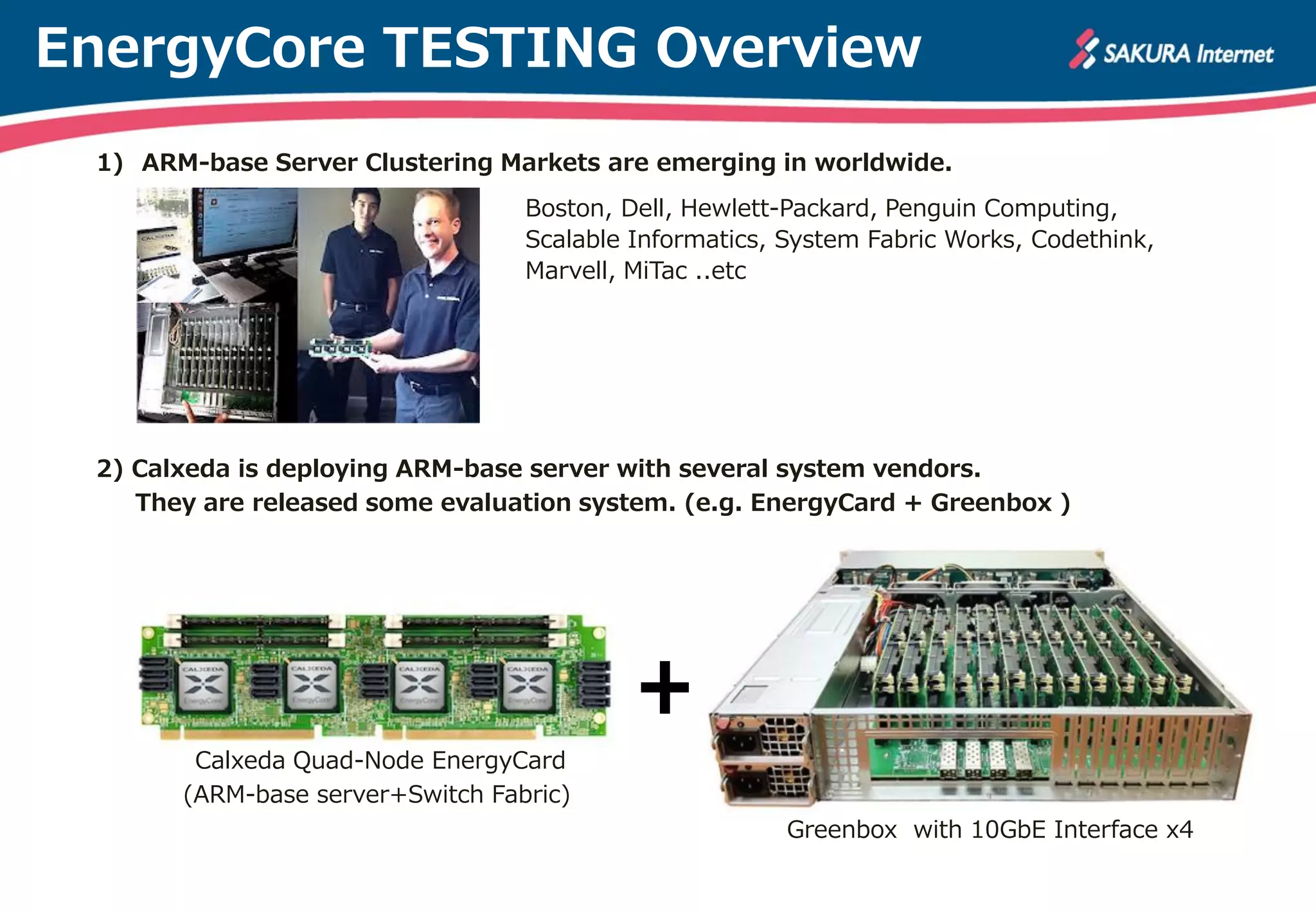
EnergyCore TESTING Overview
 1) ARM-base Server Clustering Markets are emerging in worldwide.
                                  Boston, Dell, Hewlett-Packard, Penguin Computing,
                                  Scalable Informatics, System Fabric Works, Codethink,
                                  Marvell, MiTac ..etc


 2) Calxeda is deploying ARM-base server with several system vendors.
    They are released some evaluation system. (e.g. EnergyCard + Greenbox )


        Calxeda Quad-Node EnergyCard
       (ARM-base server+Switch Fabric)
                                                        Greenbox with 10GbE Interface x4
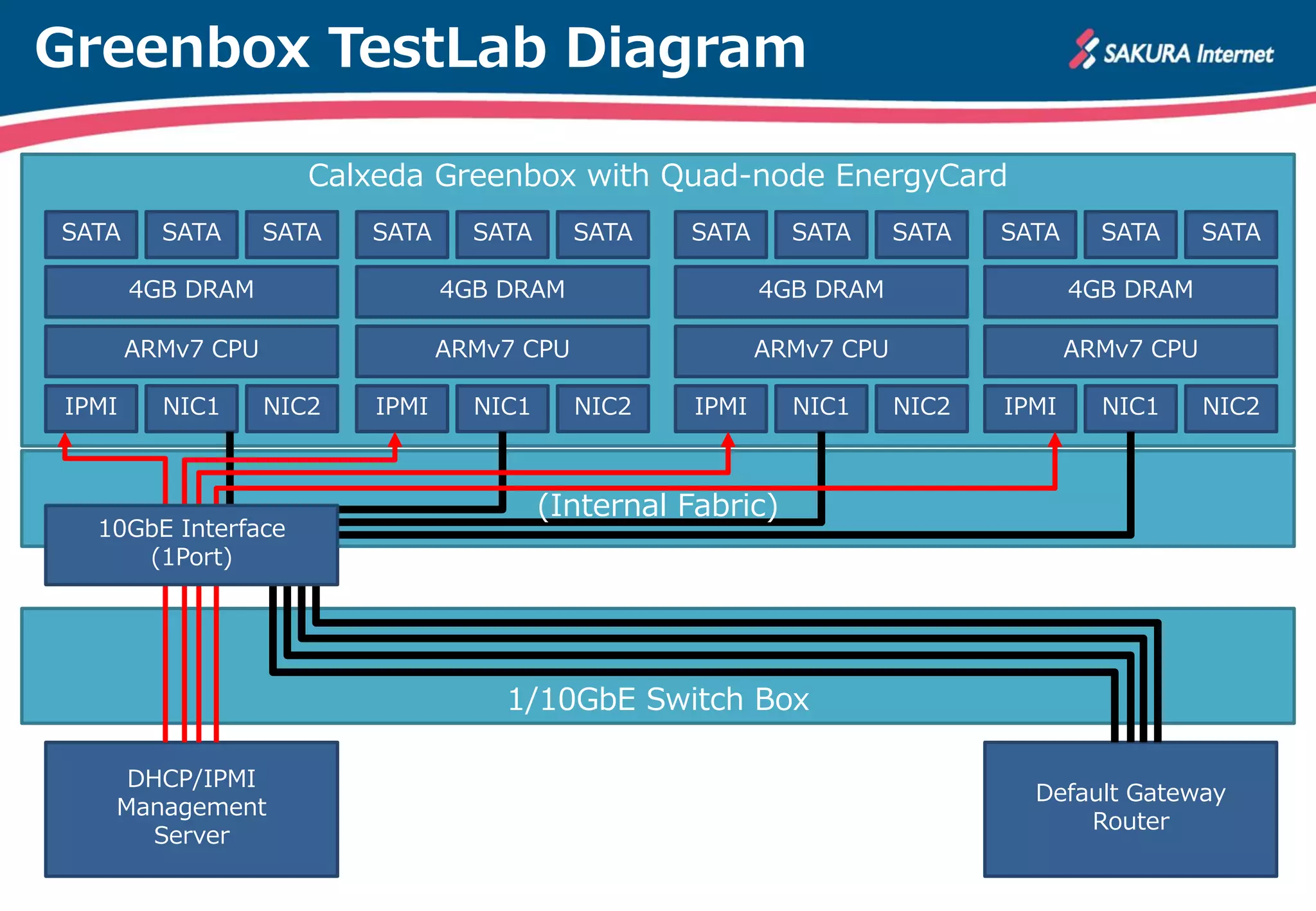
Greenbox TestLab Diagram

                      Calxeda Greenbox with Quad-node EnergyCard
SATA     SATA      SATA   SATA     SATA      SATA   SATA      SATA      SATA   SATA     SATA      SATA

       4GB DRAM                  4GB DRAM                   4GB DRAM                  4GB DRAM

       ARMv7 CPU                 ARMv7 CPU                  ARMv7 CPU                 ARMv7 CPU

IPMI     NIC1      NIC2   IPMI     NIC1      NIC2    IPMI     NIC1      NIC2   IPMI     NIC1      NIC2


                                          (Internal Fabric)
  10GbE Interface
     (1Port)


                                     1/10GbE Switch Box

    DHCP/IPMI
                                                                                 Default Gateway
   Management
                                                                                     Router
      Server
EnergyCore DHCP Bootstrap

Calxeda EnergyCore           0) EnergyCore DHCP Bootstrap (COM port 115200bps)
                             Calxeda Energy Core Management Engine v0.8.2
SATA      SATA      SATA     Power: Isolation will be forced
                             :
        4GB DRAM             DHCP Discover Request
                                       op is BOOTREPLY, that is good
        ARMv7 CPU                      valid Magic cookie! 0x63825363
                                       dmto->type = 2
 IPMI     NIC1      NIC2                          DHCP Server option = 0xc0a86401
                                                  Addr Lease option = 86400
                                                  Netmask = 255.255.255.0
                                                  Default gateway = 192.168.100.1
                                                  DNS Server option = 0x8080808
   10GbE Interface                     New (DHCP) IP Address = 192.168.100.2
      (1Port)                [Node 0] ECME IPv4 Address is 192.168.100.2
                                       Transaction ID = 0xc9a4dd6e
                             ips_complete_network_initialization_handler
                                       op is BOOTREPLY, that is good
                                       valid Magic cookie! 0x63825363
                                       dmto->type = 5

     DHCP/IPMI
                           Default Gateway
    Management
                               Router
       Server
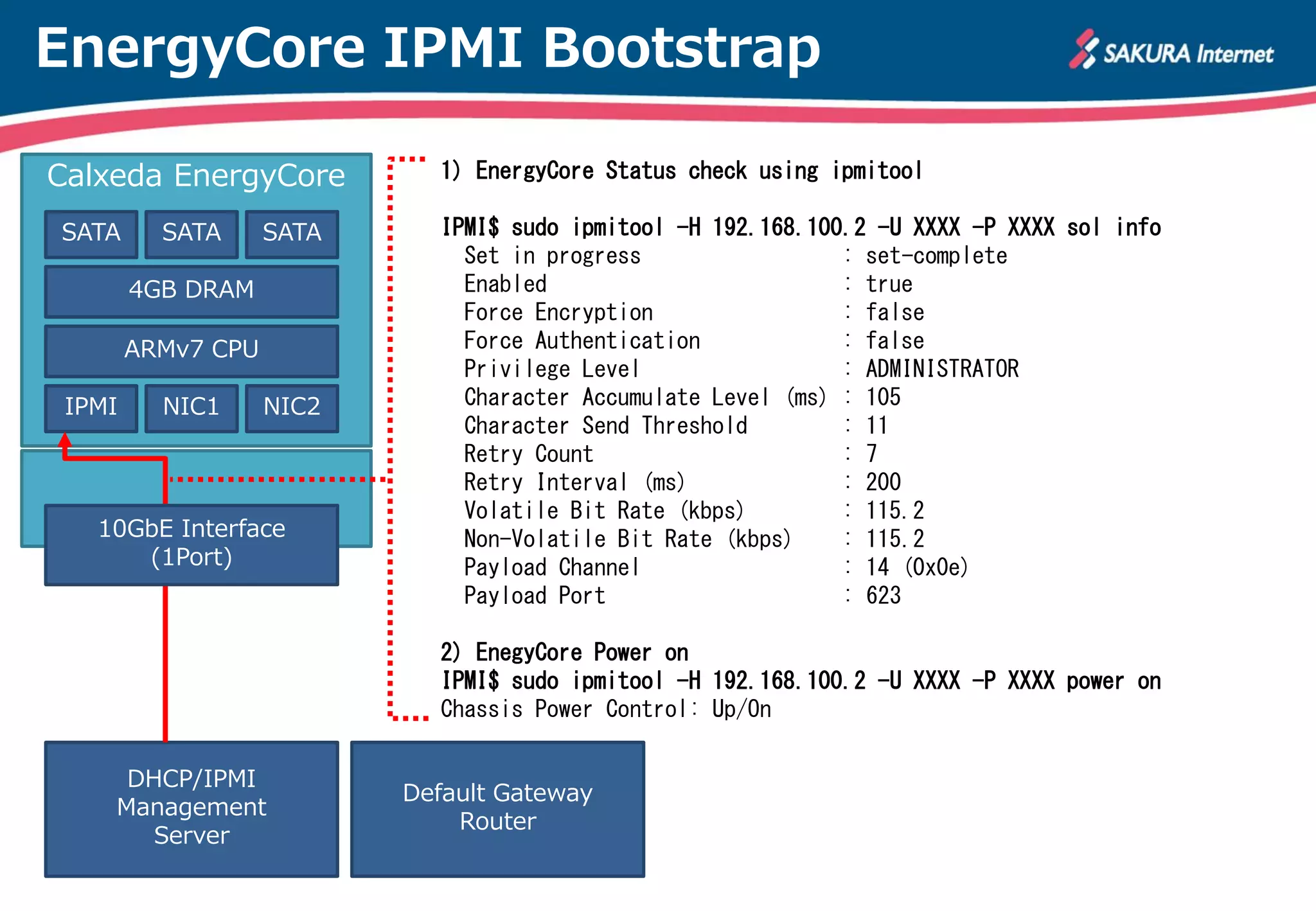
EnergyCore IPMI Bootstrap

Calxeda EnergyCore           1) EnergyCore Status check using ipmitool

SATA      SATA      SATA     IPMI$ sudo ipmitool -H 192.168.100.2 -U XXXX -P XXXX sol info
                               Set in progress                 : set-complete
        4GB DRAM               Enabled                         : true
                               Force Encryption                : false
        ARMv7 CPU              Force Authentication            : false
                               Privilege Level                 : ADMINISTRATOR
 IPMI     NIC1      NIC2       Character Accumulate Level (ms) : 105
                               Character Send Threshold        : 11
                               Retry Count                     : 7
                               Retry Interval (ms)             : 200
                               Volatile Bit Rate (kbps)        : 115.2
   10GbE Interface             Non-Volatile Bit Rate (kbps)    : 115.2
      (1Port)                  Payload Channel                 : 14 (0x0e)
                               Payload Port                    : 623

                             2) EnegyCore Power on
                             IPMI$ sudo ipmitool -H 192.168.100.2 -U XXXX -P XXXX power on
                             Chassis Power Control: Up/On

     DHCP/IPMI
                           Default Gateway
    Management
                               Router
       Server
EnergyCore IPMI session activate

Calxeda EnergyCore           3) IPMI session activate

SATA      SATA      SATA     IPMI$ sudo ipmitool -H 192.168.100.2 -U XX -P XX -I lanplus sol activate
                             [SOL Session operational. Use ~? for help]
        4GB DRAM
                             U-Boot 2012.07 (Sep 21 2012 - 14:54:04)
        ARMv7 CPU
                             DRAM: 4 GiB
 IPMI     NIC1      NIC2     WARNING: Caches not enabled
                             In:    serial
                             Out: serial
                             Err: serial
                             AHCI 0001.0300 32 slots 5 ports 3 Gbps 0x1e impl SATA mode
   10GbE Interface           flags: ncq stag pm led clo only pmp pio slum part
      (1Port)                scanning bus for devices...
                               Device 0: (2:0) Vendor: ATA Prod.: Hitachi HTS72755 Rev: JF3O
                                         Type: Hard Disk
                                         Capacity: 2097151.8 MB = 2047.9 GB (-241 x 512)
                             Net: xgmac0
                             :

     DHCP/IPMI
                           Default Gateway
    Management
                               Router
       Server
EnergyCore OS boot & login

Calxeda EnergyCore           4) OS boot & login on IPMI
                             Starting kernel ...
SATA      SATA      SATA
                             [    0.000000] Booting Linux on physical CPU 0
        4GB DRAM             [    0.000000] Initializing cgroup subsys cpuset
                             [    0.000000] Initializing cgroup subsys cpu
        ARMv7 CPU            [    0.000000] Linux version 3.2.0-1000-highbank (gcc version 4.6.3
                             (Ubuntu/Linaro 4.6.3-1ubuntu5) ) #141-Ubuntu SMP PREEMPT Mon Oct 15
 IPMI     NIC1      NIC2     08:14:05 CDT 2012 (Ubuntu 3.2.0-1000.141-highbank 3.2.27)
                             [    0.000000] CPU: ARMv7 Processor [413fc090] revision 0 (ARMv7),
                             [    0.000000] CPU: PIPT / VIPT nonaliasing data cache, VIPT aliasing
                             :
   10GbE Interface
      (1Port)                Ubuntu 12.04.1 LTS ubuntu ttyAMA0

                             ubuntu login: XXXXX
                             Password:


     DHCP/IPMI
                           Default Gateway
    Management
                               Router
       Server
EnergyCore System Install

Calxeda EnergyCore           5) System Install using package repository

SATA      SATA      SATA     $ sudo   aptitude update
                             Get: 1   http://security.ubuntu.com precise-security Release.gpg [198 B]
        4GB DRAM             Get: 2   http://security.ubuntu.com precise-security Release [49.6 kB]
                             Get: 3   http://ports.ubuntu.com precise Release.gpg [198 B]
        ARMv7 CPU            :

 IPMI     NIC1      NIC2
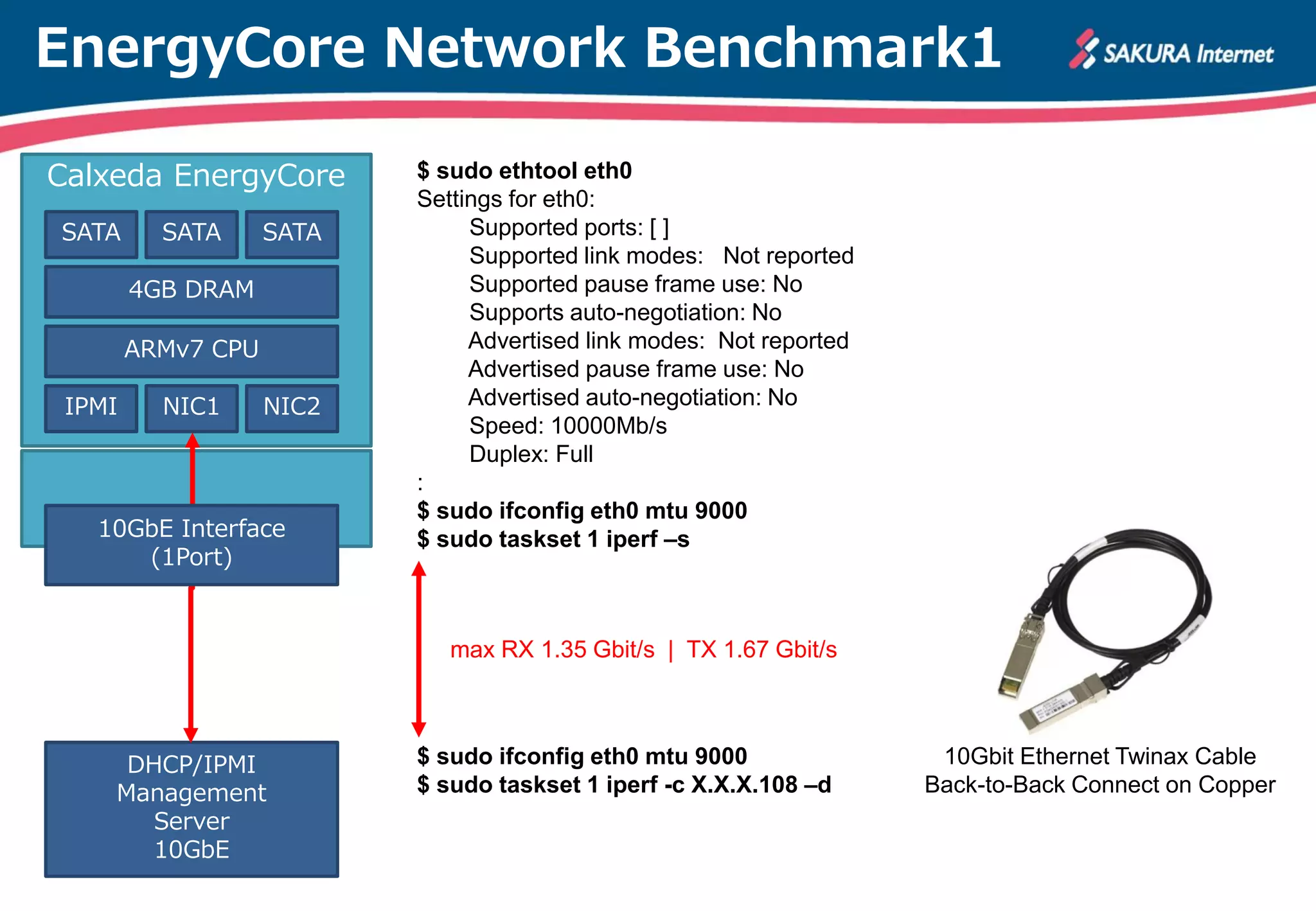
                             $ sudo aptitude install ethtool iperf
                             $ sudo aptitude install vnstat
                             The following NEW packages will be installed:
                               vnstat
   10GbE Interface           0 packages upgraded, 1 newly installed, 0 to remove and 27 not upgraded.
      (1Port)                Need to get 84.8 kB of archives. After unpacking 260 kB will be used.
                             Get: 1 http://ports.ubuntu.com/ precise/universe vnstat armhf 1.11-1
                             Fetched 84.8 kB in 1s (42.6 kB/s)
                             Selecting previously unselected package vnstat.
                             (Reading database ... 51999 files and directories currently installed.)


     DHCP/IPMI
                           Default Gateway
    Management
                               Router
       Server
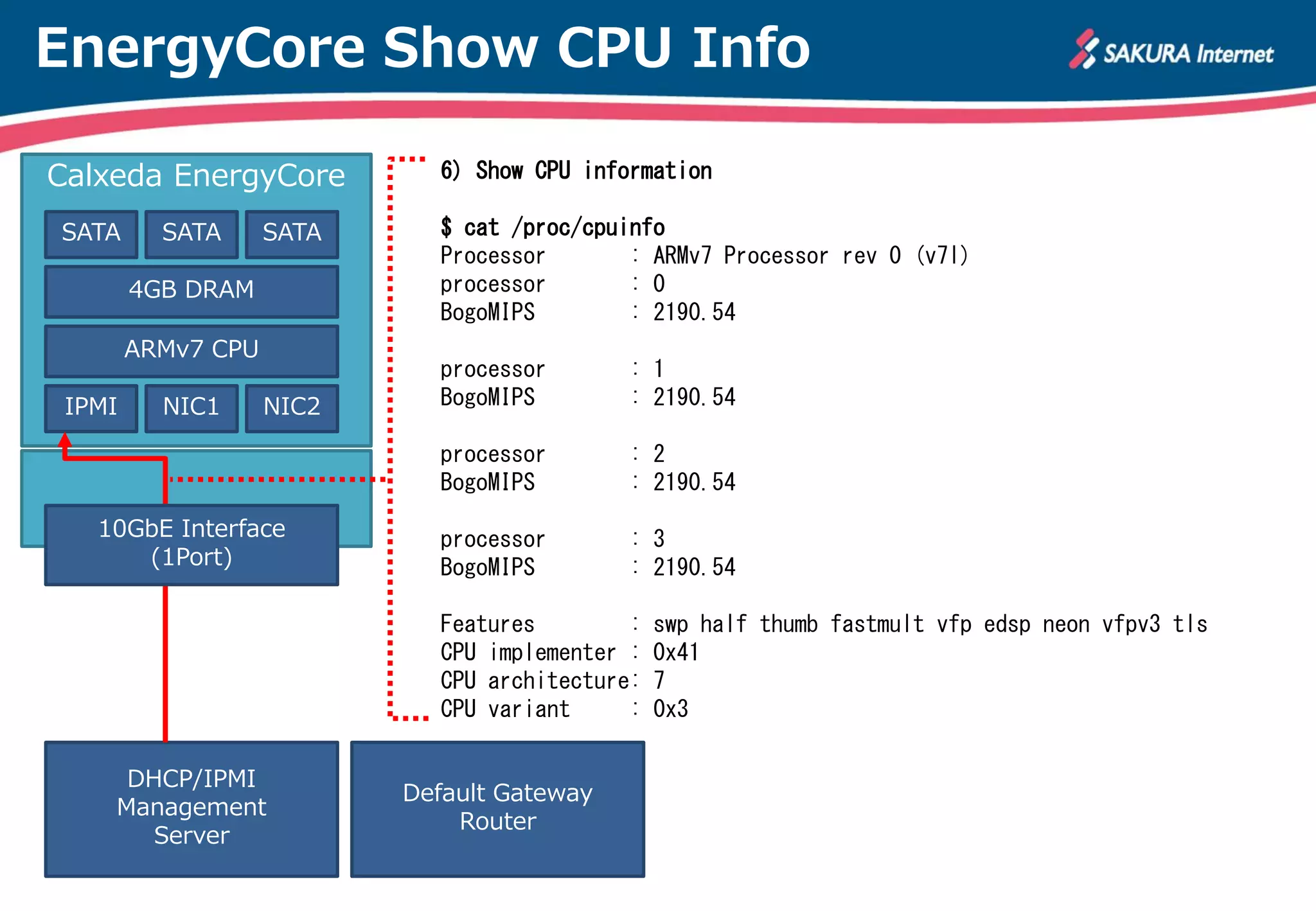
EnergyCore Show CPU Info

Calxeda EnergyCore           6) Show CPU information

SATA      SATA      SATA     $ cat /proc/cpuinfo
                             Processor       : ARMv7 Processor rev 0 (v7l)
        4GB DRAM             processor       : 0
                             BogoMIPS        : 2190.54
        ARMv7 CPU
                             processor       : 1
 IPMI     NIC1      NIC2     BogoMIPS        : 2190.54

                             processor       : 2
                             BogoMIPS        : 2190.54
   10GbE Interface           processor       : 3
      (1Port)                BogoMIPS        : 2190.54

                             Features        :   swp half thumb fastmult vfp edsp neon vfpv3 tls
                             CPU implementer :   0x41
                             CPU architecture:   7
                             CPU variant     :   0x3

     DHCP/IPMI
                           Default Gateway
    Management
                               Router
       Server
Thanks for your interest
      in our Lab.


  SAKURA Internet Research Center.

How To Train Your Calxeda EnergyCore

  • 1.
    19 Dec, 2012 SAKURA Internet Research Center Senior Researcher / Naoto MATSUMOTO
  • 2.
    EnergyCore TESTING Overview 1) ARM-base Server Clustering Markets are emerging in worldwide. Boston, Dell, Hewlett-Packard, Penguin Computing, Scalable Informatics, System Fabric Works, Codethink, Marvell, MiTac ..etc 2) Calxeda is deploying ARM-base server with several system vendors. They are released some evaluation system. (e.g. EnergyCard + Greenbox ) Calxeda Quad-Node EnergyCard (ARM-base server+Switch Fabric) Greenbox with 10GbE Interface x4
  • 3.
    Greenbox TestLab Diagram Calxeda Greenbox with Quad-node EnergyCard SATA SATA SATA SATA SATA SATA SATA SATA SATA SATA SATA SATA 4GB DRAM 4GB DRAM 4GB DRAM 4GB DRAM ARMv7 CPU ARMv7 CPU ARMv7 CPU ARMv7 CPU IPMI NIC1 NIC2 IPMI NIC1 NIC2 IPMI NIC1 NIC2 IPMI NIC1 NIC2 (Internal Fabric) 10GbE Interface (1Port) 1/10GbE Switch Box DHCP/IPMI Default Gateway Management Router Server
  • 4.
    EnergyCore DHCP Bootstrap CalxedaEnergyCore 0) EnergyCore DHCP Bootstrap (COM port 115200bps) Calxeda Energy Core Management Engine v0.8.2 SATA SATA SATA Power: Isolation will be forced : 4GB DRAM DHCP Discover Request op is BOOTREPLY, that is good ARMv7 CPU valid Magic cookie! 0x63825363 dmto->type = 2 IPMI NIC1 NIC2 DHCP Server option = 0xc0a86401 Addr Lease option = 86400 Netmask = 255.255.255.0 Default gateway = 192.168.100.1 DNS Server option = 0x8080808 10GbE Interface New (DHCP) IP Address = 192.168.100.2 (1Port) [Node 0] ECME IPv4 Address is 192.168.100.2 Transaction ID = 0xc9a4dd6e ips_complete_network_initialization_handler op is BOOTREPLY, that is good valid Magic cookie! 0x63825363 dmto->type = 5 DHCP/IPMI Default Gateway Management Router Server
  • 5.
    EnergyCore IPMI Bootstrap CalxedaEnergyCore 1) EnergyCore Status check using ipmitool SATA SATA SATA IPMI$ sudo ipmitool -H 192.168.100.2 -U XXXX -P XXXX sol info Set in progress : set-complete 4GB DRAM Enabled : true Force Encryption : false ARMv7 CPU Force Authentication : false Privilege Level : ADMINISTRATOR IPMI NIC1 NIC2 Character Accumulate Level (ms) : 105 Character Send Threshold : 11 Retry Count : 7 Retry Interval (ms) : 200 Volatile Bit Rate (kbps) : 115.2 10GbE Interface Non-Volatile Bit Rate (kbps) : 115.2 (1Port) Payload Channel : 14 (0x0e) Payload Port : 623 2) EnegyCore Power on IPMI$ sudo ipmitool -H 192.168.100.2 -U XXXX -P XXXX power on Chassis Power Control: Up/On DHCP/IPMI Default Gateway Management Router Server
  • 6.
    EnergyCore IPMI sessionactivate Calxeda EnergyCore 3) IPMI session activate SATA SATA SATA IPMI$ sudo ipmitool -H 192.168.100.2 -U XX -P XX -I lanplus sol activate [SOL Session operational. Use ~? for help] 4GB DRAM U-Boot 2012.07 (Sep 21 2012 - 14:54:04) ARMv7 CPU DRAM: 4 GiB IPMI NIC1 NIC2 WARNING: Caches not enabled In: serial Out: serial Err: serial AHCI 0001.0300 32 slots 5 ports 3 Gbps 0x1e impl SATA mode 10GbE Interface flags: ncq stag pm led clo only pmp pio slum part (1Port) scanning bus for devices... Device 0: (2:0) Vendor: ATA Prod.: Hitachi HTS72755 Rev: JF3O Type: Hard Disk Capacity: 2097151.8 MB = 2047.9 GB (-241 x 512) Net: xgmac0 : DHCP/IPMI Default Gateway Management Router Server
  • 7.
    EnergyCore OS boot& login Calxeda EnergyCore 4) OS boot & login on IPMI Starting kernel ... SATA SATA SATA [ 0.000000] Booting Linux on physical CPU 0 4GB DRAM [ 0.000000] Initializing cgroup subsys cpuset [ 0.000000] Initializing cgroup subsys cpu ARMv7 CPU [ 0.000000] Linux version 3.2.0-1000-highbank (gcc version 4.6.3 (Ubuntu/Linaro 4.6.3-1ubuntu5) ) #141-Ubuntu SMP PREEMPT Mon Oct 15 IPMI NIC1 NIC2 08:14:05 CDT 2012 (Ubuntu 3.2.0-1000.141-highbank 3.2.27) [ 0.000000] CPU: ARMv7 Processor [413fc090] revision 0 (ARMv7), [ 0.000000] CPU: PIPT / VIPT nonaliasing data cache, VIPT aliasing : 10GbE Interface (1Port) Ubuntu 12.04.1 LTS ubuntu ttyAMA0 ubuntu login: XXXXX Password: DHCP/IPMI Default Gateway Management Router Server
  • 8.
    EnergyCore System Install CalxedaEnergyCore 5) System Install using package repository SATA SATA SATA $ sudo aptitude update Get: 1 http://security.ubuntu.com precise-security Release.gpg [198 B] 4GB DRAM Get: 2 http://security.ubuntu.com precise-security Release [49.6 kB] Get: 3 http://ports.ubuntu.com precise Release.gpg [198 B] ARMv7 CPU : IPMI NIC1 NIC2 $ sudo aptitude install ethtool iperf $ sudo aptitude install vnstat The following NEW packages will be installed: vnstat 10GbE Interface 0 packages upgraded, 1 newly installed, 0 to remove and 27 not upgraded. (1Port) Need to get 84.8 kB of archives. After unpacking 260 kB will be used. Get: 1 http://ports.ubuntu.com/ precise/universe vnstat armhf 1.11-1 Fetched 84.8 kB in 1s (42.6 kB/s) Selecting previously unselected package vnstat. (Reading database ... 51999 files and directories currently installed.) DHCP/IPMI Default Gateway Management Router Server
  • 9.
    EnergyCore Show CPUInfo Calxeda EnergyCore 6) Show CPU information SATA SATA SATA $ cat /proc/cpuinfo Processor : ARMv7 Processor rev 0 (v7l) 4GB DRAM processor : 0 BogoMIPS : 2190.54 ARMv7 CPU processor : 1 IPMI NIC1 NIC2 BogoMIPS : 2190.54 processor : 2 BogoMIPS : 2190.54 10GbE Interface processor : 3 (1Port) BogoMIPS : 2190.54 Features : swp half thumb fastmult vfp edsp neon vfpv3 tls CPU implementer : 0x41 CPU architecture: 7 CPU variant : 0x3 DHCP/IPMI Default Gateway Management Router Server
  • 10.
    Thanks for yourinterest in our Lab. SAKURA Internet Research Center.