
05 Apr, 2013

     SAKURA Internet Research Center
Senior Researcher / Naoto MATSUMOTO
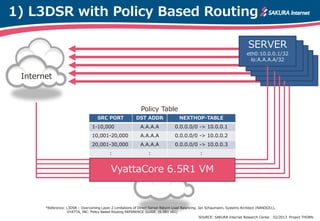
1) L3DSR with Policy Based Routing

                                                                                                                             SERVER
                                                                                                                            eth0:10.0.0.1/32
                                                                                                                              lo:A.A.A.A/32


 Internet


                                                              Policy Table
                                     SRC PORT              DST ADDR                  NEXTHOP-TABLE
                                  1-10,000                    A.A.A.A             0.0.0.0/0 -> 10.0.0.1
                                  10,001-20,000               A.A.A.A             0.0.0.0/0 -> 10.0.0.2
                                  20,001-30,000               A.A.A.A             0.0.0.0/0 -> 10.0.0.3
                                            :                      :                             :


                                             VyattaCore 6.5R1 VM


       *Reference: L3DSR – Overcoming Layer 2 Limitations of Direct Server Return Load Balancing. Jan Schaumann, Systems Architect (NANOG51),
                   VYATTA, INC. Policy Based Routing REFERENCE GUIDE. (6.5R1 v01)
                                                                                                SOURCE: SAKURA Internet Research Center. 02/2013 Project THORN.
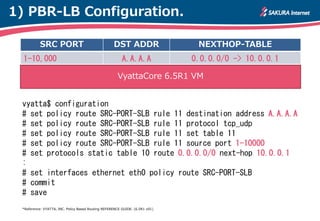
1) PBR-LB Configuration.

           SRC PORT                                 DST ADDR                   NEXTHOP-TABLE
  1-10,000                                               A.A.A.A              0.0.0.0/0 -> 10.0.0.1

                                                      VyattaCore 6.5R1 VM


 vyatta$ configuration
 # set policy route SRC-PORT-SLB rule 11 destination address A.A.A.A
 # set policy route SRC-PORT-SLB rule 11 protocol tcp_udp
 # set policy route SRC-PORT-SLB rule 11 set table 11
 # set policy route SRC-PORT-SLB rule 11 source port 1-10000
 # set protocols static table 10 route 0.0.0.0/0 next-hop 10.0.0.1
 :
 # set interfaces ethernet eth0 policy route SRC-PORT-SLB
 # commit
 # save
 *Reference: VYATTA, INC. Policy Based Routing REFERENCE GUIDE. (6.5R1 v01)
2) InfiniBand-Ethernet Connect

                                                                     Peak (RX) 8.23 Gbit/s 709,288 pps (MTU1500)
                                                                     Peak (RX) 308.99 Mbit/s 791,004 pps (MTU64)


 Packet Generator                                                VyattaCore 6.5R1[VM]                                                                 SERVER
       CLIENT                                                            VMware ESXi 5.1                                                              SERVER
                                       Ethernet                                                                                InfiniBand
                                                                                                                                                      SERVER
                                10Gbit/s                                                                                   40/56Gbit/s
                        IP over Ethernet Network                                                                    IP over Infiniband Network

Corei7-3930K CPU @ 3.20GHz / 32GB DDR3-DIMM / PCI Express 3.0 / Mellanox Connect-X3 VPI Card (10/40/56Gbit/s)   SOURCE: SAKURA Internet Research Center. 02/2013 Project THORN.
using linux standard pktgen.
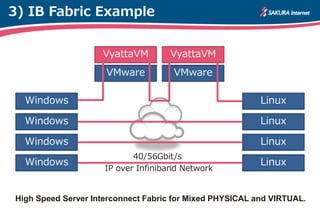
3) IB Fabric Example


                    VyattaVM        VyattaVM
                     VMware          VMware

  Windows                                                 Linux

  Windows                                                 Linux

  Windows                                                 Linux
                            40/56Gbit/s
  Windows                                                 Linux
                     IP over Infiniband Network


High Speed Server Interconnect Fabric for Mixed PHYSICAL and VIRTUAL.
Install OFED for VMware ESXi 5.1

1) Enable ESXi Shell & SSH
Troubleshooting Options > Enable ESXi Shell, Enable SSH and SSH login.
# vmware -v
VMware ESXi 5.1.0 build-799733

2) Download/Install MLNX_OFED
#   cd /opt
#   wget http://mellanox.com/downloads/Drivers/MLNX-OFED-ESX-1.8.0.0.zip
#   esxcli software vib install -d /opt/MLNX-OFED-ESX-1.8.0.0.zip
#   sync; sync; sync; reboot –f

# esxcfg-nics –l
vmnic_ib0 0000:01:00.00 ib_ipoib  Up 56252Mbps Full
00:02:c9:34:1c:f1 1500 Mellanox Technologies MT27500 Family [ConnectX-3]
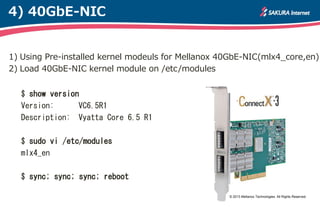
4) 40GbE-NIC


1) Using Pre-installed kernel modeuls for Mellanox 40GbE-NIC(mlx4_core,en)
2) Load 40GbE-NIC kernel module on /etc/modules


  $ show version
  Version:      VC6.5R1
  Description: Vyatta Core 6.5 R1

  $ sudo vi /etc/modules
  mlx4_en

  $ sync; sync; sync; reboot

                                                    © 2013 Mellanox Technologies. All Rights Reserved.
4) 40GbE-NIC Status Check

 $ show interfaces ethernet eth1 physical
 Settings for eth1:
         Supported ports: [ TP ]
         :
         Speed: 40000Mb/s
         Duplex: Full
         Port: Twisted Pair
         :
 Link detected: yes
 driver: mlx4_en
 version: 2.0 (Dec 2011)
 firmware-version: 2.10.800
 bus-info: 0000:01:00.0
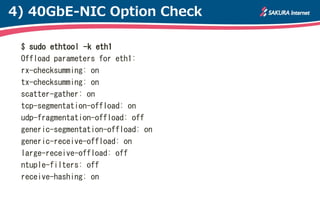
4) 40GbE-NIC Option Check

 $ sudo ethtool -k eth1
 Offload parameters for eth1:
 rx-checksumming: on
 tx-checksumming: on
 scatter-gather: on
 tcp-segmentation-offload: on
 udp-fragmentation-offload: off
 generic-segmentation-offload: on
 generic-receive-offload: on
 large-receive-offload: off
 ntuple-filters: off
 receive-hashing: on
Thanks for your interest.


SAKURA Internet Research Center.

VyattaCore TIPS2013

  • 1.
    05 Apr, 2013 SAKURA Internet Research Center Senior Researcher / Naoto MATSUMOTO
  • 2.
    1) L3DSR withPolicy Based Routing SERVER eth0:10.0.0.1/32 lo:A.A.A.A/32 Internet Policy Table SRC PORT DST ADDR NEXTHOP-TABLE 1-10,000 A.A.A.A 0.0.0.0/0 -> 10.0.0.1 10,001-20,000 A.A.A.A 0.0.0.0/0 -> 10.0.0.2 20,001-30,000 A.A.A.A 0.0.0.0/0 -> 10.0.0.3 : : : VyattaCore 6.5R1 VM *Reference: L3DSR – Overcoming Layer 2 Limitations of Direct Server Return Load Balancing. Jan Schaumann, Systems Architect (NANOG51), VYATTA, INC. Policy Based Routing REFERENCE GUIDE. (6.5R1 v01) SOURCE: SAKURA Internet Research Center. 02/2013 Project THORN.
  • 3.
    1) PBR-LB Configuration. SRC PORT DST ADDR NEXTHOP-TABLE 1-10,000 A.A.A.A 0.0.0.0/0 -> 10.0.0.1 VyattaCore 6.5R1 VM vyatta$ configuration # set policy route SRC-PORT-SLB rule 11 destination address A.A.A.A # set policy route SRC-PORT-SLB rule 11 protocol tcp_udp # set policy route SRC-PORT-SLB rule 11 set table 11 # set policy route SRC-PORT-SLB rule 11 source port 1-10000 # set protocols static table 10 route 0.0.0.0/0 next-hop 10.0.0.1 : # set interfaces ethernet eth0 policy route SRC-PORT-SLB # commit # save *Reference: VYATTA, INC. Policy Based Routing REFERENCE GUIDE. (6.5R1 v01)
  • 4.
    2) InfiniBand-Ethernet Connect Peak (RX) 8.23 Gbit/s 709,288 pps (MTU1500) Peak (RX) 308.99 Mbit/s 791,004 pps (MTU64) Packet Generator VyattaCore 6.5R1[VM] SERVER CLIENT VMware ESXi 5.1 SERVER Ethernet InfiniBand SERVER 10Gbit/s 40/56Gbit/s IP over Ethernet Network IP over Infiniband Network Corei7-3930K CPU @ 3.20GHz / 32GB DDR3-DIMM / PCI Express 3.0 / Mellanox Connect-X3 VPI Card (10/40/56Gbit/s) SOURCE: SAKURA Internet Research Center. 02/2013 Project THORN. using linux standard pktgen.
  • 5.
    3) IB FabricExample VyattaVM VyattaVM VMware VMware Windows Linux Windows Linux Windows Linux 40/56Gbit/s Windows Linux IP over Infiniband Network High Speed Server Interconnect Fabric for Mixed PHYSICAL and VIRTUAL.
  • 6.
    Install OFED forVMware ESXi 5.1 1) Enable ESXi Shell & SSH Troubleshooting Options > Enable ESXi Shell, Enable SSH and SSH login. # vmware -v VMware ESXi 5.1.0 build-799733 2) Download/Install MLNX_OFED # cd /opt # wget http://mellanox.com/downloads/Drivers/MLNX-OFED-ESX-1.8.0.0.zip # esxcli software vib install -d /opt/MLNX-OFED-ESX-1.8.0.0.zip # sync; sync; sync; reboot –f # esxcfg-nics –l vmnic_ib0 0000:01:00.00 ib_ipoib Up 56252Mbps Full 00:02:c9:34:1c:f1 1500 Mellanox Technologies MT27500 Family [ConnectX-3]
  • 7.
    4) 40GbE-NIC 1) UsingPre-installed kernel modeuls for Mellanox 40GbE-NIC(mlx4_core,en) 2) Load 40GbE-NIC kernel module on /etc/modules $ show version Version: VC6.5R1 Description: Vyatta Core 6.5 R1 $ sudo vi /etc/modules mlx4_en $ sync; sync; sync; reboot © 2013 Mellanox Technologies. All Rights Reserved.
  • 8.
    4) 40GbE-NIC StatusCheck $ show interfaces ethernet eth1 physical Settings for eth1: Supported ports: [ TP ] : Speed: 40000Mb/s Duplex: Full Port: Twisted Pair : Link detected: yes driver: mlx4_en version: 2.0 (Dec 2011) firmware-version: 2.10.800 bus-info: 0000:01:00.0
  • 9.
    4) 40GbE-NIC OptionCheck $ sudo ethtool -k eth1 Offload parameters for eth1: rx-checksumming: on tx-checksumming: on scatter-gather: on tcp-segmentation-offload: on udp-fragmentation-offload: off generic-segmentation-offload: on generic-receive-offload: on large-receive-offload: off ntuple-filters: off receive-hashing: on
  • 10.
    Thanks for yourinterest. SAKURA Internet Research Center.