How to Be Comfortable on Camera:
Fool-Proof Tips to Look and Feel Your Best
Our Top Tips for Getting
Comfortable on Camera
1. Know What You Want to Say
2. Rehearse Your Message
3. Choose Good Lighting
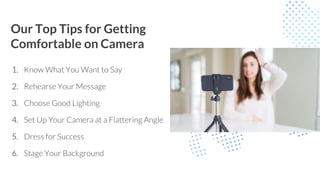
4. Set Up Your Camera at a Flattering Angle
5. Dress for Success
6. Stage Your Background
Know What You Want to Say
Filming yourself (or being filmed) is a lot less scary if you’re
not coming up with what you want to say on the spot.
Recording Yourself:
● Set aside a little time to determine what your message is.
● Plan out your main talking points and make some notes.
Part of a Scripted Video:
● Ask to see the script in advance to review and get to know
your lines.
Rehearse Your Message
● Once you know what you want to say, practice it.
Then practice it again.
● If you’re nervous about being on camera, going
through your message a few times—out loud—will
help you prepare. That preparedness will lessen
your anxiety.
● Don’t worry about exact wording. Focus on
knowing your message, not memorizing lines.
Choose Good Lighting
● Lighting is another easy way to feel like you
look your best on film
● The most flattering lighting is even and
front-facing.
● Set up facing a window
● If a window is unavailable, set up a lamp or
similar light source behind your screen
(slightly above or off to the side works).
Set Up Your Camera at a Flattering Angle
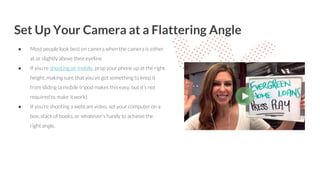
● Most people look best on camera when the camera is either
at or slightly above their eyeline
● If you’re shooting on mobile, prop your phone up at the right
height, making sure that you’ve got something to keep it
from sliding (a mobile tripod makes this easy, but it’s not
required to make it work).
● If you’re shooting a webcam video, set your computer on a
box, stack of books, or whatever’s handy to achieve the
right angle.
Dress for Success
● Think about your audience and the purpose of your video
and dress to that.
● Wear things that you’re comfortable in and make you feel
confident. And don’t forget to dress like you.
● Choose outfits that reflect your authentic self in a given
situation.
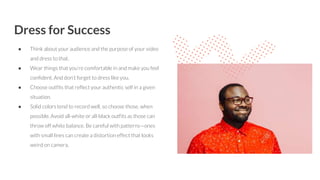
● Solid colors tend to record well, so choose those, when
possible. Avoid all-white or all-black outfits as those can
throw off white balance. Be careful with patterns—ones
with small lines can create a distortion effect that looks
weird on camera.
Stage Your Background
● This step is all about making sure your background
isn’t a distraction to you (or viewers).
● If you’re not worried about there being something
potentially embarrassing in the background of your
video (say an unmade bed, if you’re working from
home), it’ll be a lot easier to focus on your message.
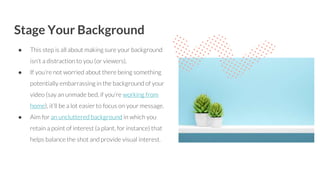
● Aim for an uncluttered background in which you
retain a point of interest (a plant, for instance) that
helps balance the shot and provide visual interest.
Watch or Read More
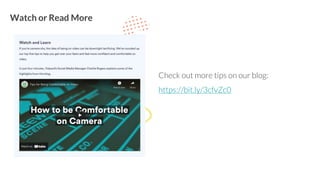
Check out more tips on our blog:
https://bit.ly/3cfvZc0

How to Feel More Comfortable on Video

  • 1.
    How to BeComfortable on Camera: Fool-Proof Tips to Look and Feel Your Best
  • 2.
    Our Top Tipsfor Getting Comfortable on Camera 1. Know What You Want to Say 2. Rehearse Your Message 3. Choose Good Lighting 4. Set Up Your Camera at a Flattering Angle 5. Dress for Success 6. Stage Your Background
  • 3.
    Know What YouWant to Say Filming yourself (or being filmed) is a lot less scary if you’re not coming up with what you want to say on the spot. Recording Yourself: ● Set aside a little time to determine what your message is. ● Plan out your main talking points and make some notes. Part of a Scripted Video: ● Ask to see the script in advance to review and get to know your lines.
  • 4.
    Rehearse Your Message ●Once you know what you want to say, practice it. Then practice it again. ● If you’re nervous about being on camera, going through your message a few times—out loud—will help you prepare. That preparedness will lessen your anxiety. ● Don’t worry about exact wording. Focus on knowing your message, not memorizing lines.
  • 5.
    Choose Good Lighting ●Lighting is another easy way to feel like you look your best on film ● The most flattering lighting is even and front-facing. ● Set up facing a window ● If a window is unavailable, set up a lamp or similar light source behind your screen (slightly above or off to the side works).
  • 6.
    Set Up YourCamera at a Flattering Angle ● Most people look best on camera when the camera is either at or slightly above their eyeline ● If you’re shooting on mobile, prop your phone up at the right height, making sure that you’ve got something to keep it from sliding (a mobile tripod makes this easy, but it’s not required to make it work). ● If you’re shooting a webcam video, set your computer on a box, stack of books, or whatever’s handy to achieve the right angle.
  • 7.
    Dress for Success ●Think about your audience and the purpose of your video and dress to that. ● Wear things that you’re comfortable in and make you feel confident. And don’t forget to dress like you. ● Choose outfits that reflect your authentic self in a given situation. ● Solid colors tend to record well, so choose those, when possible. Avoid all-white or all-black outfits as those can throw off white balance. Be careful with patterns—ones with small lines can create a distortion effect that looks weird on camera.
  • 8.
    Stage Your Background ●This step is all about making sure your background isn’t a distraction to you (or viewers). ● If you’re not worried about there being something potentially embarrassing in the background of your video (say an unmade bed, if you’re working from home), it’ll be a lot easier to focus on your message. ● Aim for an uncluttered background in which you retain a point of interest (a plant, for instance) that helps balance the shot and provide visual interest.
  • 9.
    Watch or ReadMore Check out more tips on our blog: https://bit.ly/3cfvZc0