Writing Seminar
Heather Surface

Jenny Donley
Librarian and Assistant Professor
Heterick Memorial Library
Introduction
 Welcome

 Jenny Donley, j-donley.1@onu.edu
 Feel free to visit or email
 Librarians on duty:
 8-4:30, 6-9 Mon – Thurs
 8-4 Friday

 reference@onu.edu
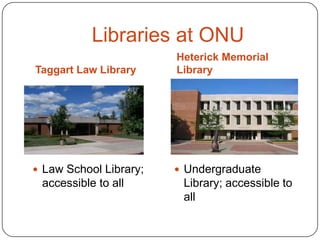
Libraries at ONU
Taggart Law Library

Heterick Memorial
Library

 Law School Library;

 Undergraduate

accessible to all

Library; accessible to
all
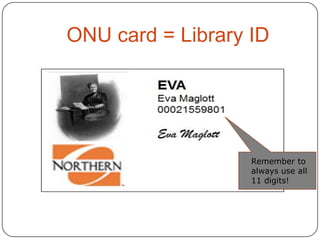
ONU card = Library ID

Remember to
always use all
11 digits!
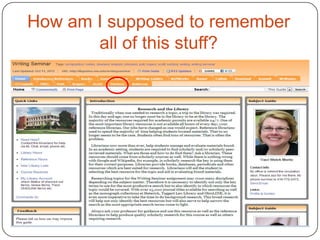
How am I supposed to remember
all of this stuff?
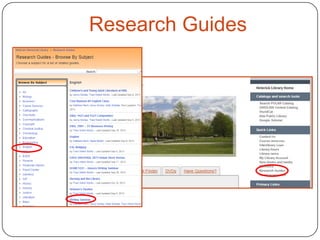
Research Guides
What we’ll do today:
 How to do research
 How to use library

resources to do research
 What resources to use
when doing research
Annotated
Bibliography
 Allows you to see what is out

there
 Helps you narrow your topic
and discard any irrelevant
materials
 Aids in developing the thesis
 Makes you a better scholar
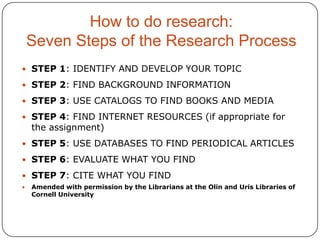
How to do research:
Seven Steps of the Research Process
 STEP 1: IDENTIFY AND DEVELOP YOUR TOPIC

 STEP 2: FIND BACKGROUND INFORMATION
 STEP 3: USE CATALOGS TO FIND BOOKS AND MEDIA
 STEP 4: FIND INTERNET RESOURCES (if appropriate for

the assignment)

 STEP 5: USE DATABASES TO FIND PERIODICAL ARTICLES
 STEP 6: EVALUATE WHAT YOU FIND
 STEP 7: CITE WHAT YOU FIND


Amended with permission by the Librarians at the Olin and Uris Libraries of
Cornell University
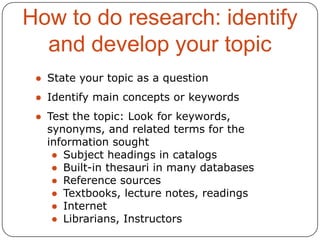
How to do research: identify
and develop your topic
● State your topic as a question
● Identify main concepts or keywords
● Test the topic: Look for keywords,
synonyms, and related terms for the
information sought
● Subject headings in catalogs
● Built-in thesauri in many databases
● Reference sources
● Textbooks, lecture notes, readings
● Internet
● Librarians, Instructors
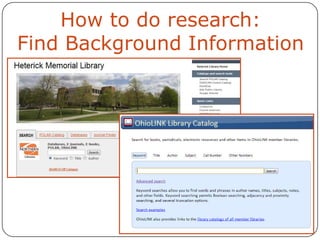
How to do research:
Find Background Information
• Highly structured information environment:
• In the way that individual records are
arranged
• Contains subject headings
• The cataloging software is optimized for the
above information
• Catalog includes material in many formats
• Implies heavy human involvement
• Preparation relatively labor-intensive
• Emphasis on precision

• Implies a learning curve to use successfully
Research Tools - Catalogs
 POLAR: Accessing physical and electronic

items located at HML (Heterick Memorial
Library) as well as LAW (Taggart Law
Library).
 OhioLINK: Next step if you can’t find what
you want in the HML or LAW collections.
 ILL: Option of last resort for books and
articles.
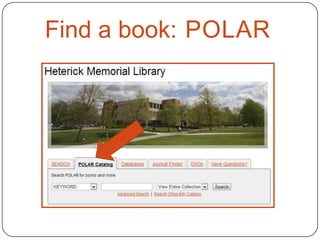
Find a book: POLAR
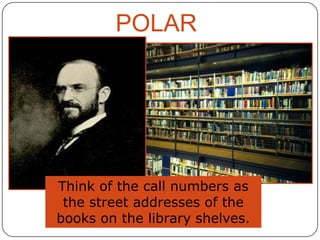
POLAR

Think of the call numbers as
the street addresses of the
books on the library shelves.
Find a book: POLAR
•Looks in several locations (usually
subject, article title, abstracts or
contents)
•Does not require an exact match
•Generates comparatively large
number of hits (not precise)
•Good if you are not familiar with
terminology
•Look for the same or similar words
which keep appearing
Find a book: POLAR
Click on the “More like this” link
found in each item record

•Looks in one place – subject
•Usually requires an exact match
between your term and a pre-set
list of terms
•Precise
•Can be used after a keyword
search has identified specific
subjects
Find a book: POLAR
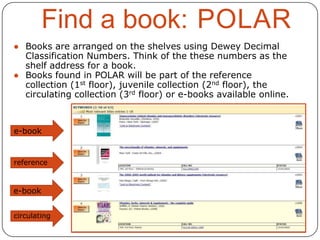
● Books are arranged on the shelves using Dewey Decimal
Classification Numbers. Think of the these numbers as the
shelf address for a book.
● Books found in POLAR will be part of the reference
collection (1st floor), juvenile collection (2nd floor), the
circulating collection (3rd floor) or e-books available online.

e-book

reference

e-book
circulating
Find a book: OhioLINK
● Most of the university and college libraries









in Ohio share their materials through a
consortium catalog called OhioLINK.
There are around 10 million items available
A link from POLAR permits you to submit
requests. Available from the Heterick
homepage
Most requests arrive in 2-3 working days
No charge
Limited to 100 items at a time
MAY RENEW UP TO 4 TIMES!
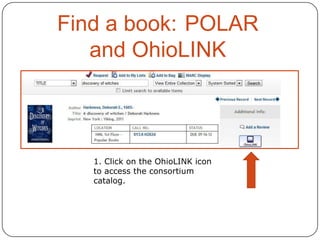
Find a book: POLAR
and OhioLINK

1. Click on the OhioLINK icon
to access the consortium
catalog.
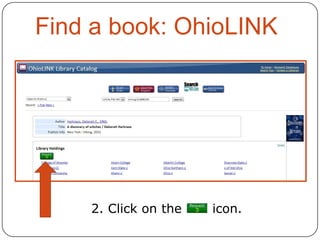
Find a book: OhioLINK

2. Click on the

icon.
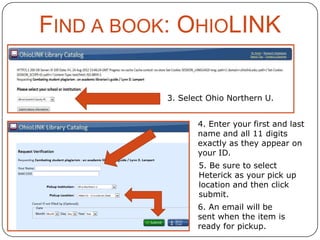
FIND A BOOK: OHIOLINK
3. Select Ohio Northern U.

4. Enter your first and last
name and all 11 digits
exactly as they appear on
your ID.
5. Be sure to select
Heterick as your pick up
location and then click
submit.
6. An email will be
sent when the item is
ready for pickup.
Internet Tools
 Does the information located

satisfy the research need?
 Is the information factual and
unbiased?
 See additional tips for evaluating
web sources and web pages in the
Writing Seminar Research Guide
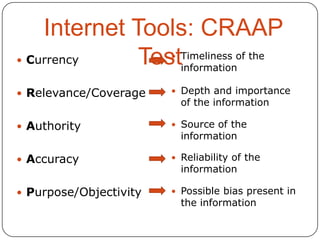
Internet Tools: CRAAP
 Currency
TestTimeliness of the
information


 Relevance/Coverage

 Depth and importance

 Authority

 Source of the

 Accuracy

 Reliability of the

 Purpose/Objectivity

 Possible bias present in

of the information

information

information

the information
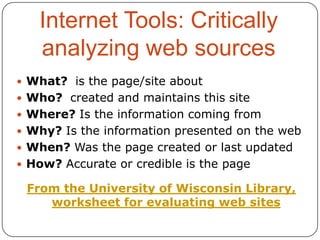
Internet Tools: Critically
analyzing web sources
 What? is the page/site about
 Who? created and maintains this site
 Where? Is the information coming from
 Why? Is the information presented on the web
 When? Was the page created or last updated
 How? Accurate or credible is the page

From the University of Wisconsin Library,
worksheet for evaluating web sites
●

●
●

●
●
●

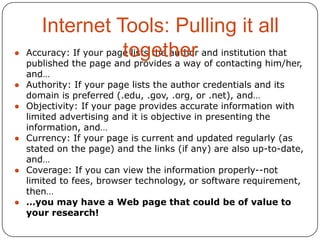
Internet Tools: Pulling it all
Accuracy: If your page lists the author and institution that
together of contacting him/her,
published the page and provides a way

and…
Authority: If your page lists the author credentials and its
domain is preferred (.edu, .gov, .org, or .net), and…
Objectivity: If your page provides accurate information with
limited advertising and it is objective in presenting the
information, and…
Currency: If your page is current and updated regularly (as
stated on the page) and the links (if any) are also up-to-date,
and…
Coverage: If you can view the information properly--not
limited to fees, browser technology, or software requirement,
then…
…you may have a Web page that could be of value to
your research!
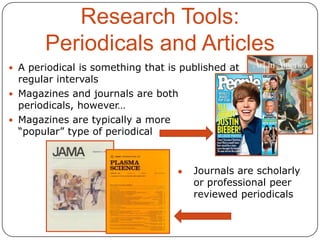
Research Tools:
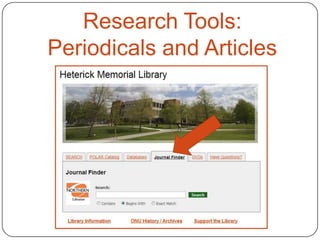
Periodicals and Articles
 A periodical is something that is published at

regular intervals
 Magazines and journals are both
periodicals, however…
 Magazines are typically a more
“popular” type of periodical

●

Journals are scholarly
or professional peer
reviewed periodicals
Research Tools:
Periodicals and Articles
Research Tools:
Periodicals and Articles
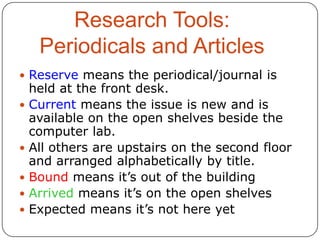
 Reserve means the periodical/journal is








held at the front desk.
Current means the issue is new and is
available on the open shelves beside the
computer lab.
All others are upstairs on the second floor
and arranged alphabetically by title.
Bound means it’s out of the building
Arrived means it’s on the open shelves
Expected means it’s not here yet
Research Tools:
Databases
 Tools for locating journal and

newspaper articles
 Most are subject-specific, but
some are multi-disciplinary
 Many give access to full text
articles
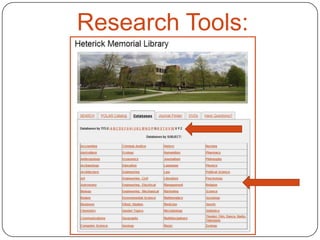
 Heterick has 240+ databases
Research Tools:
Databases
Research Tools:
 Helpful databases to jump start your
Databases
research:
 Academic Search Complete

 Business Source Complete
 LexisNexis Academic
 MasterFILE Premier
 MEDLINE
 SPORTDiscus

 Search by subject/discipline to find

subject specific databases
 But we have an even easier tool now
to get your research started…
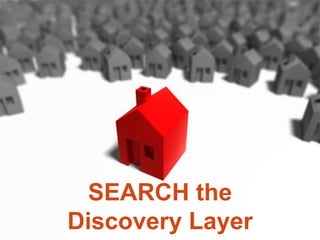
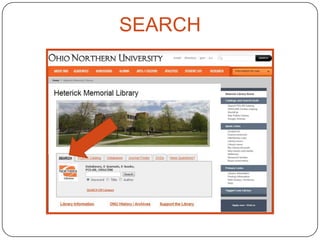
SEARCH the
Discovery Layer
Research Tools: Discovery
Layer
 What is SEARCH?
 SEARCH is a discovery layer

that sits on top of all of the
library’s resources and allows
users to access the majority
of information available on a
topic with a single search.
 Think of it as the roof on top
of a house.
Research Tools: Discovery
Layer
 What is included?
 POLAR catalog
 OhioLINK catalog
 Article-level searching for all EBSCO

databases
 Article-level searching for a variety
of other databases: JSTOR,
Hoover’s, AccessPharmacy, etc.
 Title-level searching fro most other
databases: IEEE, CIAO, Proquest
Nursing & Allied Health
Research Tools: Discovery
Layer
 What it isn’t:
 A replacement for the current

catalog
 A ready-made index to all
database content
 A Googlization of library
resources, although it may
seem like this to some
SEARCH
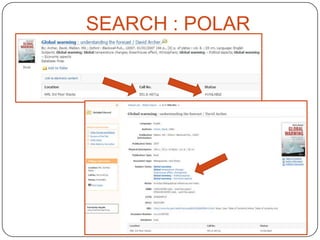
SEARCH : POLAR
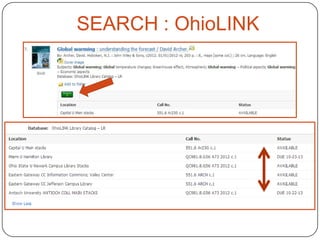
SEARCH : OhioLINK
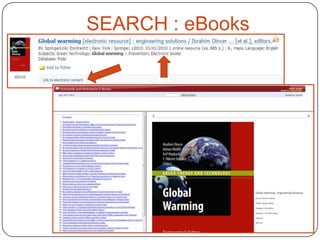
SEARCH : eBooks
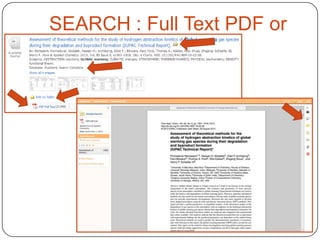
SEARCH : Full Text PDF or
HTML
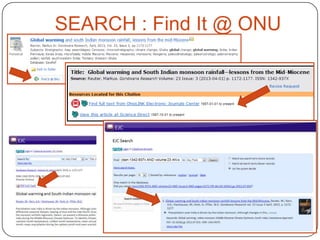
SEARCH : Find It @ ONU
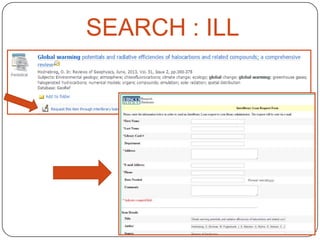
SEARCH : ILL
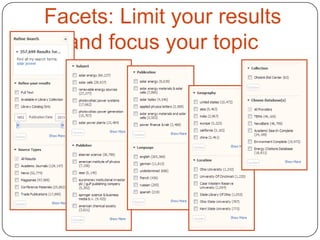
Facets: Limit your results
and focus your topic
How to do research:
Cite what you find using
standard formats
There are 3 citation styles that are
frequently used at ONU:
● MLA (Modern Language Association)
● APA (American Psychological Association)
● CMS (Chicago Manual of Style)
Research Ethics

ACADEMI
C
Research Ethics
 Copyright: Intended to promote the arts and

the sciences. It does this by providing authors
of original literary, dramatic, musical, artistic,
and certain other intellectual works the ability
to control how their work is used by others.
 Plagiarism: “...the wrongful appropriation or
purloining, and publication as one’s own, the
ideas or the expression of the ideas (literary,
artistic, musical, mechanical, etc.) of an other.”
 See Heterick’s Help page and Writing Seminar
research guide for more information.
Research Ethics
 In other words, to plagiarize is to copy someone else’s work

without giving him/her credit.

 Plagiarism is not always intentional. You can do it by accident,

but it is still against the law. If you ever have a question about
whether something is plagiarized, please ask.

 How may I avoid plagiarizing?
 Identify any information that would not be considered common

knowledge
 Unless in direct quotes, make sure you paraphrase what the
original author said
 Use a quote if you can’t think of a way to paraphrase the
information
 Always, always, ALWAYS cite the source of any information in
your paper which is not considered common knowledge. If you
are unsure if something is common knowledge, cite it!
 From “How not to plagiarize your report” by Shannon Hosier Mersand
Happy
Researching!
Remember, the
librarians are here
to help you with
your research.
Come and see us!

Surface2013 fallwsp

  • 1.
    Writing Seminar Heather Surface JennyDonley Librarian and Assistant Professor Heterick Memorial Library
  • 2.
    Introduction  Welcome  JennyDonley, j-donley.1@onu.edu  Feel free to visit or email  Librarians on duty:  8-4:30, 6-9 Mon – Thurs  8-4 Friday  reference@onu.edu
  • 3.
    Libraries at ONU TaggartLaw Library Heterick Memorial Library  Law School Library;  Undergraduate accessible to all Library; accessible to all
  • 4.
    ONU card =Library ID Remember to always use all 11 digits!
  • 5.
    How am Isupposed to remember all of this stuff?
  • 6.
  • 7.
    What we’ll dotoday:  How to do research  How to use library resources to do research  What resources to use when doing research
  • 8.
    Annotated Bibliography  Allows youto see what is out there  Helps you narrow your topic and discard any irrelevant materials  Aids in developing the thesis  Makes you a better scholar
  • 9.
    How to doresearch: Seven Steps of the Research Process  STEP 1: IDENTIFY AND DEVELOP YOUR TOPIC  STEP 2: FIND BACKGROUND INFORMATION  STEP 3: USE CATALOGS TO FIND BOOKS AND MEDIA  STEP 4: FIND INTERNET RESOURCES (if appropriate for the assignment)  STEP 5: USE DATABASES TO FIND PERIODICAL ARTICLES  STEP 6: EVALUATE WHAT YOU FIND  STEP 7: CITE WHAT YOU FIND  Amended with permission by the Librarians at the Olin and Uris Libraries of Cornell University
  • 10.
    How to doresearch: identify and develop your topic ● State your topic as a question ● Identify main concepts or keywords ● Test the topic: Look for keywords, synonyms, and related terms for the information sought ● Subject headings in catalogs ● Built-in thesauri in many databases ● Reference sources ● Textbooks, lecture notes, readings ● Internet ● Librarians, Instructors
  • 11.
    How to doresearch: Find Background Information
  • 12.
    • Highly structuredinformation environment: • In the way that individual records are arranged • Contains subject headings • The cataloging software is optimized for the above information • Catalog includes material in many formats • Implies heavy human involvement • Preparation relatively labor-intensive • Emphasis on precision • Implies a learning curve to use successfully
  • 13.
    Research Tools -Catalogs  POLAR: Accessing physical and electronic items located at HML (Heterick Memorial Library) as well as LAW (Taggart Law Library).  OhioLINK: Next step if you can’t find what you want in the HML or LAW collections.  ILL: Option of last resort for books and articles.
  • 14.
  • 15.
    POLAR Think of thecall numbers as the street addresses of the books on the library shelves.
  • 16.
    Find a book:POLAR •Looks in several locations (usually subject, article title, abstracts or contents) •Does not require an exact match •Generates comparatively large number of hits (not precise) •Good if you are not familiar with terminology •Look for the same or similar words which keep appearing
  • 17.
    Find a book:POLAR Click on the “More like this” link found in each item record •Looks in one place – subject •Usually requires an exact match between your term and a pre-set list of terms •Precise •Can be used after a keyword search has identified specific subjects
  • 18.
    Find a book:POLAR ● Books are arranged on the shelves using Dewey Decimal Classification Numbers. Think of the these numbers as the shelf address for a book. ● Books found in POLAR will be part of the reference collection (1st floor), juvenile collection (2nd floor), the circulating collection (3rd floor) or e-books available online. e-book reference e-book circulating
  • 19.
    Find a book:OhioLINK ● Most of the university and college libraries       in Ohio share their materials through a consortium catalog called OhioLINK. There are around 10 million items available A link from POLAR permits you to submit requests. Available from the Heterick homepage Most requests arrive in 2-3 working days No charge Limited to 100 items at a time MAY RENEW UP TO 4 TIMES!
  • 20.
    Find a book:POLAR and OhioLINK 1. Click on the OhioLINK icon to access the consortium catalog.
  • 21.
    Find a book:OhioLINK 2. Click on the icon.
  • 22.
    FIND A BOOK:OHIOLINK 3. Select Ohio Northern U. 4. Enter your first and last name and all 11 digits exactly as they appear on your ID. 5. Be sure to select Heterick as your pick up location and then click submit. 6. An email will be sent when the item is ready for pickup.
  • 23.
    Internet Tools  Doesthe information located satisfy the research need?  Is the information factual and unbiased?  See additional tips for evaluating web sources and web pages in the Writing Seminar Research Guide
  • 24.
    Internet Tools: CRAAP Currency TestTimeliness of the information   Relevance/Coverage  Depth and importance  Authority  Source of the  Accuracy  Reliability of the  Purpose/Objectivity  Possible bias present in of the information information information the information
  • 25.
    Internet Tools: Critically analyzingweb sources  What? is the page/site about  Who? created and maintains this site  Where? Is the information coming from  Why? Is the information presented on the web  When? Was the page created or last updated  How? Accurate or credible is the page From the University of Wisconsin Library, worksheet for evaluating web sites
  • 26.
    ● ● ● ● ● ● Internet Tools: Pullingit all Accuracy: If your page lists the author and institution that together of contacting him/her, published the page and provides a way and… Authority: If your page lists the author credentials and its domain is preferred (.edu, .gov, .org, or .net), and… Objectivity: If your page provides accurate information with limited advertising and it is objective in presenting the information, and… Currency: If your page is current and updated regularly (as stated on the page) and the links (if any) are also up-to-date, and… Coverage: If you can view the information properly--not limited to fees, browser technology, or software requirement, then… …you may have a Web page that could be of value to your research!
  • 27.
    Research Tools: Periodicals andArticles  A periodical is something that is published at regular intervals  Magazines and journals are both periodicals, however…  Magazines are typically a more “popular” type of periodical ● Journals are scholarly or professional peer reviewed periodicals
  • 28.
  • 29.
    Research Tools: Periodicals andArticles  Reserve means the periodical/journal is      held at the front desk. Current means the issue is new and is available on the open shelves beside the computer lab. All others are upstairs on the second floor and arranged alphabetically by title. Bound means it’s out of the building Arrived means it’s on the open shelves Expected means it’s not here yet
  • 30.
    Research Tools: Databases  Toolsfor locating journal and newspaper articles  Most are subject-specific, but some are multi-disciplinary  Many give access to full text articles  Heterick has 240+ databases
  • 31.
  • 32.
    Research Tools:  Helpfuldatabases to jump start your Databases research:  Academic Search Complete  Business Source Complete  LexisNexis Academic  MasterFILE Premier  MEDLINE  SPORTDiscus  Search by subject/discipline to find subject specific databases  But we have an even easier tool now to get your research started…
  • 33.
  • 34.
    Research Tools: Discovery Layer What is SEARCH?  SEARCH is a discovery layer that sits on top of all of the library’s resources and allows users to access the majority of information available on a topic with a single search.  Think of it as the roof on top of a house.
  • 35.
    Research Tools: Discovery Layer What is included?  POLAR catalog  OhioLINK catalog  Article-level searching for all EBSCO databases  Article-level searching for a variety of other databases: JSTOR, Hoover’s, AccessPharmacy, etc.  Title-level searching fro most other databases: IEEE, CIAO, Proquest Nursing & Allied Health
  • 36.
    Research Tools: Discovery Layer What it isn’t:  A replacement for the current catalog  A ready-made index to all database content  A Googlization of library resources, although it may seem like this to some
  • 37.
  • 38.
  • 39.
  • 40.
  • 41.
    SEARCH : FullText PDF or HTML
  • 42.
    SEARCH : FindIt @ ONU
  • 43.
  • 44.
    Facets: Limit yourresults and focus your topic
  • 45.
    How to doresearch: Cite what you find using standard formats There are 3 citation styles that are frequently used at ONU: ● MLA (Modern Language Association) ● APA (American Psychological Association) ● CMS (Chicago Manual of Style)
  • 46.
  • 47.
    Research Ethics  Copyright:Intended to promote the arts and the sciences. It does this by providing authors of original literary, dramatic, musical, artistic, and certain other intellectual works the ability to control how their work is used by others.  Plagiarism: “...the wrongful appropriation or purloining, and publication as one’s own, the ideas or the expression of the ideas (literary, artistic, musical, mechanical, etc.) of an other.”  See Heterick’s Help page and Writing Seminar research guide for more information.
  • 48.
    Research Ethics  Inother words, to plagiarize is to copy someone else’s work without giving him/her credit.  Plagiarism is not always intentional. You can do it by accident, but it is still against the law. If you ever have a question about whether something is plagiarized, please ask.  How may I avoid plagiarizing?  Identify any information that would not be considered common knowledge  Unless in direct quotes, make sure you paraphrase what the original author said  Use a quote if you can’t think of a way to paraphrase the information  Always, always, ALWAYS cite the source of any information in your paper which is not considered common knowledge. If you are unsure if something is common knowledge, cite it!  From “How not to plagiarize your report” by Shannon Hosier Mersand
  • 49.
    Happy Researching! Remember, the librarians arehere to help you with your research. Come and see us!