INTRODUCTION TO
RESEARCH AT HETERICK
MEMORIAL LIBRARY
ENGL 1521
Professor Jenny Donley, Librarian
Heterick Memorial Library
Introduction
 Welcome!
 Jenny Donley
 Cataloging and Knowledge Architect Librarian
 j-donley.1@onu.edu
 Kelly Kobiela
 Systems Librarian
 k-kobiela@onu.edu
 Librarians on duty:
 Monday – Friday
 8:00 AM – 4:30 PM
 Monday – Wednesday
 6:00 PM – 9:00 PM
 Reference email: reference@onu.edu
 Feel free to stop by or send us an email
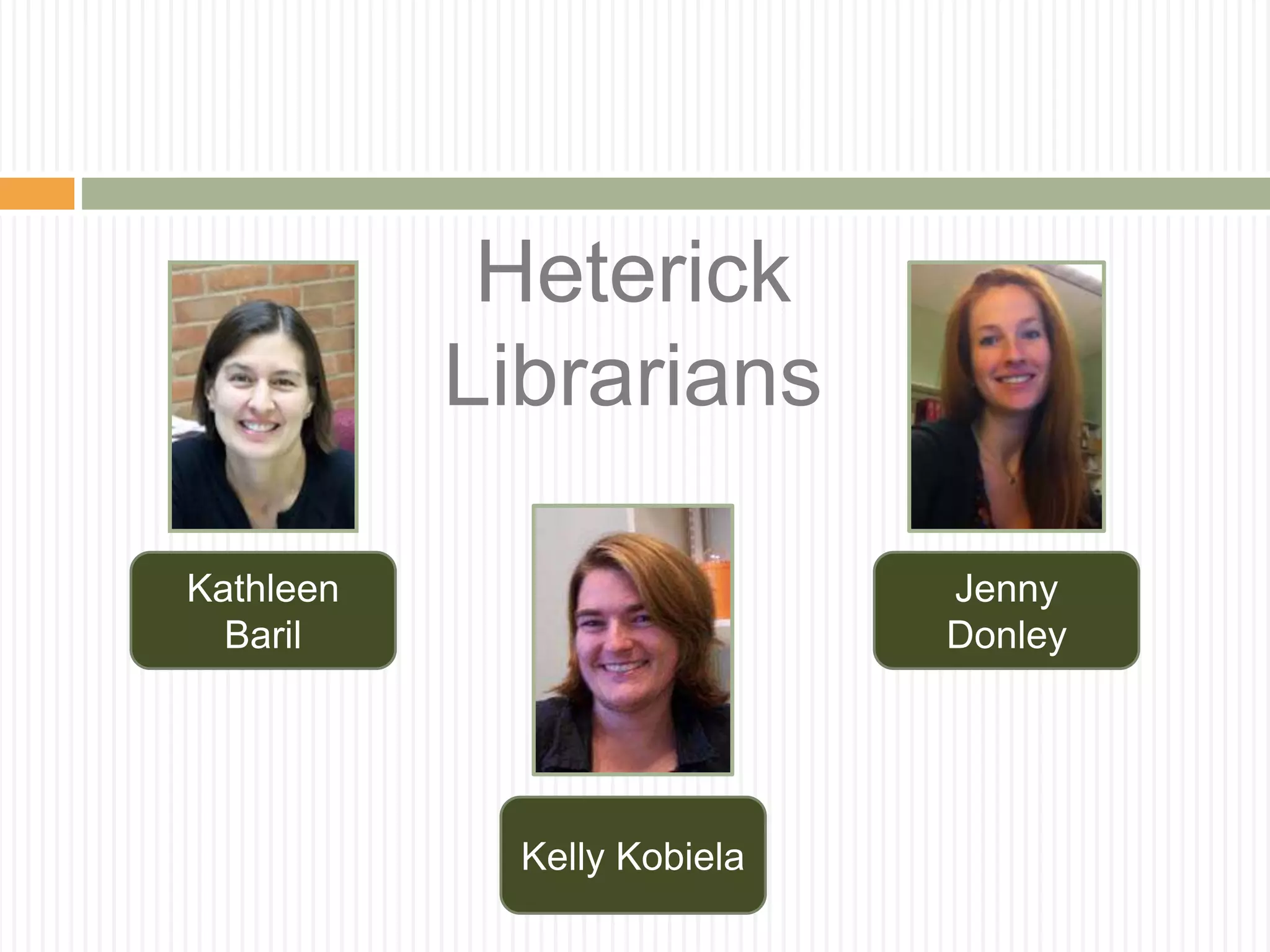
Heterick
Librarians
Kathleen
Baril
Jenny
Donley
Kelly Kobiela
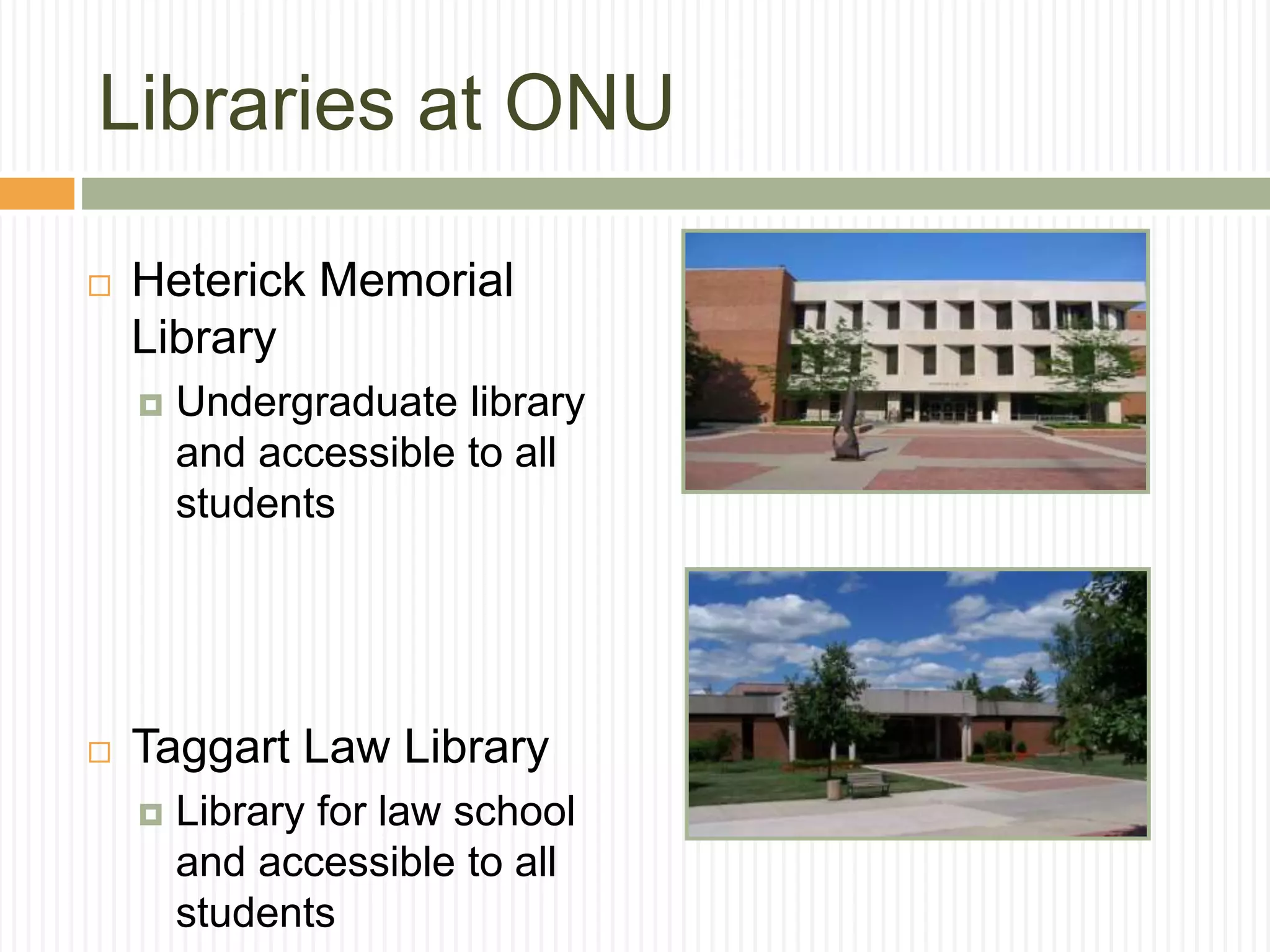
Libraries at ONU
 Heterick Memorial
Library
 Undergraduate library
and accessible to all
students
 Taggart Law Library
 Library for law school
and accessible to all
students
What we will accomplish today:
 How to do research
 How to use the
library to do
research
 What resources to
use when doing
research
What the library offers:
 ~400,000 items in POLAR, the ONU library
catalog
 ~20,000,000 items in OhioLink
 260 Databases
 400+ print periodicals
 Tens of thousands of electronic journal titles
 Juvenile, Young Adult, and Graphic Novel
collections
 DVDs, CDs, streaming audiovisuals, and
streaming music
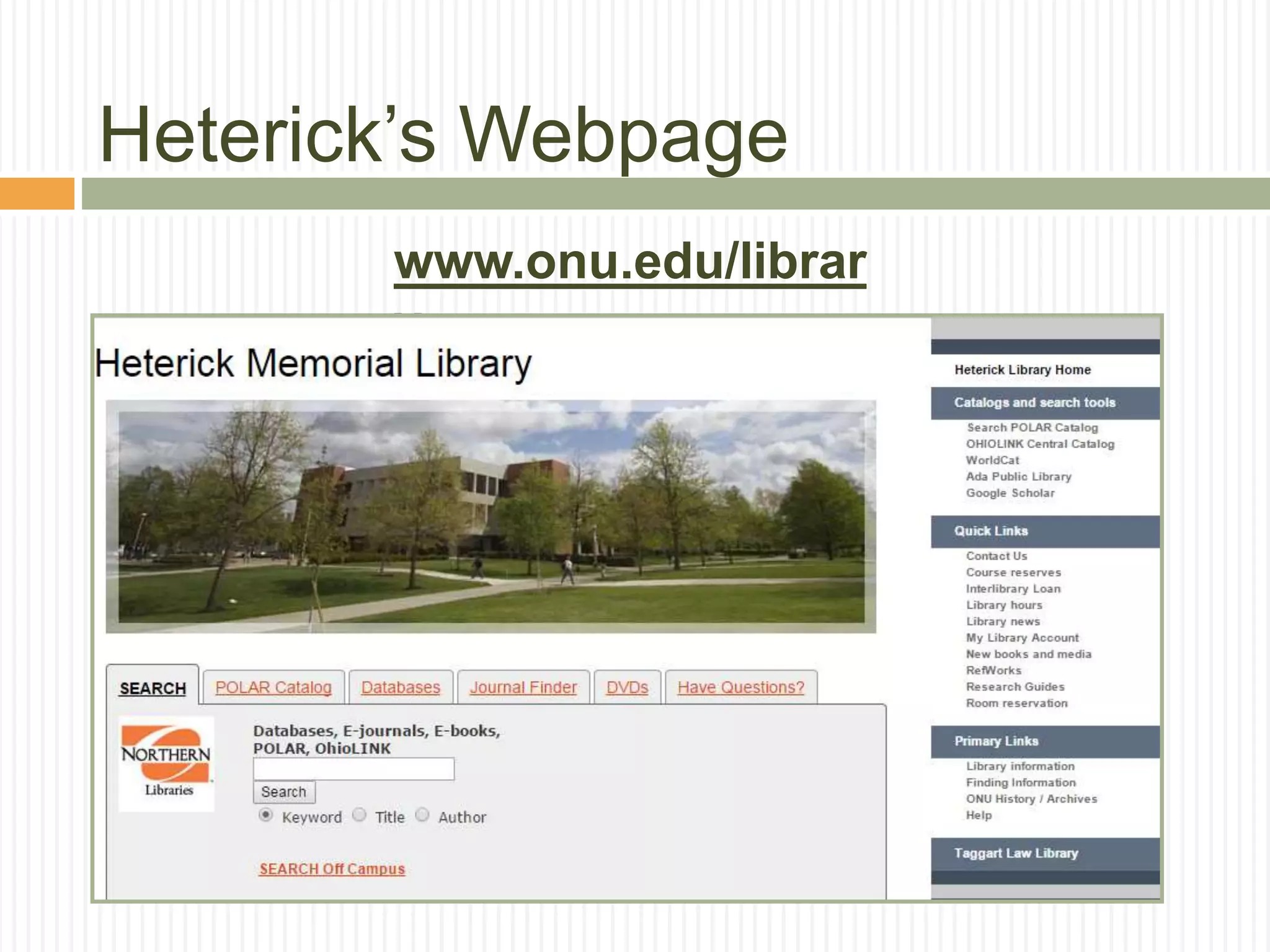
Heterick’s Webpage
www.onu.edu/librar
y
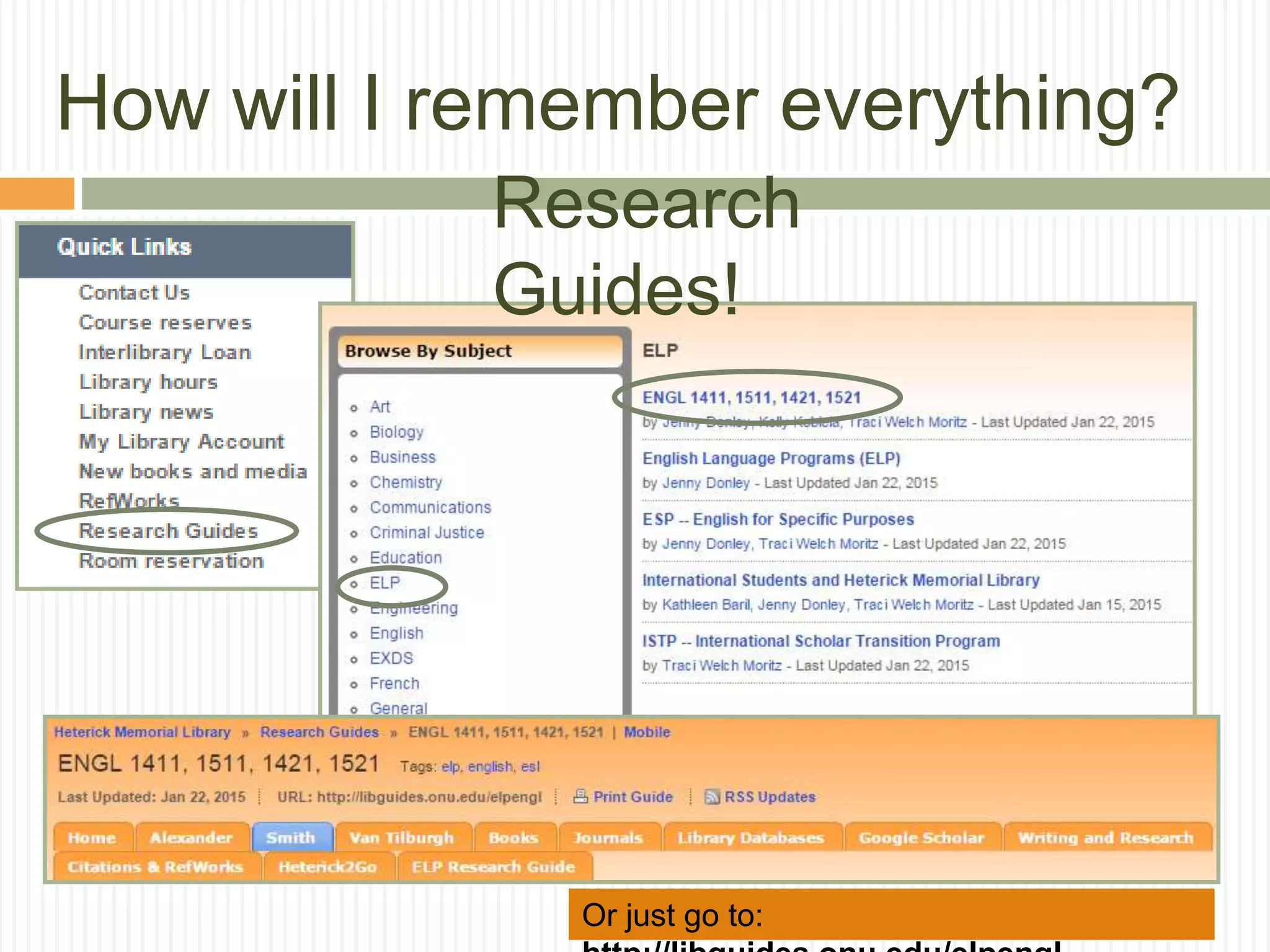
How will I remember everything?
Or just go to:
Research
Guides!
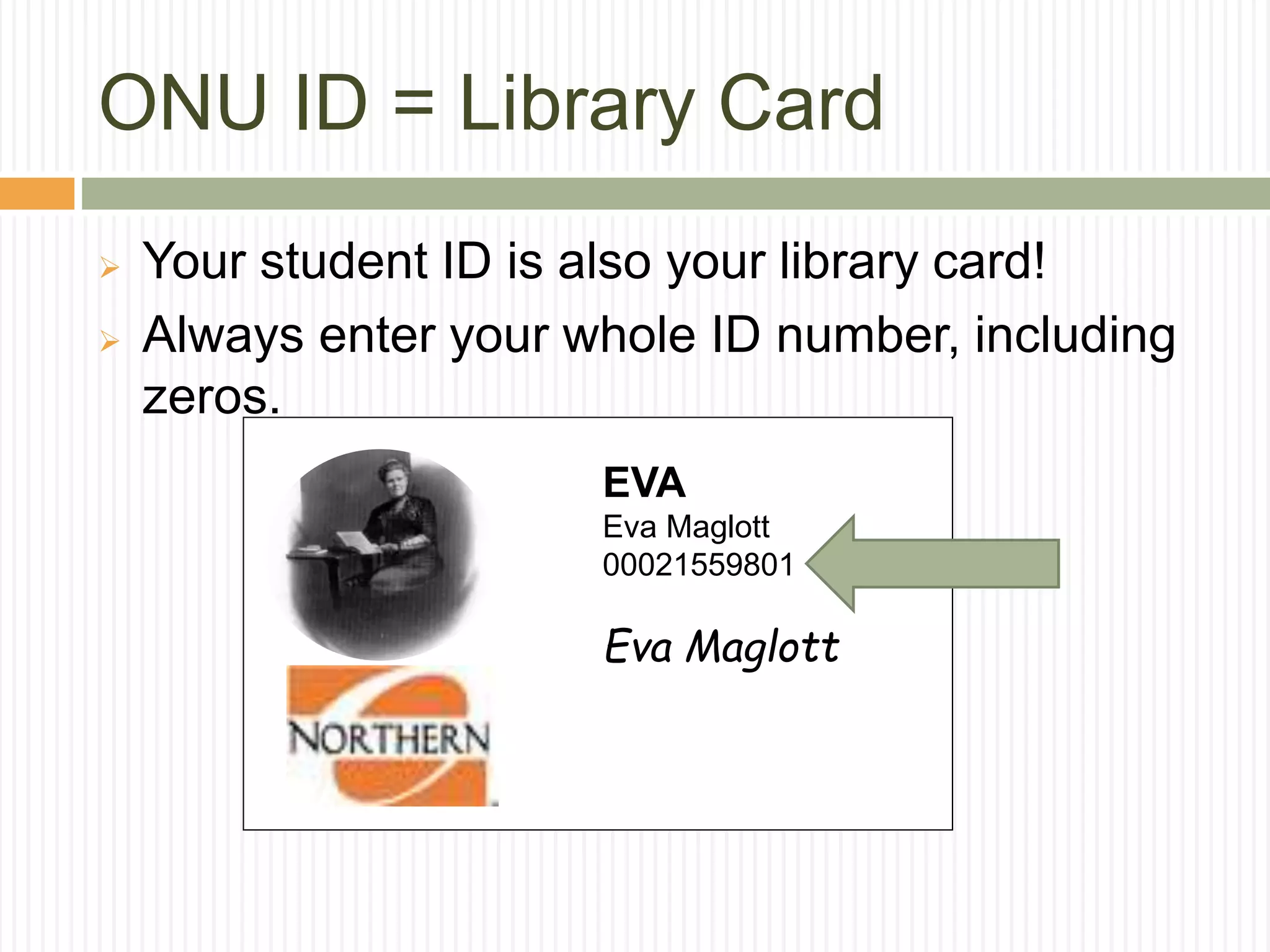
ONU ID = Library Card
 Your student ID is also your library card!
 Always enter your whole ID number, including
zeros.
EVA
Eva Maglott
00021559801
Eva Maglott
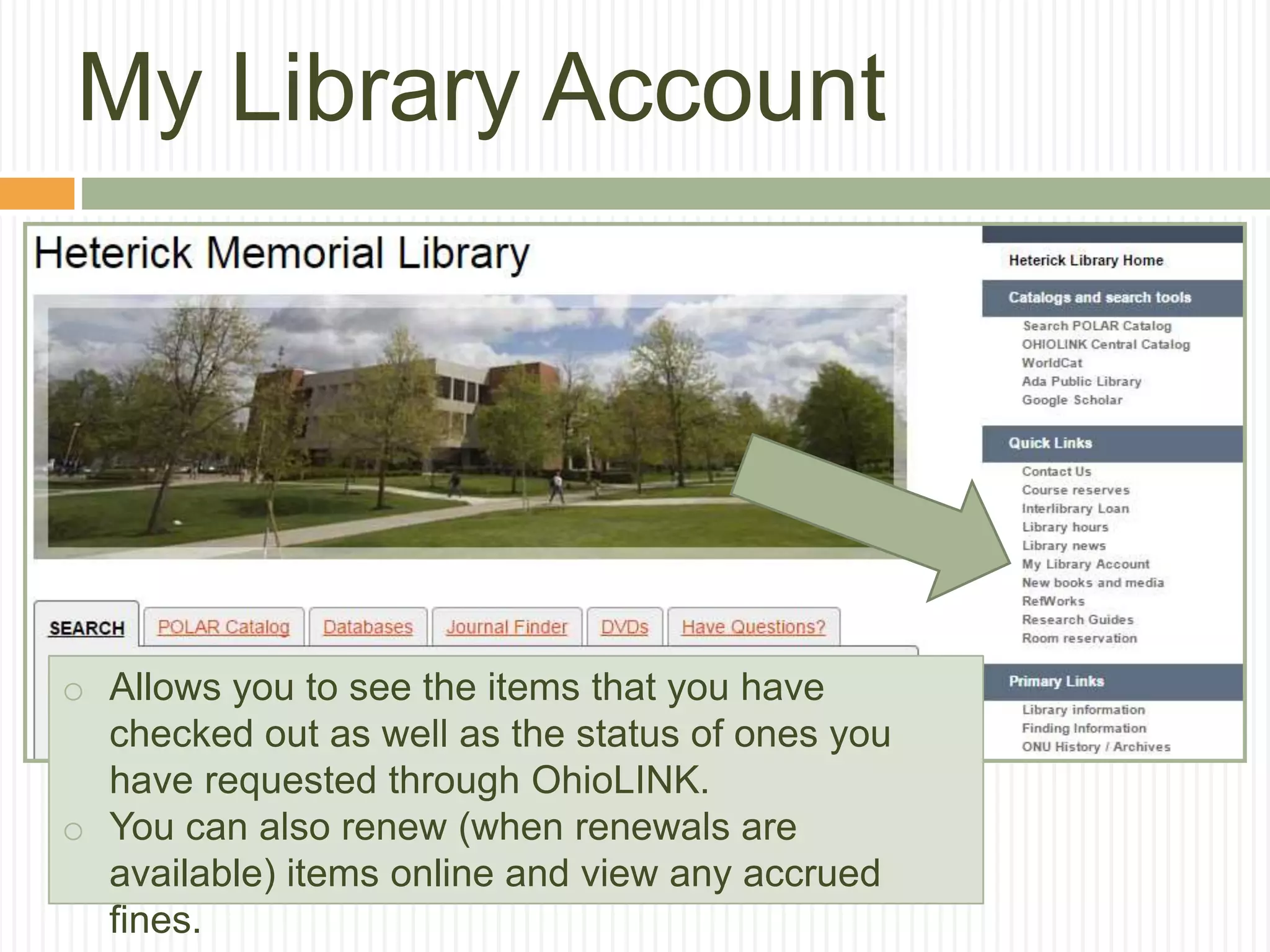
My Library Account
o Allows you to see the items that you have
checked out as well as the status of ones you
have requested through OhioLINK.
o You can also renew (when renewals are
available) items online and view any accrued
fines.
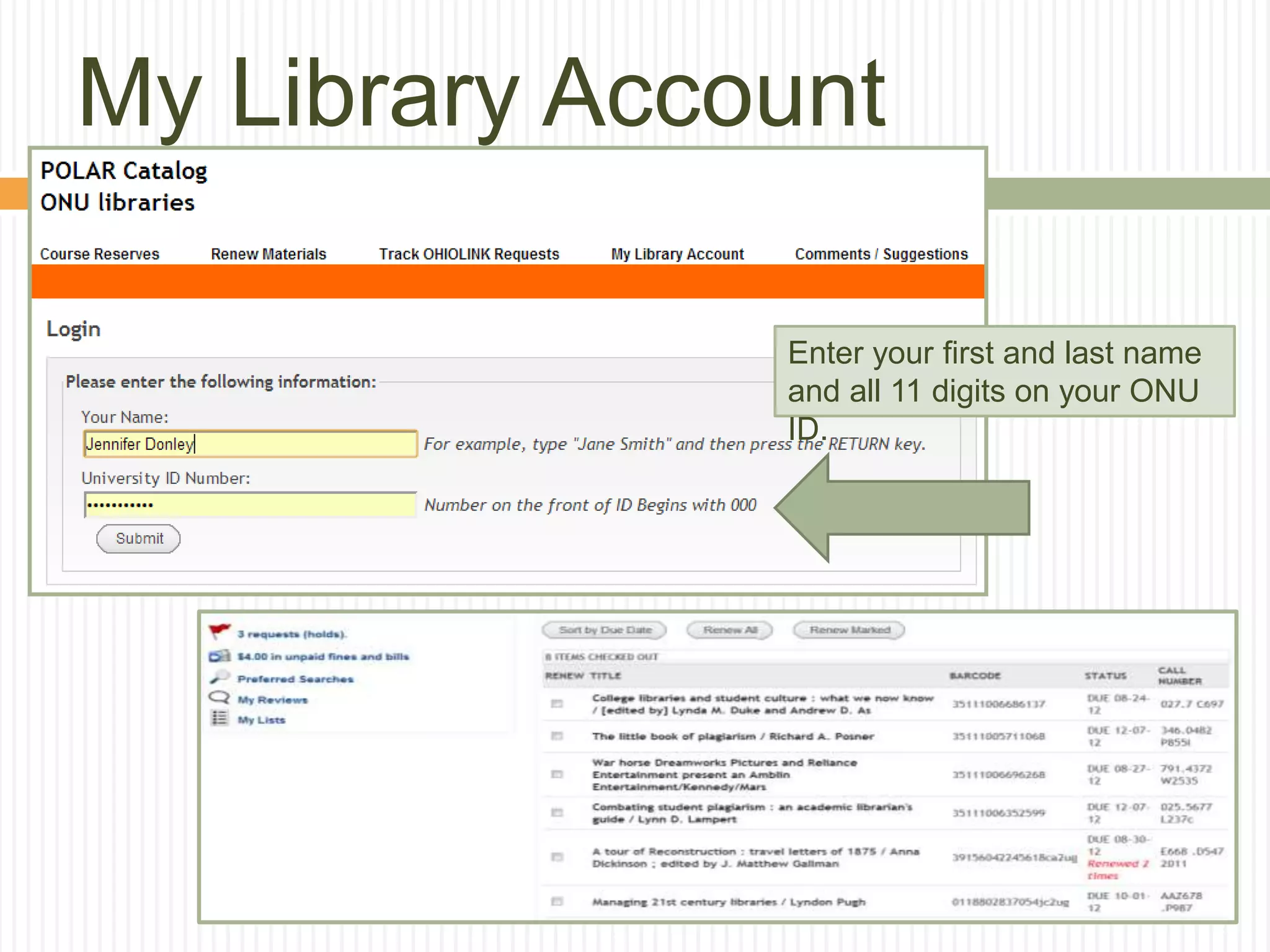
My Library Account
Enter your first and last name
and all 11 digits on your ONU
ID.
Research Strategies
 Start big by doing background reading
 Narrow your topic for a more focused project
 Work on finding the right search terms
 Use patterns you see in the results list to
narrow your topic
 Most resources will have a built-in thesaurus
that will suggest phrases and subjects to
search by…use them!
Think of your research as
a tree…broad at the top,
but narrow at the bottom!
Can’t I just Google articles?
Google and Wikipedia:
 Aren’t evil
 Can prove valuable
 Can’t be used as a
source
 Turn to the
databases for
source material
From the University of Wisconsin
Library, worksheet for evaluating web
sites
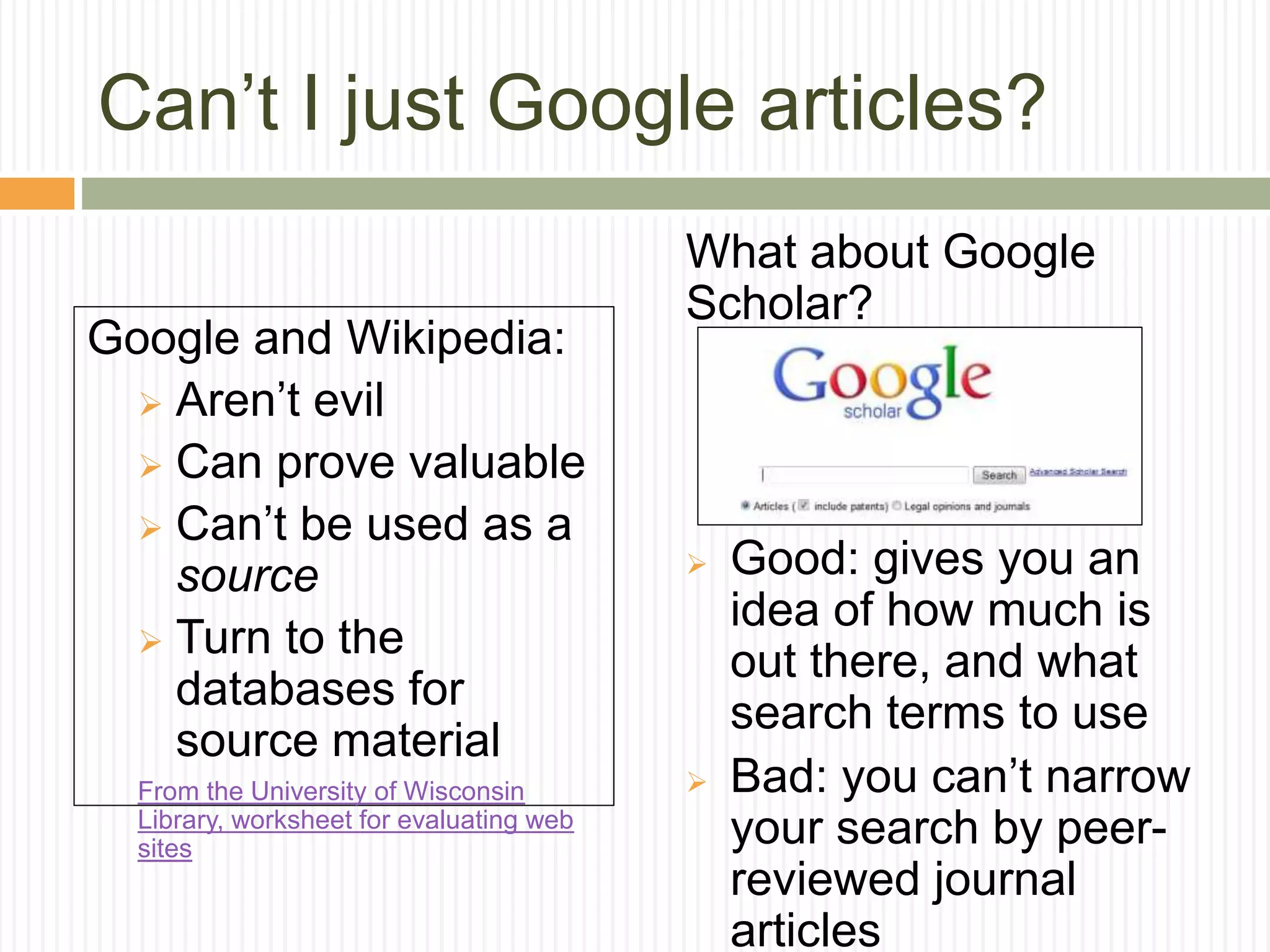
What about Google
Scholar?
 Good: gives you an
idea of how much is
out there, and what
search terms to use
 Bad: you can’t narrow
your search by peer-
reviewed journal
articles
But I found this great website…
Critically analyzing web sources
 What? is the page/site about
 Who? created and maintains this site
 Where? is the information coming from
 Why? is the information presented on the web
 When? was the page created or last updated
 How? accurate or credible is the page
From the University of Wisconsin Library, worksheet for evaluating web
sites
Warning! Always remember to
cite.
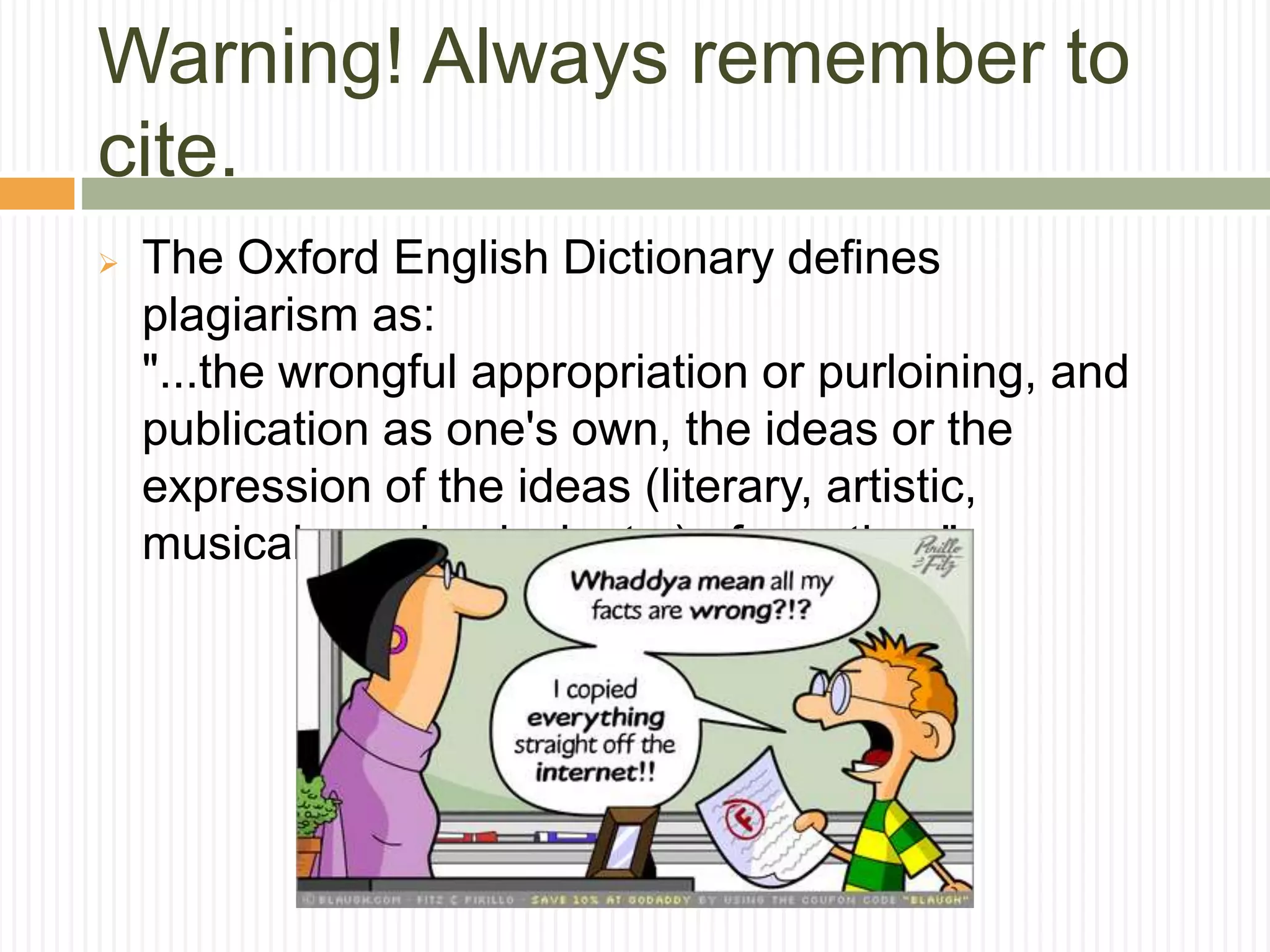
 The Oxford English Dictionary defines
plagiarism as:
"...the wrongful appropriation or purloining, and
publication as one's own, the ideas or the
expression of the ideas (literary, artistic,
musical, mechanical, etc.) of an other."
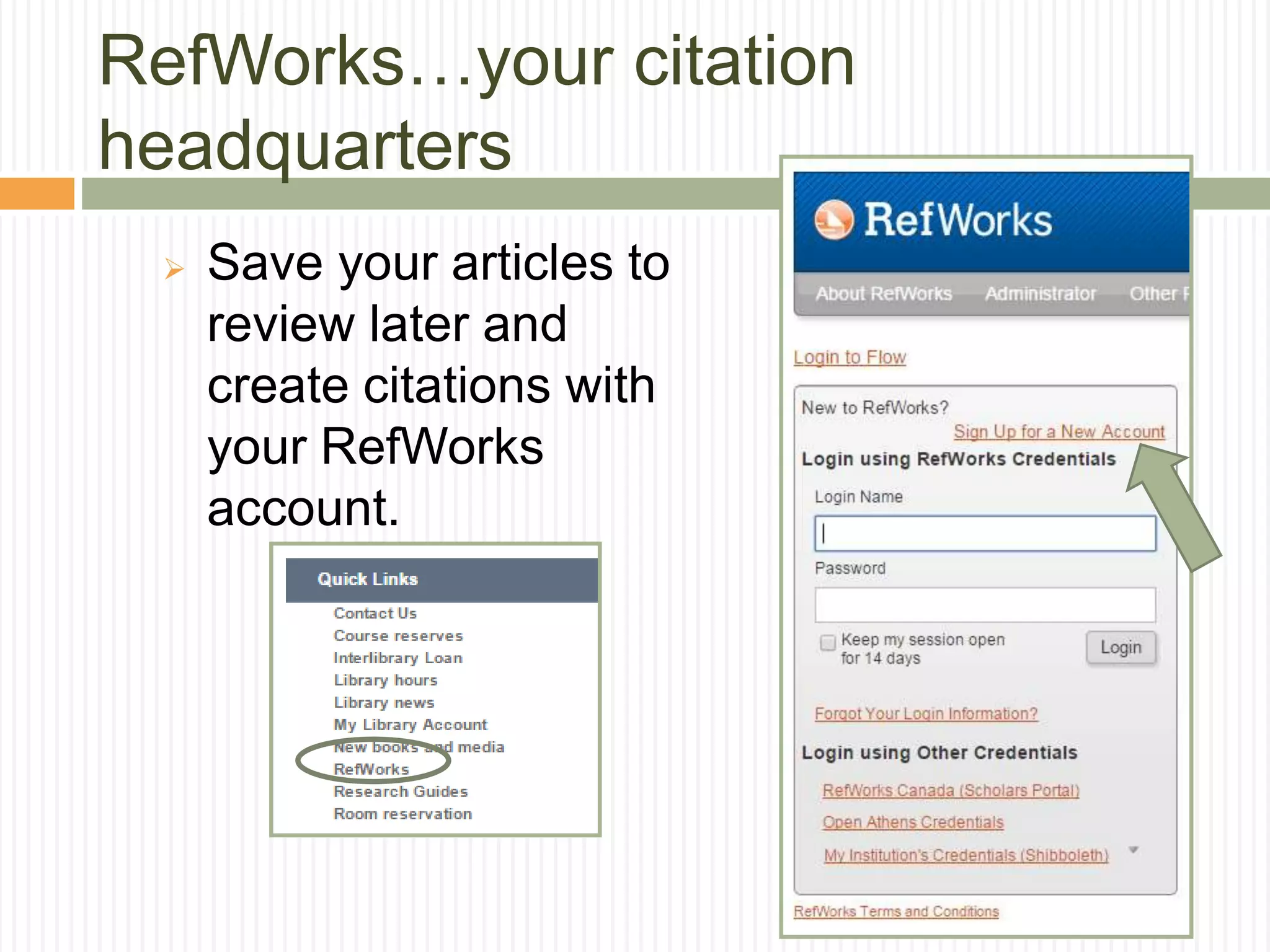
RefWorks…your citation
headquarters
 Save your articles to
review later and
create citations with
your RefWorks
account.
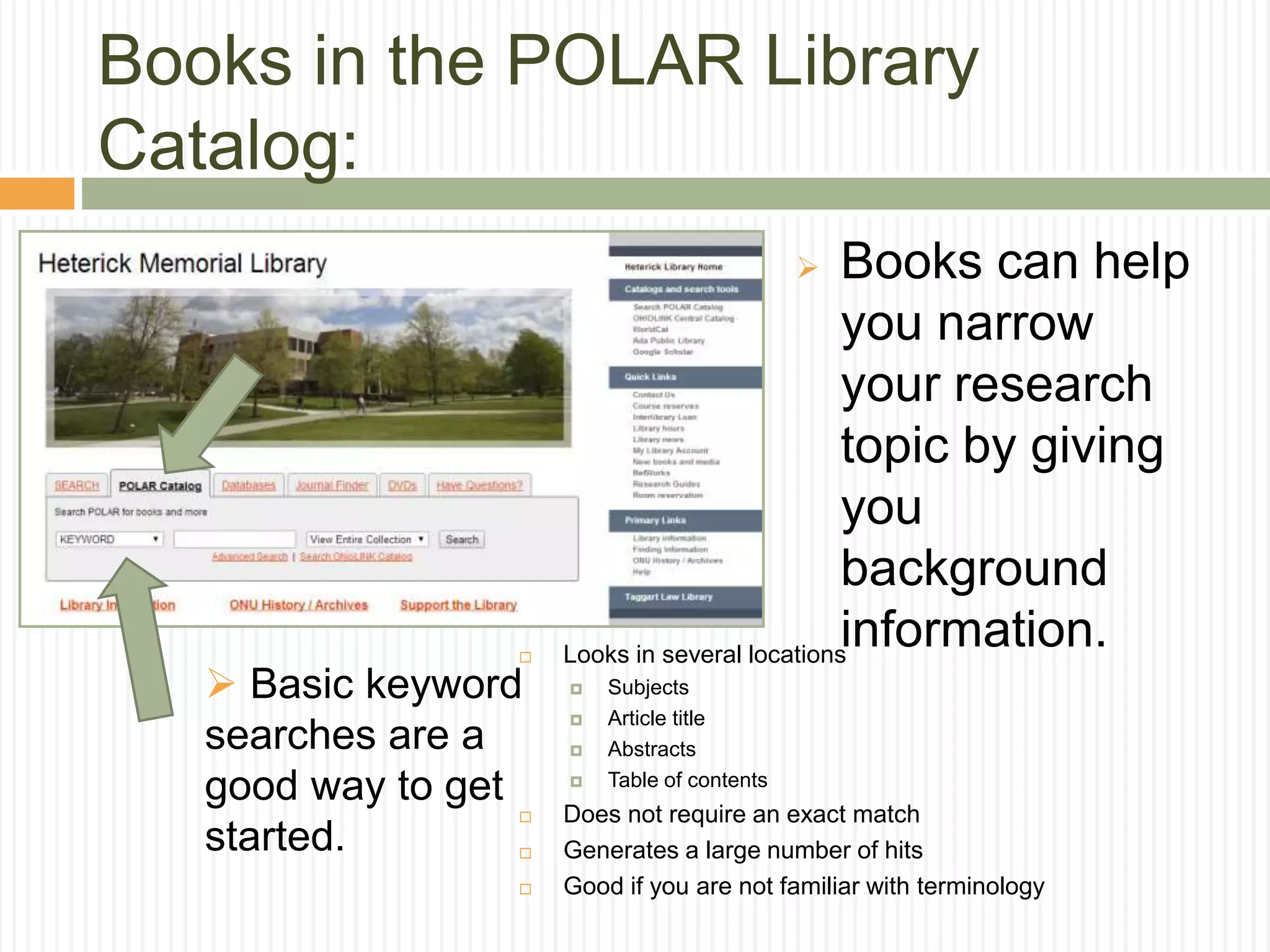
 Books can help
you narrow
your research
topic by giving
you
background
information.
Books in the POLAR Library
Catalog:
 Basic keyword
searches are a
good way to get
started.
 Looks in several locations
 Subjects
 Article title
 Abstracts
 Table of contents
 Does not require an exact match
 Generates a large number of hits
 Good if you are not familiar with terminology
Books in the POLAR Library
Catalog:
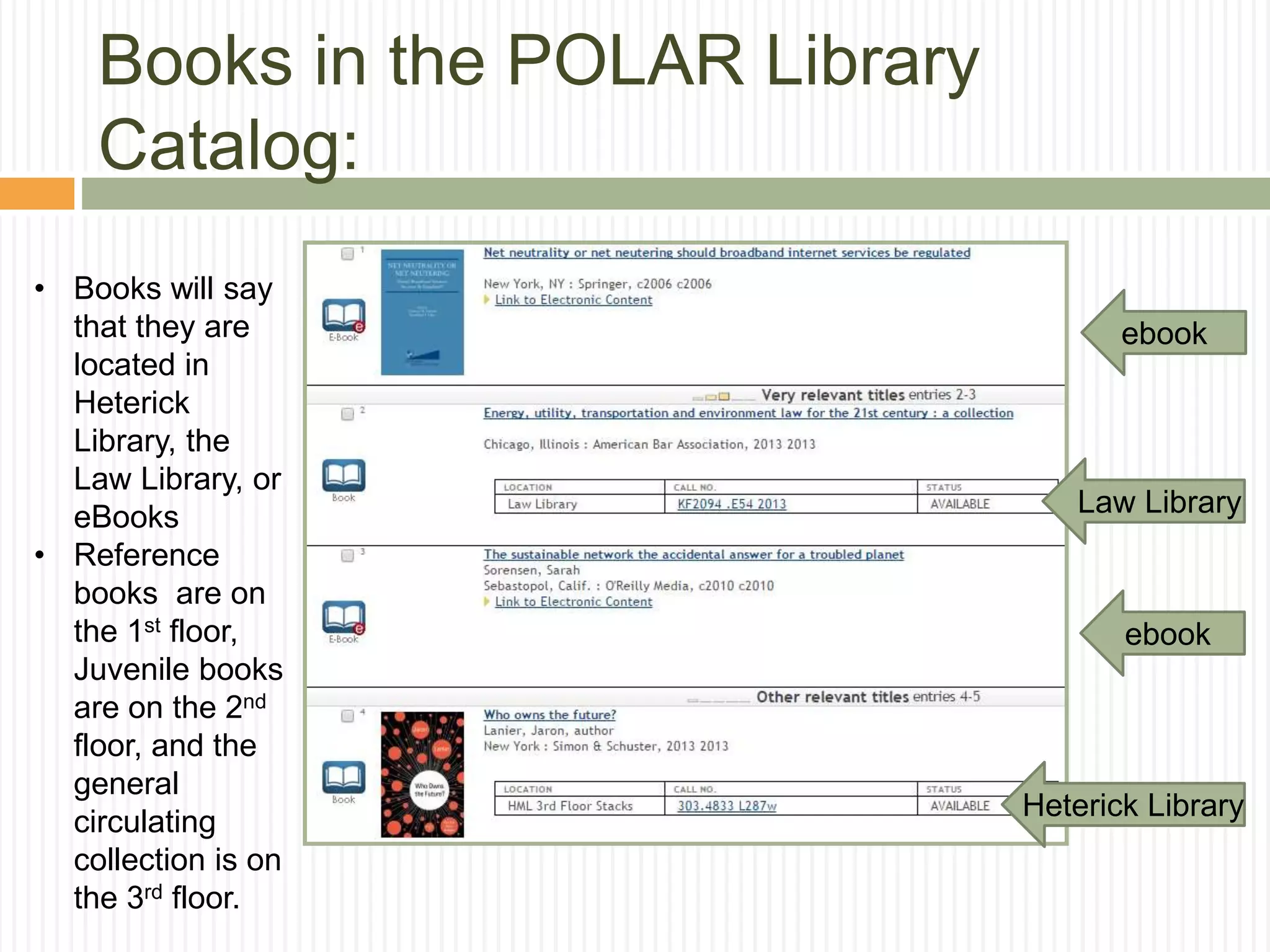
ebook
Law Library
Heterick Library
• Books will say
that they are
located in
Heterick
Library, the
Law Library, or
eBooks
• Reference
books are on
the 1st floor,
Juvenile books
are on the 2nd
floor, and the
general
circulating
collection is on
the 3rd floor.
ebook
o Helpful if a book that you want is not available through
POLAR, or is already checked out in POLAR.
o Most of the university and college libraries in Ohio share
their materials through this consortium catalog called
OhioLINK.
Books in the OhioLINK Library
Catalog:
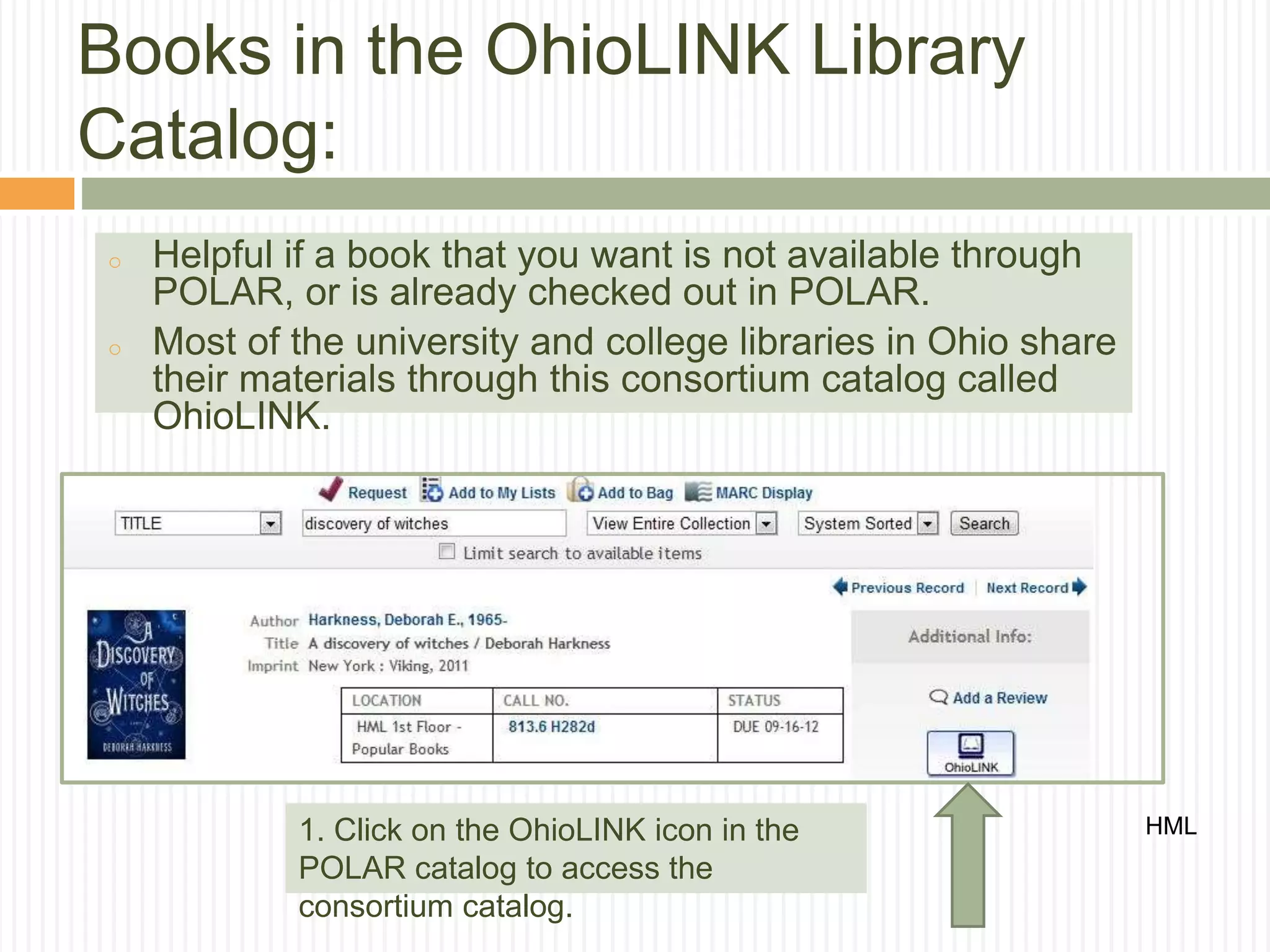
HML1. Click on the OhioLINK icon in the
POLAR catalog to access the
consortium catalog.
Books in the OhioLINK Library
Catalog:
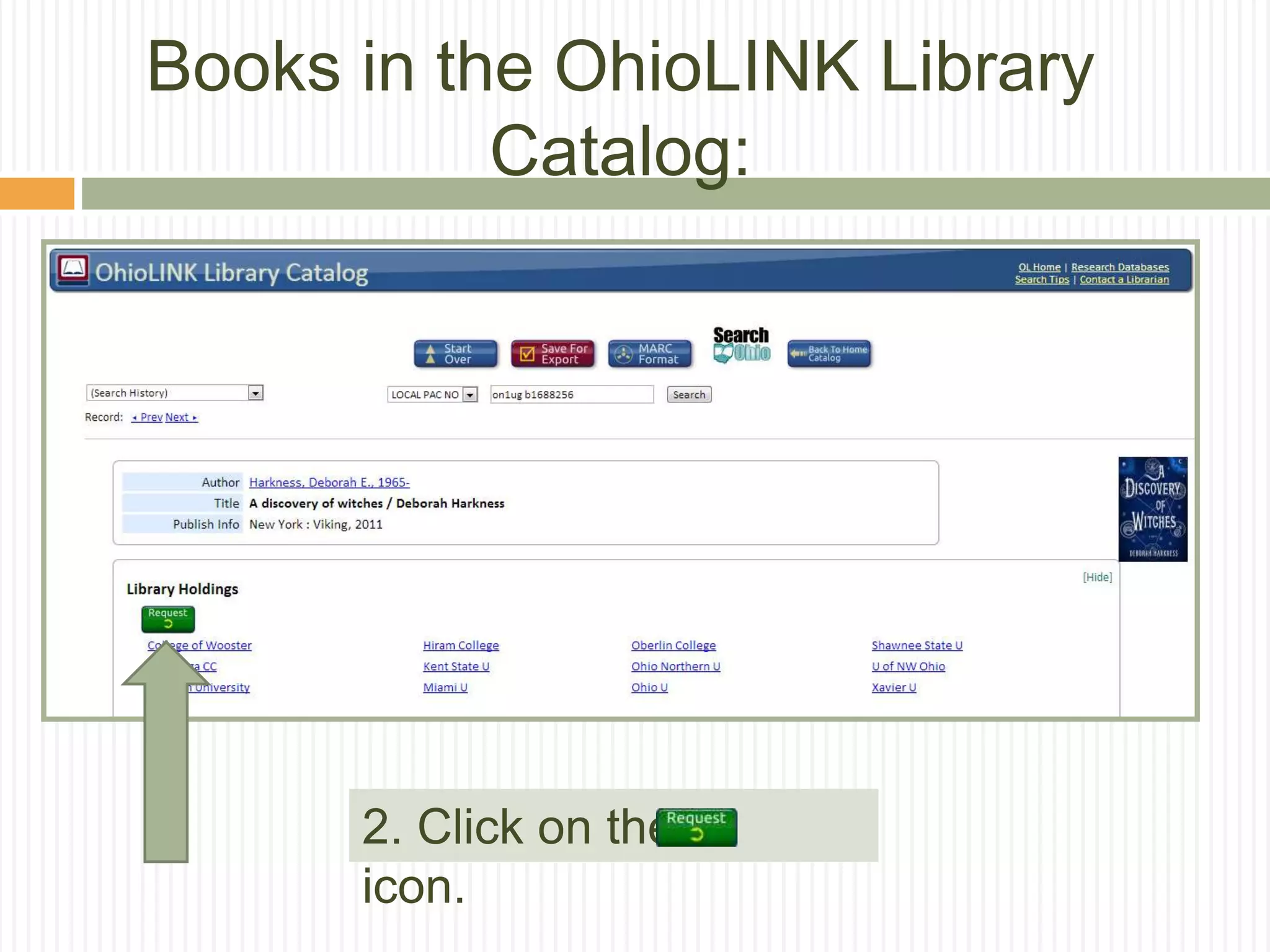
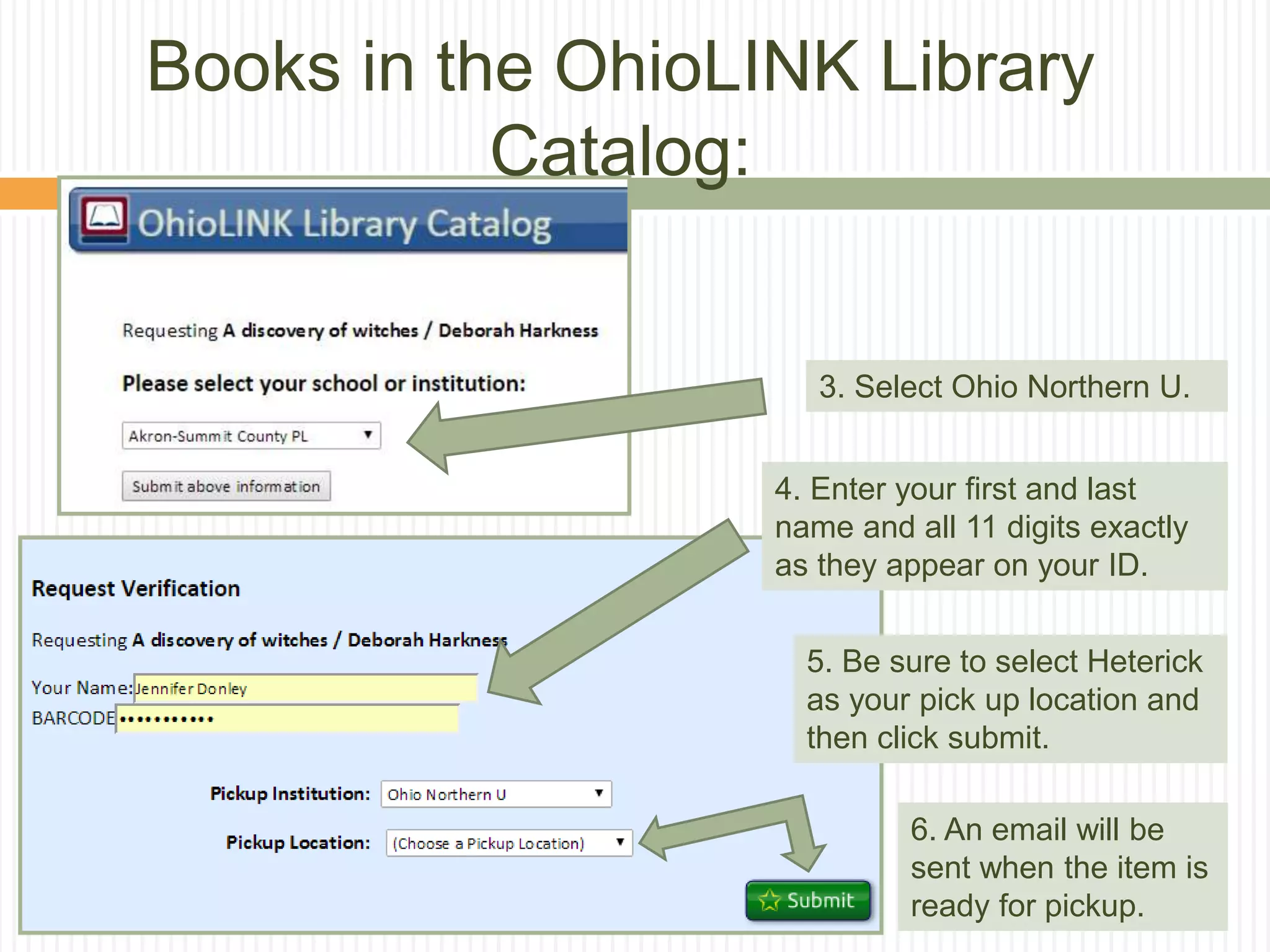
2. Click on the
icon.
3. Select Ohio Northern U.
4. Enter your first and last
name and all 11 digits exactly
as they appear on your ID.
5. Be sure to select Heterick
as your pick up location and
then click submit.
6. An email will be
sent when the item is
ready for pickup.
Books in the OhioLINK Library
Catalog:
Finding articles in databases
 What is the basic definition of a library database?
 A library database is an electronic (online) catalog or index
 Library databases contain information about published items
 Library databases are searchable
 The library subscribes to many databases so the ONU community has
access to these resources. When you’re searching a database, you
are not searching “the web.”
 What types of items are indexed by library databases?
 Articles in Journals/Magazines/Newspapers
 Reference Information (i.e. entries from Encyclopedias, Dictionaries,
etc.)
 Books & other documents
Source: http://web.calstatela.edu/library/whatisadatabase.htm
What do databases offer?
 Databases are often the best tools for
locating journal and newspaper articles.
 Most databases are subject specific, but
some are multi-disciplinary and those are
a great place to begin your research.
 Many databases give access to full text of
articles.
Keep in mind:
 Types of Articles
 Popular vs. Scholarly
 Popular = Magazine
 Magazines tend to have glossy pages, lots of pictures,
and can be read and understood by the general public
 Scholarly = Journal
 Scholarly journals are usually peer-reviewed and tend
to be aimed at professionals in the field
 Sometimes a professor or assignment will
require that you use scholarly/peer reviewed
articles
Five key databases to remember:
 Academic Source Complete
 A good general database where you can begin your
research.
 Business Source Complete
 Similar to Academic Search Complete, but best for business-
related topics.
 MasterFILE Premier
 A database that focuses on popular magazines and
periodicals. Good for current events topics and public
perception.
 MEDLINE with Full Text
 100% scholarly database for medical topics. Uses high-level
technical language.
 Points of View
 A database designed to help you explore both sides of a
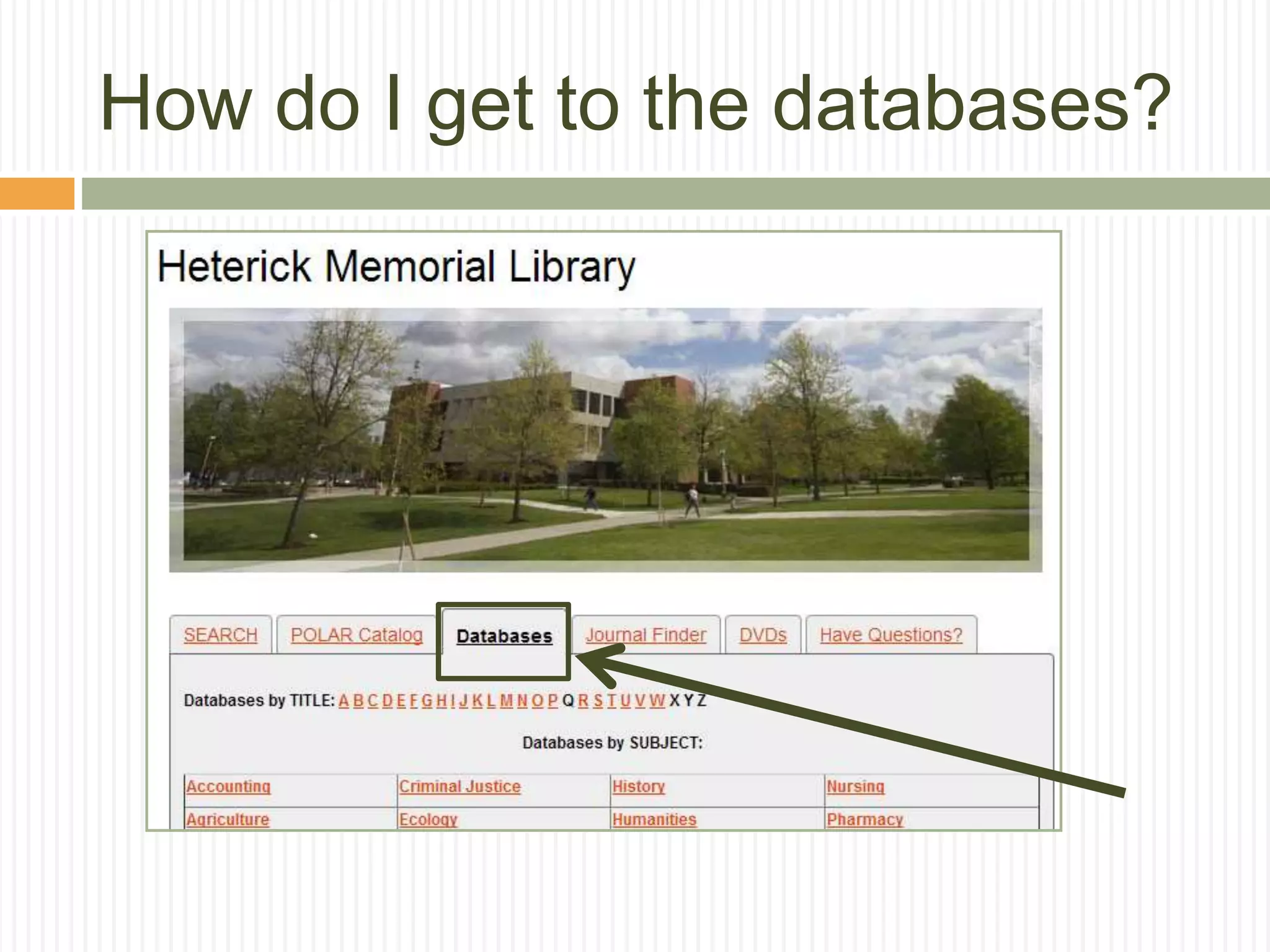
How do I get to the databases?
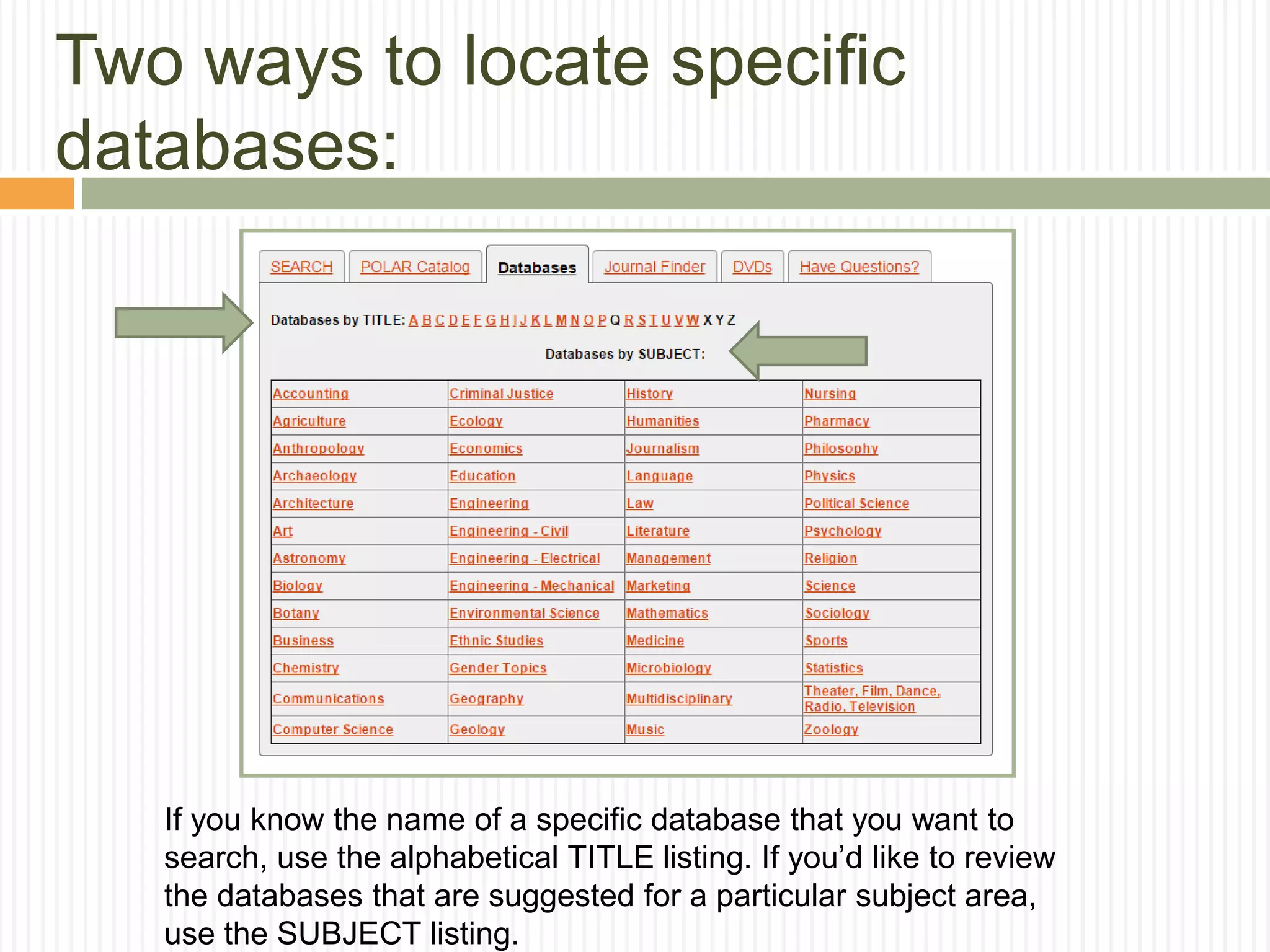
Two ways to locate specific
databases:
If you know the name of a specific database that you want to
search, use the alphabetical TITLE listing. If you’d like to review
the databases that are suggested for a particular subject area,
use the SUBJECT listing.
Always remember:
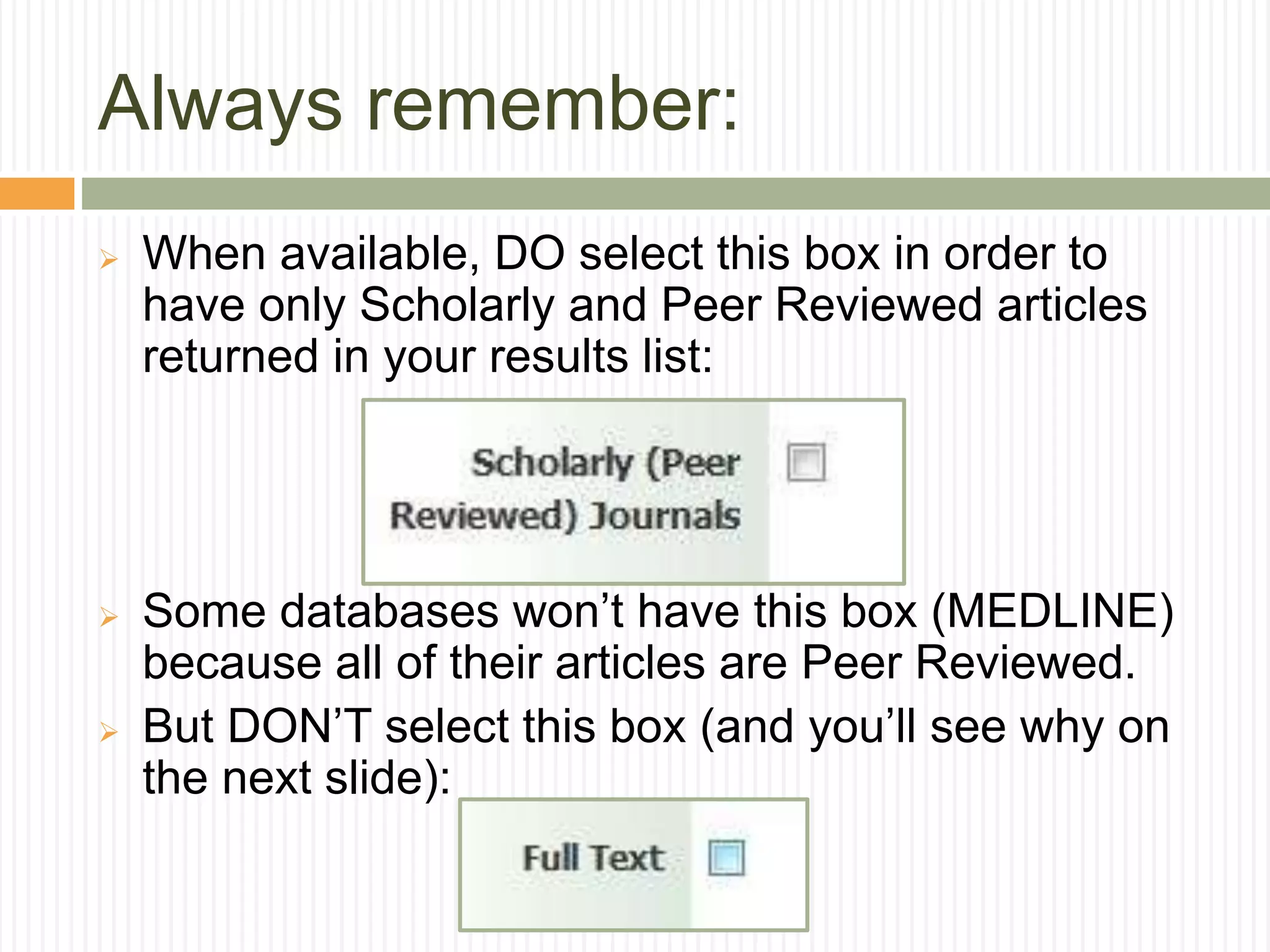
 When available, DO select this box in order to
have only Scholarly and Peer Reviewed articles
returned in your results list:
 Some databases won’t have this box (MEDLINE)
because all of their articles are Peer Reviewed.
 But DON’T select this box (and you’ll see why on
the next slide):
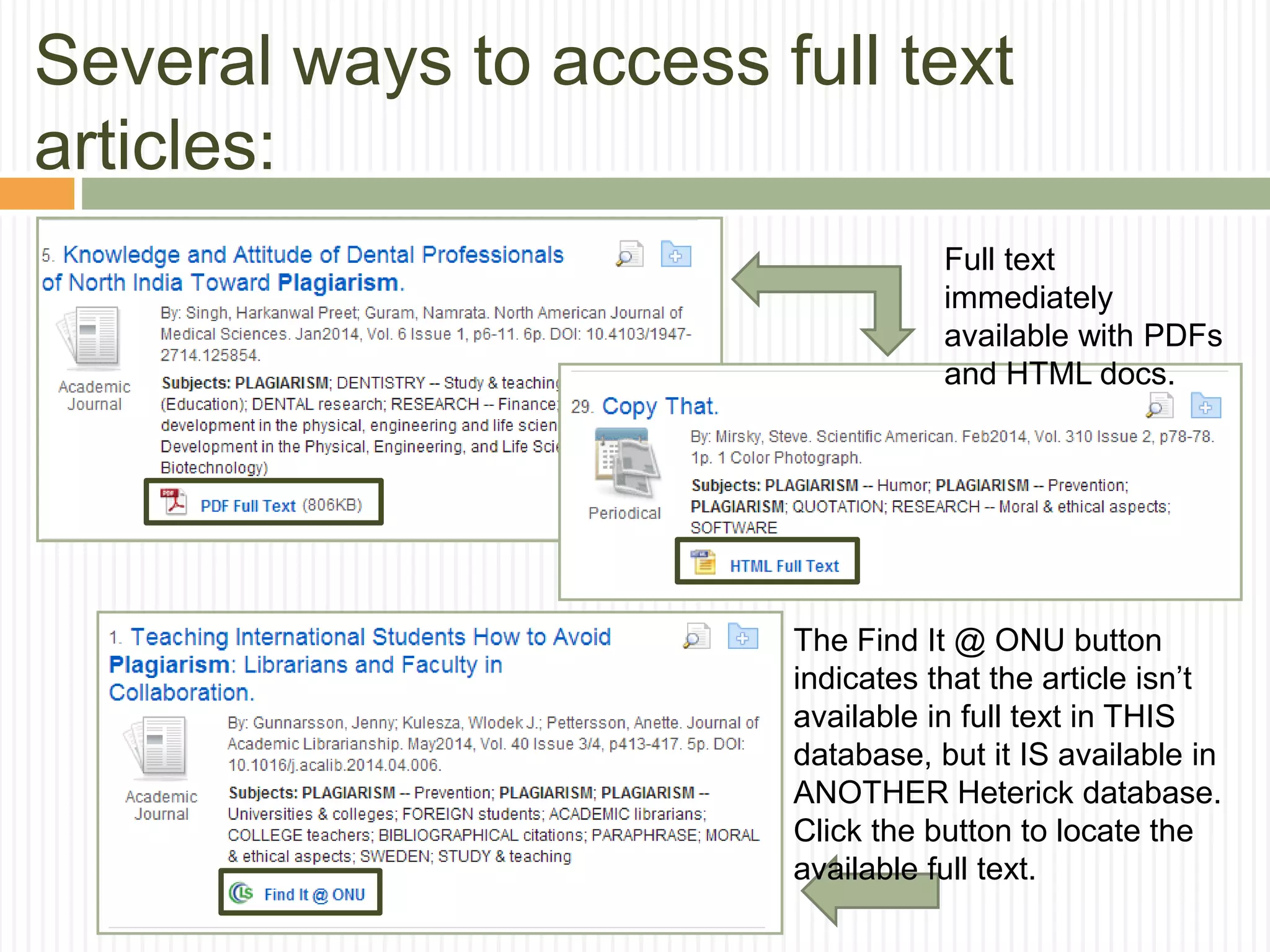
Several ways to access full text
articles:
Full text
immediately
available with PDFs
and HTML docs.
The Find It @ ONU button
indicates that the article isn’t
available in full text in THIS
database, but it IS available in
ANOTHER Heterick database.
Click the button to locate the
available full text.
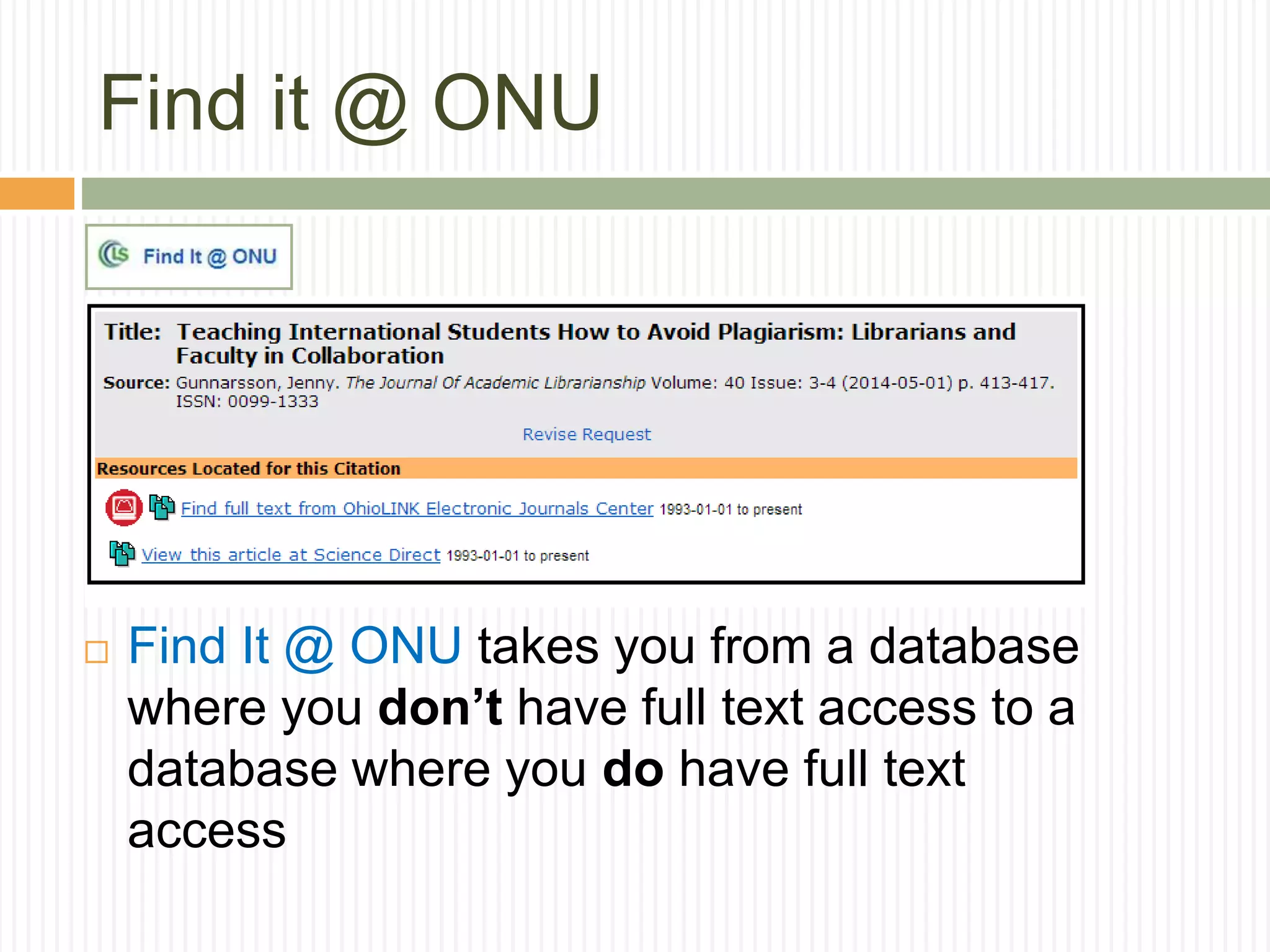
Find it @ ONU
 Find It @ ONU takes you from a database
where you don’t have full text access to a
database where you do have full text
access
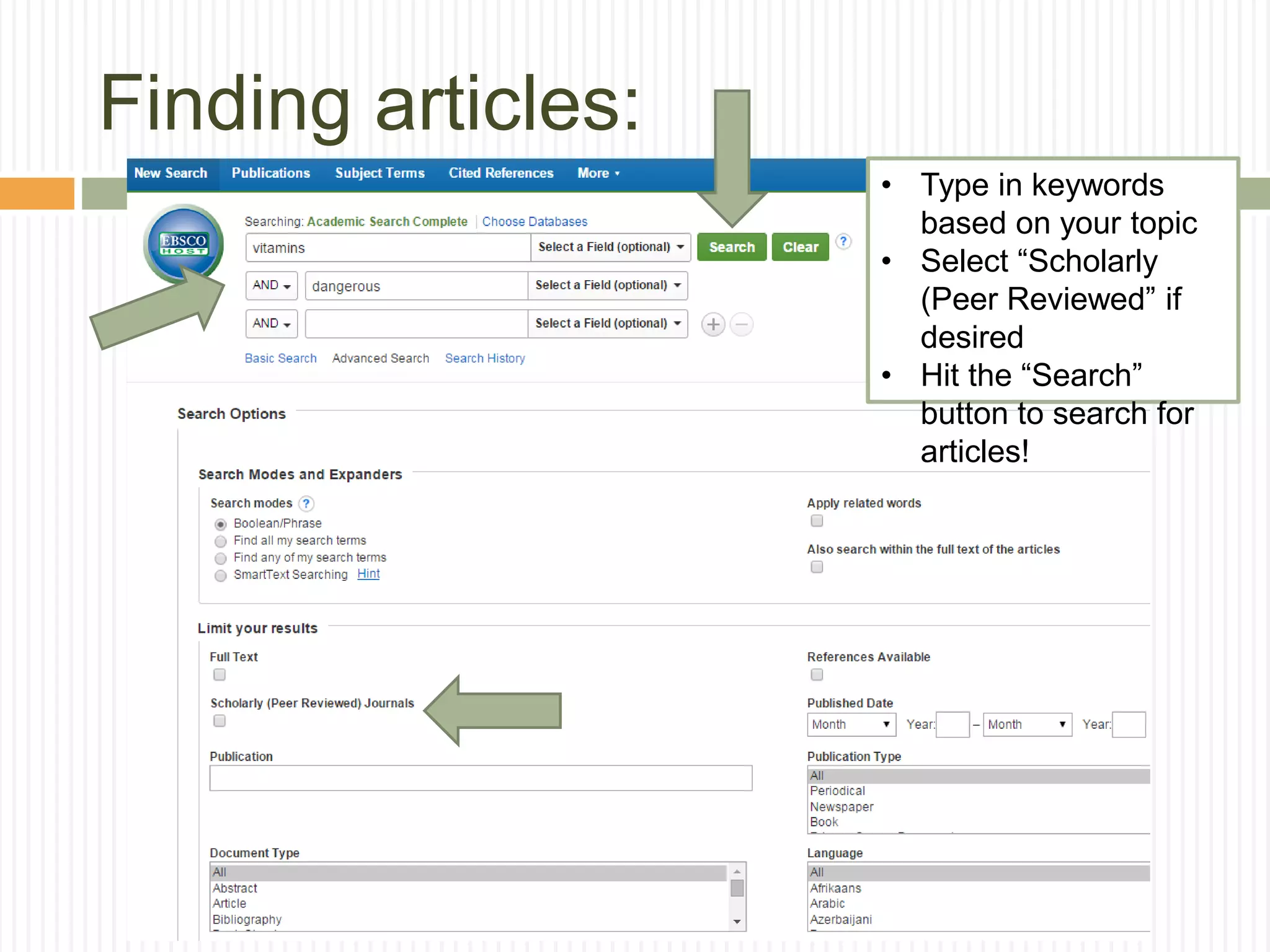
Finding articles:
• Type in keywords
based on your topic
• Select “Scholarly
(Peer Reviewed” if
desired
• Hit the “Search”
button to search for
articles!
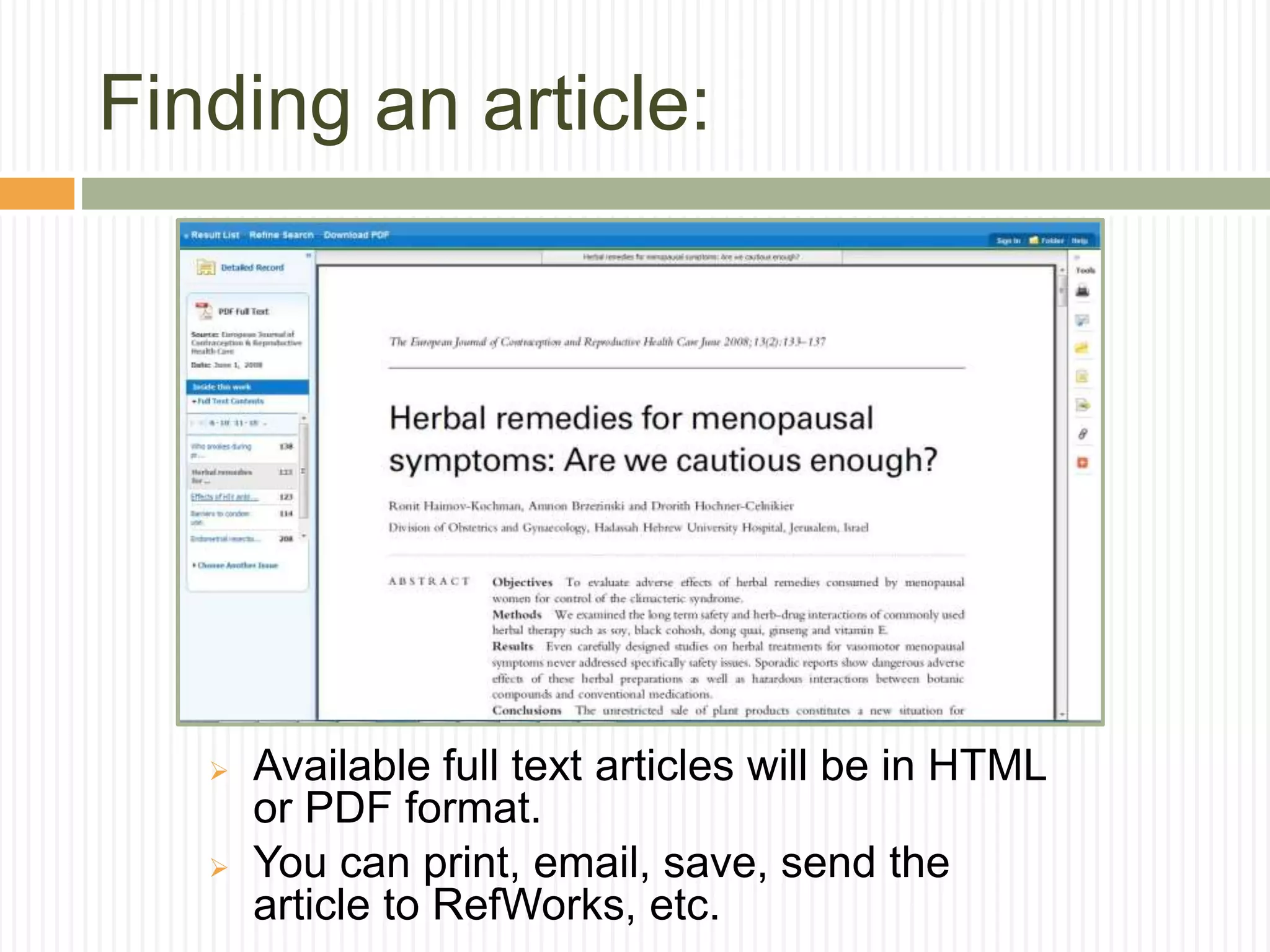
Finding an article:
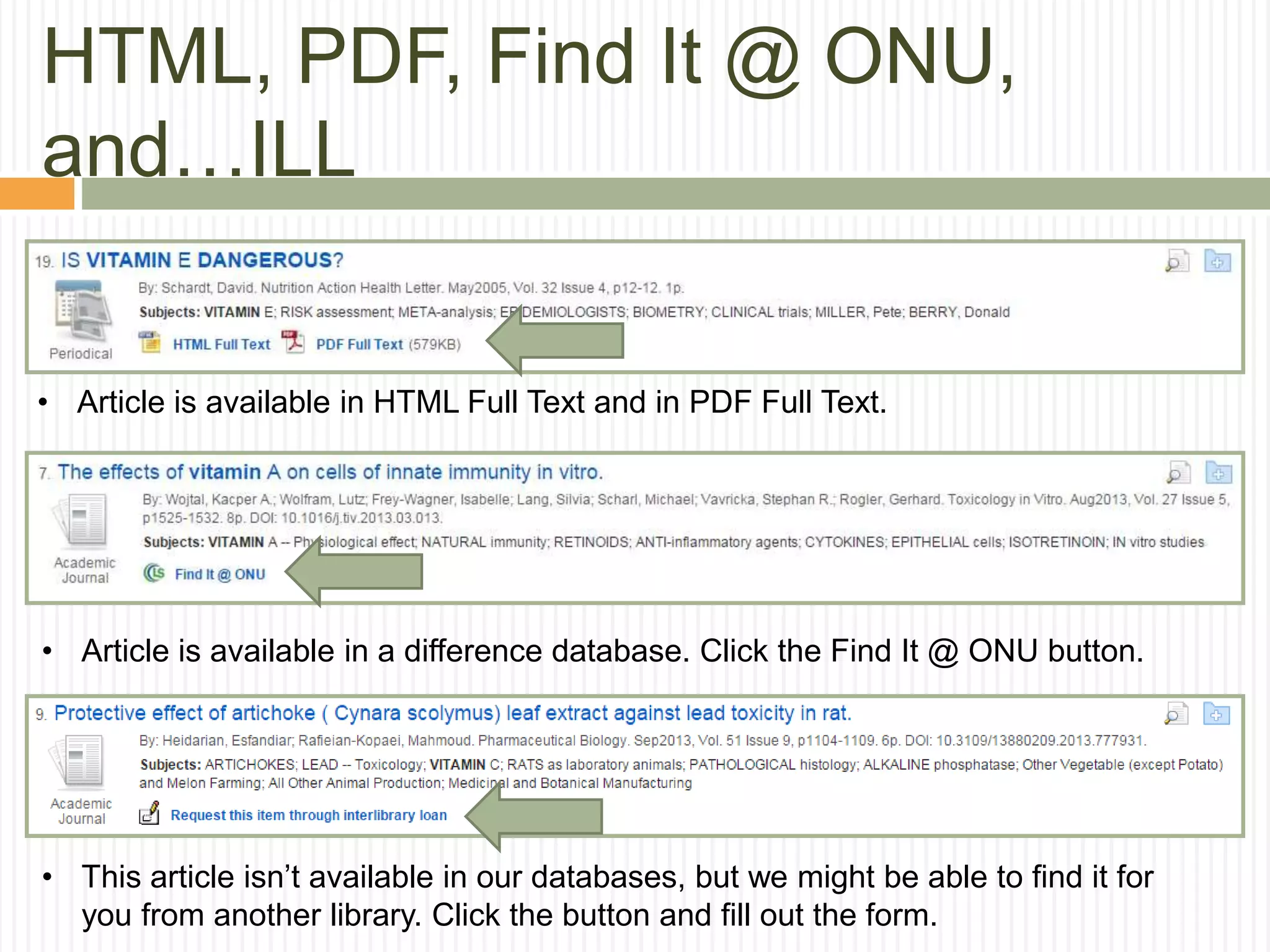
 Available full text articles will be in HTML
or PDF format.
 You can print, email, save, send the
article to RefWorks, etc.
HTML, PDF, Find It @ ONU,
and…ILL
• Article is available in HTML Full Text and in PDF Full Text.
• Article is available in a difference database. Click the Find It @ ONU button.
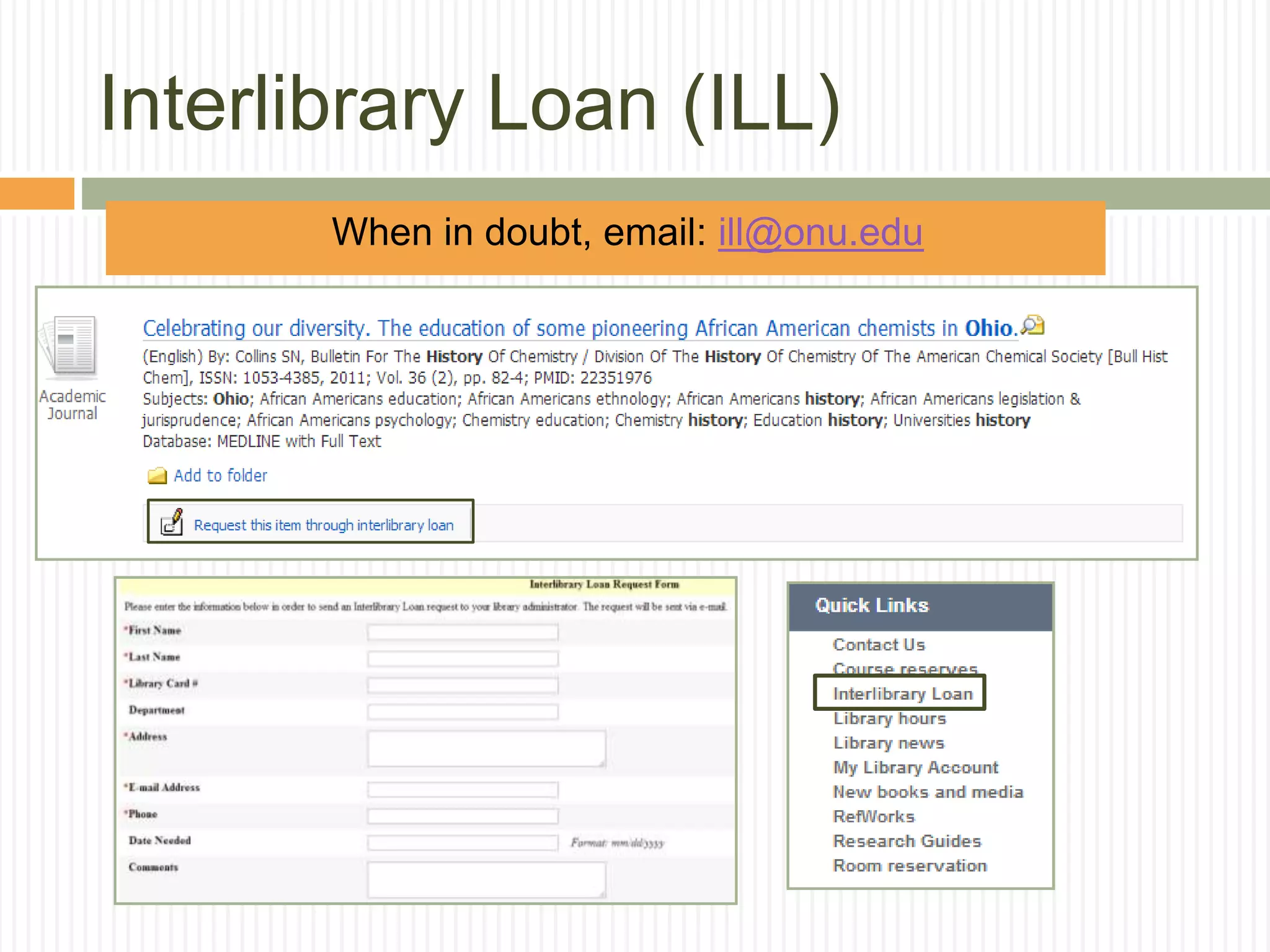
• This article isn’t available in our databases, but we might be able to find it for
you from another library. Click the button and fill out the form.
Interlibrary Loan (ILL)
 When in doubt, email: ill@onu.edu
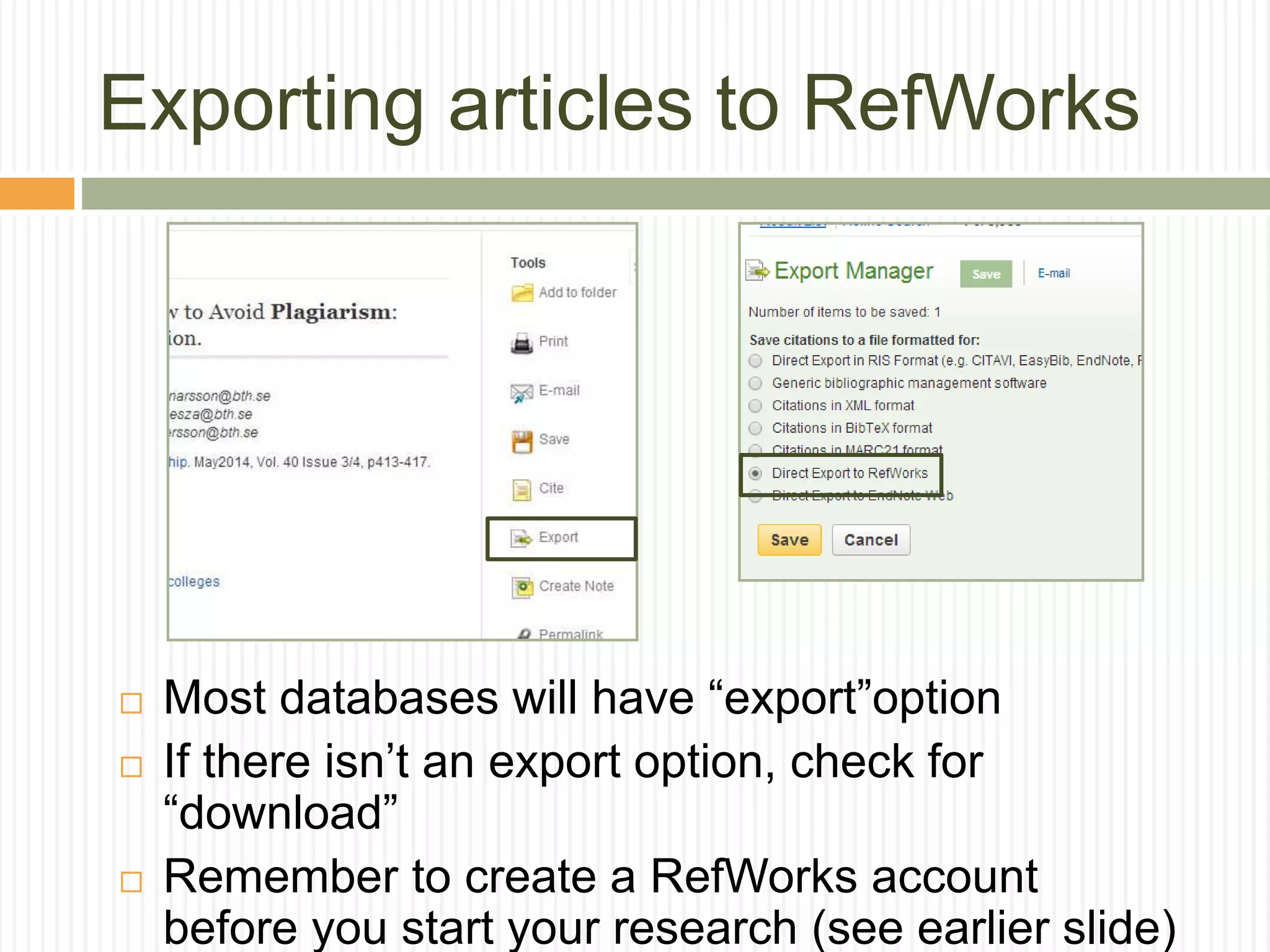
Exporting articles to RefWorks
 Most databases will have “export”option
 If there isn’t an export option, check for
“download”
 Remember to create a RefWorks account
before you start your research (see earlier slide)
And finally: Good luck with your
research!
 Remember, the
librarians are here to
help you with your
research. Come
back and see us!

Library Reserach

  • 1.
    INTRODUCTION TO RESEARCH ATHETERICK MEMORIAL LIBRARY ENGL 1521 Professor Jenny Donley, Librarian Heterick Memorial Library
  • 2.
    Introduction  Welcome!  JennyDonley  Cataloging and Knowledge Architect Librarian  j-donley.1@onu.edu  Kelly Kobiela  Systems Librarian  k-kobiela@onu.edu  Librarians on duty:  Monday – Friday  8:00 AM – 4:30 PM  Monday – Wednesday  6:00 PM – 9:00 PM  Reference email: reference@onu.edu  Feel free to stop by or send us an email
  • 3.
  • 4.
    Libraries at ONU Heterick Memorial Library  Undergraduate library and accessible to all students  Taggart Law Library  Library for law school and accessible to all students
  • 5.
    What we willaccomplish today:  How to do research  How to use the library to do research  What resources to use when doing research
  • 6.
    What the libraryoffers:  ~400,000 items in POLAR, the ONU library catalog  ~20,000,000 items in OhioLink  260 Databases  400+ print periodicals  Tens of thousands of electronic journal titles  Juvenile, Young Adult, and Graphic Novel collections  DVDs, CDs, streaming audiovisuals, and streaming music
  • 7.
  • 8.
    How will Iremember everything? Or just go to: Research Guides!
  • 9.
    ONU ID =Library Card  Your student ID is also your library card!  Always enter your whole ID number, including zeros. EVA Eva Maglott 00021559801 Eva Maglott
  • 10.
    My Library Account oAllows you to see the items that you have checked out as well as the status of ones you have requested through OhioLINK. o You can also renew (when renewals are available) items online and view any accrued fines.
  • 11.
    My Library Account Enteryour first and last name and all 11 digits on your ONU ID.
  • 12.
    Research Strategies  Startbig by doing background reading  Narrow your topic for a more focused project  Work on finding the right search terms  Use patterns you see in the results list to narrow your topic  Most resources will have a built-in thesaurus that will suggest phrases and subjects to search by…use them! Think of your research as a tree…broad at the top, but narrow at the bottom!
  • 13.
    Can’t I justGoogle articles? Google and Wikipedia:  Aren’t evil  Can prove valuable  Can’t be used as a source  Turn to the databases for source material From the University of Wisconsin Library, worksheet for evaluating web sites What about Google Scholar?  Good: gives you an idea of how much is out there, and what search terms to use  Bad: you can’t narrow your search by peer- reviewed journal articles
  • 14.
    But I foundthis great website… Critically analyzing web sources  What? is the page/site about  Who? created and maintains this site  Where? is the information coming from  Why? is the information presented on the web  When? was the page created or last updated  How? accurate or credible is the page From the University of Wisconsin Library, worksheet for evaluating web sites
  • 15.
    Warning! Always rememberto cite.  The Oxford English Dictionary defines plagiarism as: "...the wrongful appropriation or purloining, and publication as one's own, the ideas or the expression of the ideas (literary, artistic, musical, mechanical, etc.) of an other."
  • 16.
    RefWorks…your citation headquarters  Saveyour articles to review later and create citations with your RefWorks account.
  • 17.
     Books canhelp you narrow your research topic by giving you background information. Books in the POLAR Library Catalog:  Basic keyword searches are a good way to get started.  Looks in several locations  Subjects  Article title  Abstracts  Table of contents  Does not require an exact match  Generates a large number of hits  Good if you are not familiar with terminology
  • 18.
    Books in thePOLAR Library Catalog: ebook Law Library Heterick Library • Books will say that they are located in Heterick Library, the Law Library, or eBooks • Reference books are on the 1st floor, Juvenile books are on the 2nd floor, and the general circulating collection is on the 3rd floor. ebook
  • 19.
    o Helpful ifa book that you want is not available through POLAR, or is already checked out in POLAR. o Most of the university and college libraries in Ohio share their materials through this consortium catalog called OhioLINK. Books in the OhioLINK Library Catalog: HML1. Click on the OhioLINK icon in the POLAR catalog to access the consortium catalog.
  • 20.
    Books in theOhioLINK Library Catalog: 2. Click on the icon.
  • 21.
    3. Select OhioNorthern U. 4. Enter your first and last name and all 11 digits exactly as they appear on your ID. 5. Be sure to select Heterick as your pick up location and then click submit. 6. An email will be sent when the item is ready for pickup. Books in the OhioLINK Library Catalog:
  • 22.
    Finding articles indatabases  What is the basic definition of a library database?  A library database is an electronic (online) catalog or index  Library databases contain information about published items  Library databases are searchable  The library subscribes to many databases so the ONU community has access to these resources. When you’re searching a database, you are not searching “the web.”  What types of items are indexed by library databases?  Articles in Journals/Magazines/Newspapers  Reference Information (i.e. entries from Encyclopedias, Dictionaries, etc.)  Books & other documents Source: http://web.calstatela.edu/library/whatisadatabase.htm
  • 23.
    What do databasesoffer?  Databases are often the best tools for locating journal and newspaper articles.  Most databases are subject specific, but some are multi-disciplinary and those are a great place to begin your research.  Many databases give access to full text of articles.
  • 24.
    Keep in mind: Types of Articles  Popular vs. Scholarly  Popular = Magazine  Magazines tend to have glossy pages, lots of pictures, and can be read and understood by the general public  Scholarly = Journal  Scholarly journals are usually peer-reviewed and tend to be aimed at professionals in the field  Sometimes a professor or assignment will require that you use scholarly/peer reviewed articles
  • 25.
    Five key databasesto remember:  Academic Source Complete  A good general database where you can begin your research.  Business Source Complete  Similar to Academic Search Complete, but best for business- related topics.  MasterFILE Premier  A database that focuses on popular magazines and periodicals. Good for current events topics and public perception.  MEDLINE with Full Text  100% scholarly database for medical topics. Uses high-level technical language.  Points of View  A database designed to help you explore both sides of a
  • 26.
    How do Iget to the databases?
  • 27.
    Two ways tolocate specific databases: If you know the name of a specific database that you want to search, use the alphabetical TITLE listing. If you’d like to review the databases that are suggested for a particular subject area, use the SUBJECT listing.
  • 28.
    Always remember:  Whenavailable, DO select this box in order to have only Scholarly and Peer Reviewed articles returned in your results list:  Some databases won’t have this box (MEDLINE) because all of their articles are Peer Reviewed.  But DON’T select this box (and you’ll see why on the next slide):
  • 29.
    Several ways toaccess full text articles: Full text immediately available with PDFs and HTML docs. The Find It @ ONU button indicates that the article isn’t available in full text in THIS database, but it IS available in ANOTHER Heterick database. Click the button to locate the available full text.
  • 30.
    Find it @ONU  Find It @ ONU takes you from a database where you don’t have full text access to a database where you do have full text access
  • 31.
    Finding articles: • Typein keywords based on your topic • Select “Scholarly (Peer Reviewed” if desired • Hit the “Search” button to search for articles!
  • 32.
    Finding an article: Available full text articles will be in HTML or PDF format.  You can print, email, save, send the article to RefWorks, etc.
  • 33.
    HTML, PDF, FindIt @ ONU, and…ILL • Article is available in HTML Full Text and in PDF Full Text. • Article is available in a difference database. Click the Find It @ ONU button. • This article isn’t available in our databases, but we might be able to find it for you from another library. Click the button and fill out the form.
  • 34.
    Interlibrary Loan (ILL) When in doubt, email: ill@onu.edu
  • 35.
    Exporting articles toRefWorks  Most databases will have “export”option  If there isn’t an export option, check for “download”  Remember to create a RefWorks account before you start your research (see earlier slide)
  • 36.
    And finally: Goodluck with your research!  Remember, the librarians are here to help you with your research. Come back and see us!

Editor's Notes

  • #6 A list of procedures and steps, or a lecture slide with media.