Science 
Fiction and 
Philosophy 
Dr. Katayama 
Trex 1001 
Prof. Jenny Donley 
Catalog and Knowledge Architect Librarian 
Heterick Memorial Library 
https://www.etsy.com/listing/55793249/classic-robot-science-fiction-retro-toy 
http://honsbioethics.clevelandhistory.org/files/2011/08/retro_brain.jpg
Introduction 
● Welcome! 
● Jenny Donley, j-donley.1@onu.edu 
● Feel free to visit or email 
● Librarians on duty: 
● 8-4:30, 6-9 Mon – Weds 
● 8-4 Friday 
● reference@onu.edu
Libraries at ONU 
Taggart Law Library Heterick Memorial Library 
Undergraduate Library: 
accessible to all 
Law School Library: 
accessible to all
ONU card = Library ID 
Remember to always 
use all 11 digits!
How am I supposed to remember 
all of this stuff?
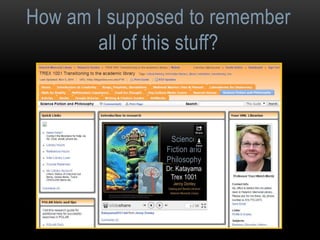
Research Guides
How to do research: 
Seven Steps of the Research Process 
● STEP 1: IDENTIFY AND DEVELOP YOUR TOPIC 
● STEP 2: FIND BACKGROUND INFORMATION 
● STEP 3: USE CATALOGS TO FIND BOOKS AND MEDIA 
● STEP 4: FIND INTERNET RESOURCES (if appropriate for the assignment) 
● STEP 5: USE DATABASES TO FIND PERIODICAL ARTICLES 
● STEP 6: EVALUATE WHAT YOU FIND 
● STEP 7: CITE WHAT YOU FIND 
Amended with permission by the Librarians at the Olin and Uris Libraries of Cornell University
Identify and develop your topic: 
How to start your research 
● State your topic as a question 
● Identify main concepts or keywords 
● Test the topic: Look for keywords, synonyms, and related 
terms for the information sought 
● Subject headings in catalogs 
● Built-in thesauri in many databases 
● Reference sources, textbooks, lecture notes, readings 
● Librarians, Instructors 
● Internet
Find Background Information: 
Background Research 
• Background research = Reference books 
and encyclopedias 
• Library catalog 
• Look at Electronic Reference Sources 
box on the tab for this class on the 
TREX research guide for a link to the 
library’s databases as well as links to 
electronic encyclopedias and reference 
materials.
Use catalogs to find books and media: 
POLAR, OhioLINK, and ILL 
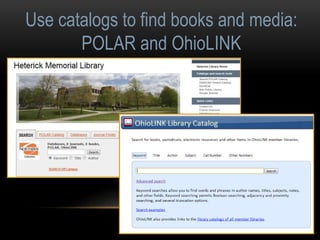
• POLAR: Access physical and electronic items located 
at HML (Heterick Memorial Library) as well as LAW 
(Taggart Law Library). 
• OhioLINK: Next step if you can’t find what you want in 
the HML or LAW collections. 
• ILL: Option of last resort for books and articles.
Use catalogs to find books and media: 
POLAR and OhioLINK
Use catalogs to find books and media: 
POLAR catalog
Use catalogs to find books and media: 
POLAR catalog 
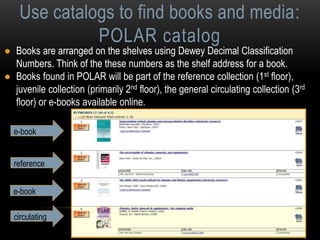
● Books are arranged on the shelves using Dewey Decimal Classification 
Numbers. Think of the these numbers as the shelf address for a book. 
● Books found in POLAR will be part of the reference collection (1st floor), 
juvenile collection (primarily 2nd floor), the general circulating collection (3rd 
floor) or e-books available online. 
e-book 
reference 
e-book 
circulating
Use catalogs to find books and media: 
OhioLINK catalog 
● Over 90 university and college libraries in Ohio share their 
materials through a consortium catalog called OhioLINK 
● There are around 10 million items available 
● A link from POLAR permits you to search OhioLINK and 
submit requests. It is also available through the Heterick 
homepage 
● Most requests arrive in 2-3 working days 
● There is no charge to request materials through OhioLINK 
● Limited to 100 items checked out at a time 
● MAY RENEW UP TO 4 TIMES!
Use catalogs to find books and media: 
OhioLINK catalog 
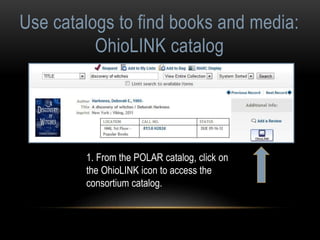
1. From the POLAR catalog, click on 
the OhioLINK icon to access the 
consortium catalog.
Use catalogs to find books and media: 
OhioLINK catalog 
2. Click on the icon.
Use catalogs to find books and media: 
OhioLINK catalog 
3. Select Ohio Northern U. 
4. Enter your first and last name 
and all 11 digits exactly as they 
appear on your ID. 
5. Be sure to select Heterick as 
your pick up location and then click 
submit. 
6. An email will be sent when the 
item is ready for pickup.
Find internet resources 
(if appropriate for the assignment) 
• Does the information located satisfy the research need? 
• Is the information factual and unbiased? 
• See additional tips for evaluating web sources and web 
pages in the Research Guide.
Critically analyzing web sources using 
• Currency 
Find internet resources: 
the CRAAP Test 
• Relevance/Coverage 
• Authority 
• Accuracy 
• Purpose/Objectivity 
• Timeliness of the information 
• Depth and importance of the 
information 
• Source of the information 
• Reliability of the information 
• Possible bias present in the 
information
Find internet resources: 
Critically analyzing web sources 
• What? is the page/site about 
• Who? created and maintains this site 
• Where? Is the information coming from 
• Why? Is the information presented on the web 
• When? Was the page created or last updated 
• How? Accurate or credible is the page 
From the University of Wisconsin Library 
worksheet for evaluating web sites
Web research vs. Library databases 
Internet 
• Material from numerous 
sources, individuals, 
government, etc. 
• Search engines must work 
with material prepared without 
regard for specific software 
• Quality of material varies 
• Generally do not access for-profit 
information 
• Content often anonymous and 
undated 
Databases 
• Usually created by a single publisher 
• Content pre-arranged for easy 
searching 
• Quality-controlled by editorial staff 
• Most are available only to 
subscribers 
• Sources are usually identified and 
dated 
• Databases often focus on a specific 
subject or discipline, but some cover 
several areas
Using databases to find periodical articles: 
Overview of databases 
• What is the basic definition of a library database? 
• A library database is an electronic (online) catalog or index 
• Library databases contain information about published items 
• Library databases are searchable 
• The library subscribes to many databases so the ONU community has access 
to these resources. When you’re searching a database, you are not searching 
“the web.” 
• What types of items are indexed by library databases? 
• Articles in Journals/Magazines/Newspapers 
• Reference Information (i.e. entries from Encyclopedias, Dictionaries, etc.) 
• Books & other documents 
Source: http://web.calstatela.edu/library/whatisadatabase.htm
Use databases to find periodical articles: 
Popular vs. scholarly periodicals 
● A periodical is something that is published at regular 
intervals. Magazines and journals are both periodicals, 
however… 
● Magazines are periodicals that contain more popular 
content. They tend to have glossy pages, lots of pictures, 
and can be read and understood by the general public. 
They contain shorter articles written by a staff of journalists. 
● Journals are periodicals that 
contain scholarly and peer-reviewed 
articles, written by 
scholars and researchers, that are 
aimed at professionals in the field. 
The articles are longer and have 
extensive bibliographies at the 
ends of the articles.
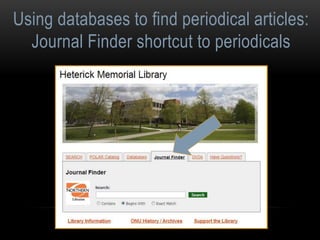
Using databases to find periodical articles: 
Journal Finder shortcut to periodicals
Using databases to find periodical articles: 
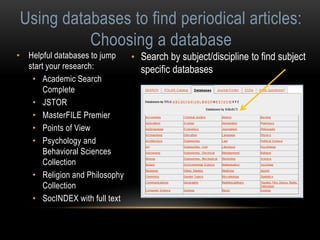
Choosing a database 
• Helpful databases to jump 
start your research: 
• Academic Search 
Complete 
• JSTOR 
• MasterFILE Premier 
• Points of View 
• Psychology and 
Behavioral Sciences 
Collection 
• Religion and Philosophy 
Collection 
• SocINDEX with full text 
• Search by subject/discipline to find subject 
specific databases
SEARCH… 
the Discovery Layer
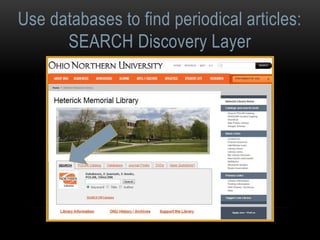
Use databases to find periodical articles: 
SEARCH Discovery Layer 
• What it includes: 
• POLAR catalog 
• Article-level searching for all EBSCO databases 
• Article-level searching for a variety of other databases: 
JSTOR, Hoover’s, AccessPharmacy, etc. 
• Title-level searching for most other databases: IEEE, 
CIAO, Proquest Nursing & Allied Health 
• OhioLINK Central Catalog
Use databases to find periodical articles: 
SEARCH Discovery Layer
Use databases to find periodical articles: 
SEARCH results for POLAR
Use databases to find periodical articles: 
SEARCH results for OhioLINK
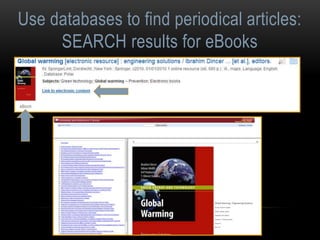
Use databases to find periodical articles: 
SEARCH results for eBooks
Use databases to find periodical articles: 
SEARCH results Full Text
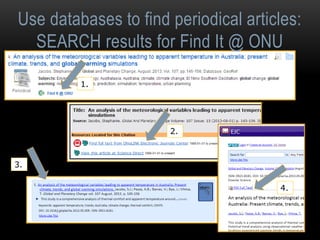
Use databases to find periodical articles: 
SEARCH results for Find It @ ONU 
1. 
3. 
2. 
4.
Use databases to find periodical articles: 
SEARCH results for ILL 
1. 
2. 
Alternate option:
Use databases to find periodical articles: 
Facets to limit your results
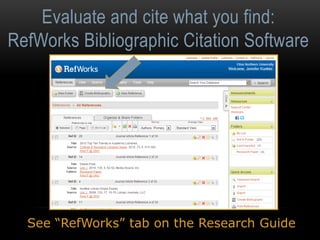
Evaluate and cite what you find: 
RefWorks Bibliographic Citation Software
Evaluate and cite what you find: 
RefWorks Bibliographic Citation Software 
See “RefWorks” tab on the Research Guide
Cite what you find: 
Standard citation formats 
These are the three citation styles that are most 
frequently used at ONU: 
● MLA (Modern Language Association) 
● APA (American Psychological Association) 
● CMS (Chicago Manual of Style) 
Always ask your professors which citation style 
you should use for their particular class.
Happy 
Researching! 
Remember, the librarians 
are here to help you with 
your research. Come and 
see us! 
https://www.etsy.com/listing/118323993/t-retro-science-fiction-alphabet-letter

Katayama2014

  • 1.
    Science Fiction and Philosophy Dr. Katayama Trex 1001 Prof. Jenny Donley Catalog and Knowledge Architect Librarian Heterick Memorial Library https://www.etsy.com/listing/55793249/classic-robot-science-fiction-retro-toy http://honsbioethics.clevelandhistory.org/files/2011/08/retro_brain.jpg
  • 2.
    Introduction ● Welcome! ● Jenny Donley, j-donley.1@onu.edu ● Feel free to visit or email ● Librarians on duty: ● 8-4:30, 6-9 Mon – Weds ● 8-4 Friday ● reference@onu.edu
  • 3.
    Libraries at ONU Taggart Law Library Heterick Memorial Library Undergraduate Library: accessible to all Law School Library: accessible to all
  • 4.
    ONU card =Library ID Remember to always use all 11 digits!
  • 5.
    How am Isupposed to remember all of this stuff?
  • 6.
  • 7.
    How to doresearch: Seven Steps of the Research Process ● STEP 1: IDENTIFY AND DEVELOP YOUR TOPIC ● STEP 2: FIND BACKGROUND INFORMATION ● STEP 3: USE CATALOGS TO FIND BOOKS AND MEDIA ● STEP 4: FIND INTERNET RESOURCES (if appropriate for the assignment) ● STEP 5: USE DATABASES TO FIND PERIODICAL ARTICLES ● STEP 6: EVALUATE WHAT YOU FIND ● STEP 7: CITE WHAT YOU FIND Amended with permission by the Librarians at the Olin and Uris Libraries of Cornell University
  • 8.
    Identify and developyour topic: How to start your research ● State your topic as a question ● Identify main concepts or keywords ● Test the topic: Look for keywords, synonyms, and related terms for the information sought ● Subject headings in catalogs ● Built-in thesauri in many databases ● Reference sources, textbooks, lecture notes, readings ● Librarians, Instructors ● Internet
  • 9.
    Find Background Information: Background Research • Background research = Reference books and encyclopedias • Library catalog • Look at Electronic Reference Sources box on the tab for this class on the TREX research guide for a link to the library’s databases as well as links to electronic encyclopedias and reference materials.
  • 10.
    Use catalogs tofind books and media: POLAR, OhioLINK, and ILL • POLAR: Access physical and electronic items located at HML (Heterick Memorial Library) as well as LAW (Taggart Law Library). • OhioLINK: Next step if you can’t find what you want in the HML or LAW collections. • ILL: Option of last resort for books and articles.
  • 11.
    Use catalogs tofind books and media: POLAR and OhioLINK
  • 12.
    Use catalogs tofind books and media: POLAR catalog
  • 13.
    Use catalogs tofind books and media: POLAR catalog ● Books are arranged on the shelves using Dewey Decimal Classification Numbers. Think of the these numbers as the shelf address for a book. ● Books found in POLAR will be part of the reference collection (1st floor), juvenile collection (primarily 2nd floor), the general circulating collection (3rd floor) or e-books available online. e-book reference e-book circulating
  • 14.
    Use catalogs tofind books and media: OhioLINK catalog ● Over 90 university and college libraries in Ohio share their materials through a consortium catalog called OhioLINK ● There are around 10 million items available ● A link from POLAR permits you to search OhioLINK and submit requests. It is also available through the Heterick homepage ● Most requests arrive in 2-3 working days ● There is no charge to request materials through OhioLINK ● Limited to 100 items checked out at a time ● MAY RENEW UP TO 4 TIMES!
  • 15.
    Use catalogs tofind books and media: OhioLINK catalog 1. From the POLAR catalog, click on the OhioLINK icon to access the consortium catalog.
  • 16.
    Use catalogs tofind books and media: OhioLINK catalog 2. Click on the icon.
  • 17.
    Use catalogs tofind books and media: OhioLINK catalog 3. Select Ohio Northern U. 4. Enter your first and last name and all 11 digits exactly as they appear on your ID. 5. Be sure to select Heterick as your pick up location and then click submit. 6. An email will be sent when the item is ready for pickup.
  • 18.
    Find internet resources (if appropriate for the assignment) • Does the information located satisfy the research need? • Is the information factual and unbiased? • See additional tips for evaluating web sources and web pages in the Research Guide.
  • 19.
    Critically analyzing websources using • Currency Find internet resources: the CRAAP Test • Relevance/Coverage • Authority • Accuracy • Purpose/Objectivity • Timeliness of the information • Depth and importance of the information • Source of the information • Reliability of the information • Possible bias present in the information
  • 20.
    Find internet resources: Critically analyzing web sources • What? is the page/site about • Who? created and maintains this site • Where? Is the information coming from • Why? Is the information presented on the web • When? Was the page created or last updated • How? Accurate or credible is the page From the University of Wisconsin Library worksheet for evaluating web sites
  • 21.
    Web research vs.Library databases Internet • Material from numerous sources, individuals, government, etc. • Search engines must work with material prepared without regard for specific software • Quality of material varies • Generally do not access for-profit information • Content often anonymous and undated Databases • Usually created by a single publisher • Content pre-arranged for easy searching • Quality-controlled by editorial staff • Most are available only to subscribers • Sources are usually identified and dated • Databases often focus on a specific subject or discipline, but some cover several areas
  • 22.
    Using databases tofind periodical articles: Overview of databases • What is the basic definition of a library database? • A library database is an electronic (online) catalog or index • Library databases contain information about published items • Library databases are searchable • The library subscribes to many databases so the ONU community has access to these resources. When you’re searching a database, you are not searching “the web.” • What types of items are indexed by library databases? • Articles in Journals/Magazines/Newspapers • Reference Information (i.e. entries from Encyclopedias, Dictionaries, etc.) • Books & other documents Source: http://web.calstatela.edu/library/whatisadatabase.htm
  • 23.
    Use databases tofind periodical articles: Popular vs. scholarly periodicals ● A periodical is something that is published at regular intervals. Magazines and journals are both periodicals, however… ● Magazines are periodicals that contain more popular content. They tend to have glossy pages, lots of pictures, and can be read and understood by the general public. They contain shorter articles written by a staff of journalists. ● Journals are periodicals that contain scholarly and peer-reviewed articles, written by scholars and researchers, that are aimed at professionals in the field. The articles are longer and have extensive bibliographies at the ends of the articles.
  • 24.
    Using databases tofind periodical articles: Journal Finder shortcut to periodicals
  • 25.
    Using databases tofind periodical articles: Choosing a database • Helpful databases to jump start your research: • Academic Search Complete • JSTOR • MasterFILE Premier • Points of View • Psychology and Behavioral Sciences Collection • Religion and Philosophy Collection • SocINDEX with full text • Search by subject/discipline to find subject specific databases
  • 26.
  • 27.
    Use databases tofind periodical articles: SEARCH Discovery Layer • What it includes: • POLAR catalog • Article-level searching for all EBSCO databases • Article-level searching for a variety of other databases: JSTOR, Hoover’s, AccessPharmacy, etc. • Title-level searching for most other databases: IEEE, CIAO, Proquest Nursing & Allied Health • OhioLINK Central Catalog
  • 28.
    Use databases tofind periodical articles: SEARCH Discovery Layer
  • 29.
    Use databases tofind periodical articles: SEARCH results for POLAR
  • 30.
    Use databases tofind periodical articles: SEARCH results for OhioLINK
  • 31.
    Use databases tofind periodical articles: SEARCH results for eBooks
  • 32.
    Use databases tofind periodical articles: SEARCH results Full Text
  • 33.
    Use databases tofind periodical articles: SEARCH results for Find It @ ONU 1. 3. 2. 4.
  • 34.
    Use databases tofind periodical articles: SEARCH results for ILL 1. 2. Alternate option:
  • 35.
    Use databases tofind periodical articles: Facets to limit your results
  • 36.
    Evaluate and citewhat you find: RefWorks Bibliographic Citation Software
  • 37.
    Evaluate and citewhat you find: RefWorks Bibliographic Citation Software See “RefWorks” tab on the Research Guide
  • 38.
    Cite what youfind: Standard citation formats These are the three citation styles that are most frequently used at ONU: ● MLA (Modern Language Association) ● APA (American Psychological Association) ● CMS (Chicago Manual of Style) Always ask your professors which citation style you should use for their particular class.
  • 39.
    Happy Researching! Remember,the librarians are here to help you with your research. Come and see us! https://www.etsy.com/listing/118323993/t-retro-science-fiction-alphabet-letter