INTRODUCTION TO RESEARCH AT
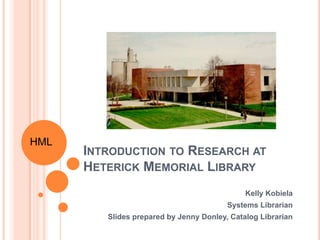
HETERICK MEMORIAL LIBRARY
Kelly Kobiela
Systems Librarian
Slides prepared by Jenny Donley, Catalog Librarian
HML
INTRODUCTION
o Welcome!
o Kelly Kobiela, k-kobiela@onu.edu
o Feel free to stop by or send an email
o Librarians on duty:
o 8am-4:30pm and 6pm-9pm Monday-
Thursday
o 8am-4:30pm Friday
o 10am-3:30pm Sunday
HML
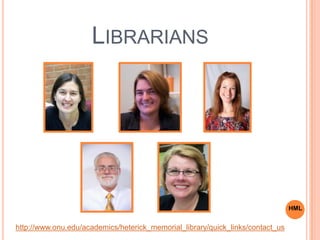
LIBRARIANS
http://www.onu.edu/academics/heterick_memorial_library/quick_links/contact_us
HML
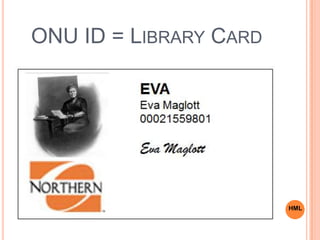
ONU ID = LIBRARY CARD
HML
MY LIBRARY ACCOUNT
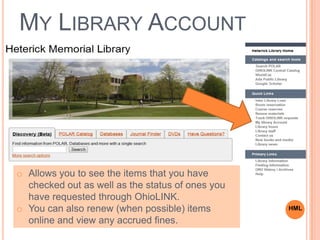
o Allows you to see the items that you have
checked out as well as the status of ones you
have requested through OhioLINK.
o You can also renew (when possible) items
online and view any accrued fines.
HML
MY LIBRARY ACCOUNT
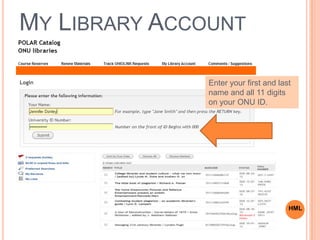
Enter your first and last
name and all 11 digits
on your ONU ID.
HML
ELEMENTS OF THE LIBRARY
o Building
o Resources (print or online)
o Services
o Staff
o PATRONS
HML
THE BUILDINGS:
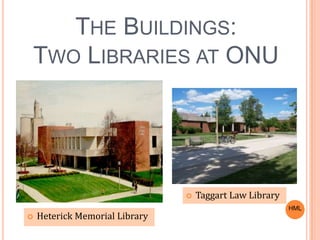
TWO LIBRARIES AT ONU
 Heterick Memorial Library
 Taggart Law Library
HML
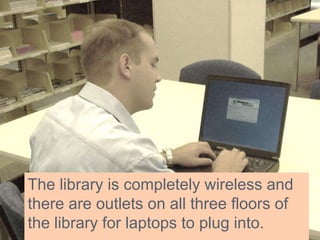
The library is completely wireless and
there are outlets on all three floors of
the library for laptops to plug into.
WELCOME TO
HETERICK LIBRARY!
Heterick Library is divided into three
floors.
First floor – Public services, circulation and
reference desks, reference collection,
computer labs, current periodicals,
microforms, newspapers & new books.
In general, this is a high-traffic area and
not conducive to concentrated study.
FIRST
FLOOR
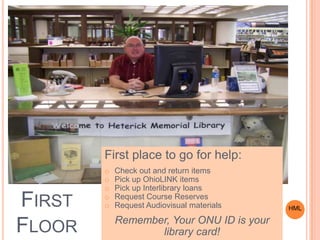
First place to go for help:
o Check out and return items
o Pick up OhioLINK items
o Pick up Interlibrary loans
o Request Course Reserves
o Request Audiovisual materials
Remember, Your ONU ID is your
library card!
HML
TECHNOLOGY ON THE FIRST FLOOR
 Scanner  Attached to the public terminals on the first
floor.
 Copiers  One on each of the three floors. Copies are 10
cents per page
 Public terminals to use exclusively with library resources
are available on all 3 floors.
 Computers  Network computers requiring an ONU log-in
and password in Large Lab (102A) and Small Lab (102B)
and four in front of the Reference Desk.
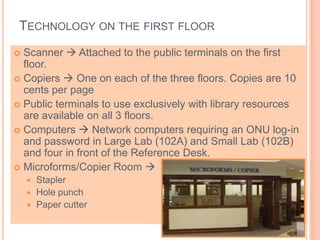
 Microforms/Copier Room 
 Stapler
 Hole punch
 Paper cutter
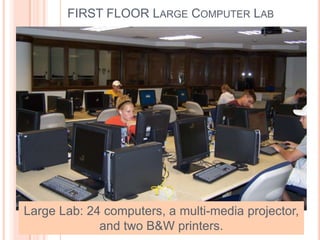
Large Lab: 24 computers, a multi-media projector,
and two B&W printers.
FIRST FLOOR LARGE COMPUTER LAB
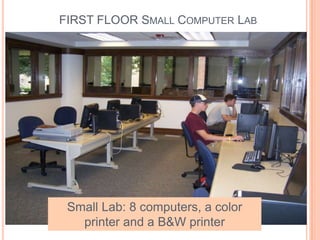
Small Lab: 8 computers, a color
printer and a B&W printer
FIRST FLOOR SMALL COMPUTER LAB
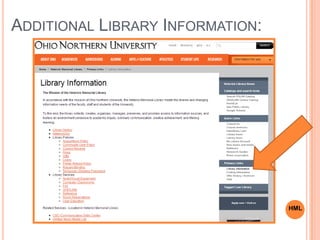
ADDITIONAL LIBRARY INFORMATION:
HML
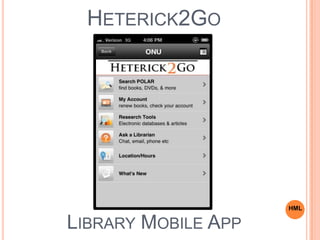
HETERICK2GO
HML
LIBRARY MOBILE APP
SECOND FLOOR
Second floor –Communication Skills
Center, classrooms, bound periodicals,
open study tables, group study carrels,
1-2 person study carrels. In addition, the
juvenile, young adult and graphic novel
collections are on the second floor.
The second floor is intended for studying and
use of bound periodicals.
SECOND FLOOR
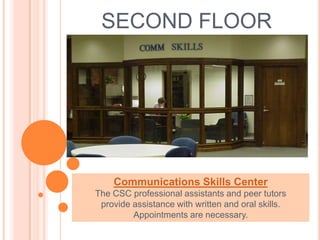
Communications Skills Center
The CSC professional assistants and peer tutors
provide assistance with written and oral skills.
Appointments are necessary.
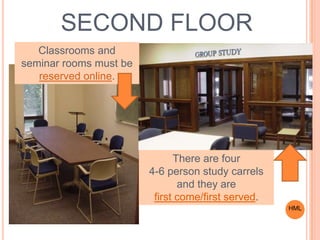
There are four
4-6 person study carrels
and they are
first come/first served.
SECOND FLOOR
Classrooms and
seminar rooms must be
reserved online.
HML
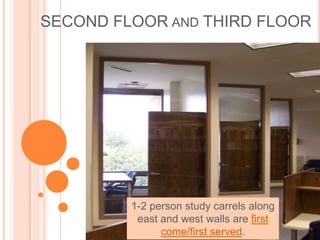
SECOND FLOOR AND THIRD FLOOR
1-2 person study carrels along
east and west walls are first
come/first served.
THIRD FLOOR
Third floor – General book collection
and oversized book collection,1-2
person study carrels, seating in book
stacks, lounge areas.
This is the quietest
floor of the library.
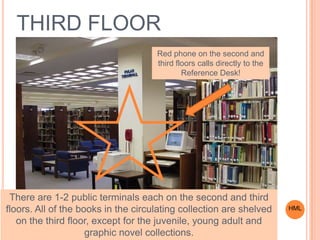
There are 1-2 public terminals each on the second and third
floors. All of the books in the circulating collection are shelved
on the third floor, except for the juvenile, young adult and
graphic novel collections.
Red phone on the second and
third floors calls directly to the
Reference Desk!
THIRD FLOOR
HML
COURSE RESERVES
 Professors will occasionally place items on course
reserve for students in a particular class to access.
 An item on course reserve could be an electronic
document, a book, a textbook, a PDF of a book
chapter or a DVD from the print/physical collection.
 Print/physical reserves require you to visit the library.
You can then read the reserve in the library, copy the
reserve or scan the information provided.
 These items are usually limited to a 1-4 hour check-
out period.
 Electronic reserves sometimes require logging in
with your first and last name and all 11 digits on your
university ID.
HML
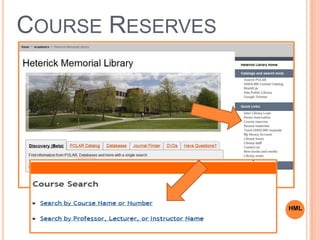
COURSE RESERVES
HML
RESEARCH STRATEGIES
o Start with background reading.
o Narrow and focus your topic.
o Find the right search terms.
o Use patterns you see in the results list to
find additional search terms.
o Many resources will have a built-in
thesaurus that will suggest phrases and
subjects to search by…use them!
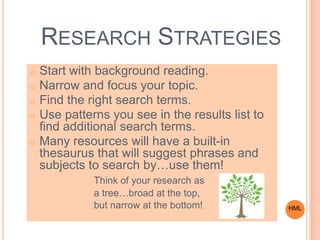
Think of your research as
a tree…broad at the top,
but narrow at the bottom! HML
LIBRARY RESOURCES
o Library Catalog  POLAR
o POLAR shows holdings for
Heterick and Taggert
o Research Databases
o There are general as well as
discipline and subject specific
databases
HML
CATALOG – POLAR
HML
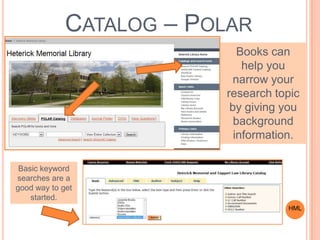
Books can
help you
narrow your
research topic
by giving you
background
information.
Basic keyword
searches are a
good way to get
started.
CATALOG – POLAR
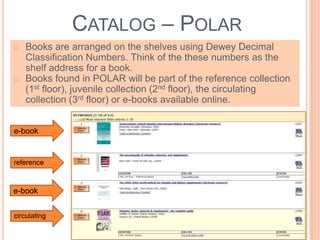
o Books are arranged on the shelves using Dewey Decimal
Classification Numbers. Think of the these numbers as the
shelf address for a book.
o Books found in POLAR will be part of the reference collection
(1st floor), juvenile collection (2nd floor), the circulating
collection (3rd floor) or e-books available online.
e-book
reference
circulating
e-book
CATALOG – POLAR
HML
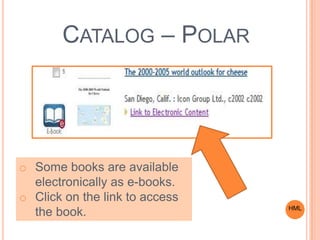
o Some books are available
electronically as e-books.
o Click on the link to access
the book.
CATALOG – POLAR
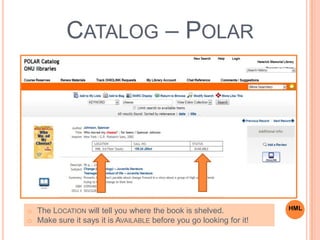
HMLo The LOCATION will tell you where the book is shelved.
o Make sure it says it is AVAILABLE before you go looking for it!
CATALOG – POLAR
HML
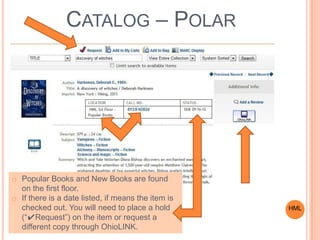
o Popular Books and New Books are found
on the first floor.
o If there is a date listed, if means the item is
checked out. You will need to place a hold
(“✔Request”) on the item or request a
different copy through OhioLINK.
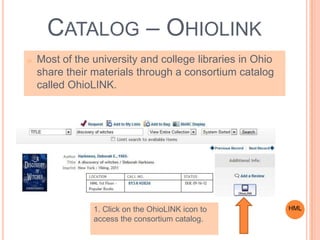
o Most of the university and college libraries in Ohio
share their materials through a consortium catalog
called OhioLINK.
CATALOG – OHIOLINK
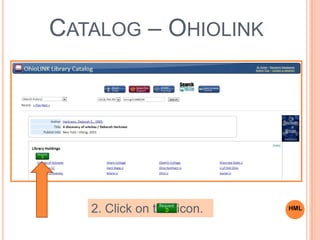
HML1. Click on the OhioLINK icon to
access the consortium catalog.
CATALOG – OHIOLINK
2. Click on the icon. HML
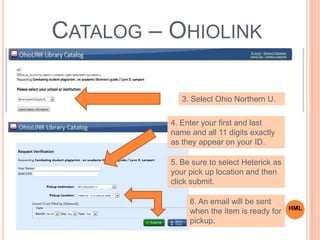
3. Select Ohio Northern U.
4. Enter your first and last
name and all 11 digits exactly
as they appear on your ID.
5. Be sure to select Heterick as
your pick up location and then
click submit.
6. An email will be sent
when the item is ready for
pickup.
CATALOG – OHIOLINK
HML
DATABASES
HML
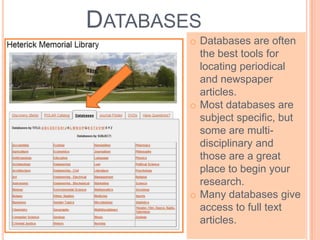
o Databases are often
the best tools for
locating periodical
and newspaper
articles.
o Most databases are
subject specific, but
some are multi-
disciplinary and
those are a great
place to begin your
research.
o Many databases give
access to full text
articles.
DATABASES – FINDING AN ARTICLE:
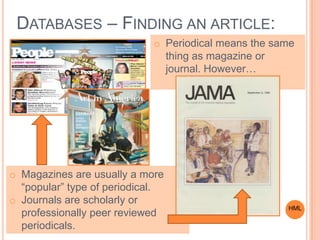
o Magazines are usually a more
“popular” type of periodical.
o Journals are scholarly or
professionally peer reviewed
periodicals.
o Periodical means the same
thing as magazine or
journal. However…
HML
SO KEEP IN MIND…
Types of periodical articles:
o Magazines
o These usually consist of more
“popular” material
o Journals
o Scholarly or Professional
o Peer reviewed
HML
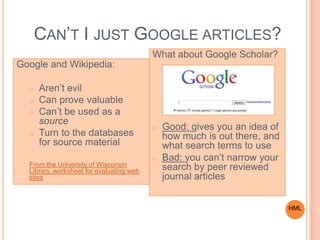
CAN’T I JUST GOOGLE ARTICLES?
Google and Wikipedia:
o Aren’t evil
o Can prove valuable
o Can’t be used as a
source
o Turn to the databases
for source material
From the University of Wisconsin
Library, worksheet for evaluating web
sites
What about Google Scholar?
o Good: gives you an idea of
how much is out there, and
what search terms to use
o Bad: you can’t narrow your
search by peer reviewed
journal articles
HML
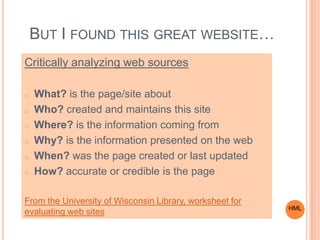
BUT I FOUND THIS GREAT WEBSITE…
Critically analyzing web sources
o What? is the page/site about
o Who? created and maintains this site
o Where? is the information coming from
o Why? is the information presented on the web
o When? was the page created or last updated
o How? accurate or credible is the page
From the University of Wisconsin Library, worksheet for
evaluating web sites HML
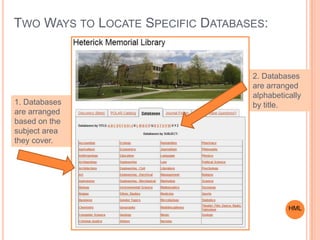
TWO WAYS TO LOCATE SPECIFIC DATABASES:
2. Databases
are arranged
alphabetically
by title.1. Databases
are arranged
based on the
subject area
they cover.
HML
FOUR GREAT
DATABASES TO
REMEMBER:
o Academic Search Complete
o Business Source Complete
o MEDLINE with Full Text
o Opposing Viewpoints
o Note: The first three are all
Ebsco databases, which
means that they look very
similar and are easy to use.
HML
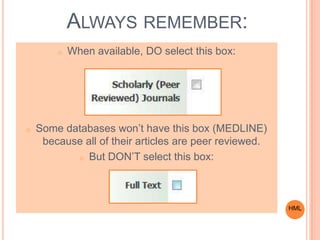
ALWAYS REMEMBER:
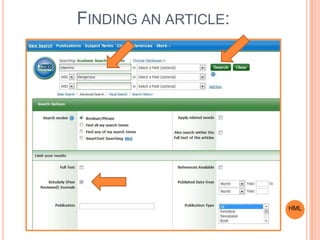
o When available, DO select this box:
o Some databases won’t have this box (MEDLINE)
because all of their articles are peer reviewed.
o But DON’T select this box:
HML
FINDING AN ARTICLE:
HML
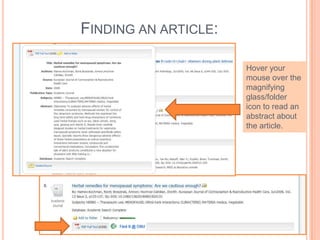
FINDING AN ARTICLE:
Hover your
mouse over the
magnifying
glass/folder
icon to read an
abstract about
the article.
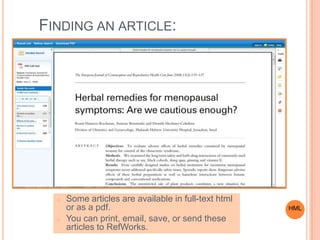
FINDING AN ARTICLE:
o Some articles are available in full-text html
or as a pdf.
o You can print, email, save, or send these
articles to RefWorks.
HML
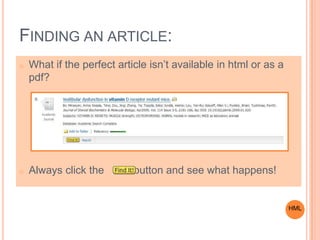
FINDING AN ARTICLE:
o What if the perfect article isn’t available in html or as a
pdf?
o Always click the button and see what happens!
HML
FINDING AN ARTICLE:
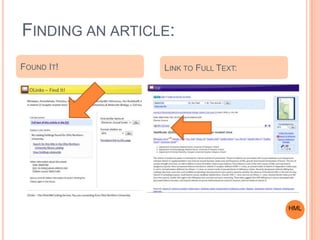
FOUND IT! LINK TO FULL TEXT:
HML
FINDING AN ARTICLE:
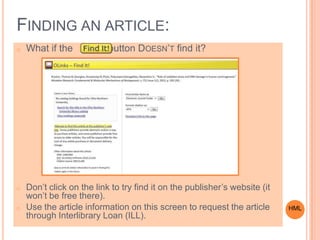
o What if the button DOESN’T find it?
o Don’t click on the link to try find it on the publisher’s website (it
won’t be free there).
o Use the article information on this screen to request the article
through Interlibrary Loan (ILL).
HML
INTERLIBRARY LOAN (ILL)
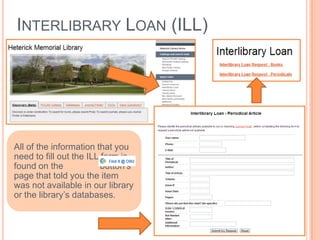
All of the information that you
need to fill out the ILL form is
found on the button’s
page that told you the item
was not available in our library
or the library’s databases.
OPPOSING VIEWPOINTS DATABASE
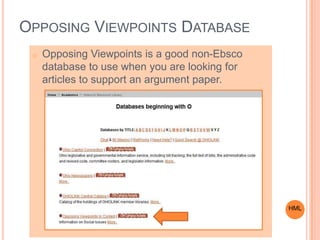
o Opposing Viewpoints is a good non-Ebsco
database to use when you are looking for
articles to support an argument paper.
HML
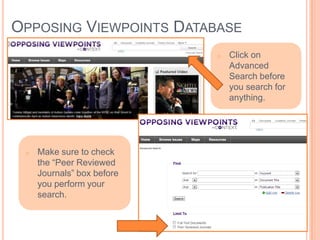
OPPOSING VIEWPOINTS DATABASE
o Make sure to check
the “Peer Reviewed
Journals” box before
you perform your
search.
o Click on
Advanced
Search before
you search for
anything.
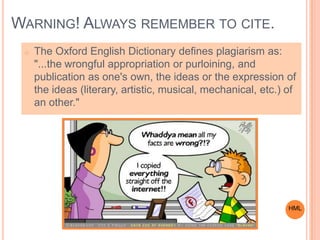
WARNING! ALWAYS REMEMBER TO CITE.
o The Oxford English Dictionary defines plagiarism as:
"...the wrongful appropriation or purloining, and
publication as one's own, the ideas or the expression of
the ideas (literary, artistic, musical, mechanical, etc.) of
an other."
HML
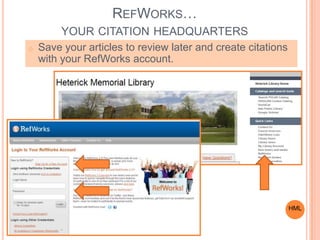
REFWORKS…
YOUR CITATION HEADQUARTERS
o Save your articles to review later and create citations
with your RefWorks account.
HML
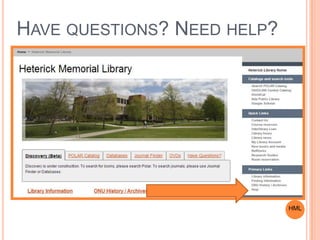
HAVE QUESTIONS? NEED HELP?
HML
HAPPY
RESEARCHING!
o Remember, the
librarians are here to
help you with your
research. Come back
and see us!

ESL_Spring2014

  • 1.
    INTRODUCTION TO RESEARCHAT HETERICK MEMORIAL LIBRARY Kelly Kobiela Systems Librarian Slides prepared by Jenny Donley, Catalog Librarian HML
  • 2.
    INTRODUCTION o Welcome! o KellyKobiela, k-kobiela@onu.edu o Feel free to stop by or send an email o Librarians on duty: o 8am-4:30pm and 6pm-9pm Monday- Thursday o 8am-4:30pm Friday o 10am-3:30pm Sunday HML
  • 3.
  • 4.
    ONU ID =LIBRARY CARD HML
  • 5.
    MY LIBRARY ACCOUNT oAllows you to see the items that you have checked out as well as the status of ones you have requested through OhioLINK. o You can also renew (when possible) items online and view any accrued fines. HML
  • 6.
    MY LIBRARY ACCOUNT Enteryour first and last name and all 11 digits on your ONU ID. HML
  • 7.
    ELEMENTS OF THELIBRARY o Building o Resources (print or online) o Services o Staff o PATRONS HML
  • 8.
    THE BUILDINGS: TWO LIBRARIESAT ONU  Heterick Memorial Library  Taggart Law Library HML
  • 9.
    The library iscompletely wireless and there are outlets on all three floors of the library for laptops to plug into.
  • 10.
    WELCOME TO HETERICK LIBRARY! HeterickLibrary is divided into three floors. First floor – Public services, circulation and reference desks, reference collection, computer labs, current periodicals, microforms, newspapers & new books. In general, this is a high-traffic area and not conducive to concentrated study.
  • 11.
    FIRST FLOOR First place togo for help: o Check out and return items o Pick up OhioLINK items o Pick up Interlibrary loans o Request Course Reserves o Request Audiovisual materials Remember, Your ONU ID is your library card! HML
  • 12.
    TECHNOLOGY ON THEFIRST FLOOR  Scanner  Attached to the public terminals on the first floor.  Copiers  One on each of the three floors. Copies are 10 cents per page  Public terminals to use exclusively with library resources are available on all 3 floors.  Computers  Network computers requiring an ONU log-in and password in Large Lab (102A) and Small Lab (102B) and four in front of the Reference Desk.  Microforms/Copier Room   Stapler  Hole punch  Paper cutter
  • 13.
    Large Lab: 24computers, a multi-media projector, and two B&W printers. FIRST FLOOR LARGE COMPUTER LAB
  • 14.
    Small Lab: 8computers, a color printer and a B&W printer FIRST FLOOR SMALL COMPUTER LAB
  • 15.
  • 16.
  • 17.
    SECOND FLOOR Second floor–Communication Skills Center, classrooms, bound periodicals, open study tables, group study carrels, 1-2 person study carrels. In addition, the juvenile, young adult and graphic novel collections are on the second floor. The second floor is intended for studying and use of bound periodicals.
  • 18.
    SECOND FLOOR Communications SkillsCenter The CSC professional assistants and peer tutors provide assistance with written and oral skills. Appointments are necessary.
  • 19.
    There are four 4-6person study carrels and they are first come/first served. SECOND FLOOR Classrooms and seminar rooms must be reserved online. HML
  • 20.
    SECOND FLOOR ANDTHIRD FLOOR 1-2 person study carrels along east and west walls are first come/first served.
  • 21.
    THIRD FLOOR Third floor– General book collection and oversized book collection,1-2 person study carrels, seating in book stacks, lounge areas. This is the quietest floor of the library.
  • 22.
    There are 1-2public terminals each on the second and third floors. All of the books in the circulating collection are shelved on the third floor, except for the juvenile, young adult and graphic novel collections. Red phone on the second and third floors calls directly to the Reference Desk! THIRD FLOOR HML
  • 23.
    COURSE RESERVES  Professorswill occasionally place items on course reserve for students in a particular class to access.  An item on course reserve could be an electronic document, a book, a textbook, a PDF of a book chapter or a DVD from the print/physical collection.  Print/physical reserves require you to visit the library. You can then read the reserve in the library, copy the reserve or scan the information provided.  These items are usually limited to a 1-4 hour check- out period.  Electronic reserves sometimes require logging in with your first and last name and all 11 digits on your university ID. HML
  • 24.
  • 25.
    RESEARCH STRATEGIES o Startwith background reading. o Narrow and focus your topic. o Find the right search terms. o Use patterns you see in the results list to find additional search terms. o Many resources will have a built-in thesaurus that will suggest phrases and subjects to search by…use them! Think of your research as a tree…broad at the top, but narrow at the bottom! HML
  • 26.
    LIBRARY RESOURCES o LibraryCatalog  POLAR o POLAR shows holdings for Heterick and Taggert o Research Databases o There are general as well as discipline and subject specific databases HML
  • 27.
    CATALOG – POLAR HML Bookscan help you narrow your research topic by giving you background information. Basic keyword searches are a good way to get started.
  • 28.
    CATALOG – POLAR oBooks are arranged on the shelves using Dewey Decimal Classification Numbers. Think of the these numbers as the shelf address for a book. o Books found in POLAR will be part of the reference collection (1st floor), juvenile collection (2nd floor), the circulating collection (3rd floor) or e-books available online. e-book reference circulating e-book
  • 29.
    CATALOG – POLAR HML oSome books are available electronically as e-books. o Click on the link to access the book.
  • 30.
    CATALOG – POLAR HMLoThe LOCATION will tell you where the book is shelved. o Make sure it says it is AVAILABLE before you go looking for it!
  • 31.
    CATALOG – POLAR HML oPopular Books and New Books are found on the first floor. o If there is a date listed, if means the item is checked out. You will need to place a hold (“✔Request”) on the item or request a different copy through OhioLINK.
  • 32.
    o Most ofthe university and college libraries in Ohio share their materials through a consortium catalog called OhioLINK. CATALOG – OHIOLINK HML1. Click on the OhioLINK icon to access the consortium catalog.
  • 33.
    CATALOG – OHIOLINK 2.Click on the icon. HML
  • 34.
    3. Select OhioNorthern U. 4. Enter your first and last name and all 11 digits exactly as they appear on your ID. 5. Be sure to select Heterick as your pick up location and then click submit. 6. An email will be sent when the item is ready for pickup. CATALOG – OHIOLINK HML
  • 35.
    DATABASES HML o Databases areoften the best tools for locating periodical and newspaper articles. o Most databases are subject specific, but some are multi- disciplinary and those are a great place to begin your research. o Many databases give access to full text articles.
  • 36.
    DATABASES – FINDINGAN ARTICLE: o Magazines are usually a more “popular” type of periodical. o Journals are scholarly or professionally peer reviewed periodicals. o Periodical means the same thing as magazine or journal. However… HML
  • 37.
    SO KEEP INMIND… Types of periodical articles: o Magazines o These usually consist of more “popular” material o Journals o Scholarly or Professional o Peer reviewed HML
  • 38.
    CAN’T I JUSTGOOGLE ARTICLES? Google and Wikipedia: o Aren’t evil o Can prove valuable o Can’t be used as a source o Turn to the databases for source material From the University of Wisconsin Library, worksheet for evaluating web sites What about Google Scholar? o Good: gives you an idea of how much is out there, and what search terms to use o Bad: you can’t narrow your search by peer reviewed journal articles HML
  • 39.
    BUT I FOUNDTHIS GREAT WEBSITE… Critically analyzing web sources o What? is the page/site about o Who? created and maintains this site o Where? is the information coming from o Why? is the information presented on the web o When? was the page created or last updated o How? accurate or credible is the page From the University of Wisconsin Library, worksheet for evaluating web sites HML
  • 40.
    TWO WAYS TOLOCATE SPECIFIC DATABASES: 2. Databases are arranged alphabetically by title.1. Databases are arranged based on the subject area they cover. HML
  • 41.
    FOUR GREAT DATABASES TO REMEMBER: oAcademic Search Complete o Business Source Complete o MEDLINE with Full Text o Opposing Viewpoints o Note: The first three are all Ebsco databases, which means that they look very similar and are easy to use. HML
  • 42.
    ALWAYS REMEMBER: o Whenavailable, DO select this box: o Some databases won’t have this box (MEDLINE) because all of their articles are peer reviewed. o But DON’T select this box: HML
  • 43.
  • 44.
    FINDING AN ARTICLE: Hoveryour mouse over the magnifying glass/folder icon to read an abstract about the article.
  • 45.
    FINDING AN ARTICLE: oSome articles are available in full-text html or as a pdf. o You can print, email, save, or send these articles to RefWorks. HML
  • 46.
    FINDING AN ARTICLE: oWhat if the perfect article isn’t available in html or as a pdf? o Always click the button and see what happens! HML
  • 47.
    FINDING AN ARTICLE: FOUNDIT! LINK TO FULL TEXT: HML
  • 48.
    FINDING AN ARTICLE: oWhat if the button DOESN’T find it? o Don’t click on the link to try find it on the publisher’s website (it won’t be free there). o Use the article information on this screen to request the article through Interlibrary Loan (ILL). HML
  • 49.
    INTERLIBRARY LOAN (ILL) Allof the information that you need to fill out the ILL form is found on the button’s page that told you the item was not available in our library or the library’s databases.
  • 50.
    OPPOSING VIEWPOINTS DATABASE oOpposing Viewpoints is a good non-Ebsco database to use when you are looking for articles to support an argument paper. HML
  • 51.
    OPPOSING VIEWPOINTS DATABASE oMake sure to check the “Peer Reviewed Journals” box before you perform your search. o Click on Advanced Search before you search for anything.
  • 52.
    WARNING! ALWAYS REMEMBERTO CITE. o The Oxford English Dictionary defines plagiarism as: "...the wrongful appropriation or purloining, and publication as one's own, the ideas or the expression of the ideas (literary, artistic, musical, mechanical, etc.) of an other." HML
  • 53.
    REFWORKS… YOUR CITATION HEADQUARTERS oSave your articles to review later and create citations with your RefWorks account. HML
  • 54.
  • 55.
    HAPPY RESEARCHING! o Remember, the librariansare here to help you with your research. Come back and see us!