

HBase Sizing Notes
                                        Lars George
                            Director EMEA Services @ Cloudera
                                    lars@cloudera.com


Thursday, March 28, 2013
About Me
                    •  Director EMEA Services
                       at Cloudera
                    • Apache Committer
                      ‣ HBase and Whirr
                    • O’Reilly Author
                      ‣ HBase – The Definitive Guide
                         ‣ Now in Japanese!
                                                  日本語版も出ました!
                    • Contact
                      ‣ lars@cloudera.com
                      ‣ @larsgeorge

Thursday, March 28, 2013
HBase Sizing Is...
                    • Making the most out of the cluster you
                           have by...
                           ‣ Understanding how HBase uses low-level
                             resources
                           ‣ Helping HBase understand your use-case
                             by configuring it appropriately
                    • Being able to gauge how many servers are
                           needed for a given use-case

Thursday, March 28, 2013
Competing Resources
                    • Reads and Writes compete for the same
                           low-level resources
                           ‣ Disk (HDFS) and Network I/O
                           ‣ RPC Handlers and Threads
                           ‣ Memory (Java Heap)
                    • Otherwise they do exercise completely
                           separate code paths

Thursday, March 28, 2013
Memory Sharing
                    • By default every region server is dividing its
                           memory (i.e. given maximum heap) into
                           ‣ 40% for in-memory stores (write ops)
                           ‣ 20% for block caching (reads ops)
                           ‣ remaining space (here 40%) go towards
                             usual Java heap usage (objects etc.)
                    • Share of memory needs to be tweaked
Thursday, March 28, 2013
Reads
                    • Locate and route request to appropriate
                           region server
                           ‣ Client caches information for faster
                             lookups ➜ consider prefetching option
                             for fast warmups
                    • Eliminate store files if possible using time
                           ranges or Bloom filter
                    • Try block cache, if block is missing then
                           load from disk

Thursday, March 28, 2013
Block Cache
                    • Use exported metrics to see effectiveness
                           of block cache
                           ‣ Check fill and eviction rate, as well as hit
                             ratios ➜ random reads are not ideal
                    • Tweak up or down as needed, but watch
                           overall heap usage
                    • You absolutely need the block cache
                           ‣ Set to 10% at least for short term benefits
Thursday, March 28, 2013
Writes
                    •      The cluster size is often determined by the
                           write performance
                    •      Log structured merge trees like
                           ‣   Store mutation in in-memory store and
                               write-ahead log
                           ‣   Flush out aggregated, sorted maps at specified
                               threshold - or - when under pressure
                           ‣   Discard logs with no pending edits
                           ‣   Perform regular compactions of store files

Thursday, March 28, 2013
Write Performance
                    • There are many factors to the overall write
                           performance of a cluster
                           ‣ Key Distribution ➜ Avoid region hotspot
                           ‣ Handlers ➜ Do not pile up too early
                           ‣ Write-ahead log ➜ Bottleneck #1
                           ‣ Compactions ➜ Badly tuned can cause
                             ever increasing background noise

Thursday, March 28, 2013
Write-Ahead Log
                    • Currently only one per region server
                           ‣ Shared across all stores (i.e. column
                             families)
                           ‣ Synchronized on file append calls
                    • Work being done on mitigating this
                           ‣ WAL Compression
                           ‣ Multiple WAL’s per region server ➜ Start
                             more than one region server per node?

Thursday, March 28, 2013
Write-Ahead Log (cont.)
                    • Size set to 95% of default block size
                           ‣ 64MB or 128MB, but check config!
                    • Keep number low to reduce recovery time
                           ‣ Limit set to 32, but can be increased
                    • Increase size of logs - and/or - increase the
                           number of logs before blocking
                    • Compute number based on fill distribution
                           and flush frequencies

Thursday, March 28, 2013
Write-Ahead Log (cont.)
                    • Writes are synchronized across all stores
                           ‣ A large cell in one family can stop all
                             writes of another
                           ‣ In this case the RPC handlers go binary,
                             i.e. either work or all block
                    • Can be bypassed on writes, but means no
                           real durability and no replication
                           ‣ Maybe use coprocessor to restore
                             dependent data sets (preWALRestore)
Thursday, March 28, 2013
Flushes

                    • Every mutation call (put, delete etc.) causes
                           a check for a flush
                    • If threshold is met, flush file to disk and
                           schedule a compaction
                           ‣ Try to compact newly flushed files quickly
                    • The compaction returns - if necessary -
                           where a region should be split


Thursday, March 28, 2013
Compaction Storms
                    • Premature flushing because of # of logs or
                           memory pressure
                           ‣ Files will be smaller than the configured
                             flush size
                    • The background compactions are hard at
                           work merging small flush files into the
                           existing, larger store files
                           ‣ Rewrite hundreds of MB over and over

Thursday, March 28, 2013
Dependencies

                    • Flushes happen across all stores/column
                           families, even if just one triggers it
                    • The flush size is compared to the size of all
                           stores combined
                           ‣ Many column families dilute the size
                           ‣ Example: 55MB + 5MB + 4MB


Thursday, March 28, 2013
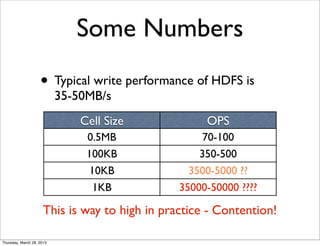
Some Numbers
                    • Typical write performance of HDFS is
                           35-50MB/s
                               Cell Size             OPS
                                0.5MB                70-100
                                100KB               350-500
                                 10KB             3500-5000 ??
                                  1KB           35000-50000 ????

                      This is way to high in practice - Contention!

Thursday, March 28, 2013
Some More Numbers
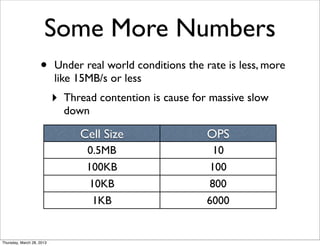
                    •      Under real world conditions the rate is less, more
                           like 15MB/s or less
                           ‣   Thread contention is cause for massive slow
                               down

                                  Cell Size                  OPS
                                   0.5MB                       10
                                   100KB                      100
                                    10KB                      800
                                     1KB                     6000


Thursday, March 28, 2013
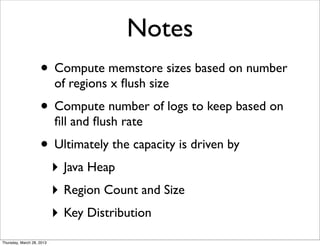
Notes
                    • Compute memstore sizes based on number
                           of regions x flush size
                    • Compute number of logs to keep based on
                           fill and flush rate
                    • Ultimately the capacity is driven by
                           ‣ Java Heap
                           ‣ Region Count and Size
                           ‣ Key Distribution
Thursday, March 28, 2013
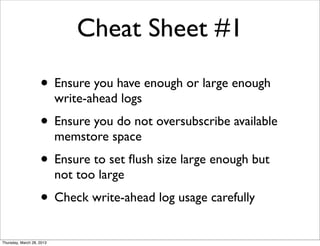
Cheat Sheet #1

                    • Ensure you have enough or large enough
                           write-ahead logs
                    • Ensure you do not oversubscribe available
                           memstore space
                    • Ensure to set flush size large enough but
                           not too large
                    • Check write-ahead log usage carefully
Thursday, March 28, 2013
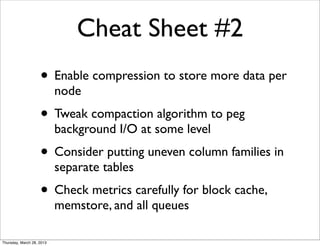
Cheat Sheet #2
                    • Enable compression to store more data per
                           node
                    • Tweak compaction algorithm to peg
                           background I/O at some level
                    • Consider putting uneven column families in
                           separate tables
                    • Check metrics carefully for block cache,
                           memstore, and all queues

Thursday, March 28, 2013
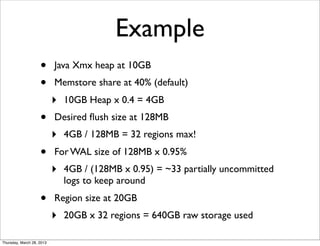
Example
                    •      Java Xmx heap at 10GB
                    •      Memstore share at 40% (default)
                           ‣   10GB Heap x 0.4 = 4GB
                    •      Desired flush size at 128MB
                           ‣   4GB / 128MB = 32 regions max!
                    •      For WAL size of 128MB x 0.95%
                           ‣   4GB / (128MB x 0.95) = ~33 partially uncommitted
                               logs to keep around
                    •      Region size at 20GB
                           ‣   20GB x 32 regions = 640GB raw storage used

Thursday, March 28, 2013
Questions?


Thursday, March 28, 2013

HBase Sizing Notes

  • 1.
    HBase Sizing Notes Lars George Director EMEA Services @ Cloudera lars@cloudera.com Thursday, March 28, 2013
  • 2.
    About Me • Director EMEA Services at Cloudera • Apache Committer ‣ HBase and Whirr • O’Reilly Author ‣ HBase – The Definitive Guide ‣ Now in Japanese! 日本語版も出ました! • Contact ‣ lars@cloudera.com ‣ @larsgeorge Thursday, March 28, 2013
  • 3.
    HBase Sizing Is... • Making the most out of the cluster you have by... ‣ Understanding how HBase uses low-level resources ‣ Helping HBase understand your use-case by configuring it appropriately • Being able to gauge how many servers are needed for a given use-case Thursday, March 28, 2013
  • 4.
    Competing Resources • Reads and Writes compete for the same low-level resources ‣ Disk (HDFS) and Network I/O ‣ RPC Handlers and Threads ‣ Memory (Java Heap) • Otherwise they do exercise completely separate code paths Thursday, March 28, 2013
  • 5.
    Memory Sharing • By default every region server is dividing its memory (i.e. given maximum heap) into ‣ 40% for in-memory stores (write ops) ‣ 20% for block caching (reads ops) ‣ remaining space (here 40%) go towards usual Java heap usage (objects etc.) • Share of memory needs to be tweaked Thursday, March 28, 2013
  • 6.
    Reads • Locate and route request to appropriate region server ‣ Client caches information for faster lookups ➜ consider prefetching option for fast warmups • Eliminate store files if possible using time ranges or Bloom filter • Try block cache, if block is missing then load from disk Thursday, March 28, 2013
  • 7.
    Block Cache • Use exported metrics to see effectiveness of block cache ‣ Check fill and eviction rate, as well as hit ratios ➜ random reads are not ideal • Tweak up or down as needed, but watch overall heap usage • You absolutely need the block cache ‣ Set to 10% at least for short term benefits Thursday, March 28, 2013
  • 8.
    Writes • The cluster size is often determined by the write performance • Log structured merge trees like ‣ Store mutation in in-memory store and write-ahead log ‣ Flush out aggregated, sorted maps at specified threshold - or - when under pressure ‣ Discard logs with no pending edits ‣ Perform regular compactions of store files Thursday, March 28, 2013
  • 9.
    Write Performance • There are many factors to the overall write performance of a cluster ‣ Key Distribution ➜ Avoid region hotspot ‣ Handlers ➜ Do not pile up too early ‣ Write-ahead log ➜ Bottleneck #1 ‣ Compactions ➜ Badly tuned can cause ever increasing background noise Thursday, March 28, 2013
  • 10.
    Write-Ahead Log • Currently only one per region server ‣ Shared across all stores (i.e. column families) ‣ Synchronized on file append calls • Work being done on mitigating this ‣ WAL Compression ‣ Multiple WAL’s per region server ➜ Start more than one region server per node? Thursday, March 28, 2013
  • 11.
    Write-Ahead Log (cont.) • Size set to 95% of default block size ‣ 64MB or 128MB, but check config! • Keep number low to reduce recovery time ‣ Limit set to 32, but can be increased • Increase size of logs - and/or - increase the number of logs before blocking • Compute number based on fill distribution and flush frequencies Thursday, March 28, 2013
  • 12.
    Write-Ahead Log (cont.) • Writes are synchronized across all stores ‣ A large cell in one family can stop all writes of another ‣ In this case the RPC handlers go binary, i.e. either work or all block • Can be bypassed on writes, but means no real durability and no replication ‣ Maybe use coprocessor to restore dependent data sets (preWALRestore) Thursday, March 28, 2013
  • 13.
    Flushes • Every mutation call (put, delete etc.) causes a check for a flush • If threshold is met, flush file to disk and schedule a compaction ‣ Try to compact newly flushed files quickly • The compaction returns - if necessary - where a region should be split Thursday, March 28, 2013
  • 14.
    Compaction Storms • Premature flushing because of # of logs or memory pressure ‣ Files will be smaller than the configured flush size • The background compactions are hard at work merging small flush files into the existing, larger store files ‣ Rewrite hundreds of MB over and over Thursday, March 28, 2013
  • 15.
    Dependencies • Flushes happen across all stores/column families, even if just one triggers it • The flush size is compared to the size of all stores combined ‣ Many column families dilute the size ‣ Example: 55MB + 5MB + 4MB Thursday, March 28, 2013
  • 16.
    Some Numbers • Typical write performance of HDFS is 35-50MB/s Cell Size OPS 0.5MB 70-100 100KB 350-500 10KB 3500-5000 ?? 1KB 35000-50000 ???? This is way to high in practice - Contention! Thursday, March 28, 2013
  • 17.
    Some More Numbers • Under real world conditions the rate is less, more like 15MB/s or less ‣ Thread contention is cause for massive slow down Cell Size OPS 0.5MB 10 100KB 100 10KB 800 1KB 6000 Thursday, March 28, 2013
  • 18.
    Notes • Compute memstore sizes based on number of regions x flush size • Compute number of logs to keep based on fill and flush rate • Ultimately the capacity is driven by ‣ Java Heap ‣ Region Count and Size ‣ Key Distribution Thursday, March 28, 2013
  • 19.
    Cheat Sheet #1 • Ensure you have enough or large enough write-ahead logs • Ensure you do not oversubscribe available memstore space • Ensure to set flush size large enough but not too large • Check write-ahead log usage carefully Thursday, March 28, 2013
  • 20.
    Cheat Sheet #2 • Enable compression to store more data per node • Tweak compaction algorithm to peg background I/O at some level • Consider putting uneven column families in separate tables • Check metrics carefully for block cache, memstore, and all queues Thursday, March 28, 2013
  • 21.
    Example • Java Xmx heap at 10GB • Memstore share at 40% (default) ‣ 10GB Heap x 0.4 = 4GB • Desired flush size at 128MB ‣ 4GB / 128MB = 32 regions max! • For WAL size of 128MB x 0.95% ‣ 4GB / (128MB x 0.95) = ~33 partially uncommitted logs to keep around • Region size at 20GB ‣ 20GB x 32 regions = 640GB raw storage used Thursday, March 28, 2013
  • 22.