




HBase Operations:
Best Practices
Yaniv Yancovich
Data Group Leader @ Gigya
Agenda
● HBase internals
● Replication
● Backup and Recovery
● Monitoring & Diagnostic
● Deploy
● Useful tools
● Hardware recommendations
● The future
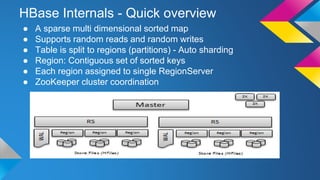
HBase Internals - Quick overview
● A sparse multi dimensional sorted map
● Supports random reads and random writes
● Table is split to regions (partitions) - Auto sharding
● Region: Contiguous set of sorted keys
● Each region assigned to single RegionServer
● ZooKeeper cluster coordination
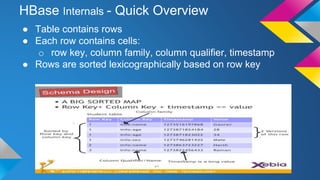
HBase Internals - Quick Overview
● Table contains rows
● Each row contains cells:
o row key, column family, column qualifier, timestamp
● Rows are sorted lexicographically based on row key
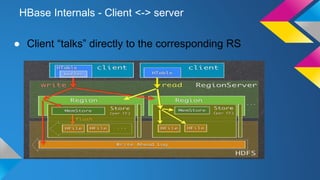
HBase Internals - Client <-> server
● Client “talks” directly to the corresponding RS
● Meet Mr. E, our Operation Director
● A very calm person until...
Problem #1: “The entire cluster went down!!!”
● The service is down!
● “Well, we have another cluster but it isn’t
up to date”
● “Maybe move to DR?”
o “DR? Who needs it?”
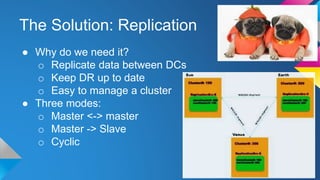
The Solution: Replication
● Why do we need it?
o Replicate data between DCs
o Keep DR up to date
o Easy to manage a cluster
● Three modes:
o Master <-> master
o Master -> Slave
o Cyclic
Replication: Design
● Push in favor of Pull (MySQL)
● Async
● Cluster can be distinct (# clusters, security, etc)
● .Meta isn’t replicated
● ZooKeeper as a key player
● Replaying WALEdits from the WALs (Write Ahead
Log)
● TS of replicated HLog are being kept intact
● Per column family
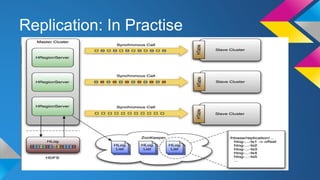
Replication: In Practise
Replication: Issues, Best Practices
● Not so good over bad network
● Monitor, Monitor, Monitor
● Problems with recovery
● Master and slave should be sync by NTP
● Avoid loops in cyclic replication
● So now when we have replication
we can sleep like...
Well...
The Problem: “I see half of my DATA!!!”
● “The “smart” guys from R&D wrote a very
sophisticated tool to clean unnecessary
records.”
● “Well... They did a “great” job and deleted 50%
of the records! “
● “They said they are sorry...”
● “We thought replication is enough...”
The Solution: Backup
● Why do we need it?
o Prevent Data loss
o Recover to point in time
o Use for offline processing
Backup (Method #1) - CopyTable
● MapReduce (MR) job
● Copy part or all table
● Incremental copies (StartTime -> EndTime)
● Limitations:
o Can only copy to an HBase table
o Newly rows won’t be included
o High latency
● Not production friendly...
● Affects production latency
The Solution (Method #2): Backup by Export
● MR job
● Dump the data to HDFS
● Copy data without going through Hbase
● Pros: Simple, point in time, heavily tested
● Cons: Slow, have impact on running
server
● "There is not enough memory or disk
space to complete the operation"
● You are killing our HDFS!
The Solution: Backup by Snapshots
● Recover to point-in-time
● Inexpensive way to freeze a table state
● Recover from user error
● Compliance (monthly snapshot)
● Pros:
o Point in time
o Fast
o Quick recovery: table from SnapShot
Backup - Snapshots
● Not a copy of a table, but set of operations on Table’s
metadata and the data
● A snapshot manifest contains references to files in the
original table
● On HDFS level (without cache hits)
● What happens in compactions? splits?
o Archiving - HFile archiver
● Offline and online snapshots
Snapshots - Offline Vs Online
● Offline:
o Disabled table -> all data is flushed on disk
o Fully consistent
o Atomicy, Fast
o Master takes the snapshot
● Online:
o Master asks each RS to take for its regions
o Two phase commit using ZooKeeper
o Pluggable snapshots: Currently “Flush snapshot”
o Few seconds
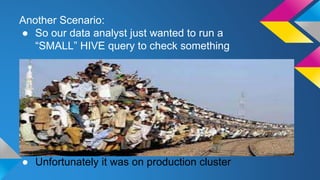
Another Scenario:
● So our data analyst just wanted to run a
“SMALL” HIVE query to check something
● Unfortunately it was on production cluster
The Solution: ExportClone Snapshots
● Clone Snapshot - New table from Snapshot. No data
copy!
● Export snapshot - copy snapshot to remote cluster -
faster than CopyTable
● Restore Snapshot - rollback
● Full support in shell
● No incremental snapshots
● Little impact on production
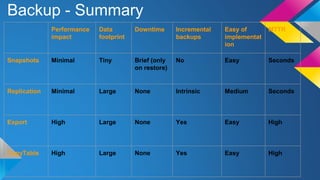
Backup - Summary
Performance
impact
Data
footprint
Downtime Incremental
backups
Easy of
implementat
ion
MTTR
Snapshots Minimal Tiny Brief (only
on restore)
No Easy Seconds
Replication Minimal Large None Intrinsic Medium Seconds
Export High Large None Yes Easy High
CopyTable High Large None Yes Easy High
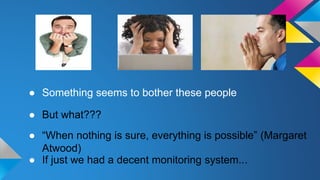
● Something seems to bother these people
● But what???
● If just we had a decent monitoring system...
● “When nothing is sure, everything is possible” (Margaret
Atwood)
Monitoring
● JMX based on few levels:
o Master
o Regions
o Replication
o OS
o GC
● Web UI renewed at 0.98
o Block cache
● Zabbix, Ganglia, Nagios, Graphite
● SemaText
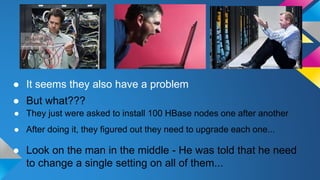
● It seems they also have a problem
● Look on the man in the middle - He was told that he need
to change a single setting on all of them...
● After doing it, they figured out they need to upgrade each one...
● They just were asked to install 100 HBase nodes one after another
● But what???
The Solution: Automation
● Puppet
o Can build a cluster very fast
o Hadoop, ZooKeeper, HBase
o Users
o Carefull!!!
Meet Mr. Slow our production manager
● “We have all backups and replication in place but...
● Production is so SLOW!”
● High latency
We might call him for help!
Or...
Solution: Hardware and OS Recommendations
● SSD - Not cost effective yet
● Virtual storage isn’t recommended
● Recommended RAM between 24-72
● Min dual 1G network
● RaidJBOD on masters
● No swap
● NTP
Useful Tools
● HBase web interface (master,
regions)
● rowCountCellCount
● VerifyReplication
● hbck for inconsistency
● HFile - examine HFile file content
● HLog - examine content of HLog file
General Operational Best Practices
● Upgrades
● Built in web tools for quick checks
● Monitoring (JMX, JSON)
● Alerting system
● Configuration: Block size, Block cache,
comparison
● Optimize to readwrite
The Future
● Upcoming: HDFS snapshots
● Major compaction timing
● New pluggable snapshots
yaniv@gigya.com
Open discussion
● Tell us about your experience in production:
o Replication
o Hardware
o Backups
o DR
o Anything else?
Open discussion 2
● Any suggestions for next meetups?

HBase operations

  • 1.
    HBase Operations: Best Practices YanivYancovich Data Group Leader @ Gigya
  • 2.
    Agenda ● HBase internals ●Replication ● Backup and Recovery ● Monitoring & Diagnostic ● Deploy ● Useful tools ● Hardware recommendations ● The future
  • 3.
    HBase Internals -Quick overview ● A sparse multi dimensional sorted map ● Supports random reads and random writes ● Table is split to regions (partitions) - Auto sharding ● Region: Contiguous set of sorted keys ● Each region assigned to single RegionServer ● ZooKeeper cluster coordination
  • 4.
    HBase Internals -Quick Overview ● Table contains rows ● Each row contains cells: o row key, column family, column qualifier, timestamp ● Rows are sorted lexicographically based on row key
  • 5.
    HBase Internals -Client <-> server ● Client “talks” directly to the corresponding RS
  • 6.
    ● Meet Mr.E, our Operation Director ● A very calm person until...
  • 7.
    Problem #1: “Theentire cluster went down!!!” ● The service is down! ● “Well, we have another cluster but it isn’t up to date” ● “Maybe move to DR?” o “DR? Who needs it?”
  • 8.
    The Solution: Replication ●Why do we need it? o Replicate data between DCs o Keep DR up to date o Easy to manage a cluster ● Three modes: o Master <-> master o Master -> Slave o Cyclic
  • 9.
    Replication: Design ● Pushin favor of Pull (MySQL) ● Async ● Cluster can be distinct (# clusters, security, etc) ● .Meta isn’t replicated ● ZooKeeper as a key player ● Replaying WALEdits from the WALs (Write Ahead Log) ● TS of replicated HLog are being kept intact ● Per column family
  • 10.
  • 11.
    Replication: Issues, BestPractices ● Not so good over bad network ● Monitor, Monitor, Monitor ● Problems with recovery ● Master and slave should be sync by NTP ● Avoid loops in cyclic replication
  • 12.
    ● So nowwhen we have replication we can sleep like... Well...
  • 13.
    The Problem: “Isee half of my DATA!!!” ● “The “smart” guys from R&D wrote a very sophisticated tool to clean unnecessary records.” ● “Well... They did a “great” job and deleted 50% of the records! “ ● “They said they are sorry...” ● “We thought replication is enough...”
  • 14.
    The Solution: Backup ●Why do we need it? o Prevent Data loss o Recover to point in time o Use for offline processing
  • 15.
    Backup (Method #1)- CopyTable ● MapReduce (MR) job ● Copy part or all table ● Incremental copies (StartTime -> EndTime) ● Limitations: o Can only copy to an HBase table o Newly rows won’t be included o High latency
  • 16.
    ● Not productionfriendly... ● Affects production latency
  • 17.
    The Solution (Method#2): Backup by Export ● MR job ● Dump the data to HDFS ● Copy data without going through Hbase ● Pros: Simple, point in time, heavily tested ● Cons: Slow, have impact on running server
  • 18.
    ● "There isnot enough memory or disk space to complete the operation" ● You are killing our HDFS!
  • 19.
    The Solution: Backupby Snapshots ● Recover to point-in-time ● Inexpensive way to freeze a table state ● Recover from user error ● Compliance (monthly snapshot) ● Pros: o Point in time o Fast o Quick recovery: table from SnapShot
  • 20.
    Backup - Snapshots ●Not a copy of a table, but set of operations on Table’s metadata and the data ● A snapshot manifest contains references to files in the original table ● On HDFS level (without cache hits) ● What happens in compactions? splits? o Archiving - HFile archiver ● Offline and online snapshots
  • 21.
    Snapshots - OfflineVs Online ● Offline: o Disabled table -> all data is flushed on disk o Fully consistent o Atomicy, Fast o Master takes the snapshot ● Online: o Master asks each RS to take for its regions o Two phase commit using ZooKeeper o Pluggable snapshots: Currently “Flush snapshot” o Few seconds
  • 22.
    Another Scenario: ● Soour data analyst just wanted to run a “SMALL” HIVE query to check something ● Unfortunately it was on production cluster
  • 23.
    The Solution: ExportCloneSnapshots ● Clone Snapshot - New table from Snapshot. No data copy! ● Export snapshot - copy snapshot to remote cluster - faster than CopyTable ● Restore Snapshot - rollback ● Full support in shell ● No incremental snapshots ● Little impact on production
  • 24.
    Backup - Summary Performance impact Data footprint DowntimeIncremental backups Easy of implementat ion MTTR Snapshots Minimal Tiny Brief (only on restore) No Easy Seconds Replication Minimal Large None Intrinsic Medium Seconds Export High Large None Yes Easy High CopyTable High Large None Yes Easy High
  • 25.
    ● Something seemsto bother these people ● But what??? ● If just we had a decent monitoring system... ● “When nothing is sure, everything is possible” (Margaret Atwood)
  • 26.
    Monitoring ● JMX basedon few levels: o Master o Regions o Replication o OS o GC ● Web UI renewed at 0.98 o Block cache ● Zabbix, Ganglia, Nagios, Graphite ● SemaText
  • 27.
    ● It seemsthey also have a problem ● Look on the man in the middle - He was told that he need to change a single setting on all of them... ● After doing it, they figured out they need to upgrade each one... ● They just were asked to install 100 HBase nodes one after another ● But what???
  • 28.
    The Solution: Automation ●Puppet o Can build a cluster very fast o Hadoop, ZooKeeper, HBase o Users o Carefull!!!
  • 29.
    Meet Mr. Slowour production manager ● “We have all backups and replication in place but... ● Production is so SLOW!” ● High latency
  • 30.
    We might callhim for help! Or...
  • 31.
    Solution: Hardware andOS Recommendations ● SSD - Not cost effective yet ● Virtual storage isn’t recommended ● Recommended RAM between 24-72 ● Min dual 1G network ● RaidJBOD on masters ● No swap ● NTP
  • 32.
    Useful Tools ● HBaseweb interface (master, regions) ● rowCountCellCount ● VerifyReplication ● hbck for inconsistency ● HFile - examine HFile file content ● HLog - examine content of HLog file
  • 33.
    General Operational BestPractices ● Upgrades ● Built in web tools for quick checks ● Monitoring (JMX, JSON) ● Alerting system ● Configuration: Block size, Block cache, comparison ● Optimize to readwrite
  • 34.
    The Future ● Upcoming:HDFS snapshots ● Major compaction timing ● New pluggable snapshots
  • 35.
  • 36.
    Open discussion ● Tellus about your experience in production: o Replication o Hardware o Backups o DR o Anything else?
  • 37.
    Open discussion 2 ●Any suggestions for next meetups?

Editor's Notes

  • #4 http://blog.cloudera.com/blog/2012/06/hbase-write-path/
  • #10 http://blog.cloudera.com/blog/2012/07/hbase-replication-overview-2/
  • #22 http://blog.cloudera.com/blog/2013/06/introduction-to-apache-hbase-snapshots-part-2-deeper-dive/
  • #24 http://www.slideshare.net/cloudera/internals-session-1?qid=80b19f35-f717-4245-a824-bc8885808441&v=default&b=&from_search=3
  • #25 http://www.slideshare.net/cloudera/internals-session-1?qid=80b19f35-f717-4245-a824-bc8885808441&v=default&b=&from_search=3
  • #27 http://www.slideshare.net/cloudera/internals-session-1?qid=80b19f35-f717-4245-a824-bc8885808441&v=default&b=&from_search=3
  • #29 http://www.slideshare.net/cloudera/internals-session-1?qid=80b19f35-f717-4245-a824-bc8885808441&v=default&b=&from_search=3
  • #32 http://hadoopblog.blogspot.co.il/2012/05/hadoop-and-solid-state-drives.html http://www.slideshare.net/vanuganti/hbase-hadoop-hbaseoperationspractices
  • #33 http://www.slideshare.net/cloudera/internals-session-1?qid=80b19f35-f717-4245-a824-bc8885808441&v=default&b=&from_search=3