
2.0 tools Kara Jones Subject Librarian University of Bath CILIP Hants&IoW AGM 16 May 2007
About me: Kara Jones Subject Librarian,  University of Bath Worked in academic libraries in Australia, Emirates and UK. Not a technology evangelist but a practitioner
Overview What is web 2.0? Web 2.0 as a TOOL Information Literacy Accessibility Client interaction Internal Practices The Issues The Future
What is web 2.0 Interactive Collaborative Community building Communication ‘ Web as platform’ ‘ Architecture of participation’
Social Technologies Weblogs Social bookmarking Wiki Podcasts RSS Webfeeds Mashups Social networking Facebook, MySpace, Academici
Why bother? Who’s using web 2.0? 12% of web traffic is to web 2.0 sites 668% growth in last two years (Hitwise data available from BusinessWeek blog:  http://www.businessweek.com/the_thread/blogspotting/archives/pdf/Tancer%20Web2expo1.pdf.  Accessed: 15 May 2007)) Why use web 2.0? It’s generally free Many of your library clients are using/learning/socialising with it!
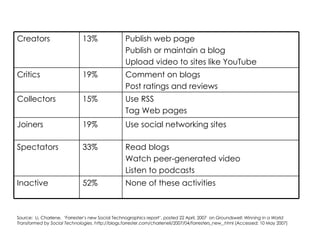
Source:  Li, Charlene.  ‘Forrester’s new Social Technographics report’, posted 22 April, 2007  on  Groundswell: Winning in a World Transformed by Social Technologies . http://blogs.forrester.com/charleneli/2007/04/forresters_new_.html (Accessed: 10 May 2007)  None of these activities 52% Inactive Read blogs Watch peer-generated video Listen to podcasts 33% Spectators Use social networking sites 19% Joiners Use RSS Tag Web pages 15% Collectors Comment on blogs Post ratings and reviews 19% Critics Publish web page Publish or maintain a blog Upload video to sites like YouTube 13% Creators
Using web 2.0  technologies as tools Information Literacy Accessibility Client interaction Internal practices
Information Literacy Information literacy (IL) is an intellectual framework for  recognising the need for,  understanding,  finding,  evaluating,  and using information .  (Australian Information Literacy Standards, 2000) Frameworks / competency standards / skills sets ….
IL and social software Social software can be used to engage learners in ways that work best for them. Mechanisms for resource discovery, critical reflection and for recording the search process.
Weblog features Reflective tools   Highlighting a path of progression  Strengthening evaluation skills   Being prepared to respond Improving written communication skills   Ease of acknowledging sources online  Community building
RSS Webfeed Features RSS newsfeeds on regularly updated websites Tools for organising new information into manageable chunks Delivered to your desktop into folders Used for keeping up to date
Wiki features Easy to create websites, focus on the content Project development with peer review  Group authoring  Track a group project   (‘Using Wiki in Education’, 2006) Development of ‘communities of practice’ where reflection and feedback are important collaborative processes.
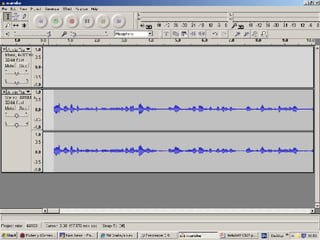
Accessibility Alternative formats mp3, podcasting pdf, text www.scribd.com Audacity.sourceforge.net ‘ Blended accessibility’  (Brian Kelly, http://www.ukoln.ac.uk/web-focus/papers/w4a-2007/)
 
Client interaction Reviews –  Amazon style www.librarything.com Comments – from weblogs Social bookmarking, tagging del.icio.us, connotea, citeulike, flickr (BUT: moderation, trust, risk management…)
Social bookmarking features Organisation and management of information Sharing and dissemination of resources Collaborative discovery Bottom-up rather than top-down classification of information Folksonomies/ tagging
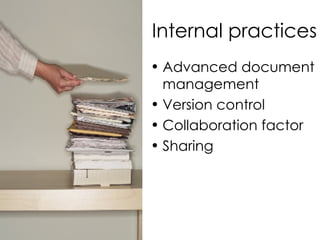
Internal practices Advanced document management Version control Collaboration factor Sharing
Internal Practices File sharing –  Wiki sites ie. www.wetpaint com Document sharing ie. docs.google.com Presentation sharing ie. www.slideshare.net Weblogs ie. www.blogger.com
The Issues Third party hosting Moderating comments Sustainability Investment Tech issues: intranets, firewalls Measuring success!
So, then… Scan the horizon Must be fit for purpose Experiment Try things out internally Take what works for you
Further reading Brian Kelly – UKOLN ukwebfocus.wordpress.com Phil Bradley’s Weblog Philbradley.typepad.com Steven M Cohen www.librarystuff.net EDUCAUSE www.educause.edu

Hants & I0W CILIP 05/07

  • 1.
    2.0 tools KaraJones Subject Librarian University of Bath CILIP Hants&IoW AGM 16 May 2007
  • 2.
    About me: KaraJones Subject Librarian, University of Bath Worked in academic libraries in Australia, Emirates and UK. Not a technology evangelist but a practitioner
  • 3.
    Overview What isweb 2.0? Web 2.0 as a TOOL Information Literacy Accessibility Client interaction Internal Practices The Issues The Future
  • 4.
    What is web2.0 Interactive Collaborative Community building Communication ‘ Web as platform’ ‘ Architecture of participation’
  • 5.
    Social Technologies WeblogsSocial bookmarking Wiki Podcasts RSS Webfeeds Mashups Social networking Facebook, MySpace, Academici
  • 6.
    Why bother? Who’susing web 2.0? 12% of web traffic is to web 2.0 sites 668% growth in last two years (Hitwise data available from BusinessWeek blog: http://www.businessweek.com/the_thread/blogspotting/archives/pdf/Tancer%20Web2expo1.pdf. Accessed: 15 May 2007)) Why use web 2.0? It’s generally free Many of your library clients are using/learning/socialising with it!
  • 7.
    Source: Li,Charlene. ‘Forrester’s new Social Technographics report’, posted 22 April, 2007 on Groundswell: Winning in a World Transformed by Social Technologies . http://blogs.forrester.com/charleneli/2007/04/forresters_new_.html (Accessed: 10 May 2007) None of these activities 52% Inactive Read blogs Watch peer-generated video Listen to podcasts 33% Spectators Use social networking sites 19% Joiners Use RSS Tag Web pages 15% Collectors Comment on blogs Post ratings and reviews 19% Critics Publish web page Publish or maintain a blog Upload video to sites like YouTube 13% Creators
  • 8.
    Using web 2.0 technologies as tools Information Literacy Accessibility Client interaction Internal practices
  • 9.
    Information Literacy Informationliteracy (IL) is an intellectual framework for recognising the need for, understanding, finding, evaluating, and using information . (Australian Information Literacy Standards, 2000) Frameworks / competency standards / skills sets ….
  • 10.
    IL and socialsoftware Social software can be used to engage learners in ways that work best for them. Mechanisms for resource discovery, critical reflection and for recording the search process.
  • 11.
    Weblog features Reflectivetools Highlighting a path of progression Strengthening evaluation skills Being prepared to respond Improving written communication skills Ease of acknowledging sources online Community building
  • 12.
    RSS Webfeed FeaturesRSS newsfeeds on regularly updated websites Tools for organising new information into manageable chunks Delivered to your desktop into folders Used for keeping up to date
  • 13.
    Wiki features Easyto create websites, focus on the content Project development with peer review Group authoring Track a group project (‘Using Wiki in Education’, 2006) Development of ‘communities of practice’ where reflection and feedback are important collaborative processes.
  • 14.
    Accessibility Alternative formatsmp3, podcasting pdf, text www.scribd.com Audacity.sourceforge.net ‘ Blended accessibility’ (Brian Kelly, http://www.ukoln.ac.uk/web-focus/papers/w4a-2007/)
  • 15.
  • 16.
    Client interaction Reviews– Amazon style www.librarything.com Comments – from weblogs Social bookmarking, tagging del.icio.us, connotea, citeulike, flickr (BUT: moderation, trust, risk management…)
  • 17.
    Social bookmarking featuresOrganisation and management of information Sharing and dissemination of resources Collaborative discovery Bottom-up rather than top-down classification of information Folksonomies/ tagging
  • 18.
    Internal practices Advanceddocument management Version control Collaboration factor Sharing
  • 19.
    Internal Practices Filesharing – Wiki sites ie. www.wetpaint com Document sharing ie. docs.google.com Presentation sharing ie. www.slideshare.net Weblogs ie. www.blogger.com
  • 20.
    The Issues Thirdparty hosting Moderating comments Sustainability Investment Tech issues: intranets, firewalls Measuring success!
  • 21.
    So, then… Scanthe horizon Must be fit for purpose Experiment Try things out internally Take what works for you
  • 22.
    Further reading BrianKelly – UKOLN ukwebfocus.wordpress.com Phil Bradley’s Weblog Philbradley.typepad.com Steven M Cohen www.librarystuff.net EDUCAUSE www.educause.edu