UKOLN is supported  by: Wikis, Blogs and Web 2.0 Demystified  Your Name Your Job Title/Position www.bath.ac.uk This work is licensed under a Attribution-NonCommercial-ShareAlike 2.0 licence (but note caveat)
A Brief Introduction…. I work for UKOLN, National centre of expertise in digital information management Located at the University of Bath Funded by JISC and MLA to advise UK HE and FE communities and the cultural heritage sector I work on the Interoperability Focus team Currently work as the Chair of the Institutional Web Management Workshop and on the JISC Standards Catalogue Previous roles include QA Focus, SPP Project Manager, ePrints UK project manager, Public Library Focus work, NOF-digitise, Web Magazines
Workshop Programme Presentation:  Wikis, Blogs and Web 2.0 Demystified 20 minutes Any feedback, questions, comments etc. Add URL of event page on UKOLN website here Add Delicious tag for event here
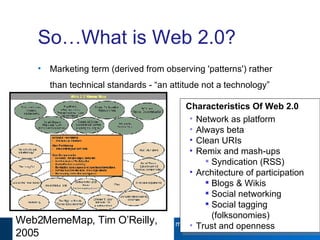
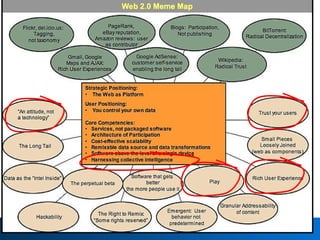
So…What is Web 2.0? Marketing term (derived from observing 'patterns') rather than technical standards - “an attitude not a technology”   Web2MemeMap, Tim O’Reilly, 2005 Characteristics Of Web 2.0 Network as platform Always beta Clean URIs Remix and mash-ups  Syndication (RSS) Architecture of participation Blogs & Wikis Social networking  Social tagging (folksonomies) Trust and openness
 
Blogs A blog is a Web log, online diary Professionals are increasingly using blogs to describe what they are doing A social phenomenon of the 21 st  Century Key characteristics are openess, collaboration and syndication  There is a need for cultural heritage professionals to: Understand blogging and related technologies (e.g. RSS, Technorati) Be able to find resources in the 'Bloggosphere' Explore how to use blogs to support business functions (support users, staff & organisation)
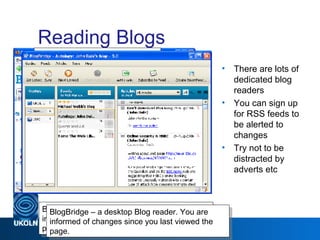
Reading Blogs There are lots of dedicated blog readers You can sign up for RSS feeds to be alerted to changes Try not to be distracted by adverts etc Web 2.0 Bloglines – a Web-based Blog reader. You are informed of changes since you last viewed the page. http://www.bloglines.com/myblogs BlogBridge – a desktop Blog reader. You are informed of changes since you last viewed the page.
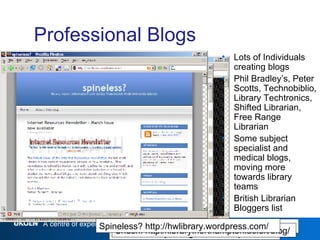
Professional Blogs Lots of Individuals creating blogs Phil Bradley’s, Peter Scotts, Technobiblio, Library Techtronics, Shifted Librarian, Free Range Librarian Some subject specialist and medical blogs, moving more towards library teams British Librarian Bloggers list Panlibus - http://blogs.talis.com/panlibus/ It’s All Good - http://scanblog.blogspot.com/ Shush! http://library.northampton.ac.uk/blog/ Spineless? http://hwlibrary.wordpress.com/
Using Blogs Blogs are very interconnected with each other (bloggers discuss other blog postings). This can help to provide feedback; measure impact; engage in discussions; etc. Web Monkey extension can give blog comments on your pages Technorati can help find Blog articles, etc. A search for “Oxford University Library Services” returns 32 hits, mainly student blogs The comments field can allow you to engage in discussions Time for you to establish a blog?
Blog Issues Can you have a corporate voice, do you want one? What software will you use? Hosted vs self hosted? Free vs cost? Open source vs propriatary? Features? Popular software includes Moveable Type ,  Wordpress, Typepad, Blogger, Blogware A huge number of blogs are not read and become deserted by their writers Do you want all your thoughts to be accessible to all? What about an internal blog? If you want to increase visibility the more postings the higher rating
Wikis Wikis are collaborative Web-based authoring tools –read state and write state They can be used for: team work and collaborative papers (avoiding emailed MS Word file around) Note-taking and social discussions at events As an easy way to set up a group Web site A great e-learning tool Uses a simple markup language (wikitext or wikisyntax) Ability to compare previous versions of a page, revert back and track who edited the page Many allow users to discuss issues prior to making changes Increasing popularity in the public sector
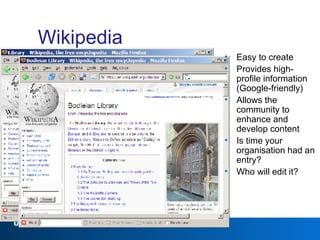
Wikipedia Easy to create Provides high-profile information (Google-friendly) Allows the community to enhance and develop content Is time your organisation had an entry? Who will edit it?
Wiki Issues Vandalism, spam Wiki etiquette Searching (more tagging needed), archiving (ephemeral), organisation of pages – no heirarchy Mark up – no standardisation…yet – training implications Stopping your wiki from becoming an unmaintained storehouse of out-of-date information! Organisational Culture - Freedom to move away from usual design, protocols, habits Consider the merits of a closed-access wiki for certain tasks Resources - Staff training, time, costs How will you add wikis and blogs to your resource collections?
Wiki Potential “ At their best, they can become true community resources that can position the library as a an online hub of their local community true community resources that can position the library as a an online hub of their local community” Meredith Farkas  Book reviews, reviews of exhibitions, FAQs  Comments section, suggestion box Commonly asked questions Local history, personal stories, personal views on exhibits Course collaboration, e-portfolios Staff project work, input for research work
Social Networks Sharing and community are what Web 2.0 is all about Some of the most famous networks are MySpace, Facebook, del.icio.us, Frappr and Flickr Aspects of museums, libraries and archives already operate as a social network in themselves so the implications for it are huge Tagging – allows users to add keywords to items Created by groups/communities who are the resource users Natural language – common understanding No hierarchy, feedback Good for subjective and descriptive data collection RSS Feeds
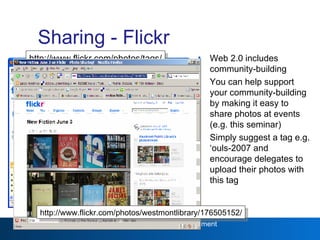
Sharing - Flickr Web 2.0 includes community-building You can help support your community-building by making it easy to share photos at events (e.g. this seminar) Simply suggest a tag e.g. ‘ouls-2007 and encourage delegates to upload their photos with this tag Web 2.0 http://www.flickr.com/photos/tags/ iwmw2006/ http://www.flickr.com/photos/westmontlibrary/176505152/
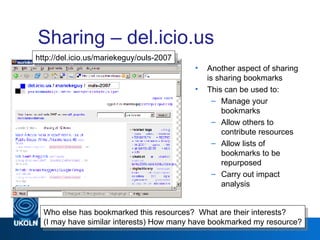
Sharing – del.icio.us Another aspect of sharing is sharing bookmarks This can be used to: Manage your bookmarks Allow others to contribute resources Allow lists of bookmarks to be repurposed Carry out impact analysis Web 2.0 Who else has bookmarked this resources?  What are their interests? (I may have similar interests) How many have bookmarked my resource? http://del.icio.us/mariekeguy/ouls-2007
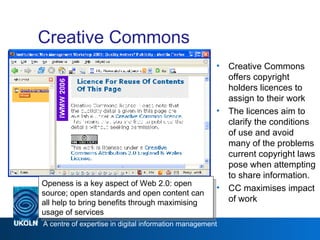
Creative Commons Creative Commons offers copyright holders licences to assign to their work The licences aim to clarify the conditions of use and avoid many of the problems current copyright laws pose when attempting to share information.  CC maximises impact of work Web 2.0 Openess is a key aspect of Web 2.0: open source; open standards and open content can all help to bring benefits through maximising usage of services
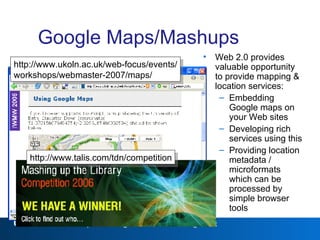
Google Maps/Mashups Web 2.0 provides valuable opportunity to provide mapping & location services: Embedding Google maps on your Web sites Developing rich services using this Providing location metadata / microformats which can be processed by simple browser tools Web 2.0 http://www.ukoln.ac.uk/web-focus/events/ workshops/webmaster-2007/maps/ http://www.talis.com/tdn/competition
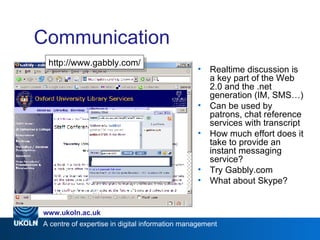
Communication Realtime discussion is a key part of the Web 2.0 and the .net generation (IM, SMS…) Can be used by patrons, chat reference services with transcript How much effort does it take to provide an instant messaging service? Try Gabbly.com What about Skype? Web 2.0 http://www.gabbly.com/
Web 2.0 Backlash When significant new things appear: Enthusiasts / early adopters predict a transformation of society Sceptics outline the limitations & deficiencies There’s a need to: Promote the benefits to the wider community (esp. those willing to try if convinced of benefits) Be realistic and recognise limitations Address inappropriate criticisms, avoid the chasm in the Gartner curve Web 2.0:  It’s a silly name. It’s just a marketing term.  There are lots of poor Web 2.0 services. There wasn’t a Web 1.0. What follows it? It does have a marketing aspect – and that’s OK. It isn’t formally defined – it describes a pattern of related usage. There will be poor (and good) Web 2.0 services – just like anything else. Any usage will arrive at a follow-up term.
Web 2.0 - Summary Paul Miller stated that he saw Web 2.0 as being about: freeing of data, remixing and the opening up of the long tail the building of virtual applications, participation, sharing, communication and facilitating community  applications that work for the user, are modular and are smart
Cultural Services 2.0 With Web 2.0 cultural services have an opportunity to work their wealth of resources harder and serve their existing audiences better Web 2.0  + Library = Library 2.0 +Museum = Museum 2.0 +Archive = Archive 2.0 Warning: Users will bypass processes and institutions that they perceive to be slow, unresponsive, unappealing and irrelevant in favour of a more direct approach to services offered by others that just might be 'good enough' for what they need to do.
Discussion (20 Minutes) So what are the challenges of Web 2.0 for the MLA  community? In small groups list: The top 5 challenges for the MLA community? Possible ways that you can meet these challenges
Questions?

Web2 UKOLN MLA Workshop

  • 1.
    UKOLN is supported by: Wikis, Blogs and Web 2.0 Demystified Your Name Your Job Title/Position www.bath.ac.uk This work is licensed under a Attribution-NonCommercial-ShareAlike 2.0 licence (but note caveat)
  • 2.
    A Brief Introduction….I work for UKOLN, National centre of expertise in digital information management Located at the University of Bath Funded by JISC and MLA to advise UK HE and FE communities and the cultural heritage sector I work on the Interoperability Focus team Currently work as the Chair of the Institutional Web Management Workshop and on the JISC Standards Catalogue Previous roles include QA Focus, SPP Project Manager, ePrints UK project manager, Public Library Focus work, NOF-digitise, Web Magazines
  • 3.
    Workshop Programme Presentation: Wikis, Blogs and Web 2.0 Demystified 20 minutes Any feedback, questions, comments etc. Add URL of event page on UKOLN website here Add Delicious tag for event here
  • 4.
    So…What is Web2.0? Marketing term (derived from observing 'patterns') rather than technical standards - “an attitude not a technology” Web2MemeMap, Tim O’Reilly, 2005 Characteristics Of Web 2.0 Network as platform Always beta Clean URIs Remix and mash-ups Syndication (RSS) Architecture of participation Blogs & Wikis Social networking Social tagging (folksonomies) Trust and openness
  • 5.
  • 6.
    Blogs A blogis a Web log, online diary Professionals are increasingly using blogs to describe what they are doing A social phenomenon of the 21 st Century Key characteristics are openess, collaboration and syndication There is a need for cultural heritage professionals to: Understand blogging and related technologies (e.g. RSS, Technorati) Be able to find resources in the 'Bloggosphere' Explore how to use blogs to support business functions (support users, staff & organisation)
  • 7.
    Reading Blogs Thereare lots of dedicated blog readers You can sign up for RSS feeds to be alerted to changes Try not to be distracted by adverts etc Web 2.0 Bloglines – a Web-based Blog reader. You are informed of changes since you last viewed the page. http://www.bloglines.com/myblogs BlogBridge – a desktop Blog reader. You are informed of changes since you last viewed the page.
  • 8.
    Professional Blogs Lotsof Individuals creating blogs Phil Bradley’s, Peter Scotts, Technobiblio, Library Techtronics, Shifted Librarian, Free Range Librarian Some subject specialist and medical blogs, moving more towards library teams British Librarian Bloggers list Panlibus - http://blogs.talis.com/panlibus/ It’s All Good - http://scanblog.blogspot.com/ Shush! http://library.northampton.ac.uk/blog/ Spineless? http://hwlibrary.wordpress.com/
  • 9.
    Using Blogs Blogsare very interconnected with each other (bloggers discuss other blog postings). This can help to provide feedback; measure impact; engage in discussions; etc. Web Monkey extension can give blog comments on your pages Technorati can help find Blog articles, etc. A search for “Oxford University Library Services” returns 32 hits, mainly student blogs The comments field can allow you to engage in discussions Time for you to establish a blog?
  • 10.
    Blog Issues Canyou have a corporate voice, do you want one? What software will you use? Hosted vs self hosted? Free vs cost? Open source vs propriatary? Features? Popular software includes Moveable Type , Wordpress, Typepad, Blogger, Blogware A huge number of blogs are not read and become deserted by their writers Do you want all your thoughts to be accessible to all? What about an internal blog? If you want to increase visibility the more postings the higher rating
  • 11.
    Wikis Wikis arecollaborative Web-based authoring tools –read state and write state They can be used for: team work and collaborative papers (avoiding emailed MS Word file around) Note-taking and social discussions at events As an easy way to set up a group Web site A great e-learning tool Uses a simple markup language (wikitext or wikisyntax) Ability to compare previous versions of a page, revert back and track who edited the page Many allow users to discuss issues prior to making changes Increasing popularity in the public sector
  • 12.
    Wikipedia Easy tocreate Provides high-profile information (Google-friendly) Allows the community to enhance and develop content Is time your organisation had an entry? Who will edit it?
  • 13.
    Wiki Issues Vandalism,spam Wiki etiquette Searching (more tagging needed), archiving (ephemeral), organisation of pages – no heirarchy Mark up – no standardisation…yet – training implications Stopping your wiki from becoming an unmaintained storehouse of out-of-date information! Organisational Culture - Freedom to move away from usual design, protocols, habits Consider the merits of a closed-access wiki for certain tasks Resources - Staff training, time, costs How will you add wikis and blogs to your resource collections?
  • 14.
    Wiki Potential “At their best, they can become true community resources that can position the library as a an online hub of their local community true community resources that can position the library as a an online hub of their local community” Meredith Farkas Book reviews, reviews of exhibitions, FAQs Comments section, suggestion box Commonly asked questions Local history, personal stories, personal views on exhibits Course collaboration, e-portfolios Staff project work, input for research work
  • 15.
    Social Networks Sharingand community are what Web 2.0 is all about Some of the most famous networks are MySpace, Facebook, del.icio.us, Frappr and Flickr Aspects of museums, libraries and archives already operate as a social network in themselves so the implications for it are huge Tagging – allows users to add keywords to items Created by groups/communities who are the resource users Natural language – common understanding No hierarchy, feedback Good for subjective and descriptive data collection RSS Feeds
  • 16.
    Sharing - FlickrWeb 2.0 includes community-building You can help support your community-building by making it easy to share photos at events (e.g. this seminar) Simply suggest a tag e.g. ‘ouls-2007 and encourage delegates to upload their photos with this tag Web 2.0 http://www.flickr.com/photos/tags/ iwmw2006/ http://www.flickr.com/photos/westmontlibrary/176505152/
  • 17.
    Sharing – del.icio.usAnother aspect of sharing is sharing bookmarks This can be used to: Manage your bookmarks Allow others to contribute resources Allow lists of bookmarks to be repurposed Carry out impact analysis Web 2.0 Who else has bookmarked this resources? What are their interests? (I may have similar interests) How many have bookmarked my resource? http://del.icio.us/mariekeguy/ouls-2007
  • 18.
    Creative Commons CreativeCommons offers copyright holders licences to assign to their work The licences aim to clarify the conditions of use and avoid many of the problems current copyright laws pose when attempting to share information. CC maximises impact of work Web 2.0 Openess is a key aspect of Web 2.0: open source; open standards and open content can all help to bring benefits through maximising usage of services
  • 19.
    Google Maps/Mashups Web2.0 provides valuable opportunity to provide mapping & location services: Embedding Google maps on your Web sites Developing rich services using this Providing location metadata / microformats which can be processed by simple browser tools Web 2.0 http://www.ukoln.ac.uk/web-focus/events/ workshops/webmaster-2007/maps/ http://www.talis.com/tdn/competition
  • 20.
    Communication Realtime discussionis a key part of the Web 2.0 and the .net generation (IM, SMS…) Can be used by patrons, chat reference services with transcript How much effort does it take to provide an instant messaging service? Try Gabbly.com What about Skype? Web 2.0 http://www.gabbly.com/
  • 21.
    Web 2.0 BacklashWhen significant new things appear: Enthusiasts / early adopters predict a transformation of society Sceptics outline the limitations & deficiencies There’s a need to: Promote the benefits to the wider community (esp. those willing to try if convinced of benefits) Be realistic and recognise limitations Address inappropriate criticisms, avoid the chasm in the Gartner curve Web 2.0: It’s a silly name. It’s just a marketing term. There are lots of poor Web 2.0 services. There wasn’t a Web 1.0. What follows it? It does have a marketing aspect – and that’s OK. It isn’t formally defined – it describes a pattern of related usage. There will be poor (and good) Web 2.0 services – just like anything else. Any usage will arrive at a follow-up term.
  • 22.
    Web 2.0 -Summary Paul Miller stated that he saw Web 2.0 as being about: freeing of data, remixing and the opening up of the long tail the building of virtual applications, participation, sharing, communication and facilitating community applications that work for the user, are modular and are smart
  • 23.
    Cultural Services 2.0With Web 2.0 cultural services have an opportunity to work their wealth of resources harder and serve their existing audiences better Web 2.0 + Library = Library 2.0 +Museum = Museum 2.0 +Archive = Archive 2.0 Warning: Users will bypass processes and institutions that they perceive to be slow, unresponsive, unappealing and irrelevant in favour of a more direct approach to services offered by others that just might be 'good enough' for what they need to do.
  • 24.
    Discussion (20 Minutes)So what are the challenges of Web 2.0 for the MLA community? In small groups list: The top 5 challenges for the MLA community? Possible ways that you can meet these challenges
  • 25.

Editor's Notes

  • #2 Update with your own name. Add job title/position if required, but feel free to delete this if not needed.