

Presented by
Stephen Peter
The Hadoop Data Access Layer
Stephen Peter
E-Mail: Stephen.peter@gmail.com
LinkedIn - https://in.linkedin.com/in/stephenepeter
Hortonworks Certified Trainer.
Hortonworks Certified Developer (Apache Pig & Hive)
Digital Badge : http://bcert.me/sxohnqiq
Professional Experience: Over 20 years of IT experience with
specialization in Business Intelligence , Data warehousing and Big Data.
Worked in organizations such as HCL Tech, Oracle , Cisco Systems.
Presently working as Hadoop trainer at Spring People.
Area of interest: coexistence of Enterprise DW and Hadoop
Introduction
• The motivation for Hadoop
▫ The need for ingesting, storing and analyzing big data.
▫ Use cases on the value of Big Data.
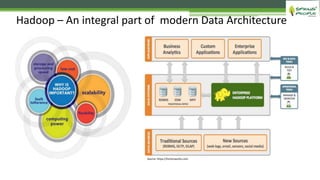
• Hadoop as an integral part of Modern Data Architecture.
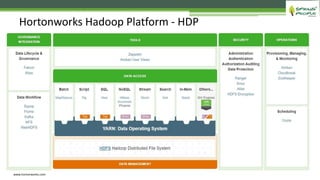
• The HDP (Hortonworks Data Platform) reference architecture.
▫ HDP Data Access Layer.
 The different components its functions and application.
• Use case – Data warehouse Optimization using Hadoop.
▫ to achieve better insight and cost effectiveness.
Agenda
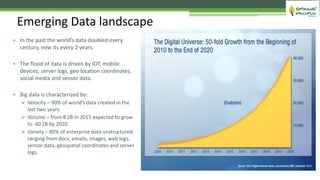
Emerging Data landscape
• In the past the world’s data doubled every
century, now its every 2 years.
• The flood of data is driven by IOT, mobile
devices, server logs, geo location coordinates,
social media and sensor data.
• Big data is characterized by:
 Velocity – 90% of world’s data created in the
last two years.
 Volume – from 8 ZB in 2015 expected to grow
to 40 ZB by 2020.
 Variety – 80% of enterprise data unstructured
ranging from docs, emails, images, web logs,
sensor data, geospatial coordinates and server
logs.
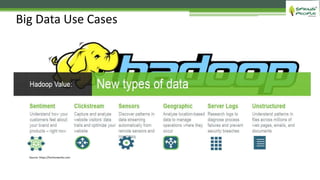
Big Data Use Cases
Source: https://hortonworks.com
Hadoop – An integral part of modern Data Architecture
Source: https://hortonworks.com
Hortonworks Hadoop Platform - HDP
www.hortonworks.com
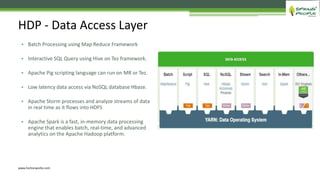
• Batch Processing using Map Reduce Framework
• Interactive SQL Query using Hive on Tez framework.
• Apache Pig scripting language can run on MR or Tez.
• Low latency data access via NoSQL database Hbase.
• Apache Storm processes and analyze streams of data
in real time as it flows into HDFS
• Apache Spark is a fast, in-memory data processing
engine that enables batch, real-time, and advanced
analytics on the Apache Hadoop platform.
HDP - Data Access Layer
www.hortonworks.com
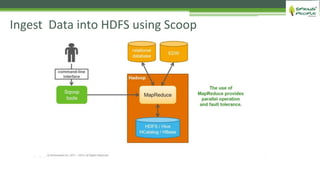
Ingest Data into HDFS using Scoop
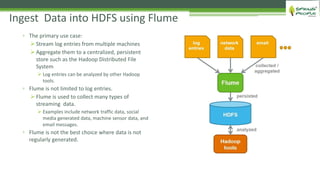
▫ The primary use case:
 Stream log entries from multiple machines
 Aggregate them to a centralized, persistent
store such as the Hadoop Distributed File
System
 Log entries can be analyzed by other Hadoop
tools.
▫ Flume is not limited to log entries.
 Flume is used to collect many types of
streaming data.
 Examples include network traffic data, social
media generated data, machine sensor data, and
email messages.
▫ Flume is not the best choice where data is not
regularly generated.
Ingest Data into HDFS using Flume
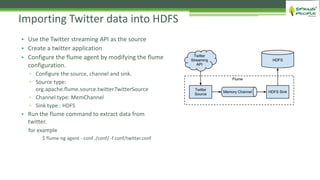
• Use the Twitter streaming API as the source
• Create a twitter application
• Configure the flume agent by modifying the flume
configuration.
▫ Configure the source, channel and sink.
▫ Source type:
org.apache.flume.source.twitter.TwitterSource
▫ Channel type: MemChannel
▫ Sink type : HDFS
• Run the flume command to extract data from
twitter.
for example
$ flume-ng agent --conf ./conf/ -f conf/twitter.conf
Importing Twitter data into HDFS
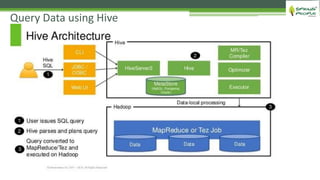
Query Data using Hive
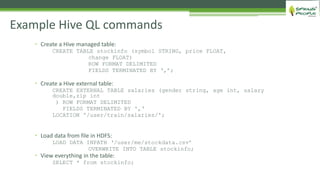
Example Hive QL commands
 Create a Hive managed table:
CREATE TABLE stockinfo (symbol STRING, price FLOAT,
change FLOAT)
ROW FORMAT DELIMITED
FIELDS TERMINATED BY ‘,’;
 Create a Hive external table:
CREATE EXTERNAL TABLE salaries (gender string, age int, salary
double,zip int
) ROW FORMAT DELIMITED
FIELDS TERMINATED BY ',‘
LOCATION '/user/train/salaries/';
 Load data from file in HDFS:
LOAD DATA INPATH ‘/user/me/stockdata.csv’
OVERWRITE INTO TABLE stockinfo;
 View everything in the table:
SELECT * from stockinfo;
Performance tuning in Hive
• Hive Partition table
• Hive Buckets
• Use Optimized Row Columnar (ORC) Format storage
• Cost Based SQL Optimization
• Using Hive on Tez for low latency query
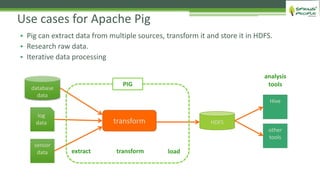
Use cases for Apache Pig
• Pig can extract data from multiple sources, transform it and store it in HDFS.
• Research raw data.
• Iterative data processing
database
data
log
data
sensor
data
transform HDFS
extract transform load
Hive
other
tools
PIG
analysis
tools
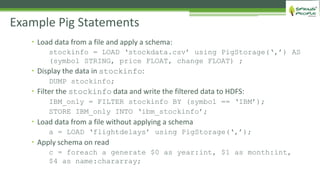
 Load data from a file and apply a schema:
stockinfo = LOAD ‘stockdata.csv’ using PigStorage(‘,’) AS
(symbol STRING, price FLOAT, change FLOAT) ;
 Display the data in stockinfo:
DUMP stockinfo;
 Filter the stockinfo data and write the filtered data to HDFS:
IBM_only = FILTER stockinfo BY (symbol == ‘IBM’);
STORE IBM_only INTO ‘ibm_stockinfo’;
 Load data from a file without applying a schema
a = LOAD ‘flightdelays’ using PigStorage(‘,’);
 Apply schema on read
c = foreach a generate $0 as year:int, $1 as month:int,
$4 as name:chararray;
Example Pig Statements
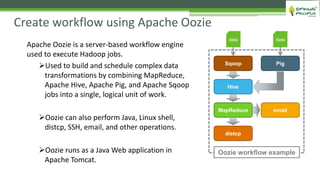
Create workflow using Apache Oozie
email
distcp
MapReduce
Hive
PigSqoop
Oozie workflow example
data data
Apache Oozie is a server-based workflow engine
used to execute Hadoop jobs.
Used to build and schedule complex data
transformations by combining MapReduce,
Apache Hive, Apache Pig, and Apache Sqoop
jobs into a single, logical unit of work.
Oozie can also perform Java, Linux shell,
distcp, SSH, email, and other operations.
Oozie runs as a Java Web application in
Apache Tomcat.
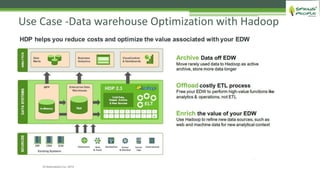
Use Case -Data warehouse Optimization with Hadoop
Hadoop data access layer v4.0

Hadoop data access layer v4.0

  • 1.
    Presented by Stephen Peter TheHadoop Data Access Layer
  • 2.
    Stephen Peter E-Mail: Stephen.peter@gmail.com LinkedIn- https://in.linkedin.com/in/stephenepeter Hortonworks Certified Trainer. Hortonworks Certified Developer (Apache Pig & Hive) Digital Badge : http://bcert.me/sxohnqiq Professional Experience: Over 20 years of IT experience with specialization in Business Intelligence , Data warehousing and Big Data. Worked in organizations such as HCL Tech, Oracle , Cisco Systems. Presently working as Hadoop trainer at Spring People. Area of interest: coexistence of Enterprise DW and Hadoop Introduction
  • 3.
    • The motivationfor Hadoop ▫ The need for ingesting, storing and analyzing big data. ▫ Use cases on the value of Big Data. • Hadoop as an integral part of Modern Data Architecture. • The HDP (Hortonworks Data Platform) reference architecture. ▫ HDP Data Access Layer.  The different components its functions and application. • Use case – Data warehouse Optimization using Hadoop. ▫ to achieve better insight and cost effectiveness. Agenda
  • 4.
    Emerging Data landscape •In the past the world’s data doubled every century, now its every 2 years. • The flood of data is driven by IOT, mobile devices, server logs, geo location coordinates, social media and sensor data. • Big data is characterized by:  Velocity – 90% of world’s data created in the last two years.  Volume – from 8 ZB in 2015 expected to grow to 40 ZB by 2020.  Variety – 80% of enterprise data unstructured ranging from docs, emails, images, web logs, sensor data, geospatial coordinates and server logs.
  • 5.
    Big Data UseCases Source: https://hortonworks.com
  • 6.
    Hadoop – Anintegral part of modern Data Architecture Source: https://hortonworks.com
  • 7.
    Hortonworks Hadoop Platform- HDP www.hortonworks.com
  • 8.
    • Batch Processingusing Map Reduce Framework • Interactive SQL Query using Hive on Tez framework. • Apache Pig scripting language can run on MR or Tez. • Low latency data access via NoSQL database Hbase. • Apache Storm processes and analyze streams of data in real time as it flows into HDFS • Apache Spark is a fast, in-memory data processing engine that enables batch, real-time, and advanced analytics on the Apache Hadoop platform. HDP - Data Access Layer www.hortonworks.com
  • 9.
    Ingest Data intoHDFS using Scoop
  • 10.
    ▫ The primaryuse case:  Stream log entries from multiple machines  Aggregate them to a centralized, persistent store such as the Hadoop Distributed File System  Log entries can be analyzed by other Hadoop tools. ▫ Flume is not limited to log entries.  Flume is used to collect many types of streaming data.  Examples include network traffic data, social media generated data, machine sensor data, and email messages. ▫ Flume is not the best choice where data is not regularly generated. Ingest Data into HDFS using Flume
  • 11.
    • Use theTwitter streaming API as the source • Create a twitter application • Configure the flume agent by modifying the flume configuration. ▫ Configure the source, channel and sink. ▫ Source type: org.apache.flume.source.twitter.TwitterSource ▫ Channel type: MemChannel ▫ Sink type : HDFS • Run the flume command to extract data from twitter. for example $ flume-ng agent --conf ./conf/ -f conf/twitter.conf Importing Twitter data into HDFS
  • 12.
  • 13.
    Example Hive QLcommands  Create a Hive managed table: CREATE TABLE stockinfo (symbol STRING, price FLOAT, change FLOAT) ROW FORMAT DELIMITED FIELDS TERMINATED BY ‘,’;  Create a Hive external table: CREATE EXTERNAL TABLE salaries (gender string, age int, salary double,zip int ) ROW FORMAT DELIMITED FIELDS TERMINATED BY ',‘ LOCATION '/user/train/salaries/';  Load data from file in HDFS: LOAD DATA INPATH ‘/user/me/stockdata.csv’ OVERWRITE INTO TABLE stockinfo;  View everything in the table: SELECT * from stockinfo;
  • 14.
    Performance tuning inHive • Hive Partition table • Hive Buckets • Use Optimized Row Columnar (ORC) Format storage • Cost Based SQL Optimization • Using Hive on Tez for low latency query
  • 15.
    Use cases forApache Pig • Pig can extract data from multiple sources, transform it and store it in HDFS. • Research raw data. • Iterative data processing database data log data sensor data transform HDFS extract transform load Hive other tools PIG analysis tools
  • 16.
     Load datafrom a file and apply a schema: stockinfo = LOAD ‘stockdata.csv’ using PigStorage(‘,’) AS (symbol STRING, price FLOAT, change FLOAT) ;  Display the data in stockinfo: DUMP stockinfo;  Filter the stockinfo data and write the filtered data to HDFS: IBM_only = FILTER stockinfo BY (symbol == ‘IBM’); STORE IBM_only INTO ‘ibm_stockinfo’;  Load data from a file without applying a schema a = LOAD ‘flightdelays’ using PigStorage(‘,’);  Apply schema on read c = foreach a generate $0 as year:int, $1 as month:int, $4 as name:chararray; Example Pig Statements
  • 17.
    Create workflow usingApache Oozie email distcp MapReduce Hive PigSqoop Oozie workflow example data data Apache Oozie is a server-based workflow engine used to execute Hadoop jobs. Used to build and schedule complex data transformations by combining MapReduce, Apache Hive, Apache Pig, and Apache Sqoop jobs into a single, logical unit of work. Oozie can also perform Java, Linux shell, distcp, SSH, email, and other operations. Oozie runs as a Java Web application in Apache Tomcat.
  • 18.
    Use Case -Datawarehouse Optimization with Hadoop