High Availability Options for
Modern Oracle Infrastructures

  Simon Haslam                      Julian Dyke
 Veriton Limited                    juliandyke.com


         1 (1.2h)   ©2011 Veriton Limited   juliandyke.com
Simon Haslam / Veriton
Specialised consultant & Oracle Partner,
established for 15 years

Oracle Fusion Middleware
(Java EE, SSO, OAM, OID, clustering)
ADF Applications (esp. strategy & admin)

Database & related technologies
(Solaris/Linux, load balancers, firewalls, …)


               2 (1.2h)   ©2011 Veriton Limited   juliandyke.com
Julian Dyke / juliandyke.com

Independent database consultant specialising in
Oracle performance tuning and HA, including
RAC and Data Guard


            3 (1.2h)   ©2011 Veriton Limited   juliandyke.com
Agenda
1.   High Availability Outline
2.   Generic HA
3.   Database HA
4.   Middleware HA
5.   Summary
High Availability Definition
                        Wikipedia:
“ High availability is a system design approach
  and associated service implementation that
  ensures a prearranged level of operational
  performance will be met during a contractual
  measurement period ”

                                    http://en.wikipedia.org/wiki/High_availability


             5 (1.2h)    ©2011 Veriton Limited       juliandyke.com
Corollary
“ Paradoxically, adding more components to an
  overall system design can undermine efforts
  to achieve high availability. That is because
  complex systems inherently have more
  potential failure points and are more difficult
  to implement correctly ”


                                  http://en.wikipedia.org/wiki/High_availability


           6 (1.2h)    ©2011 Veriton Limited       juliandyke.com
Complexity
is the enemy of
   availability

  7 (1.2h)   ©2011 Veriton Limited   juliandyke.com
Contrast HA with Disaster
          Recovery
• DR triggered by catastrophic loss of primary
  data centre (i.e. all or nothing)
• Cost of running a DR site means that more
  often now it has a semi-active, or even fully
  active, role
• WANs/MANs are getting faster & more
  affordable
• => techniques for HA & DR are merging


           8 (1.2h)   ©2011 Veriton Limited   juliandyke.com
HA covers failures of…
• Hardware (the most common use case)
  – e.g. server failure
  – Note: within servers many components are
    redundant
    (power supplies, disks, sometimes controllers,
    NICs/HBAs/HCAs, even memory & processors)
• Software
  – unresponsive components


             9 (1.2h)   ©2011 Veriton Limited   juliandyke.com
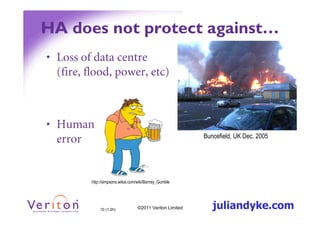
HA does not protect against…
• Loss of data centre
  (fire, flood, power, etc)


• Human
  error                                                   Buncefield, UK Dec. 2005


         http://simpsons.wikia.com/wiki/Barney_Gumble


             10 (1.2h)            ©2011 Veriton Limited      juliandyke.com
Typical Requirements for HA
• Business:
   – An assured level of availability (probably different
     between LOBs/applications)
   – Environment isolation ( ‘it’s ours’)
   – Reduced capital expenditure (esp. licences)
• IT:
   –   low maintenance
   –   standard construction
   –   low complexity
   –   easy to monitor and troubleshoot


               11 (1.2h)   ©2011 Veriton Limited   juliandyke.com
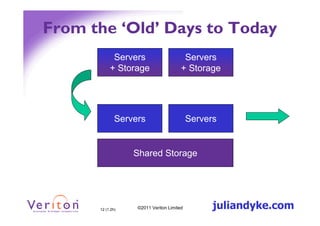
From the ‘Old’ Days to Today
            Servers                     Servers
           + Storage                   + Storage


              Servers                      Servers


                  Shared Storage


      12 (1.2h)    ©2011 Veriton Limited         juliandyke.com
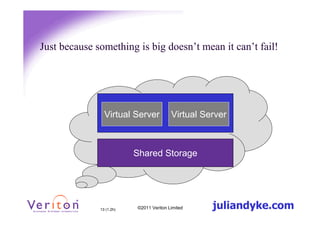
Just because something is big doesn’t mean it can’t fail!


                Virtual Server           Virtual Server
                           Cloud
                          Shared Storage


              13 (1.2h)   ©2011 Veriton Limited    juliandyke.com
High Availability
• HA = as available as your business needs
• Makes things more complicated

• List of HA approaches we’ve used or just
  seen… not necessarily complete


          14 (1.2h)   ©2011 Veriton Limited   juliandyke.com
Agenda
1.   High Availability Outline
2.   Generic HA
3.   Database HA
4.   Middleware HA
5.   A Look Ahead & Summary
Generic HA techniques
• Active/Passive Clusters
• Virtualisation Clusters
• Storage Replication


         16 (1.2h)   ©2011 Veriton Limited   juliandyke.com
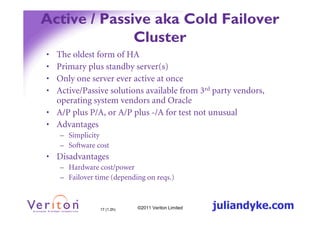
Active / Passive aka Cold Failover
              Cluster
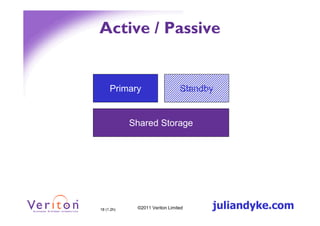
• The oldest form of HA
• Primary plus standby server(s)
• Only one server ever active at once
• Active/Passive solutions available from 3rd party vendors,
  operating system vendors and Oracle
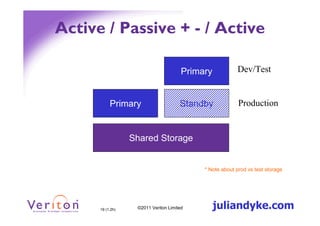
• A/P plus P/A, or A/P plus -/A for test not unusual
• Advantages
    – Simplicity
    – Software cost
• Disadvantages
    – Hardware cost/power
    – Failover time (depending on reqs.)


                17 (1.2h)   ©2011 Veriton Limited   juliandyke.com
Active / Passive


     Primary                    Standby


            Shared Storage


18 (1.2h)    ©2011 Veriton Limited    juliandyke.com
Active / Passive + - / Active

                                       Primary           Dev/Test


           Primary                    Standby             Production


                  Shared Storage


                                            * Note about prod vs test storage


      19 (1.2h)    ©2011 Veriton Limited         juliandyke.com
Virtualisation HA
• Relocating virtual machine
   – suspend, move, resume
• Automatic relocation
   – Move contents of vRAM to target host
   – E.g. vMotion, OVM live migration
• Advantages
   – Generic across all IT services
   – Appears simple
• Disadvantages
   – Underlying products don’t know what’s happening
   – Support if it all goes wrong

              20 (1.2h)   ©2011 Veriton Limited   juliandyke.com
Storage (bit out of scope, but…)
 •   Replication can be done various ways
      –   SAN/NAS provider, e.g. EMC SRDF, RecoverPoint, ZFS
      –   Virtualisation provider, e.g. VMware Storage vMotion
      –   OS provider, e.g. DRBD
      –   Probably lots of others…
 •   Advantages
      – Generic
      – Elegance in simplicity
 •   Disadvantages
      –   May be expensive, especially if need to license both ends
      –   May be new technology
      –   Probably sensitive to network stability (latency, throughput)
      –   “Under the covers” technique the Oracle products don’t know about
      –   Manual failover? Typically invoking DR procedure.


                     21 (1.2h)   ©2011 Veriton Limited     juliandyke.com
Agenda
1.   High Availability Outline
2.   Generic HA
3.   Database HA
4.   Middleware HA
5.   A Look Ahead & Summary
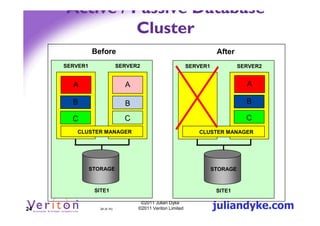
Active / Passive – Database
                   Cluster
     Protects against server failure
         Does not protect against site failure

     Consists of
        Two servers; one active and one passive
        Database files on shared storage
        Heartbeat network to monitor cluster health

     Under normal operation
        Database instances run on active server

     On server failure
         Passive server becomes active server
         Cluster manager fails across all instances to new active server


23                  23 (4.1h)
                                   ©2011 Julian Dyke
                                  ©2011 Veriton Limited    juliandyke.com
Active / Passive Database
               Cluster
               Before                                                  After
     SERVER1                  SERVER2                       SERVER1             SERVER2


       A                        A                                                 A

       B                        B                                                 B

       C                        C                                                 C
        CLUSTER MANAGER                                        CLUSTER MANAGER


               STORAGE                                                STORAGE


                SITE1                                                  SITE1


24                24 (4.1h)
                                     ©2011 Julian Dyke
                                    ©2011 Veriton Limited             juliandyke.com
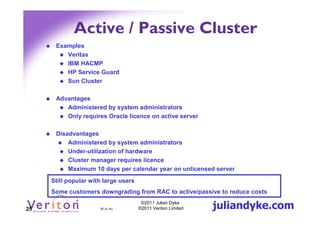
Active / Passive Cluster
      Examples
         Veritas
         IBM HACMP
         HP Service Guard
         Sun Cluster

      Advantages
         Administered by system administrators
         Only requires Oracle licence on active server

      Disadvantages
          Administered by system administrators
          Under-utilization of hardware
          Cluster manager requires licence
          Maximum 10 days per calendar year on unlicensed server
     Still popular with large users
     Some customers downgrading from RAC to active/passive to reduce costs

25                    25 (4.1h)
                                       ©2011 Julian Dyke
                                      ©2011 Veriton Limited   juliandyke.com
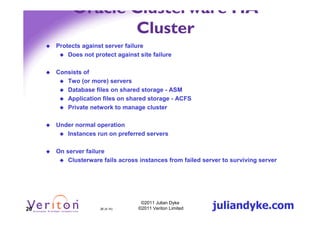
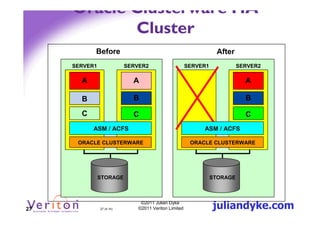
Oracle Clusterware HA
                 Cluster
     Protects against server failure
         Does not protect against site failure

     Consists of
        Two (or more) servers
        Database files on shared storage - ASM
        Application files on shared storage - ACFS
        Private network to manage cluster

     Under normal operation
        Instances run on preferred servers

     On server failure
         Clusterware fails across instances from failed server to surviving server


26                  26 (4.1h)
                                   ©2011 Julian Dyke
                                  ©2011 Veriton Limited    juliandyke.com
Oracle Clusterware HA
            Cluster
           Before                                                 After
     SERVER1               SERVER2                     SERVER1             SERVER2

       A                     A                                               A

       B                     B                                               B

       C                     C                                               C
           ASM / ACFS                                       ASM / ACFS

      ORACLE CLUSTERWARE                                ORACLE CLUSTERWARE


               STORAGE                                           STORAGE


27             27 (4.1h)
                                ©2011 Julian Dyke
                               ©2011 Veriton Limited             juliandyke.com
Oracle Clusterware HA
                   Cluster
      Advantages
         Administered by database administrators
         Based on known and trusted technology stack (Oracle RAC)
         Better utilization of hardware during normal operations
         Supports non-Oracle applications

      Disadvantages
          Administered by database administrators
          May require additional licences for
                  Oracle Clusterware
                  ACFS
                  Oracle RDBMS


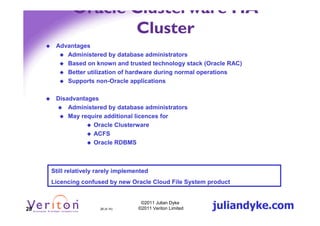
     Still relatively rarely implemented
     Licencing confused by new Oracle Cloud File System product


28                    28 (4.1h)
                                     ©2011 Julian Dyke
                                    ©2011 Veriton Limited   juliandyke.com
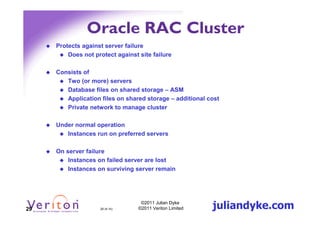
Oracle RAC Cluster
     Protects against server failure
         Does not protect against site failure

     Consists of
        Two (or more) servers
        Database files on shared storage – ASM
        Application files on shared storage – additional cost
        Private network to manage cluster

     Under normal operation
        Instances run on preferred servers

     On server failure
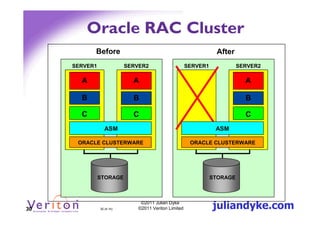
         Instances on failed server are lost
         Instances on surviving server remain


29                  29 (4.1h)
                                   ©2011 Julian Dyke
                                  ©2011 Veriton Limited   juliandyke.com
Oracle RAC Cluster
           Before                                                 After
     SERVER1               SERVER2                     SERVER1             SERVER2

       A                     A                                               A

       B                     B                                               B

       C                     C                                               C
                 ASM                                              ASM

      ORACLE CLUSTERWARE                                ORACLE CLUSTERWARE


               STORAGE                                           STORAGE


30             30 (4.1h)
                                ©2011 Julian Dyke
                               ©2011 Veriton Limited             juliandyke.com
Oracle RAC Cluster
      Advantages
         Administered by database administrators
         Known and trusted technology stack
         Better utilization of hardware during normal operations
         Instances can scale across multiple servers

      Disadvantages
          Administered by database administrators
          Database must be licenced on each server
          May require additional licenses for Oracle RAC option
          Scaling may affect performance


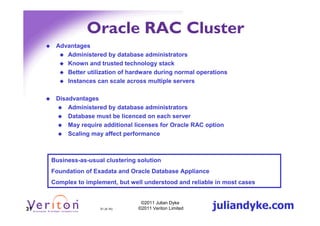
     Business-as-usual clustering solution
     Foundation of Exadata and Oracle Database Appliance
     Complex to implement, but well understood and reliable in most cases


31                   31 (4.1h)
                                   ©2011 Julian Dyke
                                  ©2011 Veriton Limited    juliandyke.com
Oracle RAC One-Node
     Protects against server failure
         Does not protect against site failure

     Consists of
        Two (or more) servers
        Database files on shared storage – ASM
        Private network to manage cluster

     Under normal operation
        Instances run on preferred servers

     On server failure
         Clusterware fails across instances from failed server to surviving server


32                  32 (4.1h)
                                   ©2011 Julian Dyke
                                  ©2011 Veriton Limited    juliandyke.com
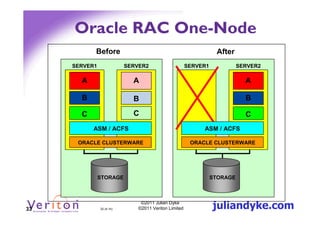
Oracle RAC One-Node
           Before                                                 After
     SERVER1               SERVER2                     SERVER1             SERVER2

       A                     A                                               A

       B                     B                                               B

       C                     C                                               C
           ASM / ACFS                                       ASM / ACFS

      ORACLE CLUSTERWARE                                ORACLE CLUSTERWARE


               STORAGE                                           STORAGE


33             33 (4.1h)
                                ©2011 Julian Dyke
                               ©2011 Veriton Limited             juliandyke.com
Oracle RAC One-Node
      Advantages
         Administered by database administrators
         Known and trusted technology stack
         Database can be unlicensed on one server
         Can be converted into Oracle RAC cluster

      Disadvantages
          Administered by database administrators
          Requires additional RAC one-node licences
          Under-utilization of hardware
          Maximum 10 days per calendar year on unlicensed server


     Really just another licensing option
     Rarely deployed in my experience


34                    34 (4.1h)
                                    ©2011 Julian Dyke
                                   ©2011 Veriton Limited   juliandyke.com
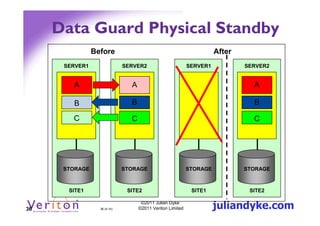
Data Guard Physical Standby
     Protects against server failure and site failure

     Consists of
        Two data centres in physically separate locations
        Servers and storage at each location
        Network between data centres

     Under normal operation
        Instances run on primary servers
        Database changes transported from primary server to standby server
        Database changes applied to standby server

     On server failure
         Instances failed over from failed server to standby server


35                   35 (4.1h)
                                   ©2011 Julian Dyke
                                  ©2011 Veriton Limited     juliandyke.com
Data Guard Physical Standby
                Before                                                After
      SERVER1                 SERVER2                       SERVER1           SERVER2


        A                       A                                               A

        B                       B                                               B

        C                       C                                               C


      STORAGE                 STORAGE                       STORAGE           STORAGE


       SITE1                   SITE2                         SITE1             SITE2


36                36 (4.1h)
                                     ©2011 Julian Dyke
                                    ©2011 Veriton Limited             juliandyke.com
Data Guard Physical Standby
      Advantages
         Protects against site failure
         Known and trusted technology
         Does not require heartbeat network
         Does not require shared storage
         Failover can be automated using Data Guard Broker

      Disadvantages
          Both sites must be licenced
          Requires Enterprise Edition database licences
          Under utilization of hardware and licences
          Applications must be available at both sites
          Failover process may be complex – requires testing


     Easily the most popular DR configuration
     Relatively simple to implement and very reliable when correctly configured


37                   37 (4.1h)
                                   ©2011 Julian Dyke
                                  ©2011 Veriton Limited     juliandyke.com
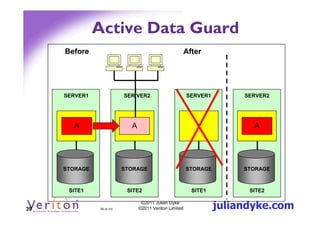
Active Data Guard
     Protects against site and server failure

     Consists of
        Two data centres in physically separate locations
        Storage at each location
        Network between data centres

     Under normal operation
        Read-write instance runs on primary server
        Redo transported and applied to standby server
        Standby server open for read-only operations
        Read-consistency maintained on standby server

     On site failure
         Read-write instance failed over to standby server


38                  38 (4.1h)
                                   ©2011 Julian Dyke
                                  ©2011 Veriton Limited      juliandyke.com
Active Data Guard
     Before                                              After


     SERVER1               SER VER2                      SERVER1        SERVER2


       A                     A                                            A


     STORAGE               STORAGE                       STORAGE        STORAGE


      SITE1                 SITE2                          SITE1         SITE2


39             39 (4.1h)
                                  ©2011 Julian Dyke
                                 ©2011 Veriton Limited             juliandyke.com
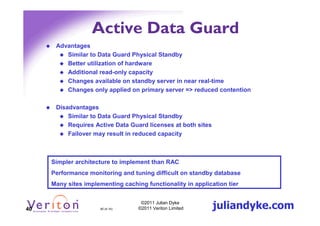
Active Data Guard
      Advantages
         Similar to Data Guard Physical Standby
         Better utilization of hardware
         Additional read-only capacity
         Changes available on standby server in near real-time
         Changes only applied on primary server => reduced contention

      Disadvantages
          Similar to Data Guard Physical Standby
          Requires Active Data Guard licenses at both sites
          Failover may result in reduced capacity


     Simpler architecture to implement than RAC
     Performance monitoring and tuning difficult on standby database
     Many sites implementing caching functionality in application tier


40                    40 (4.1h)
                                    ©2011 Julian Dyke
                                   ©2011 Veriton Limited      juliandyke.com
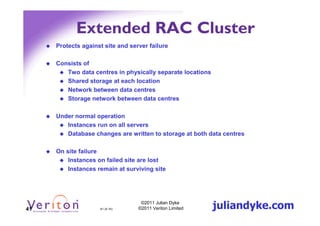
Extended RAC Cluster
     Protects against site and server failure

     Consists of
        Two data centres in physically separate locations
        Shared storage at each location
        Network between data centres
        Storage network between data centres

     Under normal operation
        Instances run on all servers
        Database changes are written to storage at both data centres

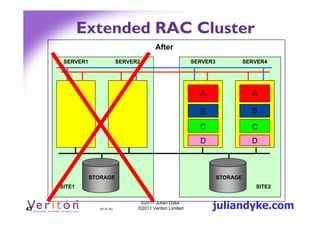
     On site failure
         Instances on failed site are lost
         Instances remain at surviving site


41                  41 (4.1h)
                                   ©2011 Julian Dyke
                                  ©2011 Veriton Limited     juliandyke.com
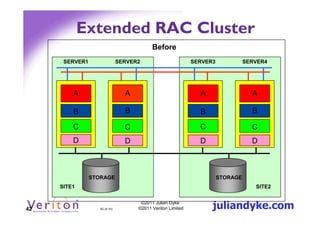
Extended RAC Cluster
                                           Before
      SERVER1                  SERVER2                       SERVER3             SERVER4


         A                       A                             A                   A

         B                       B                             B                   B

         C                       C                             C                   C
         D                       D                             D                   D


                STORAGE                                                STORAGE
     SITE1                                                                          SITE2


42                 42 (4.1h)
                                      ©2011 Julian Dyke
                                     ©2011 Veriton Limited         juliandyke.com
Extended RAC Cluster
                                            After
      SERVER1                  SERVER2                       SERVER3             SERVER4


                                                               A                   A

                                                               B                   B

                                                               C                   C
                                                               D                   D


                STORAGE                                                STORAGE
     SITE1                                                                          SITE2


43                 43 (4.1h)
                                      ©2011 Julian Dyke
                                     ©2011 Veriton Limited         juliandyke.com
Extended RAC Cluster
     Advantages
        Better utilization of hardware and licences
        Applications maintained at both locations
        Reduced failover testing required

     Disadvantages
         May require RAC licences at both sites
         Additional I/O may impact performance
         Increased latencies may impact performance
         Complex solution requires additional management skills
         Oracle commitment to solution is dubious


44                  44 (4.1h)
                                  ©2011 Julian Dyke
                                 ©2011 Veriton Limited   juliandyke.com
And there’s more…
     Oracle Restart
        Clusterware / ASM on a single server

     Replication
        Database links / Remote queries
        Materialized Views
        Advanced Queuing
        Oracle Streams
        Golden Gate


45                 45 (4.1h)
                                 ©2011 Julian Dyke
                                ©2011 Veriton Limited   juliandyke.com
Agenda
1.   High Availability Outline
2.   Generic HA
3.   Database HA
4.   Middleware HA
5.   Summary
Types of Middleware Data
           (11g+)
• Binaries
   – Read only ($MW_HOME, $ORACLE_HOME)
• Configuration/logs (inc deployed apps)
   – Read/write ($DOMAIN_HOME, $ORACLE_INSTANCE)
• State data
   – Java Session
   – JMS messages
   – JTA transactions
• Application data(?)


               47 (1.2h)   ©2011 Veriton Limited   juliandyke.com
State data in memory (& on
          disk)…
• Java Session objects
   – stay in memory (e.g. contents of my basket)
   – very common (historical – JVM size)
   – replicate to other WebLogic servers using either
     WebLogic clustering or Coherence*Web
• JMS messages
   – Java messages (e.g. reserve this item in warehouse)
   – can choose to store on filesystem or in database
• JTA transactions
   – Java transactions (e.g. checkout)
   – NEW! WebLogic 12c can choose to store in database


              48 (1.2h)   ©2011 Veriton Limited   juliandyke.com
Active / Passive vs Active /
            Active
• Active / Active more common in
  middleware tier
  –   Lightweight servers (cd database)
  –   Processes more likely to fail
  –   Low interaction between users
  –   Active / active used for horizontal scalability


             49 (1.2h)   ©2011 Veriton Limited   juliandyke.com
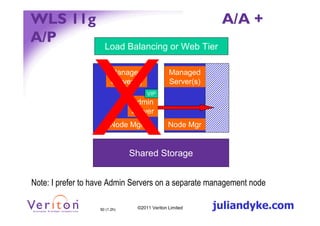
WLS 11g                                                    A/A +
A/P
                     Load Balancing or Web Tier

                         Managed              Managed
                         Server(s)            Server(s)
                                     VIP
                               Admin
                               Server
                        Node Mgr              Node Mgr


                               Shared Storage


Note: I prefer to have Admin Servers on a separate management node

                   50 (1.2h)    ©2011 Veriton Limited     juliandyke.com
Active / Passive CFC & ASCRS
• Oracle Clusterware
   – Around since Oracle Database 10g
   – (CRS code base much more mature)

• 10g: You must install with everything listening on
  VIP
• 11g: ‘transform’ steps
   – ASCRS is new “wrapper” (uses Clusterware 11.1), but
     its future is unclear to me

• See my UKOUG 2010 presentation:
  Building Active/Passive Clusters with Oracle Fusion Middleware 11g
  http://www.veriton.co.uk/content/haslam_events.shtml


                 51 (1.2h)    ©2011 Veriton Limited     juliandyke.com
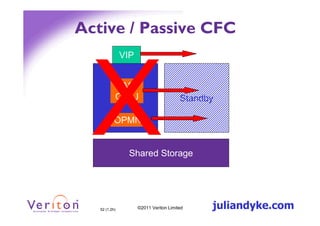
Active / Passive CFC
               VIP


          iAS
         OC4J
        Primary                         Standby

           OPMN


                 Shared Storage


   52 (1.2h)         ©2011 Veriton Limited    juliandyke.com
WLS Whole Service/Server
       Migration
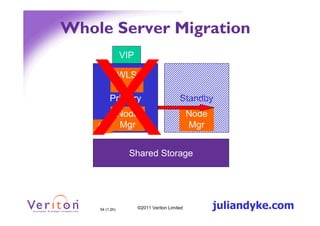
• Service or Server running against VIP
• Node Manager co-ordinates service or
  server restart with Admin Server


          53 (1.2h)   ©2011 Veriton Limited   juliandyke.com
Whole Server Migration
                VIP

                WLS

         Primary                         Standby
       Node                                   Node
    AS Mgr                                    Mgr


                  Shared Storage


    54 (1.2h)         ©2011 Veriton Limited          juliandyke.com
HA for Layered Products
 • More difficult
 • Mainly application level clustering (e.g.
   OIM, OAM)
 • Legacy products little, or product-specific
   options
    – Chunks of C code
 • Newer products:
    – With SOA/BPM 11g uses Coherence for HA
    – Needs to co-ordinate with database failover
Note: 10g AS Guard has gone – more generic approach now ☺

              55 (1.2h)   ©2011 Veriton Limited   juliandyke.com
Agenda
1.   High Availability Outline
2.   Generic HA
3.   Database HA
4.   Middleware HA
5.   Summary
• Hardware HA – traditional, simple
  active/passive
• Database HA – Oracle products
• Virtualisation HA – treat with caution
• Middleware HA – review in ‘WebLogic
  world’


          57 (1.2h)   ©2011 Veriton Limited   juliandyke.com
Thanks for listening!

     Twitter: @simon_haslam
  Blog: http://simonhaslam.co.uk

        info@juliandyke.com
       Twitter: @julian_dyke
Blog: http://juliandyke.wordpress.com


     58 (1.2h)   ©2011 Veriton Limited   juliandyke.com

High Availability Options for Modern Oracle Infrastructures

  • 1.
    High Availability Optionsfor Modern Oracle Infrastructures Simon Haslam Julian Dyke Veriton Limited juliandyke.com 1 (1.2h) ©2011 Veriton Limited juliandyke.com
  • 2.
    Simon Haslam /Veriton Specialised consultant & Oracle Partner, established for 15 years Oracle Fusion Middleware (Java EE, SSO, OAM, OID, clustering) ADF Applications (esp. strategy & admin) Database & related technologies (Solaris/Linux, load balancers, firewalls, …) 2 (1.2h) ©2011 Veriton Limited juliandyke.com
  • 3.
    Julian Dyke /juliandyke.com Independent database consultant specialising in Oracle performance tuning and HA, including RAC and Data Guard 3 (1.2h) ©2011 Veriton Limited juliandyke.com
  • 4.
    Agenda 1. High Availability Outline 2. Generic HA 3. Database HA 4. Middleware HA 5. Summary
  • 5.
    High Availability Definition Wikipedia: “ High availability is a system design approach and associated service implementation that ensures a prearranged level of operational performance will be met during a contractual measurement period ” http://en.wikipedia.org/wiki/High_availability 5 (1.2h) ©2011 Veriton Limited juliandyke.com
  • 6.
    Corollary “ Paradoxically, addingmore components to an overall system design can undermine efforts to achieve high availability. That is because complex systems inherently have more potential failure points and are more difficult to implement correctly ” http://en.wikipedia.org/wiki/High_availability 6 (1.2h) ©2011 Veriton Limited juliandyke.com
  • 7.
    Complexity is the enemyof availability 7 (1.2h) ©2011 Veriton Limited juliandyke.com
  • 8.
    Contrast HA withDisaster Recovery • DR triggered by catastrophic loss of primary data centre (i.e. all or nothing) • Cost of running a DR site means that more often now it has a semi-active, or even fully active, role • WANs/MANs are getting faster & more affordable • => techniques for HA & DR are merging 8 (1.2h) ©2011 Veriton Limited juliandyke.com
  • 9.
    HA covers failuresof… • Hardware (the most common use case) – e.g. server failure – Note: within servers many components are redundant (power supplies, disks, sometimes controllers, NICs/HBAs/HCAs, even memory & processors) • Software – unresponsive components 9 (1.2h) ©2011 Veriton Limited juliandyke.com
  • 10.
    HA does notprotect against… • Loss of data centre (fire, flood, power, etc) • Human error Buncefield, UK Dec. 2005 http://simpsons.wikia.com/wiki/Barney_Gumble 10 (1.2h) ©2011 Veriton Limited juliandyke.com
  • 11.
    Typical Requirements forHA • Business: – An assured level of availability (probably different between LOBs/applications) – Environment isolation ( ‘it’s ours’) – Reduced capital expenditure (esp. licences) • IT: – low maintenance – standard construction – low complexity – easy to monitor and troubleshoot 11 (1.2h) ©2011 Veriton Limited juliandyke.com
  • 12.
    From the ‘Old’Days to Today Servers Servers + Storage + Storage Servers Servers Shared Storage 12 (1.2h) ©2011 Veriton Limited juliandyke.com
  • 13.
    Just because somethingis big doesn’t mean it can’t fail! Virtual Server Virtual Server Cloud Shared Storage 13 (1.2h) ©2011 Veriton Limited juliandyke.com
  • 14.
    High Availability • HA= as available as your business needs • Makes things more complicated • List of HA approaches we’ve used or just seen… not necessarily complete 14 (1.2h) ©2011 Veriton Limited juliandyke.com
  • 15.
    Agenda 1. High Availability Outline 2. Generic HA 3. Database HA 4. Middleware HA 5. A Look Ahead & Summary
  • 16.
    Generic HA techniques •Active/Passive Clusters • Virtualisation Clusters • Storage Replication 16 (1.2h) ©2011 Veriton Limited juliandyke.com
  • 17.
    Active / Passiveaka Cold Failover Cluster • The oldest form of HA • Primary plus standby server(s) • Only one server ever active at once • Active/Passive solutions available from 3rd party vendors, operating system vendors and Oracle • A/P plus P/A, or A/P plus -/A for test not unusual • Advantages – Simplicity – Software cost • Disadvantages – Hardware cost/power – Failover time (depending on reqs.) 17 (1.2h) ©2011 Veriton Limited juliandyke.com
  • 18.
    Active / Passive Primary Standby Shared Storage 18 (1.2h) ©2011 Veriton Limited juliandyke.com
  • 19.
    Active / Passive+ - / Active Primary Dev/Test Primary Standby Production Shared Storage * Note about prod vs test storage 19 (1.2h) ©2011 Veriton Limited juliandyke.com
  • 20.
    Virtualisation HA • Relocatingvirtual machine – suspend, move, resume • Automatic relocation – Move contents of vRAM to target host – E.g. vMotion, OVM live migration • Advantages – Generic across all IT services – Appears simple • Disadvantages – Underlying products don’t know what’s happening – Support if it all goes wrong 20 (1.2h) ©2011 Veriton Limited juliandyke.com
  • 21.
    Storage (bit outof scope, but…) • Replication can be done various ways – SAN/NAS provider, e.g. EMC SRDF, RecoverPoint, ZFS – Virtualisation provider, e.g. VMware Storage vMotion – OS provider, e.g. DRBD – Probably lots of others… • Advantages – Generic – Elegance in simplicity • Disadvantages – May be expensive, especially if need to license both ends – May be new technology – Probably sensitive to network stability (latency, throughput) – “Under the covers” technique the Oracle products don’t know about – Manual failover? Typically invoking DR procedure. 21 (1.2h) ©2011 Veriton Limited juliandyke.com
  • 22.
    Agenda 1. High Availability Outline 2. Generic HA 3. Database HA 4. Middleware HA 5. A Look Ahead & Summary
  • 23.
    Active / Passive– Database Cluster Protects against server failure Does not protect against site failure Consists of Two servers; one active and one passive Database files on shared storage Heartbeat network to monitor cluster health Under normal operation Database instances run on active server On server failure Passive server becomes active server Cluster manager fails across all instances to new active server 23 23 (4.1h) ©2011 Julian Dyke ©2011 Veriton Limited juliandyke.com
  • 24.
    Active / PassiveDatabase Cluster Before After SERVER1 SERVER2 SERVER1 SERVER2 A A A B B B C C C CLUSTER MANAGER CLUSTER MANAGER STORAGE STORAGE SITE1 SITE1 24 24 (4.1h) ©2011 Julian Dyke ©2011 Veriton Limited juliandyke.com
  • 25.
    Active / PassiveCluster Examples Veritas IBM HACMP HP Service Guard Sun Cluster Advantages Administered by system administrators Only requires Oracle licence on active server Disadvantages Administered by system administrators Under-utilization of hardware Cluster manager requires licence Maximum 10 days per calendar year on unlicensed server Still popular with large users Some customers downgrading from RAC to active/passive to reduce costs 25 25 (4.1h) ©2011 Julian Dyke ©2011 Veriton Limited juliandyke.com
  • 26.
    Oracle Clusterware HA Cluster Protects against server failure Does not protect against site failure Consists of Two (or more) servers Database files on shared storage - ASM Application files on shared storage - ACFS Private network to manage cluster Under normal operation Instances run on preferred servers On server failure Clusterware fails across instances from failed server to surviving server 26 26 (4.1h) ©2011 Julian Dyke ©2011 Veriton Limited juliandyke.com
  • 27.
    Oracle Clusterware HA Cluster Before After SERVER1 SERVER2 SERVER1 SERVER2 A A A B B B C C C ASM / ACFS ASM / ACFS ORACLE CLUSTERWARE ORACLE CLUSTERWARE STORAGE STORAGE 27 27 (4.1h) ©2011 Julian Dyke ©2011 Veriton Limited juliandyke.com
  • 28.
    Oracle Clusterware HA Cluster Advantages Administered by database administrators Based on known and trusted technology stack (Oracle RAC) Better utilization of hardware during normal operations Supports non-Oracle applications Disadvantages Administered by database administrators May require additional licences for Oracle Clusterware ACFS Oracle RDBMS Still relatively rarely implemented Licencing confused by new Oracle Cloud File System product 28 28 (4.1h) ©2011 Julian Dyke ©2011 Veriton Limited juliandyke.com
  • 29.
    Oracle RAC Cluster Protects against server failure Does not protect against site failure Consists of Two (or more) servers Database files on shared storage – ASM Application files on shared storage – additional cost Private network to manage cluster Under normal operation Instances run on preferred servers On server failure Instances on failed server are lost Instances on surviving server remain 29 29 (4.1h) ©2011 Julian Dyke ©2011 Veriton Limited juliandyke.com
  • 30.
    Oracle RAC Cluster Before After SERVER1 SERVER2 SERVER1 SERVER2 A A A B B B C C C ASM ASM ORACLE CLUSTERWARE ORACLE CLUSTERWARE STORAGE STORAGE 30 30 (4.1h) ©2011 Julian Dyke ©2011 Veriton Limited juliandyke.com
  • 31.
    Oracle RAC Cluster Advantages Administered by database administrators Known and trusted technology stack Better utilization of hardware during normal operations Instances can scale across multiple servers Disadvantages Administered by database administrators Database must be licenced on each server May require additional licenses for Oracle RAC option Scaling may affect performance Business-as-usual clustering solution Foundation of Exadata and Oracle Database Appliance Complex to implement, but well understood and reliable in most cases 31 31 (4.1h) ©2011 Julian Dyke ©2011 Veriton Limited juliandyke.com
  • 32.
    Oracle RAC One-Node Protects against server failure Does not protect against site failure Consists of Two (or more) servers Database files on shared storage – ASM Private network to manage cluster Under normal operation Instances run on preferred servers On server failure Clusterware fails across instances from failed server to surviving server 32 32 (4.1h) ©2011 Julian Dyke ©2011 Veriton Limited juliandyke.com
  • 33.
    Oracle RAC One-Node Before After SERVER1 SERVER2 SERVER1 SERVER2 A A A B B B C C C ASM / ACFS ASM / ACFS ORACLE CLUSTERWARE ORACLE CLUSTERWARE STORAGE STORAGE 33 33 (4.1h) ©2011 Julian Dyke ©2011 Veriton Limited juliandyke.com
  • 34.
    Oracle RAC One-Node Advantages Administered by database administrators Known and trusted technology stack Database can be unlicensed on one server Can be converted into Oracle RAC cluster Disadvantages Administered by database administrators Requires additional RAC one-node licences Under-utilization of hardware Maximum 10 days per calendar year on unlicensed server Really just another licensing option Rarely deployed in my experience 34 34 (4.1h) ©2011 Julian Dyke ©2011 Veriton Limited juliandyke.com
  • 35.
    Data Guard PhysicalStandby Protects against server failure and site failure Consists of Two data centres in physically separate locations Servers and storage at each location Network between data centres Under normal operation Instances run on primary servers Database changes transported from primary server to standby server Database changes applied to standby server On server failure Instances failed over from failed server to standby server 35 35 (4.1h) ©2011 Julian Dyke ©2011 Veriton Limited juliandyke.com
  • 36.
    Data Guard PhysicalStandby Before After SERVER1 SERVER2 SERVER1 SERVER2 A A A B B B C C C STORAGE STORAGE STORAGE STORAGE SITE1 SITE2 SITE1 SITE2 36 36 (4.1h) ©2011 Julian Dyke ©2011 Veriton Limited juliandyke.com
  • 37.
    Data Guard PhysicalStandby Advantages Protects against site failure Known and trusted technology Does not require heartbeat network Does not require shared storage Failover can be automated using Data Guard Broker Disadvantages Both sites must be licenced Requires Enterprise Edition database licences Under utilization of hardware and licences Applications must be available at both sites Failover process may be complex – requires testing Easily the most popular DR configuration Relatively simple to implement and very reliable when correctly configured 37 37 (4.1h) ©2011 Julian Dyke ©2011 Veriton Limited juliandyke.com
  • 38.
    Active Data Guard Protects against site and server failure Consists of Two data centres in physically separate locations Storage at each location Network between data centres Under normal operation Read-write instance runs on primary server Redo transported and applied to standby server Standby server open for read-only operations Read-consistency maintained on standby server On site failure Read-write instance failed over to standby server 38 38 (4.1h) ©2011 Julian Dyke ©2011 Veriton Limited juliandyke.com
  • 39.
    Active Data Guard Before After SERVER1 SER VER2 SERVER1 SERVER2 A A A STORAGE STORAGE STORAGE STORAGE SITE1 SITE2 SITE1 SITE2 39 39 (4.1h) ©2011 Julian Dyke ©2011 Veriton Limited juliandyke.com
  • 40.
    Active Data Guard Advantages Similar to Data Guard Physical Standby Better utilization of hardware Additional read-only capacity Changes available on standby server in near real-time Changes only applied on primary server => reduced contention Disadvantages Similar to Data Guard Physical Standby Requires Active Data Guard licenses at both sites Failover may result in reduced capacity Simpler architecture to implement than RAC Performance monitoring and tuning difficult on standby database Many sites implementing caching functionality in application tier 40 40 (4.1h) ©2011 Julian Dyke ©2011 Veriton Limited juliandyke.com
  • 41.
    Extended RAC Cluster Protects against site and server failure Consists of Two data centres in physically separate locations Shared storage at each location Network between data centres Storage network between data centres Under normal operation Instances run on all servers Database changes are written to storage at both data centres On site failure Instances on failed site are lost Instances remain at surviving site 41 41 (4.1h) ©2011 Julian Dyke ©2011 Veriton Limited juliandyke.com
  • 42.
    Extended RAC Cluster Before SERVER1 SERVER2 SERVER3 SERVER4 A A A A B B B B C C C C D D D D STORAGE STORAGE SITE1 SITE2 42 42 (4.1h) ©2011 Julian Dyke ©2011 Veriton Limited juliandyke.com
  • 43.
    Extended RAC Cluster After SERVER1 SERVER2 SERVER3 SERVER4 A A B B C C D D STORAGE STORAGE SITE1 SITE2 43 43 (4.1h) ©2011 Julian Dyke ©2011 Veriton Limited juliandyke.com
  • 44.
    Extended RAC Cluster Advantages Better utilization of hardware and licences Applications maintained at both locations Reduced failover testing required Disadvantages May require RAC licences at both sites Additional I/O may impact performance Increased latencies may impact performance Complex solution requires additional management skills Oracle commitment to solution is dubious 44 44 (4.1h) ©2011 Julian Dyke ©2011 Veriton Limited juliandyke.com
  • 45.
    And there’s more… Oracle Restart Clusterware / ASM on a single server Replication Database links / Remote queries Materialized Views Advanced Queuing Oracle Streams Golden Gate 45 45 (4.1h) ©2011 Julian Dyke ©2011 Veriton Limited juliandyke.com
  • 46.
    Agenda 1. High Availability Outline 2. Generic HA 3. Database HA 4. Middleware HA 5. Summary
  • 47.
    Types of MiddlewareData (11g+) • Binaries – Read only ($MW_HOME, $ORACLE_HOME) • Configuration/logs (inc deployed apps) – Read/write ($DOMAIN_HOME, $ORACLE_INSTANCE) • State data – Java Session – JMS messages – JTA transactions • Application data(?) 47 (1.2h) ©2011 Veriton Limited juliandyke.com
  • 48.
    State data inmemory (& on disk)… • Java Session objects – stay in memory (e.g. contents of my basket) – very common (historical – JVM size) – replicate to other WebLogic servers using either WebLogic clustering or Coherence*Web • JMS messages – Java messages (e.g. reserve this item in warehouse) – can choose to store on filesystem or in database • JTA transactions – Java transactions (e.g. checkout) – NEW! WebLogic 12c can choose to store in database 48 (1.2h) ©2011 Veriton Limited juliandyke.com
  • 49.
    Active / Passivevs Active / Active • Active / Active more common in middleware tier – Lightweight servers (cd database) – Processes more likely to fail – Low interaction between users – Active / active used for horizontal scalability 49 (1.2h) ©2011 Veriton Limited juliandyke.com
  • 50.
    WLS 11g A/A + A/P Load Balancing or Web Tier Managed Managed Server(s) Server(s) VIP Admin Server Node Mgr Node Mgr Shared Storage Note: I prefer to have Admin Servers on a separate management node 50 (1.2h) ©2011 Veriton Limited juliandyke.com
  • 51.
    Active / PassiveCFC & ASCRS • Oracle Clusterware – Around since Oracle Database 10g – (CRS code base much more mature) • 10g: You must install with everything listening on VIP • 11g: ‘transform’ steps – ASCRS is new “wrapper” (uses Clusterware 11.1), but its future is unclear to me • See my UKOUG 2010 presentation: Building Active/Passive Clusters with Oracle Fusion Middleware 11g http://www.veriton.co.uk/content/haslam_events.shtml 51 (1.2h) ©2011 Veriton Limited juliandyke.com
  • 52.
    Active / PassiveCFC VIP iAS OC4J Primary Standby OPMN Shared Storage 52 (1.2h) ©2011 Veriton Limited juliandyke.com
  • 53.
    WLS Whole Service/Server Migration • Service or Server running against VIP • Node Manager co-ordinates service or server restart with Admin Server 53 (1.2h) ©2011 Veriton Limited juliandyke.com
  • 54.
    Whole Server Migration VIP WLS Primary Standby Node Node AS Mgr Mgr Shared Storage 54 (1.2h) ©2011 Veriton Limited juliandyke.com
  • 55.
    HA for LayeredProducts • More difficult • Mainly application level clustering (e.g. OIM, OAM) • Legacy products little, or product-specific options – Chunks of C code • Newer products: – With SOA/BPM 11g uses Coherence for HA – Needs to co-ordinate with database failover Note: 10g AS Guard has gone – more generic approach now ☺ 55 (1.2h) ©2011 Veriton Limited juliandyke.com
  • 56.
    Agenda 1. High Availability Outline 2. Generic HA 3. Database HA 4. Middleware HA 5. Summary
  • 57.
    • Hardware HA– traditional, simple active/passive • Database HA – Oracle products • Virtualisation HA – treat with caution • Middleware HA – review in ‘WebLogic world’ 57 (1.2h) ©2011 Veriton Limited juliandyke.com
  • 58.
    Thanks for listening! Twitter: @simon_haslam Blog: http://simonhaslam.co.uk info@juliandyke.com Twitter: @julian_dyke Blog: http://juliandyke.wordpress.com 58 (1.2h) ©2011 Veriton Limited juliandyke.com