Automatic Storage Management
Oracle Exadata Master Class
Copyright © 2019 Oracle and/or its affiliates.
The preceding is intended to outline our general product direction. It is intended for information purposes
only, and may not be incorporated into any contract. It is not a commitment to deliver any material, code,
or functionality, and should not be relied upon in making purchasing decisions. The development,
release, timing, and pricing of any features or functionality described for Oracle’s products may change
and remains at the sole discretion of Oracle Corporation.
Statements in this presentation relating to Oracle’s future plans, expectations, beliefs, intentions and
prospects are “forward-looking statements” and are subject to material risks and uncertainties. A detailed
discussion of these factors and other risks that affect our business is contained in Oracle’s Securities and
Exchange Commission (SEC) filings, including our most recent reports on Form 10-K and Form 10-Q
under the heading “Risk Factors.” These filings are available on the SEC’s website or on Oracle’s website
at http://www.oracle.com/investor. All information in this presentation is current as of September
2019 and Oracle undertakes no duty to update any statement in light of new information or future events.
Safe Harbor
Copyright © 2019 Oracle and/or its affiliates.
3
Program Agenda
Past and Present: a History of ASM
ASM Best Practices
Disk Offline and Online Enhancements
Rebalance Enhancements
1
2
3
4
3
4
Program Agenda
Past and Present: a History of ASM
ASM Best Practices
Disk Offline and Online Enhancements
Rebalance Enhancements
1
2
3
4
4
5
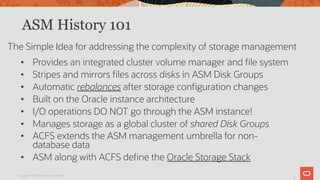
ASM History 101
• Provides an integrated cluster volume manager and file system
• Stripes and mirrors files across disks in ASM Disk Groups
• Automatic rebalances after storage configuration changes
• Built on the Oracle instance architecture
• I/O operations DO NOT go through the ASM instance!
• Manages storage as a global cluster of shared Disk Groups
• ACFS extends the ASM management umbrella for non-
database data
• ASM along with ACFS define the Oracle Storage Stack
The Simple Idea for addressing the complexity of storage management
Copyright © 2019 Oracle and/or its affiliates.
6
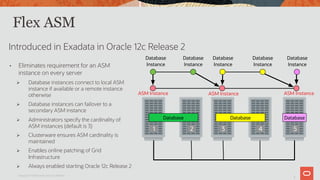
Flex ASM
Introduced in Exadata in Oracle 12c Release 2
• Eliminates requirement for an ASM
instance on every server
Ø Database instances connect to local ASM
instance if available or a remote instance
otherwise
Ø Database instances can failover to a
secondary ASM instance
Ø Administrators specify the cardinality of
ASM instances (default is 3)
Ø Clusterware ensures ASM cardinality is
maintained
Ø Enables online patching of Grid
Infrastructure
Ø Always enabled starting Oracle 12c Release 2
Database Database Database
Database
Instance
Database
Instance
Database
Instance
Database
Instance
ASM Instance
1 2 3 4 5
Database
Instance
ASM Instance ASM Instance
Copyright © 2019 Oracle and/or its affiliates.
7
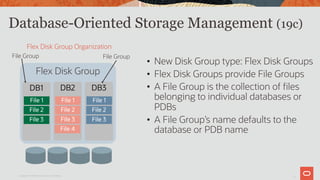
Database-Oriented Storage Management (19c)
Copyright © 2019 Oracle and/or its affiliates.
• New Disk Group type: Flex Disk Groups
• Flex Disk Groups provide File Groups
• A File Group is the collection of files
belonging to individual databases or
PDBs
• A File Group’s name defaults to the
database or PDB name
Flex Disk Group Organization
Flex Disk Group
DB1
File 1
File 2
File 3
DB2
File 1
File 2
File 3
File 4
DB3
File 1
File 2
File 3
File Group File Group
8
ASM File Group Flexibility and Availability
Copyright © 2019 Oracle and/or its affiliates.
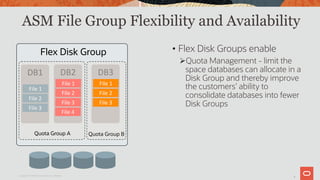
• Flex Disk Groups enable
ØQuota Management - limit the
space databases can allocate in a
Disk Group and thereby improve
the customers’ ability to
consolidate databases into fewer
Disk Groups
DB1	
File	1	
File	2	
File	3	
DB2	
File	1	
File	2	
File	3	
File	4	
DB3	
File	1	
File	2	
File	3	
Quota Group B
Flex Disk Group
Quota Group A
9
ASM File Group Flexibility and Availability
Copyright © 2019 Oracle and/or its affiliates.
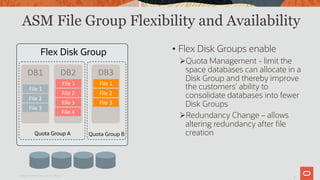
• Flex Disk Groups enable
ØQuota Management - limit the
space databases can allocate in a
Disk Group and thereby improve
the customers’ ability to
consolidate databases into fewer
Disk Groups
ØRedundancy Change – allows
altering redundancy after file
creation
DB1	
File	1	
File	2	
File	3	
DB2	
File	1	
File	2	
File	3	
File	4	
DB3	
File	1	
File	2	
File	3	
Quota Group B
Flex Disk Group
Quota Group A
10
ASM File Group Flexibility and Availability
Copyright © 2019 Oracle and/or its affiliates.
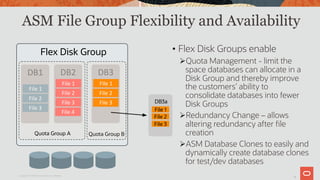
• Flex Disk Groups enable
ØQuota Management - limit the
space databases can allocate in a
Disk Group and thereby improve
the customers’ ability to
consolidate databases into fewer
Disk Groups
ØRedundancy Change – allows
altering redundancy after file
creation
ØASM Database Clones to easily and
dynamically create database clones
for test/dev databases
DB1	
File	1	
File	2	
File	3	
DB2	
File	1	
File	2	
File	3	
File	4	
DB3	
File	1	
File	2	
File	3	
Quota Group B
Flex Disk Group
Quota Group A
DB3a
File 1
File 2
File 3
11
Flex Disk Groups: Parity Protected Files
ASM Parity protection
• New space-efficient protection option
• ASM provides parity protection for write-once files
Ø Archive log files
Ø Archive log backup piece
Ø Automatically generated control file backup
Ø Data file backup pieces
Ø Data file incremental backup pieces
Ø Cross-platform transportable data files backup
Ø Cross-platform transportable data files incremental backup
Copyright © 2019 Oracle and/or its affiliates.
12
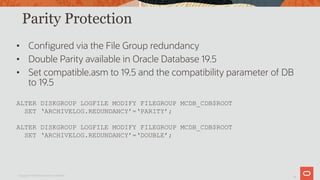
Parity Protection
• Configured via the File Group redundancy
• Double Parity available in Oracle Database 19.5
• Set compatible.asm to 19.5 and the compatibility parameter of DB
to 19.5
ALTER DISKGROUP LOGFILE MODIFY FILEGROUP MCDB_CDB$ROOT
SET ‘ARCHIVELOG.REDUNDANCY’=‘PARITY’;
ALTER DISKGROUP LOGFILE MODIFY FILEGROUP MCDB_CDB$ROOT
SET ‘ARCHIVELOG.REDUNDANCY’=‘DOUBLE’;
Copyright © 2019 Oracle and/or its affiliates.
13
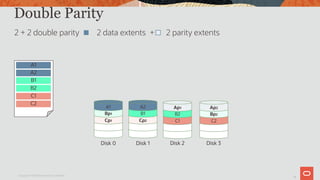
Double Parity
Copyright © 2019 Oracle and/or its affiliates.
2 + 2 double parity 2 data extents + 2 parity extents
Disk 0
Cp1
Bp1
A1
Disk 1
Cp2
B1
A2
Disk 2
C1
B2
Ap1
A1
A2
B1
B2
C1
C2
Disk 3
C2
Bp2
Ap2
14
Program Agenda
Past and Present: a History of ASM
ASM Best Practices
Disk Offline and Online Enhancements
Rebalance Enhancements
1
2
3
4
14
15
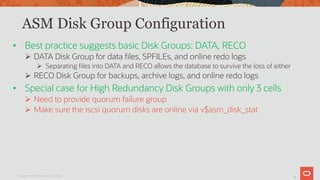
ASM Disk Group Configuration
• Best practice suggests basic Disk Groups: DATA, RECO
Ø DATA Disk Group for data files, SPFILEs, and online redo logs
Ø Separating files into DATA and RECO allows the database to survive the loss of either
Ø RECO Disk Group for backups, archive logs, and online redo logs
• Special case for High Redundancy Disk Groups with only 3 cells
Ø Need to provide quorum failure group
Ø Make sure the iscsi quorum disks are online via v$asm_disk_stat
Copyright © 2019 Oracle and/or its affiliates.
16
Exadata Disk Groups Configuration
• For Exadata, High Redundancy is the best practice
recommendation for Disk Groups.
• Any individual Disk Group should have disks of similar capacity
and performance
Copyright © 2019 Oracle and/or its affiliates.
17
Number of Disk Groups - Continued
• Separate disk groups for different storage tiers, e.g. hard disk or flash
• A system has disks of varying capacity and performance. Because
different drive types cannot be mixed in the same disk group and
separate disk groups are required
• To isolate specific databases due to operational considerations such
as E-Business Suite data and Siebel data
Reasons for More Than the Recommended Minimum Number of Disk
Groups
1
18
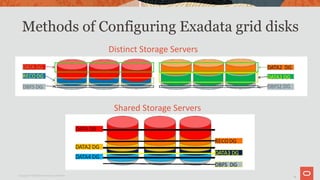
Methods of Configuring Exadata grid disks
Copyright © 2019 Oracle and/or its affiliates.
Distinct Storage Servers
Shared Storage Servers
19
Best Practices for Creating Disk Groups
• Use the shared storage server approach. This provides the best
overall system performance
• Consider using fewer Disk Groups and using IORM to manage
workload
• Keep in mind that the number of concurrent rebalance
operations are limited to the number of ASM instances. With
many Disk Groups, some Disk Group rebalance operations may
have to queue.
Copyright © 2019 Oracle and/or its affiliates.
20
How to Create New Disk Groups with no
Unallocated Space
• Option 1: Free up space from an existing disk group
• Delete or move some files from disk group, if necessary and possible
• Resize all ASM disks to a smaller size
• Resize the respective grid disks to a smaller size
• Use the newly available space to create new grid disks
• Create a new disk group using new grid disks
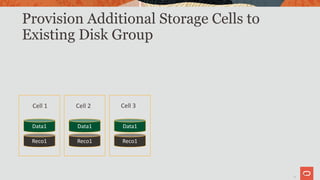
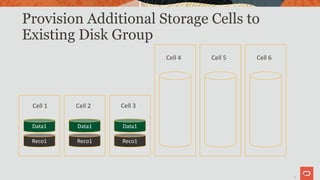
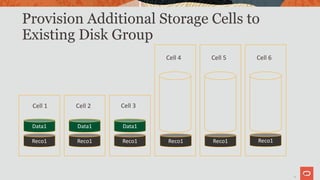
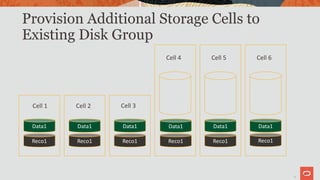
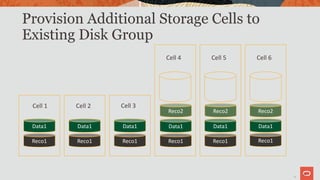
• Option 2: Obtain additional storage cells
20
21
Provision Additional Storage Cells to
Existing Disk Group
21
Data1
Reco1
Data1
Reco1
Data1
Reco1
Cell 1 Cell 2 Cell 3
22
Provision Additional Storage Cells to
Existing Disk Group
22
Data1
Reco1
Data1
Reco1
Data1
Reco1
Cell 1 Cell 2 Cell 3
Cell 4 Cell 5 Cell 6
23
Provision Additional Storage Cells to
Existing Disk Group
23
Data1
Reco1
Data1
Reco1
Data1
Reco1
Cell 1 Cell 2 Cell 3
Cell 4 Cell 5 Cell 6
Reco1 Reco1 Reco1
24
Provision Additional Storage Cells to
Existing Disk Group
24
Data1
Reco1
Data1
Reco1
Data1
Reco1
Cell 1 Cell 2 Cell 3
Cell 4 Cell 5 Cell 6
Reco1 Reco1 Reco1
Data1 Data1 Data1
25
Provision Additional Storage Cells to
Existing Disk Group
25
Data1
Reco1
Data1
Reco1
Data1
Reco1
Cell 1 Cell 2 Cell 3
Cell 4 Cell 5 Cell 6
Reco1 Reco1 Reco1
Data1 Data1 Data1
Reco2 Reco2 Reco2
27
ASM Disk Group Reconfiguration
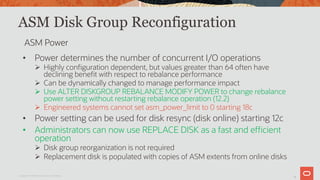
• Power determines the number of concurrent I/O operations
Ø Highly configuration dependent, but values greater than 64 often have
declining benefit with respect to rebalance performance
Ø Can be dynamically changed to manage performance impact
Ø Use ALTER DISKGROUP REBALANCE MODIFY POWER to change rebalance
power setting without restarting rebalance operation (12.2)
Ø Engineered systems cannot set asm_power_limit to 0 starting 18c
• Power setting can be used for disk resync (disk online) starting 12c
• Administrators can now use REPLACE DISK as a fast and efficient
operation
Ø Disk group reorganization is not required
Ø Replacement disk is populated with copies of ASM extents from online disks
Copyright © 2019 Oracle and/or its affiliates.
ASM Power
28
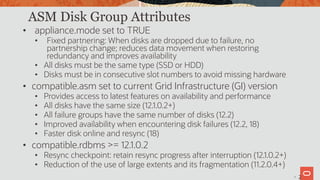
ASM Disk Group Attributes
• appliance.mode set to TRUE
• Fixed partnering: When disks are dropped due to failure, no
partnership change; reduces data movement when restoring
redundancy and improves availability
• All disks must be the same type (SSD or HDD)
• Disks must be in consecutive slot numbers to avoid missing hardware
• compatible.asm set to current Grid Infrastructure (GI) version
• Provides access to latest features on availability and performance
• All disks have the same size (12.1.0.2+)
• All failure groups have the same number of disks (12.2)
• Improved availability when encountering disk failures (12.2, 18)
• Faster disk online and resync (18)
• compatible.rdbms >= 12.1.0.2
• Resync checkpoint: retain resync progress after interruption (12.1.0.2+)
• Reduction of the use of large extents and its fragmentation (11.2.0.4+)
2
29
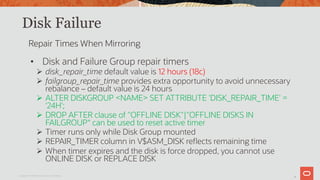
Disk Failure
• Disk and Failure Group repair timers
Ø disk_repair_time default value is 12 hours (18c)
Ø failgroup_repair_time provides extra opportunity to avoid unnecessary
rebalance – default value is 24 hours
Ø ALTER DISKGROUP <NAME> SET ATTRIBUTE 'DISK_REPAIR_TIME' =
‘24H';
Ø DROP AFTER clause of "OFFLINE DISK"|"OFFLINE DISKS IN
FAILGROUP“ can be used to reset active timer
Ø Timer runs only while Disk Group mounted
Ø REPAIR_TIMER column in V$ASM_DISK reflects remaining time
Ø When timer expires and the disk is force dropped, you cannot use
ONLINE DISK or REPLACE DISK
Copyright © 2019 Oracle and/or its affiliates.
Repair Times When Mirroring
30
Checking for Corruption
• Silent data corruption is a fact of life in today’s storage world
• The database checks for corruption when reading data
Ø If physical corruption is detected then automatic recovery can be
performed using the ASM mirror copies
Ø For seldom accessed data, over time all mirror copies of data could be
corrupted
• ASM data can be proactively scrubbed:
Ø Scrubbing occurs automatically during rebalance operations
Ø Scrubbing of a Disk Group, individual files, or individual disks
Ø Check alert log for results
Ø ALTER DISKGROUP <NAME> SCRUB [REPAIR];
Copyright © 2019 Oracle and/or its affiliates.
31
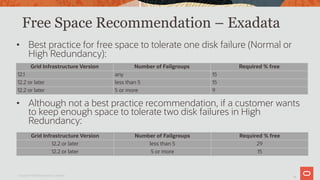
Free Space Recommendation – Exadata
• Best practice for free space to tolerate one disk failure (Normal or
High Redundancy):
• Although not a best practice recommendation, if a customer wants
to keep enough space to tolerate two disk failures in High
Redundancy:
Copyright © 2019 Oracle and/or its affiliates.
Grid Infrastructure Version Number of Failgroups Required % free
12.1 any 15
12.2 or later less than 5 15
12.2 or later 5 or more 9
Grid Infrastructure Version Number of Failgroups Required % free
12.2 or later less than 5 29
12.2 or later 5 or more 15
32
Program Agenda
Past and Present: a History of ASM
ASM Best Practices
Disk Offline and Online Enhancements
Rebalance Enhancements
1
2
3
4
32
33
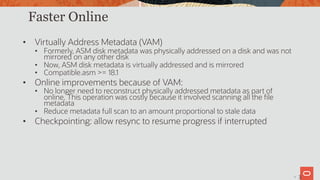
Faster Online
• Virtually Address Metadata (VAM)
• Formerly, ASM disk metadata was physically addressed on a disk and was not
mirrored on any other disk
• Now, ASM disk metadata is virtually addressed and is mirrored
• Compatible.asm >= 18.1
• Online improvements because of VAM:
• No longer need to reconstruct physically addressed metadata as part of
online. This operation was costly because it involved scanning all the file
metadata
• Reduce metadata full scan to an amount proportional to stale data
• Checkpointing: allow resync to resume progress if interrupted
3
34
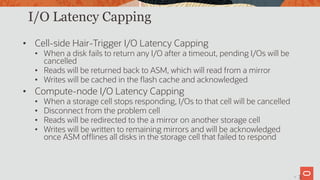
I/O Latency Capping
• Cell-side Hair-Trigger I/O Latency Capping
• When a disk fails to return any I/O after a timeout, pending I/Os will be
cancelled
• Reads will be returned back to ASM, which will read from a mirror
• Writes will be cached in the flash cache and acknowledged
• Compute-node I/O Latency Capping
• When a storage cell stops responding, I/Os to that cell will be cancelled
• Disconnect from the problem cell
• Reads will be redirected to the a mirror on another storage cell
• Writes will be written to remaining mirrors and will be acknowledged
once ASM offlines all disks in the storage cell that failed to respond
3
35
Program Agenda
Past and Present: a History of ASM
ASM Best Practices
Disk Offline and Online Enhancements
Rebalance Enhancements
1
2
3
4
35
36
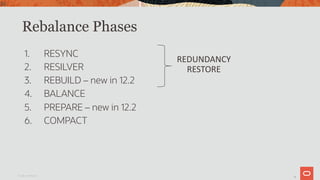
Rebalance Phases
1. RESYNC
2. RESILVER
3. REBUILD – new in 12.2
4. BALANCE
5. PREPARE – new in 12.2
6. COMPACT
Oracle Confidential
36
REDUNDANCY
RESTORE
37
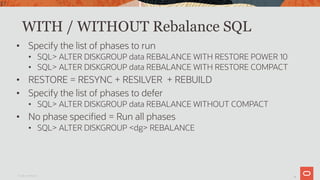
WITH / WITHOUT Rebalance SQL
• Specify the list of phases to run
• SQL> ALTER DISKGROUP data REBALANCE WITH RESTORE POWER 10
• SQL> ALTER DISKGROUP data REBALANCE WITH RESTORE COMPACT
• RESTORE = RESYNC + RESILVER + REBUILD
• Specify the list of phases to defer
• SQL> ALTER DISKGROUP data REBALANCE WITHOUT COMPACT
• No phase specified = Run all phases
• SQL> ALTER DISKGROUP <dg> REBALANCE
Oracle Confidential
37
39
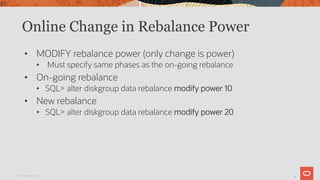
Online Change in Rebalance Power
• MODIFY rebalance power (only change is power)
• Must specify same phases as the on-going rebalance
• On-going rebalance
• SQL> alter diskgroup data rebalance modify power 10
• New rebalance
• SQL> alter diskgroup data rebalance modify power 20
Oracle Confidential
39
40
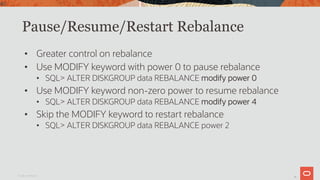
Pause/Resume/Restart Rebalance
• Greater control on rebalance
• Use MODIFY keyword with power 0 to pause rebalance
• SQL> ALTER DISKGROUP data REBALANCE modify power 0
• Use MODIFY keyword non-zero power to resume rebalance
• SQL> ALTER DISKGROUP data REBALANCE modify power 4
• Skip the MODIFY keyword to restart rebalance
• SQL> ALTER DISKGROUP data REBALANCE power 2
Oracle Confidential
40
41
Rebalance Estimates
• Estimates for each phase computed in parallel
• Faster rebalance
• ARB-0 Process – rebalance work
• ARB-A Process (estimate slave) – rebalance estimates
Oracle Confidential
41
42
HARD Check During Rebalance
• Prevents physical corruptions from spreading from disk to disk
• What happens if HARD check fails?
• ORA-00600 [kfk_iodone_invalid_buffer] (12.1.0.2DBBP, 12.2RU)
• Results in ORA-59035: HARDCHECK error during I/O (18.3 or later)
• Rebalance tries to continue until a number of failures occur, then ORA-
59035 (18.3 or later)
• Checks limited to major file types like datafile, online redo log,
archive log, backup files, etc. File types like temp files are
excluded from these checks.
Oracle Confidential
42
43
Content.check – 19.2 ASM Feature
• Scrubs relocating extents during rebalance for physical
corruptions just like HARD check
• If a corruption is found and there is a good mirror side,
automatically repair from mirror side
• Throws ORA-00700:
[KFFSCRUBDUMPEXTENTSET_ONSUSPICIOUSBLKS] for root
cause analysis
• Rebalance will continue after the repair
Oracle Confidential
43
Thank You
The ASM Team
45
Copyright © 2019 Oracle and/or its affiliates.

Exadata master series_asm_2020

  • 1.
    Automatic Storage Management OracleExadata Master Class Copyright © 2019 Oracle and/or its affiliates.
  • 2.
    The preceding isintended to outline our general product direction. It is intended for information purposes only, and may not be incorporated into any contract. It is not a commitment to deliver any material, code, or functionality, and should not be relied upon in making purchasing decisions. The development, release, timing, and pricing of any features or functionality described for Oracle’s products may change and remains at the sole discretion of Oracle Corporation. Statements in this presentation relating to Oracle’s future plans, expectations, beliefs, intentions and prospects are “forward-looking statements” and are subject to material risks and uncertainties. A detailed discussion of these factors and other risks that affect our business is contained in Oracle’s Securities and Exchange Commission (SEC) filings, including our most recent reports on Form 10-K and Form 10-Q under the heading “Risk Factors.” These filings are available on the SEC’s website or on Oracle’s website at http://www.oracle.com/investor. All information in this presentation is current as of September 2019 and Oracle undertakes no duty to update any statement in light of new information or future events. Safe Harbor Copyright © 2019 Oracle and/or its affiliates.
  • 3.
    3 Program Agenda Past andPresent: a History of ASM ASM Best Practices Disk Offline and Online Enhancements Rebalance Enhancements 1 2 3 4 3
  • 4.
    4 Program Agenda Past andPresent: a History of ASM ASM Best Practices Disk Offline and Online Enhancements Rebalance Enhancements 1 2 3 4 4
  • 5.
    5 ASM History 101 •Provides an integrated cluster volume manager and file system • Stripes and mirrors files across disks in ASM Disk Groups • Automatic rebalances after storage configuration changes • Built on the Oracle instance architecture • I/O operations DO NOT go through the ASM instance! • Manages storage as a global cluster of shared Disk Groups • ACFS extends the ASM management umbrella for non- database data • ASM along with ACFS define the Oracle Storage Stack The Simple Idea for addressing the complexity of storage management Copyright © 2019 Oracle and/or its affiliates.
  • 6.
    6 Flex ASM Introduced inExadata in Oracle 12c Release 2 • Eliminates requirement for an ASM instance on every server Ø Database instances connect to local ASM instance if available or a remote instance otherwise Ø Database instances can failover to a secondary ASM instance Ø Administrators specify the cardinality of ASM instances (default is 3) Ø Clusterware ensures ASM cardinality is maintained Ø Enables online patching of Grid Infrastructure Ø Always enabled starting Oracle 12c Release 2 Database Database Database Database Instance Database Instance Database Instance Database Instance ASM Instance 1 2 3 4 5 Database Instance ASM Instance ASM Instance Copyright © 2019 Oracle and/or its affiliates.
  • 7.
    7 Database-Oriented Storage Management(19c) Copyright © 2019 Oracle and/or its affiliates. • New Disk Group type: Flex Disk Groups • Flex Disk Groups provide File Groups • A File Group is the collection of files belonging to individual databases or PDBs • A File Group’s name defaults to the database or PDB name Flex Disk Group Organization Flex Disk Group DB1 File 1 File 2 File 3 DB2 File 1 File 2 File 3 File 4 DB3 File 1 File 2 File 3 File Group File Group
  • 8.
    8 ASM File GroupFlexibility and Availability Copyright © 2019 Oracle and/or its affiliates. • Flex Disk Groups enable ØQuota Management - limit the space databases can allocate in a Disk Group and thereby improve the customers’ ability to consolidate databases into fewer Disk Groups DB1 File 1 File 2 File 3 DB2 File 1 File 2 File 3 File 4 DB3 File 1 File 2 File 3 Quota Group B Flex Disk Group Quota Group A
  • 9.
    9 ASM File GroupFlexibility and Availability Copyright © 2019 Oracle and/or its affiliates. • Flex Disk Groups enable ØQuota Management - limit the space databases can allocate in a Disk Group and thereby improve the customers’ ability to consolidate databases into fewer Disk Groups ØRedundancy Change – allows altering redundancy after file creation DB1 File 1 File 2 File 3 DB2 File 1 File 2 File 3 File 4 DB3 File 1 File 2 File 3 Quota Group B Flex Disk Group Quota Group A
  • 10.
    10 ASM File GroupFlexibility and Availability Copyright © 2019 Oracle and/or its affiliates. • Flex Disk Groups enable ØQuota Management - limit the space databases can allocate in a Disk Group and thereby improve the customers’ ability to consolidate databases into fewer Disk Groups ØRedundancy Change – allows altering redundancy after file creation ØASM Database Clones to easily and dynamically create database clones for test/dev databases DB1 File 1 File 2 File 3 DB2 File 1 File 2 File 3 File 4 DB3 File 1 File 2 File 3 Quota Group B Flex Disk Group Quota Group A DB3a File 1 File 2 File 3
  • 11.
    11 Flex Disk Groups:Parity Protected Files ASM Parity protection • New space-efficient protection option • ASM provides parity protection for write-once files Ø Archive log files Ø Archive log backup piece Ø Automatically generated control file backup Ø Data file backup pieces Ø Data file incremental backup pieces Ø Cross-platform transportable data files backup Ø Cross-platform transportable data files incremental backup Copyright © 2019 Oracle and/or its affiliates.
  • 12.
    12 Parity Protection • Configuredvia the File Group redundancy • Double Parity available in Oracle Database 19.5 • Set compatible.asm to 19.5 and the compatibility parameter of DB to 19.5 ALTER DISKGROUP LOGFILE MODIFY FILEGROUP MCDB_CDB$ROOT SET ‘ARCHIVELOG.REDUNDANCY’=‘PARITY’; ALTER DISKGROUP LOGFILE MODIFY FILEGROUP MCDB_CDB$ROOT SET ‘ARCHIVELOG.REDUNDANCY’=‘DOUBLE’; Copyright © 2019 Oracle and/or its affiliates.
  • 13.
    13 Double Parity Copyright ©2019 Oracle and/or its affiliates. 2 + 2 double parity 2 data extents + 2 parity extents Disk 0 Cp1 Bp1 A1 Disk 1 Cp2 B1 A2 Disk 2 C1 B2 Ap1 A1 A2 B1 B2 C1 C2 Disk 3 C2 Bp2 Ap2
  • 14.
    14 Program Agenda Past andPresent: a History of ASM ASM Best Practices Disk Offline and Online Enhancements Rebalance Enhancements 1 2 3 4 14
  • 15.
    15 ASM Disk GroupConfiguration • Best practice suggests basic Disk Groups: DATA, RECO Ø DATA Disk Group for data files, SPFILEs, and online redo logs Ø Separating files into DATA and RECO allows the database to survive the loss of either Ø RECO Disk Group for backups, archive logs, and online redo logs • Special case for High Redundancy Disk Groups with only 3 cells Ø Need to provide quorum failure group Ø Make sure the iscsi quorum disks are online via v$asm_disk_stat Copyright © 2019 Oracle and/or its affiliates.
  • 16.
    16 Exadata Disk GroupsConfiguration • For Exadata, High Redundancy is the best practice recommendation for Disk Groups. • Any individual Disk Group should have disks of similar capacity and performance Copyright © 2019 Oracle and/or its affiliates.
  • 17.
    17 Number of DiskGroups - Continued • Separate disk groups for different storage tiers, e.g. hard disk or flash • A system has disks of varying capacity and performance. Because different drive types cannot be mixed in the same disk group and separate disk groups are required • To isolate specific databases due to operational considerations such as E-Business Suite data and Siebel data Reasons for More Than the Recommended Minimum Number of Disk Groups 1
  • 18.
    18 Methods of ConfiguringExadata grid disks Copyright © 2019 Oracle and/or its affiliates. Distinct Storage Servers Shared Storage Servers
  • 19.
    19 Best Practices forCreating Disk Groups • Use the shared storage server approach. This provides the best overall system performance • Consider using fewer Disk Groups and using IORM to manage workload • Keep in mind that the number of concurrent rebalance operations are limited to the number of ASM instances. With many Disk Groups, some Disk Group rebalance operations may have to queue. Copyright © 2019 Oracle and/or its affiliates.
  • 20.
    20 How to CreateNew Disk Groups with no Unallocated Space • Option 1: Free up space from an existing disk group • Delete or move some files from disk group, if necessary and possible • Resize all ASM disks to a smaller size • Resize the respective grid disks to a smaller size • Use the newly available space to create new grid disks • Create a new disk group using new grid disks • Option 2: Obtain additional storage cells 20
  • 21.
    21 Provision Additional StorageCells to Existing Disk Group 21 Data1 Reco1 Data1 Reco1 Data1 Reco1 Cell 1 Cell 2 Cell 3
  • 22.
    22 Provision Additional StorageCells to Existing Disk Group 22 Data1 Reco1 Data1 Reco1 Data1 Reco1 Cell 1 Cell 2 Cell 3 Cell 4 Cell 5 Cell 6
  • 23.
    23 Provision Additional StorageCells to Existing Disk Group 23 Data1 Reco1 Data1 Reco1 Data1 Reco1 Cell 1 Cell 2 Cell 3 Cell 4 Cell 5 Cell 6 Reco1 Reco1 Reco1
  • 24.
    24 Provision Additional StorageCells to Existing Disk Group 24 Data1 Reco1 Data1 Reco1 Data1 Reco1 Cell 1 Cell 2 Cell 3 Cell 4 Cell 5 Cell 6 Reco1 Reco1 Reco1 Data1 Data1 Data1
  • 25.
    25 Provision Additional StorageCells to Existing Disk Group 25 Data1 Reco1 Data1 Reco1 Data1 Reco1 Cell 1 Cell 2 Cell 3 Cell 4 Cell 5 Cell 6 Reco1 Reco1 Reco1 Data1 Data1 Data1 Reco2 Reco2 Reco2
  • 26.
    27 ASM Disk GroupReconfiguration • Power determines the number of concurrent I/O operations Ø Highly configuration dependent, but values greater than 64 often have declining benefit with respect to rebalance performance Ø Can be dynamically changed to manage performance impact Ø Use ALTER DISKGROUP REBALANCE MODIFY POWER to change rebalance power setting without restarting rebalance operation (12.2) Ø Engineered systems cannot set asm_power_limit to 0 starting 18c • Power setting can be used for disk resync (disk online) starting 12c • Administrators can now use REPLACE DISK as a fast and efficient operation Ø Disk group reorganization is not required Ø Replacement disk is populated with copies of ASM extents from online disks Copyright © 2019 Oracle and/or its affiliates. ASM Power
  • 27.
    28 ASM Disk GroupAttributes • appliance.mode set to TRUE • Fixed partnering: When disks are dropped due to failure, no partnership change; reduces data movement when restoring redundancy and improves availability • All disks must be the same type (SSD or HDD) • Disks must be in consecutive slot numbers to avoid missing hardware • compatible.asm set to current Grid Infrastructure (GI) version • Provides access to latest features on availability and performance • All disks have the same size (12.1.0.2+) • All failure groups have the same number of disks (12.2) • Improved availability when encountering disk failures (12.2, 18) • Faster disk online and resync (18) • compatible.rdbms >= 12.1.0.2 • Resync checkpoint: retain resync progress after interruption (12.1.0.2+) • Reduction of the use of large extents and its fragmentation (11.2.0.4+) 2
  • 28.
    29 Disk Failure • Diskand Failure Group repair timers Ø disk_repair_time default value is 12 hours (18c) Ø failgroup_repair_time provides extra opportunity to avoid unnecessary rebalance – default value is 24 hours Ø ALTER DISKGROUP <NAME> SET ATTRIBUTE 'DISK_REPAIR_TIME' = ‘24H'; Ø DROP AFTER clause of "OFFLINE DISK"|"OFFLINE DISKS IN FAILGROUP“ can be used to reset active timer Ø Timer runs only while Disk Group mounted Ø REPAIR_TIMER column in V$ASM_DISK reflects remaining time Ø When timer expires and the disk is force dropped, you cannot use ONLINE DISK or REPLACE DISK Copyright © 2019 Oracle and/or its affiliates. Repair Times When Mirroring
  • 29.
    30 Checking for Corruption •Silent data corruption is a fact of life in today’s storage world • The database checks for corruption when reading data Ø If physical corruption is detected then automatic recovery can be performed using the ASM mirror copies Ø For seldom accessed data, over time all mirror copies of data could be corrupted • ASM data can be proactively scrubbed: Ø Scrubbing occurs automatically during rebalance operations Ø Scrubbing of a Disk Group, individual files, or individual disks Ø Check alert log for results Ø ALTER DISKGROUP <NAME> SCRUB [REPAIR]; Copyright © 2019 Oracle and/or its affiliates.
  • 30.
    31 Free Space Recommendation– Exadata • Best practice for free space to tolerate one disk failure (Normal or High Redundancy): • Although not a best practice recommendation, if a customer wants to keep enough space to tolerate two disk failures in High Redundancy: Copyright © 2019 Oracle and/or its affiliates. Grid Infrastructure Version Number of Failgroups Required % free 12.1 any 15 12.2 or later less than 5 15 12.2 or later 5 or more 9 Grid Infrastructure Version Number of Failgroups Required % free 12.2 or later less than 5 29 12.2 or later 5 or more 15
  • 31.
    32 Program Agenda Past andPresent: a History of ASM ASM Best Practices Disk Offline and Online Enhancements Rebalance Enhancements 1 2 3 4 32
  • 32.
    33 Faster Online • VirtuallyAddress Metadata (VAM) • Formerly, ASM disk metadata was physically addressed on a disk and was not mirrored on any other disk • Now, ASM disk metadata is virtually addressed and is mirrored • Compatible.asm >= 18.1 • Online improvements because of VAM: • No longer need to reconstruct physically addressed metadata as part of online. This operation was costly because it involved scanning all the file metadata • Reduce metadata full scan to an amount proportional to stale data • Checkpointing: allow resync to resume progress if interrupted 3
  • 33.
    34 I/O Latency Capping •Cell-side Hair-Trigger I/O Latency Capping • When a disk fails to return any I/O after a timeout, pending I/Os will be cancelled • Reads will be returned back to ASM, which will read from a mirror • Writes will be cached in the flash cache and acknowledged • Compute-node I/O Latency Capping • When a storage cell stops responding, I/Os to that cell will be cancelled • Disconnect from the problem cell • Reads will be redirected to the a mirror on another storage cell • Writes will be written to remaining mirrors and will be acknowledged once ASM offlines all disks in the storage cell that failed to respond 3
  • 34.
    35 Program Agenda Past andPresent: a History of ASM ASM Best Practices Disk Offline and Online Enhancements Rebalance Enhancements 1 2 3 4 35
  • 35.
    36 Rebalance Phases 1. RESYNC 2.RESILVER 3. REBUILD – new in 12.2 4. BALANCE 5. PREPARE – new in 12.2 6. COMPACT Oracle Confidential 36 REDUNDANCY RESTORE
  • 36.
    37 WITH / WITHOUTRebalance SQL • Specify the list of phases to run • SQL> ALTER DISKGROUP data REBALANCE WITH RESTORE POWER 10 • SQL> ALTER DISKGROUP data REBALANCE WITH RESTORE COMPACT • RESTORE = RESYNC + RESILVER + REBUILD • Specify the list of phases to defer • SQL> ALTER DISKGROUP data REBALANCE WITHOUT COMPACT • No phase specified = Run all phases • SQL> ALTER DISKGROUP <dg> REBALANCE Oracle Confidential 37
  • 37.
    39 Online Change inRebalance Power • MODIFY rebalance power (only change is power) • Must specify same phases as the on-going rebalance • On-going rebalance • SQL> alter diskgroup data rebalance modify power 10 • New rebalance • SQL> alter diskgroup data rebalance modify power 20 Oracle Confidential 39
  • 38.
    40 Pause/Resume/Restart Rebalance • Greatercontrol on rebalance • Use MODIFY keyword with power 0 to pause rebalance • SQL> ALTER DISKGROUP data REBALANCE modify power 0 • Use MODIFY keyword non-zero power to resume rebalance • SQL> ALTER DISKGROUP data REBALANCE modify power 4 • Skip the MODIFY keyword to restart rebalance • SQL> ALTER DISKGROUP data REBALANCE power 2 Oracle Confidential 40
  • 39.
    41 Rebalance Estimates • Estimatesfor each phase computed in parallel • Faster rebalance • ARB-0 Process – rebalance work • ARB-A Process (estimate slave) – rebalance estimates Oracle Confidential 41
  • 40.
    42 HARD Check DuringRebalance • Prevents physical corruptions from spreading from disk to disk • What happens if HARD check fails? • ORA-00600 [kfk_iodone_invalid_buffer] (12.1.0.2DBBP, 12.2RU) • Results in ORA-59035: HARDCHECK error during I/O (18.3 or later) • Rebalance tries to continue until a number of failures occur, then ORA- 59035 (18.3 or later) • Checks limited to major file types like datafile, online redo log, archive log, backup files, etc. File types like temp files are excluded from these checks. Oracle Confidential 42
  • 41.
    43 Content.check – 19.2ASM Feature • Scrubs relocating extents during rebalance for physical corruptions just like HARD check • If a corruption is found and there is a good mirror side, automatically repair from mirror side • Throws ORA-00700: [KFFSCRUBDUMPEXTENTSET_ONSUSPICIOUSBLKS] for root cause analysis • Rebalance will continue after the repair Oracle Confidential 43
  • 42.
  • 43.
    45 Copyright © 2019Oracle and/or its affiliates.