ORACLE DATABASE HIGH
AVAILABILITY STRATEGY,
ARCHITECTURE AND SOLUTIONS
DOAG - 17/09/2013
Kirill Loifman
Oracle Certified Professional DBA
www: dadbm.com
Twitter: @loifmkir
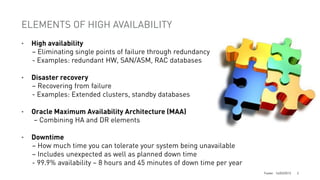
ELEMENTS OF HIGH AVAILABILITY
•

High availability
– Eliminating single points of failure through redundancy
- Examples: redundant HW, SAN/ASM, RAC databases

•

Disaster recovery
– Recovering from failure
- Examples: Extended clusters, standby databases

•

Oracle Maximum Availability Architecture (MAA)
– Combining HA and DR elements

•

Downtime
– How much time you can tolerate your system being unavailable
– Includes unexpected as well as planned down time
- 99.9% availability ~ 8 hours and 45 minutes of down time per year
Footer 14/03/2012

2
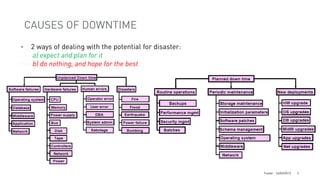
CAUSES OF DOWNTIME
•

2 ways of dealing with the potential for disaster:
a) expect and plan for it
b) do nothing, and hope for the best

Footer 14/03/2012

3
UNDERSTANDING SERVICE LEVEL AGREEMENTS (SLA)
•

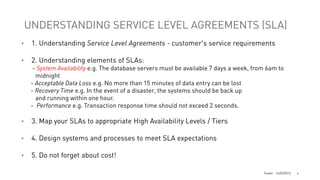
1. Understanding Service Level Agreements - customer's service requirements

•

2. Understanding elements of SLAs:

- System Availability e.g. The database servers must be available 7 days a week, from 6am to
midnight
- Acceptable Data Loss e.g. No more than 15 minutes of data entry can be lost
- Recovery Time e.g. In the event of a disaster, the systems should be back up
and running within one hour.
- Performance e.g. Transaction response time should not exceed 2 seconds.

•

3. Map your SLAs to appropriate High Availability Levels / Tiers

•

4. Design systems and processes to meet SLA expectations

•

5. Do not forget about cost!
Footer 14/03/2012

4
AVAILABILITY TARGET VS COST
•

•

•

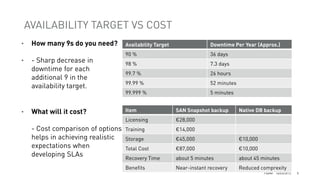
How many 9s do you need?

- Sharp decrease in
downtime for each
additional 9 in the
availability target.

Availability Target

Downtime Per Year (Approx.)

90 %

36 days

98 %

7.3 days

99.7 %

26 hours

99.99 %

52 minutes

99.999 %

5 minutes

- Cost comparison of options
helps in achieving realistic
expectations when
developing SLAs

Item

SAN Snapshot backup

Licensing

What will it cost?

Native DB backup

€28,000

Training

€14,000

Storage

€45,000

€10,000

Total Cost

€87,000

€10,000

Recovery Time

about 5 minutes

about 45 minutes

Benefits

Near-instant recovery

Reduced comprexity
Footer 14/03/2012

5
LEVELS OF HIGH AVAILABILITY - EXAMPLE
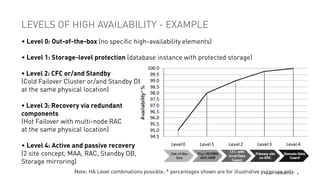
• Level 0: Out-of-the-box (no specific high-availability elements)
• Level 1: Storage-level protection (database instance with protected storage)

• Level 2: CFC or/and Standby
(Cold Failover Cluster or/and Standby DB
at the same physical location)
• Level 3: Recovery via redundant
components
(Hot Failover with multi-node RAC
at the same physical location)
• Level 4: Active and passive recovery
(2 site concept, MAA, RAC, Standby DB,
Storage mirroring)
Note: HA Level combinations possible; * percentages shown are for illustrative purposes only.
Footer 14/03/2012

6
ORACLE’S SOLUTION TO DOWN TIME
•
•
•
•
•
•
•
•
•
•
•
•
•
•
•
•

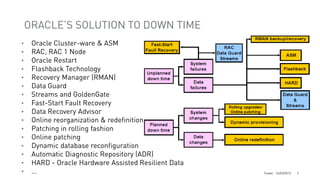
Oracle Cluster-ware & ASM
RAC, RAC 1 Node
Oracle Restart
Flashback Technology
Recovery Manager (RMAN)
Data Guard
Streams and GoldenGate
Fast-Start Fault Recovery
Data Recovery Advisor
Online reorganization & redefinition
Patching in rolling fashion
Online patching
Dynamic database reconfiguration
Automatic Diagnostic Repository (ADR)
HARD - Oracle Hardware Assisted Resilient Data
…

Footer 14/03/2012

7
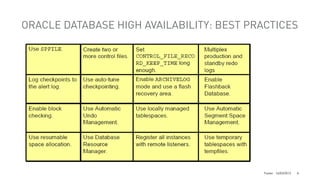
ORACLE DATABASE HIGH AVAILABILITY: BEST PRACTICES

Footer 14/03/2012

8
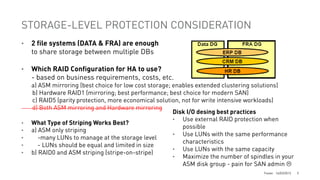
STORAGE-LEVEL PROTECTION CONSIDERATION
•

2 file systems (DATA & FRA) are enough
to share storage between multiple DBs

•

Which RAID Configuration for HA to use?
- based on business requirements, costs, etc.

•
•
•
•
•

a) ASM mirroring (best choice for low cost storage; enables extended clustering solutions)
b) Hardware RAID1 (mirroring; best performance; best choice for modern SAN)
c) RAID5 (parity protection, more economical solution, not for write intensive workloads)
d) Both ASM mirroring and Hardware mirroring
Disk I/O desing best practices
• Use external RAID protection when
What Type of Striping Works Best?
possible
a) ASM only striping
• Use LUNs with the same performance
-many LUNs to manage at the storage level
characteristics
- LUNs should be equal and limited in size
• Use LUNs with the same capacity
b) RAID0 and ASM striping (stripe-on-stripe)
• Maximize the number of spindles in your
ASM disk group - pain for SAN admin 
Footer 14/03/2012

9
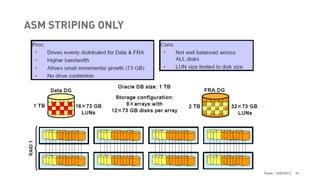
ASM STRIPING ONLY

Footer 14/03/2012

10
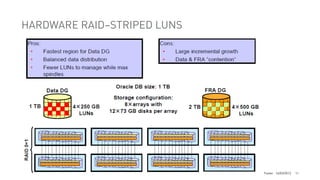
HARDWARE RAID–STRIPED LUNS

Footer 14/03/2012

11
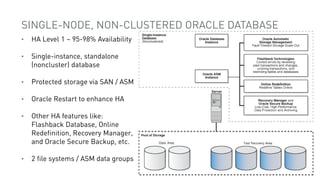
SINGLE-NODE, NON-CLUSTERED ORACLE DATABASE
•

HA Level 1 ~ 95-98% Availability

•

Single-instance, standalone
(noncluster) database

•

Protected storage via SAN / ASM

•

Oracle Restart to enhance HA

•

Other HA features like:
Flashback Database, Online
Redefinition, Recovery Manager,
and Oracle Secure Backup, etc.

•

2 file systems / ASM data groups
Footer 14/03/2012

12
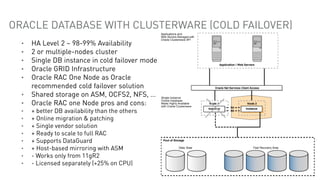
ORACLE DATABASE WITH CLUSTERWARE (COLD FAILOVER)
•
•
•
•
•

•
•
•
•
•
•
•
•
•
•

HA Level 2 ~ 98-99% Availability
2 or multiple-nodes cluster
Single DB instance in cold failover mode
Oracle GRID Infrastructure
Oracle RAC One Node as Oracle
recommended cold failover solution
Shared storage on ASM, OCFS2, NFS, …
Oracle RAC one Node pros and cons:
+ better DB availability than the others
+ Online migration & patching
+ Single vendor solution
+ Ready to scale to full RAC
+ Supports DataGuard
+ Host-based mirroring with ASM
- Works only from 11gR2
- Licensed separately (+25% on CPU)

Footer 14/03/2012

13
ORACLE DATABASE COLD FAILOVER - OTHER OPTIONS
•

Oracle Grid Infrastructure with Oracle clusterware scripts

+ Not licensed separately in case you cluster an Oracle licensed product (database)
+ Works for Oracle Clusterware and Database before 11gR2
+ Host-based mirroring with ASM possible
- No online relocation possible as with RAC One Node
- Oracle does not directly support action scripts as custom code fragments.

•

RedHat Failover Cluster

+ Inexpensive
+ Make sense using Linux RedHat
+ Simple to manage but a major upgrade can be a pain
- Storage not shared but mounted to active node
- Host-based mirroring in a stretched cluster requires different Linux LVM with more overhead

•

•

HP Serviceguard

+ Complex but stable
+ Available on HP-UX and Linux
+ Host-based mirroring with HP-UX LVM possible
- Expansive
Footer 14/03/2012

14
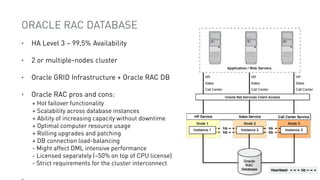
ORACLE RAC DATABASE
•

HA Level 3 ~ 99,5% Availability

•

2 or multiple-nodes cluster

•

Oracle GRID Infrastructure + Oracle RAC DB

•

Oracle RAC pros and cons:
+ Hot failover functionality
+ Scalability across database instances
+ Ability of increasing capacity without downtime
+ Optimal computer resource usage
+ Rolling upgrades and patching
+ DB connection load-balancing
- Might affect DML intensive performance
- Licensed separately (~50% on top of CPU license)
- Strict requirements for the cluster interconnect
Footer 14/03/2012

15
ORACLE RAC DATABASE ON EXTENDED CLUSTERS
•
•
•
•
•
•
•

•
•
•

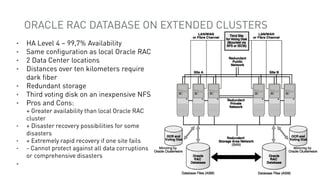
HA Level 4 ~ 99,7% Availability
Same configuration as local Oracle RAC
2 Data Center locations
Distances over ten kilometers require
dark fiber
Redundant storage
Third voting disk on an inexpensive NFS
Pros and Cons:
+ Greater availability than local Oracle RAC
cluster
+ Disaster recovery possibilities for some
disasters
+ Extremely rapid recovery if one site fails
- Cannot protect against all data corruptions
or comprehensive disasters

•
Footer 14/03/2012

16
EXTENDED RAC DISK MIRRORING
•
•

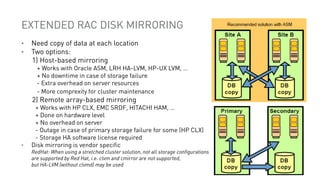
Need copy of data at each location
Two options:
1) Host-based mirroring

+ Works with Oracle ASM, LRH HA-LVM, HP-UX LVM, …
+ No downtime in case of storage failure
- Extra overhead on server resources
- More comprexity for cluster maintenance

2) Remote array-based mirroring

•

+ Works with HP CLX, EMC SRDF, HITACHI HAM, …
+ Done on hardware level
+ No overhead on server
- Outage in case of primary storage failure for some (HP CLX)
- Storage HA software license required
Disk mirroring is vendor specific
RedHat: When using a stretched cluster solution, not all storage configurations
are supported by Red Hat, i.e. clvm and cmirror are not supported,
but HA-LVM (without clvmd) may be used
Footer 14/03/2012

17
ACHIEVING QUORUM WITH EXTENDED RAC
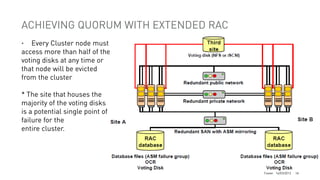
Every Cluster node must
access more than half of the
voting disks at any time or
that node will be evicted
from the cluster
•

* The site that houses the
majority of the voting disks
is a potential single point of
failure for the
entire cluster.

Footer 14/03/2012

18
ORACLE RAC AND DATA GUARD COMPLEMENTARITY
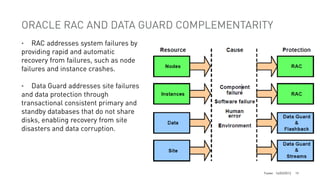
RAC addresses system failures by
providing rapid and automatic
recovery from failures, such as node
failures and instance crashes.
•

Data Guard addresses site failures
and data protection through
transactional consistent primary and
standby databases that do not share
disks, enabling recovery from site
disasters and data corruption.
•

Footer 14/03/2012

19
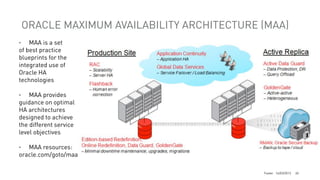
ORACLE MAXIMUM AVAILABILITY ARCHITECTURE (MAA)
MAA is a set
of best practice
blueprints for the
integrated use of
Oracle HA
technologies
•

MAA provides
guidance on optimal
HA architectures
designed to achieve
the different service
level objectives
•

MAA resources:
oracle.com/goto/maa
•

Footer 14/03/2012

20
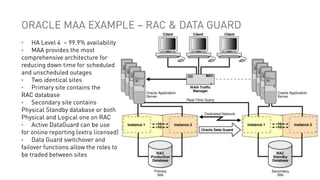
ORACLE MAA EXAMPLE – RAC & DATA GUARD
HA Level 4 ~ 99.9% availability
MAA provides the most
comprehensive architecture for
reducing down time for scheduled
and unscheduled outages
• Two identical sites
• Primary site contains the
RAC database
• Secondary site contains
Physical Standby database or both
Physical and Logical one on RAC
• Active DataGuard can be use
for online reporting (extra licensed)
• Data Guard switchover and
failover functions allow the roles to
be traded between sites
•
•

Footer 14/03/2012

21
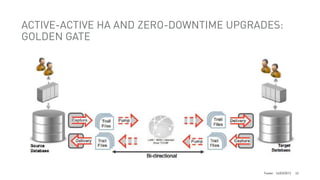
ACTIVE-ACTIVE HA AND ZERO-DOWNTIME UPGRADES:
GOLDEN GATE

Footer 14/03/2012

22
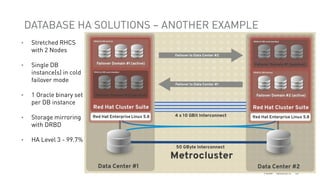
DATABASE HA SOLUTIONS – ANOTHER EXAMPLE
•

Stretched RHCS
with 2 Nodes

•

Single DB
instance(s) in cold
failover mode

•

1 Oracle binary set
per DB instance

•

Storage mirroring
with DRBD

•

HA Level 3 - 99.7%

Footer 14/03/2012

23
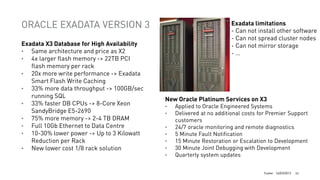
ORACLE EXADATA VERSION 3
Exadata X3 Database for High Availability
• Same architecture and price as X2
• 4x larger flash memory -> 22TB PCI
flash memory per rack
• 20x more write performance -> Exadata
Smart Flash Write Caching
• 33% more data throughput -> 100GB/sec
running SQL
• 33% faster DB CPUs -> 8-Core Xeon
SandyBridge E5-2690
• 75% more memory -> 2-4 TB DRAM
• Full 10Gb Ethernet to Data Centre
• 10-30% lower power -> Up to 3 Kilowatt
Reduction per Rack
• New lower cost 1/8 rack solution

Exadata limitations
- Can not install other software
- Can not spread cluster nodes
- Can not mirror storage
-…

New Oracle Platinum Services on X3
•
•
•
•
•
•
•

Applied to Oracle Engineered Systems
Delivered at no additional costs for Premier Support
customers
24/7 oracle monitoring and remote diagnostics
5 Minute Fault Notification
15 Minute Restoration or Escalation to Development
30 Minute Joint Debugging with Development
Quarterly system updates
Footer 14/03/2012

24
ORACLE 12C HIGH AVAILABILITY FEATURES
•
•
•
•
•

•
•
•
•
•

….

Oracle Multitenant architecture
Application Continuity - improve application recovery (former TAF)
Global Data Services - support global database services
Active Data Guard Far Sync - extend zero-data-loss protection
Flex ASM - enable inter-node storage failover and reduce ASM-related resource
consumption
SYSDG, SYSBACKUP – new privileges to avoid granting SYSDBA
Active Duplicate Cloning – rman feature
More online operations: datafile move, partition move
Database Rolling Upgrades using Active Data Guard
OEM12c Cloud Control:

- Oracle Site Guard – extends automation of disaster recovery to the rest of the Oracle stack
- High Availability Console - integrates monitoring of various HA areas
- MAA Configuration Advisor
- Automation of migration a database to ASM and RAC
Footer 14/03/2012

25
???
THANK YOU!
Kirill Loifman

www.dadbm.com

Oracle database high availability solutions

  • 1.
    ORACLE DATABASE HIGH AVAILABILITYSTRATEGY, ARCHITECTURE AND SOLUTIONS DOAG - 17/09/2013 Kirill Loifman Oracle Certified Professional DBA www: dadbm.com Twitter: @loifmkir
  • 2.
    ELEMENTS OF HIGHAVAILABILITY • High availability – Eliminating single points of failure through redundancy - Examples: redundant HW, SAN/ASM, RAC databases • Disaster recovery – Recovering from failure - Examples: Extended clusters, standby databases • Oracle Maximum Availability Architecture (MAA) – Combining HA and DR elements • Downtime – How much time you can tolerate your system being unavailable – Includes unexpected as well as planned down time - 99.9% availability ~ 8 hours and 45 minutes of down time per year Footer 14/03/2012 2
  • 3.
    CAUSES OF DOWNTIME • 2ways of dealing with the potential for disaster: a) expect and plan for it b) do nothing, and hope for the best Footer 14/03/2012 3
  • 4.
    UNDERSTANDING SERVICE LEVELAGREEMENTS (SLA) • 1. Understanding Service Level Agreements - customer's service requirements • 2. Understanding elements of SLAs: - System Availability e.g. The database servers must be available 7 days a week, from 6am to midnight - Acceptable Data Loss e.g. No more than 15 minutes of data entry can be lost - Recovery Time e.g. In the event of a disaster, the systems should be back up and running within one hour. - Performance e.g. Transaction response time should not exceed 2 seconds. • 3. Map your SLAs to appropriate High Availability Levels / Tiers • 4. Design systems and processes to meet SLA expectations • 5. Do not forget about cost! Footer 14/03/2012 4
  • 5.
    AVAILABILITY TARGET VSCOST • • • How many 9s do you need? - Sharp decrease in downtime for each additional 9 in the availability target. Availability Target Downtime Per Year (Approx.) 90 % 36 days 98 % 7.3 days 99.7 % 26 hours 99.99 % 52 minutes 99.999 % 5 minutes - Cost comparison of options helps in achieving realistic expectations when developing SLAs Item SAN Snapshot backup Licensing What will it cost? Native DB backup €28,000 Training €14,000 Storage €45,000 €10,000 Total Cost €87,000 €10,000 Recovery Time about 5 minutes about 45 minutes Benefits Near-instant recovery Reduced comprexity Footer 14/03/2012 5
  • 6.
    LEVELS OF HIGHAVAILABILITY - EXAMPLE • Level 0: Out-of-the-box (no specific high-availability elements) • Level 1: Storage-level protection (database instance with protected storage) • Level 2: CFC or/and Standby (Cold Failover Cluster or/and Standby DB at the same physical location) • Level 3: Recovery via redundant components (Hot Failover with multi-node RAC at the same physical location) • Level 4: Active and passive recovery (2 site concept, MAA, RAC, Standby DB, Storage mirroring) Note: HA Level combinations possible; * percentages shown are for illustrative purposes only. Footer 14/03/2012 6
  • 7.
    ORACLE’S SOLUTION TODOWN TIME • • • • • • • • • • • • • • • • Oracle Cluster-ware & ASM RAC, RAC 1 Node Oracle Restart Flashback Technology Recovery Manager (RMAN) Data Guard Streams and GoldenGate Fast-Start Fault Recovery Data Recovery Advisor Online reorganization & redefinition Patching in rolling fashion Online patching Dynamic database reconfiguration Automatic Diagnostic Repository (ADR) HARD - Oracle Hardware Assisted Resilient Data … Footer 14/03/2012 7
  • 8.
    ORACLE DATABASE HIGHAVAILABILITY: BEST PRACTICES Footer 14/03/2012 8
  • 9.
    STORAGE-LEVEL PROTECTION CONSIDERATION • 2file systems (DATA & FRA) are enough to share storage between multiple DBs • Which RAID Configuration for HA to use? - based on business requirements, costs, etc. • • • • • a) ASM mirroring (best choice for low cost storage; enables extended clustering solutions) b) Hardware RAID1 (mirroring; best performance; best choice for modern SAN) c) RAID5 (parity protection, more economical solution, not for write intensive workloads) d) Both ASM mirroring and Hardware mirroring Disk I/O desing best practices • Use external RAID protection when What Type of Striping Works Best? possible a) ASM only striping • Use LUNs with the same performance -many LUNs to manage at the storage level characteristics - LUNs should be equal and limited in size • Use LUNs with the same capacity b) RAID0 and ASM striping (stripe-on-stripe) • Maximize the number of spindles in your ASM disk group - pain for SAN admin  Footer 14/03/2012 9
  • 10.
  • 11.
  • 12.
    SINGLE-NODE, NON-CLUSTERED ORACLEDATABASE • HA Level 1 ~ 95-98% Availability • Single-instance, standalone (noncluster) database • Protected storage via SAN / ASM • Oracle Restart to enhance HA • Other HA features like: Flashback Database, Online Redefinition, Recovery Manager, and Oracle Secure Backup, etc. • 2 file systems / ASM data groups Footer 14/03/2012 12
  • 13.
    ORACLE DATABASE WITHCLUSTERWARE (COLD FAILOVER) • • • • • • • • • • • • • • • HA Level 2 ~ 98-99% Availability 2 or multiple-nodes cluster Single DB instance in cold failover mode Oracle GRID Infrastructure Oracle RAC One Node as Oracle recommended cold failover solution Shared storage on ASM, OCFS2, NFS, … Oracle RAC one Node pros and cons: + better DB availability than the others + Online migration & patching + Single vendor solution + Ready to scale to full RAC + Supports DataGuard + Host-based mirroring with ASM - Works only from 11gR2 - Licensed separately (+25% on CPU) Footer 14/03/2012 13
  • 14.
    ORACLE DATABASE COLDFAILOVER - OTHER OPTIONS • Oracle Grid Infrastructure with Oracle clusterware scripts + Not licensed separately in case you cluster an Oracle licensed product (database) + Works for Oracle Clusterware and Database before 11gR2 + Host-based mirroring with ASM possible - No online relocation possible as with RAC One Node - Oracle does not directly support action scripts as custom code fragments. • RedHat Failover Cluster + Inexpensive + Make sense using Linux RedHat + Simple to manage but a major upgrade can be a pain - Storage not shared but mounted to active node - Host-based mirroring in a stretched cluster requires different Linux LVM with more overhead • • HP Serviceguard + Complex but stable + Available on HP-UX and Linux + Host-based mirroring with HP-UX LVM possible - Expansive Footer 14/03/2012 14
  • 15.
    ORACLE RAC DATABASE • HALevel 3 ~ 99,5% Availability • 2 or multiple-nodes cluster • Oracle GRID Infrastructure + Oracle RAC DB • Oracle RAC pros and cons: + Hot failover functionality + Scalability across database instances + Ability of increasing capacity without downtime + Optimal computer resource usage + Rolling upgrades and patching + DB connection load-balancing - Might affect DML intensive performance - Licensed separately (~50% on top of CPU license) - Strict requirements for the cluster interconnect Footer 14/03/2012 15
  • 16.
    ORACLE RAC DATABASEON EXTENDED CLUSTERS • • • • • • • • • • HA Level 4 ~ 99,7% Availability Same configuration as local Oracle RAC 2 Data Center locations Distances over ten kilometers require dark fiber Redundant storage Third voting disk on an inexpensive NFS Pros and Cons: + Greater availability than local Oracle RAC cluster + Disaster recovery possibilities for some disasters + Extremely rapid recovery if one site fails - Cannot protect against all data corruptions or comprehensive disasters • Footer 14/03/2012 16
  • 17.
    EXTENDED RAC DISKMIRRORING • • Need copy of data at each location Two options: 1) Host-based mirroring + Works with Oracle ASM, LRH HA-LVM, HP-UX LVM, … + No downtime in case of storage failure - Extra overhead on server resources - More comprexity for cluster maintenance 2) Remote array-based mirroring • + Works with HP CLX, EMC SRDF, HITACHI HAM, … + Done on hardware level + No overhead on server - Outage in case of primary storage failure for some (HP CLX) - Storage HA software license required Disk mirroring is vendor specific RedHat: When using a stretched cluster solution, not all storage configurations are supported by Red Hat, i.e. clvm and cmirror are not supported, but HA-LVM (without clvmd) may be used Footer 14/03/2012 17
  • 18.
    ACHIEVING QUORUM WITHEXTENDED RAC Every Cluster node must access more than half of the voting disks at any time or that node will be evicted from the cluster • * The site that houses the majority of the voting disks is a potential single point of failure for the entire cluster. Footer 14/03/2012 18
  • 19.
    ORACLE RAC ANDDATA GUARD COMPLEMENTARITY RAC addresses system failures by providing rapid and automatic recovery from failures, such as node failures and instance crashes. • Data Guard addresses site failures and data protection through transactional consistent primary and standby databases that do not share disks, enabling recovery from site disasters and data corruption. • Footer 14/03/2012 19
  • 20.
    ORACLE MAXIMUM AVAILABILITYARCHITECTURE (MAA) MAA is a set of best practice blueprints for the integrated use of Oracle HA technologies • MAA provides guidance on optimal HA architectures designed to achieve the different service level objectives • MAA resources: oracle.com/goto/maa • Footer 14/03/2012 20
  • 21.
    ORACLE MAA EXAMPLE– RAC & DATA GUARD HA Level 4 ~ 99.9% availability MAA provides the most comprehensive architecture for reducing down time for scheduled and unscheduled outages • Two identical sites • Primary site contains the RAC database • Secondary site contains Physical Standby database or both Physical and Logical one on RAC • Active DataGuard can be use for online reporting (extra licensed) • Data Guard switchover and failover functions allow the roles to be traded between sites • • Footer 14/03/2012 21
  • 22.
    ACTIVE-ACTIVE HA ANDZERO-DOWNTIME UPGRADES: GOLDEN GATE Footer 14/03/2012 22
  • 23.
    DATABASE HA SOLUTIONS– ANOTHER EXAMPLE • Stretched RHCS with 2 Nodes • Single DB instance(s) in cold failover mode • 1 Oracle binary set per DB instance • Storage mirroring with DRBD • HA Level 3 - 99.7% Footer 14/03/2012 23
  • 24.
    ORACLE EXADATA VERSION3 Exadata X3 Database for High Availability • Same architecture and price as X2 • 4x larger flash memory -> 22TB PCI flash memory per rack • 20x more write performance -> Exadata Smart Flash Write Caching • 33% more data throughput -> 100GB/sec running SQL • 33% faster DB CPUs -> 8-Core Xeon SandyBridge E5-2690 • 75% more memory -> 2-4 TB DRAM • Full 10Gb Ethernet to Data Centre • 10-30% lower power -> Up to 3 Kilowatt Reduction per Rack • New lower cost 1/8 rack solution Exadata limitations - Can not install other software - Can not spread cluster nodes - Can not mirror storage -… New Oracle Platinum Services on X3 • • • • • • • Applied to Oracle Engineered Systems Delivered at no additional costs for Premier Support customers 24/7 oracle monitoring and remote diagnostics 5 Minute Fault Notification 15 Minute Restoration or Escalation to Development 30 Minute Joint Debugging with Development Quarterly system updates Footer 14/03/2012 24
  • 25.
    ORACLE 12C HIGHAVAILABILITY FEATURES • • • • • • • • • • …. Oracle Multitenant architecture Application Continuity - improve application recovery (former TAF) Global Data Services - support global database services Active Data Guard Far Sync - extend zero-data-loss protection Flex ASM - enable inter-node storage failover and reduce ASM-related resource consumption SYSDG, SYSBACKUP – new privileges to avoid granting SYSDBA Active Duplicate Cloning – rman feature More online operations: datafile move, partition move Database Rolling Upgrades using Active Data Guard OEM12c Cloud Control: - Oracle Site Guard – extends automation of disaster recovery to the rest of the Oracle stack - High Availability Console - integrates monitoring of various HA areas - MAA Configuration Advisor - Automation of migration a database to ASM and RAC Footer 14/03/2012 25
  • 26.