© 2014 Blue Medora LLC All rights reserved
Blue	
  Medora	
  
Oracle	
  Enterprise	
  Manager	
  12c	
  
Plugin	
  for	
  PostgreSQL	


Overview	
  
2 2
PostgreSQL	
  Monitoring	
  in	
  Oracle	
  Enterprise	
  Manager	
  
New	
  plugin	
  for	
  Oracle	
  
Enterprise	
  Manager	
  12c	
  
Developed	
  by	
  Blue	
  
Medora	


Extends	
  the	
  best	
  of	
  class	
  
database	
  monitoring	
  
capabili>es	
  of	
  Oracle	
  
EM12c	
  to	
  PostgreSQL	


3 3
PostgreSQL	
  Monitoring	
  in	
  Oracle	
  Enterprise	
  Manager	


Available	
  as	
  a	
  fully	
  
func>onal	
  free	
  edi=on	
  
for	
  the	
  Oracle	
  EM12c	
  
community	
  
4 4
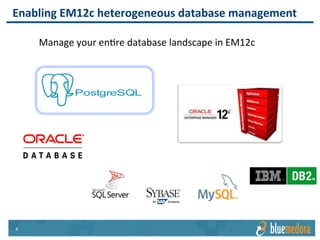
Enabling	
  EM12c	
  heterogeneous	
  database	
  management	
  
Manage	
  your	
  en>re	
  database	
  landscape	
  in	
  EM12c	


5 5
Key	
  Benefits	
  
Status	
  dashboard	
  view	
  with	
  intelligent	
  feedback	


6 6
Key	
  Benefits	
  
Advanced	
  diagnos>cs	
  (for	
  tables,	
  indices,	
  and	
  SQL	
  queries)	


7 7
Key	
  Benefits	
  
View,	
  compare	
  and	
  
search	
  configura>on	
  
Iden>fy	
  expensive	
  SQL	
  
queries	
  
8 8
How	
  it	
  works	
  
The	
  plugin	
  is	
  installed	
  and	
  
configured	
  adding	
  a	
  new	
  
PostgreSQL	
  target	
  type	
  to	
  
EM12c	


9 9
How	
  it	
  works	


The	
  plugin	
  connects	
  to	
  each	
  
PostgreSQL	
  instance	
  via	
  a	
  
remote,	
  agentless,	
  JDBC	
  
connec>on	


Why	
  this	
  is	
  great	
  
§  No	
  need	
  to	
  install	
  an	
  agent	
  
on	
  each	
  PostgreSQL	
  server	
  
§  Monitor	
  mul>ple	
  PostgreSQL	
  
instances	
  from	
  a	
  single	
  OMA	


1010
How	
  it	
  works	


Add	
  a	
  target	
  for	
  each	
  
PostgreSQL	
  instance	


All	
  databases	
  are	
  monitored	
  
and	
  displayed	
  within	
  the	
  
plugin	
  UI	
  
1111
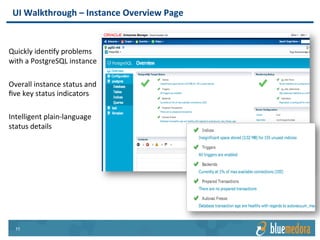
UI	
  Walkthrough	
  –	
  Instance	
  Overview	
  Page	


Quickly	
  iden>fy	
  problems	
  
with	
  a	
  PostgreSQL	
  instance	


Overall	
  instance	
  status	
  and	
  
five	
  key	
  status	
  indicators	


Intelligent	
  plain-­‐language	
  
status	
  details	


1212
UI	
  Walkthrough	
  –	
  Configura=on	
  Page	


Visibility	
  into	
  all	
  
PostgreSQL	
  configura>on	
  
values	


Current	
  value	
  as	
  well	
  as	
  
reboot	
  value,	
  reset	
  value,	
  
range,	
  and	
  type	


1313
UI	
  Walkthrough	
  –	
  Database,	
  Tables,	
  Indices	
  and	
  Queries	
  
Powerful	
  analysis	
  tools	
  provide	
  
insight	
  into	
  Table,	
  Index,	
  and	
  
Query	
  problems	
  for	
  individual	
  
databases	


View	
  historical	
  or	
  real	
  >me	
  data	
  
and	
  drill-­‐down	
  to	
  iden>fy	
  the	
  
root	
  cause	
  of	
  poor	
  performance	
  
1414
PostgreSQL	
  SQL	
  query	
  deep	
  dive	
  
1515
PostgreSQL	
  SQL	
  query	
  drill	
  down	
  
1616
Dig	
  into	
  PostgreSQL	
  Metrics	
  
•  Nearly	
  200	
  PostgreSQL	
  
metrics	
  available	
  
•  Compare	
  performance	
  
and	
  configura>on	
  across	
  
mul>ple	
  PostgreSQL	
  
instances	
  
•  Set	
  custom	
  EM12c	
  alerts	
  
•  View	
  the	
  metric	
  in	
  real-­‐
>me	
  or	
  customized	
  
historical	
  views	
  
•  Create	
  your	
  own	
  custom	
  
PostgreSQL	
  reports	
  using	
  
BI	
  Publisher	
  or	
  
Informa>on	
  Publisher	
  
1717
Prerequisites	
  
§  Oracle	
  Enterprise	
  Manager	
  12c	
  R3	
  (12.1.0.3.0)	
  or	
  greater	
  
•  No	
  addi>onal	
  Oracle	
  management	
  packs	
  are	
  required	


§  PostgreSQL	
  v9.0	
  or	
  higher	
  
•  With	
  monitoring	
  enabled	
  (refer	
  to	
  User	
  Guide)	


1818
Resources	
  
§  Blue	
  Medora	
  EM12c	
  Plugin	
  for	
  PostgreSQL	
  DB	
  Product	
  Page	
  
•  hWp://www.bluemedora.com/product/oracle-­‐enterprise-­‐manager-­‐
plugin-­‐postgresql-­‐database	


© 2014 Blue Medora LLC All rights reserved
Backup	
  
2020
Screenshot	
  –	
  PostgreSQL	
  server	
  overview	
  
2121
Screenshot	
  –	
  PostgreSQL	
  database	
  details	
  
2222
Screenshot	
  –	
  PostgreSQL	
  configura=on	
  details	
  
2323
Screenshot	
  –	
  PostgreSQL	
  tables	
  deep	
  dive	
  
2424
Screenshot	
  –	
  PostgreSQL	
  indices	
  deep	
  dive	
  
2525
Screenshot	
  –	
  PostgreSQL	
  SQL	
  queries	
  deep	
  dive	
  
2626
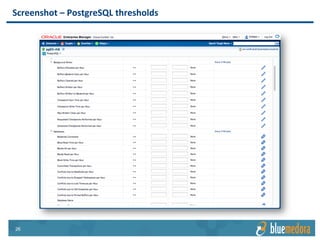
Screenshot	
  –	
  PostgreSQL	
  thresholds	
  
2727
Screenshot	
  –	
  PostgreSQL	
  “All	
  Metrics”	
  view	
  
2828
Screenshot	
  –	
  PostgreSQL	
  topology	
  view	
  

Blue Medora Oracle Enterprise Manager (EM12c) Plug-in for PostgreSQL

  • 1.
    © 2014 BlueMedora LLC All rights reserved Blue  Medora   Oracle  Enterprise  Manager  12c   Plugin  for  PostgreSQL     Overview  
  • 2.
    2 2 PostgreSQL  Monitoring  in  Oracle  Enterprise  Manager   New  plugin  for  Oracle   Enterprise  Manager  12c   Developed  by  Blue   Medora     Extends  the  best  of  class   database  monitoring   capabili>es  of  Oracle   EM12c  to  PostgreSQL    
  • 3.
    3 3 PostgreSQL  Monitoring  in  Oracle  Enterprise  Manager         Available  as  a  fully   func>onal  free  edi=on   for  the  Oracle  EM12c   community  
  • 4.
    4 4 Enabling  EM12c  heterogeneous  database  management   Manage  your  en>re  database  landscape  in  EM12c    
  • 5.
    5 5 Key  Benefits   Status  dashboard  view  with  intelligent  feedback      
  • 6.
    6 6 Key  Benefits   Advanced  diagnos>cs  (for  tables,  indices,  and  SQL  queries)    
  • 7.
    7 7 Key  Benefits   View,  compare  and   search  configura>on   Iden>fy  expensive  SQL   queries  
  • 8.
    8 8 How  it  works   The  plugin  is  installed  and   configured  adding  a  new   PostgreSQL  target  type  to   EM12c    
  • 9.
    9 9 How  it  works     The  plugin  connects  to  each   PostgreSQL  instance  via  a   remote,  agentless,  JDBC   connec>on     Why  this  is  great   §  No  need  to  install  an  agent   on  each  PostgreSQL  server   §  Monitor  mul>ple  PostgreSQL   instances  from  a  single  OMA    
  • 10.
    1010 How  it  works     Add  a  target  for  each   PostgreSQL  instance     All  databases  are  monitored   and  displayed  within  the   plugin  UI  
  • 11.
    1111 UI  Walkthrough  –  Instance  Overview  Page     Quickly  iden>fy  problems   with  a  PostgreSQL  instance     Overall  instance  status  and   five  key  status  indicators     Intelligent  plain-­‐language   status  details    
  • 12.
    1212 UI  Walkthrough  –  Configura=on  Page     Visibility  into  all   PostgreSQL  configura>on   values     Current  value  as  well  as   reboot  value,  reset  value,   range,  and  type    
  • 13.
    1313 UI  Walkthrough  –  Database,  Tables,  Indices  and  Queries   Powerful  analysis  tools  provide   insight  into  Table,  Index,  and   Query  problems  for  individual   databases     View  historical  or  real  >me  data   and  drill-­‐down  to  iden>fy  the   root  cause  of  poor  performance  
  • 14.
  • 15.
  • 16.
    1616 Dig  into  PostgreSQL  Metrics   •  Nearly  200  PostgreSQL   metrics  available   •  Compare  performance   and  configura>on  across   mul>ple  PostgreSQL   instances   •  Set  custom  EM12c  alerts   •  View  the  metric  in  real-­‐ >me  or  customized   historical  views   •  Create  your  own  custom   PostgreSQL  reports  using   BI  Publisher  or   Informa>on  Publisher  
  • 17.
    1717 Prerequisites   §  Oracle  Enterprise  Manager  12c  R3  (12.1.0.3.0)  or  greater   •  No  addi>onal  Oracle  management  packs  are  required     §  PostgreSQL  v9.0  or  higher   •  With  monitoring  enabled  (refer  to  User  Guide)    
  • 18.
    1818 Resources   §  Blue  Medora  EM12c  Plugin  for  PostgreSQL  DB  Product  Page   •  hWp://www.bluemedora.com/product/oracle-­‐enterprise-­‐manager-­‐ plugin-­‐postgresql-­‐database    
  • 19.
    © 2014 BlueMedora LLC All rights reserved Backup  
  • 20.
  • 21.
    2121 Screenshot  –  PostgreSQL  database  details  
  • 22.
    2222 Screenshot  –  PostgreSQL  configura=on  details  
  • 23.
    2323 Screenshot  –  PostgreSQL  tables  deep  dive  
  • 24.
    2424 Screenshot  –  PostgreSQL  indices  deep  dive  
  • 25.
    2525 Screenshot  –  PostgreSQL  SQL  queries  deep  dive  
  • 26.
  • 27.
    2727 Screenshot  –  PostgreSQL  “All  Metrics”  view  
  • 28.