Linux Disaster Recovery Solutions IT3 Consultants Gratien D’haese March 2008
Agenda What is Linux Disaster Recovery? Why are backups not enough? Commercial or Open Source? Comparing 3 GPL DR on Debian/ia64
Some Definitions What is Disaster Recovery? The process by which a business function is restored to the normal, steady state after a disaster What is Business Continuity The way that a business function will operate after a disaster, until such time as the normal, steady state is restored
What is Linux Disaster Recovery Like any other UNIX (including HP-UX) Linux is vulnerable for disaster to strike The question really is “What shall I do if a disaster strikes?” Dependent on: HW failure (boot disk lost) Lost everything (fire, water, earthquake, theft) The answer: “Act immediately”
Why are backups not enough? Backups of data are necessary! Are not enough in case of losing the OS! Reinstalling from scratch takes hours Fine-tuning of configurations takes days Even months later issues pop up! It is absolute necessary to foresee an inventory of HW and SW
Disaster Recovery Plan (DRP) DRP addresses need to recover from an emergency with minimum impact to the enterprise Protects enterprise from major services failure Minimizes risk to enterprise from delays in providing services Guarantees reliability of standby systems by testing and simulation Minimizes personnel decision-making required during disaster recovery
Commercial or Open Source? There is no standard solution delivered with Linux as such The choice is do we go for a commercial or Open Source solution? Try before you buy I would say It doesn’t always work as promised Do we have test equipment? Don’t try it on production without a real DR test first!
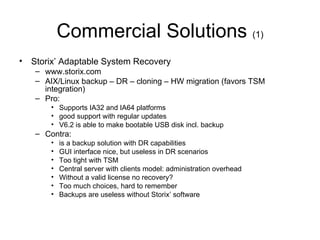
Commercial Solutions  (1) Storix’ Adaptable System Recovery www.storix.com AIX/Linux backup – DR – cloning – HW migration (favors TSM integration) Pro:  Supports IA32 and IA64 platforms good support with regular updates V6.2 is able to make bootable USB disk incl. backup Contra:  is a backup solution with DR capabilities GUI interface nice, but useless in DR scenarios Too tight with TSM Central server with clients model: administration overhead Without a valid license no recovery? Too much choices, hard to remember Backups are useless without Storix’ software
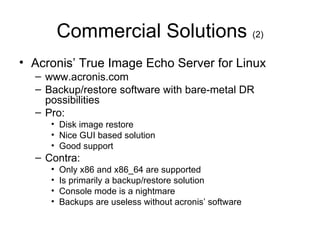
Commercial Solutions  (2) Acronis’ True Image Echo Server for Linux www.acronis.com Backup/restore software with bare-metal DR possibilities Pro: Disk image restore Nice GUI based solution Good support Contra: Only x86 and x86_64 are supported Is primarily a backup/restore solution Console mode is a nightmare Backups are useless without acronis’ software
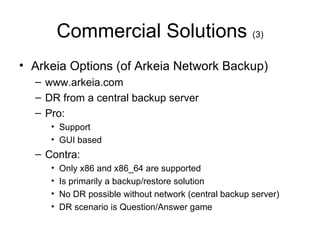
Commercial Solutions  (3) Arkeia Options (of Arkeia Network Backup) www.arkeia.com DR from a central backup server Pro: Support GUI based Contra: Only x86 and x86_64 are supported Is primarily a backup/restore solution No DR possible without network (central backup server) DR scenario is Question/Answer game
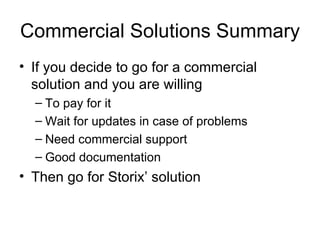
Commercial Solutions Summary If you decide to go for a commercial solution and you are willing To pay for it Wait for updates in case of problems Need commercial support Good documentation Then go for Storix’ solution
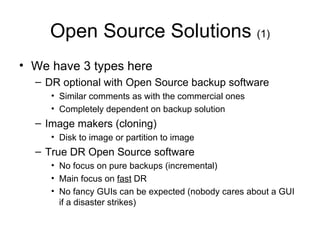
Open Source Solutions  (1) We have 3 types here DR optional with Open Source backup software Similar comments as with the commercial ones Completely dependent on backup solution Image makers (cloning) Disk to image or partition to image True DR Open Source software No focus on pure backups (incremental) Main focus on  fast  DR No fancy GUIs can be expected (nobody cares about a GUI if a disaster strikes)
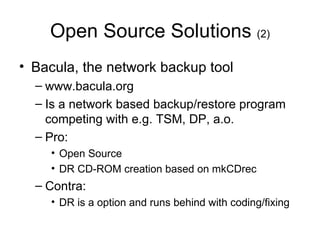
Open Source Solutions  (2) Bacula, the network backup tool www.bacula.org Is a network based backup/restore program competing with e.g. TSM, DP, a.o. Pro: Open Source DR CD-ROM creation based on mkCDrec Contra: DR is a option and runs behind with coding/fixing
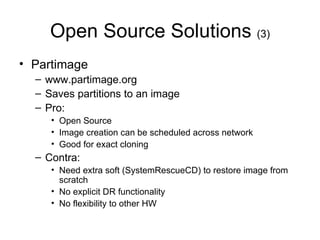
Open Source Solutions  (3) Partimage www.partimage.org Saves partitions to an image Pro: Open Source Image creation can be scheduled across network Good for exact cloning Contra: Need extra soft (SystemRescueCD) to restore image from scratch No explicit DR functionality No flexibility to other HW
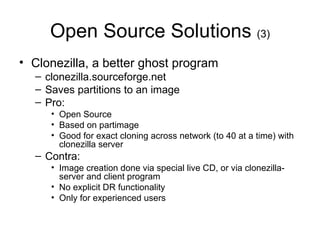
Open Source Solutions  (3) Clonezilla, a better ghost program clonezilla.sourceforge.net Saves partitions to an image Pro: Open Source Based on partimage Good for exact cloning across network (to 40 at a time) with clonezilla server Contra: Image creation done via special live CD, or via clonezilla-server and client program No explicit DR functionality Only for experienced users
Open Source Solutions  (4) Mondorescue www.mondorescue.org/ Available since 2000 GPL DR supporting Linux (x86, x86_64, ia64) and FreeBSD (x86) Support major Linux distributions Target backup media includes CDR, DVD-R(w), USB/disks, tape, network Understands major file systems including LVM, soft- and hardware RAID
Open Source Solutions  (5) Mondorescue Pro: Open Source with excellent support base (incl. HP) CLI and GUI interface Cloning supported Uses a fail-safe Linux kernel (mindi) Pretty good documentation Contra: Command line quite complicated to remember Relies on different sub-products (mindi, mindi-busybox, afio,…) Lacks integration with other backup solutions
Open Source Solutions  (6) Make CD-ROM Recovery (mkCDrec) mkcdrec.ota.be Available since 2000 GPL DR supporting Linux (x86, x86_64, powerpc, sparc and ia64)  Support major Linux distributions Target backup media includes CDR, DVD-R(w), tape/OBDR, USB/disks, network (NFS/CIFS) Understands major file systems including LVM, soft- and hardware RAID
Open Source Solutions  (7) mkCDrec Pro: Open Source with excellent support base Only CLI with kiss in mind Cloning support Uses the active Linux kernel on rescue image Integrates with 3th party backup sw (DP, TSM,…) Contra: Only 1 main developer Documentation is minimal, but still enough/clear
Open Source Solutions  (8) Relax and Recover (rear) rear.sourceforge.net Available since 2006 GPL DR supporting Linux (x86, x86_64, ia64)  Support major Linux distributions Target backup media includes CDR, DVD-R(w), disk, network (NFS/CIFS), rsync Understands major file systems including LVM, soft- and hardware RAID
Open Source Solutions  (9) Relax and Recover (rear) Pro: Open Source with excellent support base Only CLI with kiss in mind (LSB compliant) Extremely modular code Uses the active Linux kernel on rescue image Integrates with 3th party backup sw (TSM, DP) Contra: Linux kernel => 2.6.x Slow development (based on sponsoring) Lacks good documentation
LSB rules of ReaR Follows the Linux Standard Base rules Configuration files are under /etc/rear/ The scripts are stored under /usr/share/rear/ One main script  /usr/sbin/rear rear is build around concepts: mkrescue mkbackup mkbackuponly recover dump
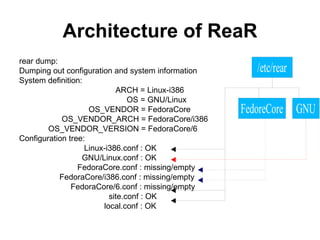
Architecture of ReaR rear dump: Dumping out configuration and system information System definition: ARCH = Linux-i386 OS = GNU/Linux OS_VENDOR = FedoraCore OS_VENDOR_ARCH = FedoraCore/i386 OS_VENDOR_VERSION = FedoraCore/6 Configuration tree: Linux-i386.conf : OK GNU/Linux.conf : OK FedoraCore.conf : missing/empty FedoraCore/i386.conf : missing/empty FedoraCore/6.conf : missing/empty site.conf : OK local.conf : OK
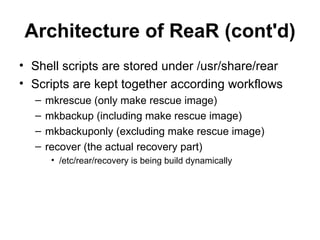
Architecture of ReaR (cont'd) Shell scripts are stored under /usr/share/rear Scripts are kept together according workflows mkrescue (only make rescue image) mkbackup (including make rescue image) mkbackuponly (excluding make rescue image) recover (the actual recovery part) /etc/rear/recovery is being build dynamically
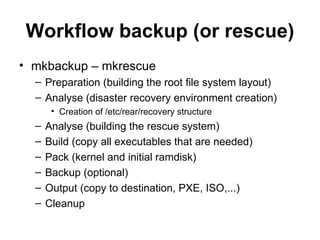
Workflow backup (or rescue) mkbackup – mkrescue Preparation (building the root file system layout) Analyse (disaster recovery environment creation) Creation of /etc/rear/recovery structure Analyse (building the rescue system) Build (copy all executables that are needed) Pack (kernel and initial ramdisk) Backup (optional) Output (copy to destination, PXE, ISO,...) Cleanup
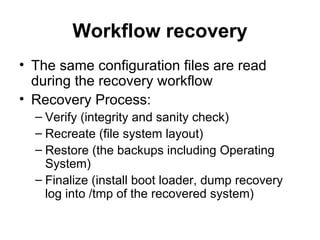
Workflow recovery The same configuration files are read during the recovery workflow Recovery Process: Verify (integrity and sanity check) Recreate (file system layout) Restore (the backups including Operating System) Finalize (install boot loader, dump recovery log into /tmp of the recovered system)
Testing on Debian 4 (IA64) We tested mondorescue, mkcdrec and rear on the same fresh installed Linux IA64 is an new architecture (Linux based) X86 and x86_64 are well tested and will most likely work very well for all of them On the next slides we give our experience Only used the sources of the 3 products to start with…
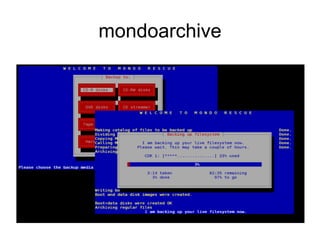
Test mondorescue Prerequisites: gcc, g++, make, gawk, afio, bzip2, cdrecord, mkisofs, parted, libnewt-dev, lvm2, buffer Downloaded from  ftp.mondorescue.org/src/ mondo-doc-2.24.tar.gz mondo-2.2.5.tar.gz mindi-busybox-1.7.3.tar.gz mindi-2.0.0.tar.gz Make DR archive: mondoarchive
mondoarchive
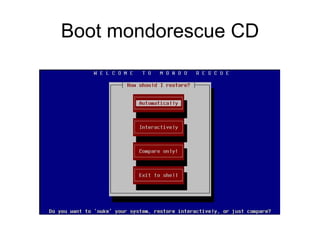
Boot mondorescue CD
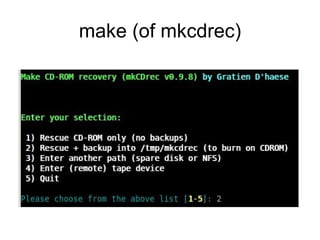
Test mkCDrec Prerequisites: gcc, make, gawk, bzip2, cdrecord, mkisofs, parted, lvm2, rsync, iproute, bash Downloaded from mkcdrec.ota.be mkCDrec_v0.9.8.tar.gz Make DR archive:  Edit Config.sh (change  BOOTARCH, ELILO_DIR ) make
make (of mkcdrec)
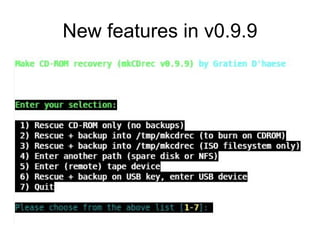
New features in v0.9.9
Test ReaR Prerequisites: gawk, bzip2, cdrecord, mkisofs, parted, lvm2, rsync, iproute, mingetty, alien, lsb, bash Downloaded from rear.sf.net rear-1.6.tar.gz and rear-1.6-1.noarch.rpm Install as follow: alien –I rear-1.6-1.noarch.rpm Edit /etc/rear/Linux-ia64.conf change agetty into getty Make DR archive: rear mkbackup
Check us out at: www.it3.be

Linux Disaster Recovery Solutions

  • 1.
    Linux Disaster RecoverySolutions IT3 Consultants Gratien D’haese March 2008
  • 2.
    Agenda What isLinux Disaster Recovery? Why are backups not enough? Commercial or Open Source? Comparing 3 GPL DR on Debian/ia64
  • 3.
    Some Definitions Whatis Disaster Recovery? The process by which a business function is restored to the normal, steady state after a disaster What is Business Continuity The way that a business function will operate after a disaster, until such time as the normal, steady state is restored
  • 4.
    What is LinuxDisaster Recovery Like any other UNIX (including HP-UX) Linux is vulnerable for disaster to strike The question really is “What shall I do if a disaster strikes?” Dependent on: HW failure (boot disk lost) Lost everything (fire, water, earthquake, theft) The answer: “Act immediately”
  • 5.
    Why are backupsnot enough? Backups of data are necessary! Are not enough in case of losing the OS! Reinstalling from scratch takes hours Fine-tuning of configurations takes days Even months later issues pop up! It is absolute necessary to foresee an inventory of HW and SW
  • 6.
    Disaster Recovery Plan(DRP) DRP addresses need to recover from an emergency with minimum impact to the enterprise Protects enterprise from major services failure Minimizes risk to enterprise from delays in providing services Guarantees reliability of standby systems by testing and simulation Minimizes personnel decision-making required during disaster recovery
  • 7.
    Commercial or OpenSource? There is no standard solution delivered with Linux as such The choice is do we go for a commercial or Open Source solution? Try before you buy I would say It doesn’t always work as promised Do we have test equipment? Don’t try it on production without a real DR test first!
  • 8.
    Commercial Solutions (1) Storix’ Adaptable System Recovery www.storix.com AIX/Linux backup – DR – cloning – HW migration (favors TSM integration) Pro: Supports IA32 and IA64 platforms good support with regular updates V6.2 is able to make bootable USB disk incl. backup Contra: is a backup solution with DR capabilities GUI interface nice, but useless in DR scenarios Too tight with TSM Central server with clients model: administration overhead Without a valid license no recovery? Too much choices, hard to remember Backups are useless without Storix’ software
  • 9.
    Commercial Solutions (2) Acronis’ True Image Echo Server for Linux www.acronis.com Backup/restore software with bare-metal DR possibilities Pro: Disk image restore Nice GUI based solution Good support Contra: Only x86 and x86_64 are supported Is primarily a backup/restore solution Console mode is a nightmare Backups are useless without acronis’ software
  • 10.
    Commercial Solutions (3) Arkeia Options (of Arkeia Network Backup) www.arkeia.com DR from a central backup server Pro: Support GUI based Contra: Only x86 and x86_64 are supported Is primarily a backup/restore solution No DR possible without network (central backup server) DR scenario is Question/Answer game
  • 11.
    Commercial Solutions SummaryIf you decide to go for a commercial solution and you are willing To pay for it Wait for updates in case of problems Need commercial support Good documentation Then go for Storix’ solution
  • 12.
    Open Source Solutions (1) We have 3 types here DR optional with Open Source backup software Similar comments as with the commercial ones Completely dependent on backup solution Image makers (cloning) Disk to image or partition to image True DR Open Source software No focus on pure backups (incremental) Main focus on fast DR No fancy GUIs can be expected (nobody cares about a GUI if a disaster strikes)
  • 13.
    Open Source Solutions (2) Bacula, the network backup tool www.bacula.org Is a network based backup/restore program competing with e.g. TSM, DP, a.o. Pro: Open Source DR CD-ROM creation based on mkCDrec Contra: DR is a option and runs behind with coding/fixing
  • 14.
    Open Source Solutions (3) Partimage www.partimage.org Saves partitions to an image Pro: Open Source Image creation can be scheduled across network Good for exact cloning Contra: Need extra soft (SystemRescueCD) to restore image from scratch No explicit DR functionality No flexibility to other HW
  • 15.
    Open Source Solutions (3) Clonezilla, a better ghost program clonezilla.sourceforge.net Saves partitions to an image Pro: Open Source Based on partimage Good for exact cloning across network (to 40 at a time) with clonezilla server Contra: Image creation done via special live CD, or via clonezilla-server and client program No explicit DR functionality Only for experienced users
  • 16.
    Open Source Solutions (4) Mondorescue www.mondorescue.org/ Available since 2000 GPL DR supporting Linux (x86, x86_64, ia64) and FreeBSD (x86) Support major Linux distributions Target backup media includes CDR, DVD-R(w), USB/disks, tape, network Understands major file systems including LVM, soft- and hardware RAID
  • 17.
    Open Source Solutions (5) Mondorescue Pro: Open Source with excellent support base (incl. HP) CLI and GUI interface Cloning supported Uses a fail-safe Linux kernel (mindi) Pretty good documentation Contra: Command line quite complicated to remember Relies on different sub-products (mindi, mindi-busybox, afio,…) Lacks integration with other backup solutions
  • 18.
    Open Source Solutions (6) Make CD-ROM Recovery (mkCDrec) mkcdrec.ota.be Available since 2000 GPL DR supporting Linux (x86, x86_64, powerpc, sparc and ia64) Support major Linux distributions Target backup media includes CDR, DVD-R(w), tape/OBDR, USB/disks, network (NFS/CIFS) Understands major file systems including LVM, soft- and hardware RAID
  • 19.
    Open Source Solutions (7) mkCDrec Pro: Open Source with excellent support base Only CLI with kiss in mind Cloning support Uses the active Linux kernel on rescue image Integrates with 3th party backup sw (DP, TSM,…) Contra: Only 1 main developer Documentation is minimal, but still enough/clear
  • 20.
    Open Source Solutions (8) Relax and Recover (rear) rear.sourceforge.net Available since 2006 GPL DR supporting Linux (x86, x86_64, ia64) Support major Linux distributions Target backup media includes CDR, DVD-R(w), disk, network (NFS/CIFS), rsync Understands major file systems including LVM, soft- and hardware RAID
  • 21.
    Open Source Solutions (9) Relax and Recover (rear) Pro: Open Source with excellent support base Only CLI with kiss in mind (LSB compliant) Extremely modular code Uses the active Linux kernel on rescue image Integrates with 3th party backup sw (TSM, DP) Contra: Linux kernel => 2.6.x Slow development (based on sponsoring) Lacks good documentation
  • 22.
    LSB rules ofReaR Follows the Linux Standard Base rules Configuration files are under /etc/rear/ The scripts are stored under /usr/share/rear/ One main script /usr/sbin/rear rear is build around concepts: mkrescue mkbackup mkbackuponly recover dump
  • 23.
    Architecture of ReaRrear dump: Dumping out configuration and system information System definition: ARCH = Linux-i386 OS = GNU/Linux OS_VENDOR = FedoraCore OS_VENDOR_ARCH = FedoraCore/i386 OS_VENDOR_VERSION = FedoraCore/6 Configuration tree: Linux-i386.conf : OK GNU/Linux.conf : OK FedoraCore.conf : missing/empty FedoraCore/i386.conf : missing/empty FedoraCore/6.conf : missing/empty site.conf : OK local.conf : OK
  • 24.
    Architecture of ReaR(cont'd) Shell scripts are stored under /usr/share/rear Scripts are kept together according workflows mkrescue (only make rescue image) mkbackup (including make rescue image) mkbackuponly (excluding make rescue image) recover (the actual recovery part) /etc/rear/recovery is being build dynamically
  • 25.
    Workflow backup (orrescue) mkbackup – mkrescue Preparation (building the root file system layout) Analyse (disaster recovery environment creation) Creation of /etc/rear/recovery structure Analyse (building the rescue system) Build (copy all executables that are needed) Pack (kernel and initial ramdisk) Backup (optional) Output (copy to destination, PXE, ISO,...) Cleanup
  • 26.
    Workflow recovery Thesame configuration files are read during the recovery workflow Recovery Process: Verify (integrity and sanity check) Recreate (file system layout) Restore (the backups including Operating System) Finalize (install boot loader, dump recovery log into /tmp of the recovered system)
  • 27.
    Testing on Debian4 (IA64) We tested mondorescue, mkcdrec and rear on the same fresh installed Linux IA64 is an new architecture (Linux based) X86 and x86_64 are well tested and will most likely work very well for all of them On the next slides we give our experience Only used the sources of the 3 products to start with…
  • 28.
    Test mondorescue Prerequisites:gcc, g++, make, gawk, afio, bzip2, cdrecord, mkisofs, parted, libnewt-dev, lvm2, buffer Downloaded from ftp.mondorescue.org/src/ mondo-doc-2.24.tar.gz mondo-2.2.5.tar.gz mindi-busybox-1.7.3.tar.gz mindi-2.0.0.tar.gz Make DR archive: mondoarchive
  • 29.
  • 30.
  • 31.
    Test mkCDrec Prerequisites:gcc, make, gawk, bzip2, cdrecord, mkisofs, parted, lvm2, rsync, iproute, bash Downloaded from mkcdrec.ota.be mkCDrec_v0.9.8.tar.gz Make DR archive: Edit Config.sh (change BOOTARCH, ELILO_DIR ) make
  • 32.
  • 33.
  • 34.
    Test ReaR Prerequisites:gawk, bzip2, cdrecord, mkisofs, parted, lvm2, rsync, iproute, mingetty, alien, lsb, bash Downloaded from rear.sf.net rear-1.6.tar.gz and rear-1.6-1.noarch.rpm Install as follow: alien –I rear-1.6-1.noarch.rpm Edit /etc/rear/Linux-ia64.conf change agetty into getty Make DR archive: rear mkbackup
  • 35.
    Check us outat: www.it3.be

Editor's Notes

  • #29 cd /tmp/mindi-busybox-1.7.3 make oldconfig make busybox make CONFIG_PREFIX=/usr/local/lib/mindi/rootfs install ---------------------------------------------------------------------------- cd /tmp/mindi-2.0.0 ./install.sh mindi 2.0.0-r1883 will be installed under /usr/local Creating target directories ... Copying files ... # mindi Mindi Linux mini-distro generator v2.0.0-r1883 Latest Mindi is available from http://www.mondorescue.org BusyBox sources are available from http://www.busybox.net ------------------------------------------------------------------------------ Mindi-BusyBox v1.7.3-r1873 (2008-02-26 12:19:11 CET) multi-call binary Do you want to use your own kernel to build the boot disk ([y]/n) ? find: /boot/efi: No such file or directory No kernel matches exactly. Are there any duff kernels? Sorry, no duff kernels either Could not find your kernel. Analyzing dependency requirements Done. Making complete dependency list Done. Analyzing your keyboard's configuration. Searching for rc.config ...Unknown config detected. Default keyboard map will be used. Assembling dependency files.................................... Done. Your mountlist will look like this: 8 directories. lvmdiskscan not found. Won't handle LVM. DEVICE MOUNTPOINT FORMAT SIZE (MB) LABEL/UUID /dev/sdb2 / ext3 66891 /dev/sdb3 swap swap 1953 Tarring and zipping the groups........................... Done. Creating data disk #1...#2...#3...#4...#5...#6...#7...#8... Done. FATAL ERROR. PBDI - cannot find 57344 kernel Please e-mail a copy of /var/log/mindi.log to the mailing list. See http://www.mondorescue.org for more information. WE CANNOT HELP unless you enclose that file. # mkdir -m 755 /boot/efi # mount -t vfat /dev/sdb1 /boot/efi # mindi Mindi Linux mini-distro generator v2.0.0-r1883 Latest Mindi is available from http://www.mondorescue.org BusyBox sources are available from http://www.busybox.net ------------------------------------------------------------------------------ Mindi-BusyBox v1.7.3-r1873 (2008-02-26 12:19:11 CET) multi-call binary Do you want to use your own kernel to build the boot disk ([y]/n) ? Analyzing dependency requirements Done. Making complete dependency list Done. Analyzing your keyboard's configuration. Searching for rc.config ...Unknown config detected. Default keyboard map will be used. Assembling dependency files.....................................Done. Your mountlist will look like this: 8 directories. lvmdiskscan not found. Won't handle LVM. DEVICE MOUNTPOINT FORMAT SIZE (MB) LABEL/UUID /dev/sdb2 / ext3 66891 /dev/sdb3 swap swap 1953 Tarring and zipping the groups........................... Done. Creating data disk #1...#2...#3...#4...#5...#6...#7...#8... Done. Making 16384KB boot disk...............udev device manager found ERROR: No product name found for Hardware support Hardware Information found and saved ... ......22934 blocks ......OK, you don't have a /boot/boot.b file, which is odd because most _good_ Linux distributions come with one, even if it's only a softlink grep: /etc/lilo.conf: No such file or directory Nor can I find it from your /etc/lilo.conf file. This is very odd. I'm going to use '' CBBF -- warning -- cannot find your boot.b file. That's it, I quit... (j/k) cp: `/tmp/mindi.BzNyJ29838/mountpoint.29836/elilo.conf' and `/tmp/mindi.BzNyJ29838/mountpoint.29836/elilo.conf' are the same file In the directory '/var/cache/mindi' you will find the images:- Done. mindi-bootroot.16384.img mindi-data-1.img mindi-data-2.img mindi-data-3.img mindi-data-4.img mindi-data-5.img mind i-data-6.img mindi-data-7.img mindi-data-8.img Would you like to create boot+data floppy disks now (y/[n]) ? Shall I make a bootable USB image ? (y/[n]) Shall I make a bootable CD image? (y/[n]) y Created bootable ISO image at /var/cache/mindi/mindi.iso Finished. Boot and data disk images were created. hpx189:/tmp/mondo-2.2.5# ls -l /var/cache/mindi/mindi.iso -rw-r--r-- 1 root root 54169600 Feb 26 14:05 /var/cache/mindi/mindi.iso ----------------------------------------------------------------------------- # cd mondo-2.2.5 # ./configure # make # make install
  • #30 On Debian/IA64 # mondoarchive W E L C O M E T O M O N D O R E S C U E Making catalog of files to be backed up Done. Dividing filelist into sets Done. Copying Mondo's core files to the scratch directory Done. Calling MINDI to cr+-----¦ Generating boot+data disks +-----+ ¦ ¦ ¦ Generating boot+data disks ¦ ¦ ¦ ¦ 1% ¦ ¦ ¦ ¦ ¦ ¦ Working.................... / ¦ +----------------------------------------+ DEVICE MOUNTPOINT FORMAT SIZE (MB) LABEL/U /dev/sda2 lvm lvm 0 /dev/sdb2 / ext3 66891 /dev/sdb3 swap swap 1953 Tarring and zipping the groups................................. Generating boot+data disks
  • #31 Problem on Debian/IA64 via LAN Console => no reaction on keyboard because of newt and dialog
  • #33 Only problem with mkCDrec v0.9.8 was the parted version. On RedHat Enterprise the layout of parted looks like: Disk geometry for /dev/sdb: 0.000-34732.890 megabytes Disk label type: gpt Minor Start End Filesystem Name Flags 1 0.017 100.002 fat16 boot 2 100.002 32740.452 ext3 32740.452 34732.873 linux-swap And on Debian/IA64 it looks: Disk /dev/sdb: 73.4GB Sector size (logical/physical): 512B/512B Partition Table: gpt Number Start End Size File system Name Flags 1 17.4kB 100MB 100MB fat16 boot 2 100MB 71.4GB 71.3GB ext3 3 71.4GB 73.4GB 2049MB linux-swap Needed to change rd-base.sh script to get a good partitioning file. Next release (v0.9.9) will have the updated code. For the rest no difference with RedHat (for booting and recovering).
  • #35 # rear -s mkrescue Relax & Recover Version 1.6 / 2007-12-05 Simulation mode activated, ReaR base directory: /usr/share/rear Source prep/default/01_progress_start.sh Source prep/ISO/default/30_check_iso_dir.sh Source prep/ISO/default/32_check_cdrom_size.sh Source prep/ISO/Linux-ia64/33_find_elilo_efi.sh Source prep/ISO/Linux-ia64/34_define_console_ia64.sh Source prep/default/99_progress_stop.sh Source dr/default/01_mk_config_dir_recovery.sh Source dr/GNU/Linux/10_describe_physical_devices.sh Source dr/GNU/Linux/11_describe_mountpoint_device.sh Source dr/GNU/Linux/12_describe_filesystems.sh Source dr/GNU/Linux/13_describe_swap.sh Source dr/GNU/Linux/15_copy_proc_partitions.sh Source dr/GNU/Linux/21_describe_md.sh Source dr/GNU/Linux/23_describe_lvm2.sh Source dr/GNU/Linux/29_find_required_devices.sh Source dr/Linux-ia64/30_mk_partitions_with_parted.sh Source dr/Linux-ia64/31_describe_device_properties.sh Source dr/GNU/Linux/80_copy_fstab_file.sh Source rescue/default/00_set_recovery_config.sh Source rescue/default/01_merge_skeletons.sh Source rescue/default/10_hostname.sh Source rescue/default/20_etc_issue.sh Source rescue/GNU/Linux/30_dns.sh Source rescue/GNU/Linux/31_network_devices.sh Source rescue/GNU/Linux/35_routing.sh Source rescue/GNU/Linux/40_kernel_modules.sh Source rescue/default/43_prepare_timesync.sh Source rescue/GNU/Linux/50_clone_keyboard_mappings.sh Source rescue/default/50_ssh.sh Source build/GNU/Linux/20_copy_as_is.sh Source build/GNU/Linux/39_copy_binaries_libraries.sh Source build/GNU/Linux/40_copy_modules.sh Source build/default/50_patch_sshd_config.sh Source pack/GNU/Linux/00_create_symlinks.sh Source pack/GNU/Linux/90_create_initramfs.sh Source output/ISO/Linux-ia64/20_mount_bootimg.sh Source output/ISO/Linux-ia64/30_create_bootimg.sh Source output/ISO/Linux-ia64/40_create_local_efi_dir.sh Source output/ISO/Linux-ia64/70_umount_bootimg.sh Source output/ISO/Linux-ia64/80_create_isofs.sh Source output/default/95_email_result_files.sh Source cleanup/default/01_progress_start.sh Source cleanup/default/99_progress_stop.sh Finished in 0 seconds. The only problem we had was with agetty which doesn’t exist on Debian (getty), but forgot to change inittab file. Solution is quite simple: /usr/share/rear/skel/Linux-ia64# ls -l sbin total 0 lrwxrwxrwx 1 root root 11 Mar 13 16:09 agetty -> /sbin/getty Looking through the /tmp/rear.log file we can see the following: 2008-03-13 16:15:06 Including rescue/default/01_merge_skeletons.sh 2008-03-13 16:15:06 Adding 'default' 2008-03-13 16:15:06 Adding 'Linux-ia64' 2008-03-13 16:15:06 Adding 'GNU/Linux' 2008-03-13 16:15:06 No 'Debian/default' or 'Debian/default.tar.gz' found 2008-03-13 16:15:06 No ' Debian/ia64 ' or 'Debian/ia64.tar.gz' found 2008-03-13 16:15:06 No 'Debian/4.0' or 'Debian/4.0.tar.gz' found 2008-03-13 16:15:06 No 'REQUESTRESTORE' or 'REQUESTRESTORE.tar.gz' found