ORACLE DATABASE APPLIANCE RAC IN A BOX   –
        SOME STRINGS ATTACHED

            Session ID#108

           Fuad Arshad @fuadar

        #C13DEN #C13TCH #C13ODA

            Walgreens Company
Who am I


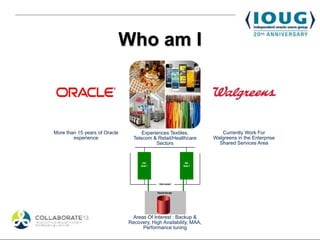
More than 15 years of Oracle         Experiences Textiles,            Currently Work For
        experience               Telecom & Retail/Healthcare       Walgreens in the Enterprise
                                           Sectors                   Shared Services Area


                                Areas Of Interest : Backup &
                               Recovery, High Availability, MAA,
                                    Performance tuning
The main conference Twitter hashtag is #C13DEN.


#C13TCH is the general COLLABORATE hashtag for
         discussing technology content.


            IOUG’s Social Media Hub:

          bit.ly/ioug-sm
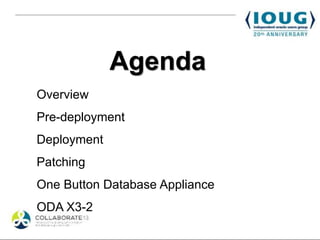
Agenda
Overview
Pre-deployment
Deployment
Patching
One Button Database Appliance
ODA X3-2
Agenda
Overview
Pre-deployment
Deployment
Patching
One Button Database Appliance
ODA X3-2
Overview
•   Entry Level Engineered System

•   2 Node RAC with Storage included

•   V1 storage comes with triple mirrored as
    well as double mirrored options

•   Virtualization is an option
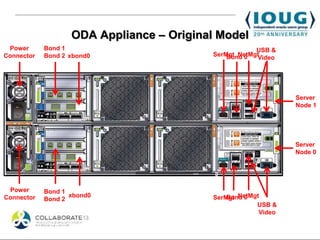
ODA Appliance – Original Model
 Power      Bond 1                                    USB &
Connector   Bond 2 xbond0                 SerMgt NetMgt
                                              Bond 0  Video


                                                               Server
                                                               Node 1


                                                               Server
                                                               Node 0


 Power      Bond 1
Connector          xbond0                 SerMgt NetMgt
                                              Bond 0
            Bond 2
                                                      USB &
                                                       Video
Agenda
Overview
Pre-deployment
Deployment
Patching
One Button Database Appliance
ODA X3-2
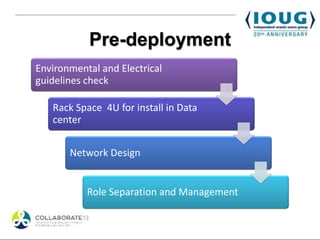
Pre-deployment
Environmental and Electrical
guidelines check

   Rack Space 4U for install in Data
   center


       Network Design


           Role Separation and Management
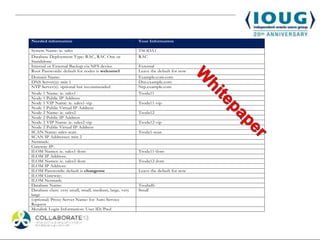
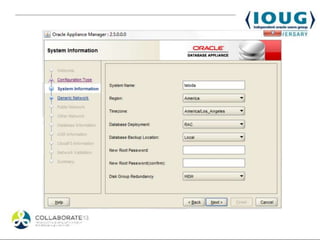
Needed information                                       Your Information

System Name: ie. sales                                   TSODA1
Database Deployment Type: RAC, RAC One or                RAC
Standalone
Internal or External Backup via NFS device               External
Root Passwords: default for nodes is welcome1            Leave the default for now
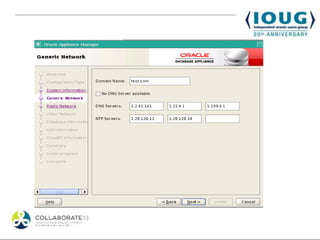
Domain Name:                                             Example.com.com
DNS Server(s): min 1                                     Dns.example.com
NTP Server(s): optional but recommended                  Ntp.example.com
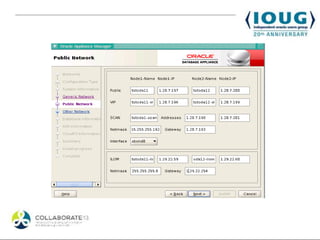
Node 1 Name: ie. sales1                                  Tsoda11
Node 1 Public IP Address
Node 1 VIP Name: ie. sales1-vip                          Tsoda11-vip
Node 1 Public Virtual IP Address
Node 2 Name: ie. sales2                                  Tsoda12
Node 2 Public IP Address
Node 2 VIP Name: ie. sales2-vip                          Tsoda12-vip
Node 2 Public Virtual IP Address
SCAN Name: sales-scan                                    Tsoda1-scan
SCAN IP Addresses: min 2
Netmask:
Gateway IP:
ILOM Names: ie. sales1-ilom                              Tsoda11-ilom
ILOM IP Address:
ILOM Names: ie. sales2-ilom                              Tsoda12-ilom
ILOM IP Address:
ILOM Passwords: default is changeme                      Leave the default for now
ILOM Gateway:
ILOM Netmask:
Database Name:                                           Tsodadb
Database class: very small, small, medium, large, very   Small
large
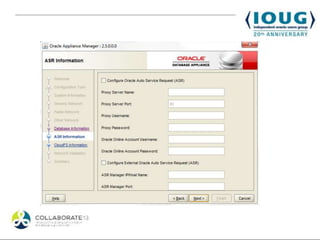
(optional) Proxy Server Name: for Auto Service
Request
Metalink Login Information: User ID/Pwd
Agenda
Overview
Pre-deployment
Deployment
Patching
One Button Database Appliance
ODA X3-2
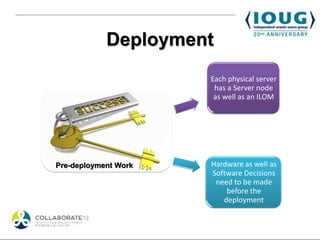
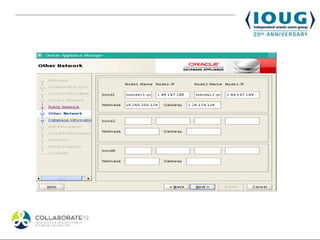
Deployment
                      Each physical server
                       has a Server node
                       as well as an ILOM


Pre-deployment Work   Hardware as well as
                      Software Decisions
                       need to be made
                          before the
                         deployment
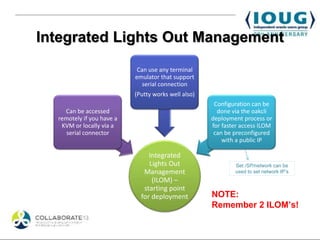
Integrated Lights Out Management
                            Can use any terminal
                           emulator that support
                              serial connection
                           (Putty works well also)
                                                      Configuration can be
    Can be accessed                                    done via the oakcli
  remotely if you have a                             deployment process or
   KVM or locally via a                              for faster access ILOM
     serial connector                                 can be preconfigured
                                                         with a public IP

                                Integrated
                                Lights Out                   Set /SP/network can be
                              Management                     used to set network IP’s
                                 (ILOM) –
                              starting point
                             for deployment          NOTE:
                                                     Remember 2 ILOM’s!
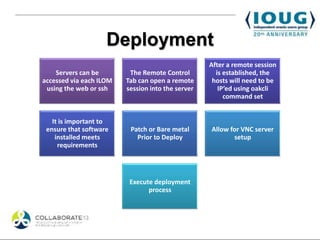
Deployment
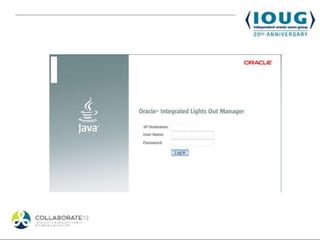
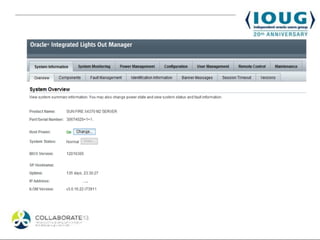
                                                   After a remote session
    Servers can be        The Remote Control         is established, the
accessed via each ILOM   Tab can open a remote      hosts will need to be
 using the web or ssh    session into the server      IP’ed using oakcli
                                                        command set


   It is important to
 ensure that software     Patch or Bare metal      Allow for VNC server
    installed meets         Prior to Deploy               setup
     requirements


                          Execute deployment
                                process
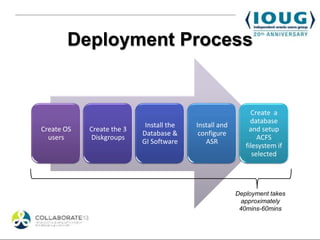
Deployment Process


                                                             Create a
                                                             database
                            Install the   Install and
Create OS   Create the 3                                    and setup
                           Database &      configure
  users     Diskgroups                                          ACFS
                           GI Software       ASR
                                                           filesystem if
                                                              selected


                                                        Deployment takes
                                                         approximately
                                                         40mins-60mins
Agenda
Overview
Pre-deployment
Deployment
Patching
One Button Database Appliance
ODA X3-2
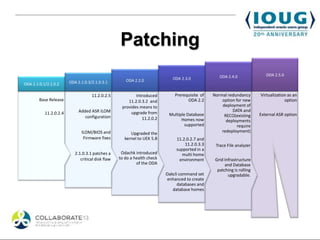
Patching
                                                                                                   ODA 2.4.0               ODA 2.5.0
                                                      ODA 2.2.0              ODA 2.3.0
ODA 2.1.0.1/2.1.0.2     ODA 2.1.0.3/2.1.0.3.1


                                    11.2.0.2.5             Introduced         Prerequisite of   Normal redundancy       Virtualization as an
        Base Release                                   11.2.0.3.2 and               ODA 2.2         option for new                   option
                                                    provides means to                               deployment of
                             Added ASR ILOM             upgrade from                                     DATA and
           11.2.0.2.4                                                      Multiple Database                            External ASR option
                                configuration                                                        RECO(existing
                                                              11.2.0.2           Homes now            deployments
                                                                                   supported                require
                              ILOM/BIOS and              Upgraded the                               redeployment)
                               Firmware fixes         kernel to UEK 5.8        11.2.0.2.7 and
                                                                                   11.2.0.3.3    Trace File analyzer
                                                                               supported in a
                           2.1.0.3.1 patches a      Odachk introduced             multi home
                              critical disk flaw   to do a health check         environment      Grid Infrastructure
                                                            of the ODA                                and Database
                                                                                                  patching is rolling
                                                                          Oakcli command set            upgradable.
                                                                           enhanced to create
                                                                                databases and
                                                                             database homes
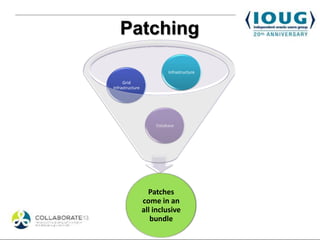
Patching

                          Infrastructure

     Grid
Infrastructure


                     Database


                   Patches
                 come in an
                 all inclusive
                    bundle
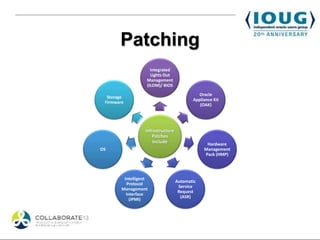
Patching
                     Integrated
                     Lights Out
                   Management
                   (ILOM)/ BIOS
                                             Oracle
  Storage
                                           Appliance Kit
 Firmware
                                              (OAK)


                   Infrastructure
                      Patches
                       Include                   Hardware
OS                                              Management
                                                Pack (HMP)


         Intelligent
                                    Automatic
          Protocol
                                     Service
        Management
                                     Request
          Interface
                                      (ASR)
            (IPMI)
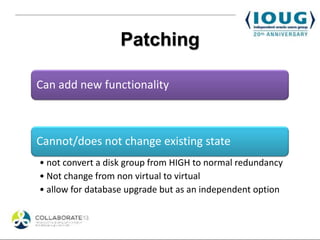
Patching

Can add new functionality


Cannot/does not change existing state
• not convert a disk group from HIGH to normal redundancy
• Not change from non virtual to virtual
• allow for database upgrade but as an independent option
Agenda
Overview
Pre-deployment
Deployment
Patching
One Button Database Appliance
ODA X3-2
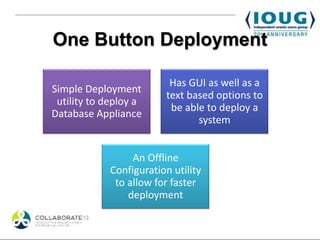
One Button Deployment

                         Has GUI as well as a
Simple Deployment
                        text based options to
 utility to deploy a
                         be able to deploy a
Database Appliance
                               system


                 An Offline
            Configuration utility
             to allow for faster
                deployment
One Button Deployment
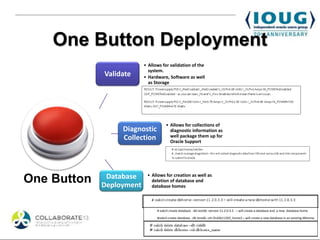
                          • Allows for validation of the
                            system.
             Validate     • Hardware, Software as well
                            as Storage


                                      • Allows for collections of
                  Diagnostic            diagnostic information as
                  Collection            well package them up for
                                        Oracle Support


              Database     • Allows for creation as well as
One Button   Deployment
                             deletion of database and
                             database homes


                                # oakcli create database -db testdb -version 11.2.0.3.3 – will create a database and a new database home

                                #oakcli create database -db testdb –oh OraDb11203_home2 – will create a new database in an existing dbhome.
Agenda
Overview
Pre-deployment
Deployment
Patching
One Button Database Appliance
ODA X3-2
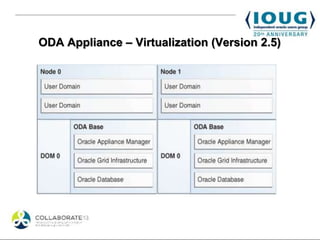
ODA Appliance – Virtualization (Version 2.5)
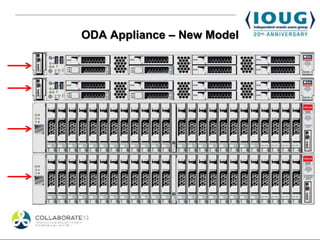
ODA Appliance – New Model
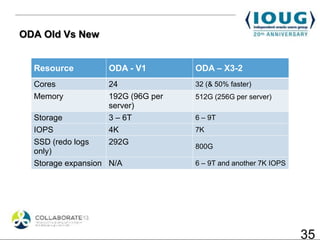
ODA Old Vs New


  Resource         ODA - V1        ODA – X3-2
  Cores            24              32 (& 50% faster)
  Memory           192G (96G per   512G (256G per server)
                   server)
  Storage          3 – 6T          6 – 9T
  IOPS             4K              7K
  SSD (redo logs   292G
                                   800G
  only)
  Storage expansion N/A            6 – 9T and another 7K IOPS


                                                                35
Summary
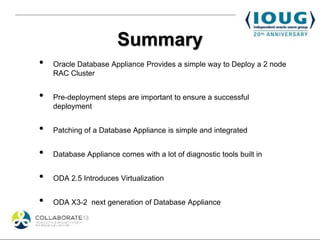
•   Oracle Database Appliance Provides a simple way to Deploy a 2 node
    RAC Cluster


•   Pre-deployment steps are important to ensure a successful
    deployment


•   Patching of a Database Appliance is simple and integrated


•   Database Appliance comes with a lot of diagnostic tools built in


•   ODA 2.5 Introduces Virtualization


•   ODA X3-2 next generation of Database Appliance
RAC SIG Events #C13RAC
•   Oracle Database Appliance Customer Panel - 154

          Tues, April 9, 2013 10:45 am - 11:45 am. Mile High Ballroom 4F


•   RAC SIG Birds of a Feather – 200


          Wed, April 10, 2013 11:00 am - 12:00 pm. Mile High Ballroom 4F


•   RAC Attack Hands on lab


          Mon April 8, 9:45 am - 12:45pm and 2:30pm - 5:30pm


          Tues April 9, 10:45am - 1:45 pm
Contact Information
             @fuadar

      www.linkedin.com/in/fuadar/


   https://plus.google.com/115356300892532820756


    http://www.fuadarshad.com
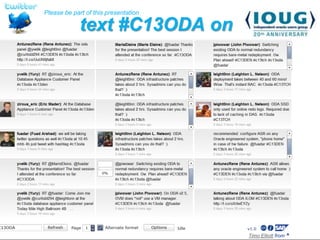
Please be part of this presentation

             text #C13ODA on
                   twitter


                              Timo Elliott


                                             Timo Elliott from ^
THANK YOU


Fuad Arshad – @fuadar

Oracle Database Appliance RAC in a box Some Strings Attached

  • 1.
    ORACLE DATABASE APPLIANCERAC IN A BOX – SOME STRINGS ATTACHED Session ID#108 Fuad Arshad @fuadar #C13DEN #C13TCH #C13ODA Walgreens Company
  • 2.
    Who am I Morethan 15 years of Oracle Experiences Textiles, Currently Work For experience Telecom & Retail/Healthcare Walgreens in the Enterprise Sectors Shared Services Area Areas Of Interest : Backup & Recovery, High Availability, MAA, Performance tuning
  • 3.
    The main conferenceTwitter hashtag is #C13DEN. #C13TCH is the general COLLABORATE hashtag for discussing technology content. IOUG’s Social Media Hub: bit.ly/ioug-sm
  • 4.
  • 5.
  • 6.
    Overview • Entry Level Engineered System • 2 Node RAC with Storage included • V1 storage comes with triple mirrored as well as double mirrored options • Virtualization is an option
  • 8.
    ODA Appliance –Original Model Power Bond 1 USB & Connector Bond 2 xbond0 SerMgt NetMgt Bond 0 Video Server Node 1 Server Node 0 Power Bond 1 Connector xbond0 SerMgt NetMgt Bond 0 Bond 2 USB & Video
  • 9.
  • 10.
    Pre-deployment Environmental and Electrical guidelinescheck Rack Space 4U for install in Data center Network Design Role Separation and Management
  • 11.
    Needed information Your Information System Name: ie. sales TSODA1 Database Deployment Type: RAC, RAC One or RAC Standalone Internal or External Backup via NFS device External Root Passwords: default for nodes is welcome1 Leave the default for now Domain Name: Example.com.com DNS Server(s): min 1 Dns.example.com NTP Server(s): optional but recommended Ntp.example.com Node 1 Name: ie. sales1 Tsoda11 Node 1 Public IP Address Node 1 VIP Name: ie. sales1-vip Tsoda11-vip Node 1 Public Virtual IP Address Node 2 Name: ie. sales2 Tsoda12 Node 2 Public IP Address Node 2 VIP Name: ie. sales2-vip Tsoda12-vip Node 2 Public Virtual IP Address SCAN Name: sales-scan Tsoda1-scan SCAN IP Addresses: min 2 Netmask: Gateway IP: ILOM Names: ie. sales1-ilom Tsoda11-ilom ILOM IP Address: ILOM Names: ie. sales2-ilom Tsoda12-ilom ILOM IP Address: ILOM Passwords: default is changeme Leave the default for now ILOM Gateway: ILOM Netmask: Database Name: Tsodadb Database class: very small, small, medium, large, very Small large (optional) Proxy Server Name: for Auto Service Request Metalink Login Information: User ID/Pwd
  • 12.
  • 13.
    Deployment Each physical server has a Server node as well as an ILOM Pre-deployment Work Hardware as well as Software Decisions need to be made before the deployment
  • 14.
    Integrated Lights OutManagement Can use any terminal emulator that support serial connection (Putty works well also) Configuration can be Can be accessed done via the oakcli remotely if you have a deployment process or KVM or locally via a for faster access ILOM serial connector can be preconfigured with a public IP Integrated Lights Out Set /SP/network can be Management used to set network IP’s (ILOM) – starting point for deployment NOTE: Remember 2 ILOM’s!
  • 17.
    Deployment After a remote session Servers can be The Remote Control is established, the accessed via each ILOM Tab can open a remote hosts will need to be using the web or ssh session into the server IP’ed using oakcli command set It is important to ensure that software Patch or Bare metal Allow for VNC server installed meets Prior to Deploy setup requirements Execute deployment process
  • 23.
    Deployment Process Create a database Install the Install and Create OS Create the 3 and setup Database & configure users Diskgroups ACFS GI Software ASR filesystem if selected Deployment takes approximately 40mins-60mins
  • 24.
  • 25.
    Patching ODA 2.4.0 ODA 2.5.0 ODA 2.2.0 ODA 2.3.0 ODA 2.1.0.1/2.1.0.2 ODA 2.1.0.3/2.1.0.3.1 11.2.0.2.5 Introduced Prerequisite of Normal redundancy Virtualization as an Base Release 11.2.0.3.2 and ODA 2.2 option for new option provides means to deployment of Added ASR ILOM upgrade from DATA and 11.2.0.2.4 Multiple Database External ASR option configuration RECO(existing 11.2.0.2 Homes now deployments supported require ILOM/BIOS and Upgraded the redeployment) Firmware fixes kernel to UEK 5.8 11.2.0.2.7 and 11.2.0.3.3 Trace File analyzer supported in a 2.1.0.3.1 patches a Odachk introduced multi home critical disk flaw to do a health check environment Grid Infrastructure of the ODA and Database patching is rolling Oakcli command set upgradable. enhanced to create databases and database homes
  • 26.
    Patching Infrastructure Grid Infrastructure Database Patches come in an all inclusive bundle
  • 27.
    Patching Integrated Lights Out Management (ILOM)/ BIOS Oracle Storage Appliance Kit Firmware (OAK) Infrastructure Patches Include Hardware OS Management Pack (HMP) Intelligent Automatic Protocol Service Management Request Interface (ASR) (IPMI)
  • 28.
    Patching Can add newfunctionality Cannot/does not change existing state • not convert a disk group from HIGH to normal redundancy • Not change from non virtual to virtual • allow for database upgrade but as an independent option
  • 29.
  • 30.
    One Button Deployment Has GUI as well as a Simple Deployment text based options to utility to deploy a be able to deploy a Database Appliance system An Offline Configuration utility to allow for faster deployment
  • 31.
    One Button Deployment • Allows for validation of the system. Validate • Hardware, Software as well as Storage • Allows for collections of Diagnostic diagnostic information as Collection well package them up for Oracle Support Database • Allows for creation as well as One Button Deployment deletion of database and database homes # oakcli create database -db testdb -version 11.2.0.3.3 – will create a database and a new database home #oakcli create database -db testdb –oh OraDb11203_home2 – will create a new database in an existing dbhome.
  • 32.
  • 33.
    ODA Appliance –Virtualization (Version 2.5)
  • 34.
  • 35.
    ODA Old VsNew Resource ODA - V1 ODA – X3-2 Cores 24 32 (& 50% faster) Memory 192G (96G per 512G (256G per server) server) Storage 3 – 6T 6 – 9T IOPS 4K 7K SSD (redo logs 292G 800G only) Storage expansion N/A 6 – 9T and another 7K IOPS 35
  • 36.
    Summary • Oracle Database Appliance Provides a simple way to Deploy a 2 node RAC Cluster • Pre-deployment steps are important to ensure a successful deployment • Patching of a Database Appliance is simple and integrated • Database Appliance comes with a lot of diagnostic tools built in • ODA 2.5 Introduces Virtualization • ODA X3-2 next generation of Database Appliance
  • 37.
    RAC SIG Events#C13RAC • Oracle Database Appliance Customer Panel - 154 Tues, April 9, 2013 10:45 am - 11:45 am. Mile High Ballroom 4F • RAC SIG Birds of a Feather – 200 Wed, April 10, 2013 11:00 am - 12:00 pm. Mile High Ballroom 4F • RAC Attack Hands on lab Mon April 8, 9:45 am - 12:45pm and 2:30pm - 5:30pm Tues April 9, 10:45am - 1:45 pm
  • 38.
    Contact Information @fuadar www.linkedin.com/in/fuadar/ https://plus.google.com/115356300892532820756 http://www.fuadarshad.com
  • 39.
    Please be partof this presentation text #C13ODA on twitter Timo Elliott Timo Elliott from ^
  • 40.

Editor's Notes

  • #11 Determine hardware placement zones. Submit a request to get network ip’sSubmit DNS and Firewall requests Work with datacenter team to determine rack space.Ensure cables and adapters are availableRead thru the ODA manualProvide datacenter team cabling specs Get the ODA connected to a KVM or access via Serial cable to ensure the hosts are powered on and ILOM is accessible.