H810 TMA02 Angela Phillips 
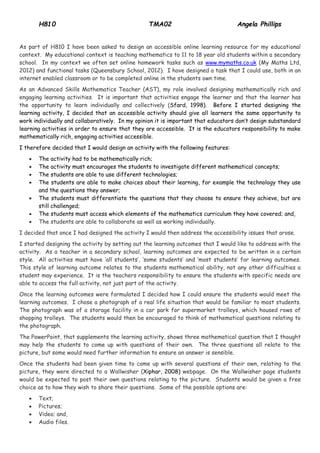
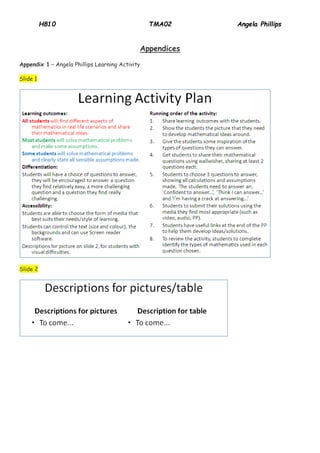
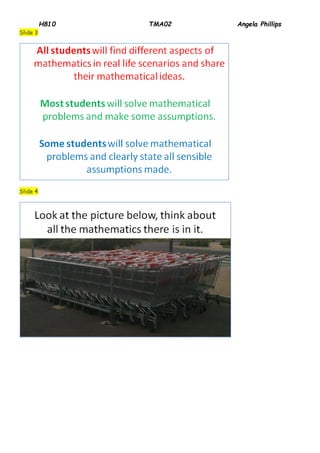
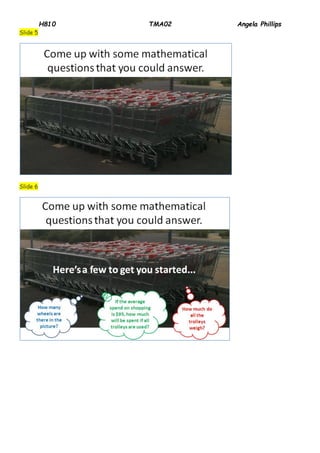
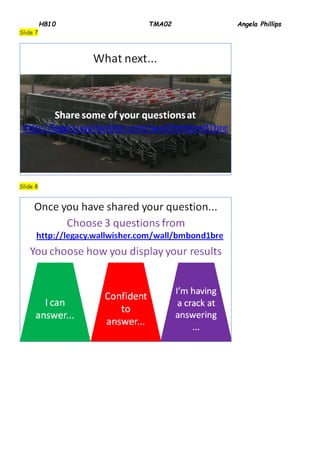
As part of H810 I have been asked to design an accessible online learning resource for my educational context. My educational context is teaching mathematics to 11 to 18 year old students within a secondary school. In my context we often set online homework tasks such as www.mymaths.co.uk (My Maths Ltd, 2012) and functional tasks (Queensbury School, 2012). I have designed a task that I could use, both in an internet enabled classroom or to be completed online in the students own time. As an Advanced Skills Mathematics Teacher (AST), my role involved designing mathematically rich and engaging learning activities. It is important that activities engage the learner and that the learner has the opportunity to learn individually and collectively (Sfard, 1998). Before I started designing the learning activity, I decided that an accessible activity should give all learners the same opportunity to work individually and collaboratively. In my opinion it is important that educators don’t design substandard learning activities in order to ensure that they are accessible. It is the educators responsibility to make mathematically rich, engaging activities accessible. I therefore decided that I would design an activity with the following features:  The activity had to be mathematically rich;  The activity must encourages the students to investigate different mathematical concepts;  The students are able to use different technologies;  The students are able to make choices about their learning, for example the technology they use and the questions they answer;  The students must differentiate the questions that they choose to ensure they achieve, but are still challenged;  The students must access which elements of the mathematics curriculum they have covered; and,  The students are able to collaborate as well as working individually. I decided that once I had designed the activity I would then address the accessibility issues that arose. I started designing the activity by setting out the learning outcomes that I would like to address with the activity. As a teacher in a secondary school, learning outcomes are expected to be written in a certain style. All activities must have ‘all students’, ‘some students’ and ‘most students’ for learning outcomes. This style of learning outcome relates to the students mathematical ability, not any other difficulties a student may experience. It is the teachers responsibility to ensure the students with specific needs are able to access the full activity, not just part of the activity. Once the learning outcomes were formulated I decided how I could ensure the students would meet the learning outcomes. I chose a photograph of a real life situation that would be familiar to most students. The photograph was of a storage facility in a car park for supermarket trolleys, which housed rows of shopping trolleys. The students would then be encouraged to think of mathematical questions relating to the photograph. The PowerPoint, that supplements the learning activity, shows three mathematical question that I thought may help the students to come up with questions of their own. The three questions all relate to the picture, but some would need further information to ensure an answer is sensible. Once the students had been given time to come up with several questions of their own, relating to the picture, they were directed to a Wallwisher (Xiphar, 2008) webpage. On the Wallwisher page students would be expected to post their own questions relating to the picture. Students would be given a free choice as to how they wish to share their questions. Some of the possible options are:  Text;  Pictures;  Video; and,  Audio files.
H810 TMA02 Angela Phillips 
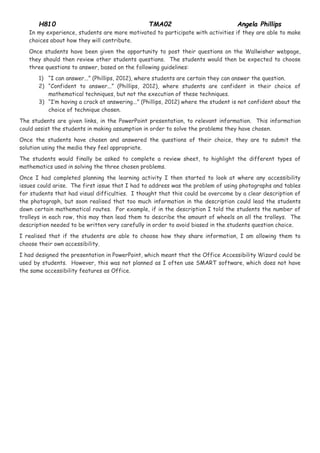
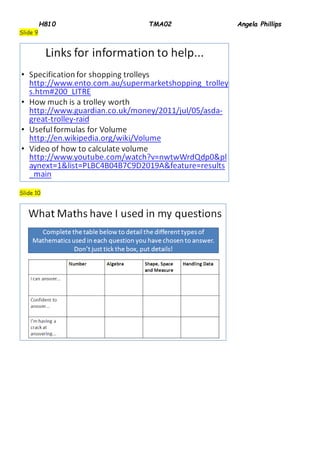
In my experience, students are more motivated to participate with activities if they are able to make choices about how they will contribute. Once students have been given the opportunity to post their questions on the Wallwisher webpage, they should then review other students questions. The students would then be expected to choose three questions to answer, based on the following guidelines: 1) “I can answer...” (Phillips, 2012), where students are certain they can answer the question. 2) “Confident to answer...” (Phillips, 2012), where students are confident in their choice of mathematical techniques, but not the execution of these techniques. 3) “I’m having a crack at answering...” (Phillips, 2012) where the student is not confident about the choice of technique chosen. The students are given links, in the PowerPoint presentation, to relevant information. This information could assist the students in making assumption in order to solve the problems they have chosen. Once the students have chosen and answered the questions of their choice, they are to submit the solution using the media they feel appropriate. The students would finally be asked to complete a review sheet, to highlight the different types of mathematics used in solving the three chosen problems. Once I had completed planning the learning activity I then started to look at where any accessibility issues could arise. The first issue that I had to address was the problem of using photographs and tables for students that had visual difficulties. I thought that this could be overcome by a clear description of the photograph, but soon realised that too much information in the description could lead the students down certain mathematical routes. For example, if in the description I told the students the number of trolleys in each row, this may then lead them to describe the amount of wheels on all the trolleys. The description needed to be written very carefully in order to avoid biased in the students question choice. I realised that if the students are able to choose how they share information, I am allowing them to choose their own accessibility. I had designed the presentation in PowerPoint, which meant that the Office Accessibility Wizard could be used by students. However, this was not planned as I often use SMART software, which does not have the same accessibility features as Office.
H810 TMA02 Angela Phillips 
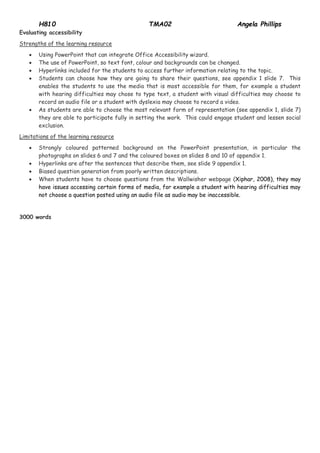
Evaluating accessibility Strengths of the learning resource  Using PowerPoint that can integrate Office Accessibility wizard.  The use of PowerPoint, so text font, colour and backgrounds can be changed.  Hyperlinks included for the students to access further information relating to the topic.  Students can choose how they are going to share their questions, see appendix 1 slide 7. This enables the students to use the media that is most accessible for them, for example a student with hearing difficulties may chose to type text, a student with visual difficulties may choose to record an audio file or a student with dyslexia may choose to record a video.  As students are able to choose the most relevant form of representation (see appendix 1, slide 7) they are able to participate fully in setting the work. This could engage student and lessen social exclusion. Limitations of the learning resource  Strongly coloured patterned background on the PowerPoint presentation, in particular the photographs on slides 6 and 7 and the coloured boxes on slides 8 and 10 of appendix 1.  Hyperlinks are after the sentences that describe them, see slide 9 appendix 1.  Biased question generation from poorly written descriptions.  When students have to choose questions from the Wallwisher webpage (Xiphar, 2008), they may have issues accessing certain forms of media, for example a student with hearing difficulties may not choose a question posted using an audio file as audio may be inaccessible. 3000 words
H810 TMA02 Angela Phillips 
Appendices 
Appendix 1 – Angela Phillips Learning Activity Slide 1 
Slide 2
H810 TMA02 Angela Phillips 
Slide 3 
Slide 4
H810 TMA02 Angela Phillips 
Slide 5 
Slide 6
H810 TMA02 Angela Phillips 
Slide 7 
Slide 8
H810 TMA02 Angela Phillips 
Slide 9 
Slide 10
H810 TMA02 Angela Phillips 
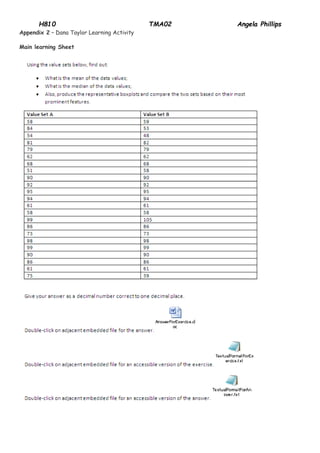
Appendix 2 – Dana Taylor Learning Activity 
Main learning Sheet
H810 TMA02 Angela Phillips 
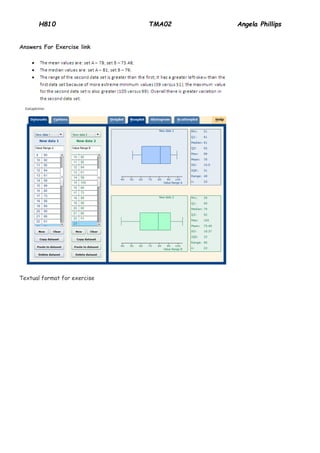
Answers For Exercise link 
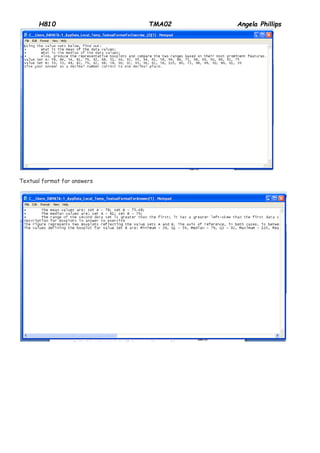
Textual format for exercise
H810 TMA02 Angela Phillips 
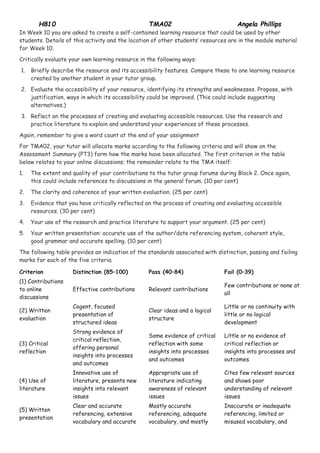
Textual format for answers
H810 TMA02 Angela Phillips 
References 
My Maths Ltd (2012) Available: www.mymaths.co.uk. (accessed 19 November 2012) 
Phillips A (2012) Ange Phillips – Learning Activity http://learn2.open.ac.uk/mod/forumng/discuss.php?d=276271 (accessed 19 November 2012) 
Queensbury School (2012) http://www.queensbury.ngfl.ac.uk/wp-content/uploads/2012/09/Functional- Maths_scheme-and-guidance.pdf (accessed 19 November 2012) Seale, J. (2006) E-Learning and Disability in Higher Education: Accessibility Research and Practice, Abingdon, Routledge; also available online at http://learn2.open.ac.uk/ mod/ subpage/ view.php?id=153062 (accessed 19 November 2012) 
Sfard, A. (1998) ‘Two Metaphors for Learning and the Dangers of Choosing Just One’ Educational Researcher American Educational Research Association, [online] Vol. 27, No. 2, pp.4-13 available from http://learn2.open.ac.uk/pluginfile.php/164544/mod_resource/content/1/H800_Week3b_OnTwoMetaphorsforLearning_Sfard.pdf (accessed 19 November 2012) 
Taylor D (2012) Dana Taylor’s Resource http://learn2.open.ac.uk/mod/forumng/discuss.php?d=280616 (accessed 19 November 2012) 
Xiphar (2008) Wallwisher, http://wallwisher.com/ (accessed 19 November 2012)
H810 TMA02 Angela Phillips 
In Week 10 you are asked to create a self-contained learning resource that could be used by other students. Details of this activity and the location of other students’ resources are in the module material for Week 10. Critically evaluate your own learning resource in the following ways: 1. Briefly describe the resource and its accessibility features. Compare these to one learning resource created by another student in your tutor group. 2. Evaluate the accessibility of your resource, identifying its strengths and weaknesses. Propose, with justification, ways in which its accessibility could be improved. (This could include suggesting alternatives.) 3. Reflect on the processes of creating and evaluating accessible resources. Use the research and practice literature to explain and understand your experiences of these processes. Again, remember to give a word count at the end of your assignment For TMA02, your tutor will allocate marks according to the following criteria and will show on the Assessment Summary (PT3) form how the marks have been allocated. The first criterion in the table below relates to your online discussions; the remainder relate to the TMA itself: 1. The extent and quality of your contributions to the tutor group forums during Block 2. Once again, this could include references to discussions in the general forum. (10 per cent) 2. The clarity and coherence of your written evaluation. (25 per cent) 3. Evidence that you have critically reflected on the process of creating and evaluating accessible resources. (30 per cent) 4. Your use of the research and practice literature to support your argument. (25 per cent) 5. Your written presentation: accurate use of the author/date referencing system, coherent style, good grammar and accurate spelling. (10 per cent) The following table provides an indication of the standards associated with distinction, passing and failing marks for each of the five criteria. 
Criterion 
Distinction (85–100) 
Pass (40–84) 
Fail (0–39) 
(1) Contributions to online discussions 
Effective contributions 
Relevant contributions 
Few contributions or none at all 
(2) Written evaluation 
Cogent, focused presentation of structured ideas 
Clear ideas and a logical structure 
Little or no continuity with little or no logical development 
(3) Critical reflection 
Strong evidence of critical reflection, offering personal insights into processes and outcomes 
Some evidence of critical reflection with some insights into processes and outcomes 
Little or no evidence of critical reflection or insights into processes and outcomes 
(4) Use of literature 
Innovative use of literature, presents new insights into relevant issues 
Appropriate use of literature indicating awareness of relevant issues 
Cites few relevant sources and shows poor understanding of relevant issues 
(5) Written presentation 
Clear and accurate referencing, extensive vocabulary and accurate 
Mostly accurate referencing, adequate vocabulary, and mostly 
Inaccurate or inadequate referencing, limited or misused vocabulary, and
H810 TMA02 Angela Phillips 
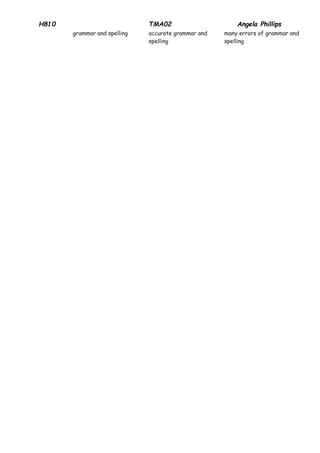
grammar and spelling 
accurate grammar and spelling 
many errors of grammar and spelling

H810 TMA02

  • 1.
    H810 TMA02 AngelaPhillips As part of H810 I have been asked to design an accessible online learning resource for my educational context. My educational context is teaching mathematics to 11 to 18 year old students within a secondary school. In my context we often set online homework tasks such as www.mymaths.co.uk (My Maths Ltd, 2012) and functional tasks (Queensbury School, 2012). I have designed a task that I could use, both in an internet enabled classroom or to be completed online in the students own time. As an Advanced Skills Mathematics Teacher (AST), my role involved designing mathematically rich and engaging learning activities. It is important that activities engage the learner and that the learner has the opportunity to learn individually and collectively (Sfard, 1998). Before I started designing the learning activity, I decided that an accessible activity should give all learners the same opportunity to work individually and collaboratively. In my opinion it is important that educators don’t design substandard learning activities in order to ensure that they are accessible. It is the educators responsibility to make mathematically rich, engaging activities accessible. I therefore decided that I would design an activity with the following features:  The activity had to be mathematically rich;  The activity must encourages the students to investigate different mathematical concepts;  The students are able to use different technologies;  The students are able to make choices about their learning, for example the technology they use and the questions they answer;  The students must differentiate the questions that they choose to ensure they achieve, but are still challenged;  The students must access which elements of the mathematics curriculum they have covered; and,  The students are able to collaborate as well as working individually. I decided that once I had designed the activity I would then address the accessibility issues that arose. I started designing the activity by setting out the learning outcomes that I would like to address with the activity. As a teacher in a secondary school, learning outcomes are expected to be written in a certain style. All activities must have ‘all students’, ‘some students’ and ‘most students’ for learning outcomes. This style of learning outcome relates to the students mathematical ability, not any other difficulties a student may experience. It is the teachers responsibility to ensure the students with specific needs are able to access the full activity, not just part of the activity. Once the learning outcomes were formulated I decided how I could ensure the students would meet the learning outcomes. I chose a photograph of a real life situation that would be familiar to most students. The photograph was of a storage facility in a car park for supermarket trolleys, which housed rows of shopping trolleys. The students would then be encouraged to think of mathematical questions relating to the photograph. The PowerPoint, that supplements the learning activity, shows three mathematical question that I thought may help the students to come up with questions of their own. The three questions all relate to the picture, but some would need further information to ensure an answer is sensible. Once the students had been given time to come up with several questions of their own, relating to the picture, they were directed to a Wallwisher (Xiphar, 2008) webpage. On the Wallwisher page students would be expected to post their own questions relating to the picture. Students would be given a free choice as to how they wish to share their questions. Some of the possible options are:  Text;  Pictures;  Video; and,  Audio files.
  • 2.
    H810 TMA02 AngelaPhillips In my experience, students are more motivated to participate with activities if they are able to make choices about how they will contribute. Once students have been given the opportunity to post their questions on the Wallwisher webpage, they should then review other students questions. The students would then be expected to choose three questions to answer, based on the following guidelines: 1) “I can answer...” (Phillips, 2012), where students are certain they can answer the question. 2) “Confident to answer...” (Phillips, 2012), where students are confident in their choice of mathematical techniques, but not the execution of these techniques. 3) “I’m having a crack at answering...” (Phillips, 2012) where the student is not confident about the choice of technique chosen. The students are given links, in the PowerPoint presentation, to relevant information. This information could assist the students in making assumption in order to solve the problems they have chosen. Once the students have chosen and answered the questions of their choice, they are to submit the solution using the media they feel appropriate. The students would finally be asked to complete a review sheet, to highlight the different types of mathematics used in solving the three chosen problems. Once I had completed planning the learning activity I then started to look at where any accessibility issues could arise. The first issue that I had to address was the problem of using photographs and tables for students that had visual difficulties. I thought that this could be overcome by a clear description of the photograph, but soon realised that too much information in the description could lead the students down certain mathematical routes. For example, if in the description I told the students the number of trolleys in each row, this may then lead them to describe the amount of wheels on all the trolleys. The description needed to be written very carefully in order to avoid biased in the students question choice. I realised that if the students are able to choose how they share information, I am allowing them to choose their own accessibility. I had designed the presentation in PowerPoint, which meant that the Office Accessibility Wizard could be used by students. However, this was not planned as I often use SMART software, which does not have the same accessibility features as Office.
  • 3.
    H810 TMA02 AngelaPhillips Evaluating accessibility Strengths of the learning resource  Using PowerPoint that can integrate Office Accessibility wizard.  The use of PowerPoint, so text font, colour and backgrounds can be changed.  Hyperlinks included for the students to access further information relating to the topic.  Students can choose how they are going to share their questions, see appendix 1 slide 7. This enables the students to use the media that is most accessible for them, for example a student with hearing difficulties may chose to type text, a student with visual difficulties may choose to record an audio file or a student with dyslexia may choose to record a video.  As students are able to choose the most relevant form of representation (see appendix 1, slide 7) they are able to participate fully in setting the work. This could engage student and lessen social exclusion. Limitations of the learning resource  Strongly coloured patterned background on the PowerPoint presentation, in particular the photographs on slides 6 and 7 and the coloured boxes on slides 8 and 10 of appendix 1.  Hyperlinks are after the sentences that describe them, see slide 9 appendix 1.  Biased question generation from poorly written descriptions.  When students have to choose questions from the Wallwisher webpage (Xiphar, 2008), they may have issues accessing certain forms of media, for example a student with hearing difficulties may not choose a question posted using an audio file as audio may be inaccessible. 3000 words
  • 4.
    H810 TMA02 AngelaPhillips Appendices Appendix 1 – Angela Phillips Learning Activity Slide 1 Slide 2
  • 5.
    H810 TMA02 AngelaPhillips Slide 3 Slide 4
  • 6.
    H810 TMA02 AngelaPhillips Slide 5 Slide 6
  • 7.
    H810 TMA02 AngelaPhillips Slide 7 Slide 8
  • 8.
    H810 TMA02 AngelaPhillips Slide 9 Slide 10
  • 9.
    H810 TMA02 AngelaPhillips Appendix 2 – Dana Taylor Learning Activity Main learning Sheet
  • 10.
    H810 TMA02 AngelaPhillips Answers For Exercise link Textual format for exercise
  • 11.
    H810 TMA02 AngelaPhillips Textual format for answers
  • 12.
    H810 TMA02 AngelaPhillips References My Maths Ltd (2012) Available: www.mymaths.co.uk. (accessed 19 November 2012) Phillips A (2012) Ange Phillips – Learning Activity http://learn2.open.ac.uk/mod/forumng/discuss.php?d=276271 (accessed 19 November 2012) Queensbury School (2012) http://www.queensbury.ngfl.ac.uk/wp-content/uploads/2012/09/Functional- Maths_scheme-and-guidance.pdf (accessed 19 November 2012) Seale, J. (2006) E-Learning and Disability in Higher Education: Accessibility Research and Practice, Abingdon, Routledge; also available online at http://learn2.open.ac.uk/ mod/ subpage/ view.php?id=153062 (accessed 19 November 2012) Sfard, A. (1998) ‘Two Metaphors for Learning and the Dangers of Choosing Just One’ Educational Researcher American Educational Research Association, [online] Vol. 27, No. 2, pp.4-13 available from http://learn2.open.ac.uk/pluginfile.php/164544/mod_resource/content/1/H800_Week3b_OnTwoMetaphorsforLearning_Sfard.pdf (accessed 19 November 2012) Taylor D (2012) Dana Taylor’s Resource http://learn2.open.ac.uk/mod/forumng/discuss.php?d=280616 (accessed 19 November 2012) Xiphar (2008) Wallwisher, http://wallwisher.com/ (accessed 19 November 2012)
  • 13.
    H810 TMA02 AngelaPhillips In Week 10 you are asked to create a self-contained learning resource that could be used by other students. Details of this activity and the location of other students’ resources are in the module material for Week 10. Critically evaluate your own learning resource in the following ways: 1. Briefly describe the resource and its accessibility features. Compare these to one learning resource created by another student in your tutor group. 2. Evaluate the accessibility of your resource, identifying its strengths and weaknesses. Propose, with justification, ways in which its accessibility could be improved. (This could include suggesting alternatives.) 3. Reflect on the processes of creating and evaluating accessible resources. Use the research and practice literature to explain and understand your experiences of these processes. Again, remember to give a word count at the end of your assignment For TMA02, your tutor will allocate marks according to the following criteria and will show on the Assessment Summary (PT3) form how the marks have been allocated. The first criterion in the table below relates to your online discussions; the remainder relate to the TMA itself: 1. The extent and quality of your contributions to the tutor group forums during Block 2. Once again, this could include references to discussions in the general forum. (10 per cent) 2. The clarity and coherence of your written evaluation. (25 per cent) 3. Evidence that you have critically reflected on the process of creating and evaluating accessible resources. (30 per cent) 4. Your use of the research and practice literature to support your argument. (25 per cent) 5. Your written presentation: accurate use of the author/date referencing system, coherent style, good grammar and accurate spelling. (10 per cent) The following table provides an indication of the standards associated with distinction, passing and failing marks for each of the five criteria. Criterion Distinction (85–100) Pass (40–84) Fail (0–39) (1) Contributions to online discussions Effective contributions Relevant contributions Few contributions or none at all (2) Written evaluation Cogent, focused presentation of structured ideas Clear ideas and a logical structure Little or no continuity with little or no logical development (3) Critical reflection Strong evidence of critical reflection, offering personal insights into processes and outcomes Some evidence of critical reflection with some insights into processes and outcomes Little or no evidence of critical reflection or insights into processes and outcomes (4) Use of literature Innovative use of literature, presents new insights into relevant issues Appropriate use of literature indicating awareness of relevant issues Cites few relevant sources and shows poor understanding of relevant issues (5) Written presentation Clear and accurate referencing, extensive vocabulary and accurate Mostly accurate referencing, adequate vocabulary, and mostly Inaccurate or inadequate referencing, limited or misused vocabulary, and
  • 14.
    H810 TMA02 AngelaPhillips grammar and spelling accurate grammar and spelling many errors of grammar and spelling