Wireless Accessibility to Local
Measurements and Control in
Industrial Processes> CSE 2007
Presentation Contents
●Project Overview
●Process Control Studio (PCS) Software
●PCS Software Mobile Edition
●Wireless Accessibility
●Ethernet Interface
●Data Acquisition
●Control
Goal of our Project
●Implementation of Distributed Process
Control System
Wireless Industrial Monitoring
Project Block Diagram
Scenario
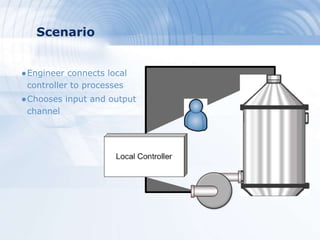
●Engineer connects local
controller to processes
●Chooses input and output
channel
Scenario
●Engineer forms a model on the software
●Our software: PCS (Process Control
Studio)
●Model analogous to real-process
●Associate model parts to I/O channels
on controller
●Load .pcs file to laptop or PDA
Presentation Contents
●Project Overview
●Process Control Studio (PCS) Software
●PCS Software Mobile Edition
●Wireless Accessibility
●Ethernet Controller
●Data Acquisition
●Control
PCS Software
>Process Control Studio
Project Block Diagram
Process Control Studio (PCS) Software
●PCS Features
●PCS Alarming System
●PCS Data Base
PCS Features
●Attractive user interface
●Support two mode
 Design time mode
 Run time mode
●Designing & Monitoring more than one
process at the same time
●Save and load Design process
●Failure notification
●Authentication
PCS Demo
PCS Alarming System
PCS alarming system
Visual notification
●Flash
●Notification
window
Sound SMS
PCS Alarming System Demo
PCS Data Base
●Simple to use
●It improves the capabilities of the overall the system
●Able to trace the shortage in any component in the
system & notify for making order
●It holds useful data about each component
●Store any alarm accrues In run time
PCS Data Base Demo
Presentation Contents
●Project Overview
●Process Control Studio (PCS) Software
●PCS Software MobileEdition
●Wireless Accessibility
●Ethernet Controller
●Data Acquisition
●Control
PCS
Mobile Edition>Personal Digital Assistant
Project Block Diagram
Introduction
●.NET Compact Framework (.NET CF)
●Operating System Used in This Project
oWinCE 5 operating system .
Program Description
●Process Control Studio PDA Edition
oLight version of PCS
oRun Mode only
> Program Stages
●Loading
●Scaling
●Network Sockets
Program Sequence
Presentation Contents
●Project Overview
●PCS Software
●PCS Software Mobile Edition
●Wireless Accessibility
●Ethernet Controller
●Control
●Data Acquisition
Wireless
Accessibilty
Project Block Diagram
●Wireless Standards
●Basic Topologies
●Access Point Features
●Wireless-to-Ethernet Bridge
Wireless Networking
Wireless Networking overview
Wireless Networking Standards
Standard
(Market Name)
802.11
(Wi-Fi)
802.15.1
(Bluetooth)
802.15.4
(ZigBee)
Application
Focus
Web, e-mail,
video
Cable
replacement
Control and
monitoring
Bandwidth 11 Mbps 1-3 Mbps 20 – 250 kbps
Transmission
Range
100+ 20 (Class 2)
100+ (Class 1)
20-70,
100+(ext. amp.)
Success Metrics Speed
flexibility
Cost, convenience Power, cost
We chose Wi-Fi
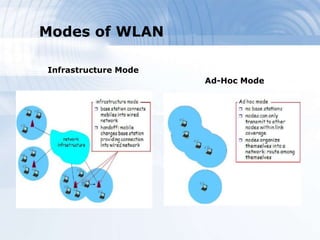
Modes of WLAN
Infrastructure Mode
Ad-Hoc Mode
TCP or UDP?
Access Point’s features
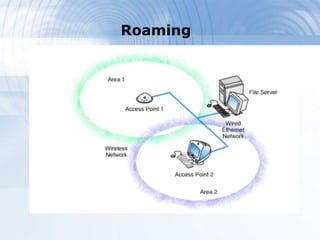
- Roaming
handshaking done by AP and OS of
wireless device
- Security
WEP: now obsolete
WPA-PSK: stronger keys
Roaming
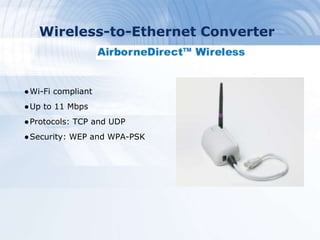
Wireless-to-Ethernet Converter
●Wi-Fi compliant
●Up to 11 Mbps
●Protocols: TCP and UDP
●Security: WEP and WPA-PSK
Wireless-to-Ethernet Converter
●Airborne bridge has its
own IP for configuration
●Transparency: to
send/receive data, deal
with IP of client
Presentation Contents
●Project Overview
●Process Control Studio (PCS) Software
●PCS Software Mobile Edition
●Wireless Accessibility
●Ethernet Controller
●Data Acquisition
●Control
Ethernet
Controller
Project Block Diagram
Ethernet Interface
Ethernet Interface Hardware
●Motorola MC9S12NE64
Microcontroller
- Features
●Demonstration Board
(DEMO9S12NE64)
Ethernet Interface
Ethernet Interface Software
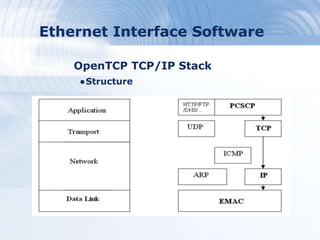
●OpenTCP TCP/IP Stack
●Main Application (PCSCP)
Ethernet Interface Software
OpenTCP TCP/IP Stack
●Structure
Ethernet Interface Software
OpenTCP TCP/IP Stack
●Robustness – Portability
●Modularity
●Multitasking
●Operation
Ethernet Interface Software
Main Application (PCSCP)
●Features
●Examples
PCSCP Transactions
Successful Transaction
PCSCP Transactions
Successful Transaction
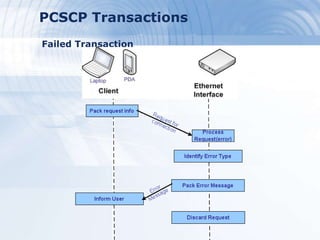
PCSCP Transactions
Failed Transaction
Presentation Contents
●Project Overview
●Process Control Studio (PCS) Software
●PCS Software Mobile Edition
●Wireless Accessibility
●Ethernet Controller
●Data Acquisition
●Control
Data
Acquisition
Project Block Diagram
Why “ Local Controller ” is needed ?
●It is needed to do:
 Process Data Sampling
 Process Control
Structure of
cal Controller
Why “ Data Acquisition ” is needed ?
●The Data Acquisition does:
 Sampling of the process data
 Any Digital or Analog
conversions
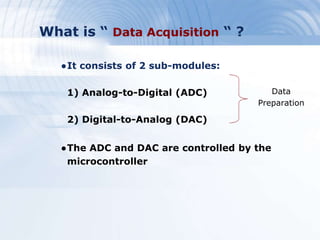
What is “ Data Acquisition “ ?
●It consists of 2 sub-modules:
1) Analog-to-Digital (ADC)
2) Digital-to-Analog (DAC)
●The ADC and DAC are controlled by the
microcontroller
Data
Preparation
Interfacing the Process with the
Data Acquisition
●Process Input and Output
●Input is Control Action
( Manipulated Variable)
●Output is Controlled
Variable
Hardware Choices
●Freescale DEMO9S12NE64 based on
MC9S12NE64 MCU
- Main Features:
oAnalog-to-Digital converter (ADC)
oTimer module (TIM )
oSerial interfaces
- One Serial Peripheral Interface (SPI)
Analog-to-Digital converter (ADC)
●ADC is a built in module in the MCU
- 8 channel module
- 10 Bit Resolution
●8-Bits was used (1-byte)
- To ease the calculations
- Compromise data storage
Digital-to-Analog converter (DAC)
●MAX528 from MAXIM INC.
●The MCU Communicates with DAC by SPI
●SPI is built in the MCU
Master Slave
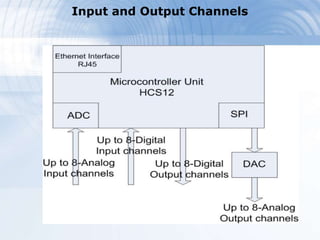
Input and Output Channels
Presentation Contents
●Project Overview
●Process Control Studio (PCS) Software
●PCS Software Mobile Edition
●Wireless Accessibility
●Ethernet Controller
●Data Acquisition
●Control
Control
Project Block Diagram
Centralized and Localized Control
●In our project, we chose localized control.
Digital Control
●There are differences between digital
control and analog control
●Analysis in z-domain rather than s-domain
●We need to consider:
oSampling Time
oResolution
Microcontroller Capabilities
●8 Analog Input Channels
●8 Analog Output Channels
●8 Digital Input Channels
●8 Digital Output Channels
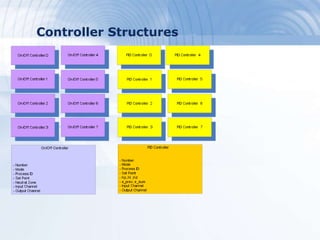
●8 On/Off Controllers
●8 PID Controllers
●Implemented in C-code using structures
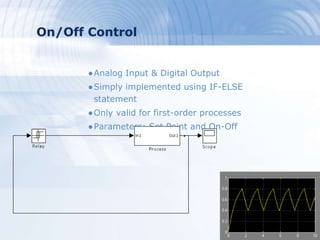
On/Off Control
●Analog Input & Digital Output
●Simply implemented using IF-ELSE
statement
●Only valid for first-order processes
●Parameters: Set Point and On-Off
PID Control
●Analog Input & Analog Output
●Implemented using mathematical
expressions
●Valid for any order process
Parallelism
6 7
Controller Structures
Earning Projections
●2002 Fiscal Year
oAside from your text, your imagery will also
send a message. We help you send the right one.
 10.7 Trillion GNP
 2.3 Billion Corporate Assets
●Projections 2003
oYour amazing ideas need amazing visuals to provide
the consistency you need for credibility.
●10 Year Projections
oOur templates are layed out in a simple way, making
complex ideas easier to follow, AND they come with
all design features (left) built-in.

Graduation Project Presentation

Editor's Notes

  • #50 Why we need local controller ? Local controller is essential when we need to do process monitoring and control Later we will know how this two tasks will be achieved.
  • #52 - Sampling the process data variables of interest every specified period of time and keeps it ready for any monitoring requests. -
  • #53 Data Acquisition Controller do all the control actions and specify the ranges and the channel numbers … Communication sub-module is used to send/receive data to/from the Software application
  • #56 One 8-channel module with 10-bit resolution
  • #62 - Different types of addressing
  • #63 - Sampling time: too high? Too low? - resolution: why use double if it will change back to integer