Google Tag Manager
Definition & Benefits
What is Google Tag Manager?
• Free Google Tool
• Makes it easy to add and update websites tags
• Site Analytics
• Analytics event tracking
• Remarketing
• Paid advertising conversion code
• Once installed leaves IT free to focus on other items rather than
implementing tracking for marketing purposes
Definition
What is Google Tag Manager?
• Future-proof your website
• All event tracking, analytics code can be updated as needed
• Speed
• The ease of updating tags makes Tag Manager much quicker than updating
website code
• Flexibility
• Updates can be changed/updated as often as needed
• Debug/Version Control
• The debug feature allows testing of all functionality and can be rolled back to a
prior version if issues arise & includes version control for multiple users
• Built-in Event Listeners and Tags
• Google Tag Manager automatically listens for events such as form submissions,
clicks and link clicks
Benefits
What is Google Tag Manager?
• Containers
• Each container contains tags, rules and macros for a site
• Similar to a property in Analytics
• Tags
• The basic building block - html code that executes on a page
• Example: Google Analytics Tag contains the JavaScript code that fires Analytics
tracking
• Rules
• When should the code in the tag fire?
• Example: {{url}} matches example.com/purchase/receipt.html
• Macros
• Contain runtime values
• Example: a built-in macros of “url” can read the URL of a page
How does it work?
Using Google Tag Manager
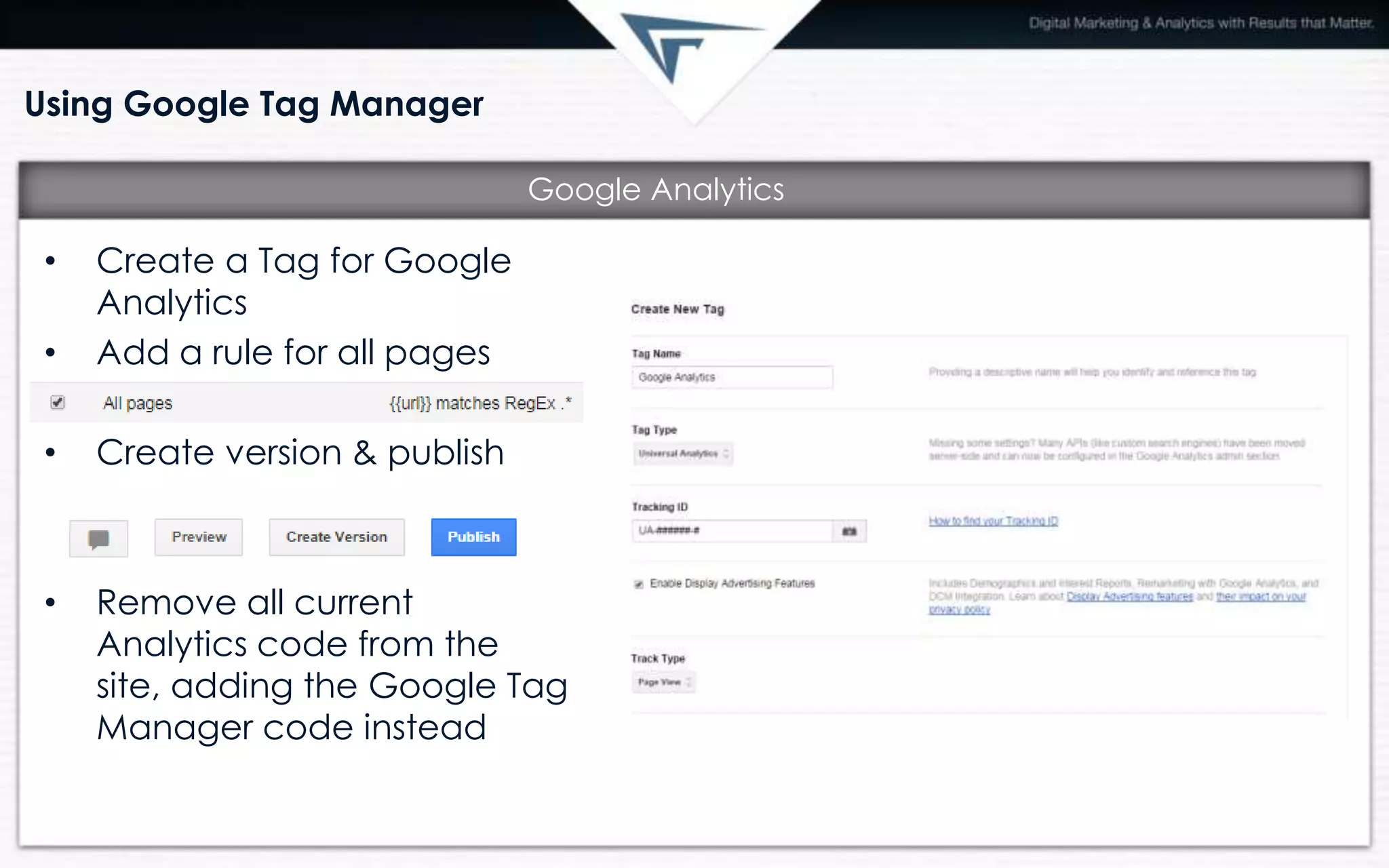
• Create a Tag for Google
Analytics
• Add a rule for all pages
• Create version & publish
• Remove all current
Analytics code from the
site, adding the Google Tag
Manager code instead
Google Analytics
Using Google Tag Manager
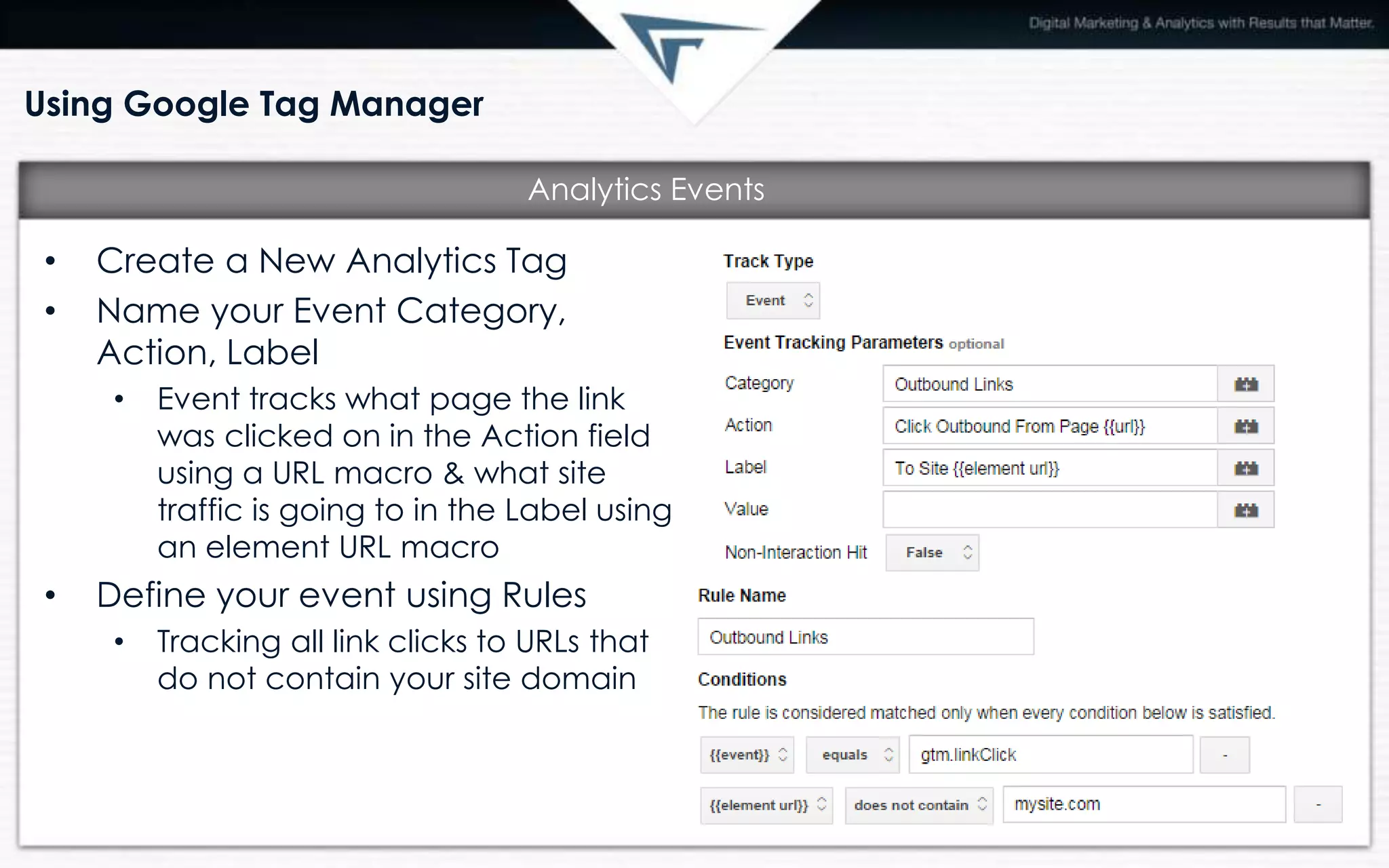
• Create a New Analytics Tag
• Name your Event Category,
Action, Label
• Event tracks what page the link
was clicked on in the Action field
using a URL macro & what site
traffic is going to in the Label using
an element URL macro
• Define your event using Rules
• Tracking all link clicks to URLs that
do not contain your site domain
Analytics Events
Using Google Tag Manager
• The outbound link click tracking is a good example of how powerful a tag
management system can be.
• With just one tag and rule – each and every outbound link on your site is
tracked as an event in Analytics
• Within that tracking is valuable information
• Which outbound links are most popular (is it traffic to your Facebook page? A
payment website? A partner?)
• What page are people leaving your site to go to another site on most?
Analytics Events
Using Google Tag Manager
• Event Tracking
• Outbound Links
o Social Media Outbound Links
• Click to Call - mobile
• File Downloads
• Embedded YouTube video plays (plus % played)
• Paid Advertising
• AdWords conversion code
• Remarketing code
• Other Uses
• Form Submissions tracking
• Clicks on banners, interactive site elements
• Much, much, much more!
Common Uses

Google Tag Manager

  • 1.
  • 3.
    What is GoogleTag Manager? • Free Google Tool • Makes it easy to add and update websites tags • Site Analytics • Analytics event tracking • Remarketing • Paid advertising conversion code • Once installed leaves IT free to focus on other items rather than implementing tracking for marketing purposes Definition
  • 4.
    What is GoogleTag Manager? • Future-proof your website • All event tracking, analytics code can be updated as needed • Speed • The ease of updating tags makes Tag Manager much quicker than updating website code • Flexibility • Updates can be changed/updated as often as needed • Debug/Version Control • The debug feature allows testing of all functionality and can be rolled back to a prior version if issues arise & includes version control for multiple users • Built-in Event Listeners and Tags • Google Tag Manager automatically listens for events such as form submissions, clicks and link clicks Benefits
  • 5.
    What is GoogleTag Manager? • Containers • Each container contains tags, rules and macros for a site • Similar to a property in Analytics • Tags • The basic building block - html code that executes on a page • Example: Google Analytics Tag contains the JavaScript code that fires Analytics tracking • Rules • When should the code in the tag fire? • Example: {{url}} matches example.com/purchase/receipt.html • Macros • Contain runtime values • Example: a built-in macros of “url” can read the URL of a page How does it work?
  • 6.
    Using Google TagManager • Create a Tag for Google Analytics • Add a rule for all pages • Create version & publish • Remove all current Analytics code from the site, adding the Google Tag Manager code instead Google Analytics
  • 7.
    Using Google TagManager • Create a New Analytics Tag • Name your Event Category, Action, Label • Event tracks what page the link was clicked on in the Action field using a URL macro & what site traffic is going to in the Label using an element URL macro • Define your event using Rules • Tracking all link clicks to URLs that do not contain your site domain Analytics Events
  • 8.
    Using Google TagManager • The outbound link click tracking is a good example of how powerful a tag management system can be. • With just one tag and rule – each and every outbound link on your site is tracked as an event in Analytics • Within that tracking is valuable information • Which outbound links are most popular (is it traffic to your Facebook page? A payment website? A partner?) • What page are people leaving your site to go to another site on most? Analytics Events
  • 9.
    Using Google TagManager • Event Tracking • Outbound Links o Social Media Outbound Links • Click to Call - mobile • File Downloads • Embedded YouTube video plays (plus % played) • Paid Advertising • AdWords conversion code • Remarketing code • Other Uses • Form Submissions tracking • Clicks on banners, interactive site elements • Much, much, much more! Common Uses