HOW GOOGLE TAG MANAGER
CHANGES EVERYTHING YOU KNEW
ABOUT WEBSITE ANALYTICS
Montgomery Webster
User Experience Designer (UX) & Analytics Technologist
2014 November
V2
OUTLINE
• Tag Management Systems (TMS)
• What are tags?
• Benefits
• Google Tag Manager
• Why now? Universal Analytics, 2nd
generation of Google Analytics
• How it works
• Implementation outline
• Complexity and the dataLayer
• Workflow
• The ownership question
• Account creation best practices
• Next steps
THE CASE FOR
TAG MANAGEMENT SYSTEMS (TMS)
Tags are the fundamental building blocks of HTML webpages:
Tag: <tagName>optional text</tagName>
Basic webpage example: <html><body><h1>Hello World!</h1></body></html>
Tracking codes are also tags. ‘Code’ here is used to identify a <script> tag.
GTM container code:
<!-- Google Tag Manager --><noscript><iframe src="//www.googletagmanager.com/ns.html?id=GTM-00001A"
height="0" width="0" style="display:none;visibility:hidden"></iframe></noscript> <script>(function(w,d,s,l,i){w[l]
=w[l]||[];w[l].push({'gtm.start': new Date().getTime(),event:'gtm.js'});var f=d.getElementsByTagName(s)[0], j=d.
createElement(s),dl=l!='dataLayer'?'&l='+l:'';j.async=true;j.src= '//www.googletagmanager.com/gtm.js?id='+i+dl;f.
parentNode.insertBefore(j,f); })(window,document,'script','dataLayer','GTM-00001A');</script> <!-- End Google
Tag Manager -->
What are tags?
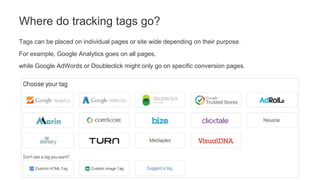
Tags can be placed on individual pages or site wide depending on their purpose.
For example, Google Analytics goes on all pages,
while Google AdWords or Doubleclick might only go on specific conversion pages.
Where do tracking tags go?
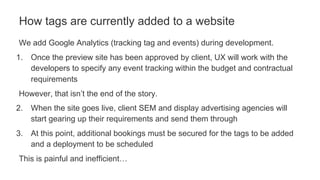
We add Google Analytics (tracking tag and events) during development.
1. Once the preview site has been approved by client, UX will work with the
developers to specify any event tracking within the budget and contractual
requirements
However, that isn’t the end of the story.
2. When the site goes live, client SEM and display advertising agencies will
start gearing up their requirements and send them through
3. At this point, additional bookings must be secured for the tags to be added
and a deployment to be scheduled
This is painful and inefficient…
How tags are currently added to a website
TMSs replace all existing tags with a single tag.
That TMS tag will then dynamically load all other tags, regardless of the quantity.
The TMS has a management interface where marketers can manage tags
themselves without having to rely on IT.
The Tag Management System value proposition
• Add, update, remove, and replace tags quickly
• Faster page load times, since every old tag added to the page latency
• Auto-event tracking
• Free IT to work on higher priority and more interesting tasks
• View all tags in one place
• Preview mode for debugging
• Version history
TMS Benefits
Clients can break their sites.
An eCommerce site can lose millions of pounds with a single error.
Though this risk is small, never lose sight of it…
TMS Risks
INTRODUCING
GOOGLE TAG MANAGER
Before GTM, not many people had every heard of a TMS.
The reason we are talking about GTM right now is because Google has very
visibly introduced a free solution to a problem a lot of people were having.
Full list of benefits: http://static.googleusercontent.com/media/www.google.
com/en//tagmanager/pdfs/google-tag-manager-technical-factsheet.pdf
Google Tag Manager is a TMS
GTM was released in October 2012, over 2 years ago.
Universal Analytics, effectively Google Analytics version 2,
was released in March 2013.
If clients wanted to move to Universal Analytics, they would have to completely
redo all custom tags:
• eCommerce (enhanced)
• Event tracking
Instead, most clients will move to GTM and UA at the same time.
Why now?
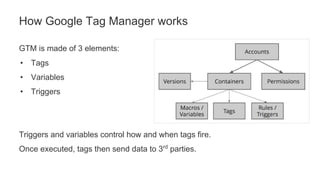
GTM is made of 3 elements:
• Tags
• Variables
• Triggers
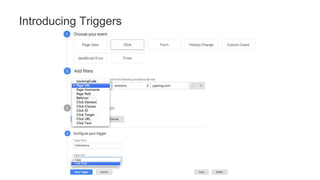
Triggers and variables control how and when tags fire.
Once executed, tags then send data to 3rd
parties.
How Google Tag Manager works
The Google Analytics tracking code can be replaced by a single tag in GTM.
However, each GA event you want to send is likely another GTM tag.
Everything is now a tag
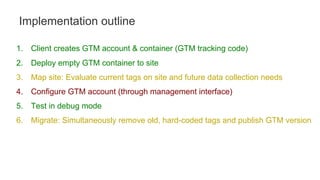
1. Client creates GTM account & container (GTM tracking code)
2. Deploy empty GTM container to site
3. Map site: Evaluate current tags on site and future data collection needs
4. Configure GTM account (through management interface)
5. Test in debug mode
6. Migrate: Simultaneously remove old, hard-coded tags and publish GTM version
Implementation outline
Now that you only have replaced all your old tags with the single GTM tag on each
page, any code that uses your previous tags will not function (even if your old
tags are loaded through GTM).
All code must be configured through GTM and / or rewritten to it’s specifications.
For example, all Google Analytics event tracking and eCommerce must be redone.
This can be a lot of work.
Implications: This is where it starts to get complicated
THE TAG MANAGEMENT INTERFACE
Introducing Google Tag Manager
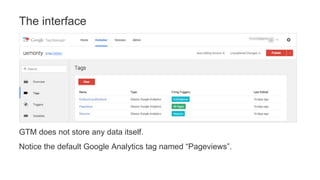
GTM does not store any data itself.
Notice the default Google Analytics tag named “Pageviews”.
The interface
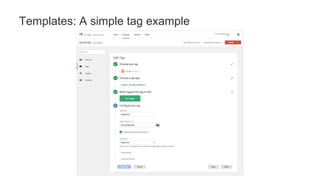
Templates: A simple tag example
Introducing Triggers
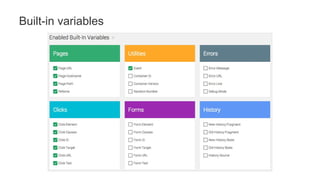
Built-in variables
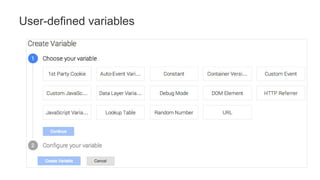
User-defined variables
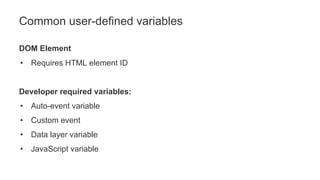
Common user-defined variables
DOM Element
• Requires HTML element ID
Developer required variables:
• Auto-event variable
• Custom event
• Data layer variable
• JavaScript variable
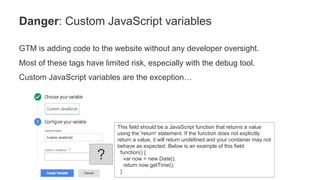
GTM is adding code to the website without any developer oversight.
Most of these tags have limited risk, especially with the debug tool.
Custom JavaScript variables are the exception…
Danger: Custom JavaScript variables
This field should be a JavaScript function that returns a value
using the 'return' statement. If the function does not explicitly
return a value, it will return undefined and your container may not
behave as expected. Below is an example of this field:
function() {
var now = new Date();
return now.getTime();
}
?
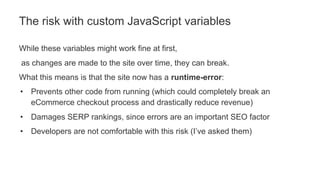
While these variables might work fine at first,
as changes are made to the site over time, they can break.
What this means is that the site now has a runtime-error:
• Prevents other code from running (which could completely break an
eCommerce checkout process and drastically reduce revenue)
• Damages SERP rankings, since errors are an important SEO factor
• Developers are not comfortable with this risk (I’ve asked them)
The risk with custom JavaScript variables
COMPLEXITY AND THE DATALAYER
Introducing Google Tag Manager
Just as Google Analytics leaves a lot to be desired out of the box,
GTM presents a lot of limitations without proper integration.
• If GTM users cannot create a trigger or access a variable accurately,
developers will have to add code to the site.
• While some event tracking can be done in GTM alone, eCommerce
configurations will need developer collaboration.
Out of the box
“The Data Layer is an optional JavaScript object you can use to help manage
the information your tags are gathering from your site.”
<body>
<script>
dataLayer = [{
'visitorType': 'high-value’
'event': 'customizeCar'
}];
</script>
<!-- Google Tag Manager --> … <!-- End Google Tag Manager →
Introducing the dataLayer
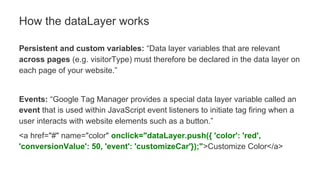
Persistent and custom variables: “Data layer variables that are relevant
across pages (e.g. visitorType) must therefore be declared in the data layer on
each page of your website.”
Events: “Google Tag Manager provides a special data layer variable called an
event that is used within JavaScript event listeners to initiate tag firing when a
user interacts with website elements such as a button.”
<a href="#" name="color" onclick="dataLayer.push({ 'color': 'red',
'conversionValue': 50, 'event': 'customizeCar'});">Customize Color</a>
How the dataLayer works
The dataLayer is straightforward for developers to implement.
The bad news is that dataLayer additions are the very problem we are trying to
solve by having a tag manager in the first place.
DataLayer development complexity
HOW GOOGLE TAG MANAGER
CHANGES OUR WORKFLOW
Since Google Tag Manager has been advertised as a tool for marketers,
clients may be interested in managing their account without us.
As a result, when GTM is discussed with a client, a few basic questions must
be answered…
The ownership question
• Who is in charge of managing Google Tag Manager, Jaywing or client?
– If client is managing everything themselves, there isn’t much else for us to do
• What tags are planned for GTM?
– E.g., classic Google Analytics, Universal Analytics, Adwords, DoubleClick,
comScore, etc.
– If classic Google Analytics is in use, do you want to use this opportunity to move to
Universal Analytics?
• What is the implementation plan? (See implementation slide)
Questions to ask clients
If clients do want us to manage their GTM…
…the best practice approach is for clients to create their own account,
then add us as administrators.
[They will need a Google account to do this.]
Google Tag Manager account creation
There is a lot to learn about Google Tag Manager
• Can run side-by-side with Google Analytics and other tracking tags
• Full implementation will require completely replacing all existing tracking code
• Not code-free: more complicated requirements will need development work,
including eCommerce and some event tracking
• There are risks associated with Google Tag Manager
• Be wary of GTM marketing material promises
– GTM can be complicated to learn
– Auto-event tracking isn’t always the correct solution
SUMMARY

How Google Tag Manager changes everything you knew about website analytics

  • 1.
    HOW GOOGLE TAGMANAGER CHANGES EVERYTHING YOU KNEW ABOUT WEBSITE ANALYTICS Montgomery Webster User Experience Designer (UX) & Analytics Technologist 2014 November V2
  • 2.
    OUTLINE • Tag ManagementSystems (TMS) • What are tags? • Benefits • Google Tag Manager • Why now? Universal Analytics, 2nd generation of Google Analytics • How it works • Implementation outline • Complexity and the dataLayer • Workflow • The ownership question • Account creation best practices • Next steps
  • 3.
    THE CASE FOR TAGMANAGEMENT SYSTEMS (TMS)
  • 4.
    Tags are thefundamental building blocks of HTML webpages: Tag: <tagName>optional text</tagName> Basic webpage example: <html><body><h1>Hello World!</h1></body></html> Tracking codes are also tags. ‘Code’ here is used to identify a <script> tag. GTM container code: <!-- Google Tag Manager --><noscript><iframe src="//www.googletagmanager.com/ns.html?id=GTM-00001A" height="0" width="0" style="display:none;visibility:hidden"></iframe></noscript> <script>(function(w,d,s,l,i){w[l] =w[l]||[];w[l].push({'gtm.start': new Date().getTime(),event:'gtm.js'});var f=d.getElementsByTagName(s)[0], j=d. createElement(s),dl=l!='dataLayer'?'&l='+l:'';j.async=true;j.src= '//www.googletagmanager.com/gtm.js?id='+i+dl;f. parentNode.insertBefore(j,f); })(window,document,'script','dataLayer','GTM-00001A');</script> <!-- End Google Tag Manager --> What are tags?
  • 5.
    Tags can beplaced on individual pages or site wide depending on their purpose. For example, Google Analytics goes on all pages, while Google AdWords or Doubleclick might only go on specific conversion pages. Where do tracking tags go?
  • 6.
    We add GoogleAnalytics (tracking tag and events) during development. 1. Once the preview site has been approved by client, UX will work with the developers to specify any event tracking within the budget and contractual requirements However, that isn’t the end of the story. 2. When the site goes live, client SEM and display advertising agencies will start gearing up their requirements and send them through 3. At this point, additional bookings must be secured for the tags to be added and a deployment to be scheduled This is painful and inefficient… How tags are currently added to a website
  • 7.
    TMSs replace allexisting tags with a single tag. That TMS tag will then dynamically load all other tags, regardless of the quantity. The TMS has a management interface where marketers can manage tags themselves without having to rely on IT. The Tag Management System value proposition
  • 8.
    • Add, update,remove, and replace tags quickly • Faster page load times, since every old tag added to the page latency • Auto-event tracking • Free IT to work on higher priority and more interesting tasks • View all tags in one place • Preview mode for debugging • Version history TMS Benefits
  • 9.
    Clients can breaktheir sites. An eCommerce site can lose millions of pounds with a single error. Though this risk is small, never lose sight of it… TMS Risks
  • 10.
  • 11.
    Before GTM, notmany people had every heard of a TMS. The reason we are talking about GTM right now is because Google has very visibly introduced a free solution to a problem a lot of people were having. Full list of benefits: http://static.googleusercontent.com/media/www.google. com/en//tagmanager/pdfs/google-tag-manager-technical-factsheet.pdf Google Tag Manager is a TMS
  • 12.
    GTM was releasedin October 2012, over 2 years ago. Universal Analytics, effectively Google Analytics version 2, was released in March 2013. If clients wanted to move to Universal Analytics, they would have to completely redo all custom tags: • eCommerce (enhanced) • Event tracking Instead, most clients will move to GTM and UA at the same time. Why now?
  • 13.
    GTM is madeof 3 elements: • Tags • Variables • Triggers Triggers and variables control how and when tags fire. Once executed, tags then send data to 3rd parties. How Google Tag Manager works
  • 14.
    The Google Analyticstracking code can be replaced by a single tag in GTM. However, each GA event you want to send is likely another GTM tag. Everything is now a tag
  • 15.
    1. Client createsGTM account & container (GTM tracking code) 2. Deploy empty GTM container to site 3. Map site: Evaluate current tags on site and future data collection needs 4. Configure GTM account (through management interface) 5. Test in debug mode 6. Migrate: Simultaneously remove old, hard-coded tags and publish GTM version Implementation outline
  • 16.
    Now that youonly have replaced all your old tags with the single GTM tag on each page, any code that uses your previous tags will not function (even if your old tags are loaded through GTM). All code must be configured through GTM and / or rewritten to it’s specifications. For example, all Google Analytics event tracking and eCommerce must be redone. This can be a lot of work. Implications: This is where it starts to get complicated
  • 17.
    THE TAG MANAGEMENTINTERFACE Introducing Google Tag Manager
  • 18.
    GTM does notstore any data itself. Notice the default Google Analytics tag named “Pageviews”. The interface
  • 19.
  • 20.
  • 21.
  • 22.
  • 23.
    Common user-defined variables DOMElement • Requires HTML element ID Developer required variables: • Auto-event variable • Custom event • Data layer variable • JavaScript variable
  • 24.
    GTM is addingcode to the website without any developer oversight. Most of these tags have limited risk, especially with the debug tool. Custom JavaScript variables are the exception… Danger: Custom JavaScript variables This field should be a JavaScript function that returns a value using the 'return' statement. If the function does not explicitly return a value, it will return undefined and your container may not behave as expected. Below is an example of this field: function() { var now = new Date(); return now.getTime(); } ?
  • 25.
    While these variablesmight work fine at first, as changes are made to the site over time, they can break. What this means is that the site now has a runtime-error: • Prevents other code from running (which could completely break an eCommerce checkout process and drastically reduce revenue) • Damages SERP rankings, since errors are an important SEO factor • Developers are not comfortable with this risk (I’ve asked them) The risk with custom JavaScript variables
  • 26.
    COMPLEXITY AND THEDATALAYER Introducing Google Tag Manager
  • 27.
    Just as GoogleAnalytics leaves a lot to be desired out of the box, GTM presents a lot of limitations without proper integration. • If GTM users cannot create a trigger or access a variable accurately, developers will have to add code to the site. • While some event tracking can be done in GTM alone, eCommerce configurations will need developer collaboration. Out of the box
  • 28.
    “The Data Layeris an optional JavaScript object you can use to help manage the information your tags are gathering from your site.” <body> <script> dataLayer = [{ 'visitorType': 'high-value’ 'event': 'customizeCar' }]; </script> <!-- Google Tag Manager --> … <!-- End Google Tag Manager → Introducing the dataLayer
  • 29.
    Persistent and customvariables: “Data layer variables that are relevant across pages (e.g. visitorType) must therefore be declared in the data layer on each page of your website.” Events: “Google Tag Manager provides a special data layer variable called an event that is used within JavaScript event listeners to initiate tag firing when a user interacts with website elements such as a button.” <a href="#" name="color" onclick="dataLayer.push({ 'color': 'red', 'conversionValue': 50, 'event': 'customizeCar'});">Customize Color</a> How the dataLayer works
  • 30.
    The dataLayer isstraightforward for developers to implement. The bad news is that dataLayer additions are the very problem we are trying to solve by having a tag manager in the first place. DataLayer development complexity
  • 31.
    HOW GOOGLE TAGMANAGER CHANGES OUR WORKFLOW
  • 32.
    Since Google TagManager has been advertised as a tool for marketers, clients may be interested in managing their account without us. As a result, when GTM is discussed with a client, a few basic questions must be answered… The ownership question
  • 33.
    • Who isin charge of managing Google Tag Manager, Jaywing or client? – If client is managing everything themselves, there isn’t much else for us to do • What tags are planned for GTM? – E.g., classic Google Analytics, Universal Analytics, Adwords, DoubleClick, comScore, etc. – If classic Google Analytics is in use, do you want to use this opportunity to move to Universal Analytics? • What is the implementation plan? (See implementation slide) Questions to ask clients
  • 34.
    If clients dowant us to manage their GTM… …the best practice approach is for clients to create their own account, then add us as administrators. [They will need a Google account to do this.] Google Tag Manager account creation
  • 35.
    There is alot to learn about Google Tag Manager • Can run side-by-side with Google Analytics and other tracking tags • Full implementation will require completely replacing all existing tracking code • Not code-free: more complicated requirements will need development work, including eCommerce and some event tracking • There are risks associated with Google Tag Manager • Be wary of GTM marketing material promises – GTM can be complicated to learn – Auto-event tracking isn’t always the correct solution SUMMARY