WEB COMPONENTSEVERYWHERE
A B O U T M E
{
"name": "Ilia Idakiev",
"experience": [
"Developer & Founder of HNS/HG",
"Lecturer in Advanced JS @ Sofia University",
"Contractor / Consultant",
"Public / Private Courses"
],
"involvedIn": [
"Angular Sofia", "SofiaJS", "BeerJS",
]
}
WEB COMPONENTS EVERYWHERE
SEPARATION OF CONCERNS (SOC)
▸ Design principle for separating a computer program into distinct sections, such
that each section addresses a separate concern. (Modularity)
WEB COMPONENTS EVERYWHERE
S.O.L.I.D PRINCIPLES OF OBJECT-ORIENTED PROGRAMMING
▸ Single Responsibility Principle
▸ Open / Close Principle
▸ Liskov Substitution Principle
▸ Interface Segregation Principle
▸ Dependency Inversion Principle
http://aspiringcraftsman.com/2011/12/08/solid-javascript-single-responsibility-principle/
WEB COMPONENTS EVERYWHERE
WEB COMPONENTS
▸ Introduced by Alex Russell (Chrome team @ Google) 

at Fronteers Conference 2011
▸ A set of features currently being added by the W3C to
the HTML and DOM specifications that allow the creation of
reusable widgets or components in web documents and web applications.
▸ The intention behind them is to bring component-based software
engineering to the World Wide Web.
WEB COMPONENTS EVERYWHERE
WEB COMPONENTS FEATURES:
▸ HTML Templates - an HTML fragment is not rendered, but stored until it is
instantiated via JavaScript.
▸ Shadow DOM - Encapsulated DOM and styling, with composition.
▸ Custom Elements - APIs to define new HTML elements.
▸ HTML Imports - Declarative methods of importing HTML documents into other
documents. (Replaced by ES6 Imports).
DEMOTHE NATIVE WAY
WEB COMPONENTS EVERYWHERE
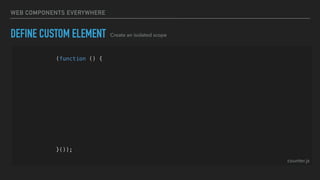
DEFINE CUSTOM ELEMENT
(function () {
const template = createTemplate('<div>Hello World<div>');
class Counter extends HTMLElement {
constructor() {
super();
const shadowRoot = this.attachShadow({ mode: 'open' });
shadowRoot.appendChild(template.content.cloneNode(true));
}
}
customElements.define('hg-counter', Counter);
}());
Create an isolated scope
counter.js
WEB COMPONENTS EVERYWHERE
(function () {
const template = createTemplate('<div>Hello World<div>');
class Counter extends HTMLElement {
constructor() {
super();
const shadowRoot = this.attachShadow({ mode: 'open' });
shadowRoot.appendChild(template.content.cloneNode(true));
}
}
customElements.define('hg-counter', Counter);
}());
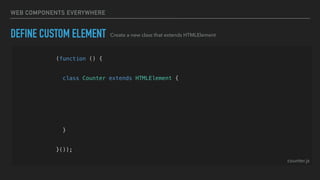
DEFINE CUSTOM ELEMENT Create a new class that extends HTMLElement
counter.js
WEB COMPONENTS EVERYWHERE
(function () {
const template = createTemplate('<div>Hello World<div>');
class Counter extends HTMLElement {
constructor() {
super();
const shadowRoot = this.attachShadow({ mode: 'open' });
shadowRoot.appendChild(template.content.cloneNode(true));
}
}
customElements.define('hg-counter', Counter);
}());
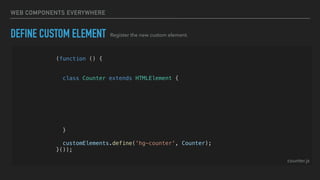
DEFINE CUSTOM ELEMENT Register the new custom element.
counter.js
WEB COMPONENTS EVERYWHERE
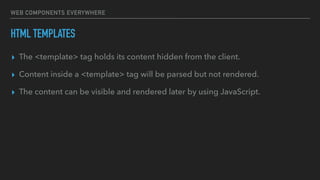
HTML TEMPLATES
▸ The <template> tag holds its content hidden from the client.
▸ Content inside a <template> tag will be parsed but not rendered.
▸ The content can be visible and rendered later by using JavaScript.
WEB COMPONENTS EVERYWHERE
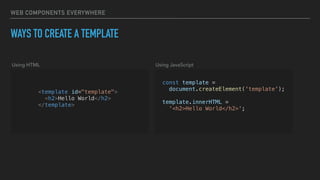
WAYS TO CREATE A TEMPLATE
<template id="template">
<h2>Hello World</h2>
</template>
const template =
document.createElement('template');
template.innerHTML =
'<h2>Hello World</h2>';
Using HTML Using JavaScript
WEB COMPONENTS EVERYWHERE
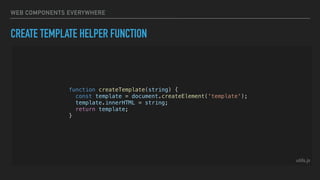
CREATE TEMPLATE HELPER FUNCTION
function createTemplate(string) {
const template = document.createElement('template');
template.innerHTML = string;
return template;
}
utils.js
WEB COMPONENTS EVERYWHERE
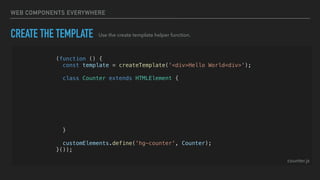
CREATE THE TEMPLATE
(function () {
const template = createTemplate('<div>Hello World<div>');
class Counter extends HTMLElement {
constructor() {
super();
const shadowRoot = this.attachShadow({ mode: 'open' });
shadowRoot.appendChild(template.content.cloneNode(true));
}
}
customElements.define('hg-counter', Counter);
}());
Use the create template helper function.
counter.js
WEB COMPONENTS EVERYWHERE
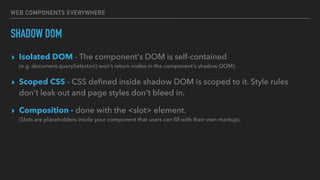
SHADOW DOM
▸ Isolated DOM - The component's DOM is self-contained
(e.g. document.querySelector() won't return nodes in the component's shadow DOM).
▸ Scoped CSS - CSS defined inside shadow DOM is scoped to it. Style rules
don't leak out and page styles don't bleed in.
▸ Composition - done with the <slot> element.

(Slots are placeholders inside your component that users can fill with their own markup).
WEB COMPONENTS EVERYWHERE
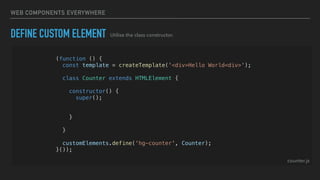
DEFINE CUSTOM ELEMENT
(function () {
const template = createTemplate('<div>Hello World<div>');
class Counter extends HTMLElement {
constructor() {
super();
const shadowRoot = this.attachShadow({ mode: 'open' });
shadowRoot.appendChild(template.content.cloneNode(true));
}
}
customElements.define('hg-counter', Counter);
}());
counter.js
Utilise the class constructor.
WEB COMPONENTS EVERYWHERE
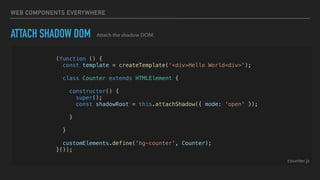
ATTACH SHADOW DOM
(function () {
const template = createTemplate('<div>Hello World<div>');
class Counter extends HTMLElement {
constructor() {
super();
const shadowRoot = this.attachShadow({ mode: 'open' });
shadowRoot.appendChild(template.content.cloneNode(true));
}
}
customElements.define('hg-counter', Counter);
}());
Attach the shadow DOM.
counter.js
WEB COMPONENTS EVERYWHERE
(function () {
const template = createTemplate('<div>Hello World<div>');
class Counter extends HTMLElement {
constructor() {
super();
const shadowRoot = this.attachShadow({ mode: 'open' });
shadowRoot.appendChild(template.content.cloneNode(true));
}
}
customElements.define('hg-counter', Counter);
}());
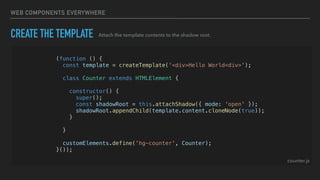
CREATE THE TEMPLATE Attach the template contents to the shadow root.
counter.js
WEB COMPONENTS EVERYWHERE
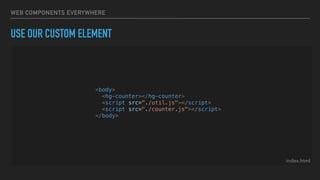
USE OUR CUSTOM ELEMENT
<body>
<hg-counter></hg-counter>
<script src="./util.js"></script>
<script src="./counter.js"></script>
</body>
index.html
WEB COMPONENTS EVERYWHERE
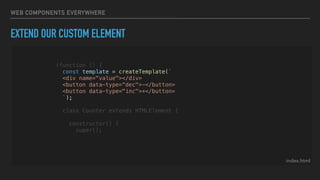
EXTEND OUR CUSTOM ELEMENT
index.html
(function () {
const template = createTemplate(`
<div name="value"></div>
<button data-type=“dec">-</button>
<button data-type="inc">+</button>
`);
class Counter extends HTMLElement {
constructor() {
super();
WEB COMPONENTS EVERYWHERE
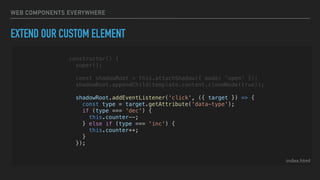
EXTEND OUR CUSTOM ELEMENT
index.html
constructor() {
super();
const shadowRoot = this.attachShadow({ mode: 'open' });
shadowRoot.appendChild(template.content.cloneNode(true));
shadowRoot.addEventListener('click', ({ target }) => {
const type = target.getAttribute('data-type');
if (type === 'dec') {
this.counter--;
} else if (type === 'inc') {
this.counter++;
}
});
WEB COMPONENTS EVERYWHERE
UPDATING THE DOM
utils.js
function updateDOM(root, updates) {
updates.forEach(item => {
root.querySelectorAll(`[name=${item.name}]`).forEach(element =>
element.textContent = item.value
);
});
}
WEB COMPONENTS EVERYWHERE
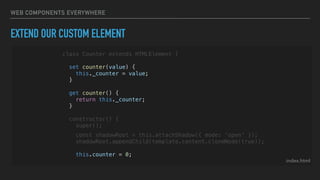
EXTEND OUR CUSTOM ELEMENT
index.html
class Counter extends HTMLElement {
set counter(value) {
this._counter = value;
}
get counter() {
return this._counter;
}
constructor() {
super();
const shadowRoot = this.attachShadow({ mode: 'open' });
shadowRoot.appendChild(template.content.cloneNode(true));
this.counter = 0;
WEB COMPONENTS EVERYWHERE
EXTEND OUR CUSTOM ELEMENT
index.html
class Counter extends HTMLElement {
constructor() {
super();
const shadowRoot = this.attachShadow({ mode: 'open' });
shadowRoot.appendChild(template.content.cloneNode(true));
this.counter = 0;
this._update = () => {
updateDOM(shadowRoot, [{
name: 'value',
value: this.counter
}]);
}
WEB COMPONENTS EVERYWHERE
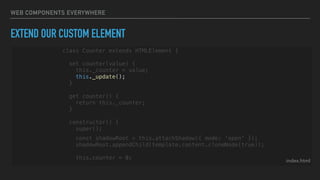
EXTEND OUR CUSTOM ELEMENT
index.html
class Counter extends HTMLElement {
set counter(value) {
this._counter = value;
this._update();
}
get counter() {
return this._counter;
}
constructor() {
super();
const shadowRoot = this.attachShadow({ mode: 'open' });
shadowRoot.appendChild(template.content.cloneNode(true));
this.counter = 0;
WEB COMPONENTS EVERYWHERE
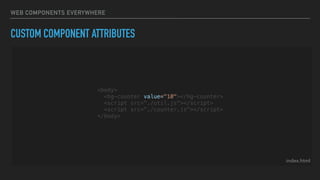
CUSTOM COMPONENT ATTRIBUTES
index.html
<body>
<hg-counter value="10"></hg-counter>
<script src="./util.js"></script>
<script src="./counter.js"></script>
</body>
WEB COMPONENTS EVERYWHERE
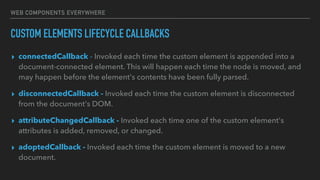
CUSTOM ELEMENTS LIFECYCLE CALLBACKS
▸ connectedCallback - Invoked each time the custom element is appended into a
document-connected element. This will happen each time the node is moved, and
may happen before the element's contents have been fully parsed.
▸ disconnectedCallback - Invoked each time the custom element is disconnected
from the document's DOM.
▸ attributeChangedCallback - Invoked each time one of the custom element's
attributes is added, removed, or changed.
▸ adoptedCallback - Invoked each time the custom element is moved to a new
document.
WEB COMPONENTS EVERYWHERE
CUSTOM COMPONENT ATTRIBUTES
index.html
class Counter extends HTMLElement {
static get observedAttributes() {
return ['value'];
}
attributeChangedCallback(name, oldValue, newValue) {
if (name === 'value') {
this.counter = newValue;
}
}
constructor() {
Handle attribute changes
WEB COMPONENTS EVERYWHERE
CUSTOM COMPONENT ATTRIBUTES
index.html
class Counter extends HTMLElement {
static get observedAttributes() {
return ['value'];
}
attributeChangedCallback(name, oldValue, newValue) {
if (name === 'value') {
this.counter = newValue;
}
}
constructor() {
Define which attributes should be watched
WHAT ABOUT STYLES?
WEB COMPONENTS EVERYWHERE
CUSTOM COMPONENT STYLES
index.html
Apply scoped styles to our component
(function () {
const template = createTemplate(`
<style>
:host {
display: flex;
}
div[name="value"] {
min-width: 30px;
}
</style>
<div name="value"></div>
<button data-type="dec">-</button>
<button data-type="inc">+</button>
`);
class Counter extends HTMLElement {
WEB COMPONENTS EVERYWHERE
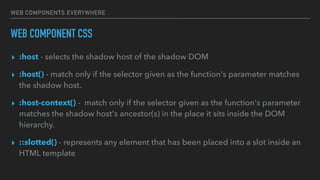
WEB COMPONENT CSS
▸ :host - selects the shadow host of the shadow DOM
▸ :host() - match only if the selector given as the function's parameter matches
the shadow host.
▸ :host-context() -  match only if the selector given as the function's parameter
matches the shadow host's ancestor(s) in the place it sits inside the DOM
hierarchy.
▸ ::slotted() - represents any element that has been placed into a slot inside an
HTML template
WHAT ABOUT
DISPATCHING EVENTS?
WEB COMPONENTS EVERYWHERE
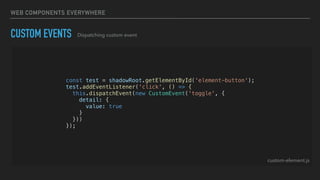
CUSTOM EVENTS Dispatching custom event
const test = shadowRoot.getElementById('element-button');
test.addEventListener('click', () => {
this.dispatchEvent(new CustomEvent('toggle', {
detail: {
value: true
}
}))
});
custom-element.js
WEB COMPONENTS EVERYWHERE
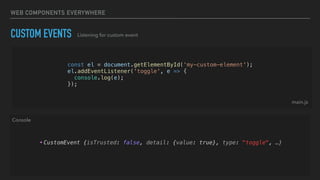
CUSTOM EVENTS Listening for custom event
• CustomEvent {isTrusted: false, detail: {value: true}, type: "toggle", …}
const el = document.getElementById('my-custom-element');
el.addEventListener('toggle', e => {
console.log(e);
});
main.js
Console
WEB COMPONENTS EVERYWHERE
FURTHER READING
▸ Extending different HTML Elements

(e.g. HTMLButton)
WEB COMPONENTS EVERYWHERE
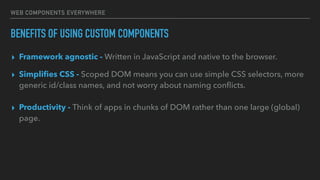
BENEFITS OF USING CUSTOM COMPONENTS
▸ Framework agnostic - Written in JavaScript and native to the browser.
▸ Simplifies CSS - Scoped DOM means you can use simple CSS selectors, more
generic id/class names, and not worry about naming conflicts.
• Productivity - Think of apps in chunks of DOM rather than one large (global) page.
▸ Productivity - Think of apps in chunks of DOM rather than one large (global)
page.
WEB COMPONENTS EVERYWHERE
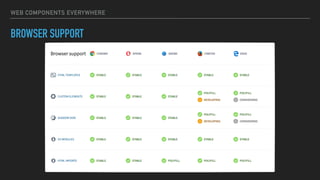
BROWSER SUPPORT
WEB COMPONENTS EVERYWHERE
COSTS OF USING CUSTOM COMPONENTS
▸ Template Generation - manually construct the DOM for our templates 

(No JSX features or Structural Directives)
▸ DOM Updates - manually track and handle changes to our DOM

(No Virtual DOM or Change Detection)
WEB COMPONENTS EVERYWHERE
LIT HTML
▸ Library Developed by the Polymer Team @ GOOGLE
▸ Efficient - lit-html is extremely fast. It uses fast platform features like
HTML <template> elements with native cloning.
▸ Expressive - lit-html gives you the full power of JavaScript and functional programming
patterns.
▸ Extensible - Different dialects of templates can be created with additional features for setting
element properties, declarative event handlers and more.
▸ It can be used standalone for simple tasks, or combined with a framework or component model,
like Web Components, for a full-featured UI development platform.
▸ It has an awesome VSC extension for syntax highlighting and formatting.
TAG FUNCTIONS
WEB COMPONENTS EVERYWHERE
TAG FUNCTIONS
function myTagFn(str, ...expr) {
console.log(str, expr);
return str.reduce((acc, curr, i) => acc + curr + (expr[i] || ''), '');
}
myTagFn`1+1 equals ${1+1} and 3 + 3 equals ${3+3} ${3+2}`
> (4) ["1+1 equals ", " and 3 + 3 equals ", " ", ""] (3) [2, 6, 5]
> “1+1 equals 2 and 3 + 3 equals 6 5"
Console
WEB COMPONENTS EVERYWHERE
RESOURCES
▸ LitHTML demo - https://github.com/Polymer/lit-html/blob/master/demo/
clock.js
WEB COMPONENTS EVERYWHERE
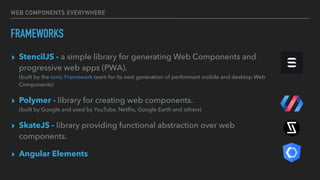
FRAMEWORKS
▸ StencilJS - a simple library for generating Web Components and
progressive web apps (PWA). 

(built by the Ionic Framework team for its next generation of performant mobile and desktop Web
Components)
▸ Polymer - library for creating web components.

(built by Google and used by YouTube, Netflix, Google Earth and others)
▸ SkateJS - library providing functional abstraction over web
components.
▸ Angular Elements
WEB COMPONENTS EVERYWHERE
WEB COMPONENTS SERVER SIDE RENDERING
▸ SkateJS SSR - @skatejs/ssr is a web component server-side
rendering and testing library. (uses undom)
▸ Rendertron - Rendertron is a headless Chrome rendering solution
designed to render & serialise web pages on the fly.
▸ Domino - Server-side DOM implementation based on Mozilla's
dom.js
ANGULAR ELEMENTS
WEB COMPONENTS EVERYWHERE
ANGULAR ELEMENTS
▸ A part of Angular Labs set.
▸ Angular elements are Angular components
packaged as Custom Elements.
WEB COMPONENTS EVERYWHERE
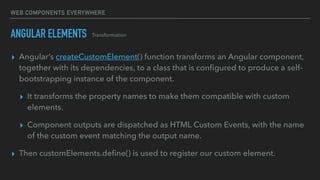
ANGULAR ELEMENTS
▸ Angular’s createCustomElement() function transforms an Angular component,
together with its dependencies, to a class that is configured to produce a self-
bootstrapping instance of the component.
▸ It transforms the property names to make them compatible with custom
elements.
▸ Component outputs are dispatched as HTML Custom Events, with the name
of the custom event matching the output name.
▸ Then customElements.define() is used to register our custom element.
Transformation
DEMOTHE ANGULAR WAY
WEB COMPONENTS EVERYWHERE
NEW ANGULAR PROJECT
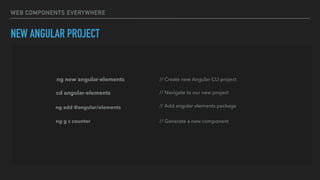
ng new angular-elements // Create new Angular CLI project
cd angular-elements
ng add @angular/elements // Add angular elements package
ng g c counter // Generate a new component
// Navigate to our new project
WEB COMPONENTS EVERYWHERE
ANGULAR ELEMENTS The generated component
@Component({
selector: 'app-counter',
templateUrl: './counter.component.html',
styleUrls: ['./counter.component.css'],
encapsulation: ViewEncapsulation.Native
})
export class CounterComponent {
@Input() counter = 0;
constructor() { }
inc() { this.counter++; }
dec() { this.counter--; }
}
src/app/counter/counter.component.ts
WEB COMPONENTS EVERYWHERE
ANGULAR ELEMENTS Add View Encapsulation via Shadow DOM (Native)
@Component({
selector: 'app-counter',
templateUrl: './counter.component.html',
styleUrls: ['./counter.component.css'],
encapsulation: ViewEncapsulation.Native
})
export class CounterComponent {
@Input() counter = 0;
constructor() { }
inc() { this.counter++; }
dec() { this.counter--; }
}
src/app/counter/counter.component.ts
WEB COMPONENTS EVERYWHERE
ANGULAR ELEMENTS Create a counter input property
@Component({
selector: 'app-counter',
templateUrl: './counter.component.html',
styleUrls: ['./counter.component.css'],
encapsulation: ViewEncapsulation.Native
})
export class CounterComponent {
@Input() counter = 0;
constructor() { }
inc() { this.counter++; }
dec() { this.counter--; }
}
src/app/counter/counter.component.ts
WEB COMPONENTS EVERYWHERE
ANGULAR ELEMENTS Create counter handlers
@Component({
selector: 'app-counter',
templateUrl: './counter.component.html',
styleUrls: ['./counter.component.css'],
encapsulation: ViewEncapsulation.Native
})
export class CounterComponent {
@Input() counter = 0;
constructor() { }
inc() { this.counter++; }
dec() { this.counter--; }
}
src/app/counter/counter.component.ts
WEB COMPONENTS EVERYWHERE
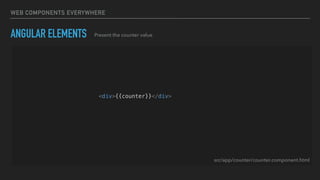
ANGULAR ELEMENTS Present the counter value
<div>{{counter}}</div>
<button (click)="dec()">Dec</button>
<button (click)="inc()">Inc</button>
src/app/counter/counter.component.html
WEB COMPONENTS EVERYWHERE
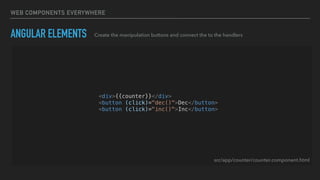
ANGULAR ELEMENTS Create the manipulation buttons and connect the to the handlers
<div>{{counter}}</div>
<button (click)="dec()">Dec</button>
<button (click)="inc()">Inc</button>
src/app/counter/counter.component.html
THATS IT?
NOT EXACTLY…
WEB COMPONENTS EVERYWHERE
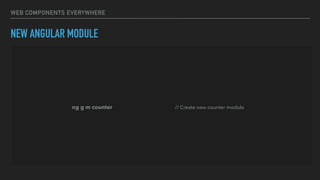
NEW ANGULAR MODULE
ng g m counter // Create new counter module
WEB COMPONENTS EVERYWHERE
ANGULAR ELEMENTS Create a module for out custom elements
@NgModule({
imports: [
BrowserModule
],
declarations: [],
entryComponents: [CounterComponent]
})
export class CounterModule {
constructor(private injector: Injector) {}
ngDoBootstrap() {
const el = createCustomElement(CounterComponent, { injector: this.injector });
customElements.define('app-counter', el);
}
}
src/app/counter/counter.module.ts
WEB COMPONENTS EVERYWHERE
ANGULAR ELEMENTS Create a module for out custom elements
@NgModule({
imports: [
BrowserModule
],
declarations: [CounterComponent],
entryComponents: [CounterComponent]
})
export class CounterModule {
constructor(private injector: Injector) {}
ngDoBootstrap() {
const el = createCustomElement(CounterComponent, { injector: this.injector });
customElements.define('app-counter', el);
}
}
src/app/counter/counter.module.ts
WEB COMPONENTS EVERYWHERE
ANGULAR ELEMENTS Create a module for out custom elements
@NgModule({
imports: [
BrowserModule
],
declarations: [CounterComponent],
entryComponents: [CounterComponent]
})
export class CounterModule {
constructor(private injector: Injector) {}
ngDoBootstrap() {
const el = createCustomElement(CounterComponent, { injector: this.injector });
customElements.define('app-counter', el);
}
}
src/app/counter/counter.module.ts
WEB COMPONENTS EVERYWHERE
ANGULAR ELEMENTS Create a module for out custom elements
@NgModule({
imports: [
BrowserModule
],
declarations: [CounterComponent],
entryComponents: [CounterComponent]
})
export class CounterModule {
constructor(private injector: Injector) {}
ngDoBootstrap() {
const el = createCustomElement(CounterComponent, { injector: this.injector });
customElements.define('app-counter', el);
}
}
src/app/counter/counter.module.ts
WEB COMPONENTS EVERYWHERE
ANGULAR ELEMENTS Create a module for out custom elements
@NgModule({
imports: [
BrowserModule
],
declarations: [CounterComponent],
entryComponents: [CounterComponent]
})
export class CounterModule {
constructor(private injector: Injector) {}
ngDoBootstrap() {
const el = createCustomElement(CounterComponent, { injector: this.injector });
customElements.define('app-counter', el);
}
}
src/app/counter/counter.module.ts
WEB COMPONENTS EVERYWHERE
ANGULAR ELEMENTS Create a module for out custom elements
@NgModule({
imports: [
BrowserModule
],
declarations: [CounterComponent],
entryComponents: [CounterComponent]
})
export class CounterModule {
constructor(private injector: Injector) {}
ngDoBootstrap() {
const el = createCustomElement(CounterComponent, { injector: this.injector });
customElements.define('app-counter', el);
}
}
src/app/counter/counter.module.ts
WEB COMPONENTS EVERYWHERE
ANGULAR ELEMENTS Create a module for out custom elements
@NgModule({
imports: [
BrowserModule
],
declarations: [CounterComponent],
entryComponents: [CounterComponent]
})
export class CounterModule {
constructor(private injector: Injector) {}
ngDoBootstrap() {
const el = createCustomElement(CounterComponent, { injector: this.injector });
customElements.define('app-counter', el);
}
}
src/app/counter/counter.module.ts
😵
WEB COMPONENTS EVERYWHERE
IVY - THE NEW RENDERING ENGINE FOR ANGULAR
▸ Incremental builds and uses monomorphic data structures internally (Fast)
▸ Tree Shaking (Efficient)
https://github.com/angular/angular/blob/master/packages/compiler/design/architecture.md
WEB COMPONENTS EVERYWHERE
ANGULAR ELEMENTS Using the Ivy hopefully we will have something like:
@Component({
selector: 'app-counter',
templateUrl: './counter.component.html',
styleUrls: ['./counter.component.css'],
customElement: true
})
export class CounterComponent {
@Input() counter = 0;
constructor() { }
inc() { this.counter++; }
dec() { this.counter--; }
}
src/app/counter/counter.component.ts
WEB COMPONENTS EVERYWHERE
FAQ
▸ Can we use Dependency Injection?
▸ What about Content Projection?
▸ Can we still use Slots?
WEB COMPONENTS EVERYWHERE
BENEFITS OF USING ANGULAR ELEMENTS
▸ All components can be reused across JavaScript applications.
▸ Creating Dynamic Components.
▸ Hybrid Rendering - Server Side Rendering with Custom Elements that don’t
wait for the application to bootstrap to start working.
▸ Micro Frontends Architecture - Vertical Application Scaling (Working with
multiple small applications instead of a big monolith.)
https://micro-frontends.org
WEB COMPONENTS EVERYWHERE
ADDITIONAL RESOURCES
▸ https://custom-elements-everywhere.com - This project runs a suite of tests
against each framework to identify interoperability issues, and highlight
potential fixes already implemented in other frameworks.
WEB COMPONENTS EVERYWHERE
CONNECT
GitHub > https://github.com/iliaidakiev (/slides/ - list of future and past events)
Twitter > @ilia_idakiev
THANK YOU!

Web Components Everywhere

  • 1.
  • 2.
    A B OU T M E { "name": "Ilia Idakiev", "experience": [ "Developer & Founder of HNS/HG", "Lecturer in Advanced JS @ Sofia University", "Contractor / Consultant", "Public / Private Courses" ], "involvedIn": [ "Angular Sofia", "SofiaJS", "BeerJS", ] }
  • 3.
    WEB COMPONENTS EVERYWHERE SEPARATIONOF CONCERNS (SOC) ▸ Design principle for separating a computer program into distinct sections, such that each section addresses a separate concern. (Modularity)
  • 4.
    WEB COMPONENTS EVERYWHERE S.O.L.I.DPRINCIPLES OF OBJECT-ORIENTED PROGRAMMING ▸ Single Responsibility Principle ▸ Open / Close Principle ▸ Liskov Substitution Principle ▸ Interface Segregation Principle ▸ Dependency Inversion Principle http://aspiringcraftsman.com/2011/12/08/solid-javascript-single-responsibility-principle/
  • 5.
    WEB COMPONENTS EVERYWHERE WEBCOMPONENTS ▸ Introduced by Alex Russell (Chrome team @ Google) 
 at Fronteers Conference 2011 ▸ A set of features currently being added by the W3C to the HTML and DOM specifications that allow the creation of reusable widgets or components in web documents and web applications. ▸ The intention behind them is to bring component-based software engineering to the World Wide Web.
  • 6.
    WEB COMPONENTS EVERYWHERE WEBCOMPONENTS FEATURES: ▸ HTML Templates - an HTML fragment is not rendered, but stored until it is instantiated via JavaScript. ▸ Shadow DOM - Encapsulated DOM and styling, with composition. ▸ Custom Elements - APIs to define new HTML elements. ▸ HTML Imports - Declarative methods of importing HTML documents into other documents. (Replaced by ES6 Imports).
  • 7.
  • 8.
    WEB COMPONENTS EVERYWHERE DEFINECUSTOM ELEMENT (function () { const template = createTemplate('<div>Hello World<div>'); class Counter extends HTMLElement { constructor() { super(); const shadowRoot = this.attachShadow({ mode: 'open' }); shadowRoot.appendChild(template.content.cloneNode(true)); } } customElements.define('hg-counter', Counter); }()); Create an isolated scope counter.js
  • 9.
    WEB COMPONENTS EVERYWHERE (function() { const template = createTemplate('<div>Hello World<div>'); class Counter extends HTMLElement { constructor() { super(); const shadowRoot = this.attachShadow({ mode: 'open' }); shadowRoot.appendChild(template.content.cloneNode(true)); } } customElements.define('hg-counter', Counter); }()); DEFINE CUSTOM ELEMENT Create a new class that extends HTMLElement counter.js
  • 10.
    WEB COMPONENTS EVERYWHERE (function() { const template = createTemplate('<div>Hello World<div>'); class Counter extends HTMLElement { constructor() { super(); const shadowRoot = this.attachShadow({ mode: 'open' }); shadowRoot.appendChild(template.content.cloneNode(true)); } } customElements.define('hg-counter', Counter); }()); DEFINE CUSTOM ELEMENT Register the new custom element. counter.js
  • 11.
    WEB COMPONENTS EVERYWHERE HTMLTEMPLATES ▸ The <template> tag holds its content hidden from the client. ▸ Content inside a <template> tag will be parsed but not rendered. ▸ The content can be visible and rendered later by using JavaScript.
  • 12.
    WEB COMPONENTS EVERYWHERE WAYSTO CREATE A TEMPLATE <template id="template"> <h2>Hello World</h2> </template> const template = document.createElement('template'); template.innerHTML = '<h2>Hello World</h2>'; Using HTML Using JavaScript
  • 13.
    WEB COMPONENTS EVERYWHERE CREATETEMPLATE HELPER FUNCTION function createTemplate(string) { const template = document.createElement('template'); template.innerHTML = string; return template; } utils.js
  • 14.
    WEB COMPONENTS EVERYWHERE CREATETHE TEMPLATE (function () { const template = createTemplate('<div>Hello World<div>'); class Counter extends HTMLElement { constructor() { super(); const shadowRoot = this.attachShadow({ mode: 'open' }); shadowRoot.appendChild(template.content.cloneNode(true)); } } customElements.define('hg-counter', Counter); }()); Use the create template helper function. counter.js
  • 15.
    WEB COMPONENTS EVERYWHERE SHADOWDOM ▸ Isolated DOM - The component's DOM is self-contained (e.g. document.querySelector() won't return nodes in the component's shadow DOM). ▸ Scoped CSS - CSS defined inside shadow DOM is scoped to it. Style rules don't leak out and page styles don't bleed in. ▸ Composition - done with the <slot> element.
 (Slots are placeholders inside your component that users can fill with their own markup).
  • 16.
    WEB COMPONENTS EVERYWHERE DEFINECUSTOM ELEMENT (function () { const template = createTemplate('<div>Hello World<div>'); class Counter extends HTMLElement { constructor() { super(); const shadowRoot = this.attachShadow({ mode: 'open' }); shadowRoot.appendChild(template.content.cloneNode(true)); } } customElements.define('hg-counter', Counter); }()); counter.js Utilise the class constructor.
  • 17.
    WEB COMPONENTS EVERYWHERE ATTACHSHADOW DOM (function () { const template = createTemplate('<div>Hello World<div>'); class Counter extends HTMLElement { constructor() { super(); const shadowRoot = this.attachShadow({ mode: 'open' }); shadowRoot.appendChild(template.content.cloneNode(true)); } } customElements.define('hg-counter', Counter); }()); Attach the shadow DOM. counter.js
  • 18.
    WEB COMPONENTS EVERYWHERE (function() { const template = createTemplate('<div>Hello World<div>'); class Counter extends HTMLElement { constructor() { super(); const shadowRoot = this.attachShadow({ mode: 'open' }); shadowRoot.appendChild(template.content.cloneNode(true)); } } customElements.define('hg-counter', Counter); }()); CREATE THE TEMPLATE Attach the template contents to the shadow root. counter.js
  • 19.
    WEB COMPONENTS EVERYWHERE USEOUR CUSTOM ELEMENT <body> <hg-counter></hg-counter> <script src="./util.js"></script> <script src="./counter.js"></script> </body> index.html
  • 20.
    WEB COMPONENTS EVERYWHERE EXTENDOUR CUSTOM ELEMENT index.html (function () { const template = createTemplate(` <div name="value"></div> <button data-type=“dec">-</button> <button data-type="inc">+</button> `); class Counter extends HTMLElement { constructor() { super();
  • 21.
    WEB COMPONENTS EVERYWHERE EXTENDOUR CUSTOM ELEMENT index.html constructor() { super(); const shadowRoot = this.attachShadow({ mode: 'open' }); shadowRoot.appendChild(template.content.cloneNode(true)); shadowRoot.addEventListener('click', ({ target }) => { const type = target.getAttribute('data-type'); if (type === 'dec') { this.counter--; } else if (type === 'inc') { this.counter++; } });
  • 22.
    WEB COMPONENTS EVERYWHERE UPDATINGTHE DOM utils.js function updateDOM(root, updates) { updates.forEach(item => { root.querySelectorAll(`[name=${item.name}]`).forEach(element => element.textContent = item.value ); }); }
  • 23.
    WEB COMPONENTS EVERYWHERE EXTENDOUR CUSTOM ELEMENT index.html class Counter extends HTMLElement { set counter(value) { this._counter = value; } get counter() { return this._counter; } constructor() { super(); const shadowRoot = this.attachShadow({ mode: 'open' }); shadowRoot.appendChild(template.content.cloneNode(true)); this.counter = 0;
  • 24.
    WEB COMPONENTS EVERYWHERE EXTENDOUR CUSTOM ELEMENT index.html class Counter extends HTMLElement { constructor() { super(); const shadowRoot = this.attachShadow({ mode: 'open' }); shadowRoot.appendChild(template.content.cloneNode(true)); this.counter = 0; this._update = () => { updateDOM(shadowRoot, [{ name: 'value', value: this.counter }]); }
  • 25.
    WEB COMPONENTS EVERYWHERE EXTENDOUR CUSTOM ELEMENT index.html class Counter extends HTMLElement { set counter(value) { this._counter = value; this._update(); } get counter() { return this._counter; } constructor() { super(); const shadowRoot = this.attachShadow({ mode: 'open' }); shadowRoot.appendChild(template.content.cloneNode(true)); this.counter = 0;
  • 26.
    WEB COMPONENTS EVERYWHERE CUSTOMCOMPONENT ATTRIBUTES index.html <body> <hg-counter value="10"></hg-counter> <script src="./util.js"></script> <script src="./counter.js"></script> </body>
  • 27.
    WEB COMPONENTS EVERYWHERE CUSTOMELEMENTS LIFECYCLE CALLBACKS ▸ connectedCallback - Invoked each time the custom element is appended into a document-connected element. This will happen each time the node is moved, and may happen before the element's contents have been fully parsed. ▸ disconnectedCallback - Invoked each time the custom element is disconnected from the document's DOM. ▸ attributeChangedCallback - Invoked each time one of the custom element's attributes is added, removed, or changed. ▸ adoptedCallback - Invoked each time the custom element is moved to a new document.
  • 28.
    WEB COMPONENTS EVERYWHERE CUSTOMCOMPONENT ATTRIBUTES index.html class Counter extends HTMLElement { static get observedAttributes() { return ['value']; } attributeChangedCallback(name, oldValue, newValue) { if (name === 'value') { this.counter = newValue; } } constructor() { Handle attribute changes
  • 29.
    WEB COMPONENTS EVERYWHERE CUSTOMCOMPONENT ATTRIBUTES index.html class Counter extends HTMLElement { static get observedAttributes() { return ['value']; } attributeChangedCallback(name, oldValue, newValue) { if (name === 'value') { this.counter = newValue; } } constructor() { Define which attributes should be watched
  • 30.
  • 31.
    WEB COMPONENTS EVERYWHERE CUSTOMCOMPONENT STYLES index.html Apply scoped styles to our component (function () { const template = createTemplate(` <style> :host { display: flex; } div[name="value"] { min-width: 30px; } </style> <div name="value"></div> <button data-type="dec">-</button> <button data-type="inc">+</button> `); class Counter extends HTMLElement {
  • 32.
    WEB COMPONENTS EVERYWHERE WEBCOMPONENT CSS ▸ :host - selects the shadow host of the shadow DOM ▸ :host() - match only if the selector given as the function's parameter matches the shadow host. ▸ :host-context() -  match only if the selector given as the function's parameter matches the shadow host's ancestor(s) in the place it sits inside the DOM hierarchy. ▸ ::slotted() - represents any element that has been placed into a slot inside an HTML template
  • 33.
  • 34.
    WEB COMPONENTS EVERYWHERE CUSTOMEVENTS Dispatching custom event const test = shadowRoot.getElementById('element-button'); test.addEventListener('click', () => { this.dispatchEvent(new CustomEvent('toggle', { detail: { value: true } })) }); custom-element.js
  • 35.
    WEB COMPONENTS EVERYWHERE CUSTOMEVENTS Listening for custom event • CustomEvent {isTrusted: false, detail: {value: true}, type: "toggle", …} const el = document.getElementById('my-custom-element'); el.addEventListener('toggle', e => { console.log(e); }); main.js Console
  • 36.
    WEB COMPONENTS EVERYWHERE FURTHERREADING ▸ Extending different HTML Elements
 (e.g. HTMLButton)
  • 37.
    WEB COMPONENTS EVERYWHERE BENEFITSOF USING CUSTOM COMPONENTS ▸ Framework agnostic - Written in JavaScript and native to the browser. ▸ Simplifies CSS - Scoped DOM means you can use simple CSS selectors, more generic id/class names, and not worry about naming conflicts. • Productivity - Think of apps in chunks of DOM rather than one large (global) page. ▸ Productivity - Think of apps in chunks of DOM rather than one large (global) page.
  • 38.
  • 39.
    WEB COMPONENTS EVERYWHERE COSTSOF USING CUSTOM COMPONENTS ▸ Template Generation - manually construct the DOM for our templates 
 (No JSX features or Structural Directives) ▸ DOM Updates - manually track and handle changes to our DOM
 (No Virtual DOM or Change Detection)
  • 40.
    WEB COMPONENTS EVERYWHERE LITHTML ▸ Library Developed by the Polymer Team @ GOOGLE ▸ Efficient - lit-html is extremely fast. It uses fast platform features like HTML <template> elements with native cloning. ▸ Expressive - lit-html gives you the full power of JavaScript and functional programming patterns. ▸ Extensible - Different dialects of templates can be created with additional features for setting element properties, declarative event handlers and more. ▸ It can be used standalone for simple tasks, or combined with a framework or component model, like Web Components, for a full-featured UI development platform. ▸ It has an awesome VSC extension for syntax highlighting and formatting.
  • 41.
  • 42.
    WEB COMPONENTS EVERYWHERE TAGFUNCTIONS function myTagFn(str, ...expr) { console.log(str, expr); return str.reduce((acc, curr, i) => acc + curr + (expr[i] || ''), ''); } myTagFn`1+1 equals ${1+1} and 3 + 3 equals ${3+3} ${3+2}` > (4) ["1+1 equals ", " and 3 + 3 equals ", " ", ""] (3) [2, 6, 5] > “1+1 equals 2 and 3 + 3 equals 6 5" Console
  • 43.
    WEB COMPONENTS EVERYWHERE RESOURCES ▸LitHTML demo - https://github.com/Polymer/lit-html/blob/master/demo/ clock.js
  • 44.
    WEB COMPONENTS EVERYWHERE FRAMEWORKS ▸StencilJS - a simple library for generating Web Components and progressive web apps (PWA). 
 (built by the Ionic Framework team for its next generation of performant mobile and desktop Web Components) ▸ Polymer - library for creating web components.
 (built by Google and used by YouTube, Netflix, Google Earth and others) ▸ SkateJS - library providing functional abstraction over web components. ▸ Angular Elements
  • 45.
    WEB COMPONENTS EVERYWHERE WEBCOMPONENTS SERVER SIDE RENDERING ▸ SkateJS SSR - @skatejs/ssr is a web component server-side rendering and testing library. (uses undom) ▸ Rendertron - Rendertron is a headless Chrome rendering solution designed to render & serialise web pages on the fly. ▸ Domino - Server-side DOM implementation based on Mozilla's dom.js
  • 46.
  • 47.
    WEB COMPONENTS EVERYWHERE ANGULARELEMENTS ▸ A part of Angular Labs set. ▸ Angular elements are Angular components packaged as Custom Elements.
  • 48.
    WEB COMPONENTS EVERYWHERE ANGULARELEMENTS ▸ Angular’s createCustomElement() function transforms an Angular component, together with its dependencies, to a class that is configured to produce a self- bootstrapping instance of the component. ▸ It transforms the property names to make them compatible with custom elements. ▸ Component outputs are dispatched as HTML Custom Events, with the name of the custom event matching the output name. ▸ Then customElements.define() is used to register our custom element. Transformation
  • 49.
  • 50.
    WEB COMPONENTS EVERYWHERE NEWANGULAR PROJECT ng new angular-elements // Create new Angular CLI project cd angular-elements ng add @angular/elements // Add angular elements package ng g c counter // Generate a new component // Navigate to our new project
  • 51.
    WEB COMPONENTS EVERYWHERE ANGULARELEMENTS The generated component @Component({ selector: 'app-counter', templateUrl: './counter.component.html', styleUrls: ['./counter.component.css'], encapsulation: ViewEncapsulation.Native }) export class CounterComponent { @Input() counter = 0; constructor() { } inc() { this.counter++; } dec() { this.counter--; } } src/app/counter/counter.component.ts
  • 52.
    WEB COMPONENTS EVERYWHERE ANGULARELEMENTS Add View Encapsulation via Shadow DOM (Native) @Component({ selector: 'app-counter', templateUrl: './counter.component.html', styleUrls: ['./counter.component.css'], encapsulation: ViewEncapsulation.Native }) export class CounterComponent { @Input() counter = 0; constructor() { } inc() { this.counter++; } dec() { this.counter--; } } src/app/counter/counter.component.ts
  • 53.
    WEB COMPONENTS EVERYWHERE ANGULARELEMENTS Create a counter input property @Component({ selector: 'app-counter', templateUrl: './counter.component.html', styleUrls: ['./counter.component.css'], encapsulation: ViewEncapsulation.Native }) export class CounterComponent { @Input() counter = 0; constructor() { } inc() { this.counter++; } dec() { this.counter--; } } src/app/counter/counter.component.ts
  • 54.
    WEB COMPONENTS EVERYWHERE ANGULARELEMENTS Create counter handlers @Component({ selector: 'app-counter', templateUrl: './counter.component.html', styleUrls: ['./counter.component.css'], encapsulation: ViewEncapsulation.Native }) export class CounterComponent { @Input() counter = 0; constructor() { } inc() { this.counter++; } dec() { this.counter--; } } src/app/counter/counter.component.ts
  • 55.
    WEB COMPONENTS EVERYWHERE ANGULARELEMENTS Present the counter value <div>{{counter}}</div> <button (click)="dec()">Dec</button> <button (click)="inc()">Inc</button> src/app/counter/counter.component.html
  • 56.
    WEB COMPONENTS EVERYWHERE ANGULARELEMENTS Create the manipulation buttons and connect the to the handlers <div>{{counter}}</div> <button (click)="dec()">Dec</button> <button (click)="inc()">Inc</button> src/app/counter/counter.component.html
  • 57.
  • 58.
  • 59.
    WEB COMPONENTS EVERYWHERE NEWANGULAR MODULE ng g m counter // Create new counter module
  • 60.
    WEB COMPONENTS EVERYWHERE ANGULARELEMENTS Create a module for out custom elements @NgModule({ imports: [ BrowserModule ], declarations: [], entryComponents: [CounterComponent] }) export class CounterModule { constructor(private injector: Injector) {} ngDoBootstrap() { const el = createCustomElement(CounterComponent, { injector: this.injector }); customElements.define('app-counter', el); } } src/app/counter/counter.module.ts
  • 61.
    WEB COMPONENTS EVERYWHERE ANGULARELEMENTS Create a module for out custom elements @NgModule({ imports: [ BrowserModule ], declarations: [CounterComponent], entryComponents: [CounterComponent] }) export class CounterModule { constructor(private injector: Injector) {} ngDoBootstrap() { const el = createCustomElement(CounterComponent, { injector: this.injector }); customElements.define('app-counter', el); } } src/app/counter/counter.module.ts
  • 62.
    WEB COMPONENTS EVERYWHERE ANGULARELEMENTS Create a module for out custom elements @NgModule({ imports: [ BrowserModule ], declarations: [CounterComponent], entryComponents: [CounterComponent] }) export class CounterModule { constructor(private injector: Injector) {} ngDoBootstrap() { const el = createCustomElement(CounterComponent, { injector: this.injector }); customElements.define('app-counter', el); } } src/app/counter/counter.module.ts
  • 63.
    WEB COMPONENTS EVERYWHERE ANGULARELEMENTS Create a module for out custom elements @NgModule({ imports: [ BrowserModule ], declarations: [CounterComponent], entryComponents: [CounterComponent] }) export class CounterModule { constructor(private injector: Injector) {} ngDoBootstrap() { const el = createCustomElement(CounterComponent, { injector: this.injector }); customElements.define('app-counter', el); } } src/app/counter/counter.module.ts
  • 64.
    WEB COMPONENTS EVERYWHERE ANGULARELEMENTS Create a module for out custom elements @NgModule({ imports: [ BrowserModule ], declarations: [CounterComponent], entryComponents: [CounterComponent] }) export class CounterModule { constructor(private injector: Injector) {} ngDoBootstrap() { const el = createCustomElement(CounterComponent, { injector: this.injector }); customElements.define('app-counter', el); } } src/app/counter/counter.module.ts
  • 65.
    WEB COMPONENTS EVERYWHERE ANGULARELEMENTS Create a module for out custom elements @NgModule({ imports: [ BrowserModule ], declarations: [CounterComponent], entryComponents: [CounterComponent] }) export class CounterModule { constructor(private injector: Injector) {} ngDoBootstrap() { const el = createCustomElement(CounterComponent, { injector: this.injector }); customElements.define('app-counter', el); } } src/app/counter/counter.module.ts
  • 66.
    WEB COMPONENTS EVERYWHERE ANGULARELEMENTS Create a module for out custom elements @NgModule({ imports: [ BrowserModule ], declarations: [CounterComponent], entryComponents: [CounterComponent] }) export class CounterModule { constructor(private injector: Injector) {} ngDoBootstrap() { const el = createCustomElement(CounterComponent, { injector: this.injector }); customElements.define('app-counter', el); } } src/app/counter/counter.module.ts
  • 67.
  • 68.
    WEB COMPONENTS EVERYWHERE IVY- THE NEW RENDERING ENGINE FOR ANGULAR ▸ Incremental builds and uses monomorphic data structures internally (Fast) ▸ Tree Shaking (Efficient) https://github.com/angular/angular/blob/master/packages/compiler/design/architecture.md
  • 69.
    WEB COMPONENTS EVERYWHERE ANGULARELEMENTS Using the Ivy hopefully we will have something like: @Component({ selector: 'app-counter', templateUrl: './counter.component.html', styleUrls: ['./counter.component.css'], customElement: true }) export class CounterComponent { @Input() counter = 0; constructor() { } inc() { this.counter++; } dec() { this.counter--; } } src/app/counter/counter.component.ts
  • 70.
    WEB COMPONENTS EVERYWHERE FAQ ▸Can we use Dependency Injection? ▸ What about Content Projection? ▸ Can we still use Slots?
  • 71.
    WEB COMPONENTS EVERYWHERE BENEFITSOF USING ANGULAR ELEMENTS ▸ All components can be reused across JavaScript applications. ▸ Creating Dynamic Components. ▸ Hybrid Rendering - Server Side Rendering with Custom Elements that don’t wait for the application to bootstrap to start working. ▸ Micro Frontends Architecture - Vertical Application Scaling (Working with multiple small applications instead of a big monolith.) https://micro-frontends.org
  • 72.
    WEB COMPONENTS EVERYWHERE ADDITIONALRESOURCES ▸ https://custom-elements-everywhere.com - This project runs a suite of tests against each framework to identify interoperability issues, and highlight potential fixes already implemented in other frameworks.
  • 73.
    WEB COMPONENTS EVERYWHERE CONNECT GitHub> https://github.com/iliaidakiev (/slides/ - list of future and past events) Twitter > @ilia_idakiev
  • 74.