Using Google Forms as a Tool for
Formative Assessment
Michael Westwood
Ohio University CALL Conference
2014
What is formative assessment?
• “Assessment is formative when teachers use it
to check on the progress of students, to see
how far they have mastered what they should
have learned, and then to use this information
to modify their future learning plans”
(Hughes, 2003, p. 5).
• Methods might include informal quizzes, self
assessment, observation, etc.
What are the benefits?
• It provides a quick snapshot of students’ grasp
of material.
• Formative assessment can take place after
each major teaching point to help teachers
recognize areas of confusion.
• Small problems can be addressed before they
become major ones.
Touching on Affective Issues
• In addition to providing information about
student progress, formative assessment can
also provide insight into other areas (i.e.
student enjoyment of activities, whether
pacing and workload are appropriate).
• It can be anonymous, providing students a
forum for raising concerns or questions they
might not feel comfortable addressing
publicly.
• Formative assessment can improve
student/teacher relationships by providing
students with a forum for addressing
grievances prior to end of course surveys.
Why Google Forms?
• Digital formative assessment can save time
and resources.
• Google accounts are common.
• Google Forms are free.
• Google Forms are easy to create, share, and
adapt.
• Google Forms are reusable.
What are the steps?
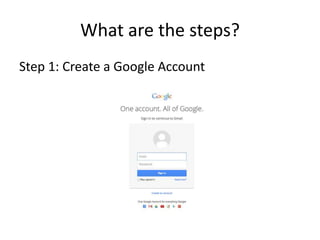
Step 1: Create a Google Account
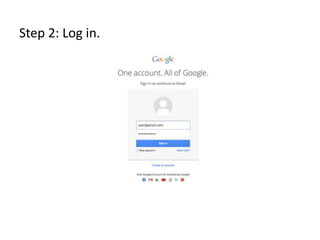
Step 2: Log in.
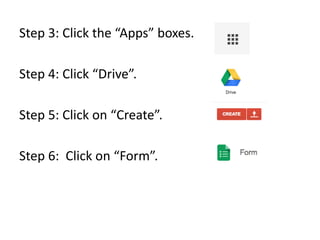
Step 3: Click the “Apps” boxes.
Step 4: Click “Drive”.
Step 5: Click on “Create”.
Step 6: Click on “Form”.
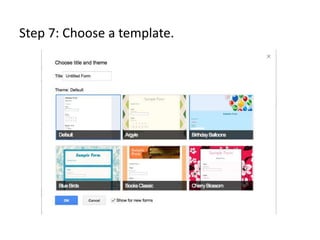
Step 7: Choose a template.
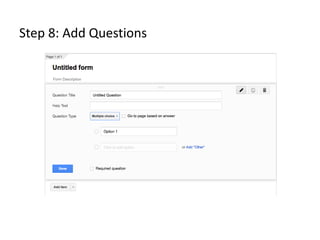
Step 8: Add Questions
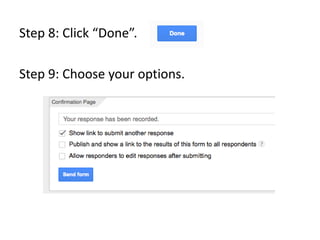
Step 8: Click “Done”.
Step 9: Choose your options.
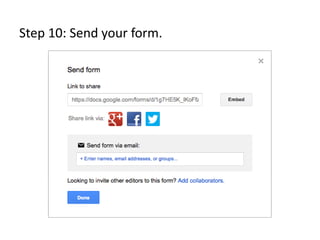
Step 10: Send your form.
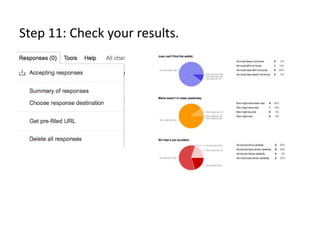
Step 11: Check your results.
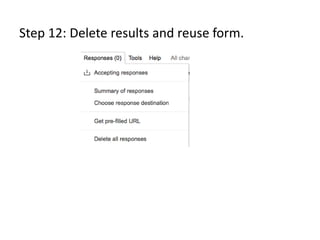
Step 12: Delete results and reuse form.
References
Hughes, A. (2003). Testing for language
teachers. (2nd ed.). Cambridge, UK: Cambridge
University Press.

Using Google Forms as a Tool for Formative Assessment

  • 1.
    Using Google Formsas a Tool for Formative Assessment Michael Westwood Ohio University CALL Conference 2014
  • 2.
    What is formativeassessment? • “Assessment is formative when teachers use it to check on the progress of students, to see how far they have mastered what they should have learned, and then to use this information to modify their future learning plans” (Hughes, 2003, p. 5). • Methods might include informal quizzes, self assessment, observation, etc.
  • 3.
    What are thebenefits? • It provides a quick snapshot of students’ grasp of material. • Formative assessment can take place after each major teaching point to help teachers recognize areas of confusion. • Small problems can be addressed before they become major ones.
  • 4.
    Touching on AffectiveIssues • In addition to providing information about student progress, formative assessment can also provide insight into other areas (i.e. student enjoyment of activities, whether pacing and workload are appropriate). • It can be anonymous, providing students a forum for raising concerns or questions they might not feel comfortable addressing publicly.
  • 5.
    • Formative assessmentcan improve student/teacher relationships by providing students with a forum for addressing grievances prior to end of course surveys.
  • 6.
    Why Google Forms? •Digital formative assessment can save time and resources. • Google accounts are common. • Google Forms are free. • Google Forms are easy to create, share, and adapt. • Google Forms are reusable.
  • 7.
    What are thesteps? Step 1: Create a Google Account
  • 8.
  • 9.
    Step 3: Clickthe “Apps” boxes. Step 4: Click “Drive”. Step 5: Click on “Create”. Step 6: Click on “Form”.
  • 10.
    Step 7: Choosea template.
  • 11.
    Step 8: AddQuestions
  • 12.
    Step 8: Click“Done”. Step 9: Choose your options.
  • 13.
    Step 10: Sendyour form.
  • 14.
    Step 11: Checkyour results.
  • 15.
    Step 12: Deleteresults and reuse form.
  • 16.
    References Hughes, A. (2003).Testing for language teachers. (2nd ed.). Cambridge, UK: Cambridge University Press.