DIGITAL CONCEPTS
WITH ADDED VALUE.
Google Analytics and UX
#uxce13 @katrinmathis
Google Analytics and UX, #uxce13 @katrinmathis
Katrin Mathis
Freelance consultant and conceptual designer based in Freiburg, Germany
B. Sc. in OnlineMedia from Hochschule Furtwangen University
MBA in Service Innovation and Design student (part-time) from September
Google Analytics and AdWords Qualified Individual
7+ years of experience with international clients
Google Analytics and UX, #uxce13 @katrinmathis
What is Web Analytics?
Web Analytics is the measurement, collection, analysis and reporting of Internet data
for the purpose of understanding and optimizing Web usage.
(Web Analytics Association)
Google Analytics and UX, #uxce13 @katrinmathis
Web Analytics User Experience
What is analyzed Behavior - „what“ Intentions and motives - „why“
Methods Quantitative Qualitative
Goal Help organization meet goals Help users achieve goals
How data is used Top down Bottom up
Kinds of data Statistical data Conceptual data
Background Engineering or math Social sciences, humanities, arts
Web Analytics vs. User Experience
Source: Louis Rosenfeld (2011): Search Analytics for Your Site. Rosenfeld Media.
Google Analytics and UX, #uxce13 @katrinmathis
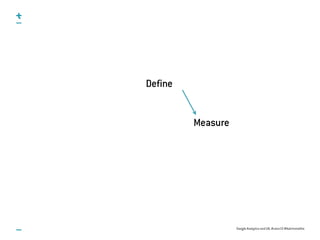
Define
Measure
1. Define conversion goals and funnels
Google Analytics and UX, #uxce13 @katrinmathis
Key Performance Indicators
Definition of 5 - 8 individual key figures per department
SMART = Specific, measurable, attainable, realistic, timely
e.g. „Increase traffic by 25% until the end of the year“
Fluctuations vs. true trends
Compare values to targets
Google Analytics and UX, #uxce13 @katrinmathis
Conversion Goals
Macro and micro goals, e.g.
Purchases
Contact form
Registrations
Newsletter subscription
Downloads
Comments
Clicks on outbound links
Google Analytics and UX, #uxce13 @katrinmathis
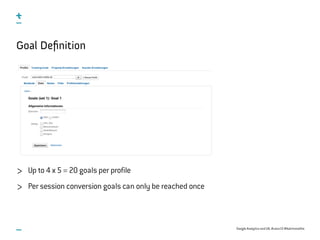
Goal Definition
Up to 4 x 5 = 20 goals per profile
Per session conversion goals can only be reached once
Google Analytics and UX, #uxce13 @katrinmathis
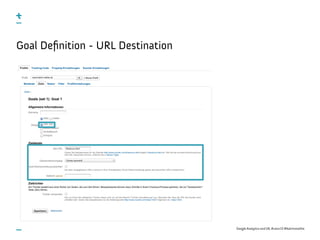
Goal Definition - URL Destination
Google Analytics and UX, #uxce13 @katrinmathis
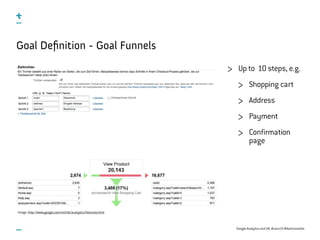
Goal Definition - Goal Funnels
Up to 10 steps, e.g.
Shopping cart
Address
Payment
Confirmation
page
Image: http://www.google.com/intl/de/analytics/features.html
Google Analytics and UX, #uxce13 @katrinmathis
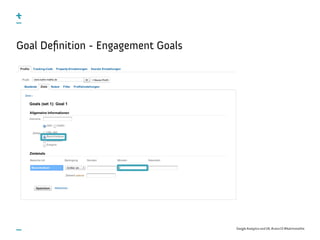
Goal Definition - Engagement Goals
Google Analytics and UX, #uxce13 @katrinmathis
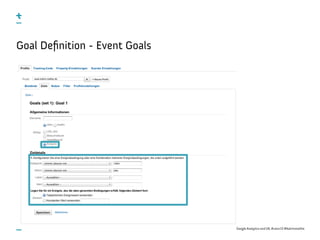
Goal Definition - Event Goals
2. Track your internal search
Google Analytics and UX, #uxce13 @katrinmathis
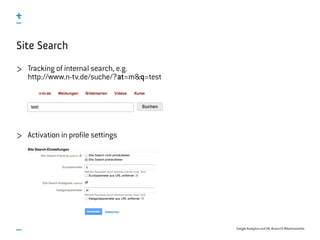
Site Search
Tracking of internal search, e.g.
http://www.n-tv.de/suche/?at=m&q=test
Activation in profile settings
Google Analytics and UX, #uxce13 @katrinmathis
Site Search Reports
Overview
Visits with Search
Total Unique Searches
Results Pageviews / Search
% Search Exits
% Search Refinements
Time after Search
Search Depth
Usage
Visits with/without Site Search
Search Terms
Search Term
Site Search Category
Pages
Start Page
Destination Page
3. Individualize your tracking
Google Analytics and UX, #uxce13 @katrinmathis
<a href=‘/document.pdf‘
onClick =‘_gaq.push([‘_trackPageview‘, ‘/downloads/document-xy.pdf‘]);‘>
Jetzt Downloaden</a>
Virtual Page Views
Tracking of actions that are not page views,
e.g. Downloads or outbound Links
Tip: Integrate script that tracks automatically all downloads and outbound links
Tip: File into categories, e.g. /downloads und /links
Request tracked, not completion!
Number of page views increased by virtual page views!
Google Analytics and UX, #uxce13 @katrinmathis
<a onclick=“_gaq.push([‘_trackEvent‘, category, action, label, value]);“>...</a>
Event Tracking
Tracking of objects (e.g. Video) and interactions (Play, Pause etc.)
category
action
label (Optional)
value (Optional)
In contrast to virtual pageviews events do not generate additional page views
Image: http://analytics.blogspot.de/2011/04/new-google-analytics-events-goals.html
Google Analytics and UX, #uxce13 @katrinmathis
_gaq.push([‘_trackSocial‘, network, socialAction, opt_target, opt_pagePath]);
Social Media Tracking - Social Plugins
Google +1 Button tracked automatically
Plugins of other networks require manual tracking
network
social action
opt_target
opt_pagePath
Google Analytics and UX, #uxce13 @katrinmathis
_gaq.push([‘_setCustomVar‘, index, name, value, scope]);
_gaq.push([‘_getVisitorCustomVar‘, index]);
_gaq.push([‘_deleteCustomVar‘, index]);
Custom variables
Up to 5 custom variables per page view or event
index
name
value
scope
1: Visitor
2: Session
3: Page
Google Analytics and UX, #uxce13 @katrinmathis
E-Commerce Tracking
Enable in profile settings
Integration of _addTrans(), _addItem(), _trackTrans() on
confirmation page after _trackPageview()
While goal conversions are only counted once per session, all e-commerce
transactions are counted.
Google Analytics and UX, #uxce13 @katrinmathis
_gaq.push([‘_addTrans‘,
‘transaction id‘,
‘affiliation‘,
‘total‘,
‘tax‘
‘shipping‘,
‘city‘,
‘region‘,
‘country‘]);
_gaq.push([‘_addItem‘,
‘transaction id‘,
‘SKU/code‘,
‘product name‘,
‘category‘,
‘price‘,
‘quantity‘]);
_gaq.push([‘_trackTrans‘]);
E-Commerce Tracking
4. Track errors
Google Analytics and UX, #uxce13 @katrinmathis
<script type="text/javascript">
_gaq.push(['_trackEvent', 'Error', '404', 'page: ' + document.location.pathname +
document.location.search + ' ref: ' + document.referrer ]);
</script>
Error tracking
Track errors as events
Types of errors
404 Not found errors
Referrer
URL trying to reach
Form field errors
Google Analytics and UX, #uxce13 @katrinmathis
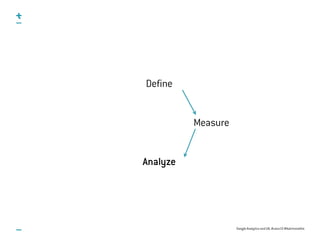
Define
Measure
Analyze
5. Put your numbers into context
Google Analytics and UX, #uxce13 @katrinmathis
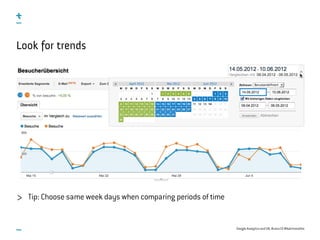
Look for trends
Tip: Choose same week days when comparing periods of time
Google Analytics and UX, #uxce13 @katrinmathis
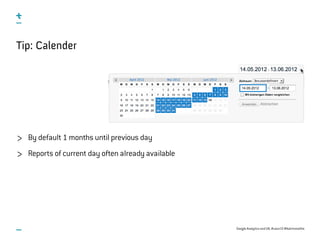
Tip: Calender
By default 1 months until previous day
Reports of current day often already available
Google Analytics and UX, #uxce13 @katrinmathis
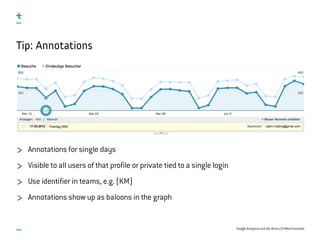
Tip: Annotations
Annotations for single days
Visible to all users of that profile or private tied to a single login
Use identifier in teams, e.g. (KM)
Annotations show up as baloons in the graph
Google Analytics and UX, #uxce13 @katrinmathis
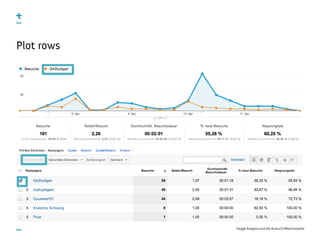
Plot rows
Google Analytics and UX, #uxce13 @katrinmathis
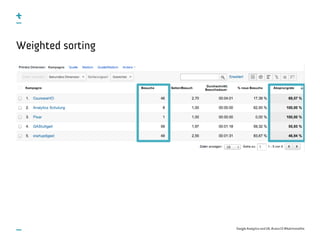
Weighted sorting
Google Analytics and UX, #uxce13 @katrinmathis
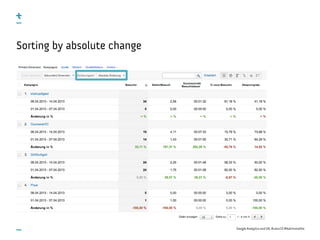
Sorting by absolute change
Google Analytics and UX, #uxce13 @katrinmathis
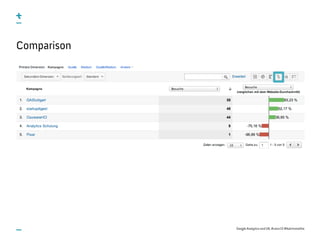
Comparison
Google Analytics and UX, #uxce13 @katrinmathis
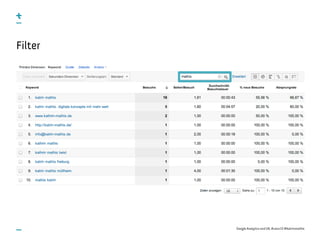
Filter
Google Analytics and UX, #uxce13 @katrinmathis
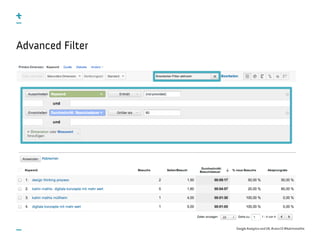
Advanced Filter
6. Understand time on site and bounce rate
Google Analytics and UX, #uxce13 @katrinmathis
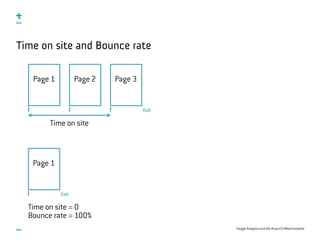
Time on site and Bounce rate
Page 1 Page 2 Page 3
Time on site
Exit
Page 1
Exit
Time on site = 0
Bounce rate = 100%
7. Segment your data
Google Analytics and UX, #uxce13 @katrinmathis
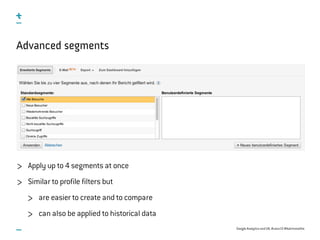
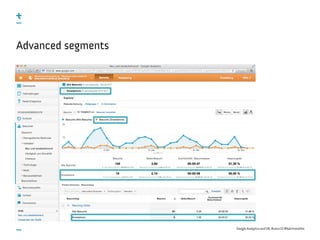
Advanced segments
Apply up to 4 segments at once
Similar to profile filters but
are easier to create and to compare
can also be applied to historical data
Google Analytics and UX, #uxce13 @katrinmathis
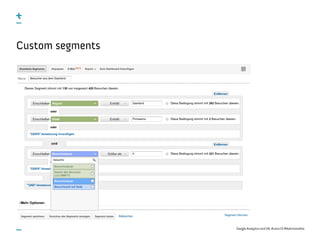
Custom segments
Google Analytics and UX, #uxce13 @katrinmathis
Advanced segments
8. Customize your reports
Google Analytics and UX, #uxce13 @katrinmathis
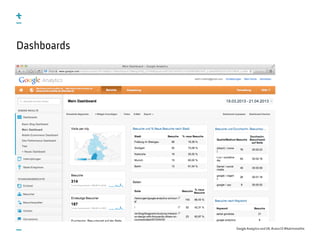
Dashboards
Google Analytics and UX, #uxce13 @katrinmathis
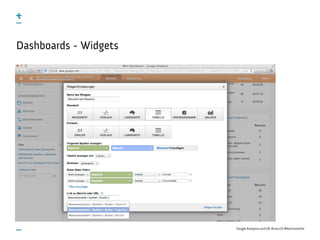
Dashboards - Widgets
Google Analytics and UX, #uxce13 @katrinmathis
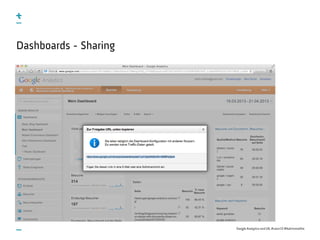
Dashboards - Sharing
Google Analytics and UX, #uxce13 @katrinmathis
Shortcuts
Saves shortcut to standard and custom reports including
Open tab
Sorting
Advanced segments
Graph settings
Filter
Number of rows
Tied to login, so far no possibility to share
Google Analytics and UX, #uxce13 @katrinmathis
Intelligence Events
Daily, weekly and monthly events
Google Analytics calculates expected range from historical data
Upon deviations from this expected range intelligence events are created
Importance indicator and filter
Helps to promptly discover anomalies and start further investigation
Google Analytics and UX, #uxce13 @katrinmathis
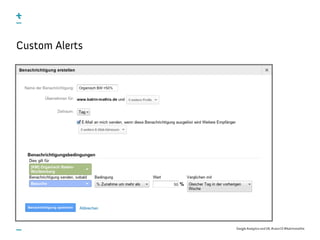
Custom Alerts
Google Analytics and UX, #uxce13 @katrinmathis
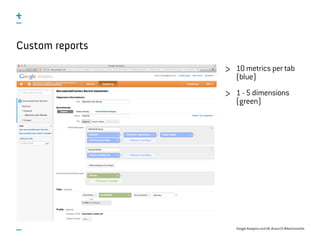
Custom reports
10 metrics per tab
(blue)
1 - 5 dimensions
(green)
Google Analytics and UX, #uxce13 @katrinmathis
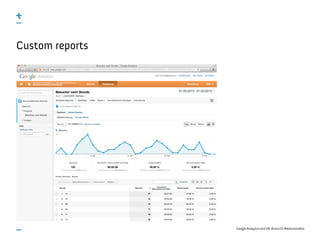
Custom reports
Google Analytics and UX, #uxce13 @katrinmathis
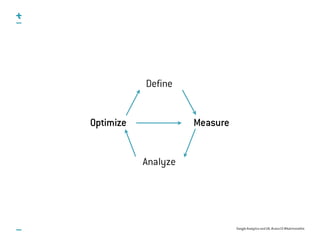
Define
Measure
Analyze
Optimize
9. Validate your MVP
Google Analytics and UX, #uxce13 @katrinmathis
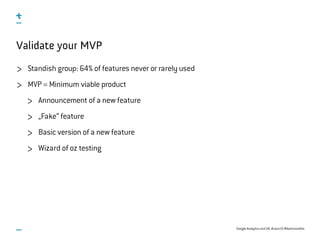
Validate your MVP
Standish group: 64% of features never or rarely used
MVP = Minimum viable product
Announcement of a new feature
„Fake“ feature
Basic version of a new feature
Wizard of oz testing
10. Verify your changes
Google Analytics and UX, #uxce13 @katrinmathis
Content Experiments
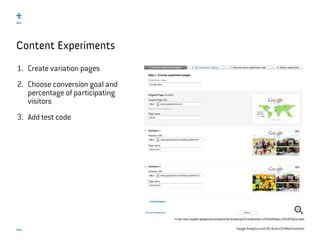
1. Create variation pages
2. Choose conversion goal and
percentage of participating
visitors
3. Add test code
Image: http://support.google.com/analytics/bin/answer.py?hl=en&answer=1745152&topic=1745207&ctx=topic
Google Analytics and UX, #uxce13 @katrinmathis
Content Experiments
Image: http://support.google.com/analytics/bin/answer.py?hl=en&answer=1745152&topic=1745207&ctx=topic
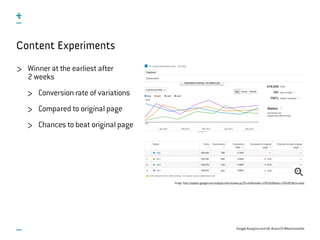
Winner at the earliest after
2 weeks
Conversion rate of variations
Compared to original page
Chances to beat original page
Google Analytics and UX, #uxce13 @katrinmathis
Value of Web Analytics for UX
Web analytics can start on a small budget and scale
Produces high fidelity data about natural use of product
Identify problematic areas for qualitative testing and quantify their impact
Quantify the ROI of usability/UX

Google Analytics & UX

  • 1.
    DIGITAL CONCEPTS WITH ADDEDVALUE. Google Analytics and UX #uxce13 @katrinmathis
  • 2.
    Google Analytics andUX, #uxce13 @katrinmathis Katrin Mathis Freelance consultant and conceptual designer based in Freiburg, Germany B. Sc. in OnlineMedia from Hochschule Furtwangen University MBA in Service Innovation and Design student (part-time) from September Google Analytics and AdWords Qualified Individual 7+ years of experience with international clients
  • 3.
    Google Analytics andUX, #uxce13 @katrinmathis What is Web Analytics? Web Analytics is the measurement, collection, analysis and reporting of Internet data for the purpose of understanding and optimizing Web usage. (Web Analytics Association)
  • 4.
    Google Analytics andUX, #uxce13 @katrinmathis Web Analytics User Experience What is analyzed Behavior - „what“ Intentions and motives - „why“ Methods Quantitative Qualitative Goal Help organization meet goals Help users achieve goals How data is used Top down Bottom up Kinds of data Statistical data Conceptual data Background Engineering or math Social sciences, humanities, arts Web Analytics vs. User Experience Source: Louis Rosenfeld (2011): Search Analytics for Your Site. Rosenfeld Media.
  • 5.
    Google Analytics andUX, #uxce13 @katrinmathis Define Measure
  • 6.
    1. Define conversiongoals and funnels
  • 7.
    Google Analytics andUX, #uxce13 @katrinmathis Key Performance Indicators Definition of 5 - 8 individual key figures per department SMART = Specific, measurable, attainable, realistic, timely e.g. „Increase traffic by 25% until the end of the year“ Fluctuations vs. true trends Compare values to targets
  • 8.
    Google Analytics andUX, #uxce13 @katrinmathis Conversion Goals Macro and micro goals, e.g. Purchases Contact form Registrations Newsletter subscription Downloads Comments Clicks on outbound links
  • 9.
    Google Analytics andUX, #uxce13 @katrinmathis Goal Definition Up to 4 x 5 = 20 goals per profile Per session conversion goals can only be reached once
  • 10.
    Google Analytics andUX, #uxce13 @katrinmathis Goal Definition - URL Destination
  • 11.
    Google Analytics andUX, #uxce13 @katrinmathis Goal Definition - Goal Funnels Up to 10 steps, e.g. Shopping cart Address Payment Confirmation page Image: http://www.google.com/intl/de/analytics/features.html
  • 12.
    Google Analytics andUX, #uxce13 @katrinmathis Goal Definition - Engagement Goals
  • 13.
    Google Analytics andUX, #uxce13 @katrinmathis Goal Definition - Event Goals
  • 14.
    2. Track yourinternal search
  • 15.
    Google Analytics andUX, #uxce13 @katrinmathis Site Search Tracking of internal search, e.g. http://www.n-tv.de/suche/?at=m&q=test Activation in profile settings
  • 16.
    Google Analytics andUX, #uxce13 @katrinmathis Site Search Reports Overview Visits with Search Total Unique Searches Results Pageviews / Search % Search Exits % Search Refinements Time after Search Search Depth Usage Visits with/without Site Search Search Terms Search Term Site Search Category Pages Start Page Destination Page
  • 17.
  • 18.
    Google Analytics andUX, #uxce13 @katrinmathis <a href=‘/document.pdf‘ onClick =‘_gaq.push([‘_trackPageview‘, ‘/downloads/document-xy.pdf‘]);‘> Jetzt Downloaden</a> Virtual Page Views Tracking of actions that are not page views, e.g. Downloads or outbound Links Tip: Integrate script that tracks automatically all downloads and outbound links Tip: File into categories, e.g. /downloads und /links Request tracked, not completion! Number of page views increased by virtual page views!
  • 19.
    Google Analytics andUX, #uxce13 @katrinmathis <a onclick=“_gaq.push([‘_trackEvent‘, category, action, label, value]);“>...</a> Event Tracking Tracking of objects (e.g. Video) and interactions (Play, Pause etc.) category action label (Optional) value (Optional) In contrast to virtual pageviews events do not generate additional page views Image: http://analytics.blogspot.de/2011/04/new-google-analytics-events-goals.html
  • 20.
    Google Analytics andUX, #uxce13 @katrinmathis _gaq.push([‘_trackSocial‘, network, socialAction, opt_target, opt_pagePath]); Social Media Tracking - Social Plugins Google +1 Button tracked automatically Plugins of other networks require manual tracking network social action opt_target opt_pagePath
  • 21.
    Google Analytics andUX, #uxce13 @katrinmathis _gaq.push([‘_setCustomVar‘, index, name, value, scope]); _gaq.push([‘_getVisitorCustomVar‘, index]); _gaq.push([‘_deleteCustomVar‘, index]); Custom variables Up to 5 custom variables per page view or event index name value scope 1: Visitor 2: Session 3: Page
  • 22.
    Google Analytics andUX, #uxce13 @katrinmathis E-Commerce Tracking Enable in profile settings Integration of _addTrans(), _addItem(), _trackTrans() on confirmation page after _trackPageview() While goal conversions are only counted once per session, all e-commerce transactions are counted.
  • 23.
    Google Analytics andUX, #uxce13 @katrinmathis _gaq.push([‘_addTrans‘, ‘transaction id‘, ‘affiliation‘, ‘total‘, ‘tax‘ ‘shipping‘, ‘city‘, ‘region‘, ‘country‘]); _gaq.push([‘_addItem‘, ‘transaction id‘, ‘SKU/code‘, ‘product name‘, ‘category‘, ‘price‘, ‘quantity‘]); _gaq.push([‘_trackTrans‘]); E-Commerce Tracking
  • 24.
  • 25.
    Google Analytics andUX, #uxce13 @katrinmathis <script type="text/javascript"> _gaq.push(['_trackEvent', 'Error', '404', 'page: ' + document.location.pathname + document.location.search + ' ref: ' + document.referrer ]); </script> Error tracking Track errors as events Types of errors 404 Not found errors Referrer URL trying to reach Form field errors
  • 26.
    Google Analytics andUX, #uxce13 @katrinmathis Define Measure Analyze
  • 27.
    5. Put yournumbers into context
  • 28.
    Google Analytics andUX, #uxce13 @katrinmathis Look for trends Tip: Choose same week days when comparing periods of time
  • 29.
    Google Analytics andUX, #uxce13 @katrinmathis Tip: Calender By default 1 months until previous day Reports of current day often already available
  • 30.
    Google Analytics andUX, #uxce13 @katrinmathis Tip: Annotations Annotations for single days Visible to all users of that profile or private tied to a single login Use identifier in teams, e.g. (KM) Annotations show up as baloons in the graph
  • 31.
    Google Analytics andUX, #uxce13 @katrinmathis Plot rows
  • 32.
    Google Analytics andUX, #uxce13 @katrinmathis Weighted sorting
  • 33.
    Google Analytics andUX, #uxce13 @katrinmathis Sorting by absolute change
  • 34.
    Google Analytics andUX, #uxce13 @katrinmathis Comparison
  • 35.
    Google Analytics andUX, #uxce13 @katrinmathis Filter
  • 36.
    Google Analytics andUX, #uxce13 @katrinmathis Advanced Filter
  • 37.
    6. Understand timeon site and bounce rate
  • 38.
    Google Analytics andUX, #uxce13 @katrinmathis Time on site and Bounce rate Page 1 Page 2 Page 3 Time on site Exit Page 1 Exit Time on site = 0 Bounce rate = 100%
  • 39.
  • 40.
    Google Analytics andUX, #uxce13 @katrinmathis Advanced segments Apply up to 4 segments at once Similar to profile filters but are easier to create and to compare can also be applied to historical data
  • 41.
    Google Analytics andUX, #uxce13 @katrinmathis Custom segments
  • 42.
    Google Analytics andUX, #uxce13 @katrinmathis Advanced segments
  • 43.
  • 44.
    Google Analytics andUX, #uxce13 @katrinmathis Dashboards
  • 45.
    Google Analytics andUX, #uxce13 @katrinmathis Dashboards - Widgets
  • 46.
    Google Analytics andUX, #uxce13 @katrinmathis Dashboards - Sharing
  • 47.
    Google Analytics andUX, #uxce13 @katrinmathis Shortcuts Saves shortcut to standard and custom reports including Open tab Sorting Advanced segments Graph settings Filter Number of rows Tied to login, so far no possibility to share
  • 48.
    Google Analytics andUX, #uxce13 @katrinmathis Intelligence Events Daily, weekly and monthly events Google Analytics calculates expected range from historical data Upon deviations from this expected range intelligence events are created Importance indicator and filter Helps to promptly discover anomalies and start further investigation
  • 49.
    Google Analytics andUX, #uxce13 @katrinmathis Custom Alerts
  • 50.
    Google Analytics andUX, #uxce13 @katrinmathis Custom reports 10 metrics per tab (blue) 1 - 5 dimensions (green)
  • 51.
    Google Analytics andUX, #uxce13 @katrinmathis Custom reports
  • 52.
    Google Analytics andUX, #uxce13 @katrinmathis Define Measure Analyze Optimize
  • 53.
  • 54.
    Google Analytics andUX, #uxce13 @katrinmathis Validate your MVP Standish group: 64% of features never or rarely used MVP = Minimum viable product Announcement of a new feature „Fake“ feature Basic version of a new feature Wizard of oz testing
  • 55.
  • 56.
    Google Analytics andUX, #uxce13 @katrinmathis Content Experiments 1. Create variation pages 2. Choose conversion goal and percentage of participating visitors 3. Add test code Image: http://support.google.com/analytics/bin/answer.py?hl=en&answer=1745152&topic=1745207&ctx=topic
  • 57.
    Google Analytics andUX, #uxce13 @katrinmathis Content Experiments Image: http://support.google.com/analytics/bin/answer.py?hl=en&answer=1745152&topic=1745207&ctx=topic Winner at the earliest after 2 weeks Conversion rate of variations Compared to original page Chances to beat original page
  • 58.
    Google Analytics andUX, #uxce13 @katrinmathis Value of Web Analytics for UX Web analytics can start on a small budget and scale Produces high fidelity data about natural use of product Identify problematic areas for qualitative testing and quantify their impact Quantify the ROI of usability/UX