



Google Analytics Crash Course
25 Tips/Tricks/Hacks in 30 minutes
@peter_oneill
Quick introduction to me
• Australian living in London
• Worked in Digital Analytics for over 10 years
• Founder of L3 Analytics in 2010
• London based Digital Analytics Consultancy
• GA & GTM Certified Partner
• Merging with AEP Convert to form LeapThree
• Support with Google Analytics and Adobe Analytics
• Services from Set-up to CRO, Personalisation and Data Strategy
• Work with clients of all sizes and across all sectors
• Founder of MeasureCamp
• Co-founder of MeasureBowling
@peter_oneill
Quick explanation of this session
• I originally was going to give 10 Google Analytics tips/tricks/hacks but
decided that wasn’t enough
• Now targeting 25 within what is left of my 30 minutes
• Some are basic, some are advanced
• They cover business principles, Google Analytics set-up, reporting and
analysis
• If one is boring or not relevant – give it a minute…
@peter_oneill
Before you open
Google Analytics
@peter_oneill
Understand the purpose of Digital Analytics1
@peter_oneill
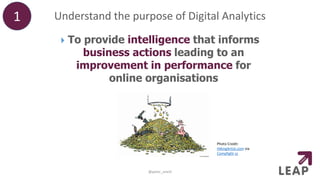
 To provide intelligence that informs
business actions leading to an
improvement in performance for
online organisations
Photo Credit:
HikingArtist.com via
Compfight cc
Create a Google Analytics solution for non analysts
• Do not create a Google Analytics set-
up for yourself
• That only you understand
• Ensure that everyone can understand
the reports
• They are the people who have to use
the information
• No abbreviations or only being able
to access information by combining
multiple custom dimensions
2
@peter_oneill
Invest time to understand information needs
• Talk to people, talk to all the end users of
Google Analytics data
• Understand the decisions they are making
and actions they are taking
• Write down a plan for all the information
you need to capture in Google Analytics
3
@peter_oneill
Know what you need to
know
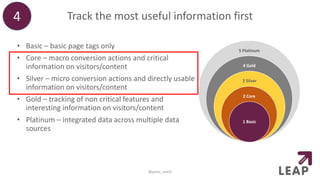
Track the most useful information first
• Basic – basic page tags only
• Core – macro conversion actions and critical
information on visitors/content
• Silver – micro conversion actions and directly usable
information on visitors/content
• Gold – tracking of non critical features and
interesting information on visitors/content
• Platinum – integrated data across multiple data
sources
4
@peter_oneill
5 Platinum
4 Gold
3 Silver
2 Core
1 Basic
Be creative within your Google Analytics solution
• One of the biggest barriers to getting value
from Google Analytics is Creativity
• You need to think of the data to capture before
it can be tracked
• What information is needed to inform business
questions/actions??
• You can capture
• the weather
• how many product sizes are in stock
• how long until a subscription expires
• whether the holiday booking people are looking for
is during school holidays
• This information is not out of the box
5
@peter_oneill
Useful information
to capture
@peter_oneill
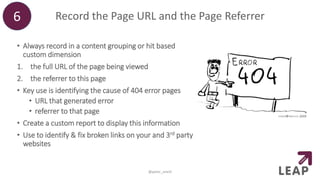
Record the Page URL and the Page Referrer
• Always record in a content grouping or hit based
custom dimension
1. the full URL of the page being viewed
2. the referrer to this page
• Key use is identifying the cause of 404 error pages
• URL that generated error
• referrer to that page
• Create a custom report to display this information
• Use to identify & fix broken links on your and 3rd party
websites
6
@peter_oneill
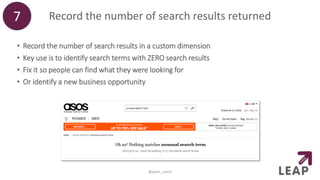
Record the number of search results returned
• Record the number of search results in a custom dimension
• Key use is to identify search terms with ZERO search results
• Fix it so people can find what they were looking for
• Or identify a new business opportunity
7
@peter_oneill
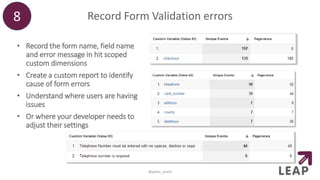
Record Form Validation errors
• Record the form name, field name
and error message in hit scoped
custom dimensions
• Create a custom report to identify
cause of form errors
• Understand where users are having
issues
• Or where your developer needs to
adjust their settings
8
@peter_oneill
Google Analytics
campaign tracking
@peter_oneill
Use all 5 Google Analytics campaign parameters
• There are five campaign parameters available
to you – use them all
• Ignore variable names, treat as a hierarchy
• Capture the granularity of campaigns
• Example – Email
• type of email (promotional or operational)
• email category OR distribution list
• name of email
• email campaign OR date email sent
• link identifier
• Bonus – if need more parameters, using
session scoped custom dimensions and
populate using View filters
9
@peter_oneill
Tell your vendors to add GA campaign parameters
• Many companies STILL don’t use campaign tracking
• Especially crazy when paying for a service such as
emails, display ads & affiliates
• In nearly every case, the vendor can flick a switch to
add Google Analytics campaign tracking
• Tell them to do so
• If they say they can’t or there is a fee, then their
solution is not that advanced or they are trying to hide
your data from you
• I recommend switching to their competitor
10
@peter_oneill
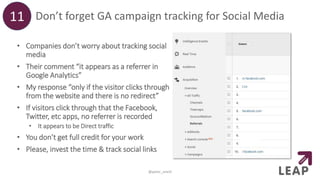
Don’t forget GA campaign tracking for Social Media
• Companies don’t worry about tracking social
media
• Their comment “it appears as a referrer in
Google Analytics”
• My response “only if the visitor clicks through
from the website and there is no redirect”
• If visitors click through that the Facebook,
Twitter, etc apps, no referrer is recorded
• It appears to be Direct traffic
• You don’t get full credit for your work
• Please, invest the time & track social links
11
@peter_oneill
Google Analytics
configuration
@peter_oneill
Create GA goals for negative experiences
• Goals can be about negative website experiences
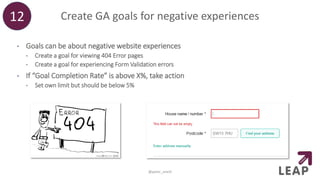
• Create a goal for viewing 404 Error pages
• Create a goal for experiencing Form Validation errors
• If “Goal Completion Rate” is above X%, take action
• Set own limit but should be below 5%
12
@peter_oneill
Create a GA goal for All Sessions
• This is a method to get a Last Click sessions report
• Create a goal for “All Sessions” – it is a destination goal which “begins with /”
13
@peter_oneill
• Select the Assisted Conversion report
within Multi-Channel Funnels
• Select “All Sessions” Goal as the
Conversion for the report
• The “Last Click” metric now
represents sessions
• The report displays last click sessions
by Channel (or medium or source or
anything else)
Create a goal for each funnel checkpoint
• There appears to be a backlash against
funnels but they are still very useful
• Goal funnels can’t be segmented
• Instead create a goal for each checkpoint
• This generates a horizontal funnel
• Can then view funnel for all dimensions
values within any report
• Use to identify differences in performance
14
@peter_oneill
Create Calculated Metrics for each funnel stage
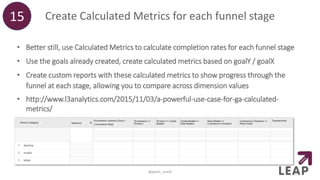
• Better still, use Calculated Metrics to calculate completion rates for each funnel stage
• Use the goals already created, create calculated metrics based on goalY / goalX
• Create custom reports with these calculated metrics to show progress through the
funnel at each stage, allowing you to compare across dimension values
• http://www.l3analytics.com/2015/11/03/a-powerful-use-case-for-ga-calculated-
metrics/
15
@peter_oneill
More useful
information to capture
@peter_oneill
Rename your pages in Google Analytics16
@peter_oneill
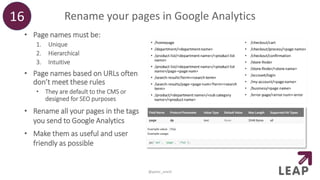
• Page names must be:
1. Unique
2. Hierarchical
3. Intuitive
• Page names based on URLs often
don’t meet these rules
• They are default to the CMS or
designed for SEO purposes
• Rename all your pages in the tags
you send to Google Analytics
• Make them as useful and user
friendly as possible
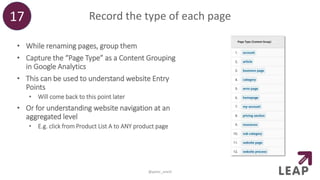
Record the type of each page
• While renaming pages, group them
• Capture the “Page Type” as a Content Grouping
in Google Analytics
• This can be used to understand website Entry
Points
• Will come back to this point later
• Or for understanding website navigation at an
aggregated level
• E.g. click from Product List A to ANY product page
17
@peter_oneill
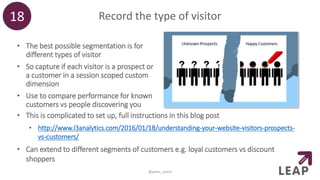
Record the type of visitor
• The best possible segmentation is for
different types of visitor
• So capture if each visitor is a prospect or
a customer in a session scoped custom
dimension
• Use to compare performance for known
customers vs people discovering you
18
@peter_oneill
• This is complicated to set up, full instructions in this blog post
• http://www.l3analytics.com/2016/01/18/understanding-your-website-visitors-prospects-
vs-customers/
• Can extend to different segments of customers e.g. loyal customers vs discount
shoppers
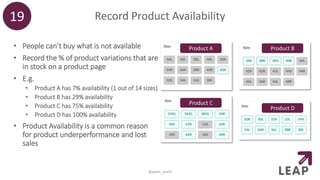
Record Product Availability
• People can’t buy what is not available
• Record the % of product variations that are
in stock on a product page
• E.g.
• Product A has 7% availability (1 out of 14 sizes)
• Product B has 29% availability
• Product C has 75% availability
• Product D has 100% availability
• Product Availability is a common reason
for product underperformance and lost
sales
19
@peter_oneill
Product A
Product C
Product D
Product B
Record the basket value in a Custom Metric
• One frustrating aspect of Enhanced Ecommerce is it
doesn’t expose basket value or any price data prior to
purchase
• Record in a product scoped custom metric
• Value of products added to basket
• Value of products removed from basket as a negative value
• Value of products in a transaction as a negative value
• This custom metric gives you the value of Abandoned
Baskets
• Share with senior management
• Caveat that this value doesn’t calculate quite right for
purchases across sessions
20
@peter_oneill
Photo Credit: gabriella szekely
Useful reports
@peter_oneill
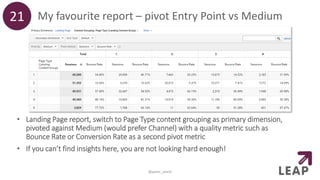
My favourite report – pivot Entry Point vs Medium
• Landing Page report, switch to Page Type content grouping as primary dimension,
pivoted against Medium (would prefer Channel) with a quality metric such as
Bounce Rate or Conversion Rate as a second pivot metric
• If you can’t find insights here, you are not looking hard enough!
21
@peter_oneill
Create a Performance Diagnostic report
• Each row is a different metric, each column is a different segment
• Look for the bugs and the opportunities using internal benchmarks
• An online version of this is currently in beta – http://profitgrid.io/
22
@peter_oneill
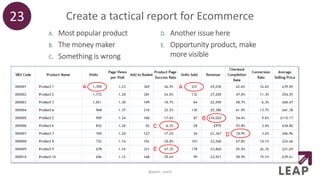
Create a tactical report for Ecommerce
A. Most popular product
B. The money maker
C. Something is wrong
D. Another issue here
E. Opportunity product, make
more visible
23
@peter_oneill
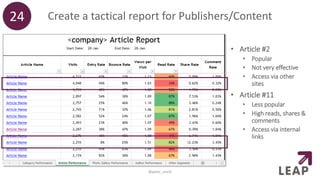
Create a tactical report for Publishers/Content
• Article #2
• Popular
• Not very effective
• Access via other
sites
• Article #11
• Less popular
• High reads, shares &
comments
• Access via internal
links
24
@peter_oneill
One to go…
@peter_oneill
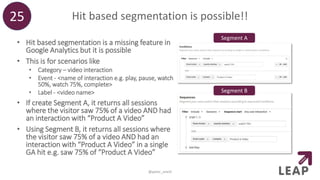
Hit based segmentation is possible!!
• Hit based segmentation is a missing feature in
Google Analytics but it is possible
• This is for scenarios like
• Category – video interaction
• Event - <name of interaction e.g. play, pause, watch
50%, watch 75%, complete>
• Label - <video name>
• If create Segment A, it returns all sessions
where the visitor saw 75% of a video AND had
an interaction with “Product A Video”
• Using Segment B, it returns all sessions where
the visitor saw 75% of a video AND had an
interaction with “Product A Video” in a single
GA hit e.g. saw 75% of “Product A Video”
25
@peter_oneill
Segment A
Segment B
THANK YOU
@peter_oneill
I can be found at
• peter.oneill@leapthree.com
• @peter_oneill
• +44 7843 617 347
• www.linkedin.com/in/peteroneill

Google Analytics Crash Course

  • 1.
    Google Analytics CrashCourse 25 Tips/Tricks/Hacks in 30 minutes @peter_oneill
  • 2.
    Quick introduction tome • Australian living in London • Worked in Digital Analytics for over 10 years • Founder of L3 Analytics in 2010 • London based Digital Analytics Consultancy • GA & GTM Certified Partner • Merging with AEP Convert to form LeapThree • Support with Google Analytics and Adobe Analytics • Services from Set-up to CRO, Personalisation and Data Strategy • Work with clients of all sizes and across all sectors • Founder of MeasureCamp • Co-founder of MeasureBowling @peter_oneill
  • 3.
    Quick explanation ofthis session • I originally was going to give 10 Google Analytics tips/tricks/hacks but decided that wasn’t enough • Now targeting 25 within what is left of my 30 minutes • Some are basic, some are advanced • They cover business principles, Google Analytics set-up, reporting and analysis • If one is boring or not relevant – give it a minute… @peter_oneill
  • 4.
    Before you open GoogleAnalytics @peter_oneill
  • 5.
    Understand the purposeof Digital Analytics1 @peter_oneill  To provide intelligence that informs business actions leading to an improvement in performance for online organisations Photo Credit: HikingArtist.com via Compfight cc
  • 6.
    Create a GoogleAnalytics solution for non analysts • Do not create a Google Analytics set- up for yourself • That only you understand • Ensure that everyone can understand the reports • They are the people who have to use the information • No abbreviations or only being able to access information by combining multiple custom dimensions 2 @peter_oneill
  • 7.
    Invest time tounderstand information needs • Talk to people, talk to all the end users of Google Analytics data • Understand the decisions they are making and actions they are taking • Write down a plan for all the information you need to capture in Google Analytics 3 @peter_oneill Know what you need to know
  • 8.
    Track the mostuseful information first • Basic – basic page tags only • Core – macro conversion actions and critical information on visitors/content • Silver – micro conversion actions and directly usable information on visitors/content • Gold – tracking of non critical features and interesting information on visitors/content • Platinum – integrated data across multiple data sources 4 @peter_oneill 5 Platinum 4 Gold 3 Silver 2 Core 1 Basic
  • 9.
    Be creative withinyour Google Analytics solution • One of the biggest barriers to getting value from Google Analytics is Creativity • You need to think of the data to capture before it can be tracked • What information is needed to inform business questions/actions?? • You can capture • the weather • how many product sizes are in stock • how long until a subscription expires • whether the holiday booking people are looking for is during school holidays • This information is not out of the box 5 @peter_oneill
  • 10.
  • 11.
    Record the PageURL and the Page Referrer • Always record in a content grouping or hit based custom dimension 1. the full URL of the page being viewed 2. the referrer to this page • Key use is identifying the cause of 404 error pages • URL that generated error • referrer to that page • Create a custom report to display this information • Use to identify & fix broken links on your and 3rd party websites 6 @peter_oneill
  • 12.
    Record the numberof search results returned • Record the number of search results in a custom dimension • Key use is to identify search terms with ZERO search results • Fix it so people can find what they were looking for • Or identify a new business opportunity 7 @peter_oneill
  • 13.
    Record Form Validationerrors • Record the form name, field name and error message in hit scoped custom dimensions • Create a custom report to identify cause of form errors • Understand where users are having issues • Or where your developer needs to adjust their settings 8 @peter_oneill
  • 14.
  • 15.
    Use all 5Google Analytics campaign parameters • There are five campaign parameters available to you – use them all • Ignore variable names, treat as a hierarchy • Capture the granularity of campaigns • Example – Email • type of email (promotional or operational) • email category OR distribution list • name of email • email campaign OR date email sent • link identifier • Bonus – if need more parameters, using session scoped custom dimensions and populate using View filters 9 @peter_oneill
  • 16.
    Tell your vendorsto add GA campaign parameters • Many companies STILL don’t use campaign tracking • Especially crazy when paying for a service such as emails, display ads & affiliates • In nearly every case, the vendor can flick a switch to add Google Analytics campaign tracking • Tell them to do so • If they say they can’t or there is a fee, then their solution is not that advanced or they are trying to hide your data from you • I recommend switching to their competitor 10 @peter_oneill
  • 17.
    Don’t forget GAcampaign tracking for Social Media • Companies don’t worry about tracking social media • Their comment “it appears as a referrer in Google Analytics” • My response “only if the visitor clicks through from the website and there is no redirect” • If visitors click through that the Facebook, Twitter, etc apps, no referrer is recorded • It appears to be Direct traffic • You don’t get full credit for your work • Please, invest the time & track social links 11 @peter_oneill
  • 18.
  • 19.
    Create GA goalsfor negative experiences • Goals can be about negative website experiences • Create a goal for viewing 404 Error pages • Create a goal for experiencing Form Validation errors • If “Goal Completion Rate” is above X%, take action • Set own limit but should be below 5% 12 @peter_oneill
  • 20.
    Create a GAgoal for All Sessions • This is a method to get a Last Click sessions report • Create a goal for “All Sessions” – it is a destination goal which “begins with /” 13 @peter_oneill • Select the Assisted Conversion report within Multi-Channel Funnels • Select “All Sessions” Goal as the Conversion for the report • The “Last Click” metric now represents sessions • The report displays last click sessions by Channel (or medium or source or anything else)
  • 21.
    Create a goalfor each funnel checkpoint • There appears to be a backlash against funnels but they are still very useful • Goal funnels can’t be segmented • Instead create a goal for each checkpoint • This generates a horizontal funnel • Can then view funnel for all dimensions values within any report • Use to identify differences in performance 14 @peter_oneill
  • 22.
    Create Calculated Metricsfor each funnel stage • Better still, use Calculated Metrics to calculate completion rates for each funnel stage • Use the goals already created, create calculated metrics based on goalY / goalX • Create custom reports with these calculated metrics to show progress through the funnel at each stage, allowing you to compare across dimension values • http://www.l3analytics.com/2015/11/03/a-powerful-use-case-for-ga-calculated- metrics/ 15 @peter_oneill
  • 23.
    More useful information tocapture @peter_oneill
  • 24.
    Rename your pagesin Google Analytics16 @peter_oneill • Page names must be: 1. Unique 2. Hierarchical 3. Intuitive • Page names based on URLs often don’t meet these rules • They are default to the CMS or designed for SEO purposes • Rename all your pages in the tags you send to Google Analytics • Make them as useful and user friendly as possible
  • 25.
    Record the typeof each page • While renaming pages, group them • Capture the “Page Type” as a Content Grouping in Google Analytics • This can be used to understand website Entry Points • Will come back to this point later • Or for understanding website navigation at an aggregated level • E.g. click from Product List A to ANY product page 17 @peter_oneill
  • 26.
    Record the typeof visitor • The best possible segmentation is for different types of visitor • So capture if each visitor is a prospect or a customer in a session scoped custom dimension • Use to compare performance for known customers vs people discovering you 18 @peter_oneill • This is complicated to set up, full instructions in this blog post • http://www.l3analytics.com/2016/01/18/understanding-your-website-visitors-prospects- vs-customers/ • Can extend to different segments of customers e.g. loyal customers vs discount shoppers
  • 27.
    Record Product Availability •People can’t buy what is not available • Record the % of product variations that are in stock on a product page • E.g. • Product A has 7% availability (1 out of 14 sizes) • Product B has 29% availability • Product C has 75% availability • Product D has 100% availability • Product Availability is a common reason for product underperformance and lost sales 19 @peter_oneill Product A Product C Product D Product B
  • 28.
    Record the basketvalue in a Custom Metric • One frustrating aspect of Enhanced Ecommerce is it doesn’t expose basket value or any price data prior to purchase • Record in a product scoped custom metric • Value of products added to basket • Value of products removed from basket as a negative value • Value of products in a transaction as a negative value • This custom metric gives you the value of Abandoned Baskets • Share with senior management • Caveat that this value doesn’t calculate quite right for purchases across sessions 20 @peter_oneill Photo Credit: gabriella szekely
  • 29.
  • 30.
    My favourite report– pivot Entry Point vs Medium • Landing Page report, switch to Page Type content grouping as primary dimension, pivoted against Medium (would prefer Channel) with a quality metric such as Bounce Rate or Conversion Rate as a second pivot metric • If you can’t find insights here, you are not looking hard enough! 21 @peter_oneill
  • 31.
    Create a PerformanceDiagnostic report • Each row is a different metric, each column is a different segment • Look for the bugs and the opportunities using internal benchmarks • An online version of this is currently in beta – http://profitgrid.io/ 22 @peter_oneill
  • 32.
    Create a tacticalreport for Ecommerce A. Most popular product B. The money maker C. Something is wrong D. Another issue here E. Opportunity product, make more visible 23 @peter_oneill
  • 33.
    Create a tacticalreport for Publishers/Content • Article #2 • Popular • Not very effective • Access via other sites • Article #11 • Less popular • High reads, shares & comments • Access via internal links 24 @peter_oneill
  • 34.
  • 35.
    Hit based segmentationis possible!! • Hit based segmentation is a missing feature in Google Analytics but it is possible • This is for scenarios like • Category – video interaction • Event - <name of interaction e.g. play, pause, watch 50%, watch 75%, complete> • Label - <video name> • If create Segment A, it returns all sessions where the visitor saw 75% of a video AND had an interaction with “Product A Video” • Using Segment B, it returns all sessions where the visitor saw 75% of a video AND had an interaction with “Product A Video” in a single GA hit e.g. saw 75% of “Product A Video” 25 @peter_oneill Segment A Segment B
  • 36.
    THANK YOU @peter_oneill I canbe found at • peter.oneill@leapthree.com • @peter_oneill • +44 7843 617 347 • www.linkedin.com/in/peteroneill