Integrating web analysis in the user experience design process Erik Verdeyen David De Block www.internetarchitects.be 26 th  September 2008 EuroIA Conference 2008 - Amsterdam
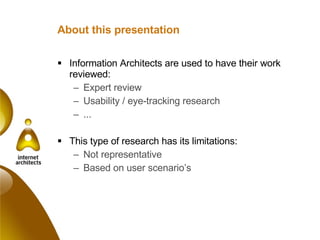
About this presentation Information Architects are used to have their work reviewed: Expert review Usability / eye-tracking research ... This type of research has its limitations: Not representative Based on user scenario’s
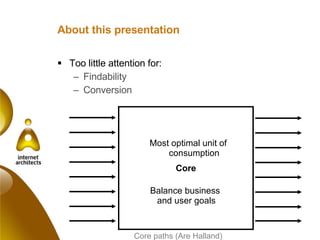
About this presentation Too little attention for: Findability Conversion Core paths (Are Halland) Core Most optimal unit of consumption Balance business  and user goals
About this presentation Web analytics: Adds information about findability and conversion Gives you an insight about ALL your users Makes affordable continuous UX optimization possible Plan Do Measure Adjust
About this presentation Analytics doesn’t replace anything in the design process: Analytics doesn’t tell how to improve when you don’t meet your targets It is no substitution to seeing how people really interact It is only usable as soon as the site is live It is a  complimentary  tool in the UX design process
About this presentation UX people are ideal for performing web analysis: We are the most user centered profile in a web team We are used interpreting user’s behavior Optimizing ease of use is our core business It makes the ROI of UX design tacit for marketing and business - it justifies our job   /  Capital expenditure vs operational expenditure
About this presentation Conclusion:  Web analytics enrich the UX design process It is a bridge to the marketing and business people We are the best party to be in the driver’s seat
About this presentation Content of the presentation Introduction in Web Analytics Web Analytics in the UX design process Some current evolutions
ACT 1: Introduction in Web Analytics
Introduction in Web Analytics Narrow point of view: Measuring behaviour of website visitors  (= core) Wide point of view: Measuring which aspects of the website work towards the business objectives (= core paths) Core Most optimal unit of consumption Balance business  and user goals
Introduction in Web Analytics new users vs. returning users Findability Calls to action Core Cross media SEO SEA Prof. networks Online ads E-mailing Content-push Job search Job browse Job details My HR RSS Newsletter Apply online
Introduction in Web Analytics This presentation takes the wide view
Introduction in Web Analytics It is what your customer wants: He doesn’t want usability and UX as such He wants to meet his targets, he wants conversion
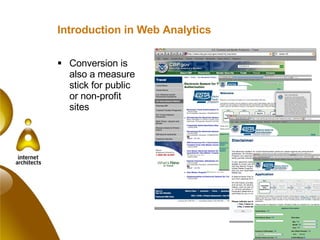
Introduction in Web Analytics Conversion is also a measure stick for public or non-profit sites
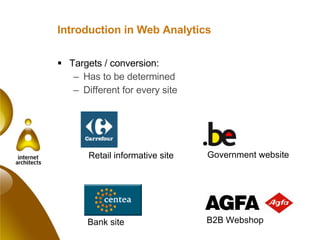
Introduction in Web Analytics Targets / conversion: Has to be determined Different for every site Retail informative site Government website Bank site B2B Webshop
Introduction in Web Analytics Business goals are described in KPI’s or Key Performance Indicators: Drive business-critical action  Rates, ratios, percentages and averages instead of raw numbers  Highlight change instead of presenting tables of data Not more than 10
Introduction in Web Analytics Focus points of the new generation tools Traffic : where do people come from? Users / content : what are people doing? Conversions : did I reach my goals?
Introduction in Web Analytics Loads of tools available: Free / paid Service / software
Introduction in Web Analytics A free tool in the  Forrester report  
Introduction in Web Analytics
Introduction in Web Analytics It doesn’t need to be expensive or complicated Google Analytics can be a great starting point It’s better to invest in people than in tools As long as you use the tool well: That’s more than next, next, …, finish Measure your KPI’s
ACT 2: Web Analytics in the UI design process
Case Belgium.be: Portal Belgian Federal government Bi-lingual country Spans federal government plus regions Portal team of 15: 10 theme managers + 5 specialists (search, metrics, news, publications,…) Doesn’t replace the ministry sites: “ broad but not deep” an entry point to gov info up to date …
Approach
Define Intake Strategy Findability High level concept
Define phase - intake Belgium.be portal vs. the other gov sites
Define phase - intake Web analysis of existing site: to learn from the past to give you input for realistic expectations  Findings:  Primary goal of portal – “dispatching” people – was not met at all People were looking for all governmental information Conclusion: Emphasis on“portal” Belgian government portal
Define phase - strategy After definition of the business goals Define KPI’s: Increase in traffic in target sites (due to better portal function) Increase in link backs from gov sites Top keywords … By the end of the define phase, we had: Clear findings from the past Indicators – based on strategy – to measure success (KPI’s)
Define phase - strategy Cross site measurement Within a cluster of sites, taking a site as boundary is arbitrary One visit is perceived a three visits
Define phase - strategy Cross site measurement Identify problems with the overall IA strategy Styleguide & guidelines Link with cross media efforts global data on user behavior
Design Navigation Functional design Graphical design Demosite Eyetracking
Design phase – functional design After defining functional specifications: Create a  web analysis inventory document : General measuring requirements  E.g. campaigns, links, custom variables Reporting and exporting requirements E.g. comparative reporting, site overlay, segmentation Reports: General reports  E.g. bounce rates, # clicks / visit Reports based on KPI’s: E.g. external links, # visits in Dutch / French
Design phase – eyetracking Use of KPI’s to add conversion driven scenarios
Design phase – eyetracking Testing a number of scenario’s and hypothesis Testing (demo site, pre launch): do people use the doormat navigation system Live site: check real life situation with  analytics
Design Phase - eyetracking Testing: do people find/use functionalities Live site: check usage and be- havior, identify problems
Some more examples Hypothesis in the design phase can be confirmed through web analytics, e.g.: Facetted navigation Banner blindness Portal functions: exit to other gov sources …
Design phase – delivery to development It’s important that your web analysis tool measures the right information: Write an implementation plan Work closely together with the implementors
Realize Development (external party) Support: Graphical Content wise Functional Technical Web analytics configuration Quality assurance
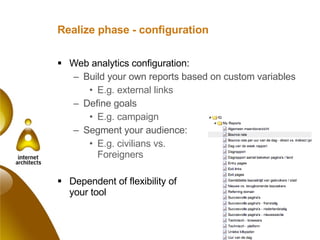
Realize phase - configuration Web analytics configuration: Build your own reports based on custom variables E.g. external links Define goals E.g. campaign Segment your audience: E.g. civilians vs.  Foreigners Dependent of flexibility of  your tool
Realize phase – Quality Assurance !!! Test whether all information comes in You don’t want to miss the launch
Optimization Findability Search Engine Optimization Internal  External Campaign management Core Conversion
Optimization As soon as the website goes online: Make sure your client understands the metrics Encourage him to have an optimize phase in the project before going operational or start a new project Belgium.be: optimization phase in progress Plan Do Measure Adjust
Optimization phase – KPI dashboard Try to do something about the information overload: Provide your client a KPI dashboard: Manually - in excel Automatically - via API Try to involve the manager
Optimization phase - findability Findability has lots of facets: Direct traffic Search engine Campaigns and push technology Referrals … It’s an important aspect of the information architecture Make sure you can segment your users on the way they came in Calculate the Cost per Conversion (CPA) and weigh the options
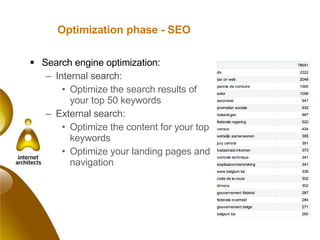
Optimization phase - SEO Search engine optimization: Internal search:  Optimize the search results of your top 50 keywords External search: Optimize the content for your top keywords Optimize your landing pages and navigation
Search engine optimization - SEA  Search engine advertising Becomes more and more important SEA management tools become available E.g. nightly exclusion of “bad performers”
Search engine optimization - SEA  Even within public services Using SEA to get traction Ad-hoc emergency communication Mind shift needed from “this is advertising” to “this is improving our findability”
Optimization phase – campaigns  Different types of “campaigns”: RSS / widgets Banners Email campaigns / newsletters Identify them all: Calculate the cost Segment and optimize
Optimization phase - core Optimization of the site: Small incremental changes A/B or multivariate testing possible (e.g. with Google’s Website Optimizer)
ACT 3: some current evolutions
CRM / behavioral targeting From web-analytics to data-driven (online) marketing: Behavioral targeting E.g. Omniture bought Touch Clarity last year E.g. Out-of-the-box techniques in CMS “Fatwire’ Integration with CRM and BI: Open architecture of most commercial tools
Campaign / bid management Bid and campaign management is getting bigger and bigger: E.g. Webtrends, StormOptimizer, Tradedoubler Even CMS vendors integrate with campaign management tools E.g. MediaSurface and Alterian
Benchmark  Benchmarking information: Google Market research companies Gives you insight in: Reach  Name recognition Appreciation Tells you where you are compared to the competition
Thank you! [email_address] +32 475 567 890 [email_address] +32 486 134 138 www.internetarchitects.be

Integrating web analysis in the user experience design process

  • 1.
    Integrating web analysisin the user experience design process Erik Verdeyen David De Block www.internetarchitects.be 26 th September 2008 EuroIA Conference 2008 - Amsterdam
  • 2.
    About this presentationInformation Architects are used to have their work reviewed: Expert review Usability / eye-tracking research ... This type of research has its limitations: Not representative Based on user scenario’s
  • 3.
    About this presentationToo little attention for: Findability Conversion Core paths (Are Halland) Core Most optimal unit of consumption Balance business and user goals
  • 4.
    About this presentationWeb analytics: Adds information about findability and conversion Gives you an insight about ALL your users Makes affordable continuous UX optimization possible Plan Do Measure Adjust
  • 5.
    About this presentationAnalytics doesn’t replace anything in the design process: Analytics doesn’t tell how to improve when you don’t meet your targets It is no substitution to seeing how people really interact It is only usable as soon as the site is live It is a complimentary tool in the UX design process
  • 6.
    About this presentationUX people are ideal for performing web analysis: We are the most user centered profile in a web team We are used interpreting user’s behavior Optimizing ease of use is our core business It makes the ROI of UX design tacit for marketing and business - it justifies our job  /  Capital expenditure vs operational expenditure
  • 7.
    About this presentationConclusion: Web analytics enrich the UX design process It is a bridge to the marketing and business people We are the best party to be in the driver’s seat
  • 8.
    About this presentationContent of the presentation Introduction in Web Analytics Web Analytics in the UX design process Some current evolutions
  • 9.
    ACT 1: Introductionin Web Analytics
  • 10.
    Introduction in WebAnalytics Narrow point of view: Measuring behaviour of website visitors (= core) Wide point of view: Measuring which aspects of the website work towards the business objectives (= core paths) Core Most optimal unit of consumption Balance business and user goals
  • 11.
    Introduction in WebAnalytics new users vs. returning users Findability Calls to action Core Cross media SEO SEA Prof. networks Online ads E-mailing Content-push Job search Job browse Job details My HR RSS Newsletter Apply online
  • 12.
    Introduction in WebAnalytics This presentation takes the wide view
  • 13.
    Introduction in WebAnalytics It is what your customer wants: He doesn’t want usability and UX as such He wants to meet his targets, he wants conversion
  • 14.
    Introduction in WebAnalytics Conversion is also a measure stick for public or non-profit sites
  • 15.
    Introduction in WebAnalytics Targets / conversion: Has to be determined Different for every site Retail informative site Government website Bank site B2B Webshop
  • 16.
    Introduction in WebAnalytics Business goals are described in KPI’s or Key Performance Indicators: Drive business-critical action Rates, ratios, percentages and averages instead of raw numbers Highlight change instead of presenting tables of data Not more than 10
  • 17.
    Introduction in WebAnalytics Focus points of the new generation tools Traffic : where do people come from? Users / content : what are people doing? Conversions : did I reach my goals?
  • 18.
    Introduction in WebAnalytics Loads of tools available: Free / paid Service / software
  • 19.
    Introduction in WebAnalytics A free tool in the Forrester report 
  • 20.
  • 21.
  • 22.
  • 23.
    Introduction in WebAnalytics It doesn’t need to be expensive or complicated Google Analytics can be a great starting point It’s better to invest in people than in tools As long as you use the tool well: That’s more than next, next, …, finish Measure your KPI’s
  • 24.
    ACT 2: WebAnalytics in the UI design process
  • 25.
    Case Belgium.be: PortalBelgian Federal government Bi-lingual country Spans federal government plus regions Portal team of 15: 10 theme managers + 5 specialists (search, metrics, news, publications,…) Doesn’t replace the ministry sites: “ broad but not deep” an entry point to gov info up to date …
  • 26.
  • 27.
    Define Intake StrategyFindability High level concept
  • 28.
    Define phase -intake Belgium.be portal vs. the other gov sites
  • 29.
    Define phase -intake Web analysis of existing site: to learn from the past to give you input for realistic expectations Findings: Primary goal of portal – “dispatching” people – was not met at all People were looking for all governmental information Conclusion: Emphasis on“portal” Belgian government portal
  • 30.
    Define phase -strategy After definition of the business goals Define KPI’s: Increase in traffic in target sites (due to better portal function) Increase in link backs from gov sites Top keywords … By the end of the define phase, we had: Clear findings from the past Indicators – based on strategy – to measure success (KPI’s)
  • 31.
    Define phase -strategy Cross site measurement Within a cluster of sites, taking a site as boundary is arbitrary One visit is perceived a three visits
  • 32.
    Define phase -strategy Cross site measurement Identify problems with the overall IA strategy Styleguide & guidelines Link with cross media efforts global data on user behavior
  • 33.
    Design Navigation Functionaldesign Graphical design Demosite Eyetracking
  • 34.
    Design phase –functional design After defining functional specifications: Create a web analysis inventory document : General measuring requirements E.g. campaigns, links, custom variables Reporting and exporting requirements E.g. comparative reporting, site overlay, segmentation Reports: General reports E.g. bounce rates, # clicks / visit Reports based on KPI’s: E.g. external links, # visits in Dutch / French
  • 35.
    Design phase –eyetracking Use of KPI’s to add conversion driven scenarios
  • 36.
    Design phase –eyetracking Testing a number of scenario’s and hypothesis Testing (demo site, pre launch): do people use the doormat navigation system Live site: check real life situation with analytics
  • 37.
    Design Phase -eyetracking Testing: do people find/use functionalities Live site: check usage and be- havior, identify problems
  • 38.
    Some more examplesHypothesis in the design phase can be confirmed through web analytics, e.g.: Facetted navigation Banner blindness Portal functions: exit to other gov sources …
  • 39.
    Design phase –delivery to development It’s important that your web analysis tool measures the right information: Write an implementation plan Work closely together with the implementors
  • 40.
    Realize Development (externalparty) Support: Graphical Content wise Functional Technical Web analytics configuration Quality assurance
  • 41.
    Realize phase -configuration Web analytics configuration: Build your own reports based on custom variables E.g. external links Define goals E.g. campaign Segment your audience: E.g. civilians vs. Foreigners Dependent of flexibility of your tool
  • 42.
    Realize phase –Quality Assurance !!! Test whether all information comes in You don’t want to miss the launch
  • 43.
    Optimization Findability SearchEngine Optimization Internal External Campaign management Core Conversion
  • 44.
    Optimization As soonas the website goes online: Make sure your client understands the metrics Encourage him to have an optimize phase in the project before going operational or start a new project Belgium.be: optimization phase in progress Plan Do Measure Adjust
  • 45.
    Optimization phase –KPI dashboard Try to do something about the information overload: Provide your client a KPI dashboard: Manually - in excel Automatically - via API Try to involve the manager
  • 46.
    Optimization phase -findability Findability has lots of facets: Direct traffic Search engine Campaigns and push technology Referrals … It’s an important aspect of the information architecture Make sure you can segment your users on the way they came in Calculate the Cost per Conversion (CPA) and weigh the options
  • 47.
    Optimization phase -SEO Search engine optimization: Internal search: Optimize the search results of your top 50 keywords External search: Optimize the content for your top keywords Optimize your landing pages and navigation
  • 48.
    Search engine optimization- SEA Search engine advertising Becomes more and more important SEA management tools become available E.g. nightly exclusion of “bad performers”
  • 49.
    Search engine optimization- SEA Even within public services Using SEA to get traction Ad-hoc emergency communication Mind shift needed from “this is advertising” to “this is improving our findability”
  • 50.
    Optimization phase –campaigns Different types of “campaigns”: RSS / widgets Banners Email campaigns / newsletters Identify them all: Calculate the cost Segment and optimize
  • 51.
    Optimization phase -core Optimization of the site: Small incremental changes A/B or multivariate testing possible (e.g. with Google’s Website Optimizer)
  • 52.
    ACT 3: somecurrent evolutions
  • 53.
    CRM / behavioraltargeting From web-analytics to data-driven (online) marketing: Behavioral targeting E.g. Omniture bought Touch Clarity last year E.g. Out-of-the-box techniques in CMS “Fatwire’ Integration with CRM and BI: Open architecture of most commercial tools
  • 54.
    Campaign / bidmanagement Bid and campaign management is getting bigger and bigger: E.g. Webtrends, StormOptimizer, Tradedoubler Even CMS vendors integrate with campaign management tools E.g. MediaSurface and Alterian
  • 55.
    Benchmark Benchmarkinginformation: Google Market research companies Gives you insight in: Reach Name recognition Appreciation Tells you where you are compared to the competition
  • 56.
    Thank you! [email_address]+32 475 567 890 [email_address] +32 486 134 138 www.internetarchitects.be