GIT Introduction


  Vu Viet Phuong - PortalTeam
Objective


 
       Understand the advantage of GIT and
       determine if we should use GIT or not.


  
      Know how to use the common used GIT commands


                                2
Subject

  
      Characteristic of GIT
      – The most powerful features of GIT
      – Explain the differences between GIT and SVN

  • GIT basic usages
      - Day to day GIT used commands


  • Tips and Tricks


                                  3
Characteristic of GIT

                        4
History


 
     Invented by Linus Torvalds to
         support the development of the Linux Kernel



     Incredibly fast, very effi cient with large projects,
      has an incredible branching system for non-linear development


 
     Projects using Git : Linux Kernel, Perl, Eclipse, Android ...


                                      5
Compare to SVN


    There are many version control tools in the market
       But GIT is a completely difference tool
       GIT own many distinct, powerful features



    Interface is fairly similar to SVN



    Git stores and thinks about data differently than SVN


                                    6
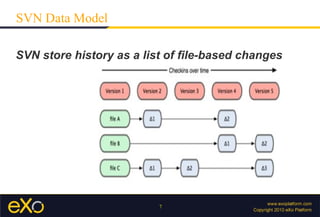
SVN Data Model

SVN store history as a list of file-based changes


                         7
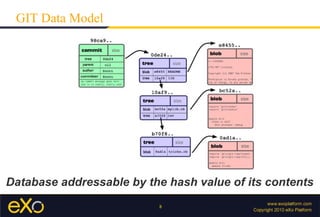
GIT Data Model


Database addressable by the hash value of its contents
                          8
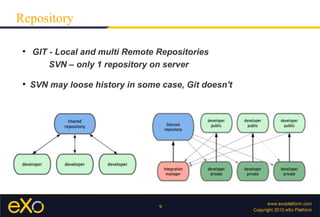
Repository

 
     GIT - Local and multi Remote Repositories
         SVN – only 1 repository on server

 
     SVN may loose history in some case, Git doesn't


                                   9
Why's GIT fast ?

  
          The internal database structure


  
          Nearly every operation is Local
                 Entire history is on local disk


      
          This database is compressed effectively
           transfer over network, use SSH or GIT protocol


                                       10
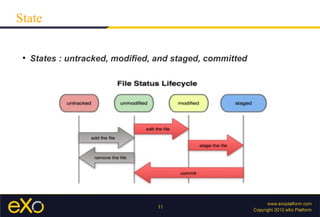
State

 
     States : untracked, modified, and staged, committed


                                  11
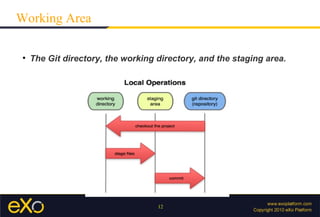
Working Area

 
     The Git directory, the working directory, and the staging area.


                                    12
Branch Management

  
      Killer feature – Managing branches
          Make Git apart in the VCS community


  
      Branching operations nearly instantaneous
         Switching back and forth between branches just as fast


  
      We can create branches, and merge often
         even multiple times in a day


                               13
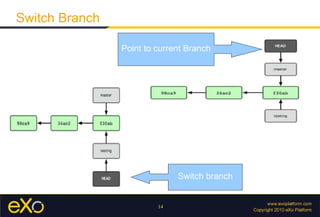
Switch Branch

                Point to current Branch


                              Switch branch


                         14
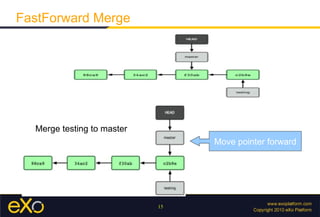
FastForward Merge


  Merge testing to master
                                 Move pointer forward


                            15
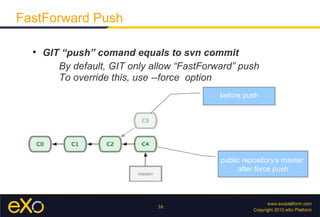
FastForward Push

  
      GIT “push” comand equals to svn commit
         By default, GIT only allow “FastForward” push
         To override this, use --force option
                                             before push


                                             public repository's master
                                                  after force push


                               16
Modify History

  
      Return to one point in History
         $ git reset --hard <commitID>


  
      Replace last commit
         $ git commit –amend -m <msg>


  
      Rebase history
         $ git rebase -i <commitID>


                               17
Working with Patch

  
      Support binary patch
       Resize a “jpeg” file → support create patch
         $ git diff --binary > patchToFile


  
      Create – apply mutiple patches


  
      Cherry picking


                               18
Git Basics

             19
Installing GIT

                   http://git-scm.com/download


    Window, Mac – Download Installation file



    Linux - The primary Git package :
       git-core, git-doc – document
       git-cvs, git-svn – work with CVS, or SVN
       gitk           – graphical application


     $ sudo apt-get install git-core git-doc gitk git-svn

                                         20
Configuration

     
         3 Config files:
              /etc/gitconfig     → all users, repositories (--system)
              ~/.gitconfig       → one user, all repo       (--global)
              [repo]/.git/config → specific to repository (default)

 
         Your Identity – information in each commit
             $ git config --global user.name "phuong_vu"
             $ git config --global user.email
              phuong_vu@exoplatform.com
 
         List all config values:
            $ git config --list


                                      21
Ignoring Files

 
     3 places to put ignore file names:
      .gitignore
            specific to folder, go with source code to public repo

      .git/info/exclude
              not share with others

      $ git config core.excludesfile <path>
              can use system, global, or default config file


                                22
Create .git

 
     Initialized empty Git repository (.git folder)
          $ git init


 
     Cloning an existing Repository
         $ git clone <url>


 
     Create GIT repo from SVN repo
         $ git svn clone --username <name> <url>


                                 23
Everyday works
                      $ git add [-A] [-i] <path>
                         add changes to index


                      $ git reset --hard
                         remove changes


                      $ git commit [-a] -m “msg”
                         commit changes


                 24
View Changes

 
     Git store project snapshot on each commit
          SVN store a list of file-based changes
                $ git show <commitID>

 
     Uncommitted changes
               $ git diff [--cached]

 
     Changes between branches
               $ git diff master..standalone


                                  25
View History

           $ git log [--pretty] [--graph] [--grep] [-S]
 --pretty → display format
 --graph → show history in diagram
 --grep   → search by commit msg
 --S      → search by diff


 
     Search log by content
               $ git log --follow [PATH]


                                26
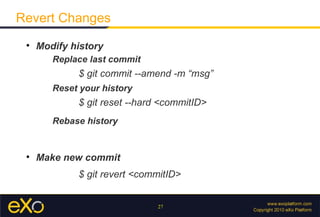
Revert Changes
 
     Modify history
        Replace last commit
             $ git commit --amend -m “msg”
        Reset your history
             $ git reset --hard <commitID>
        Rebase history


 
     Make new commit
             $ git revert <commitID>


                              27
Share Changes
 
     Remote Repository
        Versions of your project hosted on some where else

 
     Show remotes
              $ git remote [show <remoteName>]

 
     Push – Pull changes (svn commit | update)
              $ git [push | pull] [remoteName]


                                 28
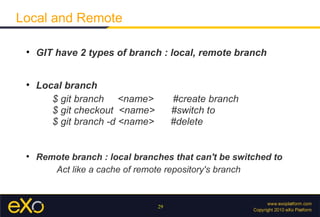
Local and Remote

 
     GIT have 2 types of branch : local, remote branch


 
     Local branch
        $ git branch <name>           #create branch
        $ git checkout <name>         #switch to
        $ git branch -d <name>        #delete


 
     Remote branch : local branches that can't be switched to
        Act like a cache of remote repository's branch


                                 29
Remote Branch

 
     Show remote branches
        $ git branch -r

 
     Make your history simple
        $ git fetch [remote]
        $ git rebase [remote/branch]


 
     Remote tracking branch
        $ git checkout -b <name> <remote/branch>


                                30
Patch

 
     Create – apply multi patches
        $ git format-patch <commitID>
        $ git am <path>

 
     Cherry picking
        $ git cherry-pick <commitID>


 
     Stashing – temporary save your work
        $ git stash [apply]


                               31
Tips and Tricks
Auto-Completion

  
      Git source:
        contrib/completion/git-completion.bash


       $ git chec → [TAB] → $ git checkout


                                               Copy to folder
 Ubuntu    /etc/bash_completion.d/
 Mac       /opt/local/etc/bash_completion.d/


                               33
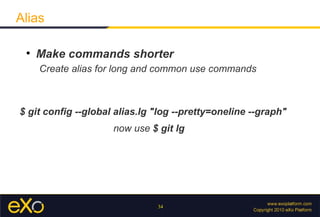
Alias

 
     Make commands shorter
     Create alias for long and common use commands


$ git config --global alias.lg "log --pretty=oneline --graph"
                     now use $ git lg


                               34
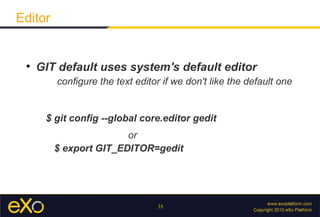
Editor


 
     GIT default uses system's default editor
         configure the text editor if we don't like the default one


      $ git config --global core.editor gedit
                        or
         $ export GIT_EDITOR=gedit


                                 35
Diff Tool

 
     Git has an internal implementation of diff
     But we can set up external merge and diff tools


 
     Git accepts xxdiff, emerge, vimdiff, gvimdiff, opendiff...


          $ git config --global merge.tool vimdiff


                                  36
Resources


 http://whygitisbetterthanx.com
     More explaination why use GIT


      Basic tutorial

      Version Control with Git - O'Reilly Media
                 Advance GIT

                        37

Git training

  • 1.
    GIT Introduction Vu Viet Phuong - PortalTeam
  • 2.
    Objective  Understand the advantage of GIT and determine if we should use GIT or not.  Know how to use the common used GIT commands 2
  • 3.
    Subject  Characteristic of GIT – The most powerful features of GIT – Explain the differences between GIT and SVN • GIT basic usages - Day to day GIT used commands • Tips and Tricks 3
  • 4.
  • 5.
    History  Invented by Linus Torvalds to support the development of the Linux Kernel  Incredibly fast, very effi cient with large projects, has an incredible branching system for non-linear development  Projects using Git : Linux Kernel, Perl, Eclipse, Android ... 5
  • 6.
    Compare to SVN  There are many version control tools in the market But GIT is a completely difference tool GIT own many distinct, powerful features  Interface is fairly similar to SVN  Git stores and thinks about data differently than SVN 6
  • 7.
    SVN Data Model SVNstore history as a list of file-based changes 7
  • 8.
    GIT Data Model Databaseaddressable by the hash value of its contents 8
  • 9.
    Repository  GIT - Local and multi Remote Repositories SVN – only 1 repository on server  SVN may loose history in some case, Git doesn't 9
  • 10.
    Why's GIT fast?  The internal database structure  Nearly every operation is Local Entire history is on local disk  This database is compressed effectively transfer over network, use SSH or GIT protocol 10
  • 11.
    State  States : untracked, modified, and staged, committed 11
  • 12.
    Working Area  The Git directory, the working directory, and the staging area. 12
  • 13.
    Branch Management  Killer feature – Managing branches Make Git apart in the VCS community  Branching operations nearly instantaneous Switching back and forth between branches just as fast  We can create branches, and merge often even multiple times in a day 13
  • 14.
    Switch Branch Point to current Branch Switch branch 14
  • 15.
    FastForward Merge Merge testing to master Move pointer forward 15
  • 16.
    FastForward Push  GIT “push” comand equals to svn commit By default, GIT only allow “FastForward” push To override this, use --force option before push public repository's master after force push 16
  • 17.
    Modify History  Return to one point in History $ git reset --hard <commitID>  Replace last commit $ git commit –amend -m <msg>  Rebase history $ git rebase -i <commitID> 17
  • 18.
    Working with Patch  Support binary patch Resize a “jpeg” file → support create patch $ git diff --binary > patchToFile  Create – apply mutiple patches  Cherry picking 18
  • 19.
  • 20.
    Installing GIT http://git-scm.com/download  Window, Mac – Download Installation file  Linux - The primary Git package : git-core, git-doc – document git-cvs, git-svn – work with CVS, or SVN gitk – graphical application $ sudo apt-get install git-core git-doc gitk git-svn 20
  • 21.
    Configuration  3 Config files: /etc/gitconfig → all users, repositories (--system) ~/.gitconfig → one user, all repo (--global) [repo]/.git/config → specific to repository (default)  Your Identity – information in each commit $ git config --global user.name "phuong_vu" $ git config --global user.email phuong_vu@exoplatform.com  List all config values: $ git config --list 21
  • 22.
    Ignoring Files  3 places to put ignore file names: .gitignore specific to folder, go with source code to public repo .git/info/exclude not share with others $ git config core.excludesfile <path> can use system, global, or default config file 22
  • 23.
    Create .git  Initialized empty Git repository (.git folder) $ git init  Cloning an existing Repository $ git clone <url>  Create GIT repo from SVN repo $ git svn clone --username <name> <url> 23
  • 24.
    Everyday works $ git add [-A] [-i] <path> add changes to index $ git reset --hard remove changes $ git commit [-a] -m “msg” commit changes 24
  • 25.
    View Changes  Git store project snapshot on each commit SVN store a list of file-based changes $ git show <commitID>  Uncommitted changes $ git diff [--cached]  Changes between branches $ git diff master..standalone 25
  • 26.
    View History $ git log [--pretty] [--graph] [--grep] [-S] --pretty → display format --graph → show history in diagram --grep → search by commit msg --S → search by diff  Search log by content $ git log --follow [PATH] 26
  • 27.
    Revert Changes  Modify history Replace last commit $ git commit --amend -m “msg” Reset your history $ git reset --hard <commitID> Rebase history  Make new commit $ git revert <commitID> 27
  • 28.
    Share Changes  Remote Repository Versions of your project hosted on some where else  Show remotes $ git remote [show <remoteName>]  Push – Pull changes (svn commit | update) $ git [push | pull] [remoteName] 28
  • 29.
    Local and Remote  GIT have 2 types of branch : local, remote branch  Local branch $ git branch <name> #create branch $ git checkout <name> #switch to $ git branch -d <name> #delete  Remote branch : local branches that can't be switched to Act like a cache of remote repository's branch 29
  • 30.
    Remote Branch  Show remote branches $ git branch -r  Make your history simple $ git fetch [remote] $ git rebase [remote/branch]  Remote tracking branch $ git checkout -b <name> <remote/branch> 30
  • 31.
    Patch  Create – apply multi patches $ git format-patch <commitID> $ git am <path>  Cherry picking $ git cherry-pick <commitID>  Stashing – temporary save your work $ git stash [apply] 31
  • 32.
  • 33.
    Auto-Completion  Git source: contrib/completion/git-completion.bash $ git chec → [TAB] → $ git checkout Copy to folder Ubuntu /etc/bash_completion.d/ Mac /opt/local/etc/bash_completion.d/ 33
  • 34.
    Alias  Make commands shorter Create alias for long and common use commands $ git config --global alias.lg "log --pretty=oneline --graph" now use $ git lg 34
  • 35.
    Editor  GIT default uses system's default editor configure the text editor if we don't like the default one $ git config --global core.editor gedit or $ export GIT_EDITOR=gedit 35
  • 36.
    Diff Tool  Git has an internal implementation of diff But we can set up external merge and diff tools  Git accepts xxdiff, emerge, vimdiff, gvimdiff, opendiff... $ git config --global merge.tool vimdiff 36
  • 37.
    Resources http://whygitisbetterthanx.com More explaination why use GIT Basic tutorial Version Control with Git - O'Reilly Media Advance GIT 37