workshop
Introduction to git (version control system)
By Samundra Shrestha
1
WHAT IS GIT ?
 Distributed Version Control Systems
 Changes track over the entire repository (tree of files)
2
Similar VCS
• Subversion
• Mercurial
• CVS
• Perforce
• Git has integrity
• SHA-1 hash (40 –character string composed of hexadecimal characters, 0-9 & a-f)
• E.g. 8abc7564536d0756ec30a37c49e9a894ad822d52
DISTRIBUTED VERSION CONTROL SYSTEMS
3
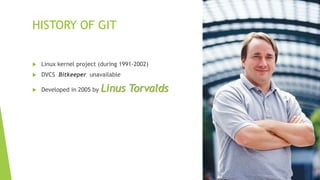
HISTORY OF GIT
 Linux kernel project (during 1991-2002)
 DVCS Bitkeeper unavailable
 Developed in 2005 by Linus Torvalds
4
GIT IS OPTIMIZED FOR:
 Distributed development
 Large file counts
 Complex merges
 Making trial branches
 Being very fast
 Being robust
5
BENEFITS OF GIT
 Work completely offline
 Commit any time you feel like, even when you are not on network.
 Branching is piece of cake
 Only one .git directory per repository
 SVN has .svn folder in each folder it contains, hard to maintain
 Easy to manage ignore files
 Easy peer review
6
POPULAR FREE HOSTINGS FOR GIT
 Github.com (only public repos, commercial private
repos)
http://www.github.com
 Bitbucket.org (private and public repos)
http://www.bitbucket.org
7
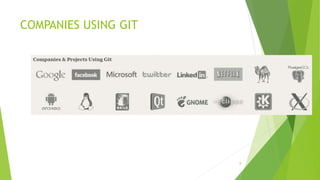
COMPANIES USING GIT
8
Answer:
9
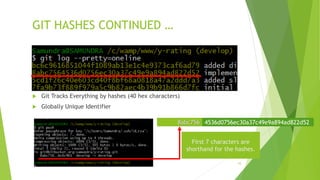
GIT HASHES CONTINUED …
 Git Tracks Everything by hashes (40 hex characters)
 Globally Unique Identifier
10
8abc756 4536d0756ec30a37c49e9a894ad822d52
First 7 characters are
shorthand for the hashes.
11
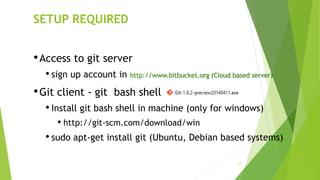
SETUP REQUIRED
•Access to git server
• sign up account in http://www.bitbucket.org (Cloud based server)
•Git client - git bash shell
• Install git bash shell in machine (only for windows)
• http://git-scm.com/download/win
• sudo apt-get install git (Ubuntu, Debian based systems)
12
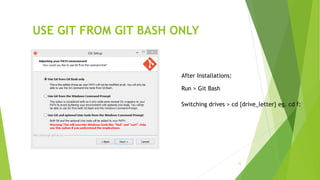
USE GIT FROM GIT BASH ONLY
Run > Git Bash
Switching drives > cd {drive_letter} eg. cd f:
After Installations:
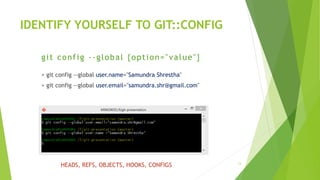
IDENTIFY YOURSELF TO GIT::CONFIG
> git config --global user.name="Samundra Shrestha"
> git config --global user.email="samundra.shr@gmail.com"
13
git config --global {option="value"}
HEADS, REFS, OBJECTS, HOOKS, CONFIGS
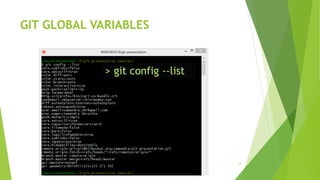
GIT GLOBAL VARIABLES
14
> git config --list
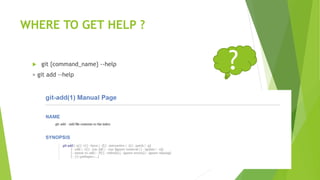
WHERE TO GET HELP ?
 git {command_name} --help
> git add --help
15
?
INITIALIZE GIT REPOSITORY
Create new directory
> mkdir git-presentation
Change path to newly created directory
> cd git-presentation
Tell system that we want this directory to be our git
repository
> git init
Create file1.txt
> touch "file1.txt"
16
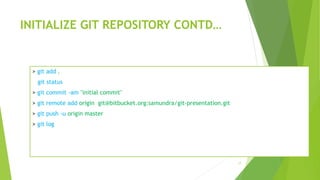
INITIALIZE GIT REPOSITORY CONTD…
> git add .
> git status
> git commit -am "initial commit"
> git remote add origin git@bitbucket.org:samundra/git-presentation.git
> git push -u origin master
> git log
17
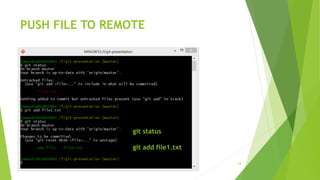
PUSH FILE TO REMOTE
18
git status
git add file1.txt
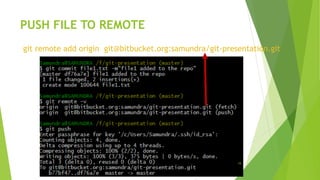
PUSH FILE TO REMOTE
19
git remote add origin git@bitbucket.org:samundra/git-presentation.git
PULL/PUSH CHANGES TO REMOTE HOSTINGS
 List all remote urls
git remote –v
 Push changes
git push –u origin master (-u tracks remote changes used
only first time.)
git push
 Pull changes
git pull [options] [<repository> [<refspec>…]]20
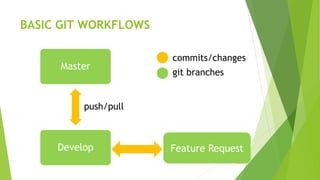
BASIC GIT WORKFLOWS
21
Master
Develop Feature Request
commits/changes
git branches
push/pull
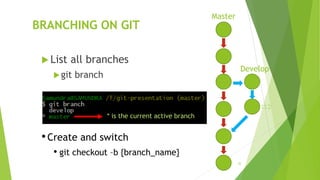
BRANCHING ON GIT
 List all branches
git branch
22
Master
Develop
•Create and switch
• git checkout –b {branch_name}
* is the current active branch
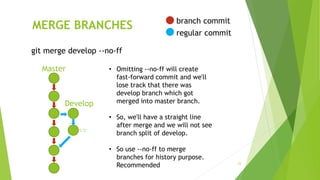
MERGE BRANCHES
23
Master
Develop
git merge develop --no-ff
• Omitting --no-ff will create
fast-forward commit and we'll
lose track that there was
develop branch which got
merged into master branch.
• So, we'll have a straight line
after merge and we will not see
branch split of develop.
• So use --no-ff to merge
branches for history purpose.
Recommended
branch commit
regular commit
VIDEO TUTORIAL ON GIT WORKFLOW
24
Video Tutorial is available on
https://drive.google.com/file/d/0B1z71cfDxHUmTXdwNU02VGl6Zm8/edit
?usp=sharing
POPULAR GIT CLIENTS
 gitk (comes bundles with git-preview installed by default on most)
 Smartgit (http://www.syntevo.com/smartgithg/)
 GitEye (http://www.giteyeapp.com/)
 SourceTree (http://www.sourcetreeapp.com/)
25
Thank You All
Questions ?
26
POPULAR GIT COMMANDS
• git init
• git clone
• git status
• git log
• git stash
• git add
27
• git commit
• git push
• git pull
• git checkout
• git stash
• git add
• git diff
• git branch
• git merge
• git fetch
• git reset
• git format-patch
REFERENCES
 Git Cheatsheet; http://www.ndpsoftware.com/git-cheatsheet.html (visually pretty)
 Atlassian, Make the switch to Git;
https://www.atlassian.com/git?_mid=83863a53e6e38075309c21d2539cbfb9&gclid=CODX0bfpur4CFZYGvAod8KUAHQ
 Getting Started Git Basics; http://git-scm.com/book/en/Getting-Started-Git-Basics
 Github training cheat sheet: https://training.github.com/kit/downloads/github-git-cheat-sheet.pdf
 From Git-Tower: http://www.git-tower.com/blog/git-cheat-sheet/
 Atlassian Git Tutorials; https://www.atlassian.com/git/tutorial/
 Lines of Code in Linux Kernel; http://www.quora.com/Linux-Kernel/How-many-lines-of-code-are-in-the-Linux-
kernel
 Git slideshare; http://www.slideshare.net/RandalSchwartz/introduction-to-git-11451326
 Linus Torvalds & Git Video; https://www.youtube.com/watch?v=idLyobOhtO4
 Git GUIs; http://git-scm.com/downloads/guis
 Git workflows; https://www.atlassian.com/git/workflows
 10Clouds on Talk; https://www.youtube.com/watch?v=bzbuyIe3kUU
28

Brown bag sessions git workshop

  • 1.
    workshop Introduction to git(version control system) By Samundra Shrestha 1
  • 2.
    WHAT IS GIT?  Distributed Version Control Systems  Changes track over the entire repository (tree of files) 2 Similar VCS • Subversion • Mercurial • CVS • Perforce • Git has integrity • SHA-1 hash (40 –character string composed of hexadecimal characters, 0-9 & a-f) • E.g. 8abc7564536d0756ec30a37c49e9a894ad822d52
  • 3.
  • 4.
    HISTORY OF GIT Linux kernel project (during 1991-2002)  DVCS Bitkeeper unavailable  Developed in 2005 by Linus Torvalds 4
  • 5.
    GIT IS OPTIMIZEDFOR:  Distributed development  Large file counts  Complex merges  Making trial branches  Being very fast  Being robust 5
  • 6.
    BENEFITS OF GIT Work completely offline  Commit any time you feel like, even when you are not on network.  Branching is piece of cake  Only one .git directory per repository  SVN has .svn folder in each folder it contains, hard to maintain  Easy to manage ignore files  Easy peer review 6
  • 7.
    POPULAR FREE HOSTINGSFOR GIT  Github.com (only public repos, commercial private repos) http://www.github.com  Bitbucket.org (private and public repos) http://www.bitbucket.org 7
  • 8.
  • 9.
  • 10.
    GIT HASHES CONTINUED…  Git Tracks Everything by hashes (40 hex characters)  Globally Unique Identifier 10 8abc756 4536d0756ec30a37c49e9a894ad822d52 First 7 characters are shorthand for the hashes.
  • 11.
    11 SETUP REQUIRED •Access togit server • sign up account in http://www.bitbucket.org (Cloud based server) •Git client - git bash shell • Install git bash shell in machine (only for windows) • http://git-scm.com/download/win • sudo apt-get install git (Ubuntu, Debian based systems)
  • 12.
    12 USE GIT FROMGIT BASH ONLY Run > Git Bash Switching drives > cd {drive_letter} eg. cd f: After Installations:
  • 13.
    IDENTIFY YOURSELF TOGIT::CONFIG > git config --global user.name="Samundra Shrestha" > git config --global user.email="samundra.shr@gmail.com" 13 git config --global {option="value"} HEADS, REFS, OBJECTS, HOOKS, CONFIGS
  • 14.
    GIT GLOBAL VARIABLES 14 >git config --list
  • 15.
    WHERE TO GETHELP ?  git {command_name} --help > git add --help 15 ?
  • 16.
    INITIALIZE GIT REPOSITORY Createnew directory > mkdir git-presentation Change path to newly created directory > cd git-presentation Tell system that we want this directory to be our git repository > git init Create file1.txt > touch "file1.txt" 16
  • 17.
    INITIALIZE GIT REPOSITORYCONTD… > git add . > git status > git commit -am "initial commit" > git remote add origin git@bitbucket.org:samundra/git-presentation.git > git push -u origin master > git log 17
  • 18.
    PUSH FILE TOREMOTE 18 git status git add file1.txt
  • 19.
    PUSH FILE TOREMOTE 19 git remote add origin git@bitbucket.org:samundra/git-presentation.git
  • 20.
    PULL/PUSH CHANGES TOREMOTE HOSTINGS  List all remote urls git remote –v  Push changes git push –u origin master (-u tracks remote changes used only first time.) git push  Pull changes git pull [options] [<repository> [<refspec>…]]20
  • 21.
    BASIC GIT WORKFLOWS 21 Master DevelopFeature Request commits/changes git branches push/pull
  • 22.
    BRANCHING ON GIT List all branches git branch 22 Master Develop •Create and switch • git checkout –b {branch_name} * is the current active branch
  • 23.
    MERGE BRANCHES 23 Master Develop git mergedevelop --no-ff • Omitting --no-ff will create fast-forward commit and we'll lose track that there was develop branch which got merged into master branch. • So, we'll have a straight line after merge and we will not see branch split of develop. • So use --no-ff to merge branches for history purpose. Recommended branch commit regular commit
  • 24.
    VIDEO TUTORIAL ONGIT WORKFLOW 24 Video Tutorial is available on https://drive.google.com/file/d/0B1z71cfDxHUmTXdwNU02VGl6Zm8/edit ?usp=sharing
  • 25.
    POPULAR GIT CLIENTS gitk (comes bundles with git-preview installed by default on most)  Smartgit (http://www.syntevo.com/smartgithg/)  GitEye (http://www.giteyeapp.com/)  SourceTree (http://www.sourcetreeapp.com/) 25
  • 26.
  • 27.
    POPULAR GIT COMMANDS •git init • git clone • git status • git log • git stash • git add 27 • git commit • git push • git pull • git checkout • git stash • git add • git diff • git branch • git merge • git fetch • git reset • git format-patch
  • 28.
    REFERENCES  Git Cheatsheet;http://www.ndpsoftware.com/git-cheatsheet.html (visually pretty)  Atlassian, Make the switch to Git; https://www.atlassian.com/git?_mid=83863a53e6e38075309c21d2539cbfb9&gclid=CODX0bfpur4CFZYGvAod8KUAHQ  Getting Started Git Basics; http://git-scm.com/book/en/Getting-Started-Git-Basics  Github training cheat sheet: https://training.github.com/kit/downloads/github-git-cheat-sheet.pdf  From Git-Tower: http://www.git-tower.com/blog/git-cheat-sheet/  Atlassian Git Tutorials; https://www.atlassian.com/git/tutorial/  Lines of Code in Linux Kernel; http://www.quora.com/Linux-Kernel/How-many-lines-of-code-are-in-the-Linux- kernel  Git slideshare; http://www.slideshare.net/RandalSchwartz/introduction-to-git-11451326  Linus Torvalds & Git Video; https://www.youtube.com/watch?v=idLyobOhtO4  Git GUIs; http://git-scm.com/downloads/guis  Git workflows; https://www.atlassian.com/git/workflows  10Clouds on Talk; https://www.youtube.com/watch?v=bzbuyIe3kUU 28