NGUYEN TUAN LAM

CWI Team
Advance Jquery Plugins


 - Overview Jquery Plugin

 - How to create a Jquery plugin

 - How to apply, custom Jquery plugins

 - Share some knowledge to debug issues related javascript/jquery


                    www.exoplatform.com - Copyright 2012 eXo Platform   2
Agenda

- Introduce some common jquery plugins

- Some rules of Jquery plugins development

- How to create a Jquery plugin

- How to custom Jquery plugins

- Share some knowledge related
javascript/jquery


             www.exoplatform.com - Copyright 2012 eXo Platform   3
Overview some jquery plugin


- Jquery plugin simple slideshow

- Jquery plugin rotator slider

- Jquery plugin modal/lightbox

- Jquery plugin dropdown menu


                       www.exoplatform.com - Copyright 2012 eXo Platform   4
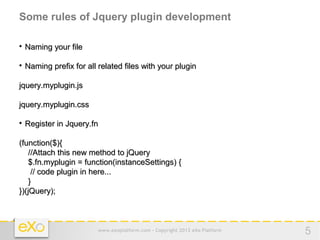
Some rules of Jquery plugin development


    Naming your file


    Naming prefix for all related files with your plugin

jquery.myplugin.js

jquery.myplugin.css


    Register in Jquery.fn

(function($){
    //Attach this new method to jQuery
    $.fn.myplugin = function(instanceSettings) {
     // code plugin in here...
    }
})(jQuery);


                          www.exoplatform.com - Copyright 2012 eXo Platform   5
Some rules of Jquery plugin development (Continue...)


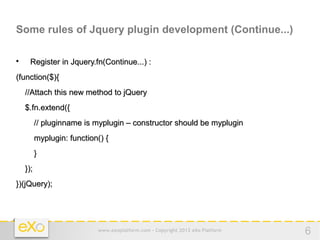
     Register in Jquery.fn(Continue...) :
(function($){
    //Attach this new method to jQuery
    $.fn.extend({
          // pluginname is myplugin – constructor should be myplugin
          myplugin: function() {
          }
    });
})(jQuery);


                            www.exoplatform.com - Copyright 2012 eXo Platform   6
Some rules of Jquery plugin development (Continue...)


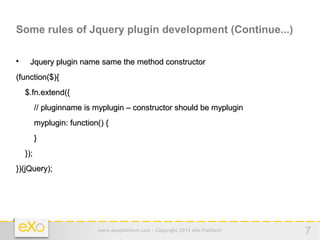
     Jquery plugin name same the method constructor
(function($){
    $.fn.extend({
          // pluginname is myplugin – constructor should be myplugin
          myplugin: function() {
          }
    });
})(jQuery);


                            www.exoplatform.com - Copyright 2012 eXo Platform   7
Some rules of Jquery plugin development (Continue...)

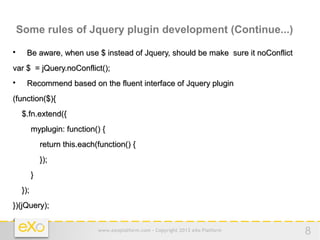
     Be aware, when use $ instead of Jquery, should be make sure it noConflict
var $ = jQuery.noConflict();

     Recommend based on the fluent interface of Jquery plugin
(function($){
    $.fn.extend({
          myplugin: function() {
              return this.each(function() {
              });
          }
    });
})(jQuery);


                               www.exoplatform.com - Copyright 2012 eXo Platform   8
Some rules of Jquery plugin development (Continue...)

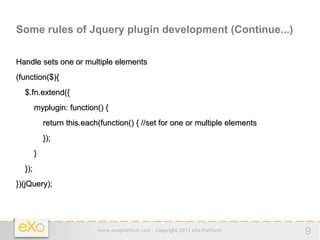
Handle sets one or multiple elements
(function($){
  $.fn.extend({
        myplugin: function() {
            return this.each(function() { //set for one or multiple elements
            });
        }
  });
})(jQuery);


                            www.exoplatform.com - Copyright 2012 eXo Platform   9
Some rules of Jquery plugin development (Continue...)


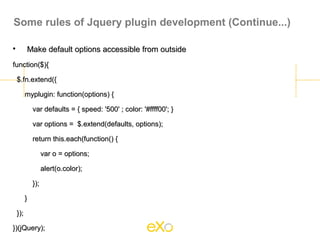
          Make default options accessible from outside
function($){

    $.fn.extend({

          myplugin: function(options) {

              var defaults = { speed: '500' ; color: '#ffff00'; }

              var options = $.extend(defaults, options);

              return this.each(function() {

                    var o = options;

                    alert(o.color);

              });

          }

    });

})(jQuery);
Create a JQuery plugin

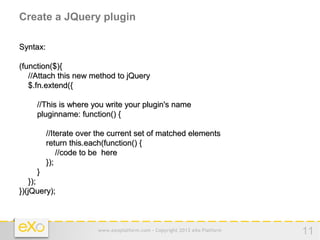
Syntax:

(function($){
   //Attach this new method to jQuery
   $.fn.extend({

     //This is where you write your plugin's name
     pluginname: function() {

          //Iterate over the current set of matched elements
          return this.each(function() {
              //code to be here
          });
     }
    });
})(jQuery);


                        www.exoplatform.com - Copyright 2012 eXo Platform   11
Create a Jquery plugin (continue...)

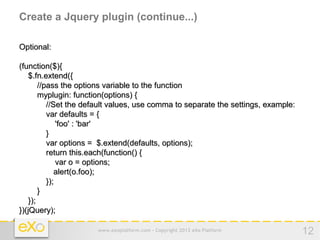
Optional:

(function($){
    $.fn.extend({
        //pass the options variable to the function
        myplugin: function(options) {
           //Set the default values, use comma to separate the settings, example:
           var defaults = {
               'foo' : 'bar'
           }
           var options = $.extend(defaults, options);
           return this.each(function() {
               var o = options;
              alert(o.foo);
           });
        }
    });
})(jQuery);

                       www.exoplatform.com - Copyright 2012 eXo Platform            12
Create a Jquery Plugin (Continue...)

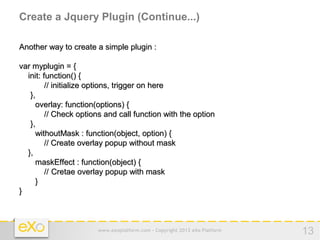
Another way to create a simple plugin :

var myplugin = {
  init: function() {
         // initialize options, trigger on here
   },
     overlay: function(options) {
         // Check options and call function with the option
   },
     withoutMask : function(object, option) {
         // Create overlay popup without mask
  },
     maskEffect : function(object) {
         // Cretae overlay popup with mask
     }
}


                       www.exoplatform.com - Copyright 2012 eXo Platform   13
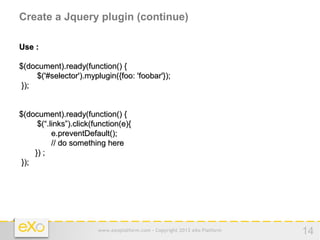
Create a Jquery plugin (continue)

Use :

$(document).ready(function() {
     $('#selector').myplugin({foo: 'foobar'});
 });


$(document).ready(function() {
      $(“.links”).click(function(e){
           e.preventDefault();
           // do something here
     }) ;
 });


                         www.exoplatform.com - Copyright 2012 eXo Platform   14
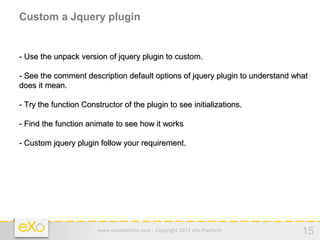
Custom a Jquery plugin


- Use the unpack version of jquery plugin to custom.

- See the comment description default options of jquery plugin to understand what
does it mean.

- Try the function Constructor of the plugin to see initializations.

- Find the function animate to see how it works

- Custom jquery plugin follow your requirement.


                        www.exoplatform.com - Copyright 2012 eXo Platform      15
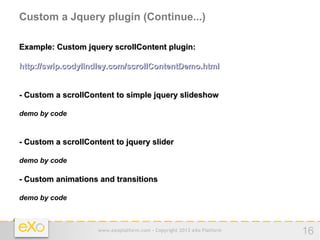
Custom a Jquery plugin (Continue...)

Example: Custom jquery scrollContent plugin:

http://swip.codylindley.com/scrollContentDemo.html


- Custom a scrollContent to simple jquery slideshow

demo by code


- Custom a scrollContent to jquery slider

demo by code

- Custom animations and transitions

demo by code


                    www.exoplatform.com - Copyright 2012 eXo Platform   16
Some ways debug and fixed issues related javascript


    Use Firebug


    Use function Console.log() to see the output


    Use alert message of javascript


    Demo by code


                        www.exoplatform.com - Copyright 2012 eXo Platform   17
Question & Answer


  www.exoplatform.com - Copyright 2012 eXo Platform   18

Advance jquery-plugin

  • 1.
  • 2.
    Advance Jquery Plugins - Overview Jquery Plugin - How to create a Jquery plugin - How to apply, custom Jquery plugins - Share some knowledge to debug issues related javascript/jquery www.exoplatform.com - Copyright 2012 eXo Platform 2
  • 3.
    Agenda - Introduce somecommon jquery plugins - Some rules of Jquery plugins development - How to create a Jquery plugin - How to custom Jquery plugins - Share some knowledge related javascript/jquery www.exoplatform.com - Copyright 2012 eXo Platform 3
  • 4.
    Overview some jqueryplugin - Jquery plugin simple slideshow - Jquery plugin rotator slider - Jquery plugin modal/lightbox - Jquery plugin dropdown menu www.exoplatform.com - Copyright 2012 eXo Platform 4
  • 5.
    Some rules ofJquery plugin development  Naming your file  Naming prefix for all related files with your plugin jquery.myplugin.js jquery.myplugin.css  Register in Jquery.fn (function($){ //Attach this new method to jQuery $.fn.myplugin = function(instanceSettings) { // code plugin in here... } })(jQuery); www.exoplatform.com - Copyright 2012 eXo Platform 5
  • 6.
    Some rules ofJquery plugin development (Continue...)  Register in Jquery.fn(Continue...) : (function($){ //Attach this new method to jQuery $.fn.extend({ // pluginname is myplugin – constructor should be myplugin myplugin: function() { } }); })(jQuery); www.exoplatform.com - Copyright 2012 eXo Platform 6
  • 7.
    Some rules ofJquery plugin development (Continue...)  Jquery plugin name same the method constructor (function($){ $.fn.extend({ // pluginname is myplugin – constructor should be myplugin myplugin: function() { } }); })(jQuery); www.exoplatform.com - Copyright 2012 eXo Platform 7
  • 8.
    Some rules ofJquery plugin development (Continue...)  Be aware, when use $ instead of Jquery, should be make sure it noConflict var $ = jQuery.noConflict();  Recommend based on the fluent interface of Jquery plugin (function($){ $.fn.extend({ myplugin: function() { return this.each(function() { }); } }); })(jQuery); www.exoplatform.com - Copyright 2012 eXo Platform 8
  • 9.
    Some rules ofJquery plugin development (Continue...) Handle sets one or multiple elements (function($){ $.fn.extend({ myplugin: function() { return this.each(function() { //set for one or multiple elements }); } }); })(jQuery); www.exoplatform.com - Copyright 2012 eXo Platform 9
  • 10.
    Some rules ofJquery plugin development (Continue...)  Make default options accessible from outside function($){ $.fn.extend({ myplugin: function(options) { var defaults = { speed: '500' ; color: '#ffff00'; } var options = $.extend(defaults, options); return this.each(function() { var o = options; alert(o.color); }); } }); })(jQuery);
  • 11.
    Create a JQueryplugin Syntax: (function($){ //Attach this new method to jQuery $.fn.extend({ //This is where you write your plugin's name pluginname: function() { //Iterate over the current set of matched elements return this.each(function() { //code to be here }); } }); })(jQuery); www.exoplatform.com - Copyright 2012 eXo Platform 11
  • 12.
    Create a Jqueryplugin (continue...) Optional: (function($){ $.fn.extend({ //pass the options variable to the function myplugin: function(options) { //Set the default values, use comma to separate the settings, example: var defaults = { 'foo' : 'bar' } var options = $.extend(defaults, options); return this.each(function() { var o = options; alert(o.foo); }); } }); })(jQuery); www.exoplatform.com - Copyright 2012 eXo Platform 12
  • 13.
    Create a JqueryPlugin (Continue...) Another way to create a simple plugin : var myplugin = { init: function() { // initialize options, trigger on here }, overlay: function(options) { // Check options and call function with the option }, withoutMask : function(object, option) { // Create overlay popup without mask }, maskEffect : function(object) { // Cretae overlay popup with mask } } www.exoplatform.com - Copyright 2012 eXo Platform 13
  • 14.
    Create a Jqueryplugin (continue) Use : $(document).ready(function() { $('#selector').myplugin({foo: 'foobar'}); }); $(document).ready(function() { $(“.links”).click(function(e){ e.preventDefault(); // do something here }) ; }); www.exoplatform.com - Copyright 2012 eXo Platform 14
  • 15.
    Custom a Jqueryplugin - Use the unpack version of jquery plugin to custom. - See the comment description default options of jquery plugin to understand what does it mean. - Try the function Constructor of the plugin to see initializations. - Find the function animate to see how it works - Custom jquery plugin follow your requirement. www.exoplatform.com - Copyright 2012 eXo Platform 15
  • 16.
    Custom a Jqueryplugin (Continue...) Example: Custom jquery scrollContent plugin: http://swip.codylindley.com/scrollContentDemo.html - Custom a scrollContent to simple jquery slideshow demo by code - Custom a scrollContent to jquery slider demo by code - Custom animations and transitions demo by code www.exoplatform.com - Copyright 2012 eXo Platform 16
  • 17.
    Some ways debugand fixed issues related javascript  Use Firebug  Use function Console.log() to see the output  Use alert message of javascript  Demo by code www.exoplatform.com - Copyright 2012 eXo Platform 17
  • 18.
    Question & Answer www.exoplatform.com - Copyright 2012 eXo Platform 18