GIT
workshop
usando Git desde 2008
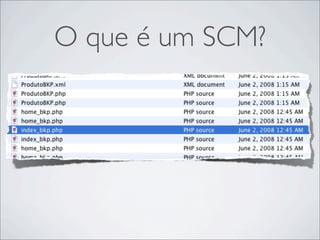
O que é um SCM?
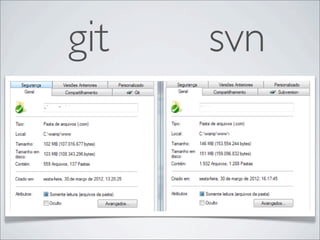
svn VS git
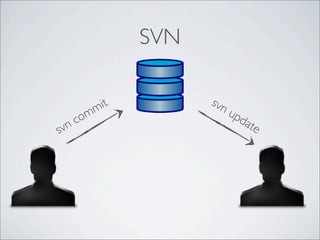
SVN

           it         svn
         m                u
    om                        pd
svnc                            ate
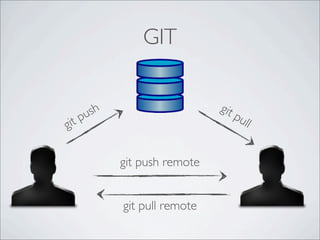
GIT

                             git
     ush                         pu
gi tp                               ll


           git push remote


           git pull remote
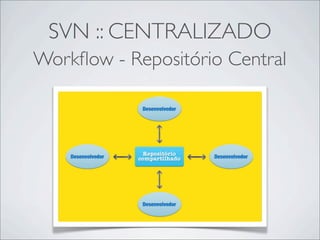
SVN :: CENTRALIZADO
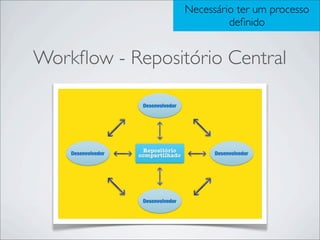
Workflow - Repositório Central
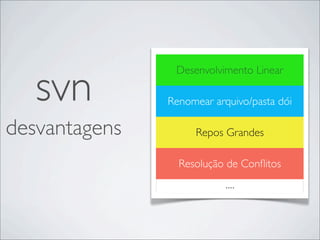
svn
                Desenvolvimento Linear

               Renomear arquivo/pasta dói

desvantagens        Repos Grandes

                 Resolução de Conflitos
                           ....
git   svn
“Git is a stupid content tracker.”
                          (Peepcode Git Internals)


git
git != github
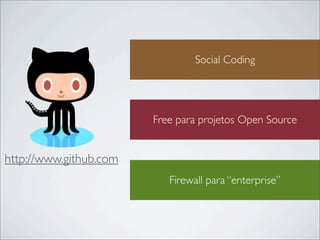
Social Coding


                        Free para projetos Open Source


http://www.github.com
                           Firewall para “enterprise”
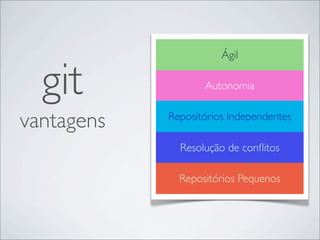
Ágil


  git              Autonomia


vantagens   Repositórios Independentes

              Resolução de conflitos

              Repositórios Pequenos
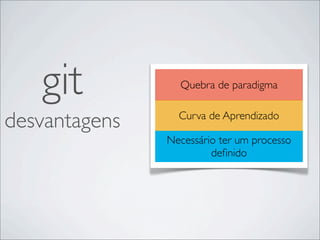
git           Quebra de paradigma


desvantagens     Curva de Aprendizado
                           t

               Necessário ter um processo
                        definido
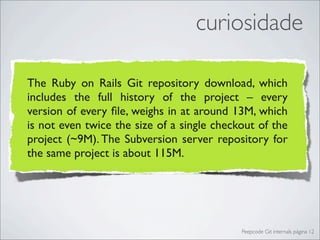
curiosidade

The Ruby on Rails Git repository download, which
includes the full history of the project – every
version of every file, weighs in at around 13M, which
is not even twice the size of a single checkout of the
project (~9M). The Subversion server repository for
the same project is about 115M.


                                            Peepcode Git internals página 12
Controle
de versões distribuído
Necessário ter um processo
                          definido


Workflow - Repositório Central
Necessário ter um processo
                           definido


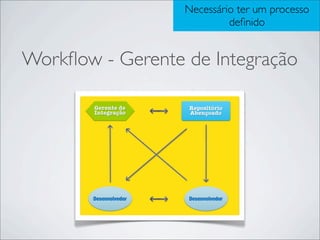
Workflow - Gerente de Integração
era uma vez ...
 Você está sentado em sua mesa trabalhando em
uma estória. De repente, sua SM chega perto de você
 e pede para você parar o que você está fazendo, pois
      foi encontrado um bug show stopper.
http://www.google.com.br/imgres?start=116&um=1&hl=pt-BR&biw=1280&bih=636&tbm=isch&tbnid=6fTHDZKMmPElhM:&imgrefurl=http://www.clear-lines.com/
 blog/post/Automatically-exclude-bin-and-obj-folder-in-Tortoise-SVN.aspx&docid=OHbeiJsJUJ8saM&imgurl=http://www.clear-lines.com/blog/image.axd%253Fpicture
%253DAddFiles_thumb.png&w=387&h=433&ei=KgqFT82RBqr40gHv4djbBw&zoom=1&iact=hc&vpx=665&vpy=279&dur=306&hovh=149&hovw=133&tx=122&ty=
                            109&sig=105001613950035108112&page=6&tbnh=140&tbnw=125&ndsp=23&ved=1t:429,r:9,s:116,i:104
resolvendo o problema
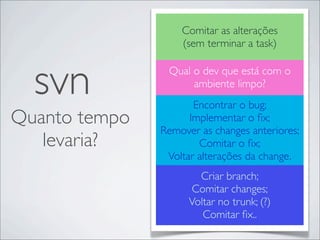
Comitar as alterações
                   (sem terminar a task)


  svn           Qual o dev que está com o
                     ambiente limpo?
                      Encontrar o bug;
Quanto tempo         Implementar o fix;
               Remover as changes anteriores;
   levaria?            Comitar o fix;
                Voltar alterações da change.
                       Criar branch;
                      Comitar changes;
                     Voltar no trunk; (?)
                        Comitar fix..
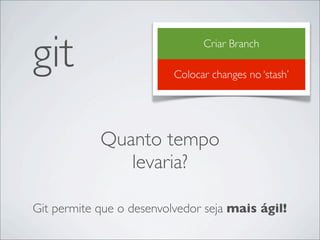
git                             Criar Branch

                          Colocar changes no ‘stash’


            Quanto tempo
               levaria?

Git permite que o desenvolvedor seja mais ágil!
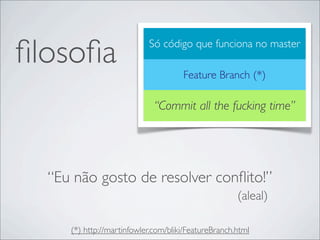
filosofia                    Só código que funciona no master

                                     Feature Branch (*)

                             “Commit all the fucking time”


  “Eu não gosto de resolver conflito!”
                                                     (aleal)

     (*) http://martinfowler.com/bliki/FeatureBranch.html
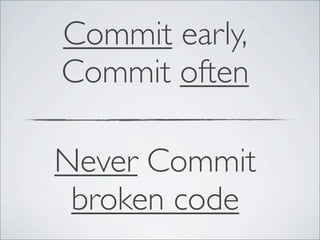
Commit early,
Commit often

Never Commit
 broken code
Mão na massa


http://www.flickr.com/photos/traftery/4773457853/
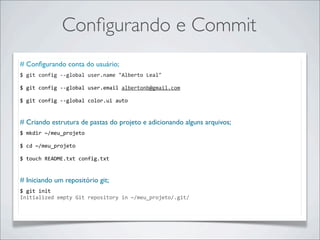
Configurando e Commit
# Configurando conta do usuário;
$	
  git	
  config	
  -­‐-­‐global	
  user.name	
  "Alberto	
  Leal"

$	
  git	
  config	
  -­‐-­‐global	
  user.email	
  albertonb@gmail.com

$	
  git	
  config	
  -­‐-­‐global	
  color.ui	
  auto


# Criando estrutura de pastas do projeto e adicionando alguns arquivos;
$	
  mkdir	
  ~/meu_projeto

$	
  cd	
  ~/meu_projeto

$	
  touch	
  README.txt	
  config.txt


# Iniciando um repositório git;
$	
  git	
  init
Initialized	
  empty	
  Git	
  repository	
  in	
  ~/meu_projeto/.git/
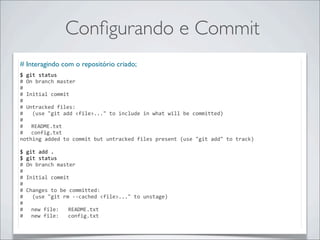
Configurando e Commit
# Interagindo com o repositório criado;
$	
  git	
  status
#	
  On	
  branch	
  master
#
#	
  Initial	
  commit
#
#	
  Untracked	
  files:
#	
  	
  	
  (use	
  "git	
  add	
  <file>..."	
  to	
  include	
  in	
  what	
  will	
  be	
  committed)
#
#	
   README.txt
#	
   config.txt
nothing	
  added	
  to	
  commit	
  but	
  untracked	
  files	
  present	
  (use	
  "git	
  add"	
  to	
  track)

$	
  git	
  add	
  .
$	
  git	
  status
#	
  On	
  branch	
  master
#
#	
  Initial	
  commit
#
#	
  Changes	
  to	
  be	
  committed:
#	
  	
  	
  (use	
  "git	
  rm	
  -­‐-­‐cached	
  <file>..."	
  to	
  unstage)
#
#	
   new	
  file:	
  	
  	
  README.txt
#	
   new	
  file:	
  	
  	
  config.txt
Configurando e Commit
# Criando o primeiro commit;
$	
  git	
  commit	
  -­‐m	
  “Initial	
  Commit”
[master	
  (root-­‐commit)	
  4692340]	
  Initial	
  Commit
	
  0	
  files	
  changed,	
  0	
  insertions(+),	
  0	
  deletions(-­‐)
	
  create	
  mode	
  100644	
  README.txt
	
  create	
  mode	
  100644	
  config.txt

$	
  git	
  log
commit	
  4692340f4f326a4120337185474153e65c808cd1
Author:	
  Alberto	
  Leal	
  <albertonb@gmail.com>
Date:	
  	
  	
  Sun	
  Mar	
  25	
  19:13:59	
  2012	
  -­‐0300


  Initial	
  Commit
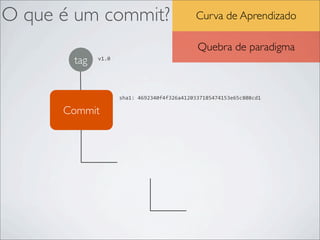
O que é um commit?                            Curva de Aprendizado

                                               Quebra de paradigma
       tag   v1.0


                    sha1:	
  4692340f4f326a4120337185474153e65c808cd1

      Commit
       Tree


                          Blob
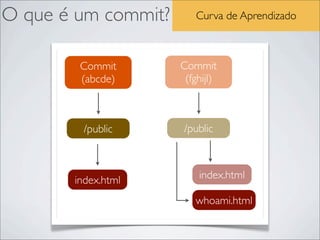
O que é um commit?      Curva de Aprendizado


        Commit       Commit
        (abcde)       (fghijl)


        /public      /public


       index.html        index.html

                        whoami.html
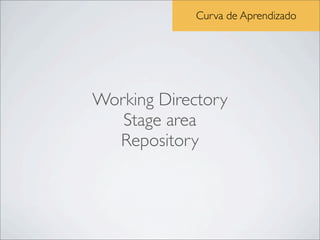
Curva de Aprendizado


Working Directory
   Stage area
  Repository
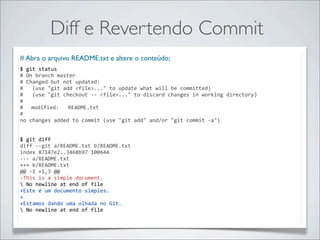
Diff e Revertendo Commit
# Abra o arquivo README.txt e altere o conteúdo;
$	
  git	
  status
#	
  On	
  branch	
  master
#	
  Changed	
  but	
  not	
  updated:
#	
  	
  	
  (use	
  "git	
  add	
  <file>..."	
  to	
  update	
  what	
  will	
  be	
  committed)
#	
  	
  	
  (use	
  "git	
  checkout	
  -­‐-­‐	
  <file>..."	
  to	
  discard	
  changes	
  in	
  working	
  directory)
#
#	
   modified:	
  	
  	
  README.txt
#
no	
  changes	
  added	
  to	
  commit	
  (use	
  "git	
  add"	
  and/or	
  "git	
  commit	
  -­‐a")


$	
  git	
  diff
diff	
  -­‐-­‐git	
  a/README.txt	
  b/README.txt
index	
  87147e2..3468b97	
  100644
-­‐-­‐-­‐	
  a/README.txt
+++	
  b/README.txt
@@	
  -­‐1	
  +1,3	
  @@
-­‐This	
  is	
  a	
  simple	
  document.
	
  No	
  newline	
  at	
  end	
  of	
  file
+Este	
  é	
  um	
  documento	
  simples.
+
+Estamos	
  dando	
  uma	
  olhada	
  no	
  Git.
	
  No	
  newline	
  at	
  end	
  of	
  file
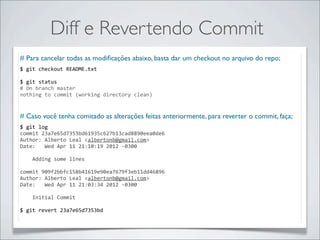
Diff e Revertendo Commit
# Para cancelar todas as modificações abaixo, basta dar um checkout no arquivo do repo;
$	
  git	
  checkout	
  README.txt	
  

$	
  git	
  status
#	
  On	
  branch	
  master
nothing	
  to	
  commit	
  (working	
  directory	
  clean)


# Caso você tenha comitado as alterações feitas anteriormente, para reverter o commit, faça;
$	
  git	
  log	
  
commit	
  23a7e65d7353bd61935c627b13cad8890eea0de6
Author:	
  Alberto	
  Leal	
  <albertonb@gmail.com>
Date:	
  	
  	
  Wed	
  Apr	
  11	
  21:10:19	
  2012	
  -­‐0300


  Adding	
  some	
  lines

commit	
  909f2bbfc158b41619e90ea7679f3eb11dd46896
Author:	
  Alberto	
  Leal	
  <albertonb@gmail.com>
Date:	
  	
  	
  Wed	
  Apr	
  11	
  21:03:34	
  2012	
  -­‐0300


  Initial	
  Commit

$	
  git	
  revert	
  23a7e65d7353bd
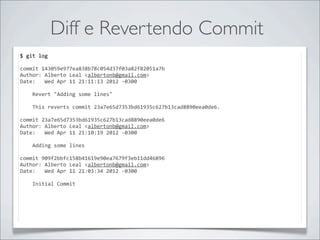
Diff e Revertendo Commit
$	
  git	
  log	
  

commit	
  143059e977ea838b78c054d37f03a82f82051a7b
Author:	
  Alberto	
  Leal	
  <albertonb@gmail.com>
Date:	
  	
  	
  Wed	
  Apr	
  11	
  21:11:13	
  2012	
  -­‐0300


  Revert	
  "Adding	
  some	
  lines"


  This	
  reverts	
  commit	
  23a7e65d7353bd61935c627b13cad8890eea0de6.

commit	
  23a7e65d7353bd61935c627b13cad8890eea0de6
Author:	
  Alberto	
  Leal	
  <albertonb@gmail.com>
Date:	
  	
  	
  Wed	
  Apr	
  11	
  21:10:19	
  2012	
  -­‐0300


  Adding	
  some	
  lines

commit	
  909f2bbfc158b41619e90ea7679f3eb11dd46896
Author:	
  Alberto	
  Leal	
  <albertonb@gmail.com>
Date:	
  	
  	
  Wed	
  Apr	
  11	
  21:03:34	
  2012	
  -­‐0300


  Initial	
  Commit
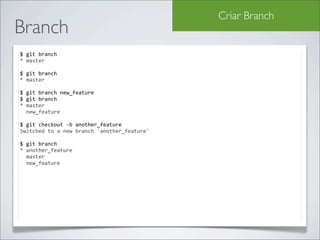
Criar Branch
Branch
$	
  git	
  branch	
  
*	
  master

$	
  git	
  branch	
  
*	
  master

$	
  git	
  branch	
  new_feature
$	
  git	
  branch
*	
  master
	
  	
  new_feature

$	
  git	
  checkout	
  -­‐b	
  another_feature
Switched	
  to	
  a	
  new	
  branch	
  'another_feature'

$	
  git	
  branch
*	
  another_feature
	
  	
  master
	
  	
  new_feature
Criar Branch
Branch
$	
  touch	
  a.txt	
  b.txt	
  c.txt	
  d.txt	
  e.txt

$	
  git	
  status	
  
#	
  On	
  branch	
  another_feature
#	
  Untracked	
  files:
#	
  	
  	
  (use	
  "git	
  add	
  <file>..."	
  to	
  include	
  in	
  what	
  will	
  be	
  committed)
#
#	
   a.txt
#	
   b.txt
#	
   c.txt
#	
   d.txt
#	
   e.txt
nothing	
  added	
  to	
  commit	
  but	
  untracked	
  files	
  present	
  (use	
  "git	
  add"	
  to	
  track)

$	
  git	
  add	
  .	
  &&	
  git	
  commit	
  -­‐m	
  "Adding	
  new	
  files"
[another_feature	
  08f9fbe]	
  Adding	
  new	
  files
	
  0	
  files	
  changed,	
  0	
  insertions(+),	
  0	
  deletions(-­‐)
	
  create	
  mode	
  100644	
  a.txt
	
  create	
  mode	
  100644	
  b.txt
	
  create	
  mode	
  100644	
  c.txt
	
  create	
  mode	
  100644	
  d.txt
	
  create	
  mode	
  100644	
  e.txt

$	
  git	
  checkout	
  new_feature
$	
  ls
README	
   	
   alberto.txt	
   oi.txt	
   	
             ola.txt
lembra ...?
 Você está sentado em sua mesa trabalhando em
uma estória. De repente, sua SM chega perto de você
 e pede para você parar o que você está fazendo, pois
      foi encontrado um bug show stopper.
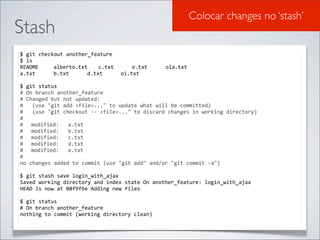
Colocar changes no ‘stash’
Stash
$	
  git	
  checkout	
  another_feature
$	
  ls
README	
   	
   alberto.txt	
   c.txt	
   	
   e.txt	
   	
              ola.txt
a.txt	
   	
   b.txt	
   	
   d.txt	
   	
   oi.txt

$	
  git	
  status
#	
  On	
  branch	
  another_feature
#	
  Changed	
  but	
  not	
  updated:
#	
  	
  	
  (use	
  "git	
  add	
  <file>..."	
  to	
  update	
  what	
  will	
  be	
  committed)
#	
  	
  	
  (use	
  "git	
  checkout	
  -­‐-­‐	
  <file>..."	
  to	
  discard	
  changes	
  in	
  working	
  directory)
#
#	
   modified:	
  	
  	
  a.txt
#	
   modified:	
  	
  	
  b.txt
#	
   modified:	
  	
  	
  c.txt
#	
   modified:	
  	
  	
  d.txt
#	
   modified:	
  	
  	
  e.txt
#
no	
  changes	
  added	
  to	
  commit	
  (use	
  "git	
  add"	
  and/or	
  "git	
  commit	
  -­‐a")

$	
  git	
  stash	
  save	
  login_with_ajax
Saved	
  working	
  directory	
  and	
  index	
  state	
  On	
  another_feature:	
  login_with_ajax
HEAD	
  is	
  now	
  at	
  08f9fbe	
  Adding	
  new	
  files

$	
  git	
  status
#	
  On	
  branch	
  another_feature
nothing	
  to	
  commit	
  (working	
  directory	
  clean)
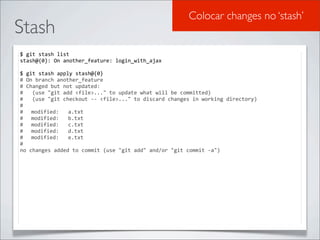
Colocar changes no ‘stash’
Stash
$	
  git	
  stash	
  list
stash@{0}:	
  On	
  another_feature:	
  login_with_ajax

$	
  git	
  stash	
  apply	
  stash@{0}
#	
  On	
  branch	
  another_feature
#	
  Changed	
  but	
  not	
  updated:
#	
  	
  	
  (use	
  "git	
  add	
  <file>..."	
  to	
  update	
  what	
  will	
  be	
  committed)
#	
  	
  	
  (use	
  "git	
  checkout	
  -­‐-­‐	
  <file>..."	
  to	
  discard	
  changes	
  in	
  working	
  directory)
#
#	
   modified:	
  	
  	
  a.txt
#	
   modified:	
  	
  	
  b.txt
#	
   modified:	
  	
  	
  c.txt
#	
   modified:	
  	
  	
  d.txt
#	
   modified:	
  	
  	
  e.txt
#
no	
  changes	
  added	
  to	
  commit	
  (use	
  "git	
  add"	
  and/or	
  "git	
  commit	
  -­‐a")
Resolução de conflitos
Resolvendo conflitos
 $	
  git	
  checkout	
  master

 $	
  git	
  status	
  
 #	
  On	
  branch	
  master
 nothing	
  to	
  commit	
  (working	
  directory	
  clean)

 $	
  touch	
  a.txt	
  &&	
  echo	
  "Workshop	
  de	
  Git"	
  >	
  a.txt
 $	
  git	
  add	
  .
 $	
  git	
  commit	
  -­‐m	
  “Adding	
  new	
  file	
  a”
 [master	
  e88ac64]	
  Adding	
  file	
  ad
 	
  1	
  files	
  changed,	
  1	
  insertions(+),	
  0	
  deletions(-­‐)
 	
  create	
  mode	
  100644	
  a.txt

 $	
  git	
  checkout	
  another_feature
 Switched	
  to	
  a	
  new	
  branch	
  'another_feature'

 $	
  echo	
  "CI&T	
  apresenta	
  Workshop	
  de	
  Git"	
  >	
  a.txt

 $	
  git	
  commit	
  -­‐am	
  "Changing	
  on	
  file	
  a"
 [another_feature	
  d7a6544]	
  Changing	
  on	
  file	
  a
 	
  1	
  files	
  changed,	
  1	
  insertions(+),	
  1	
  deletions(-­‐)

 $	
  git	
  checkout	
  master
 Switched	
  to	
  branch	
  'master'
Resolução de conflitos
Resolvendo conflitos
 $	
  git	
  merge	
  another_feature
 Auto-­‐merging	
  a.txt
 CONFLICT	
  (add/add):	
  Merge	
  conflict	
  in	
  a.txt
 Automatic	
  merge	
  failed;	
  fix	
  conflicts	
  and	
  then	
  commit	
  the	
  result.

 $	
  git	
  diff
 diff	
  -­‐-­‐cc	
  a.txt
 index	
  f4e2830,ae35584..0000000
 -­‐-­‐-­‐	
  a/a.txt
 +++	
  b/a.txt
 @@@	
  -­‐1,1	
  -­‐1,1	
  +1,5	
  @@@
 -­‐	
  Workshop	
  de	
  Git
 	
  -­‐Cit	
  apresenta	
  workshop	
  de	
  git.
 ++<<<<<<<	
  HEAD
 ++Workshop	
  de	
  Git
 ++=======
 ++Cit	
  apresenta	
  workshop	
  de	
  git.
 ++>>>>>>>	
  another_feature

 $	
  git	
  commit	
  -­‐am	
  "Merging	
  branches"
 [master	
  36e2a5d]	
  Merging	
  branches

 $	
  git	
  log
 commit	
  36e2a5d1b4cdc74d967ced02a29190321adefbec
 Merge:	
  e88ac64	
  d7a6544
 Author:	
  Alberto	
  Leal	
  <albertonb@gmail.com>
 Date:	
  	
  	
  Wed	
  Apr	
  11	
  22:00:50	
  2012	
  -­‐0300


  Merging	
  branches
Procurando bug com git bisect
http://imasters.com.br/artigo/15310/desenvolvimento/git-localizando-a-origem-de-um-bug-atraves-de-busca-
                                        binaria-entre-os-commits
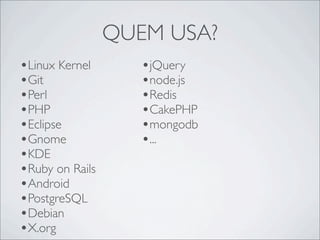
QUEM USA?
•Linux Kernel       •jQuery
•Git                •node.js
•Perl               •Redis
•PHP                •CakePHP
•Eclipse            •mongodb
•Gnome              •...
•KDE
•Ruby on Rails
•Android
•PostgreSQL
•Debian
•X.org
FERRAMENTAS
•Github
•Gitorious
•SmartGit
•Tortoise
•...
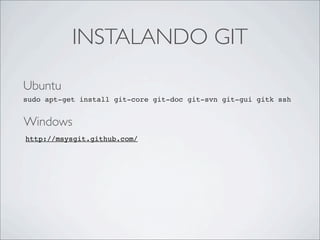
INSTALANDO GIT

Ubuntu
sudo apt-get install git-core git-doc git-svn git-gui gitk ssh


Windows
http://msysgit.github.com/
OBRIGADO!!
           aleal@ciandt.com

http://www.albertoleal.eti.br/category/git
adesivos na minha mesa

Wokshop de Git

  • 1.
  • 2.
  • 3.
    O que éum SCM?
  • 4.
  • 5.
    SVN it svn m u om pd svnc ate
  • 6.
    GIT git ush pu gi tp ll git push remote git pull remote
  • 7.
    SVN :: CENTRALIZADO Workflow- Repositório Central
  • 8.
    svn Desenvolvimento Linear Renomear arquivo/pasta dói desvantagens Repos Grandes Resolução de Conflitos ....
  • 9.
    git svn
  • 10.
    “Git is astupid content tracker.” (Peepcode Git Internals) git
  • 11.
  • 12.
    Social Coding Free para projetos Open Source http://www.github.com Firewall para “enterprise”
  • 13.
    Ágil git Autonomia vantagens Repositórios Independentes Resolução de conflitos Repositórios Pequenos
  • 14.
    git Quebra de paradigma desvantagens Curva de Aprendizado t Necessário ter um processo definido
  • 15.
    curiosidade The Ruby onRails Git repository download, which includes the full history of the project – every version of every file, weighs in at around 13M, which is not even twice the size of a single checkout of the project (~9M). The Subversion server repository for the same project is about 115M. Peepcode Git internals página 12
  • 16.
  • 17.
    Necessário ter umprocesso definido Workflow - Repositório Central
  • 18.
    Necessário ter umprocesso definido Workflow - Gerente de Integração
  • 19.
    era uma vez... Você está sentado em sua mesa trabalhando em uma estória. De repente, sua SM chega perto de você e pede para você parar o que você está fazendo, pois foi encontrado um bug show stopper.
  • 20.
  • 21.
  • 22.
    Comitar as alterações (sem terminar a task) svn Qual o dev que está com o ambiente limpo? Encontrar o bug; Quanto tempo Implementar o fix; Remover as changes anteriores; levaria? Comitar o fix; Voltar alterações da change. Criar branch; Comitar changes; Voltar no trunk; (?) Comitar fix..
  • 23.
    git Criar Branch Colocar changes no ‘stash’ Quanto tempo levaria? Git permite que o desenvolvedor seja mais ágil!
  • 24.
    filosofia Só código que funciona no master Feature Branch (*) “Commit all the fucking time” “Eu não gosto de resolver conflito!” (aleal) (*) http://martinfowler.com/bliki/FeatureBranch.html
  • 25.
  • 26.
  • 27.
    Configurando e Commit #Configurando conta do usuário; $  git  config  -­‐-­‐global  user.name  "Alberto  Leal" $  git  config  -­‐-­‐global  user.email  albertonb@gmail.com $  git  config  -­‐-­‐global  color.ui  auto # Criando estrutura de pastas do projeto e adicionando alguns arquivos; $  mkdir  ~/meu_projeto $  cd  ~/meu_projeto $  touch  README.txt  config.txt     # Iniciando um repositório git; $  git  init Initialized  empty  Git  repository  in  ~/meu_projeto/.git/
  • 28.
    Configurando e Commit #Interagindo com o repositório criado; $  git  status #  On  branch  master # #  Initial  commit # #  Untracked  files: #      (use  "git  add  <file>..."  to  include  in  what  will  be  committed) # #   README.txt #   config.txt nothing  added  to  commit  but  untracked  files  present  (use  "git  add"  to  track) $  git  add  . $  git  status #  On  branch  master # #  Initial  commit # #  Changes  to  be  committed: #      (use  "git  rm  -­‐-­‐cached  <file>..."  to  unstage) # #   new  file:      README.txt #   new  file:      config.txt
  • 29.
    Configurando e Commit #Criando o primeiro commit; $  git  commit  -­‐m  “Initial  Commit” [master  (root-­‐commit)  4692340]  Initial  Commit  0  files  changed,  0  insertions(+),  0  deletions(-­‐)  create  mode  100644  README.txt  create  mode  100644  config.txt $  git  log commit  4692340f4f326a4120337185474153e65c808cd1 Author:  Alberto  Leal  <albertonb@gmail.com> Date:      Sun  Mar  25  19:13:59  2012  -­‐0300        Initial  Commit
  • 30.
    O que éum commit? Curva de Aprendizado Quebra de paradigma tag v1.0 sha1:  4692340f4f326a4120337185474153e65c808cd1 Commit Tree Blob
  • 31.
    O que éum commit? Curva de Aprendizado Commit Commit (abcde) (fghijl) /public /public index.html index.html whoami.html
  • 32.
    Curva de Aprendizado WorkingDirectory Stage area Repository
  • 33.
    Diff e RevertendoCommit # Abra o arquivo README.txt e altere o conteúdo; $  git  status #  On  branch  master #  Changed  but  not  updated: #      (use  "git  add  <file>..."  to  update  what  will  be  committed) #      (use  "git  checkout  -­‐-­‐  <file>..."  to  discard  changes  in  working  directory) # #   modified:      README.txt # no  changes  added  to  commit  (use  "git  add"  and/or  "git  commit  -­‐a") $  git  diff diff  -­‐-­‐git  a/README.txt  b/README.txt index  87147e2..3468b97  100644 -­‐-­‐-­‐  a/README.txt +++  b/README.txt @@  -­‐1  +1,3  @@ -­‐This  is  a  simple  document.  No  newline  at  end  of  file +Este  é  um  documento  simples. + +Estamos  dando  uma  olhada  no  Git.  No  newline  at  end  of  file
  • 34.
    Diff e RevertendoCommit # Para cancelar todas as modificações abaixo, basta dar um checkout no arquivo do repo; $  git  checkout  README.txt   $  git  status #  On  branch  master nothing  to  commit  (working  directory  clean) # Caso você tenha comitado as alterações feitas anteriormente, para reverter o commit, faça; $  git  log   commit  23a7e65d7353bd61935c627b13cad8890eea0de6 Author:  Alberto  Leal  <albertonb@gmail.com> Date:      Wed  Apr  11  21:10:19  2012  -­‐0300        Adding  some  lines commit  909f2bbfc158b41619e90ea7679f3eb11dd46896 Author:  Alberto  Leal  <albertonb@gmail.com> Date:      Wed  Apr  11  21:03:34  2012  -­‐0300        Initial  Commit $  git  revert  23a7e65d7353bd
  • 35.
    Diff e RevertendoCommit $  git  log   commit  143059e977ea838b78c054d37f03a82f82051a7b Author:  Alberto  Leal  <albertonb@gmail.com> Date:      Wed  Apr  11  21:11:13  2012  -­‐0300        Revert  "Adding  some  lines"                This  reverts  commit  23a7e65d7353bd61935c627b13cad8890eea0de6. commit  23a7e65d7353bd61935c627b13cad8890eea0de6 Author:  Alberto  Leal  <albertonb@gmail.com> Date:      Wed  Apr  11  21:10:19  2012  -­‐0300        Adding  some  lines commit  909f2bbfc158b41619e90ea7679f3eb11dd46896 Author:  Alberto  Leal  <albertonb@gmail.com> Date:      Wed  Apr  11  21:03:34  2012  -­‐0300        Initial  Commit
  • 36.
    Criar Branch Branch $  git  branch   *  master $  git  branch   *  master $  git  branch  new_feature $  git  branch *  master    new_feature $  git  checkout  -­‐b  another_feature Switched  to  a  new  branch  'another_feature' $  git  branch *  another_feature    master    new_feature
  • 37.
    Criar Branch Branch $  touch  a.txt  b.txt  c.txt  d.txt  e.txt $  git  status   #  On  branch  another_feature #  Untracked  files: #      (use  "git  add  <file>..."  to  include  in  what  will  be  committed) # #   a.txt #   b.txt #   c.txt #   d.txt #   e.txt nothing  added  to  commit  but  untracked  files  present  (use  "git  add"  to  track) $  git  add  .  &&  git  commit  -­‐m  "Adding  new  files" [another_feature  08f9fbe]  Adding  new  files  0  files  changed,  0  insertions(+),  0  deletions(-­‐)  create  mode  100644  a.txt  create  mode  100644  b.txt  create  mode  100644  c.txt  create  mode  100644  d.txt  create  mode  100644  e.txt $  git  checkout  new_feature $  ls README     alberto.txt   oi.txt     ola.txt
  • 38.
    lembra ...? Vocêestá sentado em sua mesa trabalhando em uma estória. De repente, sua SM chega perto de você e pede para você parar o que você está fazendo, pois foi encontrado um bug show stopper.
  • 39.
    Colocar changes no‘stash’ Stash $  git  checkout  another_feature $  ls README     alberto.txt   c.txt     e.txt     ola.txt a.txt     b.txt     d.txt     oi.txt $  git  status #  On  branch  another_feature #  Changed  but  not  updated: #      (use  "git  add  <file>..."  to  update  what  will  be  committed) #      (use  "git  checkout  -­‐-­‐  <file>..."  to  discard  changes  in  working  directory) # #   modified:      a.txt #   modified:      b.txt #   modified:      c.txt #   modified:      d.txt #   modified:      e.txt # no  changes  added  to  commit  (use  "git  add"  and/or  "git  commit  -­‐a") $  git  stash  save  login_with_ajax Saved  working  directory  and  index  state  On  another_feature:  login_with_ajax HEAD  is  now  at  08f9fbe  Adding  new  files $  git  status #  On  branch  another_feature nothing  to  commit  (working  directory  clean)
  • 40.
    Colocar changes no‘stash’ Stash $  git  stash  list stash@{0}:  On  another_feature:  login_with_ajax $  git  stash  apply  stash@{0} #  On  branch  another_feature #  Changed  but  not  updated: #      (use  "git  add  <file>..."  to  update  what  will  be  committed) #      (use  "git  checkout  -­‐-­‐  <file>..."  to  discard  changes  in  working  directory) # #   modified:      a.txt #   modified:      b.txt #   modified:      c.txt #   modified:      d.txt #   modified:      e.txt # no  changes  added  to  commit  (use  "git  add"  and/or  "git  commit  -­‐a")
  • 41.
    Resolução de conflitos Resolvendoconflitos $  git  checkout  master $  git  status   #  On  branch  master nothing  to  commit  (working  directory  clean) $  touch  a.txt  &&  echo  "Workshop  de  Git"  >  a.txt $  git  add  . $  git  commit  -­‐m  “Adding  new  file  a” [master  e88ac64]  Adding  file  ad  1  files  changed,  1  insertions(+),  0  deletions(-­‐)  create  mode  100644  a.txt $  git  checkout  another_feature Switched  to  a  new  branch  'another_feature' $  echo  "CI&T  apresenta  Workshop  de  Git"  >  a.txt $  git  commit  -­‐am  "Changing  on  file  a" [another_feature  d7a6544]  Changing  on  file  a  1  files  changed,  1  insertions(+),  1  deletions(-­‐) $  git  checkout  master Switched  to  branch  'master'
  • 42.
    Resolução de conflitos Resolvendoconflitos $  git  merge  another_feature Auto-­‐merging  a.txt CONFLICT  (add/add):  Merge  conflict  in  a.txt Automatic  merge  failed;  fix  conflicts  and  then  commit  the  result. $  git  diff diff  -­‐-­‐cc  a.txt index  f4e2830,ae35584..0000000 -­‐-­‐-­‐  a/a.txt +++  b/a.txt @@@  -­‐1,1  -­‐1,1  +1,5  @@@ -­‐  Workshop  de  Git  -­‐Cit  apresenta  workshop  de  git. ++<<<<<<<  HEAD ++Workshop  de  Git ++======= ++Cit  apresenta  workshop  de  git. ++>>>>>>>  another_feature $  git  commit  -­‐am  "Merging  branches" [master  36e2a5d]  Merging  branches $  git  log commit  36e2a5d1b4cdc74d967ced02a29190321adefbec Merge:  e88ac64  d7a6544 Author:  Alberto  Leal  <albertonb@gmail.com> Date:      Wed  Apr  11  22:00:50  2012  -­‐0300        Merging  branches
  • 43.
    Procurando bug comgit bisect http://imasters.com.br/artigo/15310/desenvolvimento/git-localizando-a-origem-de-um-bug-atraves-de-busca- binaria-entre-os-commits
  • 44.
    QUEM USA? •Linux Kernel •jQuery •Git •node.js •Perl •Redis •PHP •CakePHP •Eclipse •mongodb •Gnome •... •KDE •Ruby on Rails •Android •PostgreSQL •Debian •X.org
  • 45.
  • 46.
    INSTALANDO GIT Ubuntu sudo apt-getinstall git-core git-doc git-svn git-gui gitk ssh Windows http://msysgit.github.com/
  • 47.
    OBRIGADO!! aleal@ciandt.com http://www.albertoleal.eti.br/category/git
  • 48.