Distributed Source
Version Control System
   Apr 2013
Who am i

Lâm Phương Duy
Software Architect
duylam@kms-technology.com


 Use Git from 2009
 http://vn.linkedin.com/in/duylamphuong


                              Confidential   2
Objectives
  To use Git in software
   project as doing with
   SVN or TFS
  To self study Git for
   advanced needs


   Confidential             3
Syllabus

Git theory

 Daily development workflow

 Daily collaboration workflow

More on Git
              Confidential      4
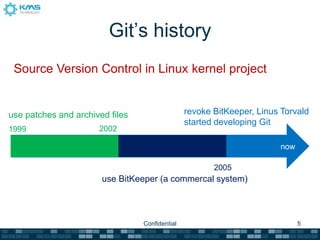
Git’s history
 Source Version Control in Linux kernel project


use patches and archived files                  revoke BitKeeper, Linus Torvald
                                                started developing Git
1999                  2002

                                                                       now

                                                       2005
                       use BitKeeper (a commercal system)


                                 Confidential                                5
Syllabus

Git theory

 Daily development workflow

 Daily collaboration workflow

More on Git
              Confidential      6
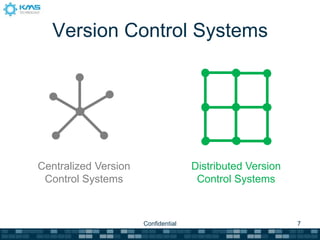
Version Control Systems


Centralized Version                  Distributed Version
 Control Systems                      Control Systems


                      Confidential                         7
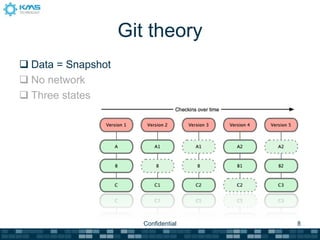
Git theory
 Data = Snapshot
 No network
 Three states


                       Confidential   8
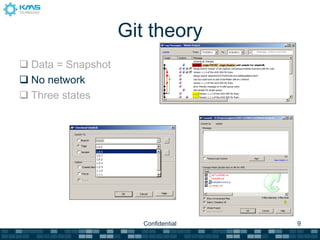
Git theory
 Data = Snapshot
 No network
 Three states


                       Confidential   9
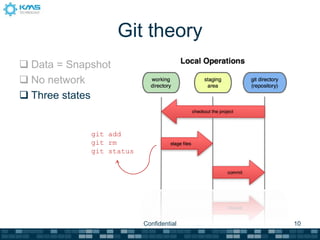
Git theory
 Data = Snapshot
 No network
 Three states


             git add
             git rm
             git status


                          Confidential   10
Syllabus

Git theory

 Daily development workflow

 Daily collaboration workflow

More on Git
              Confidential      11
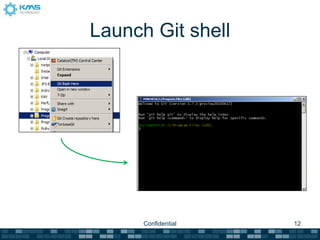
Launch Git shell


      Confidential   12
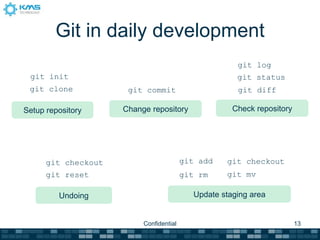
Git in daily development
                                                      git log
 git init                                             git status
 git clone            git commit                      git diff

Setup repository     Change repository               Check repository


      git checkout                       git add   git checkout
      git reset                          git rm    git mv

         Undoing                           Update staging area


                          Confidential                                  13
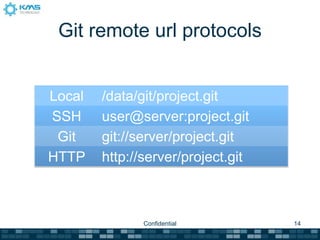
Git remote url protocols


Local   /data/git/project.git
SSH     user@server:project.git
 Git    git://server/project.git
HTTP    http://server/project.git


               Confidential         14
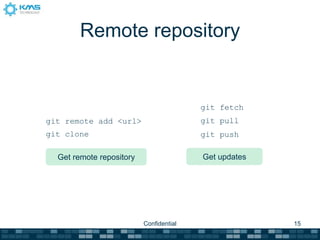
Remote repository


                                         git fetch
git remote add <url>                     git pull
git clone                                git push

  Get remote repository                  Get updates


                          Confidential                 15
Authenticate with remote
          repository
1) Generate key files with ssh-keygen
2) Upload %USER_HOME%/.ssh/id_rsa.pub to
   remote repository hosting


    Read more: https://help.github.com/articles/generating-ssh-keys

                           Confidential                          16
Syllabus

Git theory

 Daily development workflow

 Daily collaboration workflow

More on Git
              Confidential      17
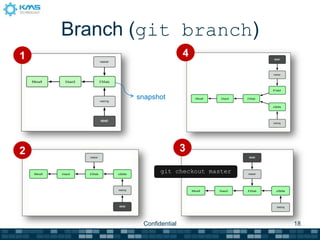
Branch (git branch)
1                          4


           snapshot


2                          3

                  git checkout master


            Confidential                18
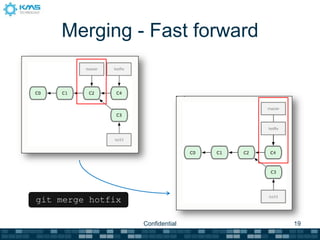
Merging - Fast forward


git merge hotfix

                   Confidential   19
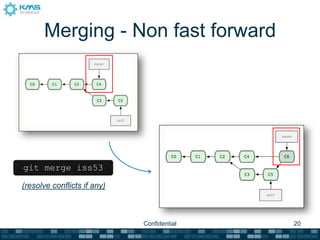
Merging - Non fast forward


git merge iss53

(resolve conflicts if any)


                             Confidential   20
Remote branch workflows
Create default remote branch
Get changes from remote repository
Merge changes from remote branch in
 local (two methods)
Update changes to remote repository


                 Confidential          21
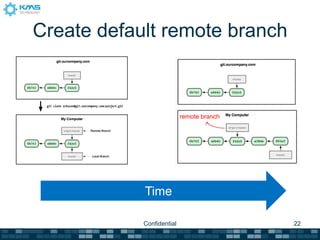
Create default remote branch


                            remote branch
                           remote branch


            Time

            Confidential                    22
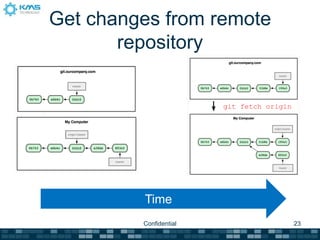
Get changes from remote
       repository


                        git fetch origin


         Time
         Confidential                      23
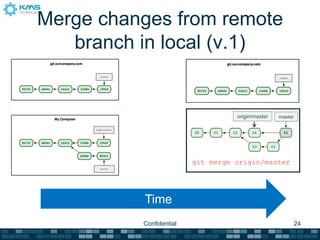
Merge changes from remote
   branch in local (v.1)


                                   origin/master   master


                         git merge origin/master


          Time
          Confidential                                      24
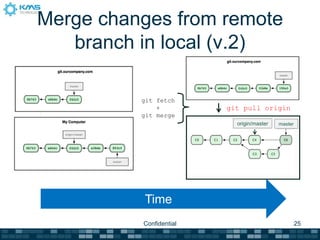
Merge changes from remote
   branch in local (v.2)

          git fetch
              +          git pull origin
          git merge
                           origin/master   master


          Time
          Confidential                              25
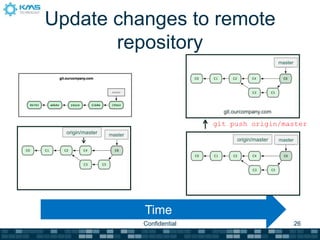
Update changes to remote
       repository
                                                                 master


                                            git.ourcompany.com

                                          git push origin/master
  origin/master   master
                                                 origin/master   master


                           Time
                           Confidential                                   26
Remote tracking branch
• Use tracking branch to let Git know which
  server and branch to push / pull
• Create remote tracking branch:
 > git checkout -b [branch] [remote name]/[branch]


                         Confidential                27
Syllabus

Git theory

 Daily development workflow

 Daily collaboration workflow

More on Git
              Confidential      28
Useful features
> git tag

> git stash

> git submodule


              Confidential   29
Common problems
> git push
! [rejected]      master -> master (non-fast forward)
Error: failed to push some refs to ‘git@gitproxy:rip747/cfwheels.git’


 > git pull
 Merge made by recursive
 > git push
 To git@gitproxy:rip747/cfwheels.git
 1717535..1406e8c master -> master


                                Confidential                            30
Common problems (cont.)
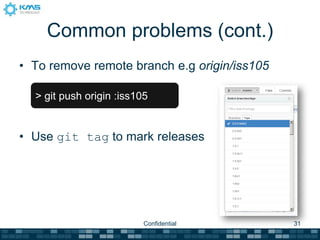
• To remove remote branch e.g origin/iss105

  > git push origin :iss105


• Use git tag to mark releases


                          Confidential        31
Reference
For everything you want to read more about Git


              http://git-scm.com


                     Confidential                32
THANK YOU

Git Version Control System

  • 1.
  • 2.
    Who am i LâmPhương Duy Software Architect duylam@kms-technology.com  Use Git from 2009  http://vn.linkedin.com/in/duylamphuong Confidential 2
  • 3.
    Objectives Touse Git in software project as doing with SVN or TFS To self study Git for advanced needs Confidential 3
  • 4.
    Syllabus Git theory Dailydevelopment workflow Daily collaboration workflow More on Git Confidential 4
  • 5.
    Git’s history SourceVersion Control in Linux kernel project use patches and archived files revoke BitKeeper, Linus Torvald started developing Git 1999 2002 now 2005 use BitKeeper (a commercal system) Confidential 5
  • 6.
    Syllabus Git theory Dailydevelopment workflow Daily collaboration workflow More on Git Confidential 6
  • 7.
    Version Control Systems CentralizedVersion Distributed Version Control Systems Control Systems Confidential 7
  • 8.
    Git theory  Data= Snapshot  No network  Three states Confidential 8
  • 9.
    Git theory  Data= Snapshot  No network  Three states Confidential 9
  • 10.
    Git theory  Data= Snapshot  No network  Three states git add git rm git status Confidential 10
  • 11.
    Syllabus Git theory Dailydevelopment workflow Daily collaboration workflow More on Git Confidential 11
  • 12.
    Launch Git shell Confidential 12
  • 13.
    Git in dailydevelopment git log git init git status git clone git commit git diff Setup repository Change repository Check repository git checkout git add git checkout git reset git rm git mv Undoing Update staging area Confidential 13
  • 14.
    Git remote urlprotocols Local /data/git/project.git SSH user@server:project.git Git git://server/project.git HTTP http://server/project.git Confidential 14
  • 15.
    Remote repository git fetch git remote add <url> git pull git clone git push Get remote repository Get updates Confidential 15
  • 16.
    Authenticate with remote repository 1) Generate key files with ssh-keygen 2) Upload %USER_HOME%/.ssh/id_rsa.pub to remote repository hosting Read more: https://help.github.com/articles/generating-ssh-keys Confidential 16
  • 17.
    Syllabus Git theory Dailydevelopment workflow Daily collaboration workflow More on Git Confidential 17
  • 18.
    Branch (git branch) 1 4 snapshot 2 3 git checkout master Confidential 18
  • 19.
    Merging - Fastforward git merge hotfix Confidential 19
  • 20.
    Merging - Nonfast forward git merge iss53 (resolve conflicts if any) Confidential 20
  • 21.
    Remote branch workflows Createdefault remote branch Get changes from remote repository Merge changes from remote branch in local (two methods) Update changes to remote repository Confidential 21
  • 22.
    Create default remotebranch remote branch remote branch Time Confidential 22
  • 23.
    Get changes fromremote repository git fetch origin Time Confidential 23
  • 24.
    Merge changes fromremote branch in local (v.1) origin/master master git merge origin/master Time Confidential 24
  • 25.
    Merge changes fromremote branch in local (v.2) git fetch + git pull origin git merge origin/master master Time Confidential 25
  • 26.
    Update changes toremote repository master git.ourcompany.com git push origin/master origin/master master origin/master master Time Confidential 26
  • 27.
    Remote tracking branch •Use tracking branch to let Git know which server and branch to push / pull • Create remote tracking branch: > git checkout -b [branch] [remote name]/[branch] Confidential 27
  • 28.
    Syllabus Git theory Dailydevelopment workflow Daily collaboration workflow More on Git Confidential 28
  • 29.
    Useful features > gittag > git stash > git submodule Confidential 29
  • 30.
    Common problems > gitpush ! [rejected] master -> master (non-fast forward) Error: failed to push some refs to ‘git@gitproxy:rip747/cfwheels.git’ > git pull Merge made by recursive > git push To git@gitproxy:rip747/cfwheels.git 1717535..1406e8c master -> master Confidential 30
  • 31.
    Common problems (cont.) •To remove remote branch e.g origin/iss105 > git push origin :iss105 • Use git tag to mark releases Confidential 31
  • 32.
    Reference For everything youwant to read more about Git http://git-scm.com Confidential 32
  • 33.