
Getting start on Android
                - By Amit Yadav
Topics covered


Why Android?
Introduction to Android
How to get started?
Emulator
Dive in
Resource available
Q&A
Why Android?

Open market place
Instant publishing & feedback
You can create anything
Create background apps(mail notifications, FB
updates, twitter etc)
Why Android? (cont…)


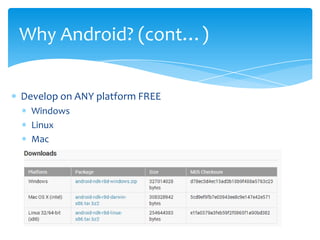
Develop on ANY platform FREE
  Windows
  Linux
  Mac
Introduction to Android


Open software platform for mobile development
A complete stack – OS, Middleware, Applications
An Open Handset Alliance (OHA) project
Powered by Linux operating system
Fast application development in Java
Open source under the Apache 2 license
Why Android? (cont…)


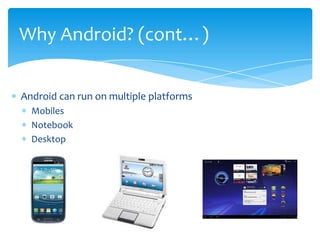
Android can run on multiple platforms
  Mobiles
  Notebook
  Desktop
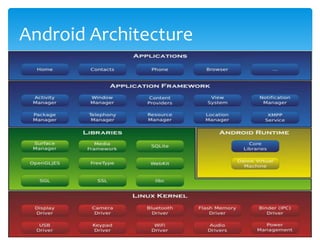
Android Architecture
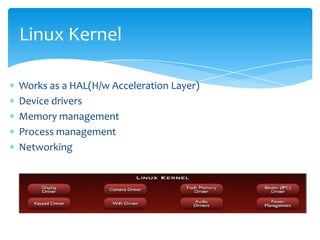
Linux Kernel

Works as a HAL(H/w Acceleration Layer)
Device drivers
Memory management
Process management
Networking
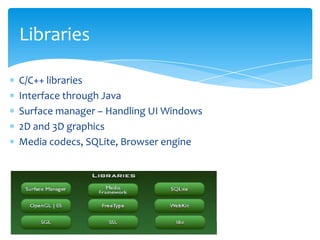
Libraries

C/C++ libraries
Interface through Java
Surface manager – Handling UI Windows
2D and 3D graphics
Media codecs, SQLite, Browser engine
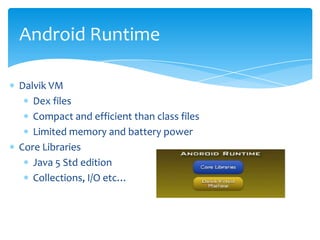
Android Runtime

Dalvik VM
   Dex files
   Compact and efficient than class files
   Limited memory and battery power
Core Libraries
   Java 5 Std edition
   Collections, I/O etc…
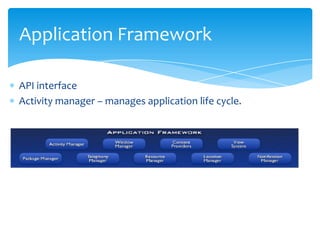
Application Framework

API interface
Activity manager – manages application life cycle.
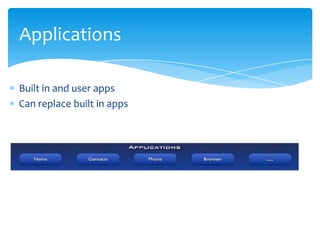
Applications

Built in and user apps
Can replace built in apps
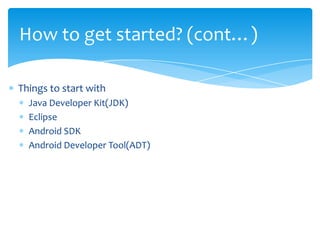
How to get started? (cont…)

Things to start with
  Java Developer Kit(JDK)
  Eclipse
  Android SDK
  Android Developer Tool(ADT)
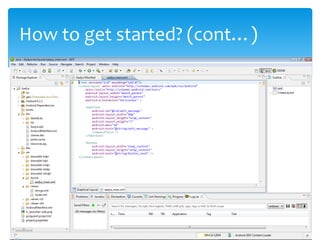
How to get started? (cont…)
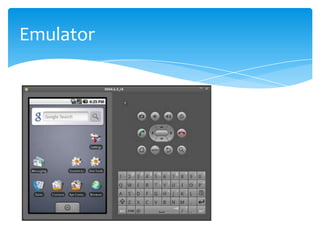
Emulator
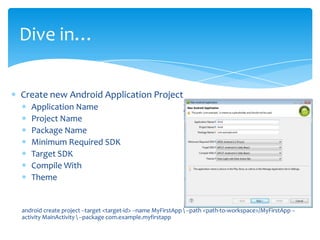
Dive in…

Create new Android Application Project
   Application Name
   Project Name
   Package Name
   Minimum Required SDK
   Target SDK
   Compile With
   Theme


android create project --target <target-id> --name MyFirstApp  --path <path-to-workspace>/MyFirstApp --
activity MainActivity  --package com.example.myfirstapp
Dive in…(Application Building Blocks)


AndroidManifest.XML
Activities
Views & ViewGroup
Intents
Services
Notifications
Content Providers
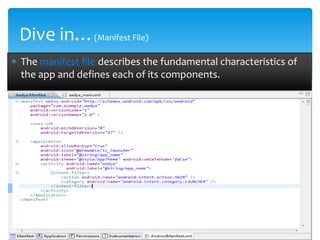
Dive in…(Manifest File)
The manifest file describes the fundamental characteristics of
the app and defines each of its components.
Dive in…(Activities)

This represents the presentation layer of an Android
Application e.g. a screen which user sees.
An Android app can have several activities and the
app can switch between these activities during
runtime
Dive in…(Views & ViewGroup)

Views are basic building blocks
Views object are usually UI widgets(buttons, text field
etc)
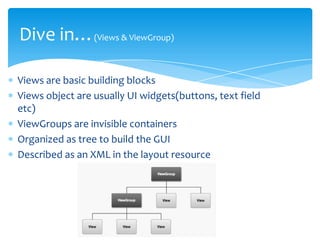
ViewGroups are invisible containers
Organized as tree to build the GUI
Described as an XML in the layout resource
Dive in…(Intents)


Intents are used to move from Activity to Activity
Describes what an application wants
Provides late runtime bindings
Dive in…(Services)


They run in the background
They don’t interact with users
Run on the main thread of the process
Is kept running as long as
  Is Started
  Has Connections
Dive in…(Notifications)


Notify the users about the events
NotificationManager is used for this purpose
Types
  Persistent icon
  Turning LEDS
  Sound or Vibrations
Dive in…(Content Providers)


ContentProviders are objects that can
  Retrieve Data
  Store Data
Data is available for all the applications
Only way to share data across packages
Backend is SQLite
Resource available

http://androidcore.com/home.html Here you can find more than 300
tutorial for android this is the best site for android.
http://www.androidpeople.com/android-tutorial/ This is the another
good site for android.
http://developer.android.com This is site here you find all the
documentation of Android.
http://en.wikipedia.org/wiki/Android_(operating_system) This is the link
of Wikipedia for Android
http://www.vogella.de/articles/Android/article.html#overview This is the
another good site for Android Development.
http://www.pdftop.com/ebook/android+tutorial/ This is the link here
you find lot of book related to Android
http://code.google.com/p/android-wheel/ This is the side here you find
source code of the projects.
Q&A


  No questions
    please!!!

Getting Started With ANDROID

  • 1.
    Getting start onAndroid - By Amit Yadav
  • 2.
    Topics covered Why Android? Introductionto Android How to get started? Emulator Dive in Resource available Q&A
  • 3.
    Why Android? Open marketplace Instant publishing & feedback You can create anything Create background apps(mail notifications, FB updates, twitter etc)
  • 4.
    Why Android? (cont…) Developon ANY platform FREE Windows Linux Mac
  • 5.
    Introduction to Android Opensoftware platform for mobile development A complete stack – OS, Middleware, Applications An Open Handset Alliance (OHA) project Powered by Linux operating system Fast application development in Java Open source under the Apache 2 license
  • 6.
    Why Android? (cont…) Androidcan run on multiple platforms Mobiles Notebook Desktop
  • 7.
  • 8.
    Linux Kernel Works asa HAL(H/w Acceleration Layer) Device drivers Memory management Process management Networking
  • 9.
    Libraries C/C++ libraries Interface throughJava Surface manager – Handling UI Windows 2D and 3D graphics Media codecs, SQLite, Browser engine
  • 10.
    Android Runtime Dalvik VM Dex files Compact and efficient than class files Limited memory and battery power Core Libraries Java 5 Std edition Collections, I/O etc…
  • 11.
    Application Framework API interface Activitymanager – manages application life cycle.
  • 12.
    Applications Built in anduser apps Can replace built in apps
  • 13.
    How to getstarted? (cont…) Things to start with Java Developer Kit(JDK) Eclipse Android SDK Android Developer Tool(ADT)
  • 14.
    How to getstarted? (cont…)
  • 15.
  • 16.
    Dive in… Create newAndroid Application Project Application Name Project Name Package Name Minimum Required SDK Target SDK Compile With Theme android create project --target <target-id> --name MyFirstApp --path <path-to-workspace>/MyFirstApp -- activity MainActivity --package com.example.myfirstapp
  • 17.
    Dive in…(Application BuildingBlocks) AndroidManifest.XML Activities Views & ViewGroup Intents Services Notifications Content Providers
  • 18.
    Dive in…(Manifest File) Themanifest file describes the fundamental characteristics of the app and defines each of its components.
  • 19.
    Dive in…(Activities) This representsthe presentation layer of an Android Application e.g. a screen which user sees. An Android app can have several activities and the app can switch between these activities during runtime
  • 20.
    Dive in…(Views &ViewGroup) Views are basic building blocks Views object are usually UI widgets(buttons, text field etc) ViewGroups are invisible containers Organized as tree to build the GUI Described as an XML in the layout resource
  • 21.
    Dive in…(Intents) Intents areused to move from Activity to Activity Describes what an application wants Provides late runtime bindings
  • 22.
    Dive in…(Services) They runin the background They don’t interact with users Run on the main thread of the process Is kept running as long as Is Started Has Connections
  • 23.
    Dive in…(Notifications) Notify theusers about the events NotificationManager is used for this purpose Types Persistent icon Turning LEDS Sound or Vibrations
  • 24.
    Dive in…(Content Providers) ContentProvidersare objects that can Retrieve Data Store Data Data is available for all the applications Only way to share data across packages Backend is SQLite
  • 25.
    Resource available http://androidcore.com/home.html Hereyou can find more than 300 tutorial for android this is the best site for android. http://www.androidpeople.com/android-tutorial/ This is the another good site for android. http://developer.android.com This is site here you find all the documentation of Android. http://en.wikipedia.org/wiki/Android_(operating_system) This is the link of Wikipedia for Android http://www.vogella.de/articles/Android/article.html#overview This is the another good site for Android Development. http://www.pdftop.com/ebook/android+tutorial/ This is the link here you find lot of book related to Android http://code.google.com/p/android-wheel/ This is the side here you find source code of the projects.
  • 26.
    Q&A Noquestions please!!!