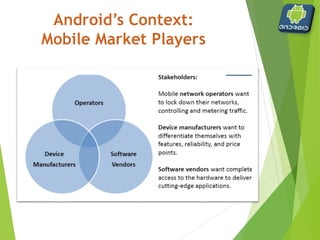
First Steps with
Android
Cesar Augusto Nogueira
@cesarnogcps
www.brazilianswhocode.com
 The Big Picture
 What is Android?
 Get you an idea of how to start developing Android
applications
 Introduce major Android application concepts
 Walk you through a sample application in the
development environments
 Install the development environments
 Create the first Android Application
Goals
 NOT a super difficult course
 Guide you to go through essentials (tons of resources are available)
 NOT a Java language class
 Learn how to use the Android SDK APIs
 NOT an Android internal course
 Learn Android Application Development
 NOT a lecture oriented course
 Learn by doing the hands-on programming
 NOT an advanced course
 Introduce from the very basics (tool installation)
 What is Android?
 System architecture
 Develop environment installation
 Hello World!
 Application components
 Tool chain
Agenda
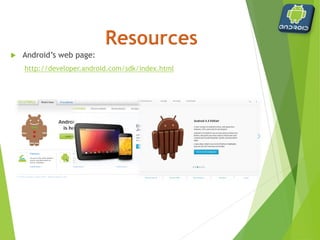
 Android’s web page:
http://developer.android.com/sdk/index.html
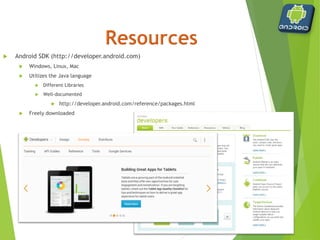
 Android SDK (http://developer.android.com)
 Windows, Linux, Mac
 Utilizes the Java language
 Different Libraries
 Well-documented
 http://developer.android.com/reference/packages.html
 Freely downloaded
Android
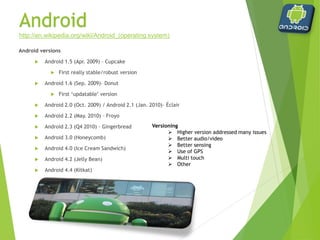
Android versions
 Android 1.5 (Apr. 2009) – Cupcake
 First really stable/robust version
 Android 1.6 (Sep. 2009)– Donut
 First ‘updatable’ version
 Android 2.0 (Oct. 2009) / Android 2.1 (Jan. 2010)– Éclair
 Android 2.2 (May. 2010) – Froyo
 Android 2.3 (Q4 2010) – Gingerbread
 Android 3.0 (Honeycomb)
 Android 4.0 (Ice Cream Sandwich)
 Android 4.2 (Jelly Bean)
 Android 4.4 (Kitkat)
http://en.wikipedia.org/wiki/Android_(operating system)
Versioning
 Higher version addressed many issues
 Better audio/video
 Better sensing
 Use of GPS
 Multi touch
 Other
 Android is a mobile operating system initially developed by
Android Inc (bought by Google 2005).
 Android is the software platform from Google and the
Open Handset Alliance (OHA) that has the potential to
revolutionize the global cell phone market.
 A free, open source mobile platform
 Android is not a device or a product
 Android™ consists of a complete set of software components for
mobile devices including:
 an operating system (Linux-based, multiprocess, multithreaded OS),
 middleware, and
 key mobile applications.
 It has the capability to make inroads in many other (non‐phone)
embedded application markets such as a tablet, a DVR, a
handheld GPS, an MP3 player, etc.
 Android Open Source Project web page to download the source
 http://source.android.com/download
 How many lines of code does it take to create the Android OS?
 http://www.gubatron.com/blog/2010/05/23/how-many-
lines-of-code-does-it-take-to-create-the-android-os/
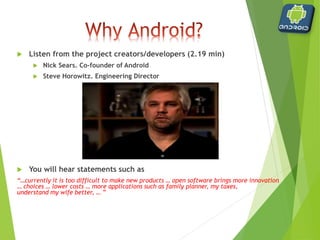
 Listen from the project creators/developers (2.19 min)
 Nick Sears. Co‐founder of Android
 Steve Horowitz. Engineering Director
 You will hear statements such as
“…currently it is too difficult to make new products … open software brings more innovation
… choices … lower costs … more applications such as family planner, my taxes,
understand my wife better, … ”
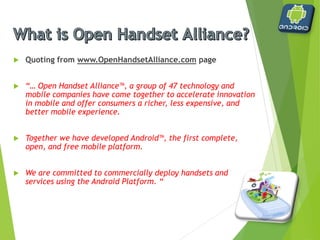
 Quoting from www.OpenHandsetAlliance.com page
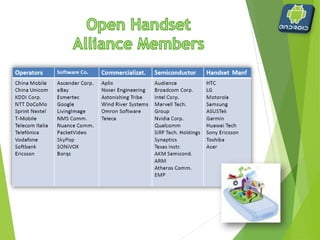
 “… Open Handset Alliance™, a group of 47 technology and
mobile companies have come together to accelerate innovation
in mobile and offer consumers a richer, less expensive, and
better mobile experience.
 Together we have developed Android™, the first complete,
open, and free mobile platform.
 We are committed to commercially deploy handsets and
services using the Android Platform. “
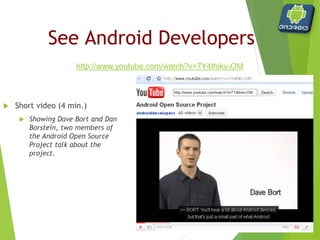
 Short video (4 min.)
 Showing Dave Bort and Dan
Borstein, two members of
the Android Open Source
Project talk about the
project.
See Android Developers
http://www.youtube.com/watch?v=7Y4thikv-OM
 Android is a software environment built for mobile devices.
 It is not a hardware platform.
 Android includes:
 Linux kernel‐based OS,
 a rich UI,
 telephone functionality,
 end‐user applications,
 code libraries,
 application frameworks,
 multimedia support, ...
 User applications are built for Android in Java.
The Android Platform
Again, what did they say about Android?
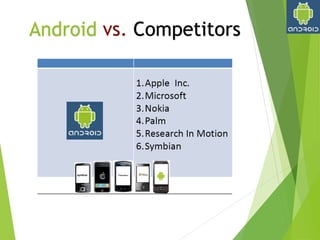
Android vs. Competitors
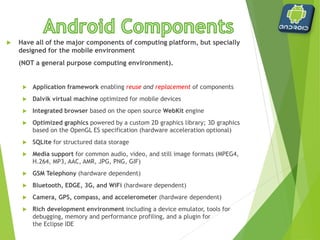
 Have all of the major components of computing platform, but specially
designed for the mobile environment
(NOT a general purpose computing environment).
 Application framework enabling reuse and replacement of components
 Dalvik virtual machine optimized for mobile devices
 Integrated browser based on the open source WebKit engine
 Optimized graphics powered by a custom 2D graphics library; 3D graphics
based on the OpenGL ES specification (hardware acceleration optional)
 SQLite for structured data storage
 Media support for common audio, video, and still image formats (MPEG4,
H.264, MP3, AAC, AMR, JPG, PNG, GIF)
 GSM Telephony (hardware dependent)
 Bluetooth, EDGE, 3G, and WiFi (hardware dependent)
 Camera, GPS, compass, and accelerometer (hardware dependent)
 Rich development environment including a device emulator, tools for
debugging, memory and performance profiling, and a plugin for
the Eclipse IDE
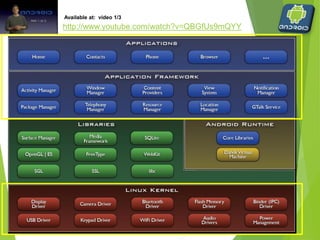
Available at: video 1/3
http://www.youtube.com/watch?v=QBGfUs9mQYY
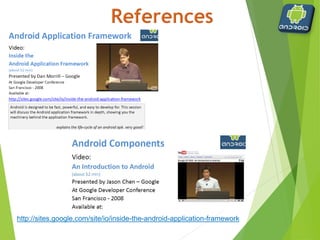
http://sites.google.com/site/io/inside-the-android-application-framework
 Linux kernel is a proven core platform.
 Reliability is more important than performance when it comes
to a mobile phone, because voice communication is the
primary use of a phone.
 Linux can help meet this requirement.
 Linux provides a hardware abstraction layer, letting the upper
levels remain unchanged despite changes in the underlying
hardware.
 As new accessories appear on the market, drivers can be
written at the Linux level to provide support, just as on other
Linux platforms.
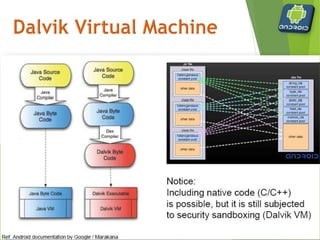
 User applications, as well as core Android applications, are
written in the Java programming language and are compiled
into byte codes.
 Android byte codes are interpreted at runtime by an
interpreter known as the Dalvik virtual machine.
 Why another Virtual Machine?
 Android byte code files are logically equivalent to Java byte codes,
but they permit Android to
 run its applications in its own virtual environment that is free from
Sun’s licensing restrictions and
 an open platform upon which Google, and potentially the open source
community, can improve as necessary.
 Being optimized for low memory requirements
 The VM was slimmed down to use less space
 The constant pool has been modified to use only 32-bit indexes to
simplify the interpreter
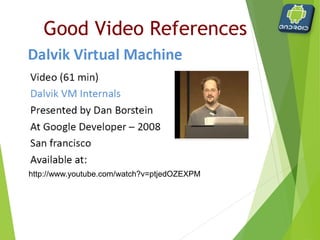
Good Video References
http://www.youtube.com/watch?v=ptjedOZEXPM
 There are four building blocks (components) to an Android
application:
 Activity represents a screen of the app. Moving from one activity
to another is done using an Intent
 An Intent describes what an application wants done, in terms of the
action and the data to act upon, e.g. PICK a contact
 Intent Receiver (broadcast receiver) is used when you want code
in your application to execute in reaction to an external event,
e.g. when the phone rings
 Service is a faceless tasks that run in the background, like a sync
session
 Content Provider is a class that implements a standard set of
methods to let other applications store and retrieve the type of
data that is handled by that content provider
Application Anatomy
Android Development
Applications are composed of:
o Activities
 Visual user interface for one focused endeavor
o Services
 Runs in the background for an indefinite period of time
Intents
 Asynchronous/ synchronous messaging
 URL dispatching on steroids
 Glues many Activities and Services together to make an application
 Provides interactivity between applications
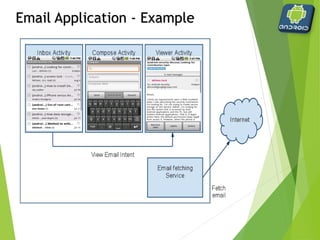
Email Application - Example
 Android application runs in its own Linux process
 The process lifetime is handled by the system, not by the app:
when the system needs memory to run new applications, one of
the background app is killed
 That's why it is important to use correctly Activities, Services,
and Intent Receivers
 Not using them in the right way can result in the system killing
the application's process while it is doing important work
 Example: starting a thread to download a file from an Activity or an
IntentReceiver. A Service should be used instead.
Life Cycle of an
Android Application
 Android determines which process to kill when low on memory
with this priority:
 Foreground process: is one that is required for what the user is
currently doing (UI interaction, handling an Intent, etc.)
 Visible process: is one holding an Activity that is visible to the user
on-screen but not in the foreground (a foreground window leaves
this visible in the background)
 Service process: is one holding a Service that is invisible to the
user, but is doing something valuable (e.g. Playing music)
 Background process: is one holding an Activity that is not currently
visible to the user
 Empty process: is one that doesn't hold any active application
components. It is kept only as a cache to improve startup time the
next time an application's component needs to run
Process priority
Application Lifecycle
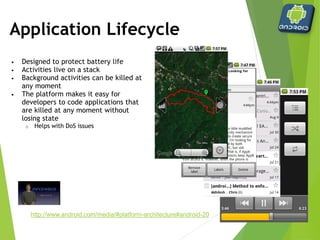
• Designed to protect battery life
• Activities live on a stack
• Background activities can be killed at
any moment
• The platform makes it easy for
developers to code applications that
are killed at any moment without
losing state
o Helps with DoS issues
http://www.android.com/media/#platform-architecture#android-20
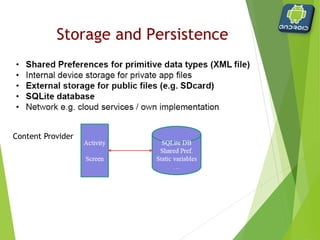
Storage and Persistence
Content Provider
Building Blocks of an
Application
 Resources
 Images
 Audio files
 Constants
 Stored in ‘res’ directory
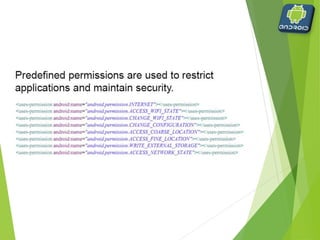
 Permissions
 Must explicitly ask permission to perform tasks
 Access web
 Access GPS
 Access Contacts
Project identification
 When creating a new project, the following must be
provided
 Project name
 Displayed in Eclipse to differentiate projects
 Application name
 Activity name
 The first screen displayed when the application is launched
 Package name
 com.csci153.name
Project components
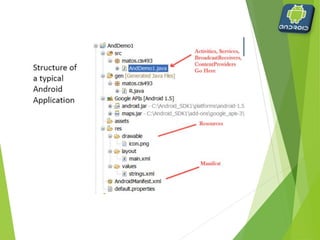
 Automatically created
 AndroidManifest.xml
 Referenced libraries
 Important directories
 gen (generated)
 res (resources)
 src (source)
Project components
 AndroidManifest.xml
 Global settings
 Permissions
 Activities
 Intents
 Referenced libraries
 android.jar – standard Android library
 can add other user-defined libraries
Project components
 gen directory
 Contains R.java
 Automatically generated file
 Contains pointers to other files and folders
 Never modified by programmer
Project components
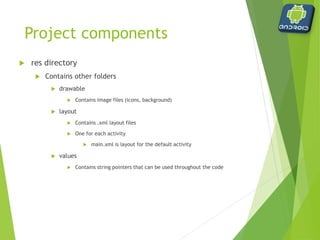
 res directory
 Contains other folders
 drawable
 Contains image files (icons, background)
 layout
 Contains .xml layout files
 One for each activity
 main.xml is layout for the default activity
 values
 Contains string pointers that can be used throughout the code
Project components
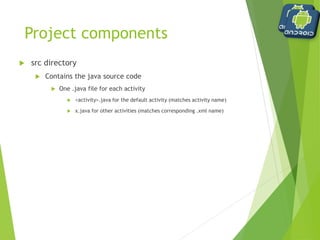
 src directory
 Contains the java source code
 One .java file for each activity
 <activity>.java for the default activity (matches activity name)
 x.java for other activities (matches corresponding .xml name)
Manifest File
Manifest file
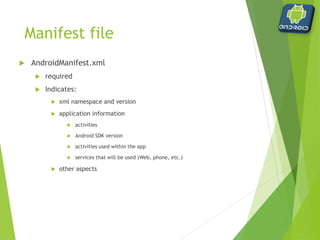
 AndroidManifest.xml
 required
 Indicates:
 xml namespace and version
 application information
 activities
 Android SDK version
 activities used within the app
 services that will be used (Web, phone, etc.)
 other aspects
Example Manifest file
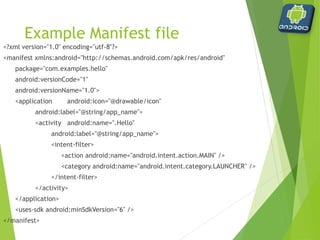
<?xml version="1.0" encoding="utf-8"?>
<manifest xmlns:android="http://schemas.android.com/apk/res/android"
package="com.examples.hello"
android:versionCode="1"
android:versionName="1.0">
<application android:icon="@drawable/icon"
android:label="@string/app_name">
<activity android:name=".Hello"
android:label="@string/app_name">
<intent-filter>
<action android:name="android.intent.action.MAIN" />
<category android:name="android.intent.category.LAUNCHER" />
</intent-filter>
</activity>
</application>
<uses-sdk android:minSdkVersion="6" />
</manifest>
Manifest File
 Exploring the <application> tag
 android:icon=“@drawable/icon”
 Icon to display in the drawer
 android:label="@string/app_name“
 Name of the icon in the drawer
 <activity>
 child of <application>
Manifest File
 Exploring the <activity> tag
 android:name=“.Hello”
 Associated .java file
 short for packagename.Hello
 i.e. com.csci153.examples.Hello
 android:label=“@string/app_name”
 Text that appears in title bar when this activity is displayed
 <intent-filter>
 child of <activity>
Manifest File
 Exploring the <intent-filter> tag
 <action android:name="android.intent.action.MAIN" />
 Indicates this is the main entry point of the application
 <category android:name="android.intent.category.LAUNCHER" />
 Indicates that the activity should be launched
 Without these lines, the application is started but no activity is
presented
 intent-filters ‘filter’ what an object can do – if there is no action defined
within the filter, they implicitly deny that the action can be performed
Intent
 Class within Android
 android.content.Intent
 contains information regarding some action to be
performed
 starting the phone dialer
 starting an activity
 opening a web page
 other
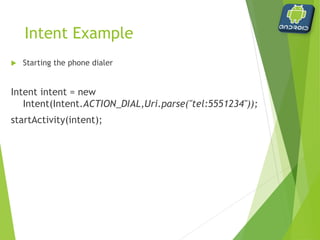
Intent Example
 Starting the phone dialer
Intent intent = new
Intent(Intent.ACTION_DIAL,Uri.parse("tel:5551234"));
startActivity(intent);
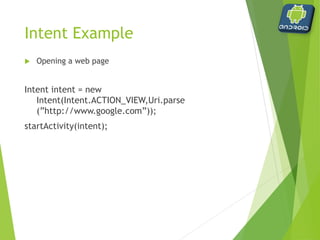
Intent Example
 Opening a web page
Intent intent = new
Intent(Intent.ACTION_VIEW,Uri.parse
(”http://www.google.com”));
startActivity(intent);
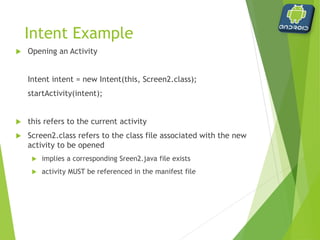
Intent Example
 Opening an Activity
Intent intent = new Intent(this, Screen2.class);
startActivity(intent);
 this refers to the current activity
 Screen2.class refers to the class file associated with the new
activity to be opened
 implies a corresponding Sreen2.java file exists
 activity MUST be referenced in the manifest file
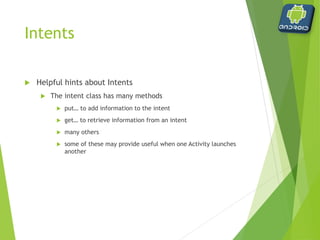
Intents
 Helpful hints about Intents
 The intent class has many methods
 put… to add information to the intent
 get… to retrieve information from an intent
 many others
 some of these may provide useful when one Activity launches
another
Activities
 Helpful hints about Activities
 Each Activity will have a corresponding .xml and .java file
 Remember to reference each Activity in the manifest file
 The Activity class has a method to retrieve the intent that
initiated it (onCreate)
 The Activity class has many methods, some of which monitor
events associated with it
 on… (onResume, onStop, …
 some of these may provide useful when one Activity launches
another
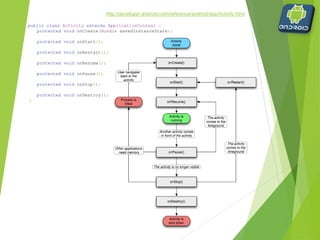
http://developer.android.com/reference/android/app/Activity.html
public class Activity extends ApplicationContext {
protected void onCreate(Bundle savedInstanceState);
protected void onStart();
protected void onRestart();
protected void onResume();
protected void onPause();
protected void onStop();
protected void onDestroy();
}
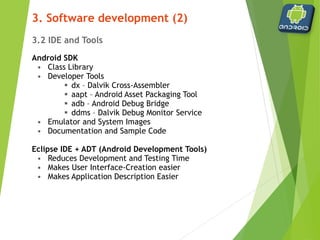
3.2 IDE and Tools
Android SDK
• Class Library
• Developer Tools
 dx – Dalvik Cross-Assembler
 aapt – Android Asset Packaging Tool
 adb – Android Debug Bridge
 ddms – Dalvik Debug Monitor Service
• Emulator and System Images
• Documentation and Sample Code
Eclipse IDE + ADT (Android Development Tools)
• Reduces Development and Testing Time
• Makes User Interface-Creation easier
• Makes Application Description Easier
3. Software development (2)
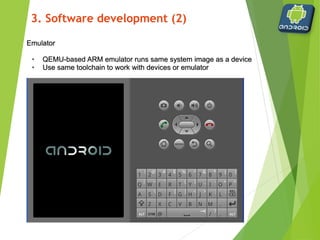
Emulator
• QEMU-based ARM emulator runs same system image as a device
• Use same toolchain to work with devices or emulator
3. Software development (2)
Layouts
 Define the user interface for an activity
 Layouts are defined in .xml files
 within /res/layout folder
 different layout can be designed for landscape view
 placed within /res/layout-land folder
 Handful of layouts to choose from
 All derived from the class:
android.view.ViewGroup
Layouts
 Available layouts
 AbsoluteLayout
 Deprecated as of 1.5
 Allows specific x, y coordinates
 LinearLayout
 Default
 Allows child items to be placed in a single row or column
 RelativeLayout
 Allows child itmes to be placed relative to each other
 TableLayout
 Allows child items to be placed in multiple rows and columns
 FrameLayout
 Allows child items to be stacked on one another
 We will not cover
Android
 Dalvik Virtual Machine
 Android’s equivalent of JVM
 Optimized for low memory-management
 Written by Dan Bornstein (named after a village where relatives lived)
 AVD
 Android Virtual Device
 Phone Emulation
 ADB
 Android Debug Bridge
 Allows access and control over emulators
 DDMS
 Dalvik Debug Monitor Service
 Middleman between IDE and applications
 Communications with ADB to provide control
 Telephony
 Location
 Other
Building Blocks of an
Application
 Activities
 User interface screen
 Each application can have multiple activities
 Layout defined in .xml file
 Functionality defined in .java file
 Intents
 Intention to perform a task
 Explicitly stated in code
 Launch an activity
 Display a webpage
 Broadcast a notification
Building Blocks of an
Application
 Services
 Task that runs in the background
 Music Player
 RSS reader that updates an activity when a site is updated
 Content Providers
 Bundles data so it can be shared among multiple applications
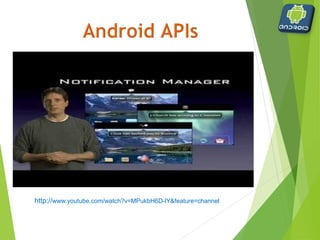
http://www.youtube.com/watch?v=MPukbH6D-lY&feature=channel
References
http://www.youtube.com/watch?v=x1ZZ-R3p_w8
Cesar Augusto Nogueira
@cesarnogcps
www.brazilianswhocode.com

First Steps with Android - An Exciting Introduction

  • 1.
    First Steps with Android CesarAugusto Nogueira @cesarnogcps www.brazilianswhocode.com
  • 2.
     The BigPicture  What is Android?  Get you an idea of how to start developing Android applications  Introduce major Android application concepts  Walk you through a sample application in the development environments  Install the development environments  Create the first Android Application Goals
  • 3.
     NOT asuper difficult course  Guide you to go through essentials (tons of resources are available)  NOT a Java language class  Learn how to use the Android SDK APIs  NOT an Android internal course  Learn Android Application Development  NOT a lecture oriented course  Learn by doing the hands-on programming  NOT an advanced course  Introduce from the very basics (tool installation)
  • 4.
     What isAndroid?  System architecture  Develop environment installation  Hello World!  Application components  Tool chain Agenda
  • 5.
     Android’s webpage: http://developer.android.com/sdk/index.html
  • 6.
     Android SDK(http://developer.android.com)  Windows, Linux, Mac  Utilizes the Java language  Different Libraries  Well-documented  http://developer.android.com/reference/packages.html  Freely downloaded
  • 7.
    Android Android versions  Android1.5 (Apr. 2009) – Cupcake  First really stable/robust version  Android 1.6 (Sep. 2009)– Donut  First ‘updatable’ version  Android 2.0 (Oct. 2009) / Android 2.1 (Jan. 2010)– Éclair  Android 2.2 (May. 2010) – Froyo  Android 2.3 (Q4 2010) – Gingerbread  Android 3.0 (Honeycomb)  Android 4.0 (Ice Cream Sandwich)  Android 4.2 (Jelly Bean)  Android 4.4 (Kitkat) http://en.wikipedia.org/wiki/Android_(operating system) Versioning  Higher version addressed many issues  Better audio/video  Better sensing  Use of GPS  Multi touch  Other
  • 8.
     Android isa mobile operating system initially developed by Android Inc (bought by Google 2005).  Android is the software platform from Google and the Open Handset Alliance (OHA) that has the potential to revolutionize the global cell phone market.  A free, open source mobile platform  Android is not a device or a product  Android™ consists of a complete set of software components for mobile devices including:  an operating system (Linux-based, multiprocess, multithreaded OS),  middleware, and  key mobile applications.  It has the capability to make inroads in many other (non‐phone) embedded application markets such as a tablet, a DVR, a handheld GPS, an MP3 player, etc.
  • 9.
     Android OpenSource Project web page to download the source  http://source.android.com/download  How many lines of code does it take to create the Android OS?  http://www.gubatron.com/blog/2010/05/23/how-many- lines-of-code-does-it-take-to-create-the-android-os/
  • 10.
     Listen fromthe project creators/developers (2.19 min)  Nick Sears. Co‐founder of Android  Steve Horowitz. Engineering Director  You will hear statements such as “…currently it is too difficult to make new products … open software brings more innovation … choices … lower costs … more applications such as family planner, my taxes, understand my wife better, … ”
  • 11.
     Quoting fromwww.OpenHandsetAlliance.com page  “… Open Handset Alliance™, a group of 47 technology and mobile companies have come together to accelerate innovation in mobile and offer consumers a richer, less expensive, and better mobile experience.  Together we have developed Android™, the first complete, open, and free mobile platform.  We are committed to commercially deploy handsets and services using the Android Platform. “
  • 13.
     Short video(4 min.)  Showing Dave Bort and Dan Borstein, two members of the Android Open Source Project talk about the project. See Android Developers http://www.youtube.com/watch?v=7Y4thikv-OM
  • 14.
     Android isa software environment built for mobile devices.  It is not a hardware platform.  Android includes:  Linux kernel‐based OS,  a rich UI,  telephone functionality,  end‐user applications,  code libraries,  application frameworks,  multimedia support, ...  User applications are built for Android in Java. The Android Platform Again, what did they say about Android?
  • 16.
  • 17.
     Have allof the major components of computing platform, but specially designed for the mobile environment (NOT a general purpose computing environment).  Application framework enabling reuse and replacement of components  Dalvik virtual machine optimized for mobile devices  Integrated browser based on the open source WebKit engine  Optimized graphics powered by a custom 2D graphics library; 3D graphics based on the OpenGL ES specification (hardware acceleration optional)  SQLite for structured data storage  Media support for common audio, video, and still image formats (MPEG4, H.264, MP3, AAC, AMR, JPG, PNG, GIF)  GSM Telephony (hardware dependent)  Bluetooth, EDGE, 3G, and WiFi (hardware dependent)  Camera, GPS, compass, and accelerometer (hardware dependent)  Rich development environment including a device emulator, tools for debugging, memory and performance profiling, and a plugin for the Eclipse IDE
  • 18.
    Available at: video1/3 http://www.youtube.com/watch?v=QBGfUs9mQYY
  • 19.
  • 20.
     Linux kernelis a proven core platform.  Reliability is more important than performance when it comes to a mobile phone, because voice communication is the primary use of a phone.  Linux can help meet this requirement.  Linux provides a hardware abstraction layer, letting the upper levels remain unchanged despite changes in the underlying hardware.  As new accessories appear on the market, drivers can be written at the Linux level to provide support, just as on other Linux platforms.
  • 21.
     User applications,as well as core Android applications, are written in the Java programming language and are compiled into byte codes.  Android byte codes are interpreted at runtime by an interpreter known as the Dalvik virtual machine.  Why another Virtual Machine?  Android byte code files are logically equivalent to Java byte codes, but they permit Android to  run its applications in its own virtual environment that is free from Sun’s licensing restrictions and  an open platform upon which Google, and potentially the open source community, can improve as necessary.  Being optimized for low memory requirements  The VM was slimmed down to use less space  The constant pool has been modified to use only 32-bit indexes to simplify the interpreter
  • 23.
  • 24.
     There arefour building blocks (components) to an Android application:  Activity represents a screen of the app. Moving from one activity to another is done using an Intent  An Intent describes what an application wants done, in terms of the action and the data to act upon, e.g. PICK a contact  Intent Receiver (broadcast receiver) is used when you want code in your application to execute in reaction to an external event, e.g. when the phone rings  Service is a faceless tasks that run in the background, like a sync session  Content Provider is a class that implements a standard set of methods to let other applications store and retrieve the type of data that is handled by that content provider Application Anatomy
  • 25.
    Android Development Applications arecomposed of: o Activities  Visual user interface for one focused endeavor o Services  Runs in the background for an indefinite period of time Intents  Asynchronous/ synchronous messaging  URL dispatching on steroids  Glues many Activities and Services together to make an application  Provides interactivity between applications
  • 26.
  • 27.
     Android applicationruns in its own Linux process  The process lifetime is handled by the system, not by the app: when the system needs memory to run new applications, one of the background app is killed  That's why it is important to use correctly Activities, Services, and Intent Receivers  Not using them in the right way can result in the system killing the application's process while it is doing important work  Example: starting a thread to download a file from an Activity or an IntentReceiver. A Service should be used instead. Life Cycle of an Android Application
  • 28.
     Android determineswhich process to kill when low on memory with this priority:  Foreground process: is one that is required for what the user is currently doing (UI interaction, handling an Intent, etc.)  Visible process: is one holding an Activity that is visible to the user on-screen but not in the foreground (a foreground window leaves this visible in the background)  Service process: is one holding a Service that is invisible to the user, but is doing something valuable (e.g. Playing music)  Background process: is one holding an Activity that is not currently visible to the user  Empty process: is one that doesn't hold any active application components. It is kept only as a cache to improve startup time the next time an application's component needs to run Process priority
  • 29.
    Application Lifecycle • Designedto protect battery life • Activities live on a stack • Background activities can be killed at any moment • The platform makes it easy for developers to code applications that are killed at any moment without losing state o Helps with DoS issues http://www.android.com/media/#platform-architecture#android-20
  • 30.
  • 33.
    Building Blocks ofan Application  Resources  Images  Audio files  Constants  Stored in ‘res’ directory  Permissions  Must explicitly ask permission to perform tasks  Access web  Access GPS  Access Contacts
  • 35.
    Project identification  Whencreating a new project, the following must be provided  Project name  Displayed in Eclipse to differentiate projects  Application name  Activity name  The first screen displayed when the application is launched  Package name  com.csci153.name
  • 36.
    Project components  Automaticallycreated  AndroidManifest.xml  Referenced libraries  Important directories  gen (generated)  res (resources)  src (source)
  • 37.
    Project components  AndroidManifest.xml Global settings  Permissions  Activities  Intents  Referenced libraries  android.jar – standard Android library  can add other user-defined libraries
  • 38.
    Project components  gendirectory  Contains R.java  Automatically generated file  Contains pointers to other files and folders  Never modified by programmer
  • 39.
    Project components  resdirectory  Contains other folders  drawable  Contains image files (icons, background)  layout  Contains .xml layout files  One for each activity  main.xml is layout for the default activity  values  Contains string pointers that can be used throughout the code
  • 40.
    Project components  srcdirectory  Contains the java source code  One .java file for each activity  <activity>.java for the default activity (matches activity name)  x.java for other activities (matches corresponding .xml name)
  • 41.
  • 42.
    Manifest file  AndroidManifest.xml required  Indicates:  xml namespace and version  application information  activities  Android SDK version  activities used within the app  services that will be used (Web, phone, etc.)  other aspects
  • 43.
    Example Manifest file <?xmlversion="1.0" encoding="utf-8"?> <manifest xmlns:android="http://schemas.android.com/apk/res/android" package="com.examples.hello" android:versionCode="1" android:versionName="1.0"> <application android:icon="@drawable/icon" android:label="@string/app_name"> <activity android:name=".Hello" android:label="@string/app_name"> <intent-filter> <action android:name="android.intent.action.MAIN" /> <category android:name="android.intent.category.LAUNCHER" /> </intent-filter> </activity> </application> <uses-sdk android:minSdkVersion="6" /> </manifest>
  • 44.
    Manifest File  Exploringthe <application> tag  android:icon=“@drawable/icon”  Icon to display in the drawer  android:label="@string/app_name“  Name of the icon in the drawer  <activity>  child of <application>
  • 45.
    Manifest File  Exploringthe <activity> tag  android:name=“.Hello”  Associated .java file  short for packagename.Hello  i.e. com.csci153.examples.Hello  android:label=“@string/app_name”  Text that appears in title bar when this activity is displayed  <intent-filter>  child of <activity>
  • 46.
    Manifest File  Exploringthe <intent-filter> tag  <action android:name="android.intent.action.MAIN" />  Indicates this is the main entry point of the application  <category android:name="android.intent.category.LAUNCHER" />  Indicates that the activity should be launched  Without these lines, the application is started but no activity is presented  intent-filters ‘filter’ what an object can do – if there is no action defined within the filter, they implicitly deny that the action can be performed
  • 48.
    Intent  Class withinAndroid  android.content.Intent  contains information regarding some action to be performed  starting the phone dialer  starting an activity  opening a web page  other
  • 49.
    Intent Example  Startingthe phone dialer Intent intent = new Intent(Intent.ACTION_DIAL,Uri.parse("tel:5551234")); startActivity(intent);
  • 50.
    Intent Example  Openinga web page Intent intent = new Intent(Intent.ACTION_VIEW,Uri.parse (”http://www.google.com”)); startActivity(intent);
  • 51.
    Intent Example  Openingan Activity Intent intent = new Intent(this, Screen2.class); startActivity(intent);  this refers to the current activity  Screen2.class refers to the class file associated with the new activity to be opened  implies a corresponding Sreen2.java file exists  activity MUST be referenced in the manifest file
  • 52.
    Intents  Helpful hintsabout Intents  The intent class has many methods  put… to add information to the intent  get… to retrieve information from an intent  many others  some of these may provide useful when one Activity launches another
  • 53.
    Activities  Helpful hintsabout Activities  Each Activity will have a corresponding .xml and .java file  Remember to reference each Activity in the manifest file  The Activity class has a method to retrieve the intent that initiated it (onCreate)  The Activity class has many methods, some of which monitor events associated with it  on… (onResume, onStop, …  some of these may provide useful when one Activity launches another
  • 54.
    http://developer.android.com/reference/android/app/Activity.html public class Activityextends ApplicationContext { protected void onCreate(Bundle savedInstanceState); protected void onStart(); protected void onRestart(); protected void onResume(); protected void onPause(); protected void onStop(); protected void onDestroy(); }
  • 55.
    3.2 IDE andTools Android SDK • Class Library • Developer Tools  dx – Dalvik Cross-Assembler  aapt – Android Asset Packaging Tool  adb – Android Debug Bridge  ddms – Dalvik Debug Monitor Service • Emulator and System Images • Documentation and Sample Code Eclipse IDE + ADT (Android Development Tools) • Reduces Development and Testing Time • Makes User Interface-Creation easier • Makes Application Description Easier 3. Software development (2)
  • 56.
    Emulator • QEMU-based ARMemulator runs same system image as a device • Use same toolchain to work with devices or emulator 3. Software development (2)
  • 57.
    Layouts  Define theuser interface for an activity  Layouts are defined in .xml files  within /res/layout folder  different layout can be designed for landscape view  placed within /res/layout-land folder  Handful of layouts to choose from  All derived from the class: android.view.ViewGroup
  • 58.
    Layouts  Available layouts AbsoluteLayout  Deprecated as of 1.5  Allows specific x, y coordinates  LinearLayout  Default  Allows child items to be placed in a single row or column  RelativeLayout  Allows child itmes to be placed relative to each other  TableLayout  Allows child items to be placed in multiple rows and columns  FrameLayout  Allows child items to be stacked on one another  We will not cover
  • 59.
    Android  Dalvik VirtualMachine  Android’s equivalent of JVM  Optimized for low memory-management  Written by Dan Bornstein (named after a village where relatives lived)  AVD  Android Virtual Device  Phone Emulation  ADB  Android Debug Bridge  Allows access and control over emulators  DDMS  Dalvik Debug Monitor Service  Middleman between IDE and applications  Communications with ADB to provide control  Telephony  Location  Other
  • 60.
    Building Blocks ofan Application  Activities  User interface screen  Each application can have multiple activities  Layout defined in .xml file  Functionality defined in .java file  Intents  Intention to perform a task  Explicitly stated in code  Launch an activity  Display a webpage  Broadcast a notification
  • 61.
    Building Blocks ofan Application  Services  Task that runs in the background  Music Player  RSS reader that updates an activity when a site is updated  Content Providers  Bundles data so it can be shared among multiple applications
  • 62.
  • 63.
  • 64.