Android Course ….
 Brief history about android.
 Features of android.
 Development challenges in android.
 Android OS architecture.
 Apps of android.
 Apps Architecture.
 Manifest file.
 Activity life cycle.
 Intent class.
Session Content
 Foundation company.
 Founders of Android OS.
  Open Handset Alliance.
 Why android is number one in the world.
 Versions of android OS till now.
Android’s brief history …
 Foundation company of Android OS:-
Android was founded in Palo Alto company in
October 2003 in California.
The main target was to invent an OS for
digital cameras but they were changed their
efforts to produce mobile OS.
In august Google was buying android.
Android’s brief history cont’d
 Android founders:-
 Andy Rubin (brain and manager of producing
android OS in google later).
 Rich Miner.
 Nick Sears.
 Chris White.
Android’s brief history cont’d
On November 5, 2007, the Open Handset Alliance,
a consortium of technology companies including
 Google
 Device manufactures
Sony – Samsung – HTC
 Wireless Carriers
sprint Nextel – T-Mobile
 Chipset makers
Qualcom – Texas Instrument
Open Handset Alliance
 Why android is number one in the world…?
In 2011,2013 Android devices sell more than
IOS, Windows Phone and Mac OS.
On July 2013 Google play stores had over 1
million android Apps published and over 5 billion
App downloaded.
In April-May 2013 71% of mobile developers developed
in android.
Android’s brief history cont’d
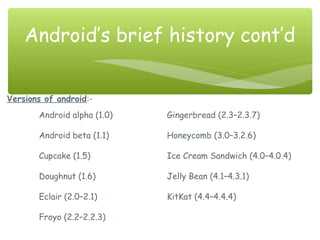
Versions of android:-
Android alpha (1.0) Gingerbread (2.3–2.3.7)
Android beta (1.1) Honeycomb (3.0–3.2.6)
Cupcake (1.5) Ice Cream Sandwich (4.0–4.0.4)
Doughnut (1.6) Jelly Bean (4.1–4.3.1)
Eclair (2.0–2.1) KitKat (4.4–4.4.4)
Froyo (2.2–2.2.3)
Android’s brief history cont’d
 Open platform
open source
open plug in
 Java Implementation(not native).
 fragmentation
Features of Android
 Fragmentation Issue.
 Resolution Issue.
 Screen sizes Issue.
 Portability Issue.
Development challenges in
android
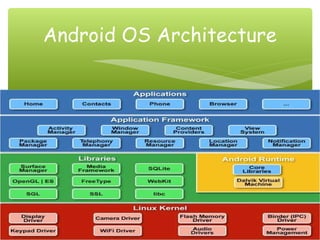
Android OS Architecture
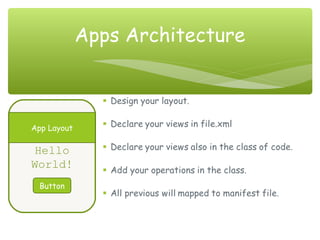
 Every App consists from a set of Activities.
 Activity
single screen in your program that will do a
specific task.
Apps of Android
Apps Architecture
Hello
World!
Button
App Layout
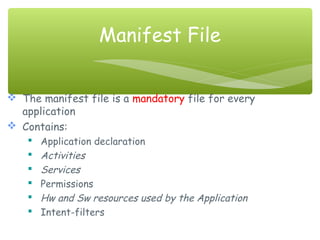
 The manifest file is a mandatory file for every
application
 Contains:
 Application declaration
 Activities
 Services
 Permissions
 Hw and Sw resources used by the Application
 Intent-filters
Manifest File
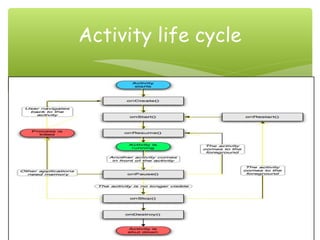
Activity life cycle
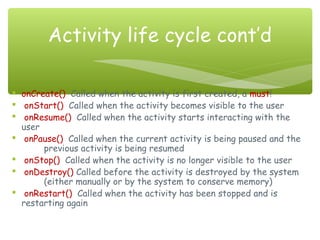
 onCreate() Called when the activity is first created, a must!
 onStart() Called when the activity becomes visible to the user
 onResume() Called when the activity starts interacting with the
user
 onPause() Called when the current activity is being paused and the
previous activity is being resumed
 onStop() Called when the activity is no longer visible to the user
 onDestroy() Called before the activity is destroyed by the system
(either manually or by the system to conserve memory)
 onRestart() Called when the activity has been stopped and is
restarting again
Activity life cycle cont’d
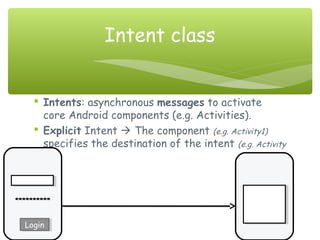
 Intents: asynchronous messages to activate
core Android components (e.g. Activities).
 Explicit Intent  The component (e.g. Activity1)
specifies the destination of the intent (e.g. Activity
2).
Intent class
**********
LoginLogin

Short notes of android

  • 1.
  • 2.
     Brief historyabout android.  Features of android.  Development challenges in android.  Android OS architecture.  Apps of android.  Apps Architecture.  Manifest file.  Activity life cycle.  Intent class. Session Content
  • 3.
     Foundation company. Founders of Android OS.   Open Handset Alliance.  Why android is number one in the world.  Versions of android OS till now. Android’s brief history …
  • 4.
     Foundation companyof Android OS:- Android was founded in Palo Alto company in October 2003 in California. The main target was to invent an OS for digital cameras but they were changed their efforts to produce mobile OS. In august Google was buying android. Android’s brief history cont’d
  • 5.
     Android founders:- Andy Rubin (brain and manager of producing android OS in google later).  Rich Miner.  Nick Sears.  Chris White. Android’s brief history cont’d
  • 6.
    On November 5,2007, the Open Handset Alliance, a consortium of technology companies including  Google  Device manufactures Sony – Samsung – HTC  Wireless Carriers sprint Nextel – T-Mobile  Chipset makers Qualcom – Texas Instrument Open Handset Alliance
  • 7.
     Why androidis number one in the world…? In 2011,2013 Android devices sell more than IOS, Windows Phone and Mac OS. On July 2013 Google play stores had over 1 million android Apps published and over 5 billion App downloaded. In April-May 2013 71% of mobile developers developed in android. Android’s brief history cont’d
  • 8.
    Versions of android:- Androidalpha (1.0) Gingerbread (2.3–2.3.7) Android beta (1.1) Honeycomb (3.0–3.2.6) Cupcake (1.5) Ice Cream Sandwich (4.0–4.0.4) Doughnut (1.6) Jelly Bean (4.1–4.3.1) Eclair (2.0–2.1) KitKat (4.4–4.4.4) Froyo (2.2–2.2.3) Android’s brief history cont’d
  • 9.
     Open platform opensource open plug in  Java Implementation(not native).  fragmentation Features of Android
  • 10.
     Fragmentation Issue. Resolution Issue.  Screen sizes Issue.  Portability Issue. Development challenges in android
  • 11.
  • 12.
     Every Appconsists from a set of Activities.  Activity single screen in your program that will do a specific task. Apps of Android
  • 13.
  • 14.
     The manifestfile is a mandatory file for every application  Contains:  Application declaration  Activities  Services  Permissions  Hw and Sw resources used by the Application  Intent-filters Manifest File
  • 15.
  • 16.
     onCreate() Calledwhen the activity is first created, a must!  onStart() Called when the activity becomes visible to the user  onResume() Called when the activity starts interacting with the user  onPause() Called when the current activity is being paused and the previous activity is being resumed  onStop() Called when the activity is no longer visible to the user  onDestroy() Called before the activity is destroyed by the system (either manually or by the system to conserve memory)  onRestart() Called when the activity has been stopped and is restarting again Activity life cycle cont’d
  • 17.
     Intents: asynchronousmessages to activate core Android components (e.g. Activities).  Explicit Intent  The component (e.g. Activity1) specifies the destination of the intent (e.g. Activity 2). Intent class ********** LoginLogin