o For more than 8 years we have
been creating search engine
optimized websites that convert
more visitors into customers.
o When you work with us, you
work with a team of experts in
graphic design, marketing,
search engine optimization and
social media.
ABOUT DESIGN & PROMOTE
o Google My Business (also known as Google
Places, Google Local Listing) was created for
companies to manage and edit their business’
information across Google searches, Google Maps
and Google+.
● Use Google My Business to put the right info about
your business on Search, Maps and Google+ so
that customers can get in touch.
What is Google My Business?
o Key differences between a Google+ and Business Page
o How to claim and verify your business listing
o Overview on how to navigate the Google My Business
Dashboard
o How to manage and update your Google My Business
Page
o Further ways to optimize your page through graphics,
virtual tours and more!
o Ways to review insights on your customers
Topics Covered
o At first there was no such thing as localized listings or
places in Google
o Then they introduced Google Places
• 6 or 7 (“pack” of) business locations listed above
organic search results
o Recently, they stopped showing 6 or 7, and now only
show 3 local businesses, still above the organic search
results
• This listing is directly tied to your Google My
Business page
History of Google My Business
o Connected to Google Maps – this is how your
business will show on Google Maps
o NOT the same as a normal Google+ Page
● Be aware of differences
◦ URL, About, Actual business information will be
listed
History of Google My Business Cont’d.
o Examples of personal Google+ Pages
● https://plus.google.com/u/0/+BruceJones630/
● https://plus.google.com/u/0/113749645772512884083/
● https://plus.google.com/u/0/+VaughnGarner
What does a personal Google+ page
look like?
o Examples of Google My Business from front-end
● https://plus.google.com/112226245033360255095/about
● https://plus.google.com/+Synergyremodel
● https://www.google.com/+Salon625Naperville
o Google has changed the way it can be viewed in Google
What does a Google My Business page
look like?
● Need gmail account or business email with Google
● Need verified physical address
◦ Google sends postcard with verification number
◦ May also get a phone call from Google
● Enter verification number from postcard on the back-end of
Google My Business
● https://support.google.com/business/answer/2911778?hl=en
Claiming your Business in Google
● If you already have a Google My Business page and your NOT
the owner, request to be the owner.
◦ If someone else is managing the Google My Business page for you,
make them a ‘Manager’.
Claiming your Business in Google
● Business name and address
● URL
● Business hours
● Service area
● Categories
● Description with a link to website
● Photos
● Managers of your page
Editing/Optimizing your Google My
Business Page
o Profile picture: 250 x 250 px
o Cover Image: 1080 x 608 px {Recommended By
Google)
o Post: 426 width (height varies)
o Shared Link: 150 x 150 (thumbnail)
Google Plus Image Sizes
Source: http://blog.hubspot.com/marketing/ultimate-guide-social-media-image-dimensions-infographic
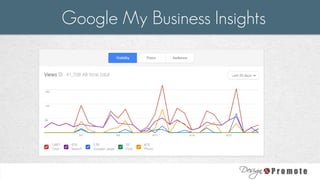
o See how many people are:
● Seeing your listing show up in Google
● Viewing photos or posts on your listing
● Clicking through to your website
● Making a phone call from your listing
● Asking for driving directions
Google My Business Insights
● Optimize the business listing
● Link back to the Google business listing URL
◦ With other social media links on your website
◦ Online Press Releases, Blog Posts, Local Directories
● Make sure your website speaks about the same services offered
● Get reviews to stand out and become trusted
● Get a Virtual Tour added to your page
◦ https://www.google.com/maps/about/partners/businessview/get-
started/
Getting your Google My Business page to show up in
Google
http://www.designandpromote.com/our-seminars/

Get Your Business Google Approved

  • 2.
    o For morethan 8 years we have been creating search engine optimized websites that convert more visitors into customers. o When you work with us, you work with a team of experts in graphic design, marketing, search engine optimization and social media. ABOUT DESIGN & PROMOTE
  • 3.
    o Google MyBusiness (also known as Google Places, Google Local Listing) was created for companies to manage and edit their business’ information across Google searches, Google Maps and Google+. ● Use Google My Business to put the right info about your business on Search, Maps and Google+ so that customers can get in touch. What is Google My Business?
  • 4.
    o Key differencesbetween a Google+ and Business Page o How to claim and verify your business listing o Overview on how to navigate the Google My Business Dashboard o How to manage and update your Google My Business Page o Further ways to optimize your page through graphics, virtual tours and more! o Ways to review insights on your customers Topics Covered
  • 5.
    o At firstthere was no such thing as localized listings or places in Google o Then they introduced Google Places • 6 or 7 (“pack” of) business locations listed above organic search results o Recently, they stopped showing 6 or 7, and now only show 3 local businesses, still above the organic search results • This listing is directly tied to your Google My Business page History of Google My Business
  • 6.
    o Connected toGoogle Maps – this is how your business will show on Google Maps o NOT the same as a normal Google+ Page ● Be aware of differences ◦ URL, About, Actual business information will be listed History of Google My Business Cont’d.
  • 7.
    o Examples ofpersonal Google+ Pages ● https://plus.google.com/u/0/+BruceJones630/ ● https://plus.google.com/u/0/113749645772512884083/ ● https://plus.google.com/u/0/+VaughnGarner What does a personal Google+ page look like?
  • 8.
    o Examples ofGoogle My Business from front-end ● https://plus.google.com/112226245033360255095/about ● https://plus.google.com/+Synergyremodel ● https://www.google.com/+Salon625Naperville o Google has changed the way it can be viewed in Google What does a Google My Business page look like?
  • 9.
    ● Need gmailaccount or business email with Google ● Need verified physical address ◦ Google sends postcard with verification number ◦ May also get a phone call from Google ● Enter verification number from postcard on the back-end of Google My Business ● https://support.google.com/business/answer/2911778?hl=en Claiming your Business in Google
  • 10.
    ● If youalready have a Google My Business page and your NOT the owner, request to be the owner. ◦ If someone else is managing the Google My Business page for you, make them a ‘Manager’. Claiming your Business in Google
  • 11.
    ● Business nameand address ● URL ● Business hours ● Service area ● Categories ● Description with a link to website ● Photos ● Managers of your page Editing/Optimizing your Google My Business Page
  • 12.
    o Profile picture:250 x 250 px o Cover Image: 1080 x 608 px {Recommended By Google) o Post: 426 width (height varies) o Shared Link: 150 x 150 (thumbnail) Google Plus Image Sizes Source: http://blog.hubspot.com/marketing/ultimate-guide-social-media-image-dimensions-infographic
  • 13.
    o See howmany people are: ● Seeing your listing show up in Google ● Viewing photos or posts on your listing ● Clicking through to your website ● Making a phone call from your listing ● Asking for driving directions Google My Business Insights
  • 14.
  • 15.
    ● Optimize thebusiness listing ● Link back to the Google business listing URL ◦ With other social media links on your website ◦ Online Press Releases, Blog Posts, Local Directories ● Make sure your website speaks about the same services offered ● Get reviews to stand out and become trusted ● Get a Virtual Tour added to your page ◦ https://www.google.com/maps/about/partners/businessview/get- started/ Getting your Google My Business page to show up in Google
  • 16.