Using LinkedIn
Presented By:
Bruce Jones
CEO,
Social Media
Knockout Series:
Round 5
LinkedIn Facts
• There are 450 million LinkedIn members in the world
• 2 new LinkedIn members are added every second
• 30,000 long-form posts are added every week
• You can increase your profile views 14x just by adding a picture
Source
Why Use LinkedIn?
• To help with employment: find a job/fill a job
• Find new customers
• Stay up to date in your industry
• Every company needs a brand ambassador
• Show off yourself and your business
Optimizing Your
LinkedIn Profile
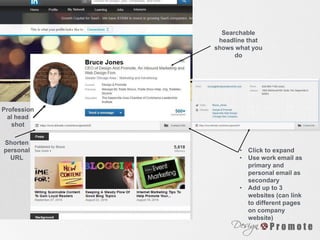
Profession
al head
shot
Searchable
headline that
shows what you
do
• Click to expand
• Use work email as
primary and
personal email as
secondary
• Add up to 3
websites (can link
to different pages
on company
website)
Shorten
personal
URL
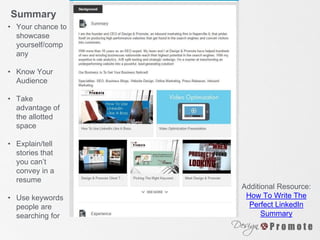
• Your chance to
showcase
yourself/comp
any
• Know Your
Audience
• Take
advantage of
the allotted
space
• Explain/tell
stories that
you can’t
convey in a
resume
• Use keywords
people are
searching for
Additional Resource:
How To Write The
Perfect LinkedIn
Summary
Summary
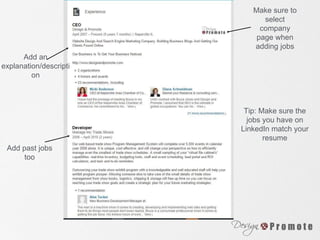
Make sure to
select
company
page when
adding jobs
Add an
explanation/descripti
on
Add past jobs
too
Tip: Make sure the
jobs you have on
LinkedIn match your
resume
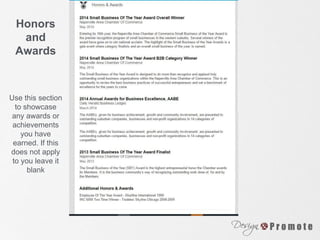
Honors
and
Awards
Use this section
to showcase
any awards or
achievements
you have
earned. If this
does not apply
to you leave it
blank
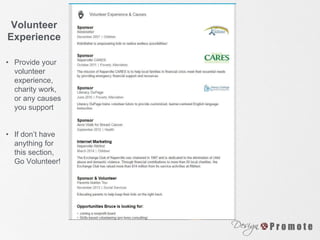
Volunteer
Experience
• Provide your
volunteer
experience,
charity work,
or any causes
you support
• If don’t have
anything for
this section,
Go Volunteer!
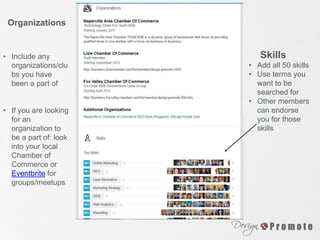
Organizations
• Include any
organizations/clu
bs you have
been a part of
• If you are looking
for an
organization to
be a part of: look
into your local
Chamber of
Commerce or
Eventbrite for
groups/meetups
• Add all 50 skills
• Use terms you
want to be
searched for
• Other members
can endorse
you for those
skills
Skills
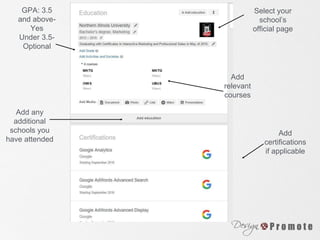
Select your
school’s
official page
Add
relevant
courses
GPA: 3.5
and above-
Yes
Under 3.5-
Optional
Add any
additional
schools you
have attended
Add
certifications
if applicable
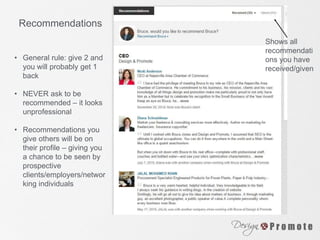
Recommendations
• General rule: give 2 and
you will probably get 1
back
• NEVER ask to be
recommended – it looks
unprofessional
• Recommendations you
give others will be on
their profile – giving you
a chance to be seen by
prospective
clients/employers/networ
king individuals
Shows all
recommendati
ons you have
received/given
Company
LinkedIn Pages
Company Pages
How to set up: Interests> Companies> Create
You need an email address that matches your domain
Blogs and Presentations:
Add blogs and SlideShare presentations to personal page –
Share them as updates on company page
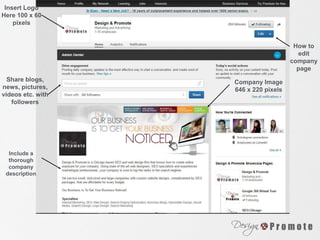
Insert Logo
Here 100 x 60
pixels
Share blogs,
news, pictures,
videos etc. with
followers
Include a
thorough
company
description
Company Image
646 x 220 pixels
How to
edit
company
page
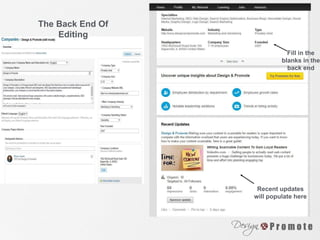
The Back End Of
Editing
Recent updates
will populate here
Fill in the
blanks in the
back end
Interacting on
LinkedIn
Interacting
Groups
• Find out what groups your network/target audience is in
• Choose what groups show on your profile
• Participate in discussions
Sharing Updates
• Share updates from your company page
• Interact with other peoples updates
Growing Your
Connections
• After you collect someone’s business card connect with them
on LinkedIn
• Always send a personal message when requesting a
connection
• Import contacts from your email – Be careful not to send to
whole email list
• Import an already existing email list
• Don’t spam someone with a sales pitch as soon as they
accept your connection request
• You can export a list of your connections emails if you need
to email them outside of LinkedIn
Additional Resources
Canva: Create graphics
Free Stock Images: Never use Google
Images!
Bitly: Shorten URLs and track traffic
ABOUT DESIGN &
PROMOTE
• For more than 8 years we have been creating
engine optimized websites that convert more
visitors into customers.
• When you work with us, you work with a team of
experts in graphic design, marketing, search
engine optimization and social media.
• View our portfolio here.
GET ON OUR LIST!
www.designandpromote.com/our-seminars/
FacebookConnect With Us: LinkedIn Twitter Google+

linkedin Workshop Presentation For The Center for Entrepreneurship at the College of DuPage

  • 1.
    Using LinkedIn Presented By: BruceJones CEO, Social Media Knockout Series: Round 5
  • 2.
    LinkedIn Facts • Thereare 450 million LinkedIn members in the world • 2 new LinkedIn members are added every second • 30,000 long-form posts are added every week • You can increase your profile views 14x just by adding a picture Source
  • 3.
    Why Use LinkedIn? •To help with employment: find a job/fill a job • Find new customers • Stay up to date in your industry • Every company needs a brand ambassador • Show off yourself and your business
  • 4.
  • 5.
    Profession al head shot Searchable headline that showswhat you do • Click to expand • Use work email as primary and personal email as secondary • Add up to 3 websites (can link to different pages on company website) Shorten personal URL
  • 6.
    • Your chanceto showcase yourself/comp any • Know Your Audience • Take advantage of the allotted space • Explain/tell stories that you can’t convey in a resume • Use keywords people are searching for Additional Resource: How To Write The Perfect LinkedIn Summary Summary
  • 7.
    Make sure to select company pagewhen adding jobs Add an explanation/descripti on Add past jobs too Tip: Make sure the jobs you have on LinkedIn match your resume
  • 8.
    Honors and Awards Use this section toshowcase any awards or achievements you have earned. If this does not apply to you leave it blank
  • 9.
    Volunteer Experience • Provide your volunteer experience, charitywork, or any causes you support • If don’t have anything for this section, Go Volunteer!
  • 10.
    Organizations • Include any organizations/clu bsyou have been a part of • If you are looking for an organization to be a part of: look into your local Chamber of Commerce or Eventbrite for groups/meetups • Add all 50 skills • Use terms you want to be searched for • Other members can endorse you for those skills Skills
  • 11.
    Select your school’s official page Add relevant courses GPA:3.5 and above- Yes Under 3.5- Optional Add any additional schools you have attended Add certifications if applicable
  • 12.
    Recommendations • General rule:give 2 and you will probably get 1 back • NEVER ask to be recommended – it looks unprofessional • Recommendations you give others will be on their profile – giving you a chance to be seen by prospective clients/employers/networ king individuals Shows all recommendati ons you have received/given
  • 13.
  • 14.
    Company Pages How toset up: Interests> Companies> Create You need an email address that matches your domain Blogs and Presentations: Add blogs and SlideShare presentations to personal page – Share them as updates on company page
  • 15.
    Insert Logo Here 100x 60 pixels Share blogs, news, pictures, videos etc. with followers Include a thorough company description Company Image 646 x 220 pixels How to edit company page
  • 16.
    The Back EndOf Editing Recent updates will populate here Fill in the blanks in the back end
  • 17.
  • 18.
    Interacting Groups • Find outwhat groups your network/target audience is in • Choose what groups show on your profile • Participate in discussions Sharing Updates • Share updates from your company page • Interact with other peoples updates
  • 19.
    Growing Your Connections • Afteryou collect someone’s business card connect with them on LinkedIn • Always send a personal message when requesting a connection • Import contacts from your email – Be careful not to send to whole email list • Import an already existing email list • Don’t spam someone with a sales pitch as soon as they accept your connection request • You can export a list of your connections emails if you need to email them outside of LinkedIn
  • 20.
    Additional Resources Canva: Creategraphics Free Stock Images: Never use Google Images! Bitly: Shorten URLs and track traffic
  • 21.
    ABOUT DESIGN & PROMOTE •For more than 8 years we have been creating engine optimized websites that convert more visitors into customers. • When you work with us, you work with a team of experts in graphic design, marketing, search engine optimization and social media. • View our portfolio here.
  • 22.
    GET ON OURLIST! www.designandpromote.com/our-seminars/ FacebookConnect With Us: LinkedIn Twitter Google+