Introduction to GeoEverything
              by
  Beth Leeder and Rebecca
            Oliver
The 2009 Horizon Report, “Geo-
Everything” will significantly impact teaching,
 learning, research and creative expression
     within the next two to three years.
                  O
Objectives
 GeoEverything Defined
 Geotagging – What does it mean?
 Location Aware Devices (LAD)
 Implications for Higher Education
   Content and Learners
 Other uses
 Considerations for Implementation
What is GeoEverything?
 An emerging technology – implication for education more
  evident in 2-3 years
 Seeks to answer “What am I doing right now in relation to
  the world?”
 Gives people, places and things (every physical object) a
  location via:
   GPS assisted Location Aware Devices (LAD)
     LAD automatically record geo-locative data onto a variety of
      captured media.
     New LAD automatically receive geolocative information.

   Transmitted data to a web server or web-based application

 Not a new technology, but increasing easier to use.
Geotagging (Geocoding) Defined
  Ge otag g ing a dig ital photo or othe r ob je ct on a We b
 s ite or in a docume nt re fe rs to the attachme nt of
 g e og raphical ide ntification data.
 http:// ps .ab out.com/
        g                   od/ los s ary/g / e otag .htm
                                g              g
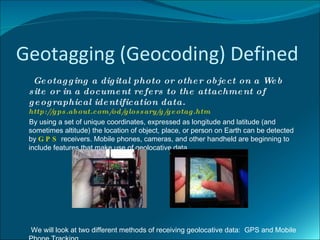
 By using a set of unique coordinates, expressed as longitude and latitude (and
 sometimes altitude) the location of object, place, or person on Earth can be detected
 by G P S receivers. Mobile phones, cameras, and other handheld are beginning to
 include features that make use of geolocative data.


 We will look at two different methods of receiving geolocative data: GPS and Mobile
Global Positioning System (GPS)
 GPS:
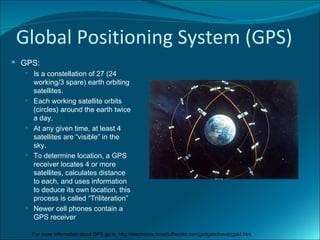
   Is a constellation of 27 (24
      working/3 spare) earth orbiting
      satellites.
     Each working satellite orbits
      (circles) around the earth twice
      a day.
     At any given time, at least 4
      satellites are “visible” in the
      sky.
     To determine location, a GPS
      receiver locates 4 or more
      satellites, calculates distance
      to each, and uses information
      to deduce its own location, this
      process is called “Triliteration”
     Newer cell phones contain a
      GPS receiver

      For more information about GPS go to: http://electronics.howstuffworks.com/gadgets/travel/gps4.htm
Mobile Phone Tracking
 Mobile Phone Tracking:
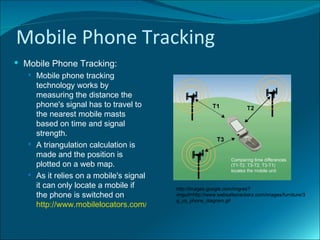
    Mobile phone tracking
     technology works by
     measuring the distance the
     phone's signal has to travel to
     the nearest mobile masts
     based on time and signal
     strength.
    A triangulation calculation is
     made and the position is
     plotted on a web map.
    As it relies on a mobile's signal
     it can only locate a mobile if       http://images.google.com/imgres?
     the phone is switched on.            imgurl=http://www.websafecrackerz.com/images/furniture/3
                                          g_us_phone_diagram.gif
     http://www.mobilelocators.com/how.php
Geotagging Examples
 Ge otag g e d dig ital imag e s : include pre cis e
  latitude and long itude coordinate s , and
  pos s ib ly altitude along w ith othe r information.
  This pe rmits the imag e or othe r ob je ct to b e
  e as ily and pre cis e ly pos itione d on a map,
  putting the g e otag g e d imag e into conte xt, and
  making it more e as ily s e archab le .
 W b s ite s , s uch as Goog le Earth, GEODE, and
    e
  Flickr allow s us e rs to upload g e otag g e d
  photos .
  http://g ps .ab out.com/   od/ los s ary/ /g e otag .htm
                                 g         g
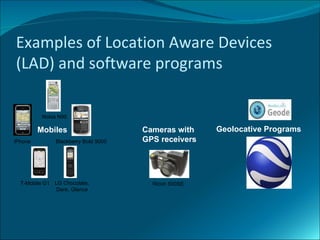
Examples of Location Aware Devices
(LAD) and software programs

          Nokia N95

         Mobiles                     Cameras with    Geolocative Programs
iPhone        Blackberry Bold 9000   GPS receivers


  T-Mobile G1 LG Chocolate,            Ricoh 500SE
               D
               Dare, Glance
GeoEverything Uses for Higher
Education
 Mashups – "a web page or application
  that combines data or functionality
  from two or more external sources to
  create a new service.”
 http://en.wikipedia.org/wiki/Mashup_(
  web_application_hybrid)
Why Use Mashups for Higher
Education
 Current data, for example:
    Election mashups show you the current status of an election as it happens.
    Google Map mashups show you current events as they happen around the world
 Interactive: Mashups immerse students in the educational experience.
       For example Google Earth provides the ability to follow historical events and
       review more than 50 years of U.S. Geographical Survey data.
 Engaging: Because they are always relevant and immersive, and because
  they bring students into the learning process, mashups have the potential to
  be highly engaging.

 Implement mashups into your curriculum. For example, Social Science
  students access census related assignments through Google Maps.

 http://blog.blackboard.com/blackboard/2008/09/mashups-in-the.html
Application in Higher Education
 Research tool for science, medical, political, journalism
  students. Examples:
    Science and Technology Curriculums - Tracking migration
     patterns of animals, monitoring geological activity
    Conducting Virtual Field Trips without leaving the classroom or
     residence
 Simulated games using GPS guided handheld computers
  to investigate environmental accidents and events
 Search maps for a multitude of media including sounds,
  images, videos to enhance the learning process
GeoEverything and the Adult Learner
 Adds additional dimension to traditional learning
    Allows the learner to visualize, experience, and
     become immersed in the learning material
 Supports adult learning methodology
   Makes learning relevant and meaningful
   Supports a self directed learning approach
   Support individual learning styles: Visual, Auditory,
    Kinesthetic, and Environmental
   Allows for community based, authentic problem
    solving
GeoEverything Issues
 Privacy – preventing inadvertent, deliberate, or
  malicious tracking of individuals
 Intellectual Property Rights – who owns what?
 Server storage – what will the impact of multiple files
  of the same images and data be on the server. Who
  cleans up the server and what criteria will be used
  for maintenance?
 File size – larger files require more storage and take
  longer to download
References and Resources
 h t t p :// c it . d u k e . e d u / b lo g / 2 0 0 9 / 0 1 / 3 0 /
 http://horizon.nmc.org/wiki/Geo-Everything
 h t t p :// n e t g e n e d . w ik is p a c e s . c o m / G e o
 http://en.wikipedia.org/wiki/Geolocation
 http://online.rit.edu/faculty/teaching_strategies/adult_learn
 http://www.youtube.com/watch?v=k6xi7JClERg

Geoeverything

  • 1.
    Introduction to GeoEverything by Beth Leeder and Rebecca Oliver
  • 2.
    The 2009 HorizonReport, “Geo- Everything” will significantly impact teaching, learning, research and creative expression within the next two to three years. O
  • 3.
    Objectives  GeoEverything Defined Geotagging – What does it mean?  Location Aware Devices (LAD)  Implications for Higher Education  Content and Learners  Other uses  Considerations for Implementation
  • 4.
    What is GeoEverything? An emerging technology – implication for education more evident in 2-3 years  Seeks to answer “What am I doing right now in relation to the world?”  Gives people, places and things (every physical object) a location via:  GPS assisted Location Aware Devices (LAD)  LAD automatically record geo-locative data onto a variety of captured media.  New LAD automatically receive geolocative information.  Transmitted data to a web server or web-based application  Not a new technology, but increasing easier to use.
  • 5.
    Geotagging (Geocoding) Defined Ge otag g ing a dig ital photo or othe r ob je ct on a We b s ite or in a docume nt re fe rs to the attachme nt of g e og raphical ide ntification data. http:// ps .ab out.com/ g od/ los s ary/g / e otag .htm g g By using a set of unique coordinates, expressed as longitude and latitude (and sometimes altitude) the location of object, place, or person on Earth can be detected by G P S receivers. Mobile phones, cameras, and other handheld are beginning to include features that make use of geolocative data. We will look at two different methods of receiving geolocative data: GPS and Mobile
  • 6.
    Global Positioning System(GPS)  GPS:  Is a constellation of 27 (24 working/3 spare) earth orbiting satellites.  Each working satellite orbits (circles) around the earth twice a day.  At any given time, at least 4 satellites are “visible” in the sky.  To determine location, a GPS receiver locates 4 or more satellites, calculates distance to each, and uses information to deduce its own location, this process is called “Triliteration”  Newer cell phones contain a GPS receiver For more information about GPS go to: http://electronics.howstuffworks.com/gadgets/travel/gps4.htm
  • 7.
    Mobile Phone Tracking Mobile Phone Tracking:  Mobile phone tracking technology works by measuring the distance the phone's signal has to travel to the nearest mobile masts based on time and signal strength.  A triangulation calculation is made and the position is plotted on a web map.  As it relies on a mobile's signal it can only locate a mobile if http://images.google.com/imgres? the phone is switched on. imgurl=http://www.websafecrackerz.com/images/furniture/3 g_us_phone_diagram.gif http://www.mobilelocators.com/how.php
  • 8.
    Geotagging Examples  Geotag g e d dig ital imag e s : include pre cis e latitude and long itude coordinate s , and pos s ib ly altitude along w ith othe r information. This pe rmits the imag e or othe r ob je ct to b e e as ily and pre cis e ly pos itione d on a map, putting the g e otag g e d imag e into conte xt, and making it more e as ily s e archab le .  W b s ite s , s uch as Goog le Earth, GEODE, and e Flickr allow s us e rs to upload g e otag g e d photos . http://g ps .ab out.com/ od/ los s ary/ /g e otag .htm g g
  • 9.
    Examples of LocationAware Devices (LAD) and software programs Nokia N95 Mobiles Cameras with Geolocative Programs iPhone Blackberry Bold 9000 GPS receivers T-Mobile G1 LG Chocolate, Ricoh 500SE D Dare, Glance
  • 10.
    GeoEverything Uses forHigher Education  Mashups – "a web page or application that combines data or functionality from two or more external sources to create a new service.”  http://en.wikipedia.org/wiki/Mashup_( web_application_hybrid)
  • 11.
    Why Use Mashupsfor Higher Education  Current data, for example:  Election mashups show you the current status of an election as it happens.  Google Map mashups show you current events as they happen around the world  Interactive: Mashups immerse students in the educational experience.  For example Google Earth provides the ability to follow historical events and review more than 50 years of U.S. Geographical Survey data.  Engaging: Because they are always relevant and immersive, and because they bring students into the learning process, mashups have the potential to be highly engaging.  Implement mashups into your curriculum. For example, Social Science students access census related assignments through Google Maps.  http://blog.blackboard.com/blackboard/2008/09/mashups-in-the.html
  • 12.
    Application in HigherEducation  Research tool for science, medical, political, journalism students. Examples:  Science and Technology Curriculums - Tracking migration patterns of animals, monitoring geological activity  Conducting Virtual Field Trips without leaving the classroom or residence  Simulated games using GPS guided handheld computers to investigate environmental accidents and events  Search maps for a multitude of media including sounds, images, videos to enhance the learning process
  • 13.
    GeoEverything and theAdult Learner  Adds additional dimension to traditional learning  Allows the learner to visualize, experience, and become immersed in the learning material  Supports adult learning methodology  Makes learning relevant and meaningful  Supports a self directed learning approach  Support individual learning styles: Visual, Auditory, Kinesthetic, and Environmental  Allows for community based, authentic problem solving
  • 14.
    GeoEverything Issues  Privacy– preventing inadvertent, deliberate, or malicious tracking of individuals  Intellectual Property Rights – who owns what?  Server storage – what will the impact of multiple files of the same images and data be on the server. Who cleans up the server and what criteria will be used for maintenance?  File size – larger files require more storage and take longer to download
  • 15.
    References and Resources h t t p :// c it . d u k e . e d u / b lo g / 2 0 0 9 / 0 1 / 3 0 /  http://horizon.nmc.org/wiki/Geo-Everything  h t t p :// n e t g e n e d . w ik is p a c e s . c o m / G e o  http://en.wikipedia.org/wiki/Geolocation  http://online.rit.edu/faculty/teaching_strategies/adult_learn  http://www.youtube.com/watch?v=k6xi7JClERg  http://www.youtube.com/watch?v=k6xi7JClERg